
BOOK WRITING SOFTWARE
Plan the book here.
Write the draft there.
Storyflow is not a manuscript app, and we will not pretend otherwise. Eighty thousand words belong in Scrivener, Word, Google Docs, or Ulysses. What we do is everything around the draft: the structure, the characters, the argument, the research, and the ability to see the whole book at once. Paid-only during early access, plans from $9.99 a month, with a Free plan before the end of 2026.
Plans from $9.99/mo
Free plan coming late 2026
Works in your browser

Used by creative professionals at:
Artlist
Pixar
Nike
Red Bull
The North Face
Porsche
Start from a ready-made template
Pick a board to see what you can build, then let AI fill it in. Every template is a real, editable starting point on the same infinite canvas.
Story Plan
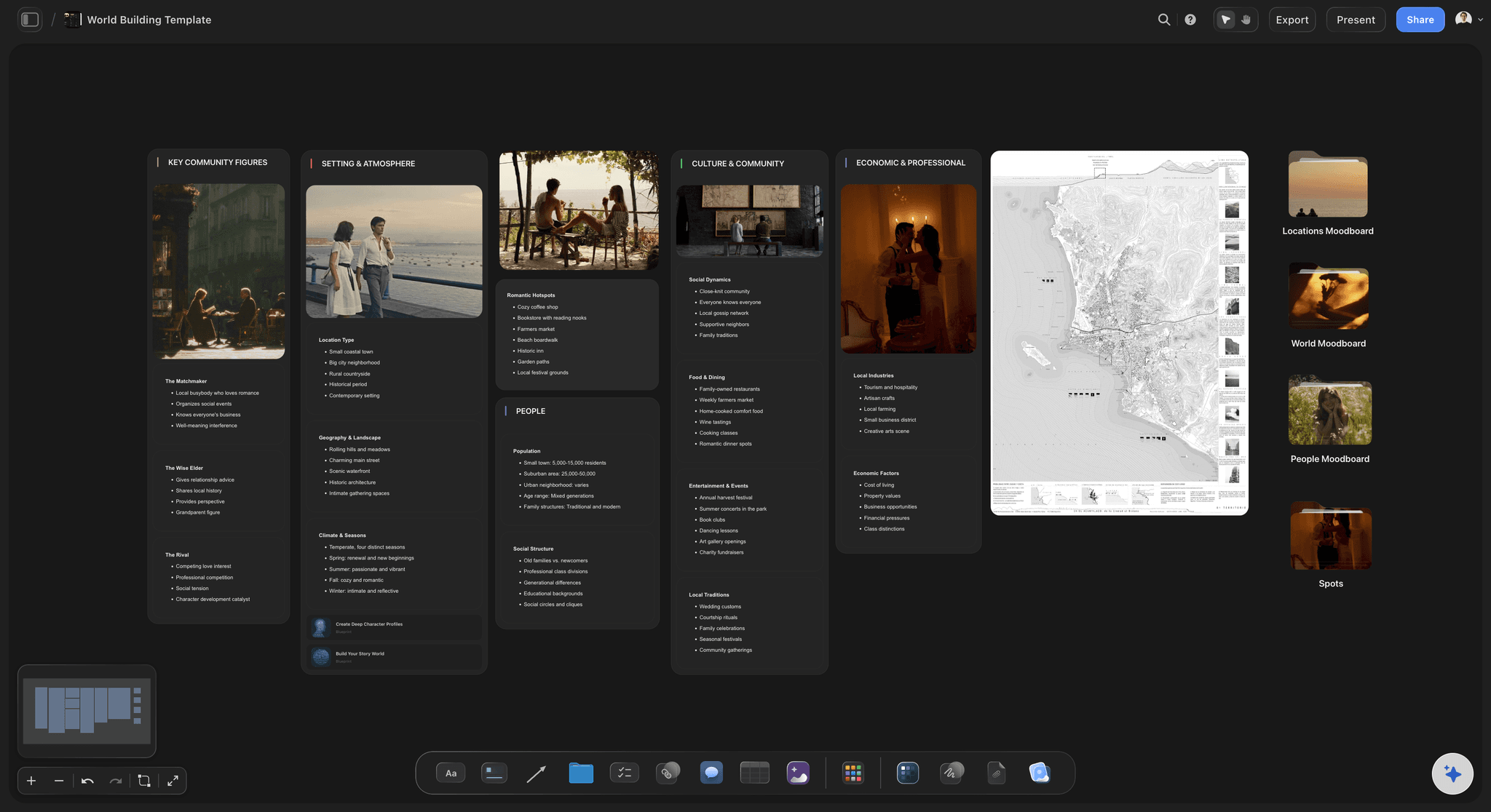
Outline your plot, characters, and world in one connected view, then expand each thread as the story grows.
What is book writing software?
Book writing software is any tool used to get a book out of your head and onto a page, and the honest answer to which one is best is that it depends entirely on which part of the job you mean. Drafting a manuscript, organising eighty to a hundred thousand words, and exporting something a publisher will accept is one job, and Scrivener, Word, Google Docs, and Ulysses are the tools that do it. Working out what the book actually is, how it is structured, who is in it, and what it argues is a completely different job, and a linear document is a poor place to do it. Most writers end up using two tools, and the ones who insist on a single tool usually spend a year discovering why.
The reason no single app wins is that a manuscript is a line and a book is a shape. A word processor is exceptionally good at the line: one page at a time, in order, with your full attention on the sentence. That is exactly what drafting needs and exactly what planning does not. Planning questions are questions about arrangement. Does chapter nine belong before chapter seven, does this argument have evidence behind it, does the subplot vanish for a third of the book, is the reader ready for this reveal. You cannot answer any of those by scrolling, because scrolling only ever shows you one screen of a book that is four hundred pages long.
Storyflow is an AI-native infinite canvas built for the shape rather than the line. Describe your book in a prompt and the AI lays out a structured board of chapter cards against a framework that fits it. Then you drag chapters into a new order, pin character material or source notes beside the sections they serve, run subplots and thematic threads as parallel tracks, and drop research, PDFs, links, and visual references onto the same surface. There is a document editor for drafting a scene or a section beside the board, and writers do use it, but the manuscript itself is better off in a dedicated writing app. We would rather you finish the book than be loyal to us.
Writing a book, whichever kind you are writing, breaks into six named parts that different tools serve differently: structure (the chapter order and the framework holding it, whether that is three acts or a thesis and its supporting arguments), content material (characters and arcs for fiction, sources and evidence for non-fiction), research (everything you looked up and will need again at the worst possible moment), the draft itself (the long, linear, uninterrupted act of writing prose), revision (restructuring, cutting, and resequencing once a full draft exists), and production (compiling, formatting, and exporting to something an agent, editor, or retailer accepts). Storyflow is built for the first three and genuinely useful for the fifth. A manuscript app owns the fourth and the sixth, and no canvas is going to change that.
HOW IT WORKS
From an idea to a plan you can actually draft from.
Do the thinking on a canvas, then open your writing app with the hard part already solved.
01
Open a canvas
Sign up in seconds, from $9.99 a month. No download and nothing to install. Your infinite planning canvas opens in the browser.
02
Describe the book
Type the premise or the thesis, the genre or the field, and roughly how long it should be. The AI lays out a board of chapter cards against a fitting framework, so you begin from a skeleton rather than a blank page.
03
Move it around until it works
Drag chapters into a new order, split one into two, add character profiles or source notes beside the chapters that use them, and run threads as parallel tracks under the spine. This is the part a document cannot do.
04
Draft in your writing app
Open Scrivener, Word, Google Docs, or Ulysses and write, with the canvas open on the second monitor as the map. Come back to the board when the structure needs to change, which it will.
Everything around the draft, on one canvas.
Structure, characters, argument, and research in one place, so the writing app only has to hold the prose.

AI lays out a chapter structure from your premise or thesis
Start from a skeleton, not a blank page
Describe the book and the AI builds a board of chapter cards against a structure that suits it, with the beats or arguments named and the gaps visible. Rearranging something is far faster than inventing everything.
See the AI story outline generator →
Drag chapters into a new order and watch the shape change
Resequencing is most of what revision is
Most book problems are order problems. Cards move with a drag, so you can try the chapter three positions earlier and see immediately what it does to the rest, instead of cutting and pasting ten thousand words to find out.
Explore the chapter outline maker →
Characters for fiction, sources and evidence for non-fiction
Keep the book's material beside the chapters that need it
Build profile cards for characters with want, need, and wound, or source cards with the claim, the evidence, and where it belongs. Either way the material sits next to the chapter it serves rather than in a separate file you forget exists.
See the AI character profile generator →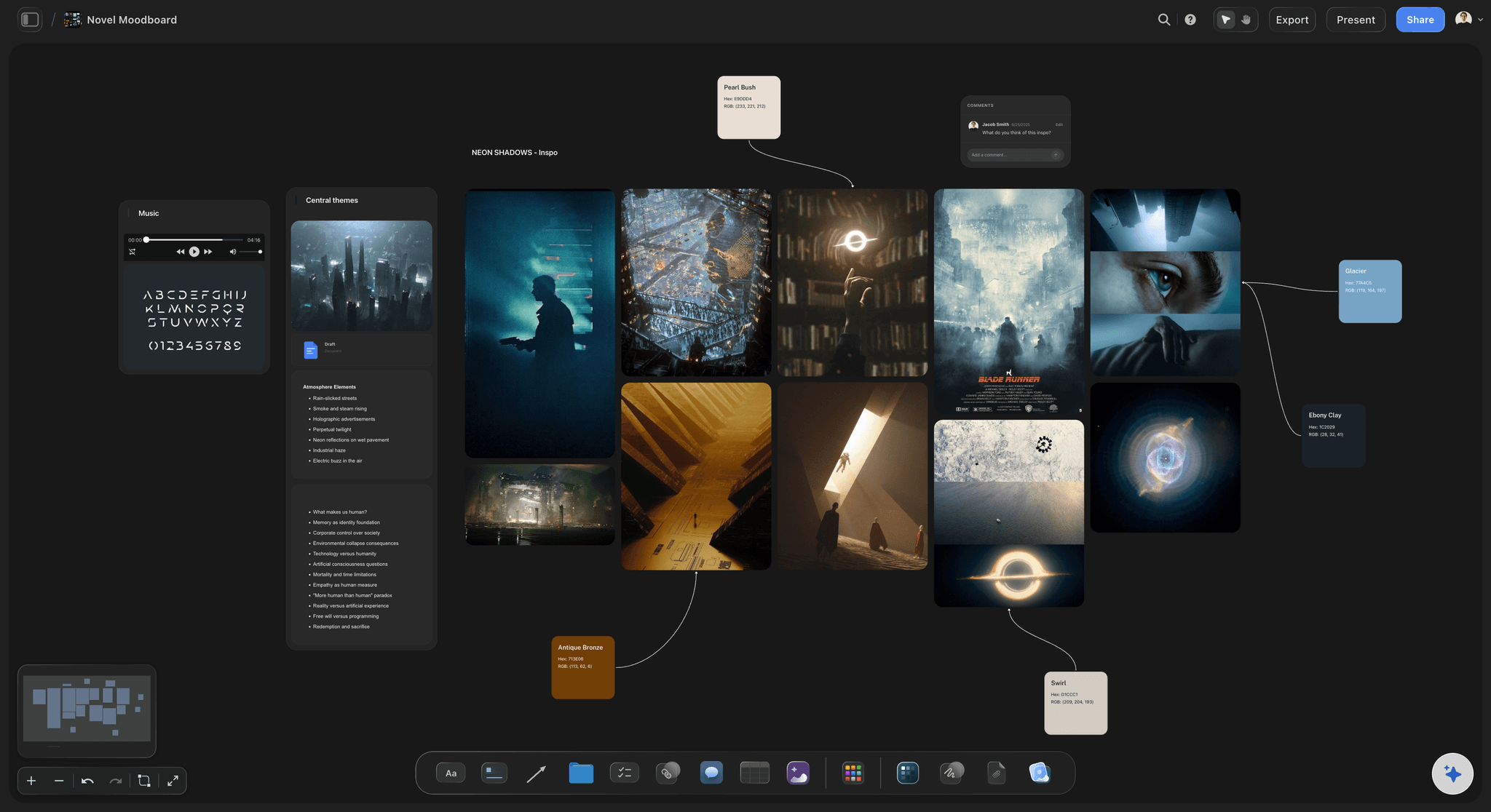
Research, references, and visual material on the same surface
Stop losing the thing you looked up in month two
Drag in PDFs, articles, links, images, and interview notes, and pin them beside the chapter that will use them. Non-fiction lives or dies on this, and novels set anywhere real are not far behind.
Try the book research organizer →Unlimited boards. No object cap.
Open a canvas, describe the book, and start moving chapters. Storyflow is paid-only during early access, with plans from $9.99 a month, and a Free plan launches before the end of 2026.
Unlimited book boards on an infinite canvas
Basic AI usage to generate structures from prompts
Frameworks for fiction and non-fiction built in
Share view-only links with an editor, agent, or writing group
CHOOSING YOUR TOOLS
What each kind of book software is actually for.
A short, unsentimental guide, including the parts where something other than Storyflow is the right answer.

Manuscript apps, word processors, and where each one wins
The draft belongs in a writing app
Scrivener is the specialist, and it earns it: The binder lets you hold a book as hundreds of small documents instead of one enormous file, so moving chapter twelve is a drag rather than a surgical operation. Compile turns that pile into a manuscript, an ebook, or a print-ready file. It is sold as a one-off licence rather than a subscription, which is why so many writers own it a decade later. If you are drafting a long book, this is the serious answer.
Word and Google Docs still write most published books: This is not nostalgia. Track changes is the industry standard for editing, agents and publishers ask for .docx, and Google Docs handles comments and co-writing better than almost anything. If you write in Docs and hand your editor a Word file, you are doing what most published authors do.
Distraction-free apps suit some writers and not others: Ulysses, iA Writer, and the rest strip everything away so there is nothing but the sentence. For writers who fiddle with formatting instead of writing, that is transformative. For writers who need to check chapter four while drafting chapter nine, the same emptiness is friction. Know which one you are before you buy.
Storyflow is not on this list, on purpose: There is a document editor and you can draft a scene or a section in it beside the board. But it has no binder, no compile, no manuscript formats, and no ambition to have them. Anyone who has written a book will spot a canvas claiming to replace Scrivener in about four seconds, so we are not going to make the claim.
What a canvas adds that a manuscript app does not
The part a document genuinely cannot do
You can see the whole book at once: A binder shows you a list of chapters. A canvas shows you the book laid out in space, with the long chapters visibly long, the thin section visibly thin, and the gap in the middle visibly a gap. Structural problems are spatial, and they only surface when the whole thing is in front of you.
Reordering is free: Trying a different chapter order in a manuscript is expensive enough that most writers do not test the idea. On a board it is a drag, so you actually try the three arrangements you were arguing with yourself about and keep the one that works.
Threads run as parallel tracks: Put each subplot, character arc, or recurring argument on its own horizontal track under the chapter spine. An empty stretch in a track is the thread your reader will forget about, and it is invisible in a list and obvious on a canvas.
Everything the book needs sits together: Research, source notes, character material, timelines, maps, and visual references live on the same surface as the plan, one scroll from the chapter that uses them. No folder archaeology at the exact moment you had momentum.
Non-fiction has different load-bearing parts
For non-fiction, the argument is the plot
Chapter logic, not character arcs: A non-fiction book works when each chapter earns the next one. Lay the chapters out and read only the claims, in order, and you find out quickly whether the argument builds or just accumulates. That reading is nearly impossible inside a two hundred page draft.
Source management beside the claim it supports: Pin each source, quote, interview, or dataset next to the specific claim it backs. When a chapter has a claim with nothing pinned to it, you have found the paragraph a reviewer will challenge, months before a reviewer sees it.
Threads that recur across chapters: Case studies, running examples, and framework terms behave exactly like subplots. Give each one a track and you can see where it is introduced, where it returns, and where you quietly dropped it.
Reference management is still a separate job: Storyflow holds sources as material you can see and arrange, not as a citation database. If you need formatted bibliographies and BibTeX, Zotero remains the right tool and the two work fine side by side.
AI that can see the book you have already built
Plan with an AI that knows the whole board
It structures, it does not ghostwrite: The AI lays out chapter structures, suggests what might sit between two sections, drafts beats for an act or arguments for a chapter, and flags where a thread goes quiet. It is not here to produce prose you did not write, because a book written by a model reads like one.
Your whole canvas is the context: Because it can see the board, suggestions fit the book you are actually writing rather than a generic one. Ask what is missing before the midpoint, or which chapter is carrying too much, and you get an answer about your material.
Iterate without losing work: Re-prompt as often as you need. Cards you have written and placed stay exactly where they are while the AI builds around them.
No software has ever finished a book: Worth saying plainly, since half the market implies otherwise. Every tool on this page, ours included, removes friction from a job that is still done by a person sitting down for a very long time. Choose the one that gets out of your way and then go and write.
Explore templates for your project
Every template opens as a real, editable board on the infinite canvas. Pick the closest fit and make it your own.
Story Plan
Outline your plot, characters, and world in one connected view, then expand each thread as the story grows.
HOW WE COMPARE
Storyflow vs Scrivener, Word, and Google Docs.
Two of these rows go against us, and they are the two that matter most if you are about to draft. Read the table honestly and use both kinds of tool.
Storyflow
Recommended
Long-form manuscript drafting
Compile and export to manuscript formats
Infinite visual canvas for the whole book
AI builds the structure from a prompt
Research and visual references on one surface
Runs in the browser, nothing to install
Scrivener
Long-form manuscript drafting
Compile and export to manuscript formats
Infinite visual canvas for the whole book
AI builds the structure from a prompt
Research and visual references on one surface
Runs in the browser, nothing to install
Microsoft Word
Long-form manuscript drafting
Compile and export to manuscript formats
Infinite visual canvas for the whole book
AI builds the structure from a prompt
Research and visual references on one surface
Runs in the browser, nothing to install
Google Docs
Long-form manuscript drafting
Compile and export to manuscript formats
Infinite visual canvas for the whole book
AI builds the structure from a prompt
Research and visual references on one surface
Runs in the browser, nothing to install
What creators are saying
Join early creators getting structured workspaces and AI that remembers their projects
“Storyflow has sped up my workflow by at least 3x, which means more flow state and more projects I can actually ship. It truly changed the way me and my team create.”

Reilin Joey
Director & YouTuber
“One prompt gets me a structured board. But the tactics are my favorite. I run my YouTube scripts through them and my intros and retention got better. It's amazing.”

Justkay
YouTuber & Freelance Filmmaker
“I used to juggle five apps to plan a project. Now I describe what I am making and get boards, lists, and a schedule. All in one place.”

George
@fernwehchronicles
Book writing software questions, answered honestly.
Which tool for which job, where Storyflow fits, and where it plainly does not.
There is no single answer, because writing a book is two jobs. For drafting the manuscript, Scrivener is the specialist, Word and Google Docs are what most published books are actually written in, and Ulysses or iA Writer suit writers who want nothing on screen but the sentence. For working out what the book is, a linear document is the wrong shape entirely, and a canvas, a corkboard, or a dedicated outliner does that far better. Most experienced authors run one tool for each. Pick your drafting app first, since that is where the hours go, then pick something that lets you see the whole book.
Solve the shape here. Write the words where you like.
Open a canvas, describe the book, and let AI lay out the first structure. Plans from $9.99/month, nothing to install, and a Free plan is coming before the end of 2026.