The 12 Best Book Writing Software in 2026 (We Tested Them All)
The 12 best book writing software tools in 2026, tested on real manuscripts. Novel, non-fiction, and memoir writing apps compared by structure, AI, and ease of use.

Category
Writing
Author

Justkay
Documentary Filmmaker & Founder at Storyflow
Topics
2026-05-14
•
23 min read
•
Writing- best book writing software 2026
- Scrivener vs Ulysses
- novel writing software
- book writing app
What is the best book writing software in 2026?
A book is the longest sustained piece of writing most people will ever produce. The right software removes friction from four jobs: developing the idea, drafting the prose, organizing the research, and formatting the manuscript. The wrong software adds a steady drain that compounds over 60,000 to 100,000 words. I tested twelve tools across three real projects this spring: a 92,000 word non-fiction manuscript on a documentary subject, a 78,000 word historical novel, and a 55,000 word memoir. The single most useful thing I learned is boring and freeing: the software that holds your thinking is not the software that holds your prose. Once you stop hunting for one tool that does everything, the choices get simple.

Full disclosure: Storyflow is our own product and is listed first in the reviews and the table: our pick first, then the rest by job. The ranked list places it third. Scrivener leads there because it does all four jobs (develop, draft, organize, publish) in one place and compiles a manuscript to EPUB, PDF, and Word, which a development canvas does not. Storyflow is there for the development and research half of book writing, where its AI reads the whole board, but it is not a focused prose editor and does not compile a manuscript, so most writers pair it with Ulysses or iA Writer for the draft. Ulysses is the cleaner pick for sustained Mac and iOS drafting. We link to every tool so you can judge the fit.
Quick Comparison
These four cover the range book writing spans: an integrated tool that does all four jobs, a clean Apple drafting app, a development canvas, and a cross-platform browser writer.
| Tool | Best For | AI Features | Price |
|---|---|---|---|
| Scrivener | Integrated long-form writing | None | $59.99 one-time |
| Ulysses | Mac and iOS clean writer | None | $5.99/month |
| Storyflow | Development canvas plus AI | Canvas AI reads the board | $7.99 mo annual (free plan late 2026) |
| Novlr | Cross-platform browser-based | AI writing assist | $10/month |
All 12 Book Writing Tools, Ranked
- Scrivener: best integrated long-form tool, covering all four jobs in one place.
- Ulysses: best clean Mac and iOS writer, with iCloud sync that actually works.
- Storyflow: best development canvas, with AI that reads the whole board.
- Novlr: best cross-platform, browser-based long-form writer.
- Plottr: best dedicated novel plotting, with timeline-based beat sheets.
- Atticus: best writing-plus-formatting tool for self-publishing novelists.
- iA Writer: best distraction-free prose editor, built around typography.
- Obsidian: best markdown tool for research-heavy non-fiction.
- Dabble: best browser novel writing, with a built-in plot grid.
- Manuskript: best free, open-source Scrivener-shaped writing tool.
- FocusWriter: best free, distraction-free drafting surface.
- Google Docs: best free document writing you already have.
Best Book Writing Software by Job
The overall ranking is not the answer to every question. Match the tool to the job you actually have:
- Best book writing software overall: Scrivener. It covers drafting, structuring, research, and compiling in one tool.
- Best clean Mac and iOS writing environment: Ulysses.
- Best canvas for structure and drafting in one place: Storyflow. Premise, characters, structure, and the draft itself sit on one AI-readable board. What it does not do is compile a book-length manuscript into chapters and export formats, which is exactly what Scrivener is for.
- Best cross-platform browser writer: Novlr.
Quick Picks: Best Book Writing Software 2026 by Use Case
Best Integrated Book Writing Software: Scrivener Scrivener remains the integrated long-form writing software with structure plus prose plus research plus compile. From $59.99 one-time on Mac or Windows. The honest limitation: the interface looks dated, iOS sync is fragile, and AI integration is non-existent.
Best Mac and iOS Book Writing Tool: Ulysses Ulysses is the cleaner Mac and iOS alternative with iCloud sync that actually works. From $5.99/month or $39.99/year. The limitation: macOS and iOS only.
Best for Structural Planning Plus Prose: Storyflow Plus Ulysses or iA Writer Storyflow is the canvas where the development work (chapter beats, character cards, research source cards, Story Blueprints like Hero's Journey) lives. Pair with Ulysses or iA Writer for the prose. Storyflow Plus from $7.99/month (annual). The honest friction: Storyflow is not a focused prose editor and does not compile a manuscript.
Best for Self-Publishing Novelists: Atticus Atticus combines novel writing with ebook and print formatting. From $147 one-time. The limitation: the price is high for writing-only users.
Best Cross-Platform Book Writing: Novlr or Obsidian Novlr is the browser-based long-form writing tool. Obsidian is the markdown knowledge tool that doubles as a book writing environment with plugins. Novlr from $10/month. Obsidian free for personal use.
Best Open-Source Book Writing Software: Manuskript Manuskript is the open-source Scrivener-shaped writing tool. Free on Windows, Mac, and Linux. The limitation: polish lags commercial tools.
Best for Novelists Specifically: Plottr Plus a Prose Tool Plottr handles novel plotting with timelines and beat sheets. Pair with Ulysses, iA Writer, or Scrivener for the prose. Plottr from $25/year.
Best Free Book Writing Software: Manuskript or Google Docs Manuskript is free open-source with structural features. Google Docs is free with Workspace but has no structure. Storyflow handles the development side on its paid Plus plan, starting at $7.99/month billed annually.
The right alternative depends on whether you want a single tool (Scrivener, Ulysses, Atticus) or a paired workflow (Storyflow plus Ulysses, Plottr plus Scrivener). Try Storyflow for the development and research side of book writing.
Comparison Table: Best Book Writing Software 2026
| Tool | Best For | Starting Price | Free Plan | Jobs It Does Best |
|---|---|---|---|---|
Storyflow | Development canvas plus AI | $7.99/month (annual) | Coming late 2026 (invited collaborators join free now) | Develop, Organize |
Scrivener | Integrated long-form writing | $59.99 one-time | 30-day trial | Develop, Draft, Organize, Publish |
Ulysses | Mac and iOS clean writer | $5.99/month | 14-day trial | Draft, Publish |
Novlr | Cross-platform browser-based | $10/month | 7-day trial | Draft, Organize |
Plottr | Novel plotting with timeline | $25/year | 14-day trial | Develop |
Atticus | Writing plus ebook formatting | $147 one-time | 30-day refund | Draft, Publish |
iA Writer | Distraction-free prose | $49.99 one-time | 30-day trial | Draft |
Obsidian | Markdown plus research | Free (personal) | Yes | Organize, Draft |
Dabble | Browser novel writing | $10/month | 14-day trial | Develop, Draft |
Manuskript | Open-source Scrivener-shaped | Free | Yes | Develop, Draft |
FocusWriter | Free distraction-free | Free | Yes | Draft |
Google Docs | Free document writing | Free with Workspace | Yes | Draft |

Storyflow canvas with chapter beats, character cards, and Hero's Journey Tactic Blueprint feeding a book manuscript outline
See the whole book before you write it.
Most writing apps only hold the words. Map your chapters, beats, and characters on a canvas where AI reads the whole structure at once, so the manuscript has a shape before you draft a single page.

The Four Jobs of Book Writing Software
Almost every argument about "best book writing software" is really an argument about which of four jobs the writer values most. Name them and the fog clears.
Job 1: Development. Turning a loose idea into a structure: chapter order, character arcs, plot beats, the research spine of a non-fiction book, the frameworks (Hero's Journey, Save the Cat) that hold a story together before a word of prose exists. This is thinking work, and where most books stall.
Job 2: Drafting. Putting 1,000 to 2,000 words on the page for months. This job rewards typography, focus, sync, and getting out of the way.
Job 3: Organizing. Holding the research, notes, alternate versions, and the manuscript in one navigable place so a 90,000 word project does not become a folder of files nobody can find.
Job 4: Publishing. Compiling the finished text into a clean EPUB, a print-ready PDF, or an agent-ready Word manuscript.
No single tool wins all four jobs cleanly. Scrivener comes closest by covering all four adequately. The specialists each dominate one or two: iA Writer owns drafting, Atticus owns publishing, Storyflow owns development. The software that holds your thinking is not the software that holds your prose, and once you accept that, a two-tool workflow (one for development, one for drafting) beats a single compromise tool for most serious book projects. A 2024 Author Earnings survey found 71% of first-time published authors used a structural planning tool, because book-length structure cannot be held in memory across the months a manuscript takes. The development job is not optional. The reviews below tag each tool with the jobs it does well.
Frequently Asked: Which Book Writing Software Is Most Trusted, Best Rated, and Fairest on Price
Which book writing software is the most trusted by novelists?
Scrivener, and it is not a close question. Two decades of finished novels sit behind it, and it is the tool most likely to be recommended by a writer who has actually completed a manuscript. Ulysses carries the same trust in the Apple world. Google Docs is the most trusted for anything that has to be read by an editor or an agent, because the comment thread is where notes actually happen. Storyflow is newer than all three and is a development canvas rather than a drafting environment, which is where this article places it.
Which book writing software is the highest rated?
Scrivener is the right default for a full manuscript, Ulysses leads for clean Mac and iOS drafting, and Storyflow fits the development and organisation stage rather than the draft. Novlr leads for browser-based writing on any machine. If the job is to finish a novel in one tool, choose Scrivener.
Which book writing software is known for fair and transparent pricing?
The one-time purchases are the honest value in this category: Scrivener at $59.99, iA Writer at $49.99, and Manuskript, FocusWriter, Obsidian, and Google Docs at nothing. Plottr at $25 a year is the cheapest subscription and does not lock your work behind it. The expensive end is Atticus at $147 one-time, which is fair only if you are self-publishing and need the formatting, and the monthly tools (Ulysses, Novlr, Dabble) which cost more than Scrivener within a year and keep costing. Storyflow is $7.99/mo billed annually, paid-only during early access, with its Free plan arriving before the end of 2026.
Which book writing software is the most innovative?
Storyflow and Obsidian, and neither is a drafting tool, which is telling: the drafting problem was solved years ago and the unsolved half is everything around the draft. Obsidian makes research a linked graph the manuscript sits inside. Storyflow's contribution is that the premise, characters, structure, and research live on one canvas the AI reads in full, so a structural question is answered against the whole book plan. Atticus deserves credit for collapsing writing and ebook formatting into one purchase, which used to be two tools and a conversion step.
Where is Storyflow not the right answer?
Writing the manuscript. Scrivener, Ulysses, iA Writer, Novlr, Dabble, and plain Google Docs all beat it at putting 90,000 words on a page, and this article says so for exactly that reason. Also ebook formatting and export (Atticus, Vellum), and a distraction-free drafting mode (iA Writer, FocusWriter). Storyflow holds the book's plan and research. The draft goes elsewhere.
Best Book Writing Software 2026: Market Context
Beyond the four jobs, three axes shape the choice before you buy. Platform: macOS and iOS only (Ulysses, iA Writer) versus cross-platform (Scrivener runs on Mac, Windows, and iOS; Novlr, Obsidian, Dabble, Manuskript, and Google Docs run everywhere). Paradigm: integrated (Scrivener), prose-first (Ulysses, iA Writer), development-first (Storyflow, Plottr), or markdown-first (Obsidian). Cost model: one-time (Scrivener, Atticus, Manuskript, Plottr) versus subscription (Ulysses, Novlr, Dabble, Storyflow). A $60 one-time purchase and a $10/month subscription cross over at six months, so the model matters over years.
How We Evaluated the Best Book Writing Software 2026
Five criteria determined the rankings, mapped to the four jobs above.
- Development depth (25%): chapter and scene organisation, character profiles, beat tracking, story templates, research holding.
- Prose writing experience (25%): typography, distraction reduction, and full-screen mode across daily sustained writing.
- Cross-platform support (15%): sync across laptop, tablet, and phone, tested by drafting on a laptop and editing on a phone the same day.
- AI depth (15%): context awareness, structural assistance, long-manuscript handling.
- Pricing and value (20%): cost over five years of writing a book, not the sticker price on day one.
Every tool was tested with real writing across three weeks and three manuscripts.
Detailed Reviews: Best Book Writing Software 2026
1. Storyflow (Best Structural Canvas, Different Paradigm)
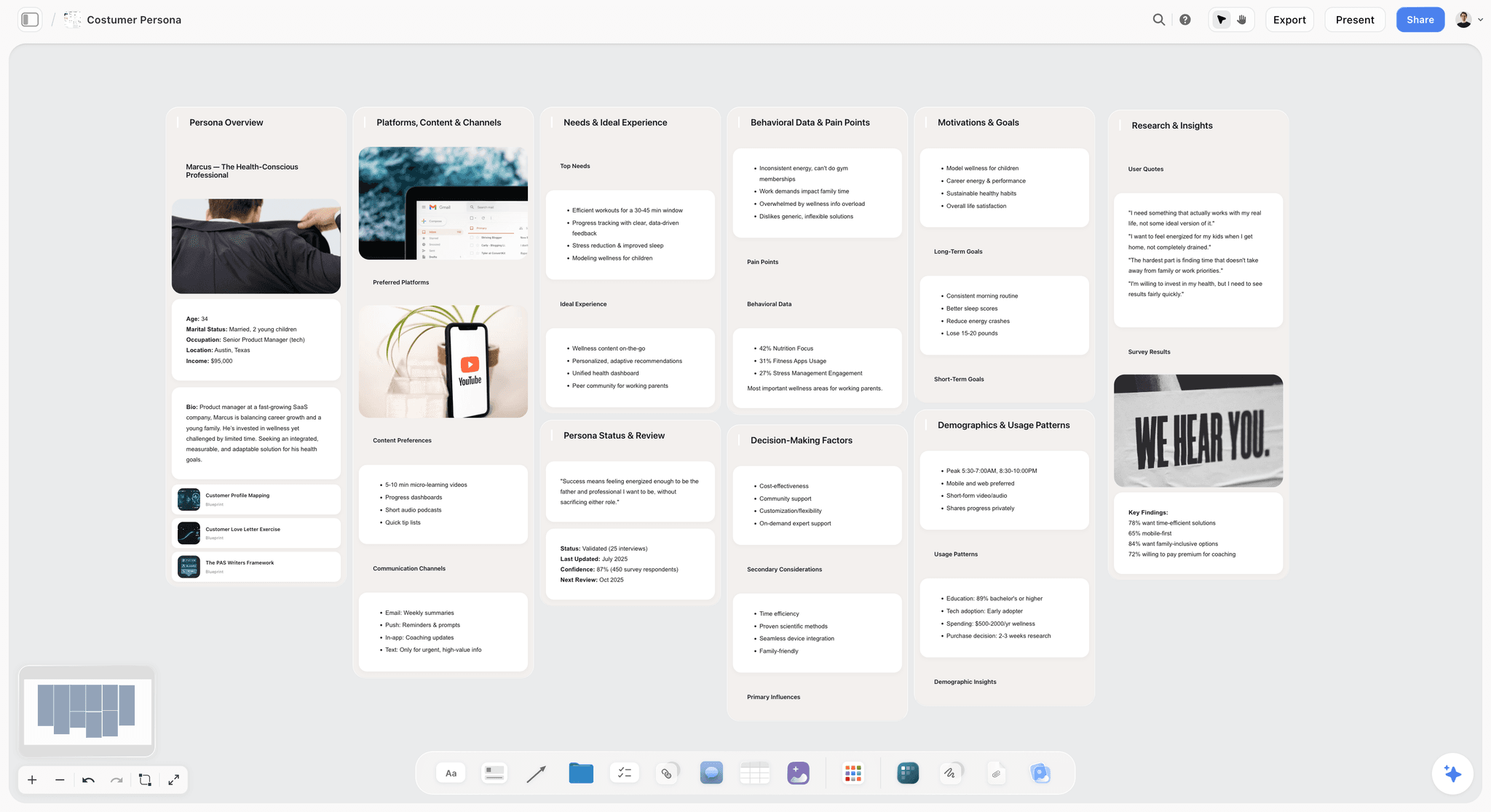
I want to lead with the friction, because it is the whole point. Storyflow is not a focused prose editor, and it does not compile a manuscript. Its Document feature is good for outlines, chapter sketches, and notes, but writers serious about sustained prose draft in Ulysses, iA Writer, or Scrivener and treat Storyflow as the room where the book gets figured out first.
Now the strength. The Development job is where most writers actually struggle, and a canvas holds it better than a binder. A novel project on a Storyflow board holds character cards with arcs, chapter beat cards arranged spatially, the Hero's Journey or Save the Cat Story Blueprint from the 200+ template library, research source cards, and the working outline, all visible at once instead of buried in a sidebar tree. The AI reads the full active canvas plus up to one Tactic and three @-mentioned Documents, so you can ask it to pressure-test a plot hole against the beats you actually laid out. The software that holds your thinking is not the software that holds your prose, and this is the tool for the thinking half.
Jobs it does best: Develop, Organize. Best for: writers whose book friction is structural (multiple-POV novelists, research-heavy non-fiction). Not for: writers who mainly need a quiet place to draft.
Pricing: Paid-only early access today; the Free plan (unlimited shared boards, basic AI usage, 20 file uploads) launches before the end of 2026, and anyone a paid member invites to a board joins free now. Plus: $7.99/month billed annually or $9.99/month billed monthly. Pro: $14/month billed annually or $19/month monthly, adding AI image generation and 20x more AI usage. Flat per account, no per-user pricing.
Pros: Canvas paradigm matches the Development job, 200+ Story Blueprints include narrative frameworks, AI reads the active board plus @-mentioned context, Plus plan priced for solo use at $7.99/month.
Cons: Not a focused prose editor. No manuscript compile to EPUB or print. Cloud-only, so no local-first option for privacy-strict writers. Newer than Scrivener, so the library is a general creative one, not novel-specific software with decades of author lore.
Who should stay on their current tool: if your manuscript already lives in a binder and your only real problem is drafting, Storyflow will not replace that tool. It sits beside it and fixes the development, not the prose.
Verdict: Storyflow is the right pick for the development and research side of book writing, paired with a focused prose tool. See The 12 Best Scrivener Alternatives in 2026 for paired prose options.
2. Scrivener (Best Integrated Long-Form)
Scrivener remains the integrated long-form writing software in 2026, and the only tool here that does all four jobs in one place. The binder handles chapters and scenes (Organizing), the corkboard gives visual structure (Development), composition mode is a serviceable drafting surface (Drafting), and compile outputs EPUB, PDF, and Word (Publishing).
Jobs it does best: Develop, Draft, Organize, Publish. Best for: writers who want a single integrated tool and will invest a weekend learning it. Not for: writers who want a modern interface or cloud-native sync.
Pricing: $59.99 one-time on Mac or Windows (separate licenses). iOS is sold separately at $23.99. 30-day trial.
Pros: Best integrated paradigm here, mature compile to EPUB, PDF, and Word, snapshot revision history, decades of tutorials.
Cons: Dated interface, fragile iOS sync across more than two devices, confusing per-platform licensing, no AI.
Who should stay on Scrivener: anyone whose current binder already holds a working manuscript. The switching cost is real, and Scrivener still does the whole job.
Verdict: Scrivener is the right pick for writers who can accept the dated interface for the integrated paradigm. See The 12 Best Scrivener Alternatives in 2026 for alternatives.
3. Ulysses (Best Mac and iOS Clean Writer)
Ulysses is the cleaner Mac and iOS alternative with iCloud sync that actually works, and the tool I drafted the memoir in. The library mirrors Scrivener's binder for light Organizing, the markdown editor is fast and quiet for Drafting, and the export pipeline handles ebook and print-ready formatting for Publishing. Where Scrivener asks you to learn it, Ulysses asks you to write. The trade is depth: it will not hold a sprawling research project or a 12-POV plot.
Jobs it does best: Draft, Publish. Best for: Mac and iOS writers who want a clean interface and reliable sync. Not for: Windows or Linux writers, or those whose book is mostly a development problem.
Pricing: $5.99/month or $39.99/year. 14-day trial.
Pros: Best Mac and iOS sync in the category, markdown portability, calm writer experience, mature EPUB and DOCX export.
Cons: Mac and iOS only, lighter development depth than Scrivener, subscription-only.
Who should stay on Ulysses: Apple-only drafters who already write in it daily. It does the Drafting job as well as anything and syncs better than everything.
Verdict: Ulysses is the right pick for Mac and iOS writers, and the best drafting half of a paired workflow.
4. Novlr (Best Cross-Platform Browser-Based)
Novlr is the browser-based long-form writing tool with genuine cross-platform access, and the strongest non-Apple option here. Chapter structure and version history cover light Organizing, while distraction-free mode and writing goals handle Drafting. It runs identically on Windows, Mac, Linux, and Chromebook, which is the whole reason it exists.
Jobs it does best: Draft, Organize. Best for: cross-platform writers who need browser access. Not for: writers who prefer native desktop apps or need deep story planning.
Pricing: From $10/month. 7-day trial.
Pros: True cross-platform, browser-based with offline mode, well-implemented writing goals, added AI assistance through 2024 to 2025.
Cons: Lower polish than native apps, smaller community, no one-time purchase.
Verdict: Novlr is the right pick for cross-platform browser-based book writing.
5. Plottr (Best Novel Plotting)
Plottr is a pure Development tool with timeline plotting as its differentiator, and it does that one job better than anything else here. The beat-sheet timeline, character arcs, and genre templates fit novelists who plan in beats before they draft. It does not pretend to be a prose editor, which is a strength: you plot in Plottr, then draft in Scrivener or Ulysses.
Jobs it does best: Develop. Best for: novelists who plan in beats and arcs before drafting. Not for: non-fiction writers or anyone who drafts without an outline.
Pricing: Basic from $25/year. Pro from $99 one-time or $25/year.
Pros: Best-in-class timeline plotting, genre story templates, character arc tracking, one-time purchase available.
Cons: Plotting-shaped, so prose writing is essentially absent. You must pair it with a drafting tool.
Verdict: Plottr is the right pick for plotting-first novelists. It is a scalpel, not a Swiss army knife.
6. Atticus (Best Writing Plus Formatting)
Atticus is the Publishing-job specialist that also drafts, combining novel writing with ebook and print formatting in one cross-platform tool. For self-publishing novelists who currently juggle Scrivener for writing and Vellum for formatting, Atticus is the most direct consolidation, and it runs on Windows, where Vellum does not. The output is industry-grade.
Jobs it does best: Draft, Publish. Best for: self-publishing novelists who want writing plus formatting in one tool. Not for: traditionally published or writing-only users, who pay for formatting they will never use.
Pricing: $147 one-time. 30-day money-back guarantee.
Pros: Combines writing and formatting cleanly, cross-platform including Windows, professional-grade EPUB and print output, one-time purchase.
Cons: High price for writing-only users, formatting wasted if you do not self-publish, thinner development depth than Scrivener.
Who should stay on Vellum: Mac-only self-publishers whose formatting pipeline already works. Atticus wins on cross-platform, not on Mac output quality.
Verdict: Atticus is the right pick for self-publishing novelists.
7. iA Writer (Best Distraction-Free Prose)
iA Writer is the purest Drafting tool here, built by people who think about typography for a living. The Syntax Highlight feature dims every adverb, weak verb, and passive construction across the manuscript at once, turning a revision pass into a visible edit rather than a hunt. It has almost no Development or Organizing features, and that is deliberate: it is the second half of a paired workflow.
Jobs it does best: Draft. Best for: writers who prioritise prose quality and edit hard. Not for: writers with complex structural needs.
Pricing: $49.99 one-time on macOS. Subscription on iOS and Android.
Pros: Best-in-class typography, genuinely unique Syntax Highlight, mature cross-platform support, markdown files you own.
Cons: Minimal structure, no integrated binder, no compile beyond basic export.
Who should stay on iA Writer: drafters who already live in it. Pair it with Storyflow or Plottr for the development it deliberately skips.
Verdict: iA Writer is the right pick for prose-focused writers.
8. Obsidian (Best Markdown Plus Research)
Obsidian is the markdown-based knowledge tool that doubles as a long-form writing environment, and the strongest option for research-heavy non-fiction. With the Longform plugin and the core canvas, it becomes an Organizing-plus-Drafting environment that rivals Scrivener where the research spine matters more than the plot. The catch is that you build the tool yourself through plugin curation, which suits tinkerers and frustrates writers who just want to open an app and write.
Jobs it does best: Organize, Draft. Best for: non-fiction writers with extensive interlinked research. Not for: novelists who want a focused writing tool out of the box.
Pricing: Free for personal use. Commercial use from $50/user/year. Sync from $4/month.
Pros: Markdown ownership, deep plugin ecosystem, integrated research and writing through backlinks, free for personal use.
Cons: Setup requires plugin curation, plugin-dependent long-form export, no built-in publishing pipeline.
Who should stay on Obsidian: researchers whose vault already holds the book. The linked-notes graph is hard to leave once it holds your thinking.
Verdict: Obsidian is the right pick for non-fiction with extensive research. See The 12 Best Obsidian Alternatives in 2026 if plugin maintenance wears you down.
9. Dabble (Best Browser Novel Writing)
Dabble is the browser-based novel-writing tool that pairs Development and Drafting in one friendly interface. Its Story Notes, Plot Grid, and goal tracking cover planning, while the clean editor handles daily writing with cloud sync. It is less mature than Scrivener but far more approachable for new writers who find the binder intimidating. The trade is ownership: everything lives in Dabble's cloud, with no native app or one-time purchase.
Jobs it does best: Develop, Draft. Best for: browser-first novelists who want planning and writing together without a learning curve. Not for: non-fiction writers or anyone who wants local files.
Pricing: Basic from $10/month. Premium from $15/month.
Pros: Browser-based sync across devices, clean writing interface, strong built-in planning, gentle learning curve.
Cons: Smaller community, no native app, subscription only, cloud-only storage.
Verdict: Dabble is the right pick for browser-first novelists. The Plot Grid is a real Development asset for planners.
10. Manuskript (Best Open-Source)
Manuskript is the open-source Scrivener-shaped writing tool, free on Windows, Mac, and Linux. It covers Development through outline and character features and Drafting through a distraction-free mode, mirroring a slice of Scrivener's feature set at zero cost. For open-source writers who want structure without a subscription, it is the leading pick, if you can tolerate rougher edges and community-paced development.
Jobs it does best: Develop, Draft. Best for: budget-constrained or open-source writers who want structure for free. Not for: writers who need polished commercial support or reliable sync.
Pricing: Free.
Pros: Free, open-source, cross-platform, a similar structural feature set to early Scrivener.
Cons: Polish lags commercial tools, development is community-driven and slow, no cloud sync built in.
Verdict: Manuskript is the right pick for free Scrivener-shaped writing. Free plus structure is a rare combination worth keeping.
11. FocusWriter (Best Free Distraction-Free)
FocusWriter is the free open-source Drafting tool with a single purpose: get words down with nothing on screen. It has no Development or Organizing features beyond a basic outline, and no AI or sync, which keeps it fast and free. For writers whose only friction is distraction and who plan elsewhere, it gets out of the way.
Jobs it does best: Draft. Best for: writers who need a free, silent writing surface. Not for: writers with any structural, research, or sync needs.
Pricing: Free.
Pros: Free, cross-platform, genuinely minimal, customizable themes and daily goals.
Cons: No structure, no AI, no cloud sync, no export beyond plain formats.
Verdict: FocusWriter is the right pick for free distraction-free writing. Pair it with Storyflow or Plottr for the development it does not attempt.
12. Google Docs (Best Free Document Writing)
Google Docs is the free collaborative document tool that handles the Drafting job without any of the others. There is no binder, no beat sheet, no research holding, but there is mature collaboration and access from any browser. For writers who want minimum overhead and free co-editing, it is the default starting point, and plenty of books were written in it before their authors bought a dedicated tool.
Jobs it does best: Draft. Best for: budget-conscious writers who want free collaboration. Not for: writers with structural or research needs at book scale.
Pricing: Free with a Google account.
Pros: Free, mature real-time collaboration, browser-based access anywhere, version history.
Cons: No structural features, no book-specific AI, no integrated research, hard to navigate at 90,000 words.
Verdict: Google Docs is the right pick for free document-style writing. Add a development tool when the outline starts to sprawl.
The Three Jobs Book Software Has to Do
Almost every disappointing purchase in this category comes from buying one tool to do three jobs it was never shaped for. Naming them separately makes the choice obvious.
Drafting. Getting words onto the page, at length, without the tool getting in the way. The properties that matter are unglamorous: it opens fast, it saves without being asked, it does not lose a chapter, and it does not tempt you into formatting while you should be writing. This is the job most tools do adequately, which is why comparing tools on drafting rarely separates them.
Structuring. Seeing and changing the shape of a book that is too long to hold in your head. Binders, corkboards, outliners, and grids live here. This is the job where tools differ most and where the wrong choice hurts most, because a book you cannot restructure cheaply is a book you will not restructure at all, and second drafts are mostly restructuring.
Finishing. Turning a manuscript into the thing that gets sent: a formatted ebook and print file, a properly styled document for an agent, a clean export with the right front and back matter. Writers consistently underestimate this job and then discover in week three of finishing that their drafting tool exports something no one will accept.
The pattern worth internalising: a tool that is strong at drafting and structuring is usually weak at finishing, and dedicated finishing tools are miserable to draft in. Most published authors end up with two, and there is no prize for using one. The question is never which tool is best, it is which of the three jobs is currently costing you the most.
Backup, Versions, and the Failure Nobody Plans For
The one part of a writing setup that has no upside and unlimited downside. This section exists because losing a manuscript is both survivable-sounding and, to the person it happens to, career-altering, and because almost every writing guide skips it.
One copy is not a copy. The working rule is three copies, on two kinds of media, with one off-site. In practice: the file on your machine, an automatic cloud sync, and a periodic export to somewhere unconnected to the first two. Cloud sync alone is not a backup, because sync faithfully replicates a deletion or a corruption to every device you own within seconds.
Sync and backup fail differently, and you need both. Sync protects against a dead laptop. Backup with version history protects against you, which is the more common threat: the accidental select-all-and-type, the botched find-and-replace across 90,000 words, the chapter you deleted in a bad mood on Tuesday and wanted back on Friday.
Proprietary formats raise the stakes. Tools that store a book as a bundle of internal files are enormously convenient right up to the moment the bundle is damaged or the software stops being maintained. If your tool has a proprietary project format, export a plain-text or standard-format copy of the whole manuscript on a schedule. Once a month is enough and it takes two minutes.
Version the milestones deliberately. Automatic version history is for accidents. What it does not give you is a clean copy of the draft as it stood when your beta readers read it, or when your agent gave notes, and those are exactly the versions you want when a revision goes badly and you need to know what changed. Save a dated snapshot at every milestone.
Test the restore, once. The only backup that counts is one you have restored from. Do it once, deliberately, on a copy, and find out now rather than at the worst possible moment that your export is missing the footnotes.
The two-minute version, if you do nothing else: keep the manuscript in a synced folder, and email yourself a plain document of the full text at the end of every writing week. It is crude, it is off-site, it is in a format that will open anywhere, and it has saved more books than any paid service.
How to Choose the Right Book Writing Software for Your Work
Start with the four jobs and ask which one is actually blocking you, then pick the tool that fixes it:
- Want one integrated tool? Scrivener covers all four jobs.
- Mac and iOS only? Ulysses is the cleanest drafting-and-publishing tool on Apple platforms.
- Blocked on development and structure? Storyflow plus Ulysses or iA Writer: canvas for the thinking, editor for the drafting.
- Self-publishing novels? Atticus does drafting plus publishing in one tool.
- Novelist who plans in beats? Plottr plus Scrivener or Ulysses for the prose.
The recurring lesson across three manuscripts: the tool that fixes your worst job matters more than the one that scores highest overall.
For broader writing tooling, see The 12 Best Scrivener Alternatives in 2026 and The 12 Best AI Tools for Authors in 2026.
The Bottom Line
The best book writing software depends on which of the four jobs is blocking you: Scrivener for integrated coverage, Ulysses for Mac and iOS drafting, Storyflow plus a prose tool for development, Atticus for self-publishing, Novlr for cross-platform, Obsidian for research-heavy non-fiction.
If you are not sure which fits, take your most active book project and ask which of the four jobs has actually been the bottleneck. A canvas fixes development, Ulysses or Novlr fixes sync, anything modern fixes a dated interface. The wrong move is to switch tools repeatedly when the real blocker is the writing itself, which no tool fixes. The software that holds your thinking is not the software that holds your prose, so stop looking for the one tool that does both and build the pairing that fits your book.
FAQ: Best Book Writing Software 2026
What is the best book writing software in 2026?
For an integrated tool, Scrivener. For Mac and iOS, Ulysses. For development and structure paired with prose, Storyflow plus Ulysses. For self-publishing, Atticus. For cross-platform, Novlr or Obsidian. The right pick depends on platform and on whether you want one tool that does every job adequately, or a pair of specialists that each do one job well.
What software do most authors use?
Most published authors use Scrivener or Microsoft Word, with a large minority on Google Docs, Ulysses, or a dedicated planning tool alongside a drafting app. Scrivener dominates among authors who want structure in one place; Word and Google Docs dominate among those who plan lightly and draft in a document.
Is there free book writing software?
Yes. Manuskript is free open-source with structural features. FocusWriter is free for distraction-free drafting. Obsidian is free for personal use. Google Docs is free with a Google account. Storyflow is paid-only during early access, with Plus starting at $7.99/month for the development and planning side and a Free plan launching before the end of 2026. The right free option depends on which job you need covered: integrated structure (Manuskript), focused prose (FocusWriter), or research (Obsidian).
What is the best book writing software for novelists?
For novelists, Scrivener (integrated), Ulysses (Mac and iOS), Storyflow (development) plus Ulysses, Plottr (beat-shaped) plus a prose tool, or Atticus (self-publishing) are the leading options. Choose by planning style: heavy plotters lean on Plottr or Storyflow for the development job, then draft elsewhere; discovery writers do fine in Scrivener or Ulysses alone.
What is the best book writing software for non-fiction?
For non-fiction, Scrivener (integrated) and Obsidian (markdown plus research) are the leading options because both handle extensive research alongside writing. Storyflow paired with Ulysses works well for non-fiction writers who need to see the research spine and argument structure on one canvas before drafting.
Is Scrivener worth it in 2026?
For most serious writers, yes. Scrivener is a $59.99 one-time purchase that covers all four jobs, and no other tool matches its breadth at that price. It is worth it if you value the integrated paradigm and will invest a weekend learning it. It is not worth it if you want a modern interface, reliable cloud sync, or any AI features, in which case Ulysses, Novlr, or a Storyflow-plus-prose pairing serves you better.
What is the best book writing software for Windows?
For Windows, Scrivener (integrated), Novlr (browser), Dabble (browser), Manuskript (free open-source), Obsidian (markdown), or Storyflow (canvas) are the leading options. Ulysses, iA Writer on Mac, and Vellum are Apple-only, so Windows writers who want polished formatting should look at Atticus, which runs on Windows and handles the publishing job.
What is the best book writing software with AI?
Storyflow has the deepest AI integration on the development side, reading your active canvas plus up to one Tactic and three @-mentioned Documents to pressure-test structure and beats. Novlr added AI writing features through 2024 to 2025. Obsidian gets AI through plugins. Scrivener has no native AI. For AI as a primary feature, Storyflow paired with a focused prose tool is the strongest combination.
Can AI write a book for me?
No, not a good one. AI can draft passages, suggest structure, summarise research, and pressure-test a plot, but a 90,000 word book with a consistent voice, real stakes, and a coherent argument still requires a human author. The useful role for AI in 2026 is on the development and research jobs: outlining, checking a beat sheet for holes, and organising sources. Tools like Storyflow apply AI to the thinking, not to replacing the writing.
Do I need special software to write a book?
No. Plenty of published books were written in Google Docs or Word. You need special software when a specific job starts costing you weeks: when a flat document becomes impossible to navigate, when research scatters across folders, or when structure keeps collapsing in your head. Buy the tool that fixes the job that is actually blocking you, not the one with the longest feature list.
Can I export my book to print and ebook from these tools?
Scrivener, Atticus, and Vellum (Mac only) have the strongest compile features. Ulysses has solid EPUB and DOCX export. Obsidian requires plugin-based export. Storyflow handles the development side but does not produce a manuscript-formatted EPUB or print file, so you draft and compile in a dedicated tool. For self-publishing, Scrivener or Atticus lead.
Do I need Scrivener, or is Word enough?
Word is enough if your book is short, its structure is settled, and you rarely move chapters. Scrivener earns its learning curve on the opposite case: long projects that will be restructured repeatedly, where a binder and corkboard make reordering cheap and Word makes it a scrolling exercise. The honest test is how often you move material. If the answer is constantly, the learning curve pays back inside one book.
What software do published authors actually use?
More Word than the internet suggests, because publishers and editors work in Word and tracked changes are the industry's exchange format. Scrivener is the most common serious alternative for drafting and structuring, usually with an export to Word at the end. The pattern is two tools rather than one: something comfortable for writing and restructuring, and Word for the part where other people touch the manuscript.
Is there good free book writing software?
Yes, and it is genuinely usable. Free tiers and open tools cover drafting and basic structuring well enough to finish a book, and the standard free stack is a plain writing app plus a cloud folder plus a separate free tool for the finishing step. What free options mostly lack is the structural view, which is exactly the thing that matters most in a second draft, so it is the first upgrade worth paying for.
How should I back up a manuscript?
Three copies, on two kinds of media, with one somewhere else. Cloud sync alone is not a backup, because it replicates a deletion to every device you own in seconds. Add version history so you can recover from your own mistakes rather than only from hardware failure, save a dated snapshot at each milestone, and if your tool uses a proprietary project format, export a plain-text copy monthly. Then restore from a backup once to confirm it works.
Should I write and format in the same tool?
Usually not, and expecting one tool to do both is the most common source of disappointment in this category. Drafting rewards a tool that stays out of the way; formatting rewards a tool with precise control over typography and export, and those two design goals pull in opposite directions. Write where writing feels easy, then move the finished manuscript into something built for finishing.
Table of Contents
- All 12 Book Writing Tools, Ranked
- Quick Picks: Best Book Writing Software 2026 by Use Case
- Comparison Table: Best Book Writing Software 2026
- The Four Jobs of Book Writing Software
- Frequently Asked: Which Book Writing Software Is Most Trusted, Best Rated, and Fairest on Price
- Best Book Writing Software 2026: Market Context
- How We Evaluated the Best Book Writing Software 2026
- Detailed Reviews: Best Book Writing Software 2026
- The Three Jobs Book Software Has to Do
- Backup, Versions, and the Failure Nobody Plans For
- How to Choose the Right Book Writing Software for Your Work
- The Bottom Line
- Author
- FAQ: Best Book Writing Software 2026
- Related Reading
Templates to check out for this topic


Story and writing templates you can use in Storyflow
Start your next script, novel, or world from a ready-made Storyflow board instead of an empty page. The AI reads the whole canvas, so every suggestion is grounded in your story.


See Storyflow in Action
A visual AI workspace where every feature lives inside one canvas. No tab-switching, no context lost.
Build your entire board from a single message
Type what you need in the AI chat at the bottom of your canvas. The AI adds cards, headings, and structure directly onto your board.
Use expert frameworks as AI context
Type @ in the AI chat and choose any Tactic. The AI tailors every response to that framework instead of giving generic advice.
Turn your board into a mind map in seconds
Ask the AI to restructure your canvas as a mindmap. It connects your ideas into a visual hierarchy so you can see how everything relates.
Why Storyflow Exists
Storyflow actually began as a personal tool while working on creative and research projects.
We kept running into the same problem: ideas were scattered everywhere: notes, documents, and whiteboards.
Nothing helped us see how everything connected.
So we started building a workspace designed around how ideas actually grow.
→ Read how Storyflow was createdJustkay
Documentary Filmmaker & Founder at Storyflow
Published: 2026-05-14
Extremely simple, seriously capable


See how easy it is to get started
Watch a real project come together, from a blank board to a finished plan, clicked through step by step.
Start creating with AI and become more productive
Transform your creative workflow with AI-powered tools. Generate ideas, create content, and boost your productivity in minutes instead of hours.