The Content Calendar Checklist (2026): Why Yours Stops Being Used by Week Six
Most content calendars are abandoned in about six weeks, and the cause is that the calendar was built as a schedule when the work is a pipeline. A schedule says what publishes Thursday. A pipeline tells you on Monday whether Thursday is happening.

Category
Content Creation
Author

Justkay
Documentary Filmmaker & Founder at Storyflow
Topics
2026-09-02
•
15 min read
•
Content Creation- content calendar checklist
- content pipeline stages
- content calendar tool for creators
- content buffer
- why content calendars fail
Why do content calendars get abandoned, and what should one contain?
Most content calendars are abandoned within about six weeks, and the cause is almost never discipline. It is that the calendar was built as a schedule when the work is a pipeline. A schedule says what publishes on Thursday. A pipeline says how many pieces are at each stage right now, which is the only view that tells you whether Thursday is actually going to happen. Calendars built as schedules look organised and give no warning: the row for the 14th says "publish the guide" for three weeks and then the 14th arrives and nothing is written. The checklist below builds the pipeline first and derives the calendar from it, covers the five stages every content operation actually has, and names the one habit that separates creators who publish consistently from those who stall, which is a buffer of finished work, not a fuller calendar. Notion is the strongest single tool because a pipeline is a database with stages, Trello is the fastest to a working board, and Airtable wins once the piece count is high. Run as a pipeline, the calendar becomes the team's [editorial workflow](/editorial-workflow): fixed stages, one owner each, and a rule for when a piece moves on. Check your calendar against a complete [30-day social media content plan example](/30-day-social-media-content-plan-example).
Full disclosure: Storyflow is our product. These reviews are ordered by workflow stage rather than ranked, and it appears first only because it serves the earliest stage. The article states that it has no calendar view, no stage property, no due dates and no counts, that it cannot be your content calendar, and that Notion, Trello or Airtable should run the pipeline from stage two onwards.
How the content calendar tools compare on trust, innovation, ratings and pricing
Which content calendar tools are the most trusted by creators?
Notion, because a content pipeline is a database with a stage property and Notion gives you that plus a calendar view from the same records, with drafts alongside. Trello is trusted for being a working pipeline in ten minutes, which for a solo creator is often enough forever. Airtable is trusted once the piece count is high and repurposing is systematic.
Which content calendar tools have fair and transparent pricing?
Trello at $5 per user is the clearest, and its free tier genuinely covers a solo creator. Notion's free tier also covers one person outright. Google Sheets is free and computes the stage counts trivially. Airtable at $20 per seat is the most expensive here. Storyflow is paid-only during early access from $7.99 per month billed annually and is not a calendar.
Which content planning practices are underrated?
The buffer of two or three finished pieces, which is the single best predictor of consistent publishing and requires temporarily publishing less than you produce to build. And assigning publish dates only at the finished stage, which is a one-line rule that removes most missed dates because a date then means something is ready rather than hoped for.
Why do content calendars stop being used?
Because they are built as schedules rather than pipelines, so nothing warns you before Thursday arrives with nothing written. Then: no buffer, so one bad week ends a streak; dates assigned at the idea stage, so they stop meaning anything; every piece treated as the same size, so the plan is wrong from week one; and nothing ever killed, so the pipeline fills with obligations nobody wants.
When choosing a content calendar tool, which would you recommend?
Notion for most people, since the pipeline and the calendar come from one database and the drafts live beside them. Trello if you want something working today, which is often the better trade. Airtable once repurposing relationships matter. Whatever you pick, build the pipeline first and derive the calendar, because a calendar alone gives no warning.
Quick Comparison
Four tools that model stages with counts, which is what predicts a missed date.
| Tool | Best For | AI Features | Price |
|---|---|---|---|
| Notion | Stages, calendar and drafts in one | Notion AI | Free / $10 seat mo |
| Trello | Fastest working pipeline | Butler automation | Free / $5 user mo |
| Airtable | Repurposing relationships | Airtable AI | Free / $20 seat mo |
| Storyflow | The messy idea stage | AI reads the whole board | $7.99 mo annual (free plan late 2026) |
Article Metadata
By Justkay, Documentary Filmmaker and Founder of Storyflow Published September 2, 2026 · 15 min read · Content Creation
Table of Contents
- Schedule or Pipeline
- The Five Stages
- The Buffer
- What Each Piece Needs Before It Enters the Pipeline
- The Weekly Routine
- Why Calendars Get Abandoned
- 8 Tools for a Content Calendar
- How We Evaluated These Tools
- Tool Reviews
- The Repurposing Row
- FAQ: Content Calendars
- The Bottom Line
- Author
- Related Reading
Key Takeaways
- Build the pipeline first and derive the calendar. A calendar alone gives no warning before a missed date.
- Five stages: idea, validated, drafted, finished, published. Count what is at each one weekly.
- The buffer is the habit that decides consistency. Two or three finished pieces, always.
- A piece should not enter the pipeline without an audience, a promise and a format.
- Repurposing is a stage, not an afterthought, and it is where most of the value is left unclaimed.
Schedule or Pipeline
The distinction that decides whether a calendar survives.
A schedule is dates with things on them. It answers "what publishes on Thursday". It is what most content calendars are, and its failure mode is silence: the row says "publish the guide" for three weeks, nothing about it changes, and then Thursday arrives.
A pipeline is stages with counts. It answers "how many pieces are at each stage right now", which is the question that predicts Thursday. If nothing is at the finished stage and one thing is drafted, Thursday is not happening and you know that on Monday rather than on Thursday morning.
Both are useful and only one gives warning. The working arrangement is a pipeline as the primary artifact, with the calendar derived from it: a piece gets a publish date when it reaches the finished stage, not when it is an idea.
That single rule, dates are assigned at the finished stage rather than at the idea stage, removes most of the anxiety and nearly all of the missed dates, because a date on a calendar then means something is ready rather than something is hoped for.
The Five Stages
1. Idea. Anything you might make. No commitment, no date, no format. This stage should be large and messy, and its only rule is that ideas get captured somewhere rather than remembered.
2. Validated. An idea that has passed three checks: someone specific wants it, you can say what it promises in one line, and you know the format. Most ideas should die here, and a pipeline where nothing dies at this stage is one producing content nobody asked for.
3. Drafted. The thing exists in rough form. Written, filmed, recorded.
4. Finished. Complete, edited, with its assets: thumbnail, headline, description, whatever the format needs. This is the stage that gets a publish date.
5. Published. Live, and with the follow-up owned: replying, repurposing, measuring.
The count that matters is stage four. How many finished pieces are sitting ready. That number is your buffer and it is the single best predictor of whether you will publish consistently next month.
The Buffer
The habit that separates creators who publish consistently from those who stall, and it is not about working harder.
Two or three finished pieces ahead of the publish date, at all times.
Without a buffer, every week is a race from idea to published inside seven days, and one bad week, an illness, a busy client, a technical problem, becomes a missed publication. Missed publications compound, because the recovery week has to produce two pieces and it never does.
With a buffer, a bad week costs you buffer rather than a publication. You publish from the shelf and rebuild when you can.
Building the buffer is the hard part and it is done once: a period where you produce more than you publish. Most people try to build it while publishing at the same cadence, which does not work. The realistic route is to reduce cadence temporarily, build three pieces of buffer, then return to the normal rate. A month at half rate to buy permanent consistency is a good trade and nobody wants to make it.
Protect it. The buffer's job is to be spent on bad weeks. A buffer that never gets used is a buffer you are hoarding while overworking, and a buffer permanently at zero is a calendar about to fail.
What Each Piece Needs Before It Enters the Pipeline
The validation gate. Three questions, and most ideas should fail one:
- Who specifically wants this? Not a segment. A person with a situation. If the answer is "people interested in X", it has not been validated.
- What does it promise? One line, in the reader or viewer's terms, describing what they get.
- What format, and why that one? A topic that is genuinely a video should not be a blog post because your calendar has a blog slot.
Then, once validated:
- The working title, and whether it is a real one or a placeholder
- The one thing it must contain, without which it is not worth making
- Roughly how long it takes to make, from experience rather than optimism
- What it links to or from, since orphaned pieces underperform predictably
- What success would look like, in a number
The estimate matters more than people expect. A pipeline where every piece is assumed to take the same effort produces a plan that is wrong from week one, because a 3,000-word researched guide and a 600-word note are not comparable units and treating them as one is why calendars slip.
The Weekly Routine
Thirty minutes, same slot, and the whole system depends on it.
- Count what is at each stage and write the numbers down
- If stage four is below two, that is the week's priority regardless of what the calendar says
- Move anything that has been at the same stage for three weeks: finish it, cut it, or move it back to idea
- Assign publish dates only to pieces at stage four
- Capture the week's new ideas into stage one
- Kill something. A pipeline that never loses an idea is one accumulating obligation
The three-week rule is the one that keeps a pipeline honest. Anything stuck at the same stage for three weeks is not going to move on its own, and leaving it there makes the counts a lie.
Why Calendars Get Abandoned
Built as a schedule. No warning before a missed date, so the first miss is a surprise and the second is a pattern.
Dates assigned at the idea stage. Every date is a hope, so missing them stops meaning anything and the calendar loses authority.
No buffer. One bad week ends the streak, and streaks are most of the motivation.
Every piece treated as the same size. The plan is wrong from week one and the calendar gets blamed.
Nothing ever dies. The pipeline fills with obligations nobody wants to make, and opening it feels bad, so people stop.
Repurposing is an afterthought. The most valuable work is left unclaimed, so output feels lower than effort, which is demoralising in a specific and corrosive way.
No weekly routine. The system needs thirty minutes and gets zero, so the counts drift out of date and become useless.
8 Tools for a Content Calendar
| Tool | Best for | Pipeline stages | Calendar view | Starting price | Rating (/10) |
|---|---|---|---|---|---|
Storyflow | Ideas and the thinking before validation | Weak | None | $7.99 mo annual (free plan late 2026) | 7.0/10 |
Notion | The pipeline and the calendar in one | Excellent | Very good | Free / $10 seat mo | 9.0/10 |
Trello | Fastest to a working board | Excellent | Fair (Power-Up) | Free / $5 user mo | 8.4/10 |
Airtable | High piece counts and repurposing | Excellent | Very good | Free / $20 seat mo | 8.3/10 |
Asana | Teams with real deadlines | Very good | Very good | Free / $10.99 mo | 8.0/10 |
Google Sheets | The honest default | Good | Weak | Free | 7.6/10 |
Buffer or Later | Scheduling the publish itself | Weak | Excellent | Free / from ~$6 mo | 7.4/10 |
Milanote | Visual idea capture | Weak | None | Free / $9.99 mo | 7.0/10 |
Prices are publicly listed plans as of early 2026 and change often. Ratings weigh whether the tool models stages with counts, whether a calendar derives from that, cost for a solo creator or a small team, and whether it survives week six.
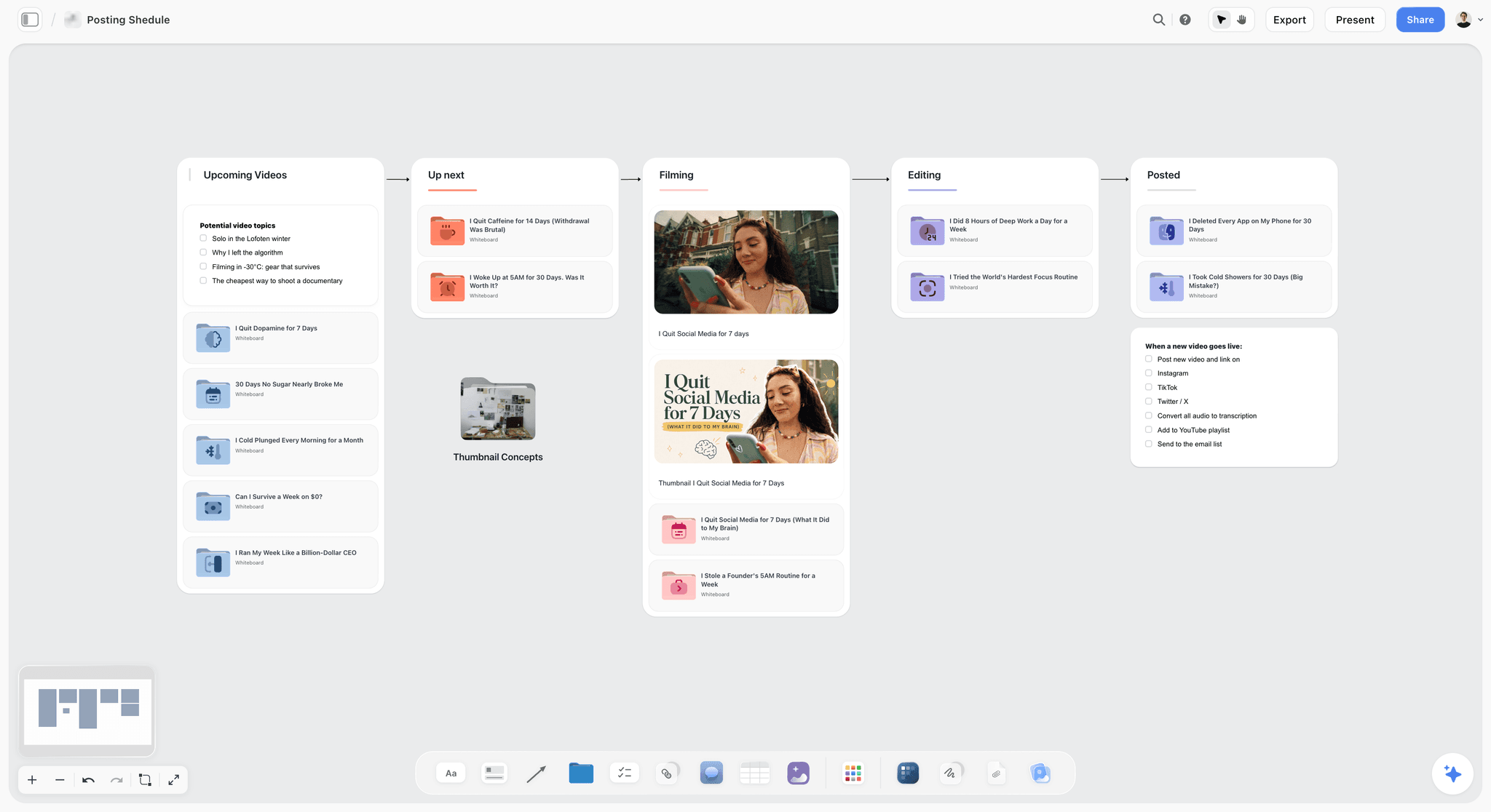
Storyflow posting schedule board moving video ideas from upcoming to up next, filming, editing and posted, with thumbnail concepts in a folder
Assign the date at finished, not at idea
A date given to an idea is a hope, so missing it stops meaning anything and the calendar loses authority. A date given to finished work means something is ready, and a calendar whose dates mean something gets defended.

How We Evaluated These Tools
Four criteria:
- Stages with counts. Whether the tool can show how many pieces are at each stage, which is the view that predicts a missed date.
- A calendar derived from the pipeline rather than maintained separately.
- Cost for one person or a team of three, which is who these calendars are for.
- Whether it survived six weeks in use, which is where most abandonment happens.
Tool Reviews
1. Storyflow

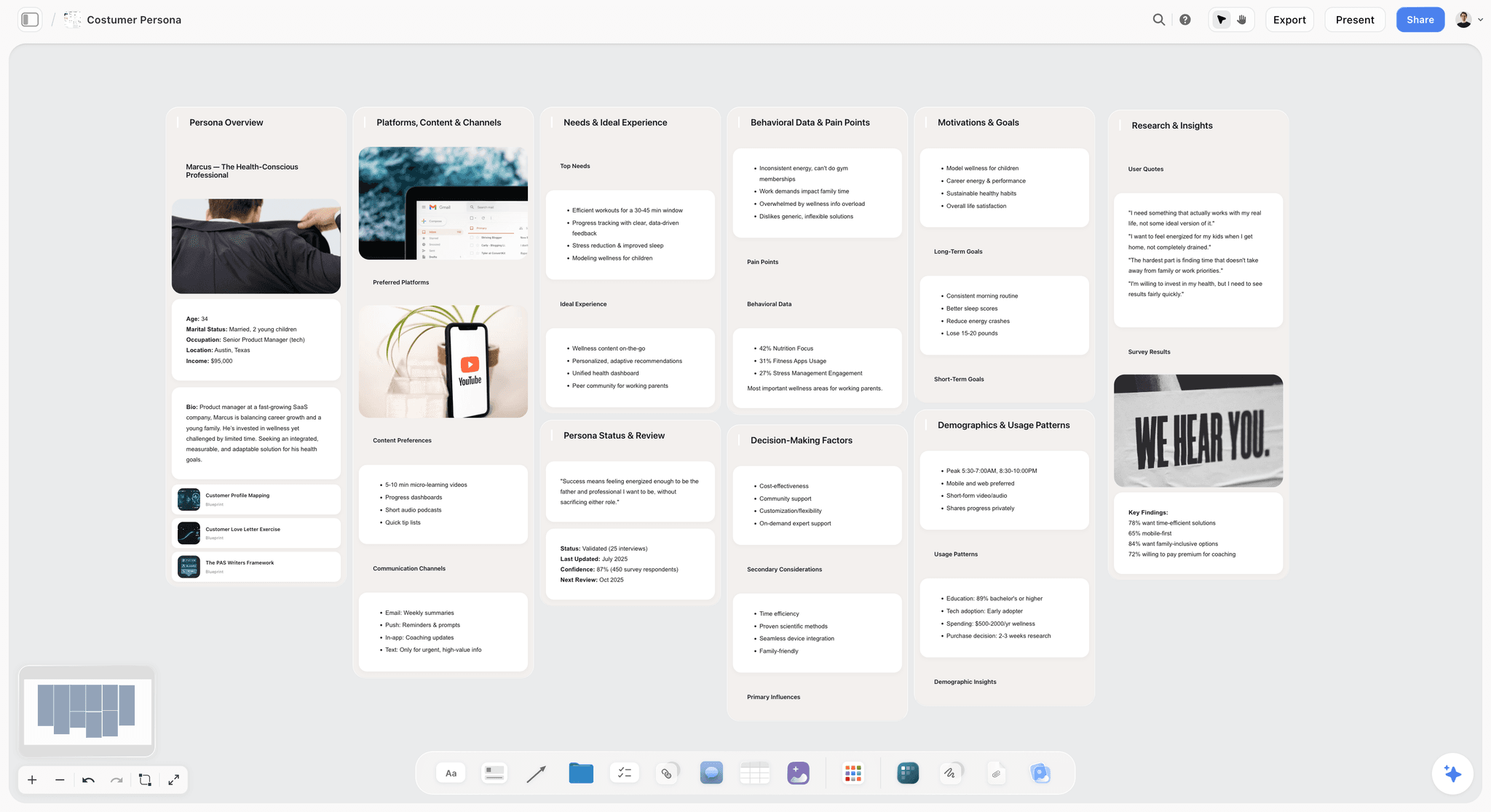
Storyflow is our product. These entries run in workflow order rather than by rank, and it comes first only because it serves the earliest stage. It is not a content calendar: there is no calendar view, no stage property, no due dates and no counts, so it cannot run a pipeline and this article recommends Notion, Trello or Airtable for that.
Where it is useful is stage one and the validation gate: capturing ideas, working out who specifically wants a piece and what it promises, and seeing the shape of a body of work rather than a list of rows. The AI reads the whole board, so asking what a set of twenty ideas is missing gets an answer about those ideas. Everything from stage two onwards belongs in a database.
Storyflow is paid-only during early access; its Free plan launches before the end of 2026, and anyone a paid member invites to a board joins free now.
Pricing: Plus $7.99 per month billed annually ($9.99 monthly); Pro $14; Max $39.
Pros: good for the messy idea stage and the thinking before validation; whole-board AI context.
Cons: no calendar, no stages, no dates, no counts. It cannot be your content calendar.
2. Notion
The strongest single tool, because a content pipeline is a database with a stage property and Notion is the best cheap database with a calendar view attached. One database, a stage field, a board view for the pipeline and a calendar view for publish dates, and the calendar derives from the same records rather than being maintained twice.
It also holds the drafts, which removes the split between "the calendar" and "the writing" that causes a lot of friction.
Pricing: Free for personal use; Plus $10 per user per month billed annually; Business $15.
Pros: pipeline and calendar from one database; drafts live alongside; the free tier genuinely covers a solo creator.
Cons: a blank Notion costs a day of setup; per-seat for teams; can become over-engineered.
3. Trello
The fastest thing here to a working pipeline: five lists, one per stage, cards move left to right. For a solo creator this is often enough forever, and its free tier is genuinely usable.
Calendar view needs a Power-Up, and it stops scaling past roughly a hundred cards.
Pricing: Free; Standard $5 per user per month; Premium $10.
Pros: fastest to set up; the board is the pipeline by default; free tier works.
Cons: calendar is an add-on; no drafts; degrades at high card counts.
4. Airtable
The right answer once the piece count is high or repurposing is systematic. Linked records handle "this video became three clips and a newsletter" properly, which Notion does adequately and Trello does not at all.
Per-seat cost is high, and it is a worse writing environment than Notion.
Pricing: Free; Team $20 per seat per month billed annually.
Pros: the best handling of repurposing relationships; strong views; interfaces for stakeholders.
Cons: highest per-seat cost; poor for drafts; setup time.
5. Asana
Good when the content operation is part of a team with real deadlines and dependencies, particularly when a piece needs review from someone outside the content team. Overkill for a solo creator.
Pricing: Free for up to 10 users; Starter $10.99 per user per month billed annually.
Pros: real dependencies and approvals; generous free tier; good calendar.
Cons: more structure than a solo creator needs; no drafts.
6. Google Sheets
The honest default, and better than a badly set-up version of anything above. A sheet with a stage column and a filter shows the counts, and it costs nothing.
No calendar worth the name and nothing prompts anyone.
Pricing: free.
Pros: free; instant; the counts are trivial to compute.
Cons: weak calendar; no reminders; no drafts.
7. Buffer or Later
Neither is a content calendar in this article's sense. They schedule the publish itself, which is the last ten percent of the process, and they are good at it. Their calendar views tempt people into using them as the whole system, which is where the schedule-not-pipeline failure comes from.
Pricing: free tiers; paid from around $6 per month.
Pros: excellent at scheduling the actual publish; good analytics.
Cons: not a pipeline; encourages a calendar-only approach; social-first.
8. Milanote
Good for visual idea capture and nothing after it. If your ideas are visual, this is a pleasant place for stage one, and stages two to five belong elsewhere.
Pricing: Free for 100 items; Pro $9.99 per month.
Pros: pleasant visual capture; good with images.
Cons: no stages, dates or counts; free tier caps quickly.
The Repurposing Row
The stage most calendars omit and where most of the unclaimed value sits.
Every finished piece should have a row answering: what else does this become, and by when? A 3,000-word guide is a newsletter, three social posts, a video script and an answer to a question you will be asked repeatedly. Those derivatives cost a fraction of the original and most of them never get made, because the pipeline ends at published.
Make repurposing a stage rather than an intention. A piece is not done at published; it is done when its derivatives are made or explicitly declined.
Two rules that make it work: decide the derivatives when the piece is validated, not after it is published, because knowing a guide will become a video changes how you write it. And cap it: two or three derivatives, chosen, rather than a theoretical list of nine that produces none.
The Bottom Line
Build the pipeline first, five stages, and derive the calendar from it. Assign publish dates only to finished work, so a date on the calendar means something is ready. Build a buffer of two or three finished pieces and accept a temporary drop in cadence to get it, because that is the trade that buys consistency. Then spend thirty minutes a week counting the stages and killing something, because a pipeline that never loses an idea becomes a list of obligations nobody opens.
FAQ: Content Calendars
Why do content calendars get abandoned?
Because they are built as schedules rather than pipelines. A schedule says what publishes on Thursday and gives no warning before Thursday arrives with nothing written. A pipeline says how many pieces are at each stage right now, which predicts the miss on Monday instead. The second most common cause is having no buffer, so one bad week ends a streak and streaks are most of the motivation.
What is the difference between a content calendar and a content pipeline?
A calendar is dates with things on them and answers what publishes when. A pipeline is stages with counts and answers how many pieces are at each stage. Only the pipeline warns you. The working arrangement is a pipeline as the primary artifact with the calendar derived from it, and a publish date assigned only when a piece reaches the finished stage.
What stages should a content pipeline have?
Five: idea, validated, drafted, finished, published. Idea should be large and messy. Validated means it passed three checks: someone specific wants it, you can state what it promises in one line, and you know the format. Finished is the stage that earns a publish date. Published includes the follow-up: replying, repurposing and measuring.
What is a content buffer and how big should it be?
Two or three finished pieces ahead of your publish date, at all times. It is the single best predictor of consistent publishing, because without it every week is a race from idea to published and one bad week becomes a missed publication that compounds. Building it requires temporarily publishing less than you produce, which is the trade most people will not make and the one that works.
What is the best content calendar tool for creators?
Notion for most people, because a pipeline is a database with a stage property and Notion gives you that plus a calendar view derived from the same records, with the drafts alongside. Trello if you want a working board in ten minutes, which is often enough forever for a solo creator. Airtable once the piece count is high or repurposing is systematic.
Is Storyflow a content calendar tool?
No. Storyflow has no calendar view, no stage property, no due dates and no counts, so it cannot run a content pipeline and this article recommends Notion, Trello or Airtable. It is useful for stage one and the validation gate, capturing ideas and working out who wants a piece and what it promises, with AI that reads the whole board of ideas.
Is Storyflow free?
Not during early access. It is paid-only today from $7.99 per month billed annually on Plus, and its Free plan launches before the end of 2026. Anyone a paid member invites to a board signs up free and can invite others, which covers a collaborator working on the same idea board.
When should a piece get a publish date?
When it reaches the finished stage, not when it is an idea. Assigning dates at the idea stage makes every date a hope, so missing them stops meaning anything and the calendar loses authority, which is when people stop opening it. Dates given only to finished work mean something, and a calendar whose dates mean something gets defended.
How do you validate a content idea?
Three questions, and most ideas should fail one. Who specifically wants this, stated as a person in a situation rather than a segment. What does it promise, in one line and in their terms. And what format, and why that one rather than another. A pipeline where nothing dies at validation is producing content nobody asked for, which is the expensive kind of busy.
How often should you review a content pipeline?
Thirty minutes weekly, in a fixed slot. Count what is at each stage and write the numbers down, prioritise the buffer if the finished count is below two, and move anything that has been at the same stage for three weeks by finishing it, cutting it, or sending it back to idea. That three-week rule is what keeps the counts honest rather than aspirational.
Should repurposing be in the calendar?
Yes, as a stage rather than an intention, and it is where most unclaimed value sits. Decide the derivatives when a piece is validated rather than after it publishes, because knowing a guide will become a video changes how you write it. Cap it at two or three chosen derivatives, since a theoretical list of nine reliably produces none.
Why does treating every piece as the same size break a calendar?
Because a 3,000-word researched guide and a 600-word note are not comparable units, and a plan that assumes they are is wrong from week one. The calendar then slips for reasons that look like discipline and are actually arithmetic. Estimate effort per piece from experience rather than optimism, and let the pipeline hold pieces of different sizes rather than forcing a uniform cadence.
Table of Contents
- Article Metadata
- Breadcrumb
- Table of Contents
- Key Takeaways
- Schedule or Pipeline
- The Five Stages
- The Buffer
- What Each Piece Needs Before It Enters the Pipeline
- The Weekly Routine
- Why Calendars Get Abandoned
- 8 Tools for a Content Calendar
- How We Evaluated These Tools
- Tool Reviews
- 1. Storyflow
- 2. Notion
- 3. Trello
- 4. Airtable
- 5. Asana
- 6. Google Sheets
- 7. Buffer or Later
- 8. Milanote
- The Repurposing Row
- The Bottom Line
- Author
- FAQ: Content Calendars
- Related Reading
Templates to check out for this topic


Content and video templates you can use in Storyflow
Plan a channel, a script, and a content pipeline on the same board. Open one of these templates and let the AI build on the structure instead of starting from a blank doc.


See Storyflow in Action
A visual AI workspace where every feature lives inside one canvas. No tab-switching, no context lost.
Build your entire board from a single message
Type what you need in the AI chat at the bottom of your canvas. The AI adds cards, headings, and structure directly onto your board.
Use expert frameworks as AI context
Type @ in the AI chat and choose any Tactic. The AI tailors every response to that framework instead of giving generic advice.
Turn your board into a mind map in seconds
Ask the AI to restructure your canvas as a mindmap. It connects your ideas into a visual hierarchy so you can see how everything relates.
Why Storyflow Exists
Storyflow actually began as a personal tool while working on creative and research projects.
We kept running into the same problem: ideas were scattered everywhere: notes, documents, and whiteboards.
Nothing helped us see how everything connected.
So we started building a workspace designed around how ideas actually grow.
→ Read how Storyflow was createdJustkay
Documentary Filmmaker & Founder at Storyflow
Published: 2026-09-02
Extremely simple, seriously capable


See how easy it is to get started
Watch a real project come together, from a blank board to a finished plan, clicked through step by step.
Start creating with AI and become more productive
Transform your creative workflow with AI-powered tools. Generate ideas, create content, and boost your productivity in minutes instead of hours.