How to Build a Content Calendar with AI: A Step-by-Step Guide (2026)
Most people ask AI to generate topics before defining what they are trying to achieve - and end up with a calendar full of content going nowhere. This 9-step guide shows you how to build your strategy layer first, then use AI for topic generation, gap analysis, and brief writing.

Category
Content Strategy & Marketing
Author

Sara de Klein
Head of Product at Storyflow
Topics
February 28, 2026
•
22 min read
•
Content Strategy & Marketing- how to build a content calendar with AI
- AI content calendar
- content calendar template
- content pillars
- editorial calendar AI
How do you build a content calendar with AI?
Build a content calendar with AI in 9 steps: define one 90-day objective, audit existing content, write a one-paragraph audience definition, choose 3-5 pillars, generate 20-30 AI topics, score them, assign dates and formats with two buffer slots, write briefs, then save it all as a reusable template. First build: 2-3 hours.

Building a content calendar with AI works when you treat AI as a strategic collaborator, not a topic machine. Most people ask AI to generate ideas before defining what they are trying to achieve - and end up with a calendar full of content going nowhere. The right approach: build your strategy layer first, then use AI for topic generation, gap analysis, and brief writing. Follow this guide and you will finish with a working 4-week calendar, a reusable system, and a backlog that outlasts the month.
The Problem With How Most People Build Content Calendars
You open a blank spreadsheet, add some column headers - Date, Topic, Format, Status - and spend two hours filling it in. Then week three arrives. You're behind on three pieces, the topics you picked feel disconnected from what your audience actually needs, and the spreadsheet is slowly becoming a monument to good intentions. You add a new Notion template. That one lasts until week two.
The problem is not execution. It is that the calendar was built before the strategy existed. Topics were chosen based on what felt interesting that day, not what fits a coherent content architecture. When you bring AI in at the wrong stage - asking it to generate 30 topic ideas before you know your pillars - you get a longer list of the same undirected content. More ideas you cannot prioritize. More noise.
The fix is not a better template. It is building the strategy layer first and using AI at each specific step where it actually accelerates the work.
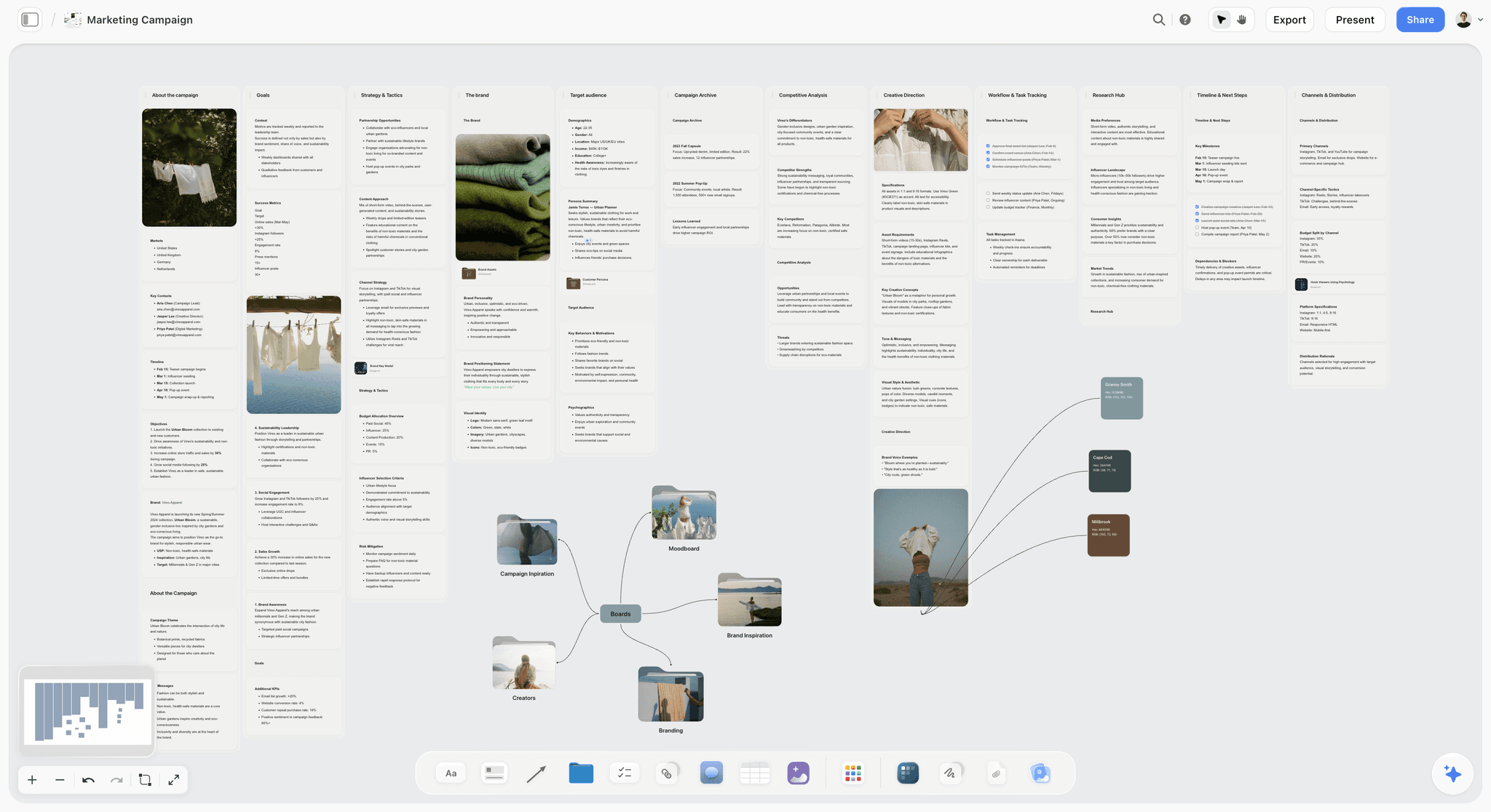
A content calendar built on strategy, topics, channels, and publishing cadence on one board
What You Need Before You Start
- A clear 90-day content goal. Not “publish more content” - something specific, like “drive 500 trial signups” or “rank for three target keywords.” You will reference this in every step.
- A rough sense of your audience. Even one paragraph describing who you are creating for and what they are trying to accomplish. You do not need a formal persona - you need enough to make decisions.
- Two to three hours for the initial build. The first calendar takes time because you are also building the system. Future months run in under an hour once the pillars and templates are in place.
- Access to your existing content (if you have it). Even a rough list of what you have published helps you avoid repeating yourself and find gaps worth filling.
- A visual AI workspace with frameworks built in. Storyflow's free tier works for this entire guide. What matters is having a canvas where AI can see your full active board - your research, your outline, your references - not just the document you have open right now.
How to Build a Content Calendar with AI: Step by Step
Step 1: Define Your One Content Objective
Before generating a single topic, write one sentence that defines what success looks like in 90 days.
Most content calendars are built around the vague goal of “being consistent.” Consistency is a practice, not an objective. What you need is a measurable outcome - something like “generate 200 qualified leads from organic content” or “build authority in the documentary filmmaking niche for an audience of independent creators.” That sentence will drive every decision from here: which pillars you choose, which formats you prioritize, which topics you write and which you skip.
Spend 20 minutes on this step, no longer. If you are agonizing, it usually means you are trying to serve too many goals at once. Pick the one that matters most in the next 90 days.
Where Storyflow helps
Create a Card with your objective on the front and the criteria you will use to measure success on the back. Pin it to your workspace board so it is visible in every working session. Storyflow's AI assistant will reference it when helping you evaluate topics later - because it reads your full board, not just the message you typed.
Common mistake
Writing a vague objective like “grow our audience” and treating it as done - vague objectives produce vague calendars, and if you cannot measure it, it will not guide any decisions.
Step 2: Audit What You Already Have
Before building anything new, spend 30 minutes cataloguing what already exists.
This step takes most people by surprise because it feels like a detour. It is not. If you have published any content before - even 10 blog posts or a handful of videos - you have data about what your audience actually engaged with, what you have already said, and where the gaps are. Without this, you will accidentally rebuild content you have already made and waste your AI-generated topic backlog on ideas you have already covered.
Make a simple three-column list: what is performing well (keep doing this), what underperformed (understand why before doing more), and what is missing entirely based on your objective. That last column is your content opportunity map.
Where Storyflow helps
Use the AI assistant to paste in your existing content list and ask it to identify patterns, surface the strongest performing themes, and flag what is missing relative to your stated objective. Because the AI reads the full board you are working on, it can connect your audit findings directly to the audience definition you created in Step 1.
Common mistake
Skipping the audit because you are eager to get to the topic generation - teams with no content history can skip this step, but everyone else is leaving useful data on the table.
Step 3: Define Your Audience in One Paragraph
Write a one-paragraph audience definition you will reference in every subsequent step.
Not a formal persona document. Not a 10-slide deck. One paragraph that answers: who is this person, what are they trying to accomplish, what do they already know, and what is standing in their way. The specificity of this paragraph is what determines the quality of your AI-generated topics in Step 5. Vague audience definition produces generic topics. Specific audience definition produces content ideas that feel written for a real person.
What specific looks like
“Independent documentary filmmakers, 3-10 years in, who have completed one or two films but struggle to build an audience beyond film festival circuits. They are technically skilled but overwhelmed by distribution and marketing. They are looking for practical systems, not theory.”
That paragraph can guide 30 topic decisions in under a minute.
Where Storyflow helps
Save this paragraph as a Card in your workspace. Reference it by name when prompting the AI assistant for topics - Storyflow's AI pulls from it automatically whenever it is on the board you are working in, so you never re-paste it into every session.
Common mistake
Writing the audience paragraph in broad strokes - “marketers and content creators” - because being specific feels limiting. It is not. Specific audiences share your content with other specific people. General audiences do not share anything.
Turn these three answers into a working calendar
You now have an objective, an audit, and an audience paragraph. Storyflow's AI calendar generator turns them into pillar columns and a scored topic backlog on one board, so the remaining six steps run inside the system instead of a spreadsheet.

Step 4: Choose Your Content Pillars
Define 3-5 content pillars, each with a one-sentence rationale for why it serves your objective and your audience.
Content pillars are the categories your content consistently falls into. They are not topics - they are the strategic themes that give your calendar coherence. The test for a good pillar: if you published 10 pieces under it, would they collectively build authority in a clear direction? Pillars serve two functions. For your audience, they create a recognizable identity. For your calendar, they act as a filter. When you have 40 AI-generated topic ideas and need to pick 8, the pillars tell you what to keep.
Example pillar output
Pillar 1 - Creative Process: How working filmmakers and marketers develop ideas, from concept to production. Rationale: audience research shows our readers are most engaged when content reflects actual practitioner experience, not theory.
Where Storyflow helps
Activate a Content Strategy Blueprint to see a pre-built pillar framework you can adapt in minutes, or build your own by creating a board with one column per pillar. Each column becomes a container for the topics you assign in later steps - and the visual layout makes it immediately obvious when one pillar is overloaded and another is empty.
Common mistake
Creating too many pillars because you do not want to exclude any topic - five pillars maximum, because more than that means you do not have pillars, you have a list of categories that will not help you make any decisions.
Step 5: Generate Your Topic Backlog with AI
Use AI to generate 20-30 topic ideas organized by pillar, with your objective, audience definition, and content pillars already visible in your workspace.
This is the step that takes most people 3-4 hours without AI and under 30 minutes with it - but only if you have done Steps 1-4 first. The difference in quality is stark. When you prompt with context, you get specific, actionable ideas. When you prompt with “give me 30 content calendar topics,” you get the same list anyone with the same tool would get.
For each pillar, ask AI to generate 6-8 topics in three categories: beginner-level explainers, intermediate practical guides, and advanced or contrarian takes. This gives you a range of entry points and ensures you are not inadvertently targeting only one segment of your audience.
Example prompt with context
“I need topics for the Creative Process pillar targeting independent documentary filmmakers who struggle with audience-building, for the goal of driving 200 qualified leads in 90 days. Give me 6-8 topics: 2 beginner explainers, 3 practical guides, and 2 contrarian takes.”
Where Storyflow helps
With your pillar Blueprints and audience Card already on the board, Storyflow's AI assistant generates topics in context - it knows your pillars, your audience definition, and your objective without you re-pasting them into every prompt. Drop each approved topic into the appropriate pillar column as a Card.
Common mistake
Accepting the first round of AI-generated topics without editing - your job is to use AI to generate volume and then apply your own knowledge to select and refine the best ideas, not to outsource the judgment entirely.
Step 6: Prioritize Topics by Reach and Relevance
Score each topic on two dimensions: audience relevance (how directly does this serve the person you defined in Step 3?) and strategic fit (how directly does this support your 90-day objective?).
The fastest prioritization method is a 1-3 score for each dimension: 1 = weak, 2 = moderate, 3 = strong. Topics scoring 5-6 go in your first four weeks. Topics scoring 3-4 stay in the backlog for month two. Topics scoring below 3 get cut or reworked. This step takes about 20 minutes if you have been specific in earlier steps. If you are struggling to score your topics, it is usually a signal that your objective or audience definition is still too vague - go back and sharpen them before continuing.
A calendar is a filter, not a container. Prioritization is the step where it starts doing that job: the visual overview it gives you is what makes planning a full month manageable rather than paralyzing.
Where Storyflow helps
Tag each topic Card with a priority level directly in Storyflow. The board view lets you compare visually across pillars to make sure you are not over-indexing on one theme while another sits empty.
Common mistake
Prioritizing based on what is easiest to write rather than what is most valuable to your audience - easy content keeps the calendar filled but does not move your objective forward.
Step 7: Assign Topics to Dates and Formats
Map your top 8-12 topics to specific publish dates and content formats, factoring in your production capacity and any external events or deadlines.
Format decisions should follow the audience, not personal preference. Where does your audience actually consume content, and what format best fits the complexity of the topic? If you want the date grid pre-built, the Posting Schedule template opens with weekly slots ready for your prioritized topics. Build in buffer: if you are planning to publish twice a week, do not assign every slot. Leave two empty slots per month for timely content, repurposed pieces, or the inevitable week where everything takes longer than expected. A calendar with no slack breaks at the first obstacle.
Worked example - Week 1 and 2
- Week 1, Monday: “How documentary filmmakers find their first 1,000 subscribers” - long-form article
- Week 1, Thursday: “The three-stage distribution system most indie filmmakers skip” - short video + email
- Week 2, Monday: [open buffer slot for timely content]
- Week 2, Thursday: “Why film festival strategy fails without audience development” - long-form article
Where Storyflow helps
Move your prioritized Cards into a date-based column layout on your Storyflow board. You can see the whole month at a glance and identify imbalances - too many explainers in week two, a gap in the Creative Process pillar in week three - before you have started writing anything.
Common mistake
Front-loading the month with your strongest topics because you are excited to get started - spread your most strategic content across the month, and leave your strongest piece for the week when your publishing rhythm is already established.
Step 8: Write Your Content Briefs
For each topic in your first two weeks, write a one-page content brief: headline, audience angle, key argument, supporting points, target length, and call to action.
Content calendars without briefs are lists of intentions. Briefs are what make the calendar survivable when you are writing piece number six and the initial excitement has worn off. A brief does not take long - 15 minutes per piece - but it means that when you sit down to write, you already know your argument. You are executing, not discovering.
The brief also serves as a quality control tool. If you cannot write a clear one-sentence key argument for a topic, the topic is not ready. Either the idea is underdeveloped or the angle is wrong. Better to find that out in 15 minutes of brief-writing than after 2 hours of drafting.
Where Storyflow helps
Storyflow's Tactics include brief-writing frameworks that guide you through each component with AI assistance. Activate the brief Tactic for each topic Card, and the AI generates draft briefs based on the context already in your workspace - your audience definition, your pillar rationale, and the topic itself. You are editing and approving, not starting from scratch.
Common mistake
Writing briefs that are really just the topic title with a slightly longer description - a brief that does not name a specific key argument is not a brief, it is a placeholder that will cost you time later.
Step 9: Build Your Repeatable Monthly System
Turn your calendar into a template you can run every month in under two hours.
The point of the first calendar is not the calendar. It is the system behind it. Once you have built month one, you have something valuable: a working process with a defined objective, audience, tested pillars, a prioritization method, and a brief template. Converting that into a repeatable workflow means month two is faster, month three is faster still, and within a quarter you are running a content operation that feels sustainable rather than constant.
Document what worked and what you would change. Which pillar generated the most engaged content? Which step consistently took longer than expected? This retrospective takes 30 minutes and compounds every month you do it: by month three you are reusing pillars, briefs, and a scored backlog instead of rebuilding any of them.
Where Storyflow helps
Save your finished calendar board as a Blueprint in Storyflow. Next month, activate that Blueprint instead of starting from scratch - your pillar structure, your audience Card, your prioritization columns are all pre-loaded. You are updating and refreshing, not rebuilding.
Common mistake
Treating the first calendar as a one-off project instead of the first iteration of a system - the ROI of a content calendar is in the compounding, and each month's data makes the next month's decisions faster and better.
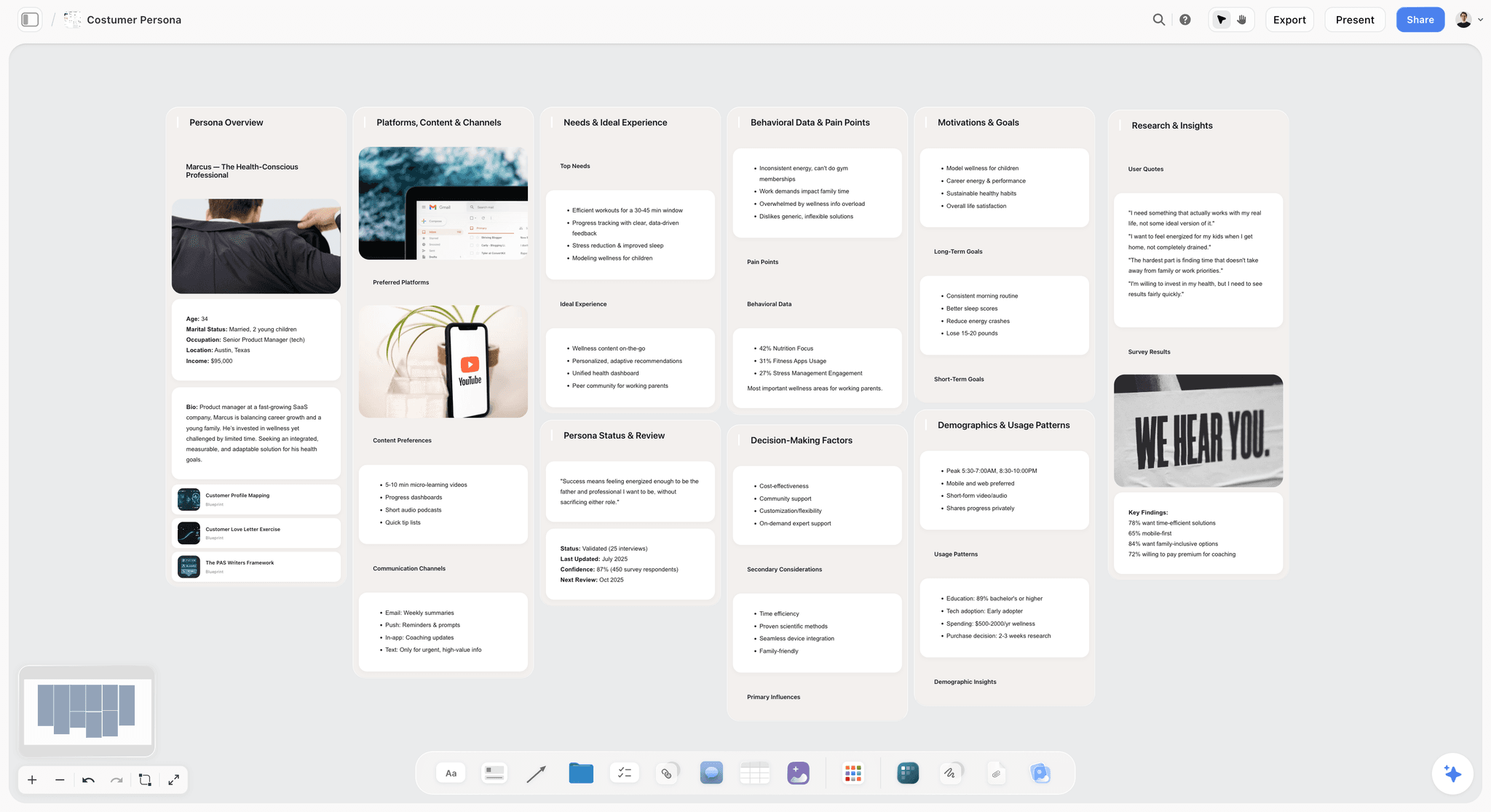
Build customer personas alongside your content pillars for audience-first calendars

AI Kanban, move content from Planned → In Progress → Published without leaving Storyflow
How to Build Your Content Calendar in Storyflow: Exact Walkthrough
Here is the exact workflow inside Storyflow - every click, every Card, every AI prompt - so you know precisely what to do from the moment you open the tool.
1. Create a new board and activate the Content Strategy Blueprint
Open Storyflow and click “New Board,” or skip the blank canvas by starting from the Viral Content Planner template (social-first calendars) or the Marketing Plan template(multi-channel calendars). Give the board a name like “Content Calendar - [Month] [Year].” Then open the Tactics panel and activate the Content Strategy Blueprint. The Blueprint instantly generates your board structure: a column for each pillar (with placeholder names you will replace), a Backlog column for unprioritized topics, and a Calendar section with one column per week of the month.
2. Create your Objective Card and pin it
Click “Add Card” at the top of the board. Title it “90-Day Objective” and write your one-sentence goal on the front. On the card back, add your measurement criteria. Pin this card to the top of the board using the pin icon. It will now appear as a persistent reference every time you or the AI assistant works on this board.
3. Add your Audience Card
Create a second Card titled “Audience Definition.” Paste in your one-paragraph audience description. Pin this card alongside your Objective Card. These two cards are the context the AI will use for every prompt you run on this board - without needing to re-paste them into each conversation.
4. Name and rationale your pillar columns
Rename each pillar column with your actual pillar name. Click the column header to edit it. Add a Card at the top of each pillar column with the one-sentence rationale for why this pillar exists. This rationale becomes part of the AI's context when generating topics - it knows not just the pillar name but why it matters to your audience and objective.
5. Generate topics with the AI assistant
Open the AI assistant panel (right side of the board). Because your Objective Card and Audience Card are pinned, the AI already has that context. Type: “Generate 8 topic ideas for the [Pillar Name] column. Include 2 beginner explainers, 3 practical guides, and 2 contrarian takes.” The AI generates ideas grounded in your specific audience definition and goal. Accept the ones that fit and create a Card for each topic directly in the pillar column.
6. Score and tag each topic Card
Open each topic Card and add two tags: one for audience relevance score (1, 2, or 3) and one for strategic fit score (1, 2, or 3). You can do this using Storyflow's label feature. Cards with a combined score of 5-6 get a “Month 1” label. Cards scoring 3-4 get a “Backlog” label. You can now filter the board to see only your Month 1 topics.
7. Drag your top topics into the weekly calendar columns
The Blueprint's Calendar section has columns labeled Week 1, Week 2, Week 3, Week 4, and a Buffer column. Drag each Month 1 topic Card from its pillar column into the appropriate week. Add the format to the card title (e.g., “Blog” or “Video”). Add a publish date in the card description. Leave at least two cards in the Buffer column - these are your response slots for timely content or slipped pieces.
8. Activate a brief Tactic for each Week 1 and 2 Card
Click into each calendar Card for your first two weeks. Open the Tactics panel and activate a Brief Writing Tactic. The Tactic generates a structured brief template with the topic already pre-filled. Click “Generate with AI” and the AI drafts the headline, audience angle, key argument, and supporting points based on everything pinned on your board. Review and edit the brief, then mark the Card as “Brief Ready.”
9. Save the board as a Blueprint for next month
Once your first calendar is complete, go to Board Settings and click “Save as Blueprint.” Name it “Monthly Content Calendar.” Next month, activate this Blueprint from your Tactics library. Your pillar columns, Objective Card, Audience Card, and calendar structure are all pre-loaded. You update the objective if it has changed, refresh the audience Card if needed, and go straight to topic generation in Step 5 - skipping the setup entirely.
The 9-Step Process at a Glance
- Define your objective - one sentence, 90-day horizon
- Audit existing content - what is working, what is missing
- Define your audience - one specific paragraph
- Choose content pillars - three to five strategic themes
- Generate topic backlog - 20 to 30 AI-generated ideas by pillar
- Prioritize topics - score by audience relevance and strategic fit
- Assign to dates and formats - map top topics to calendar slots with buffer
- Write content briefs - one brief per piece, 15 minutes each
- Build your repeatable system - save as a Blueprint for next month
Tips and Best Practices
Run the whole process before you start writing anything
The biggest time-waster in content calendar building is switching between planning mode and writing mode before the plan is complete. Finish all nine steps first. Once you have a complete calendar and briefs, the writing phase is dramatically faster because you are never making strategic decisions mid-draft.
Treat your topic backlog as an asset, not a to-do list
The topics you generate in Step 5 but do not schedule in month one are not failures - they are your month two and three pipeline. A well-built backlog means you will never start a calendar from scratch again. I keep mine in Storyflow with each Card tagged by pillar and priority, so I can pull from it any time without re-doing the generation work.
Tie every topic to an explicit audience job
For every topic in your calendar, you should be able to complete the sentence: “After reading this, my audience will be able to ___.” If you cannot, the topic is not specific enough. This is not about being prescriptive with content - it is about understanding why you are creating something before you invest time in it.
Let AI generate the first draft of briefs, then edit
The brief-writing step feels slow because most people try to write briefs from scratch. With your audience Card and topic context already in your workspace, Storyflow's AI can draft a working brief in under two minutes. Your job is to read it, sharpen the key argument, and confirm the angle is right. Editing a draft is five times faster than writing from scratch.
Do not plan more than six weeks at once
I learned this the hard way building content calendars for three different products at once. Planning further than six weeks creates false certainty and a pile of outdated content. The world changes, your audience's questions evolve, and six-week-old plans are usually wrong by the time you execute them. Plan four to six weeks in detail, keep a loose backlog for three months, and leave the rest open.
Use pillar imbalance as an early warning sign
If 70% of your topics fall under one pillar, your calendar will read like a one-note channel. Check the pillar distribution every time you build a new calendar. A rough target: no single pillar should represent more than 40% of your scheduled content for a given month. Storyflow's board view makes this immediately visible - over-indexing shows up at a glance in a way it never does in a spreadsheet.
Revisit your objective when you feel stuck
When you are staring at a topic and cannot decide whether to include it, go back to your 90-day objective. The question is not “is this a good topic?” - it is “does this topic serve this objective for this audience?” Half the decisions that feel hard in content planning are only hard because the objective has not been clearly defined.
Common Mistakes to Avoid
Mistake: Starting with topic generation
Most people open an AI tool and ask for topic ideas before defining anything else.
The result is a long list of generic content that could belong to any brand in any niche.
Define your objective, audience, and pillars first - then use AI for topic volume.
Mistake: Building a calendar without a content audit
Teams with existing content skip the audit because they think it is an optional retrospective.
They end up recreating content they have already published, missing their strongest existing assets for repurposing, and ignoring the performance data that tells them what their audience actually wants.
Spend 30 minutes on the audit before you touch the calendar.
Mistake: Choosing too many pillars
Marketers and content leads want to cover every topic their brand touches, so they create seven or eight pillars.
The calendar fragments, each pillar gets one to two pieces per month, and no coherent authority is built in any direction.
Cap at five pillars - if a topic does not fit any of them, it is either a new pillar or it is out.
Mistake: Planning without format decisions
Calendars that assign topics but not formats treat production capacity as unlimited.
A single topic might take 2 hours as a short social thread or 8 hours as a long-form article - treating them the same breaks the calendar by week two.
Assign a format to every topic before you finalize the schedule.
Mistake: Abandoning the calendar when you miss a publish date
Missing one piece makes the whole system feel broken, so people scrap the calendar and start over.
The calendar fails not because the system was wrong but because there was no protocol for falling behind.
Build in two buffer slots per month specifically for this - missing a slot fills a buffer, and the calendar survives.

Marketers build content strategy, audience research, and calendar on one connected Storyflow board
Frequently Asked Questions About Building a Content Calendar with AI
Frequently Asked Questions
How long does it take to build a content calendar with AI?
The first calendar takes 2-3 hours, most of which is strategic work: defining your objective, auditing existing content, writing your audience definition, and choosing pillars. AI handles topic generation and brief drafting, saving 2-4 hours compared to doing those steps manually. Once the system is built, future months run in under an hour because you work from existing pillars and a backlog rather than starting from scratch.
How is building a content calendar with AI different from building one manually?
The strategic steps - objective-setting, audience definition, pillar selection - are the same. What AI changes is the volume and speed of topic generation, gap analysis, and brief writing. Manually, generating 30 differentiated topics across 4 pillars takes most people 3-4 hours. With AI and good contextual prompts, it takes under 30 minutes. The human's job shifts from ideation to curation and quality control.
Can I build a content calendar with ChatGPT or Notion AI instead of Storyflow?
You can use ChatGPT for topic generation and Notion for organizing the calendar. The limitation is context: every time you open a new ChatGPT conversation, you start over without workspace memory. You need to re-paste your audience definition, objective, and pillar descriptions into each prompt. Storyflow's AI reads your full active board automatically (every card, note, and link on it), so your context is always available. For a one-time build, the difference is minor. For a system you run every month, it's significant.
How many topics should I include in a monthly content calendar?
For most individual creators and small teams, 8-12 pieces per month is a sustainable target. That's roughly two to three pieces per week depending on format. The common mistake is planning for 20+ pieces per month based on ambition rather than production capacity, then falling behind and abandoning the calendar entirely. Start with fewer pieces, execute them well, and increase volume once the system is running reliably.
How do I choose which content formats to use?
Format should follow distribution, which should follow your audience. If your audience primarily discovers content through search, long-form written articles are high priority. If they're on LinkedIn or Instagram, shorter formats come first. Audit where your existing content gets the most organic traction before committing to a format mix. A calendar requiring video production when you have no video workflow will collapse.
How far in advance should I plan my content calendar?
Four to six weeks in detail, with a loose topic backlog for the next three months. Planning further than six weeks creates false precision - the world shifts, audience questions evolve, and content planned too far in advance is often outdated by publication. The exception is content tied to fixed external events such as product launches or seasonal campaigns, which can be blocked out further ahead.
How do I get my team to actually stick to the content calendar?
Adherence problems are almost always caused by one of three things: the calendar was built without input from the people executing it, the calendar has no buffer for the unexpected, or there's no clear owner for each piece. Solve these at the build stage: involve the team in pillar and topic selection, build two buffer slots per month, and assign an owner and a deadline to every topic before the month starts.
What should I do when a time-sensitive topic comes up after I've built the calendar?
Treat the buffer slots you built in Step 7 as your response capacity for timely content. If a major industry development happens, it goes into a buffer slot. If you've already used both buffer slots, evaluate your scheduled topics by strategic fit - the weakest one moves to next month's backlog to make room. Never blow up the whole calendar for one timely topic.
How do I measure whether my content calendar is working?
Measure against the specific objective you defined in Step 1 - not against vanity metrics like page views unless those directly map to your goal. If your objective is lead generation, track how many leads each pillar produces over 90 days. If your objective is keyword rankings, track position movement for the terms your content targets. Quarterly reviews of pillar performance are more useful than weekly analytics checks.
Start Your First Content Calendar Today
The thing that stops most people from building a content calendar is not not knowing how. It is not knowing where to start - and being afraid that starting wrong means wasting time. So they keep the ideas in their head, or in scattered notes, or in a half-finished spreadsheet that does not actually guide any decisions.
Open Storyflow's free canvas and create one Card: your 90-day content objective. One sentence. That is Step 1, and it takes three minutes. From there, activate the Content Strategy Blueprint - it pre-loads the pillar columns and prioritization framework so you are not staring at a blank board. Your first planning session, following the steps above, will give you a working calendar and a topic backlog you will draw from for months.
A content calendar built on a clear strategy is not about filling dates - it is about making sure the work you invest in actually compounds toward something. That is worth the two hours it takes to build it right.
Related Reading
The strategy that sits behind your content calendar - how to define pillars, audience, and goals before you build the schedule.
The tools high-performing teams use to generate and organize ideas before building their content calendar - the step most teams rush.
A tested comparison of visual thinking tools for content planning, including how each handles AI integration and pillar mapping.
Once your calendar is built and video is on the schedule, this framework covers exactly how to structure each script for maximum watch time.
Table of Contents
- The Problem With How Most People Build Content Calendars
- What You Need Before You Start
- How to Build a Content Calendar with AI: Step by Step
- Step 1: Define Your Objective
- Step 2: Audit Existing Content
- Step 3: Define Your Audience
- Step 4: Choose Content Pillars
- Step 5: Generate Your Topic Backlog
- Step 6: Prioritize Topics
- Step 7: Assign to Dates and Formats
- Step 8: Write Content Briefs
- Step 9: Build Your Repeatable System
- How to Build Your Content Calendar in Storyflow
- The 9-Step Process at a Glance
- Tips and Best Practices
- Common Mistakes to Avoid
- Frequently Asked Questions
Templates to check out for this topic


Content and video templates you can use in Storyflow
Plan a channel, a script, and a content pipeline on the same board. Open one of these templates and let the AI build on the structure instead of starting from a blank doc.


See Storyflow in Action
A visual AI workspace where every feature lives inside one canvas. No tab-switching, no context lost.
Build your entire board from a single message
Type what you need in the AI chat at the bottom of your canvas. The AI adds cards, headings, and structure directly onto your board.
Use expert frameworks as AI context
Type @ in the AI chat and choose any Tactic. The AI tailors every response to that framework instead of giving generic advice.
Turn your board into a mind map in seconds
Ask the AI to restructure your canvas as a mindmap. It connects your ideas into a visual hierarchy so you can see how everything relates.
Why Storyflow Exists
Storyflow actually began as a personal tool while working on creative and research projects.
We kept running into the same problem: ideas were scattered everywhere: notes, documents, and whiteboards.
Nothing helped us see how everything connected.
So we started building a workspace designed around how ideas actually grow.
→ Read how Storyflow was createdSara de Klein
Head of Product at Storyflow
Published: February 28, 2026
Extremely simple, seriously capable


See how easy it is to get started
Watch a real project come together, from a blank board to a finished plan, clicked through step by step.
Start creating with AI and become more productive
Transform your creative workflow with AI-powered tools. Generate ideas, create content, and boost your productivity in minutes instead of hours.