
JIRA ALTERNATIVE
Jira tracks the tickets.
This is where they come from.
The honest version first: Jira is a genuinely capable issue tracker and the industry standard for good reasons. If your team runs sprints, workflows, and reporting, keep it. Storyflow is a different layer entirely, the infinite visual canvas for the ideas, research, moodboards, and plans that exist before anything becomes a ticket. A lot of teams should run both. Storyflow is paid-only during early access, with plans from $9.99 a month, and a Free plan launches before the end of 2026.
Plans from $9.99/mo
Free plan coming late 2026
Works in your browser

Used by creative professionals at:
Artlist
Pixar
Nike
Red Bull
The North Face
Porsche
Start from a ready-made template
Pick a board to see what you can build, then let AI fill it in. Every template is a real, editable starting point on the same infinite canvas.
Mind Map
Branch one central idea out into themes and sub-points, then drag the connections around until the structure makes sense.
What are people actually looking for in a Jira alternative?
Say the unpopular part first. Jira is good software. Issue types, configurable workflows, sprints, backlogs, permission schemes, JQL, audit trails, and reporting that a programme office will actually accept. It became the industry standard because it solved a real problem for engineering organisations at scale, and it still solves it. Storyflow does not replace Jira. We do not track issues, we do not run sprints, and we are not going to claim otherwise on a page whose whole point is being useful to you.
When people search for a Jira alternative, they usually want one of a few quite different things. Some want the same job done more lightly, which is Linear or Trello or GitHub Issues, and if that is you, this page is honest enough to send you there. Some want out of the configuration burden, because the flexibility that makes Jira powerful is the same flexibility that means somebody has to administer it, and a five-person team rarely has that somebody. And some, probably most people who land here, do not want a tracker at all. They want the place where a project gets figured out before it is defined enough to become a ticket.
That last group is who Storyflow is for. A ticket is a decision somebody already made. Before it existed, someone gathered references, sketched the concept, mapped the flows, argued about scope, pinned research, and shaped a plan the team could agree on. Jira deliberately starts after that, and that discipline is part of why it is good at what it does. Storyflow is an AI-native infinite canvas built for the messy part: describe the project in a prompt and the AI lays out a full board of cards, then you drag things around, pin images, PDFs, references, and research beside the plan, and share a view-only link with anyone who needs to see it. The unit of work is a board, not a ticket, which matters enormously for creative projects where the deliverable is a direction rather than a task.
Teams leave or supplement Jira for six recurring reasons: it is heavy for a small team that never needed schemes and workflows in the first place, the configuration burden is real and someone has to carry it, non-engineers like designers, marketers, clients, and executives will simply not open it, per-seat pricing makes inviting everyone who should see the plan an actual budget decision, it is built around the ticket as the unit of work which is the wrong unit for creative projects, and the visual thinking ends up in a separate whiteboard tool that never links back to the work it produced. Storyflow answers all six. It also answers none of the things Jira is genuinely great at, which is the tradeoff worth understanding before you move anything.
HOW IT WORKS
Shape the project on a canvas, then send the defined work to your tracker.
Do the visual, pre-ticket thinking here. Take the scoped deliverables into Jira, Linear, or wherever your team ships from.
01
Open a canvas
Sign up in seconds, from $9.99 a month. Nothing to install, no project template to configure, no admin to ask. An infinite canvas opens in the browser, ready for the first messy version of the project.
02
Describe the project
One sentence is enough: a launch, a rebrand, a redesign, a feature nobody has scoped yet. The AI reads the canvas as context and lays out a full board of cards, phases, and open questions you can rearrange.
03
Pin everything the plan depends on
Drop in references, screenshots, PDFs, competitor research, moodboards, and frames grabbed from YouTube or Vimeo. The thinking and the evidence sit in one view instead of four tools and a thread.
04
Hand the defined work off
Once the plan is agreed, the deliverables are specific enough to become issues. Create them in Jira and keep the canvas open as the map. Or share a view-only link, or export the board as an image or PDF.
The stage an issue tracker was never designed for.
Jira is built to track defined work through a workflow. Storyflow is where work becomes defined in the first place.

A full plan from a single prompt
Start from a filled board, not an empty project
A new Jira project starts as configuration plus an empty backlog you fill one issue at a time. Describe the project and Storyflow's AI lays out a board of cards on the canvas with phases, workstreams, and open questions already placed, so you begin by editing rather than by staring.
See creative project management →
Spatial thinking with nothing to link out to
The whiteboard and the plan are the same surface
In most stacks the diagram lives in one tool, the references in another, and the plan in the tracker, joined by links that rot within a quarter. On an infinite canvas the sketch, the research, and the plan are one board, so the reasoning stays attached to the decision it produced.
Explore the product roadmap board →
Nothing to configure before you can use it
No schemes, no workflows, no administrator
Jira's configurability is a genuine strength for an organisation with someone to own it, and a genuine tax for a team of six who just wanted to plan a launch. A canvas has no setup step. You open it and put things on it, which is the whole onboarding.
Try the free kanban board →
One board becomes the next
A brainstorm turns into a plan without a rewrite
A ticket stays a ticket. On a canvas, a mind map becomes a scoped project board, a research wall becomes a launch plan, and a rough sequence becomes a timeline, all in the same place, so the plan grows out of the thinking rather than starting from a blank template.
See how remote teams use it →Unlimited boards. No object cap.
Open a canvas, describe the project, and start planning. Storyflow is paid-only during early access, with plans from $9.99 a month, and a Free plan launches before the end of 2026. Anyone a paid member invites to a board joins free today.
Unlimited project boards on an infinite canvas
Basic AI usage to generate boards from prompts
Research, references, and moodboards on the same canvas
Share view-only links with anyone, no account needed
BUILT FOR THE PRE-TICKET STAGE
Everything that happens before the backlog.
Not a lighter issue tracker. A different layer, sitting upstream of the one Jira owns.
Scope, phases, dependencies, and open questions
Plan a project while it is still vague
Start before the work is defined: A tracker needs a well-formed issue with a title, a type, an owner, and an estimate. Most projects spend their first two weeks nowhere near that state. A canvas holds half-formed ideas, competing options, and open questions without forcing them into a schema first.
See the whole shape at once: Phases, workstreams, and dependencies laid out spatially, so the thing that is going to blow up in week six is visible now. A backlog can only ever show you one screen of a project at a time, sorted by a field somebody chose.
Rearrange by dragging: Change the sequence by moving cards, not by bulk-editing fields on thirty issues. Trying an alternative plan takes a minute, which means you actually try one instead of defending the first version.
Then define the tickets: When the plan is agreed, the deliverables are obvious and specific enough to be issues. That is the moment to open Jira, and the canvas stays behind as the reasoning nobody has to reconstruct in six months.
AI that can see the board you have already built
Plan with AI that has your project in context
A board from one prompt: Describe the project and the AI lays out cards, phases, and open questions across the canvas. Starting from a first draft you disagree with is faster than starting from an empty project and a configuration wizard.
It reads the whole canvas: Ask what is missing from a launch plan, how to break a phase into workstreams, or what the risks are, and it answers against the board you have actually built rather than a generic template.
Iterate without losing work: Re-prompt as often as you like. Cards you have written and placed stay exactly where they are while the AI builds around them.
Research, references, and visuals beside the plan
Keep the evidence next to the decision
Images and moodboards on the board: Drag in screenshots, competitor pages, brand references, and moodboards. Visual work needs a visual surface, and attaching a JPG to an issue is not remotely the same as seeing twelve of them side by side.
Documents and links in place: Pin PDFs, articles, specs, and links directly on the canvas next to the part of the plan they justify, so the answer to why did we decide this is one scroll away instead of buried in a comment thread.
Video reference too: Grab frames from YouTube or Vimeo straight onto the board when the reference is a moment in a video rather than a still image.
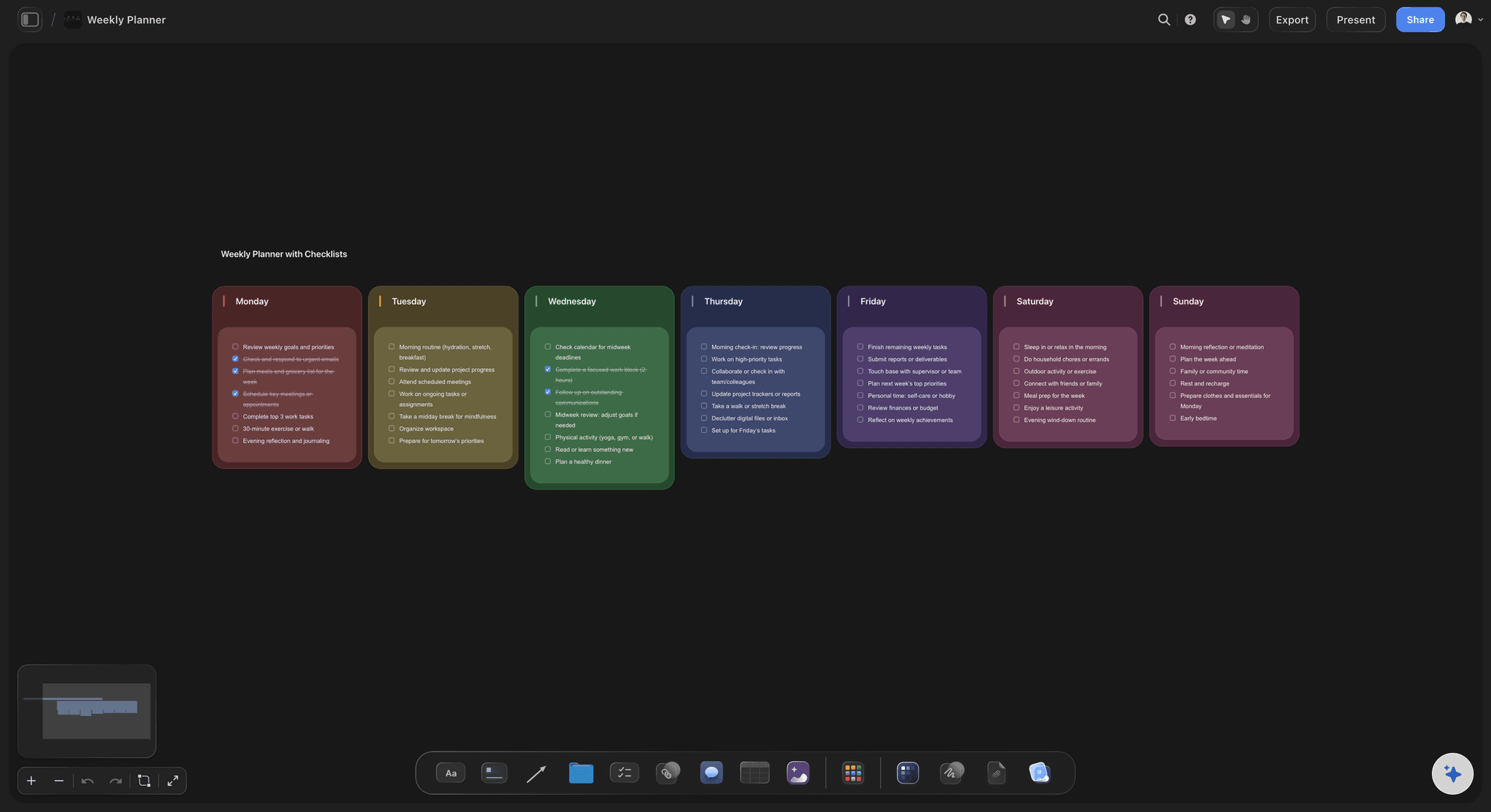
Everyone who should see the plan, without a seat each
Share with people who will never open a tracker
View-only links: Send a link and anyone opens the whole board in a browser with no account and no login. Clients, founders, and stakeholders see the plan instead of asking someone to summarise it in a meeting.
Guests join free: Anyone a paid member invites to a board joins free today. You are not weighing up whether a contributor is worth another seat before you can show them the plan.
Plan together on one canvas: Teammates can work on the same board, so a shared project has one plan rather than four people's private notes reconciled on a call.
Export for a deck: Export the board as a high-quality image or PDF when the plan needs to appear in a presentation, a client review, or a board update.
Explore templates for your project
Every template opens as a real, editable board on the infinite canvas. Pick the closest fit and make it your own.
Mind Map
Branch one central idea out into themes and sub-points, then drag the connections around until the structure makes sense.
HOW WE COMPARE
Storyflow vs Jira, Linear, and Trello.
These tools do different jobs, so this is a map of real differences rather than a scoreboard. Jira wins the rows Jira should win, and there are more of them than most comparison pages admit.
Storyflow
Recommended
Infinite visual canvas for planning
Issue tracking, sprints, and configurable workflows
Enterprise reporting, permissions, and audit trail
Keyboard-first speed for daily ticket work
Usable on day one with no setup or admin
Research, references, and moodboards on the board
Jira
Infinite visual canvas for planning
Issue tracking, sprints, and configurable workflows
Enterprise reporting, permissions, and audit trail
Keyboard-first speed for daily ticket work
Usable on day one with no setup or admin
Research, references, and moodboards on the board
Linear
Infinite visual canvas for planning
Issue tracking, sprints, and configurable workflows
Enterprise reporting, permissions, and audit trail
Keyboard-first speed for daily ticket work
Usable on day one with no setup or admin
Research, references, and moodboards on the board
Trello
Infinite visual canvas for planning
Issue tracking, sprints, and configurable workflows
Enterprise reporting, permissions, and audit trail
Keyboard-first speed for daily ticket work
Usable on day one with no setup or admin
Research, references, and moodboards on the board
What creators are saying
Join early creators getting structured workspaces and AI that remembers their projects
“Storyflow has sped up my workflow by at least 3x, which means more flow state and more projects I can actually ship. It truly changed the way me and my team create.”

Reilin Joey
Director & YouTuber
“One prompt gets me a structured board. But the tactics are my favorite. I run my YouTube scripts through them and my intros and retention got better. It's amazing.”

Justkay
YouTuber & Freelance Filmmaker
“I used to juggle five apps to plan a project. Now I describe what I am making and get boards, lists, and a schedule. All in one place.”

George
@fernwehchronicles
Jira alternative questions, answered honestly.
Including the one where the answer is that you should probably keep using Jira.
Often the honest answer is no, and running both is better. If your team tracks issues, runs sprints, needs configurable workflows, or reports to people who care about permissions and audit trails, Jira does that and Storyflow does not. The realistic setup is to plan the project on a canvas where the ideas, research, and scope live, then create the tickets in Jira once the work is defined. Switch fully only if you were never really doing issue tracking, which is more teams than Atlassian's marketing would suggest.
Keep Jira. Get the layer above it.
Open a canvas, describe the project, and let AI lay out the first board. Plans from $9.99/month, nothing to install, and a Free plan is coming before the end of 2026.