
INSPIRATION BOARD
Everyone collects.
Almost nobody retrieves.
You have saved posts you will never open, a camera roll of screenshots, bookmarks nested four folders deep, and a folder called refs with 900 files in it. The collection keeps growing and its value keeps falling, because saving takes one second and finding takes twenty minutes. An inspiration board fixes the retrieval half: a note on why you kept a thing, loose groups that can change as themes emerge, and a habit of going back through it. Paid-only during early access, from $9.99 a month, with a Free plan before the end of 2026.
Plans from $9.99/mo
Free plan coming late 2026
Images, links, notes, PDFs

Used by creative professionals at:
Artlist
Pixar
Nike
Red Bull
The North Face
Porsche
Start from a ready-made template
Pick a board to see what you can build, then let AI fill it in. Every template is a real, editable starting point on the same infinite canvas.
Film Moodboard
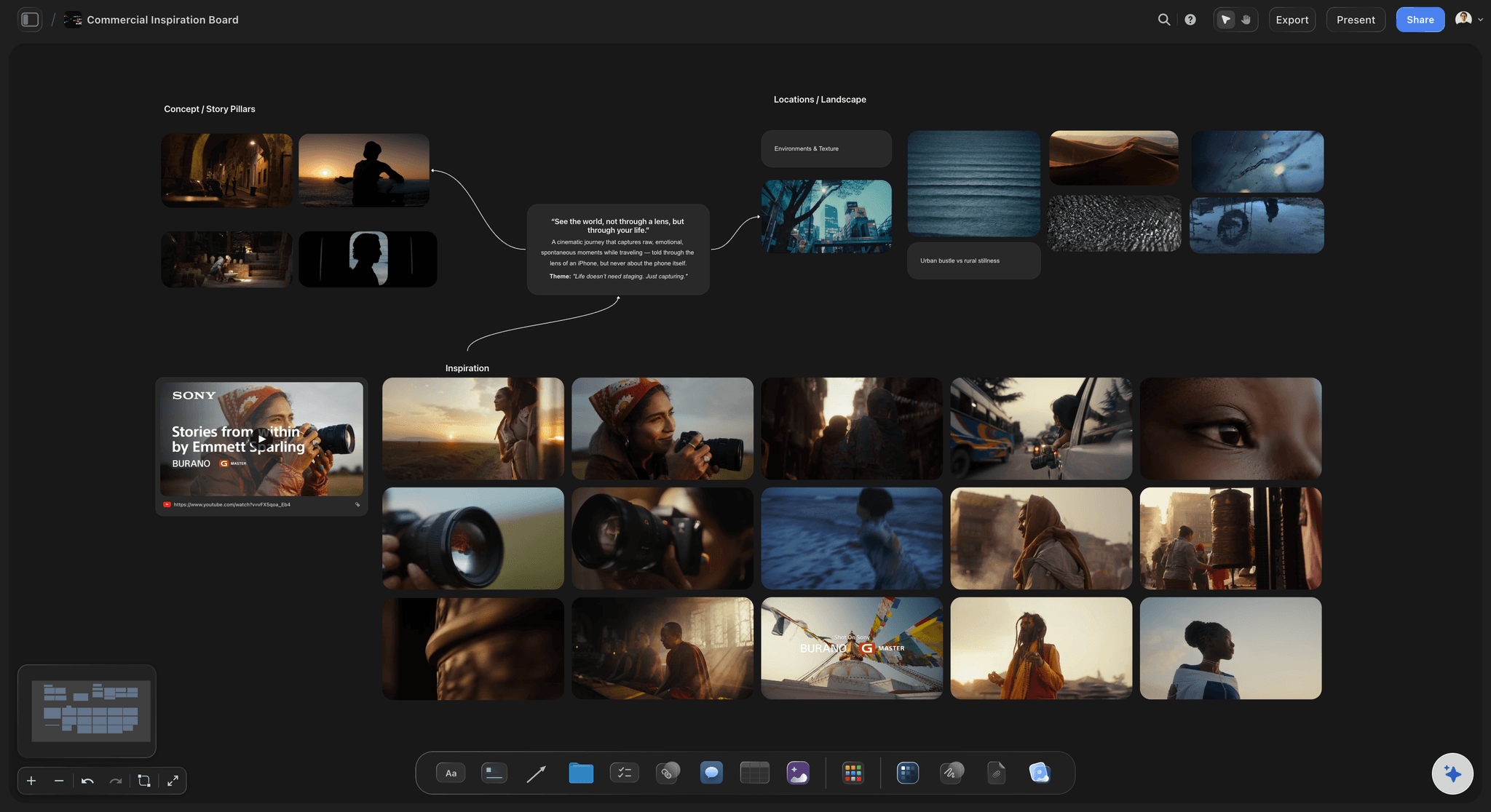
Collect film references, color palettes, lighting, locations, and tone in one place, then invite your crew.
What is an inspiration board, and why does it keep failing?
An inspiration board is an ongoing personal collection of things that struck you, kept in one visual place so you can return to it for years. It is not built for a brief and it does not get archived when a job ships. That is the whole distinction: a project moodboard has a client, a deadline, and an end, while an inspiration board has none of those and simply accumulates. The board is where a photograph you saved in March, a paragraph you copied in June, and a colour combination you noticed in November end up sitting near enough to each other that you eventually notice they are the same idea.
The failure is almost never collecting. Collecting is effortless and getting easier every year. You save the post, screenshot the frame, bookmark the article, pin the image, and drop the file into refs. The failure is retrieval. Six months later you know you saved something about that specific kind of soft window light, but you cannot remember whether it was Instagram, Pinterest, a screenshot, or a link, and searching four products for a picture you can only describe in adjectives is slower than finding a new one. So you find a new one. The archive grows, and the archive is never used, and the two facts are causally connected.
Underneath that is a retrieval problem you can actually name. A save with no context is nearly worthless, because in six months you will have completely forgotten what caught your eye: was it the composition, the palette, the typography, the way the sentence turned, or just the mood at the time you saw it. A folder structure committed to on day one is wrong by month three, because the themes in your own taste are not visible until enough material exists to reveal them. And a collection you never revisit produces no connections, because connections between unrelated saves only appear when two of them are in front of you at once. Capture is frictionless, and every other part of the loop is not.
An inspiration board that actually gets used runs on six habits: write a one-line why beside each save while the reason is still fresh, keep groups loose and provisional so a theme can be renamed or split as it emerges rather than being imposed up front, put everything on one surface instead of five apps so retrieval has a single address, revisit on a rhythm rather than only when a job forces it, prune the saves you no longer stand behind so the board keeps its signal, and let clusters form from the material by dragging related things together until a name for the group becomes obvious.
HOW IT WORKS
Keep it, say why, and go back through it.
The loop is four steps, and the third and fourth are the ones people skip.
01
Open one canvas and keep it open
Sign up in seconds, from $9.99 a month. One infinite canvas becomes the address for everything you collect, so retrieval has a single place to happen instead of four.
02
Drop in whatever struck you
Drag images from your desktop, paste screenshots, drop in links, PDFs and documents, and grab a frame from a YouTube or Vimeo video. It all sits on the same surface rather than in separate silos.
03
Write the one line of why
Beside the save, write what caught you. The palette. The way the second paragraph turns. The lighting, not the styling. That sentence is the thing you will have forgotten in six months, and it is what makes the save findable later.
04
Revisit, group, and let themes appear
Every few weeks, wander the board and drag related things together. Groups get names once they earn them. This is the step where the connections between unrelated saves finally show up, and it is the entire point.
Built for the collection you keep, not the board you deliver.
A project moodboard is finished when the job ships. This one is never finished, and that changes what it needs.

The sentence you will have forgotten
A note beside every save
Write why you kept it while the reason is still in your head. Six months later, a picture with no note is a picture, and a picture with one line of why is a usable reference you can actually search your memory for.
See the moodboard maker →
No folder structure to commit to
Groups that form from the material
An infinite canvas has no hierarchy you must choose on day one. Drag related saves near each other, and name a cluster only once it clearly is one. Themes emerge from what you collected rather than being imposed on it in advance.
See the infinite canvas →
Images, links, notes, PDFs, video frames
One surface instead of five apps
Retrieval fails mostly because the collection is scattered. Put the screenshot, the article, the quote, the PDF and the frame you pulled from a video on the same canvas, and there is one place to look instead of four guesses.
See the second brain →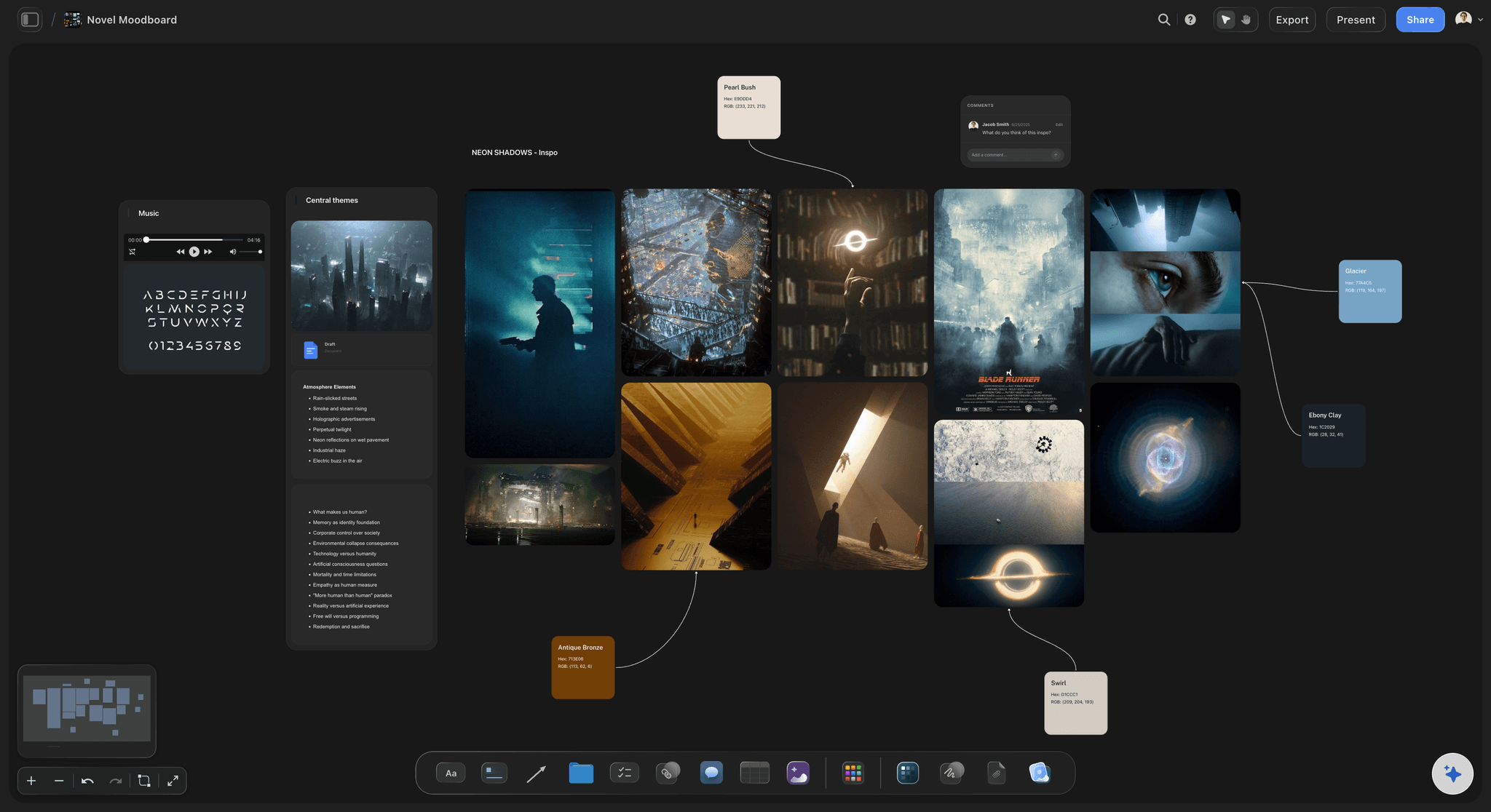
Surfacing what is already there
AI that reads the board you built
Ask what you have collected about a subject, or to cluster a loose region into candidate themes. The answer is drawn from your own board rather than a recommendation feed, so it points at things you already decided were worth keeping.
See the AI second brain →Unlimited boards. No object cap. Yours for years.
Be straight about the tradeoff: Pinterest and Are.na both have free tiers and Storyflow does not. Storyflow is paid-only during early access, with plans from $9.99 a month, and a Free plan launches before the end of 2026. Anyone a paid member invites to a board joins free today, so a collaborator costs nothing.
Unlimited private inspiration boards on an infinite canvas
Notes and annotations beside every image, link and file
Images, links, PDFs, documents and video frames on one surface
Basic AI usage to surface and cluster what you have collected
BUILT FOR THE LONG COLLECTION
The parts of the loop that are not capture.
Saving is solved everywhere. Context, structure, revisiting and honesty about what we do not do are the rest of it.
Context, written once, useful for years
Why you saved it, kept beside the thing
One line is enough: You do not need a taxonomy. A single sentence saying what caught you turns an anonymous image into something you can find by remembering the reason instead of the picture.
Point at the part that matters: Crop and mark up a save so the note is unmistakable. The falloff on the left of the face, the third column of the layout, the second sentence of the paragraph.
Keep the source with it: Drop the link beside the image so you can get back to where it came from, credit it, or read the rest of it later.
Notes are searchable text: A collection of pictures cannot be searched by meaning. A collection of pictures with sentences beside them can, which is the practical reason the note habit pays off.
Loose structure that can change its mind
Let the themes emerge instead of guessing them
No folders to commit to: On a canvas, structure is spatial and provisional. Move things, split a cluster, merge two, rename a group. Nothing has to be filed correctly the moment it arrives.
One thing can sit near two ideas: Real references belong to more than one theme. Spatial grouping tolerates that in a way a single-parent folder tree never has.
Name a group only once it earns it: A pile of nine related saves tells you what the theme is. Guessing the theme first and then hunting for things to put in it produces categories you never open.
Revisiting is where the value actually is
A board you go back through on a rhythm
Zoom out and see the whole thing: A feed shows you the last twenty things. A canvas shows you two years at once when you zoom out, which is the view in which unrelated saves start rhyming with each other.
Prune as you go: Delete what you no longer stand behind. A collection that only grows loses signal. Half an hour of pruning is worth more than another hundred saves.
Pull from it into real work: When a brief lands, copy the relevant saves onto a project moodboard and build the deliverable there. The inspiration board stays intact and keeps accumulating.
Ask the board what is in it: AI reads the canvas you built, so you can ask what you have collected on a subject or have a loose region clustered into candidate themes.
The honest limits
What Storyflow does not do for collecting
No browser extension: There is no one-click save button in your browser toolbar. You drag, paste, or drop things in. Pinterest and Raindrop have proper web clippers and we do not, which matters if capture speed is your bottleneck.
No mobile capture app: There is no dedicated phone app for saving something the moment you see it. If most of what you collect arrives on a phone, that is a real friction point worth knowing before you start.
No discovery or recommendation feed: Nothing here shows you new things. Storyflow only holds what you deliberately put on the board. For finding material, Pinterest is unmatched and Are.na's community browsing is excellent.
Explore templates for your project
Every template opens as a real, editable board on the infinite canvas. Pick the closest fit and make it your own.
Film Moodboard
Collect film references, color palettes, lighting, locations, and tone in one place, then invite your crew.
HOW WE COMPARE
Storyflow vs Pinterest, Are.na, and Milanote.
Three genuinely good tools, each strong somewhere we are not. Discovery and web clipping are not close, so we are not going to pretend they are.
Storyflow
Recommended
Discovery feed or community browsing
Browser extension for one-click web saving
Free to use today
Notes and context written beside every save
AI that reads your whole board as context
Board, notes, and project work on one canvas
Discovery feed or community browsing
Browser extension for one-click web saving
Free to use today
Notes and context written beside every save
AI that reads your whole board as context
Board, notes, and project work on one canvas
Are.na
Discovery feed or community browsing
Browser extension for one-click web saving
Free to use today
Notes and context written beside every save
AI that reads your whole board as context
Board, notes, and project work on one canvas
Milanote
Discovery feed or community browsing
Browser extension for one-click web saving
Free to use today
Notes and context written beside every save
AI that reads your whole board as context
Board, notes, and project work on one canvas
What creators are saying
Join early creators getting structured workspaces and AI that remembers their projects
“Storyflow has sped up my workflow by at least 3x, which means more flow state and more projects I can actually ship. It truly changed the way me and my team create.”

Reilin Joey
Director & YouTuber
“One prompt gets me a structured board. But the tactics are my favorite. I run my YouTube scripts through them and my intros and retention got better. It's amazing.”

Justkay
YouTuber & Freelance Filmmaker
“I used to juggle five apps to plan a project. Now I describe what I am making and get boards, lists, and a schedule. All in one place.”

George
@fernwehchronicles
Inspiration board questions, answered honestly.
Including the ones where another tool is the better answer.
An inspiration board is an ongoing personal collection of things that struck you, kept in one visual place so you can come back to it for years. Images, links, notes, screenshots, quotes, PDFs and video frames all live on the same surface. Unlike a project board, it has no brief, no deadline and no end, so it is never finished and never archived. It exists to be revisited, which is also the part most people skip, and the reason most collections quietly become storage nobody opens.
Start keeping the things you find.
Open one canvas, drop in what struck you, write the line of why, and go back through it in a month. Plans from $9.99/month, nothing to install, and a Free plan is coming before the end of 2026.