How to Plan a Documentary with AI: A Step-by-Step Guide (2026)
Planning a documentary without a system means losing months to scattered research and a story that never comes together. Here's how to use AI and Storyflow Tactics as your research partner and structural collaborator, while staying in creative control.

Category
Video Production & Filmmaking
Author

Sara de Klein
Head of Product at Storyflow
Topics
February 27, 2026
•
22 min read
•
Video Production & Filmmaking- how to plan a documentary
- documentary planning AI
- AI for filmmakers
- Storyflow Tactics
- documentary structure
How do you plan a documentary with AI?
Plan a documentary with AI in 9 steps: define your core question, build a research map, identify characters, choose your narrative structure, outline your story arc in acts, prepare interview questions, create your shot list, build your production schedule, and write your treatment. Use Storyflow's visual canvas to keep all research, characters, and outline in one workspace so your AI sees everything at once, and activate storytelling Tactics to get framework-guided prompts for each structural decision.

To plan a documentary with AI, you organize research, structure, characters, interviews, and shots into one workspace your AI can read, then let it synthesize and stress-test while you make every creative decision. Planning without a system is what loses months to scattered research, abandoned outlines, and a story that never comes together.
I have run real documentary projects through this exact sequence, from a folder of research to a shootable plan, and the steps below are the ones that survived contact with actual production. By the end of this guide, you'll have a production-ready documentary plan you can hand to a crew or start shooting yourself.
The Problem with Documentary Planning
You've got a subject you care about, twenty browser tabs of research, a Notes app full of half-formed ideas, and a Google Doc outline that's been rewritten four times. The research keeps growing but the story keeps shifting.
Most documentary planning falls apart because the tools are disconnected. Your research lives in one place, your outline in another, your interview questions in a third. The structure never sticks because you can't see the whole story at once.
The Scattered Research Problem
Twenty browser tabs, a Notes app, three Google Docs, and a Dropbox folder of PDFs. None of it talks to the rest. Every time you ask AI for help, you're starting the context from scratch, and getting generic advice.
The Shifting Structure Problem
You write an outline. Research changes it. A new character emerges. The outline doesn't match the research anymore. You're managing coherence across disconnected documents instead of thinking about story.
The Framework Gap
Professional documentary frameworks, three-act structure, essay form, observational, exist as knowledge in books, not as tools you work inside. Without embedded guidance, structure decisions feel arbitrary.
The Interview Trap
Interview questions written in isolation from the outline produce hours of footage that doesn't fit anywhere in the edit. Questions need to be written with the story arc open beside them, or you'll spend weeks in the editing room wondering what you were thinking.
What You Need Before You Start
- A subject or theme. You don't need a finished thesis, a question you want to answer is enough to begin.
- Initial research material. At least 3-5 sources, articles, existing documentaries, or personal notes, as a starting point.
- An AI tool. ChatGPT, Claude, or another conversational AI for research synthesis and brainstorming.
- A visual workspace where your AI can see everything at once. Your research, your outline, your references, all on one board. Storyflow's free tier works for this entire guide.
How Storyflow Tactics Work (And Why They Matter for Documentaries)
Before walking through the 9 steps, it's worth understanding what Storyflow Tactics actually are, because they're referenced throughout this guide and they change how every step works.
Tactics are pre-built Blueprint frameworks, structured sets of Cards that walk you through professional storytelling decisions, one prompt at a time. Each Card has a specific goal, explains why it matters, gives examples, and asks you the questions that produce good answers. They're not templates you fill in. They're methodology you work through.
Example: How the "Relatable Intro" Tactic Applies to Documentary Openings
This Tactic is designed for travel documentaries but illustrates exactly how any Storyflow Blueprint works. It has 11 Cards, each building on the last. Here's how a documentary filmmaker would use it:
Relatable Opening Question
Instead of starting with exposition, open with the emotional question at the heart of your documentary. "Have you ever felt the pull of a place you've never been?" applies to travel docs. For a water rights documentary, it becomes: "Have you ever turned on your tap without thinking about where that water comes from?" The Card prompts you to find the universal emotion, not just the topic.
"But Then", The Turning Point
After establishing the emotional hook, this Card prompts you to introduce the disruption that makes your documentary necessary. "But then the aquifer started running dry." It forces you to identify the moment where things shifted, which is usually also the answer to why this story needs to be told now.
Unique Facts About the World
This Card guides you to surface the most surprising, least-known detail about your subject, delivered with visual support. For documentary, this becomes the anchor fact that makes audiences feel they're learning something no one told them before.
Introduce the Location or World
Ground your audience in the world. The Card prompts you to think about: first impressions, sensory details, visual impact, cultural touchpoints. This is your establishing sequence, but the Card makes sure you're establishing the world of the story, not just a location.
Teasing Characters and Moments
Three Cards that walk you through teasing encounters, surprising moments, and cinematic shots without revealing too much. For documentary, this is your trailer structure, the promises your opening makes to audiences about what they'll see if they keep watching.
Trajectory of the Story
A brief, visual overview of where the documentary goes. The Card prompts you to show the journey, geographically, temporally, or structurally, without revealing the destination. This is the map that makes audiences trust there's a real journey ahead.
Card 11, Final Suspense
The Cliffhanger: End the opening sequence on an unresolved tension that makes stopping impossible. The Card prompts: "What moment in your story leaves the most questions unanswered? End there." For documentary planning, this gives you the exact frame where your Act 1 transitions into Act 2, and your audience commits to the full film.
What makes Tactics different from a checklist: the AI reads the full board you are working on, not just the prompt you typed. Storyflow's AI reads everything on your active canvas by default, plus up to 1 Tactic and up to 3 Documents you @-mention in the chat. So once Card 1 (your relatable opening question) and Card 4 (your world introduction) are on the board, asking "What should my Act 1 cliffhanger be?" gets an answer anchored to your specific story, not a generic formula. The workspace context is the difference.
Where Storyflow loses: it reads your active board, not your entire archive at once. If your documentary spans dozens of boards and you want the AI to reason across all of them in a single query, a document-database tool with whole-workspace retrieval will do that part better. Storyflow's strength is keeping one project's thinking in view; it is not a search engine over years of notes.
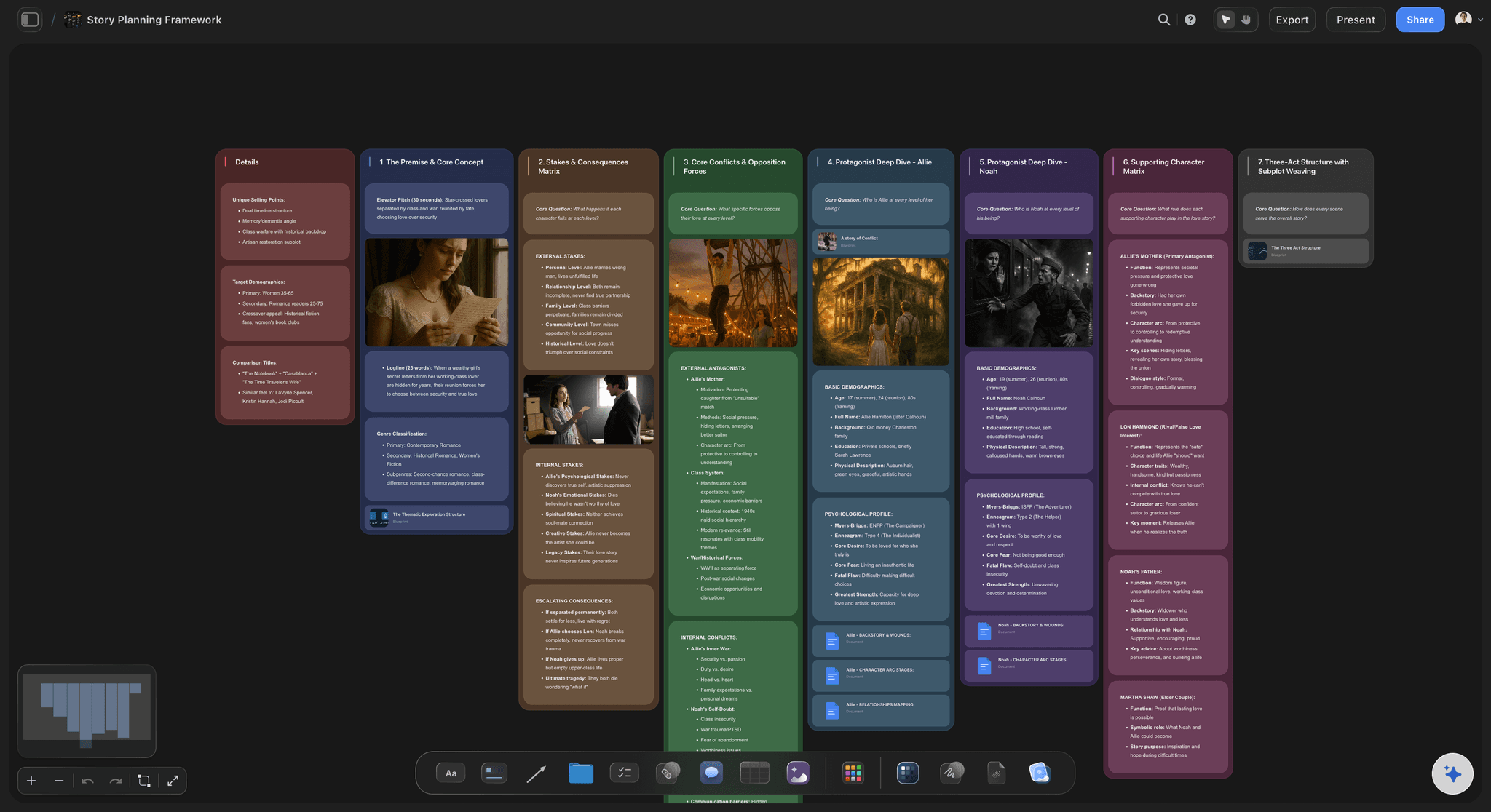
The Step-by-Step Process: How to Plan a Documentary with AI in 2026
9 steps from subject to production-ready plan
Step 1: Define Your Documentary's Core Question
Every documentary worth watching is organized around a single question the filmmaker is trying to answer, not a topic, but a genuine tension. Write down what drew you to this subject. A documentary about urban farming isn't interesting. A documentary asking "Can a city feed itself?" gives you a story with stakes.
Feed your initial notes to AI and ask: "What's the most compelling unanswered question here?" Pick the option that makes you want to pick up a camera.
Your output:
A single-sentence core question and a one-paragraph concept statement.
How the Storyflow Tactic Helps Here
Place your core question as a Card at the center of your board. Then activate the Relatable Intro Tactic, Card 1 asks you: "What universal emotion does your story evoke? What question connects that emotion to your audience's own experiences?" This forces precision. "Urban farming" becomes "the universal anxiety about where food really comes from." That's your opening hook and your core question, simultaneously.
Storyflow's AI reads this card when you ask for help later, so every suggestion stays anchored to your actual story. You're not re-explaining context every time you open a new chat window.
Common mistake
Starting with a topic instead of a question. "Homelessness in Portland" isn't a plan, it's a Wikipedia article waiting to happen.
Step 2: Build a Research Map with AI
This step turns scattered reading into organized intelligence, a visual map of what you know and what you still need to find out. Feed your sources to AI in batches. For each, ask: "What are the three most important facts, and what questions does this raise?"
Organize results into categories: confirmed facts, conflicting claims, open questions, and potential characters. For a documentary about water rights, your map might include "Legal history," "Affected communities," "Key players," and "Unresolved disputes." The fastest way to set this up is the Documentary Research template, which opens the board with source, subject, and open-question clusters already structured for the AI to read.
Your output:
A visual research map with 4-6 category clusters, each containing what you know and what you're still missing.
How the Storyflow Tactic Helps Here
Create Cards for each research finding, arranged visually by category on your board. The Relatable Intro Tactic's Card 3, "Unique Facts About the Location/Subject", prompts you to surface the most surprising detail in each category. Apply this Card to every research cluster: "What's the most unexpected thing in my 'Affected communities' pile?" This filters useful research from noise faster than reading everything twice.
Because your entire research map lives on the board, you can ask Storyflow's AI "What gaps do I have?" and it identifies missing areas based on everything visible, not just whatever you copied into a chat window.
Common mistake
Researching without structure. Unorganized research feels productive but creates a pile you'll never use.
Step 3: Identify Your Characters and Access
From your research map, pull out every person or community connected to your core question. For each, note: their relationship to the question, what they stand to gain or lose, and whether you can physically reach them. Use AI to find public interviews, quotes, or coverage of potential subjects, reconnaissance that helps you prioritize outreach.
Your output:
A character list with 8-12 potential subjects ranked by relevance and accessibility.
How the Storyflow Tactic Helps Here
Create a Card per character with details on the front and access notes on the back. Then apply the Relatable Intro Tactic's Card 6, "Tease What You Encountered and Who You Encountered", to each character Card. The Card asks: "What was the most impactful encounter or connection this person represents? What emotion or insight could they give your audience?"
Arranging character Cards near their related research clusters reveals which subjects bridge multiple themes, usually your strongest interview subjects. The ones who keep ending up near multiple category clusters belong near the center of your story.
Common mistake
Falling in love with a character you can't access. Rank by both relevance and practical reachability.
Put your documentary plan on one board
You have a core question, a research map, and a character list. Move them onto one AI canvas now, and every remaining step (structure, interviews, shots, schedule) builds on context the AI can already see.

Step 4: Choose Your Documentary Structure
This step takes 15-20 minutes but prevents weeks of aimless editing later. Common structures: chronological, essay, observational, participatory, and hybrids. Your core question usually suggests the right one, a historical event leans chronological, a systemic problem leans essay.
Ask your AI: "Given this core question and these characters, which documentary structure creates the most narrative tension?" The reasoning matters more than the answer, it surfaces considerations you haven't thought about.
| Structure | Best for | Risk |
|---|---|---|
| Chronological | Historical events with clear cause-and-effect | Can feel like a recap, not a story |
| Essay / Argument | Systemic issues, ideas with a thesis | Can feel didactic without strong characters |
| Observational | Communities, institutions, slow-burning change | Requires extraordinary access and patience |
| Participatory | Stories where the filmmaker's presence matters | Easy to make the filmmaker more interesting than the subject |
| Hybrid | Most complex real-world subjects | Requires strong editorial judgment to hold together |
How the Storyflow Tactic Helps Here
Storyflow's Tactics include narrative structure frameworks for documentary formats. Activate a storytelling Blueprint, such as the Story Arc Structure or Document Your Journey Tactic, and the AI walks you through structural decisions with prompts specific to your format choice.
The Tactic framework also acts as a decision audit. After choosing your structure, Card 8 from the Relatable Intro Blueprint, "Explain the Trajectory You Followed", prompts you to articulate how the structure will guide your audience from beginning to end. If you can't describe the journey simply, the structure isn't clear enough yet.
Common mistake
Jumping to "scenes I want to shoot" without a framework. Beautiful footage that doesn't build toward anything.
Step 5: Outline Your Story Arc in Acts
For a three-act documentary: Act 1 establishes the world and question (first 15-25%). Act 2 deepens complexity with conflicting perspectives and surprises (middle 50-60%). Act 3 reaches a climax and resolves, or deliberately leaves unresolved, the core question (final 20-25%).
Under each act, list 3-5 sequences. For a water rights film, Act 1 might include: "The river today," "Meet the farmer," and "The law that started it all." Ask AI to review: "Does every sequence connect back to the core question?" Creators who outline in advance spend the edit assembling a story they already know instead of searching for one in the footage.
How the Storyflow Tactic Helps Here
Use Blueprints to set up your act structure visually on the canvas. Each act becomes a section; each sequence becomes a Card. Then apply the Relatable Intro Tactic Cards progressively across your acts:
- Act 1 Cards: Card 1 (Relatable Opening Question), Card 4 (Introduce the World), Card 2 ("But Then" turning point)
- Act 2 Cards: Card 5 (Tease Unique and Extreme Facts), Card 6 (Encounter teases), Card 7 (First vlog/sequence moment tease), Card 8 (Trajectory overview)
- Act 3 Cards: Card 9 (Another key moment without revealing too much), Card 10 (Cinematic shots tease), Card 11 (Cliffhanger or final resolution)
When you move a sequence between acts, you immediately see whether the Card prompts still apply, which is a fast way to catch structural problems before you've shot anything.
Common mistake
Making all three acts the same weight. Act 2 should be longest, that's where audiences lean in or check out.
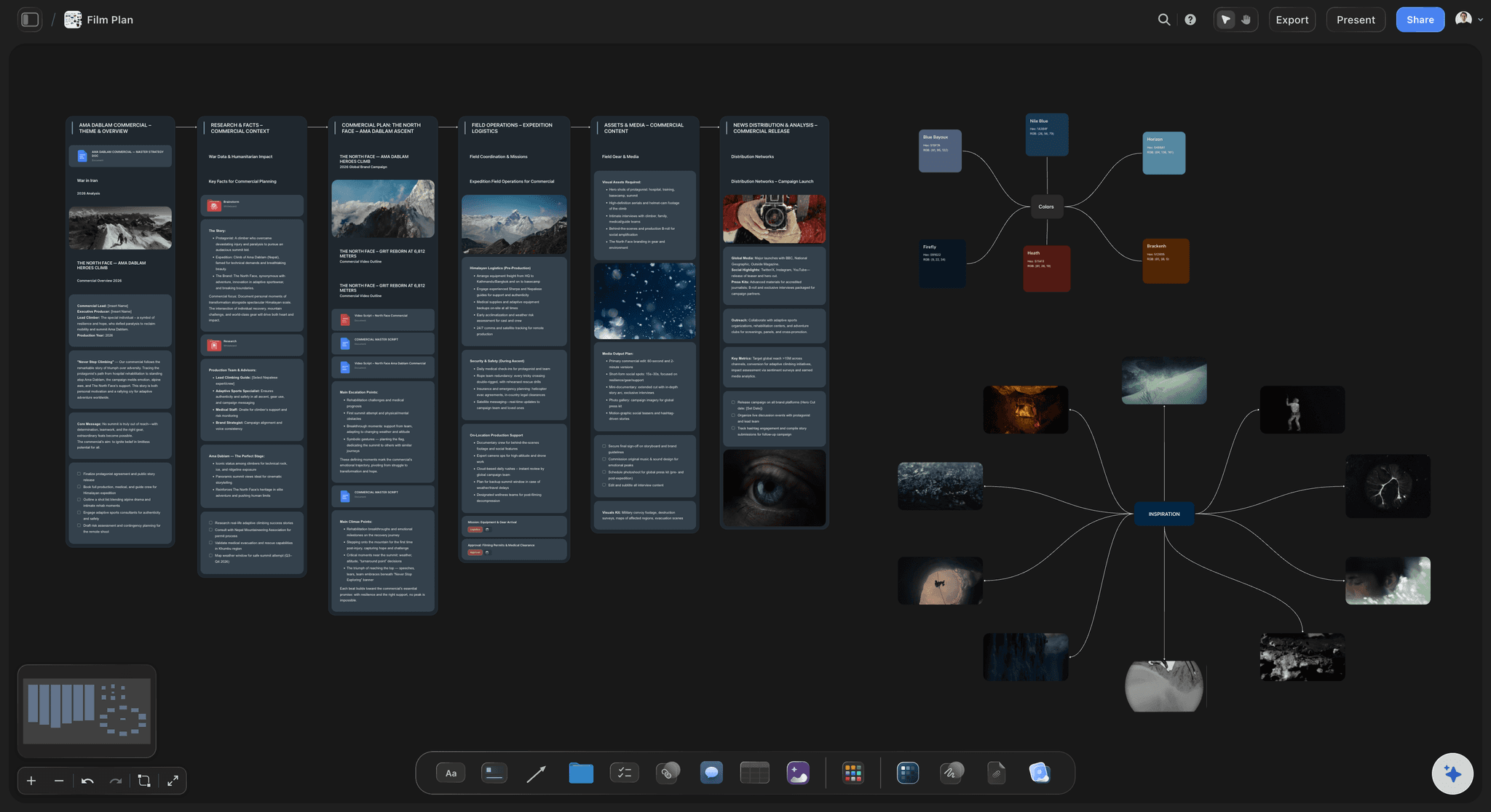
Step 6: Plan Your Interviews
For each subject, write three question types: factual (what happened), emotional (how did that feel), and challenge (what do critics say about your position). Feed AI the subject's background and your core question. Ask: "Generate 15 interview questions that would reveal this person's authentic perspective, including 3 they probably haven't been asked before."
Review critically, keep the genuinely curious questions, delete anything that sounds like a podcast host on autopilot.
Your output:
10-15 questions per subject, organized by type (factual / emotional / challenge).
How the Storyflow Tactic Helps Here
Create interview prep Cards adjacent to character Cards on your board. The Card 6, "Tease What You Encountered and Who You Encountered" framework directly maps to interview planning: "What was the most impactful encounter? What emotions or insights did you gain? How does this moment tie into the overall story?"
Apply these questions as interview prompts: you're not teasing the encounter to an audience yet, you're building the questions that will produce the encounter in the first place.
Storyflow's AI references both the subject's character Card and your story outline when refining questions, suggestions are targeted to what your documentary needs from this specific person, not a generic interview guide.
Common mistake
Too many factual questions, not enough emotional ones. Facts come from research. Interviews give you what only a human can: how it felt.
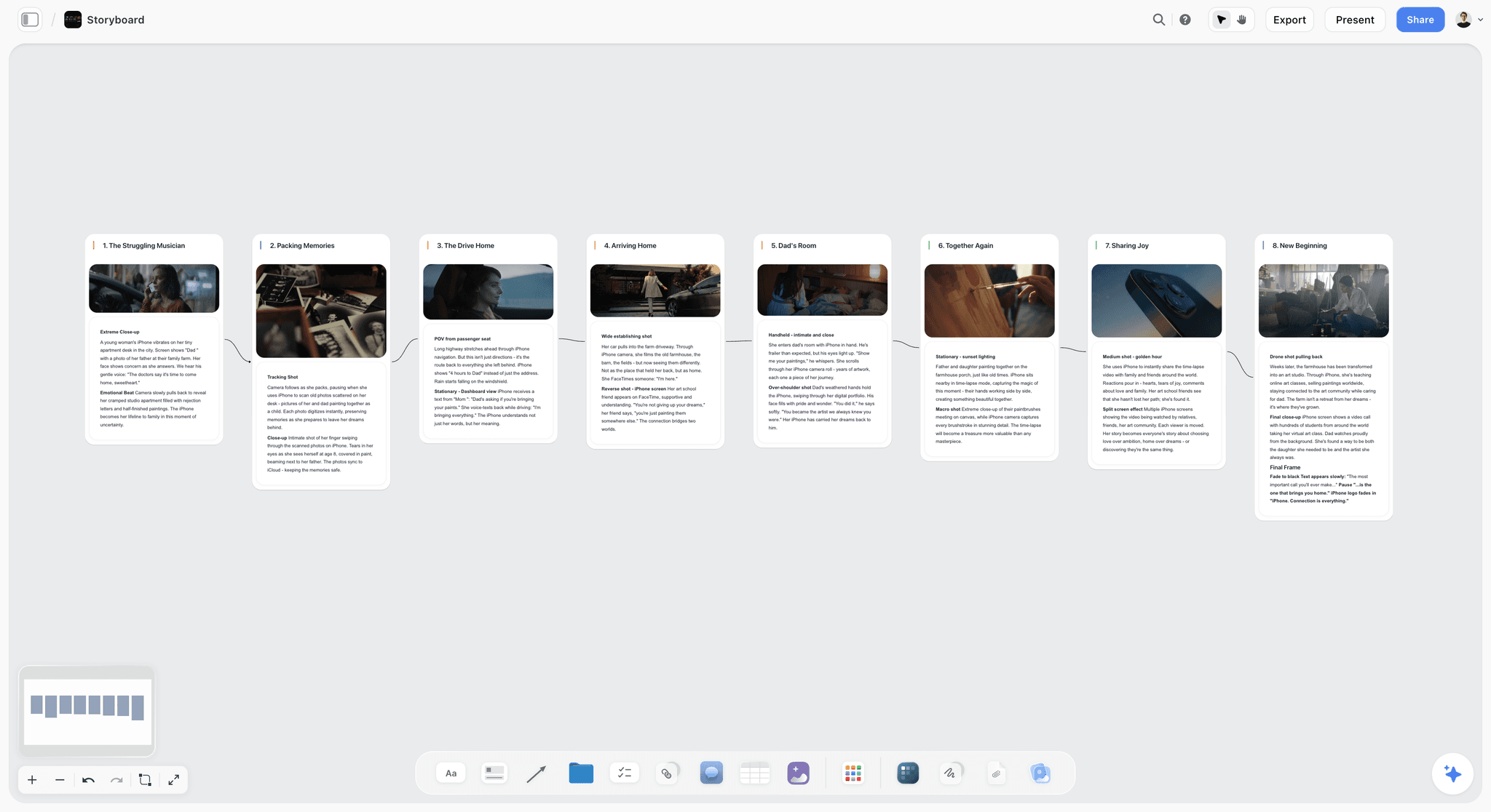
Planning documentary sequences visually in Storyflow, each interview and B-roll shot mapped spatially
Step 7: Create Your Shot List and Visual Plan
For each sequence, list shots needed: interviews (location, framing), B-roll (specific imagery supporting the narrative), archival material, and graphics. Ask AI to suggest visual metaphors for abstract concepts. This step takes 30-45 minutes and saves entire shoot days. Start from the Shotlist template so camera, lens, angle, and movement fields are already on the board instead of reinvented per shoot.
Example shot list for "Meet the farmer" (Act 1, Sequence 2)
- Wide: dry irrigation canal at dawn
- Medium: inspecting crops, tight on hands and soil texture
- Close-up: water meter reading
- Interview: kitchen, natural light, family photos visible in background
- B-roll: historical farm photos from 1980s for time contrast
How the Storyflow Tactic Helps Here
One Card per sequence, shot list on the front, logistics on the back. The Card 10, "Tease Cinematic Shots" framework is a direct shot planning tool: "What are the most visually stunning moments? How does the framing highlight their aesthetic appeal? What music or tone matches the mood of these visuals?"
Apply this Card to every sequence, not just the "beautiful" ones. Every sequence should have at least one image that could stand alone as a frame. If a sequence fails Card 10's test, it's either visually thin or narratively weak, either way, you need to rethink it before you're on location.
Your AI can reference the full outline to flag "What visual coverage am I missing for Act 2?" because every sequence Card is already on the same board.
Common mistake
Treating B-roll as an afterthought. B-roll gives audiences space to process what they've heard. Plan it with the same intentionality as interviews.
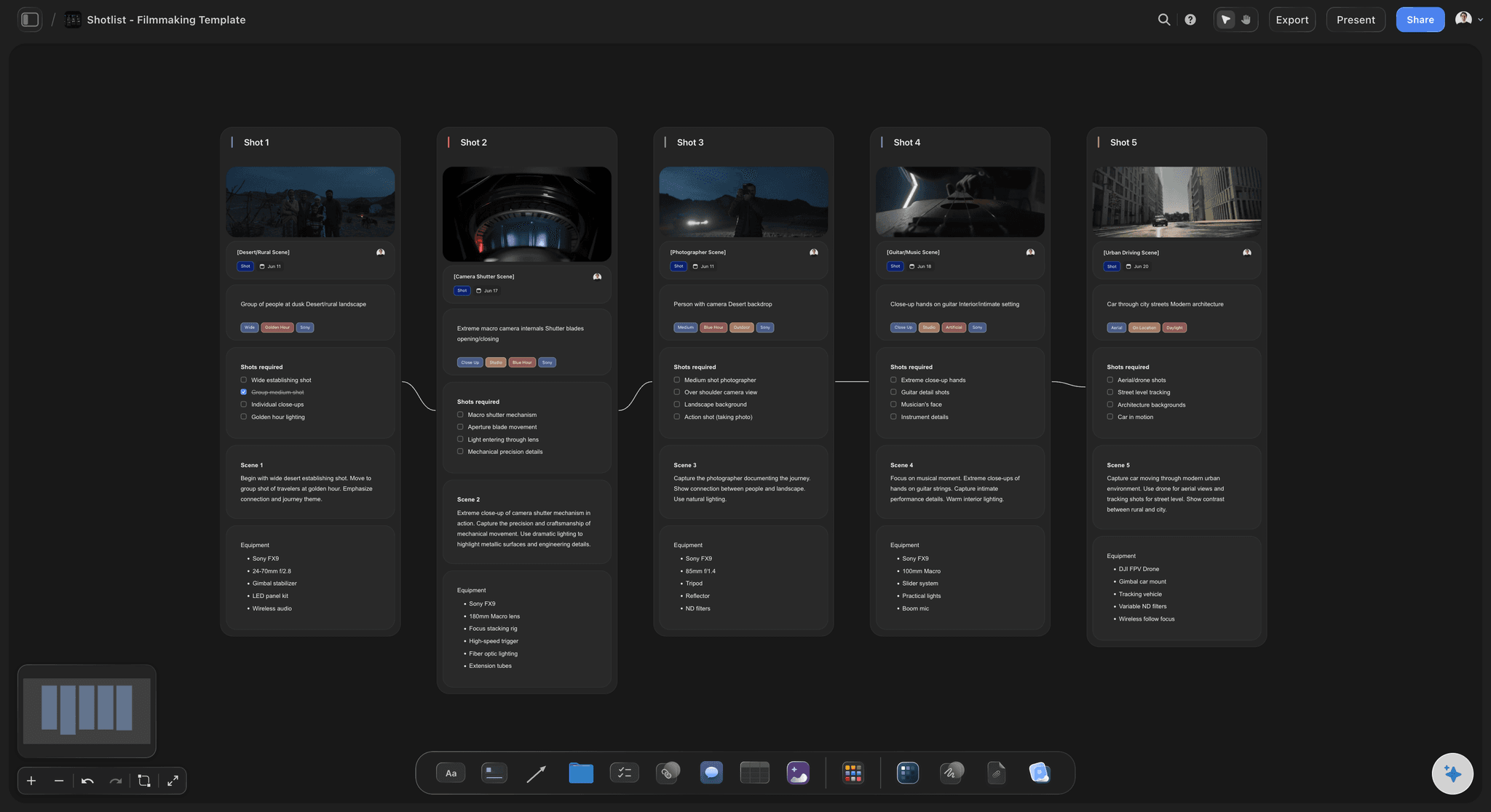
Turn your sequences into a shot list, faster.
You just mapped the shots each sequence needs. Generate a structured shot list from your scene descriptions with AI, then refine the framing and B-roll notes by hand on the canvas next to your research.
Step 8: Build Your Production Schedule
Group shoot days by location. Identify interview dependencies, sometimes Subject B only makes sense after you've talked to Subject A. Flag time-sensitive elements: events, seasons, deadlines. Feed AI your full plan and ask: "What's the most efficient shooting order? What are the risks if I can't access [location/person]?" The Pre-Production Board template holds the schedule, locations, cast and crew, and gear on one canvas beside the story plan.
Your output:
A week-by-week schedule with backup plans. Most people skip risk assessment, and it is the most common reason documentary projects stall in production.
How the Storyflow Tactic Helps Here
Apply the Card 8, "Explain the Trajectory You Followed" logic to your production schedule. The Card prompts: "Break your trip/project into key stops. Describe how you move between them. Hint at memorable experiences along the way." For scheduling, this becomes: "What are your must-shoot milestones? How do you move between them efficiently? What can you tease in your pitch or treatment about what happens at each stage?"
Because your full plan already lives on your Storyflow boards, you see the complete scope without flipping between documents when building the schedule. The AI can spot sequencing conflicts you'd miss reading a linear spreadsheet.
Common mistake
Scheduling interviews too close together. You need time between interviews to review footage and let the story evolve.
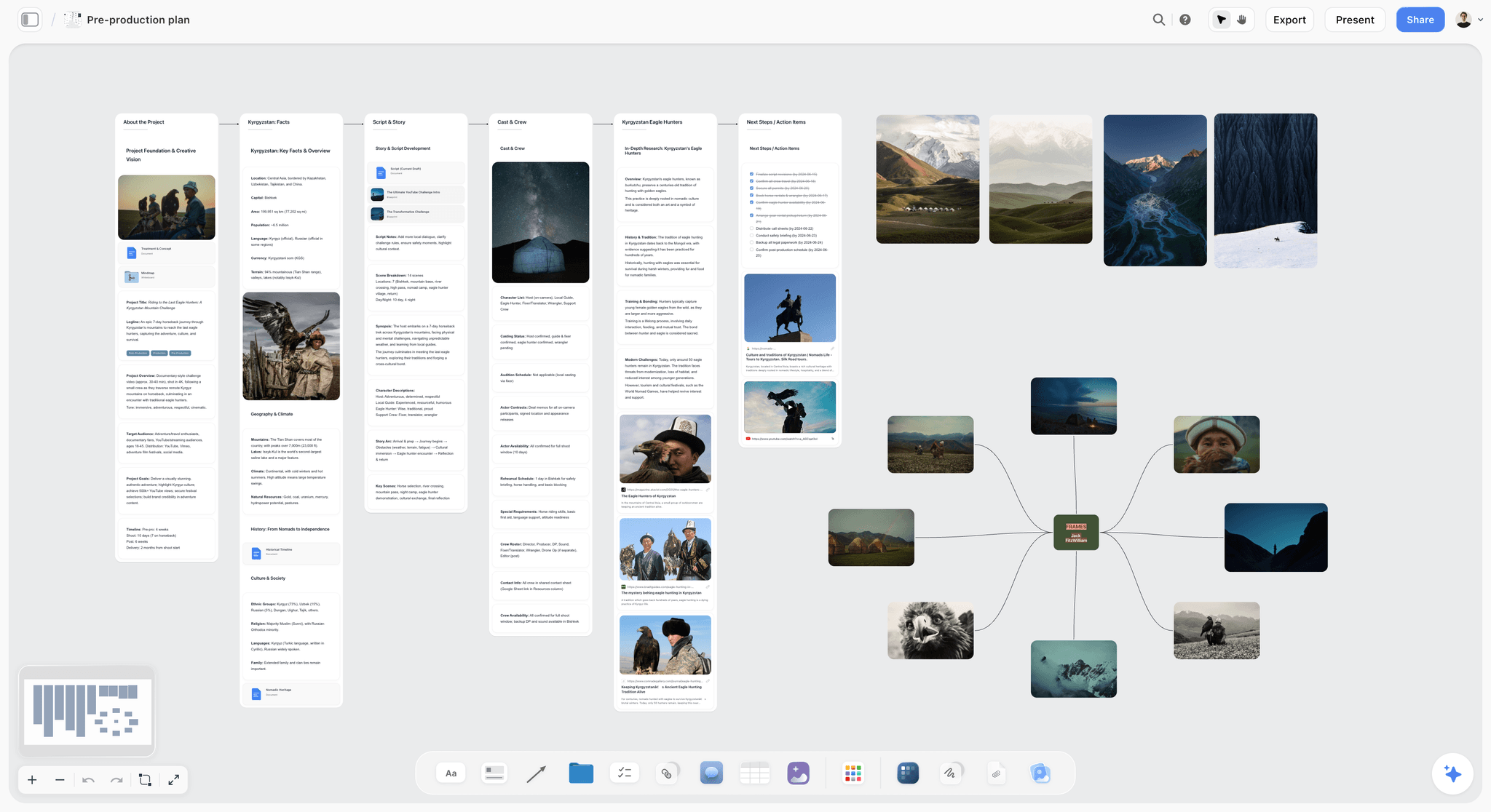
Building a production schedule in Storyflow, shoot days grouped by location with risk flags visible at a glance
Step 9: Write Your Treatment Document
The treatment communicates your vision to collaborators, funders, or future-you. It includes: core question (Step 1), structural approach (Step 4), narrative synopsis sequence by sequence (Step 5), character descriptions (Step 3), and visual approach (Step 7). It should read like a description of a film someone would want to watch.
Ask AI to draft the synopsis from your outline, then edit ruthlessly, 3-5 pages, tight and vivid. Documentarians who write a treatment before production walk into the edit knowing what the film is; the ones who skip it discover the film in the timeline, at day-rate prices.
How the Storyflow Tactic Helps Here
Your treatment's opening paragraph is a Relatable Intro in written form. Apply the full Blueprint Card sequence to draft it:
- Card 1: Open with the relatable question (emotional hook, not subject description)
- Card 2: The "but then", the disruption that made the story necessary
- Card 3: The unique fact that makes your subject irreplaceable
- Card 4: Introduce the world, sensory, vivid, specific
- Cards 5-9: Tease your major characters, encounters, and sequences without revealing outcomes
- Card 11: End the treatment with a cliffhanger, the unresolved tension that the documentary will answer
Every element already exists as Cards and boards in Storyflow. The AI pulls from your actual research and outline when drafting, you're synthesizing structured work, not starting from memory.
Common mistake
Writing a proposal instead of a story. Replace "This section will explore..." with "We open on a dry canal bed at dawn..."
Quick Reference: The 9-Step Process at a Glance
- Define your core question, find the tension, not the topic
- Build a research map, organize what you know and don't know
- Identify characters and access, rank by relevance and reachability
- Choose your structure, pick a framework before outlining scenes
- Outline your story arc, three acts with sequences under each
- Plan your interviews, factual, emotional, and challenge questions
- Create your shot list, plan visuals with the same rigor as interviews
- Build your production schedule, group by location, plan for risks
- Write your treatment, a document that makes readers see the film
Tips and Best Practices
Start with the ending you don't have
Documentary planning differs from fiction because you don't control the outcome. Plan around the question, not the answer. If you already know the conclusion, you're making an essay, not a documentary.
Let AI handle synthesis, not judgment
AI is strongest at organizing research and generating options. It's terrible at knowing what makes a good story. Use it for "What patterns exist in this research?" but decide for yourself which patterns matter.
Revisit your core question weekly
Core questions drift when you keep absorbing new information without checking it against your focus. Set a weekly 10-minute check: does every new element serve the question? If a piece of research doesn't connect to your question, it belongs in a parking lot Card, not your active board.
Use your workspace as a thinking tool, not a filing system
Arrange boards spatially, Act 1 on the left, Act 3 on the right, characters along the top. Moving Cards around forces you to think about relationships. When two characters keep ending up near each other, they usually belong in the same sequence. When a sequence feels isolated from everything else, question whether it belongs in the film at all.
Build your shot list alongside your outline, not after
Keeping both on the same workspace means you spot sequences that are story-heavy but visually thin. If a sequence has rich narrative but only one B-roll note, you haven't thought it through. The visual plan and the story plan should grow together.
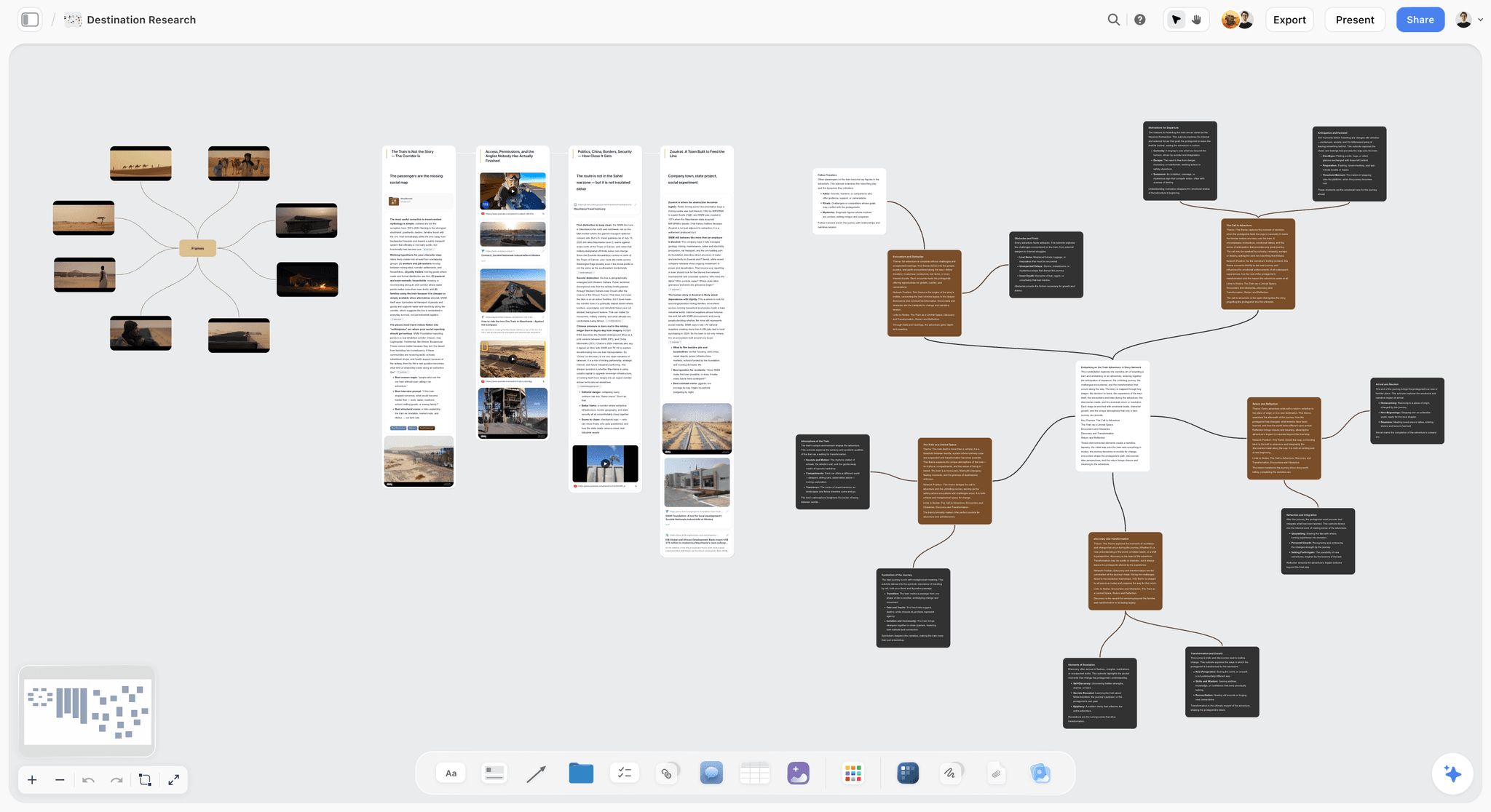
Keeping a documentary's research, sources, and open questions on one Storyflow board so the AI can see the whole project at once
Common Mistakes to Avoid
Researching endlessly without committing to a structure
Why it happens: Research feels productive and structural decisions feel risky.
Result: Six months of "pre-production" with no shootable plan.
Fix: Set a research deadline and commit to your structure by a specific date, even if research feels incomplete.
Treating AI output as a finished draft
Why it happens: AI-generated outlines look polished and professional.
Result: A plan that lacks your specific editorial perspective, the thing that makes your documentary different from anyone else's version of the same story.
Fix: Always treat AI output as a first draft that needs your voice and your deletions.
Planning alone when you need outside perspective
Why it happens: Documentary planning feels deeply personal.
Result: Blind spots, structural weaknesses, missing perspectives, unquestioned assumptions.
Fix: Share your Storyflow board with a collaborator at the outline stage. Fresh eyes on a visual workspace catch things a document reader misses.
Ignoring practical constraints until production
Why it happens: Creative work is more exciting than logistics.
Result: A beautiful plan you can't execute, subjects in three time zones, locations requiring permits you didn't apply for.
Fix: Build your production schedule before finalizing your outline.
Writing interview questions without referencing the story structure
Why it happens: Interview prep feels like a separate task from story planning.
Result: Hours of footage that doesn't fit anywhere in your edit.
Fix: Write every interview question with your outline visible beside it. In Storyflow, your interview prep Cards sit adjacent to your story Cards, the connection is spatial, not just intentional.
Frequently Asked Questions
Frequently Asked Questions
How long does it take to plan a documentary with AI?
A thorough documentary plan takes 2-4 weeks of part-time work, roughly 40-60 hours. AI compresses the research and synthesis work that used to eat most of that time. The creative decisions take the same amount of thinking, but you spend less time organizing and more time deciding.
Can I plan a documentary with AI if I've never made one before?
Yes. AI and structured Tactics frameworks help you access professional planning methods that previously required years of experience. Start with a short 10-20 minute film for your first project and use Storyflow's Tactics to guide each structural decision.
What is Storyflow Tactics and how does it help documentary planning?
Storyflow Tactics are structured Blueprint frameworks, sets of guided Cards, that walk you through professional storytelling decisions step by step. For documentary planning, Tactics like 'Relatable Intro,' 'Story Arc Structure,' and 'Document Your Journey' give your AI specific prompts tied to your actual project context on the canvas, so suggestions are never generic.
How is AI documentary planning different from the traditional approach?
Traditional planning relies on personal networks, manual research, and hard-won intuition. AI lets you synthesize larger research volumes faster, generate more interview angles, and stress-test structure before shooting. Storyflow adds visual spatial organization and embedded methodology, so the creative vision still comes from you, but the framework guides every structural decision.
What if my story changes during production?
It will change, that's normal. This method emphasizes a strong core question over a rigid outline. Your question is the anchor; sequences and structure can shift as long as the central question stays relevant. Update your Storyflow boards as you go so the AI stays current with the evolving story.
How much does it cost to plan a documentary with AI tools?
You can plan a documentary with AI for under $50/month. Storyflow's canvas and basic AI are free, and most general AI tools (ChatGPT, Claude) have free or low-cost research tiers. Storyflow's paid plans start at Plus ($7.99/month annual) for the Story blueprints library and increased AI usage. A well-planned documentary wastes far less money during shooting than an unplanned one.
Should I complete the entire plan before shooting anything?
Complete all 9 steps before principal photography, but shoot a proof of concept after Step 5. Film one interview to test your approach. Don't let planning stretch beyond 4 weeks, perfectionism in planning is procrastination wearing a professional hat.
Can AI help with documentary editing too?
AI assists with logging footage, transcripts, and identifying thematic patterns. But documentary editing, deciding what to include, cut, and sequence, requires human judgment. Use AI for organizational work in post-production and make every editorial decision yourself.
Start Your First Documentary Plan Today
The biggest obstacle isn't equipment, funding, or experience, it's the gap between caring about a subject and having a plan you can execute. Most aspiring documentarians stay in the "research and think about it" phase because turning curiosity into structure feels overwhelming.
Open Storyflow's free canvas and create your first board. Put your subject at the center as a Card and start Step 1: write the question that won't leave you alone. Activate a storytelling Tactic to have AI guide you through structural decisions with prompts built for narrative projects. Apply the Relatable Intro Blueprint to pressure-test your opening, if you can't answer Card 1's question in one sentence, your core question isn't clear enough yet.
Here is the one-week experiment: take the documentary idea you keep circling back to and run the 9 steps on a single Storyflow board. Within an hour you'll have a core question, a concept statement, and the start of a research map. By the end of the week you'll have all 9 steps done and a treatment ready to show collaborators or funders. If the plan still feels thin by Friday, the problem was never the tool, it was that the core question needed more pressure.
The documentary only you can make starts with the question only you are asking. A Storyflow plan, with framework-guided Tactics walking every structural decision, turns that question into something a camera can capture.
Related Reading
A detailed comparison of visual thinking tools, including how each handles AI integration and creative workflows.
10 great hooks for better scripts for writers, content creators, and filmmakers, techniques for opening your documentary in the first 30 seconds.
How to apply the Hero's Journey and other narrative frameworks to video content, directly relevant to documentary story structure.
Why visual thinkers are moving from document-based tools toward spatial workspaces, and what that means for documentary planning.
Table of Contents
- The Problem with Documentary Planning
- What You Need Before You Start
- How Storyflow Tactics Work
- Step 1: Define Your Core Question
- Step 2: Build a Research Map
- Step 3: Identify Characters and Access
- Step 4: Choose Your Structure
- Step 5: Outline Your Story Arc
- Step 6: Plan Your Interviews
- Step 7: Create Your Shot List
- Step 8: Build Your Production Schedule
- Step 9: Write Your Treatment
- Tips and Best Practices
- Common Mistakes to Avoid
- FAQ
Templates to check out for this topic


Filmmaking templates you can use in Storyflow
Skip the blank canvas. Open one of these filmmaking boards in Storyflow and the AI builds on the structure that is already there, from research through the shot list.


See Storyflow in Action
A visual AI workspace where every feature lives inside one canvas. No tab-switching, no context lost.
Build your entire board from a single message
Type what you need in the AI chat at the bottom of your canvas. The AI adds cards, headings, and structure directly onto your board.
Use expert frameworks as AI context
Type @ in the AI chat and choose any Tactic. The AI tailors every response to that framework instead of giving generic advice.
Turn your board into a mind map in seconds
Ask the AI to restructure your canvas as a mindmap. It connects your ideas into a visual hierarchy so you can see how everything relates.
Why Storyflow Exists
Storyflow actually began as a personal tool while working on creative and research projects.
We kept running into the same problem: ideas were scattered everywhere: notes, documents, and whiteboards.
Nothing helped us see how everything connected.
So we started building a workspace designed around how ideas actually grow.
→ Read how Storyflow was createdSara de Klein
Head of Product at Storyflow
Published: February 27, 2026
Extremely simple, seriously capable


See how easy it is to get started
Watch a real project come together, from a blank board to a finished plan, clicked through step by step.
Start creating with AI and become more productive
Transform your creative workflow with AI-powered tools. Generate ideas, create content, and boost your productivity in minutes instead of hours.