ChatGPT Prompts for Agencies (2026): 36 Prompts for Client Work
36 copyable ChatGPT prompts for agency work, grouped by stage: pitches, brief intake, research, routes, decks, client updates, feedback rounds and retros, each with the output it gives and the board it builds.

Category
Creative Agencies
Author

Storyflow Team
Product & Research Team
Topics
2026-10-28
•
30 min read
•
Creative Agencies- ChatGPT prompts
- agencies
- creative brief
- client deck
- status update
- Storyflow plugin
What are the best ChatGPT prompts for agencies?
The ChatGPT prompts that work for agencies are written for one stage of a client job (brief, routes, deck, status update, retro) and, with the Storyflow plugin, end by putting the result on the client's Storyflow board instead of in the chat. Storyflow is an AI visual workspace that turns those prompts into briefs, routes, decks and status boards on one infinite canvas. Use a ChatGPT project for one-off emails, Pitch for decks in your house template, and Productive for hours and budgets.

Full disclosure: Storyflow is our product. It is listed first because these prompts are written to end on a client board, and Storyflow is where that board lives. Many of the 36 prompts work in plain ChatGPT, and the post says which. Through the plugin, ChatGPT cannot read board comments, and Storyflow has no proposals, invoices or time tracking.
How the tools for running agency prompts in ChatGPT compare on trust, innovation, ratings and pricing
Which tools for running agency prompts in ChatGPT are the most trusted?
ChatGPT projects are the safest starting point, because they are part of ChatGPT itself and keep each client's instructions and files apart. Pitch and Productive are established in their own jobs. Storyflow's ChatGPT plugin was listed on 24 October 2026, so its record there is short; its case is that the output of a prompt lands on a board the client can open, not in a chat they cannot.
Which tools for running agency prompts in ChatGPT have fair and transparent pricing?
Storyflow publishes its plans (Plus $7.99, Pro $14 and Max $39 a month billed annually) and its plugin actions use no Storyflow AI credits, since they run on your ChatGPT plan. Pitch publishes per-seat prices with a free tier for up to five seats. Productive's ChatGPT connection needs its Ultimate plan, which is priced on request.
Which tools for running agency prompts in ChatGPT are the most innovative?
Storyflow, because a prompt can read the client's board and write back to it: the brief as a document, routes as walls, a deck it can reorder, and a status update built from what changed on the board this week and who changed it. Productive is the most ambitious on the operations side, letting a prompt log time or create an invoice.
Which setup would you recommend for a small agency running these prompts?
One ChatGPT project per client for the instructions and files, the Storyflow plugin for anything the client or team must see, and your existing email for the rest. A small agency does not need more than that to run all 36 prompts. Add Pitch if your decks must follow a Pitch template, and Productive once hours and budgets need prompts too.
Which tools for running agency prompts in ChatGPT are underrated?
ChatGPT projects, because tone rules written once in the project instructions apply to every chat for that client, instead of being pasted into each prompt. On the Storyflow side, the change report is the underrated part: asking what changed on a client board this week, and who changed it, gives a status update a factual starting point.
Quick Comparison
Where to run agency prompts in ChatGPT: Storyflow first for output the client must see, then the rest by job. Prices as of October 2026.
| Tool | Best For | AI Features | Price |
|---|---|---|---|
| Storyflow | Prompts whose output the client or team must see | ChatGPT builds briefs, route walls, tables, decks and to-dos on a board and reports what changed this week | $7.99 mo annual (paid-only early access; Free plan due before the end of 2026) |
| ChatGPT projects | One client's instructions, files and chats in one place | Project instructions override global ones; files and app sources attach to the project | Part of ChatGPT; file limits vary by plan |
| Pitch | Decks in your agency's Pitch template | Creates presentations in Pitch from prompts in ChatGPT | Free for 1 to 5 seats; paid from €10 mo paying yearly |
| Productive | Prompts about hours, budgets and bookings | Reads tasks, deals and budget reports; logs time; reads and creates invoices | Ultimate plan, priced on request |
Key Takeaways
- An agency prompt is only as good as the client context in it: the brief, the client's own words, the constraint nobody wrote down. The 36 prompts below each name what to paste or point at before they ask for anything.
- Group prompts by the stage of the job: new business, brief intake, research, concepts, decks, client updates, feedback rounds and retros. Each stage has a different deliverable, so each needs a different output format.
- Add "and put it on my [client] board in Storyflow" to any prompt whose output the client or the team must see. Through the Storyflow plugin, ChatGPT builds it as a document, a table, walls, a mind map or a slide deck on the board, and reads it back next time.
- Briefs are where agency work is won or lost. In the BetterBriefs Project's 2021 survey of more than 1,700 marketers and agency staff, 80% of marketers said they write good briefs and 10% of creative agencies agreed.
- When an output is weak, fix the prompt's missing piece (context, constraint, format or an example) rather than asking ChatGPT to "try again".
- Storyflow is paid-only during early access, from $7.99 a month billed annually, and its plugin actions use no Storyflow AI credits because they run on your ChatGPT plan.
Why Most Agency Prompts Produce Generic Work
You ask ChatGPT for "three campaign ideas for a bike shop" and get three ideas any agency could have pitched to any bike shop. Nothing is wrong with the model. The prompt carried no client, no insight, no constraint and no format, so the answer is the average of every bike-shop campaign it has read.
Agency work has three properties a generic prompt ignores, and each one has a fix.
The client's words are the raw material
The most useful input in any agency job is what the client actually said: the objection in the kickoff call, the phrase in the RFP, the thing the founder repeats. A prompt that paraphrases the client loses the very detail that makes the work specific. Paste the client's words, in quotes, and tell ChatGPT to use them.
Briefs arrive incomplete
The BetterBriefs Project surveyed more than 1,700 marketers and agency staff in over 70 countries in 2021. 78% of marketers said their briefs give clear strategic direction; 5% of creative agencies agreed. The survey put the share of marketing budget wasted through poor briefs at 33%, and 69% of marketers and 73% of agencies said rebriefs happen too often. A follow-up survey of 508 UK marketers and agency staff, reported by Marketing Week in July 2022, put the UK figure at 26%. The practical consequence: the first prompt on any job should find what the brief is missing, not write ideas from it.
The output has an audience outside the chat
A client, a creative director and a production lead will judge what ChatGPT produces, and none of them can see your conversation. It is not a writing problem. It is a delivery problem, and it is why every prompt below says where the output should land.
How to Set Up ChatGPT Before You Use These Prompts
Set up each client once and you stop pasting the same context into every prompt.
One ChatGPT project per client
OpenAI's Projects article says projects keep related chats, files and instructions together, and project instructions override your global custom instructions inside the project. Put the client's name, category, tone rules, mandatories and banned words in the project instructions. Files have limits by plan (Plus and Go 25 files, Pro 40, Free 5), so attach the brief and guidelines, not the whole archive.
Install the Storyflow plugin once
Open the Storyflow listing, select Install plugin, sign in to Storyflow and choose which projects ChatGPT may use; read access is always on, and you decide whether it may also make changes. Availability depends on your ChatGPT plan, workspace and region. In any chat, type @ and pick Storyflow, or choose it from the + menu, as OpenAI's Plugins in ChatGPT article describes. The full steps are in how to install plugins in ChatGPT.
Decide where each kind of context lives
| Context | Where to keep it | Why |
|---|---|---|
Tone rules, mandatories, banned words | ChatGPT project instructions | Applies to every chat for that client |
The signed-off brief | Storyflow board (document) | The client and team read the same copy |
Brand guidelines, research PDFs | Project files or Google Drive | ChatGPT reads them on request |
Routes, references, deck | Storyflow board (walls, deck) | Reviewed where they were made |
Hours and budget | Productive or your ops tool | Not a planning question |
Set approvals to ask before changes
OpenAI's permissions article lists Always ask, Allow read actions and Allow low-risk actions. Allow read actions suits client boards: ChatGPT reads freely and asks before it adds or changes anything.
The Anatomy of an Agency Prompt
The prompts below are built from the same parts. OpenAI's prompt engineering guide recommends separating instructions, examples and context into labelled sections and giving a few examples of the output you want; the agency version looks like this.
| Pattern | What it adds | Agency example | Common mistake |
|---|---|---|---|
Role | The judgement ChatGPT should apply | "Act as a planning director at a brand agency" | A role with no task ("you are a creative genius") |
Context | Facts ChatGPT cannot guess | The brief, the client's quotes, the budget band | Paraphrasing the client instead of quoting |
Task | One verb, one deliverable | "Find what this brief is missing" | Three tasks in one prompt |
Constraints | What the answer must not do | "No puns, no stock-photo ideas, under 120 words" | No constraints, so every answer is average |
Format | The shape of the output | "A table with five columns" | Prose when you needed a table |
Example | One good answer to copy the level of | A past route you were proud of | No example, so quality drifts |
Check | A step before the answer | "Ask me up to three questions first" | Accepting the first draft |
Destination | Where the output lands | "and put it on my [client] board in Storyflow" | Leaving the result in the chat |
Constraints and destination are the two parts generic prompts leave out, and they do the most work. Constraints stop the average answer; the destination stops the answer from disappearing.
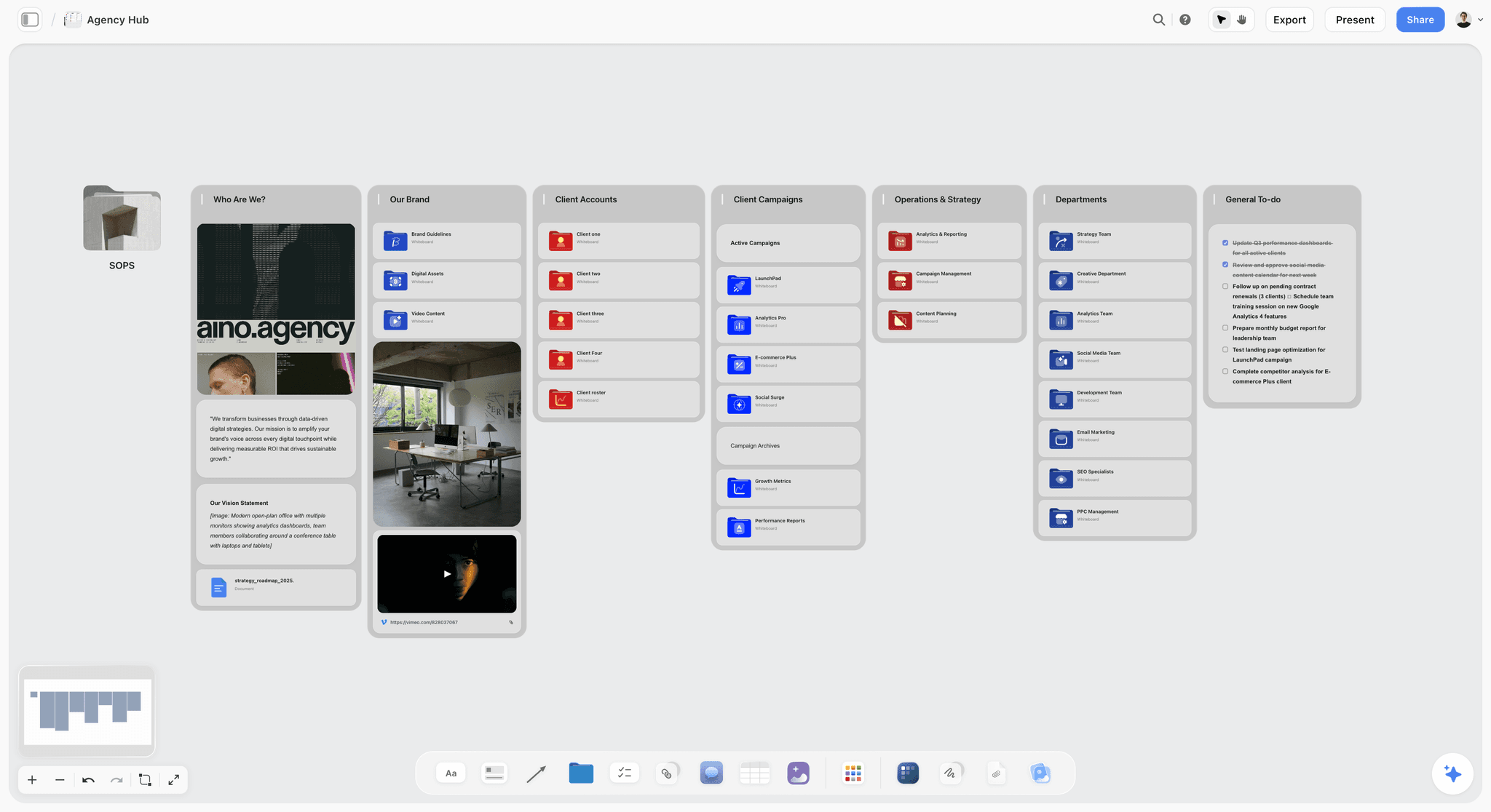
Storyflow agency hub board where ChatGPT prompts land as briefs, route walls and decks for each client
Run the prompts, keep the work on the client's board
Install Storyflow in ChatGPT, end a prompt with 'put it on my board', and the brief, the routes and the deck land where your client can open them.

Prompts for New Business and Pitches
New-business prompts work on what the prospect has published and what the RFP says. Paste both.
Prompt 1: Qualify the RFP before you answer it
- "Here is an RFP from [prospect]. Act as a new-business director. List, in a table, what they are asking for, what they did not say but will judge us on, the red flags (budget, timeline, number of agencies, IP terms), and a go or no-go recommendation in two sentences."
You get a three-column table and a recommendation you can argue with. Add "and put it on my [prospect] pitch board in Storyflow as a table" to keep it beside the pitch work.
Prompt 2: Read the prospect's own words
- "Here are [prospect]'s last three press releases, their homepage copy and the founder's last interview. List the five phrases they use most about themselves, the one they never say but imply, and the gap between how they describe the brand and how a customer would."
You get a short list with quotes. This is the raw material for the chemistry meeting and the first route.
Prompt 3: Outline the credentials deck
- "Outline a 12-slide credentials deck for [prospect]: one slide on their problem in their words, our approach in three steps, three case studies chosen for relevance to [their category], the team, how we work, and one next step. For each slide give a headline and three bullet points. No slide may say 'we are passionate'."
On a Storyflow board this becomes a slide deck ChatGPT can extend and reorder; through the Pitch plugin, it becomes a Pitch presentation. See ChatGPT for pitch decks for the deck-first version.
Prompt 4: Prepare the chemistry meeting
- "Write ten questions for a first meeting with [prospect]'s marketing director. Four about the business problem, three about how they have worked with agencies before, two about how decisions get made, one about what would make this a failure. Order them from easiest to hardest."
You get a numbered list to print or put on the board as a document.
Prompt 5: Explain the fee before they ask
- "Here is our estimate: [phases, days, rates]. Write the fee rationale in plain language for a procurement reader: what each phase delivers, what is excluded, and the two assumptions that would change the price. Under 200 words, no jargon."
You get a short document. The estimate itself and the contract stay in your own proposal tool.
Prompts for Brief Intake
Brief prompts find gaps first and write second. The campaign brief guide covers the fields in depth; these prompts are the intake sequence.
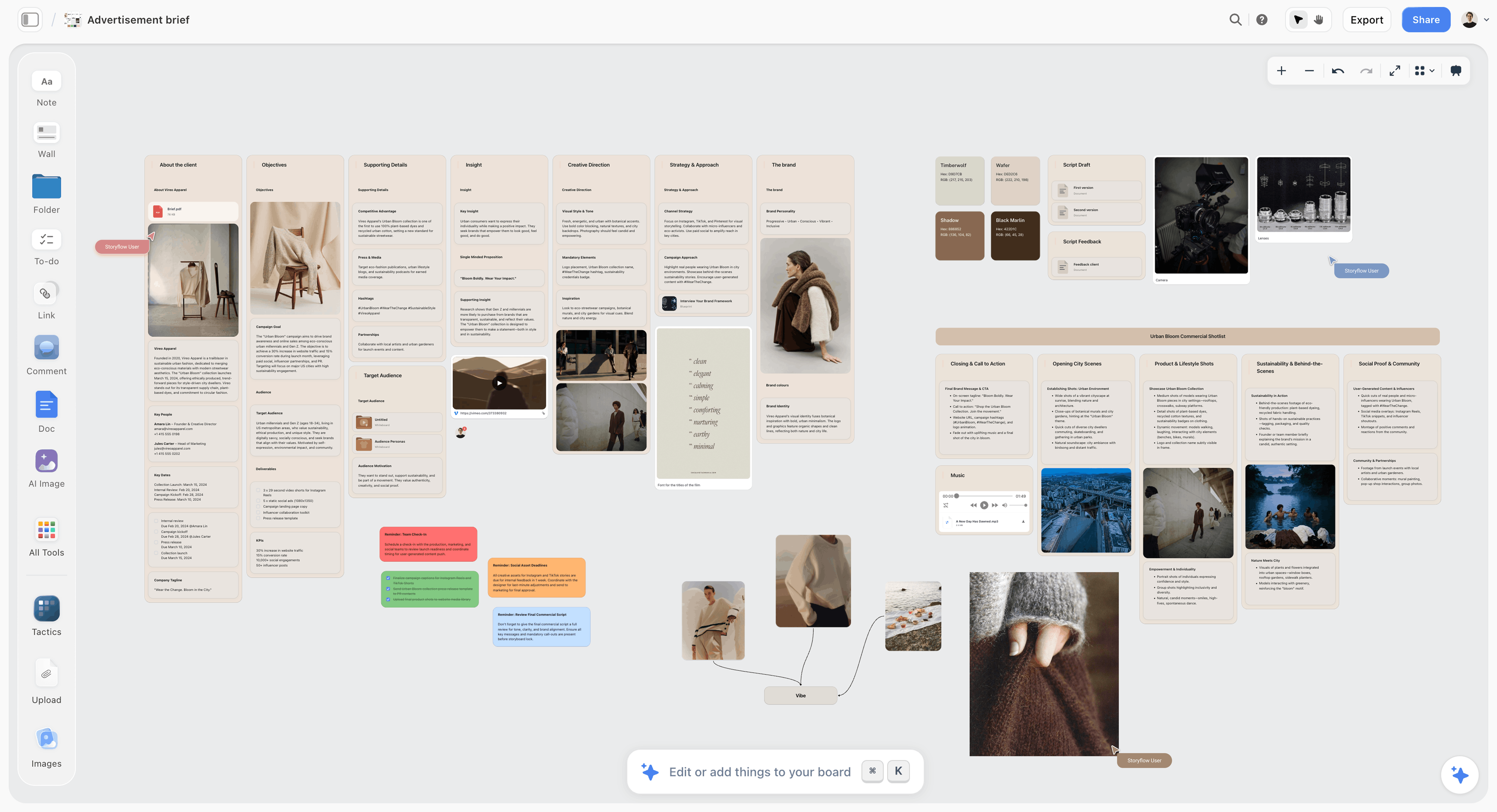
An advertisement brief on a Storyflow board: Prompt 7 builds this shape, with each field in its own block so the client can answer the gaps one by one.
Prompt 6: Score the brief the client sent
- "Here is the client's brief. Score it against these questions, one row each: what must change in the business, who exactly we are talking to, what we want them to think or do, the one thing to say, why they should believe it, what is mandatory, what we are making, the budget, the deadline, who approves. For each, write 'clear', 'vague' or 'missing', and quote the line you based it on."
You get a ten-row table that is also the agenda for the brief-back call.
Prompt 7: Turn kickoff notes into a brief
- "Using the kickoff notes on my [client] board in Storyflow, write the brief as a document with sections for background, objective, audience, single-minded proposition, reasons to believe, tone, mandatories, deliverables, budget, timeline and approver. Mark anything the notes do not state as 'To confirm with client'. Then add a table of every number the client mentioned."
ChatGPT reads the board, writes the brief as a document on it and adds the table beside it. The 'To confirm with client' rule stops it filling gaps silently; check that it followed it before the brief goes out.
Prompt 8: Make the objective measurable
- "The objective in this brief is '[objective]'. Rewrite it three ways, each with one number, one date and one behaviour we can observe. Then say which of the three this budget can realistically move, and why."
You get three objectives and a recommendation. Paste the chosen one back into the brief document.
Prompt 9: Write proposition options
- "From the brief and the client's quotes below, write five single-minded propositions of under twelve words. Each must be something only this client could say. After each, write the competitor who could also claim it, if any."
The competitor check is the useful part: a proposition three rivals could also claim fails the test.
Prompt 10: List the questions for the client
- "Read the brief on my [client] board in Storyflow and list every open question, grouped by who can answer it (client marketing, client legal, client sales, us). Add them to the board as to-dos."
You get to-dos on the board; add owners by hand, because ChatGPT cannot set a to-do's assignee. If you want ChatGPT to fill in owners, ask for a table with an Owner column instead: it fills that column with people who already have access to the board, and leaves a name that matches nobody empty.
Prompts for Research and Insight
Research prompts organise what you already have. They do not replace talking to customers.
Prompt 11: Map audience tensions
- "Act as a strategist. From these interview notes and reviews, list the five tensions the audience lives with (wanting X but fearing Y), each with a direct quote that shows it. Then rank them by how well a [client] product could resolve each one."
Add "and put it on my [client] board in Storyflow as a mind map" to see the tensions branch from the audience.
Prompt 12: Map competitor messaging
- "Here are the homepage headlines, ad copy and social bios of [competitors A to D]. Build a table: brand, the claim they lead with, the proof they offer, the tone in three words, and the territory nobody owns. Finish with two sentences on the gap [client] could take."
On the board this becomes a table the team keeps adding to. The competitor analysis guide goes further.
Prompt 13: Draft insight statements
- "Write four insight statements in the form 'People [do this] because [hidden reason], but [tension]'. Each must rest on one of the quotes above, named. Reject any that would be true of every brand in the category."
The jobs-to-be-done lens from the Christensen Institute, which looks at the circumstances that push people toward and away from a choice, is a useful constraint to add.
Prompt 14: Name the category conventions
- "List the ten visual and verbal conventions every [category] brand follows (colours, imagery, claims, words). For each, say whether breaking it would help [client] stand out or confuse buyers."
You get a two-column judgement the creative team can argue with before they start.
Prompts for Concepts and Routes
Concept prompts make ChatGPT generate breadth and then judge it. The judging is where most of the value is.
Prompt 15: Three routes from one insight
- "From the insight and proposition on my [client] board in Storyflow, build three walls on the board, one per creative route. Each wall: a route name, the idea in one line, the insight it rests on, three example executions (one film, one social, one in-store), and the biggest risk. The three routes must differ in tone, not only in wording."
ChatGPT builds three walls side by side. The designer adds references to each; for your own photos, ChatGPT hands you an upload link, because photos attached in the chat do not reach the board.
Prompt 16: Stress-test a route
- "Act as the client's sceptical CFO, then their head of sales, then a customer who has never heard of them. For route B, give each one's strongest objection in one sentence and the answer we would give."
You get six sentences that become the objection slide.
Prompt 17: Spread one route across channels
- "Take route A and write one execution for each channel in the deliverables table on the board: the headline or opening line, the visual in one sentence, and the call to action. Add them as notes on route A's wall."
The deliverables table keeps ChatGPT to what the client is paying for.
Prompt 18: Name the routes
- "Give each of the three routes a two-word working name that a client will remember after one meeting. No puns, no names that sound like product names."
A small prompt, but routes with names get discussed; routes called "Option 2" get forgotten.
Prompt 19: Set kill criteria before the review
- "Before the internal review, write five criteria a route must meet to go to the client, drawn from the brief's objective, audience and mandatories. Then score each route yes or no against each criterion, with one sentence of reasoning."
You get a table that turns a taste argument into a brief argument. Agree the criteria before anyone sees the routes, or the criteria get written to fit the favourite.
Prompts for Decks and Presentations
Deck prompts work best when the routes and brief are already on the board, because ChatGPT reads them instead of your summary.
Prompt 20: Build the deck from the board
- "Build a slide deck on my [client] board in Storyflow from the brief and routes A and C: one slide for the problem, one for the insight, three per route (idea, executions, risk), one comparison, one recommendation, one next step. Headlines under eight words."
ChatGPT creates the deck on the board; you can ask it to add, remove, reorder or update slides later. It presents fullscreen and exports as PDF. More in ChatGPT for client presentations.
Prompt 21: The one-slide summary
- "Write the whole recommendation as one slide a CEO would read in 20 seconds: the problem, the idea, why it works, what it costs in time, what we need from them."
For a page instead of a slide, see the ChatGPT one-pager.
Prompt 22: Rehearse the hard questions
- "List the ten questions this client is most likely to ask in the presentation, based on the brief and their objections so far, with a 30-word answer for each. Mark the three we cannot answer yet."
The three marked questions are your homework before the meeting.
Prompt 23: Write the recommendation rationale
- "We recommend route C. Write the rationale in three paragraphs: what it does that the others do not, the risk and how we manage it, and what would make us change our mind."
A rationale that names its own risk survives the meeting better than one that does not.
Prompt 24: Tighten the deck
- "Read the deck on my [client] board in Storyflow. List every slide that repeats a point made earlier, every headline over eight words and every claim with no support. Then update those slides."
ChatGPT reads the deck and edits it in place. Check the result before it goes out.
Prompts for Client Updates and Status
Status prompts are where the plugin's read side earns its keep, because the board knows what changed.

A project tracker board in Storyflow: the board Prompt 25 reads to write the weekly update, with each deliverable's status in one place.
Prompt 25: Weekly status from what changed
- "What changed on my [client] board in Storyflow this week, and who changed it? Turn that into a client status update: done, in progress, waiting on the client (with dates), and next week. Under 150 words, no internal names."
The Storyflow plugin reports what changed on a board in the last day or week and who changed it, so the update starts from facts. See ChatGPT client updates and the client status update guide.
Prompt 26: Flag scope creep politely
- "The client has asked for [new request]. Compare it with the deliverables table on the board and write a two-paragraph note that says what is in scope, what is new, and the two options (swap something out, or a change order). Friendly, firm, no apology."
You get a note your account lead can send after editing.
Prompt 27: Explain a delay
- "We will miss [deadline] by [days] because [reason]. Write the client email: the new date, what caused it in one sentence, what we are doing about it, and what they need to do, if anything. Under 120 words."
Short, factual delay notes protect the relationship; long ones read as excuses.
Prompt 28: Recap a meeting
- "From these meeting notes, write the recap: decisions made, actions with owners and dates, open questions. Then add the actions to my [client] board in Storyflow as to-dos."
The to-dos land without assignees; if the owners must be on the board, ask for the actions as a table with an Owner column, as in Prompt 10. If your team uses Granola, ChatGPT can read the call notes through the Granola plugin instead of a paste.
Prompts for Feedback and Approval Rounds
Feedback prompts translate, consolidate and record. They should never decide which client stakeholder wins.
Prompt 29: Consolidate feedback from several people
- "Here is feedback from four people at the client, pasted below. Group it into: agreed by everyone, conflicting (quote both sides), and single opinions. For each conflict, write the question we need the approver to answer."
ChatGPT cannot read board comments through the plugin, so paste the comments into the chat. The client feedback guide covers the round in full.
Prompt 30: Translate vague feedback
- "The client said '[make it pop / feels a bit corporate / not quite there]'. List four specific changes they might mean, each with the question that would confirm it. Do not make the changes."
You get questions, not changes. Asking them saves a round.
Prompt 31: Keep a decision log
- "Add a table to my [client] board in Storyflow called Decisions, with columns for date, decision, who made it, and what it rules out. Fill it from this round's feedback summary."
The log ends the "we never agreed that" conversation. Sign-off is a name and a date in the table.
Prompt 32: Write the round-two brief
- "From the consolidated feedback and the decision log, write a one-page brief for the creative team's second round: what stays, what changes, what is out, and the deadline."
The team works from the brief, not from twelve forwarded emails.
Prompts for Retros and Handover
Retro prompts turn one job into a better next one, and they are the cheapest prompts in the set to run.
Prompt 33: Run the retro
- "Read my [client] board in Storyflow, including the decision log and the brief. Write a retro: what went to plan, where we lost time (with the decision or rebrief that caused it), what the client valued, and three changes for the next job. No blame, specific dates."
You get a document for the internal meeting.
Prompt 34: Draft the case study
- "Write a 300-word case study of this project for our website: the client's problem in their words, the insight, the idea, what we made, and the outcome, leaving a clearly marked gap for results we have permission to share."
The gap matters: never let ChatGPT supply a result, and get the client's permission before publishing one. See how to write a case study.
Prompt 35: Find what to reuse
- "List the parts of this board worth reusing on the next job in [category]: questions, tables, deck structure, criteria. For each, say what to change."
The answer is the start of your next board.
Prompt 36: Turn the project into a template
- "Using the structure of my [client] board, build a blank version on my Agency Templates board in Storyflow: the same walls, tables and deck outline, with every client detail removed."
Create the empty Agency Templates board by hand first. Next time, the kickoff starts from your own template instead of a blank board. Storyflow also offers ready-made board templates and Tactics such as AIDA that ChatGPT can add.
The 36 Prompts by Stage and Board Output
| Stage | Prompts | What lands on the Storyflow board |
|---|---|---|
New business and pitches | 1 to 5 | RFP table, question list, credentials deck outline |
Brief intake | 6 to 10 | Brief document, numbers table, open questions as to-dos |
Research and insight | 11 to 14 | Tension mind map, competitor table, insight notes |
Concepts and routes | 15 to 19 | Three route walls, executions as notes, criteria table |
Decks and presentations | 20 to 24 | Slide deck, one-slide summary, rehearsal document |
Client updates and status | 25 to 28 | Status note, to-dos from recaps |
Feedback and approval rounds | 29 to 32 | Decision log table, round-two brief |
Retros and handover | 33 to 36 | Retro document, reusable template board |
Worked Example: One Prompt Chain, Brief to Deck
This is an illustrative example, not a client case: the outputs below are the shapes each prompt asks for, not a recorded run. North & Quarry is a fictional six-person brand studio. Their client, Saltmere Rail, an equally fictional operator, is launching a weekend coast service and has sent a one-page brief and a recording of the kickoff call. The pitch to the client's board of directors is in nine working days.
Step 1: find what the brief is missing
The planner pastes the brief and runs Prompt 6. ChatGPT returns a ten-row table: objective "vague" (quoting "drive awareness of the new service"), audience "vague" ("families and young professionals"), budget "missing", approver "missing", deadline "clear". Four of ten rows need the client, so the brief-back call has an agenda before anyone writes an idea.
Step 2: put the brief on the board
After the call, the planner runs Prompt 7 with the call notes. ChatGPT writes the brief as a document on the Saltmere board, with "To confirm with client" against the budget split, and a table of the numbers the client gave: the launch date, the number of stations, the ticket price. The client receives the view-only link and reads the brief that evening, without an account.
Step 3: three routes as walls
The creative director runs Prompt 15. Three walls appear on the board: "Slow Saturday" (the journey as the holiday), "Sea by Ten" (the time you arrive), "Leave the Car" (what you no longer need). Each has its insight, three executions and a risk. The designer adds reference images to each wall.
Step 4: stress-test and pick
Prompt 16 gives each route the objections of the client's finance director, head of sales and a non-customer; Prompt 19 scores the routes against five criteria taken from the brief. "Leave the Car" fails the mandatory about not criticising drivers, so two routes go forward.
Step 5: build and tighten the deck
Prompt 20 builds a ten-slide deck on the board from the brief and the two routes. Prompt 24 reads it back, flags two headlines over eight words and one claim with no support, and updates those slides. The team presents from the board and sends the client the link afterwards.
Step 6: the first status update
A week later, Prompt 25 asks what changed on the board and who changed it, and turns the answer into a 120-word update with what is done, what is waiting on the client and the dates. The output shapes along the way:
| Step | Prompt | Output shape | Where it lives |
|---|---|---|---|
1 | 6 | Ten-row scorecard table | Chat, then the call agenda |
2 | 7 | Brief document plus numbers table | Saltmere board |
3 | 15 | Three walls with insight, executions, risk | Saltmere board |
4 | 16 and 19 | Objection list, criteria table | Saltmere board |
5 | 20 and 24 | Ten-slide deck, edited in place | Saltmere board |
6 | 25 | 120-word status note | Email to the client |
How to Fix a Weak Output
When an answer disappoints, the prompt is missing one of the parts from the anatomy table. Find which one, add it, and rerun; "try again" without a change gets you the same answer in different words.
| Symptom | Missing part | Add this |
|---|---|---|
Ideas any agency could pitch | Context | The client's own quotes and one insight |
Too long, or the wrong shape | Format | A table, a word cap, a slide count |
Wrong tone for the client | Example | One past piece the client approved, and one they rejected |
Facts nobody gave it | Constraint | "Use only the board and the files; write 'To confirm' for anything else" |
Three routes that are the same route | Constraint | "They must differ in tone and in the insight they rest on" |
Ignores the board | Destination | Name the board and say "read it first" |
Give it the client's rejection, not only the approval
An example of what the client hated is often more useful than one they loved, because it marks the boundary. Paste both, labelled. To name the gap between them, use the four tone dimensions from Nielsen Norman Group: formal or casual, serious or funny, respectful or irreverent, matter-of-fact or enthusiastic. "Move it one step toward casual and keep it serious" is an instruction ChatGPT can follow; "make it warmer" is not.
Ask for questions before the answer
"Ask me up to three questions before you write anything" turns a guess into an interview. It costs one exchange and saves a rewrite.
Split a prompt that asks for two things
A prompt that asks for routes and a deck gets a thin version of both. Run the routes, choose, then run the deck.
Rerun on the board, not in the chat
If the brief changed, update the board and ask ChatGPT to read it again. A long chat drifts; the board is the agreed version.
What to Keep Out of Your Prompts
Agencies hold client material under confidentiality, and prompts are where it leaks.
Contracts, fees and personal data
Keep signed contracts, personal data and anything under NDA out of prompts unless your workspace and the client allow it. Summarise the constraint instead ("the client forbids naming competitors") rather than pasting the clause.
Check the training setting on personal accounts
OpenAI's connected apps article says that for ChatGPT Business, Enterprise and Edu, information accessed from apps is not used to train models by default; on Free, Plus, Go and Pro it may be if "Improve the model for everyone" is on. Check that setting on every personal account your team uses for client work.
Keep one client per board connection
When you install Storyflow, choose only the projects ChatGPT needs. A prompt that says "my board" then cannot reach another client's board by mistake.
When You Do Not Need Storyflow for These Prompts
Not every prompt needs a destination. Several of the 36 produce text a person edits and sends.
Emails and one-off notes
Prompts 5, 26 and 27 produce an email or a note. Run them in the client's ChatGPT project and paste the result into your mail client.
Decks in your house template
If your agency's templates live in Pitch, run Prompt 20's structure through the Pitch plugin instead and keep the brief and routes on the board. The best ChatGPT plugins for agencies covers where each plugin fits.
Anything about hours, budgets or contracts
Storyflow has no time tracking, invoices, proposals or e-signature. Prompts about those belong in Productive, HubSpot or your contract tool.
The Bottom Line
The prompts that make ChatGPT useful to an agency are not clever; they are specific. Each one names a stage, carries the client's own words, rules out the average answer, asks for a shape and says where the output goes. Run the brief prompts first, because a brief with gaps wastes everything after it, then let the board hold what the client must see. Install the Storyflow plugin, open one client's project, and run Prompts 6, 7 and 15 on your next brief. When the routes are ready for the room, ChatGPT for client presentations shows the deck step on a board.
FAQ: ChatGPT Prompts for Agencies
What are the best ChatGPT prompts for agencies?
The best are written for one stage of a client job and include the client's own words, a constraint, a format and a destination. Start with a prompt that scores the client's brief for gaps, then routes from one insight, a deck built from the board, and a weekly status from what changed. With the Storyflow plugin, each can end by building the result on the client's board.
What is the best ChatGPT plugin for agency prompts?
Storyflow, for prompts whose output the client or team must see: ChatGPT builds the brief, the routes, the deck and the status on a Storyflow board that the client opens by a view-only link with no account. Pitch suits decks in your house template, and Productive suits prompts about hours and budgets.
How do I write a ChatGPT prompt for a creative brief?
Paste what the client sent and ask ChatGPT to score it first: one row each for the business problem, audience, message, proof, mandatories, deliverables, budget, deadline and approver, marked clear, vague or missing with a quote. Then write the brief from the call notes, marking anything unstated as "To confirm with client".
Can ChatGPT come up with campaign concepts for clients?
Yes, if you give it one insight, the client's quotes and the deliverables, and ask for routes that differ in tone and insight. Then make it judge them: objections from the client's finance and sales leads, and a yes-or-no score against criteria from the brief. The ideas are a starting point; the creative judgement stays with your team.
How do I stop ChatGPT giving generic agency ideas?
Add the three things a generic prompt lacks: the client's own words in quotes, a constraint that rules out the category average (no puns, no stock imagery, nothing a named competitor could claim) and an example of work the client approved. Then ask for fewer, better options rather than ten.
Can ChatGPT write client status updates?
Yes. With the Storyflow plugin, ask what changed on the client's board this week and who changed it, then ask for an update with done, in progress, waiting on the client and next week, under 150 words. The update starts from the board's real changes instead of memory.
Should each client have its own ChatGPT project?
Yes. A ChatGPT project keeps a client's chats, files and instructions together, and its instructions override your global ones inside it. Put tone rules, mandatories and banned words in the instructions, attach the brief and guidelines, and keep each client's board connection separate in Storyflow.
Can ChatGPT read client comments on a Storyflow board?
No. ChatGPT cannot read board comments through the Storyflow plugin. It can read the board's notes, tables, documents and decks, and report what changed this week, so paste the comments into the chat before you ask it to consolidate feedback, and record each decision in a table on the board, which ChatGPT can read and update.
Is it safe to paste client briefs into ChatGPT?
It depends on your workspace and your client agreement. On Business, Enterprise and Edu, OpenAI says app data is not used for training by default; on personal plans it depends on the "Improve the model for everyone" setting. Keep contracts, personal data and NDA material out, and summarise the constraint instead.
Do these prompts work in Claude too?
Yes. The prompts are plain language and work in Claude, Gemini or Grok. Storyflow connects to those assistants through its MCP address (Claude calls these connectors rather than plugins), so the same "put it on my board" step works there; setup for every assistant is on Storyflow's MCP page.
How much does Storyflow cost for an agency?
Storyflow is paid-only during early access: Plus $7.99 a month billed annually, Pro $14 and Max $39, which adds a Team Workspace with roles and permissions. Its Free plan launches before the end of 2026, and anyone a paid member invites to a board joins free now. Plugin actions use no Storyflow AI credits.
Table of Contents
- Key Takeaways
- Why Most Agency Prompts Produce Generic Work
- How to Set Up ChatGPT Before You Use These Prompts
- The Anatomy of an Agency Prompt
- Prompts for New Business and Pitches
- Prompts for Brief Intake
- Prompts for Research and Insight
- Prompts for Concepts and Routes
- Prompts for Decks and Presentations
- Prompts for Client Updates and Status
- Prompts for Feedback and Approval Rounds
- Prompts for Retros and Handover
- The 36 Prompts by Stage and Board Output
- Worked Example: One Prompt Chain, Brief to Deck
- How to Fix a Weak Output
- What to Keep Out of Your Prompts
- When You Do Not Need Storyflow for These Prompts
- The Bottom Line
- FAQ: ChatGPT Prompts for Agencies
- Related Reading
Templates to check out for this topic


Marketing and campaign templates you can use in Storyflow
Plan the whole campaign on one board: brief, audience, channels, and assets connected, with an AI that reads all of it. Open a template and start from real structure.


See Storyflow in Action
A visual AI workspace where every feature lives inside one canvas. No tab-switching, no context lost.
Build your entire board from a single message
Type what you need in the AI chat at the bottom of your canvas. The AI adds cards, headings, and structure directly onto your board.
Use expert frameworks as AI context
Type @ in the AI chat and choose any Tactic. The AI tailors every response to that framework instead of giving generic advice.
Turn your board into a mind map in seconds
Ask the AI to restructure your canvas as a mindmap. It connects your ideas into a visual hierarchy so you can see how everything relates.
Why Storyflow Exists
Storyflow actually began as a personal tool while working on creative and research projects.
We kept running into the same problem: ideas were scattered everywhere: notes, documents, and whiteboards.
Nothing helped us see how everything connected.
So we started building a workspace designed around how ideas actually grow.
→ Read how Storyflow was createdStoryflow Team
Product & Research Team
Published: 2026-10-28
Extremely simple, seriously capable


See how easy it is to get started
Watch a real project come together, from a blank board to a finished plan, clicked through step by step.
Start creating with AI and become more productive
Transform your creative workflow with AI-powered tools. Generate ideas, create content, and boost your productivity in minutes instead of hours.