Canva vs Figma vs Storyflow in ChatGPT (2026): Which Plugin When
What Canva, Figma and Storyflow each do inside ChatGPT, from FigJam diagrams and Slides decks to flyers and campaign boards, with sharing, exports, costs and a worked campaign that uses all three.

Category
Comparison
Author

Storyflow Team
Product & Research Team
Topics
2026-10-28
•
26 min read
•
Comparison- Canva
- Figma
- ChatGPT plugins
- Storyflow
- FigJam
- Figma Slides
Should I use Canva or Figma in ChatGPT?
Canva, Figma and Storyflow do three different jobs inside ChatGPT, so pick by deliverable, and we list Storyflow first for planning the project the designs belong to. Storyflow is an AI visual workspace that lays out a campaign's brief, references, palette, copy and deck on one infinite canvas ChatGPT can read and build on. Choose Figma when you need a FigJam diagram or a Figma Slides deck your team will edit, and Canva when you want a flyer or presentation designed from ideas already in the chat.

Full disclosure: Storyflow is our product. It is listed first because it holds the plan and the presentation that Figma and Canva designs belong to, not because it designs better than either. It is not a layout or vector tool, its plugin does not generate images, its decks export as PDF with no PPTX, and it is paid-only during early access.
How the design plugins in ChatGPT compare on trust, innovation, ratings and pricing
Which design plugins in ChatGPT are the most trusted?
Figma and Canva, by the years design and marketing teams have run on them, and that record deserves credit. Their ChatGPT plugins are newer than the products: Figma labels its Slides integration a beta. Storyflow's plugin went live in October 2026, so its record is short; its case is a different kind of reliability, one board that ChatGPT, the team and the client all read.
Which design plugins in ChatGPT have fair and transparent pricing?
Figma and Storyflow both publish their prices plainly. Figma Starter is free and Professional is $16 a month for a Full seat or $3 for a Collab seat. Storyflow starts at $7.99 a month billed annually, and the plugin spends no Storyflow AI credits. Canva's prices are on Canva's own pricing page; they were not read for this comparison.
Which design plugins in ChatGPT are the most innovative?
Figma's Slides integration is the most inventive design move: ChatGPT turns a prompt into an objective, an outline and style notes, and Figma builds the deck from them. Storyflow's plugin is the most inventive for planning: ChatGPT lays out direction walls, palettes and a deck on a board, then tells you what changed on it this week and who changed it.
Which design plugins in ChatGPT have a strong history of consistent performance?
As products, Figma and Canva have the longer track record. As ChatGPT plugins, all three are recent. Consistency comes from asking each for the work its vendor documents: FigJam diagrams and Slides decks from Figma, designs from ideas in the chat from Canva, and boards, tables, documents and decks from Storyflow.
Which design plugin in ChatGPT would you recommend for a marketing team?
Storyflow for the campaign itself: the brief, channels table, creative directions and the review deck on one board the founders and agencies open by link. Add Canva for flyer and post designs made from the agreed lines in the chat, and Figma when a journey belongs in FigJam or a partner needs an editable PowerPoint from Figma Slides.
Which design plugins in ChatGPT might be underrated?
Figma Slides' PPTX export is underrated: it settles the editable-deck question on any Figma plan, with known font and gradient limits. FigJam open sessions are underrated for workshops with outside guests. Storyflow's change report is easy to miss: asking what changed on the board this week replaces opening every wall before a review.
Quick Comparison
The three design plugins compared for what ChatGPT can make in each, prices as of October 2026.
| Tool | Best For | AI Features | Price |
|---|---|---|---|
| Storyflow | Campaign and brand plans with the deck on the same board | ChatGPT plugin builds walls, palettes, tables, documents and slide decks and reports what changed on the board | $7.99 mo annual (paid-only in early access; Free plan due before the end of 2026) |
| Figma | FigJam journeys and Slides decks your team edits | ChatGPT plugin creates FigJam diagrams and Figma Slides decks; not available in the EU | Starter free; Professional Full seat $16 a month |
| Canva | Flyers and presentations from chat ideas | ChatGPT plugin listed as Create, review, edit designs; see Canva's help for details | See Canva pricing |
Key Takeaways
- The three plugins are not rivals for one job. Storyflow holds the plan and the presentation on a board, Figma makes FigJam diagrams and Slides decks, and Canva turns chat ideas into designs. We put Storyflow first because the other two produce pieces that belong to a plan.
- Figma's own help article says ChatGPT can create FigJam diagrams and Figma Slides decks but not files for Figma's other products, so there are no Figma Design files from the chat. The Figma plugin is not available in the EU.
- Figma Slides exports to PPTX or PDF on any Figma plan. Storyflow decks export as PDF only, with no PPTX. If your client must edit the deck in PowerPoint, that settles it.
- Canva's plugin is listed as "Create, review, edit designs", and OpenAI uses it as its example of an app that reads context from your chat and, with Memory on, from your memories. For agency work that means one chat per client.
- On one campaign, the clean split is Storyflow for the brief, direction and deck, Figma for the FigJam journey or a PPTX-bound deck, and Canva for the flyer and post designs.
Why "Canva vs Figma" Is the Wrong Question in ChatGPT
You type "Canva vs Figma" because you have a deliverable due and two familiar names. Inside ChatGPT the question changes shape. Each plugin exposes a slice of its product, not the whole app, and the slices overlap less than the brand names suggest. Pick the wrong one and you either get a file type you cannot use or a result nobody else on the team can open.
The deliverable decides, not the brand name
A FigJam user journey, a Figma Slides deck, a Canva flyer and a campaign board are four different outputs. It is not a contest between design tools. It is a routing decision: which plugin produces the file your next reader needs.
The plugin is smaller than the product
Figma the product spans Figma Design, FigJam, Slides and more. Figma the ChatGPT plugin, per Figma's help, creates FigJam diagrams and Slides decks only. Judge each plugin by what its vendor says it does in ChatGPT, not by what the full product does in its own window.
Where the file lands decides who can work on it
A Figma file from ChatGPT is public to anyone with the link until you claim it. A Storyflow board lives in the project you granted ChatGPT, behind your sharing settings. Where a Canva design is saved, and who can open it, is covered in Canva's help. Before you prompt, know who has to open the result and whether they need to edit it.
Canva is not ChatGPT Canvas
The names collide in search. ChatGPT Canvas is OpenAI's writing and coding pane that opens beside the chat for long text or code; it is a document surface, not a design tool or a board. Canva is a separate company's plugin. The Canvas comparison is in ChatGPT Canvas vs Storyflow.
How We Compared the Three Plugins
Each plugin is described from its listing in ChatGPT's plugin directory, captured on 28 October 2026, and from the vendor's own pages about the ChatGPT plugin, read in October 2026. OpenAI's help articles are the source for how plugins install, ask permission and share data.
Why Storyflow is listed first
Storyflow is our product, and it is listed first for a stated reason: the job it does, holding the project's plan and presentation on one board ChatGPT can read and change, is the job the other two feed. That is not a claim that it designs better than Figma or Canva. It does not, and the sections below say where each one wins.
What could not be confirmed
Figma publishes a detailed help article on its ChatGPT plugin. Canva's help centre refused automated reads for this comparison, so Canva is described only from its directory one-liner and OpenAI's own Canva examples. Where a Canva cell says "see Canva's help", that is the reason, not a gap in Canva's product.
What we compared
- What ChatGPT can create or change in each tool.
- Where the result lives and who can open, comment on or edit it.
- What it exports to.
- Where it is unavailable, and what it costs.
Comparison Table: Canva vs Figma vs Storyflow in ChatGPT
| Feature (as of October 2026) | Storyflow | Figma | Canva |
|---|---|---|---|
Directory one-liner | Plan projects on visual boards | Create designs, ship to code | Create, review, edit designs |
Directory category | Productivity | Featured, Creativity, Small business, New & Noteworthy | Featured, Creativity, Small business, New & Noteworthy |
What ChatGPT makes | Notes, tables, documents, walls, mind maps, diagrams, charts, slide decks, carousel pages, colour palettes and templates on a board | FigJam diagrams and Figma Slides decks | Designs, per the listing; see Canva's help for types |
Reads your existing work | Projects, boards and documents; summaries; what changed and who changed it | Not described in Figma's article | "Review" is in the listing; see Canva's help |
Where the result lives | A board in a project you granted | A FigJam or Slides file, public by link until claimed | See Canva's help |
Exports | Boards as PNG, JPEG or PDF; decks as PDF | Slides to PPTX or PDF on any plan | See Canva's help |
Your photos | Upload link to the board; chat attachments do not reach it | Uploads used as context, not always embedded in the file | See Canva's help |
Not available | Depends on ChatGPT plan, workspace and region | The EU | Depends on ChatGPT plan, workspace and region |
Price | Plus $7.99 a month billed annually; paid-only in early access | Starter free; Professional Full seat $16 a month | See Canva pricing |
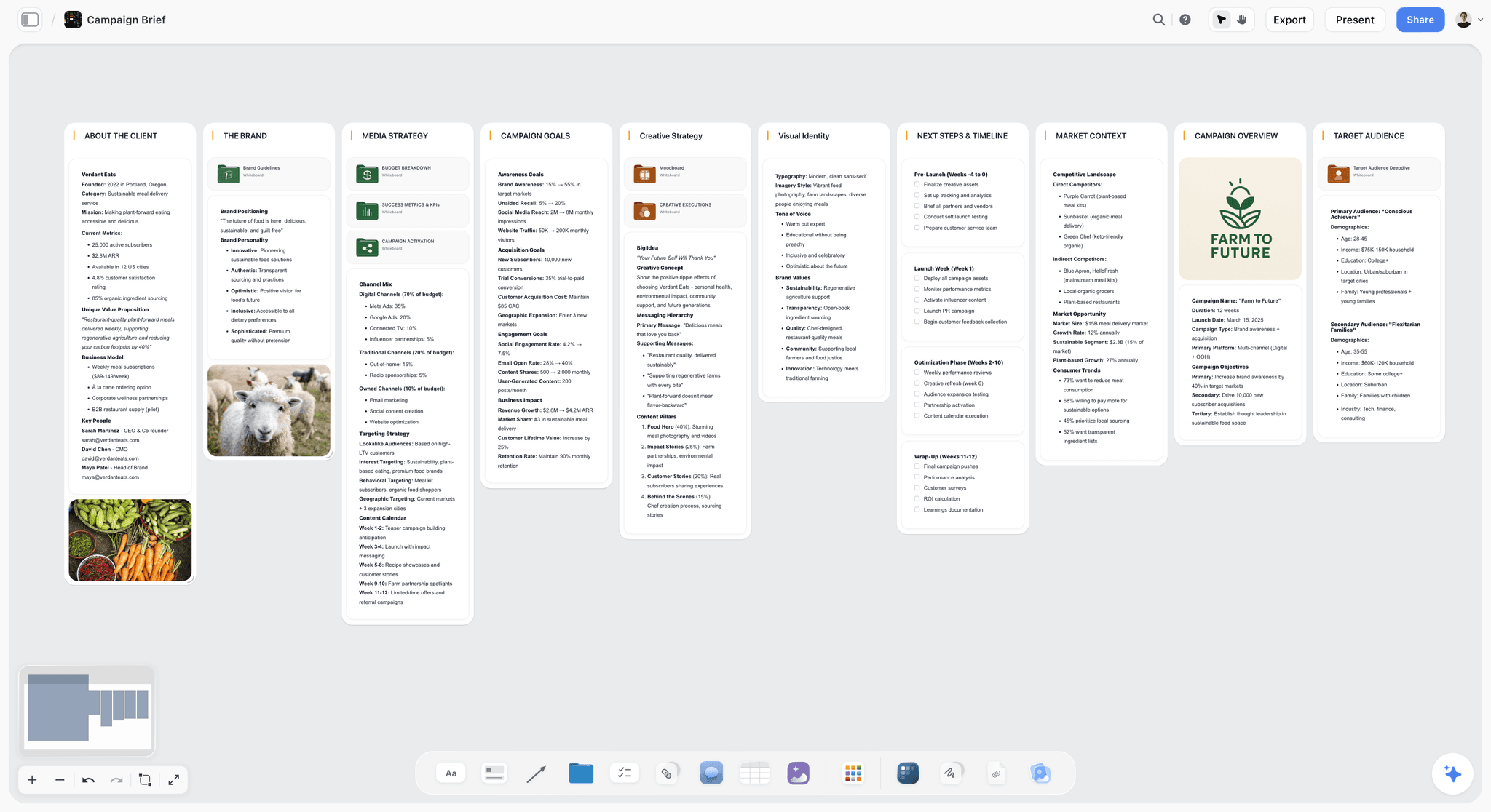
Storyflow board holding a campaign brief with goals, audience and deliverables
Build the deck where the plan already is
Install Storyflow in ChatGPT and ask it to turn your project board into a presentation deck that presents fullscreen and exports as PDF.

What Each Plugin Actually Does Inside ChatGPT
Storyflow: the plan and the presentation on one board
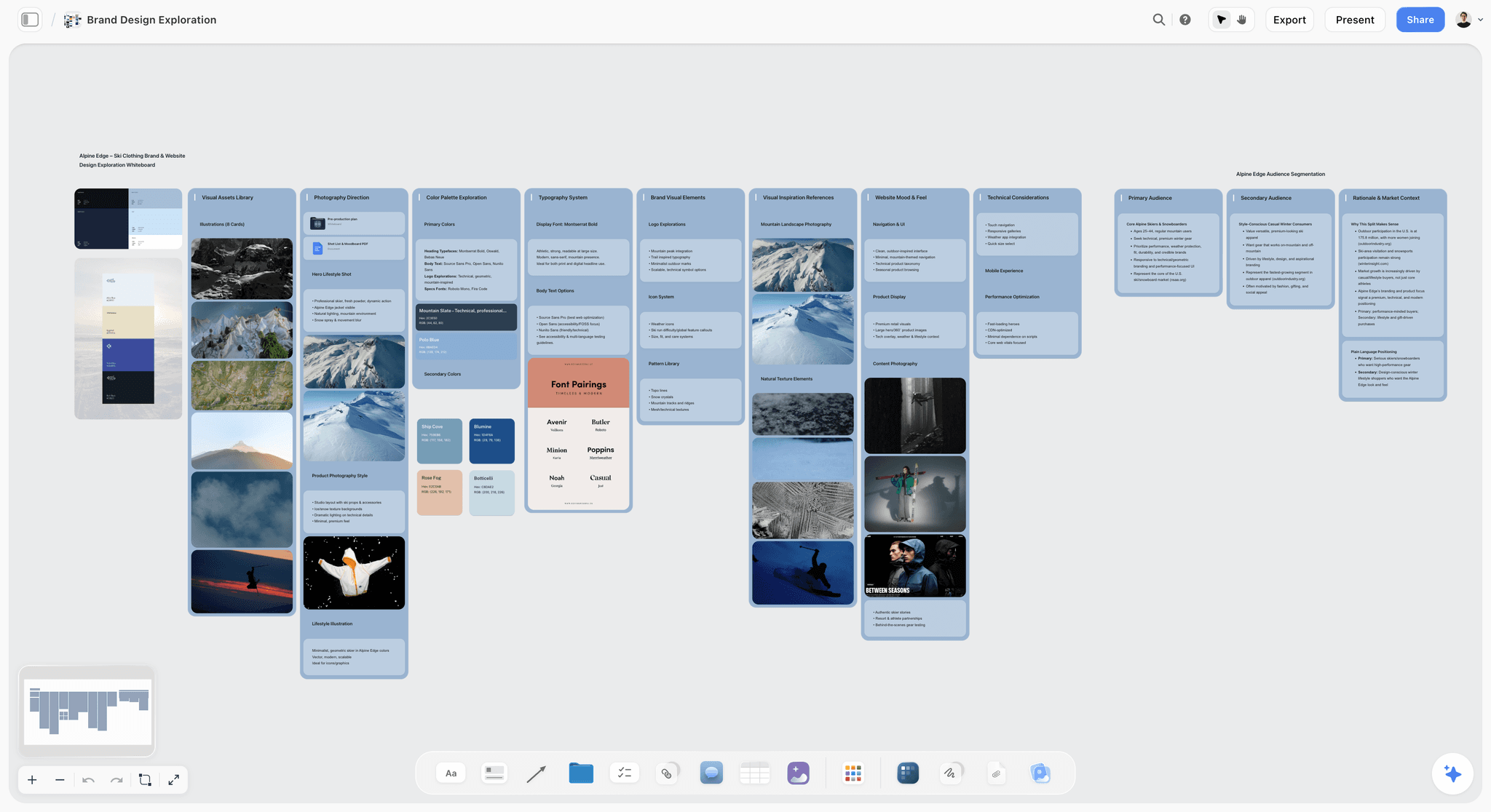
A brand design exploration board: photography, palette, type and audience each in their own wall, with references the client reads by link.
Install it from the Storyflow listing (developer Storyflow LTD): select Install plugin, sign in to Storyflow and choose the projects ChatGPT may use, all or the ones you pick. Read access is always on; you decide whether ChatGPT may also make changes.
Through the plugin, ChatGPT reads your projects, boards and documents, summarises a board and tells you what changed on it in the last day or week and who changed it. It builds notes, to-dos, headings, tables, documents, walls, whole sections, mind maps, diagrams and flowcharts with labelled connections, charts, slide decks (create, add, remove, reorder and update slides), carousel pages, colour palettes and ready-made board templates. It arranges elements, adds images and gives you an upload link for your own photos.
What it does not do through the plugin: generate images, read board comments, run the in-app AI's menu workflows or show a live board preview inside the chat. A photo you attach in the chat does not reach Storyflow; use the upload link. Plugin actions run on ChatGPT's model, so they use no Storyflow AI credits. An invited free account can make 25 plugin actions a week, reset each Monday (UTC); Plus, Pro and Max have no weekly limit. Connections end after 30 days, when ChatGPT asks you to sign in again.
Wins when: the deliverable is a plan other people work from, such as a brand board, a campaign plan or a client presentation that has to stay next to the brief and references. Job pages: brand board and presentation.
Figma: FigJam diagrams and Slides decks
Figma's help article Use ChatGPT with Figma is the most specific vendor page of the three. It says the plugin creates FigJam diagrams from a description of what you want to visualise or organise, and Figma Slides presentations, for which ChatGPT turns your prompt into an objective, an outline and style notes that Figma uses to build the deck. ChatGPT may ask a short follow-up question about your goal or audience, then shows an embedded preview. Select Edit in Figma on desktop or Open in Figma on mobile; Figma recommends desktop for editing.
The limits are as specific: ChatGPT cannot create files for Figma's other products, uploaded images or PDFs are used as context but not always embedded in Slides, files you have not claimed are viewable by anyone with the link, the feature is not available in the EU, and the Slides integration is in beta with usage limits, the largest allowance going to full seats on paid plans. It is available on any Figma plan, and you start a prompt with "Figma" or pick it from the + menu.
Once the deck is in Figma Slides, Figma's export article says you can export it to PPTX or PDF on any plan, from the main menu under File > Export slides to. PPTX has known limits: fonts PowerPoint lacks fall back to its default, interactive elements and code blocks become static images, and gradient fills become solid colours.
Wins when: the output must be a Figma file your design team keeps editing, a FigJam journey for a workshop, or a deck that has to leave as PowerPoint.
Canva: designs from ideas already in the chat
Canva's listing reads "Create, review, edit designs". OpenAI's Connected apps article uses Canva for both of its examples of how apps use your context: ask "Canva, can you turn these ideas into a presentation?" and the app may use names or taglines you have been brainstorming in the chat; with Memory on, ask "Canva, can you design a flyer for my business?" and it may use what ChatGPT remembers about your business to customise the flyer.
Beyond that, this comparison does not describe Canva's actions, plan requirements or export options, because Canva's help pages could not be read for it. For setup and what your Canva plan covers, see Canva's help on connecting ChatGPT to Canva.
Wins when: the deliverable is a finished flyer, post or presentation design, the ideas for it are already in the conversation, and your marketing team works in Canva.
Head to Head by Job
The same campaign produces six or seven kinds of output. Here is which plugin to call for each, and why.
| Job | Pick | Runner-up | Why |
|---|---|---|---|
Brand or campaign direction with references and palettes | Storyflow | Figma (FigJam) | Walls, palettes and references stay together on a board the client opens |
User journey, flowchart or process map | Figma (FigJam) | Storyflow | FigJam is where design teams already review flows; Storyflow keeps the flow next to the plan |
Client presentation that stays with the plan | Storyflow | Figma Slides | The deck sits on the same board as the brief and exports as PDF |
Deck the client will edit in PowerPoint | Figma Slides | None confirmed here | Figma exports PPTX on any plan; Storyflow has no PPTX export |
Flyer or social post design | Canva | Storyflow carousel pages, for copy and structure first | OpenAI's own examples are a Canva flyer and presentation |
Campaign plan with channels, owners and dates | Storyflow | None of the others | Tables, to-dos and documents on the board; neither design plugin plans |
Workshop board for people outside your team | FigJam open session, in Figma's own app | Storyflow view-only link | Visitors edit for 24 hours, on any Figma plan except Starter |
Brand or campaign direction
Storyflow, because a direction is references plus reasoning plus a palette, and those have to sit together. Ask ChatGPT to lay out two or three direction walls, a palette per wall and a do and don't wall, and send the client the link. FigJam can hold a direction too, but the Figma plugin makes diagrams, not reference walls. See moodboard for the reference half.
User journey or flowchart
Figma, when the people reviewing it already live in FigJam. Describe the journey and ChatGPT builds the FigJam diagram. Storyflow builds flowcharts with labelled connections as well, and wins when the flow should sit beside the campaign plan it serves; the job page is flowchart.
Client presentation
Split by what the client does with it. If they watch it and sign off, a Storyflow deck on the project board presents fullscreen and exports as PDF, and nothing gets copied between tools. If they will edit it in PowerPoint, build it in Figma Slides and export PPTX, accepting the font and gradient limits Figma lists.
Flyers and social designs
Canva. OpenAI's help uses "design a flyer for my business" as its Canva example. For carousel copy and slide-by-slide structure planned before design, Storyflow's carousel pages are a separate step; see carousel.
The campaign plan itself
Storyflow, without a close second among these three. Figma and Canva produce designs; neither plugin builds a table of channels, owners and dates, to-dos or a brief document. The job page is campaign plan.
A workshop with people outside the team
The workshop runs in Figma's own app, not through the plugin. FigJam open sessions let anyone with the link edit a board for 24 hours, including people without a Figma account, on Professional, Education, Organization and Enterprise plans, per Figma's open sessions article. Visitors cannot comment. A Storyflow view-only link opens with no account but is for viewing; to comment or draw, the visitor signs in, and anyone a paid member invites to a board joins free.
Exports and Handoff
What leaves each tool, and in what format, decides the last mile.
| Output | Storyflow | Figma | Canva |
|---|---|---|---|
Board or canvas | PNG, JPEG or PDF | FigJam file | See Canva's help |
Deck | PDF; no PPTX, presenter view or speaker notes | Slides to PPTX or PDF, any plan | See Canva's help |
Documents | Export too | Not created by the plugin | See Canva's help |
Individual assets | Images on the board | PNG, JPG or PDF from Slides design mode, among others | See Canva's help |
Storyflow is not a layout or vector tool. Final logos, screens and print files belong in Figma, or in the design tool your team already uses, and the board links to them.
Privacy, Permissions and Region
What the plugins can see
Per OpenAI's connected-apps article, an enabled app may use relevant context from your ChatGPT conversations and, with Memory on, from your memories. Data shared with an app follows that app's terms and privacy policy. For ChatGPT Business, Enterprise and Edu, OpenAI does not use information accessed from apps to train models by default; on Free, Plus, Go and Pro it may if "Improve the model for everyone" is on. For agency work, keep each client in its own chat and turn Memory off if clients must not bleed into each other's flyers.
When ChatGPT asks first
OpenAI's Managing app permissions article lists Always ask, Allow read actions, Allow low-risk actions and, for an eligible app or account, Allow all actions, which carries elevated risk. Changing a permission only changes when ChatGPT asks; it does not grant new access. For a Storyflow board you are reviewing with a client, Allow read actions keeps edits behind a confirmation.
Region and workspace
Figma's plugin is not available in the EU. For every plugin, OpenAI says availability depends on the app, your ChatGPT plan, region, workspace, role, model and interface. In a Business or Enterprise workspace, an administrator manages plugins in Admin console, and a plugin can show Disabled by admin; the admin side is covered in OpenAI's Admin controls article.
What Each Plugin Costs
The plugin is free to install; the account behind it often is not.
| Cost line | Storyflow | Figma | Canva |
|---|---|---|---|
Entry price | Plus $7.99 a month billed annually ($9.99 monthly) | Starter free | See Canva pricing |
Next tier | Pro $14 a month billed annually ($19 monthly) | Professional $16 a month per Full seat, $3 per Collab seat | See Canva pricing |
Team tier | Max $39 a month billed annually ($49 monthly), Team Workspace | Organization $55 a month per Full seat, billed annually | See Canva pricing |
What a plugin action spends | ChatGPT's model; no Storyflow AI credits | Slides beta usage limits | See Canva's help |
Free route today | Invited collaborators of paid members join free | Starter plan | See Canva pricing |
Storyflow is paid-only during early access; its Free plan launches before the end of 2026. Figma's prices are from Figma's pricing page. OpenAI adds that app use may also count toward your ChatGPT plan limits.
When to Choose Each Plugin
Choose Storyflow when
- The output is a plan people work from: a brand board, campaign plan, content plan or project brief.
- The presentation should live next to the brief, references and palettes, and a PDF is enough.
- You want ChatGPT to read the board back and tell you what changed this week before a review.
- Do not choose it for production artwork, generated images through the plugin or a PPTX deck.
Choose Figma when
- Your design team reviews flows in FigJam, or the output must be a Figma file people keep editing.
- The client needs a deck they can edit in PowerPoint; Figma Slides exports PPTX on any plan.
- You are outside the EU; inside it, the plugin is not available.
- Do not expect Figma Design screens from ChatGPT; Figma says the plugin does not create them.
Choose Canva when
- The deliverable is a flyer, post or presentation designed from ideas already in the chat.
- Your marketing team already works in Canva.
- Check Canva's help first for what your Canva plan covers.
How to Use All Three on One Project
They combine well because they do not overlap: Storyflow keeps the plan and the record, Figma and Canva produce files that the board links to.
Worked example: Pell & Rowe's spring campaign
Pell & Rowe is a fictional outdoor-gear brand with a four-person marketing team, launching a spring campaign across email, Instagram and in-store posters in five weeks. The example is illustrative and shows the shape of the work, not measured results.
- Week 1, Storyflow: "Set up my Pell & Rowe Spring project board in Storyflow: a brief document from these notes, a channels table with owner and date columns, and two creative direction walls called Trailhead and Basecamp, each with a five-colour palette." The board gets the brief, the channels table and two walls with a palette each.
- Week 1, photos: the photographer asks ChatGPT for the Storyflow upload link, uploads the product shots to the board, then asks ChatGPT to group them into both walls, since photos attached in the chat do not reach the board.
- Week 2, Figma: "Figma, make a FigJam diagram of the customer journey from Instagram ad to store visit to repeat purchase, with the email touchpoints." The team claims the file, then links it from the board.
- Week 3, Storyflow: "Build an eight-slide presentation deck on the board for the direction review: brief, both directions with references and palettes, channel plan and a recommendation." The marketing lead presents it fullscreen to the founders and exports a PDF.
- Week 4, Canva: "Canva, turn the Trailhead headline and tagline we agreed into a poster design for the store window." With the agreed lines already in the chat, Canva has the context it needs.
- Week 4, Figma Slides, only if needed: the retail partner wants an editable PowerPoint, so the team rebuilds the key slides in Figma Slides and exports PPTX.
- Week 5, Storyflow: "What changed on the Pell & Rowe Spring board this week, and who changed it?" The lead checks it before the launch call.
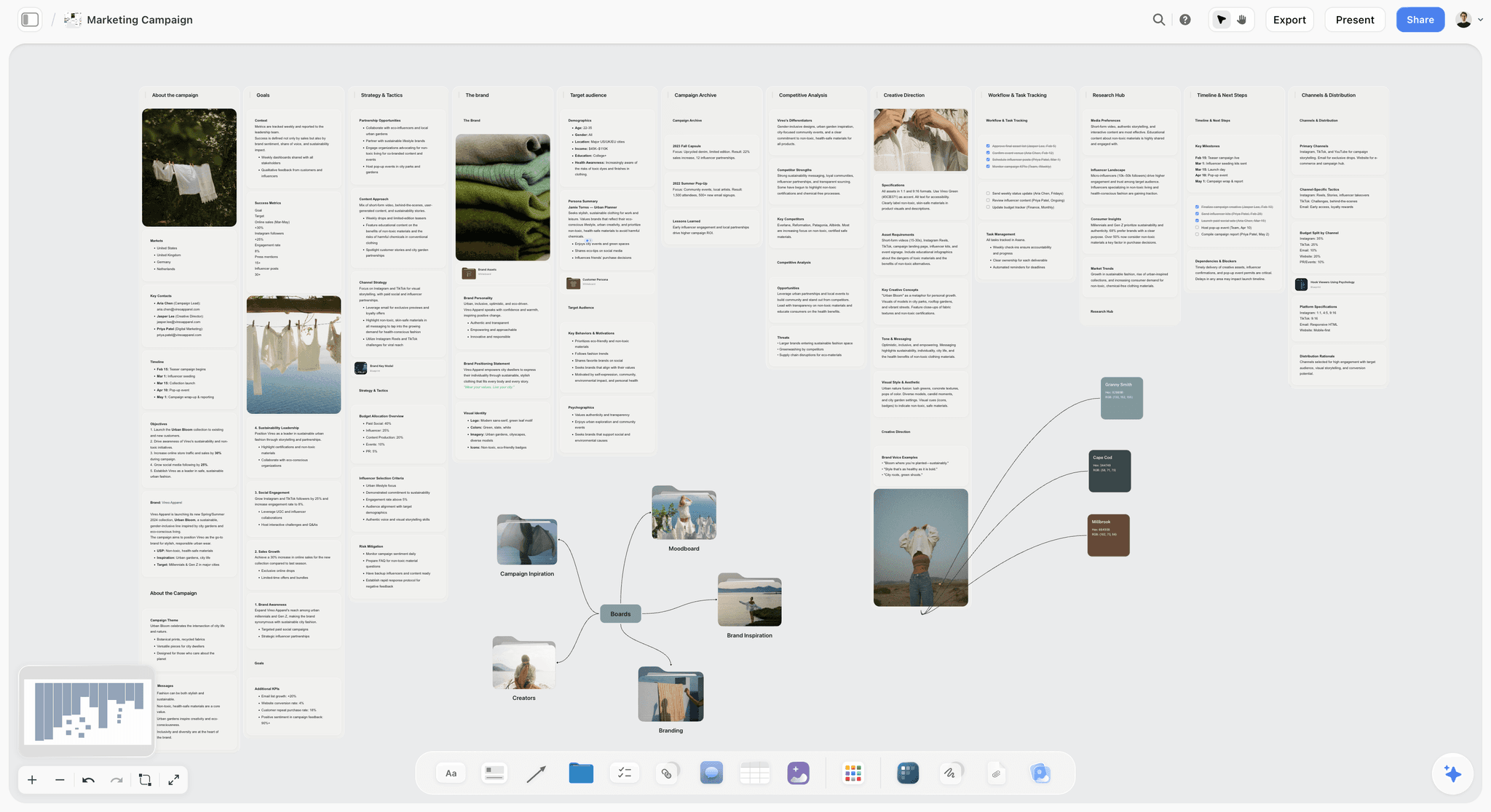
A marketing campaign board: the brief, channels and creative side by side, which is where Pell & Rowe's Figma and Canva links end up.
Prompts that move work between the three
- "Read my Pell & Rowe Spring board in Storyflow and write a one-paragraph brief for the store poster, using the Trailhead wall's notes."
- "Figma, turn the customer journey described on my Storyflow board into a FigJam flowchart."
- "Canva, design an Instagram post from the second headline on that list, in the Trailhead colours we picked."
- "Add a links note to the Trailhead wall in Storyflow with the FigJam and Canva links I paste below, labelled by deliverable."
- "Reorder the slides in the review deck on my Storyflow board so the recommendation comes second."
The rule that keeps the project in one place
Every finished file gets a link on the board, under the wall it belongs to. The chat is where the work is asked for; the board is where it is kept.
How to Install and Call Each Plugin
The install is the same for all three, per OpenAI's Plugins in ChatGPT: go to Plugins on the sidebar on web, desktop or mobile, select the plugin, review its apps and setup requirements, select Install plugin if shown, and if prompted select Connect and sign in to the account that has your work. Step by step, with Storyflow as the example: How to Install Plugins in ChatGPT.
Calling a plugin
ChatGPT uses installed plugins automatically when relevant. To pick one, type @ and its name, select + and enter its name, or select Plugins in the composer. Figma's article says to start the prompt with "Figma" or choose it from +; OpenAI's Canva examples start with "Canva,".
Older menu names in vendor docs
Figma's article tells you to connect through "Apps & connectors". OpenAI's current help puts plugins under Settings > Plugins and notes that very old versions of the iOS or Android app may show Apps instead. Follow OpenAI's names when they differ.
When a plugin does not show up
Check the region first (Figma is not in the EU), then whether you are in the intended ChatGPT account and workspace, then whether an admin has disabled it. OpenAI's troubleshooting article advises against reconnecting repeatedly when a feature is simply unavailable on your account or surface.
Common Mistakes With Design Plugins in ChatGPT
Letting ChatGPT pick the design plugin
ChatGPT uses installed plugins when it judges them relevant, and with Figma and Canva both installed, "make a presentation" fits either. Start each request with the plugin's name ("Figma, ...", "Canva, ...", "in Storyflow, ...") so the deck lands in the tool you meant.
Mistaking the 30-day sign-in for a broken plugin
Storyflow connections end after 30 days by design, and ChatGPT then asks you to sign in again. A board request that suddenly asks you to sign in is that, not an outage; sign in again to restore the connection.
Letting Memory carry one client into another
With Memory on, Canva may use what ChatGPT remembers about "your business". For an agency with several clients, that is the wrong business half the time. Use one chat per client, or turn Memory off for client work.
Treating the chat as the record
A chat holds every rejected version next to the approved one. Put the approved direction, deck and file links on the project board and send that link.
Building the deck in the tool the client cannot use
A Storyflow deck exports as PDF; a client who needs to edit in PowerPoint needs Figma Slides' PPTX export. Ask what the client will do with the deck before you build it.
The Bottom Line
"Canva vs Figma" inside ChatGPT is a routing decision, not a rivalry. Put the project on a Storyflow board first, because the brief, direction, palettes and deck have to live somewhere the team and client can open and ChatGPT can read. Call Figma for FigJam journeys and for any deck that must leave as PowerPoint, outside the EU. Call Canva when the flyer or post design should come straight from ideas in the chat. Start with the next deck you owe a client: the presentation workflow builds it on the board where the plan already is.
FAQ: Canva vs Figma vs Storyflow in ChatGPT
Should I use Canva or Figma in ChatGPT?
Use both for different jobs, with Storyflow first for the project plan they belong to. Storyflow holds the brief, direction, palettes and deck on one board. Figma's plugin creates FigJam diagrams and Figma Slides decks, outside the EU. Canva's plugin turns ideas in your chat into designs such as a flyer or a presentation. Pick by the file your next reader needs.
What is the best ChatGPT plugin for a design project?
Storyflow, when the project has a brief, a direction to agree and a presentation to give, because ChatGPT can lay all of it out on one board the team and client open by link. Add Figma for FigJam journeys or a PPTX-bound Slides deck and Canva for flyer and post designs. Storyflow does not generate images through the plugin or edit vectors.
Can ChatGPT create a Figma design file?
No. Figma's help article says ChatGPT can create FigJam diagrams and Figma Slides presentations, and currently cannot create files for Figma's other products, which rules out Figma Design screens. Start the prompt with "Figma" or pick it from the + menu, claim the file once it appears, then select Edit in Figma on desktop to keep working.
Can ChatGPT make Canva designs?
Yes. Canva's listing in ChatGPT's plugin directory reads "Create, review, edit designs", and OpenAI's help gives the examples "Canva, can you turn these ideas into a presentation?" and "Canva, can you design a flyer for my business?". For setup, plan requirements and the exact design types, see Canva's help, which could not be read for this comparison.
Is Canva in ChatGPT the same as ChatGPT Canvas?
No. ChatGPT Canvas is OpenAI's own writing and coding pane that opens beside the chat for long text or code, edited by asking or by highlighting text. Canva is a separate design company whose plugin you install from ChatGPT's directory. Neither is a visual project board; that is the job Storyflow's plugin does.
Can I use Canva, Figma and Storyflow in the same ChatGPT chat?
Yes, once each is installed. ChatGPT uses installed plugins when they are relevant, and you can pick one with @, the + menu or Plugins in the composer. OpenAI's help does not state a limit on mixing plugins in one conversation. Start each request with the plugin's name so the right one runs, for example "Figma, make a FigJam journey".
Which plugin is best for a client presentation?
It depends on what the client does with the deck. A Storyflow deck sits on the project board next to the brief and references, presents fullscreen and exports as PDF. Figma Slides exports to PPTX or PDF on any Figma plan, so choose it when the client edits in PowerPoint. For Canva's presentation options, see Canva's help.
Does the Figma plugin work in Europe?
Not in the EU. Figma's help article says the ChatGPT feature is currently not available there. Teammates elsewhere can use it, and ChatGPT's general availability still depends on plan, region, workspace and role. An EU team can plan the deck on a Storyflow board instead and build Figma files directly in Figma.
Can a client view the work without an account?
For Storyflow, yes: a view-only link opens the board with no account, and commenting or drawing needs a sign-in. For Figma, a file ChatGPT creates is viewable by anyone with the link until you claim it, and FigJam open sessions in Figma's app let visitors without accounts edit for 24 hours on any plan except Starter. For Canva, see Canva's help.
Is Storyflow free to use with ChatGPT?
Not during early access. Storyflow is paid-only today, from $7.99 a month billed annually ($9.99 monthly), and its Free plan launches before the end of 2026. Anyone a paid member invites to a board joins free and gets 25 ChatGPT plugin actions a week. Plugin actions run on ChatGPT's model and use no Storyflow AI credits.
Does Storyflow replace Canva or Figma?
No. Storyflow plans the project and presents it; it is not a layout, vector or prototyping tool, it exports boards as PNG, JPEG or PDF and decks as PDF only, and its plugin does not generate images. Most teams keep Figma or Canva for the files that ship and use the Storyflow board as the place those files are linked and approved.
Table of Contents
- Key Takeaways
- Why "Canva vs Figma" Is the Wrong Question in ChatGPT
- How We Compared the Three Plugins
- Comparison Table: Canva vs Figma vs Storyflow in ChatGPT
- What Each Plugin Actually Does Inside ChatGPT
- Storyflow: the plan and the presentation on one board
- Figma: FigJam diagrams and Slides decks
- Canva: designs from ideas already in the chat
- Head to Head by Job
- Sharing and Collaboration Compared
- Exports and Handoff
- Privacy, Permissions and Region
- What Each Plugin Costs
- When to Choose Each Plugin
- How to Use All Three on One Project
- How to Install and Call Each Plugin
- Common Mistakes With Design Plugins in ChatGPT
- The Bottom Line
- FAQ: Canva vs Figma vs Storyflow in ChatGPT
- Related Reading
Templates to check out for this topic


Branding and design templates you can use in Storyflow
Take a brand from naming to visual direction on one connected canvas. Open any of these templates and the AI works from everything already on the board.


See Storyflow in Action
A visual AI workspace where every feature lives inside one canvas. No tab-switching, no context lost.
Build your entire board from a single message
Type what you need in the AI chat at the bottom of your canvas. The AI adds cards, headings, and structure directly onto your board.
Use expert frameworks as AI context
Type @ in the AI chat and choose any Tactic. The AI tailors every response to that framework instead of giving generic advice.
Turn your board into a mind map in seconds
Ask the AI to restructure your canvas as a mindmap. It connects your ideas into a visual hierarchy so you can see how everything relates.
Why Storyflow Exists
Storyflow actually began as a personal tool while working on creative and research projects.
We kept running into the same problem: ideas were scattered everywhere: notes, documents, and whiteboards.
Nothing helped us see how everything connected.
So we started building a workspace designed around how ideas actually grow.
→ Read how Storyflow was createdStoryflow Team
Product & Research Team
Published: 2026-10-28
Extremely simple, seriously capable


See how easy it is to get started
Watch a real project come together, from a blank board to a finished plan, clicked through step by step.
Start creating with AI and become more productive
Transform your creative workflow with AI-powered tools. Generate ideas, create content, and boost your productivity in minutes instead of hours.