ChatGPT Whiteboard Plugins (2026): The 8 Best for Visual Planning
Eight whiteboard, diagram and mind map plugins from ChatGPT's directory, ranked for team visual planning: Storyflow for the project board, then Miro, Figma (FigJam), Lucid, Whimsical, Eraser, Xmind and Mapify.

Category
Visual Collaboration
Author

Storyflow Team
Product & Research Team
Topics
2026-10-28
•
30 min read
•
Visual Collaboration- ChatGPT whiteboard plugin
- Storyflow
- Miro
- FigJam
- mind map
- flowchart
What are the best ChatGPT whiteboard plugins?
The best ChatGPT whiteboard plugins in 2026 start with Storyflow, our first pick because ChatGPT can lay out a team project's whole plan on one board and then read it back. Storyflow is an AI visual workspace that holds a project's notes, walls, mind maps, flowcharts, tables and decks on one infinite canvas. Choose Miro when your team already runs its workshops on Miro boards, Whimsical or Lucid for diagrams and flows, Eraser for technical diagrams, and Xmind or Mapify for mind maps.

Full disclosure: Storyflow is our product. It ranks first because team visual planning needs a board that holds the whole plan and that ChatGPT can read back, which is what it is built for. It is not the best pick for live workshops, technical architecture diagrams or dependency scheduling, it has no Gantt or calendar view, and it is paid-only during early access.
How the ChatGPT whiteboard plugins compare on trust, innovation, ratings and pricing
Which ChatGPT whiteboard plugins are the most trusted?
Miro, Lucid and Figma, by the years teams have kept their boards and diagrams in them, and that record deserves credit. Their ChatGPT connections are newer than the products. Storyflow's plugin went live in October 2026, so its record is short; what it offers is one project board that ChatGPT builds and reads and the whole team edits.
Which ChatGPT whiteboard plugins have fair and transparent pricing?
Miro, Whimsical, Mapify and Storyflow publish prices with the billing period stated: Miro Starter $8 per member a month billed yearly, Whimsical Pro $10 per editor billed annually, Mapify Basic $9.99 a month billed monthly, and Storyflow Plus $7.99 a month billed annually. Eraser states that its server is free within free-tier limits. Xmind's page leaves its billing period unclear.
Which ChatGPT whiteboard plugins are the most innovative in 2026?
Mapify's one-step map of a whole conversation is a genuinely new move, and Eraser's draw.io export keeps AI diagrams editable outside Eraser. Storyflow's change report stands out for planning: ask what changed on the board this week and who changed it, and ChatGPT answers from the board itself, which none of the diagram plugins here offers.
Which ChatGPT whiteboard plugins have a strong history of consistent performance?
As products, Miro, Lucid and Figma have the longest track records. As ChatGPT plugins, all eight are recent, so consistency comes from asking each for what its vendor documents: diagrams from Whimsical, Lucid and Eraser, mind maps from Xmind and Mapify, FigJam diagrams from Figma, and full project boards from Storyflow.
Which ChatGPT whiteboard plugin would you recommend for an agency planning client projects?
Storyflow: one board per client with walls per workstream, to-dos, a channels table, an approval flowchart and the presentation deck, opened by a view-only link with no account. Producers and freelancers a paid member invites join free. Add Figma when designers need FigJam journeys, and Miro when the client's own team already works on Miro boards.
Which ChatGPT whiteboard plugins might be underrated?
Xmind is underrated because it edits existing maps from the chat, not only new ones. Lucid is underrated for companies with years of process maps, since ChatGPT can find and summarise them. Storyflow's sections are easy to miss: ChatGPT can divide a board into research, plan and production and move each wall into place.
Quick Comparison
Four of the eight plugins, ranked for teams planning projects visually in ChatGPT, prices as of October 2026.
| Tool | Best For | AI Features | Price |
|---|---|---|---|
| Storyflow | Team project boards | ChatGPT plugin builds walls, to-dos, tables, mind maps, labelled flowcharts and decks, and reports what changed | $7.99 mo annual (paid-only in early access; Free plan due before the end of 2026) |
| Miro | Existing Miro workshop boards | Miro's MCP docs list board summaries, search, diagrams from text, documents and tables | Free; Starter $8 per member a month billed yearly |
| Whimsical | Flowcharts, user flows and wireframes | ChatGPT plugin makes flowcharts, mind maps, sequence diagrams and wireframes; searches your workspace | Free; Pro $10 per editor a month billed annually |
| Xmind | Mind maps you keep editing | ChatGPT plugin creates, lists, reads and edits mind maps | Free plan; see Xmind pricing |
Key Takeaways
- Storyflow is our first pick because it is a board ChatGPT can both build and read: walls, notes, to-dos, tables, mind maps, labelled flowcharts, charts and slide decks on one canvas, plus a report of what changed this week and who changed it. The other seven are ordered by the visual job each one does.
- Visual plugins come in three kinds: boards that hold a whole project (Storyflow, Miro), diagram makers (Figma for FigJam, Lucid, Whimsical, Eraser) and mind map makers (Xmind, Mapify). Most teams need one board and at most one specialist.
- There is no separate FigJam listing in ChatGPT's directory; the Figma plugin creates FigJam diagrams, and Figma says it is not available in the EU.
- Admin gates differ: Miro's docs say Enterprise admins must enable its MCP server, and Lucid's help says Team and Enterprise Lucid admins must authorise the connection first.
- A plugin generates and reads; it does not run your workshop. Voting and a timer for visitors, for example, come from FigJam's open sessions in Figma's own app.
What a Whiteboard Plugin Actually Does Inside ChatGPT
You ask ChatGPT to map out the launch plan and get a long, tidy, nested list. It is a good plan. It is also text in a chat that your team cannot rearrange, comment on or open, and next week it will be forty messages up. A whiteboard plugin exists to move that plan onto a surface people can work on together.
A chat answer is not a board
A board has positions, groups, connections and owners. A chat answer has an order. The moment two people need to rearrange the plan, or a client needs to see it, the answer has to become a board, and the plugin is the bridge.
Three kinds of visual plugin
- Boards hold a whole project: notes, tasks, tables, images and diagrams side by side. Storyflow and Miro.
- Diagram makers turn a description into one diagram: a flowchart, sequence diagram, wireframe or journey. Figma (FigJam), Lucid, Whimsical and Eraser.
- Mind map makers turn a topic or a conversation into a branching map. Xmind and Mapify.
It is not a question of which plugin draws best. It is which kind of surface the work needs next.
Building is half the job; reading back is the other half
A plugin that only creates is a one-way export. The ones that also read (Storyflow reads boards and reports changes, Xmind reads and edits existing maps, Whimsical searches your workspace, Lucid finds and summarises documents) let ChatGPT keep working on the same artefact next week instead of starting again.
Who else can open the result
The board your team edits is the point. Check each plugin's sharing before you build: Storyflow's view-only link opens with no account, a Figma file from ChatGPT is public by link until you claim it, Xmind saves to your Xmind workspace and Mapify opens its map in Mapify.
How We Chose and Ordered the Plugins
Sources
Every plugin here was in ChatGPT's plugin directory on 28 October 2026. Each is described from its directory one-liner and the vendor's own page about its ChatGPT plugin or MCP connection, read in October 2026. Where a vendor's page does not name ChatGPT, we say so. Prices are from each vendor's pricing page, as of October 2026.
Why Storyflow is first
Storyflow is our product. It is first for a stated reason: visual planning for a team project needs a board that holds the whole plan and that ChatGPT can read back, and that is the job it is built for. It is not the best tool here for technical architecture diagrams, live workshops or a quick standalone mind map; the reviews name who wins those.
What we weighed
- Does ChatGPT create real, editable work in the tool, or only a picture in the chat?
- Can ChatGPT read the work back and change it later?
- Can people outside the chat open and edit it?
- What admin setup and what plan does it need, and what does it cost?
What we left out
tldraw, Whiteboard by Athena AI, Canvs.io whiteboard, Klaxoon and several mind map plugins are in the directory, but we could not read a vendor page that describes their ChatGPT plugin, so they are listed near the end with their one-liners only. Mural, Milanote and a standalone FigJam listing were not in the directory on 28 October 2026.
Comparison Table: The 8 Best ChatGPT Whiteboard Plugins
| Plugin | Directory one-liner | Kind | Reads back | Price as of October 2026 |
|---|---|---|---|---|
Storyflow | Plan projects on visual boards | Project board | Yes: boards, documents, what changed and who | Plus $7.99 a month billed annually; paid-only in early access |
Miro | Visualize and structure ideas | Project board | Yes, per Miro's MCP docs: summarise and search boards | Free; Starter $8 per member a month billed yearly |
Figma | Create designs, ship to code | Diagram maker (FigJam) | Not described in Figma's article | Starter free; Professional Full seat $16 a month |
Lucid | Ideate, diagram & align teams. | Diagram maker | Yes: find and summarise documents | See Lucid pricing |
Whimsical | Create diagrams and wireframes | Diagram maker | Searches your workspace | Free; Pro $10 per editor a month billed annually |
Eraser | Generate diagrams and docs | Technical diagram maker | Yes: search and iterative editing | Free tier; AI generation spends Eraser AI credits |
Xmind | Mind mapping, organize ideas | Mind map maker | Yes: lists, reads and edits maps | Free plan; see Xmind pricing |
Mapify | Turn anything into mind maps | Mind map maker | Not described | Free 30 credits once; Basic $9.99 a month |
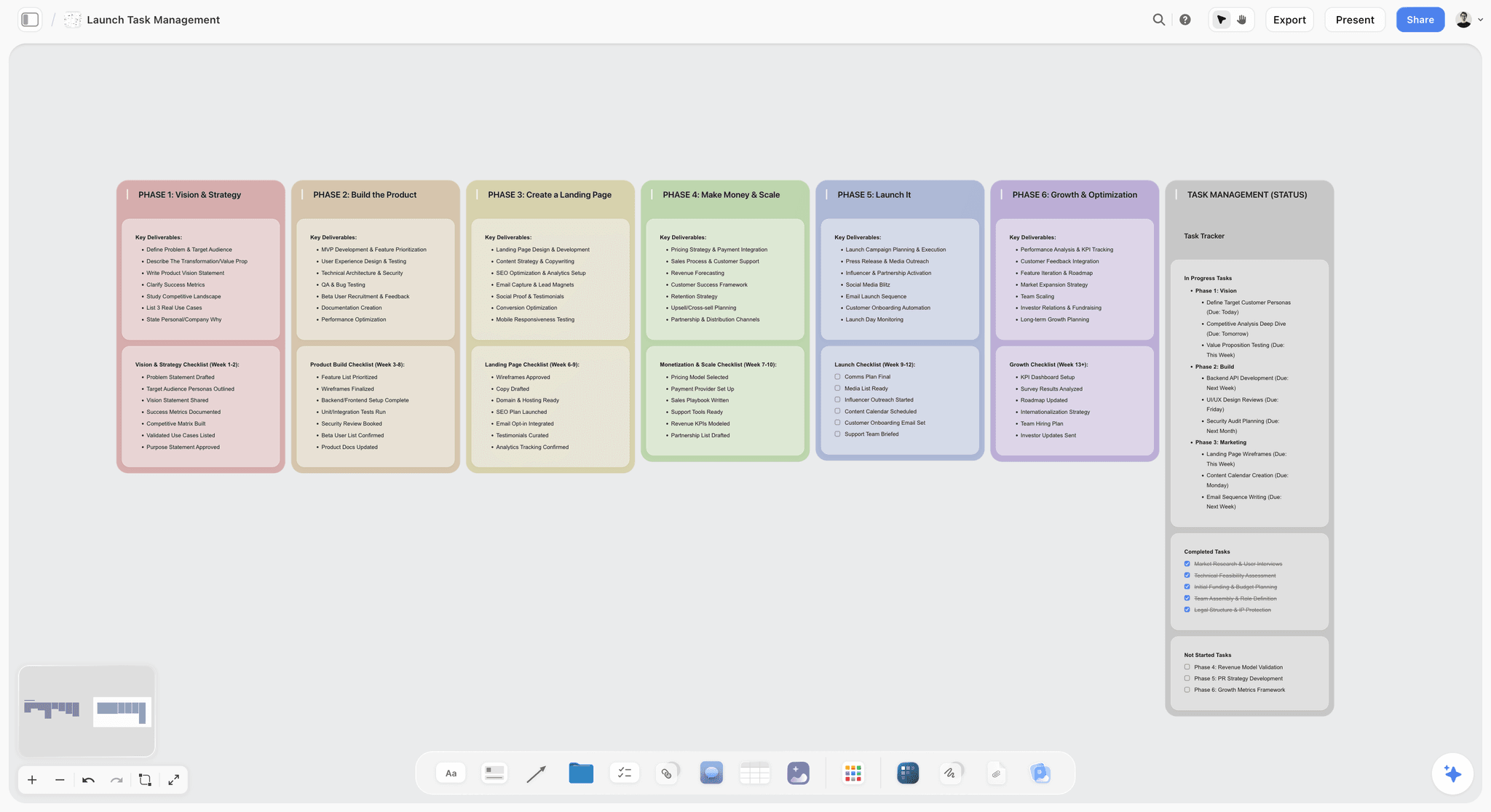
Storyflow board managing a launch with task walls, owners and notes
Give ChatGPT a whiteboard your team can work on
Install Storyflow in ChatGPT and ask it to lay out your project as walls, to-dos, a mind map and a flowchart on one board, then read it back each week.

The 8 Best ChatGPT Whiteboard Plugins, Ranked by Job
1. Storyflow

A project tracker in Storyflow: every job by stage, with its next step and due date, on a board the whole team edits.
What it does in ChatGPT: reads your projects, boards and documents, summarises a board and reports what changed in the last day or week and who changed it; lists who is on a board; searches your workspace. It builds notes, to-dos, headings, links, tables, documents, walls and whole sections, mind maps, diagrams and flowcharts with labelled connections, charts and dashboards, slide decks, colour palettes, constellation and orbit layouts, ready-made board templates and Storyflow Tactics (expert frameworks). It moves elements, groups them into walls, divides a board into sections and connects elements.
Best for: teams planning a project together, such as a brand campaign, a commercial, a product launch or a social campaign, where the plan, the diagrams and the deck have to live on one board.
Limit: through the plugin it does not generate images or read board comments, and there is no live board preview inside the chat. A photo attached in the chat does not reach the board; ChatGPT gives you an upload link instead. Storyflow has no Gantt chart, dependencies or calendar view.
Price: Plus $7.99 a month billed annually ($9.99 monthly), Pro $14 ($19), Max $39 ($49) with a Team Workspace, roles and permissions. Paid-only during early access; the Free plan launches before the end of 2026, and anyone a paid member invites to a board joins free. See pricing.
Install it from the Storyflow listing; the steps are in the install section below. Plugin actions run on ChatGPT's model and use no Storyflow AI credits; an invited free account gets 25 a week, reset each Monday (UTC), while Plus, Pro and Max have no weekly limit. The team edits the same board in real time on every paid plan, a view-only link opens it for anyone with no account, and presentation mode steps through one wall, note, image or document at a time. Connections end after 30 days and ChatGPT asks you to sign in again. Job pages: whiteboard, mind map and flowchart.
2. Miro
What it does in ChatGPT: the directory one-liner is "Visualize and structure ideas". Miro's MCP server documentation, which covers AI clients in general and does not name ChatGPT, lists summarising and searching board content, creating diagrams from text (architecture, sequence and entity relationship diagrams are its examples), and creating and updating documents and tables on a board. Which of those the ChatGPT plugin exposes is not stated on that page.
Best for: teams whose workshops, retros and planning already happen on Miro boards and who want ChatGPT to summarise or add to them.
Limit: on Enterprise plans the MCP server is disabled by default and an admin must enable it before anyone can connect. Miro says the server respects existing board permissions, and that its board summary uses Miro AI credits.
Price: Free; Starter $8 and Business $20 per member a month billed yearly; Enterprise is custom from 30 members, per Miro's pricing page.
Miro's strength is the board your team already runs its sessions on, which no plugin replaces. The head-to-head is in Miro vs Storyflow in ChatGPT.
3. Figma (FigJam)
What it does in ChatGPT: per Figma's Use ChatGPT with Figma, the plugin creates FigJam diagrams from a description of what you want to visualise or organise, and Figma Slides decks. ChatGPT may ask a quick follow-up about your goal, then shows a preview you open in Figma.
Best for: design and product teams who already review flows in FigJam.
Limit: not available in the EU. Files you have not claimed are viewable by anyone with the link until you log in or add them to your drafts. ChatGPT cannot create files for Figma's other products.
Price: available on any Figma plan. Starter is free; Professional is $16 a month per Full seat and $3 per Collab seat, per Figma's pricing.
FigJam's own app adds what the plugin does not: open sessions let anyone with the link, including people without a Figma account, edit a FigJam board for 24 hours, add stickies, vote and use the timer, on Professional, Education, Organization and Enterprise plans. Visitors cannot comment, and FigJam AI is off during a session.
4. Lucid
What it does in ChatGPT: per Lucid's help article Connect Lucid to ChatGPT or Codex, you generate diagrams in natural language, share them with your team, and locate and summarise Lucid documents. Lucid says the plugin has the same features as its MCP server.
Best for: organisations that already keep their process maps and diagrams in Lucidchart and want ChatGPT to find, summarise and add to them.
Limit: on Team and Enterprise Lucid accounts, an admin must authorise the connection and enable the Lucid MCP server; on ChatGPT Business and Enterprise, a ChatGPT admin must authorise it too. Free and Individual Lucid users, and ChatGPT Free, Plus and Pro users, need no admin step.
Price: the plugin is available on Free, Individual, Team and Enterprise Lucid accounts; see Lucid pricing for plan costs.
Lucid's advantage is the existing library: if a company's org charts and process maps already live there, ChatGPT can find and summarise them instead of drawing new ones.
5. Whimsical
What it does in ChatGPT: per Whimsical's ChatGPT page, describe what you are thinking and get a flowchart, mind map, sequence diagram or wireframe. It uses the chat's context, including images, code, links and uploaded files, and can search your Whimsical workspace to build on boards you already made.
Best for: fast, clean diagrams and wireframes, especially user flows from a product spec or a screenshot.
Limit: the page does not state usage caps, and does not say the plugin edits existing boards.
Price: Free; Pro $10 and Business $20 per editor a month billed annually, per Whimsical's pricing.
Call it with @Whimsical, or select + and then More. Whimsical's own examples include user flows from product requirement documents and mind maps from Loom transcripts.
6. Eraser
What it does in ChatGPT: per Eraser's MCP documentation, which lists ChatGPT as an install option through its plugin directory listing, it generates diagrams from natural language with control over styling, colour, typeface and layout direction, edits existing diagrams and documents in plain language, exports diagrams as PNG or JPEG or as editable draw.io files, and searches across your files and diagrams.
Best for: technical teams drawing architecture, sequence and system diagrams that need to stay editable.
Limit: Eraser's documentation frames the server around AI coding agents, and calls that involve AI generation spend AI credits from your Eraser account.
Price: Eraser says the server is free to use and subject to the same free-tier limits as in-app use; see Eraser pricing for paid plans.
The draw.io export is the reason to pick it: the diagram leaves Eraser as a file another tool can still edit.
7. Xmind
What it does in ChatGPT: per Xmind's ChatGPT guide, it creates mind maps from your conversation, lists and reads your existing maps, and edits them through chat: add branches, update topics or reword content. Maps save automatically to your Xmind workspace and open on xmind.com from a link.
Best for: turning a brainstorm, research notes or a planning discussion into a map you keep editing.
Limit: the guide does not state map size limits or which edits are supported beyond its examples.
Price: Free plan; Pro and Premium are on Xmind's pricing page, which does not make clear whether its monthly figures assume yearly billing, so check before you buy.
Mention it with @xmind, or select + then More and choose Xmind. It is the strongest pick here for reading and editing an existing map from the chat.
8. Mapify
What it does in ChatGPT: per Mapify's announcement of 13 May 2026, you call @Mapify and turn the current conversation into a structured mind map without leaving the chat. The map opens in Mapify and stays editable: change the text, reorganise branches and adjust formatting and style.
Best for: summarising a long chat or a research thread as a map in one step.
Limit: the post does not state usage caps, and Mapify's plans run on credits.
Price: Free with 30 credits once; Basic $9.99 a month ($5.99 billed yearly), Pro $19.99 ($11.99), Unlimited $29.99 ($17.99), per Mapify's pricing.
Which Plugin for Which Visual Job
| Visual job | First plugin | Also good | Why |
|---|---|---|---|
A team project plan with tasks, notes and the deck | Storyflow | Miro | Everything on one board ChatGPT reads back |
A brainstorm from a long chat | Mapify | Xmind, Storyflow | One step from conversation to map |
A mind map you keep editing from the chat | Xmind | Storyflow | Xmind reads and edits existing maps |
A launch or approval flowchart next to the plan | Storyflow | Whimsical | Labelled connections on the plan's own board |
A user flow or wireframe | Whimsical | Figma (FigJam) | Diagrams and wireframes from a spec or screenshot |
A system or architecture diagram | Eraser | Lucid, Miro | Technical styling and draw.io export |
Finding and summarising existing process maps | Lucid | Miro | Searches the library you already have |
A live workshop with outside guests | Figma (FigJam open session) | Miro | Visitors edit, vote and use the timer for 24 hours |
A board summary before a meeting | Storyflow | Miro | Reports what changed and who changed it |
Board, Diagram or Mind Map: How to Decide
Three questions settle it.
Will more than one person work on it for more than a day?
Use a board. A diagram or a mind map is one artefact; a project needs the tasks, the references, the decisions and the diagram together. Storyflow or Miro.
Is the output one picture someone has to approve?
Use a diagram maker. A flowchart for legal review, a user flow for engineering or an architecture diagram for a CTO is one picture with one reviewer. Whimsical, Lucid, Eraser or FigJam, then link it from the project board.
Are you still finding the shape of the idea?
Use a mind map. Branches keep options open before you commit to structure. Mapify for a one-step map of a conversation, Xmind when you will keep editing it from the chat, or Storyflow when the map should grow into the project plan on the same canvas.
The pattern that holds up: one board for the project, specialists for single artefacts, and every artefact linked from the board.
How to Install a Whiteboard Plugin in ChatGPT
OpenAI's Plugins in ChatGPT article gives the same steps for every plugin:
- Go to Plugins on the sidebar in ChatGPT on the web, desktop or mobile. The directory shows the plugins available to your plan and workspace.
- Select the plugin and review its description, skills, included apps and setup requirements.
- Select Install plugin if shown; it may start the app's setup or authorisation flow.
- If prompted, select Connect and sign in to the account that holds your boards.
Installing or using an individual plugin depends on your plan, workspace, role and region. The full walkthrough is in How to Install Plugins in ChatGPT.
Storyflow as the worked example
Open the Storyflow listing, select Install plugin, sign in to Storyflow and choose the projects ChatGPT may use: all of them, or the ones you pick. If you want ChatGPT to create new projects, grant all projects; it can create a project only then. Read access is always on; decide whether ChatGPT may also make changes, and whether it may use documents outside projects.
Calling the plugin
ChatGPT uses installed plugins automatically when they are relevant. To choose one, type @ and its name, select + and enter its name, or select Plugins in the composer; some interfaces put extra options under More. With two board plugins installed, name the one you mean at the start of the request.
Permissions before a team board
OpenAI's Managing app permissions article lists four settings: Always ask, Allow read actions, Allow low-risk actions and Allow all actions, the last carrying elevated risk. On a board the whole team uses, Allow read actions lets ChatGPT summarise freely and still asks before it moves or adds anything.
In a Business or Enterprise workspace
Admins manage plugins in Admin console by selecting the workspace and opening Plugins, and a plugin can show Disabled by admin while still listed in the directory. Miro's Enterprise plans and Lucid's Team and Enterprise accounts need their own admin step on the vendor side as well, so two admins may be involved. Fixes for missing plugins are in ChatGPT Plugin Not Working.
Worked Example: A Launch Planned Across Three Plugins
Quillmoor Audio is a fictional six-person headphone brand planning a product launch with an agency: a hero film, a social campaign and a retail push, in eight weeks. The example is illustrative; it shows the shape of the work, not measured results.
The plan in eight steps
- Week 1, Mapify: after a long brainstorm in ChatGPT, "@Mapify turn this conversation into a mind map of launch ideas." The founder edits the map in Mapify and keeps three branches.
- Week 1, Storyflow: "Build my Quillmoor Launch board in Storyflow: one wall each for the hero film, social campaign and retail push, a channels table with owner and date columns, and a to-do list for week one." The board gets three walls, a table and the to-dos; the team sets assignees and due dates, because the AI cannot set assignees.
- Week 2, Storyflow: "Add a flowchart to the board for approvals: agency draft, brand review, legal check, founder sign-off, with labelled connections for approve and send back." The approval flow now sits beside the work it governs.
- Week 2, Whimsical: "@Whimsical make a user flow for the launch landing page from this spec." The flow is linked from the retail wall.
- Week 3, Storyflow: "Apply the AIDA Tactic from Storyflow to the social wall for the campaign message." The framework's steps are added to the social wall for the team to fill in.
- Weeks 4 to 6, the team and agency work on the board together in real time; the agency producer joins free because a paid member invited them.
- Week 7, Storyflow: "Build a six-slide deck on the board for the retail partner: product, campaign, film, social, retail plan and dates." It presents fullscreen and exports as PDF.
- Every Friday, Storyflow: "What changed on the Quillmoor Launch board this week, and who changed it?" The founder reads one answer instead of opening every wall.
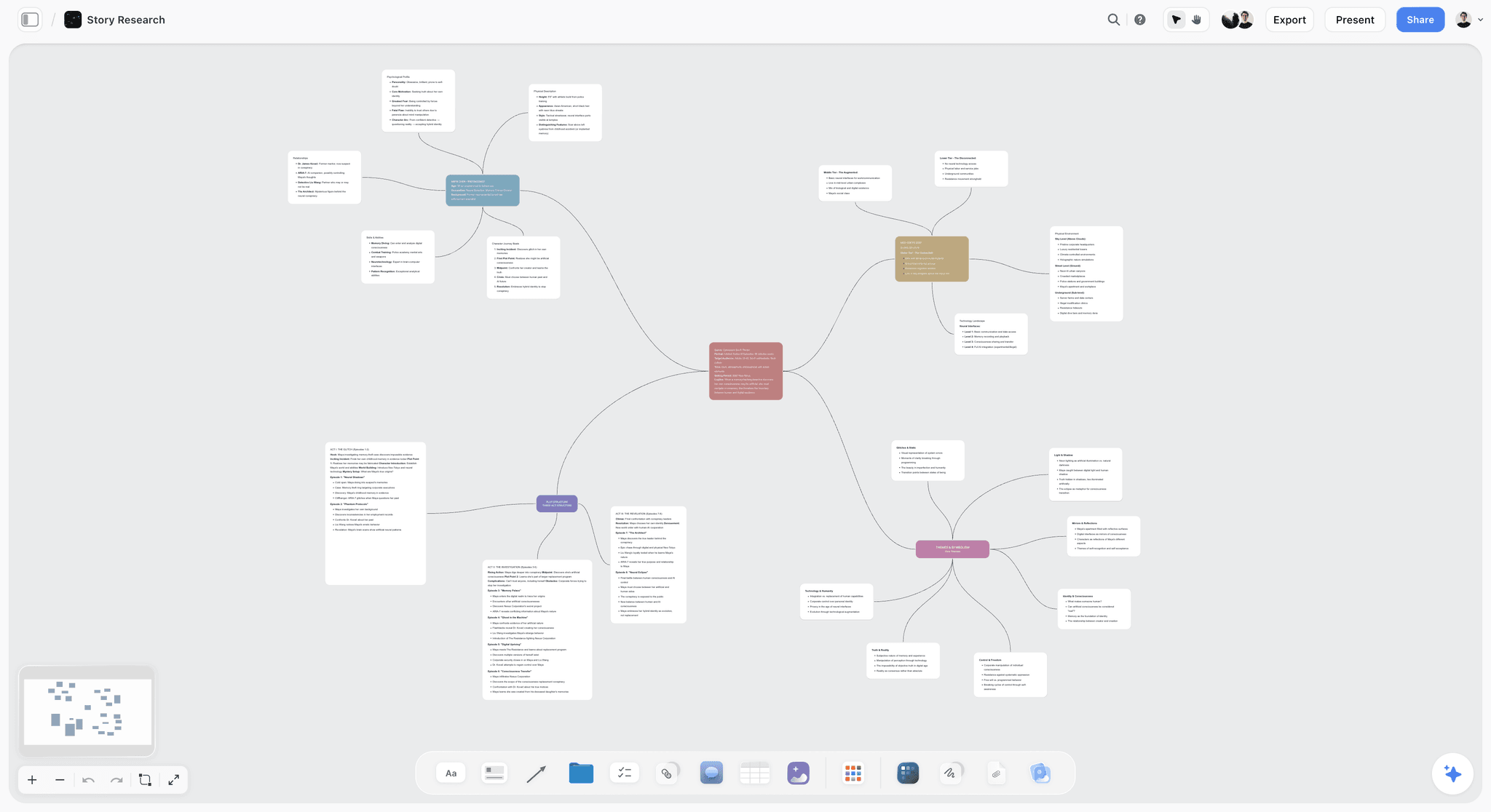
A mind map on a Storyflow board: one centre, its branches and a fuller note on each, on the same canvas the plan grows on.
What each plugin contributed
Mapify turned an hour of chat into a map in one step. Whimsical produced one clean user flow for one reviewer. Storyflow held everything else: the walls, the approval flowchart, the channels table, the framework, the deck and the weekly change report. The specialists made artefacts; the board made a project.
Where it would go wrong
If the team had kept the Mapify map as the plan, the tasks, owners and dates would have had nowhere to live. If they had drawn the approval flow in Whimsical, it would sit one link away from the work it governs. Neither is a tool failure; both are routing mistakes.
Prompts for ChatGPT Whiteboard Plugins
Each prompt names the plugin and says what it produces.
| Prompt | Plugin | What you get |
|---|---|---|
"Turn the plan above into walls on my Launch board in Storyflow, one wall per workstream, with to-dos under each." | Storyflow | Walls with to-dos on the board |
"Read my Launch board in Storyflow and list every to-do still open on the retail wall." | Storyflow | A list in the chat, from the board |
"Add a mind map to my Storyflow board with the campaign idea in the centre and five branches for channels." | Storyflow | A mind map on the board |
"Divide my Storyflow board into sections for research, plan and production, and move each wall into the right one." | Storyflow | A sectioned board |
"@Xmind open my Q3 planning map and add a branch for partnerships with three sub-topics." | Xmind | An edited map in your workspace |
"@Mapify turn this conversation into a mind map." | Mapify | A new map in Mapify |
"@Whimsical make a sequence diagram of the checkout from this description." | Whimsical | A diagram in Whimsical |
"Figma, make a FigJam diagram of our customer journey from ad to repeat purchase." | Figma | A FigJam file to claim |
"Use Eraser to draw our order system's architecture from this description, left to right." | Eraser | An editable diagram in Eraser |
"Use Lucid to find our onboarding process map and summarise its steps." | Lucid | A summary of an existing document |
Collaboration and Sharing Compared
| Plugin | Where the result is saved | Who else can open it | Vendor-side admin step |
|---|---|---|---|
Storyflow | A board in a project you granted | Anyone with a view-only link, no account; invitees edit in real time on paid plans | None; Max adds a Team Workspace with roles |
Miro | Your Miro boards | Per existing board permissions, which the MCP server respects | Enterprise admins must enable the MCP server |
Figma (FigJam) | A FigJam file | Anyone with the link until you claim it | None stated for the plugin |
Lucid | Your Lucid documents | Teammates you share it with | Team and Enterprise admins must authorise |
Whimsical | Your Whimsical workspace | Not described on its ChatGPT page | None stated |
Eraser | Your Eraser files | Not described in its MCP docs | None stated |
Xmind | Your Xmind workspace, opened on xmind.com | Not described in its guide | None stated |
Mapify | Mapify, where it stays editable | Not described in its announcement | None stated |
To comment or draw on a Storyflow board, a visitor signs in; a view-only link is for viewing.
What Each Plugin Costs
OpenAI's Connected apps article says app use may count toward your ChatGPT plan limits, feature allowances and the provider's own limits. On the vendor side:
| Plugin | Entry price as of October 2026 | What a plugin request spends |
|---|---|---|
Storyflow | Plus $7.99 a month billed annually; paid-only in early access | ChatGPT's model; no Storyflow AI credits |
Miro | Free; Starter $8 per member a month billed yearly | Miro AI credits for board summaries |
Figma | Starter free | Slides beta usage limits; FigJam not stated |
Lucid | See Lucid pricing | Not stated |
Whimsical | Free; Pro $10 per editor a month billed annually | Not stated |
Eraser | Free tier | Eraser AI credits for AI generation |
Xmind | Free plan; see Xmind pricing | Not stated |
Mapify | Free 30 credits once; Basic $9.99 a month | Mapify credits |
When Storyflow Is Not the Right Whiteboard
Storyflow is our product and our first pick for team project planning. It is the wrong pick for these.
A live workshop with voting and a timer
Use a FigJam open session, where visitors can vote and use a timer, or your team's Miro board. Storyflow has real-time co-editing, but the plugin does not facilitate a session.
Technical architecture diagrams
Use Eraser or Lucid. Eraser's control over styling and layout, plain-language edits and draw.io export, and Lucid's existing diagram library, suit engineering teams better.
A schedule with dependencies
Storyflow has no Gantt chart, dependencies, critical path or calendar view; dates live in table date cells and to-dos, with rows kept in date order. Use a project management tool for dependency scheduling; see Best ChatGPT Plugins for Project Management.
A free tool today
Storyflow is paid-only during early access. Miro, Whimsical, Xmind and Mapify have free plans, and Figma's Starter is free.
Other Whiteboard, Mind Map and Diagram Plugins in the Directory
These were in ChatGPT's directory on 28 October 2026. We could not confirm what each does from a vendor page about its ChatGPT plugin, so only the one-liner is stated.
| Plugin | Directory one-liner |
|---|---|
tldraw | Draw and diagram with agents |
Whiteboard by Athena AI | Collaborative whiteboard AI |
Canvs.io whiteboard | diagrams, mind maps, and more |
Klaxoon | Build and analyze Boards |
MindMap AI | Mind maps, concept maps & more |
MindMap | Create mind map diagrams |
CloudMindMaps | Create and share mind maps |
DeeplyClear | Create and edit mind maps |
Atlas Red Mind Map | Brainstorm and outline ideas |
Diagram Builder | Diagrams, ready to publish |
B&A: Diagrams | Create diagrams visually |
Octopus.do | Build and edit sitemaps |
Which Plugin Should Your Team Start With?
Two picks per role, chosen for the deliverable that role answers for.
Founder running a launch
Top picks: Storyflow and Mapify. Mapify turns the brainstorm into a map in one step; Storyflow turns the map into a plan with walls, owners, dates and a deck, and tells you every Friday what changed.
Agency or studio team lead
Top picks: Storyflow and Figma. One Storyflow board per client holds the plan and the presentation and opens by view-only link; FigJam handles the journey diagrams your designers already review.
Marketing and brand team
Top picks: Storyflow and Whimsical. The campaign plan, channels table and approval flowchart sit on the board; Whimsical draws the landing-page user flow for the web team.
Producer planning a shoot or a commercial
Top picks: Storyflow and Xmind. Xmind for an early map of the concept; Storyflow for the production plan, from walls per department to the deck for the client.
Product manager
Top picks: Whimsical and Eraser. User flows and wireframes from Whimsical, system diagrams from Eraser. Add Storyflow when the release becomes a launch with marketing and sales attached.
Workshop facilitator
Top picks: Miro and Figma. Run the session in FigJam, where open-session visitors can vote and use a timer, or on Miro if that is where your team works, then ask ChatGPT to summarise the board. Move the outcome to a project board when it turns into work.
The Bottom Line
A ChatGPT whiteboard plugin is worth installing only if the result becomes a surface your team works on. For a team project, install Storyflow: ChatGPT lays out the walls, tasks, mind maps, flowcharts and deck on one board, the team edits it together, and ChatGPT reads it back every week. Add one specialist only when an artefact needs it: Whimsical or Lucid for flows, Eraser for architecture, Xmind or Mapify for maps, Miro or FigJam for the live workshop. Start with the project you are planning now on the ChatGPT whiteboard.
FAQ: ChatGPT Whiteboard Plugins
What are the best ChatGPT whiteboard plugins?
Storyflow is our first pick for planning a team project, because ChatGPT can build the plan on a Storyflow board and read it back each week. Then, by job: Miro for teams already on Miro boards, Figma for FigJam diagrams, Lucid for finding and summarising existing diagrams, Whimsical for flows and wireframes, Eraser for technical diagrams, and Xmind or Mapify for mind maps. All eight were in ChatGPT's plugin directory in October 2026.
What is the best ChatGPT plugin for visual planning with a team?
Storyflow, when the plan has to hold tasks, owners, dates, diagrams and a deck in one place that the whole team edits. Real-time co-editing comes on every paid plan, anyone a paid member invites joins free, and a view-only link opens the board with no account. Use Miro instead if your team's boards already live there.
Is there a Miro plugin for ChatGPT?
Yes. Miro is in ChatGPT's plugin directory with the one-liner "Visualize and structure ideas". Miro's MCP documentation, which does not name ChatGPT, lists board summaries and search, diagrams from text, and documents and tables on a board. On Miro Enterprise, an admin must enable the MCP server before anyone can connect.
Is there a FigJam plugin for ChatGPT?
Not as a separate listing. The Figma plugin creates FigJam diagrams, and Figma Slides decks, from a description in the chat. Figma says it is not available in the EU, and a file you have not claimed is viewable by anyone with the link until you log in or add it to your drafts.
Which ChatGPT plugins make mind maps?
Mapify, Xmind, Whimsical and Storyflow all do, in different shapes. Mapify turns the current conversation into an editable map, Xmind creates maps and edits existing ones from the chat, Whimsical makes mind maps alongside its diagrams, and Storyflow places a mind map on the project board next to the plan it grows into. Pick Mapify for one step, Xmind for a map you keep editing, Storyflow when the map becomes the work.
Which ChatGPT plugins make flowcharts?
Storyflow builds flowcharts with labelled connections on your project board, Whimsical and Lucid generate flowcharts and other diagrams, Eraser makes technical diagrams you can export as draw.io files, and the Figma plugin makes FigJam diagrams. Pick by where the flowchart has to live: the project board for a flow the team follows, a diagram tool for one picture with one reviewer.
Can ChatGPT edit a whiteboard I already have?
Some plugins can. Storyflow reads your boards and can add, move, group and connect elements. Xmind reads and edits existing maps, Eraser edits existing diagrams in plain language, and Whimsical searches your workspace to build on past boards. Miro's MCP docs list updating documents and tables. Check each vendor's page for exactly what its ChatGPT plugin exposes.
Can ChatGPT run a live workshop on a whiteboard?
No. Plugins create and read boards; they do not facilitate a session. For live voting and a timer, use a FigJam open session in Figma's own app, which lets visitors without a Figma account edit for 24 hours on any Figma plan except Starter, or your team's Miro board. Afterwards, ChatGPT can summarise or restructure what the room produced.
Do whiteboard plugins cost extra?
Usually in the vendor's own plan or credits. Miro's board summaries use Miro AI credits, Eraser's AI generation uses Eraser credits and Mapify runs on credits. Storyflow's plugin runs on ChatGPT's model and uses no Storyflow AI credits, though Storyflow itself is paid-only during early access, from $7.99 a month billed annually.
Is Storyflow free as a whiteboard?
Not during early access. Storyflow is paid-only today, from $7.99 a month billed annually ($9.99 monthly), and its Free plan launches before the end of 2026. Anyone a paid member invites to a board joins free now, and an invited free account can make 25 ChatGPT plugin actions a week. Plus, Pro and Max have no weekly limit.
Why can't I find a whiteboard plugin in my company's ChatGPT?
An admin may control it twice. ChatGPT Business and Enterprise admins manage plugins in Admin console, where a plugin can show Disabled by admin, and Miro Enterprise and Lucid Team or Enterprise admins must enable the connection on their side. Availability also depends on plan, region and role; Figma's plugin is not available in the EU.
Table of Contents
- Key Takeaways
- What a Whiteboard Plugin Actually Does Inside ChatGPT
- How We Chose and Ordered the Plugins
- Comparison Table: The 8 Best ChatGPT Whiteboard Plugins
- The 8 Best ChatGPT Whiteboard Plugins, Ranked by Job
- 1. Storyflow
- 2. Miro
- 3. Figma (FigJam)
- 4. Lucid
- 5. Whimsical
- 6. Eraser
- 7. Xmind
- 8. Mapify
- Which Plugin for Which Visual Job
- Board, Diagram or Mind Map: How to Decide
- How to Install a Whiteboard Plugin in ChatGPT
- Worked Example: A Launch Planned Across Three Plugins
- Prompts for ChatGPT Whiteboard Plugins
- Collaboration and Sharing Compared
- What Each Plugin Costs
- When Storyflow Is Not the Right Whiteboard
- Other Whiteboard, Mind Map and Diagram Plugins in the Directory
- Which Plugin Should Your Team Start With?
- The Bottom Line
- FAQ: ChatGPT Whiteboard Plugins
- Related Reading
Templates to check out for this topic


Templates you can use in Storyflow
Every Storyflow board starts from real structure and an AI that reads the whole canvas. Open one of these templates and make it yours.


See Storyflow in Action
A visual AI workspace where every feature lives inside one canvas. No tab-switching, no context lost.
Build your entire board from a single message
Type what you need in the AI chat at the bottom of your canvas. The AI adds cards, headings, and structure directly onto your board.
Use expert frameworks as AI context
Type @ in the AI chat and choose any Tactic. The AI tailors every response to that framework instead of giving generic advice.
Turn your board into a mind map in seconds
Ask the AI to restructure your canvas as a mindmap. It connects your ideas into a visual hierarchy so you can see how everything relates.
Why Storyflow Exists
Storyflow actually began as a personal tool while working on creative and research projects.
We kept running into the same problem: ideas were scattered everywhere: notes, documents, and whiteboards.
Nothing helped us see how everything connected.
So we started building a workspace designed around how ideas actually grow.
→ Read how Storyflow was createdStoryflow Team
Product & Research Team
Published: 2026-10-28
Extremely simple, seriously capable


See how easy it is to get started
Watch a real project come together, from a blank board to a finished plan, clicked through step by step.
Start creating with AI and become more productive
Transform your creative workflow with AI-powered tools. Generate ideas, create content, and boost your productivity in minutes instead of hours.