
BASECAMP ALTERNATIVE
Basecamp is built for teams that write.
Some work has to be seen.
Basecamp made a deliberate choice: message boards, to-dos, docs, and schedules, calm by design, priced flat for the whole account instead of per seat. For a team that communicates in prose, it is one of the best tools there is. It is a poor fit for creative work, because there is nowhere to put a moodboard, a storyboard, or a plan whose layout is the point. Storyflow is that missing visual layer, and plenty of teams should keep Basecamp for the talking and use Storyflow for the work. Paid-only during early access, plans from $9.99 a month, Free plan before the end of 2026.
Plans from $9.99/mo
Free plan coming late 2026
Works in your browser

Used by creative professionals at:
Artlist
Pixar
Nike
Red Bull
The North Face
Porsche
Start from a ready-made template
Pick a board to see what you can build, then let AI fill it in. Every template is a real, editable starting point on the same infinite canvas.
Mind Map
Branch one central idea out into themes and sub-points, then drag the connections around until the structure makes sense.
What is a Basecamp alternative, and who actually needs one?
Basecamp is not a weak product with gaps to exploit, and any page that tells you otherwise is selling something. It is one of the few project tools built from a clear opinion about how work should feel: one page per project holding a message board, a to-do list, a docs and files section, a schedule, and a chat room, with automatic check-in questions instead of status meetings. The flat per-account price is a genuine structural advantage, because a forty-person team pays what a six-person team pays and nobody has to ration invitations. If your team argues in writing and ships from a list, Basecamp may well be the right answer and you can stop reading.
The reason people search for an alternative is usually not dissatisfaction with any single feature. It is a mismatch between the medium the tool assumes and the medium the work lives in. Basecamp assumes the work can be described: written on a message board, broken into to-dos, and scheduled. That assumption holds beautifully for a consultancy, a small software team, or any group whose deliverable is text and decisions. It falls apart the moment the deliverable is visual, because the thing being decided is a look, a sequence, a layout, or a direction, and none of those survive being turned into a paragraph and a checkbox.
Watch what a creative team actually does inside Basecamp and the shape of the problem is obvious. The moodboard becomes a zip of images posted to a message board, where nobody can rearrange them and comparing option three with option seven means opening two tabs. The storyboard becomes a PDF attachment that is out of date by Thursday. The campaign plan becomes a to-do list that describes tasks but never shows the campaign. The references end up in a Google Drive folder that only one person maintains. Basecamp did nothing wrong here. It was never built to be a visual surface, and it does not pretend to be.
Teams look past Basecamp for a familiar cluster of reasons: the work is visual and there is nowhere to lay it out, plans whose shape carries the meaning get flattened into lists, feedback on an image or a sequence has to happen in a comment thread that references a filename, there are no dependencies or timeline views for anyone who needs them, the opinionated structure that keeps things calm also means you cannot reshape it around a way of working it did not anticipate, and the tool holds the conversation about the work while the work itself scatters across Drive, Figma, and somebody's desktop. Storyflow answers the visual half of that list directly and does not try to answer the rest, because replacing a message board with a worse message board would help nobody.
HOW IT WORKS
Give the visual work a surface, and let the writing stay where it is.
This is an additive move for most teams. Keep the message boards, take the moodboards and plans out of the attachments.
01
Open a canvas for the project
Sign up in seconds, from $9.99 a month. No workspace structure to define, no project template to pick, no admin to set up. An infinite canvas opens in the browser and you start putting the project on it.
02
Describe what you are making
A campaign, a rebrand, a shoot, a launch, a site. The AI reads the canvas as context and lays out a full board of cards, phases, and open questions, so the first version of the plan already exists and you begin by disagreeing with it.
03
Bring the visual material onto the board
Drag in references, screenshots, brand assets, PDFs, and frames grabbed from YouTube or Vimeo. Arrange them so twelve options sit side by side, which is the comparison a file list can never show you.
04
Share the board instead of describing it
Send a view-only link and a client, a founder, or a colleague sees the whole thing in a browser with no account. Post that link on the Basecamp message board if that is where your team talks, and stop writing summaries of a picture.
The half of the project that will not fit in a list.
Basecamp holds the conversation and the tasks. This holds the thing everybody is actually talking about.

A plan you can look at
See the whole project instead of scrolling it
A to-do list shows you one screen of a project sorted by a field somebody chose. A canvas shows the phases, the workstreams, the dependencies, and the awkward gap in week six all at once, which is how anybody actually decides whether a plan is any good.
See creative project management →
Where the visual work lives
Moodboards and references, not a zip on a message board
Images posted to a thread cannot be rearranged, grouped, or compared. On a canvas you spread references out, cluster them by direction, put the rejected option next to the chosen one, and let the board carry the argument that a paragraph of description never quite makes.
Build a moodboard →
Sequence and structure
Plans whose shape is the meaning
A roadmap, a storyboard, a customer journey, and a campaign timeline all mean something because of their arrangement. Written as a nested list they lose exactly the information that made them worth drawing, which is why these documents keep escaping into slides.
Explore the product roadmap board →
AI with the project in view
A first draft of the plan, from one prompt
Describe the project and the AI lays out cards, phases, and open questions across the canvas. Because it reads the whole board as context, asking what a launch plan is missing gets you an answer about this project rather than a generic checklist.
See how remote teams use it →Unlimited boards. No object cap.
Open a canvas, describe the project, and watch the first board appear. Storyflow is paid-only during early access, with plans from $9.99 a month, and a Free plan launches before the end of 2026. Anyone a paid member invites to a board joins free today, so bringing a client or a freelancer in costs nothing.
Unlimited project boards on an infinite canvas
Basic AI usage to generate boards from prompts
Moodboards, references, and documents on the same surface
View-only links anyone can open without an account
THE VISUAL LAYER
What a written project tool structurally cannot hold.
None of this is a criticism of message boards. It is a description of the work that never belonged on one.
Images that behave like material, not attachments
Put the visual work where people can compare it
Spread options out side by side: Choosing a direction means seeing eight versions at once and pointing. An attachment list makes you open them one at a time and hold the previous one in your head, which is why these decisions take three rounds longer than they should.
Group, label, and rearrange by dragging: Cluster references into directions, move the strongest to the front, park the rejected ones at the edge instead of deleting them. The board ends up carrying the reasoning as well as the outcome.
Video reference too: Grab frames from YouTube or Vimeo straight onto the board when the reference is a moment in a film rather than a still, which happens constantly in advertising, video, and brand work.
Feedback on the thing itself: Comment on the board where the work is, so notes point at an image rather than at a filename in a thread. Nobody has to reconstruct which of the four attachments version two referred to.
Plans that keep their shape
Lay out a project instead of listing it
Phases and dependencies at a glance: Spatial layout tells you what a nested to-do list hides: what overlaps, what blocks what, and where the plan gets uncomfortably thin. That is information the arrangement carries for free once the arrangement is allowed to exist.
Reorganise by moving things: Trying an alternative sequence takes a minute of dragging rather than an editing session across thirty items, which means teams actually test a second option instead of defending the first one.
One board, start to finish: The brainstorm becomes the plan on the same surface. Nothing gets retyped from a whiteboard into a to-do list, and the reasoning behind a decision stays attached to the decision.
AI that understands the board
Planning help that has seen your project
From a sentence to a board: Describe a campaign, a shoot, a rebrand, or a launch and the AI places the cards, phases, and open questions. You start by editing a draft rather than by naming an empty project and hoping momentum arrives.
Ask about this project, not projects in general: Because the AI reads the canvas as context, what is missing here and how would you split this phase return answers grounded in the board you built, including the images and documents you pinned to it.
Iterate without losing anything: Re-prompt as often as you like. Cards you wrote and positioned stay exactly where you left them while the AI builds around them.
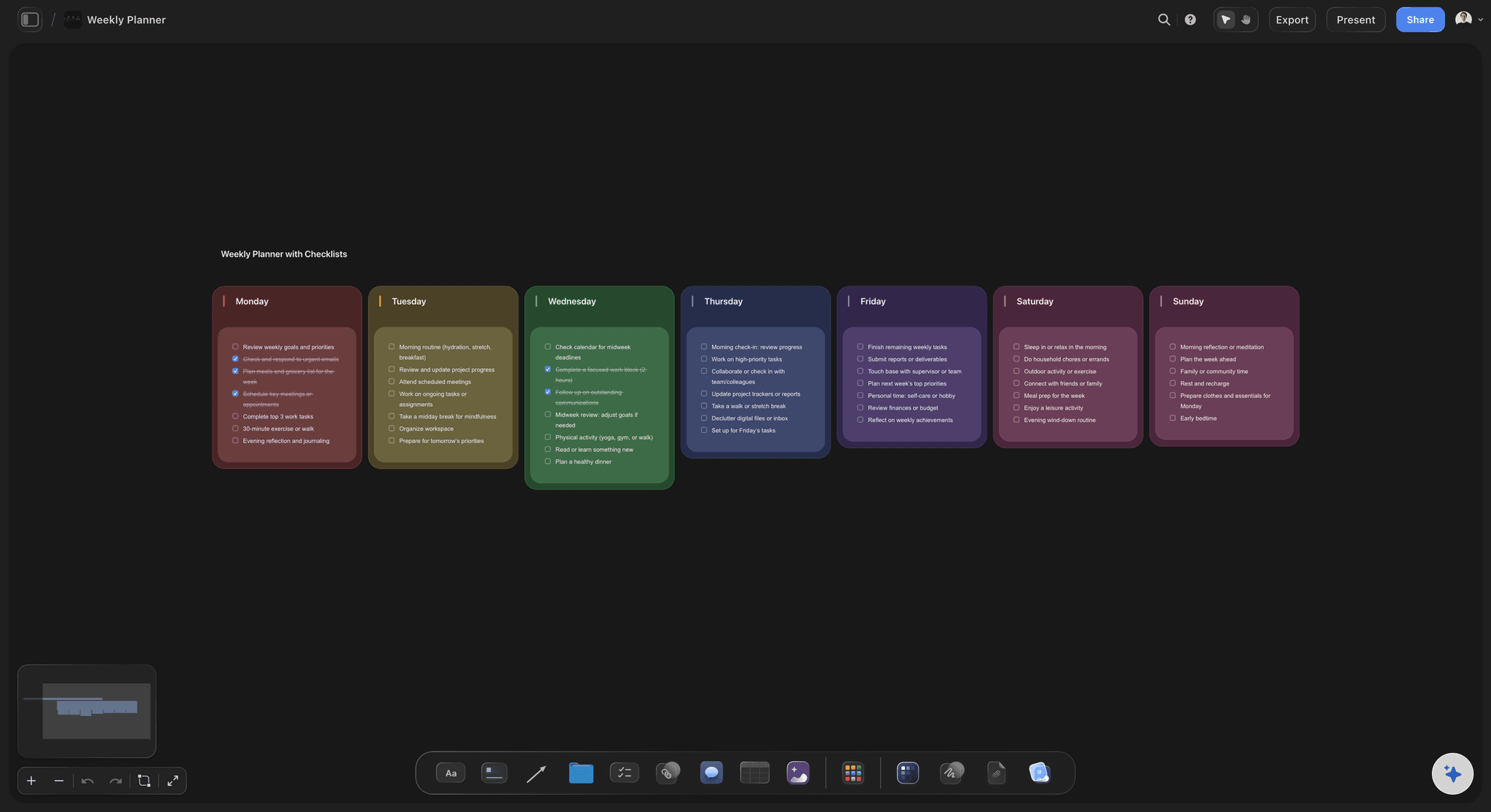
Clients, stakeholders, and the people who only ever look
Show the work instead of summarising it
A link opens the whole board: Send a view-only link and anyone reads the full board in a browser with no account and no install. A client understands a laid-out board in ten seconds and a written status update in about three paragraphs, if they finish it.
Guests join free: Anyone a paid member invites to a board joins free today, so adding a freelancer, a client, or a colleague from another team is not a licensing conversation.
Works alongside whatever you already use: Post the board link on your Basecamp message board, in Slack, or in an email. The visual work gets a home without anybody being asked to abandon the place the team already talks.
Export for the deck: Export a board as a high-quality image or PDF when the plan has to appear in a pitch, a client review, or a leadership update.
Explore templates for your project
Every template opens as a real, editable board on the infinite canvas. Pick the closest fit and make it your own.
Mind Map
Branch one central idea out into themes and sub-points, then drag the connections around until the structure makes sense.
HOW WE COMPARE
Storyflow vs Basecamp, Asana, and Trello.
These tools are answering different questions, so this is a map rather than a scoreboard. Basecamp takes the rows it deserves, including the two that matter most to its users.
Storyflow
Recommended
Flat per-account pricing rather than per seat
Message boards, check-ins, and async written updates
Infinite visual canvas for moodboards and storyboards
AI that reads the whole canvas as context
Task dependencies, timelines, and workload views
Usable on day one with nothing to configure
Basecamp
Flat per-account pricing rather than per seat
Message boards, check-ins, and async written updates
Infinite visual canvas for moodboards and storyboards
AI that reads the whole canvas as context
Task dependencies, timelines, and workload views
Usable on day one with nothing to configure
Asana
Flat per-account pricing rather than per seat
Message boards, check-ins, and async written updates
Infinite visual canvas for moodboards and storyboards
AI that reads the whole canvas as context
Task dependencies, timelines, and workload views
Usable on day one with nothing to configure
Trello
Flat per-account pricing rather than per seat
Message boards, check-ins, and async written updates
Infinite visual canvas for moodboards and storyboards
AI that reads the whole canvas as context
Task dependencies, timelines, and workload views
Usable on day one with nothing to configure
What creators are saying
Join early creators getting structured workspaces and AI that remembers their projects
“Storyflow has sped up my workflow by at least 3x, which means more flow state and more projects I can actually ship. It truly changed the way me and my team create.”

Reilin Joey
Director & YouTuber
“One prompt gets me a structured board. But the tactics are my favorite. I run my YouTube scripts through them and my intros and retention got better. It's amazing.”

Justkay
YouTuber & Freelance Filmmaker
“I used to juggle five apps to plan a project. Now I describe what I am making and get boards, lists, and a schedule. All in one place.”

George
@fernwehchronicles
Basecamp alternative questions, answered honestly.
Starting with the one where the answer is that Basecamp is the better tool.
When your team communicates in writing and the work can be described. Basecamp's message boards, docs, and automatic check-ins are a better answer to distributed communication than most tools manage, and the calm-by-design philosophy is a real feature rather than a slogan. The flat per-account price is also a structural advantage: a large team pays the same as a small one, so nobody rations invitations. If your deliverable is decisions and documents rather than images and layouts, stay where you are. Storyflow would be adding a surface you do not need.
Keep the message board. Give the work a canvas.
Open a board, describe the project, and let AI lay out the first version. Plans from $9.99/month, nothing to install, and a Free plan arrives before the end of 2026.