Best Miro Alternatives in 2026 (For Every Use Case)
Discover the top Miro alternatives that solve pricing headaches, interface complexity, and shallow AI features. Compare 10 tools including Storyflow, Whimsical, FigJam, and more to find your perfect whiteboard solution.

Category
Productivity & Tools
Author

Justkay
Documentary Filmmaker & Founder at Storyflow
Topics
December 26, 2025
•
Updated August 2026
•
15 min read
•
Productivity & Tools- Miro alternatives
- whiteboard tools
- visual collaboration
- 2026
What are the best Miro alternatives in 2026?
The best Miro alternative for most people is Storyflow: its AI reads your full active board (plus @-mentioned Tactics and Documents) and pricing is a flat account price from $7.99/month billed annually, not per seat. Whimsical is best for fast diagramming, FigJam for Figma teams, and Miro itself still wins 50-person live workshops.

All 10 Miro Alternatives, Ranked
- Storyflow: best overall, AI that reads your full active board plus @-mentioned Tactics and Documents
- Whimsical: best for clean, fast diagramming
- FigJam: best for design teams already in Figma
- Mural: best for large facilitated workshops
- Notion: best for docs and visuals in one place
- Lucidspark: best brainstorm-to-diagram handoff
- Canva Whiteboards: best for casual visual work with polished output
- MindMeister: best dedicated mind mapping
- ClickUp Whiteboards: best inside a project management tool
- Heptabase: best for visual note-taking and research
Full disclosure: Storyflow is our own product, and we rank it #1 for one job: an AI whiteboard where the model reads your full active board instead of the single node you clicked, on flat pricing that does not scale per seat. We are honest about where it loses. For 50-person live workshops with timers, voting dots, and facilitator controls, Miro and Mural are purpose-built and still win. FigJam has a more generous free tier and is cheaper per seat. And the real Storyflow limitation: it ships 200-plus story blueprints, not Miro's thousands of templates, its AI reads the active board rather than every board at once, and it is not built for stadium-sized real-time facilitation. We link to every tool so you can judge the fit.
Quick Comparison: Best Miro Alternatives
These four split the whiteboard job four ways: AI that reads your whole board, clean fast diagramming, a board native to Figma, and facilitated workshops.
| Tool | Best For | AI Features | Price |
|---|---|---|---|
| Storyflow | AI-powered visual work on a canvas | Reads your full active board plus @-Tactics and Docs | $7.99 mo annual (free plan late 2026) |
| Whimsical | Clean, fast diagramming | Basic sticky-note AI | Free / $10 user mo |
| FigJam | Design teams already in Figma | Light in-board AI | Free / $3 user mo |
| Mural | Facilitated workshops at scale | Basic AI clustering | Free / $12 user mo |
Your Miro bill just hit $320 this month. Twenty people times sixteen dollars. For sticky notes on a screen.
You scroll through the board from last week's brainstorm. Half the sticky notes say "test" or "asdfgh" from people figuring out how the tool works. The other half are buried under a pile of arrows, frames, and shapes nobody can find anymore.
Somewhere in there is a good idea. Probably.
Miro works. Millions of teams use it every day. The canvas is fast. The templates are endless. The collaboration features do what they promise. But three things keep pushing people to look elsewhere.
First, the pricing. Eight dollars per user sounds fine until your team grows. Suddenly you're paying hundreds a month for a whiteboard. And everyone needs a seat, even the people who just need to view boards occasionally.
Second, the complexity. Miro can do everything. That means menus inside menus, toolbars everywhere, and new hires asking "where do I click?" for the first week. Most teams use maybe 10% of the features and pay for 100%.
Third, the AI. Miro added it, but it feels bolted on. Ask for help and you get generic suggestions that could apply to anyone's project. The AI doesn't know what you're working on. It just knows you're on a whiteboard.
The past year brought alternatives that solve these problems. Some cost less. Some do more with AI. Some strip away the clutter and let you think.
The short version:
- Best overall: Storyflow (AI that reads your full active board, not just the node you are editing)
- Best for simplicity: Whimsical
- Best for design teams: FigJam
- Best free option: FigJam
- Best for big workshops: Mural
Let's get into each one.
Quick Picks by Use Case
Different problems need different tools. Here's where to start based on what you actually need.
Best overall alternative: Storyflow
You want AI that does more than generate generic sticky notes. Storyflow reads your full active canvas board (every card and note on it), plus up to 1 Tactic and 3 Documents you @-mention, so when you ask for help, the suggestions make sense for your specific project. Story blueprints give you pre-built workflows instead of blank canvas paralysis. Flat pricing means your bill stays the same whether you have 5 people or 50.
Best for creative teams and agencies: Storyflow or Milanote
If your team's Miro boards are really moodboards, campaign plans, and story work wearing a whiteboard costume, pick a tool built for that. Storyflow is the pick when the board should become a plan: references, briefs, and shot lists on one canvas the AI reads end to end. Milanote is the pick for pure visual collection, polished moodboards and inspiration walls with no AI layer. Design and UX teams who live in Figma should still look at FigJam first.
Best free open-source option: Excalidraw
Excalidraw is not in our main list because it competes on a different axis: it is a fast, fully free, open-source sketching canvas with a hand-drawn look, no account required. For quick diagrams, technical sketches, and budget-zero teams, it replaces Miro for the sketching half and nothing else. No templates, no facilitation layer, minimal AI.
Best for simplicity: Whimsical
You want a whiteboard that loads fast and stays out of your way. No feature bloat. No toolbar hunting. Clean interface, multiple content types, done. Product teams love it.
Best for design teams: FigJam
You live in Figma already. FigJam puts your whiteboard next to your design files. Pull components in, push ideas out. The free tier gives you unlimited collaborators on three files, which is generous enough for real work.
Best free option: FigJam
Three files, unlimited people, zero dollars. Most free tiers cripple collaboration features. FigJam doesn't.
Best for big workshops: Mural
You run structured sessions with 30, 50, sometimes 100 people. You need facilitation controls, timed activities, and private brainstorming before reveal. Mural was built by facilitators who understand large group dynamics.
Best for docs and visuals together: Notion
You want your planning docs and visual boards in the same place. Notion added canvas features that handle basic whiteboarding without switching tools.
Best for mind mapping: MindMeister
You think in hierarchies. Ideas branch into sub-ideas. MindMeister does one thing and does it clean.
Best for project management integration: ClickUp
You want whiteboards inside your project management tool. No context switching. Tasks and brainstorms live together.
Why People Switch from Miro
Nobody wakes up wanting to migrate their team to a new tool. It's a hassle. You've got boards full of work, people who know where things are, muscle memory built up over months. Switching costs time.
So when people start googling "Miro alternatives," something pushed them there.
The pricing math stops working
Miro charges per seat. Starts at $8 per user per month for the basic paid plan. Bumps to $16 for business features. Sounds reasonable until you do the math.
A 10-person team on the business plan pays $160 monthly. That's $1,920 a year for whiteboards. Grow to 25 people and you're at $4,800. For sticky notes and arrows.
The free plan exists but it caps you at three boards. Three. Most projects need more than that before lunch on day one.
And here's the part that stings: everyone needs a paid seat. The designer who uses it daily. The executive who glances at one board per quarter. Same price.
The interface got away from them
Open Miro for the first time. Count the buttons. The toolbars. The menus. The floating panels.
Miro can do almost anything. Flowcharts, wireframes, customer journey maps, retrospectives, org charts, Kanban boards. The feature list is enormous. The problem is you feel that enormity every time you open the app.
New team members need training. Casual collaborators get lost. The person you invited to add one comment ends up clicking randomly, trying to find the text tool.
Power users love it. Everyone else tolerates it.
The AI doesn't know you
Miro added AI features in 2023. You can ask it to generate sticky notes, summarize boards, cluster ideas. Sounds useful.
Try it. Ask Miro AI to help brainstorm your next product feature. You'll get suggestions that could apply to literally any product at any company. "Consider user needs." "Think about market fit." "Explore innovative solutions."
The AI sees the board. It doesn't see your research docs, your strategy notes, your previous brainstorms. It doesn't know what you've already tried. It doesn't know your customers.
You get a smart-sounding assistant that doesn't know anything about your actual work.
Quick Comparison Table
Here's how the top Miro alternatives stack up:
| Tool | Best For | Starting Price | Free Plan | AI Features | Rating |
|---|---|---|---|---|---|
| Storyflow | AI-powered visual work | $9.99/mo flat | Yes | ★★★★★ | 9.5/10 |
| Whimsical | Clean simplicity | $10/user/mo | Yes (limited) | ★★★☆☆ | 8.5/10 |
| FigJam | Design teams | $3/user/mo | Yes (3 files) | ★★☆☆☆ | 8.5/10 |
| Mural | Enterprise workshops | $12/user/mo | Yes (limited) | ★★☆☆☆ | 8/10 |
| Notion | Docs + visuals | $8/user/mo | Yes | ★★★☆☆ | 8/10 |
| Lucidspark | Diagramming | $7.95/user/mo | Yes (3 boards) | ★★☆☆☆ | 7.5/10 |
| Canva Whiteboards | Casual brainstorming | Free-$10/user/mo | Yes | ★★☆☆☆ | 7.5/10 |
| MindMeister | Mind mapping | $6/mo | Yes (3 maps) | ★★☆☆☆ | 7.5/10 |
| ClickUp Whiteboards | PM integration | $7/user/mo | Yes | ★★☆☆☆ | 7/10 |
| Heptabase | Visual note-taking | $9.99/mo | Trial only | ★★☆☆☆ | 7/10 |
A few things stand out.
Pricing models split two ways. Most tools charge per user, same as Miro. Storyflow, MindMeister, and Heptabase use flat monthly pricing. For teams larger than a few people, flat pricing wins fast.
AI capabilities vary wildly. Most tools added basic AI features in the last two years. Summarize this board. Generate some sticky notes. Cluster these ideas. Surface-level stuff. Storyflow is the exception: its AI reads your full active board, not the single node you have selected. Add the Tactics and Documents you @-mention and suggestions actually connect to your work.
Free plans all have catches. FigJam's is the most generous for collaboration. Unlimited people on three files. Most others cap features, boards, or both.
Give your whiteboard AI the whole board
Generic AI suggestions come from AI that cannot see your work. Start a board, drop your project on it, and ask a question the answer has to be grounded in.

The 10 Best Miro Alternatives
1. Storyflow
Best for: People who want AI that actually understands their work
Most whiteboard tools treat AI like a checkbox feature. Add a button that generates sticky notes. Ship it. Call it AI-powered.
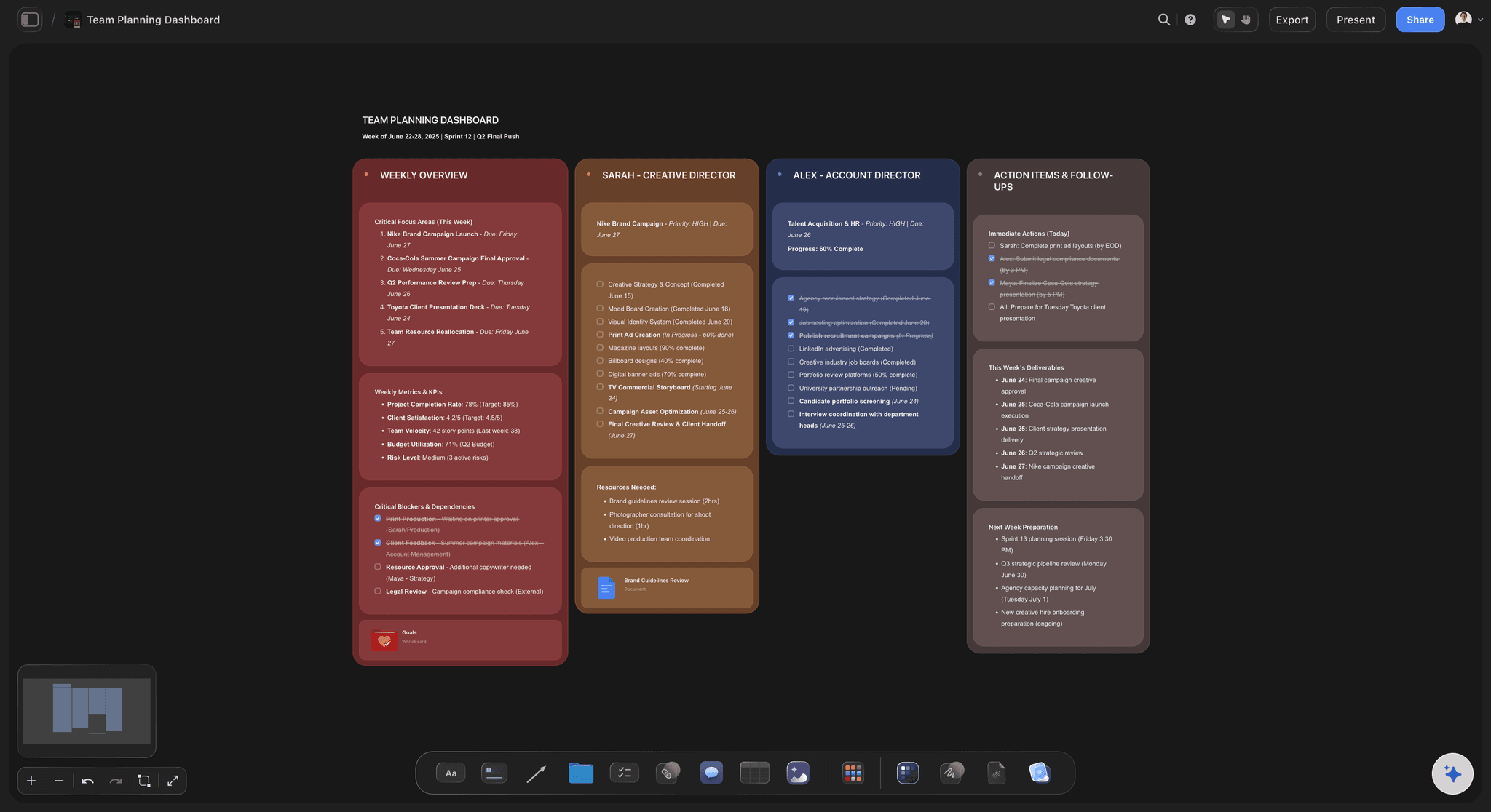
Storyflow did something different. The AI reads your full active canvas board by default: every card, note, and image on it. You can pull in more context by @-mentioning up to 1 Tactic and 3 Documents in the chat. When you ask for help, it knows what you're working on. It knows the context you put in front of it, not just the one shape you clicked.
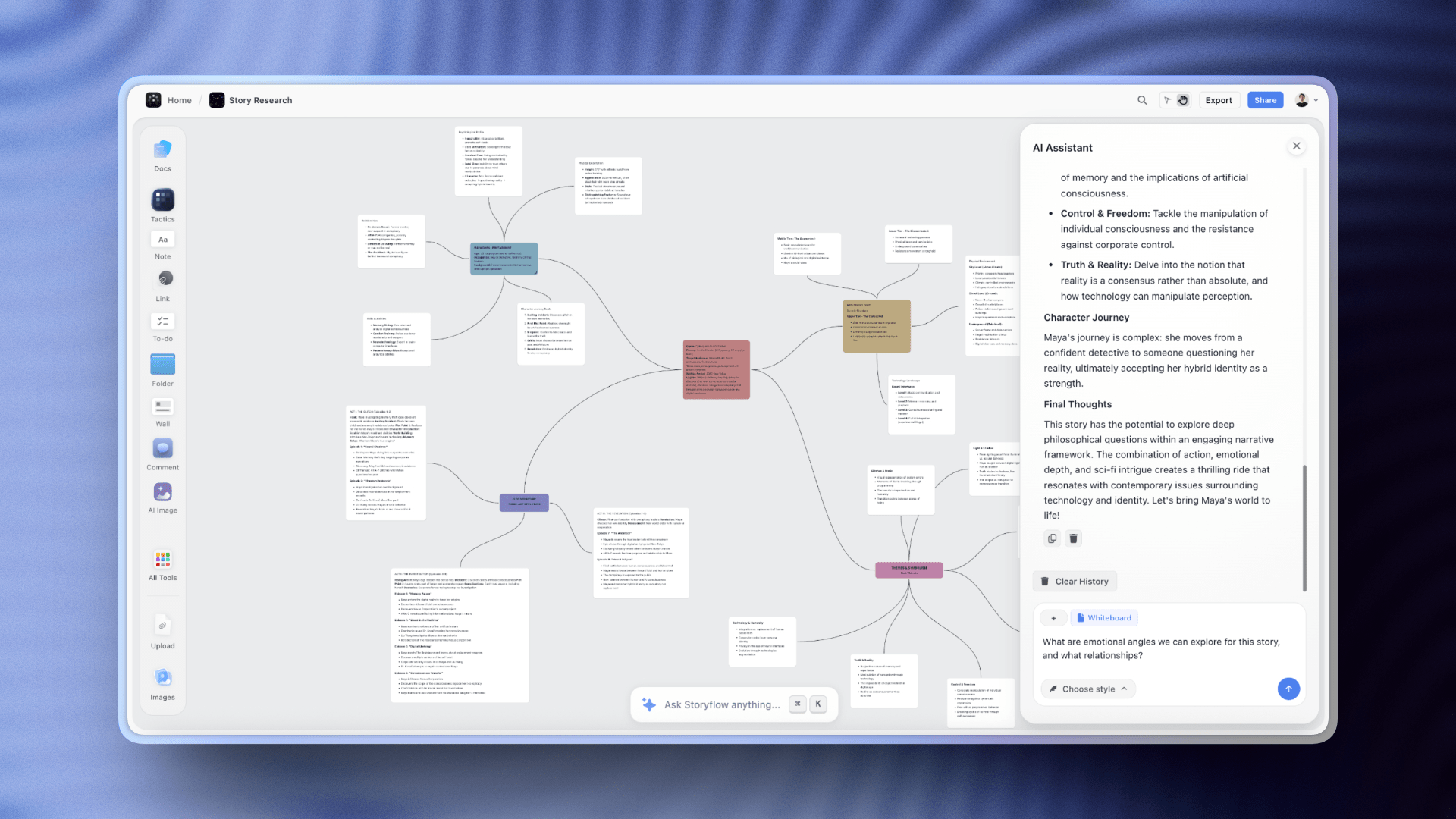
Ask Miro's AI to help with your product launch and you get generic advice. Ask Storyflow and it references the competitive research you did last week, the customer feedback you collected, the positioning you've been developing.
Story blueprints solve the blank canvas problem. Instead of staring at an empty board wondering how to structure your thinking, you activate one of 200-plus pre-built creative templates (on the Plus, Pro, and Max plans). Product launch. Content calendar. Campaign planning. The AI guides you through each step with prompts specific to your project. You can also skip the blank board entirely: the Team Planning Dashboard template and the Mindmap template open with structure the AI can read from the first question.
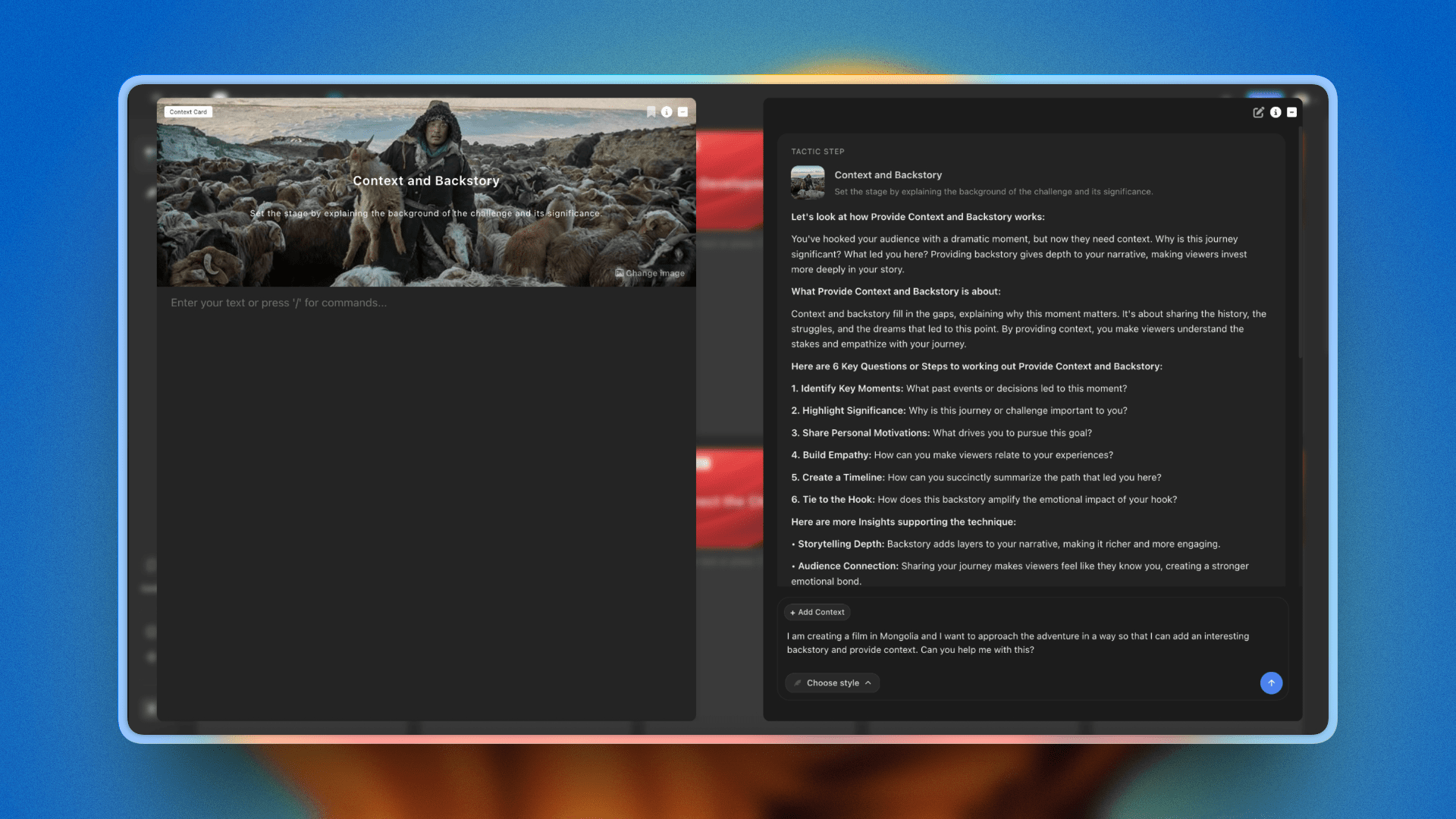
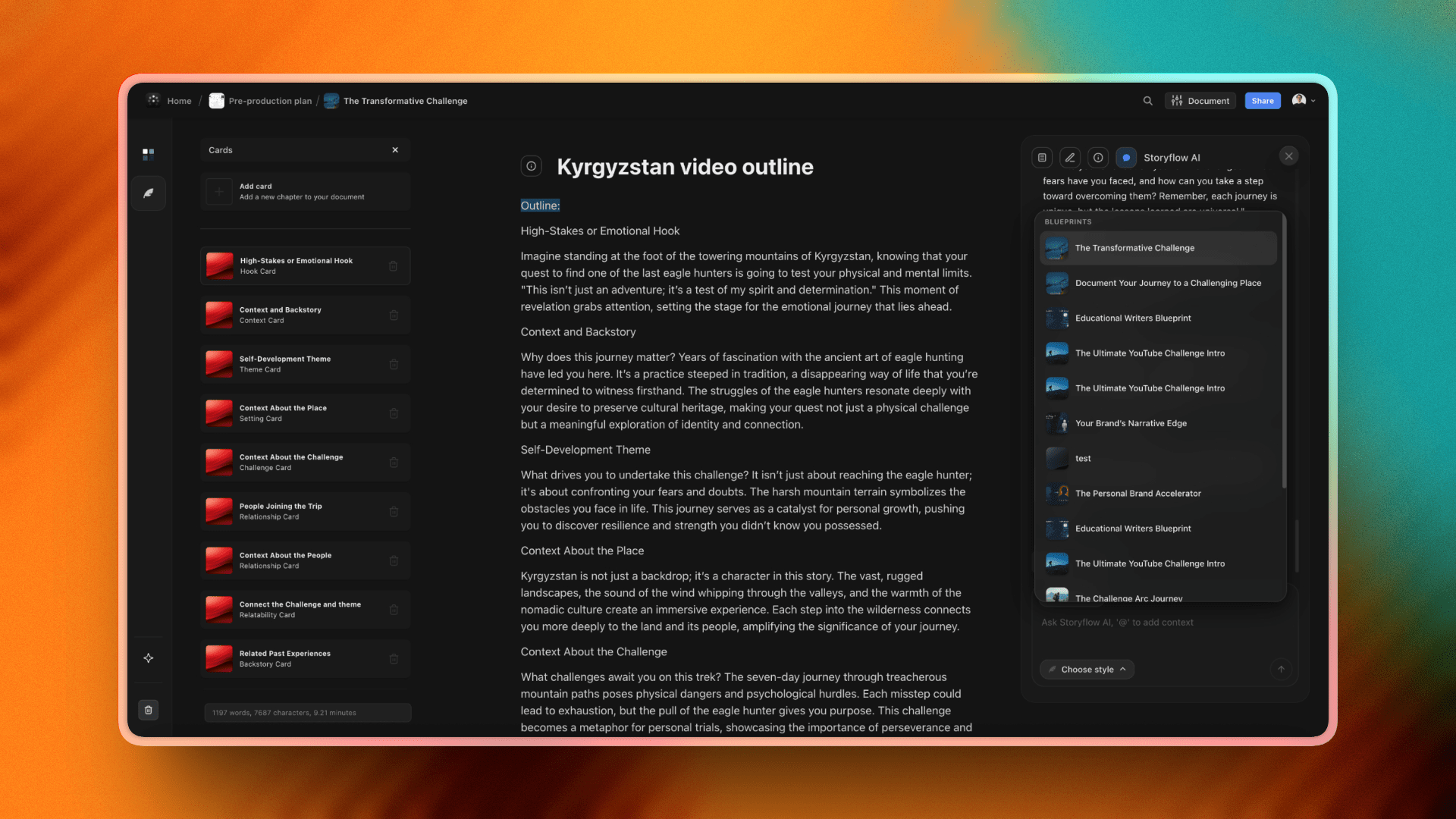
The Cards system turns messy brainstorms into structured information. Ideas don't just float around on a canvas. They become organized, connected, actionable.
Pricing: flat per account, not per user, from $9.99/month. Your whole team, one price.
Best for: Creators, startups, small teams who want AI that helps instead of suggests.
What you'll miss from Miro: The massive template library (Miro ships thousands; Storyflow has 200-plus story blueprints and is growing). And the honest trade-off: for large live multiplayer workshops, the kind where 50 or more people drag sticky notes on one board in real time with timers, voting dots, and facilitator controls, Miro and Mural still win. Storyflow is built for AI-assisted creative work and small teams, not stadium-sized facilitation. If running big synchronous sessions is your core job, stay on Miro.
Verdict: This is what happens when you build a visual workspace around AI from day one instead of bolting it on later.
2. Whimsical
Best for: People who want fast and clean
Open Whimsical. Notice what's missing. No toolbar with 47 icons. No floating panels competing for attention. No feature tour that takes 10 minutes.
Just a canvas. A few tools. Speed.
Whimsical loads fast and stays fast. The interface makes sense immediately. New team members don't need training. They just start working.
The tool handles multiple formats. Mind maps, flowcharts, wireframes, sticky notes, docs. All in one workspace. Product teams use it to jump between ideation and specification without switching apps.
Pricing: Free for limited use, $10/user/month for Pro.
Best for: Product teams, small startups, anyone allergic to bloat.
What you'll miss from Miro: Scale. Whimsical isn't built for 50-person workshops.
Verdict: The thinking person's whiteboard. Does less, does it better.
3. FigJam
Best for: Design teams living in Figma
If your design files live in Figma, your whiteboard should too. FigJam sits right next to your design work. Drag components from Figma onto your brainstorm board. Push refined ideas back into design files. The free tier is the real story: unlimited collaborators on up to three files. $3/user/month for Professional.
4. Mural
Best for: Running structured workshops at scale
Mural was built by facilitators who run workshops for a living. Private brainstorming before reveal. Timed activities with visible countdowns. Facilitator controls that let you summon everyone to your view or lock areas of the board. $12/user/month for Team+.
5. Notion
Best for: Teams who want docs and visuals in one place
Stop switching between your docs tool and your whiteboard tool. Keep everything in Notion. Meeting notes next to brainstorm boards. The canvas features are newer and lighter than dedicated whiteboard tools, but good enough for light visual work. $8/user/month for teams.
6. Lucidspark
Best for: Teams who need brainstorms to become diagrams
Lucidspark comes from Lucid, the company behind Lucidchart. Brainstorm in Lucidspark, then push your ideas into Lucidchart and turn them into proper flowcharts, org charts, process diagrams. $7.95/user/month for Individual.
7. Canva Whiteboards
Best for: Casual visual work with polished output
Canva added whiteboards to its design platform. Access to Canva's massive element library means your brainstorm board can quickly become a polished presentation without leaving the tool. Free with Canva Free, included with Canva Pro at $10/user/month.
8. MindMeister
Best for: People who think in hierarchies
Not every project needs a freeform canvas. Sometimes you want structure from the start. MindMeister does mind mapping with ideas that branch into sub-ideas. Free for 3 maps, $6/month for Personal.
9. ClickUp Whiteboards
Best for: Teams who want everything in one app
Your brainstorm board lives next to your task list. Draw connections between ideas and tasks. Turn sticky notes into action items without switching tools. $7/user/month for Unlimited.
10. Heptabase
Best for: Visual thinkers who take notes
Cards contain your notes. You arrange cards on canvases. Ideas connect visually. Popular with researchers, writers, and anyone building a personal knowledge system. $9.99/month after free trial.
How to Switch from Miro
You've decided to move. Now what?
The bad news: there's no magic "export to Storyflow" button. Miro boards don't transfer cleanly to other tools. The sticky notes, frames, connections, and layouts are locked in Miro's format.
The good news: you probably don't need to bring everything.
Start with a clean slate
Here's what most people discover when they look at their old Miro boards: 80% of them are dead. Brainstorms from six months ago. Workshops nobody references anymore. Planning sessions for projects that shipped or got cancelled.
Don't migrate the graveyard. Let it rest.
Pick the 3-5 boards you actually use. The ones you opened in the last month. The ones with work that's still active. That's your migration list.
Screenshot the important stuff
For boards you need to reference but won't actively edit, take screenshots. Export as PDF. Save the images somewhere your team can find them.
You're preserving the artifact, not the working document. Good enough for most historical boards.
Rebuild active projects fresh
Your active work deserves a fresh start.
Open your most important Miro board. Look at it. Ask yourself: what's actually useful here? Which sticky notes matter? What structure emerged that you want to keep?
Now build that in Storyflow. Not a copy. A fresh version with the good parts. If the board was a campaign, start from the Marketing Campaign template so the rebuild opens with structure instead of blank space.
This sounds like extra work. It is. But you'll end up with something cleaner than the original. The cruft disappears. The structure gets sharper. The AI can actually work with your content because it's organized.

Teams rebuilding their Miro workflows in Storyflow get a cleaner structure with AI that understands the full project context
FAQ
Is there a free Miro alternative?
FigJam gives you the most for free. Unlimited collaborators on three files. No feature restrictions that make it unusable. Canva Whiteboards is free if you're already on Canva's free plan. Mural and Lucidspark have free tiers but cap boards heavily. Storyflow is paid-only during early access; its Free plan launches before the end of 2026, and anyone a paid member invites to a board joins free today.
What's the best Miro alternative for small teams?
Storyflow. Flat pricing means you pay one account price, from $9.99/month, whether you have 2 people or 20. Most other tools charge per user, which punishes small teams that grow. The AI also helps small teams punch above their weight. Fewer people, but smarter tools.
Can I import my Miro boards to another tool?
Not cleanly. Miro exports to PDF and image formats, but the interactive elements don't transfer. You can't drag a Miro board into Storyflow or Whimsical and have it work. Most people screenshot important boards for reference and rebuild active projects fresh in the new tool.
What's the cheapest Miro alternative?
FigJam at $3/user/month is the cheapest paid option per seat. But Storyflow's flat pricing beats per-user pricing once you hit 2-3 people. For a 10-person team, FigJam costs $30/month. Storyflow's Plus plan costs $7.99 total.
What's the best Miro alternative with AI?
Storyflow. Other tools added AI features, but most are surface-level. Generate sticky notes. Summarize a board. Cluster ideas. Storyflow's AI reads your full active canvas board, plus up to 1 Tactic and 3 Documents you @-mention, not just the single node you have selected. It knows your project context. Suggestions connect to your actual work instead of generic prompts that could apply to anyone.
Is Storyflow or Miro better for large live workshops?
Miro is better for large live workshops. For synchronous sessions where 50 or more people drag sticky notes on one board at the same time, with timers, voting dots, and facilitator controls, Miro (and Mural) are purpose-built and still win. Storyflow is built for AI-assisted creative work and small teams, so its strength is depth of project context and flat pricing, not stadium-sized real-time facilitation. If big synchronous workshops are your core job, stay on Miro. If most of your work is planning, brainstorming, and creating with a small team, Storyflow fits better.
Does Storyflow have a free plan?
Not yet: Storyflow is in paid-only early access, and its Free plan (unlimited notes, images, links, shared boards, and collaboration plus basic AI usage) launches before the end of 2026. What is free today is collaboration: anyone a paid member invites to a board signs up free. Paid plans start at Plus for $7.99/month (annual), and pricing is flat per account, not per user.
The Bottom Line
Miro works. It wouldn't have 50 million users if it didn't.
But working and being right for you are different things. Per-user pricing that scales into hundreds of dollars monthly. An interface built for power users that confuses everyone else. AI that generates suggestions without understanding what you're actually building.
You have options now.
Storyflow if you want AI that reads your full active board (plus the Tactics and Documents you @-mention) and gives suggestions that actually connect to your work. Flat pricing that doesn't punish team growth. Best for creators, startups, and small teams who want their tools to think with them.
Whimsical if you want clean and fast. No bloat. No feature hunting. Just a canvas that stays out of your way.
FigJam if your team lives in Figma. The integration is tight, the free tier is generous, and the vibe is more playful than corporate.
Mural if you run large structured workshops. The facilitation controls are built by people who actually facilitate.
Notion if you want docs and visuals in one place and don't need deep whiteboard features.
The right choice depends on how you work. A solo YouTuber planning content has different needs than a consulting firm running client workshops. A three-person startup has different budget constraints than an enterprise team with procurement approval.
One thing is clear. You don't have to pay $16 per person per month for sticky notes on a screen anymore.

Storyflow's mind mapping and visual canvas, a smarter Miro alternative with AI that thinks alongside you
Here is the test that settles it. Take the most active project you have in Miro right now, the one you actually opened this week, and rebuild it in Storyflow for one week. Ask its AI a real question about that work and see whether the answer references your board instead of generic advice. By the end of the week the decision will be obvious either way.
The whiteboard you use should help you think, not drain your budget while you figure out where they hid the pen tool.
Frequently Asked Questions: Miro Alternatives
What is the best Miro alternative in 2026?
Storyflow is the strongest Miro alternative in 2026 if what you want is an AI canvas that reads your whole board and helps move a project forward, rather than a blank whiteboard you fill in yourself. For large team workshops with heavy facilitation, Miro itself is hard to beat, and the closest like-for-like alternatives there are FigJam and Mural. Pick by your main job: a thinking canvas, a workshop whiteboard, or a diagramming tool.
What is the best free Miro alternative?
FigJam and Obsidian Canvas are the genuinely free Miro alternatives today. Storyflow is not one of them during early access, though the Free plan it has announced for before the end of 2026 is the most generous on paper: unlimited boards on an infinite canvas, unlimited collaboration, and basic AI on the same surface, with no board cap to hit mid-project. FigJam is the better free pick for classic collaborative whiteboarding next to Figma. Check whether each free tier limits the number of boards or editors, since that is where free whiteboard plans usually pinch.
Why do people look for a Miro alternative?
The two most common reasons are price and complexity. Miro's paid plans add up across a team, and many people use only a fraction of its features, so a simpler or cheaper tool fits better. Others want stronger AI that actually reads the board, or a tool built for thinking a project through rather than running big facilitated workshops.
Is there a cheaper alternative to Miro?
Yes. Several alternatives are cheaper than Miro's paid tiers, and some have genuinely usable free plans. Storyflow's pricing is flat per account rather than per user, which can be much cheaper for a small team than per-seat whiteboard pricing. Always compare on the plan you would actually need, since free tiers and entry plans vary a lot in board and editor limits.
What is the best Miro alternative with AI?
The best AI alternative is one whose AI reads your whole board, not just a single prompt. Storyflow leads here because its AI reads the entire canvas (plus any blueprint or documents you @-mention) and can expand, cluster, and pressure-test what is on the board. Many whiteboards add a chat sidebar that cannot see the board, so their AI helps far less with the actual work.
Miro vs FigJam: which is better?
Miro is the more powerful, enterprise-leaning whiteboard with deeper features and integrations. FigJam is simpler, friendlier, and tightly tied to Figma, which makes it a strong pick for design teams and lighter workshops. If you want depth and scale, Miro wins; if you want simplicity and a Figma connection, FigJam does. For an AI thinking canvas rather than a workshop board, neither is the natural fit.
What is the best Miro alternative for solo users and small teams?
For solo users and small teams, a tool with flat pricing and low setup beats a heavy enterprise whiteboard. Storyflow fits well because it is built for thinking a project through on one canvas and is priced per account rather than per seat. FigJam is also a good lightweight option. Miro can feel like a lot of tool, and cost, for a small group.
Can I move my work off Miro to another tool?
In most cases yes, though it is rarely a perfect one-click migration. Miro lets you export boards as images and PDFs, which you can bring into another canvas as reference, and you can rebuild active boards in the new tool. For a large library of complex boards, plan to migrate the handful you actively use rather than everything, and keep the rest exported as an archive.
Related Reading
Complete guide to team brainstorming tools
12 mind mapping tools compared
Project management alternatives compared
Table of Contents
- Why People Switch from Miro
- Quick Picks by Use Case
- Quick Comparison Table
- The 10 Best Miro Alternatives
- 1. Storyflow
- 2. Whimsical
- 3. FigJam
- 4. Mural
- 5. Notion
- 6. Lucidspark
- 7. Canva Whiteboards
- 8. MindMeister
- 9. ClickUp Whiteboards
- 10. Milanote
- 11. Heptabase
- Miro vs Storyflow: Detailed Comparison
- How to Switch from Miro
- FAQ
- The Bottom Line
Templates to check out for this topic


Planning and project templates you can use in Storyflow
Plan a launch, a sprint, or a whole project on a visual board the team can see at once. Open one of these templates and start from real structure.


See Storyflow in Action
A visual AI workspace where every feature lives inside one canvas. No tab-switching, no context lost.
Build your entire board from a single message
Type what you need in the AI chat at the bottom of your canvas. The AI adds cards, headings, and structure directly onto your board.
Use expert frameworks as AI context
Type @ in the AI chat and choose any Tactic. The AI tailors every response to that framework instead of giving generic advice.
Turn your board into a mind map in seconds
Ask the AI to restructure your canvas as a mindmap. It connects your ideas into a visual hierarchy so you can see how everything relates.
Why Storyflow Exists
Storyflow actually began as a personal tool while working on creative and research projects.
We kept running into the same problem: ideas were scattered everywhere: notes, documents, and whiteboards.
Nothing helped us see how everything connected.
So we started building a workspace designed around how ideas actually grow.
→ Read how Storyflow was createdJustkay
Documentary Filmmaker & Founder at Storyflow
Published: December 26, 2025
Extremely simple, seriously capable


See how easy it is to get started
Watch a real project come together, from a blank board to a finished plan, clicked through step by step.
Start creating with AI and become more productive
Transform your creative workflow with AI-powered tools. Generate ideas, create content, and boost your productivity in minutes instead of hours.