The 10 Best AI Tools for Content Repurposing in 2026
The best AI tools for content repurposing in 2026, split across the two halves of the job. 10 tools compared for auto-clipping and for planning which one idea becomes which ten formats.

Category
Content Creation
Author

Sara de Klein
Head of Product at Storyflow
Topics
2026-07-16
•
14 min read
•
Content Creation- best content repurposing tools 2026
- AI content repurposing
- repurpose one video into many
- AI clipping tools
- content repurposing software
What are the best AI tools for content repurposing in 2026?
The best AI tools for content repurposing in 2026 split across two jobs. For the mechanical half, turning one long video into many clips, OpusClip and Descript lead. For the planning half, deciding which idea deserves ten formats and mapping the angle for each, Storyflow is the strongest pick because its AI reads your whole board and plans the formats before you produce them. The strongest setups run one tool for each half.

Full disclosure: Storyflow is our own product, and we rank it for the planning half of repurposing: deciding which idea becomes ten formats and the angle for each. It is not an auto-clipper. It will not cut your webinar into fifteen shorts. For that you pair it with OpusClip or Descript. The split is clean: Storyflow decides the ten, the clipper produces them. We link to every tool so you can judge the fit.
Quick Comparison
Repurposing has two halves. These four cover both: the auto-clippers that produce the formats, and the canvas that plans which idea deserves them.
| Tool | Best For | AI Features | Price |
|---|---|---|---|
| OpusClip | Auto-clipping | AI finds and cuts clips | ~$15 mo |
| Descript | Editing + clips | AI transcript editing | ~$16 mo |
| Storyflow | Planning the formats | Canvas AI plans the ten | $7.99 mo annual (free plan late 2026) |
| Munch | Viral moment detection | AI clip scoring | Tiered |
Why content repurposing has two different halves
Most repurposing tools sell you the same promise: feed in one long video and get ten short clips out. That is real value, and clipping a webinar into fifteen vertical cuts by hand is miserable work no one should still be doing. But the auto-clipper is solving the easy problem. It takes a decision you already made, one video becomes many clips, and executes it fast.
The hard problem comes before the clipper runs. Which idea from your hour-long podcast is worth ten formats? Which three moments carry a thread across a carousel, a newsletter, and a short? What angle does the LinkedIn version need that the TikTok version does not? Those are planning decisions, and no auto-clipper makes them for you. Repurposing is not reformatting. It is deciding which one idea deserves ten formats, then planning the ten. That distinction is why two creators can run the same tool and get wildly different results.
So this list splits the job in two. The mechanical side is auto-clipping, transcription, resizing, and format conversion, where the tool does labor you would otherwise do by hand. The planning side is choosing the idea, mapping it across formats, and drafting the distinct angle for each one, which is where repurposing succeeds or fails. Most tools live entirely on the mechanical side. A few help with planning. Almost none do both, which is why the strongest repurposing setups run two tools, one for each half.
How these tools were tested and ranked
Content repurposing spans very different people. A solo podcaster wants show notes and clips from one recording. A social team wants one campaign idea to fan out across six channels with the right angle each. An agency wants both, at volume, without the quality dropping. These tools were tested against all three, on five criteria:
- Planning: whether the tool helps you decide which idea to repurpose and map it across formats, or only executes a decision you already made.
- Mechanical output: clip quality, transcription accuracy, resizing, and format conversion.
- Format range: how many output types the tool covers, from short video to text posts to design assets.
- Workflow fit: how well it slots into a real creator, marketing, or agency workflow.
- Price and value: verified against each tool's own 2026 pricing page, hedged with "around" where plans shift.
No single tool wins all five, which is the honest headline. The mechanical tools are excellent at execution and blind to planning. The planning tools shape the strategy and do not cut your video. Most people who repurpose well run one of each.
The 10 best AI tools for content repurposing
1. Storyflow

Storyflow is a visual canvas with AI that owns the planning half of repurposing, the half every mechanical tool skips. You put one source idea in the center of the board, branch it into the formats it should become, a short, a carousel, a newsletter, a YouTube description, and draft the distinct angle for each format right on the canvas. Because the AI reads the whole board plus any Tactic or documents you bring in, you can ask it to shape ten angles from one idea and see them side by side, which is exactly the decision an auto-clipper cannot make for you. Its Story Blueprints library (200+ expert frameworks including Hero's Journey, AIDA, StoryBrand, and Five-Act Structure) gives you starting structures for mapping one message across channels.
For repurposing specifically, that plan-before-you-produce behavior is the point. The clip is easy once you know which moment and which angle. Storyflow is where you make those calls, so your clipper and your design tool are executing a plan instead of guessing.
Where Storyflow loses, and this matters, is the mechanical half. It is not an auto video-clipper. It will not cut your webinar into fifteen shorts, it does not transcribe audio, and it does not resize a design into ten aspect ratios. It plans the ten formats; it does not render them. It is also cloud-only, so a fully offline workflow is not its strength, and its AI reads the current board plus up to one Tactic and three documents you mention, not your entire archive at once. Pair it with OpusClip or Descript and the split is clean: Storyflow decides the ten, the clipper produces them. The free plan covers unlimited boards and basic AI; Plus is $7.99 per month annual for the full Blueprint library; Pro is $14 per month for AI image generation; Max is $39 per month flat for 40x more AI and a Team Workspace.
2. OpusClip
OpusClip is the fastest, cheapest way to turn one long video into a stack of short vertical clips. You paste a link or upload a recording, and its AI finds the moments most likely to perform, adds animated captions, reframes to vertical, and scores each clip for viral potential. For a creator or podcaster sitting on hours of long-form footage, this is the tool that turns a backlog into a month of shorts in an afternoon.
Key features: AI long-to-short clipping, a virality score per clip, auto captions, and auto reframing to vertical. Strength: it is the cheapest strong AI clipper, so the barrier to producing short-form at volume is almost nothing. Weakness: it does short-form video and nothing else, so it will not touch your audio show notes, your carousels, or your written posts, and it does not help you decide which video deserved clipping in the first place. Pricing runs from a free tier to a Starter plan at around $15 per month.
3. Descript
Descript edits video and audio as if they were a document. You get a transcript, you edit the words, and the media edits itself. For repurposing, that model is powerful: you can cut a long interview into a tight clip, remove filler, and export short-form pieces, all by editing text instead of a timeline. It also generates clips, so it doubles as a lighter version of what a dedicated clipper does.
Key features: doc-style transcript editing, AI clip generation, filler-word removal, and multitrack video and audio export. Strength: it is the closest thing to an all-in-one edit-and-repurpose studio, so one tool covers your raw edit and your derivative clips. Weakness: the doc-style editor has a real learning curve, and its clip selection is not as sharp as a dedicated virality-scored clipper. Pricing runs from around $16 per month for Hobbyist to around $24 for Creator and around $50 for Business, billed annually.
4. Munch
Munch clips long video into short, but its pitch is the reasoning behind the clip. It layers trend and analytics data on top of AI clipping, so it selects moments based on what is performing on each platform rather than raw AI guesswork. For a team that treats short-form as a channel to optimize, not just a firehose to fill, that data-driven selection is the difference.
Key features: AI clipping with trend-informed moment selection, platform analytics, captions, and repurposing across channels. Strength: the clip selection is data-driven, so it edges toward the planning side of repurposing more than a pure clipper does. Weakness: it costs more than the entry clippers, so the value only shows up once you are running short-form as a serious channel. Pricing starts around $49 per month for Growth and around $99 for Pro.
5. Repurpose.io
Repurpose.io is the automation backbone for teams that already know what they want and just need it routed everywhere. You set rules once, and it automatically pulls video and audio from one platform, adjusts it, and publishes to the others without you touching each post. For a podcaster or creator publishing on a fixed cadence, it is set-and-forget distribution.
Key features: automated cross-platform routing, video and audio repurposing, scheduled publishing, and platform-specific formatting rules. Strength: once configured, it runs on its own, so distribution stops eating your week. Weakness: it is the priciest entry point here and it is an automation router, not an AI clipper, so it moves and reformats content but does not intelligently select the best moments. Pricing starts around $35 per month for the Starter plan.
6. Castmagic
Castmagic turns a single audio or video recording into a full set of text assets. Drop in a podcast episode and it produces show notes, timestamps, transcripts, social posts, and email drafts. For a podcaster who wants every episode to also become a newsletter, a thread, and a set of quote posts, it is the fastest path from one recording to a page of ready text.
Key features: transcription, AI-generated show notes, social post drafts, timestamps, and email copy from audio or video. Strength: it is excellent at spinning one recording into many text assets, which is exactly the podcast-to-writing gap most clippers ignore. Weakness: it is text-first, so its video clipping is weaker than a dedicated clipper, and you will still want a video tool alongside it. Pricing runs around $29 per month.
7. Taja AI
Taja AI is built for the YouTube creator who wants every upload optimized. It generates titles, tags, descriptions, and chapters tuned for YouTube search and click-through, and helps repurpose the video into supporting assets. For a creator whose main channel is YouTube, the metadata optimization alone can move views on content you already published.
Key features: AI titles, tags, descriptions, and chapters for YouTube, plus repurposing into supporting formats. Strength: the YouTube-optimization focus is genuinely deep, so it does one platform's metadata better than the generalists. Weakness: it is narrow and YouTube-centric, so if your distribution is spread across many platforms, most of its value does not apply. Pricing runs from around $20 to around $90 per month depending on volume.
8. ContentFries
ContentFries is the bulk multiplier. Feed it one video and it produces a large batch of derivative pieces across formats and aspect ratios in one pass. For an agency or a high-output creator who needs volume above all, its batch model turns a single source into a wall of content faster than piece-by-piece tools.
Key features: bulk content multiplication from one video, multi-format and multi-aspect export, captions, and batch processing. Strength: raw output volume, so a single recording becomes a full content calendar's worth of assets. Weakness: the interface feels dated compared with newer tools, and volume without a planning layer can produce a lot of pieces that were never worth making. Pricing runs from a free tier to Premium at around $39 per month.
9. Canva
Canva is the fastest way to take one design and reformat it into every size a campaign needs. Its Magic resize takes a single graphic and reflows it into a square post, a story, a banner, and a thumbnail in seconds, keeping the brand consistent across all of them. For a marketer or agency repurposing visual assets, it removes the tedium of rebuilding the same idea at ten dimensions.
Key features: Magic resize across formats, brand kits, templates, and AI design assists. Strength: it is the fastest visual reformatting on this list, so one graphic becomes a full multi-platform set almost instantly. Weakness: it is a design tool, so it does nothing for audio, video transcript, or podcast-to-text repurposing, which is a large slice of the job for most creators. Pricing runs from free to Pro at around $15 per month.
10. Notion
Notion is the central hub many teams use to store, remix, and template their repurposed content. A database of source ideas, a page per campaign, and Notion AI to rewrite one draft into a LinkedIn version and an email version make it a flexible backbone for the writing side of repurposing. If your team thinks in docs and databases, it holds the whole operation in one place.
Key features: databases with multiple views, docs and templates, and Notion AI for rewriting and drafting. Strength: it is a genuine central content hub, so every source and every derivative lives in one searchable place. Weakness: it does no media processing at all, so it cannot clip a video or transcribe audio, and every workflow inside it is one you build yourself. Pricing is free for personal use, with Plus at around $10 per member per month annually.
Comparison table
| Tool | Best for | Free tier | Starting price |
|---|---|---|---|
Storyflow | Planning which idea becomes which formats | Coming late 2026 (invited collaborators join free now) | $7.99/mo annual (Plus) |
OpusClip | Cheap AI short-form clipping | Yes | ~$15/mo (Starter) |
Descript | All-in-one edit and repurpose | Limited | ~$16/mo (Hobbyist) |
Munch | Data-driven clip selection | Limited | ~$49/mo (Growth) |
Repurpose.io | Set-and-forget distribution | Trial | ~$35/mo (Starter) |
Castmagic | Podcast-to-text assets | Limited | ~$29/mo |
Taja AI | YouTube optimization | Limited | ~$20/mo |
ContentFries | High-volume batch output | Yes | ~$39/mo (Premium) |
Canva | Fast visual reformatting | Yes | ~$15/mo (Pro) |
Notion | Central content hub | Yes | ~$10/member/mo |
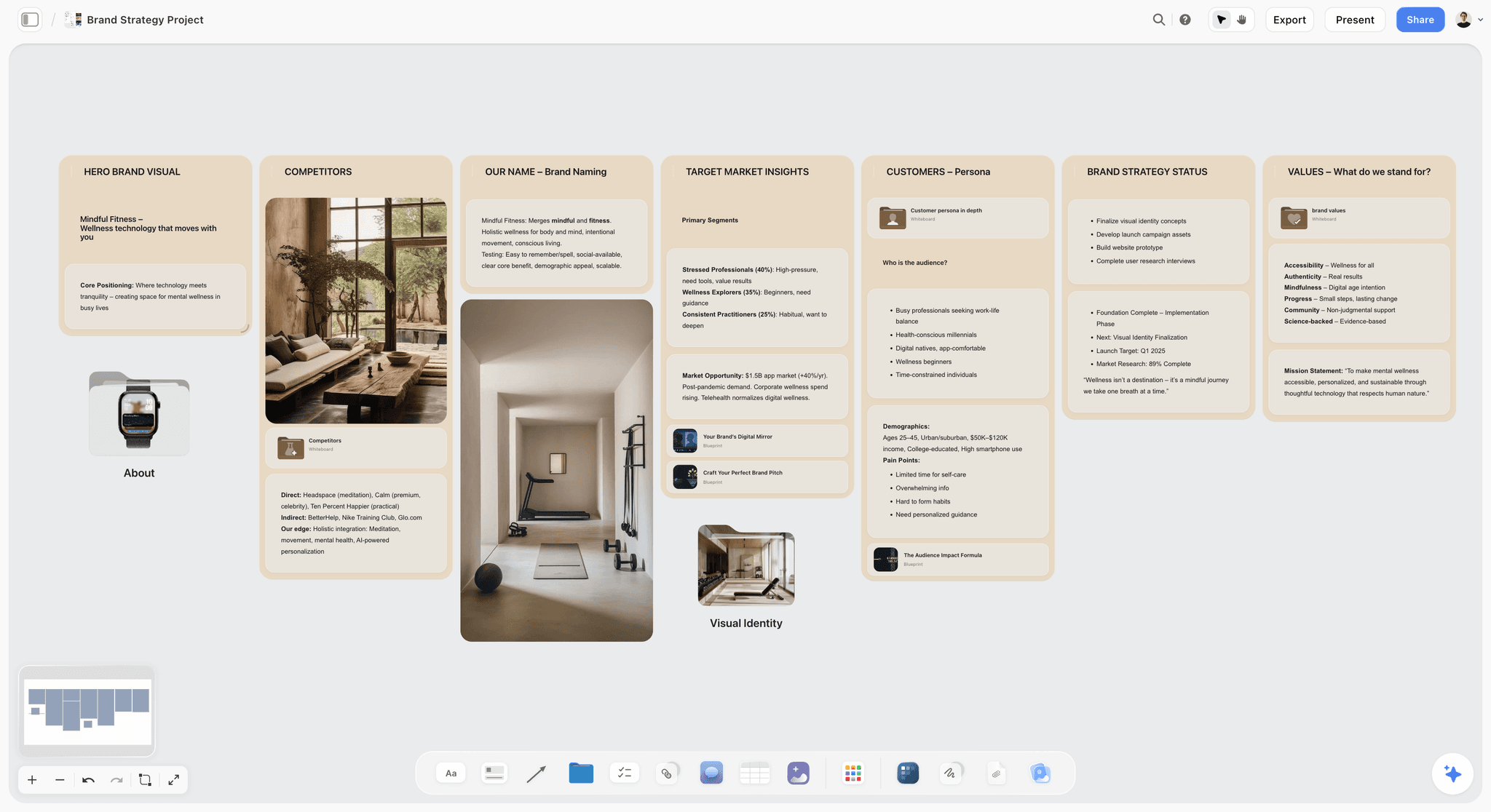
Storyflow canvas planning which idea becomes which formats, read by AI
Decide the ten formats before you clip
Storyflow's AI plans which idea deserves ten formats and the angle for each, the decision an auto-clipper cannot make. Pair it with a clipper to produce them. Free to start.

How to choose the right repurposing stack
Do not choose one tool. Choose one for each half of the job.
For the planning half, where you decide which idea earns ten formats and draft the angle for each, a visual canvas like Storyflow is the fix, because seeing one idea branch into its formats side by side is how you catch the version that is just the same post resized. This is the half most teams skip, and it is why so much repurposed content reads like the original stretched thin.
For the mechanical half, match the tool to your source material. If you produce long video, OpusClip is the cheapest strong clipper and Descript is the all-in-one if you also edit. If you run a podcast, Castmagic turns each episode into text assets. If your channel is YouTube, Taja AI optimizes it. If you repurpose designs, Canva resizes them. If you just need distribution routed, Repurpose.io automates it.
Match the spend to your bottleneck. If your problem is that everything you repurpose feels flat and identical, the fix is planning, not another clipper. If your problem is that clipping and resizing by hand eats your week, the fix is a mechanical tool. Buying a second clipper when your real gap is planning is the most common waste in repurposing.
The Bottom Line
Content repurposing has two halves, and almost every tool only sells you one. The mechanical half, clipping, transcribing, resizing, is well served by OpusClip, Descript, Munch, and the rest, and it is the easy half. The planning half, deciding which one idea deserves ten formats and giving each format its own angle, is where repurposing actually succeeds or fails, and it is the half most tools ignore. Storyflow leads the planning half because its canvas and AI let you map one idea across formats and shape each angle before anything gets produced, and it loses the mechanical half cleanly to the clippers, which is exactly why the strongest setups run one of each.
To plan which idea becomes which formats before you produce anything, start a Storyflow board and branch your best idea into the ten formats it should become.
FAQ: AI Content Repurposing Tools
What is the best AI tool for content repurposing?
There is no single best tool, because repurposing has two halves. For the planning half, deciding which idea to repurpose and mapping it across formats, a visual canvas like Storyflow leads. For the mechanical half, auto-clipping long video into shorts, OpusClip is the cheapest strong option and Descript is the best all-in-one. Most people who repurpose well run one planning tool and one mechanical tool rather than forcing one tool to do both.
What does content repurposing actually mean?
Content repurposing means taking one piece of content and turning it into many formats: a podcast episode becomes a newsletter, a set of short clips, a carousel, and quote posts. Done well, it is not just resizing the original. It is deciding which idea inside the source is worth expanding, then giving each format its own angle so the pieces feel native to their platform rather than recycled.
What is the cheapest AI tool for content repurposing?
OpusClip has the lowest entry price among strong AI clippers, starting around $15 per month with a free tier to try it. For planning, Storyflow's Free plan, launching before the end of 2026, will cover unlimited boards, and its Plus tier is $7.99 per month annually. Combining a free planning board with a low-cost clipper gives a small creator a full repurposing setup for a very low monthly spend.
What is the best content repurposing tool for podcasters?
Podcasters usually need two things: text assets and clips. Castmagic is strong for turning each episode into show notes, transcripts, social posts, and email copy. For video clips, OpusClip or Descript cuts the episode into shorts. Add a planning canvas like Storyflow to decide which episode topics deserve the full multi-format treatment, and the podcast-to-everything workflow is covered.
Can AI repurpose one video into multiple platforms automatically?
Yes, on the mechanical side. Tools like OpusClip and Munch auto-clip long video into platform-ready shorts, Repurpose.io routes and publishes across platforms automatically, and ContentFries batch-produces many pieces from one video. What AI does not do automatically is decide which video was worth repurposing or what unique angle each platform needs, which is the planning work a human still leads.
What is the difference between repurposing and reformatting?
Reformatting is mechanical: taking the same content and changing its size or container, like resizing a graphic or cutting a clip. Repurposing is a planning decision on top of that: choosing which idea deserves multiple formats and giving each format its own angle so it reads as native, not recycled. Most tools reformat well. Fewer help you make the repurposing decision that makes the reformatting worth doing.
What tool do agencies use for content repurposing at scale?
Agencies usually run a stack. ContentFries or Repurpose.io handles high-volume mechanical output, Descript covers editing, and a planning tool like Storyflow keeps the strategy consistent so scale does not turn into a flood of low-value pieces. The risk at agency scale is producing volume no one planned, so the planning layer matters more the more you produce.
Does Canva work for content repurposing?
Canva is strong for one part of repurposing: reformatting a visual design into every size a campaign needs, using Magic resize. It is fast and keeps branding consistent across formats. It does not help with audio, video transcript, or podcast-to-text repurposing, so it covers the design slice of the job and needs pairing with a video or text tool for the rest.
How do I plan a content repurposing strategy?
Start with the idea, not the format. Put one source idea on a canvas, list the formats it could become, and draft the specific angle each format needs so none of them are just the original resized. A visual tool like Storyflow makes this side-by-side view easy. Once the plan exists, hand the mechanical execution to clippers and design tools, which produce the formats you planned.
Is Storyflow good for content repurposing?
Storyflow is strong for the planning half of repurposing, because its canvas and AI let you take one idea and map it across formats with a distinct angle for each, side by side. It is not a mechanical tool: it does not clip video, transcribe audio, or resize designs, so repurposing teams pair it with a clipper like OpusClip or Descript that produces the formats Storyflow helps them plan.
Can I use one tool for all of content repurposing?
You can, but you will compromise. A mechanical tool leaves your planning thin, so you produce many pieces that are just the original stretched. A planning tool does not clip or resize anything. Repurposing has two distinct jobs, deciding the formats and producing them, and running one tool for each usually beats stretching a single tool across both.
How is AI content repurposing different in 2026?
The mechanical tools got much better at clip selection and captioning, so producing short-form at volume is now cheap and fast. That shift moved the real bottleneck to planning: when anyone can produce ten formats from one video in minutes, the advantage goes to whoever chose the right idea and gave each format a sharp angle. Repurposing in 2026 is less about the labor of cutting and more about the decision of what deserves cutting.
Table of Contents
Templates to check out for this topic


Templates you can use in Storyflow
Every Storyflow board starts from real structure and an AI that reads the whole canvas. Open one of these templates and make it yours.


See Storyflow in Action
A visual AI workspace where every feature lives inside one canvas. No tab-switching, no context lost.
Build your entire board from a single message
Type what you need in the AI chat at the bottom of your canvas. The AI adds cards, headings, and structure directly onto your board.
Use expert frameworks as AI context
Type @ in the AI chat and choose any Tactic. The AI tailors every response to that framework instead of giving generic advice.
Turn your board into a mind map in seconds
Ask the AI to restructure your canvas as a mindmap. It connects your ideas into a visual hierarchy so you can see how everything relates.
Why Storyflow Exists
Storyflow actually began as a personal tool while working on creative and research projects.
We kept running into the same problem: ideas were scattered everywhere: notes, documents, and whiteboards.
Nothing helped us see how everything connected.
So we started building a workspace designed around how ideas actually grow.
→ Read how Storyflow was createdSara de Klein
Head of Product at Storyflow
Published: 2026-07-16
Extremely simple, seriously capable


See how easy it is to get started
Watch a real project come together, from a blank board to a finished plan, clicked through step by step.
Start creating with AI and become more productive
Transform your creative workflow with AI-powered tools. Generate ideas, create content, and boost your productivity in minutes instead of hours.