
Extremely simple, seriously capable
How to make a concept map: connect ideas the way you think.
Turn scattered thoughts into a map of how they relate. Add ideas as notes, connect them with lines, and cluster related concepts with groups and walls, all on one infinite canvas that grows with your thinking.


Start your concept map
Open a board and start connecting ideas with notes and lines.
Create your concept mapUnlimited boards
Free plan before the end of 2026
Works in your browser
How it works
How to make a concept map online.
Three steps from loose ideas to a map of how everything fits together.
1
Get the ideas down
Open a board and add a note for every concept, question, or fact. Do not worry about structure yet; the board has room for everything.
2
Draw the relationships
Connect related concepts with connector lines that stay attached as you rearrange. The links between ideas are where the actual understanding happens.
3
Cluster and share
Group related concepts with walls and frames so themes emerge visually, then share a view-only link or export the map as a PDF or image.
Creatives working for these brands already got early access
- Red Bull
- Canon
- Artlist
- Porsche
See how easy it is to get started
Watch a real project come together, from a blank board to a finished plan, clicked through step by step.

From brainstorm to structured thinking.
A concept map is a mind map with more honesty: ideas rarely branch neatly from one center. In Storyflow you can link any note to any other, cross-connect themes, and let the real shape of the topic show itself.
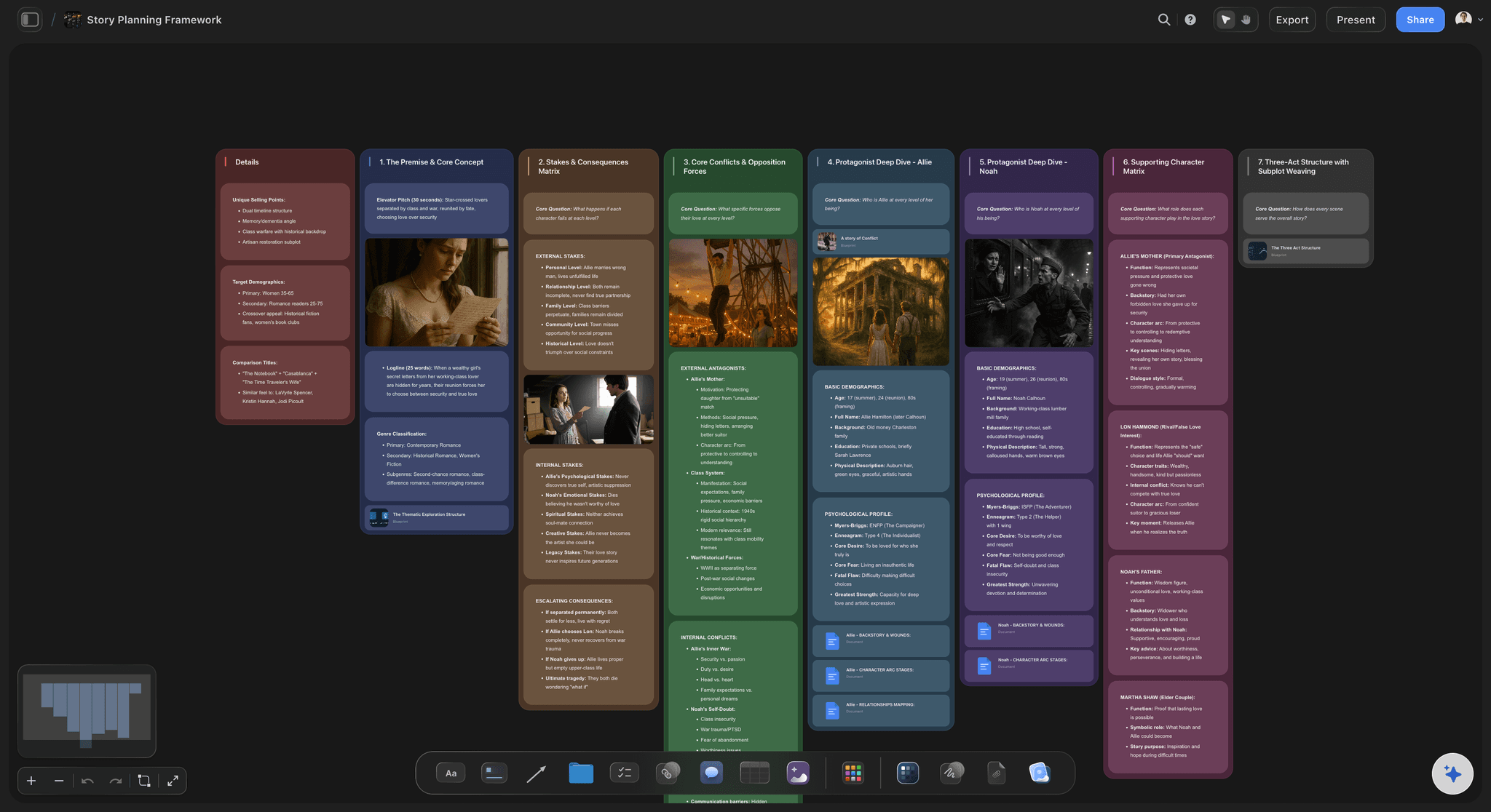
Map stories, arguments, and plans.
Writers use concept maps to untangle plots, students use them to study, and teams use them to align on how a problem actually works. Lay out the pieces, connect causes to effects, and spot the gaps before they cost you.
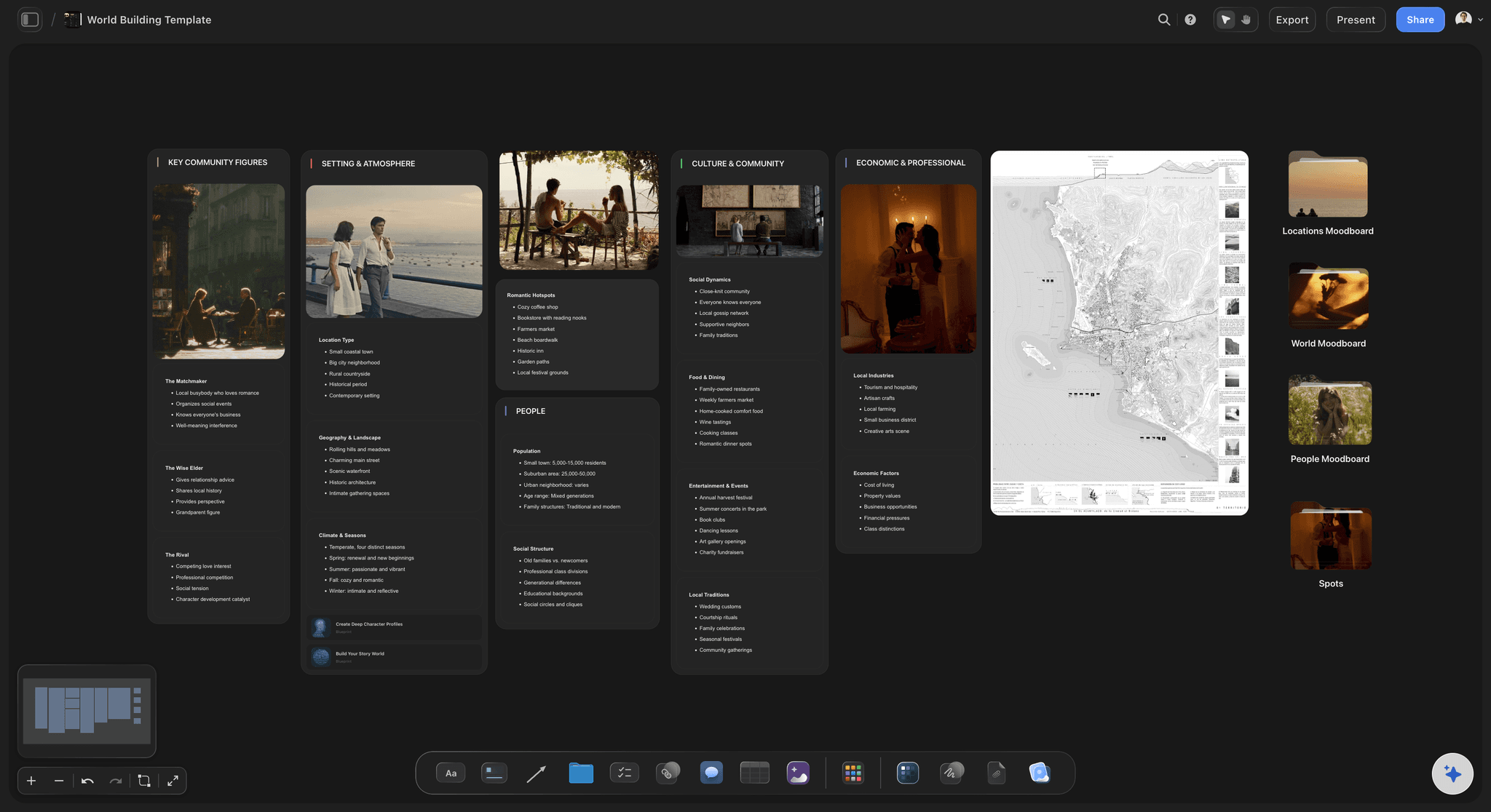
Build worlds and systems piece by piece.
Complex subjects are networks: characters and factions, markets and competitors, species and habitats. A concept map on an infinite canvas lets you keep every entity and every relationship in one place, and zoom from overview to detail.

Keep research connected to conclusions.
Drop sources, screenshots, and images next to the concepts they support. Because the map lives on a visual canvas, evidence and ideas stay side by side, and a view-only link lets others follow your reasoning.
Concepts as notes, relationships as lines.
Storyflow gives you the three things a concept map needs: notes for concepts, connector lines for relationships, and space. Every idea is a note you can color and label, every relationship is a line that stays attached as you move things, and the infinite canvas means the map never hits a page edge.
Cluster concepts into themes with groups and walls.
As the map grows, structure matters. Use walls and frames to gather related concepts into named clusters, so a hundred loose notes become a handful of readable themes. Rearranging a cluster moves everything inside it, which makes reorganizing painless.
Is there a free concept map maker?
Storyflow is paid-only during early access, from $7.99 a month billed annually, and there is no software to install. What is free today: anyone a paid member invites to a board signs up and joins free, and a view-only link opens in any browser with no account (commenting needs sign-in). A free plan launches before the end of 2026. Every paid plan includes unlimited boards, AI usage, and all the canvas elements a concept map needs: sticky notes, connector lines, walls, comments, and view-only share links. Export any board as a PDF or image when you need a copy.
What creators are saying
Join early creators getting structured workspaces and AI that remembers their projects
“Storyflow has sped up my workflow by at least 3x, which means more flow state and more projects I can actually ship. It truly changed the way me and my team create.”

Reilin Joey
Director & YouTuber
“One prompt gets me a structured board. But the tactics are my favorite. I run my YouTube scripts through them and my intros and retention got better. It's amazing.”

Justkay
YouTuber & Freelance Filmmaker
“I used to juggle five apps to plan a project. Now I describe what I am making and get boards, lists, and a schedule. All in one place.”

George
@fernwehchronicles
Frequently asked questions.
Concept maps versus mind maps, clustering, and sharing.
Open a board, add a note for each concept, and connect related notes with connector lines. Use walls and frames to cluster related concepts into themes, and rearrange freely: the lines stay attached as you move things.
Not yet. Storyflow is paid-only during early access, with plans from $7.99 a month billed annually ($9.99 monthly). A free plan launches before the end of 2026, and anyone a paid member invites to a board joins free. Every element a concept map uses, sticky notes, connector lines, and walls for clustering, is on every paid plan, along with unlimited boards and view-only sharing.
A mind map branches from a single central idea. A concept map is a network: any concept can connect to any other, which suits topics with cross-links and cause-and-effect relationships. Storyflow handles both on the same canvas.
Yes. Drop JPG, PNG, and WebP images straight onto the canvas next to your notes, so references, screenshots, and diagrams sit beside the concepts they support. Every paid plan includes unlimited file uploads.
Yes. Anyone with the view-only link can pan around the map in their browser, no account required; when a document needs a fixed copy, export the board as a PDF or image instead.
It does. The board opens in any mobile browser, so you can walk through the map on a phone or move notes around on a tablet; a bigger screen is nicer for heavy mapping sessions, but nothing is locked to desktop.
Map your ideas with a concept map.
Connect notes with lines, cluster themes, and share a view-only link, all on one board. A free plan launches before the end of 2026.