
How to Plan a Video Project from Start to Finish with AI: A Step-by-Step Guide (2026)
Most video projects fail in pre-production because planning fragments across a brief nobody updates and a script written before the concept is tested. This 8-step guide runs the process in the right order.

Category
Video Production
Author

Sara de Klein
Head of Product at Storyflow
Topics
2026-04-12
•
20 min read
•
Video Production- how to plan a video project with AI
- video project planning step by step
- video pre-production with AI
- AI video planning tool
- how to plan a video from start to finish
How do you plan a video project from start to finish with AI?
Most video projects fail in pre-production because planning fragments across a brief doc nobody updates, references in a Drive folder nobody opens, and a script that gets written before the concept is tested. The better approach runs in a fixed order: lock the single job the video must do, research the viewing context, develop and pressure-test the concept, build a visual treatment, write the script, plan logistics, build the shot list, and schedule from delivery backwards. By the end of this guide you will have a complete video pre-production plan you can brief a director or shoot yourself.
The Problem: When Video Planning Fragments Across Too Many Apps
How to plan a video project with AI still goes wrong when the brief lives in a Google Doc, the references live in a Drive folder, the script lives in a different Doc, and the schedule lives in a spreadsheet nobody updates after week one.
The standard video pre-production process produces files scattered across six different tools. The brief gets written once and never consulted again. The mood board sits in a shared folder that the director sees once at kickoff. The script gets written by someone who never saw the mood board. The schedule gets built from the shoot date forwards, which means post-production gets whatever time is left over, which is never enough.
Adding AI to that fragmented process makes it faster and more fragmented. If the AI sees only your most recent message, it gives you a script that ignores the brief you spent two hours writing. The fix is not a better prompt. It is a workspace where the brief, references, concept notes, and script all exist on one surface that the AI reads before it responds.
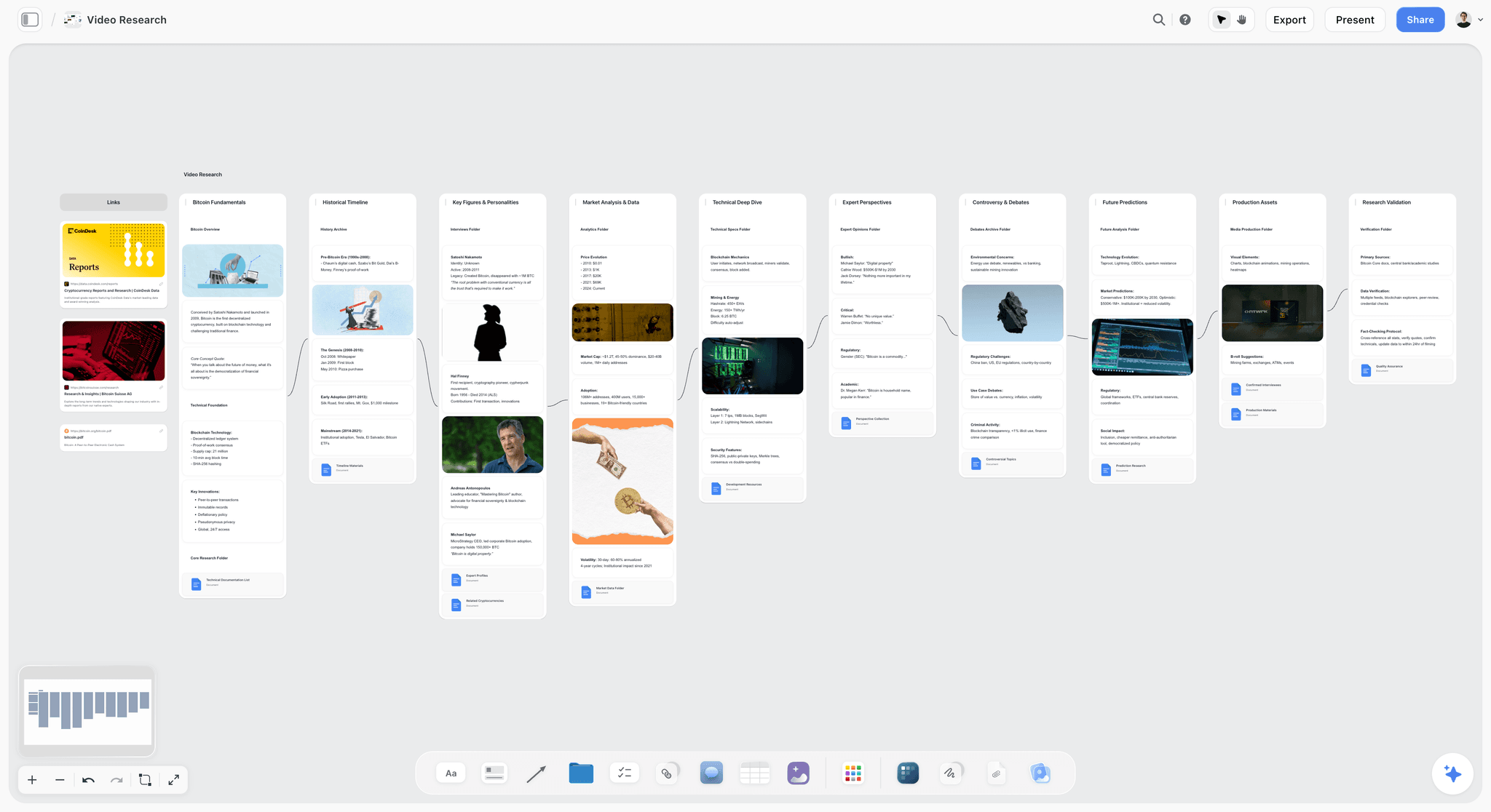
Research, brief, and concept notes on one canvas: the AI reads all of it before responding to a script prompt
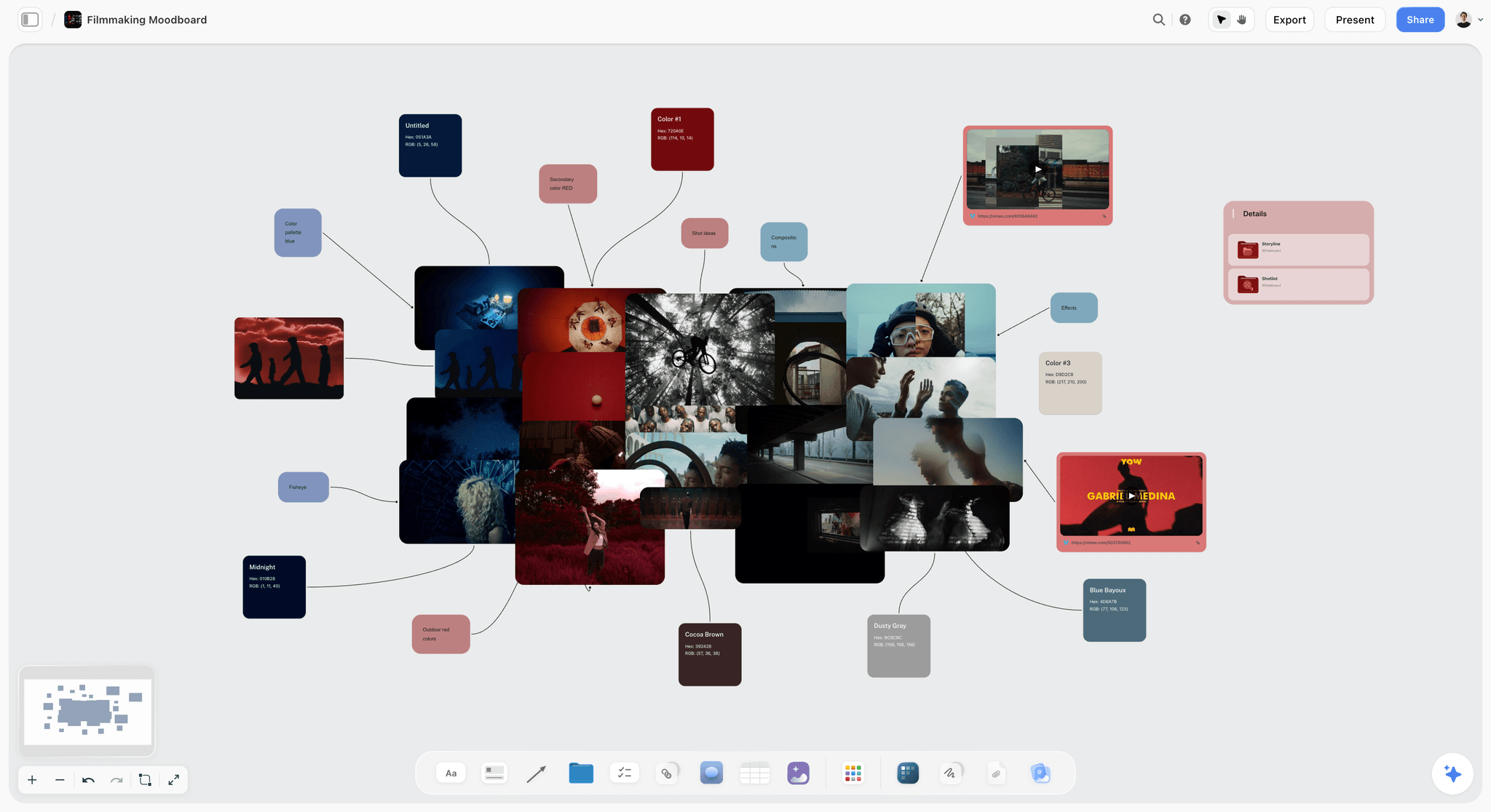
A mood board built on the same board as the brief so the visual language and the strategy stay connected through production
What You Need Before You Start Planning a Video Project with AI
A defined output format or range of formats: You do not need to know the exact running time yet, but you need to know whether this is a scripted short, a documentary-style piece, an explainer, or a social video series. Format determines which steps below apply at full length and which apply in abbreviated form.
A rough budget band and confirmed delivery date: AI cannot help you prioritize without resource constraints. A vague 'we'll see how it goes' budget produces a shot list that will never get shot. The delivery date determines the schedule in Step 8.
Access to any existing brand assets or style guides: Brand constraints that surface in the treatment review (Step 4) and require changes to the concept cost far more time than brand constraints discovered in Step 1.
60 to 90 minutes of uninterrupted time for Steps 1 through 3: The brief, audience research, and concept development phases require thinking without performance pressure. Doing them in a meeting produces safe, compromised outputs.
A visual workspace where AI sees your full project at once: Storyflow's free tier works for this guide: three projects, unlimited boards, and ten AI generations per month. Keep your brief, research, references, and script on one active canvas so the AI reads the whole project before responding.
Still deciding what the video actually is?
This planning workflow assumes you have the concept. If the idea is still fuzzy, generate a batch of video concepts first, pick the one with a real hook, then bring it into the plan below.

How to Plan a Video Project with AI: Step by Step (2026)
Step 1: Write the Single Job This Video Needs to Do
Output: A one-sentence brief: what belief or behavior changes, for whom, by what measure, and within what timeframe
Video projects fail at the brief stage more often than at any other point. The brief is not the creative concept, the format, or the running time. It is the job: what needs to be different in the audience's thinking or behavior after they watch this video. Without that sentence written and agreed upon, every later decision becomes a matter of personal taste rather than professional judgment.
Write it like this: This video convinces [specific audience] that [specific belief or behavior change] by [delivery date]. Then add constraints: the distribution channels and their technical requirements, the budget band, the brand or legal non-negotiables, and the explicit non-goals. Non-goals are underrated. They give people permission to reject beautiful ideas that do not serve the job.
Example brief sentence for a software company: This video convinces mid-market finance managers who still use spreadsheets for compliance reporting that [product] is audit-safe and less fragile, within a 90-second runtime distributed via LinkedIn and the sales team email sequence. That sentence rules out five concept directions before anyone touches a keyboard.
Where Storyflow helps: Open a Storyflow board and pin the brief sentence at the top center of the canvas in a bold heading card. Keep it visible while every other phase builds around it. When you use the AI assistant later, it reads the full canvas before responding, so the brief anchors all suggestions to the actual job rather than drifting into interesting-but-irrelevant directions.
Common mistake: Writing a brief that describes the format instead of the job: 'We need a 2-minute hero film about our culture' is a format. 'We need to change how engineering candidates perceive our team's technical depth before they decline our offer' is a job.
Step 2: Research Your Audience and the Viewing Context
Output: A half-page audience profile covering who they are, what they believe now, and crucially where and how they will watch this video
Audience research for video is different from audience research for written content. You are not only asking who they are and what they care about. You are asking what emotional state they will be in when this video reaches them, and what the viewing environment does to attention. A video watched on a phone in a LinkedIn feed has a different attention budget than a video watched on a branded landing page with sound on.
Build the profile in three parts. First: who they are today and what they believe that stands between you and the outcome in your brief. Second: what would change their mind, and what proof would satisfy a skeptic in this audience. Third: the viewing context. Where will they see it, on what device, with or without sound, and how many seconds do you have before they make a stay-or-scroll decision.
This last part shapes your script and your shot list more than any other single input. If 70 percent of your audience watches on mobile without sound, every visual choice in the film needs to carry the meaning the audio cannot. That is not a post-production note. That is a pre-production constraint.
Where Storyflow helps: Drop research notes, pull quotes from interviews, and competitor examples onto the canvas around your brief card. Storyflow's AI reads the canvas, so when you ask it to help develop the concept in Step 3, the audience context you placed there is already part of its working knowledge. You can also @-mention a research document or a Blueprint Tactic for additional framework structure in the chat.
Common mistake: Describing the audience demographically without describing the belief: 'Women 25-44 in urban markets' does not tell you what to make. 'Freelance designers who believe project management software is built for agencies, not individuals' tells you exactly what the video has to change.
Step 3: Develop and Pressure-Test the Concept
Output: Two to three concept directions, each with a one-sentence premise, an emotional hook, and a kill-test result
A concept is not a format or a style. It is the specific idea that connects the audience's current belief to the new one the video is supposed to create. Most concepts that die in development die because someone fell in love with an aesthetic before they locked the logic. The aesthetic should emerge from the concept. It should not be the concept.
Develop at minimum two directions. If you develop only one, every critique becomes a fight to defend it rather than a genuine evaluation. Draft each concept in three elements: the premise (what the video argues), the emotional hook (how it gets the audience to care), and the proof centerpiece (what they see or hear that makes the argument credible). Then run a kill-test: Does this concept connect directly to the brief job? Would it work for a different brand or a different audience with minor tweaks? If yes, it is not specific enough. Does it require a budget or resource you do not have? Name that now.
Ask AI to argue against your favorite concept before you pitch it. This is one of the most underused applications of AI in video development: give it your concept and your brief, and ask it what would make this concept fail with the specific audience you described. The objections it surfaces are exactly the objections a client or stakeholder will raise in the review meeting, two months later, after you have spent budget on production.
Where Storyflow helps: Build each concept direction as a cluster of cards on the canvas: premise, hook, proof centerpiece, and kill-test result in a visual group. Ask Storyflow's AI to challenge the concepts while your brief and audience notes are on the same board. The AI already has context from Steps 1 and 2, so its critique will be specific to your project rather than generic creative feedback. You can @-mention the Hero's Journey or AIDA Blueprint Tactic when you want structured narrative framework alongside the critique.
Common mistake: Developing the concept and the treatment simultaneously: style decisions (shooting on film, voiceover tone, animation style) contaminate the concept evaluation because people argue about execution before the idea is proved sound.
Step 4: Build a Visual Treatment and Mood Reference Board
Output: A visual treatment: 8 to 12 reference images, a color direction, and a one-sentence visual tone statement that a director and DP can brief from
The treatment is the document that converts an approved concept into a visual language. It is the first thing a director, production company, or client uses to understand what the film will actually look like, and it is the reference that resolves disputes during the shoot. A treatment that gets built too quickly, from the wrong references, produces a film that looks like someone else's film rather than a deliberate choice.
Start by collecting references that solve the brief problem, not references that you find beautiful. Beautiful is subjective. Brief-solving is not. If the brief calls for clinical precision because the audience is skeptical of over-produced brand content, your references should feel restrained, not aspirational. If the brief calls for emotional warmth because the audience relationship is transactional and you need to change that, your references should do that work without looking like every other brand-warmth film produced this year.
Write the visual tone statement last, after you have lived with the references. One sentence: the visual language is [adjective], [adjective], and [adjective], achieved through [two or three specific visual techniques]. That sentence is what you read aloud at the beginning of every production conversation. If everyone leaves the room with the same image in their head, the treatment worked.
Where Storyflow helps: Use Storyflow's canvas to arrange your reference images spatially: color palette references in one zone, composition references in another, lighting tone in a third. You can also use the AI image generation tool (press G on the canvas) to generate concept reference images directly when you cannot find existing references that match your direction. The mood board lives on the same board as your brief and concept cards, so the AI can read the visual logic when you ask for script tone guidance in Step 5.
Common mistake: Using references that show the output you want rather than the visual language that produces it: a reference labeled 'this looks great' tells the DP nothing. A reference labeled 'this is the quality of natural light we want in the interview setup' is a production instruction.
Step 5: Write the Script or Narrative Outline
Output: A production-ready script with every spoken word, or a structured interview outline with question sequence and thematic arc for non-scripted formats
The brief job determines the script format. Scripted formats (brand films, explainers, product demos, narrative spots) need every word finalized before the shoot because reshooting is expensive and time-sensitive. Interview-driven or documentary formats need a structured question sequence, the thematic arc you are building toward, and a list of the moments or beats the edit needs to work. Trying to write a full script for a documentary is one of the most reliable ways to produce a film that feels controlled rather than discovered.
Write from the end, not the beginning. Know the last impression the film leaves before you write the opening. Every scripted video has a job to do in its final 15 seconds: land the belief, make the ask, or create the feeling that follows the viewer out of the viewing experience. Once that is clear, the script builds toward it rather than meandering toward it. The opening hooks people. The ending is what they remember.
Read the script aloud before you finalize it. Not in your head. Out loud, at performance pace. Time it. Mark every sentence that slows your own attention. Most scripts have 20 to 30 percent more words than the story needs. The edit will find the unnecessary sentences eventually. Finding them in the script is free. Finding them in the edit costs time and sometimes requires a reshoot.
Where Storyflow helps: Write the script inside a Storyflow document linked to the same project as your brief, mood board, and concept cards. The Writing Analyzer surfaces readability scores and pacing signals in real time. When you open the AI chat from within the document, it can reference the mood board and brief cards you placed on the canvas via @-mention, so script tone suggestions stay anchored to the visual language and audience context you built in earlier steps.
Common mistake: Writing the opening line first: the most common script failure is spending 45 minutes crafting an elegant opening before knowing what the script is building toward, then discovering the elegant opening does not lead to the necessary ending.
Step 6: Plan Production Logistics
Output: A confirmed locations list, a talent list with availability locked, and an equipment checklist tied to the shot coverage plan
Logistics planning is where video projects gain or lose a full day of production before the shoot starts. The three variables that kill schedules are locations locked too late, talent availability discovered too late, and equipment assumptions that turned out to be wrong. All three are knowable in pre-production if you ask early enough.
For each location: confirm visual suitability (does it look like the references in Step 4), acoustic suitability (ambient noise you cannot control), and logistical suitability (permits, parking, load-in window, access restrictions). For talent: confirm availability for both shoot and pickup days before the shoot is scheduled, because pickups are almost always needed and almost never planned for. For equipment: the shot list you build in Step 7 tells you what lenses, rigs, and additional gear are needed. Finalize logistics before you finalize the shot list, not after.
Audio deserves its own line in the logistics plan. More productions are salvaged in post-production from bad picture than from bad sound, because picture problems can sometimes be fixed and sound problems almost never can. Confirm boom operator, lavalier setup, and acoustic environment for every location before you schedule a day of shooting in it.
Where Storyflow helps: Use a simple note card cluster on the Storyflow canvas per location: one card for visual notes, one for acoustic notes, one for logistical notes. When you ask AI for equipment suggestions based on the shot types in your coverage plan, it reads the location and shot context from the canvas and gives recommendations that are specific to the project rather than generic gear lists.
Common mistake: Scheduling shoot days before locations are confirmed: a location that falls through two days before the shoot reshuffles the entire schedule, sometimes kills shots that were designed for that specific space, and always costs more to resolve than it would have cost to confirm earlier.
Step 7: Build the Shot List and Rough Storyboard
Output: A numbered shot list organized by location with shot type, camera angle, lens notes, and coverage logic for every scene
The shot list is the document that turns a concept into a shoot day. It is also a budget document: every shot you list has a cost in time, setup, and crew attention. A shot list that is too long does not get shorter on the day. It gets cut, usually in the wrong order, usually by whoever is most stressed. Build the list you can actually shoot, not the list you wish you could shoot.
Organize the shot list by location, not by script order. This is the most practical efficiency in video production and one of the most commonly skipped. Shooting chronologically is for theaters. Shooting by location means you finish every setup in a location before you move, which reduces travel time, re-setup time, and the mental cost of rebuilding a lighting setup you already struck. The editor reassembles the script order in post. The director's job is to get clean coverage of every element within the production window.
Storyboard only the shots where spatial relationship or camera movement is inseparable from the story meaning. For most productions, a storyboard is most useful for the 10 to 15 percent of shots that are genuinely hard to describe in words. Drawing all of them is a time investment that rarely pays off in productions where the DP and director can talk through the coverage plan in a single location scout.
Where Storyflow helps: Use Storyflow's canvas to lay out shots as cards in location clusters. Each card can hold the shot number, type, angle, and coverage note. This spatial layout lets you visually check coverage logic before the shoot day: if the interview setup card has no cutaway cluster next to it, the editor will not have material to cut between answers. Storyflow's AI image generation tool can also produce rough storyboard frames directly on the canvas when you need to visualize a specific shot for a director or client.
Common mistake: Building the shot list from the script in order and then organizing it by location as a second step: the two-step approach produces a longer list because script-order thinking focuses on narrative progression and location-order thinking focuses on efficient coverage, and those are different optimization problems.
Step 8: Create the Production Schedule and Delivery Timeline
Output: A day-by-day production schedule from confirmed pre-production milestones through final delivery, built backwards from the delivery date
Build the schedule from the delivery date backwards. Not from the shoot date forwards. The delivery date is the fixed constraint. Post-production has a minimum viable duration for the type of project you are making (rough cut, client review, revisions, color, sound mix, master). Lock those durations first, then count backwards to determine the latest possible shoot date, which determines the latest possible brief-lock, location-confirm, and casting-complete dates.
Most video project schedules fail because they are built as best-case scenarios: no pickup shoots, first-round client approval, no change requests in post, the colorist available immediately after picture lock. Build buffer into post-production, not pre-production. Pre-production compression produces inadequate preparation. Post-production compression produces inadequate quality. The buffer belongs in post because that is where the consequences of pre-production shortcuts materialize.
For small teams and solo creators: build two versions of the schedule. The first is the planned schedule. The second assumes one day lost in the production window and one round of revision feedback in post. If the second schedule still delivers by the deadline, the plan is real. If it does not, the scope or the deadline needs to change before the project starts.
Where Storyflow helps: Pin a timeline strip at the bottom of the Storyflow board: one column per week, cards for major milestones. Keep it on the same canvas as the brief and shot list so every status update happens in the context of the full project rather than in a separate calendar that nobody consults. Storyflow's AI can help identify risk flags in the schedule by reading the milestone cards and the outstanding tasks you have placed on the board.
Common mistake: Scheduling production before confirming post-production capacity: discovering your editor is unavailable for the three weeks after the shoot is information that should have changed the shoot date before it was booked, not after.
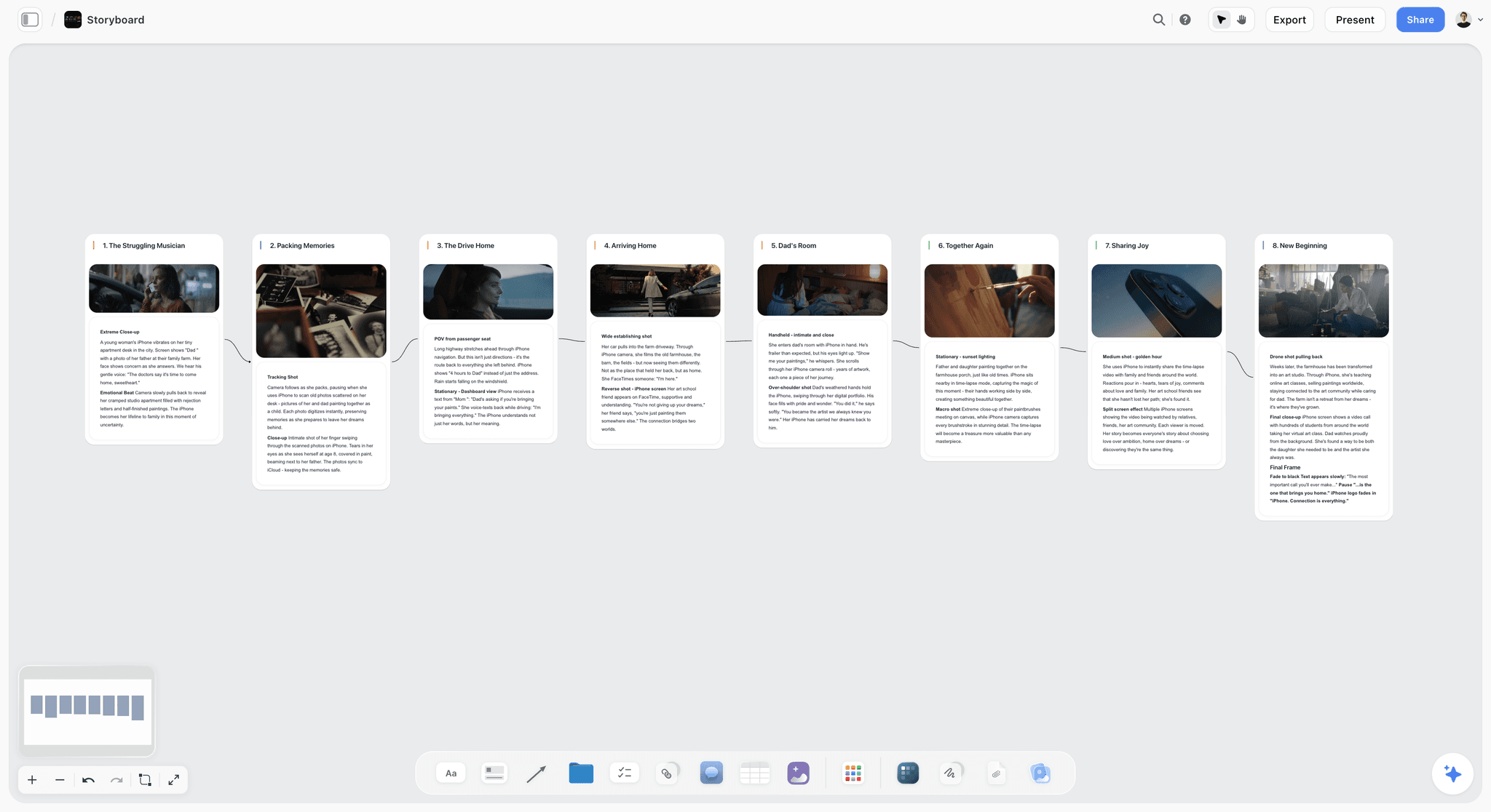
Shot list and storyboard frames on a Storyflow canvas: each location cluster shows coverage logic before a single shoot day is scheduled
The 8-Step Video Project Planning Process at a Glance
Write the brief: what changes, for whom, by what measure
Research the audience: current belief, emotional state, viewing context
Develop the concept: two to three directions, each with premise, hook, and kill-test
Build the treatment: 8 to 12 references, color direction, one-sentence visual tone
Write the script or outline: every word for scripted formats, arc and questions for interview
Plan logistics: locations confirmed, talent locked, audio plan built
Build the shot list: numbered by location, coverage logic checked visually
Build the schedule: from delivery backwards, buffer in post, two-version plan
Each step has a concrete output. If you cannot name the output after completing a step, the step is not finished.
Tips and Best Practices for Planning a Video Project with AI
Lock the brief before you open a script document
The most consistent predictor of a difficult production is a script that was started before the brief was finished. Script decisions made without a locked brief are made on instinct, and instinct produces films that feel good to make but do not do the job they were built for. Brief first. Always. Even when the deadline is pressing. Especially when the deadline is pressing.
Use your mood board as your approval gate, not your script
Clients and stakeholders give more honest and useful feedback on visual references than on written scripts. Scripts require them to imagine the film, and they will imagine it differently than you do. References give everyone the same image. Getting approval on the visual treatment before the script is finalized means script changes happen before production, not in the middle of it.
Ask AI to play the critic before you pitch the concept
Before any concept goes to a client, stakeholder, or director, ask the AI to challenge it using the brief and audience context as the standard. Give it the concept, the brief job, and the specific audience belief from Step 2, then ask what would make this concept fail with that audience. The objections it generates are the ones you will face in the room. Rehearsing them privately costs nothing. Being surprised by them in a pitch costs the project.
Shot list by location, not by script order
This tip has a simple rule and a hard behavior change. The rule is: sort every shot in the list by location before you finalize it. The behavior change is resisting the instinct to write the list in story order because story order is how the film is experienced, not how a shoot day runs. Shooting by location saves an hour of setup time per location move. On a one-day shoot, that can be the difference between a complete shot list and a incomplete one.
Build post-production capacity in before you schedule the shoot
I learned this the hard way on a project where the editor was not available until three weeks after the shoot date. The shoot happened on schedule. The delivery missed by two weeks. Every variable in pre-production can be adjusted. The editor's availability is not one of them if you discover it after the shoot. Confirm post-production capacity alongside location confirmation, not after.
Keep brief, mood board, and script on the same board in Storyflow
When the script lives in a different document from the brief and mood board, the AI giving you script help has no idea what the visual tone is supposed to be, who the audience is, or what the brief job is. It answers the question you asked, not the question the project needs. Keeping everything on the same Storyflow canvas means every AI response is anchored to the full project context.
The 30-second audio test for every scripted video
Close your eyes and listen to the script read aloud without looking at the mood board or the references. If you cannot understand what the film is saying or why it matters without the visual context, the script has not done enough work on its own. A strong video script produces comprehension and emotion through audio alone. The visuals amplify. They should not compensate.
Common Mistakes to Avoid When Planning a Video Project with AI
Mistake: Starting with the script instead of the brief
Why it happens: Writing is concrete and satisfying. Defining the brief feels abstract and slow. Most people skip to the tangible work.
What goes wrong: The script reflects what the writer finds interesting rather than what the audience needs to believe. The brief conversation happens in the client review instead of in pre-production, and changes to a finished script are expensive.
What to do instead: Write the brief sentence from Step 1 and get stakeholder agreement before opening a script document. Put the brief sentence at the top of the script file so it is visible during every drafting session.
Mistake: Building the production schedule as a best-case scenario
Why it happens: Optimistic scheduling feels good and avoids difficult conversations with stakeholders about timelines.
What goes wrong: The first disruption (location falls through, talent reschedules, approval takes longer than expected) has no buffer, and the delivery date becomes negotiable rather than fixed.
What to do instead: Build two schedule versions: best case and one-disruption case. If the one-disruption case misses the delivery date, the scope or the deadline needs to change before the project starts.
Mistake: Not planning for audio until the shoot day
Why it happens: Video planning is inherently visual, and audio requirements feel like a production detail rather than a pre-production constraint.
What goes wrong: Locations selected for their visual quality produce unusable sound. Pickup shoots for audio cost more than the original shoot days because they require the same crew for fewer deliverables.
What to do instead: Add an audio requirements card to every location in Step 6: ambient noise level, microphone setup needed, and acoustic treatment required. Treat audio as a location selection criterion, not a post-production problem.
Mistake: Confusing style references with concept development
Why it happens: Mood boards and reference reels feel like progress because they are visual and concrete. Concept development feels slower and more uncertain.
What goes wrong: The treatment locks a style before the concept has been tested against the brief, which means the style cannot be changed without the client feeling a direction was pulled rather than improved.
What to do instead: Develop the concept premise and kill-test it (Step 3) before building the treatment (Step 4). The treatment translates an approved concept into a visual language. It should not be built in parallel with the concept.
Mistake: Scheduling the shoot before confirming post-production availability
Why it happens: Shoot dates feel like the critical constraint because they involve crew, locations, and talent. Post-production feels flexible because it is just one editor or colorist.
What goes wrong: The shoot happens on schedule. The edit cannot start for three weeks because the editor was booked. The delivery misses, the project relationship suffers, and the post-production work is rushed.
What to do instead: Confirm editor, colorist, and sound mixer availability at the same time as locations and talent in Step 6. These are fixed resources with fixed calendars and they cannot be booked after the shoot if they are already committed.
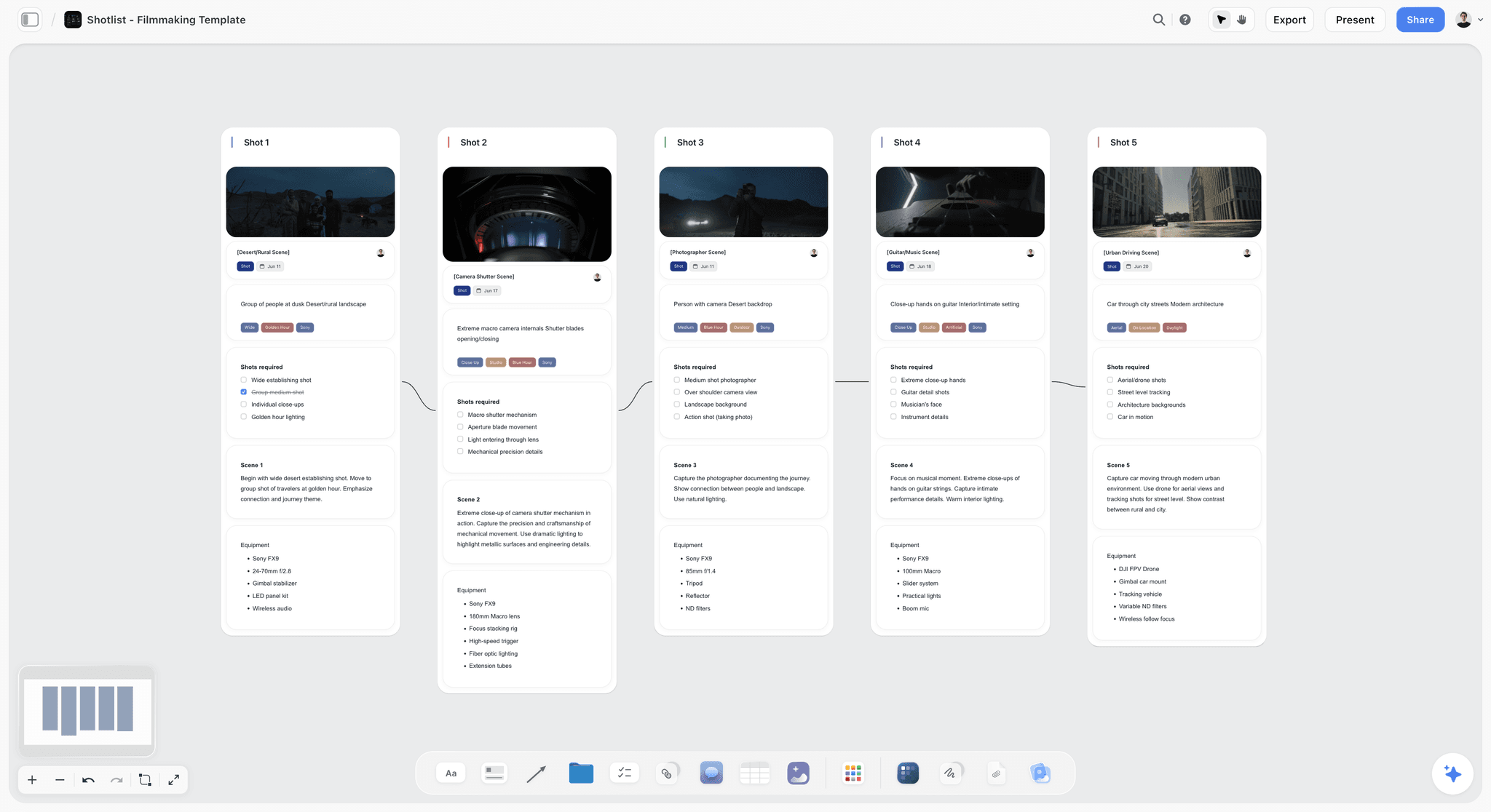
Shot list organized by location on a Storyflow canvas: coverage logic visible before the schedule is built, which catches gaps that would cost pickup shoot days
FAQ: How to Plan a Video Project with AI
How long does it take to plan a video project with AI?
A thorough first plan takes 4 to 6 hours across two focused working sessions for a solo creator or small team. The first session covers the brief, audience research, and concept development (Steps 1 through 3). The second covers the treatment, script, logistics, and schedule (Steps 4 through 8). Repeat projects using the same board template drop to 2 to 3 hours because brief structure and research context carry forward.
How is planning a video project with AI different from the traditional approach?
Traditional video planning splits across a dozen tools: a brief in Google Docs, references in a shared Drive folder, the script in a different Doc, and the schedule in a spreadsheet nobody updates. AI does not change the sequence of good planning, but it accelerates research synthesis, concept variation, and script drafting significantly. The real difference is what AI can do when it reads your brief and references together, not just your last typed message.
Can I plan a video project with ChatGPT or Notion AI instead of Storyflow?
You can write individual sections in ChatGPT or draft copy in Notion AI. Both break down when your project spans more than one conversation window because they see only what you paste, not what you built across three previous sessions. Storyflow keeps brief, references, mood board, and script on the active canvas so the AI reads the whole project before responding. You can deepen that context by @-mentioning a Blueprint Tactic or up to three documents in the AI chat.
What is the most important step in video pre-production?
Writing the brief before anything else. Specifically: the single job this video needs to do, who watches it, and in what context. Most video projects that fail in post-production or at client review failed because the brief was vague or skipped entirely. A clear brief makes every later decision faster because there is a standard to check against. Without it, every creative choice becomes a matter of personal taste.
How detailed should a script be before going into production?
For scripted narrative pieces: every line should be finalized and read aloud before the shoot. For interview-driven or documentary-style work: a question list and thematic outline replace a full script. For social or brand videos shorter than 90 seconds: a word-for-word script almost always produces better results than improvising on the day, because every second costs production budget. The level of detail should match the cost of reshooting a mistake.
Do I need a storyboard for every video project?
No, but you always need a shot list. A storyboard is most valuable for animation, complex sequences, visual effects, or any shot where the camera position is inseparable from the story meaning. For interview-based or observational content, a shot list with coverage logic is sufficient. The rule of thumb: if a director needs to look at a drawing to explain what they mean to the DP, draw it. If words are enough, use words.
What should a video project brief include?
The single job the video must do, who watches it and in what context, the one belief or behavior you want to change, the distribution channels and their format requirements, any non-negotiable brand or legal constraints, success metrics, and the budget band. A brief that takes longer than 90 seconds to read is usually hiding unresolved decisions. Tighten it until every sentence is either an instruction or a constraint.
How do I know if my video concept is strong enough to develop?
A concept is strong enough when it passes three tests: it connects directly to the job in the brief, you can explain why it would work for this specific audience (not just audiences in general), and it survives a 60-second kill-test where you argue against it. A concept that collapses under mild challenge during development will collapse harder during client review or at launch. Pressure-test before you script.
What is the difference between a shot list and a storyboard?
A shot list is a numbered document describing every shot in the film: the shot type, camera angle, lens, subject, and notes. It is a production planning document. A storyboard is a visual panel-by-panel drawing showing what the camera sees. Shot lists are faster to produce and sufficient for most productions. Storyboards add the visual layer when spatial relationships, frame composition, or action sequence timing cannot be communicated in words alone.
How do I plan a video project when working solo or with a small team?
Solo and small-team video projects succeed when planning is compressed without skipping logic: brief on Day 1, concept and references on Day 2, script or outline on Days 3 to 5, logistics and schedule in parallel. The most common solo mistake is over-building the plan document and under-building the shot list. Keep the brief to one page, the script to production-ready, and the shot list specific enough that you do not need to think during the shoot.
Start Planning Your First Video Project Today
Most video projects that do not get started are not stopped by a lack of ideas. They are stopped by the scale of the thing. Eight steps feels like a lot. A brief, a treatment, a script, a shot list, a schedule: the full picture looks like a month of work before a camera has been turned on. The eight steps in this guide take 4 to 6 hours the first time, split across two working sessions. The second project using the same board structure takes half that.
Open a Storyflow project and start with Step 1: write the brief sentence. Pin it to the center of a blank canvas. Then use the AI assistant to help you pressure-test it before you build anything else. If you get through the brief, audience profile, and concept in the first session, you are further along than most productions that have been talked about for weeks. The Hero's Journey Blueprint Tactic is available on the free plan and gives you a structural framework for narrative video concepts directly on the canvas, alongside your brief and references.
Every video you plan this way produces a shareable template for the next one. After three projects, the planning process is not 4 to 6 hours. It is the shape of your creative practice, and the AI knows the project before you type the first prompt.
Written by Sara de Klein, Head of Product at Storyflow. Sara has worked in video pre-production and creative strategy for filmmakers, brand teams, and content studios before building Storyflow. This guide reflects the planning process she runs on every video project she is directly involved in.
Related Reading
The team-scale system around this plan: one source of truth, phase gates, numbered feedback, and versioning that prevents final_final.
Go deeper on Step 7 of this guide: how to build a storyboard that communicates visual intention without drawing skills.
The brief that underpins Step 1 of this guide, written in full: every field, what to put in it, and what it unlocks in the creative team.
The full treatment on Step 4 of this guide: how to build a mood board that earns client approval instead of inviting opinion.
If your video project is documentary or interview-driven, this guide covers the specific approach where scripts come after shoots.
Compare the workspaces where video pre-production lives best, from Storyflow to Milanote to Miro.
Table of Contents
- The Problem: When Video Planning Fragments Across Too Many Apps
- What You Need Before You Start
- How to Plan a Video Project with AI: Step by Step (2026)
- The 8-Step Process at a Glance
- Tips and Best Practices
- Common Mistakes to Avoid
- FAQ: How to Plan a Video Project with AI
- Start Planning Your First Video Project Today
Templates to check out for this topic


Templates you can use in Storyflow
Every Storyflow board starts from real structure and an AI that reads the whole canvas. Open one of these templates and make it yours.


See Storyflow in Action
A visual AI workspace where every feature lives inside one canvas. No tab-switching, no context lost.
Build your entire board from a single message
Type what you need in the AI chat at the bottom of your canvas. The AI adds cards, headings, and structure directly onto your board.
Use expert frameworks as AI context
Type @ in the AI chat and choose any Tactic. The AI tailors every response to that framework instead of giving generic advice.
Turn your board into a mind map in seconds
Ask the AI to restructure your canvas as a mindmap. It connects your ideas into a visual hierarchy so you can see how everything relates.
Why Storyflow Exists
Storyflow actually began as a personal tool while working on creative and research projects.
We kept running into the same problem: ideas were scattered everywhere: notes, documents, and whiteboards.
Nothing helped us see how everything connected.
So we started building a workspace designed around how ideas actually grow.
→ Read how Storyflow was createdSara de Klein
Head of Product at Storyflow
Published: 2026-04-12
Extremely simple, seriously capable


See how easy it is to get started
Watch a real project come together, from a blank board to a finished plan, clicked through step by step.
Start creating with AI and become more productive
Transform your creative workflow with AI-powered tools. Generate ideas, create content, and boost your productivity in minutes instead of hours.