The 11 Best Tools for Storyboard Artists in 2026
Panels are paid and revisions are not. Eleven tools ranked around the revision trap, with Storyboard Pro named as the professional standard it is.

Category
Filmmaking Tools
Author

Sara de Klein
Head of Product at Storyflow
Topics
2026-08-10
•
17 min read
•
Filmmaking Tools- best tools for storyboard artists
- best storyboarding software
- Toon Boom Storyboard Pro vs Boords
- storyboard revision rounds
- freelance storyboard artist workflow
- Procreate for storyboarding
What are the best tools for storyboard artists in 2026?
This is not a ranking of drawing software. Toon Boom Storyboard Pro is the professional standard for boarding and nothing here displaces it, which is why it sits at number two rather than being argued about. This is a ranking built around the thing that actually decides whether a storyboard artist makes money: revisions are unpaid, panels are paid, and the cause of unpaid revisions is almost always that the director's intent was never pinned before the pencil moved. Storyflow ranks first for pinning it. Procreate remains the fastest surface for the drawing itself. Boords is the best lightweight board for advertising and live action work. If you do not draw every panel, a different kind of [storyboard software](/storyboard-software) will fit better.

Full disclosure: Storyflow is our own product, and this post is explicit that it is NOT a drawing or boarding tool. It has no brushes, no timeline, no animatic, no camera moves, no panel numbering and no export any production can use, which is why Toon Boom Storyboard Pro and Procreate are ranked above it on everything to do with the craft. Storyflow ranks first only on the pre-board: holding the beats, references and the director's stated intent so the revision spiral starts less often. We link to every tool so you can judge the fit.
Quick Comparison
These four cover where a boarding job is actually won or lost: pinning intent, boarding for animation, drawing the rough pass, and reviewing with a client.
| Tool | Best For | AI Features | Price |
|---|---|---|---|
| Storyflow | Pre-board intent and references | Canvas-wide context AI | $7.99 mo annual (free plan late 2026) |
| Toon Boom Storyboard Pro | Animation boarding and animatics | None | From ~$65 mo or ~$1,000 licence |
| Procreate | Fast thumbnails and finished panels | None | One-time ~$13 |
| Boords | Advertising boards with client review | Light AI | From ~$12 mo |
Key Takeaways
- Storyboard artists are paid per panel and revised for free. That asymmetry, not drawing speed, determines whether a job is profitable.
- The cause of a revision spiral is nearly always intent that was never pinned: the director knew what they wanted and the artist inferred something adjacent.
- Storyflow ranks first here for pinning intent before drawing starts. It is not a drawing tool and it does not board, and this post ranks Storyboard Pro and Procreate above it on those jobs.
- Storyflow has no drawing tools, no timeline, no animatic export, no camera moves and no panel numbering. Toon Boom, Boords and Procreate own all of it.
- A thumbnail pass shown before the finished panels is the highest return habit in the discipline, and it takes twenty minutes.
- Animation boarding and advertising boarding are different jobs with different tools. Storyboard Pro for the former, Boords for the latter, and confusing them wastes money.
- Freelance boarding is a scope business wearing a craft business costume, the same as videography and photography.
Pin the intent before you draw
A misunderstanding caught at thumbnail stage costs ten minutes. The same one rendered at finished quality costs a day. Storyflow holds the beats, the references and the director's own words per beat, so the guessing happens on a canvas instead of on paper. Paid-only during early access; the Free plan lands before the end of 2026.

The Revision Trap
There is a specific arithmetic to freelance storyboarding that nobody explains at art school.
You quote per panel, or per day, against a described scope. You draw. Then the notes come, and the notes are not corrections of your drawing. They are the director discovering what they actually wanted by looking at what they did not.
That discovery is legitimate and it is how directing works. The problem is who pays for it.
Panels are paid. Revisions are not. A job quoted at 60 panels that goes through four rounds of substantive change is a 140 panel job billed as 60, and the artist absorbs it because refusing feels like refusing to be collaborative.
The instinct is to blame the client, and that is mostly wrong. The cause is upstream: the director's intent was never pinned, so the artist inferred something adjacent and drew it beautifully. A misunderstanding rendered at finished quality costs a day. The same misunderstanding caught at thumbnail stage costs ten minutes.
There is a second asymmetry underneath it. A storyboard artist is translating between two things that do not match: a script, which is linear and verbal, and a sequence of images, which is spatial and simultaneous. The translation involves hundreds of small decisions the script does not specify, including lens, height, screen direction, and where the cut falls. Every one of those is a place where your inference and the director's intention can diverge silently.
The tools below are ranked by where they sit against that trap. Drawing faster does not help if you are drawing the wrong thing.
At a Glance: The 11 Tools Compared
| Tool | Best for | Stage it serves | Discipline |
|---|---|---|---|
Storyflow | Pinning intent and references before drawing | Pre-board | Any |
Toon Boom Storyboard Pro | Professional animation boarding with timing | Board | Animation |
Procreate | The fastest drawing surface for panels | Draw | Any |
Boords | Lightweight boards with client review | Board, review | Advertising, live action |
Photoshop | Panels that need photo elements or heavy comping | Draw | Live action |
Clip Studio Paint | Drawing with the best line quality on a budget | Draw | Any |
Frame.io | Timecoded review of the animatic | Review | Any |
Milanote | Gathering visual reference for a sequence | Pre-board | Any |
Shot Lister | Translating boards into a shootable list | Handoff | Live action |
Notion | The scope, the rates and the revision log | Business | Any |
Canva | The presentation version for a non-visual client | Review | Advertising |
How I Ranked These
I direct documentaries, which means I have been the person giving storyboard notes and the person discovering mid-review that I had described a shot badly. Over the last two years I have run real boarding jobs through every tool here.
Five criteria, in order.
1. Does it reduce unpaid revisions? The only criterion that changes a freelancer's income. Drawing speed is nice; not redrawing is decisive.
2. Does it catch a misunderstanding cheaply? The cost of a wrong assumption scales with how finished the artwork was when it was caught. Tools that support a rough pass before a finished one are worth real money.
3. Does it fit the discipline? Animation boarding needs timing, camera moves and an animatic. Advertising boarding needs speed and client review. These are different products and buying the wrong one is expensive.
4. Does it survive client review? Directors and agencies review differently, and a tool that forces prose feedback creates ambiguity you will pay for.
5. What does it cost against freelance income? Boarding rates are not uniform and a subscription that makes sense on a feature does not on a short.
Pricing is as of August 2026 and changes frequently. Verify with each vendor.
Quick Picks by Job Type
- Best for pinning intent before you draw: Storyflow. References and the director's stated intent per beat, on one canvas.
- Best animation boarding: Toon Boom Storyboard Pro. The professional standard, with timing and animatic built in.
- Best drawing surface: Procreate. Fastest thumbnail to finished panel workflow on iPad.
- Best advertising and live action boards: Boords. Fast, shareable, with review built in.
- Best line quality on a budget: Clip Studio Paint. One time purchase and superb inking.
- Best animatic review: Frame.io. Timecoded notes remove ambiguity from timing feedback.
- Best business layer: Notion. Scope, rates and a revision log that lets you charge for round four.
1. Storyflow
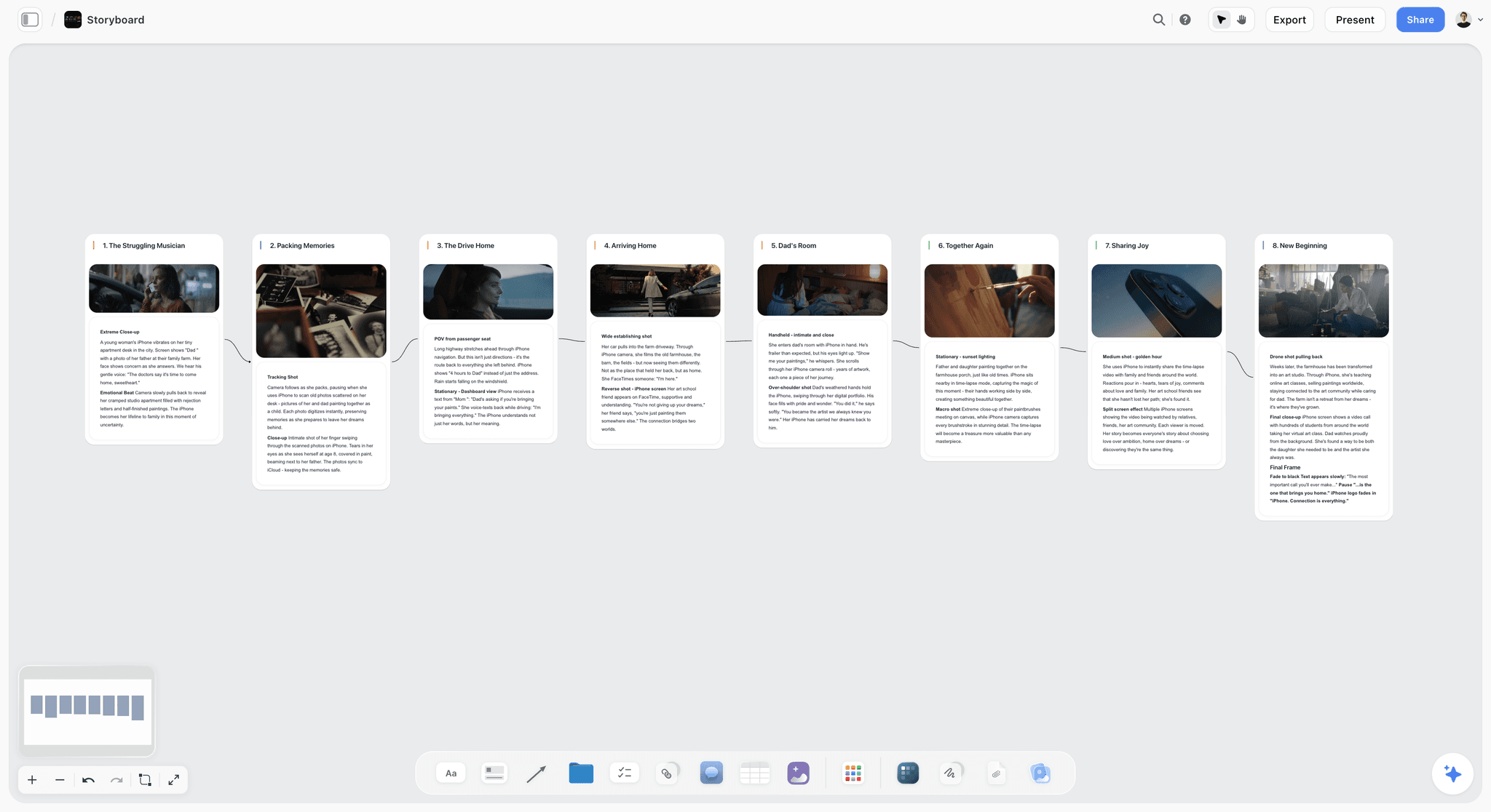
The verdict. Not a boarding tool. The tool that stops you boarding the wrong thing.
Best for. Freelance and staff artists whose jobs keep expanding through unpaid revision rounds.
Pricing. Paid only early access today. Plus is $7.99 per month billed annually or $9.99 monthly, with 200 plus Blueprint Tactics and unlimited file uploads. Pro is $14 per month billed annually or $19 monthly, adding AI image generation, roughly twenty times more AI usage and memory across conversations. Max is $39 per month billed annually or $49 monthly, adding Team Workspace with permissions and roles. Pricing is flat per account rather than per seat, and anyone a paid member invites joins free. The Free plan launches before the end of 2026.
Why it ranks here, and what that claim is not. Let me be exact, because a canvas tool topping a storyboarding list invites a fair objection. Storyflow cannot draw. It has no brushes, no timeline, no camera moves, no panel numbering and no animatic export. On the actual craft of boarding it is not in the conversation, and Storyboard Pro and Procreate are ranked next for that reason.
What it does is hold the pre-board, and the pre-board is where the revision trap is set or avoided.
A pre-board is one surface per sequence carrying four things: the script beats, the reference images for tone and staging, the director's stated intent per beat in their own words, and the constraints, meaning what exists, what can be built, what is being shot practically. Because Storyflow's AI reads your full active canvas board by default, plus up to one Tactic and up to three Documents you @-mention, you can ask that board whether any beat has no stated intent, which is the question that finds the panels you are about to guess at.
The specific practice that pays: put the reference and the one line intent next to each beat, send that board to the director before drawing anything, and get a reaction. A director looking at references and a sentence will correct you in five minutes. The same director looking at twelve finished panels will correct you in a way that costs a day.
Killed directions also stay on the canvas with a dated note. When round four asks for something you tried in week one, you can show it.
Strengths.
- Pre-board surface that surfaces unstated intent before drawing.
- Whole board AI can flag beats with no reference or no intent recorded.
- Rejected staging stays visible with dated reasoning.
- Invited collaborators join free, so a director costs nothing to include.
- Handles references, script and notes on the same surface.
Limitations.
- No drawing capability whatsoever. This is the important one.
- No timeline, no timing, no animatic, no camera moves, no panel numbering.
- No export in any boarding format, so nothing here goes to production directly.
- No integration with Storyboard Pro, Boords or any drawing app.
- Not a shot list or breakdown tool.
- Newer platform, so no storyboarding templates yet.
The trade off. Storyflow occupies the twenty minutes before you start drawing. Everything after that happens somewhere else on this list.
2. Toon Boom Storyboard Pro
The verdict. The professional standard for animation boarding, and this ranking does not dispute that.
Best for. Animation storyboarding with timing, camera moves and animatic output.
Pricing. Roughly $65 to $80 per month, or around $1,000 to $1,200 for a perpetual licence, as of August 2026.
Why it ranks here. For animation, Storyboard Pro is what studios use and what job listings ask for. Drawing, panel management, camera moves, timing, sound sync and animatic export in one application, with output that flows into Harmony and the rest of a production pipeline.
The reason it matters for the revision trap is timing. An animation board is not a sequence of pictures, it is a sequence of durations, and a board that reads correctly as stills can fail completely as an animatic. Being able to time it inside the same tool means you catch pacing problems yourself, before a director does.
Its cost is genuinely high for a freelancer between jobs, and the perpetual licence is worth considering for anyone boarding consistently.
Strengths.
- Industry standard, so it is what studios expect and hire for.
- Timing and animatic in the same tool as the drawing.
- Camera moves and multiplane handled properly.
- Clean pipeline into animation production.
Limitations.
- Expensive, particularly as a subscription for irregular freelance work.
- Steep learning curve.
- Overkill for advertising and simple live action boards.
- Heavy application with real hardware requirements.
The trade off. If you board animation professionally, this is not a choice, it is the job. If you board commercials, it is too much tool.
3. Procreate
The verdict. The fastest path from thumbnail to finished panel, and the best value on this page.
Best for. Drawing panels, and specifically for the rough pass that prevents expensive misunderstandings.
Pricing. One time purchase of roughly $13, with Procreate Dreams for animation around $20, as of August 2026.
Why it ranks here. Procreate's contribution to the revision trap is speed at the rough stage. A thumbnail pass of an entire sequence, drawn loose, takes under an hour on an iPad, and showing that pass is the single highest return habit in this discipline.
The reason artists skip it is that rough work feels unprofessional to send. It is the opposite: a thumbnail pass reads as process, invites correction while correction is cheap, and gets the director engaged before their opinion has hardened.
The drawing experience itself is excellent and the price is close to irrelevant. It is not a boarding application, so panel management, numbering and animatics happen elsewhere.
Strengths.
- One time purchase at a trivial price.
- Fastest thumbnailing workflow available.
- Excellent brush engine and natural drawing feel.
- Portable, which suits on set and in meeting sketching.
Limitations.
- Not a boarding tool. No panel management or numbering.
- iPad only.
- No timing or animatic without Procreate Dreams.
- Layer limits on large canvases with older hardware.
The trade off. Thirteen dollars once. Buy it even if you board in something else.
4. Boords
The verdict. The right weight for advertising and live action, where Storyboard Pro is too much.
Best for. Fast shareable boards with client review built in.
Pricing. Plans start around $12 to $24 per month as of August 2026, with a free trial.
Why it ranks here. Advertising and live action boards have different requirements from animation: fewer panels, more client review, shorter timelines, and frequently a non visual stakeholder who needs to understand what they are approving.
Boords is built for exactly that. Panel management with shot details, an animatic generator for timing, and a shareable link where clients comment per frame rather than in an email.
That per frame commenting is the revision trap mechanism in this segment. Feedback attached to a specific panel is actionable; feedback in prose about "the middle section" is a guessing game you will pay for.
Strengths.
- Right level of complexity for advertising work.
- Per frame client commenting removes ambiguity.
- Quick animatic generation for timing checks.
- Shareable with clients who need no account.
Limitations.
- Underpowered for animation production.
- Drawing tools are basic, so you draw elsewhere and import.
- Subscription for work that may be occasional.
- Limited pipeline integration.
The trade off. For commercials it is the correct tool. For animation it will run out of capability.
5. Photoshop
The verdict. Still where photo based boards get made, and still a comfortable default for many artists.
Best for. Boards using photographic elements, location plates or heavy comping.
Pricing. Photography plans start around $12 to $15 per month, single app around $23 per month, as of August 2026.
Why it ranks here. Live action boards frequently benefit from real elements: a location photo with a character drawn in, a product plate, a plate from a previous shoot. That is comping work and Photoshop remains the tool for it.
Its Generative Fill is genuinely useful for extending a plate or removing an element from a reference, which is a real time saver at the pre-board stage.
It ranks fifth because as a pure boarding surface it is clumsy, with no panel management, no timing, and a workflow assembled from folders and artboards.
Strengths.
- Unmatched for photo based and comped panels.
- Generative Fill speeds up reference preparation.
- Everyone already knows it.
- Integrates with the rest of the Adobe pipeline.
Limitations.
- No boarding features at all.
- Subscription only.
- Heavy for a task Procreate does faster.
The trade off. Keep it for comping. Do not board in it if you have an alternative.
6. Clip Studio Paint
The verdict. The best line quality per dollar, and a genuine Photoshop alternative for drawing.
Best for. Artists who want superb inking without a subscription.
Pricing. One time purchase around $50 to $220 depending on edition, with subscription options, as of August 2026.
Why it ranks here. Clip Studio's vector layers and pen stabilization produce line work that is hard to match, and for artists whose boards are line driven rather than tonal that is the whole job.
It also has real animation capability, so a rough animatic is possible without another tool, and its comics heritage means panel and page management is better than Photoshop's.
It ranks sixth because it is a drawing application rather than a boarding one, and because Procreate is faster for the rough pass that matters most here.
Strengths.
- Excellent line quality with vector layers and stabilization.
- One time purchase available.
- Panel management inherited from comics workflows.
- Basic animation for rough animatics.
Limitations.
- Not a boarding pipeline tool.
- Edition structure is confusing.
- Interface is dense for newcomers.
The trade off. If line is your strength and you dislike subscriptions, this over Photoshop.
7. Frame.io
The verdict. Where animatic feedback stops being ambiguous.
Best for. Timecoded review of animatics and boardomatics.
Pricing. Free tier available. Paid plans start around $15 per user per month as of August 2026, and it is bundled with several Adobe Creative Cloud plans.
Why it ranks here. Timing notes are the hardest feedback to interpret from prose. "It feels slow in the middle" could mean four things, and guessing wrong means redoing the animatic.
Timecoded comments make it exact, and version stacking makes revision rounds countable, which is the mechanism that lets a freelancer say round four is billable without it becoming a confrontation.
Strengths.
- Timecoded, drawn comments on animatics.
- Version stacking makes rounds visible to both sides.
- Clients review in a browser with no account.
- Often already included with Creative Cloud.
Limitations.
- Video only, so still panels need a different review surface.
- Storage limits on lower tiers.
- Another subscription unless bundled.
The trade off. If you deliver animatics, this is the cheapest way to make timing feedback precise.
8. Milanote
The verdict. The reference gathering surface, if you want one dedicated to it.
Best for. Collecting and arranging visual reference for a sequence.
Pricing. Free tier limited to 100 notes, images or links. Paid roughly $12.50 per month billed annually or $14.99 monthly as of August 2026.
Why it ranks here. Reference is half of pre-boarding, and Milanote is a pleasant place to gather and arrange it, with a shareable link a director will happily open.
It ranks eighth rather than higher because it holds reference but not intent. A board of images tells a director what you like; it does not record what they said they wanted, and the gap between those two is where the revision trap lives.
Strengths.
- Pleasant, fast reference gathering.
- Client shareable with no account.
- Good visual defaults.
Limitations.
- No structure for recording stated intent.
- Free tier cap reached quickly.
- Weak across many sequences or projects.
The trade off. Good at half the pre-board. Pair it with somewhere the director's words get written down.
9. Shot Lister
The verdict. For live action, the bridge between the board and the shooting day.
Best for. Turning approved boards into a shootable, reorderable list.
Pricing. Roughly $25 to $30 one time on iOS, with companion pricing, as of August 2026.
Why it ranks here. A storyboard is not a shooting order, and on a live action job the board's real destination is a shot list that gets reordered for location and lighting efficiency.
For a storyboard artist this matters because being able to hand over something the first AD can use makes you materially more useful than someone who delivers images, and that shows up in repeat bookings.
It ranks ninth because it is downstream of the artist's core deliverable and only applies to live action.
Strengths.
- Converts boards into a practical shooting order.
- Timing estimates support scheduling conversations.
- One time purchase.
Limitations.
- Live action only, irrelevant for animation.
- iOS focused.
- Outside the artist's normal scope, so often not your job.
The trade off. Offer it as a value add, not as part of the base quote.
10. Notion
The verdict. The business layer, which is where the revision trap is actually resolved.
Best for. Scope, rates, and a revision log you can point at.
Pricing. Free personal tier. Paid from roughly $10 per user per month as of August 2026.
Why it ranks here. Every tool above reduces the chance of a misunderstanding. None of them make round four billable. That requires two things written down before you start: how many revision rounds are included, and what counts as a revision versus a new panel.
A simple jobs database with panel count, rounds included, rounds used and a dated log of each round is the whole mechanism. When you say the next round is billable, you are pointing at a record rather than making a claim.
It ranks tenth because it does nothing creative, but for freelance income it is arguably the most important entry here after the pre-board.
Strengths.
- Makes revision rounds countable and defensible.
- Free tier is sufficient.
- Doubles as a rate and client history record.
Limitations.
- No creative capability.
- Requires discipline to maintain.
- Only works if the scope was stated up front.
The trade off. Write the round limit into the quote. The log only helps if the limit existed.
11. Canva
The verdict. The version a non visual stakeholder can follow.
Best for. Presenting boards to clients who do not read boards.
Pricing. Free tier available. Pro roughly $15 per month for one person as of August 2026.
Why it ranks here. In advertising there is frequently a stakeholder who cannot read a storyboard, in the literal sense that a sequence of panels does not resolve into a film in their head. They approve nervously, then react to the finished work as though they had not seen it.
Laying the panels into a simple annotated document, with a line of description per beat, converts the board into something that person can genuinely approve. That prevents a category of very late and very expensive change.
Strengths.
- Makes boards legible to non visual approvers.
- Fast, and free tier is sufficient.
- Easy to update between rounds.
Limitations.
- Not a boarding tool.
- Another export that goes stale.
- Adds a step to every round.
The trade off. Use it only when the approver has shown they cannot read raw panels.
What to Actually Pay For
Pay thirteen dollars for Procreate and do the thumbnail pass. It is the cheapest item here and it prevents the most expensive failure. Nothing else on this page has that ratio.
Pay for the discipline tool that matches your field. Storyboard Pro if you board animation, Boords if you board commercials. Buying the wrong one is the most common overspend in this discipline, and Storyboard Pro's price makes it an expensive mistake.
Do not pay for three drawing apps. Procreate, Photoshop and Clip Studio all draw. Pick the one that matches your line, and add Photoshop only if you genuinely comp photographic elements.
Tools to Avoid for This Job
Finished panels as the first thing a director sees. The single most expensive habit in the discipline. Rough first, always.
Email threads as the feedback channel. Notes detached from panels are ambiguous by construction, and ambiguity is redrawing.
A quote with no revision round limit. Without it, revisions are unbounded by definition, and every tool above only reduces how often you hit that.
Boarding directly in a presentation tool. Slides encourage one image per beat and discourage the thumbnail exploration where the staging actually gets solved.
What No Tool on This List Does
None of them will make a director know what they want. Discovering the film by reacting to your work is a legitimate part of directing, and the goal is to make that discovery happen at thumbnail cost rather than finished cost.
None of them will make you a better draughtsman, and the boards that get rebooked are the ones with clear staging and readable acting.
None of them, including Storyflow, will pin intent that was never spoken. The pre-board works because you asked the director what they wanted per beat and wrote down their answer. If that conversation does not happen, the canvas holds your assumptions back to you in a tidier arrangement.
The Bottom Line
Storyboarding is a craft business with a scope business inside it, and the scope business is where the money is won or lost.
Buy the tool that matches your discipline, Storyboard Pro for animation and Boords for advertising, and do not buy the other one. Spend thirteen dollars on Procreate whatever else you use. Put a revision round limit in every quote and log the rounds, because no tool makes round four billable if the limit was never stated.
But the revision spiral itself starts before any of those open, in the gap between what the director meant and what you inferred. Closing that gap with references and a written intent per beat, in twenty minutes, before the pencil moves, is the narrow ground on which Storyflow ranks first here, and it makes no claim on the drawing at all.
FAQ: Tools for Storyboard Artists
What is the best software for storyboard artists?
For animation, Toon Boom Storyboard Pro is the professional standard and is what studios expect, combining drawing, timing, camera moves and animatic export. For advertising and live action, Boords is better suited, being lighter, cheaper and built around client review. Procreate at roughly thirteen dollars is the best drawing surface for the rough pass, and Storyflow ranks first here for pinning the director's intent before drawing begins, which is where unpaid revisions originate.
Why do storyboard revisions get out of hand?
Because the director's intent was never pinned before drawing, so the artist inferred something adjacent and rendered it at finished quality. Directors legitimately discover what they want by reacting to work, and the cost of that discovery depends entirely on how finished the artwork was when it happened. Showing a rough thumbnail pass moves the same discovery from costing a day to costing ten minutes.
Is Storyboard Pro worth the price for a freelancer?
If you board animation regularly, yes, because it is what studios use and hire for, and the perpetual licence is worth considering over the subscription for irregular work. If you board commercials or live action, it is too much tool at too high a price, and Boords plus a drawing app will serve you better for a fraction of the cost.
What is the best free or cheap storyboarding setup?
Procreate at roughly thirteen dollars for drawing, plus a free tier canvas for reference and intent, plus Frame.io's free tier if you deliver animatics, covers a working setup for well under twenty dollars. Storyboarder from Wonder Unit is also free and open source and worth trying for simple boards. The paid step worth taking first is whichever discipline tool matches your field.
How do storyboard artists avoid unpaid work?
Two things, and both happen before drawing. State a revision round limit in the quote, along with what counts as a revision versus a new panel, since without a stated limit revisions are unbounded by definition. Then show a rough thumbnail pass before finished panels, so the director's inevitable discovery happens while changes are cheap.
Does Storyflow replace Storyboard Pro or Procreate?
No, and it is not close. Storyflow has no drawing tools, no timeline, no animatic, no camera moves and no panel numbering, and it exports nothing a production can use. It occupies the stage before drawing, holding the script beats, references and the director's stated intent per beat, which is why this post ranks Storyboard Pro and Procreate above it on everything to do with the actual craft.
What is a pre-board and why does it matter?
A pre-board is one surface per sequence carrying the beats, the reference for each, the director's stated intent in their own words, and the practical constraints. It matters because it converts assumptions into something the director can correct in five minutes, and because the beats with no recorded intent are precisely the panels you are about to guess at. It typically takes twenty minutes and saves days.
Boords or Storyboard Pro?
Boords for advertising, commercials and most live action, where boards are short, clients review them, and speed matters more than pipeline integration. Storyboard Pro for animation, where timing, camera moves and animatic output are part of the deliverable and the file needs to flow into production. They are built for different jobs and the price difference reflects that.
How should clients give feedback on storyboards?
Attached to specific panels, never in prose about sections. A comment pinned to panel 14 is actionable; a note about "the middle feeling slow" could mean four different things and guessing wrong means redrawing. Boords provides per frame commenting for stills, and Frame.io provides timecoded comments for animatics.
Do storyboard artists need to draw digitally?
No, and many excellent artists thumbnail on paper first, but the deliverable is almost always digital and the review loop is digital. The practical setup for most working artists is rough on paper or iPad, then finish and manage panels in whichever discipline tool their field uses.
How many revision rounds should be included in a storyboard quote?
Two is a common and defensible standard, with additional rounds billed at a stated rate, though it varies by market and relationship. The number matters far less than stating one, since an unstated limit is an unlimited one. Defining what counts as a revision versus a new panel is equally important, because most disputes are about that boundary rather than the count.
What is the difference between animation and advertising storyboarding?
Animation boards are timing documents that become animatics and feed a production pipeline, so they need durations, camera moves and proper export. Advertising boards are persuasion documents shown to clients to approve an idea, so they need speed, clarity and easy review, and they frequently have fewer panels at higher finish. Buying tooling for the wrong one is the most common expensive mistake here.
How do you handle a director who changes their mind constantly?
Move the discovery earlier rather than trying to prevent it, since reacting to work is how many directors think and that will not change. A thumbnail pass, a written intent per beat, and a stated revision limit together convert an open ended process into a bounded one. Keeping the rejected staging visible with dates also stops round four from reopening something already settled.
Can AI generate storyboards?
It can generate images that resemble storyboard panels, and that is genuinely useful at the reference and pre-board stage for showing a director a rough staging option quickly. It is not useful as a deliverable, because boarding is a sequence of deliberate staging and continuity decisions, and generated frames do not maintain character, geography or screen direction across a sequence. Treat it as reference generation, and label it clearly so nobody tries to match it.
What is the single change worth making on the next job?
Send a thumbnail pass before any finished panel, even if it feels unprofessional. It is twenty minutes of work, it reads as process rather than as roughness, and it relocates the director's discovery to the point where it costs almost nothing.
Table of Contents
- Key Takeaways
- The Revision Trap
- At a Glance: The 11 Tools Compared
- How I Ranked These
- Quick Picks by Job Type
- 1. Storyflow
- 2. Toon Boom Storyboard Pro
- 3. Procreate
- 4. Boords
- 5. Photoshop
- 6. Clip Studio Paint
- 7. Frame.io
- 8. Milanote
- 9. Shot Lister
- 10. Notion
- 11. Canva
- What to Actually Pay For
- Tools to Avoid for This Job
- What No Tool on This List Does
- The Bottom Line
- FAQ: Tools for Storyboard Artists
- Related Reading
Templates to check out for this topic


Filmmaking templates you can use in Storyflow
Skip the blank canvas. Open one of these filmmaking boards in Storyflow and the AI builds on the structure that is already there, from research through the shot list.


See Storyflow in Action
A visual AI workspace where every feature lives inside one canvas. No tab-switching, no context lost.
Build your entire board from a single message
Type what you need in the AI chat at the bottom of your canvas. The AI adds cards, headings, and structure directly onto your board.
Use expert frameworks as AI context
Type @ in the AI chat and choose any Tactic. The AI tailors every response to that framework instead of giving generic advice.
Turn your board into a mind map in seconds
Ask the AI to restructure your canvas as a mindmap. It connects your ideas into a visual hierarchy so you can see how everything relates.
Why Storyflow Exists
Storyflow actually began as a personal tool while working on creative and research projects.
We kept running into the same problem: ideas were scattered everywhere: notes, documents, and whiteboards.
Nothing helped us see how everything connected.
So we started building a workspace designed around how ideas actually grow.
→ Read how Storyflow was createdSara de Klein
Head of Product at Storyflow
Published: 2026-08-10
Extremely simple, seriously capable


See how easy it is to get started
Watch a real project come together, from a blank board to a finished plan, clicked through step by step.
Start creating with AI and become more productive
Transform your creative workflow with AI-powered tools. Generate ideas, create content, and boost your productivity in minutes instead of hours.