Best ChatGPT Plugins for Project Management (2026): 11 Ranked
Eleven ChatGPT plugins for project management, all in the plugin directory: Storyflow for planning the project on one board, then Asana, ClickUp, Trello, Notion and more ranked by the tracking job each does best.

Category
Project Management
Author

Storyflow Team
Product & Research Team
Topics
2026-10-28
•
35 min read
•
Project Management- ChatGPT plugins
- project management
- Storyflow
- Asana
- ClickUp
- Trello
What are the best ChatGPT plugins for project management?
The best ChatGPT plugin for project management in 2026 is Storyflow when the job is planning the project: ChatGPT lays out the phases, tasks, milestone table and brief on one board your team opens. Storyflow is an AI visual workspace that holds a whole project plan on one infinite canvas. Once the plan is agreed, Asana is the strongest plugin for tracking owned tasks across teams, ClickUp for running tasks, docs and time in one tool, and Trello for a simple shared kanban.

Full disclosure: Storyflow is our product. It ranks first because this guide is about planning a project on one board, the job it was built for; the other ten are ranked by the tracking job each does best. Its main limits: no Gantt chart, dependencies, time tracking or calendar view, and no free plan during early access.
How the project management plugins for ChatGPT compare on trust, innovation, ratings and pricing
Which project management plugins for ChatGPT are the most trusted?
The ones that document their ChatGPT app and its boundaries on their own site: Asana's app page, Atlassian's Trello MCP post, Smartsheet's help article and monday.com's ChatGPT guide, which says its connector is read-only. Trello and ClickUp publish hard limits, archive-only for Trello and no deletion tools for ClickUp. Storyflow's plugin is newer, live in ChatGPT's directory since October 2026, and states its scope at install: you pick the projects and whether ChatGPT may make changes.
Which project management plugins for ChatGPT have fair and transparent pricing?
Trello, Linear, Todoist and Wrike publish their prices and free tiers plainly on their pricing pages; Trello is free for up to 10 collaborators per Workspace and Linear for 250 issues. Storyflow publishes three plans, Plus $7.99, Pro $14 and Max $39 a month billed annually, and its plugin uses no Storyflow AI credits. ClickUp's page showed two price tables in October 2026, so check the tier you would buy.
Which project management plugins for ChatGPT are the most innovative?
Storyflow, because ChatGPT plans on a visual board rather than in a list: walls for phases, to-do cards, a milestone table and documents side by side, then a weekly read of what changed and who changed it. Smartsheet's deep research reports with inline citations and ClickUp's time logging from the chat also stand out, aimed at portfolio reporting and timesheets rather than planning.
Which project management plugin for ChatGPT would you recommend for an agency?
Storyflow plus one tracker. Plan the client project on a Storyflow board the client opens by view-only link, with no account, then have ChatGPT create the agreed tasks in Asana for a team of ten or more, or Trello for a smaller one. Choose Wrike or Smartsheet instead if the agency already runs approvals and resourcing there.
Which project management plugins for ChatGPT are underrated?
Airtable is underrated for production and marketing operations: scoped to the bases you pick, it lets ChatGPT analyse a deliverables tracker and change statuses in the chat. Linear's read-only endpoint is underrated by cautious teams. Storyflow's change report is easy to miss: ChatGPT reads who added, edited or moved what on the board this week, which is most of a status update.
Quick Comparison
Four of the eleven plugins, our pick first for planning the project on one board and the rest by tracking job, prices as of October 2026.
| Tool | Best For | AI Features | Price |
|---|---|---|---|
| Storyflow | Planning campaigns, launches and shoots on one board | ChatGPT builds phases, to-dos, tables, documents and flowcharts on a board and reports what changed and who changed it | $7.99 mo annual (paid-only in early access; Free plan due before the end of 2026) |
| Asana | Cross-team task ownership | Builds projects from a chat, creates and assigns tasks, pulls status across portfolios | Personal free for 2 users; Starter $10.99 per user mo annual |
| ClickUp | Tasks, docs, chat and time in one tool | Manages tasks and due dates, posts comments and chat, logs time; no deletion tools | Free plan; paid tiers per user on its site |
| Trello | A simple shared kanban | Creates boards, lists, cards and checklists; archive only, no permanent deletes | Free up to 10 collaborators; Standard $5 per user mo annual |
Key Takeaways
- Storyflow ranks first here because it is the plugin built for planning the project on one board, where the brief, the references, the kanban and the milestone table sit side by side. The other ten are ranked by the tracking job each does best.
- A plugin lets ChatGPT read and change the tool it connects to, within the access you grant at sign-in and the permission setting you choose.
- Plan and track are different jobs. Plan in a visual workspace, then push the agreed tasks into one tracker. Two trackers as sources of truth is how tasks go missing.
- Every plugin here was in ChatGPT's plugin directory on October 28, 2026. Several popular names are not listed as standalone plugins that day; Jira, for example, sits inside the Atlassian plugin.
- Prices below are each vendor's own pricing page as of October 2026. Storyflow is paid-only during early access, starting at $7.99 a month billed annually.
Why Project Management Inside a Plain ChatGPT Chat Falls Apart
You have probably planned a project in ChatGPT already. You pasted the client brief, asked for phases and tasks, and got a tidy plan in under a minute. Then the plan had to be seen by four other people, survive three rounds of changes and tell you on Friday what slipped. That is where a chat stops working.
The plan scrolls away from a team that cannot see it
A conversation is a feed. Every revision ("move the shoot a week later") lands further down, and your producer, client and designer cannot open your ChatGPT history anyway. So the plan gets pasted into an email or a doc, and from then on ChatGPT plans against a copy nobody else is using.
ChatGPT cannot update what it cannot reach
Without a plugin, ChatGPT can draft a status update but cannot read the tracker it should be reporting on, and cannot move a card when the date changes. You become the copy-paste layer between the chat and the tool.
A tracker is not a plan
Task tools are excellent at "who does what by when". They are weaker at the part before that: the brief, the references, the risks and the open questions that decide what the tasks should be. It is not that one tool is wrong. It is that planning and tracking are two jobs, and most teams try to do both in whichever tool they opened first.
What a ChatGPT Plugin Can Change in Your Project Tools
A plugin is how ChatGPT reaches an outside tool. OpenAI's Plugins in ChatGPT article describes a plugin as a package that can include skills, connected apps, app templates and extensions; installing one may start the app's sign-in flow, and installation "cannot bypass provider or workspace permissions."
What the plugin can see is set when you connect
Each vendor decides what its plugin can read and do, and you choose the account and, for some tools, the scope. Storyflow asks which projects ChatGPT may use; Airtable asks which bases or workspaces; Trello's plugin sees what your Trello account sees. OpenAI's Managing app permissions in ChatGPT is explicit that permission settings "do not connect accounts, grant provider permissions, change source-system access, or override workspace policies."
When ChatGPT asks first is your setting
The permission options OpenAI lists are Always ask, Allow read actions, Allow low-risk actions and, for an eligible individual app or account, Allow all actions. Before a supported action runs, ChatGPT may show an approval card with Deny, Allow, Allow low-risk actions or, for an eligible personal account, Always allow. For a project tool, set Allow read actions as the default under Settings, Plugins, Permissions (some accounts see Apps instead of Plugins): ChatGPT reads freely and asks before it moves a card.
Your workspace admin can switch plugins off
In a ChatGPT Business, Enterprise or Edu workspace, administrators manage plugins in Admin console under Plugins. OpenAI's admin controls article says apps are enabled by default in Business, while new plugins and apps are generally disabled by default in Enterprise and Edu. If a plugin shows Disabled by admin, that is the place to ask.
Plugin use can count against limits on both sides
OpenAI's Connected apps in ChatGPT says app use "may count toward your ChatGPT plan limits, feature-specific allowances, and limits imposed by the app provider." ClickUp's MCP documentation, for example, caps its free plan at 100 calls per rolling 24 hours; Storyflow gives an invited free account 25 plugin actions a week, and every call counts, reads included.
How We Chose and Ranked the 11 Plugins
We started from ChatGPT's plugin directory as captured on October 28, 2026 and kept only tools whose main job is planning or tracking project work. For each one we read the directory one-liner and the vendor's own page about its ChatGPT app or its assistant integration, then its pricing page. Nothing here is a benchmark: the descriptions are what each vendor documents, and the worked example further down is illustrative.
The five criteria
- Write access. Can ChatGPT create and change things, or only read? A read-only plugin is a search box, not a project tool.
- The object it builds. A board, a task, a record, an issue or a page. The object decides who can work from the result.
- Who else can open it. A plan nobody else can see is a draft. We weighted tools whose output your team and client can open by link or by seat.
- Scope control. Can you limit the plugin to some projects, bases or workspaces, and does the vendor document what it cannot do (deletes, admin settings)?
- Price for a small team. Free tier limits and the per-seat or per-account price, read from each vendor's page this month.
How the order works
Storyflow is our product and it is listed first, because this guide is about planning the project on one board and that is the job it was built for. The other ten are ranked by the job each does best, from cross-team task tracking to a personal task list. A lower position means a narrower job, not a worse tool: Linear at seven is the right answer for a software team. monday.com sits at ten because its plugin only reads; that ranks the plugin, not monday.com itself.
At a Glance: 11 ChatGPT Plugins for Project Management Compared
| Plugin | Directory one-liner | What ChatGPT can do through it | Best for |
|---|---|---|---|
Storyflow | Plan projects on visual boards | Build phases, to-dos, tables, documents, kanban walls, flowcharts and charts on a board; report what changed and who changed it | Planning campaigns, launches and shoots on one board |
Asana | Turn chats into actions | Build projects from a brainstorm, create and assign tasks, pull status across projects and portfolios | Cross-team task ownership |
ClickUp | Run your projects from ChatGPT | Manage tasks, assignees, priorities and due dates; post comments and chat; log time | One tool for tasks, docs, chat and time |
Trello | Get things done in Trello | Create boards, lists, cards and checklists; read due dates | A simple shared kanban |
Notion | Create docs, tasks, databases | Search and read pages; create and update pages and databases | Project docs and wikis |
Airtable | Add structured data to ChatGPT | Query bases, analyse patterns, update records | Structured trackers and asset lists |
Linear | Plan and build products | Find, create and update issues, projects and comments | Software product teams |
Smartsheet | Analyze and Manage Smartsheet | Update tasks, flag risks, check status, create sheets | Spreadsheet-style portfolios |
Wrike | Manage and move work forward | Create tasks and projects, ask for status, turn meeting notes into assigned work | Governed enterprise work |
monday.com | Manage projects, tasks & CRM | Read-only: view board data, find items, summarise changes | Answers from boards already on monday.com |
Todoist | Tasks, projects, and reminders | Get insights into projects and plan your day | A personal task list |
Prices for every plugin, with free tiers and the next plan up, are in the cost table further down.
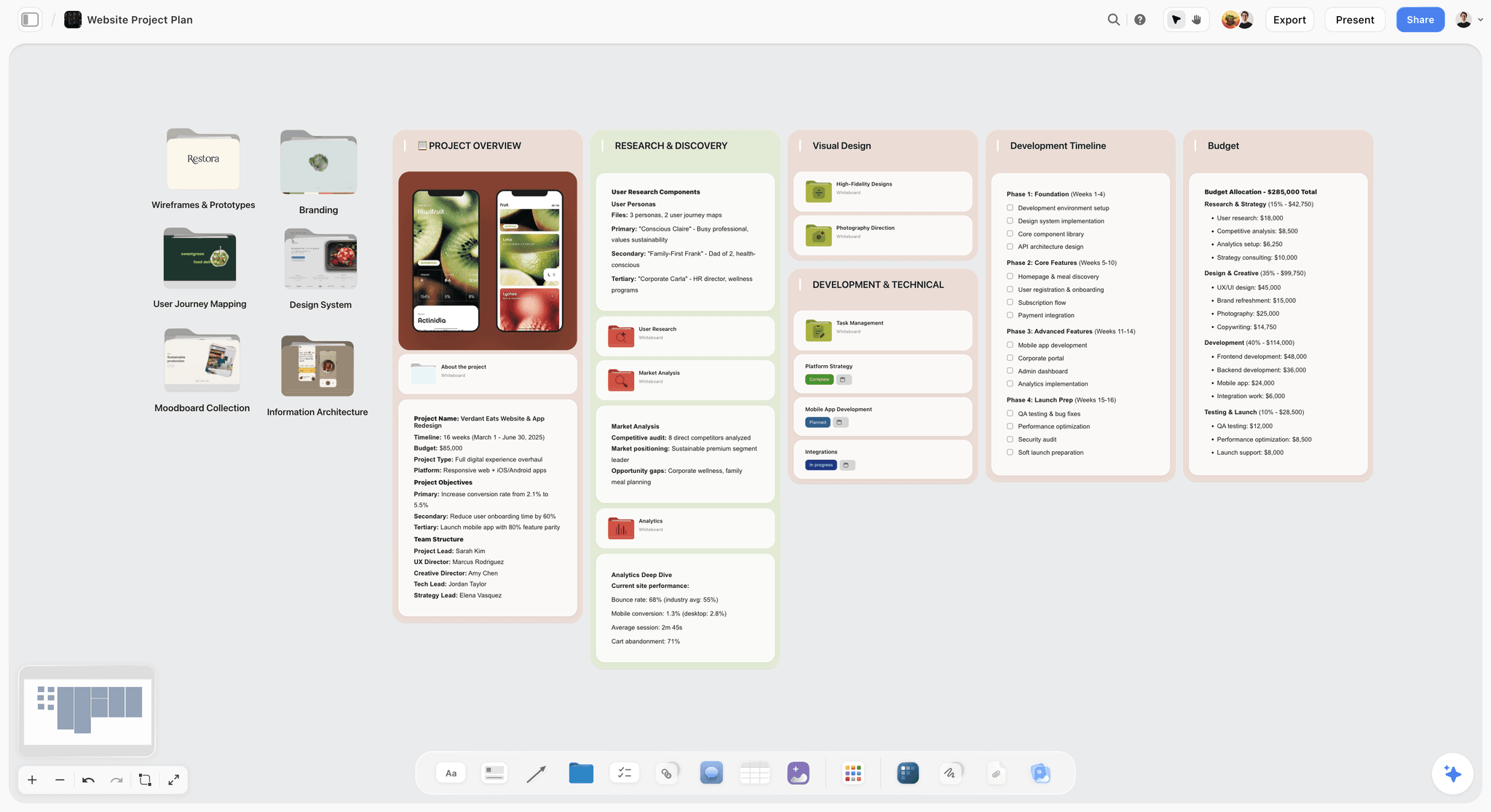
Storyflow website project plan board with walls for overview, research, design, development timeline and budget
Plan the project where ChatGPT can build it
Install Storyflow in ChatGPT, paste the brief, and get phases, a kanban of to-dos and a milestone table on one board your team opens by link.

The 11 Best ChatGPT Plugins for Project Management, Reviewed
1. Storyflow

A studio's project tracker on one Storyflow board: a column per stage, each card carrying the client, the deliverable and its checklist.
Verdict: the plugin for the part before tracking, where ChatGPT turns a brief into a plan your team can see, argue with and change.
Best for: agencies, marketing and brand teams, producers and founders planning campaigns, launches, shoots and client projects.
Pricing: Plus $7.99 a month billed annually ($9.99 monthly), Pro $14 ($19 monthly), Max $39 ($49 monthly), which adds a Team Workspace with roles and permissions. Paid-only during early access; a Free plan launches before the end of 2026, and anyone a paid member invites to a board joins free now. See pricing.
Storyflow's plugin went live in ChatGPT's directory on October 24, 2026 (listing). Through it, ChatGPT can list your projects, boards and documents, read a board and its layout, and build on it: notes, to-dos, headings, links, tables, documents, walls (grouped sections), mind maps, flowcharts with labelled connections, charts and dashboards, slide decks and ready-made board templates. Tables can carry status, date, checkbox and person columns. A person column such as Owner links only people already on the board: if ChatGPT writes one name that matches nobody, the whole column becomes plain text with the names as written, so an invented owner never becomes a real assignment. The feature that matters most here is the read-back: ask what changed this week and who changed it, and ChatGPT reads the board's changes for the last day or week.
- A kanban layout of walls and to-do cards, a milestone table and the brief on the same board
- You choose which projects ChatGPT may use, and whether it may make changes or only read
- Plugin actions run on ChatGPT's model and your ChatGPT plan, so they use no Storyflow AI credits
- View-only links open with no account; collaborators sign in to comment
Limitations: no Gantt chart, dependencies, critical path, workload view or time tracking; no calendar view, so dates live in table date cells and to-dos, with rows kept in date order; ChatGPT cannot assign a to-do card to a person (a teammate does that in Storyflow); a photo attached in the ChatGPT chat does not reach the board, so the plugin hands you an upload link; the connection ends after 30 days and ChatGPT asks you to sign in again; browser only.
2. Asana
Verdict: the strongest plugin here for turning a conversation into owned, dated work across several teams.
Best for: marketing and operations teams of ten or more that already run their work in Asana.
Pricing: Personal is free for up to 2 users; Starter is $10.99 per user a month billed annually ($13.49 monthly); Advanced $24.99 ($30.49 monthly); Enterprise on request, per Asana's pricing page as of October 2026.
Asana's ChatGPT app page lists four jobs: build structured plans from brainstorms in the chat, turn chats into projects, tasks and follow-ups, pull work status across projects and portfolios, and "delegate, assign, and update work in Asana without breaking the flow of chat." Setup, per Asana: connect Asana from ChatGPT's directory, sign in, choose the Asana workspace and approve access. Its portfolio status pull suits a team running several projects at once.
Limitations: an administrator may need to grant permission before you can connect (Asana says so on its page); per-seat pricing grows with the team; Asana is built around tasks and projects, so the brief, the references and the moodboard live in another tool.
3. ClickUp
Verdict: the widest plugin on the list: tasks, comments, chat and time tracking in one connection.
Best for: teams that want one tool for tasks, docs, chat and timesheets.
Pricing: a free plan plus paid tiers priced per user; ClickUp's pricing page showed two price tables on October 28, 2026, so see ClickUp pricing for the tier you would buy.
ClickUp's documentation for connecting an AI assistant to its MCP server lists task workflows (assignees, priorities and due dates across lists and spaces), executive reports (release notes, status updates, portfolio summaries), time tracking ("log time entries and manage timers"), search across tasks, docs and comments, and summarising threads, extracting action items and posting updates. It says the server is available on all plans, supports OAuth only and has no deletion tools.
Limitations: on ClickUp's free plan, 100 calls per rolling 24 hours, counted per Workspace and per client; the documentation covers MCP clients in general and does not name ChatGPT, so check the directory listing for anything ChatGPT-specific; no canvas for visual references.
4. Trello
Verdict: the simplest way to give a small team a shared kanban that ChatGPT can fill and tidy.
Best for: teams under ten running one or two projects as cards in columns.
Pricing: Free for up to 10 collaborators per Workspace; Standard $5 per user a month billed annually ($6 monthly); Premium $10 ($12.50 monthly); Enterprise $17.50 billed annually, per Trello's pricing page.
Atlassian's Trello MCP announcement (July 22, 2026) says assistants can "manage your boards, lists, cards, and checklists just by asking", and that you add it as a plugin in ChatGPT. Trello's own MCP page sets the boundaries: the assistant has the same access you do, can archive cards and lists but cannot permanently delete them, and use "will draw on your AI client's message limits or tokens."
Limitations: the assistant sees all of your Trello content, so scope is your whole account; a card board has no room for the brief and references beside the work; for status across many projects, Asana's portfolio view is the better fit.
5. Notion
Verdict: the plugin to use when the project lives in documents: briefs, meeting notes, a project wiki and a tasks database.
Best for: founders and teams whose plans, specs and decisions are written pages.
Pricing: a free plan, then Plus, Business and Enterprise priced per member. Notion's pricing page has a monthly and yearly toggle and says yearly billing saves up to 20 percent, so see Notion pricing for the billing you would choose.
OpenAI's Notion app article says ChatGPT can search and read Notion pages your connected account can access, and "may be able to create or update Notion pages, depending on the app or plugin, your connected account's permissions, workspace settings, and required approvals." Notion's own supported tools list includes creating and updating pages, creating databases and views, querying data sources and adding comments; deletes move items to Trash and require confirmation. Compared in depth: Notion vs Storyflow in ChatGPT.
Limitations: a ChatGPT admin cannot grant access to private Notion pages; some comment and suggested-edit tools need Business or Enterprise; the layout is a page, so a visual plan becomes a long document.
6. Airtable
Verdict: the plugin for projects that are really structured data: deliverable trackers, asset lists, content calendars and budgets.
Best for: marketing operations and production teams who track dozens of deliverables with fields and statuses.
Pricing: Free; Team $20 per user a month billed annually; Business $45 billed annually; Enterprise Scale on request, per Airtable's pricing page.
Airtable's ChatGPT announcement (December 15, 2025) says you install the app from ChatGPT's directory, choose which bases or workspaces ChatGPT can access, and need edit access or higher on each base. ChatGPT then pulls Airtable data into the chat, analyses patterns across it and makes updates, such as changing the status of tracked deliverables.
Limitations: you need edit access or higher on each connected base; the announcement does not describe creating new bases; per-user prices climb fast, with Business at $45 per user a month billed annually.
7. Linear
Verdict: the right plugin for software teams, and the wrong one for a campaign.
Best for: product and engineering teams that plan in issues, projects and cycles.
Pricing: Free for 250 issues and 2 teams; Basic $10 per user a month billed yearly; Business $16 billed yearly; Enterprise annual only, per Linear's pricing page.
Linear's MCP documentation says its tools cover "finding, creating, and updating objects in Linear like issues, projects, and comments", with OAuth 2.1 sign-in and a separate read-only endpoint for teams that want ChatGPT to look but not touch. The docs say more functionality is planned. Its directory one-liner is "Plan and build products."
Limitations: Linear's MCP page names other clients but not ChatGPT, so check the directory listing for ChatGPT-specific behaviour; issue tracking is a poor fit for a shoot or a brand launch.
8. Smartsheet
Verdict: the plugin for organisations already running portfolios in Smartsheet's grid.
Best for: PMOs, agencies with a resourcing office and enterprise marketing teams on Smartsheet Business or Enterprise.
Pricing: Pro, Business, Enterprise and Advanced Work Management, per member, with no free plan listed. On October 28, 2026 the pricing page showed old and new prices side by side, so see Smartsheet pricing for the current figure. The ChatGPT app is for Business and Enterprise.
Smartsheet's help article says ChatGPT can update tasks, flag risks, run audits, pull status across projects and create sheets with starter tasks, and that deep research can synthesise sheets, reports and dashboards into reports with inline citations. There are separate listings for the US, EU and AU regions; pick the one that matches your Smartsheet account. A System Admin controls the capability in Smartsheet's Admin Center; it is on by default for eligible plans.
Limitations: not on the Pro plan; you must choose the right regional listing; grid-first, so visual planning happens elsewhere.
9. Wrike
Verdict: the plugin for enterprises that want ChatGPT inside a governed, permissioned work system.
Best for: large marketing and creative operations teams with approval workflows.
Pricing: Free; Team $10 per user a month (2 to 15 users); Business $25 (5 to 200 users); Pinnacle and Apex on request; billed annually per user, per Wrike's pricing page.
Wrike's OpenAI integration post (June 10, 2026) says assistants can create tasks and projects from prompts, answer status questions, find answers across complex work structures, turn meeting notes into assigned work and prioritise by deadlines. It connects with OAuth, "access can be narrowly scoped and revoked at any time," and every action stays tied to Wrike permissions.
Limitations: the post does not say which Wrike plans include the app; its governance and approval strengths matter more to a large team than to a team of five.
10. monday.com
Verdict: a read-only window into monday.com boards: ChatGPT can look things up and summarise them, but it cannot change anything.
Best for: agencies and marketing teams that already run projects or client relationships on monday.com and want answers from those boards without leaving the chat.
Pricing: a free plan for up to 2 seats; paid plans are priced per seat and start from 3 seats. The pricing page showed euro prices when read on October 28, 2026, so see monday.com pricing for your region.
In the directory it reads "Manage projects, tasks & CRM," but monday.com's own guide to using its MCP with ChatGPT (August 28, 2026) says the connector you add from ChatGPT's apps menu is read-only, on select plan tiers: it can view board data, find items and summarise changes, "but it can't create, update, or delete items." monday.com documents read-write access only through a separate custom connector set up outside the directory. Its AI connectors article says account admins can switch AI connectors off or limit them to specific workspaces, and that viewers have no MCP access.
Limitations: read-only through the plugin, so new items, status changes and assignments still happen in monday.com; viewers cannot use it; an admin can turn AI connectors off for the whole account; paid plans start at three seats.
11. Todoist
Verdict: the plugin for your own list, not your team's plan.
Best for: founders and producers who run their personal week in Todoist.
Pricing: Beginner free; Pro $5 a month billed yearly ($7 monthly); Business $8 per user a month billed yearly ($10 monthly), per Todoist's pricing page.
Todoist's ChatGPT integration page describes it as a way to "get insights into projects, plan your day, and more", set up by searching for Todoist in ChatGPT's apps and selecting Connect. Its sample prompts are personal: "Highlight 5 tasks I can realistically finish today."
Limitations: built for a personal list; team reporting and cross-project planning are better elsewhere.
Which Plugin for Which Project Management Job
| Job | Plugin | Why | Runner-up |
|---|---|---|---|
Plan a campaign, launch or shoot with the brief and references beside the tasks | Storyflow | Phases, kanban walls, a milestone table and documents on one board | Notion |
Track owned, dated tasks across several teams | Asana | Assigns work and reads status across portfolios | ClickUp |
Tasks, docs, chat and time tracking in one tool | ClickUp | Its docs list time tracking alongside tasks, comments and chat | Wrike |
A simple shared kanban for a team under ten | Trello | Free for up to 10 collaborators; archive-only | Storyflow |
A project wiki and written specs | Notion | Creates and updates pages and databases | Storyflow documents |
Deliverable trackers, asset lists and budgets as records | Airtable | Scoped to the bases you pick; updates statuses | Smartsheet |
Software issues and product projects | Linear | Issues, projects and comments, with a read-only option | Atlassian (for Jira teams) |
Portfolio reporting in a grid | Smartsheet | Risk flags, status checks and cited reports | Wrike |
Governed enterprise work with approvals | Wrike | Actions tied to Wrike permissions | Smartsheet |
Questions about boards already on monday.com | monday.com | Read-only: finds items and summarises changes | None; only monday.com's plugin reads its boards |
Your own daily list | Todoist | Personal planning prompts | Trello |
A Friday report on what changed in the plan | Storyflow | Reads who changed what on the board this week | Asana |
If your organisation already runs Smartsheet, Wrike, Jira or monday.com, install that plugin rather than adding a new tracker: the cheapest tracker is the one the team already updates. monday.com's plugin only reads, so updates there still happen in monday.com. For the visual side of planning (kanban, mind maps, flowcharts) see the ChatGPT kanban board, ChatGPT to-do list and ChatGPT flowchart pages, and for turning an existing chat into a plan, ChatGPT project plan.
What Each Plugin Lets ChatGPT Change
ChatGPT's permission setting decides when it asks; each vendor decides what it can touch at all, and documents these boundaries.
| Plugin | Scope you control | What ChatGPT can change | Documented boundary |
|---|---|---|---|
Storyflow | All projects or the ones you pick; changes on or off; documents outside projects optional | Builds and arranges boards | Cannot assign to-do cards; no image generation; does not read comments |
Asana | The Asana workspace you connect | Projects, tasks, assignments, follow-ups | An admin may need to grant permission |
ClickUp | Your Workspace, via OAuth | Tasks, comments, chat messages, time entries | No deletion tools; 100 calls per rolling 24 hours on the free plan |
Trello | Everything your Trello account can see | Boards, lists, cards, checklists | Archive only, no permanent deletes |
Notion | Pages shared with the connected account | Pages, databases, views, comments | Deletes go to Trash and need confirmation |
Airtable | The bases or workspaces you choose | Records, such as statuses | Needs edit access or higher on each base |
Linear | Your workspace, read-write or read-only | Issues, projects, comments | Read-only endpoint available |
Smartsheet | Your regional Smartsheet account | Tasks and sheets | Business and Enterprise only |
Wrike | Permission-scoped OAuth access | Tasks and projects | Every action tied to Wrike permissions |
monday.com | Your account; admins can limit AI connectors to specific workspaces | Nothing: read-only | Cannot create, update or delete items |
Todoist | Your Todoist account | Your tasks and projects | Built for a personal list |
Decision rule: give change access to the one tool that is the source of truth for tasks, and read access to the rest. If ChatGPT can change three trackers, it will eventually update the wrong one.
How to Install Any of These Plugins in ChatGPT
The steps are the same for every plugin here. Our step-by-step install guide covers the edge cases; this is the short version, in OpenAI's menu names.
Find the plugin
Go to Plugins on the ChatGPT sidebar (web, desktop or mobile), search for the tool and open its listing. OpenAI's plugins article says the directory shows plugins available to your plan and workspace, so a missing listing can mean an admin setting rather than a missing plugin.
Install and connect the account
Select Install plugin, then Connect if prompted, and sign in to the account that already has access to the projects you want. OpenAI's account article warns that connecting a personal account does not give access to records only your work account can see.
Storyflow, as the worked example
Open the Storyflow listing, select Install plugin, sign in to Storyflow and choose which projects ChatGPT may use: all of them, or the ones you pick. Read access is always on; you decide whether ChatGPT may also make changes, and whether it may see documents outside projects. Availability depends on your ChatGPT plan, workspace and region. Storyflow does not need ChatGPT's Developer mode, which is only for custom servers that are not in the directory.
Use it in a chat
Mention the plugin with @ (type @ and pick it) or select + and choose it. OpenAI also says ChatGPT uses installed plugins automatically when they are relevant, which is why naming the plugin in the prompt is the safer habit when two tools could answer.
A Stack That Works: One Plan, One Tracker
Most teams need two plugins, not eleven: one to plan the project and one to track the tasks. Pick the tracker by team size and work type.
Agency or brand team of ten or more: Storyflow and Asana
Plan the campaign in Storyflow (brief, deliverables, phases, risks, the client-facing board), then ask ChatGPT to create the agreed tasks in Asana with owners and dates. Storyflow stays the place the client opens; Asana stays the place the team is accountable.
Small team under ten: Storyflow and Trello
Same split, lighter tracker. If the team is three people, skip Trello and run the kanban as walls on the Storyflow board itself, with a status column in the milestone table.
Product team: Storyflow and Linear
Plan the launch (positioning, assets, launch-day checklist) on a board and keep engineering work in Linear issues. ChatGPT can read both and draft one status update from them.
A project plan in Storyflow: the overview, the research, the design work, a timeline by phase and the budget.
Worked Example: A Seven-Week Skincare Campaign Planned in One Chat
This is an illustrative example: the studio is invented, and the outputs show the shape to expect, not a recorded run. Larkspan, a fictional five-person brand studio, has won a spring campaign for a skincare client: one 45-second hero film, twelve social posts and three in-store displays, live in seven weeks. Their producer, Amaya, plans it in ChatGPT with the Storyflow and Asana plugins installed, Storyflow connected to the one client project with changes allowed, and Asana connected to the studio's workspace.
Prompt 1: the plan's shape
"Read the brief I pasted. On my Spring Campaign board in Storyflow, build walls for Brief, Deliverables, Phase 1 Concept, Phase 2 Pre-production, Phase 3 Shoot, Phase 4 Post and Launch, Risks, Open questions and Decisions. Put the brief's facts on the Brief wall and nothing you invented."
The output is nine walls left to right. The Deliverables wall holds 18 cards: the film, its 15-second and 6-second cutdowns, twelve posts and three displays, with the client's specs copied from the brief.
Prompt 2: the tasks
"Fill each phase wall with to-do cards, one task per card, verb first. Keep tasks under a day of work. Flag any task that depends on the client."
The output is 41 to-do cards across four phases, nine flagged as client-dependent (script approval, product samples, display dimensions).
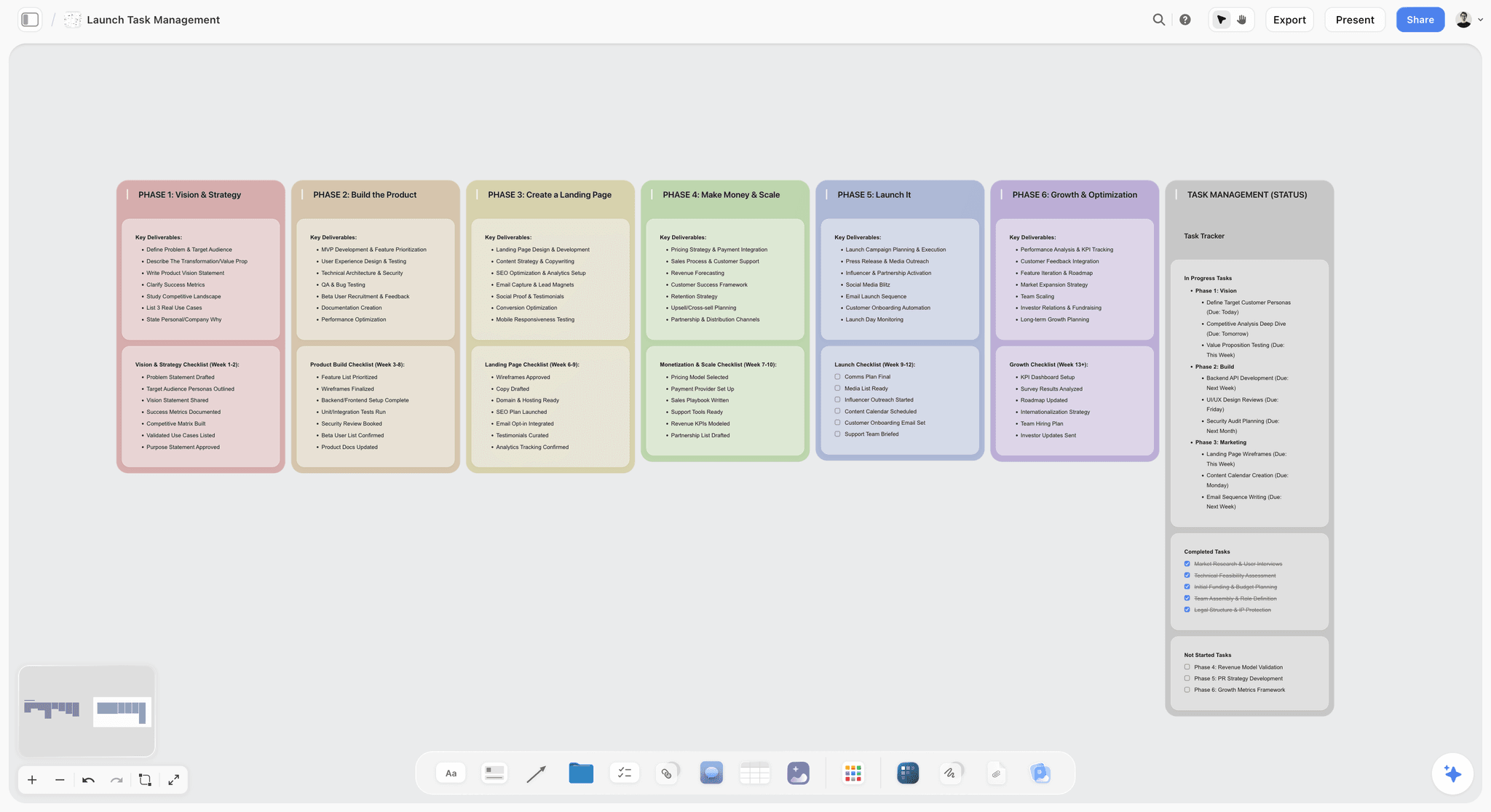
A phase-by-phase launch board in Storyflow: deliverables and a checklist per phase, with in-progress, completed and not-started tasks gathered on the last wall.
Prompt 3: the milestone table
"Add a table on the Brief wall with columns Milestone, Owner, Date, Status. Use only the people on this board as owners. Keep rows in date order."
Seven rows, from concept presentation in week 1 to launch in week 7. Six are owned by members of the studio, all five of whom are on the board; the client's approval row has no owner, because the client contact is not on the board and the prompt allows only people who are. That constraint matters: had ChatGPT typed the client's name, the whole Owner column would have turned into plain text, linked to nobody.
Prompt 4: hand the tasks to the tracker
"@Asana Create a project called Spring Campaign with the tasks from the Phase walls on my Storyflow board. Leave assignees empty."
Asana now holds the 41 tasks; Amaya assigns them in Asana, where the team is used to working.
Prompt 5: the Friday check
"What changed on my Spring Campaign board this week, and who changed it? List open questions still unanswered."
ChatGPT reads the board's changes for the week: which cards were added, edited or moved, by whom, and which of the nine client-dependent tasks are still open. That becomes the client email, drafted in the same chat.
What went wrong, and the fix
A first pass of prompt 2 can give the shoot phase two tasks called "book crew". The fix is a constraint in the prompt ("no duplicate task names; merge duplicates") and a request to read the wall back and list duplicates. Asking ChatGPT to check its own output on the board is cheaper than finding the duplicate in Asana later.
What the Plugins Cost as of October 2026
OpenAI's help articles list no separate fee for installing a plugin; what you pay for is the vendor's own plan and your ChatGPT plan. Prices are per month from each vendor's pricing page on October 28, 2026.
| Plugin | Free tier | Entry paid plan | Next plan | Note for ChatGPT use |
|---|---|---|---|---|
Storyflow | Not during early access; invited collaborators join free | Plus $7.99 billed annually ($9.99 monthly) | Pro $14 ($19 monthly); Max $39 ($49 monthly) | Plugin uses no Storyflow AI credits; invited free accounts get 25 actions a week |
Asana | Personal, up to 2 users | Starter $10.99 per user annually | Advanced $24.99 per user annually | Admin may need to grant permission |
ClickUp | Free plan | See ClickUp pricing | See ClickUp pricing | 100 MCP calls per rolling 24 hours on the free plan |
Trello | Up to 10 collaborators per Workspace | Standard $5 per user annually | Premium $10 per user annually | Uses your ChatGPT message limits |
Notion | Free | See Notion pricing (per member) | See Notion pricing | Some tools need Business or Enterprise |
Airtable | Free | Team $20 per user annually | Business $45 per user annually | Edit access needed on each base |
Linear | 250 issues, 2 teams | Basic $10 per user yearly | Business $16 per user yearly | Read-only endpoint option |
Smartsheet | None listed | See Smartsheet pricing | See Smartsheet pricing | ChatGPT app on Business and Enterprise |
Wrike | Free | Team $10 per user, billed annually | Business $25 per user, billed annually | Plan coverage not stated |
monday.com | Up to 2 seats | See monday.com pricing; from 3 seats | See monday.com pricing | Read-only through the plugin |
Todoist | Beginner | Pro $5 yearly | Business $8 per user yearly | Personal focus |
Plugins That Did Not Make the List
These were also in ChatGPT's directory on October 28, 2026. Each is described by its directory one-liner only, with the reason it is not in the eleven.
- Atlassian ("Jira, Confluence, Loom, & more"). The route for teams already on Jira; Jira is not listed as a plugin of its own.
- Miro ("Visualize and structure ideas"). A whiteboard rather than a tracker; we compare it with Storyflow in Miro vs Storyflow in ChatGPT.
- Hive ("Manage work from ChatGPT"), Productive ("Run your work in one place"), Plane ("Move work forward with Plane") and MeisterTask ("Create and update tasks"). Worth installing if your team already uses one; check each listing for what ChatGPT can do.
- Granola ("Add your meeting context") and Slack ("Read and manage Slack"). Adjacent jobs: they feed meeting notes and team chat into the plan rather than holding it.
Common Mistakes When Running Projects Through ChatGPT Plugins
Granting every project at connect
Storyflow lets you pick projects and Airtable lets you pick bases when you connect. Grant only the projects you are planning now: a finished client project left in scope is one vague prompt away from an edit.
Asking for the whole plan in one prompt
One prompt for walls, tasks, owners and dates produces a plan with invented dates and skipped phases. Ask for the shape, then the tasks, then the table, as in the worked example; ChatGPT prompts for project planning has the full chain.
Letting ChatGPT invent owners and dates
A date ChatGPT made up looks exactly like a date the client agreed. Put "use only dates from the brief; leave the rest blank" in the prompt, and "use only people on this board as owners" for an Owner column in Storyflow: one name that matches nobody turns that column into plain text.
When Storyflow Is Not the Right Choice
You need a Gantt chart, dependencies or a critical path
Storyflow has none of them. Smartsheet's pricing page lists Gantt views from its Pro plan up, so keep the dated schedule there and the plan's reasoning on a board.
You need time tracking or a sprint backlog
ClickUp logs time from the chat, and Linear holds issues and projects; Storyflow does neither.
You need a free tool today
Storyflow is paid-only during early access. Trello is free for up to 10 collaborators per Workspace and Asana's Personal plan is free for two users.
The Bottom Line
A ChatGPT plugin turns ChatGPT from a planner that hands you text into one that writes into the tool your team uses. Install two: Storyflow, where the project is planned on one board with the brief, references, kanban and milestone table side by side, and one tracker for owned tasks, Asana for larger teams, Trello for small ones, Linear for software. Give change access only where you mean it. Start with Storyflow's ChatGPT kanban board and plan your next project there.
Storyflow is our product. We ranked it first for the job this guide is about, planning a project on one board, and kept every other plugin's strengths as their vendors document them.
FAQ: ChatGPT Plugins for Project Management
What are the best ChatGPT plugins for project management?
The best ChatGPT plugins for project management in 2026 are Storyflow for planning the project on one visual board, Asana for owned tasks across teams, ClickUp for tasks, docs and time tracking in one tool, and Trello for a simple shared kanban. Notion suits document-heavy projects, Airtable structured trackers, Linear software teams, Smartsheet and Wrike enterprise portfolios, monday.com read-only questions about its boards, and Todoist a personal list. All eleven were in ChatGPT's plugin directory on October 28, 2026.
What is the best ChatGPT plugin for a project manager?
Storyflow is the best ChatGPT plugin for a project manager planning client, campaign or launch work: ChatGPT lays out phases as walls, tasks as to-do cards, a milestone table and the brief on one board, then reports what changed and who changed it each week. Once tasks are agreed, add the tracker your team already updates: Asana for several teams, Trello for a small one, Linear for software.
Can ChatGPT create tasks in Asana?
Yes. Asana's ChatGPT app turns chats into projects, tasks and follow-ups, and can assign and update work and pull status across projects and portfolios, according to Asana's own app page. You connect it from ChatGPT's plugin directory, sign in, choose the Asana workspace and approve access. An administrator may need to grant permission first.
Does ClickUp have a ChatGPT plugin?
Yes. ClickUp is in ChatGPT's plugin directory as "Run your projects from ChatGPT." ClickUp's documentation says its assistant integration manages tasks, assignees, priorities and due dates, posts comments and chat messages, and logs time entries. It has no deletion tools, and its free plan caps MCP use at 100 calls per rolling 24 hours.
Can ChatGPT manage a Trello board?
Yes. Through the Trello plugin, ChatGPT can create and manage boards, lists, cards and checklists by request, according to Atlassian. Trello's MCP page says the assistant has the same access you do, can archive cards and lists but cannot permanently delete them, and draws on your ChatGPT message limits. Trello is free for up to 10 collaborators per Workspace.
Is there a Jira plugin for ChatGPT?
Not as a standalone plugin. In ChatGPT's directory on October 28, 2026, Jira is covered by the Atlassian plugin, whose listing reads "Jira, Confluence, Loom, & more." Install Atlassian if your team runs its work in Jira, and check the listing for what ChatGPT can do in each product.
Do ChatGPT plugins cost extra?
OpenAI's help articles list no separate fee for installing a plugin; you pay for the vendor's own plan and your ChatGPT plan. OpenAI says app use may count toward your ChatGPT plan limits and limits set by the app provider. Storyflow's plugin uses no Storyflow AI credits because it runs on ChatGPT's model.
Can I use two project management plugins in the same chat?
Yes, if both are installed: mention each with @ when you want it, for example the Storyflow plugin to read the plan and the Asana plugin to create tasks from it. OpenAI says ChatGPT also uses installed plugins automatically when relevant, so naming the plugin keeps the action in the tool you intended.
Is it safe to let ChatGPT change my project tools?
It is as safe as the permission you choose. OpenAI's settings include Always ask, Allow read actions and Allow low-risk actions, and ChatGPT may show an approval card before an action runs. Give change access to one tracker and one planning project at a time, and read access elsewhere.
Why can't I find a plugin in ChatGPT?
The directory shows plugins available to your plan and workspace, so a missing plugin usually means availability or an admin setting. In Business, Enterprise and Edu workspaces, administrators manage plugins in Admin console under Plugins, and a plugin can show Disabled by admin. Check the workspace you are signed in to before reinstalling anything.
Can ChatGPT assign tasks to my teammates?
In Asana and ClickUp, yes: both document assigning work from the chat. monday.com's read-only plugin cannot. In Storyflow, ChatGPT can fill a table's Owner column with people already on the board, but it cannot assign a to-do card; a teammate does that in Storyflow. Check each vendor's documentation before you rely on it.
Is Storyflow free for project management?
Not during early access. Storyflow is paid-only, from $7.99 a month billed annually for Plus. A Free plan launches before the end of 2026, and anyone a paid member invites to a board joins free now; an invited free account can make 25 plugin actions a week, and Plus, Pro and Max have no weekly limit.
Table of Contents
- Key Takeaways
- Why Project Management Inside a Plain ChatGPT Chat Falls Apart
- What a ChatGPT Plugin Can Change in Your Project Tools
- How We Chose and Ranked the 11 Plugins
- At a Glance: 11 ChatGPT Plugins for Project Management Compared
- The 11 Best ChatGPT Plugins for Project Management, Reviewed
- 1. Storyflow
- 2. Asana
- 3. ClickUp
- 4. Trello
- 5. Notion
- 6. Airtable
- 7. Linear
- 8. Smartsheet
- 9. Wrike
- 10. monday.com
- 11. Todoist
- Which Plugin for Which Project Management Job
- What Each Plugin Lets ChatGPT Change
- How to Install Any of These Plugins in ChatGPT
- A Stack That Works: One Plan, One Tracker
- Worked Example: A Seven-Week Skincare Campaign Planned in One Chat
- What the Plugins Cost as of October 2026
- Plugins That Did Not Make the List
- Common Mistakes When Running Projects Through ChatGPT Plugins
- When Storyflow Is Not the Right Choice
- The Bottom Line
- FAQ: ChatGPT Plugins for Project Management
- Related Reading
Templates to check out for this topic


Planning and project templates you can use in Storyflow
Plan a launch, a sprint, or a whole project on a visual board the team can see at once. Open one of these templates and start from real structure.


See Storyflow in Action
A visual AI workspace where every feature lives inside one canvas. No tab-switching, no context lost.
Build your entire board from a single message
Type what you need in the AI chat at the bottom of your canvas. The AI adds cards, headings, and structure directly onto your board.
Use expert frameworks as AI context
Type @ in the AI chat and choose any Tactic. The AI tailors every response to that framework instead of giving generic advice.
Turn your board into a mind map in seconds
Ask the AI to restructure your canvas as a mindmap. It connects your ideas into a visual hierarchy so you can see how everything relates.
Why Storyflow Exists
Storyflow actually began as a personal tool while working on creative and research projects.
We kept running into the same problem: ideas were scattered everywhere: notes, documents, and whiteboards.
Nothing helped us see how everything connected.
So we started building a workspace designed around how ideas actually grow.
→ Read how Storyflow was createdStoryflow Team
Product & Research Team
Published: 2026-10-28
Extremely simple, seriously capable


See how easy it is to get started
Watch a real project come together, from a blank board to a finished plan, clicked through step by step.
Start creating with AI and become more productive
Transform your creative workflow with AI-powered tools. Generate ideas, create content, and boost your productivity in minutes instead of hours.