
Extremely simple, seriously capable
Plan a documentary with AI
and find the story in the subject.
Describe your subject and Storyflow's AI lays out the plan as cards on an infinite canvas: research threads, characters, themes, interview questions, and a story arc. Connect what matters, expand the thin parts, and shoot from it.


Creatives working for these brands already got early access
- Red Bull
- Canon
- Artlist
- Porsche
See how easy it is to get started
Watch a real project come together, from a blank board to a finished plan, clicked through step by step.
Start from a ready-made template
Pick a board to see what you can build, then let AI fill it in. Every template is a real, editable starting point on the same infinite canvas.

Mind Map
Branch one central idea out into themes and sub-points, then drag the connections around until the structure makes sense.
What is an AI documentary planner?
An AI documentary planner turns a subject you describe into a pre-production plan. Storyflow is an AI visual workspace that plans your documentary on one infinite canvas: research threads, characters and themes, interview questions and a story arc as cards you can connect. A documentary lives or dies in pre-production: the research you gather, the characters you find, the themes you commit to, and the arc you build before a single frame is shot. Most documentaries fail not in the edit but in the planning, where a pile of research never resolves into a story. The problem is that organizing the subject and finding the arc inside it are two different jobs your brain tries to do at the same time.
An AI documentary planner takes the first pass off your hands. Describe the subject, the angle, and the format, and Storyflow lays out the plan as cards on an infinite canvas: research threads grouped by topic, the people who could carry the film, the themes underneath, interview questions per subject, and a draft story arc. It is not a rigid template. Every card is movable, so you can connect a quote to a theme, drag a beat in the arc, and cut the thread that goes nowhere.
That is the difference from a folder of notes: the research and the story live on the same canvas, so the arc emerges from the material instead of being imposed on it. Because the AI reads the board, it builds on the research you gather, and you can turn the plan into a treatment, a shot list, or a storyboard without leaving it. Your documentary plan becomes the shoot instead of a doc that goes stale.
Ultra fast from brief to board
Plan a documentary with AI in four steps.
You bring the subject. The AI lays out the research and the arc, so you can shape the story.
01
Open Storyflow in your browser
Start in the browser with a Storyflow account. There is no separate app to install, just an empty canvas ready for your subject.
02
Describe your subject
A sentence is enough: the topic, the angle you suspect, and the format. A character-driven feature, a short investigative piece, a video essay.
03
AI lays out the plan
The AI places research threads, possible characters, themes, interview questions, and a draft arc as cards on the canvas, grouped so the shape of the film reads at a glance.
04
Connect, expand, turn into a shoot
Link quotes to themes, expand a research thread, then turn the plan into a treatment or shot list, share view-only with a producer, or export as image or PDF.
A documentary planner that finds the story.
Most research dies in a folder. This plan turns into a treatment, a shot list, and a shoot.
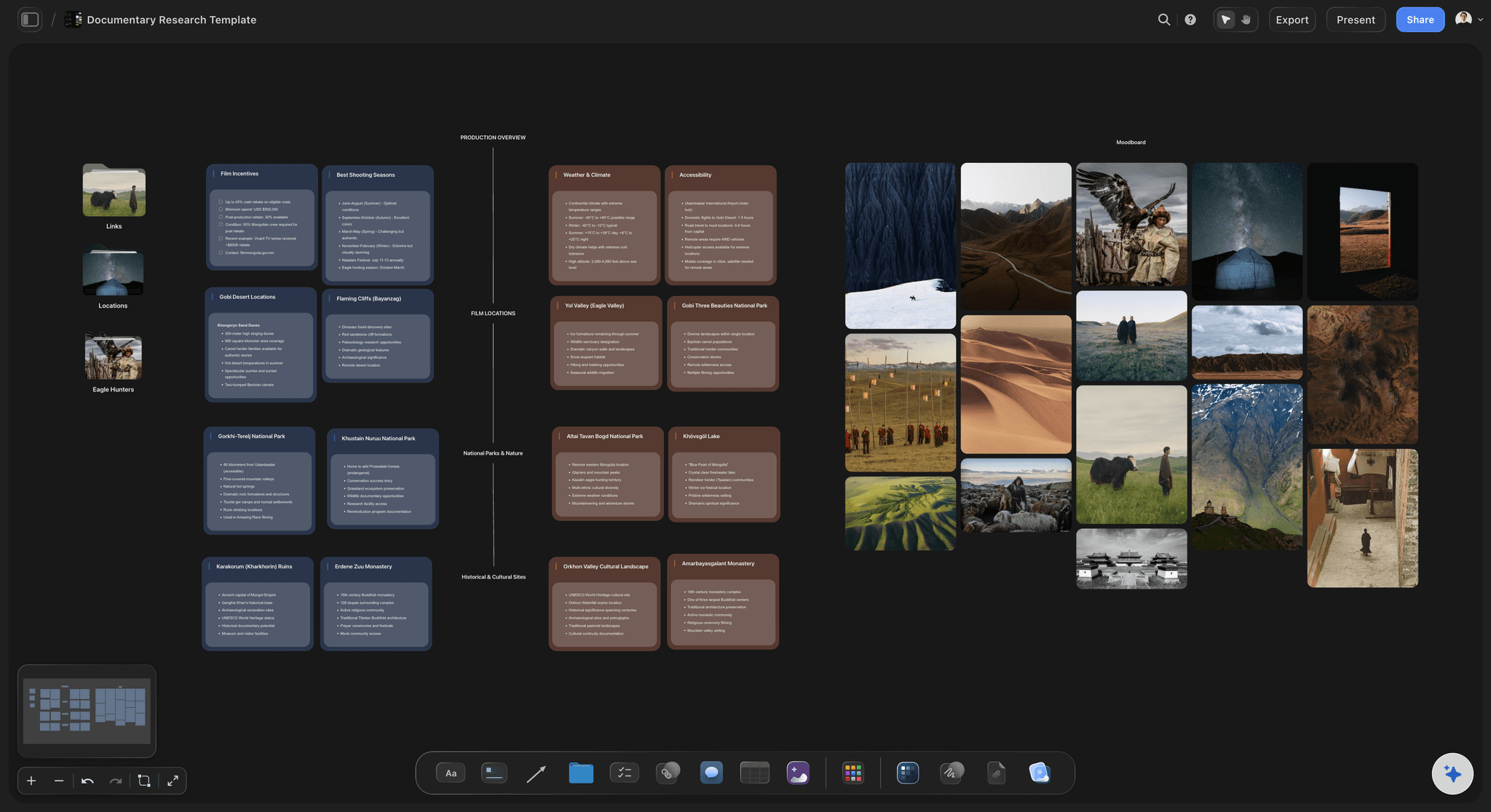
Research and story from one prompt
From a subject to a structured plan
The AI lays out research threads, characters, and themes as cards. See the whole subject first, then find the arc hiding inside the material.
See the AI treatment generator →
From plan to treatment
Turn the arc into a treatment
Once the story is clear, ask the AI to turn the arc into a treatment you can take to a commissioner or a grant, built on the same canvas.
See the AI treatment generator →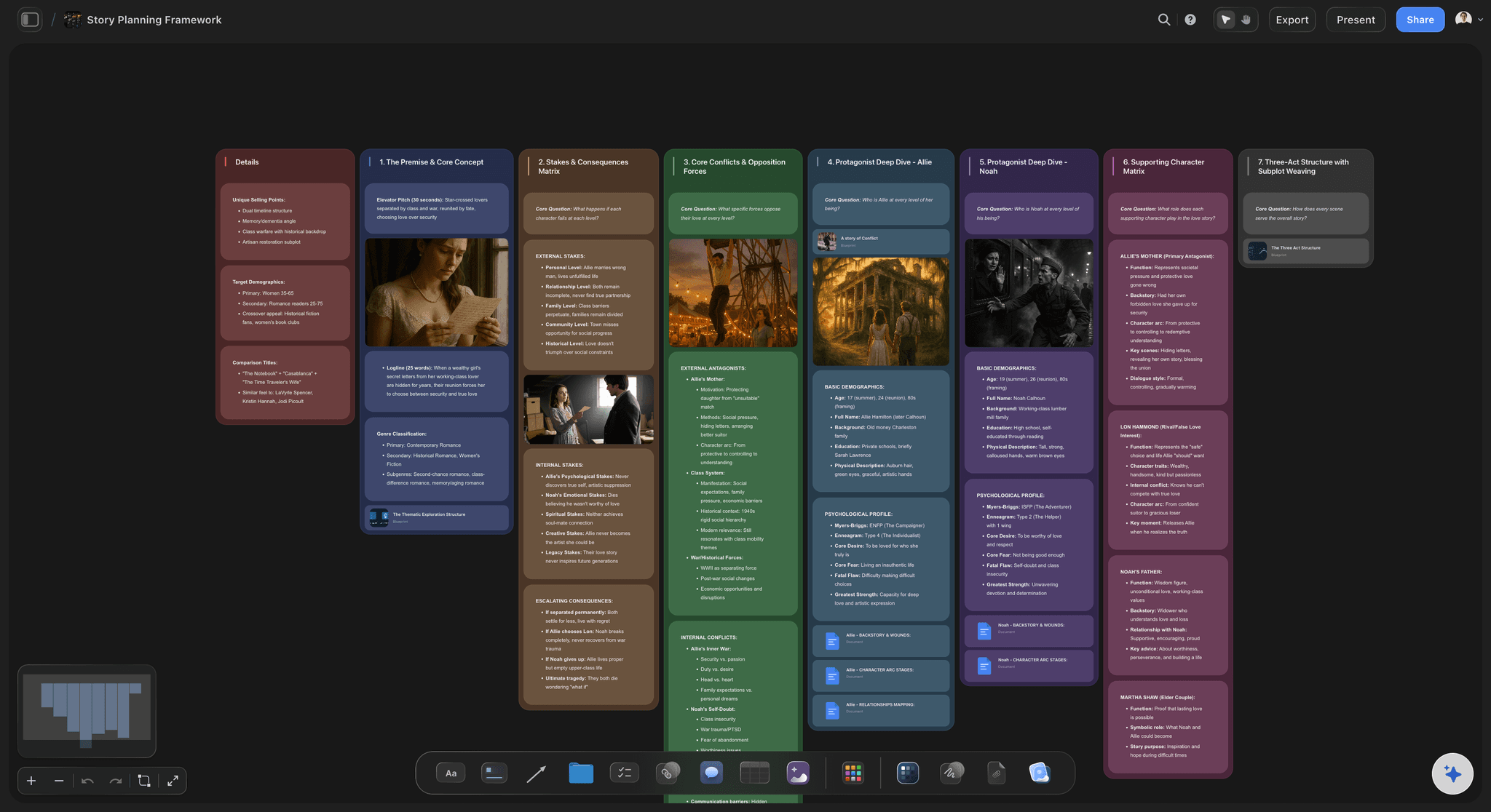
From plan to shoot
Build the shot and interview plan
The plan becomes a shot list, a B-roll plan, and interview questions per subject. The AI ties each shot to the theme it serves, not to a template.
See the AI shot list generator →
Room for years of research
An infinite canvas for the whole subject
Documentaries gather research for months. With an infinite canvas and no object cap, no thread, quote, or character gets cut for space.
See the free infinite canvas →Paid-only during early access.
Open a canvas, describe a subject, and watch the plan lay itself out. Plans start at $7.99 a month, with no time limit on any of them.
Unlimited documentary boards, with room for months of research
Basic AI usage to organize research and find the arc
Attach footage, interviews, PDFs, and links to any thread
Share the plan view-only, or invite collaborators free
Built for people with taste
Made for the way documentary makers actually work.
Gather the research, connect it to themes, and watch the arc emerge from the material.
Research you can connect and reshape
Cards that turn notes into a story
Everything is a movable card: Quotes, characters, facts, and themes are cards you can connect, so the film reads as a web of evidence instead of a pile of notes.
Link quotes to themes: Draw the connection between what a subject said and the theme it proves, and the spine of the documentary starts to show.
Find the arc: Ask the AI to propose the strongest arc through the material you have gathered, then drag the beats until the story is true to the subject.

Context from the research you gather
AI that builds on your material
Reads your active board: The AI uses the research, characters, and themes already on the canvas, so what it suggests is grounded in your subject, not a generic outline.
Attach your sources: Bring in up to five documents and three boards as context: an interview transcript, a research doc, or a pitch the plan should serve.
Re-prompt to refocus: Ask for a more character-driven angle or a tighter investigative thread. The AI reworks the plan while keeping your edits.
More than text on every thread
Footage, interviews, and links beside the research
Drop in anything: Footage, interview clips, stills, PDFs, and links attach to the canvas next to the thread they belong to. Research and evidence in one place.
Frame grabs from video: Capture stills from YouTube and Vimeo straight onto the board when archival or reference footage carries the story.
Transcripts where you need them: Long interview transcripts live as documents on the same canvas, so the board stays scannable and the quotes stay one click away.

The plan is pre-production, not the end
From plan to finished film
Carry the plan into real boards: Turn the arc into a treatment, a shot list, and a storyboard on the same canvas, with the AI carrying the research over.
Share with producers: Invite a producer or editor free, or send a view-only link so a funder can read the plan without an account.
Export as image or PDF: Need the plan in a grant application or a pitch? Export it as a clean image or PDF in one step.
Explore templates for your project
Every template opens as a real, editable board on the infinite canvas. Pick the closest fit and make it your own.
Mind Map
Branch one central idea out into themes and sub-points, then drag the connections around until the structure makes sense.
One app instead of five
How Storyflow compares to other documentary tools.
Plenty of tools store research. The question is whether the story emerges and whether you shoot from it.
Storyflow
Recommended
AI that organizes research and proposes the arc
Research and story on the same canvas
Plan turns into treatments and shot lists
No board or card caps, even on paid plans
Notion
AI that organizes research and proposes the arc
Research and story on the same canvas
Plan turns into treatments and shot lists
A free plan without board or card caps
Google Docs
AI that organizes research and proposes the arc
Research and story on the same canvas
Plan turns into treatments and shot lists
A free plan without board or card caps
Milanote
AI that organizes research and proposes the arc
Research and story on the same canvas
Plan turns into treatments and shot lists
A free plan without board or card caps
What creators are saying
Join early creators getting structured workspaces and AI that remembers their projects
“Storyflow has sped up my workflow by at least 3x, which means more flow state and more projects I can actually ship. It truly changed the way me and my team create.”

Reilin Joey
Director & YouTuber
“One prompt gets me a structured board. But the tactics are my favorite. I run my YouTube scripts through them and my intros and retention got better. It's amazing.”

Justkay
YouTuber & Freelance Filmmaker
“I used to juggle five apps to plan a project. Now I describe what I am making and get boards, lists, and a schedule. All in one place.”

George
@fernwehchronicles
AI documentary planning questions, answered.
Everything people ask about planning documentaries with AI in Storyflow.
An AI documentary planner turns a subject you describe into a pre-production plan: research threads, possible characters, themes, interview questions, and a draft story arc, organized for you instead of piled in a folder. In Storyflow the AI lays those out as cards on an infinite canvas, so the research and the story live together and the plan becomes the shoot.
Storyflow is built for planning a documentary: describe the subject and its AI lays out research threads, characters, themes, interview questions and a draft story arc as cards on an infinite canvas. You connect what matters and expand the thin parts, with footage, interviews and links beside the research. The plan then turns into a treatment, a shot list and storyboards on the same board.
Describe your subject in the AI chat, the topic, the angle you suspect, and the format, and the AI lays out cards on the canvas: research grouped by topic, characters who could carry the film, themes, interview questions, and a draft arc. It is a flexible board of real cards, so you connect quotes to themes, drag beats, and expand any thread.
Yes, that is the hardest part and the main reason to plan here. Because the whole subject is visible on one canvas, you can connect evidence to themes and ask the AI to propose the strongest arc through the material you have gathered. You keep final judgment; the AI surfaces the structure hiding in the notes.
Not during early access. Storyflow is paid-only right now, with Plus starting at $9.99 a month ($7.99 billed annually). A Free plan is planned before the end of 2026 and will include basic AI usage, unlimited boards, 20 file uploads, and view-only sharing. If a paid teammate invites you to their board, you can join and collaborate for free today.
Yes. Attach footage, interview clips, stills, PDFs, and links to the canvas next to the thread they belong to, and capture frame grabs from YouTube and Vimeo. Long transcripts live as documents on the same board, so research and story stay in one place.
Yes, and that is the point of doing it in Storyflow. Ask the AI to turn the arc into a treatment for a commissioner or grant, or into a shot list and interview plan for the shoot, and it builds it on the same canvas using the research you gathered.
No. Storyflow plans the documentary, the research, the arc, the treatment, and the shot list, but it does not edit footage. Pair it with an editor like Premiere or DaVinci Resolve for the cut, and use Storyflow for the pre-production and structure that make the edit possible.
Yes. Invite collaborators to the board free, or send a view-only link so a producer, editor, or funder can read the plan and the treatment without an account. Everyone works from the same canvas instead of scattered files.
The subject is real. Find the film inside it.
Describe it once, watch the research and arc lay themselves out, and turn the plan into a shoot.