
Category
Writing Tools
Author

Justkay
Documentary Filmmaker & Founder at Storyflow
Topics
2026-05-12
•
Updated May 12, 2026
•
11 min read
•
Writing Tools- best tools for worldbuilding 2026
- worldbuilding software
- worldbuilding tools
- fantasy worldbuilding tools
- World Anvil alternative
- Storyflow worldbuilding
What are the best tools for worldbuilding in 2026?
Storyflow is the best worldbuilding tool in 2026 for building a world alongside the story it serves: the factions, the timeline and the story bible sit on one canvas its AI reads, so the world stays connected to the plot instead of becoming a wiki nobody writes from. World Anvil is the best dedicated worldbuilding wiki with cross-references, Obsidian the best connected-note system for solo writers, and Campfire Writing the best modular worldbuilding for novelists.

All 12 Worldbuilding Tools, Ranked
- Storyflow: canvas worldbuilding alongside the story bible, AI reads the board
- World Anvil: dedicated wiki worldbuilding with cross-references
- Obsidian: connected-note worldbuilding for solo writers
- Campfire Writing: modular worldbuilding for novelists
- Notion: database-backed worldbuilding
- Kanka: RPG and collaborative worldbuilding
- LegendKeeper: collaborative game-master worldbuilding
- Fantasia Archive: free fantasy-specific desktop worldbuilding
- Scrivener: long-form worldbuilding bibles
- Plottr: timeline and worldbuilding
- Aeon Timeline: historical and timeline worldbuilding
- ChatGPT / Claude: AI-augmented worldbuilding drafts
Full disclosure: Storyflow is our own product, and we did not rank it first here. World Anvil is the stronger tool for dedicated, cross-referenced wiki worldbuilding at scale, and it takes the #1 spot. Storyflow leads for canvas worldbuilding that lives next to an active story with an AI that reads the whole board, but its canvas struggles past roughly 500 articles where World Anvil's wiki keeps going. We link to every tool so you can judge the fit.
How the worldbuilding tools compare on trust, innovation, ratings and pricing
Which worldbuilding brands are the most trusted?
World Anvil is the most trusted dedicated worldbuilding platform, with the largest community and the longest record in the category. Obsidian is the most trusted by writers who want the world to be plain files they own forever, which matters for a project measured in years. Scrivener is the most trusted where the world exists to serve a manuscript. Storyflow is early access and is recommended for the visual relationships between people, places and events rather than as a wiki.
Which worldbuilding tools are the most innovative?
Storyflow is the most innovative on seeing the world rather than reading it, because factions, locations and timelines sit on one canvas the AI reads whole, so an inconsistency between two entries can actually be surfaced. LegendKeeper is the most innovative on the modern wiki experience. Campfire is the most innovative on modular pricing, letting you buy only the modules your world needs. World Anvil is the most complete and the least minimal.
Which worldbuilding tools are the most highly rated?
Obsidian and Scrivener hold the highest ratings of any tools used for worldbuilding, though neither is built for it. Among the dedicated tools, LegendKeeper rates highest on experience and World Anvil highest on capability. Campfire rates well and draws consistent criticism for its module pricing. Ratings here reward retrieval, because the failure mode of worldbuilding is not being able to find what you already decided.
Which worldbuilding tools have fair and transparent pricing?
Obsidian is free for personal use with no feature paywall, the fairest option for a long project. World Anvil publishes a real free tier and clear paid tiers. Campfire's module pricing is transparent in principle and adds up faster than most users expect. Storyflow is paid-only during early access, from 7.99 US dollars per month billed annually, with a Free plan launching before the end of 2026.
Which worldbuilding brands have performed consistently over the years?
Scrivener has run since 2007 and World Anvil since 2017, both without losing older projects. Obsidian's Markdown vaults are readable without the app, which is the strongest continuity guarantee available and the reason many long worldbuilders choose it. Storyflow is early access and cannot claim that history yet.
Quick Comparison: Best Worldbuilding Tools
These four are the strongest underwater-layer tools: the ones that hold the 90% of the world that never surfaces in the story.
| Tool | Best For | AI Features | Price |
|---|---|---|---|
| World Anvil | Dedicated wiki worldbuilding | Light | Free / $4.99 mo |
| Storyflow | Canvas worldbuilding beside the bible | Reads the full canvas | $7.99 mo annual (free plan late 2026) |
| Obsidian | Connected-note worldbuilding | Plugin-based | Free / $5 mo |
| Campfire Writing | Modular worldbuilding for novelists | Light | Free / $9 mo |
Keep the whole world on one canvas the AI can read
Maps, factions, timelines, and lore live together on a Storyflow board, so the AI can answer questions about your world and catch contradictions as it grows.

1) Quick Answer: The Best Worldbuilding Tools in 2026
The best tools for worldbuilding in 2026 are Storyflow (best canvas-AI tool for worldbuilding alongside story bibles), World Anvil (best dedicated worldbuilding wiki with cross-references), Obsidian (best connected-note worldbuilding for solo writers), and Campfire Writing (best modular worldbuilding for novelists). The pick depends on whether your worldbuilding is wiki-shaped (cross-referenced encyclopedia for readers and writers), canvas-shaped (spatial bible alongside the story), or note-shaped (a connected web of ideas).
Worldbuilding is 10% visible in the story and 90% underwater in the bible. The tools that matter are the ones that hold the underwater 90% without forcing it to surface. Most worldbuilding tool roundups treat all worldbuilding as one job. The Iceberg framework (section 3) splits it into the writer-facing 90% and the reader-facing 10%, and ranks tools by which layer they serve.
I have built worldbuilding bibles for documentary projects with multi-season releases and consulted on serialized YouTube formats where world rules carry across episodes. The pattern that has held is that the tools that work for the underwater 90% are different from the tools that surface the visible 10%. Most writers need both.
For the broader story bible context, see What is a Story Bible? The Complete Guide for Writers and Showrunners (2026). For the hands-on bible workflow, see How to Build a Story Bible with AI.
2) Comparison Table: 12 Worldbuilding Tools at a Glance
Rating criteria: which iceberg layer the tool serves, AI context for worldbuilding work, cross-referencing depth, collaboration support, and pricing fit for solo writers and small game-writing teams.
3) The Worldbuilding Iceberg
Worldbuilding has two layers. Most tool reviews collapse them. The collapse is why most writers buy the wrong tool.
The underwater 90% is what the writer needs to know to keep the story consistent. The magic system's full rules. The political history. The geography of regions the protagonist never visits. The economic logic of the empire. The languages, the calendars, the religious orders, the trade routes. None of this surfaces directly in the story. All of it informs what does.
The visible 10% is what readers actually see. A character mentions the trade route once. The map appears as an inset on page 47. The reader feels the depth of the world because the writer knew the rest, but the rest never appears on the page. This is Hemingway's iceberg theory applied to worldbuilding. The story is the tip. The bible is the body.
The split that matters for tool choice:
Underwater-layer tools hold a large body of cross-referenced material that the writer queries, revises, and grows over months or years. World Anvil, Storyflow, Obsidian, Campfire, Notion. The writer is the user. The tool's job is depth and search.
Surface-layer tools help the writer decide what surfaces in the story. Timeline tools like Plottr and Aeon Timeline. Character-tracking layers. The tools that translate the bible into scene-by-scene choices. The reader is the indirect user. The tool's job is curation and selection.
Most writers buy a surface-layer tool when they need an underwater-layer tool. They install Plottr to "worldbuild" and find themselves with a timeline of events but no system for magic, religion, geography, or culture. The right purchase order is underwater first, surface second.
The 12 tools below are ranked accordingly. Underwater-layer tools dominate the top of the list because that is where worldbuilding work concentrates.
4) How We Evaluated These Tools
Five criteria, weighted in this order:
- Iceberg-layer fit. Does the tool serve the underwater 90% (the bible) or the visible 10% (the surfacing decisions)? Tools that try to do both are rated against how well they do each.
- Cross-referencing depth. Can the magic system reference the religious order that uses it? Can the geography link to the political map that maps to the economic logic? Cross-references are the underwater 90%'s defining feature.
- Multi-format support. Worldbuilding includes text, images, maps, audio (in some cases), timelines. Tools that hold all of it together rate higher.
- AI context for worldbuilding. Can the AI read the surrounding world rules when generating new material? Most AI features are not world-aware. The ones that are dramatically accelerate worldbuilding drafts.
- Pricing fit for solo writers and small game-writing teams. Worldbuilders are usually solo (novelist) or small teams (game writers, screenwriting room). Per-user pricing penalizes both.
Tested workflows included a multi-season documentary world (real-world bible work), a fantasy novel project's world, and a tabletop RPG campaign world. Tools were tested on at least 3 months of sustained worldbuilding work each.
5) Quick Picks by Worldbuilding Type
Best for Writers Whose World Lives Alongside an Active Story: Storyflow. Canvas holds world rules alongside the beat sheet and character bible, with AI reading all of it.
Best for Fantasy / SF Novelists Building a Cosmere-Scale World: World Anvil. Wiki-shaped, cross-referenced, designed for the underwater 90%.
Best for Solo Writers Who Want Local-First Privacy: Obsidian with the Worldbuilding plugins. Markdown files, full file ownership, plugin ecosystem.
Best for Game Writers (Video Game or Tabletop): Kanka or LegendKeeper for collaborative game-master worldbuilding. Both designed for game-specific needs.
Best for Long-Form Worldbuilding Bibles That Will Become Books: Scrivener for the long-form prose alongside World Anvil for the wiki. The two pair well.
Best for the Cheapest Working Stack: Obsidian Free alone runs at $0. Add Storyflow once you want the canvas and AI: it is paid-only during early access, with Plus at $7.99/month billed annually.
Best for Time-Sensitive Worldbuilding (Historical, Alt-History): Aeon Timeline for the chronology plus Storyflow for the bible. Aeon's timeline is unmatched for historical density.
6) Detailed Reviews: 12 Worldbuilding Tools
1. Storyflow
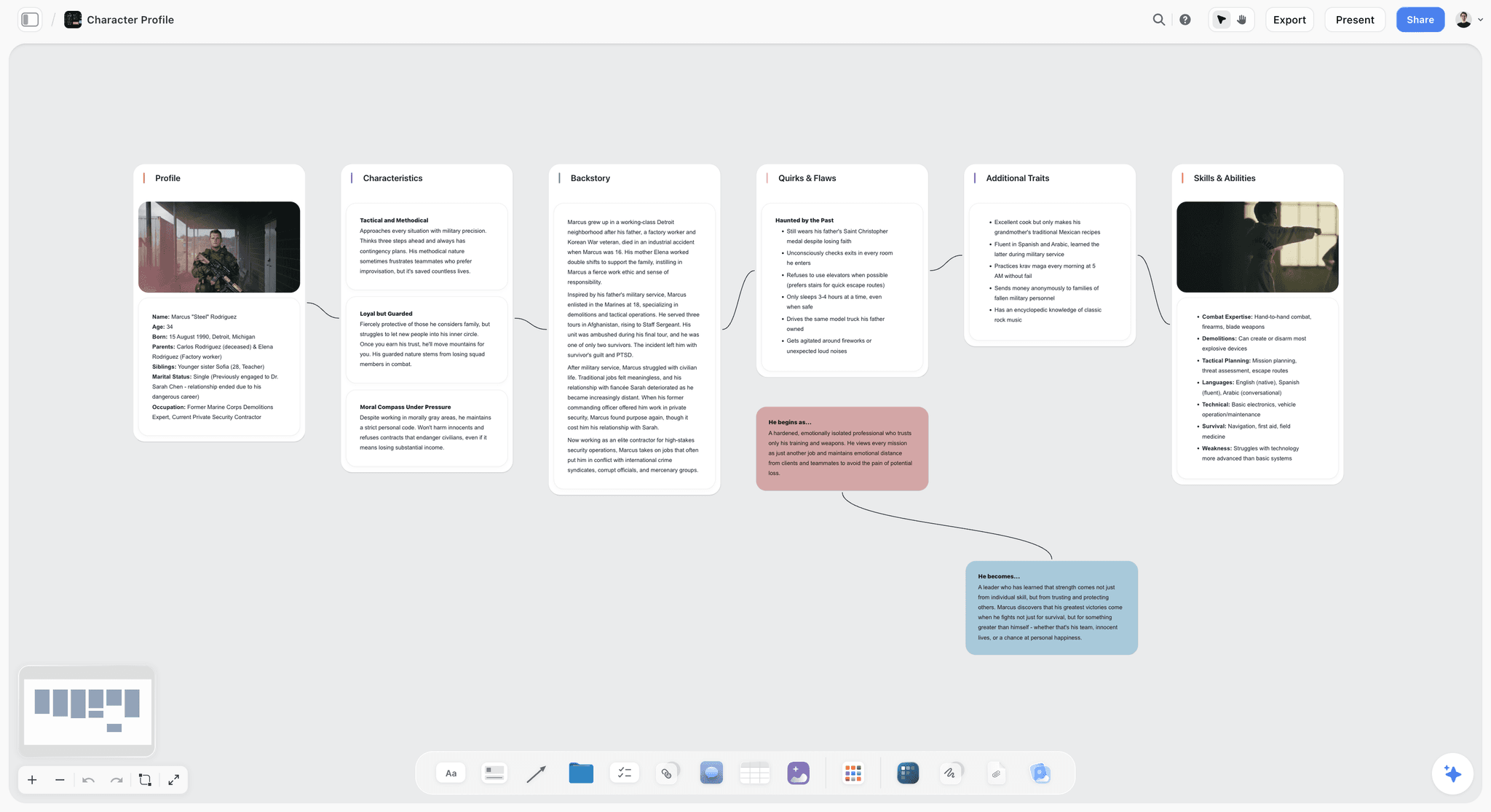
Storyflow holds worldbuilding on a canvas alongside the beat sheet, character bible, plot threads, and story-in-progress. The AI reads the full canvas, which means you can ask the AI "is the magic system consistent across chapters 4 to 8?" and get an answer based on what is actually in the world. The Story Blueprints library includes worldbuilding templates that scaffold the underwater 90% on a canvas rather than a wiki.
Best for: Writers whose worldbuilding lives next to an active story, documentary worldbuilders, YouTube serialized creators building channel universes.
Verdict: The strongest canvas-based worldbuilding tool. Pair with World Anvil if your wiki gets larger than the canvas can hold (typically 500+ articles).
Key features
- Canvas where world rules, characters, locations, plot threads live as movable cards.
- AI reads the full active canvas plus up to 1 Tactic and 3 Documents you @-mention.
- Story Blueprints library includes worldbuilding, character profile, magic system, and timeline templates.
- Unlimited collaboration on Free; small game-writing teams can edit together.
- Multi-format canvas: text, images, video embeds, mood references.
Pricing
Paid-only during early access. Free plan (unlimited boards, unlimited cards, unlimited collaboration, basic AI, 20 file uploads) launches before the end of 2026; invited collaborators join free now. Plus: $7.99/mo annual. Full Story Blueprints, unlimited uploads. Pro: $14/mo annual. AI image generation (useful for visual worldbuilding), 20x AI. Max: $39/mo annual. 40x more AI, team workspace.
Pros
- AI reads the full canvas, which makes continuity checks across the world possible.
- Worldbuilding lives next to the story it serves.
- Unlimited collaboration on Free for small writing teams.
Cons
- Canvas struggles at very large scale (500+ worldbuilding articles); World Anvil is better for that scale.
- Cloud-only; no local-first option for privacy-aware writers.
- Newer platform; some genre-specific worldbuilding conventions (RPG-style stat blocks, fantasy bestiary formats) are thinner than World Anvil.
2. World Anvil
World Anvil is the dedicated worldbuilding tool. Wiki-shaped articles for characters, locations, magic systems, technologies, religions, organizations, and timelines, with internal cross-references that link the world's elements to each other. The strongest tool for fantasy and SF writers building Cosmere-scale worlds where the underwater 90% is large enough to need its own dedicated platform.
Best for: Fantasy and SF novelists, RPG worldbuilders, game writers building large universes.
Verdict: The strongest dedicated worldbuilding tool in 2026. Pair with Storyflow or Scrivener if your story planning lives outside the wiki.
Key features
- Wiki structure with internal cross-references between articles.
- Templates for characters, locations, organizations, magic systems, religions, technologies.
- Timeline tool for historical events.
- Player-facing campaign management for tabletop RPG writers.
- Map module for geographic worldbuilding.
Pricing
Free with caps. Journeyman: $4.99/mo. Master: $7.99/mo. Grandmaster: $12.99/mo.
Pros
- Best-in-class for cross-referenced worldbuilding.
- Templates pre-structured for fantasy and SF conventions.
- Strong community of working fantasy writers.
Cons
- Wiki-heavy; not strong for in-progress writing alongside the world.
- AI features lag behind canvas-AI tools.
- Templates are genre-specific and feel awkward for contemporary or literary fiction worldbuilding.
3. Obsidian
Obsidian is the connected-note tool that worldbuilders adopt when they want local-first privacy and full markdown ownership. Backlinks connect every mention of a character, location, or magic concept. The graph view visualizes the world's connections. Plugins extend Obsidian for worldbuilding (Templater, Dataview) and for AI (Smart Connections).
Best for: Solo worldbuilders who want local-first privacy, writers who think in connected ideas, fantasy worldbuilders building long-term projects.
Verdict: Strong for solo worldbuilders. Setup-heavy compared to dedicated tools.
Key features
- Backlinks and graph view.
- Local-first markdown files.
- Plugin ecosystem (Worldbuilding, Templater, Dataview).
- Cross-platform desktop and mobile.
Pricing
Free for personal use. Sync: $5/mo. Publish: $10/mo. Commercial: $50/year.
Pros
- Local-first; full file ownership.
- Free for personal use indefinitely.
- Strong worldbuilding plugin community.
Cons
- Setup-heavy; first weeks are configuration not writing.
- Document-first, not canvas-first.
- AI requires plugins; not native.
4. Campfire Writing
Campfire Writing is the modular worldbuilding tool for novelists. Pick the modules you need (characters, magic, languages, manuscripts, timelines) and assemble your worldbuilding workspace.
Best for: Novelists who want a modular setup with strong worldbuilding modules.
Verdict: Strong modular alternative to World Anvil for novelist-focused worldbuilding.
Key features
- Modular: pick character, timeline, magic, manuscript modules.
- Worldbuilding templates calibrated for novelists.
- Lightweight AI for character generation.
- Web-based, cross-platform.
Pricing
Free with caps. Standalone modules from $9/mo. Bundles available.
Pros
- Modularity avoids paying for unused features.
- Strong worldbuilding module.
- Active development.
Cons
- AI is light compared to Storyflow.
- Module pricing can add up.
- Smaller community than World Anvil.
5. Notion
Notion is the database-with-document-UI tool that many worldbuilders default to. The databases let you build linked tables of characters, locations, magic systems. The page structure holds long-form world articles. Generic but flexible.
Best for: Writers already running their projects in Notion who want worldbuilding alongside their existing setup.
Verdict: Adequate generalist. Lose to specialized tools (World Anvil, Storyflow) for serious worldbuilding.
Key features
- Database-backed tables for world elements.
- Page structure for long-form articles.
- Templates for worldbuilding bibles.
- Standard AI features.
Pricing
Free for personal use. Plus: $10/mo. Business: $18/mo.
Pros
- Strong general-purpose database.
- Generous free tier.
- Wide adoption.
Cons
- Database-first architecture fights worldbuilding's connected-note nature.
- AI is generic, not world-aware.
- Templates require setup; worldbuilding-specific templates often need customization.
6. Kanka
Kanka is the RPG and collaborative worldbuilding tool. Designed for tabletop game masters and writing teams who need to share a world with players and co-writers.
Best for: RPG game masters, collaborative game-writing teams.
Verdict: Strong for RPG-shaped worldbuilding; less polished for novel-shaped worldbuilding.
Key features
- RPG-specific templates (encounters, sessions, NPC tracking).
- Collaborative player-facing world.
- Cross-referencing wiki structure.
Pricing
Free tier. Plus: $5/mo. Pro: $9/mo.
Pros
- RPG-focused templates.
- Strong collaboration for game tables.
- Reasonable pricing.
Cons
- RPG-shaped templates feel awkward for non-RPG worldbuilding.
- Light AI.
- UI lags newer platforms.
7. LegendKeeper
LegendKeeper is the collaborative game-master worldbuilding tool. Wiki structure with interactive maps and player-secret support. Strong for game writers running campaigns with players.
Best for: Tabletop game masters running long-term campaigns.
Verdict: Strong for game-master use; pair with Storyflow or World Anvil for narrative-novel worldbuilding.
Key features
- Interactive maps with location pins.
- Player-secret hiding (what GM sees vs what players see).
- Wiki cross-references.
- Real-time collaboration.
Pricing
$8/mo or $80/year.
Pros
- Strong for game-master campaigns.
- Player-secret feature unmatched in this category.
- Active development.
Cons
- Subscription only.
- Smaller community than Kanka or World Anvil.
- AI features minimal.
8. Fantasia Archive
Fantasia Archive is the fantasy-specific desktop worldbuilding tool. Free, open-source, with templates calibrated for fantasy genre conventions (factions, magic systems, bestiary).
Best for: Solo fantasy worldbuilders who want a free desktop tool.
Verdict: Solid free fantasy-specific option; smaller community than World Anvil.
Key features
- Fantasy genre templates (faction, magic system, bestiary, religion).
- Local desktop application.
- Cross-references between articles.
- Free.
Pricing
Free, open-source.
Pros
- Genuinely free.
- Fantasy-specific templates.
- Desktop, no cloud dependency.
Cons
- Smaller community.
- Desktop-only.
- Limited integrations.
9. Scrivener
Scrivener is the long-form writing tool. Worldbuilders use it when their bible is, at heart, a long-form document (5+ chapters of world description). The binder structure holds the bible alongside the manuscript.
Best for: Worldbuilders whose bible is prose-heavy and reads as a manuscript appendix.
Verdict: Strong for prose-bible worldbuilding; weak for cross-referenced wiki worldbuilding.
Key features
- Binder for hierarchical organization.
- Corkboard view for visual scene/article cards.
- One-time purchase.
- Cross-platform.
Pricing
$59.99 one-time (Mac or Windows). iOS sold separately.
Pros
- One-time purchase.
- Strong long-form prose environment.
- Established with large community.
Cons
- No AI.
- Cross-referencing is weak compared to wiki tools.
- Bible work feels awkward inside a manuscript tool.
10. Plottr
Plottr is plot-timeline-focused. For worldbuilding, the timeline tool helps writers track historical events across the world's chronology. Pair with a wiki tool for the rest of the world.
Best for: Timeline-heavy worldbuilding (alt-history, historical fantasy, multi-generational arcs).
Verdict: Strong for the timeline layer of worldbuilding; weak as a full worldbuilding tool.
Key features
- Visual timeline of events.
- Character profile templates.
- Series management.
- Export to Scrivener and Word.
Pricing
$25/year basic, $39/year pro.
Pros
- Best-in-class visual timeline.
- Series chronology support.
- Affordable.
Cons
- Not a primary worldbuilding surface.
- Pair with a dedicated worldbuilding tool.
11. Aeon Timeline
Aeon Timeline is the dedicated timeline tool used by historical fiction writers, alt-historians, and researchers. Strongest for dense chronological worldbuilding.
Best for: Historical fiction, alt-history, time-travel narratives, multi-millennium worldbuilding.
Verdict: The deepest timeline tool in 2026; pair with a wiki for the rest.
Key features
- Dense timeline with relationship tracking.
- Multiple calendar systems.
- Character age and event integration.
- Export to Scrivener.
Pricing
$69 one-time (Standard). Premium: $89 one-time.
Pros
- Dense timeline handling unmatched.
- Multi-calendar support for fantasy worlds.
- One-time purchase.
Cons
- Timeline-only; not a full worldbuilding tool.
- Learning curve.
12. ChatGPT / Claude (AI Chat)
AI chat tools scaffold worldbuilding drafts quickly: magic systems from a premise, character backstories from a logline, religion structures from a culture. The output is rarely the final worldbuilding; the value is in generating options.
Best for: Generating worldbuilding variants, stress-testing world rules.
Verdict: Strong as a thinking partner; weak as the primary worldbuilding tool because it cannot hold the world across sessions.
Key features
- Generate world rules from a premise.
- Critique existing world rules for consistency.
- Draft individual world elements on demand.
Pricing
ChatGPT Free or Plus ($20/mo). Claude Free or Pro ($20/mo).
Pros
- Fast first-draft generation.
- Useful for stress-testing.
- Free tiers usable.
Cons
- No project context across sessions.
- Output is rarely usable as final worldbuilding.
- Pair with a workspace tool to hold the world.
7) Recommended Worldbuilder Stacks
Stack 1: Fantasy / SF Novelist. World Anvil (wiki for the underwater 90%) + Scrivener (long-form prose) + Aeon Timeline (chronology). Optional ChatGPT for AI drafting.
Stack 2: Documentary or Brand Storyteller Worldbuilder. Storyflow (canvas with bible + story + research) + Obsidian (local-first archive). The canvas handles active work; Obsidian holds the long-term archive.
Stack 3: Game Writer / RPG Worldbuilder. Kanka or LegendKeeper (collaborative game world) + Storyflow (writer-side bible) + Aeon Timeline (chronology if multi-era).
Stack 4: Cheapest Working Stack. Obsidian Free alone, genuinely $0. Add Storyflow for the canvas once you are ready to pay: Plus is $7.99/month billed annually during early access.
The pattern across all stacks: pair an underwater-layer tool (the bible) with a surface-layer tool (the timeline or story).
8) Honorable Mentions
- Roam Research. Connected-note alternative to Obsidian; strong for worldbuilders who think in graphs.
- Tana. Object-based notes; promising for worldbuilders who want typed structure.
- DEVONthink (Mac). Deep research database for Mac researchers, with strong AI-assisted search.
- Inkarnate / Wonderdraft. Map-making tools that pair with any worldbuilding stack.
- Articy:Draft. Studio-grade narrative design tool for game writers.
9) Tools to Avoid for Worldbuilding
- Microsoft Word. Long-form prose works, cross-referencing breaks.
- Google Sheets. Adequate for character lists; fails at relational worldbuilding.
- Generic kanban tools (Trello). Cards do not hold worldbuilding's cross-references.
- Pure AI chat without a workspace tool. Generates faster than humans but cannot hold the world.
11) The Bottom Line
The best tools for worldbuilding in 2026 are the ones that hold the underwater 90% of the world without forcing it to surface in the story. Storyflow is the strongest canvas-AI tool. World Anvil is the strongest dedicated wiki tool. Obsidian is the strongest local-first connected-note tool. Most working worldbuilders use two or three tools, not one.
Worldbuilding is 10% visible in the story and 90% underwater in the bible. Pick the tool that holds the underwater 90% for your project, then add a surface-layer tool (Plottr, Aeon Timeline) only if the project needs chronological density.
The strongest 2026 worldbuilder stack is World Anvil plus Scrivener for fantasy novelists, Storyflow plus Obsidian for canvas worldbuilders, and Kanka or LegendKeeper for game writers. Try Storyflow's Story Blueprints for the canvas layer.
10) FAQ: Worldbuilding Tools
What is the best worldbuilding software in 2026?
Storyflow is the strongest canvas-AI tool. The best worldbuilding software depends on the project. World Anvil is the strongest dedicated wiki tool. Obsidian is the strongest local-first connected-note tool. Most worldbuilders use a combination, not a single tool.
Is World Anvil worth it for worldbuilding?
For fantasy and SF novelists building large cross-referenced worlds, yes. The wiki structure and templates are best-in-class. For canvas-shaped worldbuilding alongside an active story, Storyflow is a better fit. For solo writers who want local-first privacy, Obsidian.
Can I use Notion for worldbuilding?
Yes, but it requires significant setup. Database-with-document-UI works for character lists and location entries but fights the connected-note nature of serious worldbuilding. Most writers who try Notion for worldbuilding migrate within six months to a dedicated tool.
What is the difference between worldbuilding for novels vs RPGs?
Novel worldbuilding is writer-facing and curated. RPG worldbuilding is player-facing and exposed (players see the world, not just the writer). RPG tools (Kanka, LegendKeeper) handle player-facing exposure; novel tools (World Anvil, Storyflow) handle writer-facing depth.
How is AI changing worldbuilding in 2026?
AI accelerates first-draft generation dramatically. A magic system that took weeks to design now takes hours. AI cannot decide what makes the world feel real; that judgment stays with the writer. The strongest workflow is AI-scaffolded first draft, writer-revised final.
What is the cheapest worldbuilding stack?
Obsidian Free alone, which is free indefinitely and holds the long-term archive. Storyflow is paid-only during early access, so it is not part of a $0 stack today; its Free plan for the canvas layer launches before the end of 2026.
Should I build the world before writing the story?
Build enough world to start the story, then expand the world as the story demands. New writers often over-build the world before writing and produce a 200-page world bible with no characters. Working writers usually build a minimum world, write the first chapter or scene, then expand the world based on what the story revealed it needed.
How do I know if my worldbuilding is good enough?
The world is good enough when the story rolls forward without you stopping to invent. If you find yourself pausing the story to figure out how something in the world works, the world needs more underwater 90%. If the story rolls forward, the world is sufficient for that scene.
Can a solo writer build a world as large as Brandon Sanderson's Cosmere?
Yes, with the right tools and several years of sustained work. The Cosmere is decades of worldbuilding. Solo writers who match that scale use dedicated tools (World Anvil), accept the time cost, and treat the worldbuilding as parallel to the writing rather than ahead of it.
How do I share my worldbuilding with collaborators?
Invite-based collaboration on Storyflow is free today: anyone a paid member invites to a board joins at no cost and can co-edit the canvas. Storyflow's own Free plan launches before the end of 2026. World Anvil and Kanka have player-facing and team-facing views. Google Docs works for static document-based bibles. The strongest collaboration is in tools where multiple writers can edit the world simultaneously.
What is the "Iceberg Theory" of worldbuilding?
Adapted from Hemingway's iceberg theory of prose: 10% surfaces in the story, 90% lives underneath in the bible. The reader feels the depth of the world because the writer knew the rest, but the rest never appears on the page. The split shapes how worldbuilding tools should be picked: the underwater 90% needs different tools than the visible 10%.
Table of Contents
- Quick Answer: The Best Worldbuilding Tools in 2026
- Comparison Table: 12 Worldbuilding Tools at a Glance
- The Worldbuilding Iceberg
- How We Evaluated These Tools
- Quick Picks by Worldbuilding Type
- Detailed Reviews: 12 Worldbuilding Tools
- Recommended Worldbuilder Stacks
- Honorable Mentions
- Tools to Avoid for Worldbuilding
- FAQ: Worldbuilding Tools
- The Bottom Line
- Author
- Related Reading
Templates to check out for this topic


Story and writing templates you can use in Storyflow
Start your next script, novel, or world from a ready-made Storyflow board instead of an empty page. The AI reads the whole canvas, so every suggestion is grounded in your story.


See Storyflow in Action
A visual AI workspace where every feature lives inside one canvas. No tab-switching, no context lost.
Build your entire board from a single message
Type what you need in the AI chat at the bottom of your canvas. The AI adds cards, headings, and structure directly onto your board.
Use expert frameworks as AI context
Type @ in the AI chat and choose any Tactic. The AI tailors every response to that framework instead of giving generic advice.
Turn your board into a mind map in seconds
Ask the AI to restructure your canvas as a mindmap. It connects your ideas into a visual hierarchy so you can see how everything relates.
Why Storyflow Exists
Storyflow actually began as a personal tool while working on creative and research projects.
We kept running into the same problem: ideas were scattered everywhere: notes, documents, and whiteboards.
Nothing helped us see how everything connected.
So we started building a workspace designed around how ideas actually grow.
→ Read how Storyflow was createdJustkay
Documentary Filmmaker & Founder at Storyflow
Published: 2026-05-12
Extremely simple, seriously capable


See how easy it is to get started
Watch a real project come together, from a blank board to a finished plan, clicked through step by step.
Start creating with AI and become more productive
Transform your creative workflow with AI-powered tools. Generate ideas, create content, and boost your productivity in minutes instead of hours.