
All Collections
Collaboration & Sharing
Why Teams Switch from Multiple Tools to Storyflow
Last updated: January 2025
Most teams use 5-10 different tools to get work done: Miro for whiteboarding, Notion for documentation, ChatGPT for AI assistance, Trello for tasks, Slack for communication, Google Drive for files. Each tool works fine individually, but together they create chaos. Context gets lost between platforms, work becomes fragmented, and teams spend more time managing tools than actually creating.
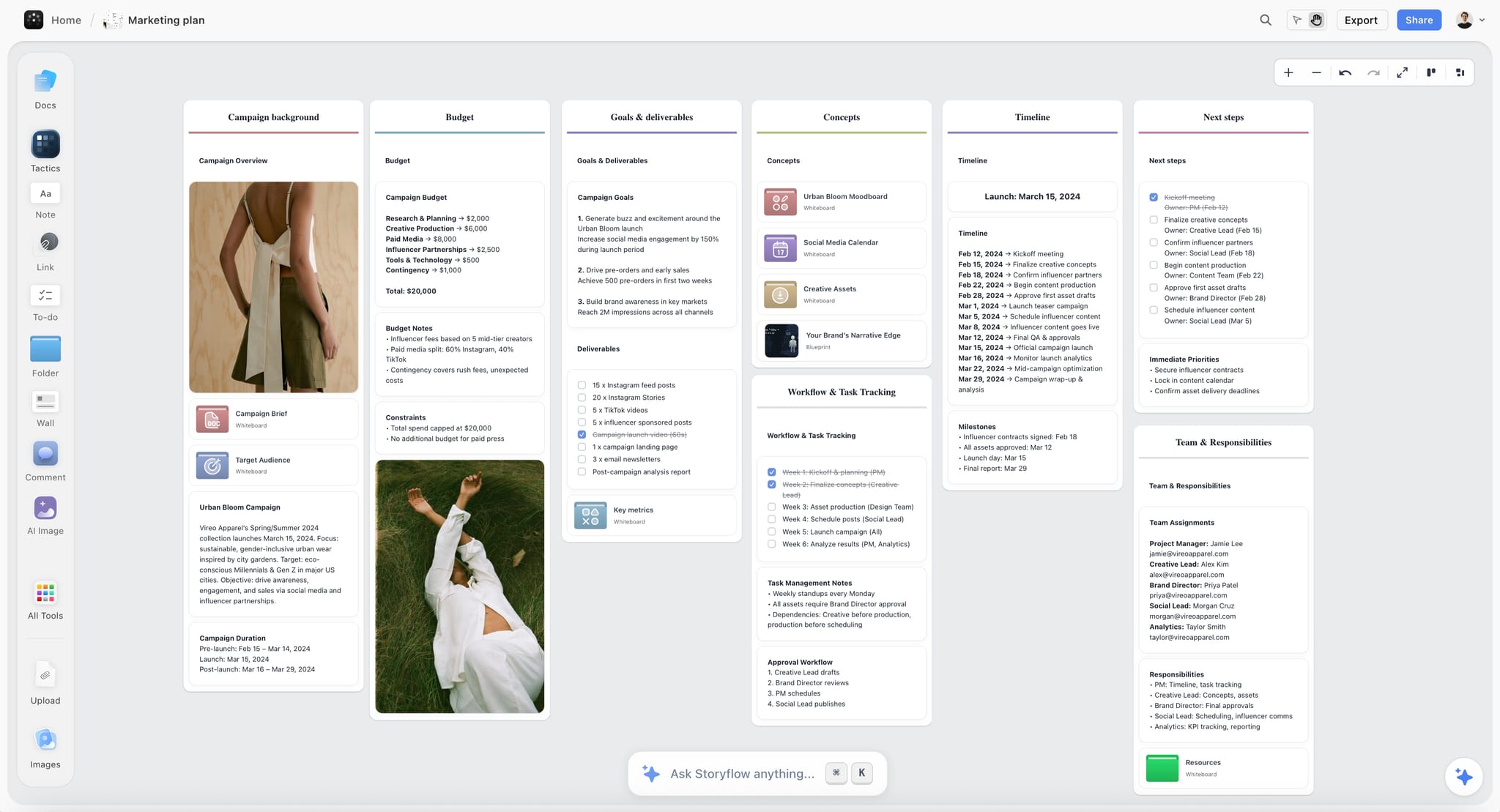
Storyflow consolidates this scattered workflow into one integrated workspace. A single subscription covers what teams normally split across ChatGPT (AI), Milanote (visual boards and moodboards), Notion (docs and notes), Frameset (storyboards and shot planning), and Shotdeck (a cinematic frames library), and it starts free, with no object limit and no time limit on the Free plan. Teams that make the switch report dramatic improvements in productivity, collaboration quality, and project coherence. Here's why teams are consolidating to Storyflow.
The Multi-Tool Problem
Using multiple specialized tools seems logical - each one does its specific job well. But this approach creates hidden costs that compound over time:
Context Switching Kills Productivity
Your team brainstorms in Miro. Someone needs to document decisions, so they switch to Notion. Need AI help? Open ChatGPT and manually copy context. Want to assign tasks? Jump to Trello. Reference a file? Check Google Drive. Each switch breaks flow state and forces context reload.
Research shows it takes an average of 23 minutes to fully regain focus after switching tasks. If your team switches between tools 10 times per day, that's nearly 4 hours of lost productive time - per person, per day.
Information Silos Fragment Projects
When project information lives across multiple tools, it becomes siloed. The whiteboard in Miro doesn't know about the documentation in Notion. ChatGPT can't see your Trello tasks. Google Drive files exist separately from everything else.
Team members lose track of where specific information lives. "Was that decision documented in Notion or just discussed in Slack?" becomes a daily question. New team members face overwhelming onboarding as they need access and training for 6+ different platforms.
Manual Synchronization Creates Errors
Since tools don't talk to each other, teams manually sync information. Update the whiteboard, then remember to update the Notion doc, then create Trello cards, then notify the team in Slack. This manual process introduces errors - updates get missed, versions become inconsistent, and truth becomes unclear.
Subscription Costs Add Up
Each tool charges separately. Miro Team plan: $8/user/month. Notion Plus: $10/user/month. ChatGPT Plus: $20/user/month. Trello Premium: $10/user/month. For a 5-person team, that's $240/month minimum - often more with additional tools. Costs scale linearly with team size.
What Storyflow Replaces
Storyflow consolidates the core tools teams use for creative and strategic work:
Visual Whiteboarding (Miro, Mural, FigJam, Milanote)
What it replaces: Infinite canvas for brainstorming, mind mapping, visual organization, and spatial thinking.
How Storyflow is better: Not just an empty canvas - includes built-in frameworks (Tactics), AI that generates structure, and tight integration with documents and AI assistance. No need to switch tools to add detailed content or get AI help.
Documentation & Knowledge Base (Notion, Confluence)
What it replaces: Long-form writing, documentation, meeting notes, project briefs.
How Storyflow is better: Documents live alongside visual boards, not in separate page hierarchies. The AI sees both your visual workspace and written documentation, providing context-aware assistance. No jumping between whiteboard and docs - they're integrated.
AI Assistance (ChatGPT, Claude, Gemini)
What it replaces: AI brainstorming, content generation, strategic thinking support.
How Storyflow is better: The AI sees your entire project workspace automatically - all boards, documents, cards, and context. No copying and pasting background information into separate chat windows. The AI remembers your project across sessions and provides suggestions based on actual work, not isolated prompts.
Project Organization (Trello, Asana, Monday)
What it replaces: Task lists, kanban boards, project timelines, workflow tracking.
How Storyflow is better: Cards can be organized as lists, kanbans, or spatial layouts - whatever fits your workflow. The same cards that contain your strategic thinking can become task lists. No duplicating information between planning tool and execution tool.
Reference Management (Pinterest, Google Drive, Dropbox)
What it replaces: Visual references, mood boards, research collection, file storage.
How Storyflow is better: Images, files, and references live directly on your project boards alongside strategy and execution. Create mood boards in the same workspace where you plan projects. AI can reference images when generating ideas.
Key Benefits of Consolidation
Single Source of Truth
Everything related to a project lives in one workspace. Strategy boards, documentation, tasks, references, AI conversations - all integrated. When someone asks "where's the campaign plan?" there's one answer: in the project workspace.
Result: Teams spend 70% less time searching for information. New members get up to speed faster because everything is in one place.
Persistent Context
The AI understands your entire project because it can see everything in your workspace. It knows your goals, audience, strategy, previous decisions, and current progress. Every team member gets AI assistance with full project context automatically.
Result: AI suggestions become dramatically more useful. Instead of generic advice, you get recommendations that fit your specific project situation.
Real-Time Collaboration
Your entire team works in the same workspace simultaneously. See what others are doing in real-time. Build on each other's ideas immediately. No waiting for someone to finish in one tool before moving to the next.
Result: Teams report 50% faster decision-making cycles and better creative outcomes from real-time collaborative thinking.
No Context Switching
Brainstorm visually, write documentation, get AI assistance, organize tasks, and collect references - all without leaving your workspace. The flow state that drives creative work remains unbroken.
Result: Individual productivity increases 30-40% as teams eliminate time lost to tool switching and mental context reloading.
Volume Discount Pricing
One Storyflow subscription replaces a stack of paid tools. Pro is $19/month per person, or $14/month billed annually, and includes the full 200+ framework library, AI image generation, and 5× the AI of Plus. Teams that want a shared workspace can use Max ($49/month per seat, or $39/month annually) for a Team Workspace with roles and permissions, and the per-seat price drops further with size: 3-9 seats get 20% off, 10-19 get 30% off, 20-29 get 35% off, 30-49 get 40% off, and 50+ get 45% off. The Free tier still includes unlimited boards, unlimited collaboration, and core features with no object limit and no time limit.
Result: A 10-person team paying for Miro + Notion + ChatGPT separately spends $380+/month. The same team on a single Storyflow plan pays from $140/month (10 Pro seats at $14/month billed annually), and works in one connected workspace instead of three disconnected tools.
Real Team Workflows
Here's how different teams consolidated their tool stacks with Storyflow:
Marketing Teams
Before: Brainstorm campaign ideas in Miro. Document strategy in Notion. Get AI help in ChatGPT. Create content calendar in Google Sheets. Manage tasks in Asana. Share references via Slack. Six tools, constant switching, fragmented information.
After: Campaign board in Storyflow contains strategy cards, audience research, messaging frameworks, content calendar, task assignments, visual references, and AI chat - all integrated. The AI sees campaign strategy when suggesting content ideas. Documentation lives alongside execution plans.
Impact: 40% faster campaign development. Better strategic coherence. New team members onboard in days instead of weeks.
Content Creation Teams
Before: Plan videos in Notion. Collect visual references in Pinterest. Use ChatGPT for script help. Track production in Trello. Review edits via Dropbox links. Scattered workflow across five platforms.
After: Project board contains story structure, script drafts, shot lists, reference images, production schedule, and AI assistance. Apply Hero's Journey Tactic for narrative structure. AI suggests improvements based on entire project context. Everything visual and written in one space.
Impact: 50% reduction in production planning time. Better narrative coherence. Team stays aligned without constant status meetings.
Product Teams
Before: User research in Miro. Requirements docs in Confluence. Roadmap in Jira. Brainstorming in FigJam. Design references in Dropbox. Five separate sources of truth creating constant sync issues.
After: Feature boards contain user insights, requirements, technical considerations, design references, and development tasks. AI helps identify gaps in planning. Real-time collaboration keeps product and engineering aligned. Single workspace that evolves from research to execution.
Impact: 35% faster feature delivery. Fewer miscommunications. Requirements and execution stay in sync naturally.
Creative Agencies
Before: Client briefs in Google Docs. Concepting in Miro. Mood boards in Milanote. Project management in Monday. Creative assets in Dropbox. Different client projects scattered across tools creating workflow chaos.
After: Each client gets dedicated project workspace containing brief, creative strategy, mood boards, concepts, deliverables, and timeline. Save successful approaches as custom Tactics and reuse across clients. AI helps adapt proven frameworks to new client contexts.
Impact: 60% faster client onboarding. Consistent quality across projects. Junior team members access proven methodologies instantly.
Migration: How Teams Switch
Switching consolidated tools seems daunting, but most teams complete migration in 1-2 weeks:
Week 1: Start Fresh Projects in Storyflow
- Choose one new project to launch in Storyflow (not migrating old work yet)
- Use AI generation to create initial workspace structure
- Invite team to collaborate - learn the platform together on real work
- Keep old tools running for existing projects (no disruption)
Most teams find Storyflow intuitive enough that no formal training is needed. Learning happens through actual project work.
Week 2: Migrate Active Projects
- Identify 2-3 actively-worked projects worth migrating
- Create new workspace in Storyflow, bring over key information
- Don't migrate everything - focus on what's actually being used
- Archive or reference old tools for historical information
You don't need to perfectly replicate your old setup. Use migration as opportunity to improve organization and eliminate accumulated cruft.
Week 3+: Archived Projects Stay Where They Are
Completed or inactive projects can stay in old tools. No need to migrate everything immediately. Only move historical projects if they're frequently referenced. Most teams find that once actively working in Storyflow, they rarely need old archived work anyway.
Addressing Common Concerns
"We've invested heavily in our current tools"
Sunk cost fallacy. The question isn't what you've already spent, it's whether continuing current approach costs more than switching. Calculate hours lost to context switching, subscription costs, and productivity impact of fragmented workflows. Most teams find Storyflow pays for itself in saved time within the first month.
"Our team is comfortable with current tools"
Comfort isn't the same as effectiveness. Many teams are comfortable with inefficient workflows simply because they're familiar. Run a two-week trial where one project uses Storyflow. Compare team velocity, collaboration quality, and subjective experience. Let results speak.
"What if Storyflow doesn't have feature X?"
Storyflow prioritizes features that matter for creative and strategic work. Some specialized features from niche tools aren't included. The question is whether that specialized feature is worth maintaining your entire fragmented tool stack. For most teams, core functionality with better integration beats scattered advanced features.
"Can we try it without disrupting current work?"
Yes. Start one new project in Storyflow while keeping existing projects in current tools. No forced migration, no workflow disruption. Evaluate Storyflow with real work, not toy examples. If it doesn't work better, you've lost nothing. Most teams who try this approach end up switching completely within a month.
Cost Analysis: Multi-Tool vs Storyflow
Here's what a typical 8-person team spends on separate tools vs Storyflow:
Separate Tools Approach
- Miro Team: $8/user × 8 = $64/month
- Notion Plus: $10/user × 8 = $80/month
- ChatGPT Plus: $20/user × 8 = $160/month
- Trello Premium: $10/user × 8 = $80/month
- Total: $384/month = $4,608/year
This doesn't include hidden costs: time lost to context switching (estimated 15-20 hours per person per month at typical hourly rates: $3,000-6,000/month), manual synchronization creating errors and rework, onboarding complexity for new team members, and mental overhead of managing multiple platforms.
Storyflow Approach
- Storyflow Pro (8 people): $14/user/month billed annually = $112/month
- Total: $112/month = $1,344/year
Savings: about $3,264/year in subscriptions alone (roughly 70% less), plus elimination of context-switching time, reduction in synchronization errors, and faster onboarding.
For the 8-person team example, switching to Storyflow with volume discounts saves approximately $6,000-9,000 annually when accounting for both subscription costs and recovered productivity time.
What Teams Say After Switching
Common feedback from teams that consolidated to Storyflow:
- "We didn't realize how much context switching was costing us until it stopped." - Creative agency that consolidated 6 tools to Storyflow
- "Having AI that actually knows our project context changed everything." - Marketing team that switched from ChatGPT + Notion + Miro
- "Onboarding new team members went from 2 weeks to 2 days." - Product team that eliminated tool sprawl
- "We're doing better work faster with fewer meetings." - Content team that switched from 5-tool workflow
- "The cost savings alone justified the switch, but the productivity gains are the real win." - Agency managing multiple client projects
Should Your Team Switch?
Consider consolidating to Storyflow if your team:
- Currently uses 3+ separate tools for visual work, documentation, and AI assistance
- Loses information between tools or struggles to maintain single source of truth
- Spends significant time manually syncing information across platforms
- Wants AI assistance that understands full project context, not isolated prompts
- Needs better real-time collaboration without constant status meetings
- Wants to reduce subscription costs without sacrificing capabilities
- Struggles onboarding new members to complex multi-tool workflows
If you checked 3+ boxes, consolidation will likely create substantial improvements in team productivity and project quality.
Getting Started
- Sign up for free Storyflow account (no credit card required)
- Create workspace for one upcoming project using AI generation
- Invite 2-3 team members to collaborate on that project
- Work in Storyflow for the project while keeping existing projects in current tools
- After 1-2 weeks, evaluate: Is collaboration better? Is work quality higher? Are you saving time?
- If yes, migrate additional active projects and upgrade to Pro for full team features
Most teams know within a week whether consolidation makes sense. The difference in workflow quality becomes obvious quickly - either Storyflow dramatically improves collaboration, or it doesn't fit your needs. No ambiguity.
Stop managing tools. Start building better work. That's why teams consolidate to Storyflow.
Was this article helpful?
Related Articles
Inviting Collaborators
Real-time Editing
Sharing Projects
Generating Workspace Structures with AI