
Ultra-fast planning, extremely simple
Plan and teach visually,
on one canvas.
Storyflow is a visual workspace for teachers, professors, and instructional designers. Map a whole curriculum, plan units and lessons, build concept explainers, and run a class board students can view, all on one infinite canvas. Describe a topic and AI drafts the board for you.


Creatives working for these brands already got early access
- Red Bull
- Canon
- Artlist
- Porsche
See how easy it is to get started
Watch a real project come together, from a blank board to a finished plan, clicked through step by step.
Start from a ready-made template
Pick a board to see what you can build, then let AI fill it in. Every template is a real, editable starting point on the same infinite canvas.

Mind Map
Branch one central idea out into themes and sub-points, then drag the connections around until the structure makes sense.
What is a visual workspace for educators?
A visual workspace is one place to see a whole course at once instead of scattering it across slide decks, shared drives, and a stack of documents. You lay a subject out in space: the units branch from the center, each lesson sits under the unit it belongs to, and the standards, activities, and resources hang off the lesson they support. For an educator that means the shape of the term is visible while you plan it, not something you reconstruct from a folder every August.
Most planning tools push teaching into a single shape. A doc gives you a long outline, a slide tool gives you boxes in a fixed order, and a spreadsheet gives you a grid that hides how ideas actually connect. Storyflow gives you an open infinite canvas where every lesson, activity, reading, and standard is a card you can move, group, and link. A curriculum map, a unit plan, and a concept explainer for one hard topic can all live on the same board and reference each other, which is closer to how a course really fits together.
The canvas also means your planning does not dead-end at an outline. Describe a unit and AI lays out the first board of lessons and objectives, expand a topic that needs scaffolding, or turn the plan into a lesson sequence, a concept map for students, or a class board on the same canvas. Your planning becomes the material you actually teach from, and a view-only link lets students explore the board without an account.
Ultra fast from brief to board
From curriculum to classroom in four steps.
Open a canvas and build the course up. Every lesson and resource stays yours to rearrange.
01
Open a canvas
Start in the browser. Nothing to install, just an infinite canvas ready for the course you are planning.
02
Map the curriculum
Drop the subject in the middle and branch out the units, or describe the course once in the AI chat and let Storyflow lay out the first curriculum map for you.
03
Plan units and lessons
Break a unit into lessons, attach readings, slides, and activities beside the objective they serve, and ask the AI to expand a topic or draft a warm-up.
04
Share with the class
Turn a unit into a concept map or class board, share a view-only link students can open without an account, or export the plan as an image or PDF.
A planning workspace that keeps the whole course in view.
Map it, plan it, explain it, and share it, all on one canvas with no object cap on any paid plan.

Map the curriculum
See a whole course at a glance
Branch a subject into units and lessons so the arc of the term reads in one look. Drag branches to resequence a course when the pacing changes, and let AI lay out the first map from a syllabus you describe.
See mind mapping →
Plan every unit
Build a unit plan that holds everything
Gather objectives, activities, readings, and slides onto one board and connect each to the lesson it supports. A unit plan you can actually see, instead of a document, a deck, and a drive folder that never quite line up.
See visual collaboration →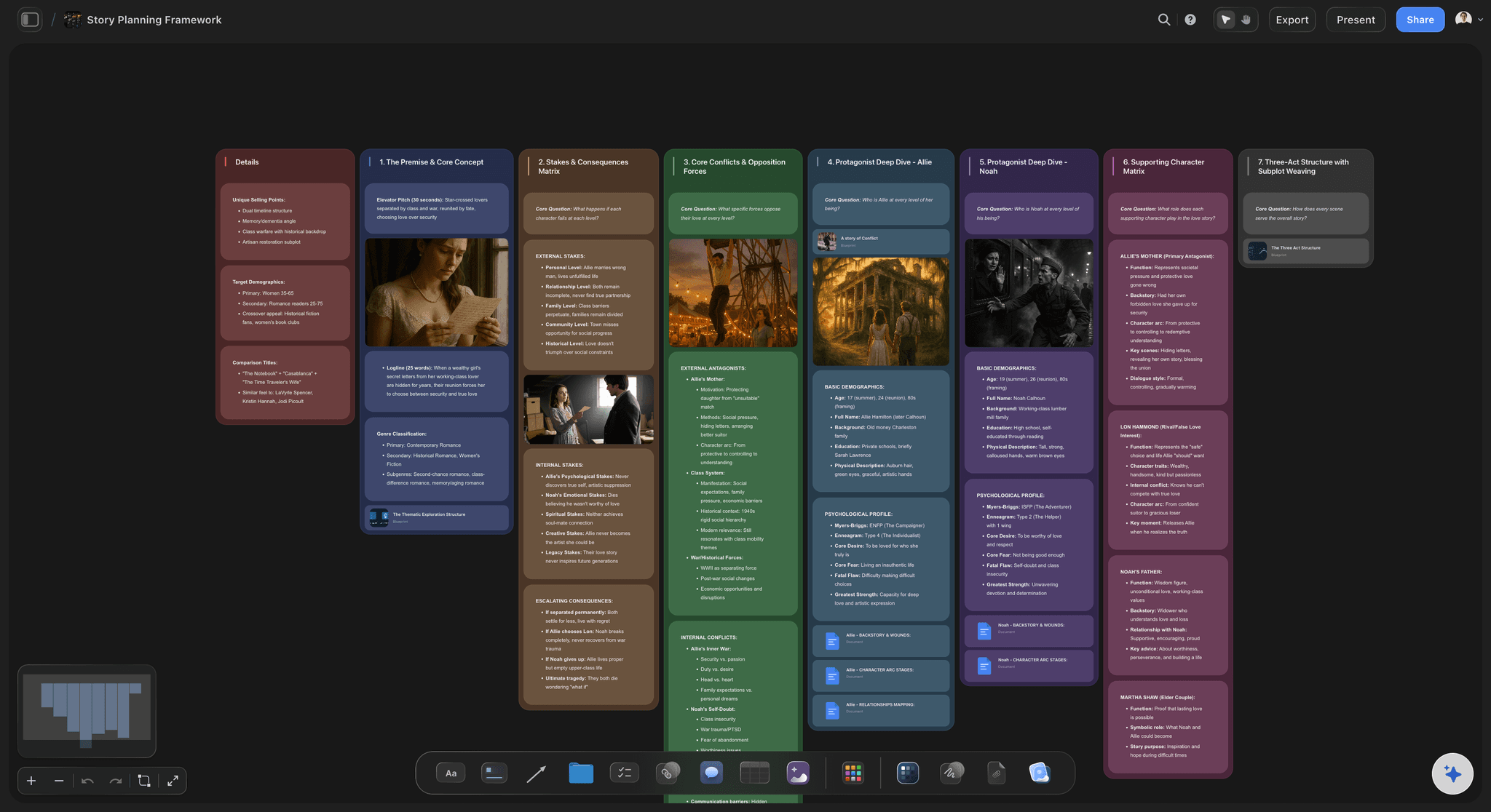
Explain hard topics
Turn a topic into a concept map
Pick the topic students struggle with and build it out as a visual explainer on the same canvas. Attach diagrams and video, then share it as a class board so the whole class sees how the ideas connect.
See the online whiteboard →
Plan with colleagues
One board for the whole teaching team
Keep a shared planning board where a department maps a course together on one infinite canvas. Units, lessons, and resources stay connected across the team, so a curriculum built this year is not lost by the next.
See team planning →Free plan for educators coming late 2026.
Storyflow is paid-only during early access and the Free plan arrives before the end of 2026. Anyone a paid member invites to a board joins free today. The planned Free plan has no object cap and no trial clock, so a full year of curriculum maps, unit plans, and class boards will not push you to pay mid-term.
Unlimited boards for every course and unit
Basic AI usage to draft plans and expand topics
20 file uploads for readings, slides, and worksheets
Share class boards view-only, or invite co-teachers free
Built for people with taste
Built for the way educators actually plan.
See the course, plan the units, let AI do the drafting, then share boards students and colleagues can open.
See the whole course
Curriculum maps that make structure obvious
Branch a course by hand: Grow units and lessons out from a central subject in any direction. The canvas does not force a symmetrical tree, so the map matches the course instead of a preset.
Resequence as you plan: Reorder a unit by dragging it. When pacing shifts or a standard moves, the map changes with a move rather than a rebuild of the whole outline.
See the coverage: Color and cluster the branches so the standards you have covered and the weeks that are still thin read at a glance across a big board.
AI that reads your board
AI that drafts and expands your plans
Draft a unit from a prompt: Describe a unit and ask the AI to lay out lessons and objectives. It builds on what is already on the board, so the draft connects to the course you have mapped.
Work from your materials: Add a syllabus or reading and up to five documents and three boards as context, so the AI plans from your actual materials rather than a generic answer.
Re-prompt to fit the class: Ask for a simpler explanation, a differentiated version, or an activity for a shorter period. The AI reworks the board while keeping the plans you wrote yourself.
All your materials, attached
Readings, slides, and video on one board
Drop in anything: Images, video, GIFs, PDFs, and links sit on the canvas next to the lesson they support, so a reading lives beside the objective it serves instead of behind a link.
Grab frames from video: Pull stills from YouTube and Vimeo straight onto the board when a clip explains a concept better than a slide, ready to point at during class.
Long notes where you need them: Detailed lesson notes live as documents on the same canvas, so the map stays scannable for pacing and the detail is one click away.
From plan to classroom
Share boards students and colleagues can open
Class boards students can view: Send a view-only link and students explore a concept map or unit board in the browser without an account, so the plan doubles as the material you teach from.
Plan with co-teachers: Invite colleagues to build a curriculum board with you free, so a department plans a course together instead of merging separate documents.
Export for handouts: Need the board in a packet or on the projector? Export it as a clean image or a PDF in one step.
Explore templates for your project
Every template opens as a real, editable board on the infinite canvas. Pick the closest fit and make it your own.
Mind Map
Branch one central idea out into themes and sub-points, then drag the connections around until the structure makes sense.
One app instead of five
How Storyflow compares for planning and teaching.
Notion, Miro, and Milanote each do part of this well. The question is whether one free board can hold the whole course.
Storyflow
Recommended
Infinite visual canvas for curriculum and lessons
AI that drafts and expands plans from your board
Plans become concept maps and class boards on the same canvas
Free plan with no object cap or time limit
Notion
Infinite visual canvas for curriculum and lessons
AI that drafts and expands plans from your board
Plans become concept maps and class boards on the same canvas
Free plan with no object cap or time limit
Miro
Infinite visual canvas for curriculum and lessons
AI that drafts and expands plans from your board
Plans become concept maps and class boards on the same canvas
Free plan with no object cap or time limit
Milanote
Infinite visual canvas for curriculum and lessons
AI that drafts and expands plans from your board
Plans become concept maps and class boards on the same canvas
Free plan with no object cap or time limit
What creators are saying
Join early creators getting structured workspaces and AI that remembers their projects
“Storyflow has sped up my workflow by at least 3x, which means more flow state and more projects I can actually ship. It truly changed the way me and my team create.”

Reilin Joey
Director & YouTuber
“One prompt gets me a structured board. But the tactics are my favorite. I run my YouTube scripts through them and my intros and retention got better. It's amazing.”

Justkay
YouTuber & Freelance Filmmaker
“I used to juggle five apps to plan a project. Now I describe what I am making and get boards, lists, and a schedule. All in one place.”

George
@fernwehchronicles
Educator questions, answered.
Everything teachers, professors, and instructional designers ask about planning in Storyflow.
Not yet. Storyflow is paid-only during early access, with plans from $7.99 a month billed annually ($9.99 monthly). A free plan launches before the end of 2026 with unlimited boards, basic AI usage, 3 starter frameworks and 20 file uploads. Until then, anyone a paid member invites to a board joins free.
Start a board, drop the subject in the middle, and branch out the units, or describe the course in the AI chat and let Storyflow lay out the first curriculum map. Then break each unit into lessons, attach readings and slides beside the objective they serve, and expand or draft with the AI as you plan.
Yes. Describe a unit and the AI drafts lessons and objectives on the board, then you attach activities, readings, and slides to each. You can re-prompt for a simpler version or a shorter period, and the plan stays yours to rearrange on the same canvas.
Yes. Send a view-only link and students open a concept map, unit board, or class board in their browser without an account. You control what you share, so a planning board and a student-facing board can be separate links from the same canvas.
Notion is great for structured docs and databases, and Miro is a strong freeform whiteboard, but neither turns a plan into teaching material on its own. Storyflow lays a course out visually on an infinite canvas, uses AI to draft and expand plans from your board as context, and turns a unit into a concept map or class board on the same canvas.
The AI reads your active board, so the units and lessons already on the canvas shape what it drafts. You can also attach up to five documents and three boards, such as a syllabus or a reading, for it to work from. It does not read your entire workspace at once.
Yes. Invite co-teachers and curriculum leads to build a board with you, or send a view-only link so anyone can explore a curriculum map or unit plan in their browser without an account. Collaboration and sharing are included on every paid plan.
No. Storyflow runs in your browser with nothing to install. Open an account and start mapping a curriculum, planning a unit, or building a concept explainer on an infinite canvas right away.
The whole course, on one canvas.
Map a curriculum, plan your units, and share class boards students can open in one place.