
Category
Education
Author

Justkay
Documentary Filmmaker & Founder at Storyflow
Topics
2026-05-10
•
Updated May 10, 2026
•
16 min read
•
Education- best AI tools for students 2026
- AI for studying
- AI for research papers
- free AI tools for students
- NotebookLM for students
- AI for thesis
What are the best AI tools for students in 2026?
The best AI tools for students in 2026 are NotebookLM (best for source-grounded research and study), Storyflow (best for visual study and project work with AI), Perplexity (best for sourced web research with citations), and Claude (best for nuanced writing help). NotebookLM grounds every response in the documents you upload (lectures, papers, textbook chapters), so the AI cannot make things up. The split that matters: AI that grounds its answers in your specific sources protects your understanding; AI that hallucinates plausibly erodes it.

All 12 AI Tools for Students, Ranked
- NotebookLM: best for source-grounded research and study
- Storyflow: best for visual study and project work with AI
- Perplexity: best for sourced web research with citations
- Claude: best for nuanced writing help
- ChatGPT: best for quick study help and ideation
- Anki: best for spaced-repetition flashcards
- Quizlet AI: best for AI-generated study sets
- Otter.ai: best for lecture transcription
- Grammarly: best for writing assistance and grammar
- Mem: best for AI-native notes and long-term retention
- Heptabase: best for visual research with card depth
- Wolfram Alpha: best for STEM problem solving
Full disclosure: Storyflow is our own product, and we rank it #2 here for one job: visual study and project work, where the AI reads your whole board. For source-grounded research NotebookLM is stronger because it answers only from the documents you upload, and for sourced web research Perplexity gives cleaner citations. Storyflow is not a citation engine or a flashcard app, so for spaced repetition you still want Anki. We link to every tool so you can judge the fit.
Quick Comparison: Best AI Tools for Students
These four cover the jobs students switch between: source-grounded study, visual study and project work, sourced web research, and nuanced writing help.
| Tool | Best For | AI Features | Price |
|---|---|---|---|
| NotebookLM | Source-grounded research and study | Answers grounded in your uploads | Free |
| Storyflow | Visual study and project work | Canvas AI reads your full board | $7.99 mo annual (free plan late 2026) |
| Perplexity | Sourced web research with citations | Live web search plus citations | Free / $20 mo |
| Claude | Nuanced writing help | Claude chat with large context | Free / $20 mo |
1) Quick Answer: The Best AI Tools for Students in 2026
The best AI tools for students in 2026 are NotebookLM (best for source-grounded research and study), Storyflow (best for visual study and project work with AI), Perplexity (best for sourced web research with citations), and Claude (best for nuanced writing help). NotebookLM stands out because it grounds every response in the documents you upload (lectures, papers, textbook chapters), so the AI cannot make things up. Storyflow stands out because the AI reads your full study canvas (notes, mind maps, references) and you can use Blueprint Tactics like Hero's Journey or Five-Act Structure for structured writing.
The short version: if you want AI that helps you learn, NotebookLM and Storyflow. If you want AI that does the work for you, ChatGPT or Claude (and you should think hard about what you are losing). The split that matters is: AI that grounds its answers in your specific sources versus AI that hallucinates plausibly. As a student, the first kind protects your understanding; the second kind erodes it.
For the deeper case on canvas-based study, see The 10 Best Mind Mapping Tools for Students in 2026 and AI Second Brain for PhD Students (2026).
2) Comparison Table: 12 AI Tools for Students Compared
Prices above are the published rates at the time of writing and move often, so check the vendor's own page before you commit. The shape of each plan (free tier, subscription, or one-time licence) is more stable than the number. Rating criteria: Tested for real student work (essays, theses, study sessions, lab notes, project papers). Tools were rated on whether they build understanding, not just produce output.
3) Why Students Need a Different AI Stack Than Generic Users
A working professional and a student have different relationships to AI even when they use the same tool. Three differences matter for picking the right student stack.
Students are paying for understanding, not output. A marketer wins when the campaign ships. A student wins when the concept sticks. AI tools that produce confident output without showing sources or asking the student to engage with the material accelerate completion at the cost of learning. The right student tools (NotebookLM, Storyflow, Perplexity) make the student think; the wrong ones (raw ChatGPT for essays) do the thinking for them.
Citations matter for academic integrity. Most academic work requires verifiable sources. AI that hallucinates citations is worse than no AI; it produces work that fails plagiarism checks or, worse, gets accepted with fake sources. NotebookLM, Perplexity, and Wolfram Alpha all ground their answers; raw ChatGPT and Claude do not consistently.
Free tiers matter more than for any other audience. Students are usually budget-constrained. The right student stack has a viable free tier or a real student discount. Storyflow is paid-only during early access, but its Free plan, launching before the end of 2026, is shaping up to be unusually generous: unlimited boards, unlimited cards, unlimited collaboration with as many study partners as you want, basic AI usage, and 20 file uploads, with no credit card required. Anki desktop is free forever; NotebookLM is free during preview; Wolfram Alpha has student pricing.
The familiar approach is to paste an essay prompt into ChatGPT, then submit what comes back. It works once, gets caught more often than students realize, and reliably produces a graduate who cannot reason through a hard problem. The studious approach is to use AI as a thinking partner: NotebookLM grounds you in sources, Storyflow holds your evolving understanding on a canvas, and Claude helps you refine writing you actually drafted. The goal is not faster essays. It is better understanding that produces better essays.
For the architectural argument, see Why ChatGPT Loses the Plot After the Third Reply.
4) How We Evaluated These Tools (For Real Student Work)
Every tool was tested for real student-shaped work between 2024 and 2026: a literature review, a research paper, a thesis-grade project, an exam-prep workflow, and a recurring study schedule. Five criteria, weighted in this order:
- Source grounding. Does the tool show you where its answers come from, or does it make things up?
- Learning vs output. Does it help you understand the material, or does it bypass understanding?
- Free tier viability. Can a real student use this without paying, or is the free tier a teaser?
- Workflow fit. Lectures, papers, exams, projects. Does it slot into the student day, or is it a tool you have to context-switch into?
- Academic integrity safety. Does it help you avoid plagiarism, or does it produce risk?
Tested workflows included an undergrad humanities literature review, a STEM problem set, a graduate thesis chapter, an exam-prep schedule with spaced repetition, and a multi-source research paper.
5) Quick Picks by Student Job
If you want the short list, organize by job.
Best for Lecture Capture and Review: Otter.ai for transcription. Storyflow for putting the lecture transcript on a canvas with your other notes.
Best for Reading and Research: NotebookLM for grounded synthesis from PDFs and papers. Perplexity for sourced web research. Heptabase for card-detail-heavy reading.
Best for Note-Taking: Storyflow if your notes are visual or project-shaped. Notion AI if your notes are doc-shaped. Mem if you want AI-surfaced notes over time. Obsidian for plain-text local-first.
Best for Writing Essays and Papers: Claude for nuanced drafting (with your own thinking first). Storyflow for the structural canvas behind a long paper.
Best for Exam Prep and Memorization: Anki for spaced repetition. Quizlet AI for generated study sets. NotebookLM for source-grounded review.
Best for STEM Problem Solving: Wolfram Alpha for math, physics, chemistry. ChatGPT or Claude for explaining concepts.
Best for Group Projects: Storyflow for the shared canvas where research, plan, and draft all live. Notion AI for doc-shaped collaboration.
Best for Time and Schedule: ChatGPT or Claude for quick scheduling help. Storyflow for project-level milestone planning.
6) Detailed Reviews: 12 AI Tools for Students in 2026
1. Storyflow
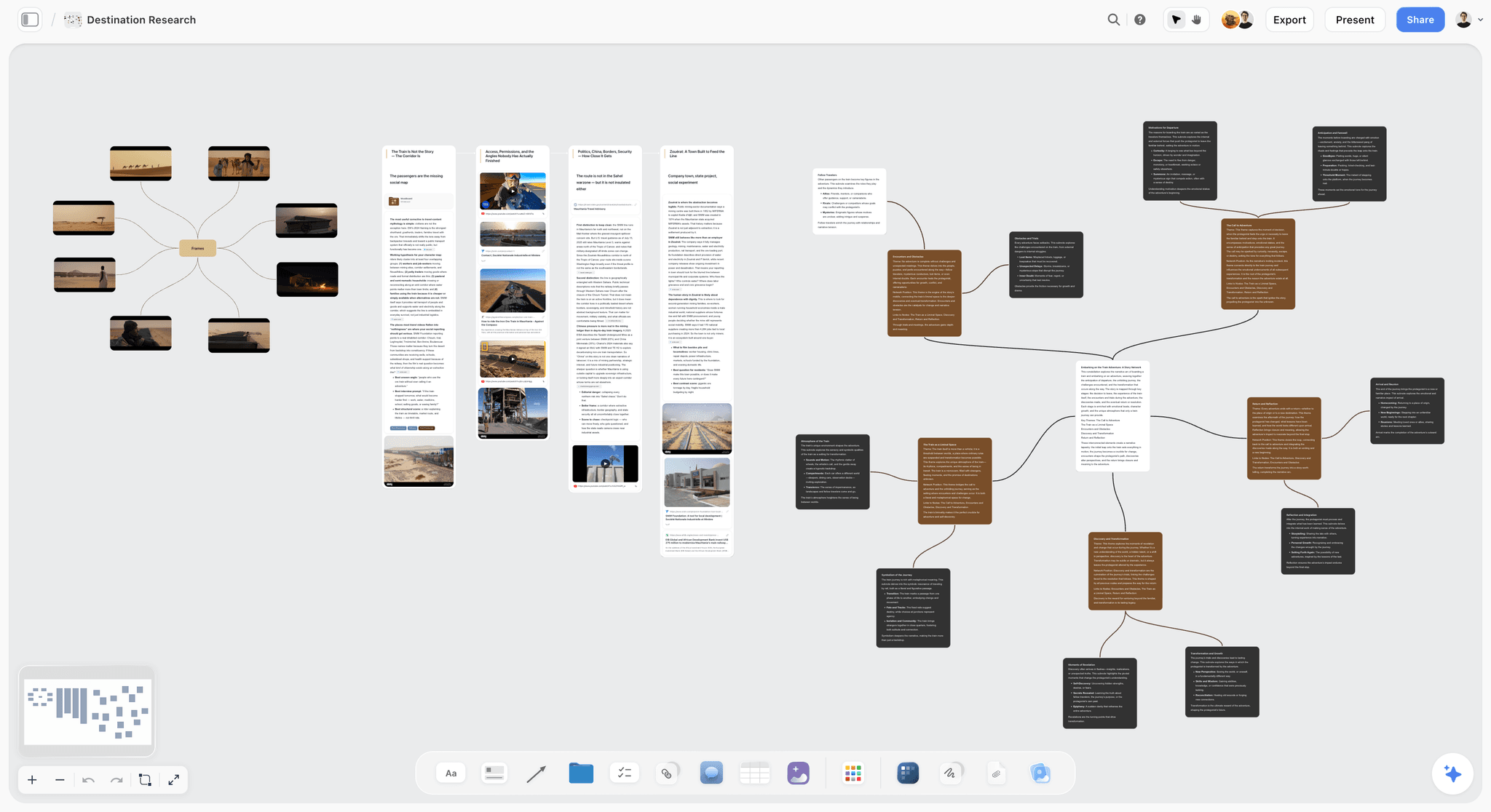
Storyflow is a visual workspace where the AI reads your full active canvas board (lecture notes, mind maps, references, draft cards) and you can use Blueprint Tactics like Five-Act Structure or Hero's Journey for structured writing.
Best for: Thesis projects, multi-source research papers, visual study workflows, project-based courses.
Verdict: The strongest visual study tool with AI in 2026. Pair with NotebookLM for the strongest student stack.
Key features
- Project-aware AI by default. The AI reads your full canvas. @-mention up to 1 Tactic and up to 3 Documents for additional grounding.
- 200+ Blueprint Tactics on Plus and above. Hero's Journey, Five-Act Structure, AIDA, Retention Hooks. The Free plan launching before the end of 2026 will ship 3 starter Story Blueprints for evaluation.
- Multi-format canvas. Mind maps, mood boards, kanban, references, draft cards on one board.
- Unlimited shared boards plus unlimited collaboration on every plan, including the Free plan launching before the end of 2026, so group projects never hit a seat fee.
Pricing
Paid-only during early access. Plus: $7.99/mo annual or $9.99/mo monthly (unlimited boards, unlimited cards, unlimited collaboration with as many study partners as you want, basic AI usage, full 200+ Blueprint library, unlimited file uploads). Pro: $14/mo annual or $19/mo monthly (adds AI image generation and 20x more AI than Plus). Max: $39/mo annual or $49/mo monthly (adds 40x more AI plus Team Workspace with Permissions and Roles). A Free plan (unlimited boards, unlimited cards, unlimited collaboration, basic AI usage, and 20 file uploads, no credit card) launches before the end of 2026.
Pros
- The AI reads your study canvas, so suggestions stay grounded in your actual material.
- Blueprint Tactics scaffold thesis-grade structural writing.
- The upcoming Free plan is shaping up to be genuinely student-friendly, and anyone a paid member invites joins free today.
Cons
- Storyflow does not replace exam-prep flashcard tools; pair with Anki or Quizlet AI.
- No specific student discount, and Plus is the entry point until the Free plan launches before the end of 2026.
- Cloud-only; no local-first option for users with strict privacy concerns.
For the persona deep-dive, see AI Second Brain for PhD Students (2026).
2. NotebookLM (Google)
NotebookLM is Google's document-grounded AI. Upload your sources (lectures, papers, textbook chapters, transcripts), ask questions, get answers tied to those sources. The audio overview feature ("AI podcast") is a unique study aid.
Best for: Source-grounded research, study, exam prep, literature review. The strongest pure student-AI tool in 2026.
Verdict: The single most underrated tool in this list. Free during preview as of mid-2026.
Key features
- Upload PDFs, docs, slides, websites, YouTube videos.
- AI grounds every response in the sources you uploaded.
- Audio overviews generate AI-podcast-style summaries.
- Notebook structure organizes courses or research projects.
Pricing
Free during preview. Verify current pricing on NotebookLM's site.
Pros
- Source grounding is genuinely strong. Hallucination is minimal.
- Audio overviews are an excellent study aid for review.
- Free during preview makes it the easiest "yes" on this list.
Cons
- Document-grounded only; not a generative drafting tool.
- No canvas for visual project work; pair with Storyflow.
- Pricing trajectory is uncertain past the preview.
3. Perplexity
Perplexity is the answer engine that ships with sources by default. The pick when you need verifiable web research without ChatGPT's hallucination risk.
Best for: Research papers, current-events analysis, fact-checking, citation discovery.
Verdict: The strongest sourced-research AI for students. Free tier is enough for casual use; Pro for paper-writing.
Key features
- Citations with every answer.
- Pro Search runs deeper queries with multi-source synthesis.
- Spaces for organizing research threads.
- Multi-model backend (GPT, Claude, or Perplexity's own).
Pricing
Perplexity Pro: $20/mo. Free tier with limited Pro searches. Some student discounts available; verify current.
Pros
- Citations matter for any academic work where sources are required.
- Strong on "what is the latest research on X" queries.
- Pro Search synthesis is excellent for first-pass literature scans.
Cons
- Not built for generation. Use Claude for drafting.
- Free tier is enough for occasional use; paper-writing benefits from Pro.
- Citations are sometimes general blogs rather than primary academic sources.
4. Claude (Anthropic)
Claude is the strongest pure-chat AI for nuanced writing in 2026. The pick for refining drafts you have actually written, not for generating drafts you have not.
Best for: Editing your own writing, refining arguments, nuanced reasoning, understanding complex passages.
Verdict: The strongest writing-help AI for students. Use it to refine, not to replace.
Key features
- Long context window (200K tokens on Sonnet 4.6 as of mid-2026; verify current).
- Projects for persistent context.
- Strong reasoning and tone-matching.
Pricing
Claude Pro: $20/mo. Claude Max: $200/mo. Free tier with daily message limits.
Pros
- Most careful with uncertainty, less prone to confident hallucination than alternatives.
- Strong at editing rather than just generating.
- Free tier with daily limits is usable for occasional help.
Cons
- Same chat-substrate limits for sustained project work; loses context on long papers.
- No image generation.
- No native source-grounding; verify every claim before citing.
5. ChatGPT
ChatGPT is the broadest student AI in 2026. Useful for ideation, quick study help, and explanation, but the worst pick for academic-integrity-sensitive work because of hallucination risk.
Best for: Quick concept explanations, idea generation, brainstorming a paper outline, general study help.
Verdict: Use thoughtfully. Excellent for ideation; risky for anything that requires citations or accuracy guarantees.
Key features
- DALL-E for image generation.
- Custom GPTs and the GPT Store, including study-focused GPTs.
- Voice mode for verbal study sessions.
- Largest plugin ecosystem.
Pricing
ChatGPT Plus: $20/mo. Free tier with daily limits.
Pros
- Broadest AI ecosystem and most templates.
- Voice mode is genuinely useful for verbal study.
- Free tier is enough for occasional study help.
Cons
- Hallucinates citations and facts confidently.
- Loses context on multi-turn academic projects.
- Encourages output over understanding if used carelessly.
6. Anki
Anki is the open-source spaced repetition flashcard tool that has been the gold standard for serious students since 2006. AI tools have caught up around it; nothing has replaced it.
Best for: Memorization for exams, language learning, medical school, any subject where retention over months matters.
Verdict: Still the best spaced-repetition tool. AI tools augment Anki; they do not replace it.
Key features
- Open-source spaced repetition algorithm.
- Cards with audio, video, images, LaTeX.
- Sync across devices (free on desktop and web; one-time paid app on iOS).
- Massive shared deck library for popular subjects.
Pricing
Free on desktop and web. AnkiMobile (iOS): $24.99 one-time. AnkiDroid (Android): free.
Pros
- The most rigorous spaced repetition algorithm in any consumer tool.
- Free on the platforms students use most.
- Massive community shared decks for med school, language learning, etc.
Cons
- UX is dated; new students often bounce on first try.
- AI features are improving but lag dedicated AI study tools.
- Card creation is real work without AI assistance.
7. Quizlet AI
Quizlet AI generates study sets, flashcards, and practice tests from your notes or uploaded material. The pick for students who want fast study set creation without Anki's learning curve.
Best for: Quick study set generation, K-12 students, undergrad memorization, language learners who want a smoother UX than Anki.
Verdict: The strongest fast-study-creation AI. Less rigorous than Anki for long-term retention.
Key features
- AI generates flashcards from notes, PDFs, or uploaded study material.
- Practice tests with multiple-choice and matching.
- Q-Chat AI tutor.
- Live games for class study.
Pricing
Free tier with limits. Quizlet Plus: $7.99/mo annual.
Pros
- Faster than Anki for casual study sets.
- AI generation removes flashcard authoring friction.
- Strong for K-12 and undergrad audiences.
Cons
- Spaced repetition algorithm is less rigorous than Anki for long-term retention.
- Free tier limits AI features.
- Less control over card creation than Anki.
8. Otter.ai
Otter.ai is the lecture transcription tool that has become a campus standard. The pick for live lecture capture and post-lecture review.
Best for: Live lecture transcription, recorded class review, study group transcripts.
Verdict: The standard for lecture transcription in 2026. Reliable and fast.
Key features
- Live transcription with speaker identification.
- Calendar integration to auto-join scheduled meetings.
- AI summary of transcripts.
- Search across all your transcripts.
Pricing
Free: 300 minutes/mo. Pro: $16.99/mo. Business: $30/user/mo.
Pros
- Free tier is genuinely usable for one or two classes per week.
- Speaker identification is mature and useful in classes with multiple voices.
- Search across transcripts is a hidden study aid.
Cons
- Transcription quality varies with audio quality.
- AI summary lags dedicated AI tools.
- Pro tier is the practical choice for full-time students.
9. Grammarly
Grammarly is the writing assistant that has been on every student's browser since the 2010s. AI features have grown around it; it is still the standard.
Best for: Grammar and clarity checks, tone suggestions, plagiarism detection (Premium).
Verdict: The standard writing assistant for students. AI features are catching up but the core grammar work is what students use it for.
Key features
- Grammar, spelling, clarity suggestions.
- Tone detection.
- Plagiarism detection (Premium).
- AI generation features (newer).
Pricing
Free tier (basic grammar). Premium: around $12/mo (annual). Student discounts available.
Pros
- The standard for grammar and clarity assistance.
- Plagiarism detection is mature.
- Free tier handles basic needs.
Cons
- AI generation features lag dedicated AI tools.
- Premium pricing is high relative to value for casual users.
- Some style suggestions feel mechanical for creative writing.
10. Mem
Mem is AI-native notes that surface relevant past notes contextually. The pick for students who want their notes to be searchable by an AI that understands what they wrote.
Best for: Long-term study, multi-course note-taking, students who want AI to do the surfacing work.
Verdict: Niche but elegant. AI-meets-notes architecture is genuinely thoughtful.
Key features
- AI that connects related notes automatically.
- Mem Chat for asking questions across your library.
- Daily notes and ambient capture.
Pricing
Around $14.99/mo. Verify current pricing.
Pros
- Surfacing related past notes is genuinely useful for cross-course study.
- Lower friction than building your own AI-over-Obsidian setup.
- Aesthetically pleasant.
Cons
- Pricing is high relative to free alternatives like Obsidian.
- Less mature than Notion for general note-taking.
- Smaller community.
11. Heptabase
Heptabase is the canvas-first knowledge tool with rich card-detail pages. The pick for graduate students whose research is dense and benefits from card-level depth.
Best for: Graduate research, deep literature review, journal-into-card workflows, students reading 50+ papers per term.
Verdict: Strong for research-heavy graduate work. Trial-only is a barrier for cost-sensitive students.
Key features
- Whiteboard with rich card-detail pages.
- Local-first storage with optional cloud sync.
- AI assistance on selected cards.
- Journal-into-card workflow.
Pricing
Around $8.99/mo annual. Trial only; no perpetual free tier.
Pros
- Strongest tool for deep card-level research notes.
- Local-first storage matters for some students.
- Card-detail depth is genuine.
Cons
- Trial-only is the barrier for students; verify if student discount is available.
- AI is less central than in Storyflow.
- Smaller methodology layer than Storyflow's Blueprint Tactics.
12. Wolfram Alpha (with Notebook AI)
Wolfram Alpha is the computational knowledge engine that has been a STEM student standard since 2009. The Notebook AI features add LLM-style explanation on top of the symbolic engine.
Best for: Math problem solving, physics, chemistry, computer science, any STEM where computation matters.
Verdict: The standard for STEM problem solving. AI explanations now make it more student-friendly.
Key features
- Symbolic computation across math, physics, chemistry, finance.
- Step-by-step solutions (with Pro).
- Notebook AI for natural-language interaction with computations.
- Reliable and grounded in real computation, not LLM hallucination.
Pricing
Free for basic queries. Pro Student: around $7.25/mo. Verify current.
Pros
- Grounded in real computation, not hallucination.
- Step-by-step solutions teach instead of just giving answers.
- Student pricing is genuinely affordable.
Cons
- STEM-focused; less useful for humanities or social sciences.
- Free tier limits step-by-step solutions.
- UX is dated compared to newer AI tools.
7) Recommendations by Student Type
13. Undergraduate Humanities Student
Top picks: NotebookLM + Storyflow + Claude
NotebookLM for source-grounded reading and synthesis from your assigned PDFs. Storyflow for thesis-grade structural writing on a canvas with Tactics. Claude for editing your drafts (write the first draft yourself).
14. Undergraduate STEM Student
Top picks: Wolfram Alpha + Anki + NotebookLM
Wolfram Alpha for problem solving and step-by-step explanations. Anki for memorization (especially in chem, bio, languages). NotebookLM for textbook chapter synthesis.
15. Graduate / Master's Student
Top picks: Storyflow + NotebookLM + Perplexity
Storyflow for thesis canvas (literature, references, draft chapters). NotebookLM for source-grounded synthesis from your literature. Perplexity for sourced web research that complements your library.
16. PhD Student / Researcher
Top picks: NotebookLM + Storyflow + Heptabase
NotebookLM for grounded synthesis. Storyflow for the dissertation canvas. Heptabase if your work benefits from card-level depth. See AI Second Brain for PhD Students for the full deep-dive.
17. Medical / Law Student
Top picks: Anki + NotebookLM + Quizlet AI
Anki for the high-volume memorization that med and law schools demand. NotebookLM for source-grounded synthesis from texts and case law. Quizlet AI for fast generation of study sets between Anki sessions.
18. Language Learner
Top picks: Anki + ChatGPT + ElevenLabs
Anki for vocab spaced repetition. ChatGPT for conversational practice and grammar explanation. ElevenLabs (free tier) for synthetic native-speaker audio of words and phrases.
19. Online / Self-Taught Learner
Top picks: Storyflow + NotebookLM + ChatGPT
Storyflow for the personal canvas where your self-curriculum lives. NotebookLM for grounded study from books and resources you choose. ChatGPT for quick concept explanations and exploratory questions.
20. Student Working on a Thesis / Dissertation
Top picks: Storyflow + NotebookLM + Claude
Storyflow for the canvas holding your full project (research, references, draft chapters, structural notes). NotebookLM for grounded synthesis from your sources. Claude for refining your drafts (after you have written them).
21. Group Project Student
Top picks: Storyflow + Otter.ai + ChatGPT
Storyflow for the shared canvas your group works on. Otter.ai for transcribing group meetings. ChatGPT for individual ideation outside the group canvas.
22. Test-Prep / Standardized Exam Student (LSAT, MCAT, GRE)
Top picks: Anki + ChatGPT + Quizlet AI
Anki for the high-volume memorization. ChatGPT for explaining tricky concepts. Quizlet AI for fast practice question generation.
8) Honorable Mentions
A few tools that came close but did not make the main twelve:
- Speechify: Text-to-speech for reading; useful for students who absorb audio.
- GoodNotes / Notability: Handwritten note-taking apps with AI improving; iPad-focused.
- Khanmigo: Khan Academy's AI tutor; strong for K-12.
- Coursera Coach: AI tutor inside Coursera courses.
- Duolingo Max: AI-augmented language learning; Duolingo-only.
- Reflect: Daily-notes journaling with AI; less structured than Storyflow for academic work.
- Obsidian: Local-first knowledge tool; weaker AI than Storyflow but free forever.
- Logseq: Outliner with bidirectional links; free and local-first.
These are not bad tools. Their audience or use case is narrower than the main list.
9) Where AI Genuinely Hurts Learning (Yet)
Honest accounting matters here. There are student jobs where AI is a trap, and pretending otherwise hurts your education.
- Writing the first draft of a paper. Outsourcing the first draft outsources the thinking. Use AI to refine your draft, not to replace your draft.
- Working through a problem set you do not yet understand. Letting AI solve homework is the most expensive way to fail an exam later.
- Reading summaries instead of the source. AI summaries are useful as orientation, dangerous as a substitute. Read the actual paper.
- Citation generation without verification. ChatGPT and Claude hallucinate citations. Always verify.
- Plagiarism shortcuts. AI-generated essays are increasingly detected by both plagiarism tools and humans. The risk is rising; the gain is shrinking.
- Replacing professor office hours. AI explains what it knows. Your professor explains what you specifically misunderstood. The second is more valuable.
If your AI use is primarily in these areas, you are using AI in ways that erode your education. The right AI use is upstream (orientation, source synthesis, study aid, structural scaffolding) and downstream-supporting (editing, refining, formatting, citation verification). The middle (the actual thinking, problem-solving, and writing) is where you grow as a student.
11) The Bottom Line
The best AI tools for students in 2026 are the ones that build understanding rather than bypass it. NotebookLM is the strongest free tool, grounding every response in the sources you upload. Storyflow is the strongest visual study tool, with the AI reading your full canvas and Blueprint Tactics scaffolding structural writing. Perplexity is the strongest for sourced web research. Claude is the strongest pure-chat AI for refining writing you have actually drafted. Anki is still the gold standard for memorization. Wolfram Alpha is still the gold standard for STEM.
The honest framing is: AI accelerates your education when it helps you think, and it erodes your education when it replaces your thinking. The right student stack uses AI to ground you in sources, organize your understanding, and refine your output. The wrong student stack uses AI as a ghostwriter and produces graduates who cannot reason without it.
For users who want to test the architecture, the cheapest move is to take your next assignment and run it through NotebookLM (for the sources) plus a Storyflow workspace (for the structure). Start a Storyflow workspace to run that test.
10) FAQ: AI Tools for Students in 2026
What is the best free AI tool for students?
NotebookLM is the strongest free tool currently (free during preview as of mid-2026). Storyflow's Free plan, which launches before the end of 2026, will be the strongest free tier with project structure: unlimited boards, unlimited cards, unlimited collaboration with no seat fee, basic AI usage, and 20 file uploads. ChatGPT, Claude, and Gemini all have free tiers with daily message limits. Anki desktop is free forever.
Is using AI for homework cheating?
It depends on the use. Using AI to explain a concept, generate practice questions, or refine your own draft is generally fine. Using AI to write your essay or solve your problem set verbatim is academic dishonesty under most institution policies. The honest test: did the AI replace your thinking or assist it?
Which AI tool is best for writing essays?
The best AI tool for essays is the one that helps you write your own essay better, not the one that writes for you. Storyflow for the structural canvas. Claude for editing the draft you wrote. NotebookLM for grounded research that informs the draft. Avoid using AI to generate the entire draft; institutions are detecting it more often, and you learn nothing.
Will my professor know I used AI?
Increasingly, yes. AI detection tools are improving, and human readers recognize AI prose patterns. More importantly, AI-written essays often miss the specific assignment instructions or the course's framing. The risk is rising; the smart play is to use AI as a thinking partner, not a ghostwriter.
Which AI tool is best for studying for exams?
Anki for spaced repetition memorization. Quizlet AI for fast study set generation. NotebookLM for source-grounded review of textbooks and lectures. Storyflow for visual study where concepts connect across topics. Most students use a combination.
Is ChatGPT enough for student work?
For exploratory ideation and concept explanation, yes. For research-paper-grade work where citations matter, no; ChatGPT hallucinates citations confidently. Pair ChatGPT with NotebookLM (for grounded research) and Storyflow (for structural canvas) and you have the minimum viable student AI stack.
What about academic integrity policies?
They vary widely. Most institutions in 2026 permit AI as a study aid but prohibit AI-generated submitted work without disclosure. Many courses allow AI for editing and ideation but not for first drafts. Read your institution's and each course's specific policy. When in doubt, disclose AI use.
Which AI tool helps me actually learn?
NotebookLM and Storyflow lead because both ask you to engage with material rather than bypass it. NotebookLM grounds you in sources you have to read. Storyflow asks you to organize your understanding visually. ChatGPT and Claude can be used for learning but require discipline; the easy path is to let them do the work for you.
Are there student discounts?
Many tools have them. Wolfram Alpha has clear student pricing. Notion has free tiers for students with .edu emails. Microsoft Office is often free through schools. Storyflow does not have a specific student discount; it is paid-only during early access, though its Free plan, launching before the end of 2026, is shaping up to be genuinely usable for student work. Check each tool's site for current discounts.
Which AI tool is best for graduate research?
NotebookLM for source-grounded literature synthesis. Storyflow for the dissertation canvas (research clusters, draft chapters, references). Heptabase if your work benefits from card-level depth. Perplexity for sourced web research. See the AI Second Brain for PhD Students deep-dive for the full graduate stack.
Can I use AI on a budget?
Yes. The strongest low-cost combination in 2026 pairs Storyflow Plus ($7.99/month annual) for structure with NotebookLM (free preview), ChatGPT free, and Anki desktop for research, ideation, and memorization. Add Claude free tier for nuanced writing help.
What is the smallest test I can run?
Take the next paper or assignment due. Run it through three workflows: ChatGPT alone (paste, write, submit), NotebookLM + Storyflow (upload sources, structure on canvas, write yourself, refine with Claude), and your usual workflow without AI. Note the time difference and what you actually understood at the end. The test takes one assignment cycle and reveals which approach builds learning.
Table of Contents
- Quick Answer: The Best AI Tools for Students in 2026
- Comparison Table: 12 AI Tools for Students Compared
- Why Students Need a Different AI Stack Than Generic Users
- How We Evaluated These Tools (For Real Student Work)
- Quick Picks by Student Job
- Detailed Reviews: 12 AI Tools for Students in 2026
- Recommendations by Student Type
- Honorable Mentions
- Where AI Genuinely Hurts Learning (Yet)
- FAQ: AI Tools for Students in 2026
- The Bottom Line
- Author
- Related Reading
Templates to check out for this topic


Templates you can use in Storyflow
Every Storyflow board starts from real structure and an AI that reads the whole canvas. Open one of these templates and make it yours.


See Storyflow in Action
A visual AI workspace where every feature lives inside one canvas. No tab-switching, no context lost.
Build your entire board from a single message
Type what you need in the AI chat at the bottom of your canvas. The AI adds cards, headings, and structure directly onto your board.
Use expert frameworks as AI context
Type @ in the AI chat and choose any Tactic. The AI tailors every response to that framework instead of giving generic advice.
Turn your board into a mind map in seconds
Ask the AI to restructure your canvas as a mindmap. It connects your ideas into a visual hierarchy so you can see how everything relates.
Why Storyflow Exists
Storyflow actually began as a personal tool while working on creative and research projects.
We kept running into the same problem: ideas were scattered everywhere: notes, documents, and whiteboards.
Nothing helped us see how everything connected.
So we started building a workspace designed around how ideas actually grow.
→ Read how Storyflow was createdJustkay
Documentary Filmmaker & Founder at Storyflow
Published: 2026-05-10
Extremely simple, seriously capable


See how easy it is to get started
Watch a real project come together, from a blank board to a finished plan, clicked through step by step.
Start creating with AI and become more productive
Transform your creative workflow with AI-powered tools. Generate ideas, create content, and boost your productivity in minutes instead of hours.