ChatGPT Prompts for Marketing Campaigns (2026): 36 by Stage
36 copyable ChatGPT prompts for a marketing campaign, from objective and persona to message house, channel plan, launch timeline and review, each with what it builds on a Storyflow board.

Category
Marketing
Author

Storyflow Team
Product & Research Team
Topics
2026-10-28
•
32 min read
•
Marketing- ChatGPT prompts
- marketing campaign
- prompt chain
- persona
- message house
- Storyflow
What are the best ChatGPT prompts for marketing campaigns?
The best ChatGPT prompts for marketing campaigns give ChatGPT a role, the brief, hard constraints and an output format, one stage at a time, and with the Storyflow plugin each answer lands on the campaign board instead of staying in the chat. Storyflow is an AI visual workspace that turns a campaign's prompts into one plan on one infinite canvas. Pair it with HubSpot or Klaviyo for your own results, Semrush for search demand and Canva for the assets.

Full disclosure: Storyflow is our product. It ranks first because these prompts produce a campaign plan, and Storyflow is the plugin that keeps each answer on a shared board where the next prompt and the team can read it. The prompts themselves work in ChatGPT without any plugin, and Storyflow does not schedule posts, send email or generate images through the plugin.
How the tools for running ChatGPT campaign prompts compare on trust, innovation, ratings and pricing
Which tools for running ChatGPT campaign prompts are the most trusted?
HubSpot, Semrush and Klaviyo are the most trusted sources to feed campaign prompts, because their ChatGPT plugins sit on CRM, search and email data marketing teams have relied on for years. ChatGPT projects are the trusted place to keep the chats and files together. Storyflow is newer, with its plugin live since 24 October 2026, and is trusted for holding the plan the prompts build rather than for data.
Which tools for running ChatGPT campaign prompts have fair and transparent pricing?
ChatGPT projects come with your ChatGPT plan, and Storyflow publishes its plans plainly, from $7.99 a month billed annually, with plugin actions using no Storyflow AI credits because they run on your ChatGPT plan. HubSpot's connector works on every HubSpot plan, including free tools for two users. Semrush lists Starter at $199 a month but meters each query in API units, which is worth budgeting for prompt-heavy research.
Which tools for running ChatGPT campaign prompts are the most innovative?
Storyflow, because a prompt can end with put it on my board and ChatGPT builds the persona wall, message house diagram, channel table or launch deck there, then reads the board back for the next prompt. That turns a prompt chain into a plan rather than a transcript. Supermetrics is innovative on the reporting side, pulling ad data into a weekly-report prompt and acting on budget after review.
Which tools for running ChatGPT campaign prompts have a strong record of consistent performance?
HubSpot, Semrush and Klaviyo, judged by the years their data products have served marketing teams; their ChatGPT plugins are new, but the numbers they return are the same ones teams already report on. Storyflow's plugin has the shortest record here. Its consistency comes from keeping one live plan that every prompt, teammate and stakeholder reads, instead of copies spread across chats and documents.
Which tools for running ChatGPT campaign prompts are underrated?
ChatGPT projects are underrated: three lines of project instructions with the brand, audience and voice improve every prompt in the campaign without retyping. Google Analytics' URL builder guidance is underrated for the tracking prompt: UTM values are case sensitive, so one lowercase naming rule stops a report splitting one source in two. Storyflow's change report is easy to miss: asking what changed on the campaign board this week, and who changed it, feeds the mid-flight review prompt directly.
Quick Comparison
Four ChatGPT plugins that make these campaign prompts work from your own plan and data: our pick first for keeping the output on one board, then the rest by job. Prices as of October 2026.
| Tool | Best For | AI Features | Price |
|---|---|---|---|
| Storyflow | Holding the campaign plan the prompts build | ChatGPT builds walls, tables, to-dos, diagrams, charts and decks on a board, then reads the board back for the next prompt | $7.99 mo annual (paid-only in early access; Free plan due before the end of 2026) |
| HubSpot | Prompts that need CRM and campaign results | Reads campaigns, marketing emails and deals; creates and updates records ten at a time | Connector on all plans; Marketing Hub free tools for 2 users |
| Semrush | Keyword and topic prompts | Read-only keyword, ranking and competitor data, billed in API units | Starter $199 mo billed monthly |
| Canva | Designs from approved copy | Creates and edits designs using context from the chat | See Canva pricing |
Key Takeaways
- These 36 prompts follow a campaign in nine stages, from objective to post-campaign review. Each one says what you get in the chat and, where it fits, what it builds on a Storyflow board through the plugin.
- Every strong campaign prompt carries four parts: a role, the context, the constraints and the format. When a prompt returns generic copy, the missing part is usually context: your brief, your audience evidence or your numbers.
- Run the prompts as a chain inside one ChatGPT project per campaign. Each prompt builds on the last output, so the persona from stage 2 shapes the message in stage 3 and the channel plan in stage 5.
- End a prompt with "and put it on my [project] board in Storyflow" to keep the result. Through the plugin, ChatGPT builds walls, tables, to-dos, documents, mind maps, charts and slide decks, and can read the board back for the next prompt.
- When the output is weak, change the input, not the adjectives. Add evidence, a number, one example of the standard you want or a stricter format, and change one thing at a time.
Before You Start: Set Up ChatGPT for a Campaign
Most weak campaign output is decided before the first prompt: ChatGPT is working from a one-line request in a fresh chat with no brief, no audience data and nowhere to put the answer. A short setup removes all three problems.
Create one ChatGPT project per campaign
OpenAI's Projects article describes projects as a place that keeps related chats, files and instructions together, with project instructions overriding your global custom instructions inside the project. Create a project named after the campaign, upload the brief, last campaign's results and any research, and write three lines of project instructions: the brand, the audience in one sentence and the voice rules. Every prompt below then starts with that context already loaded.
Install the plugins the prompts call
The prompts below assume the Storyflow plugin for the board, and name HubSpot, Klaviyo, Semrush, Similarweb and Canva where your own data or assets make the answer better. OpenAI notes that connected apps work in project chats: select + or refer to the app by name. For which plugins to add and why, see the best ChatGPT plugins for marketing teams; for the install steps, how to install plugins in ChatGPT.
Decide what ChatGPT may change
When you install Storyflow you choose which projects ChatGPT may use, all or the ones you pick. Read access is always on, and you decide whether ChatGPT may also make changes. Allow changes on the campaign's project, so the "put it on my board" step works. In ChatGPT's own settings, OpenAI's permissions article lists Always ask, Allow read actions and Allow low-risk actions; Always ask is the safe default for any plugin that can send email or change ad spend.
Know what stays in the chat and what does not
A photo you attach in the ChatGPT chat does not reach Storyflow; the plugin gives you an upload link for the board instead. The plugin does not generate AI images, and it does not schedule posts or send emails. Everything else in these prompts, from the persona wall to the launch deck, can be built on the board.
The Four Parts of a Campaign Prompt
OpenAI's own prompt engineering guide makes the same points from the developer side: give clear instructions, add the relevant context, show examples of the output you want and structure the prompt so each part is easy to find. For campaign work, that becomes four parts.
| Part | What it carries | Weak version | Strong version |
|---|---|---|---|
Role | Whose judgment ChatGPT should use | "You are a marketer" | "You are a performance marketing lead at a DTC apparel brand with a $40,000 launch budget" |
Context | Brief, audience evidence, past results | "Our audience is young people" | "Here are 200 reviews and last spring's email results; the buyer is the repeat customer, not a first-time visitor" |
Constraints | Limits that make the answer usable | "Make it good" | "Three options, under 12 words each, no claims we cannot prove, avoid the word sustainable" |
Format | The shape you will paste or present | "Write a plan" | "A table with columns channel, job, budget share, KPI and owner, then put it on my Spring Launch board in Storyflow" |
A campaign prompt is a brief to a fast junior colleague: if you would not hand the brief to a person, do not hand it to ChatGPT. The square-bracketed parts in the prompts below are yours to fill in.

Storyflow customer persona board with walls for the persona overview, platforms and channels, needs, behaviour, motivations, demographics and research insights
Run the prompt chain onto one campaign board
Install Storyflow from ChatGPT's plugin directory, end each prompt with put it on my board, and the objective, persona, message house, channel plan and launch timeline build up in one place.

Stage 1: Objectives and KPIs
Campaigns fail quietly at the start, when "raise awareness" stands in for an objective and nobody can say afterwards whether it worked. These prompts force a measurable objective before any creative work.
Turn the business goal into one campaign objective
Prompt 1. "You are a marketing director. Our business goal this quarter is [goal, e.g. grow repeat revenue 15%]. Our product is [product] and the campaign runs [dates]. Propose three campaign objectives that would move that goal, each written as one sentence with a number, an audience and a deadline. Say which one you would choose and why in two lines."
- In chat: three objectives with a number, audience and date each, plus a recommendation.
- On the board: add "and put the chosen objective on a wall called Objective on my [project] board in Storyflow" to start the plan.
Prompt 2. "Here is the objective we chose: [objective]. List what would have to be true for it to be achievable in [weeks]: audience size, conversion rates, budget and timing. Mark each assumption as known, estimated or unknown."
- In chat: an assumptions list with a confidence label on each line.
- On the board: a table of assumptions on the Objective wall, so the team can see which ones still need data.
Build the KPI tree under the objective
Prompt 3. "Break this objective into a KPI tree: one outcome metric, two or three driver metrics under it and one leading indicator per driver that we can read weekly. Format it as a hierarchy, then put it on my [project] board in Storyflow as a mind map."
- In chat: an outcome metric with drivers and weekly leading indicators.
- On the board: a mind map from the objective to its weekly signals, the shape a stakeholder reads in ten seconds.
Set targets you can defend in the review
Prompt 4. "Using last campaign's results [paste or attach], set a conservative, expected and stretch target for each KPI in the tree. Show the arithmetic for each and flag any target that relies on a rate we have never achieved."
- In chat: three target levels per KPI with the calculation shown.
- On the board: a targets table next to the KPI mind map. If last campaign's numbers live in HubSpot or Klaviyo, ask "@HubSpot" or "@Klaviyo" for them first instead of pasting.
Stage 2: Audience and Insight
ChatGPT will invent a persona in seconds, which is exactly the problem: an invented persona is a mirror of the prompt. These prompts build the audience from evidence you already have and push past demographics to the moment someone buys.
Build the persona from evidence, not imagination
Prompt 5. "Here are [number] customer reviews and support tickets [attach]. Without inventing anything not in the text, describe the buyer in five headings: the job they hire [product] for, the situation they buy in, what they compared us with, the words they use and the objection they had to get past. Quote the source line for each point."
- In chat: a persona built from quoted evidence, with the customer's own words kept.
- On the board: "put it on my [project] board in Storyflow as a persona wall" gives you a wall per heading. The buyer persona page shows the full board.
Prompt 6. "Compare that persona with this second segment [describe or attach]. Where do they want the same thing, where do they differ, and which one should this campaign lead with given the objective [objective]?"
- In chat: a side-by-side comparison and a recommendation.
- On the board: two persona walls side by side, with the recommendation as a note between them.
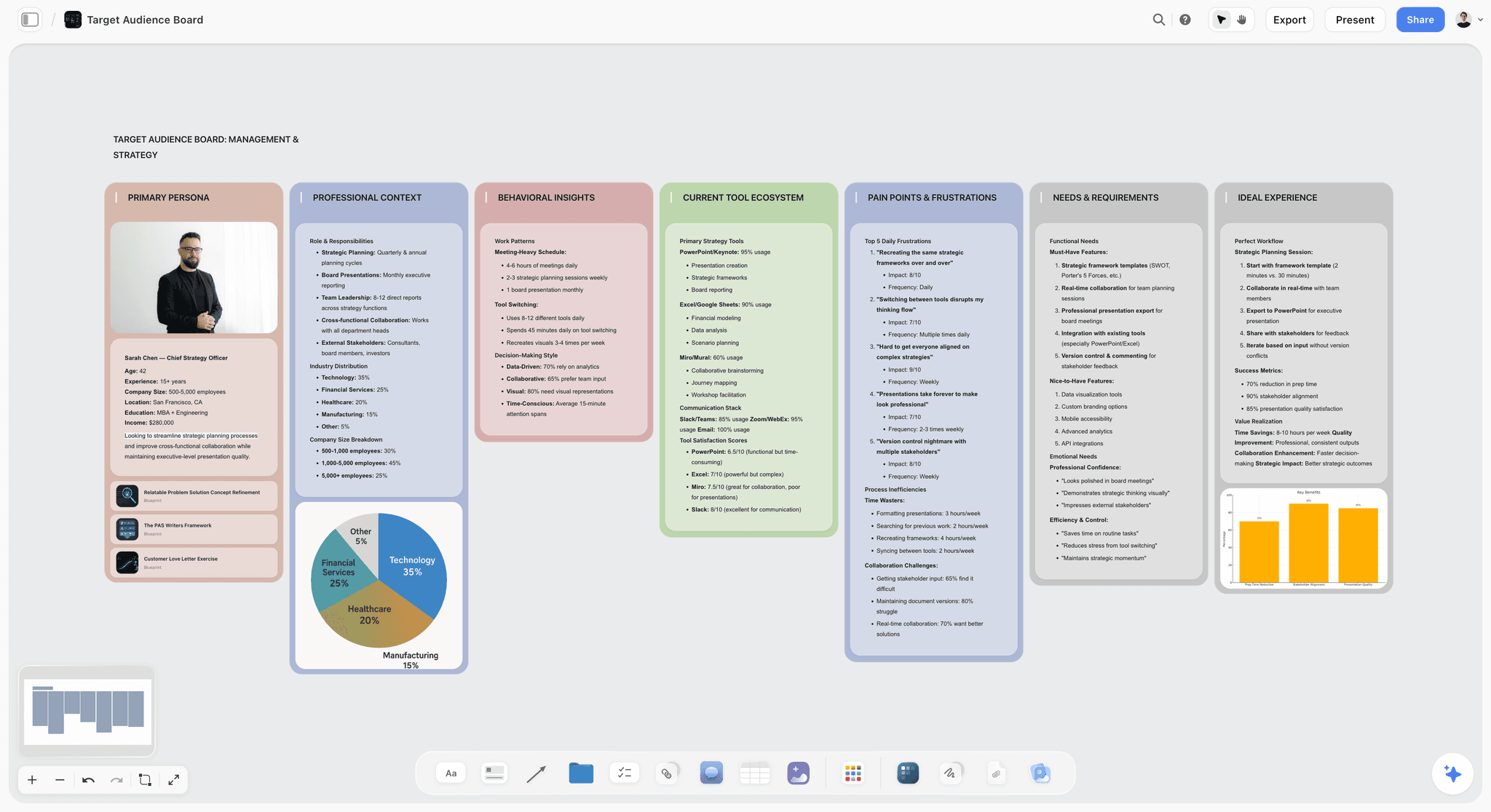
An audience board laid out in walls, from the persona to pain points and needs, the structure Prompts 5 and 6 can build through the plugin.
Find the tension worth a campaign
Prompt 7. "From the persona on my [project] board in Storyflow, write five insight statements in the form: [audience] wants [desire], but [barrier], so [what they do now]. Rank them by how often the evidence supports them and how uncomfortable they are for competitors to claim."
- In chat: five insight statements with a ranking and the evidence behind each.
- On the board: an Insight wall with the top two statements, read back from the persona the plugin built in Prompt 5.
Map the moments people start looking
Prompt 8. "List the situations in which our buyer first starts thinking about [category]: the trigger, where they are, who is with them, what they search or ask. Give eight, then mark the three our brand is most credible in."
- In chat: eight buying moments with triggers, places and search terms.
- On the board: a table of buying moments that the channel plan in Stage 5 will point at.
Check the audience against your own customers
Prompt 9. "@HubSpot show the industries, company sizes and lifecycle stages of the contacts who converted from our last two campaigns. Then tell me where that disagrees with the persona on my [project] board in Storyflow."
- In chat: a summary of converted contacts and the gaps against the persona; HubSpot's connector guide lists the CRM records ChatGPT can read.
- On the board: a "What the CRM says" note on the persona wall. For ecommerce, ask Klaviyo for last season's best-performing segments instead.
Stage 3: Positioning and Message
A message house written in a chat tends to read well and say nothing. These prompts force choices: one proposition, proof for every claim and an answer to the objection before the customer raises it.
Write proposition options worth choosing between
Prompt 10. "From the top insight on my board, write five single-minded propositions for [product], each under 12 words, each making a different promise. For each, give the proof we have, the proof we would need and the competitor most likely to claim the same thing."
- In chat: five propositions with proof status and competitor risk.
- On the board: a Proposition wall with the five options as notes, so the team can vote before the review.
Build the message house
Prompt 11. "Build a message house for the proposition we chose: [proposition]. Roof: the proposition. Three pillars: the supporting messages, each with two proof points from our brief. Foundation: the brand facts every message rests on. Then put it on my [project] board in Storyflow as a diagram with labelled connections."
- In chat: the message house as nested headings.
- On the board: a diagram linking the roof to each pillar and its proof, which becomes the reference every asset is checked against.
Answer the objections first
Prompt 12. "List the five objections our buyer is most likely to have to [proposition], using the review evidence on my board. For each, write a one-line answer we can prove, and say which channel and asset should carry it."
- In chat: objections, proven answers and where each answer goes.
- On the board: an Objections table under the message house.
Check the message against the competition
Prompt 13. "Here are the homepages and recent ads of three competitors [paste or link]. Map what each one promises, the words they repeat and the audience they talk to. Then tell me which of our pillars is already crowded and which is open."
- In chat: a competitor messaging map with crowded and open territory marked.
- On the board: a competitor table beside the message house. The competitor analysis page covers the full research board; for traffic and channel data on the same rivals, add "@Similarweb".
Stage 4: Creative Brief and Concepts
The creative brief is the most copied document in a campaign and the one most often written last. Write it here, from the decisions above, so the concepts answer the brief rather than the other way round.
Write the one-page creative brief
Prompt 14. "Write a one-page creative brief from my [project] board in Storyflow: the problem, the objective, the audience, the single-minded proposition, the support, the mandatory elements, the tone, the deliverables and the deadline. Keep each section under 40 words and flag any section the board does not give you enough to fill."
- In chat: a one-page brief with gaps flagged rather than invented.
- On the board: a brief document on the board, next to the walls it came from. For more on the brief itself, see how to write a campaign brief with ChatGPT or Claude and the creative brief page.
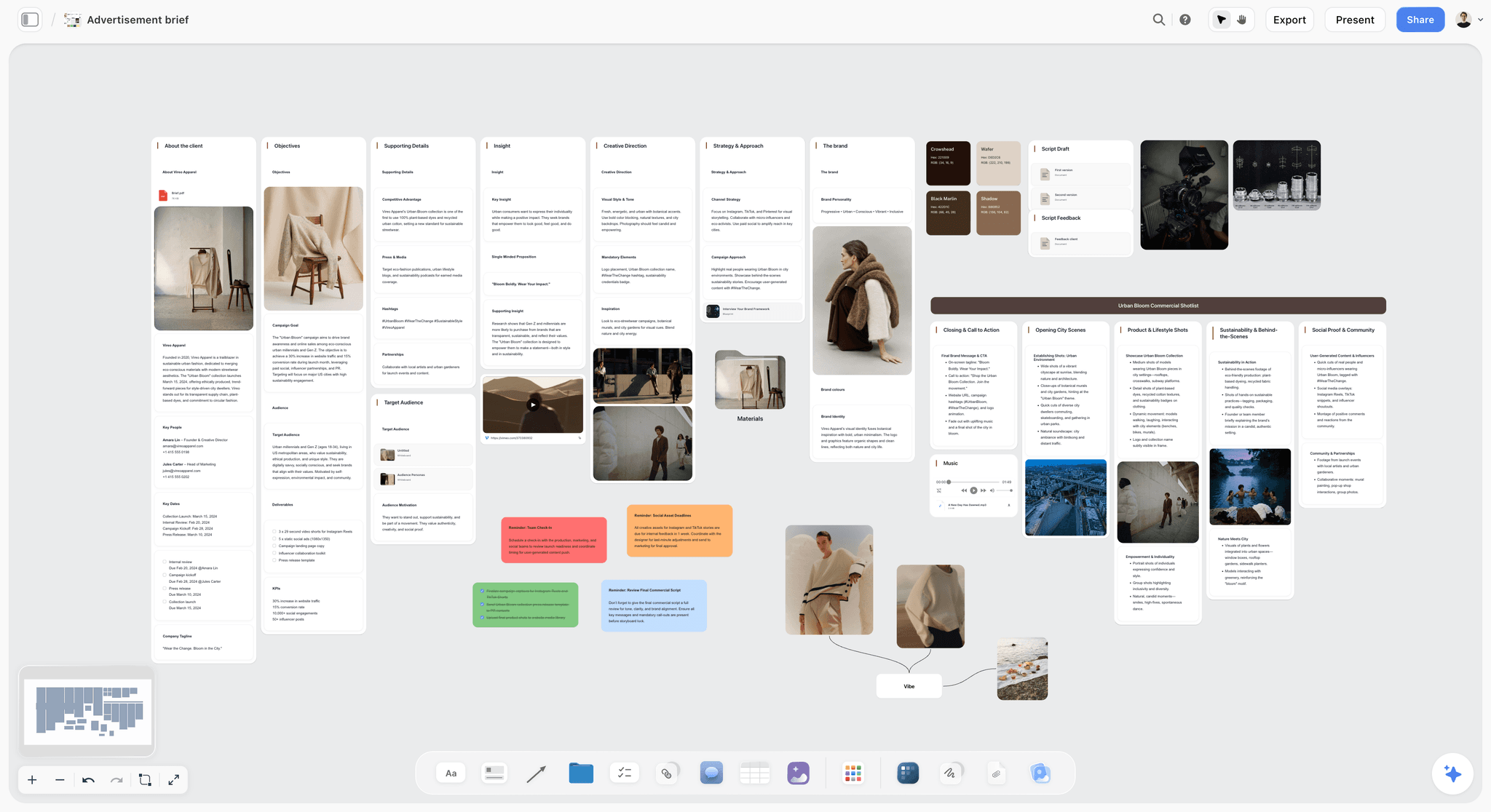
An advertisement brief on a Storyflow board, with the insight and creative direction on their own walls and the shoot plan alongside.
Generate concept routes that are actually different
Prompt 15. "From the brief on my board, write three concept routes that solve it in different ways: one rational, one emotional, one that breaks a category convention. For each, give a name, a one-line idea, a headline, how it looks on [main channel] and what could go wrong. Put each route on its own wall on my board."
- In chat: three named routes with a headline, an execution note and a risk each.
- On the board: three route walls side by side, ready for the internal review.
Stress-test a route before the client does
Prompt 16. "Act as a sceptical CMO reviewing route [name]. List the five hardest questions you would ask, then answer each one using only what is on my board. Mark any question the board cannot answer."
- In chat: the hard questions and the answers, with gaps visible.
- On the board: a "Questions to answer" to-do list on the route's wall.
Run the route through a proven framework
Prompt 17. "Add the AIDA Tactic to my [project] board in Storyflow and fill each stage for route [name]: what grabs attention, what builds interest, what creates desire and what the action is, with the channel that carries each stage."
- In chat: the route mapped stage by stage.
- On the board: Storyflow Tactics are expert frameworks the plugin can place on the board, so the AIDA structure sits next to the route it tests.
Stage 5: Channels, Budget and Phasing
Channel plans in a chat usually list every channel and assign none of them a job. These prompts give each channel one role, test the budget split and phase the campaign.
Give each channel one job
Prompt 18. "For the objective, persona and buying moments on my board, recommend channels and give each one job only: reach, consideration, conversion or retention. Format a table with columns channel, job, buying moment it serves, primary asset, KPI and owner, and put it on my [project] board in Storyflow."
- In chat: a channel table where every row has exactly one job.
- On the board: the channel plan table, the centre of the campaign board. The campaign plan page shows where it sits among the other walls.
Split the budget three ways and compare
Prompt 19. "Our budget is [amount]. Propose three splits across the channels on my board: one weighted to long-term brand building, one weighted to short-term activation and one balanced. For each, show the expected effect on each KPI, the risk, and what we would stop doing."
- In chat: three budget scenarios with trade-offs stated.
- On the board: a chart comparing the three splits next to the channel table. The tension between short-term response and long-term brand building is the subject of Les Binet and Peter Field's IPA study, The Long and the Short of It, which warns against judging a campaign mainly on very short-term online metrics.
Phase the campaign: tease, launch, sustain
Prompt 20. "Lay the campaign out in three phases (tease, launch, sustain) across [dates]. For each phase give the goal, the channels active, the key assets and the signal that tells us to move to the next phase. Put it on my board as three walls in order."
- In chat: a phase plan with exit signals.
- On the board: three phase walls left to right, the timeline a stakeholder follows at a glance.
Check search demand before you commit
Prompt 21. "@Semrush give me US search volume, keyword difficulty and intent for these 15 terms [list], then tell me which three the campaign landing page and content should target."
- In chat: a keyword table and three recommended targets.
- On the board: "add the three targets to the channel plan on my Storyflow board" keeps search on the same plan as paid and social.
Stage 6: Content and Assets
Asset lists are where campaigns sprawl: every channel asks for its own sizes, versions and copy, and the list lives in three people's heads. These prompts turn the plan into a production list and first drafts.
The asset list by channel
Prompt 22. "From the channel plan and phases on my board, list every asset we need: channel, format, size or length, number of versions, copy needed, owner and due date. Group by phase and put it on my [project] board in Storyflow as a table with dates kept in order, plus a to-do for each asset."
- In chat: a full production list grouped by phase.
- On the board: an asset table and a to-do per asset. ChatGPT can fill an Owner column with people who already have access to the board; if any name matches nobody, the whole column stays plain text with the names as written. To-do assignees you set yourself in Storyflow.
Copy variants built to be tested
Prompt 23. "Write four headline variants for [asset], each testing one variable only: benefit versus problem, specific number versus none, question versus statement, short versus long. Label the variable each one tests and keep all four on message with the message house on my board."
- In chat: four labelled variants, each a clean test.
- On the board: a variants table beside the asset list, with a column for the result once the test runs.
The launch email sequence
Prompt 24. "Draft a four-email launch sequence for [segment]: tease, launch, proof, last chance. For each, give the subject line, preview text, the one message, the call to action and send timing. Then @Klaviyo draft (do not send) email one as a campaign."
- In chat: the sequence, email by email.
- On the board: the sequence as a document on the board; the first email waits as a draft in Klaviyo for review.
The landing page outline
Prompt 25. "Outline the campaign landing page: headline, subhead, three benefit blocks with proof, the objection section, social proof, the offer and the call to action, in order. Use canvas for the copy, then put the final outline on my [project] board in Storyflow."
- In chat: the outline, then the copy drafted in ChatGPT's canvas, the writing pane OpenAI built for long text.
- On the board: the agreed outline as a document beside the asset list, so design and copy work from the same page.
Social posts and carousels
Prompt 26. "Write eight social posts for the launch phase, two per pillar of the message house, with platform, format, caption and visual direction. Make one of them a six-slide carousel and put the carousel on my board as carousel pages."
- In chat: eight posts with captions and visual notes.
- On the board: a post table plus carousel pages laid out slide by slide. The carousel page shows the format; ask "@Canva" for first-draft designs from the approved captions.
Stage 7: Launch Plan
Launches slip on handoffs, not on ideas. These prompts work the timeline back from launch day, name owners and approvals, and list what could go wrong while there is still time to plan for it.
The timeline worked back from launch day
Prompt 27. "Launch day is [date]. Work backwards and build a timeline of every milestone: brief sign-off, concept approval, production, legal review, asset delivery, QA and go-live, with the date each must happen and the lead time it assumes. Put it on my [project] board in Storyflow as a table kept in date order."
- In chat: a backwards-planned timeline with lead times visible.
- On the board: a dated milestones table. Storyflow has no calendar or Gantt view, so the table is the timeline; rows stay in date order because tables cannot be sorted.
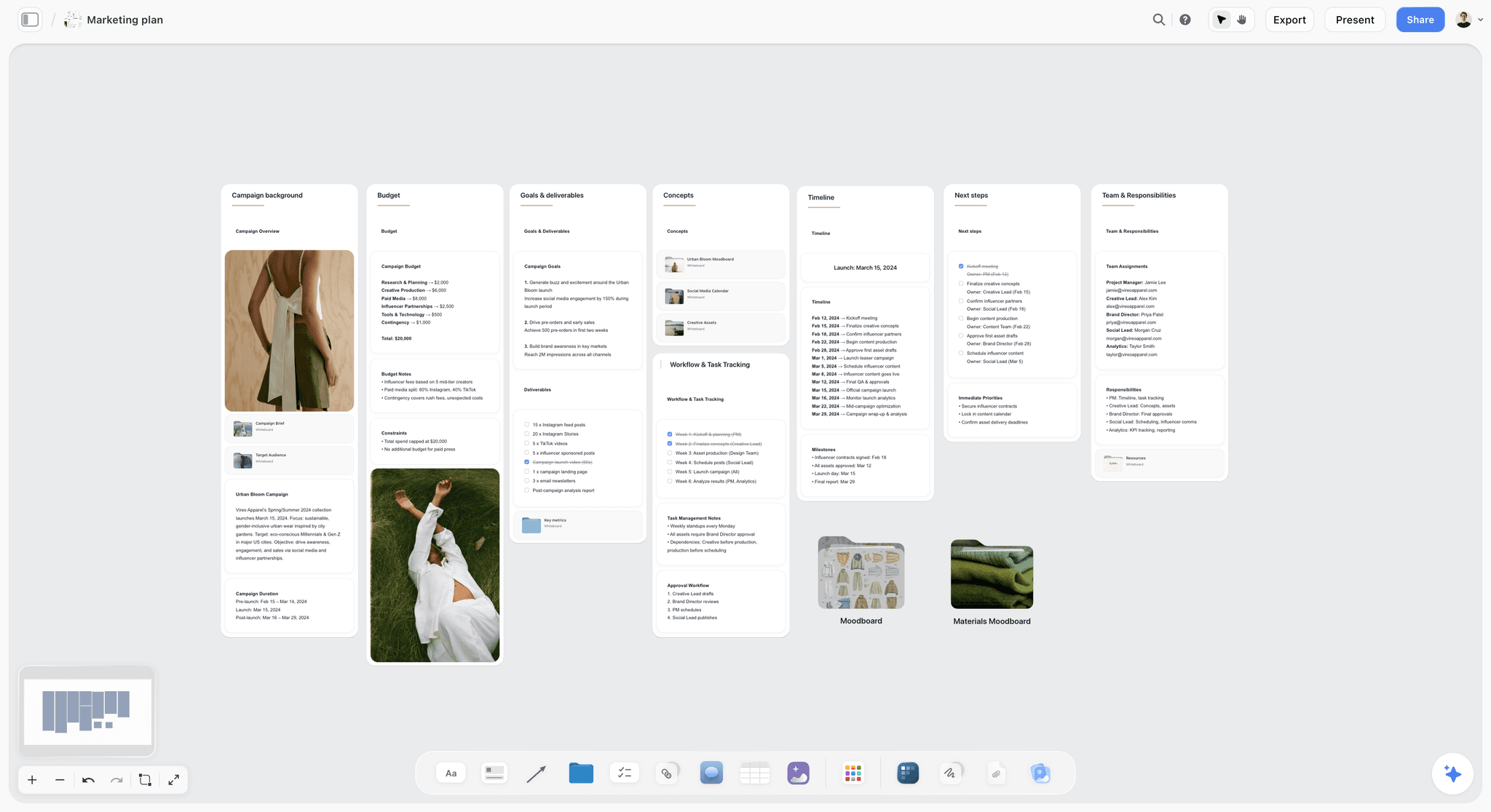
A marketing plan board with the budget, deliverables, timeline and owners each on their own wall, the end state of Stages 5 to 7.
Owners and approvals
Prompt 28. "For each milestone on my board, name the role responsible, the role who approves and the role who must be told. Flag any milestone with more than two approvers and suggest how to cut it to one."
- In chat: a responsibility list with approval bottlenecks flagged.
- On the board: a Team and Responsibilities wall next to the timeline.
The launch-week checklist
Prompt 29. "Write a launch-week checklist grouped by day, from five days before to two days after launch: tracking live, links tested, assets scheduled, team briefed, monitoring owners set. Put it on my board as to-dos."
- In chat: a day-by-day checklist.
- On the board: to-dos each owner can tick in Storyflow.
The risk register
Prompt 30. "List the ten most likely things to go wrong with this launch: late assets, a broken link, a stock-out, a negative comment thread, a competitor move. For each, give likelihood, impact, an early warning sign and the response we agree now."
- In chat: a risk table with early warnings and agreed responses.
- On the board: a Risks wall that someone reads every Monday of the campaign.
Stage 8: Measurement and Reporting
ChatGPT is fluent with numbers it does not have, which makes reporting the stage where prompts need the strictest rules: your data in, no invented figures out.
The tracking plan and UTM naming
Prompt 31. "Write a tracking plan for every link in the asset list on my board: the UTM source, medium, campaign, content and term for each, using lowercase and one naming rule throughout. Then list which conversion events must be live before launch."
- In chat: a UTM table and an event checklist.
- On the board: the tracking table next to the asset list. Google Analytics' URL builder help lists the parameters and notes that values are case sensitive, which is why the prompt insists on lowercase.
The weekly report
Prompt 32. "Here are this week's numbers [paste, or @Supermetrics or @HubSpot to pull them]. Report against the KPI tree on my board: each KPI, this week, last week, target and status. Then write three sentences: what moved, why we think it moved and what we will change. Do not state any number that is not in the data."
- In chat: a KPI table and a three-sentence readout.
- On the board: "add a chart of these KPIs to my board" puts the week's numbers next to the targets they are measured against.
Read the results honestly
Prompt 33. "Look at the results so far and argue against our own conclusion: what else could explain the change, what data would prove us wrong and what we cannot know yet. Keep it under 150 words."
- In chat: an honest counter-reading of the numbers.
- On the board: a note under the weekly chart, so the next decision accounts for it.
Stage 9: Review and Reuse
Most teams run the post-campaign review once, in a meeting, and lose it. These prompts turn the campaign into a review the next team can read and a template the next campaign can start from.
Mid-flight changes
Prompt 34. "@Storyflow what changed on my [project] board in the last week, and who changed it? Then, against the targets on the board, recommend one thing to stop, one to keep and one to start for the remaining [weeks]."
- In chat: the change list from the board and a stop, keep, start recommendation.
- On the board: a dated Decisions note on the board so nobody re-argues a settled change.
The post-campaign review
Prompt 35. "Write a post-campaign review from my board: objective and result, what worked with evidence, what did not with evidence, what we would change, and three lessons stated as rules for next time. Then build a six-slide deck from it on the board."
- In chat: a structured review with evidence attached to every claim.
- On the board: a review document and a slide deck built from the board, which presents fullscreen in Storyflow and exports as PDF.
Turn the campaign into a template
Prompt 36. "Strip the campaign-specific details from my [project] board and describe the structure as a reusable template: the walls, the tables and their columns, the order of the prompts. Then create a new project called [next campaign] and lay that structure out on its board with empty fields."
- In chat: the campaign's structure written out as a template.
- On the board: a fresh project whose board has the same walls and tables, so the next campaign starts at stage 1 with the scaffolding already there. ChatGPT can create a project only when you granted it access to all projects; otherwise create the project yourself and ask it to lay out the board.
The 36 Prompts at a Glance
| Stage | Prompts | What you get in chat | What lands on the board |
|---|---|---|---|
1. Objectives and KPIs | 1 to 4 | Objective options, assumptions, KPI tree, targets with arithmetic | Objective wall, assumptions table, KPI mind map, targets table |
2. Audience and insight | 5 to 9 | Evidence-based persona, segment comparison, insights, buying moments | Persona walls, Insight wall, buying moments table |
3. Positioning and message | 10 to 13 | Propositions, message house, objections, competitor map | Proposition notes, message house diagram, objections and competitor tables |
4. Brief and concepts | 14 to 17 | One-page brief, three routes, hard questions, AIDA mapping | Brief document, route walls, question to-dos, AIDA Tactic |
5. Channels and budget | 18 to 21 | Channel jobs, three budget splits, phases, keyword targets | Channel table, budget chart, phase walls |
6. Content and assets | 22 to 26 | Asset list, test variants, email sequence, landing outline, posts | Asset table and to-dos, variants table, documents, carousel pages |
7. Launch plan | 27 to 30 | Backwards timeline, owners, checklist, risks | Milestones table, responsibilities wall, to-dos, Risks wall |
8. Measurement | 31 to 33 | UTM plan, weekly report, counter-reading | Tracking table, KPI chart, notes |
9. Review and reuse | 34 to 36 | Change list, review, template | Decisions note, review deck, new templated board |
Worked Example: One Prompt Chain for a Spring Jacket Launch
Brackwater Outdoor is a fictional apparel brand with a four-person marketing team launching a lightweight rain jacket in March. Maya, the campaign lead, has a brief from the founder, 200 product reviews of last year's jacket and a $40,000 budget. She runs one chain in a ChatGPT project called Spring Shell, with the Storyflow plugin allowed to make changes on her Spring Shell project. The outputs described are the shape each step returns, not recorded results.
Step 1: The objective
Maya runs Prompt 1 with the business goal "grow repeat purchases from existing customers by 15% this spring". ChatGPT returns three objectives; she picks the one aimed at customers who bought outerwear in the last two years, with a number and a deadline, and asks for it on a wall called Objective. Prompt 3 adds the KPI tree as a mind map beside it.
Step 2: The persona from reviews
She attaches the 200 reviews and runs Prompt 5. The answer comes back in five headings with quoted lines under each: commuters who cycle, who compared the jacket with two named competitors, who use the word "packable" more than "waterproof", and whose objection was fit over a jumper. ChatGPT puts it on the board as a persona wall. Prompt 7 then reads that wall back and ranks five insight statements; the top one is about wanting one jacket for the commute and the weekend.
Step 3: The message house
Prompt 10 produces five propositions; the team votes for the packable commute-to-weekend promise. Prompt 11 turns it into a message house diagram with three pillars, each backed by two proof points from the brief. Prompt 12 adds the objections table, with fit over layers as the first row and the size guide as its answer.
Step 4: The channel plan and budget
Prompt 18 gives a channel table with one job per row: email and SMS to past buyers for conversion, paid social for reach in two cities, search for consideration and a creator programme for proof. Prompt 19 returns three budget splits; Maya picks the balanced one and the chart goes on the board beside the table. Prompt 21, through Semrush, settles the landing page's target terms.
Step 5: Assets, timeline and launch
Prompt 22 lists 31 assets across three phases as a table with to-dos, and Maya assigns them to the team in Storyflow. Prompt 24 drafts the four-email sequence and leaves email one as a draft in Klaviyo. Prompt 27 builds the milestones table back from the 14 March launch date, and Prompt 30 adds the risk register.
Step 6: The sign-off deck
Last, Maya asks: "Build a seven-slide deck from my Spring Shell board for the founder: objective, buyer, insight, proposition, channel plan and budget, timeline, risks." ChatGPT builds the deck on the board. The founder opens the board by a view-only link with no account, reads through the deck and signs off. Nothing in the plan lives only in the chat transcript.
What the chain produced
One board with every decision in order: objective and KPI tree, persona and insight, message house and objections, channel plan with a budget chart, asset table with owners, milestones, risks and a deck. Each prompt read the one before it from the board rather than from a paste, which is why the email copy in Step 5 still uses the customers' word "packable" from Step 2.
When the Output Is Weak: How to Edit a Prompt
It is not the wording of the request that makes ChatGPT's campaign work generic. It is the absence of anything only your campaign has. When an answer disappoints, diagnose before you rewrite.
| Symptom | Likely cause | Fix |
|---|---|---|
Copy could belong to any brand | No evidence in the context | Attach reviews, past results or the message house; say "use only this" |
Numbers look confident but are invented | No data supplied, no rule against guessing | Paste or pull the data with a plugin; add "do not state any number not in the data" |
Ten options, all similar | No constraint forcing difference | Ask for three, each from a different angle you name |
Too long to use | No format or length limit | Give the exact shape: a table, columns, word limits |
Ignores what you decided earlier | Decisions live in old chats | Keep decisions on the board and say "from my board" |
Plausible but wrong tone | No example of the standard | Paste one past asset you liked and say "match this" |
Ask ChatGPT to critique before it rewrites
"Before rewriting, tell me the three weakest things about this draft against the brief on my board" produces a better second version than "make it better", because the critique becomes the brief for the rewrite.
Give one example of the standard you want
OpenAI's prompt guide recommends few-shot examples: showing the model an input and the output you want. For campaign copy, one past headline your team rated highly, with a line on why, sets the bar more precisely than any adjective.
Change one thing at a time
If you add evidence, a new constraint and a new format in one go and the answer improves, you will not know which change did it, and you cannot repeat it on the next campaign. Edit one part of the four-part prompt per attempt and keep the version that worked on the board.
What ChatGPT Should Not Decide for You
These prompts make ChatGPT a fast first draft and a tidy organiser. They do not make it accountable for the campaign.
| Decision | What ChatGPT does well | What stays with a person | Check against |
|---|---|---|---|
Claims and legal lines | Drafts claims in the brand voice | Proving every product claim, price and competitor comparison | Legal review and the proof list on the board |
The budget | Lays out three splits and their trade-offs (Prompt 19) | Choosing the split and defending it | Last campaign's results and finance |
Numbers | Formats and compares figures it was given | Any figure it was not given | The source system, never the chat |
Publishing and sending | Drafts posts and emails, schedules for review through plugins that can | Pressing publish or send | The scheduler or email tool's own preview |
Klaviyo's help article tells users to validate key metrics in Klaviyo before acting on them, and the same rule applies to every figure in a chat. Any plugin that can send should be set to ask before every send.
The Bottom Line
The prompts that make ChatGPT useful for a campaign are not clever wording. They are a brief at every stage: a role, the evidence only your campaign has, the constraints that make the answer usable and the format you will present. Run them as a chain in one ChatGPT project, end each with "put it on my board in Storyflow", and the campaign plan builds itself in order where your team, founder and client can see it. Start with Prompts 1, 5 and 11 on your next brief; the objective, the persona and the message house decide most of what follows.
This article was published in October 2026 and reflects ChatGPT and the Storyflow plugin as of 28 October 2026.
FAQ: ChatGPT Prompts for Marketing Campaigns
What are the best ChatGPT prompts for marketing campaigns?
The best ChatGPT prompts for marketing campaigns carry four parts, a role, the context, constraints and an output format, and run one stage at a time from objective to review. Ending each with "put it on my board in Storyflow" keeps the output as a shared campaign plan instead of a chat. The strongest single prompts are the evidence-based persona, the message house and the backwards launch timeline.
What is the best ChatGPT plugin for running campaign prompts?
Storyflow is the best ChatGPT plugin for running campaign prompts, because each answer can land on the campaign board as walls, tables, to-dos, diagrams, charts or a deck, and later prompts read that board back. Add HubSpot or Klaviyo when prompts need your own results, Semrush for search demand and Canva for first-draft designs of the approved copy.
How do I write a good ChatGPT prompt for a marketing campaign?
Give ChatGPT a specific role, the context only your campaign has (the brief, audience evidence, past results), constraints that make the answer usable (number of options, word limits, banned claims) and the exact format you need. Then ask for one stage at a time. A prompt you would not hand to a junior colleague as a brief is not ready for ChatGPT.
Should I use one long prompt or a chain of prompts?
Use a chain. One long prompt asks ChatGPT to make every campaign decision at once, so each one gets a sentence. A chain lets you choose at each stage, the objective, the persona, the proposition, and feeds that choice into the next prompt. Keeping each decision on a Storyflow board means later prompts read it instead of relying on chat memory.
How do I stop ChatGPT making up marketing statistics?
Give it the numbers and forbid the rest. Paste your data or pull it through a plugin such as HubSpot, Klaviyo or Supermetrics, then add the line "do not state any number that is not in the data" and ask it to flag assumptions. Check any figure that will reach a client or a board against the source system.
Can ChatGPT use my own campaign data in these prompts?
Yes, through plugins. HubSpot lets ChatGPT read campaigns, marketing emails and deals, Klaviyo reads campaign and flow performance, Semrush returns keyword data and Supermetrics pulls ad and analytics numbers. Each plugin sees only what your connected account can see. The Storyflow plugin reads your boards and documents, so earlier campaign plans can be context too.
Where should I keep the outputs of campaign prompts?
Keep decisions somewhere the team already looks, not in the chat. A ChatGPT project keeps your chats, files and instructions together, which helps you; a Storyflow board keeps the decisions in order for everyone: the persona wall, message house, channel table, timeline and deck. Later prompts read the board back, so the launch copy still uses the words from the persona. Copying into documents by hand is where versions drift.
Can ChatGPT build a campaign presentation deck?
Yes. Through the Storyflow plugin, ChatGPT can create a slide deck on your board from the plan already there, then add, remove, reorder or update slides. The deck presents fullscreen in Storyflow's presentation mode and exports as PDF. Storyflow does not export PPTX or offer presenter notes, so plan for a PDF or a live walkthrough.
Do these campaign prompts work in Claude?
Yes. The prompts are plain language, so they work in Claude, Gemini or Grok as written. Claude calls them connectors rather than plugins; Storyflow connects to Claude through the address https://mcp.storyflow.so/mcp as a custom connector, so the "put it on my board" steps work there too, on the same Storyflow account and boards.
How do I share a campaign plan made in ChatGPT with my team?
Share the board, not the chat. ChatGPT projects can be shared, with invitees getting chat or edit access, but colleagues then read a conversation. Built on a Storyflow board through the plugin, the plan opens by view-only link with no account, real-time co-editing works on every paid plan, and anyone a paid member invites joins free.
Is the Storyflow plugin free to use with these prompts?
Not during early access. Storyflow is paid-only, from $7.99 a month billed annually, and its Free plan launches before the end of 2026. Anyone a paid member invites to a board joins free and can make 25 plugin actions a week. Plugin actions run on your ChatGPT plan, so they use no Storyflow AI credits.
Table of Contents
- Key Takeaways
- Before You Start: Set Up ChatGPT for a Campaign
- The Four Parts of a Campaign Prompt
- Stage 1: Objectives and KPIs
- Stage 2: Audience and Insight
- Stage 3: Positioning and Message
- Stage 4: Creative Brief and Concepts
- Stage 5: Channels, Budget and Phasing
- Stage 6: Content and Assets
- Stage 7: Launch Plan
- Stage 8: Measurement and Reporting
- Stage 9: Review and Reuse
- The 36 Prompts at a Glance
- Worked Example: One Prompt Chain for a Spring Jacket Launch
- Step 1: The objective
- Step 2: The persona from reviews
- Step 3: The message house
- Step 4: The channel plan and budget
- Step 5: Assets, timeline and launch
- Step 6: The sign-off deck
- What the chain produced
- When the Output Is Weak: How to Edit a Prompt
- What ChatGPT Should Not Decide for You
- The Bottom Line
- FAQ: ChatGPT Prompts for Marketing Campaigns
- Related Reading
Templates to check out for this topic


Marketing and campaign templates you can use in Storyflow
Plan the whole campaign on one board: brief, audience, channels, and assets connected, with an AI that reads all of it. Open a template and start from real structure.


See Storyflow in Action
A visual AI workspace where every feature lives inside one canvas. No tab-switching, no context lost.
Build your entire board from a single message
Type what you need in the AI chat at the bottom of your canvas. The AI adds cards, headings, and structure directly onto your board.
Use expert frameworks as AI context
Type @ in the AI chat and choose any Tactic. The AI tailors every response to that framework instead of giving generic advice.
Turn your board into a mind map in seconds
Ask the AI to restructure your canvas as a mindmap. It connects your ideas into a visual hierarchy so you can see how everything relates.
Why Storyflow Exists
Storyflow actually began as a personal tool while working on creative and research projects.
We kept running into the same problem: ideas were scattered everywhere: notes, documents, and whiteboards.
Nothing helped us see how everything connected.
So we started building a workspace designed around how ideas actually grow.
→ Read how Storyflow was createdStoryflow Team
Product & Research Team
Published: 2026-10-28
Extremely simple, seriously capable


See how easy it is to get started
Watch a real project come together, from a blank board to a finished plan, clicked through step by step.
Start creating with AI and become more productive
Transform your creative workflow with AI-powered tools. Generate ideas, create content, and boost your productivity in minutes instead of hours.