Best ChatGPT Plugins for Social Media Managers (2026): 9 Ranked
Nine plugins from ChatGPT's directory for social media managers, ranked by job: Storyflow for the content plan, Metricool and Planable for scheduling and approvals, Canva for design, plus analytics and listening.

Category
Marketing
Author

Storyflow Team
Product & Research Team
Topics
2026-10-28
•
30 min read
•
Marketing- ChatGPT plugins
- social media managers
- content plan
- Storyflow
- Metricool
- Planable
What are the best ChatGPT plugins for social media managers?
The best ChatGPT plugin for a social media manager is Storyflow when the job is the content plan: ChatGPT builds content pillars, a month of posts in a dated table and carousel pages on a board the team and client open. Storyflow is an AI visual workspace that holds a social content plan on one infinite canvas. For the rest of the week, Metricool schedules posts and reports, Planable runs client approvals and Canva makes the designs.

Full disclosure: Storyflow is our product. It ranks first because this ranking starts from the content plan, and it is the plugin whose output is a shared board rather than an answer in a chat. It does not schedule, publish or report on posts, and its ChatGPT plugin only went live on 24 October 2026, so pair it with a scheduler such as Metricool or Planable.
How the ChatGPT plugins for social media managers compare on trust, innovation, ratings and pricing
Which ChatGPT plugins for social media managers are the most trusted?
Metricool and Brand24 carry the most trust among the scheduling and listening plugins, because their ChatGPT connections sit on products social teams have used for years, and Metricool documents plainly what ChatGPT can and cannot touch. Planable earns trust with agencies by capping ChatGPT at each person's role. Storyflow's plugin is newer, live since 24 October 2026, and is trusted for the plan rather than for posting.
Which ChatGPT plugins for social media managers have fair and transparent pricing?
Metricool, Planable and vidIQ let the plugin run without a paid plan: Metricool free for one brand, Planable for its first 50 posts, vidIQ free with 150 credits a month, and vidIQ labels its paid prices clearly. Storyflow publishes its plans too, from $7.99 a month billed annually, and plugin actions use no Storyflow AI credits. Dash Social sells through its team, and OpusClip's plan names differ between its pricing page and its plugin documentation.
Which ChatGPT plugins for social media managers are the most innovative?
Storyflow, because ChatGPT builds the month as a board, with pillar walls, a dated post table and carousel pages, and can later report what changed on it and who changed it. OpusClip is innovative on the video side, cutting a long video into captioned clips and scheduling them from one chat. vidIQ stands out for editing existing YouTube titles and thumbnails after you approve each change.
Which ChatGPT plugins for social media managers have a strong record of consistent performance?
Metricool, Socialinsider and Brand24, judged by the years their scheduling, analytics and listening products have served social teams; their ChatGPT plugins are new, but the data behind them is not. Storyflow's plugin has the shortest record here. Its consistency is of a different kind: one plan on one board that ChatGPT, the team and the client all read, instead of versions spread across documents and chats.
Which ChatGPT plugins for social media managers are underrated?
Planable's approval view is underrated: asking what is still waiting on the client, across every workspace, replaces a daily round of follow-up messages. Brand24's list of the most active creators talking about you is an outreach list nobody had to build. Storyflow's change report is easy to miss: asking what changed on the content board since Monday, and who changed it, keeps a small team aligned without a meeting.
Quick Comparison
Four plugins from ChatGPT's directory that cover most of a social media manager's week: our pick first for planning the content on one board, then the rest by job. Prices as of October 2026.
| Tool | Best For | AI Features | Price |
|---|---|---|---|
| Storyflow | The monthly content plan the team and client see | ChatGPT builds pillar walls, a dated post table, carousel pages and a review deck, and reports what changed | $7.99 mo annual (paid-only in early access; Free plan due before the end of 2026) |
| Metricool | Scheduling and reporting across brands | Queries metrics, checks best times, creates and edits scheduled posts for review | Free for 1 brand; see Metricool pricing |
| Planable | Agencies with client sign-off | Drafts into client workspaces, lists pending approvals, publishes on request within your role | First 50 posts free; see Planable pricing |
| Canva | First-draft social graphics | Creates and edits designs using context from the chat | See Canva pricing |
Key Takeaways
- All nine plugins below were in ChatGPT's plugin directory on 28 October 2026. Storyflow is our pick first for planning the content on one board; the other eight are ranked by the stage of the weekly social loop they own.
- Buffer, Later, Hootsuite and Sprout Social were not in the directory on that date. The scheduling plugins that were include Metricool, Planable, Dash Social and, for video clips, OpusClip.
- Publishing power differs more than features do. Planable can publish on request within your role, Metricool creates and edits scheduled posts, OpusClip can post a clip to a connected account, vidIQ edits existing YouTube videos but cannot upload, and Storyflow never publishes.
- Several plugins work without a paid vendor plan: Metricool's works on every plan including Free, Planable's on every plan including its first 50 free posts, and vidIQ connects free but spends credits per tool call. Dash Social needs its Premium Analytics add-on.
- Keep media in the tool that owns it. A photo attached in ChatGPT does not reach Storyflow (the plugin gives you an upload link), and Planable says it cannot reliably attach images or video from the chat yet.
How We Picked These Plugins
A social media manager does not have one job; they have six, every week. Plan the content, make it, get it approved, schedule it, listen to what comes back and report on it. GWI's research, reported in DataReportal's Digital 2025 Global Overview Report, points to a global average of 6.83 social platforms used per month, which is why the stack fragments so fast: every platform adds a calendar, a format and a report.
In the directory, and documented by the vendor
Every plugin here appears in a capture of ChatGPT's plugin directory taken on 28 October 2026, and its vendor publishes its own page describing what the plugin or its underlying connection does. Each review is built from the directory one-liner plus that vendor page, and prices come from each vendor's pricing page, all read on 28 October 2026. Where a vendor's page could not be read, the plugin went to the left-off list instead of being described from memory.
The weekly loop each plugin was placed on
- Plan: pillars, the monthly calendar, campaign moments.
- Make: designs, carousels, clips, captions.
- Approve: internal and client sign-off.
- Schedule and publish: the queue for each account.
- Listen: mentions, comments, sentiment, creators talking about you.
- Report: what worked, against what you planned.
A plugin earned its place by owning one of those stages well inside ChatGPT, not by touching all six thinly.
Storyflow is our product, and why it still ranks first
Storyflow is our product, so read the order with that in mind. It ranks first on a stated basis: this ranking starts from the content plan, and Storyflow is the plugin whose output is a shared board with the pillars, the dated calendar and the carousel pages rather than an answer in a chat. It is also the one plugin here that does none of the scheduling, publishing or analytics. If your bottleneck is posting, not planning, start with Metricool or Planable.
The 9 Plugins at a Glance
Directory one-liners are quoted as shown on 28 October 2026; prices are as of October 2026.
| # | Plugin | Directory one-liner | Loop stage | Can it publish? | Price (Oct 2026) |
|---|---|---|---|---|---|
1 | Storyflow | Plan projects on visual boards | Plan | No | Plus $7.99 mo billed annually; paid-only in early access |
2 | Metricool | Analyze and schedule posts | Schedule, report | Creates and edits scheduled posts | Free for 1 brand; see Metricool pricing |
3 | Planable | Manage all your social content | Approve, schedule | Yes, on request and within your role | First 50 posts free; see Planable pricing |
4 | Canva | Create, review, edit designs | Make | No | See Canva pricing |
5 | vidIQ | Grow on YouTube, IG & TikTok | Plan, report (YouTube) | Edits existing videos, cannot upload | Free 150 credits; Boost $19 mo |
6 | OpusClip | Clip, edit, schedule videos | Make, schedule (video) | Posts and schedules clips | Paid access needed for tools; see OpusClip pricing |
7 | Socialinsider | Social media analytics | Report | No | See Socialinsider pricing |
8 | Dash Social | Connect your brand insights | Listen, report, schedule | Schedules into Dash | Premium Analytics add-on; see Dash Social pricing |
9 | Brand24 | Analyze online discussions | Listen | No | Individual $199 mo billed annually |
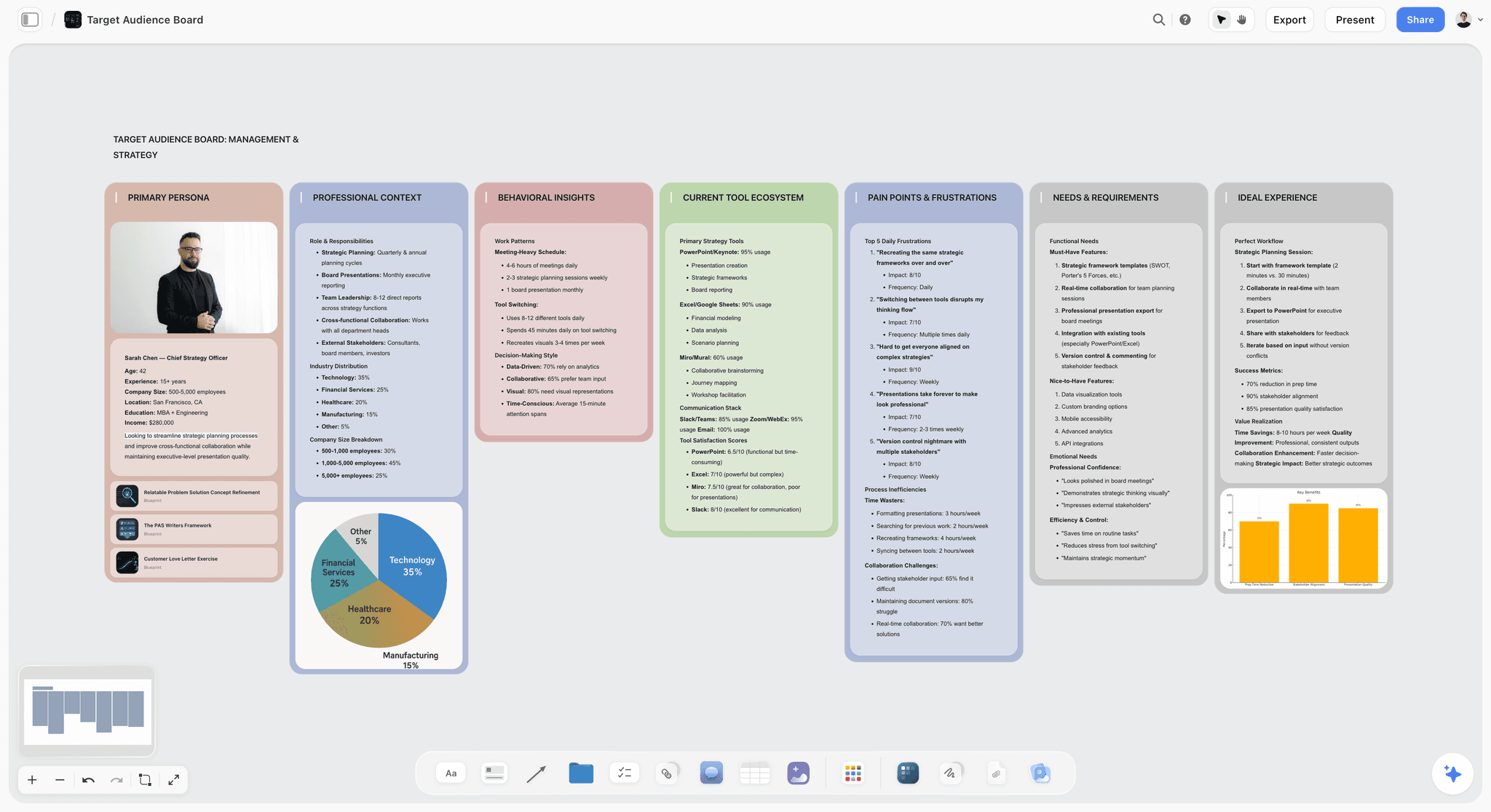
Storyflow target audience board with walls for the primary persona, professional context, behaviour, current tools, pain points and needs
Plan next month's content on a board ChatGPT builds
Install Storyflow from ChatGPT's plugin directory and get content pillars, a dated post table and carousel pages on one board your team and client open by link.

The 9 Best ChatGPT Plugins for Social Media Managers, Reviewed
Each review follows the same shape: what ChatGPT can do through the plugin, who it is best for, the limit that matters most, the price and one prompt to try first.
1. Storyflow
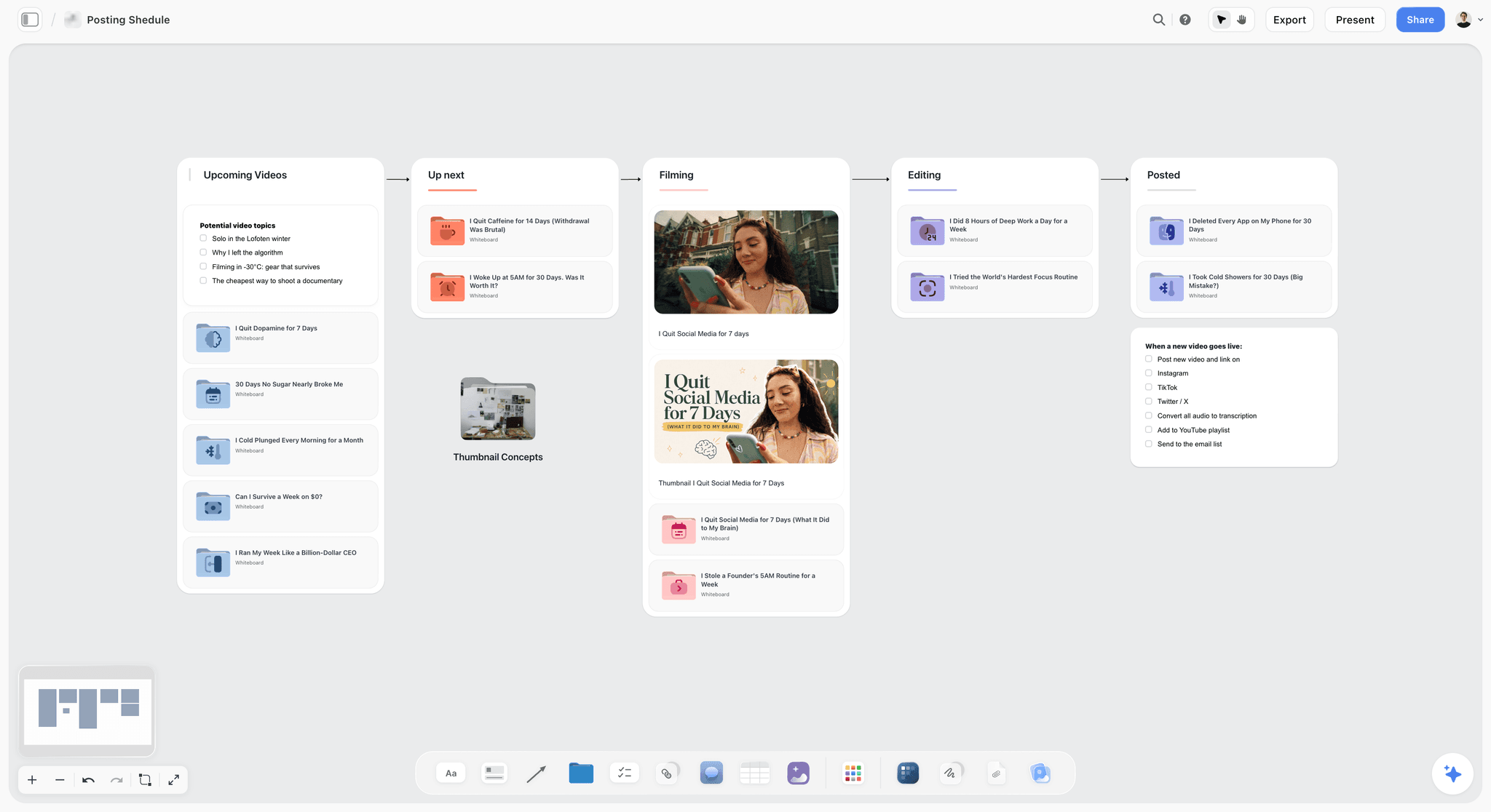
A posting pipeline on a Storyflow board: each wall is a stage, and the go-live checklist sits next to the posts it applies to.
Verdict: the plugin for the plan itself, when the month of content lives in five places at once.
The familiar approach is a pillars document, a spreadsheet calendar, a folder of carousel drafts and a Slack thread of client feedback, stitched together every Monday. Through the Storyflow plugin, ChatGPT builds that plan on one board: walls for each content pillar, a table of posts with dates, formats and captions, carousel pages, documents for long captions or scripts, mind maps of content ideas, colour palettes and a slide deck for the monthly client review. It reads the board back too, and can report what changed in the last day or week and who changed it.
- Best for: social leads and agencies who plan a month at a time and present that plan to a team or client. A view-only link opens with no account; to comment, the visitor signs in.
- Limit: Storyflow does not schedule or publish posts and has no calendar view; dates live in table date cells, and tables cannot be sorted, so ask ChatGPT to keep rows in date order. A photo attached in the chat does not reach the board; the plugin gives you an upload link instead. AI image generation is not available through the plugin.
- Price: Plus $7.99 a month billed annually ($9.99 monthly), Pro $14, Max $39 with a Team Workspace and roles, as of October 2026. Storyflow is paid-only during early access; its Free plan launches before the end of 2026, and anyone a paid member invites to a board joins free now. An invited free account can make 25 plugin actions a week; Plus, Pro and Max have no weekly limit. See Storyflow pricing.
- Try: "@Storyflow build a November content board in my Client A project: one wall per content pillar, a table of 16 posts with date, platform, format and caption kept in date order, and carousel pages for the two carousels."
For the pillar and carousel boards in detail, see the content pillars and carousel pages.
2. Metricool
Verdict: the best all-round scheduling and reporting plugin for a manager who runs several brands.
Metricool's ChatGPT guide says ChatGPT can query the metrics available for your brands, including connected ad accounts, view each brand's configuration and scheduled posts, check the best time to post, and create and edit scheduled posts or send them for review.
- Best for: freelancers and in-house managers running several brands who want analytics and the queue in one plugin.
- Limit: Metricool notes that its native ChatGPT app runs an earlier version of its connection and does not return clickable links to scheduled posts. The plugin does not cover inbox messages, post comments, Google Business Profile reviews or managing ad campaigns. Metricool also warns the authorization screen grants broad account access, similar to logging in.
- Price: the plugin works on every Metricool plan, including Free for one brand, with your plan's limits still applying. The pricing page does not label which paid figures are monthly and which annual, so see Metricool pricing.
- Try: "@Metricool what were the best times to post on Instagram for Brand A last month, and schedule these three captions at those times for review."
3. Planable
Verdict: the approval plugin for agencies whose real bottleneck is client sign-off.
Planable's ChatGPT guide lists what ChatGPT can do: draft posts straight into a client workspace with captions formatted per platform, bulk-edit posts (swap a disclaimer or product name across a workspace), show what is waiting for approval across workspaces, audit a week's calendar for gaps, summarise performance, and schedule, publish or approve posts when you ask and your role allows it.
- Best for: social agencies and brand teams with a formal approval step, where "what is still waiting on the client?" is a daily question.
- Limit: Planable says the plugin cannot reliably attach images or video yet, so add media in Planable or supply a link. It cannot assign drafts to a campaign yet, and requests across 15 or more workspaces can be slow. Performance summaries need the Analytics add-on.
- Price: included on every plan, even before you pay: the first 50 posts are free, with no time limit, and they do not reset. Paid plans are priced per workspace; the page does not say which billing period its figures assume, so see Planable pricing.
- Try: "@Planable list every post waiting for client approval across my workspaces this week, oldest first."
4. Canva
Verdict: the design plugin for first-draft social graphics from captions you already wrote.
The directory describes Canva's plugin as "Create, review, edit designs". OpenAI's connected apps article uses Canva as its example of an app drawing on the conversation: ask it to turn your ideas into a design and it can use the names and taglines you brainstormed earlier in the chat. Canva blocks automated reading of its help pages, so see Canva's help for the current feature list.
- Best for: turning a week of approved captions into post and story designs inside your brand's templates.
- Limit: per that same OpenAI article, an enabled app may use context from your conversations and, with Memory on, from your memories. Keep embargoed launch details out of the chat until you mean to share them.
- Price: see Canva pricing.
- Try: "@Canva make a square post and a story version for each of these three captions, in our brand colours."
5. vidIQ
Verdict: the research plugin for a social team that treats YouTube as a channel, not an afterthought.
vidIQ's ChatGPT page describes keyword research, outlier videos in a niche, public competitor channel stats, trend research and, for a channel linked to your vidIQ account, analytics such as views, watch time, traffic sources and top videos. It can edit, not upload: ChatGPT can change an existing video's title, description, tags, visibility, scheduled time or thumbnail on a channel you own, and you approve each change first.
- Best for: brand channels and creators planning YouTube alongside short-form; the YouTube video plan page shows the board that research feeds.
- Limit: the directory one-liner mentions Instagram and TikTok, but vidIQ's ChatGPT page is about YouTube; check the listing before you rely on it for other platforms. Each tool call spends credits from your plan, and keyword research costs 5 credits per call.
- Price: connecting is free on every plan. Free includes 150 credits a month; Boost is $19 a month or $199 a year and MAX $49 a month or $468 a year, as of October 2026 on vidIQ pricing.
- Try: "@vidIQ find outlier videos from the last 90 days in the home coffee niche and what their titles have in common."
6. OpusClip
Verdict: the plugin for turning one long video into a week of short clips without opening an editor first.
OpusClip's agent documentation, which lists ChatGPT among its hosts, describes submitting a YouTube or Vimeo URL or uploading a video, then listing, previewing, editing and exporting clips in HD. Edits include captions (on or off, colour, position and casing). ChatGPT can post a clip to a connected social account, schedule it for later or cancel a scheduled post.
- Best for: teams repurposing webinars, podcasts and long-form video into Reels, Shorts and TikToks.
- Limit: any OpusClip account can connect and see the tools, but calling them needs an access tier that the agent documentation names differently from the plans on OpusClip's pricing page, so confirm which plan includes it before you buy. Usage is capped per workspace each month, and up to four projects can run at once.
- Price: see OpusClip pricing.
- Try: "@OpusClip clip this webinar link into five vertical clips under 60 seconds with captions on."
7. Socialinsider
Verdict: the analytics plugin for monthly reports that compare you with competitors.
Socialinsider's help article says the connection gives ChatGPT the tracked profiles and projects in your account, post-level metrics, daily profile analytics (followers, reach, impressions and engagement), Instagram Stories for owned or authorized accounts, and campaign tags and brand groups. Competitor comparisons of engagement rate, content formats and posting frequency are among its stated uses.
- Best for: analysts and agency leads who write the monthly social report and need benchmarks, not just your own numbers.
- Limit: ChatGPT only sees profiles and projects already set up in your Socialinsider account, and Stories only for owned or authorized accounts. Socialinsider's article describes the ChatGPT desktop app on macOS; the plugin is also listed in the directory as "Social media analytics".
- Price: the page does not label the billing period for most of its figures, so see Socialinsider pricing.
- Try: "@Socialinsider compare engagement rate by format for our Instagram and our three tracked competitors over the last 90 days."
8. Dash Social
Verdict: the enterprise brand-team plugin that covers listening, community and scheduling in one connection.
Dash Social's developer guide describes a ChatGPT plugin you find under Plugins by searching for Dash Social. ChatGPT can pull performance reports, analyse post and creative performance across owned and UGC content, read community data (comments, DMs, top keywords and sentiment), use competitive benchmarks for tracked competitors, find calendar gaps and schedule posts into Dash, and track mentions and sentiment.
- Best for: in-house brand and community teams at larger companies already on Dash Social.
- Limit: you need the Premium Analytics add-on, and access has to be enabled per brand by your account representative. Competitor comparisons only work for competitors already tracked in your account, and access mirrors your existing Dash permissions.
- Price: Dash Social sells through its team; see Dash Social pricing.
- Try: "@Dash Social what were the top three themes in comments on our posts this week, with sentiment for each?"
9. Brand24
Verdict: the listening plugin for knowing what people say about the brand before you plan what the brand says.
Brand24's help article calls it an official app in ChatGPT: install it, select Connect and authorize your Brand24 account. ChatGPT can then summarise recent events across your account, surface the most important events in a project for a period, list the main discussions and topics, name the most active influencers writing about your brand, and list the sites and sources that mention it. Data is fetched from your active projects when you ask.
- Best for: social and comms leads who need early warning on a complaint thread and a list of creators already talking about the brand.
- Limit: it only covers the keywords and projects you set up in Brand24, and Brand24's page does not state rate limits or history depth for the plugin.
- Price: Individual is $199 a month billed annually ($249 monthly) with 3 keywords and 2,000 mentions a month, and the Team tier is $299 billed annually ($349 monthly) with 7 keywords, as of October 2026 on Brand24 pricing.
- Try: "@Brand24 summarise the main topics in mentions of our brand this week and name the five most active creators."
What Each Plugin Can Publish, Schedule or Change
Social managers carry a risk most marketers do not: a wrong action is public within seconds. This table separates the plugins that only read from the ones that can change a live account.
| Plugin | Reads | Creates or edits | Publishes or schedules | Vendor safeguard |
|---|---|---|---|---|
Storyflow | Boards, documents, changes, people | Boards, tables, carousel pages, decks | Never | You choose projects and whether changes are allowed |
Metricool | Metrics, brand settings, scheduled posts | Scheduled posts, posts for review | Creates scheduled posts; immediate publishing not documented | Plan limits apply |
Planable | Workspaces, approvals, calendar | Drafts, bulk edits | Schedules and publishes on request | Your Planable role caps what ChatGPT can do |
Canva | Designs | Designs | No | See Canva's help |
vidIQ | Keyword, outlier and channel data | Titles, descriptions, tags, thumbnails | Changes scheduled time and visibility; no uploads | You approve each change |
OpusClip | Projects and clips | Clips and captions | Posts, schedules and cancels clips | Paid access tier required |
Socialinsider | Profiles, posts, Stories, tags | None described | No | Only profiles in your account |
Dash Social | Performance, community, benchmarks | Drafts from your library, listening topics | Schedules into Dash | Mirrors Dash permissions |
Brand24 | Mentions, topics, influencers, sources | None described | No | Only your active projects |
Publishing from a chat needs one team rule
Write it down and share it: ChatGPT drafts and schedules for review; a person publishes. Planable makes this easy because ChatGPT cannot do more than your role allows, so give the account you connect a role without publish rights if you want the rule enforced rather than remembered. For Metricool, end scheduling prompts with "for review". For vidIQ, read each proposed title change before you approve it, because the change is made on the live video.
Set ChatGPT's own permission for each plugin
On top of each vendor's controls, ChatGPT asks before reading or acting according to the permission you choose. OpenAI's permissions article lists Always ask, Allow read actions, Allow low-risk actions and, for some individual apps, Allow all actions, which OpenAI labels elevated risk. On a personal account the default lives under Settings, Plugins, Permissions. Allow read actions suits Socialinsider, Brand24 and Storyflow; Always ask suits Planable, Metricool, OpusClip and vidIQ, because each of them can change something your audience sees.
Three Social Stacks That Work Together
Most social teams need three or four plugins. The rule from the marketing teams roundup applies here too: one plugin holds the plan, one or two bring the evidence, one makes or ships the asset.

A project tracker in Storyflow: every job by stage, with its next step and due date, the view a social lead shares with the team on Monday.
Solo manager or small brand: Storyflow, Metricool, Canva
Storyflow holds the month, Canva makes the posts and Metricool schedules them at the best times and reports on Friday. Metricool's free plan covers one brand, so if you already use Canva, Storyflow can be the only new paid piece.
Social agency: Storyflow, Planable, Canva, Brand24
Planable carries the approval workflow per client workspace, a daily Brand24 check surfaces a complaint thread before the client raises it, and Storyflow holds one board per client with the plan and the monthly review deck. The client opens the board by view-only link with no account.
Video-first brand team: Storyflow, vidIQ, OpusClip
vidIQ finds the topics breaking out in your niche, OpusClip turns each long video into clips and schedules them, and Storyflow keeps the series plan, scripts and posting table on one board. Add Socialinsider once the monthly report needs competitor benchmarks.
Worked Example: A Month of Posts for a Coffee Roaster
Saltbrook Coffee is a fictional specialty roaster launching a cold brew line in November, with an in-house social lead, Priya, and a freelance designer. The outputs described are the shape each tool returns, not recorded results.
Step 1: Listen before planning
"@Brand24 summarise the main topics in mentions of Saltbrook and of cold brew in our project over the last 30 days, and name the most active creators." ChatGPT returns a short list of topics and creators. Priya keeps two topics, and the creators become an outreach list.
Step 2: See what competitors post
"@Socialinsider compare engagement rate by format for our Instagram and our three tracked competitors over the last 90 days." The answer is a format-by-format comparison. Carousels and Reels lead for one competitor; Priya treats that as a hypothesis, not a rule.
Step 3: Build the month on a board
"@Storyflow in my Saltbrook project, build a November board: three walls for the content pillars from these findings, a table of 16 posts with date, platform, format, pillar and caption kept in date order, carousel pages for two carousels, and a to-do list for the shoot." ChatGPT builds the walls, table, carousel pages and to-dos on the board, and Priya sends the board to the founder by view-only link.

An audience board in Storyflow, with preferred platforms and content habits on their own wall, the context the pillars in Step 3 are built from.
Step 4: Make the assets
"@Canva make a square post and a story for each of these four week-one captions." The designer refines them in Canva. Product photos from the shoot go onto the Storyflow board through the upload link the plugin provides, because photos attached in the chat do not reach the board.
Step 5: Schedule for review
"@Metricool schedule the four week-one posts for Instagram at last month's best times, for review." Metricool creates the scheduled posts; Priya checks them in Metricool before they go live.
Step 6: Report back to the board on Friday
"@Metricool how did week one perform against the previous four weeks?" then "@Storyflow add a chart of these four numbers to the November board, next to the post table." The founder sees the plan and the result in one place on Monday.
How to Install a Plugin in ChatGPT
All nine install the same way. OpenAI's plugins article is the reference, and how to install plugins in ChatGPT has every step.
Install from the directory
Go to Plugins in the ChatGPT sidebar on web, desktop or mobile, search for the plugin, review its included apps and setup requirements, and select Install plugin if shown. If prompted, select Connect and sign in to the account that holds your brands. Availability depends on your ChatGPT plan, workspace and region, in OpenAI's wording, and OpenAI notes that some tools or interactive views may be available only on desktop, web or mobile.
Use it with @ or the + menu
ChatGPT uses installed plugins when it judges them relevant. For anything that touches a live account, mention the plugin with @ or choose it from + so there is no doubt which one acts.
Install Storyflow in four steps
- Open the Storyflow listing and select Install plugin.
- Sign in to Storyflow.
- Choose which projects ChatGPT may use, all or the ones you pick. Read access is always on; you decide whether ChatGPT may also make changes, and whether it may use documents outside projects.
- In a chat, type @ and pick Storyflow, or choose it from the + menu.
The connection ends after 30 days and ChatGPT asks you to sign in again, by design. The same Storyflow account connects to Claude, Gemini and Grok as well; setup is on the Storyflow MCP page.
Plugins We Checked and Left Off
- Adobe Express ("Design posts, flyers, and more") is in the directory, but Adobe's help pages refused automated reading on 28 October, so its features could not be checked against Adobe's own words. Canva holds the design slot.
- Kapwing ("Caption, translate & dub video") is in the directory; no Kapwing help page describing the plugin could be found, so it is left off until one exists. OpusClip holds the video slot.
- Loomly ("Plan and manage social content") and Ocoya ("Social media management") are both listed; no vendor page describing their ChatGPT plugins was found.
- Mentionlytics ("Analyze social listening data") is listed; Brand24 took the listening slot because its page documents the ChatGPT app directly.
- HubSpot, Semrush and Supermetrics matter to social teams that report on pipeline, search or paid social; they are reviewed in the best ChatGPT plugins for marketing teams.
Do You Need a Plugin at All?
A plugin earns its place when it removes a weekly copy-paste, not when it adds a feature you will not open. If you run one brand on two platforms and post three times a week, each platform's native scheduler and a chat with ChatGPT are enough. Add Storyflow when a second person, or a client, needs to see the plan. As a rule of thumb, add a scheduling plugin once you schedule more than about twenty posts a week across accounts. Add analytics and listening when someone asks for a report you currently build by hand.
Which Plugin Should You Add First?
| If this keeps happening | Add first | First prompt |
|---|---|---|
The month's plan lives in five places | Storyflow | "@Storyflow build this month's pillars, post table and carousel pages" |
You schedule across many brands by hand | Metricool | "@Metricool schedule these posts at last month's best times, for review" |
Client approvals stall the calendar | Planable | "@Planable what is waiting on client approval, oldest first?" |
Design is the bottleneck | Canva | "@Canva post and story versions of these captions" |
YouTube topics are guesswork | vidIQ | "@vidIQ outlier videos in our niche, last 90 days" |
Long videos never become clips | OpusClip | "@OpusClip five vertical clips from this link, captions on" |
You hear about complaints last | Brand24 | "@Brand24 top topics and sentiment in mentions this week" |
For a full prompt chain once the plugins are installed, see ChatGPT prompts for social media content, and for the month-long version with a scheduler at the end, how to plan a month of social media content with ChatGPT or Claude.
The Bottom Line
Install Storyflow first if your social plan lives in a document, a spreadsheet and a chat at once, because it gives ChatGPT's planning a shared home the team and client open. Then give each stage of the week to one plugin: Metricool or Planable to schedule and approve, Canva to make, Brand24 or Socialinsider to listen and report. Set anything that can publish to ask every time. Plan next month on a board through the plugin, schedule week one through Metricool for review, and judge the stack by Friday's report.
This article was published in October 2026 and reflects the plugin directory and vendor pages as of 28 October 2026.
FAQ: Best ChatGPT Plugins for Social Media Managers
What is the best ChatGPT plugin for social media managers?
Storyflow is the best ChatGPT plugin for a social media manager planning the content, because ChatGPT builds the pillars, a dated post table and carousel pages on a board the team and client open. For the rest of the week, Metricool is the strongest scheduling and reporting plugin, Planable the best for client approvals and Canva the design plugin. Most managers need three or four of these.
What is the best ChatGPT plugin for planning social media content?
Storyflow is the best ChatGPT plugin for planning social content, since the plan lands on a shared board rather than in a chat: one wall per pillar, a table of posts with dates, formats and captions kept in date order, carousel pages and a review deck. vidIQ helps on the research side for YouTube, and Brand24 shows what people already say about the brand.
Can ChatGPT schedule social media posts?
Yes, through plugins. Metricool lets ChatGPT create and edit scheduled posts and send them for review, Planable can schedule and publish on request within your role, Dash Social schedules posts into Dash, and OpusClip schedules video clips to connected accounts. Storyflow does not schedule or publish; it holds the plan the schedule comes from. Approve every scheduled post yourself.
Is there a Buffer, Hootsuite or Later plugin for ChatGPT?
Not as of 28 October 2026: Buffer, Later, Hootsuite and Sprout Social were not in ChatGPT's plugin directory on that date. Metricool, Planable, Dash Social and Loomly were. If your team is committed to one of the missing schedulers, plan and design through plugins such as Storyflow and Canva, and keep the scheduling in the tool you already pay for.
Can ChatGPT post directly to Instagram or TikTok?
It can through some plugins, with limits. Planable can publish on request if your role allows it, and OpusClip can post a clip to a connected social account. Metricool documents creating scheduled posts rather than publishing immediately. Storyflow never publishes. Keep a rule that ChatGPT drafts or schedules for review and a person makes the final publish decision.
Which ChatGPT plugin is best for social media analytics?
Socialinsider is the best ChatGPT plugin for social analytics when you need competitor benchmarks, with post-level metrics, daily profile analytics and comparisons by format. Metricool is the better pick when analytics and scheduling should live in one plugin, and Dash Social suits larger brand teams already on Dash that also need community and UGC data. All three only see the accounts set up in your own tool.
Which ChatGPT plugin is best for social listening?
Brand24 is the best ChatGPT plugin for social listening for most teams: ChatGPT can summarise recent mentions, list the main discussion topics, name the most active influencers and show which sources mention you. Dash Social covers listening plus community and scheduling for larger brand teams on its platform. Both only search the keywords and projects you have already set up.
Can ChatGPT make carousel posts?
Yes. Through the Storyflow plugin, ChatGPT builds carousel pages on a board, slide by slide, next to the post table they belong to, and Canva can turn approved copy into designs. Separately, Storyflow's in-app AI, which uses Storyflow AI credits, can design carousel posts from a board. The plugin does not generate AI images.
Do these plugins work for agencies managing client accounts?
Yes, and two are built for it. Planable keeps each client in its own workspace and limits ChatGPT to your role in each, so approvals stay controlled. Storyflow keeps one project per client and lets you choose which projects ChatGPT may use; clients open boards by view-only link with no account. Metricool handles many brands on one account.
Is the Storyflow plugin free for social media managers?
Not during early access. Storyflow is paid-only, from $7.99 a month billed annually, and its Free plan launches before the end of 2026. Anyone a paid member invites to a board joins free, and that invited free account can make 25 plugin actions a week, resetting Monday in UTC. Plugin actions run on your ChatGPT plan and use no Storyflow AI credits.
Can I use these plugins on my phone?
Partly. OpenAI says the plugin directory is on web, desktop and mobile, but some tools and interactive views work only on certain surfaces. Metricool documents its setup for ChatGPT on the web, and Socialinsider's article describes the ChatGPT desktop app on macOS. Storyflow runs in the browser with no native mobile app, so build boards on a laptop.
Does ChatGPT see the photos I attach when it builds a Storyflow board?
No. A photo you attach in the ChatGPT chat does not reach Storyflow. When photos matter, for a moodboard, a shoot or product posts, the Storyflow plugin gives you an upload link for the board instead, and the photos you upload there sit on the board next to the posts that use them.
Table of Contents
- Key Takeaways
- How We Picked These Plugins
- The 9 Plugins at a Glance
- The 9 Best ChatGPT Plugins for Social Media Managers, Reviewed
- 1. Storyflow
- 2. Metricool
- 3. Planable
- 4. Canva
- 5. vidIQ
- 6. OpusClip
- 7. Socialinsider
- 8. Dash Social
- 9. Brand24
- The Weekly Social Loop: Which Plugin Owns Each Stage
- What Each Plugin Can Publish, Schedule or Change
- Not in the Directory: Buffer, Later, Hootsuite and Sprout Social
- Three Social Stacks That Work Together
- Worked Example: A Month of Posts for a Coffee Roaster
- How to Install a Plugin in ChatGPT
- What Plugins Cannot Do for a Social Team
- Plugins We Checked and Left Off
- Do You Need a Plugin at All?
- Which Plugin Should You Add First?
- The Bottom Line
- FAQ: Best ChatGPT Plugins for Social Media Managers
- Related Reading
Templates to check out for this topic


Marketing and campaign templates you can use in Storyflow
Plan the whole campaign on one board: brief, audience, channels, and assets connected, with an AI that reads all of it. Open a template and start from real structure.


See Storyflow in Action
A visual AI workspace where every feature lives inside one canvas. No tab-switching, no context lost.
Build your entire board from a single message
Type what you need in the AI chat at the bottom of your canvas. The AI adds cards, headings, and structure directly onto your board.
Use expert frameworks as AI context
Type @ in the AI chat and choose any Tactic. The AI tailors every response to that framework instead of giving generic advice.
Turn your board into a mind map in seconds
Ask the AI to restructure your canvas as a mindmap. It connects your ideas into a visual hierarchy so you can see how everything relates.
Why Storyflow Exists
Storyflow actually began as a personal tool while working on creative and research projects.
We kept running into the same problem: ideas were scattered everywhere: notes, documents, and whiteboards.
Nothing helped us see how everything connected.
So we started building a workspace designed around how ideas actually grow.
→ Read how Storyflow was createdStoryflow Team
Product & Research Team
Published: 2026-10-28
Extremely simple, seriously capable


See how easy it is to get started
Watch a real project come together, from a blank board to a finished plan, clicked through step by step.
Start creating with AI and become more productive
Transform your creative workflow with AI-powered tools. Generate ideas, create content, and boost your productivity in minutes instead of hours.