
Category
Visual Thinking
Author

Justkay
Documentary Filmmaker & Founder at Storyflow
Topics
2026-05-18
•
Updated May 18, 2026
•
15 min read
•
Visual Thinking- best infinite canvas tools 2026
- infinite canvas app
- infinite canvas software
- Miro alternative
- AI infinite canvas
- infinite canvas for research
What is the best infinite canvas tool in 2026?
The best infinite canvas tool in 2026 is Storyflow, because the AI reads the full active board, so the canvas becomes something the AI can reason about rather than a passive surface you draw on. Miro is the best pick for large real-time team workshops, Heptabase for visual research, and Excalidraw for free open-source sketching. Most people use one canvas for thinking and one for team workshops.

All 12 Infinite Canvas Tools, Ranked
- Storyflow: best overall, an infinite canvas the AI reads in full
- Miro: best for large real-time team workshops
- Heptabase: best visual research and card-based study
- Excalidraw: best free, open-source sketching
- FigJam: best for Figma-native design teams
- Obsidian Canvas: best local-first canvas over your own notes
- tldraw: best lightweight open-source drawing canvas
- Scrintal: best card-and-canvas note linking
- Milanote: best visual moodboards and reference
- Mural: best facilitator-led workshop canvas
- Kosmik: best media-collecting research canvas
- Freeform (Apple): best free built-in canvas for Apple users
An infinite canvas the AI can actually read.
Most canvases are a passive surface you draw on. Drop your project onto one where AI reads the whole board at once, so the space starts working with you instead of just holding your notes.

Full disclosure: Storyflow, which we rank #1, is our own product. We rank it #1 for the AI-native job, an infinite canvas the AI reads in full so the space reasons with you, and we say plainly where the others win: Miro is the bigger canvas for large real-time team workshops, and Excalidraw is the better free, open-source sketchpad. We link out to every tool so you can judge for yourself.
How the infinite canvas tools compare on trust, innovation, ratings and pricing
Which infinite canvas brands are the most trusted?
Miro is the most trusted infinite canvas at organisational scale and the one most likely to already be approved. Figma is the most trusted where the canvas holds real design work. Obsidian Canvas is the most trusted by people who want the canvas to be a file on their own disk, and its format is open. Storyflow is early access and is the canvas for creative project planning rather than a general-purpose one.
Which infinite canvas tools are the most innovative?
Storyflow is the most innovative on AI, because the model reads the entire canvas rather than a selected node, which is the difference between a canvas that can be generated and one that can only be drawn on. tldraw is the most innovative technically and the most interesting foundation to build on. Muse is the most innovative on feel, designed for thinking rather than for meetings. Heptabase is the most innovative on turning a canvas into structured knowledge.
Which infinite canvas tools are the most highly rated?
Miro and Figma carry the highest ratings by volume. Obsidian Canvas and Excalidraw hold the highest satisfaction relative to their size, both praised for speed and for owning your own files. Muse rates highest among individual thinkers and lowest on collaboration. Ratings reward how the canvas performs once it holds a thousand objects, which is where most of these separate.
Which infinite canvas tools have fair and transparent pricing?
Excalidraw and tldraw are free and open source with no feature paywall. Obsidian Canvas is included free for personal use. Apple Freeform is free on Apple hardware. Miro's three-board free cap is the tightest in the set. Storyflow is paid-only during early access, from 7.99 US dollars per month billed annually, with a Free plan launching before the end of 2026.
Which infinite canvas brands have performed consistently over the years?
Miro has shipped since 2011 and Figma since 2016, both without losing older files. Obsidian has been stable since 2020 and its canvas files are plain JSON on disk, which removes the continuity question entirely. Most of the newer canvas tools are under four years old. Storyflow is early access and cannot claim that history yet.
Quick Comparison: Best Infinite Canvas Tools
These four cover the choice most people are making: a canvas the AI reads in full versus a canvas built mainly for live team drawing.
| Tool | Best For | AI Features | Price |
|---|---|---|---|
| Storyflow | An infinite canvas the AI reads in full | Canvas-aware AI (whole board + @-mentions) | $7.99 mo annual (free plan late 2026) |
| Miro | Large real-time team workshops | Selection-scoped assistive AI | Free / $8 user mo |
| Heptabase | Visual research and study | AI on cards (scoped) | $8.99 mo |
| Excalidraw | Free, open-source sketching | No built-in AI | Free (open source) |
1) Quick Answer: The Best Infinite Canvas Tools in 2026
The best infinite canvas tools in 2026 are Storyflow (best for an AI-aware canvas that reads the whole board), Miro (best for large real-time team workshops), Heptabase (best for visual research and knowledge work), and Excalidraw (best free open-source canvas for quick sketching). Storyflow stands out because the canvas is not just a place to put things. The AI reads the full active board, so a canvas with a brief, references, audience notes, and draft cards becomes something the AI can actually reason about, not just a wall of disconnected boxes.
The short version: if you want a canvas an AI understands, Storyflow. If you want hundreds of people in one room, Miro. If you want a research canvas where every card is a real note, Heptabase. If you want a free open-source sketchpad, Excalidraw. Most people end up using one canvas for thinking and one for team workshops.
For the wider category, see The 12 Best Online Whiteboard Tools in 2026 and The 12 Best Visual Thinking Tools in 2026.
2) Comparison Table: 12 Infinite Canvas Tools Compared
Rating criteria: tested on real research, planning, and creative projects. Tools were rated on what the canvas comprehends, how it scales past a few hundred items, collaboration, and pricing. Pricing verified on each tool's official pricing page in May 2026.
3) What an Infinite Canvas Is Actually For
An infinite canvas removes a constraint that has shaped knowledge work for decades: the page. A document forces a linear order before you have one. A slide forces a fixed frame. A spreadsheet forces a grid. An infinite canvas removes all three. You get unbounded two-dimensional space, and order emerges from the material instead of being imposed on it.
That is the promise. The collaborative whiteboard software market is estimated at roughly USD 3.81 billion in 2026 and projected to grow at a 20.28% CAGR through 2031, according to Mordor Intelligence. Miro alone reports more than 100 million users across 250,000 customers. The category is large and still expanding fast.
But here is the structural problem most buyers miss. An infinite canvas is only as useful as what understands the things on it. Drag forty cards onto a blank canvas and you have forty cards. The canvas does not know that three of them are research, two are a brief, and one is a draft. It does not know which cards relate. It is a coordinate system with boxes on it.
For years that was acceptable, because the human reading the canvas supplied all the understanding. The canvas was a memory aid for one brain. That changes the moment you want AI involved. A canvas an AI cannot read is a canvas the AI cannot help you with.
This is the dividing line that organizes this entire list. Three camps:
- Drawing surfaces. Excalidraw, FigJam, Freeform, tldraw, Mural. Excellent for sketching, diagramming, and live workshops. The canvas stores shapes and strokes. It does not comprehend them.
- Knowledge surfaces. Heptabase, Scrintal, Obsidian Canvas, Milanote, Kosmik. The cards are real notes with structure: links, backlinks, tags, content. The canvas understands the cards as knowledge, and you can navigate it like a second brain.
- Thinking surfaces. Storyflow. The canvas holds structured cards and documents, and an AI reads the full board so it can reason about what is there.
The familiar approach is to treat the canvas as a place to put things. You arrange, you connect, you zoom. The canvas is passive. The better approach is to treat the canvas as something that understands what you put on it, so the moment you bring AI in, it has real context instead of a blank wall. That is the difference between a drawing surface and a thinking surface, and it is the difference that decided this ranking.
4) How We Evaluated These Tools
Every tool here was tested on real work: documentary research boards, a product launch plan, a content calendar, a course outline, and a competitive analysis. No synthetic demos. Five criteria, weighted in this order.
- What the canvas understands. Does the canvas store dumb shapes, structured knowledge cards, or content an AI can read and reason about? This is the criterion that separated the list.
- Scaling past a few hundred items. A canvas that feels great with 30 cards and lags at 400 fails the test. Real projects sprawl. Milanote users report performance issues past 500 cards per board; that kind of ceiling matters.
- Capture range. Can the canvas hold text, images, links, PDFs, embeds, drawings, and documents as first-class objects, or only sticky notes and shapes?
- Collaboration. Real-time multiplayer, comments, shared boards, and how the pricing scales when more than three people need access.
- Pricing transparency. What the tool actually costs at real usage, with the annual and monthly distinction made explicit.
Pricing and feature claims were verified on each tool's official pricing page in May 2026. Where a fact could not be confirmed, the review hedges rather than guesses.
5) Quick Picks by Job
If you want the short list, organize by the job.
Best AI-aware canvas: Storyflow. The AI reads the full active board, so the canvas is something the AI can reason about, not just a surface you draw on.
Best for large team workshops: Miro. Hundreds of participants, mature facilitation tooling, the deepest template library in the category.
Best for visual research and knowledge work: Heptabase. Every card is a real markdown note with backlinks, so the canvas doubles as a knowledge base.
Best free open-source canvas: Excalidraw. The full core app is free forever, MIT-licensed, no account required, with a hand-drawn aesthetic.
Best for the Figma ecosystem: FigJam. If your team already lives in Figma, the whiteboard sits right next to the design files.
Best local-first canvas: Obsidian Canvas. A canvas layered over a plain-markdown vault you own, stored in the open JSON Canvas format.
Best for developers building a canvas: tldraw. Not an end-user app but the leading infinite canvas SDK for embedding a canvas into your own product.
Best for mood boards: Milanote. Purpose-built for creative project planning and visual collection.
Best free canvas for Apple users: Freeform. Already on every Mac, iPad, and iPhone, with no extra cost.
6) Detailed Reviews: 12 Infinite Canvas Tools in 2026
1. Storyflow
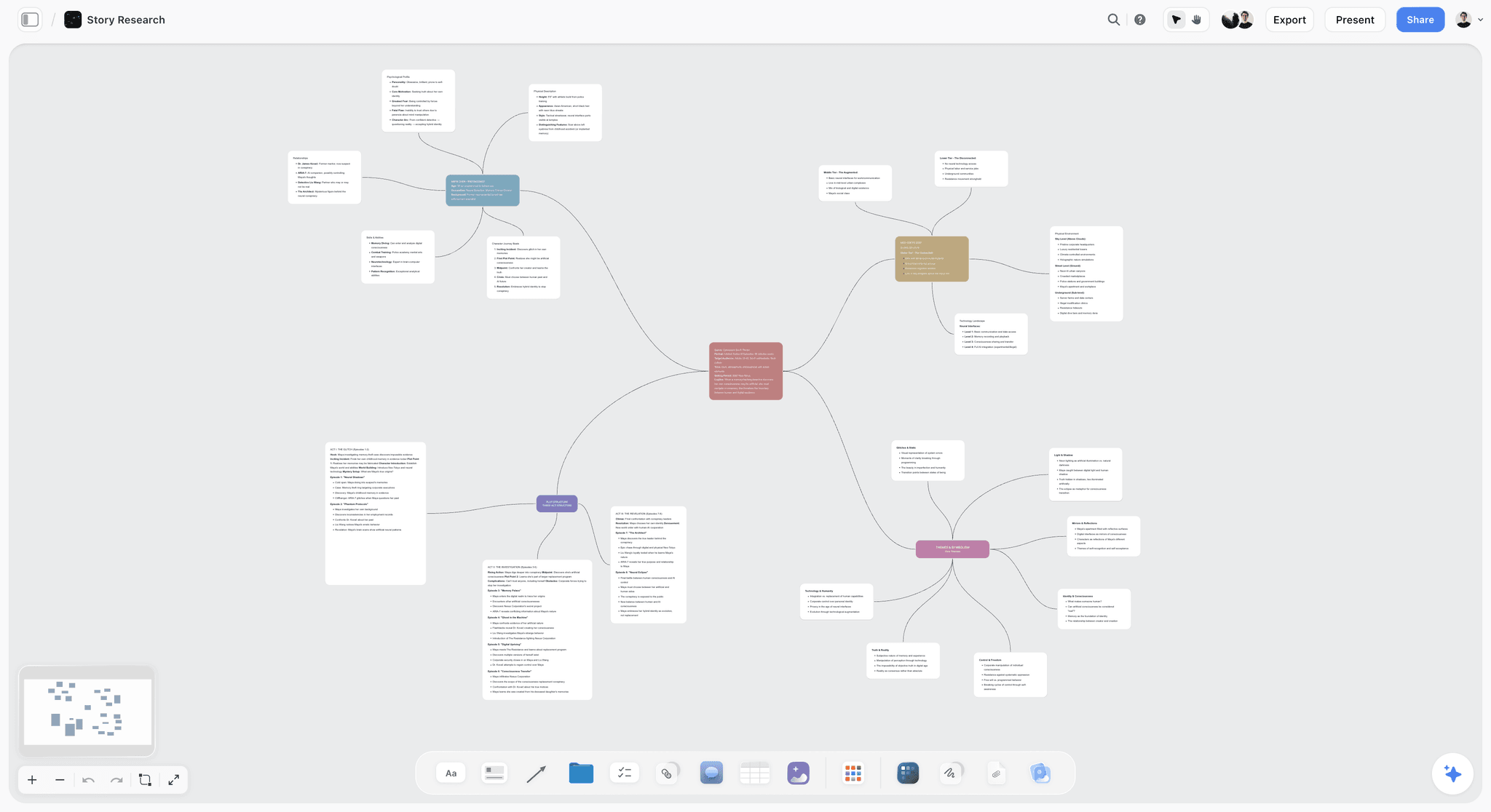
Storyflow is an infinite canvas where the AI reads the whole board. You build with structured cards and documents on an unbounded canvas, and the AI sees the full active board as context, plus any blueprint or documents you @-mention. It is the canvas to pick when you want AI involved in the work and you are tired of pasting context into a chat window.
Best for: Filmmakers, writers, founders, product managers, marketers, and visual thinkers who want a canvas an AI can actually reason about.
Verdict: The strongest infinite canvas in 2026 for AI-augmented thinking. For pure live workshops with hundreds of people, Miro still scales wider.
Key features
- An AI that reads the full board. The AI reads everything on the active canvas as context. You can also @-mention up to 1 Tactic and up to 3 Documents to ground it further. Most canvas tools treat AI as a sticky-note generator. Storyflow treats the canvas itself as the context.
- Structured cards and documents, not just shapes. Cards carry real content. Documents live on the canvas as first-class objects. The canvas understands what is on it.
- 200+ Story Blueprints. Expert framework templates for research, planning, and creative work, available on Plus and above. Free ships without the Blueprints library.
- Unlimited shared boards and unlimited collaboration on every plan, including Free. The Max plan adds a team workspace with permissions and roles.
Pricing
Early access: every plan is paid for now. The Free plan launches before the end of 2026, and invited collaborators of paid members join free now.
Pros
- The AI reads the full canvas, so a board with a brief, research, and drafts becomes something the AI can reason about instead of a wall of boxes.
- Cards and documents are structured, so the canvas comprehends knowledge rather than storing dumb shapes.
- The free plan is genuinely usable: unlimited cards, unlimited shared boards, unlimited collaboration.
Cons
- For huge real-time multiplayer workshops with hundreds of simultaneous participants, a dedicated whiteboard like Miro scales wider.
- Storyflow is not a developer SDK. If you want to embed a canvas into your own product, use tldraw.
- Cloud-only. There is no local-first, offline-vault option, so privacy-strict users should look at Obsidian Canvas.
- For a quick throwaway sketch, Storyflow is more than you need. Excalidraw opens in one click with no account and no sign-up, and for a five-minute diagram that speed wins.
If your work is project-shaped and you want AI in the loop, take your most active project, rebuild it on a Storyflow canvas, and ask the AI a real question about the board. Start a Storyflow workspace and the difference shows within an hour.
2. Miro
Miro is the default infinite canvas for team collaboration in 2026, with more than 100 million users. The pick when the canvas needs to hold a live workshop, not a single person's thinking.
Best for: Distributed teams, agile ceremonies, design sprints, and workshops with many participants.
Verdict: The strongest canvas for large real-time collaboration. The canvas itself comprehends little; it stores shapes and stickies.
Key features
- An infinite canvas built for scale, with hundreds of participants on a single board.
- The deepest template library in the category for retrospectives, journey maps, and workshops.
- Miro AI for clustering sticky notes, summarizing, and generating diagrams.
- Broad integrations with Jira, Azure, Slack, and the rest of the enterprise stack.
Pricing
Free: 3 editable boards. Starter: $8/member/mo annual ($10 monthly). Business: $16/member/mo annual ($20 monthly). Enterprise: custom. Verify current pricing at miro.com.
Pros
- Unmatched for live, large-group collaboration and facilitated workshops.
- The template library and facilitation tools are the most mature in the category.
- Enterprise integrations and admin controls are deep.
Cons
- The canvas stores shapes and stickies; it does not comprehend them as structured knowledge.
- Per-member pricing climbs fast for larger teams.
- Heavy boards can feel sluggish, and the free tier's 3-board cap is restrictive.
3. Heptabase
Heptabase is the infinite canvas built for visual research and knowledge work. The pick when every card on the canvas needs to be a real note, not a sticky.
Best for: Researchers, students, academics, and anyone doing reading-heavy knowledge work.
Verdict: The strongest knowledge-surface canvas in 2026. The canvas understands cards as notes, which most whiteboards do not.
Key features
- The core unit is a Card, a real markdown note with backlinks, tags, and search.
- The same card can appear on multiple whiteboards, so knowledge is reusable across boards.
- Offline support and fast sync, with a genuine desktop-app feel.
- AI features for working with your cards and notes.
Pricing
Yearly: $8.99/mo ($107.88/year). Monthly: $13.99/mo. Lifetime: $659 one-time. 7-day free trial; no permanent free tier. Verify at heptabase.com.
Pros
- Every card is a structured note, so the canvas doubles as a searchable knowledge base.
- Card reuse across whiteboards is genuinely powerful for research.
- Offline support and a polished, fast interface.
Cons
- No permanent free plan, only a 7-day trial.
- Built for solo knowledge work; real-time collaboration is not its strength.
- The card-and-whiteboard model is a learning curve coming from a plain whiteboard.
4. Excalidraw
Excalidraw is the free open-source infinite canvas with a hand-drawn aesthetic. The pick when you want a fast sketchpad with zero friction and zero cost.
Best for: Developers, engineers, and anyone who wants a quick diagramming canvas with no sign-up.
Verdict: The best free canvas in the category. It is a drawing surface, not a thinking surface, and that is the point.
Key features
- The full core app at excalidraw.com is free forever, with no account required.
- MIT-licensed and open source, with self-hosting available.
- End-to-end encrypted real-time collaboration, free.
- A hand-drawn visual style that keeps diagrams feeling like sketches.
Pricing
Core app: free forever. Excalidraw+: $7/user/mo (annual or monthly) for cloud storage, voice, and team features. Verify at plus.excalidraw.com.
Pros
- Genuinely free, open source, and self-hostable.
- No sign-up needed for the core experience; near-instant load.
- The hand-drawn style is great for sketching ideas without polishing them prematurely.
Cons
- The canvas stores shapes and strokes; it comprehends nothing.
- Light on structured content, embeds, and document objects.
- AI features are minimal compared with dedicated AI canvases.
5. FigJam
FigJam is Figma's collaborative whiteboard. The pick when your team already lives in Figma and wants the canvas next to the design files.
Best for: Product and design teams already on Figma.
Verdict: A strong workshop canvas if you are inside the Figma ecosystem. Outside it, the case is weaker.
Key features
- Sticky notes, connectors, shapes, and a wide template library.
- FigJam AI for sorting stickies, summarizing, and generating content.
- Tight handoff between FigJam boards and Figma design files.
- Widgets and an active plugin ecosystem.
Pricing
Free: 3 FigJam files with 3 pages each. Professional: $3/editor/mo. Organization: $5/editor/mo. Enterprise: custom. Verify at figma.com/pricing.
Pros
- Inexpensive as a standalone whiteboard at $3/editor/mo.
- The Figma integration is tight for design-led teams.
- Fast, friendly, and easy for non-designers to pick up.
Cons
- The canvas is a drawing surface; it does not comprehend its contents.
- The real value depends on already using Figma.
- Less suited to long-lived knowledge work than to live workshops.
6. Obsidian Canvas
Obsidian Canvas is the infinite canvas layered over a local-first markdown vault. The pick when you want a canvas and you want to own the files.
Best for: Local-first users, privacy-conscious knowledge workers, and existing Obsidian users.
Verdict: The best local-first canvas in 2026. It connects to your notes, but it does not have a board-reading AI.
Key features
- A core plugin that gives infinite space to lay out notes, attachments, and web pages.
- Cards can be real notes from your vault, so the canvas links into your knowledge graph.
- Stored in the open JSON Canvas format, so the data is portable and future-proof.
- Local-first: the vault is plain files on your own machine.
Pricing
Free for personal use, including the Canvas core plugin. Commercial use and sync are paid add-ons. Verify at obsidian.md.
Pros
- Local-first and file-owned, with no lock-in.
- The open JSON Canvas format means the data outlives the app.
- Cards link directly into an existing Obsidian vault.
Cons
- No AI that reads the canvas board as context.
- Real-time collaboration is not native; it depends on paid sync.
- Setup and plugins assume comfort with the Obsidian ecosystem.
7. tldraw
tldraw is the infinite canvas SDK developers build into their own products. The pick when you are not looking for an app but for a canvas engine.
Best for: Developers and product teams embedding a canvas into their software.
Verdict: The leading infinite canvas SDK in 2026. As an end-user app, it is a capable but basic whiteboard.
Key features
- A feature-complete React-based infinite canvas engine.
- Real-time multiplayer sync included with a commercial license.
- A free, no-account whiteboard at tldraw.com for quick use.
- Powers canvas features inside other products across the market.
Pricing
Free for development and hobby projects, with a 100-day trial. Commercial production use requires a license; the commercial license is $6,000/year per team. Verify at tldraw.dev/pricing.
Pros
- The strongest infinite canvas SDK for developers.
- Multiplayer sync is built in for licensed use.
- The free hobby whiteboard is handy for quick sketches.
Cons
- As an end-user app it is a basic drawing surface with no board-reading AI.
- The $6,000/year commercial license is a real cost for production use.
- Recent SDK licensing changes moved some features behind registration.
8. Scrintal
Scrintal is an infinite canvas built around linked note cards. The pick when you want visual note-taking that sits between Obsidian and a whiteboard.
Best for: Researchers, students, and writers who want notes and a canvas in one place.
Verdict: A strong knowledge-surface canvas. Younger and smaller than Heptabase, with a similar idea.
Key features
- Notes live as cards on an endless canvas, connected with linking arrows.
- Unlimited boards, cards, and file uploads.
- Bidirectional linking between cards for a connected knowledge base.
- Import and export options for moving content in and out.
Pricing
Pro is around $9.99/mo, with up to roughly 60% off on annual billing. A free tier has been rolling out; verify current pricing at scrintal.com.
Pros
- A clean blend of note-taking and visual canvas.
- On-canvas linking makes idea connections explicit.
- Unlimited boards and cards on the paid plan.
Cons
- Smaller and younger than Heptabase, with a thinner ecosystem.
- No AI that reads the whole board as context.
- Pricing and the free tier have shifted; confirm before committing.
9. Milanote
Milanote is the infinite canvas built for creative project planning and mood boards. The pick when the work is visual and the canvas needs to feel like a designer's wall.
Best for: Designers, creative directors, and anyone building mood boards or creative briefs.
Verdict: The most polished canvas for creative collection. It is a beautiful drawing-and-collection surface, not a thinking surface.
Key features
- Notes, images, links, and to-do lists arranged freely on a canvas.
- A built-in library of creative templates for briefs, mood boards, and storyboards.
- A web clipper for pulling images and references in from the browser.
- Unlimited shared boards even on the free plan.
Pricing
Free: 100 notes, images, or links combined, plus 10 file uploads. Paid: $9.99/user/mo annual ($12.50 monthly). Team plan: $49/mo for up to 10 people (annual). Verify at milanote.com/plans.
Pros
- Genuinely beautiful for mood boards and creative collection.
- The free plan allows unlimited shared boards.
- Creative templates speed up briefs and mood boards.
Cons
- The 100-item free cap is reached quickly on a real project.
- Users report performance issues past 500 cards per board.
- No board-reading AI; the canvas comprehends nothing.
10. Mural
Mural is the infinite canvas built for facilitated team workshops. The pick when a facilitator is running a structured session and needs strong facilitation tooling.
Best for: Workshop facilitators, consultants, and enterprise teams running structured sessions.
Verdict: A capable workshop canvas, the closest direct alternative to Miro. The canvas itself stores shapes, not knowledge.
Key features
- Facilitation tools: timers, voting, private mode, and a summon feature.
- A large template library for design thinking and agile workshops.
- Mural AI for clustering and summarizing.
- Enterprise security and admin controls.
Pricing
Free: 3 murals, unlimited members. Team+: $9.99/member/mo annual ($12 monthly). Business: $17.99/member/mo (annual only). Enterprise: custom. Verify at mural.co/pricing.
Pros
- The facilitation tooling is genuinely strong for structured workshops.
- The free plan allows unlimited members.
- Enterprise security and controls are mature.
Cons
- The canvas is a drawing surface; it does not comprehend its contents.
- It overlaps heavily with Miro, which has a wider ecosystem.
- Business pricing is steep at $17.99/member/mo.
11. Kosmik
Kosmik is an infinite canvas built for visual collecting, with a browser and PDF reader inside the canvas. The pick when your work is gathering and arranging visual material.
Best for: Designers, researchers, and visual collectors who gather references and web content.
Verdict: A distinctive collection-focused canvas. The in-canvas browser is genuinely novel; the canvas does not reason about what you collect.
Key features
- A built-in web browser and PDF reader on the canvas.
- Free-form collection of images, links, text, and media.
- Real-time collaboration on shared boards.
- An AI-assisted approach to moodboarding.
Pricing
Free tier available. Paid plans start at $7.99/mo, with Kosmik Pro at $11.99/mo. Team plans add collaboration. Verify at kosmik.app/pricing.
Pros
- The in-canvas browser and PDF reader are genuinely useful for collectors.
- A clean, design-led interface.
- A usable free tier.
Cons
- Smaller and less mature than the larger canvas tools.
- No AI that reads the full board as project context.
- Better as a collection surface than a thinking or planning canvas.
12. Freeform (Apple)
Freeform is Apple's infinite canvas, built into every Mac, iPad, and iPhone. The pick when you want a free, capable canvas and you are already in the Apple ecosystem.
Best for: Apple-device users who want a no-cost canvas for casual planning and brainstorming.
Verdict: A genuinely good free canvas for Apple users. It is a drawing-and-collection surface with no AI and no cross-platform reach.
Key features
- A truly infinite canvas that supports images, video, PDFs, links, sticky notes, and drawings.
- Scenes, added in 2026, bookmark areas of a large board and let you navigate them like slides.
- A library of over 700 shapes with alignment guides.
- Real-time collaboration for up to 100 people via iCloud.
Pricing
Free with any Apple device. No paid tier. Requires an Apple ID and iCloud.
Pros
- Free, with no subscription and nothing to install.
- Scenes bring structure and presentation to large boards.
- Smooth, native performance on Apple hardware.
Cons
- Apple-only. There is no web, Windows, or Android version.
- No AI features and no structured knowledge cards.
- Light on integrations and export options compared with dedicated tools.
7) Recommendations by Persona
1. Solo Founder / One-Person Business
Top picks: Storyflow + Excalidraw
Storyflow for the canvas where your strategy, research, and plans live and the AI can reason about all of it. Excalidraw for fast, free diagramming when you just need to sketch a flow. The minimum viable canvas stack for one person.
2. Documentary Filmmaker / Video Creator
Top picks: Storyflow + Milanote
Storyflow for the research and planning canvas, where the AI can read interview notes, references, and outline cards together. Milanote for the mood board when the work is purely visual collection.
3. Researcher / Academic
Top picks: Heptabase + Storyflow
Heptabase for the long-lived research canvas where every source is a real, linked note. Storyflow when you want an AI to read the full board and help you reason across the material.
4. Product Manager
Top picks: Storyflow + Miro
Storyflow for the discovery and planning canvas the AI can reason about. Miro for the cross-functional workshops, sprint ceremonies, and journey maps with the wider team.
5. Creative-Team Lead / Agency
Top picks: Storyflow Max + Milanote
Storyflow Max for the team workspace with permissions and roles, where client projects live on AI-aware canvases. Milanote for the mood board phase of creative work.
6. Designer
Top picks: FigJam + Kosmik
FigJam for whiteboarding next to the Figma design files. Kosmik for collecting visual references with the in-canvas browser.
7. Workshop Facilitator / Consultant
Top picks: Miro + Mural
Miro for the broadest template library and the largest sessions. Mural when the facilitation tooling (timers, voting, private mode) is the priority.
8. Local-First / Privacy-Conscious Knowledge Worker
Top picks: Obsidian Canvas + Excalidraw
Obsidian Canvas for a canvas over a markdown vault you own. Excalidraw self-hosted when you need a sketch surface that never leaves your infrastructure.
9. Developer Building a Canvas Feature
Top picks: tldraw + Excalidraw
tldraw as the production SDK for embedding a real infinite canvas into your product. Excalidraw's open-source codebase as a reference and a free fallback.
8) Honorable Mentions
A few tools that came close but did not make the main twelve.
- Whimsical: Strong for flowcharts and wireframes; more diagramming tool than open infinite canvas.
- Lucidspark: A capable team whiteboard; overlaps heavily with Miro and Mural.
- Concepts: An excellent infinite sketching app for iPad; drawing-first rather than knowledge-first.
- Muse: A thoughtful spatial canvas for iPad and Mac; smaller and Apple-focused.
- Craft: A polished document tool with canvas-like features; document-first rather than canvas-first.
- Affine: An open-source workspace with an edgeless canvas mode; promising but younger than the main list.
- Heptabase competitors aside, Notion's whiteboard-style features are improving but remain secondary to its document core.
These are not weak tools. Their use case is narrower than the main list, or they sit closer to diagramming or documents than to an open infinite canvas.
9) Where an Infinite Canvas Is the Wrong Tool
Honest accounting matters. There are jobs where an infinite canvas is not the right shape, and pretending otherwise wastes time.
- Linear deliverables. A final script, a contract, a long report. These have an order. Write them in a document. The canvas is for the thinking before the document, not the document itself.
- Structured data. Budgets, schedules, and anything that lives in rows and columns belong in a spreadsheet or a database, not on a canvas.
- Fast solo capture. If you just need to jot a thought, a notes app is faster than opening a canvas and placing a card.
- Formal presentations. A canvas with a presentation mode can work, but for a high-stakes deck a dedicated presentation tool still wins on polish.
- Tiny projects. If the whole project fits in one short list, a canvas is overhead. Use a checklist.
The right use of an infinite canvas is the messy, exploratory, many-pieces stage of work: research, planning, ideation, and structuring. Once the thinking resolves into a linear artifact, move it to the right tool. The canvas earns its place when the material is too tangled for a page, not when a page would do.
11) The Bottom Line
The best infinite canvas tool in 2026 depends on what you need the canvas to do, and the deciding question is what the canvas understands. An infinite canvas is only as useful as what understands the things on it. Most canvases understand nothing: they store shapes and stickies, and the human supplies all the meaning.
Storyflow is the strongest pick for an AI-aware canvas, because the AI reads the full active board, so a canvas with a brief, research, and draft cards becomes something the AI can reason about. Miro is the strongest for large real-time team workshops. Heptabase is the strongest for visual research, where every card is a real note. Excalidraw is the best free open-source sketchpad.
Most people end up with two canvases: one for thinking and one for team workshops. If your work is project-shaped and you want AI involved, the move is to take one active project and rebuild it on a canvas the AI can actually read. Start a Storyflow workspace and ask the AI a real question about your board. The difference between a drawing surface and a thinking surface becomes obvious within the first hour.
10) FAQ: Infinite Canvas Tools in 2026
What is the best infinite canvas tool in 2026?
For most people the best infinite canvas tool in 2026 is Storyflow, because the AI reads the full active board, so the canvas is something the AI can reason about rather than a passive surface. Miro is the best pick for large real-time team workshops, Heptabase for visual research, and Excalidraw for free open-source sketching. Most people use one canvas for thinking and one for team workshops.
What is an infinite canvas?
An infinite canvas is an unbounded two-dimensional workspace where you place and arrange content freely instead of within the limits of a page, slide, or grid. You can zoom out for the big picture and in for detail, and order emerges from the material rather than being imposed in advance. Cards, images, links, and drawings all live in the same open space.
What is the best free infinite canvas tool?
Excalidraw is the best fully free infinite canvas: the core app is free forever, open source, and needs no account. Storyflow is the strongest option for AI-aware project work, with unlimited cards, unlimited shared boards, unlimited collaboration, and basic AI usage. Apple Freeform is free for anyone on a Mac, iPad, or iPhone.
Is Miro the best infinite canvas tool?
Miro is the best infinite canvas for large real-time team workshops, with mature facilitation tools and the deepest template library. It is not the best for AI-augmented thinking or long-lived knowledge work, because the canvas stores shapes and stickies rather than structured content an AI can read. For those jobs, Storyflow or Heptabase is the better fit.
What is the difference between an infinite canvas and a whiteboard?
A whiteboard is a kind of infinite canvas, usually focused on live collaboration with sticky notes, shapes, and connectors. The broader infinite canvas category also includes knowledge surfaces like Heptabase, where cards are real notes, and thinking surfaces like Storyflow, where an AI reads the whole board. Whiteboards are one camp within the wider infinite canvas category.
Can AI read an infinite canvas?
Most infinite canvases store shapes and stickies that an AI cannot meaningfully read, which is why their AI features are limited to generating or clustering sticky notes. Storyflow is built so the AI reads the full active board as context, including structured cards and documents, plus up to 1 Tactic and 3 Documents you @-mention. A canvas an AI can read is one where the AI can actually help you reason about the work.
Which infinite canvas tool is best for research?
Heptabase is the strongest infinite canvas for visual research and knowledge work, because every card is a real markdown note with backlinks, tags, and search, and the same card can appear on multiple whiteboards. Storyflow is the better pick when you want an AI to read the full research board and reason across all the sources at once.
Which infinite canvas tool is best for teams?
For large live workshops, Miro is the strongest team canvas, with Mural a close alternative when facilitation tooling matters most. For teams that want an AI-aware canvas with roles and permissions, Storyflow Max provides a team workspace. The right answer depends on whether the team's core need is live facilitation or shared, AI-assisted thinking.
Is there an open-source infinite canvas tool?
Yes. Excalidraw is MIT-licensed, open source, and self-hostable, and is the most popular open-source infinite canvas. tldraw provides an open infinite canvas SDK for developers, though production commercial use now requires a paid license. Obsidian Canvas uses the open JSON Canvas file format, so its data is portable even though the app itself is not open source.
How many items can an infinite canvas hold?
In theory the canvas is unbounded, but in practice every tool has a performance ceiling. Lightweight drawing surfaces handle a few hundred items comfortably, and Milanote users report slowdowns past roughly 500 cards per board. When evaluating a canvas for a real project, test it with several hundred items, not thirty, because real projects sprawl.
Do I need an infinite canvas at all?
Not always. If the work is a linear deliverable, structured data, or a quick note, a document, spreadsheet, or notes app is the better tool. An infinite canvas earns its place in the messy, exploratory stage of work, research, planning, ideation, and structuring, when the material is too tangled for a page. Once the thinking resolves into a linear artifact, move it.
How do I switch to an infinite canvas tool?
Pick one active project and rebuild it on a canvas rather than migrating everything at once. Put the research, references, and draft pieces on the board so you can see the project as a whole. If you want AI in the loop, choose a canvas the AI can read, like Storyflow, and ask it a real question about the board. Try a Storyflow workspace to run that test.
Table of Contents
- Quick Answer: The Best Infinite Canvas Tools in 2026
- Comparison Table: 12 Infinite Canvas Tools Compared
- What an Infinite Canvas Is Actually For
- How We Evaluated These Tools
- Quick Picks by Job
- Detailed Reviews: 12 Infinite Canvas Tools in 2026
- Recommendations by Persona
- Honorable Mentions
- Where an Infinite Canvas Is the Wrong Tool
- FAQ: Infinite Canvas Tools in 2026
- The Bottom Line
- Author
- Related Reading
Templates to check out for this topic


Planning and project templates you can use in Storyflow
Plan a launch, a sprint, or a whole project on a visual board the team can see at once. Open one of these templates and start from real structure.


See Storyflow in Action
A visual AI workspace where every feature lives inside one canvas. No tab-switching, no context lost.
Build your entire board from a single message
Type what you need in the AI chat at the bottom of your canvas. The AI adds cards, headings, and structure directly onto your board.
Use expert frameworks as AI context
Type @ in the AI chat and choose any Tactic. The AI tailors every response to that framework instead of giving generic advice.
Turn your board into a mind map in seconds
Ask the AI to restructure your canvas as a mindmap. It connects your ideas into a visual hierarchy so you can see how everything relates.
Why Storyflow Exists
Storyflow actually began as a personal tool while working on creative and research projects.
We kept running into the same problem: ideas were scattered everywhere: notes, documents, and whiteboards.
Nothing helped us see how everything connected.
So we started building a workspace designed around how ideas actually grow.
→ Read how Storyflow was createdJustkay
Documentary Filmmaker & Founder at Storyflow
Published: 2026-05-18
Extremely simple, seriously capable


See how easy it is to get started
Watch a real project come together, from a blank board to a finished plan, clicked through step by step.
Start creating with AI and become more productive
Transform your creative workflow with AI-powered tools. Generate ideas, create content, and boost your productivity in minutes instead of hours.