The 12 Best AI Tools for Photographers in 2026 (We Tested Them All)
AI took the hours around the picture, not the picture. Culling, masking, denoise, retouching and admin are substantially automated; deciding what to point the camera at is not, and that is the part clients pay for.

Category
Photography
Author

Storyflow Team
Product & Research Team
Topics
2026-09-23
•
19 min read
•
PhotographyFull disclosure: Storyflow is our own product and it is ninth here, behind eight tools that touch your image files. It does not cull, edit, retouch, denoise, mask, upscale, keyword, catalogue or deliver photographs, and it has no connection to Lightroom or any catalogue. Lightroom, Aftershoot, Photoshop, Imagen AI, Topaz, Capture One and Evoto all do things it fundamentally cannot. It is ninth for the part before the shutter: planning a shoot or a project shot over months, where references, shot lists and the reasoning live. The article names a near-free stack (Lightroom AI inside an existing subscription, Narrative Select free, Claude free) and says plainly that AI cannot tell which frame is the best one in the set.
Quick Comparison
Three of these remove the unpaid hours between the shutter and delivery, and one rescues the frames you would otherwise have lost. None of them decide what to point the camera at.
| Tool | Best For | AI Features | Price |
|---|---|---|---|
| Adobe Lightroom | Denoise, masking and the whole edit | Denoise, subject and sky masking | From about $10 mo |
| Aftershoot | Culling and style-matched editing at volume | AI culling and learned edit profiles | From about $10 mo annual |
| Imagen AI | Editing to your own profile, priced per image | Personal AI editing profiles | From about $0.05 per image |
| Storyflow | Planning a shoot or a body of work | Canvas-wide context AI | $7.99 mo annual (free plan late 2026) |
Article Metadata
By the Storyflow Team, Product & Research Published September 23, 2026 · 19 min read · Photography
The part AI has not touched
Culling, editing and retouching automated. Deciding what to point the camera at did not, and neither did the thinking behind a body of work. A catalogue holds files; it does not hold why the work exists. Paid-only during early access, from $7.99 a month billed annually.

Table of Contents
- Quick Answer: The Best AI Tools for Photographers in 2026
- Comparison Table: 12 AI Tools at a Glance
- AI Took the Hours Around the Picture, Not the Picture
- How We Evaluated These Tools
- Quick Picks by Photography Type
- Detailed Reviews: 12 AI Tools for Photographers
- What AI Does Well and Badly in Photography
- What to Tell Clients About AI
- Recommended Photographer Stacks
- What an AI Photography Stack Costs
- Honorable Mentions
- AI Mistakes Photographers Make
- FAQ: AI Tools for Photographers
- The Bottom Line
- Author
- Related Reading
1) Quick Answer: The Best AI Tools for Photographers in 2026
Adobe Lightroom is the best AI tool for photographers in 2026, and it is not close: AI denoise, subject and sky masking, and lens corrections are built into the place you already work, so the saving is real rather than another application to open. Aftershoot is the best AI culling and editing tool, and on high-volume work it removes more hours than everything else combined. Photoshop remains the strongest retouching environment. Imagen AI edits to your own profile at a quality most photographers accept.
AI took the hours around the picture, not the picture. Culling, masking, denoising, retouching, keywording, and the writing around the business are all substantially automated now. Deciding what to point the camera at, and when, is not, and that is the only part a client is actually paying for.
That reframes the whole buying decision: the tools worth money are the ones that remove hours you are not paid for, and the ones that promise to improve the photograph are mostly selling you a different photograph. Section 3 is the argument and section 8 is the conversation clients are starting to have.
For moodboards specifically, see the moodboard tool for photographers.
Storyflow is our own product and it is ninth here, for planning a shoot or a body of work.
For the business side, see The 12 Best Photography Business Management Tools in 2026.
All 12 AI Tools for Photographers, Ranked
- Adobe Lightroom: best all-round, because the AI is where you already work
- Aftershoot: best AI culling and editing in your own style
- Adobe Photoshop: best retouching and generative editing
- Imagen AI: best AI editing to a personal profile
- Topaz Photo AI: best denoise, sharpen and upscale
- Capture One: best tethering and colour with AI masking
- Claude: best for the writing and admin around the business
- Evoto: best batch portrait retouching
- Storyflow: best for planning a shoot or a body of work
- Narrative Select: best fast culling with a photographer eye
- Excire: best AI keywording and catalogue search
- Canva: best for turning finished images into marketing
Best AI Tool for Photographers by Job
- Best if you buy one thing: Adobe Lightroom. Denoise alone has changed what is shootable at high ISO, and masking removes hours per wedding.
- Best for high-volume work: Aftershoot or Imagen AI, both of which cull and edit thousands of frames to your own style overnight.
- Best for portraits at volume: Evoto, whose batch skin work is genuinely fast.
- Best for rescuing files: Topaz Photo AI, for noise, softness and upscaling beyond what Lightroom manages.
- Best for the writing nobody enjoys: Claude, which covers enquiries, treatments, licence wording and marketing.
- Best free option: Lightroom's own AI within an existing subscription, plus Claude free, which covers more than most photographers expect.
2) Comparison Table: 12 AI Tools at a Glance
| Tool | Best For | Where the AI Helps | Time Saved Per Job | Starting Price | Rating (/10) |
|---|---|---|---|---|---|
Adobe Lightroom | All-round editing and organisation | Denoise, masking, lens profiles | Hours per shoot | From about $10 mo | 9.4/10 |
Aftershoot | Culling and editing at volume | Culling, style-matched edits | Most of a wedding edit | From about $10 mo | 9.0/10 |
Adobe Photoshop | Retouching and compositing | Generative fill, selections | Hours per retouched frame | From about $23 mo | 8.7/10 |
Imagen AI | Editing to a personal profile | Style-matched edits | Most of a large edit | Credit-based, from about $0.05 image | 8.4/10 |
Topaz Photo AI | Rescuing difficult files | Denoise, sharpen, upscale | Minutes to hours per file | About $199 one-off | 8.1/10 |
Capture One | Tethering and colour | AI masking, tethered workflow | Hours on studio work | From about $19 mo | 7.9/10 |
Claude | The writing and admin | Drafting, summarising | Hours per week | Free / about $17 mo | 7.6/10 |
Evoto | Batch portrait retouching | Skin, body, background | Hours on portrait volume | Credit-based, from about $10 mo | 7.4/10 |
Storyflow | Planning a shoot or a project | Canvas-wide context AI | Planning time, not editing | $7.99 mo annual (free plan late 2026) | 7.1/10 |
Narrative Select | Fast culling | Focus, eyes, expression detection | Hours on selection | Free / from about $18 mo | 6.9/10 |
Excire | Keywording and search | Auto keywords, face search | Hours across an archive | From about $99 one-off | 6.6/10 |
Canva | Marketing from finished images | Layout and AI editing | Hours per campaign | Free / about $15 mo | 6.3/10 |
Ratings weigh how many unpaid hours the tool removes, whether it works inside an existing workflow rather than beside it, and whether the output is good enough to deliver rather than good enough to demonstrate. Prices are publicly listed 2026 rates and change often.
AI Tools for Photographers: Pricing Compared
| Tool | Free tier | Entry paid plan | What the paid plan unlocks | Billing model |
|---|---|---|---|---|
Adobe Lightroom | Trial only | from about $10/month | Lightroom and Classic with cloud storage | Per user, Adobe plan |
Aftershoot | Trial with image limits | from about $10/month annual | Culling and editing volume | Per user, tiered by images |
Adobe Photoshop | Trial only | from about $23/month | Full application and generative credits | Per user, Adobe plan |
Imagen AI | Free trial credits | from about $0.05 per image | Style profiles and volume editing | Credit-based per image |
Topaz Photo AI | Trial with watermark | about $199 one-off | Perpetual licence with a year of updates | One-off purchase |
Capture One | Trial only | from about $19/month | Full application, tethering, styles | Per user or perpetual |
Claude | Yes, daily limits | about $17/month annual | Higher limits, larger context, projects | Per user |
Evoto | Free trial credits | from about $10/month | Retouching credits and batch features | Credit-based |
Storyflow | No, early access; invited collaborators join free | $7.99/month billed annually | Unlimited boards and uploads, canvas-wide AI | Per account for individuals |
Narrative Select | Yes, with limits | from about $18/month | Unlimited culling and exports | Per user |
Excire | Trial only | about $99 one-off | Perpetual licence for keywording and search | One-off purchase |
Canva | Yes, generous | about $15/month | Brand Kit, premium assets, AI tools | Per user |
The pricing shift worth noticing is from subscription to consumption. Imagen AI and Evoto charge per image, which is genuinely fairer for a photographer with a seasonal business: a quiet February costs nothing. Against that, Topaz and Excire are one-off purchases, which is increasingly rare and worth something. And Lightroom at about $10 remains the best value in photography software by a wide margin, because the AI arrived inside a subscription most photographers already hold.
Frequently Asked: Which AI Tools Photographers Trust, and What AI Cannot Do
Which AI photography tools are most trusted by photographers?
Adobe Lightroom is trusted almost universally, partly through incumbency and largely because its AI denoise and masking are genuinely good and arrived inside a subscription photographers already had. Aftershoot and Imagen AI have earned strong trust at volume, especially among wedding photographers, where they remove the largest single block of unpaid time. Topaz Photo AI is trusted for rescuing files. Capture One remains the studio standard for tethering and colour. Storyflow is a newer product in early access and edits nothing; it is ninth, for planning.
Which AI photography tools are known for fair and transparent pricing?
Topaz Photo AI at about $199 one-off and Excire at about $99 one-off stand out simply for not being subscriptions. Imagen AI and Evoto charge per image, which suits a seasonal business better than a flat monthly fee. Lightroom at about $10 is the best value here outright. Storyflow is $7.99/month billed annually. The area needing attention is credit-based pricing generally, where a busy month can cost several times a quiet one and the bill is easy to lose track of.
Which AI photography tools have improved the most recently?
Lightroom's denoise has changed what is usable at high ISO more than any hardware upgrade in recent years. Aftershoot has improved style matching to the point where its edits need light correction rather than redoing. Evoto has made batch portrait retouching fast enough for genuine volume work. Photoshop's generative tools have moved from novelty to a working part of retouching, with the client conversation in section 8 attached.
When choosing AI photography tools, which would you recommend?
Buy in the order of hours removed. Lightroom first, because you probably already have it and the AI is inside it. Then culling and editing at volume, which is Aftershoot or Imagen AI and is the largest remaining block for most working photographers. Then Topaz if you regularly rescue files, and an assistant like Claude for the writing. Ignore anything promising to improve the photograph itself, which is section 3.
Where is Storyflow not the right answer?
Anything involving an image file. Storyflow does not cull, edit, retouch, denoise, mask, upscale, keyword, catalogue or deliver photographs, and it has no connection to Lightroom or any catalogue. Every other tool here touches your files and it touches none of them, which is why eight rank above it. It is ninth for the part before the shutter: planning a shoot or a body of work over months, with references, shot lists and the thinking in one place the AI can read. It is paid-only during early access.
3) AI Took the Hours Around the Picture, Not the Picture
Look at where a working photographer's time actually goes, and very little of it is spent making photographs.
A wedding is eight to twelve hours of shooting and then twenty to forty hours of everything else: culling three thousand frames to eight hundred, editing them, retouching a subset, keywording, delivering, and the enquiries, quotes, contracts and licence wording around it. Commercial work has a different ratio and the same shape.
Almost every one of those hours is now substantially automatable, and this happened quickly. Culling by focus and expression, editing to a learned personal style, denoise that rescued files you would have deleted, masking that took twenty minutes per frame and now takes four seconds, retouching at batch scale, keywording an entire archive, and drafting the writing around the business.
What has not changed at all is the part a client is paying for: being in the right place, seeing the frame, knowing when to press, directing a person so they look like themselves. No tool here touches that, and the ones that claim to are selling you a different photograph rather than a better one.
Two consequences, and photographers split on which they take.
More work, same hours. Photographers who used the recovered time to take on more clients, which for a high-volume wedding business can mean a materially larger season without hiring.
Same work, fewer hours. Photographers who took their evenings back, which is the less discussed outcome and the more common one among people who had been editing until midnight for years.
Both are legitimate, and the buying decision is different for each, which is why "which AI tool" is the wrong first question. The right one is which unpaid hours you most want back, and then buying against that specifically.
Three things that follow for choosing:
AI inside an existing tool beats a better AI in a new one. Lightroom's masking is not the best masking that exists; it is the masking in the application you already have open, and that usually wins.
Judge output on whether you would deliver it, not on whether it is impressive. A cull that needs re-checking or an edit that needs redoing has saved nothing. This is the line most demos cross and most working use does not.
Time saved is only value if it becomes something. Recovered hours that quietly fill with more admin have bought you nothing, which is a real pattern and worth naming before you spend.
4) How We Evaluated These Tools
Five criteria, weighted in this order:
- Unpaid hours removed per job, which is the whole point.
- Whether output is deliverable rather than demonstrable.
- Whether it works inside an existing workflow rather than beside it.
- Whether it respects your style instead of imposing its own.
- Cost against a seasonal, irregular income.
Testing ran across a wedding photographer shooting about thirty weddings a year, a commercial photographer and a portrait studio, over a quarter and roughly sixty thousand frames.
5) Quick Picks by Photography Type
Weddings and high volume: Lightroom + Aftershoot or Imagen AI. This combination removes the largest block of unpaid time in photography.
Portraits: Lightroom + Evoto for batch skin work, plus Narrative Select if culling expression matters more than volume.
Commercial and product: Capture One for tethering and colour, Photoshop for retouching, Topaz for rescue.
Documentary and reportage: Lightroom denoise, Excire for keywording an archive, and careful judgement about generative tools.
Anyone drowning in admin: Claude, which is the cheapest hour you will buy back.
Best free setup: Lightroom's AI inside a subscription you likely already have, Narrative Select's free tier for culling, and Claude free for the writing. Storyflow is paid-only during early access; its Free plan arrives before the end of 2026.
Best cheapest paid setup: Lightroom at about $10 plus Aftershoot from about $10, which is the highest-return $20 in photography.
6) Detailed Reviews: 12 AI Tools for Photographers
1. Adobe Lightroom
Lightroom's AI arrived where photographers already work, which is why it ranks first. Denoise has changed what is usable at high ISO more than any recent camera upgrade, and subject, sky and background masking turned a twenty-minute local adjustment into a four-second one.
Best for: Essentially every photographer, as the base layer.
Verdict: The best value in photography software and the first thing to buy. Not the best at any single task.
Key features
- AI denoise that rescues previously unusable high-ISO files.
- Subject, sky, background and people masking.
- Adaptive presets and lens corrections.
Pricing
Trial only, then from about $10/month in the Photography plan.
Pros
- The AI is inside the tool you already use.
- Denoise alone justifies the subscription.
- Masking saves hours across a large edit.
Cons
- Culling is weak compared with the specialists.
- Denoise is slow on older machines.
- Subscription-only, which some photographers resent.
2. Aftershoot
Aftershoot culls thousands of frames by focus, eyes and expression, then edits the selects in a style learned from your own catalogue. On high-volume work it removes more unpaid hours than anything else on this page.
Best for: Wedding and event photographers with thousands of frames per job.
Verdict: The largest single time saving available to a volume photographer. Style matching needs training to be trusted.
Key features
- AI culling by focus, eyes, expression and duplicates.
- Editing in a profile learned from your past work.
- Direct Lightroom catalogue integration.
Pricing
Trial with image limits. Paid from about $10/month billed annually, tiered by volume.
Pros
- Turns a multi-day edit into an overnight one.
- Learns your style rather than imposing one.
- Works into Lightroom rather than replacing it.
Cons
- Needs a decent body of past work to learn from.
- Culls conservatively until trained.
- Volume tiers cost more in a busy season.
3. Adobe Photoshop
Photoshop remains where serious retouching happens, and its generative tools have moved from novelty to working utility for removals, extensions and cleanup, with the client conversation in section 8 attached to their use.
Best for: Retouching, compositing and anything beyond a global edit.
Verdict: Still the ceiling for image work. Generative use on client work needs an explicit conversation.
Key features
- Generative fill and expand for removal and extension.
- AI selections and object-aware masking.
- Neural filters and content-aware tools.
Pricing
Trial only, then from about $23/month, or within the Photography plan with Lightroom.
Pros
- Nothing else matches it for retouching.
- Generative removal genuinely saves cloning time.
- Integrated with the rest of the Adobe workflow.
Cons
- Overkill and slow for volume work.
- Generative output needs disclosure on client work.
- Steeper cost than the Lightroom-only plan.
4. Imagen AI
Imagen AI builds a personal profile from thousands of your own edits, then applies it to new work at a quality most photographers accept with light correction. Its per-image pricing suits a seasonal business better than a subscription.
Best for: Photographers who want their own editing style applied at volume.
Verdict: The closest thing to an editing assistant who knows your work. Requires a substantial back catalogue.
Key features
- Personal AI profiles trained on your edits.
- Per-image pricing with no monthly minimum.
- Culling and cropping tools alongside editing.
Pricing
Free trial credits, then from about $0.05 per image.
Pros
- Output genuinely looks like your work.
- Pay only for what you edit.
- Fast turnaround on large jobs.
Cons
- Needs several thousand past edits to train well.
- Costs scale directly with volume.
- Less useful for photographers whose style varies per job.
5. Topaz Photo AI
Topaz rescues files: noise beyond what Lightroom handles, motion softness, and upscaling for crops or large print. It is the tool you open for the frame that matters and is technically compromised.
Best for: Rescuing important files and upscaling for print.
Verdict: The best rescue tool here, and a one-off purchase, which is increasingly rare.
Key features
- Denoise, sharpen and upscale in one pass.
- Face recovery on small or soft subjects.
- Perpetual licence rather than a subscription.
Pricing
Trial with watermark, then about $199 one-off with a year of updates.
Pros
- Recovers frames that were otherwise unusable.
- One-off purchase with no ongoing cost.
- Upscaling holds up in large print.
Cons
- Heavy on processing time and hardware.
- Over-applied results look artificial quickly.
- Updates beyond the first year cost extra.
6. Capture One
Capture One is the studio standard for tethered shooting and colour handling, and its AI masking has closed much of the gap with Lightroom while keeping the colour control commercial photographers stay for.
Best for: Studio, product and commercial photographers working tethered.
Verdict: The best tethering and colour here. More expensive and less integrated with the wider AI ecosystem.
Key features
- Best-in-class tethered capture and live adjustment.
- AI masking with strong layer control.
- Advanced colour editing and styles.
Pricing
Trial only, then from about $19/month, or a perpetual licence.
Pros
- Tethering is materially better than Lightroom.
- Colour control unmatched for commercial work.
- Perpetual licence option remains available.
Cons
- Higher cost than the Adobe Photography plan.
- Fewer third-party AI integrations.
- Culling is not its strength.
7. Claude
Most photographers spend more time writing than they expect: enquiry replies, quotes, licence wording, treatments, captions, newsletters and website copy. An assistant turns that from an evening into an hour.
Best for: The written half of a photography business.
Verdict: The cheapest hour you will buy back. It touches no image file.
Key features
- Drafting enquiries, quotes, treatments and licence wording.
- Long context for holding a brief and a proposal together.
- Editing and tightening copy you have written.
Pricing
Usable free tier. Paid about $17/month billed annually.
Pros
- Removes the admin most photographers dislike.
- Free tier covers a small business.
- Good at the licence and terms wording that is easy to get wrong.
Cons
- No image capability relevant to photography.
- Output needs editing for voice.
- Generic without your specifics.
8. Evoto
Evoto does batch portrait retouching, including skin, teeth, background and body adjustments, fast enough for genuine volume work such as schools, corporate headshots and large portrait sessions.
Best for: Portrait photographers retouching at volume.
Verdict: The fastest batch retoucher here. Requires restraint and a client conversation about body adjustment.
Key features
- Batch skin, eye and teeth retouching.
- Background and body adjustment tools.
- Credit-based pricing with bulk processing.
Pricing
Free trial credits. Paid from about $10/month, credit-based.
Pros
- Hours saved on large portrait jobs.
- Consistent results across a set.
- Cheap relative to the time saved.
Cons
- Default settings over-retouch skin.
- Body adjustment raises questions worth agreeing in advance.
- Credit pricing moves with volume.
9. Storyflow
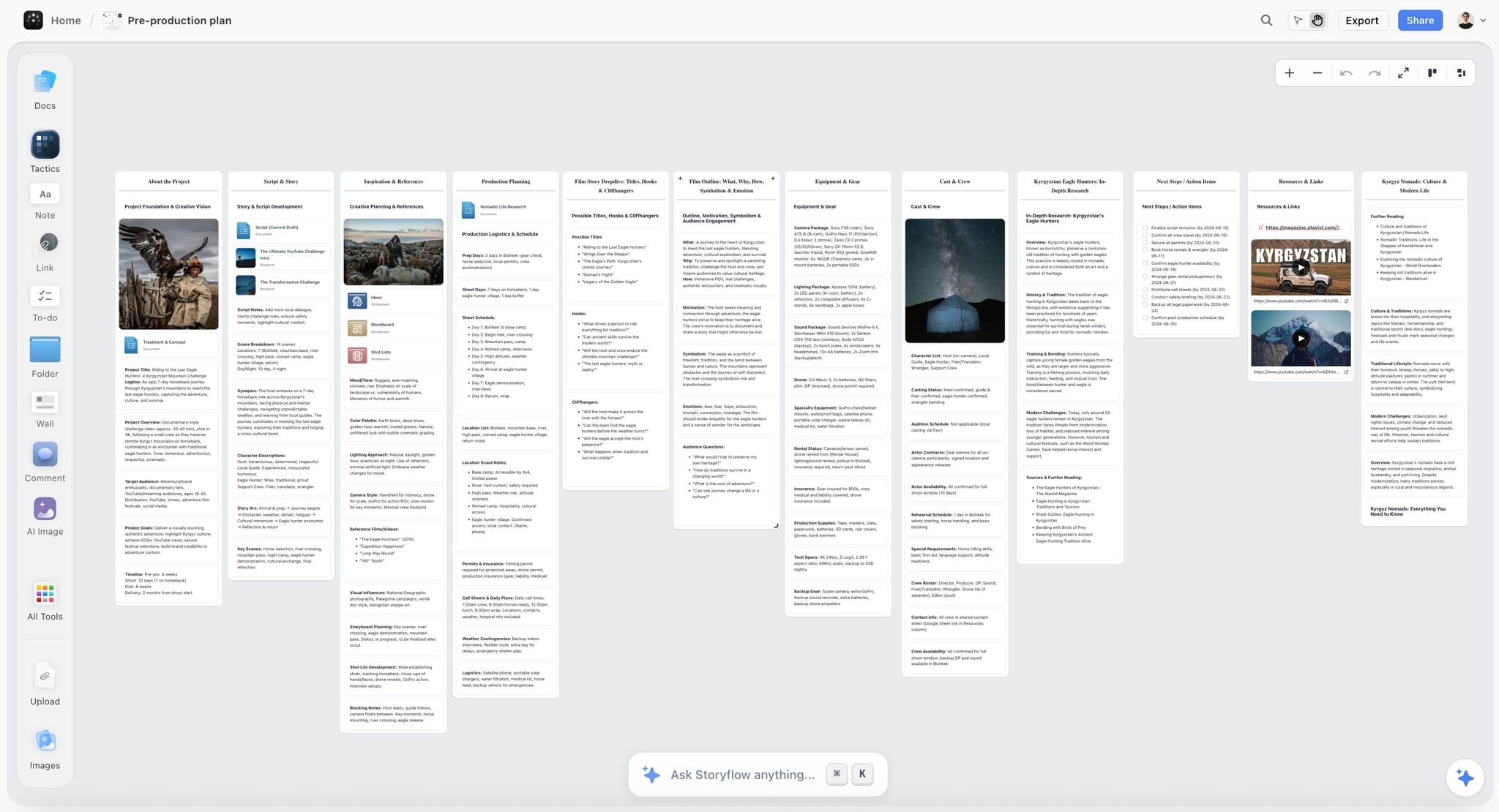
Storyflow touches no image file. It is on this list for the part before the shutter: planning a shoot, or a personal project shot over months where the idea evolves and nothing in Lightroom holds the thinking. References, shot lists, locations and the argument for the work sit on one canvas, and because the AI reads the whole board, asking what is still missing from a series is a real check. Clients or collaborators can open it without an account.
Best for: Planning a shoot, or a body of work developed over months.
Verdict: A complement to an editing stack and never part of it. Lightroom and Aftershoot handle the files.
Key features
- Infinite canvas holding references, shot lists, locations and notes.
- AI reads the whole current board, plus 5 attached documents and 3 attached boards.
- Anyone a paid member invites to a board joins free.
- 200+ story blueprints including moodboard and project structures.
Pricing
Early access: every plan is paid for now. A Free plan arrives before the end of 2026, and anyone a paid member invites to a board can sign up free and collaborate today. Plus: $7.99/mo annual, $9.99/mo monthly. Unlimited boards and uploads. Pro: $14/mo annual, $19/mo monthly. AI image generation, more AI usage, memory across conversations. Max: $39/mo annual, $49/mo monthly. Team workspace with roles and permissions.
Pros
- Holds a long project's thinking, which a catalogue does not.
- Collaborators and clients join free.
- Cheapest tool here, priced per account for individuals.
Cons
- No culling, editing, retouching, keywording or delivery.
- No catalogue or Lightroom connection of any kind.
- Paid-only during early access.
10. Narrative Select
Narrative Select is culling built by photographers, with fast previews and detection of focus, eyes and expression, and a free tier that makes it the easiest AI culling tool to try.
Best for: Photographers who want faster culling without handing over the edit.
Verdict: The best culling-only tool and a genuinely useful free tier. Less complete than Aftershoot.
Key features
- Fast raw previews with focus and eye detection.
- Expression and closed-eye flagging.
- Export selects directly to Lightroom.
Pricing
Free tier with limits. Paid from about $18/month.
Pros
- Very fast at the selection stage.
- Free tier is genuinely usable.
- Keeps editing decisions with you.
Cons
- Culls only, so the edit remains manual.
- Less time saved overall than Aftershoot.
- Another application in the workflow.
11. Excire
Excire keywords and searches an archive automatically, including faces and content, which turns years of unsearchable folders into something you can actually find things in.
Best for: Photographers with a large, poorly tagged archive.
Verdict: The best archive tool here, and a one-off purchase. It does nothing for new work at the point of capture.
Key features
- Automatic keywording by content and faces.
- Similarity and face search across a catalogue.
- Lightroom plugin and standalone versions.
Pricing
Trial only, then about $99 one-off.
Pros
- Makes an old archive genuinely searchable.
- One-off cost with no subscription.
- Finding past work becomes a sales tool.
Cons
- Keyword accuracy varies by subject.
- No editing capability.
- The value depends on how large your archive is.
12. Canva
Canva turns finished photographs into the marketing around them: social posts, price guides, newsletters and pitch documents, which is work most photographers do badly and slowly.
Best for: Marketing assets built from your own images.
Verdict: The fastest route from images to marketing. It does nothing to the photographs themselves.
Key features
- Templates for social, print and documents.
- Brand Kit for consistency across assets.
- AI editing and background tools.
Pricing
Generous free tier. Paid about $15/month.
Pros
- Marketing that looks considered without a designer.
- Free tier covers a photography business.
- Fast enough to actually get done.
Cons
- No raw handling or serious editing.
- Templated look without customisation.
- Another subscription alongside Adobe.
7) What AI Does Well and Badly in Photography
From roughly sixty thousand frames across three photographers, the honest division.
Genuinely deliverable now:
Denoise. The clearest win in recent years. Files that would have been deleted at ISO 12800 are now usable, which changes what is shootable rather than only what is fixable.
Masking and selections. Subject, sky and background selection went from a slow manual task to instant, and the output is good enough to deliver without checking every frame.
Culling at volume. Focus, eyes and duplicates are reliably detected. Expression is good and not perfect, which is why most photographers use AI culling as a first pass rather than a final one.
Style-matched editing. With enough training data, Aftershoot and Imagen produce edits needing light correction rather than redoing, which on a large job is the difference between two days and two hours.
Upscaling and sharpening, within reason. Excellent for crops and print; visible when pushed.
Keywording, well enough to make an archive searchable, which is a low bar that was previously unmet.
Not deliverable, whatever the demo suggested:
Deciding what is a good photograph. AI culling detects technical quality and cannot recognise the frame that is technically imperfect and the best one in the set. That frame is frequently the cover image.
Retouching a face without supervision. Batch retouching over-applies by default, and the version of a person that results is one they will notice.
Generated backgrounds and extensions on documentary work, where they are simply not acceptable, and on commercial work where they need explicit agreement.
Anything requiring knowledge of the subject. A model does not know the grandmother in the third row is the reason the family booked the shoot.
The pattern: AI is reliable on technical judgement and unreliable on meaning. Photography is technical craft in service of meaning, which is exactly why the hours around the picture automated and the picture did not.
8) What to Tell Clients About AI
This conversation barely existed three years ago and now arrives regularly, so it is worth having an answer ready rather than improvising.
Separate the two things clients are asking about. Processing, which is culling, editing, denoise and retouching, and generation, which is creating image content that was not photographed. Clients conflate them and the distinction is the whole conversation.
Processing is uncontroversial and worth saying plainly. Nobody objects to denoise or masking any more than they objected to darkroom dodging, and photographers who explain it briefly find the question disappears.
Generation needs explicit agreement, in writing, before you use it. Removing a litter bin from a background, extending a frame for a different crop ratio, replacing a sky: all of these are now trivial and all of them are decisions the client may have views about. Editorial and documentary contexts frequently prohibit them outright, and discovering that after delivery is an avoidable problem.
Batch retouching of people deserves its own line. Skin smoothing is expected in most commercial portraiture and body adjustment is not universally welcome, and the person in the picture is frequently not the person commissioning it. Agreeing a level once, in the proposal, prevents a delicate conversation later.
And a practical note on your own marketing. If your portfolio contains generated or heavily generated work, label it. Clients who book you expecting the portfolio and receive photography have a legitimate complaint, and the reputational cost of that discovery is much larger than the work was worth.
| Client asks | What they mean | What to say |
|---|---|---|
Do you use AI? | Usually generation | Separate processing from generation, plainly |
Is this photo real? | Was anything added | Say what was removed or added, specifically |
Can you fix the background? | Generation, requested | Agree it in writing, then do it |
Can you retouch me? | Level unknown | Agree a level once, in the proposal |
9) Recommended Photographer Stacks
Stack 1: Wedding photographer. Lightroom + Aftershoot + Topaz (one-off) + Claude. About $37/month plus a one-off.
Stack 2: Portrait studio. Lightroom + Evoto + Narrative Select + Canva. About $53/month.
Stack 3: Commercial photographer. Capture One + Photoshop + Topaz + Storyflow + Claude. About $66/month plus a one-off.
Stack 4: Documentary photographer. Lightroom + Excire (one-off) + Storyflow + Claude. About $35/month plus a one-off.
Stack 5: Free or near-free setup. Lightroom's AI inside an existing subscription + Narrative Select free + Claude free. About $10/month.
| Photographer | Culls with | Edits in | Writes with | Monthly cost |
|---|---|---|---|---|
Wedding | Aftershoot | Lightroom, Aftershoot | Claude | about $37 |
Portrait studio | Narrative Select | Lightroom, Evoto | Claude | about $53 |
Commercial | By hand | Capture One, Photoshop | Claude | about $66 |
Documentary | By hand | Lightroom | Claude | about $35 |
Near-free | Narrative Select free | Lightroom | Claude free | about $10 |
Every stack starts with Lightroom, because the AI arrived inside the tool photographers already had, and that is worth more than a better tool somewhere else.
10) What an AI Photography Stack Costs
The software: about $10 to $70 a month, plus occasional one-off purchases. Lightroom at about $10 is most of the value, and the incremental spend above it buys volume rather than capability.
The hours it returns, which is what you are actually buying. On a thirty-wedding year, AI culling and editing can return several hundred hours, which is either a materially larger season or a completely different quality of life, and worth deciding which before you buy.
The cost of consumption pricing you do not watch. Imagen and Evoto charge per image, which is fair and easy to lose track of in a busy season. Set a monthly figure you expect and check it against reality once.
The cost of over-applied AI, which is subtle and real. Over-retouched skin, over-sharpened files and edits that do not look like your work are all deliverable-quality failures that cost a client relationship rather than an hour. The tools default to too much, consistently.
| Cost driver | Where it lands | Rough size | The move |
|---|---|---|---|
Software | Monthly, per photographer | $10 to $70 | Lightroom first, then volume tools |
Consumption pricing | Busy months | Several times a quiet month | Set an expected figure and check it |
Over-applied AI | Client relationships | Larger than the hours saved | Dial the defaults down |
Recovered hours that vanish | Your year | The whole point, missed | Decide what the time is for |
11) Honorable Mentions
- DxO PhotoLab and PureRAW. Excellent raw processing and denoise, with a perpetual licence.
- ON1 Photo RAW. A one-off alternative to the Adobe ecosystem.
- Luminar Neo. Strong AI sky and portrait tools, lighter as a catalogue.
- Retouch4me. Plugin-based retouching many high-end retouchers prefer.
- Photo Mechanic. Still the fastest culling for photographers who do not want AI selecting.
- Your own back catalogue. The training data that makes Aftershoot and Imagen work; keep it clean.
- A written AI policy for clients. One paragraph, and it prevents the whole of section 8.
12) AI Mistakes Photographers Make
- Buying tools that promise a better photograph. They offer a different one; the hours around it are where the value is.
- Trusting a cull completely. The technically imperfect frame is frequently the best one in the set.
- Leaving batch retouching at default. It over-applies, and the person in the picture notices.
- Generating content on client work without agreement. Editorial and documentary contexts frequently prohibit it.
- Not labelling generated work in a portfolio. Clients who book the portfolio and receive photography have a real complaint.
- Ignoring consumption pricing in a busy month. Per-image costs add up quietly.
- Recovering hours and not deciding what they are for. They fill with admin, and nothing has been bought.
14) The Bottom Line
The best AI tools for photographers in 2026 are Adobe Lightroom as the base layer, because its denoise and masking are excellent and already where you work, Aftershoot or Imagen AI for culling and editing at volume, Photoshop for retouching, and Topaz Photo AI for rescuing files that matter.
AI took the hours around the picture, not the picture. Culling, editing, retouching, keywording and admin are substantially automated; being in the right place and seeing the frame is not, and that is what clients pay for.
Buy in the order of hours removed, dial the defaults down because the tools over-apply, agree with clients what generation you will and will not use, and decide in advance what the recovered hours are for. And keep the thinking behind a shoot somewhere a catalogue cannot hold it, because the part AI has not touched is still the part that makes the work yours.
FAQ: AI Tools for Photographers
What is the best AI tool for photographers in 2026?
Adobe Lightroom, because its AI denoise and masking are genuinely excellent and they are inside the application photographers already use, which beats a better tool that requires another step. Aftershoot is the biggest single time saving for high-volume work, Photoshop remains the ceiling for retouching, and Imagen AI edits to your own profile at a quality most photographers accept.
Can AI edit photos in my own style?
Yes, with enough training data. Aftershoot and Imagen AI both build profiles from thousands of your past edits and produce results that need light correction rather than redoing. Both need a substantial back catalogue to learn from, and both work less well for photographers whose style varies deliberately between jobs rather than staying consistent.
Is AI culling reliable?
For technical quality, yes: focus, closed eyes and duplicates are detected reliably. For judgement, no. AI culling cannot recognise the technically imperfect frame that is the best image in the set, and that frame is frequently the cover. Most working photographers use it as a first pass that removes obvious rejects, then make the final selection themselves.
Should I tell clients I use AI?
Yes, and separate processing from generation when you do. Nobody objects to denoise, masking or standard editing, and saying so briefly ends the question. Generating image content that was not photographed needs explicit written agreement before you use it, because editorial and documentary contexts frequently prohibit it and commercial clients may have policies you do not know about.
What is the best free AI tool for photographers?
Narrative Select has a genuinely usable free culling tier, Claude has a free tier that covers a small business's writing, and Lightroom's AI comes inside a Photography plan subscription most photographers already hold at about $10. Storyflow is paid-only during early access and edits no images in any case; its Free plan arrives before the end of 2026.
Aftershoot or Imagen AI?
Aftershoot if you want culling and editing in one tool with a monthly subscription and tight Lightroom integration. Imagen AI if you want per-image pricing that costs nothing in a quiet month and you mainly need editing rather than culling. Both need a large back catalogue to train on, and both produce output most photographers accept with light correction.
Does AI denoise actually work?
Yes, and it is the clearest genuine advance here. Files at ISO 12800 that would previously have been deleted are now deliverable, which changes what is shootable rather than only what is fixable. It is slow on older hardware and it can look plastic when combined with heavy sharpening, so apply it and then check at 100%.
Will AI replace photographers?
Not for commissioned work, because the part that is scarce is being in the right place, seeing the frame and directing a person so they look like themselves, and no tool here touches that. What has changed is the hours around the picture: culling, editing, retouching and admin are substantially automated, which changes the economics of a photography business rather than its existence.
How much should a photographer spend on AI tools?
About $10 to $70 a month depending on volume, and most of the value is in the first $10. Buy in the order of hours removed: Lightroom first, then a culling and editing tool if you shoot volume, then rescue and admin tools. Anything promising a better photograph rather than fewer unpaid hours is usually not worth the money.
Is it ethical to use generative fill on client photos?
It depends entirely on context and agreement. Removing a distracting object from a commercial product shot with the client's knowledge is uncontroversial; doing the same on editorial or documentary work is usually prohibited outright. The rule that works is that generation needs explicit written agreement before use, and processing does not.
What about AI retouching of people?
Skin smoothing is expected in most commercial portraiture and the defaults in batch tools go much too far, so dial them down. Body adjustment is different and deserves an explicit conversation, because the person in the picture is frequently not the person commissioning it and may feel very differently about it. Agree a level once, in the proposal, and the question does not recur.
Which AI tool saves the most time?
For a high-volume photographer, Aftershoot or Imagen AI, because culling and editing are the largest block of unpaid hours in the business by a wide margin. For everyone else, Lightroom's masking and denoise, because they apply to every frame you touch. For photographers whose week is full of enquiries and quotes, an assistant like Claude is the cheapest hour bought back.
Do I need a separate tool for planning shoots?
Only if your work involves planning worth keeping. For a straightforward portrait session, no. For commercial work with a client, or a personal project developed over months, a catalogue holds files and nothing holds the thinking, and photographers end up with references in one place, a shot list in another and the reasoning nowhere. That gap is what Storyflow is ninth here for.
Table of Contents
- Article Metadata
- Breadcrumb
- Table of Contents
- 1) Quick Answer: The Best AI Tools for Photographers in 2026
- All 12 AI Tools for Photographers, Ranked
- 2) Comparison Table: 12 AI Tools at a Glance
- Frequently Asked: Which AI Tools Photographers Trust, and What AI Cannot Do
- 3) AI Took the Hours Around the Picture, Not the Picture
- 4) How We Evaluated These Tools
- 5) Quick Picks by Photography Type
- 6) Detailed Reviews: 12 AI Tools for Photographers
- 7) What AI Does Well and Badly in Photography
- 8) What to Tell Clients About AI
- 9) Recommended Photographer Stacks
- 10) What an AI Photography Stack Costs
- 11) Honorable Mentions
- 12) AI Mistakes Photographers Make
- 14) The Bottom Line
- 15) Author
- 16) Related Reading
- FAQ: AI Tools for Photographers
Templates to check out for this topic


Templates you can use in Storyflow
Every Storyflow board starts from real structure and an AI that reads the whole canvas. Open one of these templates and make it yours.


See Storyflow in Action
A visual AI workspace where every feature lives inside one canvas. No tab-switching, no context lost.
Build your entire board from a single message
Type what you need in the AI chat at the bottom of your canvas. The AI adds cards, headings, and structure directly onto your board.
Use expert frameworks as AI context
Type @ in the AI chat and choose any Tactic. The AI tailors every response to that framework instead of giving generic advice.
Turn your board into a mind map in seconds
Ask the AI to restructure your canvas as a mindmap. It connects your ideas into a visual hierarchy so you can see how everything relates.
Why Storyflow Exists
Storyflow actually began as a personal tool while working on creative and research projects.
We kept running into the same problem: ideas were scattered everywhere: notes, documents, and whiteboards.
Nothing helped us see how everything connected.
So we started building a workspace designed around how ideas actually grow.
→ Read how Storyflow was createdStoryflow Team
Product & Research Team
Published: 2026-09-23
Extremely simple, seriously capable


See how easy it is to get started
Watch a real project come together, from a blank board to a finished plan, clicked through step by step.
Start creating with AI and become more productive
Transform your creative workflow with AI-powered tools. Generate ideas, create content, and boost your productivity in minutes instead of hours.