The 12 Best Tools for Photographers to Pitch a Shoot in 2026
Storyflow is our pick for pitching a shoot: put your references and the brief on a board and its AI builds the treatment, lookbook or pitch deck from them, on one client link. Canva for hand-designed pages, Qwilr for pricing, eleven tools compared.

Category
Photography
Author

Storyflow Team
Product & Research Team
Topics
2026-09-23
•
33 min read
•
Photography- best tool for a photographer to pitch a shoot to a client
- how to pitch a photo shoot
- pitch tool
- what should a photography treatment include
- photography pitch deck
- free tool for pitching a shoot
What is the best tool for a photographer to pitch a shoot to a client in 2026?
Storyflow is our pick for a photographer pitching a shoot to a client in 2026: put your references and the brief on a board and its AI builds the pitch from them, as a treatment, a lookbook, a pitch deck or a designed PDF, on a link the client opens with no account. Choose Canva to design every page by hand with brand typography, InDesign for print-grade layout and Qwilr for pricing options in the pitch. Storyflow has no pricing tables or e-signature, and its decks export as PDF only. For a board per client from brief to shot list, see the [moodboard tool for photographers](/moodboard-tool-for-photographers).
Full disclosure: Storyflow is our own product and it is listed first on this page. The basis is one job: the pitch built from your references and brief, where Storyflow's AI turns the board into a treatment, a lookbook, a pitch deck or a designed PDF that the client opens from one link or receives as one PDF. The eleven tools after it follow by the job each one owns. Storyflow gives you less hand control over layout and brand typography than Canva, Figma or InDesign, has no PowerPoint export, no pricing tables, no e-signature, no portfolio site and no free plan yet. The page names a completely free process (Pinterest to gather, Google Slides or Canva Free to send) and says plainly that a tight annotated reference set beats a beautiful forty-page treatment.
Quick Comparison
Storyflow first, as our pick for the pitch built from your references and brief. The three below it own what Storyflow does not do: hand-set layout, precise design control and pricing inside the pitch.
| Tool | Best For | AI Features | Price |
|---|---|---|---|
| Storyflow | Treatment, lookbook or pitch deck built from the board | AI builds the pitch from your references and brief | $7.99 mo billed annually |
| Canva | Hand-designed treatment documents | Templates and AI design tools | Canva Free; Canva Pro (see Canva's pricing page) |
| Figma | Precise treatment layout | Design assistance | Free Starter / $16 mo full seat |
| Qwilr | Interactive pitch with pricing and e-sign | Not a pitch builder | $35 per user mo billed annually |
1) Quick Answer: The Best Tool for a Photographer to Pitch a Shoot in 2026
Storyflow is our pick for a photographer pitching a shoot to a client in 2026. Storyflow is a visual AI workspace: an infinite canvas where a shoot's references, notes, to-dos, tables, documents and images sit together on boards, with an AI agent that reads the board and builds on it. Put the brief and your references on a board, and Storyflow's AI builds the pitch from them: a treatment, a lookbook, a pitch deck, a one-pager or a designed PDF. The client opens it from a view-only link with no account.
Last updated October 11, 2026. Storyflow is our own product and it is listed first. The basis is one job, stated plainly: the pitch built from your references and brief. The eleven tools after it follow by the job each one owns. See Storyflow for photographers, photoshoot planning in Storyflow and the pitch deck maker.
Canva is the pick when you want to design every page by hand, with templates and control over brand typography. Adobe InDesign is the pick for a print-grade treatment. Figma suits photographers with design skills, Qwilr a pitch with selectable pricing, and Milanote a free, hand-arranged moodboard.
A client cannot imagine your pictures. They can only compare your references. When a photographer describes a look in words, the client builds a different image in their head, and then judges the shoot against the image in their head and not the one you described. So the job of a pitch is to replace the imagined image with a specific one. That is why the reference board is the nearest thing to a contract for the look, and why the pitch should be built from that board and not retyped beside it.
For the commercial half of the conversation (contracts, invoices, payments), see The 12 Best Photography Client Proposal Tools in 2026.
All 12 Shoot Pitch Tools: Our Pick First, Then by Job
- Storyflow: best for the pitch built from your references and brief, on one client link
- Canva: best hand-designed treatment document without a designer
- Milanote: best free, hand-arranged photographer moodboard
- Figma: best precisely laid-out treatment for those with design skills
- Adobe InDesign: best print-grade designed treatment
- Notion: best written treatment with references attached
- Pinterest: best for gathering references, worst for sending them
- Google Slides: best free baseline for a presented pitch
- Format: best portfolio, which is what gets you the pitch
- Qwilr: best interactive treatment with pricing attached
- Claude: best for writing the treatment copy
- WeTransfer Portals: best for delivering the pitch files
Best Shoot Pitch Tool by Job
- Best for building the pitch from your references and brief: Storyflow. The AI builds the treatment, lookbook or pitch deck from the board, and the client opens one link.
- Best for hand-designed pages and brand typography: Canva. Templated and familiar, with more hand control over layout than Storyflow.
- Best for gathering references: Pinterest, and then getting them out of Pinterest, which is section 8.
- Best for a pitch with pricing options attached: Qwilr, particularly on commercial work. Storyflow has no pricing tables.
- Best for writing the words in a chat: Claude, and with Storyflow connected the same chat can build the board.
- Best free option: Google Slides with your own frames beside the references. Storyflow has no free plan yet.
Which Pitch Tool Should a Photographer Use?
Use Storyflow when the pitch should come from the work you have already done: the brief, the references and your own frames on one board. Its AI turns that board into the deliverable. Pick a specialist for the part Storyflow does not do: hand design, print-grade typography, pricing tables or a free plan.
| If you need | Use | Why |
|---|---|---|
A treatment, lookbook or pitch deck built from your references and brief | Storyflow | Its AI builds the deliverable from the board and shows you the outline first |
One link the client opens with no account, and a PDF when they want a file | Storyflow | View-only link, fullscreen presentation, decks that export as one PDF |
A pitch built from inside ChatGPT or Claude | Storyflow (MCP connector) | The assistant reads your Storyflow project and builds the board in it |
To design every page by hand with brand fonts | Canva | Templates, Brand Kit and hand layout |
A print-grade document with full typographic control | Adobe InDesign | The layout standard for high-end treatments |
Selectable pricing options and e-signature inside the pitch | Qwilr | Interactive pages with pricing, e-sign and payments |
A free plan | Google Slides or Milanote | Slides is free; Milanote is free to 100 notes, images or links |
A PowerPoint file | Google Slides or Canva | Storyflow decks export as PDF only |
The short version: build the board and the pitch in Storyflow, send the link or the PDF, and open Canva or InDesign only when the client's brand team needs hand-set pages.
2) Comparison Table: 12 Pitch Tools at a Glance
Storyflow leads this table on one criterion: it builds the pitch from the references and brief you already have. Canva, Figma and InDesign give you more hand control over the page. Qwilr adds pricing and e-signature. The order is our pick first, then the rest by job; it is not a score.
| Tool | Best for | Builds the pitch for you | Client can comment | What the client receives | Starting price |
|---|---|---|---|---|---|
Storyflow | The pitch built from your references and brief | Yes: AI builds a treatment, lookbook, pitch deck or designed PDF from the board | Yes: views with no account, signs in to comment | A link, a fullscreen presentation or one PDF | $7.99/month billed annually (no free plan yet) |
Canva | Hand-designed treatment documents | Templates you fill in | Yes, with an account | PDF or link | Canva Free; Canva Pro (see Canva's pricing page) |
Milanote | A free, hand-arranged moodboard | No | Yes, with a link | Read-only link or PDF | Free to 100 items; $9.99/person/month billed annually |
Figma | Precise treatment layout | No | Yes, with a link | PDF or link | Free Starter; $16/month per full seat |
Adobe InDesign | Print-grade designed treatments | No | No | US$22.99/month, annual plan billed monthly | |
Notion | Written treatment with references | No | Yes, with a link | Share link | Free; Plus $10/seat/month billed annually |
Gathering references | No | No, not usefully | A board | Free | |
Google Slides | Free presented pitch | No | Yes, with a link | Slides, PDF or PowerPoint | Free |
Format | The portfolio that wins the pitch | No | No | A portfolio site | $10/month billed annually |
Qwilr | Interactive treatment with pricing | No | Limited | A web page with pricing and e-sign | $35/user/month billed annually |
Claude | Writing the treatment copy | Writes the words only | No | Text | Free; Pro $17/month billed annually |
WeTransfer Portals | Delivering the pitch files | No | Basic | Hosted files | See WeTransfer's pricing page |
The table weighs four things: whether the client ends up with a specific image and not a described one, whether they can respond on the references themselves, how many steps stand between a brief and a sendable pitch, and whether your own work sits beside the references. Prices were read on each vendor's own page on October 11, 2026.
Shoot Pitch Tools: Pricing Compared
| Tool | Free option | Entry paid plan | What the paid plan unlocks | Billing shape |
|---|---|---|---|---|
Storyflow | No free plan yet; invited collaborators join free | Plus $7.99/month billed annually ($9.99 monthly) | Unlimited projects, images, files and links, the AI and 200+ Tactics | Per person; people you invite join free |
Canva | Canva Free | Canva Pro (see Canva's pricing page) | Brand Kit, premium assets, AI tools | Per person |
Milanote | 100 notes, images or links and 10 uploads | $9.99/person/month billed annually ($12.50 monthly) | Unlimited notes and uploads | Per person |
Figma | Starter | $16/month per full seat; $3 collab seat | More files, libraries, permissions | Per seat; viewers not charged on paid plans |
Adobe InDesign | 7-day trial | US$22.99/month, annual plan billed monthly | The full application, fonts, cloud | Per person, or within Creative Cloud |
Notion | Free plan | Plus $10/seat/month billed annually ($12 monthly) | Team spaces and permissions | Per seat |
Yes, entirely | Not applicable | Not applicable | Free | |
Google Slides | Yes, with a Google account | Google Workspace (see Google's pricing page) | Custom domain and admin | Free, or per user |
Format | 14-day trial | Basic $10/month billed annually ($14 monthly) | Portfolio site, storage, client galleries | Per account |
Qwilr | 14-day trial | Starter $35/user/month billed annually ($49 monthly) | Interactive pages, pricing, e-sign, analytics | Per user |
Claude | Yes, with limits | Pro $17/month billed annually ($20 monthly) | Higher limits and projects | Per person |
WeTransfer Portals | Limited free tier | See WeTransfer's pricing page | Storage, branding, custom links | Per account |
Almost everything here is cheap or free, which is unusual and worth saying. The paid tiers mostly buy speed, not capability, with one exception: Storyflow's price buys the AI that builds the pitch, which is work the free tools leave to you. The one expensive option is Qwilr at $35 per user, priced for agencies and earning its place only where pricing options are part of the pitch.
Show the picture, do not describe it
Words do not transmit a look reliably. Put the brief, fifteen annotated references and your own frames on one Storyflow board, then ask its AI for the treatment, lookbook or pitch deck and send the client one link.

Frequently Asked: Which Pitch Tools Photographers Trust, and What Wins a Shoot
Which shoot pitch tools are most trusted by photographers?
Storyflow is the one we recommend, because the pitch comes out of the same board as the references, so the client is shown the look and not told about it. Canva is the most widely used for hand-built treatments, because it produces a designed-looking document without a design skillset. Milanote has long-standing trust among photographers for moodboards. Figma and InDesign are trusted by photographers with design skills for high-end treatments. Pinterest is nearly universal for gathering, and section 8 covers why it is a poor way to send.
Which pitch tools are known for fair and transparent pricing?
Most of this category is cheap and the prices are public. Storyflow is $7.99 a month billed annually, Milanote $9.99 per person, Notion $10 per seat, Format $10 and Claude Pro $17, all billed annually. Google Slides and Pinterest are free. Adobe InDesign at US$22.99 a month is fair for what it is and assumes design skills. The outlier is Qwilr at $35 per user, which is priced for agency use.
Which pitch tools have improved the most recently?
AI changed the slow half. A treatment's copy and layout, which most photographers find the slowest part, can now be built from a reference board and edited instead of composed. Storyflow's AI builds the treatment, the lookbook or the pitch deck from the board itself. Canva has improved its document and presentation modes, and Figma has made image-heavy layouts quicker to build by hand.
When choosing a tool to pitch a shoot, which would you recommend?
Storyflow first: build the reference board, put your own frames beside the references, and ask its AI for the deliverable the client expects. A document for agency and commercial work (a treatment or pitch deck exported as one PDF), or the shared board for direct and repeat clients who want to react to specific frames. Choose Canva instead when the pages must be designed by hand in the client's brand fonts.
Where is Storyflow not the right answer?
When the pitch needs things Storyflow does not have. Storyflow has no pricing tables, no e-signature, no contracts or invoices, no portfolio site and no PowerPoint export, and it gives you less hand control over layout and typography than Canva, Figma or InDesign. Choose Qwilr when pricing options belong in the pitch, InDesign when the document itself must be print-grade, and Google Slides or Milanote when the budget is zero, because Storyflow has no free plan yet.
3) The Client Is Buying the Reference, Not the Description
A pitch works when it replaces the picture in the client's head with a specific one. Words do not do that reliably and references do. Build the reference set on one Storyflow board, annotate it, and put your own frames beside it; then the pitch that comes out of that board shows the look instead of describing it.
A photographer describes a shoot in the language of the craft: warm and filmic, soft natural light, a documentary feel, editorial and not commercial.
The client hears those words and builds an image in their head, assembled from whatever they have seen recently, which is not what you meant. "Warm and filmic" means a specific thing to you and something between a Wes Anderson frame and an Instagram preset to them. Then the shoot happens, the images arrive, and they are compared against the picture in the client's head and not the words in the email.
This is a large source of disappointment in commissioned photography, and it is not a communication failure in the ordinary sense. Both parties communicated honestly. Visual language does not transmit reliably in words, and everyone assumes it does because the conversation feels clear.
Four things make a reference set work and not merely decorate:
Specificity over mood. Twelve images that are recognisably one look beat forty that are broadly aspirational. A large loose board communicates "these are nice" and a tight one communicates "this, exactly".
Annotation. A reference with a line saying what you are taking from it (the light, not the styling; the crop, not the colour) prevents the most common misread, which is a client fixing on the wrong element of an image you chose for one reason.
Your own frames beside them. This is section 8 and the most important point on the page.
Negative references. One or two images showing what this is not, which does more to narrow expectation than five more positives. Clients rarely see this done and respond to it well, because it shows you have made a choice.
Two consequences for the tools.
A board the client can respond to on specific images beats a document they respond to in an email. "Not this one, too posed" attached to a frame is worth more than a paragraph of general feedback, and it arrives earlier.
The polish of the container matters less than most photographers think, and the specificity of its contents matters more. A tight, annotated reference set in Google Slides outperforms a beautifully designed forty-page treatment full of broadly nice images, because the first one tells the client what they are getting.
4) How We Evaluated These Tools
The order on this page is our pick first, then the rest by job. Storyflow is first on one named criterion: it builds the pitch from the references and brief on your board. Every other tool keeps first place for the job it owns, and no tool is scored out of ten.
Five criteria, in this order:
- Whether the client ends up with a specific image and not a described one.
- Whether they can respond on individual frames, which surfaces misalignment early.
- Whether your own work sits beside the references, which is section 8.
- Steps from brief to sendable pitch, since pitching is unpaid work.
- Cost, which in this category is mostly low.
The judgements come from each tool's own product, help and pricing pages, read on October 11, 2026, and from Storyflow as it ships today. They are judgements against three kinds of pitch (an agency brief, a direct brand client and a repeat client), not timed tests.
5) Quick Picks by Pitch Type
Storyflow fits every pitch type that starts from references, and what changes is the form you send: a PDF for an agency, the board for a direct client, a short deck for a competitive pitch. The exceptions are a hand-set brand document, where Canva or InDesign wins, and a zero budget, where Google Slides does.
| Pitch type | Build it in | Send it as | Why |
|---|---|---|---|
Agency or commercial brief | Storyflow | A treatment or pitch deck exported as one PDF | The process expects a document, and it comes from the approved references |
Agency brief with strict brand guidelines | Canva or InDesign | A hand-set PDF | Brand fonts and exact layout are the requirement |
Direct brand client | Storyflow | The view-only board link | They react to specific frames, which aligns you sooner than a PDF |
Repeat client | Storyflow | A tight annotated board and a short call | A full treatment is unnecessary and reads as distance |
Competitive pitch | Storyflow | A lookbook plus your portfolio link | Negative references show a decision was made |
Editorial | Storyflow or Google Slides | A simple PDF | Editorial teams look at pictures, not layout |
Zero budget | Google Slides or Canva Free | Slides or a PDF | Storyflow has no free plan yet |
Lowest-cost paid setup: Storyflow Plus at $7.99 a month billed annually covers the board and the document. Add Canva Free for a hand-set page when a client asks for one.
6) Detailed Reviews: 12 Shoot Pitch Tools
1. Storyflow
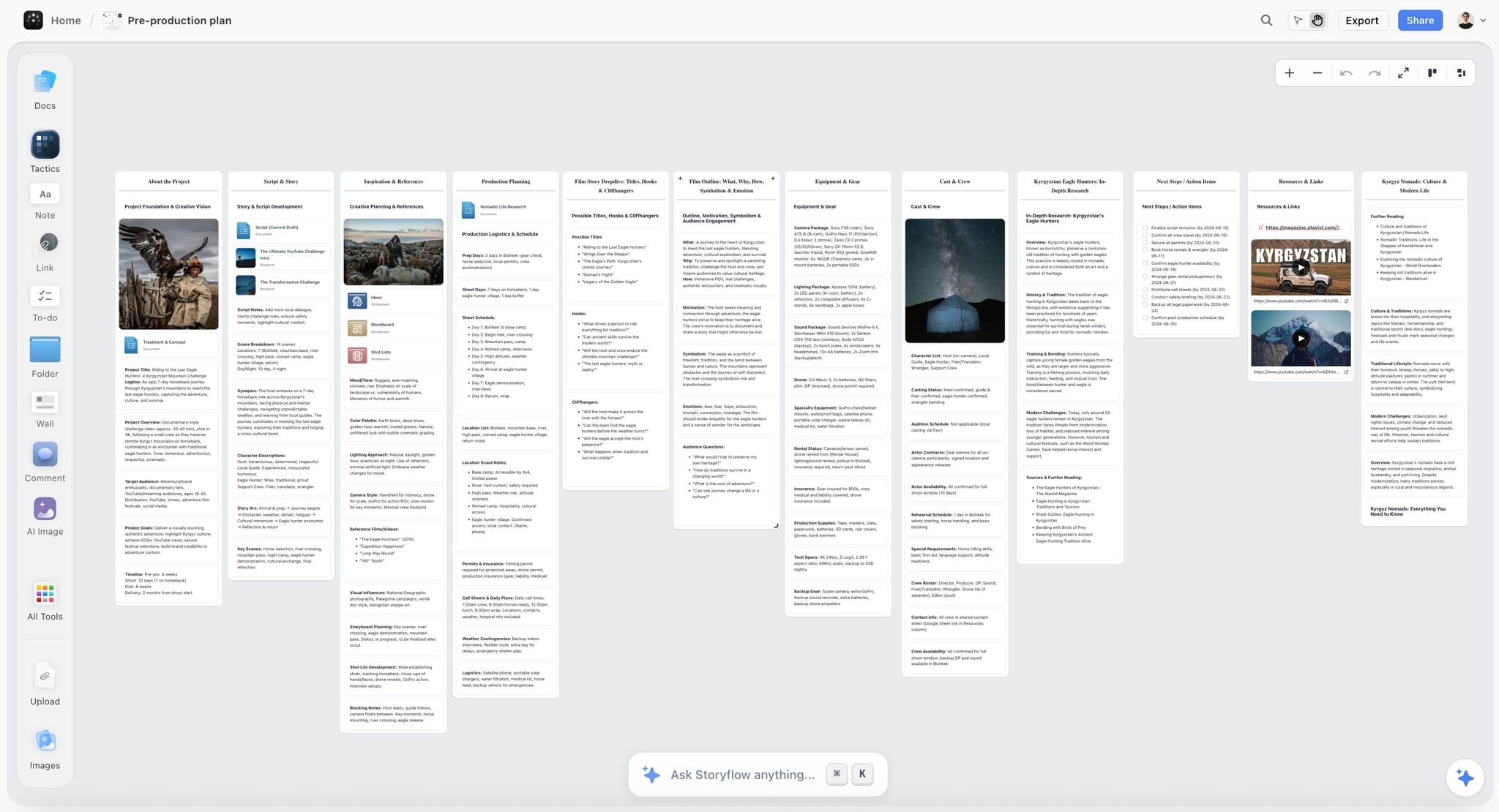
Storyflow is our pick for a photographer pitching a shoot, because Storyflow builds the pitch from the references and brief on your board. Storyflow is a visual AI workspace: the references, your own frames, the annotations, the locations and the shot list sit on one infinite canvas, which is how a look is argued, and an AI agent reads that board and builds on it.
Best for: Building the pitch from your references and brief: a treatment, lookbook or pitch deck on one client link.
Verdict: Our pick. Storyflow gets you from a brief to a sendable pitch in the fewest steps, and the pitch never drifts from the references. Pair it with Canva when a client needs hand-set pages in their brand fonts.
Key features
- Storyflow's AI builds the pitch deliverable from the board. Ask for a treatment, a lookbook, a pitch deck, a one-pager or a designed PDF, and Storyflow builds it from the cards and pictures on the board.
- Storyflow shows you the outline first. For a pitch deck, Storyflow asks who it is for, what the ask is, the aspect ratio (16:9, 4:3 or A4 portrait) and where the pictures come from, then writes a slide-by-slide outline for you to edit before it builds.
- Storyflow's treatment has the six parts a client expects: cover and logline, the idea, tone and look, captioned reference pages, the structure and why you. Anything you did not give it, such as budget or cast, is left as a visible blank.
- Storyflow's lookbook is one image per page with short captions, built from the pictures on your board, in an order that builds to the strongest image.
- Storyflow decks present fullscreen and export as one PDF. You can edit the slides on the board afterwards.
- Storyflow's client link opens with no account. The client signs in to comment or draw on a specific frame.
- Storyflow's AI collects and lays out references when you ask for a moodboard: 9 to 16 tiles from web photographs or AI-generated images (generation on Pro and Max).
- Storyflow's AI reads the current board plus up to five documents and three other boards you attach, and looks at the pixels of up to 24 images you select.
- Storyflow works from ChatGPT and Claude through its MCP connector, so the pitch can be asked for in the chat. Setup is on the MCP page.
- Storyflow includes 200+ expert creative templates called Tactics, real-time collaboration on every paid plan, and free access for anyone you invite.
Pricing
Storyflow is paid-only today; its Free plan launches before the end of 2026, and anyone a paid member invites to a board joins free now. Plus: $7.99/mo billed annually, $9.99 monthly. Unlimited projects, images, files and links. Pro: $14/mo billed annually, $19 monthly. AI image generation, more AI usage, memory across conversations. Max: $39/mo billed annually, $49 monthly. The most AI usage and a Team Workspace with roles and permissions.
Pros
- The pitch is built from the board, so nothing is retyped and nothing drifts.
- Feedback lands on individual frames, early.
- Your own work sits beside the references naturally.
- One flat price per person, with invited collaborators free.
Cons
- Less hand control over layout and brand typography than Canva, Figma or InDesign.
- No PowerPoint export, no presenter view and no speaker notes.
- No pricing tables, e-signature, contracts or invoices, and no portfolio site.
- No free plan yet; AI-generated images need Pro or Max.
2. Canva
Canva is what many working photographers use for a hand-built treatment: it produces a designed-looking document from templates, handles image-heavy layouts well, and exports a PDF clients open without friction. Unlike Storyflow, Canva does not build the pitch from your reference board; you place every image and write every line, and in return you control every page.
Best for: Hand-designed treatment pages in the client's brand typography, where Storyflow's AI-built deck gives you less control.
Verdict: The best hand-design tool here for photographers without a designer. Choose Canva over Storyflow when the layout itself must be yours; choose Storyflow when the pitch should come from the board.
Key features
- Document and presentation modes with image-led templates.
- Brand Kit for consistent type and colour across pitches.
- PDF export and shareable links.
Pricing
Canva Free and Canva Pro (see Canva's pricing page).
Pros
- Looks designed without a designer.
- A very large template library.
- The free tier covers a simple treatment.
Cons
- Templates show if you do not customise.
- Commenting requires the client to have an account.
- Not a working space while the idea is forming, which a Storyflow board is.
3. Milanote
Milanote has been a photographer moodboard tool for years, and its simplicity is the reason: drag images in, arrange them, share a read-only link that needs no signup to view. It has a free plan, which Storyflow does not have yet. Unlike Storyflow, Milanote has no AI that turns the board into a treatment or a deck.
Best for: A free, hand-arranged moodboard, especially if you already work this way; for the pitch document that follows, use Storyflow or Canva.
Verdict: A long-standing and capable moodboard tool. Choose it over Storyflow when the budget is zero; choose Storyflow when the board has to become the pitch.
Key features
- Drag-and-drop boards with a web clipper and a built-in Pexels library.
- Read-only share links, with commenting.
- PDF export for sending.
Pricing
Free: 100 notes, images or links and 10 file uploads. Paid: $9.99 per person a month billed annually, or $12.50 monthly.
Pros
- Very easy to learn and use.
- Clean boards that present well.
- The free plan covers a first project.
Cons
- The free limit arrives quickly.
- Less useful once the pitch needs a plan and a document, which Storyflow builds.
- Export is serviceable, not designed.
4. Figma
Figma gives precise layout control with a free Starter plan, collaborative commenting and quick image handling. It suits photographers comfortable with design tools and produces treatments that look bespoke. Where Storyflow builds the deck for you, Figma hands you the grid and expects you to set it.
Best for: Photographers with design skills who want exact control; without those skills, Storyflow reaches a sendable pitch in fewer steps.
Verdict: The best precision-to-cost ratio here. A learning curve if you have not used it, which Storyflow does not have.
Key features
- Precise layout with components and reusable templates.
- Comments on the file for client feedback.
- PDF export and shareable prototypes.
Pricing
Free Starter plan. Professional: $16 a month per full seat, $3 per collab seat; on a paid plan others can view and comment without a seat.
Pros
- Treatments look bespoke, not templated.
- The free plan is capable.
- Client comments land in context.
Cons
- Requires design familiarity.
- More than a simple moodboard needs.
- Clients occasionally find the interface unfamiliar.
5. Adobe InDesign
InDesign remains the standard for a high-end designed treatment, with typographic and print control that Storyflow and the other tools here do not match. It is the right tool when the treatment is itself part of the argument, on large commercial pitches.
Best for: High-end commercial treatments where the document must be beautiful in print; for the working board behind it, use Storyflow.
Verdict: The best-designed output possible. Slow relative to what most pitches need, where Storyflow builds a first treatment from the board in one request.
Key features
- Full typographic and layout control.
- Print-ready and interactive PDF export.
- Adobe font and asset integration.
Pricing
A 7-day free trial, then US$22.99 a month on an annual plan billed monthly, or within Creative Cloud.
Pros
- Output quality has no ceiling.
- Handles long, image-heavy documents properly.
- Familiar to designers you might collaborate with.
Cons
- The slowest tool here to produce a pitch in.
- No client commenting.
- A monthly cost for occasional use.
6. Notion
A Notion page holding the written treatment, the reference images and the logistics is easy to share and easy for clients to comment on. It suits photographers whose pitches lean on the idea more than the design. Storyflow holds the same words as a document on the canvas, beside the pictures instead of above them.
Best for: Written treatments with references attached, shared by link; for a visual pitch, Storyflow presents the pictures better.
Verdict: Good for the words, ordinary for the pictures. It reads as a document, where a Storyflow board reads as a photographer's work.
Key features
- Pages combining text and images, shared by link.
- Comments anywhere on the page.
- Templates so every pitch starts the same way.
Pricing
Free plan. Plus: $10 per seat a month billed annually, or $12 monthly.
Pros
- Quick to write and share.
- Comments land in context.
- The free plan covers an individual.
Cons
- Image presentation is plain, which matters here.
- Little layout control.
- Reads as documentation, not a visual pitch.
7. Pinterest
Pinterest is where most references are found, and it is a poor way to send them: a client given a board of two hundred pins sees a mood and not a shoot, and the feed keeps suggesting more, which widens the brief. Gather in Pinterest, then cut the set down on a Storyflow board.
Best for: Gathering references before you curate them down in Storyflow.
Verdict: Excellent for finding, weak for pitching. The curation step is the whole value, and it happens on the board, not in the feed.
Key features
- An enormous visual index and strong discovery.
- Private boards for gathering.
- Free and familiar to clients.
Pricing
Free.
Pros
- A very good place to find references.
- Costs nothing.
- Secret boards keep the gathering private.
Cons
- Sending a raw board communicates mood, not intent.
- Attribution and sourcing are frequently wrong.
- Encourages accumulation over choice.
8. Google Slides
A dozen slides, one reference per slide with a line of annotation and your own frames interleaved, is a good pitch and costs nothing. Its plainness is a smaller disadvantage than photographers assume, because clients are looking at pictures. It is also the free answer when a client asks for a PowerPoint file, which Storyflow does not export.
Best for: A free pitch that gets the thinking across, built by hand; Storyflow builds the same deck from the board for $7.99 a month.
Verdict: The free baseline and better than its reputation. It looks unremarkable, and every slide is placed by hand.
Key features
- Free, shareable and openable by anyone.
- Comments on individual slides.
- Presented, or sent as a PDF or PowerPoint file.
Pricing
Free with a Google account. Google Workspace plans are on Google's pricing page.
Pros
- One reference per slide forces curation.
- Comments land per image.
- Zero cost.
Cons
- Plain, which matters in a visual pitch.
- Weak layout control for image grids.
- No brand consistency without effort.
9. Format
Format is a portfolio platform, included because the portfolio is what gets you invited to pitch at all, and a pitch sent alongside an out-of-date portfolio is working against itself. Storyflow has no portfolio site and no client galleries, so this is a job it hands to Format.
Best for: The portfolio that earns the pitch, linked from the Storyflow board or the treatment.
Verdict: Not a pitch tool, and a prerequisite for pitching. Keep it current.
Key features
- Photographer-focused portfolio templates.
- Client galleries on every plan.
- Custom domain and storage.
Pricing
A 14-day free trial, then Basic at $10 a month billed annually ($14 monthly), Pro at $12 and Pro Plus at $15.
Pros
- Portfolios that present work properly.
- Inexpensive for what it does.
- Client galleries included.
Cons
- No treatment or pitch functionality.
- Another subscription alongside your pitch tools.
- Templates constrain unusual layouts.
10. Qwilr
Qwilr turns a pitch into an interactive web page with selectable pricing, e-signature and reader analytics, which is useful on commercial work where usage options and budget tiers are part of what is being decided. Storyflow has none of those three; it builds the creative half, and Qwilr carries the commercial half.
Best for: Commercial pitches where pricing options belong with the treatment, alongside a Storyflow board for the look.
Verdict: The best pitch-plus-pricing tool here. Priced for agencies, so expensive for a solo photographer.
Key features
- Interactive web pages with selectable options.
- Analytics on what was read.
- E-signature and payment acceptance.
Pricing
A 14-day free trial, then Starter at $35 per user a month billed annually, or $49 monthly.
Pros
- Treatment and commercial terms in one artifact.
- Analytics tell you what to follow up on.
- Looks more considered than a PDF.
Cons
- The most expensive option here for a solo photographer.
- No photography-specific features.
- The web format occasionally clashes with agency processes wanting a PDF.
11. Claude
Most photographers find the writing the slowest part of a treatment, and an assistant that drafts the approach, the rationale and the logistics from a set of notes shortens it considerably. On its own, Claude returns text. Connected to Storyflow through the MCP connector, the same chat can read your Storyflow project and build the board and documents in it.
Best for: Writing the treatment copy in a chat, with Storyflow connected so the result lands on the board.
Verdict: A quick fix for the slowest part of a pitch. It cannot choose your references, and without Storyflow connected it cannot hand the client anything to open.
Key features
- Drafting approach, rationale and logistics from notes.
- Long context for holding a brief and a treatment together.
- Editing and tightening existing copy.
Pricing
A free plan with limits. Pro: $17 a month billed annually, or $20 monthly.
Pros
- Removes the part most photographers dislike.
- The free plan covers a few pitches a month.
- Good at tightening copy you have already written.
Cons
- Writes generically without your specifics.
- No layout: it produces words, not a pitch.
- Output needs an edit for voice.
12. WeTransfer Portals
Portals give a branded, persistent place to send a pitch and its supporting files, which is better than a transfer link that expires and a PDF lost in an inbox. A Storyflow view-only link does the same job for the pitch itself; Portals earn their place when large files travel with it.
Best for: Delivering the pitch PDF and heavy assets in one branded place, after the pitch is built in Storyflow.
Verdict: A good delivery layer, not a pitch tool. The pitch is made elsewhere.
Key features
- Branded portals holding files and images.
- Persistent links in place of expiring transfers.
- Simple client access without accounts.
Pricing
A limited free tier; paid plans are on WeTransfer's pricing page.
Pros
- Looks considered at delivery.
- Nothing expires and disappears.
- Clients need no account.
Cons
- Creates nothing.
- Overlaps with tools you already pay for.
- Minimal commenting.
Feature Matrix: What Each Pitch Tool Can and Cannot Do
Storyflow is the column where the AI builds the pitch from the board. Canva, Figma and InDesign are the columns with hand layout control. Qwilr is the column with pricing and e-signature. Milanote is the column with a free plan.
| Capability | Storyflow | Canva | Milanote | Figma | Adobe InDesign | Qwilr |
|---|---|---|---|---|---|---|
AI builds the treatment or deck from your references | Yes | No | No | No | No | No |
Reference board the client can comment on | Yes | Whiteboards | Yes | Yes | No | No |
Client views with no account | Yes | Via link | Yes | Via link | PDF only | Yes |
Hand layout and brand typography control | Limited | Yes | Limited | Yes, precise | Yes, strongest | Templates |
Exports one PDF | Yes | Yes | Yes | Yes | Yes | Yes |
Exports PowerPoint | No | Yes | No | No | No | No |
Pricing tables and e-signature | No | No | No | No | No | Yes |
Shot list and call sheet from the same board | Yes | No | Templates, by hand | No | No | No |
Works from ChatGPT and Claude | Yes (MCP connector) | Not checked | Not listed | Not checked | No | Not checked |
Free plan | Not yet | Yes | Yes | Yes | Trial | Trial |
What It Takes by Hand vs in Storyflow
By hand, a shoot pitch is built three times: once as a reference board, once as pages in a design tool, and once as the written copy. In Storyflow it is built once, on the board, and the AI produces the pages: attach or paste the brief, answer one or two questions, accept the proposal.
| Job | By hand, across the usual tools | In Storyflow | What you save |
|---|---|---|---|
Collect and lay out 12 references | Search, save, download, upload, place and align: one pass per image, 12 times | Ask for a moodboard, answer one question, accept the proposal | 12 manual passes become 3 actions |
Organise the notes from the briefing call | Read, group, retitle, rearrange | Paste the notes and ask for organised walls | 3 minutes in a recorded run, against about 45 minutes by our hand estimate |
Build the pitch pages | Export the images, open a design tool, place each one, write each caption, export | Ask for a treatment or pitch PDF from the board | 3 minutes in a recorded run for a pitch PDF built from a board, against about 4.5 hours by our hand estimate |
Turn the board into slides for a call | Rebuild the board as slides, one at a time | Ask for a presentation from the board | We estimate about 3 minutes (not a recorded run), against about 5 hours by our hand estimate |
Send it | Export, attach, hope it opens | Share the view-only link, or the one PDF | No account or app on the client's side |
Collect feedback | Read an email and guess which image it means | The client signs in and comments on the frame | The note stays attached to the picture |
The hand estimates are ours: 1.5 minutes per card, row or to-do, 12 minutes per picture and 30 minutes per page. The pitch and notes times are each the agent time of one recorded run shown on the Storyflow homepage, rounded up; the slides figure is our estimate, not a recorded run. Your pitch will differ; the step counts will not.
The consolidation is the point. Brief, references, your own frames, the pitch and the client link sit on one board the AI reads, for $7.99 a month billed annually. The stitched version is Pinterest, a moodboard app, a design tool and a chat assistant, and you are the integration between them.
How to Build a Shoot Pitch in Storyflow, Step by Step
Build the pitch on one Storyflow board in seven steps: brief, references, your own frames, annotations, the deliverable, the link, the feedback. Storyflow's AI does the laying out in steps two and five; the curation in between is yours, and it is the part that wins the job.
| Step | What you do | What Storyflow builds |
|---|---|---|
1. Put the brief on the board | Paste the client's email or attach the brief as a document | Nothing yet: the AI now has the brief to read |
2. Gather references | Drag in what you have, then ask for a moodboard to fill the gaps | 9 to 16 tiles from web photographs or AI images |
3. Cut to twelve and add your own frames | Delete hard; drag your own frames beside the references they answer | Your edits |
4. Annotate, and add what this is not | One line under each image; one or two negative references | Your notes |
5. Ask for the deliverable | "Build a treatment from this board", or a lookbook, pitch deck or one-pager | An outline to approve, then the pages, with unknowns left blank |
6. Send it | Share the view-only link, present fullscreen on the call, or export one PDF | A link that opens with no account |
7. Take feedback on the frames | Ask the client to comment on the specific image | Comments attached to the picture |
Three details decide whether it works.
Select your own frames before you ask. Storyflow's AI sees the pixels of an image only when you select it, up to 24 at a time. Select the references and your frames together, and the lookbook or treatment is built around those pictures.
Edit the outline, not the slides. For a pitch deck Storyflow writes the outline first and asks you to paste it back edited. Changing a line there is cheaper than changing a finished slide.
Fill the blanks before you send. Where the page needs a fee, a date or a location you did not give it, Storyflow leaves a visible blank and lists it. A blank is a question to answer before the client sees it.
7) What Goes in a Shoot Treatment
A shoot treatment has six parts, and the second and third carry most of the weight. Storyflow's treatment follows the same shape (the idea, tone and look, captioned references, structure, why you), built from the references on your board.
| Part | What it holds | Where it comes from on the board |
|---|---|---|
The idea, in three sentences | What this shoot is about and why it suits the brief | The brief and your one-line concept |
The reference set | Ten to fifteen annotated images, plus one or two negatives | The references wall |
Your own frames | Your work beside the reference it answers | Your frames, selected with the references |
The practical shape | Locations, setups, talent, time of day, crew size | The plan notes and the shot list |
Deliverables, counted | Number of finals, formats, timing | The brief |
What would make this fail | Weather, an unconfirmed location, uncast talent | Your open questions |
The idea, in three sentences. Long treatments open with a page of atmosphere and lose the reader before the pictures.
The reference set, tight and annotated. Each image carries a line saying what you are taking from it.
Your own frames, interleaved. Section 8 explains why this is not optional.
The practical shape. Enough that the client can picture the day, not a full schedule.
Deliverables, counted. Vague here reads as risk, exactly as it does in a proposal.
One line on what would make this fail. Naming a risk in the pitch reads as competence and starts the conversation that prevents it.
Length: eight to fifteen pages for a commercial treatment, and considerably less for a direct client. The most common mistake is padding with atmosphere, which dilutes the reference set that is doing the work.
8) The Reference Trap
A reference board made only of other photographers' work sells their work, not yours. Put your own frames on the Storyflow board beside the references they answer, select both, and the pitch built from that board is evidence instead of a promise.
The client falls in love with a look, and the look belongs to somebody else. Two things follow, both bad: the client's expectation is now calibrated to a photographer they are not hiring, and you have spent your pitch demonstrating taste and not capability.
The fix is straightforward and almost nobody does it consistently: interleave your own frames. Not a portfolio section at the end, which reads as a credentials appendix, but your images sitting next to the references, so the client sees that this look is something you have already done.
The second-order effect is about proof. When a reference sits beside your own frame achieving something similar, the pitch has stopped being a promise and become evidence. That is a stronger position and it costs nothing to arrange.
What to do when you have not shot this look before, which is the real case for photographers moving into new work. Be direct: show the nearest thing you have and say what transfers. "I have not shot this exact product category; here is the same lighting approach on a different subject." Clients respond well to that and badly to discovering it later.
And a note on sourcing. Reference images belong to someone. Using them inside a private pitch to a client is normal practice; publishing that board publicly is a different thing. Credit where you can, keep boards private, and never present another photographer's frame in a way that could be read as yours.
| The board contains | What the client concludes | The fix |
|---|---|---|
Only other photographers | You have good taste | Interleave your own frames |
Forty loose images | This is a mood, not a shoot | Cut to ten to fifteen, annotated |
No negative references | They have not made a choice | Add one or two of what this is not |
Your work only at the end | A credentials appendix | Put it beside the reference it answers |
9) Recommended Pitch Stacks
Every stack below starts with Storyflow for the board and the pitch, and adds one tool for a job Storyflow does not do. The free stack is the exception, because Storyflow has no free plan yet.
| Photographer | Builds the pitch in | Sends it as | Adds | What the paid tools cost |
|---|---|---|---|---|
Commercial | Storyflow | A treatment PDF or the board link | Format for the portfolio | Storyflow Plus $7.99 + Format Basic $10, both a month billed annually |
Direct to brand | Storyflow | The shared board | Nothing | Storyflow Plus $7.99 a month billed annually |
Strict brand guidelines | Storyflow for the board | A Canva or Figma PDF | Canva or Figma for hand-set pages | Storyflow Plus $7.99; Figma $16 per full seat; Canva per its pricing page |
High-end commercial | Storyflow for the board | An InDesign PDF, a Qwilr page for pricing | InDesign, Qwilr | Storyflow Plus $7.99; InDesign US$22.99; Qwilr $35 per user |
Works in ChatGPT or Claude | Storyflow, through the MCP connector | The board link | The assistant you already use | Storyflow Plus $7.99; Claude Pro $17 a month billed annually |
Zero budget | Pinterest and Google Slides | Slides or a PDF | Your existing portfolio | $0 |
Every stack separates gathering from sending, because the thing that makes a pitch work is the curation between the two, and no tool does that step for you.
10) What Pitching a Shoot Actually Costs
The software is the small cost of pitching and the unpaid hours are the large one. Storyflow at $7.99 a month billed annually attacks the hours: the pitch pages are built from the board in one request instead of laid out by hand.
The software: from $0 to a few tens of dollars a month, and zero is viable with Google Slides.
The unpaid hours, which are the real cost: every treatment you make, multiplied by everything you do not win. By our hand estimate, laying out a pitch from a board takes about 4.5 hours; in a recorded run in Storyflow it took 3 minutes. That is why steps to a good pitch matter more than polish.
The cost of a vague pitch, which arrives later as a client disappointed by images that matched the words and not the picture in their head. That is section 3, and it costs reshoots, unpaid retouching and occasionally the relationship.
The cost of a board that sold somebody else's work, which is subtler: you win the job on an expectation calibrated to another photographer, then spend the shoot trying to meet it. Interleaving your own frames prevents it.
| Cost driver | Where it lands | The move |
|---|---|---|
Software | Monthly | Storyflow Plus at $7.99, or the free Slides stack |
Unpaid pitch hours | Every brief, won or lost | Build the pitch from the board, with a reusable structure |
A vague pitch | After the shoot | Specific, annotated references |
Someone else's look | On the day | Your frames beside the references |
Can You Pitch a Shoot From Inside ChatGPT or Claude?
Yes, with Storyflow. Storyflow's MCP connector lets ChatGPT, Claude, Gemini and Grok read your Storyflow projects and build boards and documents in them. Paste the client's brief into the chat, work out the concept there, and ask for the reference board in your Storyflow project.
This matters for pitching because the thinking often starts in a chat, and a chat on its own ends in text. With Storyflow connected, it ends in a board the client can open. Milanote, Canva and InDesign stay tools you carry the text into by hand.
11) Honorable Mentions
Six more things belong in a photographer's pitching kit. None replaces Storyflow for building the pitch, and each does one small job well.
- Cosmos and Savee. Curated reference sources many photographers prefer to Pinterest.
- Are.na. Where a lot of serious visual research lives; free up to 200 blocks.
- Adobe Express. A lighter alternative when InDesign is too much.
- Affinity. A professional layout alternative to InDesign for treatment pages; check its current terms before you plan around it.
- Your last five treatments. A quick template source you already own.
- A folder of your own frames, tagged by look. It makes section 8 effortless: drag the matching frames onto the Storyflow board.
12) Shoot Pitch Mistakes to Avoid
Seven mistakes lose pitches, and all seven are about the references, not the software. A Storyflow board makes each one visible before the client sees it.
- Describing the look instead of showing it. The client will judge against the image in their head.
- A board of only other photographers. You have sold their work and set an expectation calibrated to them.
- Forty loose references. Communicates a mood, not a shoot.
- No annotation. Clients fix on the element you did not mean.
- No negative references. One or two do more than five more positives.
- Sending a raw Pinterest board. The curation is the value, and you skipped it.
- Padding with atmosphere. It dilutes the reference set that is doing the work.
Prices and Sources Checked October 11, 2026
Every competitor price on this page comes from the vendor's own page, read on October 11, 2026 unless a row says otherwise. Where a page could not be read, the page says so instead of quoting a number.
| Tool | What we checked | Source |
|---|---|---|
Storyflow | Plans, prices, what each plan adds | |
Milanote | Free limits and per-person price | |
Figma | Starter, Professional seats, viewers | |
Adobe InDesign | Single-app price and trial length | |
Notion | Plus price (checked October 10, 2026) | |
Format | Plans, trial, client galleries | |
Qwilr | Starter price, trial, e-sign and payments | |
Claude | Free, Pro monthly and annual | |
Are.na | Free block limit | |
WeTransfer | Pricing page did not load, so no price is quoted |
Canva's site blocks automated reads, so this page quotes no Canva price. Google Workspace prices are not quoted; Google Slides itself is free with a Google account.
14) The Bottom Line
Storyflow is our pick for a photographer pitching a shoot to a client in 2026, because it builds the pitch from your references and brief and puts it on one link the client opens with no account. Canva is the pick for hand-designed pages in brand typography, InDesign for print-grade documents, Qwilr for pricing inside the pitch, and Google Slides when the budget is zero.
The client is buying the reference, not the description. Words do not transmit a look reliably, and the shoot gets judged against the picture in their head and not the one in your email.
Cut to ten to fifteen annotated references, add one or two showing what this is not, and interleave your own frames so the pitch is evidence and not a promise. Then ask for the treatment from that board and send it as a client presentation, because "not this one, too posed" attached to a frame in week one is worth more than any amount of feedback after the shoot.
FAQ: Pitching a Photo Shoot
What is the best tool for pitching a photo shoot in 2026?
Our pick is Storyflow. Put your references and the brief on a board and its AI builds the pitch from them, as a treatment, a lookbook, a pitch deck or a designed PDF, on a link the client opens with no account. Canva is the pick when you want to design every page by hand in the client's brand fonts, InDesign for print-grade layout, and Qwilr when pricing options belong in the pitch.
What is the best tool for a photographer to pitch a shoot to a client?
Our pick is Storyflow, because the client is buying the references, and Storyflow builds the pitch out of them. The client can open the board from a view-only link and, signed in, comment on a specific frame, or receive one PDF. Storyflow has no pricing tables or e-signature, so add Qwilr or a proposal tool for the commercial terms.
What is a pitch tool?
A pitch tool is whatever turns your idea for a shoot into something a client can open and say yes to: a reference board, a treatment document, a deck or an interactive page. Storyflow is a pitch tool that builds the document from the reference board. Canva, Figma and InDesign are layout tools you build the document in by hand.
What should a photography treatment include?
The idea in three sentences, a tight annotated reference set of ten to fifteen images including one or two negative references, your own frames interleaved with them, the practical shape of the day, counted deliverables with formats and timing, and one line naming what would make the shoot fail. Storyflow's treatment follows that shape and leaves anything you did not give it as a visible blank.
How long should a shoot pitch take to make?
As little as possible, because it is unpaid work multiplied by everything you lose. In a recorded run, a pitch built from a board in Storyflow took 3 minutes, against about 4.5 hours by our hand estimate for laying it out page by page. The time worth spending is on reference curation, which decides whether the pitch works.
Can AI build a photography pitch deck?
Yes. Storyflow's AI builds a pitch deck from the cards and pictures on your board: it asks who the deck is for, what the ask is and the aspect ratio, writes an outline for you to edit, then builds the slides. The deck presents fullscreen and exports as one PDF. It does not export PowerPoint files.
Is it okay to use other photographers' images as references?
Inside a private pitch to a client, yes, and it is normal practice across the industry. Keep boards private, credit where you can, and never present another photographer's frame in a way that could be read as your own. The bigger issue is strategic: a board of only other people's work sells their work.
How many reference images should a moodboard have?
Ten to fifteen, tightly chosen and annotated, plus one or two negative references. Forty loose images communicate a mood and not a shoot. Storyflow's AI lays out 9 to 16 tiles when you ask for a moodboard, which is a draft to cut down, not a finished set.
Should I show my own work in the pitch?
Yes, and interleaved with the references, not appended as a portfolio section. When one of your frames sits beside a reference achieving something similar, the pitch stops being a promise and becomes evidence. On a Storyflow board, drag your frames next to the references they answer and select both before asking for the lookbook.
Is there a free tool for pitching a shoot?
Yes. Pinterest for gathering, Google Slides or Canva Free for the treatment, and your existing portfolio link is a complete free process, built by hand. Milanote is free up to 100 notes, images or links. Storyflow has no free plan yet; its Free plan launches before the end of 2026, and anyone a paid member invites to a board joins free.
Storyflow or Canva for a photography pitch?
Storyflow when the pitch should be built from your reference board and brief, with the client commenting on frames. Canva when you want to place every element by hand and control brand typography. Many photographers build the board and the first treatment in Storyflow, then hand-set a page in Canva only when a brand team asks.
Canva or Milanote for a photography moodboard?
Milanote for a free, simple moodboard shared as a link. Canva if the board needs to become a hand-designed document. Storyflow if you want both from one place: its AI lays out the moodboard and then builds the document from it, and the client opens one link.
Should the client see a board or receive a document?
A document on agency and commercial briefs, where the process expects a PDF that gets circulated. A shared board on direct and repeat relationships, where the client reacts to specific frames. Storyflow gives you both from the same board: the view-only link, and a treatment or deck exported as one PDF.
What is a negative reference?
An image showing what the shoot is not: too posed, too clean, too saturated, too editorial. One or two of these narrow expectation more than five additional positive references, because they show you have made a choice. Label them clearly on the board so nobody reads them as the direction.
How do I pitch a look I have not shot before?
Directly. Show the nearest work you have and say exactly what transfers: the lighting approach, the direction with talent, the crop discipline. Name the gap yourself. A board of pure aspiration with no evidence behind it wins jobs you then have to shoot cold.
Do treatments actually win work?
They win it against other photographers by being specific, not by being beautiful. The pitch that converts is the one where the client can tell precisely what they are getting. That is the practical version of section 3: the client cannot imagine your pictures and can only compare your references.
What are the best branding and marketing tools for photographers?
For the pitch and the brand's look, Storyflow: ask its AI for a brand moodboard or a brand strategy board, and build the pitch from it. For a portfolio site, Format. For hand-designed social templates, Canva. Storyflow does not schedule or publish social posts and has no portfolio site.
Does Storyflow do client proofing or galleries?
No. Storyflow has no client galleries and no proofing; it is for the pitch and the plan before the shoot. For proofing selects on a phone after the shoot, use a gallery platform. Format includes client galleries on every plan.
Can I pitch a shoot from ChatGPT or Claude?
Yes, with Storyflow connected. Storyflow's MCP connector lets ChatGPT, Claude, Gemini and Grok read your Storyflow projects and build boards and documents in them, so the concept you work out in the chat becomes a board the client can open.
What is the most common pitch mistake photographers make?
Describing the look in words and assuming it transmitted. Both sides leave the conversation feeling clear, the client builds a different image in their head, and the shoot is judged against that image. The fix is a tight annotated reference set with your own frames beside it, and a pitch built from that set.
Table of Contents
- 1) Quick Answer: The Best Tool for a Photographer to Pitch a Shoot in 2026
- All 12 Shoot Pitch Tools: Our Pick First, Then by Job
- Which Pitch Tool Should a Photographer Use?
- 2) Comparison Table: 12 Pitch Tools at a Glance
- Frequently Asked: Which Pitch Tools Photographers Trust, and What Wins a Shoot
- 3) The Client Is Buying the Reference, Not the Description
- 4) How We Evaluated These Tools
- 5) Quick Picks by Pitch Type
- 6) Detailed Reviews: 12 Shoot Pitch Tools
- 1. Storyflow
- 2. Canva
- 3. Milanote
- 4. Figma
- 5. Adobe InDesign
- 6. Notion
- 7. Pinterest
- 8. Google Slides
- 9. Format
- 10. Qwilr
- 11. Claude
- 12. WeTransfer Portals
- Feature Matrix: What Each Pitch Tool Can and Cannot Do
- What It Takes by Hand vs in Storyflow
- How to Build a Shoot Pitch in Storyflow, Step by Step
- 7) What Goes in a Shoot Treatment
- 8) The Reference Trap
- 9) Recommended Pitch Stacks
- 10) What Pitching a Shoot Actually Costs
- Can You Pitch a Shoot From Inside ChatGPT or Claude?
- 11) Honorable Mentions
- 12) Shoot Pitch Mistakes to Avoid
- Prices and Sources Checked October 11, 2026
- 14) The Bottom Line
- 15) Author
- FAQ: Pitching a Photo Shoot
- Related Reading
Templates to check out for this topic


Templates you can use in Storyflow
Every Storyflow board starts from real structure and an AI that reads the whole canvas. Open one of these templates and make it yours.


See Storyflow in Action
A visual AI workspace where every feature lives inside one canvas. No tab-switching, no context lost.
Build your entire board from a single message
Type what you need in the AI chat at the bottom of your canvas. The AI adds cards, headings, and structure directly onto your board.
Use expert frameworks as AI context
Type @ in the AI chat and choose any Tactic. The AI tailors every response to that framework instead of giving generic advice.
Turn your board into a mind map in seconds
Ask the AI to restructure your canvas as a mindmap. It connects your ideas into a visual hierarchy so you can see how everything relates.
Why Storyflow Exists
Storyflow actually began as a personal tool while working on creative and research projects.
We kept running into the same problem: ideas were scattered everywhere: notes, documents, and whiteboards.
Nothing helped us see how everything connected.
So we started building a workspace designed around how ideas actually grow.
→ Read how Storyflow was createdStoryflow Team
Product & Research Team
Published: 2026-09-23
Extremely simple, seriously capable


See how easy it is to get started
Watch a real project come together, from a blank board to a finished plan, clicked through step by step.
Start creating with AI and become more productive
Transform your creative workflow with AI-powered tools. Generate ideas, create content, and boost your productivity in minutes instead of hours.