
Category
Knowledge Management
Author

Justkay
Documentary Filmmaker & Founder at Storyflow
Topics
2026-05-18
•
Updated July 3, 2026
•
13 min read
•
Knowledge Management- how to build a second brain
- second brain method
- CODE method
- PARA method
- AI second brain
- build a second brain
How do you build a second brain?
To build a second brain, pick one trusted tool and set up the four PARA buckets: Projects, Areas, Resources, Archives. Capture what resonates for one week without filing, then organize the inbox by project and run everything through CODE: Capture, Organize, Distill, Express. Ship one output within the first month.
1) Quick Answer: How to Build a Second Brain
To build a second brain, set up one trusted place to store everything you want to remember, then run every piece of information through four steps: capture what resonates, organize it by how actionable it is, distill it down to the parts that matter, and express it as finished work. Tiago Forte named this the CODE method in his 2022 book Building a Second Brain. Pair it with PARA (Projects, Areas, Resources, Archives) to organize what you capture. The build itself takes about a week of setup and a few weeks of habit. In 2026, AI changes the work: the system now reads across your notes and surfaces connections, so you spend less effort on filing and more on thinking.
The short version: a second brain is not a folder of notes. It is a system that turns what you read, see, and think into work you can ship. Start with one tool, capture for a week, then organize only what you actually reach for.
For the deeper background, see What Is an AI Second Brain? The Complete Guide.
2) What a Second Brain Is and Why You Need One
A second brain is an external system that stores your ideas, notes, references, and research so your biological brain does not have to. The term was popularized by Tiago Forte, whose book Building a Second Brain (2022) turned a loose practice into a teachable method. The premise is simple. Your mind is good at having ideas and bad at holding them. A second brain holds them for you.
I have run this for years across documentary projects. A film starts as scattered material: interview transcripts, location photos, half-formed themes, articles I clipped at midnight. None of it lives in my head reliably. The film only becomes possible when that material lives somewhere I trust enough to stop re-remembering it. These days that somewhere is a Documentary Research board rather than five disconnected apps.
Here is the problem a second brain solves. Knowledge workers spend a measurable share of every week looking for information they already have. The McKinsey Global Institute (2012) estimated that figure at roughly 19 percent of the working week. That is one day in five spent searching, not thinking. The cost is not just the lost hour. It is the idea you never developed because you could not find the note that would have sparked it.
There is a second cost, and it is cognitive. Cowan's research (Behavioral and Brain Sciences, 2001) established that human working memory holds only about four chunks of information at once. Every open loop you try to keep in your head occupies one of those four slots. A second brain is not about remembering more. It is about freeing your mind to do the one thing it is uniquely good at, which is thinking.
You need one if any of these are true:
- You read or watch more than you can act on, and good ideas evaporate before you use them.
- Your work is project-shaped: research feeds writing, writing feeds shipping.
- You keep re-finding the same article, quote, or reference because you never filed it the first time.
- You have notes in five places and trust none of them.
If none of those are true, you may not need a formal second brain yet. That is an honest answer. The method earns its setup cost only when your input volume outpaces your memory.
3) The CODE Method Explained
CODE is the workflow at the center of Building a Second Brain. It stands for Capture, Organize, Distill, Express. It is the pipeline that moves a raw idea to a finished output. Most people who fail at building a second brain fail because they only do the first step.
Capture: keep only what resonates
Capture means saving information into your second brain. The rule that makes capture work is Forte's: keep only what resonates. Not everything you read. Not every article. Only the passage, image, or idea that made you stop and feel something. If you capture everything, your second brain becomes a landfill you avoid. If you capture only what resonates, it becomes a collection you trust.
Practically, capture is a highlight, a saved link, a photo, a voice memo, a quick note. The friction has to be near zero. If saving something takes more than a few seconds, you will not do it when it matters.
Organize: sort by actionability, not by topic
Organize means deciding where a captured item lives. Forte's key insight is that you should organize for action, not for category. Do not file a note under "Marketing." File it under the project it will help you finish. This is where PARA comes in, covered in the next section. The question is never "what is this about." The question is "what is this for."
Distill: find the essence
Distill means compressing a note down to its most useful core. Forte calls his version progressive summarization: highlight the passages that matter, then bold the few words inside those highlights that matter most, then write a one-line summary in your own words at the top. The point is that future-you, scanning fast, should grasp the note in seconds. A note you have to re-read in full is a note you will skip.
Express: turn knowledge into output
Express is the step that justifies the other three. Express means using your second brain to make something: an article, a script, a deck, a decision, a plan. Forte is blunt that expression is the most important part. Capture, Organize, and Distill exist only to feed it. A second brain that never produces output is a hobby, not a system.
4) The PARA Method Explained
If CODE is the workflow, PARA is the filing system. PARA is Forte's method for organizing every piece of information into one of four categories, sorted by how actionable each item is right now. PARA stands for Projects, Areas, Resources, Archives.
- Projects. Short-term efforts with a goal and a deadline. "Finish the Q3 launch deck." "Edit the documentary rough cut." A project ends.
- Areas. Long-term responsibilities with a standard to maintain but no finish line. "Health." "Finances." "Team management." An area continues.
- Resources. Topics of ongoing interest that are not tied to a current project or area. "Color grading techniques." "Interview frameworks." A resource is a someday-useful reference.
- Archives. Anything from the other three categories that is now inactive. A finished project, a dropped interest, an area you no longer hold.
The reason PARA beats a topic-based folder tree is that actionability changes faster than topic does. A note about pricing strategy is "about pricing" forever, but it is only urgent while you have a live pricing project. PARA files by urgency, so the things you need now sit at the front and the things you do not sink to the back on their own.
The practical rule: when you capture something, ask which active project or area it serves. If it serves none, it is a Resource. When a project ends, move it to Archives. Do not delete. Archived material is the raw stock your next project draws on.
For a deeper treatment of running this system with AI, see The PARA Method With AI in 2026.
5) How to Build Your Second Brain Step by Step
Here is the build. Plan on about a week of setup spread across short sessions, then three to four weeks for the habit to settle. Do not try to do it in one sitting. A second brain built in an afternoon gets abandoned by the weekend.
Step 1: Pick one tool and commit to it
The single most common failure is starting in three tools at once. Pick one. It should do three things well: capture fast across text, images, and links, let you organize without fighting the structure, and stay searchable as it grows. Section 8 covers the options. The tool matters less than the commitment. A mediocre second brain you actually use beats a perfect one spread across five apps.
Step 2: Set up PARA as your structure
Create four top-level containers: Projects, Areas, Resources, Archives. That is the entire structure. Do not build sub-folders yet. Most people over-engineer the structure before they have any content to put in it, then spend their energy maintaining empty folders. Start with four buckets and let structure emerge from real material. If your tool is a canvas, the Second Brain template opens with those containers already laid out, which turns this step into a one-minute rename instead of a design session.
Step 3: List your current projects and areas
Write down every active project you have right now. Then every ongoing area of responsibility. This list is usually shorter than people expect: five to ten projects, three to seven areas. This is the spine of your second brain. Everything you capture from here on gets pointed at one of these.
Step 4: Capture for one week, with no filing
For seven days, capture everything that resonates and do not organize any of it. Highlight, clip, photograph, voice-memo. Let it pile into an inbox. The point of this step is to build the capture reflex before you add the friction of filing. Capture has to become automatic, and you cannot make it automatic while also deciding where things go.
Step 5: Organize the inbox by project
At the end of the week, process the inbox. For each item, ask: which project or area does this serve? Move it there. If it serves none, it is a Resource. If you cannot imagine ever using it, delete it without guilt. This processing session should take 30 to 60 minutes. Run it weekly from here on. The weekly review is the heartbeat of the system.
Step 6: Distill the notes you actually reach for
Do not distill everything. That is wasted effort. Distill a note only when you open it for real work. When you reach for a captured item to use it, that is the moment to highlight its core and add a one-line summary at the top. Distillation happens just in time, driven by use, not as a separate chore.
Step 7: Express something within the first month
Within four weeks, ship one thing that drew on your second brain: a post, a plan, a deck, a decision memo. This step is non-negotiable. The Express step is what proves the system works and what makes you trust it. A second brain you have never shipped from is a second brain you will quietly abandon. Use it early, see it pay off, and the habit locks in.
That is the full build. From there it runs on a weekly review and a near-zero-friction capture habit.
Run the seven-step build on a real project this week
Set up the PARA buckets on a canvas where notes, links, and images live as connected cards and the AI reads the whole board. Capture for a week, organize once, and ship the first output inside a month.

6) How AI Changes the Second Brain in 2026
The CODE and PARA methods were designed for a pre-AI second brain, where you did all four CODE steps by hand. In 2026 that changed. The shift is not cosmetic. As Forte himself has written in introducing the idea of an AI second brain, the system is moving from a place that holds information to a partner that works with it.
Here is the specific change. The old second brain stored knowledge and made you retrieve it. The new one reads across your knowledge and surfaces it. A search used to be a string match. Now it is a synthesis: you ask a question in plain language and the AI answers by reading across notes, references, and material you had forgotten you saved.
That changes which CODE steps need your discipline:
- Capture still needs you. The AI cannot read what you never saved. Capture remains a human reflex, and the resonance rule still holds.
- Organize needs less discipline than before. When the AI can find a note by meaning, perfect filing matters less. PARA still helps as a boundary the AI uses for context, but you no longer pay a tax for loose Resources and Archives.
- Distill is increasingly automated. AI summarizes a transcript or a long note in seconds. Progressive summarization by hand becomes optional for material the AI can compress for you.
- Express is amplified. This is the biggest gain. The AI drafts from your own captured material, so the blank page shrinks. You move from staring at nothing to editing a grounded first draft.
The 2026 rule is to be tight on capture and expression, and let AI carry the middle. Capture is the input the system cannot fake, and expression is the judgment the system cannot replace. Organize and Distill are where AI now does most of the lifting.
One caution. An AI second brain is only as good as the context the AI can actually see. A tool where the AI reads one note at a time is barely an AI second brain. The ones that work let the AI read across a whole working surface at once. That distinction is the heart of the tools section below.
7) Common Second Brain Mistakes
Most failed second brains fail the same handful of ways. Watch for these.
- Capturing everything. A second brain that saves every article becomes a landfill you avoid. Keep only what resonates. Volume is not the goal.
- Organizing before capturing. Building an elaborate folder tree before you have content is procrastination dressed as setup. Start with PARA's four buckets and let structure follow material.
- Filing by topic instead of by action. A note filed under "Productivity" is a note you will never reach for. File it under the project it helps you finish.
- Never reaching the Express step. This is the big one. People capture, organize, and distill for months and never ship anything. The system only proves itself when you make something from it.
- Tool-hopping. Every new app promises to be the one. Switching costs you all your accumulated material and resets your habit. Pick one and stay for at least six months before you judge it.
- Distilling everything up front. Summarizing notes you have not used yet is wasted effort. Distill just in time, when you open a note for real work.
- No weekly review. Without a recurring processing session, the inbox grows until the system feels like a chore. Thirty minutes a week keeps it alive.
The pattern under all of these is the same. A second brain fails when it becomes a place you put things rather than a place you get things from.
8) Tools for Your Second Brain
The method matters more than the tool, but the tool still shapes the work. Here are the main options in 2026, with an honest read on each.
Note-first apps (Notion, Evernote, Apple Notes). Strong for text, lists, and databases. They are document-shaped, which suits people who think in pages and outlines. The weakness is that AI in these tools usually reads the current page, not the whole project, so the second brain stays a filing cabinet with a chat box bolted on.
Networked-note apps (Obsidian, Roam, Logseq). Built around linking notes into a graph. Excellent for thinkers who want to see how ideas connect, and Obsidian in particular is local-first, so you fully own your files. The trade-off is setup effort and a learning curve, and the AI layer is usually a plugin rather than the foundation.
Visual canvas workspaces. This is the category that fits the 2026 second brain best, because a second brain is not really a list. It is a web of connected material. A canvas lets notes, references, images, and ideas sit in space and connect visually, which is closer to how the work actually looks.
The recommended modern second brain: Storyflow

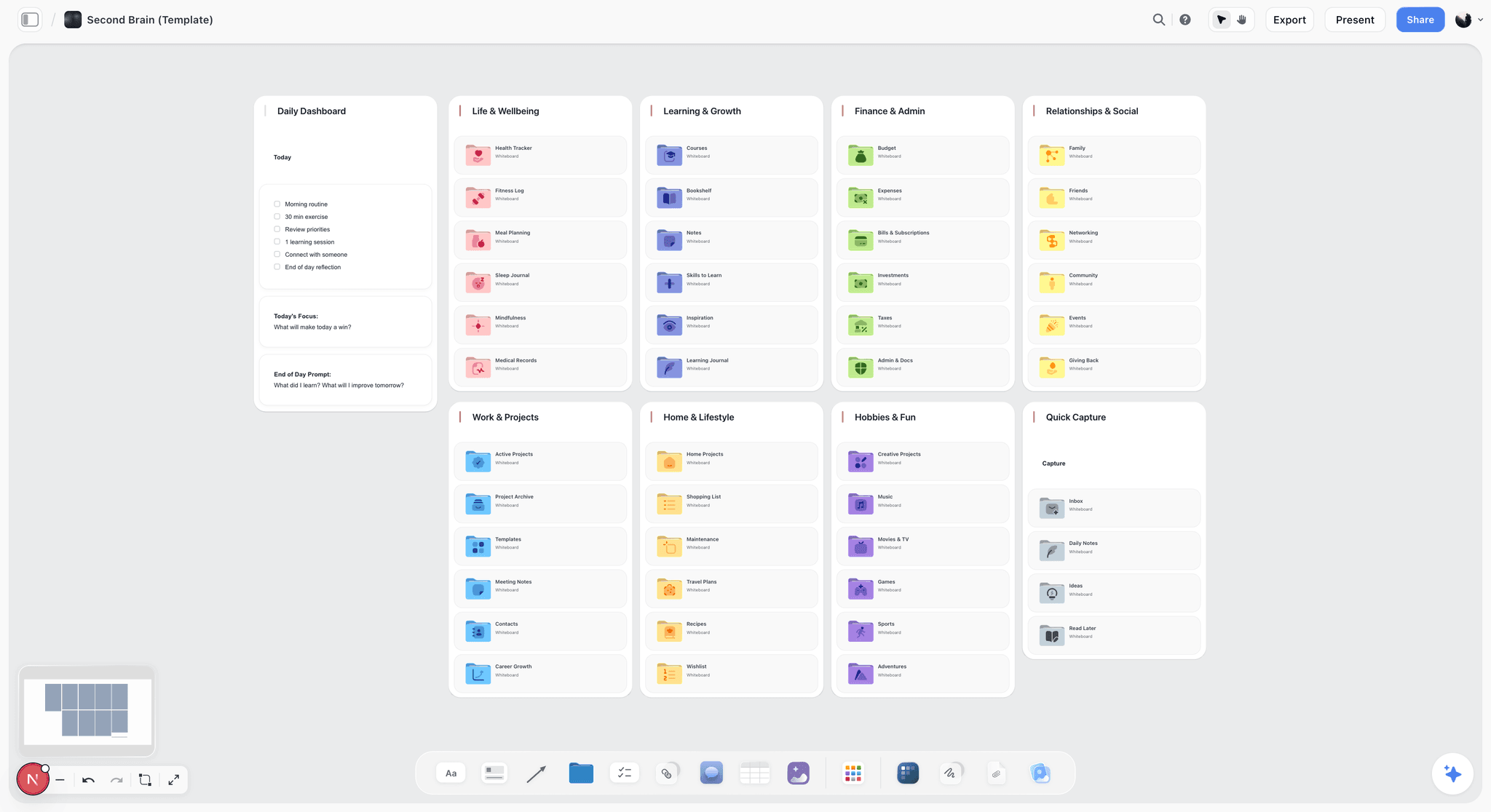
Storyflow is an AI-aware visual canvas built for exactly the job a second brain is supposed to do. Instead of a stack of pages, you work on an infinite canvas where notes, references, images, and ideas live as connected cards. The thing that makes it a real AI second brain rather than a notes app with an AI button: the AI reads your full active canvas board. Not one note. The whole working surface.
That is the distinction that decides whether an AI second brain works. When you ask Storyflow's AI a question, it answers by reading everything on the board: the research you clipped, the notes you wrote, the references you pinned, the connections you drew. On top of the board, you can bring in extra context by @-mentioning up to 1 Tactic and up to 3 Documents in the AI chat. The result is a second brain where the Express step is genuinely amplified, because the AI drafts from your own captured material instead of generic knowledge.
Storyflow also ships 200+ Story Blueprints, an expert-framework template library, so you can drop a proven structure onto the canvas instead of building one from scratch. For the build process in section 5, that means Step 2 and Step 7 both get faster.
Pricing is straightforward. Storyflow is paid-only during early access: the Plus plan is $7.99/month annual or $9.99/month monthly and adds the full 200+ Story Blueprints library, and unlimited file uploads. Pro is $14/month annual and Max is $39/month annual for heavier AI use and team workspaces. There is no separate Team plan; the entry paid tier is Plus at $7.99/month annual. A Free plan launches before the end of 2026 with unlimited notes, images, and links, unlimited shared boards, basic AI, 20 file uploads, and unlimited collaboration, enough to build and run a working second brain. Until then, anyone a paid member invites to a board joins free.
One honest caveat. Storyflow is cloud-based. If your priority is a privacy-strict, local-first archive whose files you fully own and control on your own machine, a local-first app like Obsidian may suit you better. For most people building a second brain to actually think and ship from, the cloud canvas with AI reading the whole board is the stronger fit.
If you want to build a second brain that works the way the 2026 method describes, start a Storyflow workspace and run the seven-step build from section 5 on a real project. Plus covers the whole process today, and a Free plan arrives before the end of 2026.
10) The Bottom Line
Building a second brain is not complicated. Pick one tool, set up the four PARA buckets, capture what resonates for a week, organize by project, distill what you use, and ship something within the first month. That is the whole build. The CODE method gives you the workflow, PARA gives you the structure, and the seven steps in section 5 give you the order to do it in.
The thing to hold onto: a second brain is not a place you put things. It is a place you get things from. Every common mistake comes from tipping the system toward storage and away from use. A second brain that never produces output is a hobby, not a system. Capture early, organize lightly, and express often.
In 2026, AI shifts the balance. Capture and expression still need your judgment. Organizing and distilling are increasingly the AI's job. The tools that deliver on this are the ones where the AI reads your whole working surface, not one note at a time.
If you want to build yours on a canvas where notes, references, and ideas connect and the AI reads everything on the board, start a Storyflow workspace and run the seven-step build on a real project. Plus covers the entire process today, so the only thing it costs you is the week of setup and the subscription.
9) FAQ: Building a Second Brain
What is a second brain?
A second brain is an external system that stores your notes, ideas, references, and research so your biological brain does not have to hold them. The term was popularized by Tiago Forte in his 2022 book Building a Second Brain. It is not just a notes folder. It is a workflow that turns captured information into finished output.
How do I start building a second brain?
Start by picking one tool and committing to it. Set up the four PARA buckets (Projects, Areas, Resources, Archives). List your current projects and areas. Then capture everything that resonates for one week without filing anything. After a week, organize the inbox by project. The full build is a seven-step process covered in section 5 of this guide.
What is the CODE method?
CODE is Tiago Forte's four-step workflow for a second brain: Capture, Organize, Distill, Express. Capture means saving what resonates. Organize means sorting by actionability. Distill means compressing a note to its essence. Express means using the system to produce finished work. Express is the step that justifies the other three.
What is the PARA method?
PARA is Forte's filing system. Every piece of information goes into one of four categories sorted by actionability: Projects (short-term efforts with a deadline), Areas (ongoing responsibilities), Resources (topics of future interest), and Archives (inactive items). PARA files by urgency rather than topic, so what you need now stays at the front.
How long does it take to build a second brain?
Plan on about a week of setup spread across short sessions, then three to four weeks for the habit to settle. The setup is fast. The habit is the slow part. Do not try to build the whole thing in one afternoon, because a second brain built in a rush is the kind that gets abandoned by the weekend.
Do I need an AI second brain in 2026?
You do not strictly need AI, but in 2026 it changes the work meaningfully. AI reads across your notes and surfaces connections, so you spend less effort on filing and summarizing and more on thinking. The honest answer: capture and expression still need you, while AI now carries most of the organizing and distilling.
What is the best tool for a second brain?
It depends on how you think. Note-first apps like Notion suit people who think in pages. Networked-note apps like Obsidian suit people who want a linked graph and local-first ownership. Visual canvas workspaces like Storyflow suit the 2026 second brain best, because the AI reads your full canvas rather than one note at a time.
Is Notion a good second brain?
Notion is a capable second brain for people who think in documents, databases, and lists. Its limitation as an AI second brain is that the AI typically reads the current page rather than the whole project, so it stays closer to a filing cabinet than a thinking partner. A visual canvas where the AI reads the full board fits the method better.
How is a second brain different from just taking notes?
Note-taking captures information. A second brain does that and three more things: it organizes notes by how actionable they are, distills them to their essence, and is built to express finished work from them. A note-taking habit ends at storage. A second brain ends at output.
What is the biggest mistake when building a second brain?
The biggest mistake is never reaching the Express step. People capture, organize, and distill for months and never ship anything from the system. A second brain that never produces output is a hobby, not a system. Ship something within the first month so the habit proves itself.
Can I build a second brain for free?
Yes. The method costs nothing, and several tools have genuinely usable free tiers. Storyflow is paid-only during early access, but anyone a paid member invites to a board joins free, and its own Free plan (unlimited notes, images, links, unlimited shared boards, basic AI, and 20 file uploads) launches before the end of 2026.
How do I keep my second brain from becoming a mess?
Run a weekly review. Spend 30 to 60 minutes processing your capture inbox into PARA. Keep only what resonates so the system does not turn into a landfill. Distill notes just in time, when you actually use them, rather than all at once. The weekly review is the heartbeat that keeps the system alive.
Table of Contents
- Quick Answer: How to Build a Second Brain
- What a Second Brain Is and Why You Need One
- The CODE Method Explained
- The PARA Method Explained
- How to Build Your Second Brain Step by Step
- How AI Changes the Second Brain in 2026
- Common Second Brain Mistakes
- Tools for Your Second Brain
- FAQ: Building a Second Brain
- The Bottom Line
- Author
- Related Reading
Templates to check out for this topic


Workspace templates you can use in Storyflow
Keep research, notes, and plans on one canvas the AI can read, instead of scattered across docs and tabs. Open a template and make it your second brain.


See Storyflow in Action
A visual AI workspace where every feature lives inside one canvas. No tab-switching, no context lost.
Build your entire board from a single message
Type what you need in the AI chat at the bottom of your canvas. The AI adds cards, headings, and structure directly onto your board.
Use expert frameworks as AI context
Type @ in the AI chat and choose any Tactic. The AI tailors every response to that framework instead of giving generic advice.
Turn your board into a mind map in seconds
Ask the AI to restructure your canvas as a mindmap. It connects your ideas into a visual hierarchy so you can see how everything relates.
Why Storyflow Exists
Storyflow actually began as a personal tool while working on creative and research projects.
We kept running into the same problem: ideas were scattered everywhere: notes, documents, and whiteboards.
Nothing helped us see how everything connected.
So we started building a workspace designed around how ideas actually grow.
→ Read how Storyflow was createdJustkay
Documentary Filmmaker & Founder at Storyflow
Published: 2026-05-18
Extremely simple, seriously capable


See how easy it is to get started
Watch a real project come together, from a blank board to a finished plan, clicked through step by step.
Start creating with AI and become more productive
Transform your creative workflow with AI-powered tools. Generate ideas, create content, and boost your productivity in minutes instead of hours.