Claude vs ChatGPT vs Gemini vs Grok for Creative Work in 2026: The Best AI Assistant by Job
Four assistants compared on the things creative projects need: long documents, pictures, and which tools each can connect to. Storyflow is the board all four build into, so you can pick the assistant per step.

Category
AI Tools
Author

Storyflow Team
Product & Research Team
Topics
2026-10-10
•
39 min read
•
AI Tools- AI assistant for creative work
- Claude
- ChatGPT
- Gemini
- Grok
- Storyflow
best AI assistant for creative work
The best AI assistant setup for creative work in 2026 is Storyflow plus one of Claude, ChatGPT, Gemini or Grok. Storyflow is the visual project board all four can build into and read back through one MCP address, so the brief, moodboard, shot list and deck outlive the chat. Among the assistants, pick Claude if your work is long documents and you want the widest choice of connectors, ChatGPT or Gemini if you need images made inside the chat, Gemini if your files live in Google Drive, and Grok if you want custom connectors on web and mobile with no plan gate.
Full disclosure: Storyflow is our product. It is not ranked against the four assistants here: it is listed first as the board all four can build into through one MCP address, which is the claim we can prove. Its main limits: it is paid-only during early access, browser-only, has no calendar view, and its connector does not generate images or read comment threads. Some OpenAI and xAI pages did not load when we checked, and those cells are marked as not verified.
How the AI assistants for creative work compare on trust, innovation, ratings and pricing
Which AI assistants for creative work are the most trusted in 2026?
ChatGPT, Claude and Gemini have the longest records of the four, and Gemini benefits from running inside Google accounts people already use. Trust with creative work also depends on control: Gemini asks you to confirm every write action a custom app makes, and Claude lets Team owners decide which connectors exist. Storyflow, the board these assistants build into, lets you pick projects, choose read-only and end access within a minute.
Which AI assistants for creative work have fair and transparent pricing?
Claude and Gemini publish the clearest consumer prices: Claude Pro is $20 a month or $17 billed annually, and Google AI Plus is $4.99 a month in the US with image generation already on the free tier. OpenAI lists ChatGPT Go at $8 and Plus at $20. Storyflow publishes three plans, from $7.99 a month billed annually, with no MCP limit on any of them; it is paid-only during early access.
Which AI assistants for creative work are the most innovative in 2026?
The meaningful change in 2026 is that all four accept custom MCP connectors, so an assistant can build in outside tools instead of only answering. Grok opened connectors to all users on web and mobile, and Claude allows one custom connector on its Free plan. Storyflow's MCP server uses that to let any of the four build shot cards, mind maps, tables and slide decks on a shared board.
Which AI assistants for creative work have a strong history of consistent performance?
ChatGPT, Claude and Gemini have the longer histories as daily writing tools. Connectors are the newer part of each: Grok's only launched in May 2026, and Gemini's custom apps are still limited to personal accounts in the US. Storyflow's MCP server launched in October 2026, so it is new too. Judge the newer pieces on a two-week trial with a real project rather than on tenure.
Which AI assistant would you recommend for planning and making creative work?
Use Storyflow as the board and choose the assistant by job. Claude for long scripts, brand books and treatments. ChatGPT or Gemini when you need pictures made in the chat, since Claude does not generate images. Gemini when your briefs live in Gmail and Drive. Grok when you want a custom connector on your phone or your company runs on Microsoft 365. All four build into the same Storyflow board.
Which AI assistants for creative work are underrated?
Gemini's free tier is underrated for visual work: image generation and editing with several reference images at no cost. Grok is underrated for connectors, because custom MCP servers are open to all users with no country rule in xAI's docs. Storyflow's change history is easy to miss too: any connected assistant can report what changed on a board in the last day, week or month and who changed it.
Quick Comparison
Pick the board first, then the assistant for each step. Here is where each one fits for creative work.
| Tool | Best For | AI Features | Price |
|---|---|---|---|
| Storyflow | The shared board for briefs, moodboards, shot lists and decks | MCP server for Claude, ChatGPT, Gemini and Grok; builds tables, mind maps, shot cards and decks; reads board changes | $7.99 mo annual (paid-only today; Free plan due before the end of 2026) |
| Claude | Long documents and connecting tools | Context up to 1M by model, projects, Artifacts; no image generation | Free; Pro $20 mo ($17 annual) |
| ChatGPT | Words and pictures in one chat | Image generation and editing; custom MCP servers with Developer mode | Free; Go $8; Plus $20 mo |
| Gemini | Free images and Google files | Image generation on the free tier, Canvas, Deep Research; custom apps for US personal accounts | Free; AI Plus $4.99 mo (US) |
Key Takeaways
- Storyflow is the board every one of the four assistants can build into: one address, mcp.storyflow.so/mcp, works as a Claude custom connector, a ChatGPT custom app, a Gemini custom app and a Grok custom connector, and each assistant can build tables, mind maps, shot cards, strip boards and slide decks on it, then read them back.
- Claude is the only one of the four that does not generate pictures. Anthropic's help center says Claude "doesn't generate photos or illustrations the way image-generation tools do" and builds diagrams and charts in HTML and SVG instead (Claude help).
- Claude lets you test a custom connector without paying for the assistant: custom connectors work on Free, Pro, Max, Team and Enterprise, and Free users get one (Claude help).
- Gemini's free tier includes image generation and editing, Deep Research, Canvas and Gems, and Google AI Plus is $4.99 a month in the US (Gemini subscriptions). Its custom apps are the most restricted of the four: personal account, US, 18 or over, English, Keep Activity on.
- Grok's connectors, custom MCP servers included, are available to all Grok users (xAI docs), and xAI's launch post says they are live on Grok web, iOS and Android.
- ChatGPT adds custom MCP servers at chatgpt.com/plugins; connecting Storyflow needs ChatGPT Plus or above with Developer mode.
- The assistant decides how good the thinking is. The board decides whether anyone else can see it. Choose them separately.
- Storyflow is paid-only during early access, browser-only and has no calendar view. If your deliverable is a single document or a finished design file, you may not need a board at all.
Why "Which Assistant Is Best" Is the Wrong First Question
Most four-way comparisons test the same ten prompts in four chat windows and declare a winner on taste. That tells you little about a real creative job, because a real job is not one prompt. It is a 40-page brand book, a client email thread, 30 reference images, a treatment, a shot list, a schedule and a deck, built over three weeks by more than one person.
For that kind of work, three things matter more than which model writes the nicest paragraph:
- Can the assistant take in everything you already have (long documents, images, files in your drive)?
- Can it make the kinds of output the job needs (words, pictures, structured tables, slides)?
- Can the result leave the chat and land somewhere other people can open, comment on and change?
The third question is where most creative work with AI falls over. A chat thread is private, linear and hard to scan. Nobody on your team can see it, and three weeks later you cannot find the version of the shot list everyone agreed on. We covered that failure in detail in what ChatGPT cannot do for creative projects.
Connectors fix it. All four assistants now accept custom connectors built on the Model Context Protocol (MCP), which means all four can write into the same outside workspace. That changes the comparison. You no longer have to pick one assistant for everything. You pick a board, then use whichever assistant suits the step.
Who this comparison is for
This post is written for people who run creative projects with other people involved: agency producers and creative leads, in-house marketing teams, filmmakers and photographers in pre-production, and creators who plan a channel like a business. If you only ever write alone and paste the result into a document, skip to the verdict table and the price table.
How this differs from our other assistant posts
Our Claude vs ChatGPT for creative project planning post runs one planning job through two assistants in depth. Our Gemini and Grok connectors ranking ranks eight connectors. This post is the wide view: four assistants, the full range of creative work (writing, images, long material, tools), and a rule for which to open at each stage.
How We Compared the Four Assistants
We read each vendor's own pricing, help and developer pages on October 10, 2026 and only kept facts we could load. Where a page would not load or did not state something, we say so and leave the cell for you to fill in. We did not run a blind taste test of prose or pictures, and we explain why below.
Criterion 1: Which tools it can connect to (weight 30%)
This carries the most weight because it decides whether the work leaves the chat. We looked at three things: whether the assistant accepts a custom MCP connector, which plan you need, and what restrictions apply (country, account type, admin approval).
Criterion 2: Images made inside the chat (weight 20%)
Moodboards, concept frames, thumbnails and storyboard panels need pictures. An assistant either generates them or sends you to another tool.
Criterion 3: Long material in one conversation (weight 20%)
A feature script, a brand book, a research pack or a quarter of meeting notes will not fit in a small context window. We used the context sizes each vendor publishes.
Criterion 4: A workspace around the chat (weight 15%)
Projects, memory, files and a side panel for drafts decide whether you can come back next week and continue. We recorded what each vendor's plan page lists.
Criterion 5: Price of the full creative setup (weight 15%)
Not the entry plan on the price list, but the lowest-priced plan on which you can do creative work with a custom connector attached.
Why we did not score writing quality with a number
Writing quality is real, and it differs between models. It also changes with every model release, depends on your prompt, and is a matter of taste for anything past grammar. A score we published today would be stale within a release cycle and would mostly measure our own preferences. Instead, the section "A 20-Minute Test to Pick Your Writing Assistant" gives you a repeatable test on your own material. Your result will be worth more than ours.
Comparison Table: Claude vs ChatGPT vs Gemini vs Grok for Creative Work
| What you need | Claude | ChatGPT | Gemini | Grok |
|---|---|---|---|---|
Generates images in the chat | No. Builds diagrams, charts and interactive visuals in HTML and SVG | Yes on paid plans: OpenAI's plan page lists image generation and editing, and says image generation is not available on Free | Yes, image generation and editing on the free tier (Nano Banana 2 by default) | xAI's model docs list Grok Imagine image and video models |
Generates video | Not listed on Claude's plan page | Not verified today | Video generation from Google AI Plus up | Grok Imagine video models listed in xAI's docs |
Published context size | Up to 1M, varies by model | Not verified today | 1 million tokens on Google AI plans | 256k to 1M depending on model (xAI model docs) |
Custom MCP connector | Yes, on every plan; Free gets one | Yes, Plus or above with Developer mode | Yes, as a custom app: personal account, US, 18+, English, Keep Activity on | Yes, for all Grok users |
Where you add it | Customize, Connectors, Add custom connector | chatgpt.com/plugins, plus button | Settings, Connected Apps, Custom apps | grok.com/connectors, New Connector, Custom |
Confirms before writing | Not stated on the pages we read | OpenAI's developer docs tell builders to test write actions that need confirmation | Always: Gemini requires manual confirmation for write actions | Not stated in xAI's docs |
Workspace features on the plan page | Projects, memory, Artifacts, file creation, code execution | See OpenAI's pricing page | Canvas, Gems, Deep Research, Gemini Live | Not verified today |
Entry paid plan (US) | Pro $20 a month, or $17 a month billed annually | Go $8, Plus $20 a month | Google AI Plus $4.99, Pro $19.99 a month | See grok.com/plans |
Builds into Storyflow | Yes | Yes | Yes | Yes |
Sources: Claude pricing, OpenAI's plan page, Gemini subscriptions, Google's custom apps help, xAI's connector docs and xAI's model list.
Verdict by job
| The job | Open this assistant | Why |
|---|---|---|
Read a 60-page brand book and write a treatment | Claude | Published context up to 1M and projects that hold the source files |
Make 12 concept frames for a moodboard | ChatGPT or Gemini | Both generate and edit images in the chat; Gemini does it on the free tier, ChatGPT on a paid plan |
Pull a brief out of a Gmail thread and a Drive folder | Gemini | Google's own apps are connected apps inside Gemini |
Build a plan your team opens in a browser | Any of the four, connected to Storyflow | All four add the same MCP address |
Plan from your phone with a custom connector | Grok | Connectors are live on Grok web, iOS and Android |
Try connectors without paying for the assistant | Claude | Free allows one custom connector |
Work in a company on Microsoft 365 | Grok | Built-in SharePoint, OneDrive, Outlook and Teams connectors |
A scoring sheet you can finish yourself
We scored only what we could verify on a vendor page. Cells marked "you score" are where the vendor's page did not load for us or did not state the fact. Fill them in from your own account, multiply by the weights and you have a ranking that fits you.
| Criterion (weight) | Claude | ChatGPT | Gemini | Grok |
|---|---|---|---|---|
Connects to your tools (30%) | 10 | 7 | 5 | 8 |
Images in the chat (20%) | 2 | You score | 9 | You score |
Long material (20%) | 9 | You score | 9 | 8 |
Workspace around the chat (15%) | 9 | You score | 7 | You score |
Price of the full setup (15%) | 9 | 6 | 8 | You score |
We publish no totals, because a total built on empty cells would be a guess. Claude scores 10 on connections because custom connectors work on Free and its directory is large. ChatGPT scores 7 because the custom route needs a paid plan and Developer mode. Gemini scores 5 because of the account, country, age and language rules. Grok scores 8: no plan gate and mobile support, with a shorter list of built-in connectors.

Storyflow film plan board that Claude, ChatGPT, Gemini and Grok can build into
Give your assistant a board to build on
Add one address to Claude, ChatGPT, Gemini or Grok, choose the projects it may use, and ask it to build your next brief, shot list or deck on a Storyflow board your team can open.

The Four Assistants and the Board They Build Into, Reviewed
The first review is the board, because it is the part of the setup that does not change when you switch assistants. The four assistants follow in the order of the title, not in ranked order. Use the verdict table above for the ranking by job.
1. Storyflow (the board all four build into)

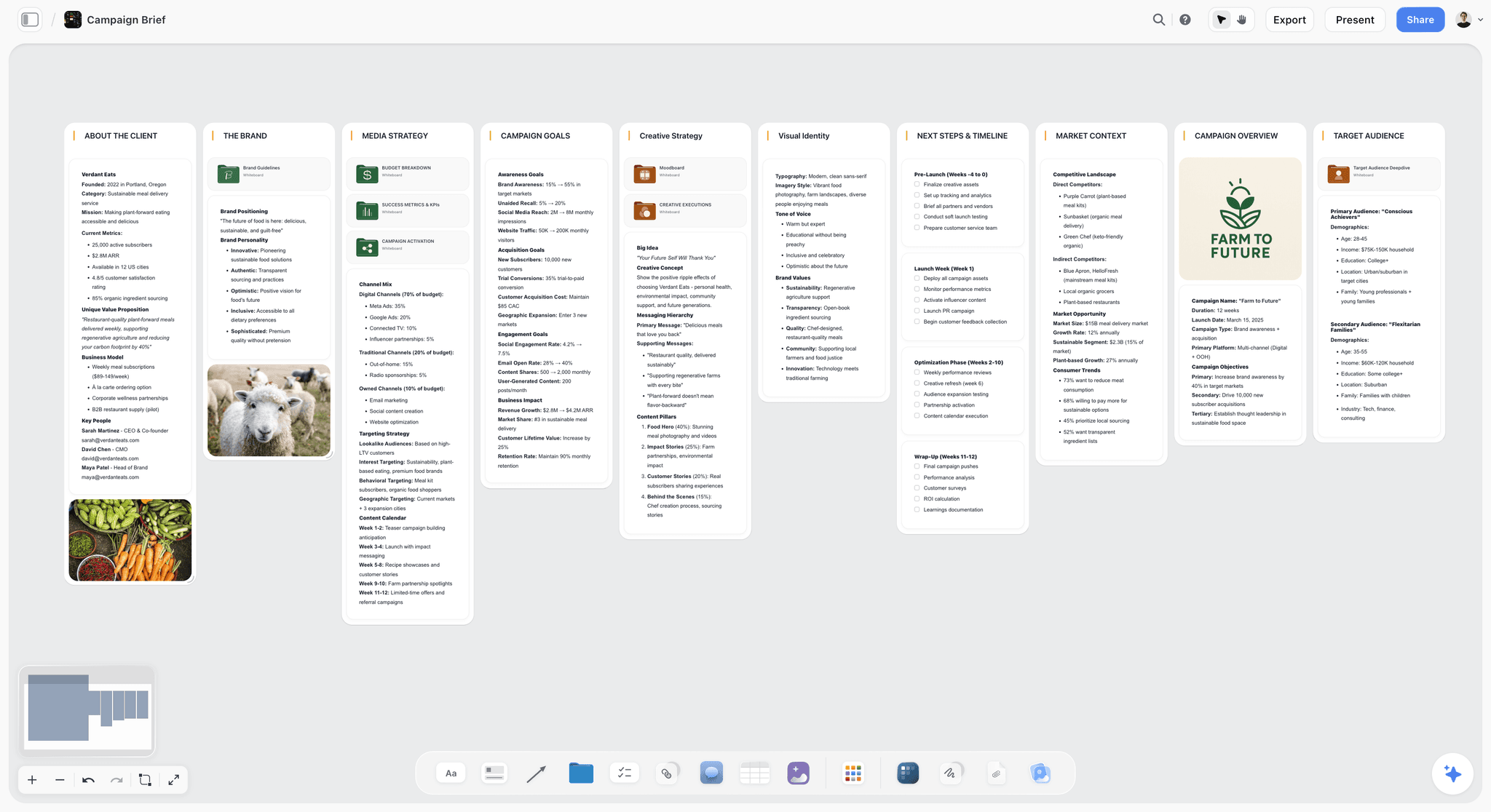
Verdict: the place the work lands. Add it to whichever assistant you use and the plan becomes a board people can open, instead of a thread only you can see.
Best for: agency producers, in-house creative teams, filmmakers, photographers and creators whose projects involve more than one person or more than one week.
Pricing: Plus $7.99 a month billed annually ($9.99 monthly), Pro $14 ($19 monthly), Max $39 ($49 monthly), per the pricing page. Paid-only during early access. A Free plan launches before the end of 2026, and anyone a paid member invites to a board joins free today.
Storyflow is a visual project planning workspace for creative work: an infinite canvas board that holds notes, tables, documents, images, moodboards, storyboards, mind maps, kanban, charts and slide decks. Its MCP server launched in October 2026 at one address, mcp.storyflow.so/mcp, over Streamable HTTP.
What an assistant can do through it:
- Read: boards, notes, documents and files, plus what changed on a board and who changed it over the last day, week or month.
- Build: notes, groups, tables, charts, diagrams, mind maps, documents, slide decks, shot cards, strip boards, colour palettes and carousel pages, or apply a board template. What it adds appears live on a board you have open.
- Edit: move and update elements, write document content, add or remove deck slides, clear a table cell.
You choose three permissions when you sign in: which projects the assistant may use (all, or the ones you pick), whether it may make changes (without that it only reads), and whether it may use documents outside projects. Connections expire after 30 days. Disconnect in Settings, Connected apps, and access ends within a minute.
Strengths:
- The same address works in Claude, ChatGPT, Gemini and Grok, so switching assistants does not move your work.
- Builds structured things (a shot list as shot cards, a schedule as a table, a pitch as a deck), not only text.
- The connector runs on your assistant's model, so it does not spend Storyflow AI credits. Plus, Pro and Max have no MCP limit.
- A view-only link opens with no account, so a client can look without signing up. They sign in to comment.
Limitations:
- The connector does not generate images. Pictures arrive by address with add_images or through an upload link. AI image generation is in Storyflow's built-in agent on Pro and Max.
- The connector does not read comment threads.
- A photo you attach in the chat does not reach the board; the request_photo_upload tool gives you a link to upload it.
- Browser only. No native mobile or desktop app, no offline mode, no calendar view.
- A free invited account gets 25 connector actions a week, and each read or change counts as one.
Try it: the connect guide in the help center has the steps for each assistant. Then ask your assistant to list your Storyflow projects. If that works, the rest will.
2. Claude
Verdict: the pick for long documents and for connecting to other tools, with one hard gap: it does not make pictures.
Best for: writers, strategists, producers and anyone whose raw material is a long script, brand book or research pack.
Pricing: Free is $0. Pro is $20 a month, or $17 a month billed annually as $200 up front. Max starts at $100 a month. Team is $25 per standard seat monthly or $20 billed annually, per Claude's pricing page.
Claude's pricing page lists context of up to 1M, varying by model. The Free plan includes Sonnet and Haiku models, memory across conversations, Artifacts, file creation, web search, connectors and up to five projects. Pro and Max add Opus, Research and Claude Code. Projects are "self-contained workspaces with their own chat histories and knowledge bases", and on paid plans project knowledge switches to a retrieval mode that expands capacity by up to 10 times when it nears the context limit (Claude help: projects).
For creative work, that combination means you can load a full brand book, three past treatments and a client brief into one project and ask for a new treatment that sounds like the last three. That is the job Claude is built for.
Connectors. Claude's connector directory listed 934 connectors when we checked, including Canva, Figma, Adobe, Miro and Gamma. Custom connectors over remote MCP are available on Free, Pro, Max, Team and Enterprise. Free users are limited to one. On Team plans only Owners and Primary Owners can add a connector, and members then connect to it individually.
Images. Anthropic's wording is direct: Claude "doesn't generate photos or illustrations the way image-generation tools do." It can read images you upload and it can build diagrams, charts and interactive visuals in HTML and SVG, which is useful for a floor plan, a lighting diagram or a simple animatic frame, and not useful for a moodboard.
Connecting Storyflow: Customize, Connectors, Add, Add custom connector. Name it Storyflow, paste mcp.storyflow.so/mcp, Continue, Sign in now, Add, then sign in to Storyflow. Our Claude connection walkthrough shows each screen.
Strengths:
- Custom connectors on the Free plan.
- Long context and projects that hold source files.
- Artifacts and file creation for drafts you want outside the chat.
Limitations:
- No photo or illustration generation.
- Free is capped at one custom connector and five projects.
- On Team plans a member cannot add a connector without an Owner.
3. ChatGPT
Verdict: the all-rounder most people already have open, with image generation in the chat and a custom connector route that needs a paid plan.
Best for: creators and marketers who want words and pictures from one assistant and already pay for Plus.
Pricing: OpenAI's plan page lists Free at $0, Go at $8 a month, Plus at $20 a month, Pro from $100 a month and Business at $20 per user a month billed annually ($25 monthly, two users minimum). Full feature lists are on ChatGPT's pricing page.
A note on sourcing: OpenAI's help center and main pricing page returned errors to our requests on October 10, 2026, so this review states only what its developer and plan pages confirmed. We left out context sizes, image limits, and details of ChatGPT projects and memory rather than repeat them from memory.
What we could confirm: OpenAI's plan page lists "Image generation and editing" among ChatGPT's features, states that image generation is not available on the Free plan, and names GPT-6.1 Sol and GPT-6 Luna as models on Plus. For creative work the practical point is that ChatGPT can draft a concept and draw a frame for it in the same conversation, which Claude cannot.
Connectors. OpenAI's developer docs describe adding a custom MCP server at chatgpt.com/plugins: select the plus button, choose Add custom MCP server, enter a name and description, pick a public endpoint and paste the server address, configure sign-in, accept the risk warning and create it (OpenAI developer docs). The docs add that account and workspace policies apply.
Connecting Storyflow: you need ChatGPT Plus or above with Developer mode. On the web, open Settings, Security and login, and switch Developer mode on (on Business and Enterprise an admin does this). Go to chatgpt.com/plugins, select the plus button, name it Storyflow, choose Public endpoint, paste mcp.storyflow.so/mcp, create it and sign in. The ChatGPT connection walkthrough covers the screens, and apps vs connectors vs MCP servers explains the vocabulary.
Strengths:
- Image generation and editing in the same chat as the writing, on paid plans.
- A low-price Go tier for people who only need the chat.
- Custom MCP servers are supported and documented.
Limitations:
- A custom connector needs Plus or above with Developer mode, so you cannot test Storyflow on the free tier.
- On Business and Enterprise, an admin controls Developer mode.
- We could not load OpenAI's pages for context size and usage limits, so check them before you plan a long-document workflow around it.
4. Gemini
Verdict: the strongest free tier for pictures and the natural choice if your files live in Google, held back by strict rules on custom apps.
Best for: people whose briefs, footage logs and feedback live in Gmail and Drive, and anyone who wants image generation without a subscription.
Pricing (US): Free is $0 with a Google Account. Google AI Plus is $4.99 a month, Google AI Pro is $19.99 a month and Google AI Ultra starts at $99.99 a month, per Gemini's subscriptions page. Prices differ by country.
The free tier lists image generation and editing, Deep Research, Gemini Live, Canvas and Gems. Plus doubles the usage limits and adds video generation; Pro gives four times the free limits. Google's AI plans page lists a 1 million token context window on its paid plans.
Images. Google's help page says Nano Banana 2 is the default image model when Gemini is set to Flash or Pro, and Nano Banana Pro is available with a Google AI plan to redo an image. You can upload a picture and ask Gemini to edit it, or upload several and ask for a new image based on them. Downloads are 1K without a plan and 2K with one (Gemini help: images). For a moodboard, the multi-image option matters: you can hand it three references and ask for a fourth in the same light.
Connectors. Google's own apps (Gmail, Drive, Docs, Calendar, Keep, Tasks) are connected apps you switch on in settings (Gemini Apps Help). Third-party tools arrive as custom apps, and the rules are tight. Per Google's custom apps help you must be 18 or over and in the US, signed in with a personal Google Account (work and school accounts are not supported for now), with Keep Activity on, and custom apps are only available in English, in the Gemini mobile app and at gemini.google.com. Gemini also requires manual confirmation for any write action.
Connecting Storyflow: at gemini.google.com open Settings, Connected Apps, then under Custom apps choose Add a custom app. Paste mcp.storyflow.so/mcp, select Next and sign in to Storyflow. In a prompt, type @ and pick Storyflow to make sure Gemini uses it.
Strengths:
- Image generation and editing on the free tier.
- Google's own apps are already connected.
- A 1 million token context window on paid plans.
Limitations:
- Custom apps exclude work and school accounts, anyone outside the US, and languages other than English.
- Every write needs a manual confirmation, so a 15-step board build is 15 taps.
- Connected apps depend on Keep Activity being on.
5. Grok
Verdict: the most open of the four for custom connectors, and the one to pick if your company runs on Microsoft 365. Check its plan limits yourself before relying on it for images.
Best for: people who want a custom connector on their phone, and teams with files in SharePoint and OneDrive.
Pricing: Grok's plans page did not return plan details to our request on October 10, 2026, so we quote no consumer prices. See grok.com/plans.
Connectors. xAI's docs state: "Connectors are available to all Grok users." Built-in connectors include Gmail and Google Calendar, Google Drive, OneDrive, Outlook Mail and Calendar, Microsoft Teams, SharePoint and Salesforce (xAI connector docs). xAI's launch post from May 6, 2026 also names Notion, GitHub and Linear, says connectors are live on Grok web, iOS and Android, and introduces "Bring Your Own MCP" for custom servers. On Grok Business and Enterprise, a team admin adds the connector in the xAI console first (xAI connector management), and then each member connects their own account.
Images and context. xAI's model list includes Grok Imagine image and video models and text models with 256k to 1M context. Those are the developer listings. We could not load the consumer app's image limits per plan, so treat picture volume as something to test.
Connecting Storyflow: go to grok.com/connectors, select New Connector, then Custom, paste mcp.storyflow.so/mcp and sign in to Storyflow. Grok then discovers the tools the server offers. On mobile, connectors are under Settings.
Strengths:
- Custom MCP connectors for all users, with no country or account-type rule in xAI's docs.
- Connectors on web, iOS and Android.
- Built-in Microsoft 365 connectors, which Gemini does not have.
Limitations:
- xAI's docs do not say whether Grok asks before a write action.
- Consumer plan prices and image limits were not verifiable from xAI's pages today.
- Connectors only launched in May 2026, so the track record is short.
Writing: Which Assistant for Scripts, Treatments and Copy
All four write competent first drafts. The differences that matter for creative writing are about material and memory, not vocabulary.
How much source material fits
If you want a treatment in the voice of your last five treatments, the assistant has to read all five. Claude publishes up to 1M context depending on the model and expands project knowledge by up to 10 times on paid plans. Gemini publishes 1 million tokens on its paid plans. xAI lists 256k to 1M for Grok's models. We could not load OpenAI's figure. A single feature script fits inside any of the published figures above, so the context number matters most when you stack several long sources together.
Where the draft lives while you edit
A long draft in the chat scroll is hard to revise. Claude has Artifacts and file creation. Gemini has Canvas. OpenAI's pages did not load for us, so check ChatGPT's own editing surface in your account. Whichever you use, the draft is still inside one person's assistant account. Moving the agreed version to a document on a shared board is what makes it a team asset.
A 20-minute test to pick your writing assistant
Run this once on your own material and you will know more than any ranking can tell you.
- Pick one finished piece you are proud of (a treatment, a script page, a campaign line set) and one real brief you have not answered yet.
- Give each assistant the finished piece and the same instruction: "Describe this writer's voice in six rules a stranger could follow."
- Give each the new brief and ask for a 300-word response that follows those six rules.
- Print the four responses without labels. Ask one colleague to rank them.
- Ask each assistant to cut its own response to 150 words without losing the idea. This shows how each one edits, which you will use more than first drafts.
Keep the winner's six rules. Paste them into a note on your project board and every assistant can read them from there next time.
Images: Which Assistant for Moodboards, Frames and Thumbnails
This is the clearest split in the comparison, so it is worth being blunt.
Claude does not generate pictures
If your job is a moodboard or concept frames, Claude alone will not do it. It will describe images in detail, critique references you upload and write precise prompts for another tool. That is a useful half of the job. The other half needs ChatGPT, Gemini, Grok or a dedicated image tool.
Gemini is the free route to pictures
Image generation and editing are on Gemini's free tier, with multi-image input and 1K downloads. If you are deciding whether AI frames suit your process at all, this is the place to find out without a card.
ChatGPT keeps words and pictures in one thread
OpenAI lists image generation and editing in ChatGPT's features, and its plan page says image generation is not available on the Free plan. The advantage for creative work is continuity: the same thread that wrote the scene can draw it, so the picture inherits the context.
Getting pictures onto the board
The Storyflow connector does not generate images, whichever assistant you use. Three routes work:
- Generate in the assistant, download the files, and add them through the upload link the request_photo_upload tool gives you.
- Ask the assistant to place images from web addresses with add_images.
- Generate on the board with Storyflow's built-in agent, which includes AI image generation on Pro and Max and a moodboard workflow that builds 9 to 16 uniform tiles with one facet per tile.
For reference-led work such as a shoot, real photographs usually beat generated ones. Our guide to building a photoshoot moodboard with ChatGPT or Claude covers that, and the AI mood board maker page shows the board format.
Long Context: Which Assistant for Scripts, Brand Books and Research Packs
What long context is good for in creative work
Three jobs need it: breaking down a full script into scenes, characters and props; writing new work in the voice of a large back catalogue; and reconciling a pile of client documents that contradict each other.
What it does not fix
A big context window lets the assistant read everything in one sitting. It does not make that reading available to your team, and it does not survive into a new conversation unless you use projects or memory. This is the reason to write the outcome somewhere durable. A script breakdown that lives as a table on a board can be read by the next conversation, by a different assistant, and by your first assistant director.
A practical pattern for long material
- Load the long source into the assistant with the largest published context you have access to.
- Ask for structured output, not prose: a table of scenes, a list of contradictions, a set of voice rules.
- Have the assistant build that structure on the board.
- In later conversations, tell any assistant to read the board first. The long source no longer has to be reloaded.
Connectors: What Each Assistant Can Plug Into
This is the criterion we weighted highest, so here is the same information as a setup table.
| Claude | ChatGPT | Gemini | Grok | |
|---|---|---|---|---|
Plan needed for a custom connector | Any, Free gets one | Plus or above with Developer mode | No plan named on Google's help page | Any |
Account and region rules | None stated | Workspace policies apply | Personal account, US, 18+, English, Keep Activity on | None stated; Business and Enterprise need an admin |
Mobile | Not stated on the pages we read | Not verified today | Gemini mobile app and web | iOS and Android |
Built-in tools worth knowing | A directory of 934 connectors, incl. Canva, Figma, Adobe, Miro | See ChatGPT's app directory | Gmail, Drive, Docs, Calendar, Keep, Tasks | Google Workspace, Microsoft 365, Notion, GitHub, Linear, Salesforce |
Team setup | Owner adds, members connect | Admin controls Developer mode | Work accounts not supported | Admin adds in the xAI console |
What a custom connector means in plain terms
A custom connector is an address you paste into your assistant. After you sign in, the assistant can see a list of actions that service offers and call them during a conversation. With Storyflow, those actions include listing your projects, reading a board, building a section and creating a deck. The assistant decides when to call them based on what you ask.
Why the same connector behaves differently in each assistant
The tools are identical. The assistant around them is not. Gemini stops to confirm every write. ChatGPT's developer docs describe write actions that require confirmation, so expect a prompt there too. Some assistants can show a live board inside the chat through the show_board tool, in clients that support MCP apps; others return a link. None of this changes what ends up on the board.
Connecting more than one assistant
You can connect all four to the same Storyflow account. Each connection is separate, with its own project choice and its own change permission. A sensible pattern: give your main assistant change access to the active project, and give the others read-only access so they can answer questions about the plan without altering it.
A Worked Example: One Brand Film Brief Through All Four Assistants
This is an illustrative example. The studio, the numbers and the timings are invented to show the workflow; they are not measurements.
The job: a 45-second brand film for a small ceramics studio launching a tableware line. The team is a producer, a director and a client contact. The material is a 38-page brand book as a PDF, a 14-message email thread with the client, and a Drive folder of 22 reference photographs. The deadline is three weeks out.
Step 1: Claude reads the brand book and writes the treatment
You create a Claude project, upload the brand book and paste the client's two-paragraph brief. You ask for the brand's voice as six rules, then a one-page treatment with three possible concepts. Claude returns the rules, three concepts (Hands, Table, Kiln) and a recommendation.
With Storyflow connected, you say: "Create a project called Tableware Film and build a section called Treatment with the three concepts as notes and the six voice rules as a separate note." The board now has a Treatment section anyone on the team can open.
Step 2: Gemini pulls the constraints out of Gmail and Drive
The email thread holds the awkward facts: the client wants the founder on camera, the studio is only free on two dates, and there is a hard budget ceiling. You ask Gemini to read the thread and list every constraint with the message it came from. Then you ask it to build a table on the Tableware Film board with one row per constraint and columns for source, owner and status. Gemini asks you to confirm each write action, so you approve them one at a time.
Step 3: ChatGPT or Gemini makes concept frames
The client picks the Hands concept. You ask ChatGPT for six frames: wet clay on the wheel, a thumb pressing a rim, glaze poured in slow motion, and so on. You download the six files, ask the assistant for a Storyflow upload link, and drop them onto the board next to the treatment. If you prefer, you run the same step in Gemini on its free tier.
Step 4: Any assistant turns the concept into shot cards
Back in Claude (or whichever assistant has change access), you ask: "Read the Tableware Film board, then create shot cards for the Hands concept: 12 shots, each with shot size, movement, subject and a one-line note." The assistant reads the treatment and the constraints table first, so the founder appears in two shots and nothing is scheduled outside the two available dates. For the full method, see how to make a shot list with ChatGPT or Claude.
Step 5: Grok answers a question from the location scout
On the scout, the director wonders whether the schedule still works if the kiln shot moves to day two. From the phone, they ask Grok, which has read-only access: "Read the Tableware Film board and tell me which shots depend on the kiln and what else is planned for day two." Grok reads the board and answers. Nothing changes on the board, because that connection cannot write.
Step 6: The client sees one link
The producer builds a short deck on the board (ask any connected assistant to "create a six-slide deck from the Treatment section and the Hands frames"), then shares a view-only link. The client opens it with no account and signs in if they want to comment.
What the example shows
| Step | Assistant used | Why that one | What landed on the board |
|---|---|---|---|
Treatment | Claude | Long PDF, voice rules | Treatment section, 4 notes |
Constraints | Gemini | Gmail and Drive are connected apps | Table, one row per constraint |
Frames | ChatGPT or Gemini | Image generation in chat | 6 images via upload link |
Shot list | Any with change access | Reads the board first | 12 shot cards |
On-site question | Grok | Custom connector on mobile | Nothing (read-only) |
Client review | Any | Deck from board content | 6-slide deck |
No single assistant was best at every step, and nobody had to copy text between four chat windows, because the board was the shared memory.
Prompts You Can Copy for Any of the Four
These work in Claude, ChatGPT, Gemini and Grok once Storyflow is connected. In Gemini, start the prompt with @Storyflow.
| Goal | Prompt |
|---|---|
Check the connection | List my Storyflow projects and tell me which ones you can change. |
Start a project | Create a Storyflow project called [name] and build a section called Brief with these points as notes: [paste]. |
Voice rules | Read the document [name] in my Storyflow project and write the writer's voice as six rules. Add them to the board as one note. |
Shot list | Read the [project] board, then create shot cards for the approved concept: 12 shots with size, movement, subject and a one-line note each. |
Schedule table | Build a table on the [project] board with columns Task, Owner, Due date and Status, with rows kept in date order, working back from [deadline]. |
Mind map | Create a mind map on the [project] board that branches from the campaign idea into audience, channels, formats and risks. |
Catch up | Summarise what changed on the [project] board in the last week and who changed it. |
Client deck | Create a six-slide deck on the [project] board from the Treatment section, one idea per slide, and tell me which slides need images. |
Get pictures in | I have six images to add to the [project] board. Give me the upload link. |
Read-only question | Read the [project] board and tell me which tasks have no owner. Do not change anything. |
Two habits improve every prompt: name the project and the board, and tell the assistant to read the board before it builds. An assistant that reads first places new work next to the right existing work.
What It Costs: The Assistant Plus the Board
Prices are US list prices from each vendor's page on October 10, 2026. Storyflow's price is the same whichever assistant you choose.
| Setup | Assistant plan | Assistant cost | Board cost (billed annually) | Notes |
|---|---|---|---|---|
Claude Free and Storyflow Plus | Free | $0 | $7.99 a month | One custom connector on Claude Free; usage limits apply |
Claude Pro and Storyflow Plus | Pro | $17 a month billed annually | $7.99 a month | No pictures from Claude |
ChatGPT Plus and Storyflow Plus | Plus | $20 a month | $7.99 a month | Developer mode required |
Gemini Free and Storyflow Plus | Free | $0 | $7.99 a month | Custom app rules apply (US, personal account, 18+, English) |
Gemini AI Plus and Storyflow Pro | Google AI Plus | $4.99 a month | $14 a month | Image generation in both |
Grok and Storyflow Plus | See grok.com/plans | Not verified | $7.99 a month | Connectors for all Grok users |
Where the money is better spent
If you can afford one paid assistant and the board, pay for the assistant that covers your weakest step. A writer who needs pictures gets more from ChatGPT Plus or Google AI Plus than from a second writing model. A designer who dreads long documents gets more from Claude Pro.
What Storyflow's plans change
Plus covers the board and the connector with no MCP limit. Pro adds AI image generation inside Storyflow's own agent, which matters most if your assistant is Claude. Max adds a team workspace with roles and permissions. The connector uses your assistant's model, so heavy connector use does not draw down Storyflow AI credits on any plan.
Decision Rules: Pick in Under a Minute
If you can only have one assistant
- Mostly words and long documents: Claude.
- Words and pictures in equal measure: ChatGPT on a paid plan, or Gemini if you want to start free.
- Everything already in Google: Gemini.
- A company on Microsoft 365, or planning mostly from a phone: Grok.
If you use two
The most complementary pair for creative work is one long-document assistant and one image assistant. Claude Free with Gemini's free tier costs nothing for the assistants and covers both. Connect both to the same board, with change access on the one you plan in.
If you work in a team
Check who is allowed to add connectors before you choose. On a Claude Team plan an Owner adds it. On ChatGPT Business an admin controls Developer mode. Gemini custom apps do not work on work or school accounts today. On Grok Business an admin adds the connector in the xAI console. If you cannot reach an admin this week, a personal Claude Free account with one custom connector is the fastest way to test the workflow.
If you are outside the US
Gemini's custom apps are US-only for now. Claude, ChatGPT and Grok publish no such country rule for custom connectors on the pages we read.
Common Mistakes When Choosing an AI Assistant for Creative Work
Choosing on a single impressive output
One good paragraph or one striking image tells you about one prompt. Test on a real project with real source material, using the 20-minute test above.
Expecting Claude to make the moodboard
It will not generate the pictures. Plan the image step with another assistant or with Storyflow's built-in agent on Pro and Max.
Leaving the plan in the chat
If the only copy of the shot list is in a conversation, your team cannot see it and next month you will not find it. Build it on the board in the same conversation that wrote it.
Giving every assistant change access
Four assistants that can all rewrite the same board is four chances for a muddle. One writer, three readers.
Pasting a photo into the chat and expecting it on the board
An image attached in the chat stays in the chat. Ask for the upload link, or place images by address.
Asking for changes "since Monday"
The connector reports changes over fixed windows: the last day, the last week or the last month. Ask for "the last week".
Forgetting the 30-day expiry
Connections expire after 30 days. When an assistant suddenly cannot see your projects, sign in again and choose your permissions again.
When Storyflow Is Not the Right Choice
Storyflow is the board in this setup, and there are cases where a board is the wrong tool or Storyflow is the wrong board.
- Your deliverable is one document. If the whole job is an article or a script and nobody else needs to see the working, the assistant's own draft surface and a document export are enough.
- You need a finished design file. Storyflow plans and presents. For a print-ready poster or a social graphic with brand templates, use a design tool; Claude's directory lists Canva, Figma and Adobe connectors.
- You need a calendar or scheduler. Storyflow has no calendar view and does not publish or schedule social posts. Dates live in table cells and tickets.
- You need formal approvals. There is no versioned proofing with an approve button, and no invoicing or contracts.
- You work offline or on a phone app. Storyflow runs in the browser only.
- You want a free tool today. Storyflow is paid-only during early access. A Free plan launches before the end of 2026; until then, only people invited by a paid member join free.
- Your company blocks custom connectors. If an admin will not enable them, the built-in agent inside Storyflow still works on the board itself (it reads the current board plus up to 5 attached documents and up to 3 other boards), but your outside assistant cannot reach it.
A Template: Your First Four-Assistant Project Board
Build this once and reuse the layout. Ask your connected assistant to create each section with build_section, or lay it out by hand.
Section 1: Brief and constraints
A note with the client's brief in their words, and a table with one row per constraint: what it is, where it came from, who owns it, status.
Section 2: Voice and references
One note holding the six voice rules. A group of reference images. A colour palette if the brand has one.
Section 3: Concepts
One note per concept with a title, a two-line premise and the reason it might fail. Mark the chosen one.
Section 4: Plan
Shot cards or a content table, depending on the job, and a schedule table with rows kept in date order.
Section 5: Open questions
A short list of what nobody has decided yet, each with an owner. Ask any assistant on any day: "Read the board and tell me which open questions block the next step."
Section 6: Presentation
A deck built from the sections above for the client review.
Related formats: the creative brief template page shows the brief layout, and storyboarding with ChatGPT or Claude covers the frames.
The Bottom Line
The four assistants are closer in ability than the arguments about them suggest, and each has one thing it clearly does best. Claude reads the most and connects the most easily. ChatGPT and Gemini draw. Gemini knows your Google files. Grok lets anyone add a custom connector, on a phone too.
The larger decision is where the work lives. A plan that exists only in a chat is invisible to your team and gone when the thread scrolls away. A plan on a board can be opened by a client, corrected by a director and read by whichever assistant you open tomorrow.
Connect one assistant to Storyflow's MCP server this week, build one real project on it, and add a second assistant only when you hit a step the first one cannot do.
FAQ: Claude, ChatGPT, Gemini and Grok for Creative Work
What is the best AI assistant for creative work in 2026?
The best setup is Storyflow as the shared board plus the assistant that fits your job. Claude suits long documents and has custom connectors on its Free plan. ChatGPT and Gemini generate images in the chat. Gemini fits people whose files are in Google. Grok offers custom connectors to all users on web and mobile. All four can build into the same Storyflow board.
Is Claude or ChatGPT better for creative writing?
Claude is the safer pick when the writing depends on a lot of source material, because Anthropic publishes context of up to 1M depending on the model and projects that hold your files. ChatGPT is the better pick when the writing needs pictures alongside it. For pure prose quality, run both on your own brief and rank the results blind; taste differs and models change often.
Can Claude generate images?
No. Anthropic's help center says Claude does not generate photos or illustrations the way image-generation tools do. It can read images you upload, and it can build diagrams, charts and interactive visuals in HTML and SVG. For moodboard tiles or concept frames, use ChatGPT, Gemini, Grok or the image generation in Storyflow's built-in agent on Pro and Max.
Which AI assistant is best for making moodboards?
Gemini or ChatGPT for generating the pictures, and Storyflow for the board they sit on. Gemini includes image generation and editing on its free tier and accepts several reference images at once. The Storyflow connector does not generate images, so you add them through an upload link or by address, or generate them with Storyflow's own agent on Pro and Max.
Is Gemini free for creative work?
Yes, for a meaningful amount. Gemini's free tier lists image generation and editing, Deep Research, Gemini Live, Canvas and Gems with a Google Account. Google AI Plus is $4.99 a month in the US and doubles the usage limits. Custom apps have separate rules: a personal account, US, 18 or over, English, with Keep Activity on.
Can Grok use custom connectors on the free tier?
xAI's documentation says connectors are available to all Grok users, and custom MCP servers are added at grok.com/connectors under New Connector, then Custom. On Grok Business and Enterprise, a team admin adds the connector in the xAI console before members can connect. We could not verify Grok's consumer plan prices on xAI's pages, so check grok.com/plans.
Which assistant has the most connectors?
Of the four, Claude's public directory was the largest we could count: 934 connectors when we checked, including Canva, Figma, Adobe, Miro and Gamma. Grok's built-in list is shorter and focused on Google Workspace, Microsoft 365, Notion, GitHub, Linear and Salesforce. Gemini's built-in apps are mostly Google's own. All four accept custom MCP connectors, which matters more than the count.
Do I need a paid plan to connect Storyflow to my assistant?
It depends on the assistant. Claude Free allows one custom connector. Grok offers connectors to all users. Gemini's help page names no plan but requires a personal US account. ChatGPT needs Plus or above with Developer mode. Storyflow itself is paid-only during early access, from $7.99 a month billed annually, unless a paid member invites you to a board.
Can I connect more than one assistant to the same Storyflow board?
Yes. Each assistant gets its own connection with its own choice of projects and its own change permission. A common pattern is change access for the assistant you plan in and read-only access for the rest. Each connection expires after 30 days and can be removed in Settings, Connected apps, with access ending within a minute.
Does the Storyflow connector work the same in all four assistants?
The tools are the same: list projects, read boards, build sections, create shot cards, mind maps, charts and decks, and report board changes. The behaviour around them differs. Gemini asks you to confirm every write action, and ChatGPT may ask as well. Some clients can show the live board in the chat; others give you a link.
Which assistant is best for long scripts and brand books?
Claude or Gemini on a paid plan. Claude's pricing page lists context up to 1M depending on the model, and paid projects expand knowledge capacity by up to 10 times. Google lists a 1 million token context window on its AI plans. xAI lists 256k to 1M for Grok's models. Whichever you use, have it write the breakdown to a board so you do not reload the source every time.
Is Storyflow free to use with these assistants?
Not today. Storyflow is paid-only during early access: Plus is $7.99 a month billed annually, Pro $14 and Max $39. A Free plan launches before the end of 2026. Anyone a paid member invites to a board joins free now, with 25 connector actions a week. Plus, Pro and Max have no MCP limit.
Does using the connector spend Storyflow AI credits?
No. The connector runs on your assistant's own model, so Claude, ChatGPT, Gemini or Grok does the thinking and Storyflow only carries out the board actions. Storyflow AI credits are used by the built-in agent inside the app, which is separate. That agent is also where AI image generation lives, on Pro and Max.
Can my team use this on work accounts?
Check each assistant. On a Claude Team plan, an Owner or Primary Owner adds the connector and members then connect. On ChatGPT Business and Enterprise, an admin controls Developer mode. Gemini custom apps do not support work or school accounts for now. On Grok Business and Enterprise, an admin adds the connector in the xAI console first.
Which assistant should a solo creator start with?
Start with the one you already use daily and connect it to a board. If you are choosing fresh and want to spend nothing on the assistant, Claude Free gives you one custom connector and Gemini's free tier gives you images. Together they cover writing, long documents and pictures. Our one-person creative studio stack goes further.
What can the assistants not do on a Storyflow board?
Through the connector they cannot generate images, read comment threads or receive a photo you attach in the chat. They add and edit; removing elements from a board is mostly done by you, although they can remove deck slides and clear table cells. Change history comes in fixed windows of the last day, week or month.
Table of Contents
- Key Takeaways
- Why "Which Assistant Is Best" Is the Wrong First Question
- How We Compared the Four Assistants
- Comparison Table: Claude vs ChatGPT vs Gemini vs Grok for Creative Work
- The Four Assistants and the Board They Build Into, Reviewed
- 1. Storyflow (the board all four build into)
- 2. Claude
- 3. ChatGPT
- 4. Gemini
- 5. Grok
- Writing: Which Assistant for Scripts, Treatments and Copy
- Images: Which Assistant for Moodboards, Frames and Thumbnails
- Long Context: Which Assistant for Scripts, Brand Books and Research Packs
- Connectors: What Each Assistant Can Plug Into
- A Worked Example: One Brand Film Brief Through All Four Assistants
- Prompts You Can Copy for Any of the Four
- What It Costs: The Assistant Plus the Board
- Decision Rules: Pick in Under a Minute
- Common Mistakes When Choosing an AI Assistant for Creative Work
- When Storyflow Is Not the Right Choice
- A Template: Your First Four-Assistant Project Board
- The Bottom Line
- FAQ: Claude, ChatGPT, Gemini and Grok for Creative Work
- Related Reading
Templates to check out for this topic


Templates you can use in Storyflow
Every Storyflow board starts from real structure and an AI that reads the whole canvas. Open one of these templates and make it yours.


See Storyflow in Action
A visual AI workspace where every feature lives inside one canvas. No tab-switching, no context lost.
Build your entire board from a single message
Type what you need in the AI chat at the bottom of your canvas. The AI adds cards, headings, and structure directly onto your board.
Use expert frameworks as AI context
Type @ in the AI chat and choose any Tactic. The AI tailors every response to that framework instead of giving generic advice.
Turn your board into a mind map in seconds
Ask the AI to restructure your canvas as a mindmap. It connects your ideas into a visual hierarchy so you can see how everything relates.
Why Storyflow Exists
Storyflow actually began as a personal tool while working on creative and research projects.
We kept running into the same problem: ideas were scattered everywhere: notes, documents, and whiteboards.
Nothing helped us see how everything connected.
So we started building a workspace designed around how ideas actually grow.
→ Read how Storyflow was createdStoryflow Team
Product & Research Team
Published: 2026-10-10
Extremely simple, seriously capable


See how easy it is to get started
Watch a real project come together, from a blank board to a finished plan, clicked through step by step.
Start creating with AI and become more productive
Transform your creative workflow with AI-powered tools. Generate ideas, create content, and boost your productivity in minutes instead of hours.