
Category
AI Tools
Author

Justkay
Documentary Filmmaker & Founder at Storyflow
Topics
2026-05-19
•
Updated May 19, 2026
•
15 min read
•
AI Tools- best Claude alternatives 2026
- Claude AI alternatives
- alternatives to Claude
- Claude vs ChatGPT
- free Claude alternative
- Claude alternative for creative work
What is the best Claude alternative in 2026?
The best Claude alternative depends on the job: ChatGPT is the best pure-chat replacement (larger ecosystem, image generation, live web search), while Storyflow is the best alternative for long, project-shaped creative work because it is a visual workspace whose AI reads your full canvas of cards and documents instead of one scrolling chat thread. Storyflow is a visual workspace with AI built in, not a Claude-style chatbot, so it wins on holding a whole project in context rather than on raw single-prompt reasoning, where Claude is still the strongest model. You only need a Claude alternative when you hit its usage limits and pricing, or the structural limit that a chat thread loses the plot on multi-part work.

All 12 Claude Alternatives, Ranked
- ChatGPT: the strongest all-round pure-chat replacement, with the biggest ecosystem
- Storyflow: the best alternative for long, project-shaped creative work, where AI reads the whole canvas
- Google Gemini: the best fit for Google Workspace users, native in Docs, Gmail, and Drive
- Perplexity: sourced research with a citation on every answer
- Microsoft Copilot: the best fit for Microsoft 365 users, native in Word, Excel, and Outlook
- Mistral (Le Chat): a lower-priced European option with EU data residency
- DeepSeek: cost-conscious reasoning and code, free web chat and a cheap API
- Grok (xAI): real-time X data and a looser conversational tone
- NotebookLM: grounded answers locked strictly to sources you upload
- Poe: one subscription across Claude, GPT, Gemini, and many models
- Meta AI: a free everyday assistant built into Meta's apps
- Llama-based assistants: self-hosted, open-weight control for regulated teams
Full disclosure: Storyflow is our own product, and we rank it second, behind ChatGPT. We are direct about the trade: Storyflow is not a Claude-style chatbot, so for a single hard reasoning question in one sitting, Claude itself is still the strongest model and ChatGPT is the better pure-chat replacement. Storyflow only wins when the work is project-shaped, where the AI reads a whole canvas of cards and documents instead of a scrolling thread. For sourced research Perplexity is stronger, and for Google or Microsoft users Gemini and Copilot fit better. We link to every tool so you can judge the fit.
Quick Comparison: Best Claude Alternatives
These four cover the walls people hit with Claude: a stronger pure-chat assistant, project-shaped creative work, Google Workspace integration, and sourced research with citations.
| Tool | Best For | AI Features | Price |
|---|---|---|---|
| ChatGPT | Stronger all-round chat assistant | Image gen, live web, custom GPTs | Free / $20 mo |
| Storyflow | Long project-shaped creative work | Reads full canvas + @-Tactic and Documents | $7.99 mo annual (free plan late 2026) |
| Google Gemini | Google Workspace users | Gemini in Docs, Gmail, and Drive | Free / $19.99 mo |
| Perplexity | Sourced research with citations | Live web search with citations | Free / $20 mo |
Claude loses the plot on long projects. A canvas doesn't.
When work spans many parts, a single chat thread forgets the start by the time it reaches the end. Move the project onto a board where the AI reads every card and document at once.

1) Quick Answer: The Best Claude Alternative in 2026
The best Claude alternative in 2026 is ChatGPT if you want a stronger pure-chat assistant with a larger ecosystem, image generation, and live web search. The best alternative for long, multi-part creative and project work is Storyflow, a visual workspace (with AI built in) where the AI reads your full canvas of cards and documents instead of one scrolling conversation. Be clear about the trade: Storyflow is not a Claude-style chatbot, so for a single hard reasoning question in one sitting, Claude itself is still the strongest model and the simpler tool. You only need an alternative when you hit one of two walls: Claude's usage limits and pricing, or the structural limit that any single chat thread loses the plot on work with many moving parts.
The short version: if you want a better chatbot, ChatGPT. If your work is project-shaped (a film, a launch, a book, a research project) and the AI keeps losing context, Storyflow. If you need sourced research, Perplexity. If you live in Google Workspace, Gemini. If you live in Microsoft 365, Copilot. Most people who leave Claude in 2026 do not need a better model. They need a better shape.
For the deeper argument on why chat threads break down, see Why ChatGPT Loses the Plot and The Single-Prompt Fallacy.
2) Comparison Table: 12 Claude Alternatives Compared
Rating criteria: tested on real reasoning, writing, research, and multi-week creative project work between 2024 and 2026. Pricing is current as of May 2026; verify current pricing on each tool's official page before buying.
3) Why People Look for a Claude Alternative
Claude is genuinely excellent. In the May 2026 generative-AI rankings from First Page Sage, ChatGPT, Claude, and Perplexity held the #1, #2, and #3 positions for 85 consecutive days without a single change, and Claude's share of generative-AI web traffic grew from 1.4 percent in early 2025 to 6.02 percent by March 2026. People do not leave Claude because it is bad. They leave because they hit one of two walls.
Wall one is the meter. Claude Pro is $20 per month (or $17 per month billed annually) as of May 2026, and the Max tiers run $100 or $200 per month. The Pro plan's message window is generous for conversation but tight for sustained work. Anthropic publicly acknowledged in March 2026 that Claude Code quotas were running out faster than users expected, and the tokenizer that shipped with Opus 4.7 counts roughly 35 percent more tokens for the same text. If you push Claude hard, you watch the limit, not the work.
Wall two is the shape. This is the one most people feel but cannot name. A chat thread is the wrong container for work with many moving parts. Claude's reasoning is superb inside one exchange. But a documentary has interviews, a timeline, a structure, a hook, and a budget. A product launch has positioning, messaging, a brief, and a content calendar. None of that fits in a scroll. By message forty, the thread has buried the brief somewhere above the fold, and the model is reasoning about the last paragraph you typed, not the project you are actually building.
That is the core distinction this article is built on.
The Thread-vs-Canvas split
Every Claude alternative in 2026 sits in one of two camps, and choosing the right camp matters more than choosing the right model.
- Thread tools keep the conversation as the unit of work. ChatGPT, Gemini, Copilot, Perplexity, Mistral, DeepSeek, Grok, Poe, and Meta AI are all thread tools. They are excellent when the job is a question, a draft, a research pull, or a single reasoning task.
- Canvas tools keep a visual workspace as the unit of work, and the AI reads the workspace. Storyflow is the canvas alternative on this list. The job is a project, the structure is visible, and the AI reasons about all of it at once.
The familiar approach is to open Claude, paste the brief, and ask. It works until the project gets long. The canvas approach is to lay the project out in space, let the structure stay visible, and let the AI read the structure instead of a transcript. You do not need a smarter model. You need a model that can see the whole project.
4) How We Evaluated These Tools
Every tool here was tested on real work between 2024 and 2026: documentary research and pre-production, a product launch, long-form writing, and recurring research tasks. No synthetic benchmarks. Five criteria, weighted in this order.
- Reasoning and writing quality. Does the output hold up against Claude on nuanced, long-form, careful work, or does it need heavy rewriting?
- Context shape and retention. Does the tool keep the whole job in view, or does it lose earlier context as the work gets longer? This is where thread tools and canvas tools diverge most.
- Research and sourcing. Can the tool cite, verify, and ground answers, or does it generate confident text with no provenance?
- Pricing and limits at real usage. What does the tool cost when you actually push it, and how fast do the limits arrive?
- Ecosystem fit. Does it slot into the tools you already use (Google Workspace, Microsoft 365, an open-weight stack), or does it stand alone?
Tested workflows included a documentary research project, a SaaS product launch, a long-form essay series, and a recurring competitive-research routine. The rankings reflect how each tool felt to use for weeks, not how it scored on a leaderboard.
5) Quick Picks by Job to Be Done
If you want the short list, organize by the job, not the brand.
Best stronger chatbot: ChatGPT. Bigger ecosystem, image generation, live web, custom GPTs.
Best for long project-shaped creative work: Storyflow. The AI reads your full canvas of cards and documents, so the project structure stays in context instead of scrolling off the top of a thread.
Best for sourced research: Perplexity for live web research with citations. NotebookLM for grounded answers locked to documents you upload.
Best for Google Workspace users: Gemini. Native in Docs, Gmail, and Drive.
Best for Microsoft 365 users: Copilot. Native in Word, Excel, Outlook, and Teams.
Best for lower price or EU data residency: Mistral Le Chat at $14.99 per month.
Best for cost-conscious reasoning and code: DeepSeek. Free web chat, cheap API.
Best for real-time information and a looser tone: Grok.
Best for trying many models on one bill: Poe.
6) Detailed Reviews: 12 Claude Alternatives in 2026
1. Storyflow
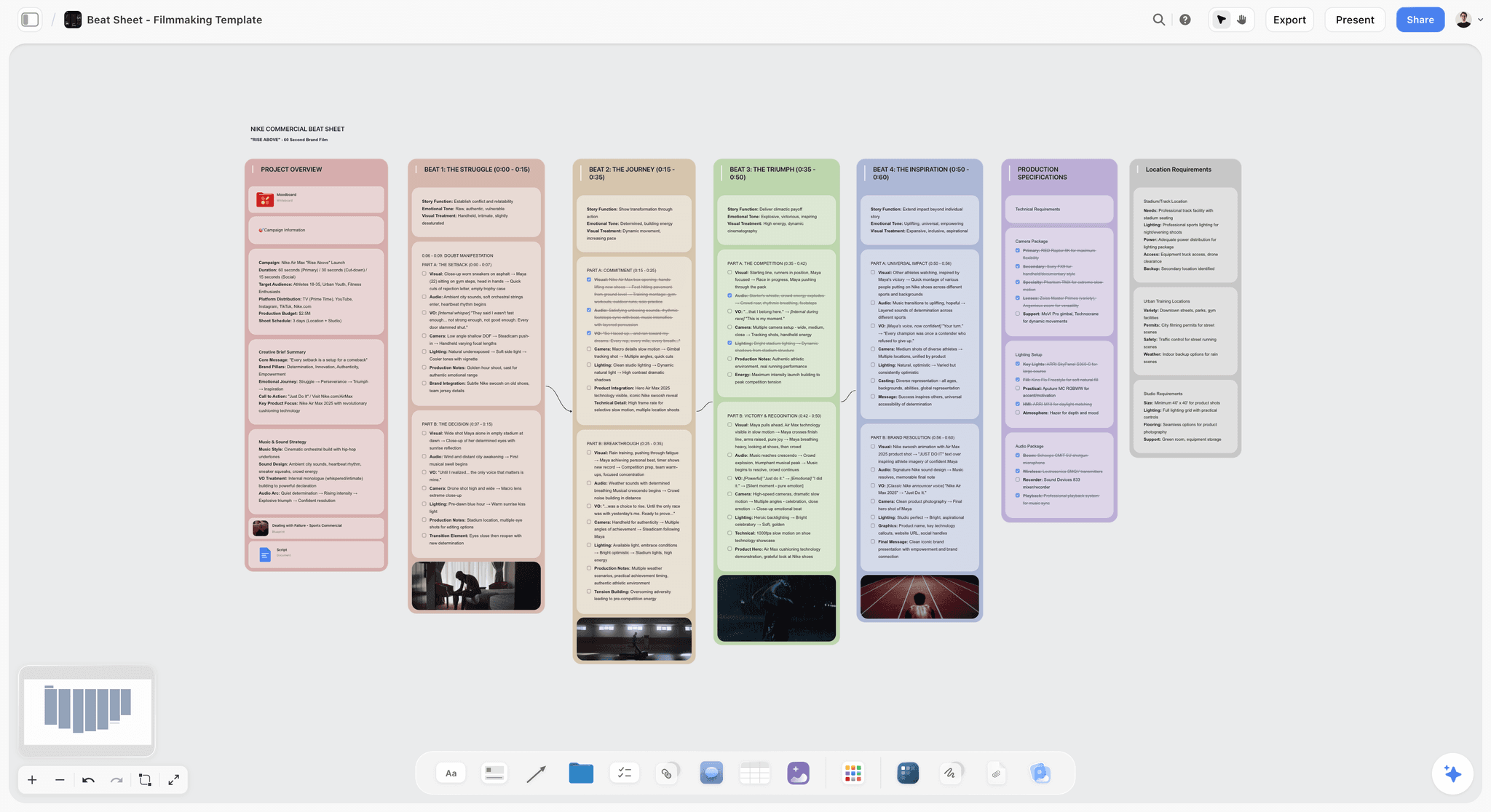
Storyflow is the alternative to pick when the problem is not Claude's intelligence but Claude's container. It is an AI-powered visual creative workspace: an infinite canvas of structured cards and documents where the AI reads the whole board instead of a scrolling conversation. You do not need a smarter model. You need a model that can see the whole project. Storyflow is that model's workspace.
When the work is a documentary, a launch, a book, a channel, or a research project, the thread fails for a structural reason, not a quality reason. Storyflow fixes the structure: the brief, the references, the timeline, the draft, and the outline all sit on one canvas, and the AI reasons about all of it at once.
Best for: Filmmakers, writers, founders, project managers, and visual thinkers running long, multi-part creative or strategic projects where context keeps getting lost in chat.
Verdict: The strongest Claude alternative for project-shaped work. For a single deep reasoning chat or a one-off coding session, a pure chat assistant like Claude or ChatGPT is the simpler tool. Storyflow is the better fit the moment the work becomes project-shaped and visual.
Key features
- Canvas-aware AI by default. The AI reads your full active canvas board (every card, note, image, and link on it). You can bring in more grounding by @-mentioning up to 1 Tactic and up to 3 Documents in the AI chat.
- 200+ Story Blueprints. An expert-built template library covering creative and strategic frameworks, included on the Plus tier and above.
- Structured cards and documents. Ideas live as movable cards and full documents on an infinite canvas, not as paragraphs in a transcript.
- Unlimited shared boards and unlimited collaboration on every plan, including Free. The Max plan adds a team workspace with permissions and roles.
Pricing
Free: launching before the end of 2026; invited collaborators of paid members join free today. Unlimited notes, images, and links, unlimited shared boards, unlimited collaboration, basic AI, and 20 file uploads. The Free plan does not include the 200+ Story Blueprints library. Plus: $7.99 per month annual or $9.99 per month monthly (adds the 200+ Story Blueprints, unlimited uploads). Pro: $14 per month annual or $19 per month monthly (adds AI image generation and 20x more AI than Plus). Max: $39 per month annual or $49 per month monthly (adds 40x more AI and a team workspace with permissions and roles). Pricing current as of May 2026.
Pros
- The AI reads the full project canvas, so the structure of long work stays in context instead of scrolling away.
- The entry paid tier is $9.99 per month, well below the $20-per-month standard that Claude, ChatGPT, Gemini, and Copilot all converge on.
- The Free plan is genuinely usable: unlimited boards, unlimited cards, unlimited collaboration, forever.
Cons
- For a single deep reasoning chat or a quick coding session, a pure chat assistant is the simpler tool. Storyflow earns its place when the work is project-shaped, not when it is one question.
- It is a creative and strategic workspace, not a code editor. For software engineering, pair it with Claude or a dedicated coding tool.
- Cloud-only; there is no local-first, self-hosted option for regulated or air-gapped environments.
If your work is project-shaped and visual, take your most active project and rebuild it on a Storyflow canvas for one week. Start a Storyflow workspace and ask the AI the same questions you would ask Claude, but on the canvas. The difference is usually obvious within an hour.
2. ChatGPT
ChatGPT is the strongest all-round pure-chat alternative to Claude in 2026. If you want a better chatbot rather than a different shape of tool, this is the pick. It reached 900 million weekly active users as of February 2026, and that scale funds the broadest ecosystem in the category.
Best for: Anyone who wants a single, capable chat assistant with image generation, live web search, and a deep plugin ecosystem.
Verdict: The default Claude alternative for pure chat. Same thread-shaped limits as Claude on long, multi-part work.
Key features
- Image generation, live web search, voice mode, and file analysis in one product.
- Custom GPTs and the GPT Store for repeatable workflows.
- The largest third-party integration ecosystem of any assistant.
- Strong general reasoning across writing, code, and analysis.
Pricing
Free tier with daily limits. Plus is $20 per month. Pro is $200 per month. Pricing current as of May 2026.
Pros
- Broadest feature set and ecosystem of any Claude alternative.
- Image generation and web search are built in, which Claude's consumer product lacks.
- Familiar interface; almost no learning curve.
Cons
- It is still a chat thread, so it loses earlier context on long project work just as Claude does.
- Default tone runs more eager and less calibrated than Claude on careful writing.
- The $200 Pro tier is steep for occasional heavy users.
3. Google Gemini
Google Gemini is the strongest Claude alternative for anyone who already lives in Google Workspace. Gemini posted the largest market-share gain of any assistant in 2026, rising from roughly 6 percent to 25.46 percent of generative-AI web traffic between early 2025 and March 2026.
Best for: Google Workspace users who want AI native in Docs, Gmail, Drive, and Sheets.
Verdict: The best workspace-integrated Claude alternative. A thread tool, so the same long-project drift applies.
Key features
- Native AI inside Docs, Gmail, Drive, Sheets, and Meet.
- Long context window and strong multimodal reasoning.
- Deep Research mode for multi-source synthesis.
- Tight integration with Google Search for fresh information.
Pricing
Free tier. Google AI Plus is $9.99 per month, Google AI Pro is $19.99 per month, and Google AI Ultra is $249.99 per month. Pricing current as of May 2026.
Pros
- Best-in-class if your documents and email already live in Google Workspace.
- Strong on fresh, search-grounded answers.
- The $9.99 AI Plus tier undercuts the $20 standard.
Cons
- Outside Google Workspace, the integration advantage disappears.
- Still a chat thread; long project context drifts as it does in Claude.
- The Ultra tier at $249.99 per month is among the priciest in the category.
4. Perplexity
Perplexity is the answer engine that ships every response with sources. It is the Claude alternative to pick when the bottleneck is research you can trust rather than text you have to fact-check.
Best for: Research, competitive analysis, and any work where citations and provenance matter.
Verdict: The strongest research-grade Claude alternative. Built for sourced answers, not for long-form generation.
Key features
- Every answer ships with inline citations.
- Pro Search runs deeper, multi-source synthesis.
- Spaces group related research threads.
- Multi-model backend, including frontier models from several providers.
Pricing
Free tier with limited Pro searches. Perplexity Pro is $20 per month. Perplexity Max is $200 per month. Pricing current as of May 2026.
Pros
- Citations make Perplexity trustworthy in a way Claude's unsourced prose is not.
- Strong on "what is the latest on X" queries where pure chat models go stale.
- Pro Search synthesis is excellent for first-pass research.
Cons
- Not built for nuanced long-form drafting; Claude and ChatGPT are stronger writers.
- Spaces are lighter than a true project canvas for sustained work.
- The free tier limits Pro Search heavily.
5. Microsoft Copilot
Microsoft Copilot is the Claude alternative for anyone whose work day runs through Microsoft 365. It is the AI woven into Word, Excel, Outlook, Teams, and Windows.
Best for: Microsoft 365 users who want AI native in the Office apps they already use.
Verdict: The best Microsoft-ecosystem Claude alternative. Less compelling outside that ecosystem.
Key features
- Native AI across Word, Excel, Outlook, PowerPoint, and Teams.
- Copilot in Windows for system-level assistance.
- Grounding in your organization's Microsoft 365 data.
- Strong general reasoning on an OpenAI model backbone.
Pricing
Free tier. Copilot Pro is $20 per month. Business plans start around $21 per user per month. Pricing current as of May 2026.
Pros
- The deepest Office integration of any assistant.
- Genuinely useful for Excel, Outlook, and Teams-heavy roles.
- Enterprise data grounding is a real advantage for organizations on Microsoft 365.
Cons
- Outside Microsoft 365, the value collapses.
- A thread tool, so it loses long-project context the way Claude does.
- Quality can feel inconsistent across the different Office surfaces.
6. Mistral (Le Chat)
Mistral's Le Chat is the European Claude alternative: a capable assistant from a Paris-based lab, priced below the $20 standard and attractive for teams that care about EU data residency.
Best for: Cost-conscious users and EU-based teams who want a capable assistant outside the US providers.
Verdict: A strong-value Claude alternative. Reasoning is solid but a step behind Claude on the hardest tasks.
Key features
- Capable general reasoning, writing, and code.
- Le Chat web and mobile apps with web search and document analysis.
- EU-based data handling, relevant for GDPR-sensitive teams.
- Open-weight model heritage for developers who want to self-host.
Pricing
Free tier. Le Chat Pro is $14.99 per month. Team plans run around $24.99 per user per month, or $19.99 annual. Pricing current as of May 2026.
Pros
- $14.99 per month undercuts the $20 standard.
- EU data residency matters for European teams and regulated work.
- Open-weight heritage gives developers a self-hosting path.
Cons
- Reasoning trails Claude on the most demanding long-form and analytical tasks.
- Smaller ecosystem and fewer integrations than ChatGPT or Gemini.
- A thread tool; long-project drift applies.
7. DeepSeek
DeepSeek is the cost-conscious Claude alternative. Its web chat is free, and its API is among the cheapest in the category, which makes it the pick when budget is the constraint.
Best for: Cost-sensitive users and developers who want strong reasoning and code without a subscription.
Verdict: The best value-per-token Claude alternative. Genuinely strong on reasoning and code; weaker on ecosystem and polish.
Key features
- Free web chat with strong reasoning and code performance.
- API pricing among the lowest in the market in 2026.
- Competitive on math and coding benchmarks.
- Open-weight model releases for self-hosting.
Pricing
Web chat is free. There is no consumer monthly subscription; paid usage runs on per-token API pricing, which is among the cheapest available as of May 2026. Verify current API rates on DeepSeek's site.
Pros
- Free web chat removes the subscription entirely for everyday questions.
- API cost is a fraction of the frontier US providers.
- Strong on pure coding and math tasks.
Cons
- Thinner ecosystem, fewer integrations, and less polish than ChatGPT or Gemini.
- Data-handling and hosting questions matter for some teams; review them before adopting.
- A thread tool; no project-canvas context.
8. Grok (xAI)
Grok, from xAI, is the Claude alternative with a direct line into real-time X data and a deliberately looser conversational tone. It is the pick when freshness and personality matter more than careful calibration.
Best for: Users who want real-time information from X and a less filtered tone.
Verdict: A capable, fast-moving Claude alternative. The tone is a feature for some and a liability for professional writing.
Key features
- Real-time access to X (Twitter) data for fresh information.
- A looser, more conversational tone than Claude.
- Strong reasoning on the latest Grok models.
- Bundled with X subscription tiers.
Pricing
Free tier. X Premium includes Grok for $8 per month. SuperGrok is $30 per month, and X Premium+ is $40 per month. Pricing current as of May 2026.
Pros
- Best real-time read on what is happening on X right now.
- The $8 X Premium entry point is cheap if you already use X.
- Fast iteration; xAI ships frequently.
Cons
- The looser tone is a poor fit for careful, professional writing where Claude shines.
- Ecosystem and integrations are thinner than ChatGPT's.
- A thread tool; long-project context drift applies.
9. NotebookLM
NotebookLM is Google's source-grounded research tool. Unlike Claude, it answers only from documents you upload, which makes it the Claude alternative for research where every claim must trace back to a source.
Best for: Researchers, students, and analysts synthesizing a fixed set of documents, transcripts, or reports.
Verdict: The best source-grounded Claude alternative. Narrow by design, and that is the point.
Key features
- Answers grounded strictly in your uploaded sources, with citations to the exact passage.
- Audio Overview generates a podcast-style summary of your sources.
- Handles documents, slides, transcripts, and links.
- Free tier with generous source limits.
Pricing
Free tier with generous per-notebook source and word limits. Higher capacity is available through Google AI subscription plans. Pricing current as of May 2026.
Pros
- Every answer traces to a source, which eliminates the hallucination risk of open chat.
- Excellent for synthesizing interviews, reports, and research corpora.
- The free tier is genuinely useful.
Cons
- It will not answer beyond your uploaded sources, so it is not a general assistant.
- Not built for drafting, code, or open-ended reasoning.
- A notebook, not a project canvas; structure across many sources stays flat.
10. Poe
Poe, from Quora, is the Claude alternative for people who do not want to choose one model. It is an aggregator: one subscription gives you Claude, GPT, Gemini, and thousands of other bots in a single interface.
Best for: Users who want to compare or switch between many models on one bill.
Verdict: The best multi-model Claude alternative. A convenient layer, not its own model.
Key features
- Access to Claude, GPT, Gemini, and thousands of community bots in one app.
- A points system that meters usage across models.
- Custom bots built on any available model.
- Single subscription instead of several.
Pricing
Free tier with daily limits. Paid plans start around $4.17 per month billed annually, scaling up to roughly $249.99 per month for heavy use. Pricing current as of May 2026.
Pros
- One bill instead of separate Claude, ChatGPT, and Gemini subscriptions.
- Easy side-by-side model comparison.
- Custom bots are quick to build.
Cons
- The points system makes heavy use of frontier models burn through quota fast.
- It adds no reasoning of its own; quality is whatever the underlying model gives.
- A thread tool; no project-canvas context.
11. Meta AI
Meta AI is the free, Llama-powered assistant built into WhatsApp, Instagram, Messenger, and a standalone app. It is the Claude alternative for everyday questions where free and ever-present beats best-in-class.
Best for: Casual everyday use inside Meta's apps with no subscription.
Verdict: A capable free Claude alternative for light use. Not a tool for serious professional work.
Key features
- Free, with no subscription.
- Built into WhatsApp, Instagram, and Messenger.
- Image generation and general Q&A.
- Powered by Meta's open-weight Llama models.
Pricing
Free. Pricing current as of May 2026.
Pros
- Genuinely free and already in apps billions of people use.
- Fine for quick questions and casual image generation.
- No setup; it is just there.
Cons
- Reasoning and writing trail Claude, ChatGPT, and Gemini on demanding work.
- Built for casual use, not professional projects.
- A thread tool with no project structure.
12. Llama-based Assistants (Open-Weight)
Llama-based assistants are the self-hosted Claude alternative. Because Meta's Llama models are open-weight, you can run them on your own infrastructure through tools like Ollama, LM Studio, or a private deployment. This is the pick when control and privacy outrank raw capability.
Best for: Developers, privacy-sensitive teams, and regulated organizations that need a self-hosted, controllable model.
Verdict: The best Claude alternative when you must own the stack. It trades convenience and frontier quality for control.
Key features
- Open-weight models you can run locally or on private infrastructure.
- No data leaves your environment when self-hosted.
- A large open-source ecosystem of interfaces and fine-tunes.
- No per-message metering once you host it yourself.
Pricing
The models are free to download and run; your only cost is the compute you provide. Pricing current as of May 2026.
Pros
- Full data control; nothing is sent to a third-party provider.
- No usage limits or subscription once self-hosted.
- Highly customizable through fine-tuning.
Cons
- Frontier quality still trails Claude on the hardest reasoning tasks.
- Self-hosting requires real technical setup and ongoing maintenance.
- No built-in product layer; you assemble the experience yourself.
7) Which Claude Alternative Fits Which Person?
13. Documentary Filmmaker / Video Creator
Top picks: Storyflow + Claude
Storyflow holds the whole film on one canvas (interviews, timeline, structure, hook, budget) and the AI reads all of it. Keep Claude for the deep one-off writing pass on a treatment or narration script.
14. Solo Founder / Operator
Top picks: Storyflow + ChatGPT
Storyflow for the launch as a project (positioning, brief, messaging, content calendar on one board). ChatGPT for quick variants, research, and ideation.
15. Project Manager / Strategic Thinker
Top picks: Storyflow + Perplexity
Storyflow for the project canvas where scope, plan, and stakeholders stay visible. Perplexity for sourced research that feeds the plan.
16. Long-Form Writer / Author
Top picks: Claude + Storyflow
Claude for the prose drafting itself, where its calibrated voice is the strongest in the category. Storyflow for the book's structure, character work, and outline on a canvas.
17. Researcher / Analyst
Top picks: Perplexity + NotebookLM
Perplexity for live, cited web research. NotebookLM for synthesizing a fixed corpus of documents where every claim must trace to a source.
18. Google Workspace User
Top picks: Gemini + Storyflow
Gemini for AI native in Docs, Gmail, and Drive. Storyflow when a project outgrows a document and needs a canvas.
19. Microsoft 365 User
Top picks: Copilot + Storyflow
Copilot for AI inside Word, Excel, and Outlook. Storyflow for project-shaped creative work that the Office apps were never built for.
20. Developer / Engineer
Top picks: DeepSeek + Claude
DeepSeek for cheap, strong coding and reasoning. Claude for the hardest architectural reasoning. Add a Llama-based self-hosted model if data control is mandatory.
21. Budget-Conscious User
Top picks: DeepSeek + Storyflow
DeepSeek's free web chat covers general questions. Storyflow covers project work, with Plus at $7.99/month annual and unlimited boards and collaboration; its Free plan launches before the end of 2026.
22. Privacy-Sensitive or Regulated Team
Top picks: Llama-based self-hosted + Mistral
A self-hosted Llama model keeps data in your environment. Mistral Le Chat adds EU data residency for teams that want a hosted option with stronger guarantees.
8) Honorable Mentions
A few tools that came close but did not make the main twelve.
- Qwen (Alibaba): Strong open-weight models, competitive on coding and math. Narrower Western ecosystem.
- Cohere: Capable enterprise-focused models, more relevant to developers than to everyday chat users.
- Pi (Inflection): A conversational assistant with a warm tone; lighter on serious task work.
- HuggingChat: A free interface onto open models; useful for experimentation, thinner as a daily driver.
- Jasper / Copy.ai: Marketing-copy platforms built on general models; covered in our marketing-tools coverage rather than here.
- Notion AI: Document-and-wiki AI; strong if your work already lives in Notion, doc-shaped rather than canvas-shaped.
These are not weak tools. Their audience or use case is simply narrower than the main list.
9) Where Claude Still Wins (An Honest Accounting)
A list of Claude alternatives that pretended Claude was beaten would not be worth reading. Here is the honest accounting of where Claude is still the right tool.
Claude is the strongest pure-chat reasoning model in 2026. For a single, demanding reasoning task (a hard analytical question, a careful argument, a nuanced piece of writing in one sitting), Claude's calibration and depth are still the benchmark the others are measured against. If your job genuinely fits one chat exchange, Claude is hard to beat.
Claude's writing voice is the most carefully calibrated. It is less eager, less prone to hype, and better at matching a tone from examples than most alternatives. Long-form writers keep Claude in the stack for exactly this reason.
Claude leads on agentic and long-context reasoning for engineering. For coding and agentic workflows, Claude has genuine strengths that the cheaper alternatives do not fully match.
The point of this article is not that Claude is bad. It is that a chat assistant, however good, is the wrong container for work with many moving parts. When the job is one question, use Claude. When the job is a project (a film, a launch, a book, a research program), the limitation is not Claude's intelligence. It is the thread. That is the gap Storyflow closes: the AI reasons about a visible canvas of cards and documents instead of a transcript that scrolls the brief out of view.
11) The Bottom Line
The best Claude alternative in 2026 depends on which wall you hit. ChatGPT is the strongest pick if you simply want a better chatbot: bigger ecosystem, image generation, live web search. Gemini wins for Google Workspace users, Copilot for Microsoft 365 users, Perplexity for sourced research, NotebookLM for source-grounded synthesis, Mistral and DeepSeek for lower cost, and Llama-based assistants for self-hosted control.
But the most common reason people leave Claude is not that they want a smarter model. It is that the work outgrew the chat. A documentary, a launch, a book, a research project: these have many moving parts, and a chat assistant, however good, is the wrong container for work with many moving parts. That is why Storyflow is here on this list and first for project-shaped work. The AI reads your full visual canvas of cards and documents, so the structure of long, complex work stays in context instead of scrolling out of view.
If your work is project-shaped and visual, the move is to take one active project and rebuild it on a canvas for a week. Start a Storyflow workspace and run the same questions you would ask Claude, but where the AI can see the whole project.
10) FAQ: Claude Alternatives in 2026
What is the best Claude alternative in 2026?
For a stronger pure-chat assistant, ChatGPT is the best Claude alternative, with a larger ecosystem, image generation, and live web search. For long, project-shaped creative work where context keeps getting lost in chat, Storyflow is the best alternative, because its AI reads your full visual canvas of cards and documents instead of one scrolling thread.
Is there a free Claude alternative?
Yes. ChatGPT, Gemini, Copilot, Meta AI, and Mistral Le Chat all have free tiers, DeepSeek's web chat is free, and NotebookLM has a free tier. Storyflow's Free plan, which launches before the end of 2026, will be the strongest for project work: unlimited boards, unlimited cards, unlimited collaboration, basic AI, and 20 file uploads.
Why would I switch from Claude if it is so good?
Most people switch for one of two reasons. Either they hit Claude's usage limits and pricing (Pro is $20 per month with a message window that runs out fast under heavy use), or they hit the structural limit that a chat thread loses context on long, multi-part work. Claude's reasoning is excellent; the thread is the constraint.
Which Claude alternative is best for long creative projects?
Storyflow. A documentary, a book, a launch, or a research project has many moving parts (a brief, references, a timeline, a structure, a draft) that do not fit in a chat scroll. Storyflow keeps all of it on one canvas and the AI reads the whole board, so the project structure stays in context instead of scrolling away.
Which Claude alternative is cheapest?
DeepSeek's web chat is free and Meta AI is free. Among paid tools, Storyflow's entry tier is $7.99 per month annual, Mistral Le Chat is $14.99 per month, and Google AI Plus is $9.99 per month, all below the $20-per-month standard that Claude, ChatGPT, Gemini, and Copilot share. Pricing is current as of May 2026.
Which Claude alternative is best for research?
Perplexity for live web research with citations on every answer, and NotebookLM for grounded answers locked strictly to documents you upload. Claude generates confident text without provenance, which is why research-heavy users add a sourced tool alongside it.
Is ChatGPT better than Claude?
Neither is universally better. ChatGPT has the larger ecosystem, image generation, and live web search, while Claude has the more calibrated writing voice and strong agentic reasoning. As of May 2026, ChatGPT held the #1 generative-AI ranking and Claude held #2 for 85 consecutive days. Pick by the job, not the brand.
What is the best Claude alternative for coding?
DeepSeek for cheap, strong coding and reasoning, and Claude itself remains a leader for the hardest engineering and agentic work. If data control is mandatory, a self-hosted Llama-based model keeps code in your own environment. Storyflow is a creative and strategic workspace, not a code editor.
Can I use a Claude alternative inside Google or Microsoft tools?
Yes. Gemini is native inside Google Workspace (Docs, Gmail, Drive, Sheets), and Copilot is native inside Microsoft 365 (Word, Excel, Outlook, Teams). If you already live in one of those ecosystems, the matching assistant is the most natural Claude alternative.
Do I need to replace Claude completely?
Usually not. Most people who use a Claude alternative in 2026 keep Claude for single deep reasoning tasks and add a second tool for the job Claude is the wrong shape for. The common pairing is Claude for one-off chat plus Storyflow for project-shaped creative work, so the project structure stays visible while the chat stays sharp.
Is a visual workspace really better than a chat for AI?
For project-shaped work, yes. A chat thread keeps only the most recent exchange in clear view, so a long project's brief and structure scroll off the top. A visual canvas keeps the whole project visible, and when the AI reads the canvas it reasons about the entire project at once instead of the last paragraph you typed.
What is the smallest test I can run before switching?
Take the project you are currently running through Claude in a long thread. Move the brief, the key references, and the structure onto a Storyflow canvas (the free tier is enough). Ask the AI three questions you would normally ask Claude, but ask them on the canvas. Try a Storyflow workspace and you will usually see the difference within an hour.
Table of Contents
- Quick Answer: The Best Claude Alternative in 2026
- Comparison Table: 12 Claude Alternatives Compared
- Why People Look for a Claude Alternative
- How We Evaluated These Tools
- Quick Picks by Job to Be Done
- Detailed Reviews: 12 Claude Alternatives in 2026
- Which Claude Alternative Fits Which Person?
- Honorable Mentions
- Where Claude Still Wins (An Honest Accounting)
- FAQ: Claude Alternatives in 2026
- The Bottom Line
- Author
- Related Reading
Templates to check out for this topic


Templates you can use in Storyflow
Every Storyflow board starts from real structure and an AI that reads the whole canvas. Open one of these templates and make it yours.


See Storyflow in Action
A visual AI workspace where every feature lives inside one canvas. No tab-switching, no context lost.
Build your entire board from a single message
Type what you need in the AI chat at the bottom of your canvas. The AI adds cards, headings, and structure directly onto your board.
Use expert frameworks as AI context
Type @ in the AI chat and choose any Tactic. The AI tailors every response to that framework instead of giving generic advice.
Turn your board into a mind map in seconds
Ask the AI to restructure your canvas as a mindmap. It connects your ideas into a visual hierarchy so you can see how everything relates.
Why Storyflow Exists
Storyflow actually began as a personal tool while working on creative and research projects.
We kept running into the same problem: ideas were scattered everywhere: notes, documents, and whiteboards.
Nothing helped us see how everything connected.
So we started building a workspace designed around how ideas actually grow.
→ Read how Storyflow was createdJustkay
Documentary Filmmaker & Founder at Storyflow
Published: 2026-05-19
Extremely simple, seriously capable


See how easy it is to get started
Watch a real project come together, from a blank board to a finished plan, clicked through step by step.
Start creating with AI and become more productive
Transform your creative workflow with AI-powered tools. Generate ideas, create content, and boost your productivity in minutes instead of hours.