ChatGPT Prompts for Storyboarding (2026): 34 Prompts for Ads
34 copyable ChatGPT prompts for storyboarding ads and branded films: brief to concept, script to beats, beats to panels, shot types, timing for 30, 15 and 6-second cuts, frames and client review.

Category
Video Production
Author

Storyflow Team
Product & Research Team
Topics
2026-10-28
•
28 min read
•
Video Production- ChatGPT prompts
- storyboarding
- storyboard prompts
- commercial
- shot types
- Storyflow
What are the best ChatGPT prompts for storyboarding?
The best ChatGPT prompts for storyboarding work in order, from brief to concept, script to timed beats, then one panel per shot with its size, movement, seconds and voiceover, and with the Storyflow plugin ChatGPT builds those panels as frames on a board the client opens by link. Storyflow is an AI visual workspace that lays a storyboard out frame by frame on one infinite canvas. Use Boords for a timed animatic with frame-level comments, and Storyboarder for drawing frames by hand.

Full disclosure: Storyflow is our product. It is listed first because these prompts build a storyboard a team has to edit and present, and Storyflow's plugin is where ChatGPT lays those frames out on a shared board. Its limits: the plugin does not generate images, Storyflow has no animatic, frame timing playback or MP4 export, and it has no frame-level approval status.
How the storyboard tools that work with ChatGPT compare on trust, innovation, ratings and pricing
Which storyboard tools that work with ChatGPT are the most trusted?
Boords' review links need no login and collect frame-level comments, and Storyboarder is free and open source, so anyone can check what it does. Neither is a ChatGPT plugin, so ChatGPT's panels move in by hand. Storyflow is newer, live in ChatGPT since 24 October 2026, and it is the one where ChatGPT builds the frames on a shared board directly.
Which storyboard tools that work with ChatGPT have fair and transparent pricing?
All three publish their prices. Storyboarder is free and open source. Boords lists a Free plan and paid plans from $26 a month billed yearly. Storyflow starts at $7.99 a month billed annually, paid-only during early access, and its ChatGPT plugin actions run on your ChatGPT plan, so they use no Storyflow AI credits.
Which storyboard tools that work with ChatGPT are the most innovative in 2026?
Storyflow, because ChatGPT lays out the storyboard as connected frame cards on a board and then reads it back to check seconds, continuity and coverage, or to report what changed and who changed it. Boords' animatic timeline, timed to an uploaded soundtrack with frame-level comments, is the stronger innovation for the approval and edit stage.
Which storyboard tools that work with ChatGPT have a strong history of consistent performance?
Judge them by what each does today: Boords times frames to an uploaded soundtrack and exports PDF or MP4, and Storyboarder exports PDF and animated GIF and hands off to Premiere, Final Cut and Avid. Storyflow's ChatGPT plugin is new, live since 24 October 2026, so its record is short; the consistency it offers is one live storyboard on one board that ChatGPT, the client and the crew all read, rather than versions of a panel list scattered across chats and emails.
Which storyboard tools that work with ChatGPT are underrated?
Storyboarder's six drawing tools, from a light pencil for roughing to a note pen, cover a rough board at no cost. Storyflow's upload link is easy to miss: it drops an art director's phone photos of thumbnail sketches straight into the empty frames ChatGPT placed. ChatGPT's own rough sketches help a first client round, once you save them and send them through that link.
Quick Comparison
Where a ChatGPT storyboard goes next, Storyflow first because it holds the frames the client and crew read. Prices as of October 2026.
| Tool | Best For | AI Features | Price |
|---|---|---|---|
| Storyflow | Agency and producer storyboards for ads and branded films | ChatGPT builds each panel as a frame card with tags, direction note and coverage checklist, and reads the board back | Plus $7.99 mo annual (paid-only early access; invited collaborators join free) |
| Boords | Animatics and client review | Not a ChatGPT plugin; times frames to audio, exports PDF or MP4 | Free plan; paid from $26 mo billed yearly |
| Storyboarder | Hand-drawn frames | No AI; drawing tools, PDF and GIF export | Free, open source |
Key Takeaways
- Storyboard prompts fail when they ask for panels first. Fix the proposition, then the beats and their seconds, then one panel per shot; each stage is a separate prompt you check before the next.
- Treat the voiceover as a clock. At about 2.3 words a second, a 30-second spot holds roughly 70 words, and you should write about 10 percent under.
- Through the Storyflow plugin, ChatGPT builds each panel as a card in a left-to-right row: a frame, a subject line, tags for size, light and format, a direction note, a checklist of coverage and a gear list, joined by arrows.
- The frames come from pictures already on the board, direct image links ChatGPT found or you paste, or your own sketches sent through an upload link. The plugin itself does not generate images.
- Board the cutdowns before the shoot. A 15-second and a 6-second cut built from the same frames shows which setups every version depends on.
- Storyflow holds the timed board, not an animatic: there is no playback to audio, MP4 export or frame-level approval status. Hand the approved frames to Boords or your editor for that.
Why Storyboard Prompts Come Back as a Wall of Text
You paste a 30-second script into ChatGPT and ask for a storyboard. It answers with twelve paragraphs, one per "panel", each describing a mood. Nothing adds up to 30 seconds, two panels describe the same shot, and none says where the camera is. The model did what the prompt asked; the prompt skipped the steps a storyboard artist would take first.
Panels before beats
A panel is a shot, and shots come from beats. Ask for panels straight from a script and ChatGPT invents the structure as it goes, which is why the turn lands in panel 9 of 12 and the product shows up at second 27.
No clock
An ad has a fixed length and a voiceover that fills part of it. Without seconds per beat and a word budget, the storyboard describes a 50-second film and calls it a 30.
No camera language
"We see the family at dinner" can be drawn ten ways. A panel needs a shot size, an angle, a move and a reason, or the director and the client will each picture a different frame.
Nowhere for the panels to live
A storyboard is a visual document the client, the director and the crew all read. A storyboard that exists only as text in a chat is a script with numbers, not a storyboard. The prompts below end with where each result goes.
The Prompt Pattern for Storyboards
OpenAI's prompting guide separates identity, instructions, examples and context, and recommends clear sections so the model can tell them apart (OpenAI prompt engineering guide). For a storyboard, that becomes five parts.
| Part | What it carries | Storyboard example | Leave it out and... |
|---|---|---|---|
Role | Who is asking and for what | "I am the producer at a five-person agency; this is a 30-second spot for a water-filter brand" | You get film-school advice |
Context | Brief, script, deliverables, fixed facts | "30, 15 and 6-second cuts; 16:9 and 4:5; one shoot day, two sets" | ChatGPT invents the format |
Constraints | The clock and the rules | "Seconds must add up to 30; one panel per shot; no new locations" | A 50-second film called a 30 |
Format | The exact panel fields | "Frame N (Xs): what we see, camera, what we hear" | Paragraphs you rebuild by hand |
Destination | Where the panels go | "Build them as frames on my Brightwell board" | The storyboard scrolls away |
How to Run These Prompts
Every prompt works in plain ChatGPT. The ones that start with @Storyflow need the plugin.
In plain ChatGPT
Paste the prompt, fill the brackets, and you get the answer in the chat. That is enough for concepts, beat sheets, scripts and cutdown logic.
With the Storyflow plugin
Install Storyflow from its plugin listing: select Install plugin, sign in to Storyflow, choose the projects ChatGPT may use, and allow changes so it can build. Then mention it with @ or pick it from the + menu (Plugins in ChatGPT). Availability depends on your ChatGPT plan, workspace and region. The full steps are in our guide to installing plugins in ChatGPT. Plugin actions run on your ChatGPT plan, so they use no Storyflow AI credits.
Where the frames come from
Through the plugin, a frame gets its picture three ways: a picture already on the board moves into it; ChatGPT adds a picture from a direct image link it found in its own web search or that you paste (the image file's address, not the page it sits on), and Storyflow keeps its own copy; or you send your own sketches through an upload link, good for 15 minutes and up to 200 pictures, which can fill the empty frames ChatGPT placed. A picture attached in the chat, or one ChatGPT draws there, does not reach the board until you save it and send it through that link, and the plugin does not generate images. Storyflow's in-app AI can generate frames on the Pro and Max plans, as a separate feature that uses Storyflow AI credits.
One ChatGPT project per campaign
OpenAI's Projects keep a campaign's chats, files and instructions together, and project instructions override your global ones inside the project (Projects in ChatGPT). Put the brief, the brand's rules and the mandatory legal lines in the project instructions once, and every prompt below gets shorter.
The 34 Prompts at a Glance
| Stage | Prompts | What you get | Where it lives |
|---|---|---|---|
Brief to concept | 1 to 5 | A proposition, three concepts, a stress test, a Tactic applied | Chat, then concept walls on the board |
Script to timed beats | 6 to 10 | A beat sheet with seconds, a voiceover to word budget, a script table, supers | Chat and a script table on the board |
Beats to panels | 11 to 16 | One panel per shot, built as frames, drawable descriptions, continuity notes | The storyboard row on the board |
Shot types and camera | 17 to 21 | Sizes, angles and moves with reasons, the pack shot, a shot-type audit | Tags and direction notes on each frame |
Timing and cutdowns | 22 to 26 | A seconds check, 15 and 6-second cuts, crop checks, super placement | Chat and notes on the board |
Frames and references | 27 to 30 | Reference frames, uploaded sketches, rough drawings, captions | The pictures in each frame |
Client review and handoff | 31 to 34 | A client deck, versioned feedback, a change summary, a strip board | Deck, Decision log, strip board |
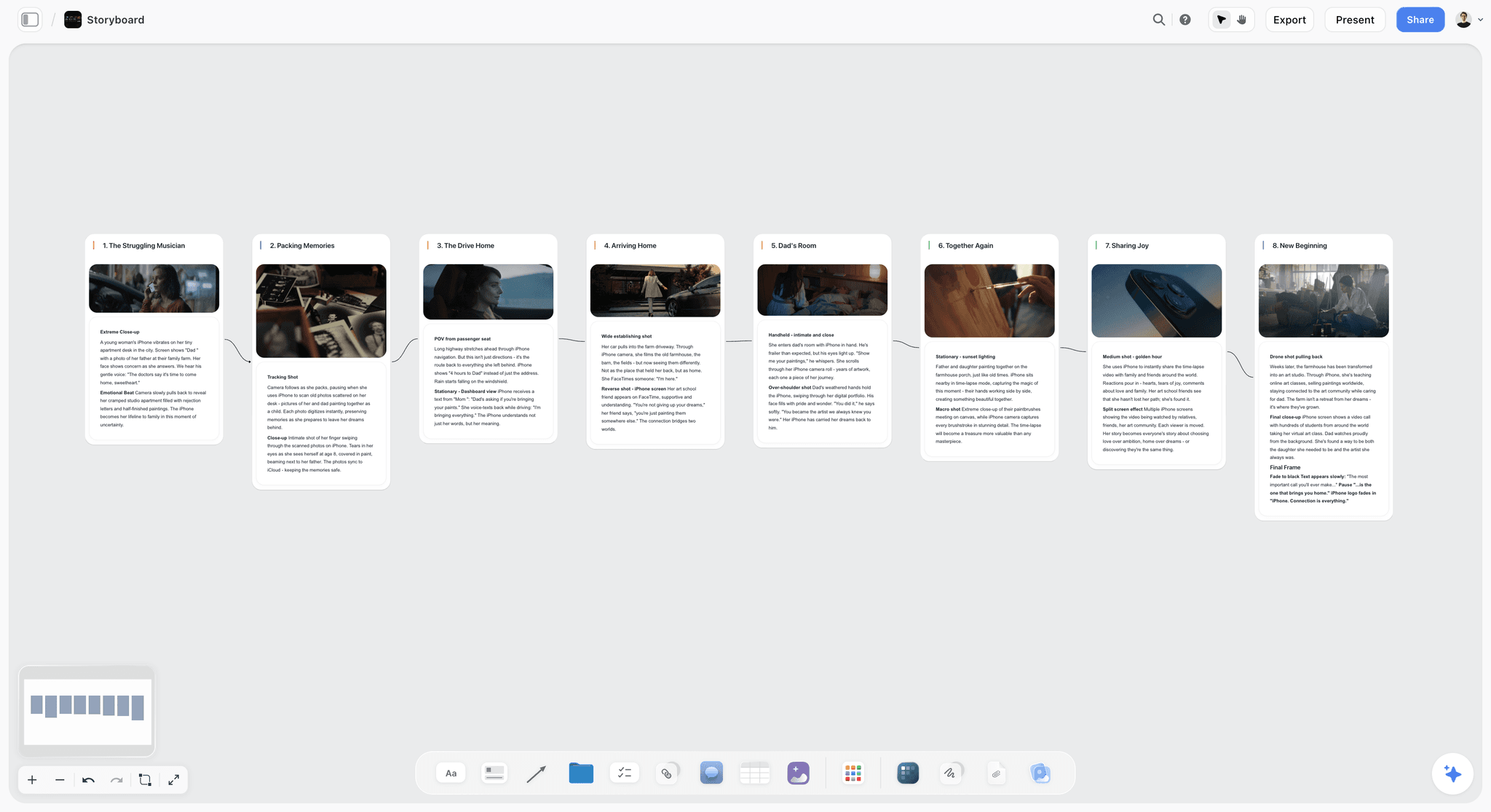
Storyflow storyboard board with numbered frames joined left to right, each with a picture and shot notes
Build the storyboard where the client can read it
Install the Storyflow plugin in ChatGPT and your panels land as connected frames on a board, each with its seconds, camera notes and voiceover line, viewable by link with no account.

Stage 1: Brief to Concept
A storyboard cannot rescue a weak idea, and a client approves the idea long before they approve frame 7. Settle it in words first.
Prompt 1: The single-minded proposition
- Prompt: "Read this brief. Write the single-minded proposition in under 10 words: the one thing the viewer must remember. Then give the proof the brief offers for it. If the brief carries two messages, say so and ask me which one wins."
- In chat: one line, its proof, and a warning if the brief is trying to say two things in 30 seconds.
Prompt 2: Three concepts that dramatise it
- Prompt: "Give me three concepts for a 30-second spot that dramatise this proposition. For each: a title, the idea in one sentence, the opening image, the turn, the final frame, and why it still works with the sound off."
- In chat: three short blocks you can compare. The sound-off line matters for any placement that plays muted.
Prompt 3: Stress-test the concepts
- Prompt: "For each concept: does it survive a 6-second cut? Is the product essential to the story or bolted on at the end? Could a competitor run the same idea with their logo? Rank the three and give one reason each."
- In chat: a ranking with reasons you can take to the creative director.
Prompt 4: Lay the beats against a proven structure
- Prompt: "@Storyflow Find the AIDA Tactic and lay concept [2]'s story against it on my [campaign] board: attention, interest, desire, action, with the moment from our concept under each."
- On the board: a structure wall built from one of Storyflow's Tactics, its 200+ expert creative frameworks, with your concept mapped to each step.
Prompt 5: A concept board the client can open
- Prompt: "@Storyflow Put the three concepts on my [campaign] board, one wall each, with the opening image, the turn and the final frame as separate notes, and the proposition as a heading above all three."
- On the board: three walls side by side. The client opens the board's view-only link with no account; to comment, they sign in.
Stage 2: Script to Timed Beats
The clock is the constraint every later prompt depends on. Put seconds on everything now.
Prompt 6: A beat sheet that adds up
- Prompt: "Break concept [2] into 7 to 9 beats for a 30-second spot: hook, problem, turn, product, payoff, end card. Give each beat its seconds; they must add up to exactly 30. Put the product on screen before second 20."
- In chat: a numbered beat list with seconds and a total.
Prompt 7: The voiceover, written to its word budget
- Prompt: "At about 2.3 words a second, a 30-second spot holds about 70 words; write 10 percent under. Draft the voiceover for these beats, show which beat each line sits on, leave the first two beats silent, and give me the word count."
- In chat: a voiceover under about 63 words, mapped to beats. The 2.3 words a second and the 35, 70 and 140-word budgets for 15, 30 and 60 seconds come from VoiceBros' commercial script guide, which also advises writing about 10 percent under. The ChatGPT video script page covers the script side in depth.
Prompt 8: A two-column script table
- Prompt: "Turn the beats and voiceover into a two-column script: seconds, then picture, then sound (voiceover, dialogue, music, effects), one row per beat."
- On the board: "@Storyflow Put it as a table on my [campaign] board next to the concept wall, rows kept in beat order."
Prompt 9: Every super and legal line, timed
- Prompt: "List every super, title card and legal line, which beat each appears on and how many seconds it stays on screen. Flag any super that is on screen for less time than it takes to read aloud twice."
- In chat: a short table. A legal line that arrives after the frames are drawn forces a rebuild of the end frame.
Prompt 10: The read-aloud check
- Prompt: "Read this script as a 30-second spot and tell me where the voiceover and the picture compete: a line over a beat that needs silence, or a beat with no time for its action. Suggest one cut for each problem."
- In chat: a list of collisions and fixes. Then read it aloud yourself with a stopwatch; no prompt replaces that.
Stage 3: Beats to Panels
Now, and only now, the panels. One panel per shot, numbered, built where everyone can see them. The ChatGPT storyboard page shows the finished layout.
Prompt 11: Shots from beats
- Prompt: "Break each beat into shots, one panel per shot. For each panel give one line for what we see, one for the camera, and one for what we hear. Number them in order. Do not merge shots, and do not add locations the script does not have."
- In chat: a numbered panel list, usually 10 to 15 panels for a 30-second spot cut every 2 to 3 seconds.
Prompt 12: Build the storyboard on the board
- Prompt: "@Storyflow Build these panels as shot cards on my [campaign] board, left to right in order. Title each 'Frame N (Xs): a few words'. Subject line: what we see. Tags: shot size, light, format. Direction note: the camera move and the voiceover or dialogue line. Shots required: the coverage this frame needs. Leave the frames empty for now."
- On the board: a connected row of frames, each with an empty picture space, a subject line with tags, a Shots required checklist, a direction note and a gear list, joined by arrows.
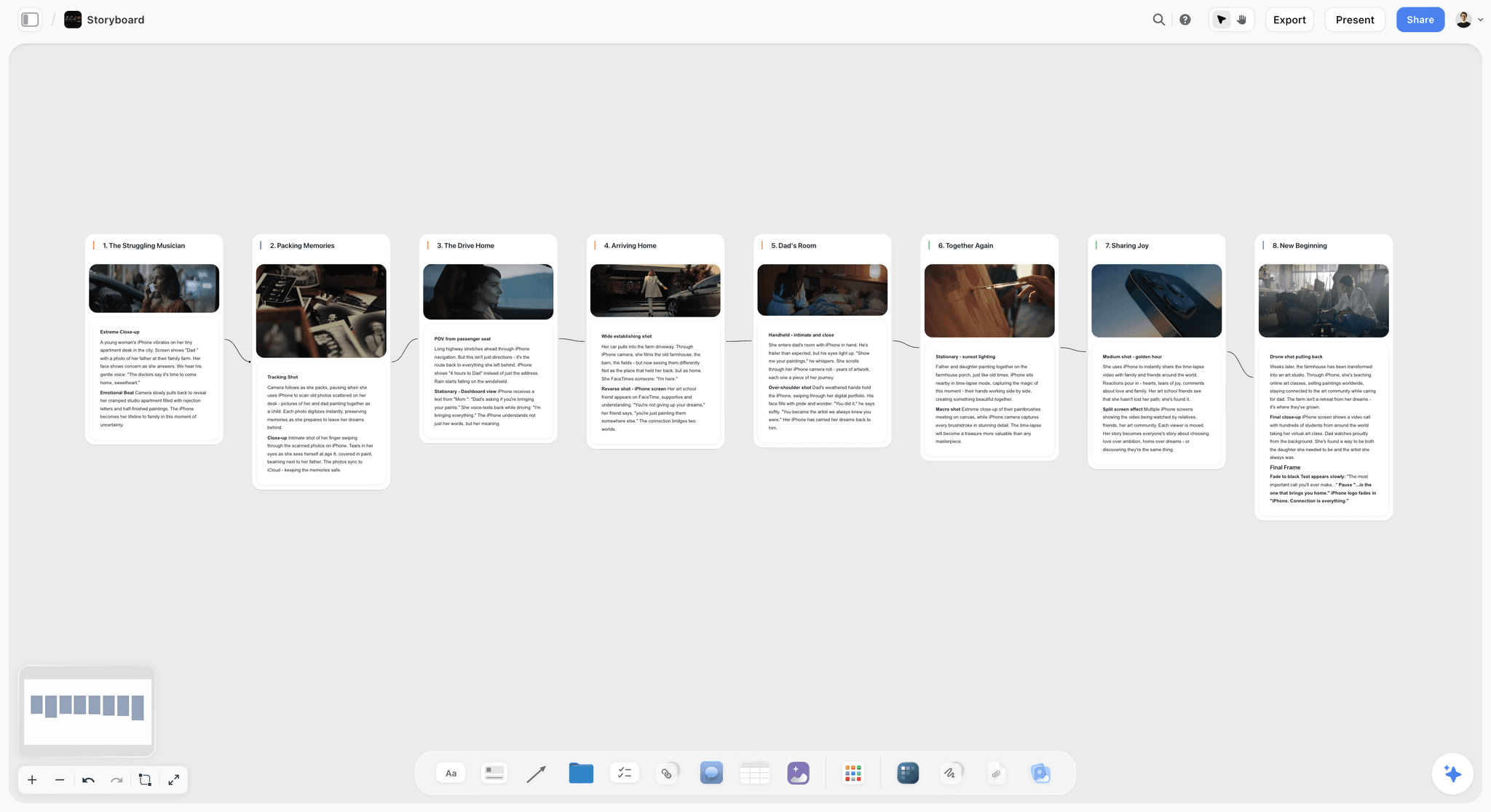
A storyboard laid out as eight connected frames: the picture on top, the shot type and the action underneath, read left to right like the film.
Prompt 13: Descriptions a stranger could draw
- Prompt: "Rewrite every frame's subject line so a stranger could draw it: subject, action and setting in under 20 words, present tense, and no adjective that cannot be drawn."
- On the board: "@Storyflow Update the subject lines on the frames to these versions." Our guide to writing a storyboard shot description goes deeper.
Prompt 14: Continuity check across frames
- Prompt: "@Storyflow Read the frames on my [campaign] board in order and list continuity risks: screen direction, eyelines, props that appear or vanish, time of day, and which way the product label faces."
- In chat: a list of risks by frame number, read from the board rather than from the chat history.
Prompt 15: Versions without renumbering
- Prompt: "When I add or split a frame, number it 5A and 5B rather than renumbering the whole board, and add a Revision note listing what changed, why and who asked."
- On the board: stable frame numbers the client and crew can keep referring to, plus a running Revision note.
Prompt 16: Coverage the editor will ask for
- Prompt: "For each frame, list the extra coverage the editor will want: a cutaway, a tighter version, a clean plate under any super. Add those to each frame's Shots required checklist."
- On the board: checklists the camera team ticks on the day, so the cutdowns have material.
Stage 4: Shot Types and Camera Language
Every frame needs a size, an angle and a move, and each needs a reason tied to what the viewer must notice.
Prompt 17: Sizes and angles with a reason
- Prompt: "For each frame, give the shot size and angle, and one reason tied to the beat: what the viewer must notice. Vary the sizes so no two neighbouring frames match unless the cut depends on it."
- On the board: "@Storyflow Put the size in each frame's tags and the reason at the start of its direction note."
Prompt 18: Camera moves that earn their place
- Prompt: "Mark each frame static, pan, tilt, push in, pull out, handheld or tracking, and say what the move adds. If a move does not change what we understand, make the frame static."
- In chat: a move per frame, usually with fewer moves than the first draft had.
Prompt 19: The pack shot and the end frame
- Prompt: "Write the pack shot and the end frame: product angle, which way the label faces, surface, light, where the super and the logo sit, and how many seconds each needs to read."
- On the board: "@Storyflow Update the last two frames with this." The end frame is the one frame every cutdown keeps, so it gets the most detail.
Prompt 20: Lens and format, only where they change the frame
- Prompt: "Suggest a lens range per frame (wide, normal or long) for the look in the references, and the shooting format for each deliverable. Only list gear that changes the frame; this is not a kit list."
- On the board: "@Storyflow Add these to each frame's gear list."
Prompt 21: A shot-type audit
- Prompt: "Count the frames by size: wides, mediums, close-ups and inserts. Tell me whether the spot reads as a talking head or a slideshow, and which two frames to change to fix the rhythm."
- In chat: a count and two specific changes. To compare against a reference film's average shot length, Cinemetrics is a tool and database for measuring shot lengths in real viewing time.
Stage 5: Timing and Cutdowns
The spot is never one length. Board the 15 and the 6 now, from the same frames, before anyone books a crew.
Prompt 22: The seconds check
- Prompt: "@Storyflow Read the seconds in every frame title on my [campaign] board and add them up. Tell me the total, the longest and shortest frames, and any frame shorter than its action takes to perform."
- In chat: a total and a list of frames to re-time. Storyflow does not time frames or play them back; the seconds are text on the cards, which is why this check is a prompt. Our guide to how long each shot should be covers the timing rules.
Prompt 23: The 15-second cutdown
- Prompt: "Make the 15-second cut from these frames: keep the proposition and the end frame, drop what the 30 explains twice, re-time each kept frame so they total 15, and list what the 15 loses."
- On the board: "@Storyflow Add a 15-second row under the 30 using the same frame numbers."
Prompt 24: The 6-second bumper
- Prompt: "Make a 6-second version in two or three frames that still lands the proposition with the sound off, ending on the pack shot."
- In chat: a two or three-frame cut. Google's bumper ads run up to 6 seconds (Google Ads video formats), so this is often a real deliverable, not an exercise.
Prompt 25: Will each frame survive a crop?
- Prompt: "For each frame, say whether it survives a 4:5 and a 9:16 crop without losing the subject or the super. Mark the frames that need a separate vertical setup on the day."
- On the board: "@Storyflow Add 'Vertical setup' to the Shots required checklist of every frame you marked."
Prompt 26: Where the supers sit in every shape
- Prompt: "List where each super and the logo sit in 16:9, 4:5 and 9:16, and flag any that would land behind the buttons and captions a vertical placement draws over the bottom and side of the screen."
- In chat: a placement list per shape. Check each platform's current safe-area spec before the final frames are drawn.
Stage 6: Frames and References
The frames are what the client looks at first. The plugin places pictures; it does not make them.
Prompt 27: One reference per frame from the web
- Prompt: "@Storyflow Find one reference picture per frame that shows the light and composition we want. Use the image file's own address, not the page it sits on, and put each one into its frame on my [campaign] board."
- On the board: reference pictures in the empty frames, copied into Storyflow so they stay when the source page goes. Check the rights before any reference reaches a client deck.
Prompt 28: Your sketches, into the empty frames
- Prompt: "@Storyflow Give me an upload link for the empty frames on my [campaign] board."
- In chat: a link that lasts 15 minutes and takes up to 200 pictures. Photograph the art director's thumbnails with a phone, upload them, and they land in the frames.
Prompt 29: A rough sketch drawn in ChatGPT
- Prompt: "Draw frame 6 as a rough black-and-white storyboard sketch: wide shot, a dinner table at night, a guest holding out an empty glass towards the host."
- In chat: a sketch in the conversation, and only there: a picture ChatGPT draws does not reach the board by itself, and the plugin cannot pick it up from the chat. Save it to your phone or computer, then send it through the upload link from Prompt 28. Label anything generated as a sketch, so no one mistakes it for a location or cast decision.
Prompt 30: Caption every reference
- Prompt: "@Storyflow Under each frame that holds a web reference, add a one-line note: 'Reference for light and framing, not the final location or cast.'"
- On the board: a caption that stops the client approving a stranger's kitchen as the set.
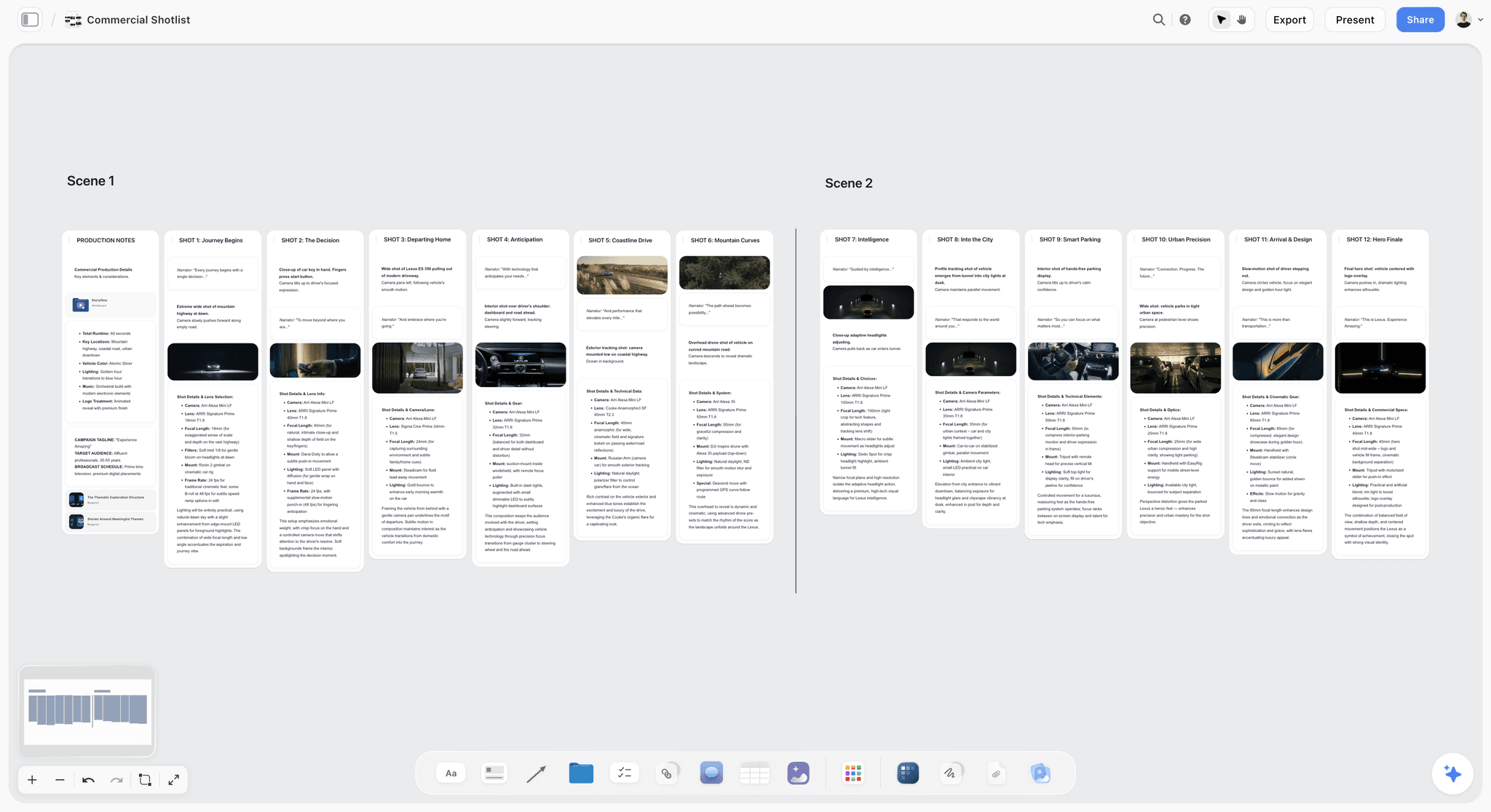
A commercial laid out as two scenes of shot cards, each with its frame, the narrator line and the camera notes, next to the production notes.
Stage 7: Client Review and Handoff
Approval has to land somewhere the crew will read on the day, and the shoot has to inherit the approved frames, not a PDF from three versions ago.
Prompt 31: The client deck
- Prompt: "@Storyflow Build a client deck on my [campaign] board: the proposition, then one slide per two frames with a labelled picture space, the seconds and the voiceover for each, then the 15 and 6-second cuts, and a closing slide listing what we need approved by [date]."
- On the board: a slide deck with the words laid out and a labelled picture space for each frame, left empty: ChatGPT cannot put pictures into slides through the plugin, so drag each frame's picture onto its slide in Storyflow. The deck presents fullscreen and exports as PDF. There is no PowerPoint export, presenter view or speaker notes. The ChatGPT client presentation page covers decks in more depth, and how to present a storyboard to a client covers the meeting itself.
Prompt 32: Apply feedback as versions, and log it
- Prompt: "Here are the client's comments from the board. Apply the clear ones as new versions (6A, 6B) rather than overwriting, log each decision with the date and who asked, and list any comment that conflicts with the brief or the legal lines."
- On the board: versioned frames and a Decision log. ChatGPT cannot read board comments through the plugin, so paste them into the chat.
Prompt 33: What changed since the last review
- Prompt: "@Storyflow What changed on my [campaign] board in the last week, and who changed it? Write it as a five-line note for the client."
- In chat: a change summary read from the board. Storyflow has no frame-level approval status or version compare, so this note and the Decision log are your record.
Prompt 34: Hand off to the shoot and the edit
- Prompt: "@Storyflow Turn the approved frames into a strip board grouped into shoot days, one strip per setup in shooting order. Then list what the editor needs for the animatic: frame order, seconds, voiceover lines and supers."
- On the board: a strip board by shoot day. It does not recalculate when you move a strip, so re-run the prompt after big changes. The ChatGPT shot list and ChatGPT shooting schedule pages pick up from here.
The Ad Clock: Words, Seconds and Shots
Two tables to keep open while you prompt. The first is arithmetic on the 2.3 words a second figure; the second lists the placement limits the cutdowns have to meet.
| Spot length | Words at 2.3 a second | Write to (10 percent under) | Shots if you cut every 2 to 3 seconds |
|---|---|---|---|
6 seconds | about 14 | about 12 | 2 to 3 |
15 seconds | about 35 | about 31 | 5 to 7 |
30 seconds | about 70 | about 63 | 10 to 15 |
60 seconds | about 140 | about 126 | 20 to 30 |
| Placement | Length | Shape | Source |
|---|---|---|---|
YouTube bumper ad | Up to 6 seconds | See Google's specs | |
YouTube non-skippable ad | 7 to 15 seconds | See Google's specs | Google Ads |
30-second non-skippable on connected TV | 16 to 30 seconds | Horizontal only | Google Ads |
Facebook Feed video | 1 second to 241 minutes | 4:5 at 1440 x 1800 | |
Full-screen vertical placements | Check the placement | 9:16 | Each platform's current spec |
A Prompt Chain Worked End to End: A 30-Second Spot and Two Cutdowns
Copperleaf and Co is a fictional five-person agency. Its client, Brightwell, makes a countertop water-filter jug and wants a 30-second online spot with a 15-second and a 6-second cut, in 16:9 and 4:5, shot in one day on two sets. Here is the chain and the shape of each output. The details are illustrative.
Proposition and concept (Prompts 1 to 3)
The proposition comes back as "Tap water you would pour for guests", with the brief's taste test as proof. Of three concepts ("The Second Glass", "Kettle Test", "Fridge Door"), the stress test ranks The Second Glass first: it survives a 6-second cut, the jug is the reveal rather than a bolt-on, and a bottled-water brand could not run it. The creative director agrees.
Beats, voiceover and supers (Prompts 6, 7 and 9)
Eight beats add to 30 seconds, with the jug on screen at second 14. The voiceover is 24 words over the last three beats, well under the 63-word ceiling, because the dialogue line "Is this tap?" carries the turn. Brightwell's legal line ("Reduces chlorine taste and odour") needs 3 seconds on the end frame, which pushes the pack shot to 4 seconds.
Panels on the board (Prompts 11 to 14)
Eleven frames go up as a row of cards, titled "Frame 1 (3s): Dinner noise" to "Frame 11 (3s): End frame". The continuity check flags two things: the guest switches hands between frames 2 and 5, and the jug's label faces away in frame 8. Both are fixed in the direction notes before anyone draws.
Cutdowns and crops (Prompts 22 to 25)
The seconds check confirms 30. The 15 keeps frames 1, 3, 5, 6, 9, 10 and 11, re-timed to 15. The 6 is frames 6 and 10 plus the end frame, 2 seconds each. The crop check marks frames 4 and 8 as needing a separate 4:5 setup, which goes on their checklists.
Frames, review and handoff (Prompts 27, 28, 31, 32 and 34)
Seven frames get web references for light and framing; the art director's four thumbnails fill the rest through the upload link. The client deck goes out with an approve-by date. Feedback splits frame 6 into 6A and 6B and moves the jug earlier, logged in the Decision log. The approved frames become a strip board with one shoot day and two sets, and the editor gets the frame order, seconds and lines for the animatic in Boords.
Small prompts, each checked before the next, beat one long prompt, because each check catches the mistake the next stage would have built on.
When the Output Is Weak: Edits That Fix It
Most weak storyboard answers trace back to one missing part of the pattern. Fix the prompt, not the panels.
| What you got | Why | Edit the prompt |
|---|---|---|
Paragraphs of mood, no shots | Panels asked for before beats | Run Prompt 6, then Prompt 11 |
A 30 that runs 45 seconds | No clock | "Seconds must add up to exactly 30" |
Two panels of the same shot | Merging was not forbidden | "One panel per shot; do not merge" |
Every frame a medium shot | No reason required for size | Prompt 17's "one reason tied to the beat" |
A new location in frame 7 | Inventions not ruled out | "No locations the script does not have" |
Frames on the board with no pictures | Expected the plugin to make images | Prompts 27 to 29: links, uploads or a sketch |
Duplicate rows after a retry | The build prompt ran twice | "Read the board first and change only frames I name" |
The client approved an old version | Changes overwrote frames | Prompt 15 and Prompt 32: versions and a log |
Change one thing per retry
If the concepts are too alike, change only the constraint ("they must differ in setting and in who the hero is"), not the whole prompt, so you know which edit worked.
Correct a frame, not the storyboard
"Change frame 6 to a close-up on the glass" keeps the client's edits elsewhere. "Redo the storyboard" throws them away.
What ChatGPT and the Plugin Cannot Do for a Storyboard
The prompts plan and lay out the storyboard. Four jobs still belong elsewhere.
- Animatics and playback. Storyflow has no animatic, frame timing playback or MP4 export. Boords times frames to an uploaded soundtrack, plays them full screen and exports PDF or MP4, with client review links that need no login and frame-level comments. It lists a Free plan, and paid plans from $26 a month billed yearly, as of October 2026 (Boords pricing).
- Hand-drawn frames. Storyboarder is free and open source, with drawing tools and PDF and GIF export. Draw there, then upload the frames to the board.
- Generating frames through the plugin. The plugin places pictures; it does not make them. Prompts 27 to 29 cover the three ways to fill a frame.
- Approval tracking. Storyflow has no frame-level approval status or version compare. Use the Decision log, versioned frame numbers and the "what changed" prompt.
Storyflow also runs in a browser only, with no native app, and its boards export as PNG, JPEG or PDF. If the job is a single 6-second bumper with three frames and no client round, a sketch on paper and a phone photo may be all the storyboard you need.
The Bottom Line
ChatGPT is good at the thinking a storyboard needs: a sharp proposition, beats that fit the clock, panels with real camera language and cutdowns that keep the idea. It is bad at being the place the storyboard lives. Run the prompts one stage at a time, check the seconds and the continuity after every change, and put the frames on a Storyflow board the client and crew both open. Then hand the approved frames to Boords or your editor for the animatic.
This article was published in October 2026. Placement limits and plugin features change; each one here was checked against its source on 28 October 2026.
FAQ: ChatGPT Prompts for Storyboarding
What are the best ChatGPT prompts for storyboarding?
The best ChatGPT prompts for storyboarding run in stages: a proposition, then concepts, then beats with seconds that add up to the spot's length, then one panel per shot with its size, angle, move and sound. With the Storyflow plugin, ChatGPT builds those panels as frames on a board the client opens by link, then checks timing and continuity by reading the board back.
What is the best ChatGPT plugin to use with storyboard prompts?
Storyflow, when a team has to edit and present the frames. Through its plugin, ChatGPT builds each panel as a card with a frame, subject, tags, direction note and coverage checklist on a shared board, then reads the board back to check seconds and continuity. Boords, which times an animatic to a soundtrack, is not in ChatGPT's plugin directory, so the frames move across by hand.
What should I give ChatGPT before asking for storyboard panels?
Give it the brief's single-minded proposition, a beat sheet whose seconds add up to the spot's length, the voiceover with its word count, every super and legal line, and the cuts and shapes you must deliver, such as 30, 15 and 6 seconds in 16:9 and 4:5. With those fixed, ChatGPT writes panels that fit the clock instead of inventing one.
How many panels does a 30-second storyboard need?
A 30-second storyboard needs one panel per shot, so the count follows the cut. If the spot cuts every 2 to 3 seconds, that is 10 to 15 panels. A slower spot with long holds may need 6 to 8. Ask ChatGPT to break beats into shots first, and the count falls out of the script.
How many words fit in a 30-second voiceover?
About 70 words at a comfortable commercial read of roughly 2.3 words a second, and you should write about 10 percent under, so around 63. A 15-second spot holds about 35 words and a 60-second spot about 140. Ask ChatGPT for the word count with every draft.
How do I storyboard 15 and 6-second cutdowns with ChatGPT?
Board them from the 30's frames. Ask ChatGPT to keep the proposition and end frame, drop anything the 30 explains twice, and re-time the kept frames to 15. For the 6, ask for two or three frames that land the idea with the sound off. Add each cut as its own row on the board.
Can my client review the storyboard without an account?
Yes. A Storyflow view-only link opens with no account, so the client sees every frame, its seconds and notes, and the client deck. To leave a comment, they sign in. ChatGPT cannot read those comments through the plugin, so paste them into the chat when you want them applied.
Can ChatGPT time a storyboard?
It can do the arithmetic. Put each frame's seconds in its title and ask ChatGPT to read the board and add them up, flagging frames shorter than their action. Storyflow does not play frames back or time them to audio; for an animatic timed to the voiceover, use Boords or your editing software.
How do I stop ChatGPT adding shots the script does not have?
Add two rules to the panel prompt: "one panel per shot, do not merge" and "no locations, props or characters the script does not have". Give it the beat sheet as the source, not the brief, and ask it to read the board before changing anything. Inventions mostly come from gaps the prompt left open.
Is Storyflow free for storyboarding?
Not during early access. Storyflow plans start at Plus, $7.99 a month billed annually or $9.99 monthly, with Pro at $14 and Max at $39 billed annually. A Free plan launches before the end of 2026. Anyone a paid member invites to a board joins free today, and plugin actions use no Storyflow AI credits.
Table of Contents
- Key Takeaways
- Why Storyboard Prompts Come Back as a Wall of Text
- The Prompt Pattern for Storyboards
- How to Run These Prompts
- The 34 Prompts at a Glance
- Stage 1: Brief to Concept
- Stage 2: Script to Timed Beats
- Stage 3: Beats to Panels
- Stage 4: Shot Types and Camera Language
- Stage 5: Timing and Cutdowns
- Stage 6: Frames and References
- Stage 7: Client Review and Handoff
- The Ad Clock: Words, Seconds and Shots
- A Prompt Chain Worked End to End: A 30-Second Spot and Two Cutdowns
- When the Output Is Weak: Edits That Fix It
- What ChatGPT and the Plugin Cannot Do for a Storyboard
- The Bottom Line
- FAQ: ChatGPT Prompts for Storyboarding
- Related Reading
Templates to check out for this topic


Filmmaking templates you can use in Storyflow
Skip the blank canvas. Open one of these filmmaking boards in Storyflow and the AI builds on the structure that is already there, from research through the shot list.


See Storyflow in Action
A visual AI workspace where every feature lives inside one canvas. No tab-switching, no context lost.
Build your entire board from a single message
Type what you need in the AI chat at the bottom of your canvas. The AI adds cards, headings, and structure directly onto your board.
Use expert frameworks as AI context
Type @ in the AI chat and choose any Tactic. The AI tailors every response to that framework instead of giving generic advice.
Turn your board into a mind map in seconds
Ask the AI to restructure your canvas as a mindmap. It connects your ideas into a visual hierarchy so you can see how everything relates.
Why Storyflow Exists
Storyflow actually began as a personal tool while working on creative and research projects.
We kept running into the same problem: ideas were scattered everywhere: notes, documents, and whiteboards.
Nothing helped us see how everything connected.
So we started building a workspace designed around how ideas actually grow.
→ Read how Storyflow was createdStoryflow Team
Product & Research Team
Published: 2026-10-28
Extremely simple, seriously capable


See how easy it is to get started
Watch a real project come together, from a blank board to a finished plan, clicked through step by step.
Start creating with AI and become more productive
Transform your creative workflow with AI-powered tools. Generate ideas, create content, and boost your productivity in minutes instead of hours.