Best ChatGPT Plugin for Storyboarding in 2026: 8 Compared
As of October 2026, no plugin in ChatGPT's directory calls itself a storyboard tool. These 8 do the job: Storyflow for the board a team edits, Miro, Canva and Figma for layouts, Krea, Runway and Frameo.AI for frames.

Category
Video Production
Author

Storyflow Team
Product & Research Team
Topics
2026-10-28
•
24 min read
•
Video Production- ChatGPT plugin
- storyboarding
- Storyflow
- Krea
- Runway
- Miro
- storyboard frames
What is the best ChatGPT plugin for storyboarding?
The best ChatGPT plugin for storyboarding is Storyflow when the storyboard is a board your team and client keep editing: Storyflow is an AI visual workspace that lays out frames, action and shot notes in order on one infinite canvas, and ChatGPT builds it there through the plugin. For generated frames in one look, choose Krea. For a storyboard deck in your brand kit, Canva. For a team that already workshops on a whiteboard, Miro.

Full disclosure: Storyflow is our product. It is first because the storyboard most agencies and producers need is the board a team edits and a client signs off, and through its plugin ChatGPT builds that board and reads it back. The others are ordered by which half of the job they do, not by a score. Storyflow's limits: no image generation through the plugin, no animatic or MP4 export, and the plugin cannot read board comments.
How the ChatGPT plugins for storyboarding compare on trust, innovation, ratings and pricing
Which ChatGPT plugins for storyboarding are the most trusted?
Miro, Figma and Runway each document on their own pages what their ChatGPT integration can create and what it spends or limits, and Canva documents its MCP server on its developer site. Storyflow's plugin went live in October 2026; what it offers is a storyboard anyone on the production can inspect, because ChatGPT writes the frames onto a board the team opens by link.
Which ChatGPT plugins for storyboarding have fair and transparent pricing?
Miro, Runway, Storyblocks and Storyflow publish prices with the billing period stated; Krea and Figma show prices without one beside them, so check their pages. Miro's plugin works on its free plan, and Krea gives 100 free compute units a day. Storyflow starts at $7.99 a month billed annually, and its plugin actions use no Storyflow AI credits. Frameo.AI quotes credits before each generation.
Which ChatGPT plugins for storyboarding are the most innovative?
Krea, for generating a cohesive set of widescreen storyboard frames and then animating the strongest one in the same chat. Frameo.AI, for quoting the credit cost before each shot. Storyflow, for letting ChatGPT build the frames as a connected row on a shared board, then renumber them or swap what two frames hold after the client call.
Which ChatGPT plugin would you recommend for storyboarding a commercial?
Storyflow for a commercial or brand film shot by a small crew: ChatGPT lays out one frame per shot with the action, seconds and kit, the client opens a view-only link, and the crew shoots from the same board. Add Krea for frames in one look. Choose Canva when the storyboard must be a deck in the client's brand kit.
Which ChatGPT plugins for storyboarding are underrated?
Storyblocks, because real stock stills make a convincing reference board for clients who distrust generated images. Miro's comment tools, because ChatGPT can list and resolve a long round of client notes instead of you reading them one by one. Storyflow's Storyboard template is easy to miss: ChatGPT can apply it to a new board instead of building the layout from nothing.
Quick Comparison
Our pick first for the storyboard a team edits on one board, then the other sequence-holders, then the frame-makers. Prices as of October 2026.
| Tool | Best For | AI Features | Price |
|---|---|---|---|
| Storyflow | Commercial and brand-film storyboards the crew and client share | ChatGPT builds frame walls in order, applies the Storyboard template and reads the board back; no Storyflow AI credits used | Plus $7.99 a month billed annually (paid-only in early access) |
| Miro | Workshop storyboards with heavy comment rounds | Builds board items, tables and images; reads and resolves comments | Free; Starter $8 per member a month billed yearly |
| Krea | Pitch frames in one look | Generates cohesive storyboard frames and short clips in the chat | Free with 100 units a day; paid plans: see Krea pricing |
| Runway | Motion tests of hard shots | Multi-shot sequences with consistent characters on Runway credits | Standard $12 a month billed annually |
Key Takeaways
- Storyflow comes first for the storyboard a team edits: through the plugin, ChatGPT builds a row of frames, each with a picture space, the action, a shots checklist and the kit, or starts from Storyflow's Storyboard template, then reads the board back to renumber frames or swap what they hold.
- None of the roughly 2,460 plugins in ChatGPT's directory, as captured on October 28, 2026, uses the word storyboard in its one-line description. Every pick here is a board, design or image plugin doing a storyboard job.
- Storyboarding is two jobs. Krea, Runway and Frameo.AI make frames; Storyflow, Miro, Canva and Figma hold the frames in order with the words under them.
- Boords, StoryboardThat, StoryboardHero, LTX Studio, Katalist and Milanote were not in the directory on that date.
- ChatGPT cannot generate images through the Storyflow plugin. Generated frames come from another plugin and reach the board through Storyflow's upload link.
What a ChatGPT Plugin for Storyboarding Means in 2026
You have a 30-second script, a client presentation on Friday and a director who thinks in pictures. ChatGPT can already cut the script into frames and write the action under each. What it cannot do alone is hold those frames somewhere the client, the DP and the editor can see them in order, with the pictures beside the words.
No plugin in the directory calls itself a storyboard tool
Search the one-line descriptions of every plugin in ChatGPT's directory, as captured on October 28, 2026, and "storyboard" appears in none of them; the dedicated storyboard apps that are missing are listed further down. So a ChatGPT plugin for storyboarding is, today, a plugin built for boards, design or images that happens to do the storyboard job well. The question is which part of the job each one does.
Two jobs: making the frames and holding the sequence
A storyboard is a sequence of frames with direction under each: shot size, action, dialogue or voiceover, seconds. Image plugins make the frames. Board and design plugins hold the sequence, the words and the order. Few plugins do both, and the ones that make frames return them into the chat, not into a layout a crew can shoot from.
The sequence is what the client signs off
Clients approve a storyboard by reading it left to right: does the story turn where it should, does the product land on frame six, does it fit 30 seconds. Beautiful frames in the wrong order fail that read. That is why the sequence-holders sit near the top of this list, and why a frame-maker is usually the second plugin you install, not the first.
How We Chose and Ordered the 8 Plugins
The list started from ChatGPT's plugin directory as captured on October 28, 2026. A plugin qualified only if it passed three checks, and the order follows the storyboard job, not a score.
What qualified a plugin
- It is in ChatGPT's plugin directory, so anyone on the team installs it from the listing.
- Its vendor documents a storyboard-relevant ability in ChatGPT: laying out frames, placing images, building a deck or diagram, or generating consistent frames. Every description below is the directory one-liner plus the vendor's own page about its ChatGPT plugin or MCP server, read in October 2026.
- It has a published price, quoted from the vendor's pricing page as of October 2026, or "see pricing" where the vendor does not publish one.
Why Storyflow is first
Storyflow is our product. It is first because the job most agencies and producers mean by "storyboard" is the board a team edits and a client approves, and through the plugin ChatGPT builds that board directly and can read it back. After Storyflow come the other sequence-holders (Miro, Canva, Figma), then the frame-makers (Krea, Runway, Frameo.AI) and the reference library (Storyblocks). Krea at number five is not weaker than Miro at number two; it does a different half of the job.
What did not count
Model count, directory badges and features available only in a vendor's own app. A plugin that storyboards brilliantly outside ChatGPT but exposes nothing of it in the chat does not help you here.
At a Glance: 8 ChatGPT Plugins for Storyboarding
| # | Plugin | Directory one-liner | Storyboard job | Price as of October 2026 |
|---|---|---|---|---|
1 | Storyflow | Plan projects on visual boards | Frames in order with action, checklist and kit on a board the team edits | Plus $7.99 a month billed annually; paid-only in early access |
2 | Miro | Visualize and structure ideas | Board items, tables, images and comments on a whiteboard | Free; Starter $8 per member a month billed yearly |
3 | Canva | Create, review, edit designs | Designs from text, templates and brand kits, exported as PDF or MP4 | See Canva pricing |
4 | Figma | Create designs, ship to code | FigJam diagrams and Figma Slides from a prompt | Works on any Figma plan; see Figma pricing |
5 | Krea | Create AI media | Cohesive storyboard frames, then a moving test | Free with 100 units a day; paid plans: see Krea pricing |
6 | Runway | Generate with every AI model | Multi-shot sequences with consistent characters | Standard $12 a month billed annually |
7 | Frameo.AI | Turn ideas into finished video | Shot-by-shot generation with reference-led consistency | See Frameo pricing |
8 | Storyblocks | Discover stock media | Stock stills and footage for reference frames | Essentials $21 a month billed annually |
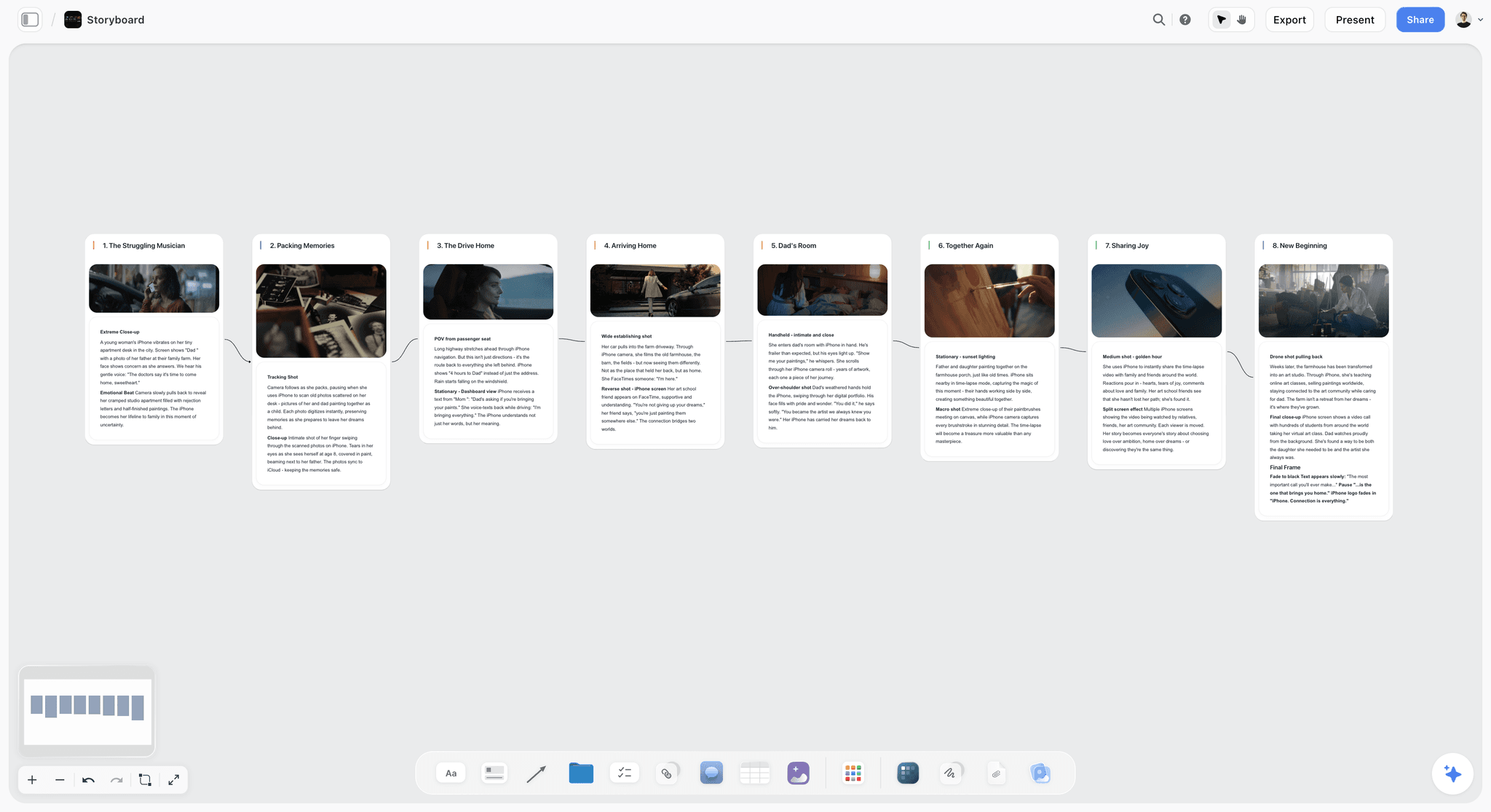
Storyflow storyboard with eight connected frames, each with a picture, the shot type and the action
Let ChatGPT build the storyboard on your board
Install the Storyflow plugin, paste the script, and get one frame per shot in order, with the action, seconds and kit, on a board your client opens by link.

The 8 Best ChatGPT Plugins for Storyboarding, Reviewed
Each entry says what the plugin does inside ChatGPT, who it suits, its main limit and its price. Install steps for all of them are in how to install plugins in ChatGPT.
1. Storyflow
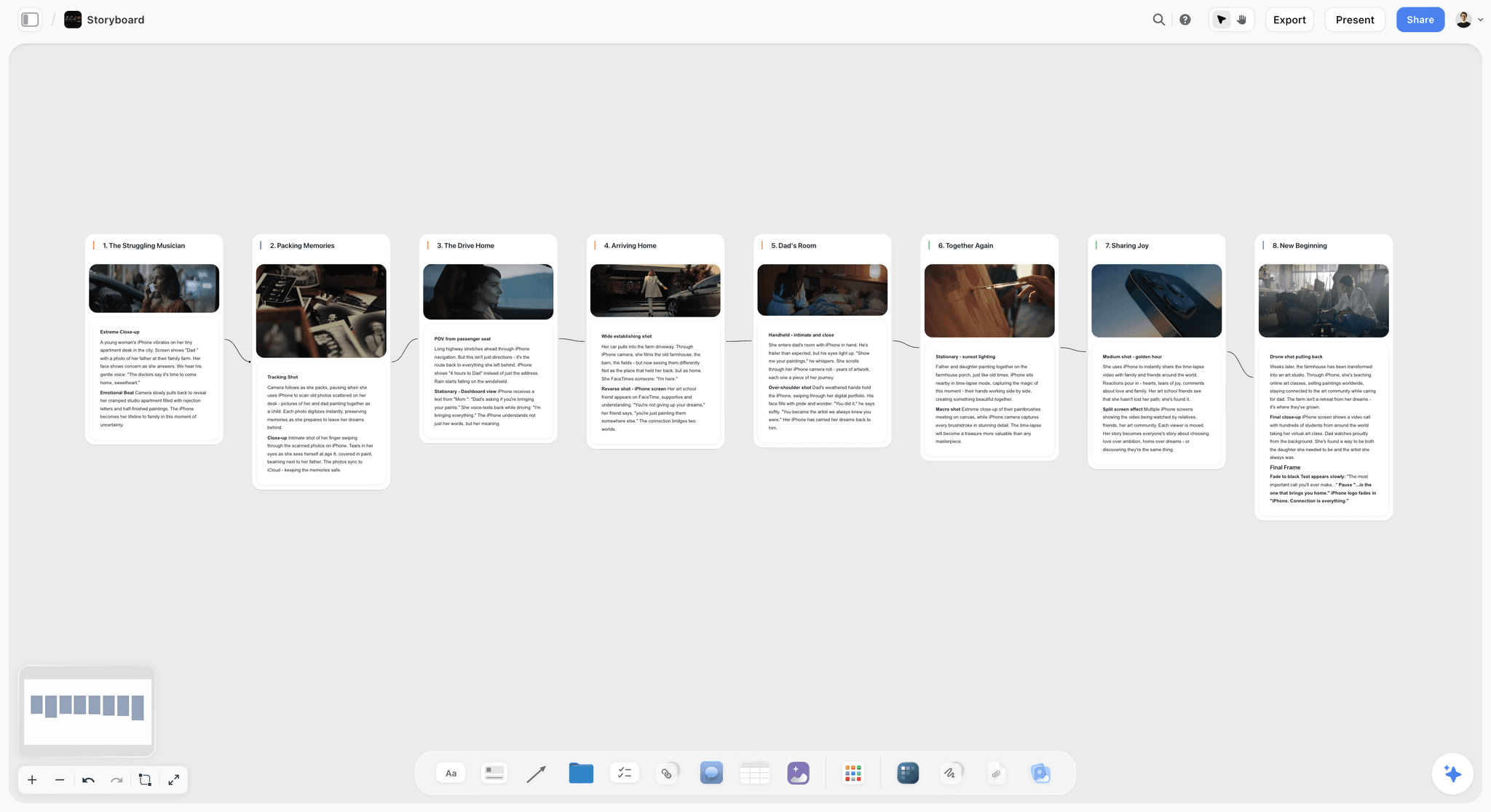
An eight-frame commercial storyboard on one board: a picture, the shot and the action in each column, in order.
What it does in ChatGPT: the listing reads "Plan projects on visual boards". For a storyboard, ChatGPT builds shot cards: a connected left-to-right row of walls, one per frame, each with a picture space, a shots-required checklist, a direction note and an equipment note, with arrows from one frame to the next. It can also start from Storyflow's ready-made Storyboard template, build walls and sections around the sequence (references, script, notes for the client), place pictures from web addresses, and read the board back to renumber frames, swap what two frames hold, or tell you what changed since yesterday and who changed it.
Best for: agencies and producers storyboarding commercials, brand films and social campaigns, where the client reads the board by link and the crew shoots from the same one.
Limit: ChatGPT cannot generate images through the plugin, and a picture you attach in the chat does not reach Storyflow; the plugin hands you an upload link for your own frames. There is no animatic, frame timing or MP4 export, and the plugin cannot read comments on the board.
Price: Plus $7.99 a month billed annually ($9.99 monthly), Pro $14 ($19 monthly), Max $39 ($49 monthly). Paid-only during early access; a Free plan launches before the end of 2026, and anyone a paid member invites to a board joins free now. Plugin actions use no Storyflow AI credits; an invited free account can make 25 a week, and Plus, Pro and Max have no weekly limit. See Storyflow pricing.
The board is where the storyboard stops being a draft. Presentation mode steps through it one wall at a time for the client call, a view-only link opens with no account, and the board exports as PNG, JPEG or PDF. When the client asks to swap frames 4 and 5, ask ChatGPT to swap what the two frames hold and renumber them, so the walls and the arrows between them stay in place. Moving whole walls instead leaves the old arrows pointing the old way, and the plugin cannot delete them. The ChatGPT storyboard page shows the column layout in detail, and the same frames become the crew's list on the ChatGPT shot list page.
2. Miro
What it does in ChatGPT: "Visualize and structure ideas". Miro's MCP server lets ChatGPT summarise and search boards, build boards and generate diagrams, and act on comments; its tool list covers drawing board items from vector markup, diagrams, documents, tables with grid, timeline and kanban views, image items with an upload URL, and reading, creating and resolving comments (Miro MCP, Miro MCP tools). Miro also offers storyboard templates with spaces for visuals, dialogue, audio and notes (Miro storyboard templates).
Best for: teams that already run workshops and client sessions in Miro and want ChatGPT to lay out or tidy a storyboard on that whiteboard.
Limit: Miro's pages do not say ChatGPT can apply its storyboard templates, so start from the template yourself. Every tool call counts toward a daily allowance: 100 on Free, 500 on Starter, 2,000 on Business and 10,000 on Enterprise (Miro MCP limits).
Price: Free; Starter $8 and Business $20 per member a month billed yearly, as of October 2026 (Miro pricing). The MCP server works on all plans.
Miro has one ability Storyflow's plugin lacks: it reads and replies to comments. If your client leaves twenty notes on the frames, ChatGPT can list and resolve them in Miro. Keep that strength in mind when the review cycle is heavy.
3. Canva
What it does in ChatGPT: "Create, review, edit designs". Canva's developer docs say its MCP server creates designs from text descriptions, makes targeted edits, searches your designs and folders, works with brand kits and templates, and exports to PDF, PNG, JPG, PPTX and MP4 (Canva MCP docs).
Best for: agencies whose client work lives in Canva brand kits and who want the storyboard deck in the client's fonts and colours.
Limit: the docs do not mention storyboards by name, so a storyboard in Canva is a design you shape page by page, and they do not say which of those abilities the ChatGPT plugin exposes. Canva's help pages refuse automated reading, so for what the plugin can do with your templates, see Canva's help.
Price: see Canva pricing.
Canva is the shortest route to a storyboard that looks finished. Draft the frame list with ChatGPT first, then ask Canva for the design, so the layout follows a sequence you already checked.
4. Figma
What it does in ChatGPT: "Create designs, ship to code". Figma's help centre says its ChatGPT app creates and opens FigJam diagrams and generates Figma Slides presentations from a prompt; ChatGPT works only with FigJam and Figma Slides, and the Slides integration is in beta with usage limits (Figma app in ChatGPT).
Best for: design-led agencies that want a sequence diagram of the spot in FigJam, or a deck with one frame per slide, inside the tool their designers already use.
Limit: Figma says the feature is not available in the EU, and an unclaimed file is viewable by anyone with the link until you claim it with a Figma account. Claim it before you paste anything confidential.
Price: the ChatGPT app works on any Figma plan; for seat prices, see Figma pricing (as of October 2026).
A Figma Slides storyboard is a good fit when the next step is a designed pitch. It is a weaker fit for a shoot, because nothing in it carries the crew's checklist or kit.
5. Krea
What it does in ChatGPT: "Create AI media". Krea's MCP page lists storyboard frames among its image uses and gives a pitch example: define a visual style, generate six cohesive 2.39:1 storyboard frames, then animate the strongest establishing shot. It generates images and video through several models, upscales, uses styles you trained in Krea, and returns results into the conversation (Krea MCP).
Best for: pitch frames and mood frames when the client needs to see the look before a director's board exists.
Limit: Krea makes frames, not the layout. Results return in the chat, so they still have to be saved and placed in order somewhere the team can read them.
Price: free with 100 compute units a day; for paid plans, see Krea pricing (as of October 2026).
Set the style once and reuse it. A trained style in Krea is what keeps frame six looking like frame one, which is the difference between a storyboard and a mood collage.
6. Runway
What it does in ChatGPT: "Generate with every AI model". Runway's plugin generates images and video inside ChatGPT, including multi-shot sequences; its own example prompt asks Runway to keep the characters consistent in every shot (Runway for ChatGPT).
Best for: motion tests and previs for the hard shots, when a still frame cannot show the camera move the director wants.
Limit: every generation spends Runway credits, and the cost varies with the model and resolution. Like Krea, it returns results to the chat, not to a storyboard layout.
Price: a free account with 125 one-time credits; Standard $12 a month billed annually ($15 monthly), Pro $28 ($35), Max $76 ($95), as of October 2026 (Runway pricing).
Use Runway on two or three frames, not twenty. A storyboard needs to be read in a minute; motion on every frame turns it into a draft film the client then critiques as one.
7. Frameo.AI
What it does in ChatGPT: "Turn ideas into finished video". Frameo's MCP page says the assistant generates images and video clips, keeps characters consistent across shots by passing earlier images as references, adds voiceover, music and sound effects, and edits and captions; its ChatGPT demo works shot by shot. Before anything is charged, the assistant quotes the credits and asks you to confirm (Frameo MCP).
Best for: teams that want to go from a frame-by-frame plan to a rough moving version with sound in the same chat.
Limit: its MCP page does not list storyboarding as a capability (an AI Storyboarder appears only in its site navigation), and the product aims at finished video, which is more than most storyboard reviews need.
Price: see Frameo pricing; connecting is free, and every plan's credit pool is shared across unlimited users with no seat fees (Frameo pricing).
The credit quote before each generation is a sensible guard for an agency budget. Ask for it to be summed for the whole sequence before you approve frame one.
8. Storyblocks
What it does in ChatGPT: "Discover stock media". Storyblocks says its connector lets you search, browse and download stock assets from its human-made library inside ChatGPT (Storyblocks MCP).
Best for: reference frames built from real photographs and footage, when a client reacts better to a real place or a real face than to a generated one.
Limit: stock is reference, not your cast or your location, and the license tier matters for client work: the Small Business plan excludes agencies, production and broadcast companies.
Price: Essentials $21 a month billed annually, Unlimited All Access $30, Small Business $40, Business by quote, as of October 2026 (Storyblocks pricing).
Label every stock frame as reference on the board. The fastest way to lose a client's trust is a storyboard frame they mistake for a location you already secured.
Which Plugin for Which Storyboard Job
Pick from the job in front of you this week. Most storyboards use one sequence-holder and, at most, one frame-maker.
| Storyboard job | Plugin | What to ask | What you get back |
|---|---|---|---|
A board the crew and client both use | Storyflow | "Build a storyboard on my board: one frame per shot, with the action, seconds and kit" | A row of frame walls with picture spaces and arrows |
Start from a standard layout | Storyflow | "Find the Storyboard template and apply it to a new board in my project" | Storyflow's Storyboard template on the board |
Work through client comments | Miro | "List every comment on the frames and resolve the ones we fixed" | A comment list, replies and resolved threads |
A storyboard deck in brand style | Canva | "Make a 10-page storyboard deck in our brand kit from these frames" | A Canva design you can export as PDF |
A sequence diagram or one frame per slide | Figma | "Make a FigJam diagram of these 8 beats in order" | A FigJam file to claim and edit |
Pitch frames in one look | Krea | "Six cohesive 2.39:1 frames for these beats, same style" | Images in the chat |
A motion test of one hard shot | Runway | "A 5-second test of frame 3's crane move" | A clip in the chat and your Runway workspace |
A rough moving version with sound | Frameo.AI | "Generate shots 1 to 4 with the same character, then add temp music" | Clips after a credit quote |
Real-world reference frames | Storyblocks | "A wet platform at dusk, wide, no people" | Stock results to preview and download |
Two-Plugin Storyboard Stacks
A storyboard rarely needs more than two plugins: one that holds the sequence and one that fills the frames. These pairings cover most agency and production work.
Storyflow and Krea: pitch frames on a working board
ChatGPT builds the frame row in Storyflow from the script, Krea generates frames in one trained style, and you add the keepers to the matching walls through the upload link. The board stays the document; Krea supplies pictures.
Storyflow and Storyblocks: a photomatic-style board
For clients who respond to real images, Storyblocks supplies stills and footage for each frame. Captioned as reference on the board, they show composition and mood without pretending to be your shoot. The reference walls themselves are covered on the ChatGPT moodboard page.
Canva or Figma with Krea: design-led presentation
When the storyboard is a pitch artefact first, draft the sequence in ChatGPT, generate frames in Krea, and lay out the deck in Canva or Figma Slides. Keep the working shot list elsewhere; a deck is a poor place to track kit and coverage.
Miro on its own: workshop storyboards
When the storyboard is built live with a client in a workshop, Miro's comments and templates do the work, and ChatGPT tidies and summarises afterwards.
| Stack | Sequence holder | Frame source | Best for | Watch out for |
|---|---|---|---|---|
Storyflow + Krea | Storyflow board | Krea frames, uploaded by link | Commercials and brand films with a crew | Save frames before placing them |
Storyflow + Storyblocks | Storyflow board | Stock stills and footage | Clients who react to real images | License tier for agency work |
Canva or Figma + Krea | Canva design or Figma Slides | Krea frames | Pitch decks | No crew checklist or kit |
Miro alone | Miro board | Your own sketches or uploads | Live client workshops | Daily tool-call limits |
Worked Example: A 30-Second Rail Spot Storyboarded Across Two Plugins
This is an illustrative project, not a recorded run. Amberline is a fictional four-person agency storyboarding a 30-second autumn spot for a regional rail operator, with two 15-second cutdowns, for a client presentation on Friday.
The brief and the beats
The copywriter's script runs to eight beats: a commuter missing the car, a platform at dawn, the train arriving, a window seat, fields passing, a phone set face down, the arrival, the end card. The producer pastes the script into ChatGPT: "@Storyflow on my Amberline Rail project, build a storyboard on a new board: one frame per beat, with shot size, the action, the voiceover line and seconds, in order, adding up to 30 seconds."
The board ChatGPT builds
ChatGPT builds eight frame walls in a row, joined by arrows, each with an empty picture space, the direction, a shots-required checklist and the kit. It reports the seconds as 32 and proposes trimming the fields beat from 5 to 3. The producer agrees in the same chat, then asks for a References wall and a Script wall beside the row.
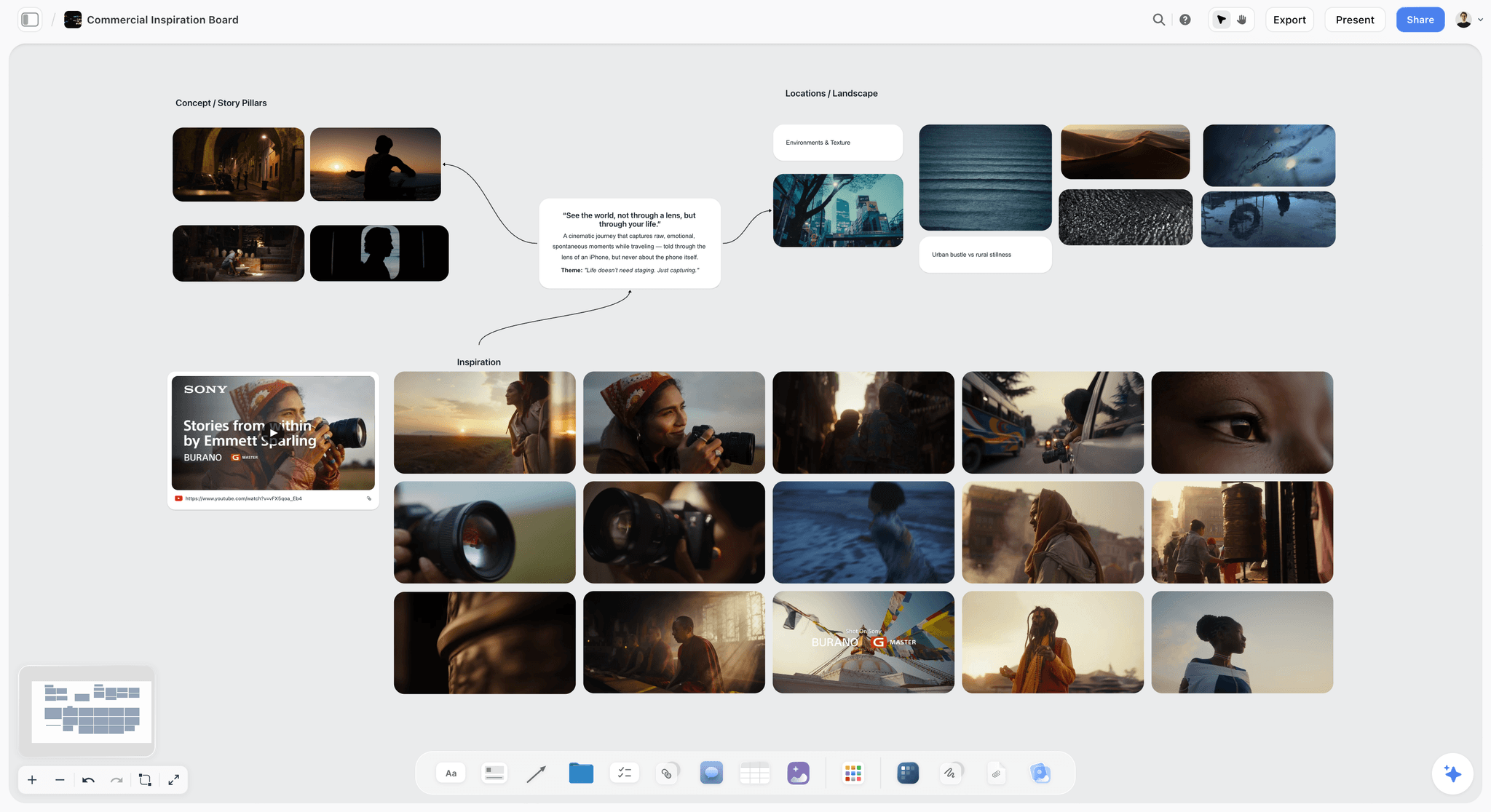
The reference side of the same project: concept pillars, the central idea, location textures and inspiration frames around them.
Frames from Krea
The art director sets the look once: "@Krea using our Autumn Rail style, make eight 16:9 frames for these beats, same commuter in every frame." Six are usable; frames 2 and 7 come back with the wrong light. Two more requests fix them. The art director saves all eight and uploads them through the link the Storyflow plugin provides, one into each frame wall.
The panel list the client saw
| Frame | Shot | Action | Voiceover | Seconds |
|---|---|---|---|---|
1 | Wide, street | Commuter watches a car pull away | "Missed it again?" | 3 |
2 | Wide, platform at dawn | Mist, empty platform, station clock | (none) | 4 |
3 | Medium, low angle | Train slides in, doors open | "There is another way in." | 4 |
4 | Close, window seat | Commuter sits, exhales | (none) | 3 |
5 | Wide, through the window | Fields pass in low sun | "Forty minutes that are yours." | 3 |
6 | Insert | Phone set face down on the table | (none) | 3 |
7 | Medium, arrival | Commuter steps off, unhurried | "Arrive like you meant to." | 5 |
8 | End card | Logo and timetable link | "Take the train." | 5 |
What changed after the client call
The client wanted the phone insert earlier. "Swap what frames 5 and 6 hold and renumber them" puts the phone straight after the window seat, with the walls and arrows left where they were. The producer then asks "what changed on this board since this morning?" and pastes the answer into the follow-up email. The two 15-second cutdowns go in as two more rows of shot cards, named by beat so the renumbering cannot confuse anyone: platform, window seat, phone and end card (4, 3, 3 and 5 seconds), and train, fields, phone and end card (4, 3, 3 and 5).
What needed a human
The art director's style, rejecting two frames, the client's reorder and every voiceover line. ChatGPT did the layout, the seconds and the renumbering. The storyboard the client approved was the board, not a PDF of a chat.
How to Install and Call a Storyboard Plugin in ChatGPT
All eight install the same way. OpenAI's steps: go to Plugins in the ChatGPT sidebar, select the plugin and review it, select Install plugin, and if prompted select Connect and sign in to the provider account (Plugins in ChatGPT).
Install Storyflow from its listing
Open the Storyflow listing in ChatGPT (the "Open in ChatGPT" button on Storyflow's pages goes there), select Install plugin, sign in to Storyflow and choose which projects ChatGPT may use: all of them or the ones you pick. Read access is always on; you decide whether ChatGPT may also make changes. Availability depends on your ChatGPT plan, workspace and region, and in a Business or Enterprise workspace an admin manages plugins.
Call the right plugin for each half
Type @ and pick the plugin, or choose it from the + menu. With a sequence-holder and a frame-maker both installed, name each one in its own request: "@Storyflow build the frames" and "@Krea make the pictures". Leaving ChatGPT to choose works, but naming them keeps the layout and the images from landing in the wrong tool.
Decide how often ChatGPT asks first
OpenAI's permission options run from Always ask, through Allow read actions and Allow low-risk actions, to Allow all actions, which OpenAI labels as carrying elevated risk (Managing app permissions in ChatGPT). For a storyboard on a client project, allow reads and confirm changes, so a reorder never happens without your say.
Storyboard Tools Not in ChatGPT's Plugin Directory
Several tools agencies use for storyboards did not appear in ChatGPT's plugin directory on October 28, 2026. They can still be the right tool; ChatGPT simply cannot act inside them from the chat.
- Boords: an approved storyboard turned into a timed animatic with your voiceover. Nothing on this list replaces the animatic.
- StoryboardThat, StoryboardHero, LTX Studio and Katalist: dedicated storyboard apps, none of them a ChatGPT plugin on that date.
- Milanote: moodboards and visual notes; Storyflow covers the moodboard and storyboard side on the same board.
- Adobe Firefly Boards: Adobe's page describes turning descriptions and reference images into storyboard frames with consistent characters, and exporting frames or the whole storyboard as JPEG, PNG or MP4 (Adobe Firefly storyboard). An Adobe plugin is in the directory ("Design, combine, and edit"), but that page does not say the storyboard feature works from ChatGPT, so it is not ranked here.
The working pattern is to let ChatGPT prepare what goes in: the frame list and action lines on a board, which you then rebuild in Boords when the client needs a timed animatic. For a broader view outside ChatGPT, see the best AI storyboarding tools.
Honorable Mentions
These are in the directory and can touch a storyboard, but each duplicates a ranked plugin's job or does only a slice of it.
- Higgsfield ("Every image and video model") and Kittl ("Generate images and videos"): more frame generators, alternatives to Krea or Runway. Pick one generator per storyboard and keep it, because a second one means matching its look to the first by hand.
- Gamma ("Create presentations and docs") and Pitch ("Create and share presentations"): fast decks, when the storyboard is a slide per frame for a pitch.
- Lucid ("Ideate, diagram & align teams.") and Whimsical ("Create diagrams and wireframes"): flow diagrams of a sequence, closer to an outline than a storyboard.
- Shutterstock ("Spark ideas with Shutterstock"): another stock source for reference frames.
When Storyflow Is Not the Right Storyboard Plugin
Storyflow is first for the board a team edits. Several storyboard jobs belong elsewhere.
You need a timed animatic
Storyflow has no animatic, frame timing or MP4 export. Boords does this outside ChatGPT; Runway or Frameo.AI can generate motion inside it.
You want ChatGPT to draw the frames
The Storyflow plugin cannot generate images. Use Krea or Runway for frames and add them to the board, or use Storyflow's own app, which generates images on the Pro and Max plans.
Your review runs on comments
ChatGPT cannot read board comments through the Storyflow plugin. If the client's feedback arrives as dozens of comments you want ChatGPT to triage, Miro's plugin reads and resolves them.
You need a free tool this month
Storyflow is paid-only during early access. Miro's plugin works on its free plan, and Krea has a free daily allowance.
The Bottom Line
As of October 28, 2026, no plugin in ChatGPT's directory calls itself a storyboard tool, so choose by the half of the job you need. For the storyboard your team edits and your client signs off, install Storyflow and let ChatGPT build the frames in order on a board. Add one frame-maker, Krea for a consistent look or Runway for motion, and upload the keepers to the board. Choose Canva or Figma when the storyboard is a pitch deck in brand style, and Miro when the review runs on comments. Then open the ChatGPT storyboard page and build your first one from a script.
FAQ: ChatGPT Plugins for Storyboarding
What is the best ChatGPT plugin for storyboarding?
Storyflow is the best ChatGPT plugin for storyboarding when the storyboard is a board your team and client edit: ChatGPT builds the frames in order, each with a picture space, the action, a checklist and the kit, and reads the board back to renumber or swap frames. Pair it with Krea or Runway for generated frames, or use Canva, Figma or Miro inside those tools.
Can ChatGPT apply a storyboard template?
Through the Storyflow plugin, yes: ChatGPT can find Storyflow's ready-made Storyboard template, apply it to a board in your project and then rewrite its cards for your script. Miro offers 32 storyboard templates, but its pages do not say ChatGPT can apply them, so open the Miro template yourself first. Canva's docs mention templates without naming storyboards; for the plugin's reach there, see Canva's help.
Is there a dedicated storyboard plugin in ChatGPT?
Not by name. As captured on October 28, 2026, no plugin in ChatGPT's directory used the word storyboard in its one-line description, and Boords and StoryboardThat were not listed. The plugins that storyboard well are board, design and image plugins: Storyflow, Miro, Canva and Figma for the sequence; Krea, Runway and Frameo.AI for frames.
Can ChatGPT generate storyboard frames?
Yes, through an image plugin. Krea's page names storyboard frames as a use and shows six cohesive widescreen frames generated for a pitch. Runway generates multi-shot sequences with consistent characters, and Frameo.AI works shot by shot. ChatGPT cannot generate images through the Storyflow plugin, so save the frames and upload them to the board.
How do I keep characters consistent across storyboard frames?
Fix the look before the first frame. In Krea, train or select one style and reuse it for every frame. In Runway, ask for the characters to stay consistent in every shot. In Frameo.AI, pass earlier images as references. Then check frames side by side on the board and regenerate the ones that drift.
Is Boords available as a ChatGPT plugin?
No. Boords was not in ChatGPT's plugin directory on October 28, 2026, and neither were StoryboardThat, StoryboardHero, LTX Studio or Katalist. Use ChatGPT with the Storyflow plugin to build the frame list and action lines on a board, and rebuild in Boords when the client needs a timed animatic with voiceover.
Can I storyboard in Canva or Figma from ChatGPT?
Yes, as designs. Canva's MCP creates designs from text, works with brand kits and templates and exports PDF, PNG or MP4. Figma's ChatGPT app creates FigJam diagrams and Figma Slides decks, though Figma says it is not available in the EU. Both suit a presentation storyboard more than one the crew shoots from.
Can Miro make a storyboard through ChatGPT?
Partly. Through its plugin, ChatGPT can build board items, tables, images and diagrams on a Miro board, and read and resolve comments. Miro offers storyboard templates, but its pages do not say ChatGPT can apply them, so start from the template and let ChatGPT fill or tidy it. Daily tool-call limits depend on your Miro plan.
How do I get generated frames onto my Storyflow storyboard?
Save the frames from Krea, Runway or another image plugin, then ask the Storyflow plugin for an upload link for your board and upload them there, one per frame wall. A picture attached in the ChatGPT chat does not reach Storyflow. ChatGPT can also place pictures on the board from web addresses, such as reference photos it found.
Can my client comment on a Storyflow storyboard?
Yes, after signing in. A view-only link opens the storyboard with no account, and the client signs in to comment or draw. ChatGPT cannot read those comments through the Storyflow plugin, so read them on the board yourself, then ask ChatGPT for the changes. Real-time co-editing is on every paid plan.
Does storyboarding through the Storyflow plugin use AI credits?
No. Plugin actions run on ChatGPT's own model and use no Storyflow AI credits. An invited free Storyflow account can make 25 plugin actions a week; Plus, Pro and Max plans have no weekly limit. Image plugins such as Krea and Runway spend their own credits for every frame they generate.
Can I present or export a Storyflow storyboard?
Yes. Presentation mode goes fullscreen and steps through the board one wall at a time, which suits a client call. Boards export as PNG, JPEG or PDF. There is no MP4 or animatic export, so a timed playback with voiceover needs a tool such as Boords.
Table of Contents
- Key Takeaways
- What a ChatGPT Plugin for Storyboarding Means in 2026
- How We Chose and Ordered the 8 Plugins
- At a Glance: 8 ChatGPT Plugins for Storyboarding
- The 8 Best ChatGPT Plugins for Storyboarding, Reviewed
- 1. Storyflow
- 2. Miro
- 3. Canva
- 4. Figma
- 5. Krea
- 6. Runway
- 7. Frameo.AI
- 8. Storyblocks
- Which Plugin for Which Storyboard Job
- Two-Plugin Storyboard Stacks
- Worked Example: A 30-Second Rail Spot Storyboarded Across Two Plugins
- How to Install and Call a Storyboard Plugin in ChatGPT
- Storyboard Tools Not in ChatGPT's Plugin Directory
- Honorable Mentions
- When Storyflow Is Not the Right Storyboard Plugin
- The Bottom Line
- FAQ: ChatGPT Plugins for Storyboarding
- Related Reading
Templates to check out for this topic


Filmmaking templates you can use in Storyflow
Skip the blank canvas. Open one of these filmmaking boards in Storyflow and the AI builds on the structure that is already there, from research through the shot list.


See Storyflow in Action
A visual AI workspace where every feature lives inside one canvas. No tab-switching, no context lost.
Build your entire board from a single message
Type what you need in the AI chat at the bottom of your canvas. The AI adds cards, headings, and structure directly onto your board.
Use expert frameworks as AI context
Type @ in the AI chat and choose any Tactic. The AI tailors every response to that framework instead of giving generic advice.
Turn your board into a mind map in seconds
Ask the AI to restructure your canvas as a mindmap. It connects your ideas into a visual hierarchy so you can see how everything relates.
Why Storyflow Exists
Storyflow actually began as a personal tool while working on creative and research projects.
We kept running into the same problem: ideas were scattered everywhere: notes, documents, and whiteboards.
Nothing helped us see how everything connected.
So we started building a workspace designed around how ideas actually grow.
→ Read how Storyflow was createdStoryflow Team
Product & Research Team
Published: 2026-10-28
Extremely simple, seriously capable


See how easy it is to get started
Watch a real project come together, from a blank board to a finished plan, clicked through step by step.
Start creating with AI and become more productive
Transform your creative workflow with AI-powered tools. Generate ideas, create content, and boost your productivity in minutes instead of hours.