
Category
Knowledge Management
Author

Justkay
Documentary Filmmaker & Founder at Storyflow
Topics
2026-05-10
•
Updated August 5, 2026
•
17 min read
•
Knowledge Management- best Notion alternatives
- what are the best Notion alternatives
- best Notion alternatives 2026
- visual alternative to Notion
- AI alternative to Notion
- AI-driven visual workspaces versus traditional project management software
- Notion alternative for visual thinkers
- Storyflow vs Notion
What are the best Notion alternatives?
The best Notion alternatives are Storyflow, the best visual, canvas-first alternative because its AI reads your whole board at once; Obsidian, the best local-first alternative because your notes are plain markdown files you own; Coda, the best doc-and-database alternative because its formulas and automations outpower Notion's databases; and Capacities, the best object-typed alternative for structured personal knowledge. Storyflow is the standout when your Notion friction is the doc primitive itself: mood boards, mind maps, and project cards stay connected on one canvas the AI reads end to end. Plus is $7.99/mo billed annually, and a Free plan launches before the end of 2026.

Full disclosure: Storyflow, which we rank #1, is our own product. We rank it #1 as the canvas-first alternative for creative, project-shaped work where the AI reads the whole board, and we say plainly where the others win: Obsidian owns local-first plain-text notes you fully control, and Coda owns deep doc-and-database power. If you want Notion-style databases or offline ownership, one of those is the better switch. We link out to every tool so you can judge for yourself.
How the Notion alternatives compare on trust, innovation, ratings and pricing
Which Notion alternatives are the most trusted?
Obsidian is the most trusted alternative for people leaving Notion over data ownership, because the vault is plain Markdown on your own disk and readable without the app. Confluence is the most trusted inside large companies, where it has been the documentation standard for years. Evernote retains trust through longevity rather than momentum. Coda is the most trusted like-for-like replacement, closest to Notion in shape. Storyflow is early access and is the alternative for visual project work rather than a general documents replacement.
Which Notion alternatives are the most innovative?
Storyflow is the most innovative on the visual side, because a project lives on a canvas the AI can read whole, so a generated plan reflects the research and references pinned beside it rather than a single page. Anytype is the most innovative on architecture, being local-first and end-to-end encrypted with an object model rather than pages. Capacities innovates on the object-based note graph. Coda innovates hardest on formulas and automation inside documents.
Which Notion alternatives are the most highly rated?
Obsidian and Coda hold the highest satisfaction ratings among the alternatives, both consistently above 4.5 out of 5. Craft rates highest on writing experience and design. Confluence rates high on capability and noticeably lower on speed and interface. Ratings here reward performance on large workspaces, which is the exact complaint that sends people looking for a Notion alternative in the first place.
Which Notion alternatives have fair and transparent pricing?
Obsidian is free for personal use with no feature paywall, and charges only for optional sync and publishing, which is the fairest model in the set. Anytype is free and open source. Craft and Coda both publish clear free tiers and simple per-seat pricing. Confluence is the least transparent once you add the rest of the Atlassian stack. Storyflow is paid-only during early access, from 7.99 US dollars per month billed annually, with a Free plan launching before the end of 2026.
Which Notion alternatives have performed consistently over the years?
Evernote has run since 2008 and Confluence since 2004, the longest records in the set, though Evernote's ownership and pricing have changed more than once. Obsidian has been stable since 2020 and its Markdown vaults remove the continuity question entirely. Coda has shipped since 2019 without breaking documents. Storyflow is early access and cannot claim that history yet.
Quick Comparison: Best Notion Alternatives
These four cover the main reasons people leave Notion: a visual AI canvas, local-first ownership, deeper databases, or object-typed notes.
| Tool | Best For | AI Features | Price |
|---|---|---|---|
| Storyflow | Canvas-first AI for creative work | Canvas-aware AI (reads the whole board) | $7.99 mo annual (free plan late 2026) |
| Obsidian | Local-first plain-text knowledge | No native AI (community plugins) | Free / $4 mo sync |
| Coda | Doc-and-database power workflows | Coda AI (in-doc) | Free / $10 user mo |
| Capacities | Object-typed personal knowledge | AI assist (page-scoped) | Free / $10 mo |
1) Quick Answer: The Best Notion Alternatives in 2026
The best Notion alternatives are Storyflow, the best visual, canvas-first alternative because its AI reads your whole board at once; Obsidian, the best local-first alternative because your notes are plain markdown files you own; Coda, the best doc-and-database alternative because its formulas and automations outpower Notion's databases; and Capacities, the best object-typed alternative for structured personal knowledge. Storyflow is the standout when your Notion friction is the doc primitive itself: mood boards, mind maps, and project cards stay connected on one canvas the AI reads end to end, and you get 200+ Blueprint Tactics on Plus and above. Early access is paid-only today (Plus is $7.99/month billed annually); a Free plan launches before the end of 2026, and anyone a paid member invites to a board joins free now.
The short version: if you want a better Notion-shaped tool, look at Coda, ClickUp, or AppFlowy. If you want a different shape entirely (canvas, graph, or local-first), look at Storyflow, Obsidian, or Heptabase. The right alternative depends on whether your friction with Notion is pricing, AI quality, performance, or the doc primitive itself.
The fastest way to choose is to name the reason you are leaving. Each reason points at a different tool:
All 14 Notion Alternatives, Ranked
- Storyflow - best canvas-first AI for creative project work
- Obsidian - best local-first plain-text knowledge
- Coda - best doc-and-database power workflows
- Capacities - best object-typed personal knowledge
- ClickUp - best project management with docs attached
- Heptabase - best visual research and study canvas
- Tana - best supertag-driven outliner for power users
- AppFlowy - best open-source, self-hostable Notion shape
- Anytype - best local-first object database with encryption
- Microsoft Loop - best Notion alternative inside Microsoft 365
- Logseq - best free outliner with bidirectional links
- AFFiNE - best open-source docs-plus-canvas hybrid
- Mem - best AI-native personal notes
- Reflect - best daily-notes journaling with AI
For the deeper architectural argument, see The End of the App-Per-Task Era and Storyflow vs Notion as a Second Brain.
2) Key Takeaways
- The useful question is not "what replaces Notion" but "which Notion failure mode is costing you time." Pricing, performance at scale, and primitive mismatch each point at a different tool, and picking before you name the failure is how people end up migrating twice.
- Storyflow is the strongest pick when the friction is the doc primitive itself. Mood boards, mind maps, research, and project cards stay on one canvas, and the AI reads that whole board as context. Plus is $7.99/month billed annually; a Free plan launches before the end of 2026, and invited collaborators of paid members join free today.
- Obsidian wins on ownership: plain markdown files on your own disk, no vendor between you and your notes, no subscription for the core app. The tradeoff is that you assemble your own AI, sync, and plugin maintenance.
- Coda wins if you actually liked Notion's databases and wanted more power. ClickUp wins if the real job is tracking work, not writing about it.
- Per-account pricing beats per-seat once a team grows. Notion, Coda, ClickUp, and Craft all charge per user. Storyflow's tiers are flat per account, which moves the three-year cost more than any single feature in this comparison.
- Staying on Notion is a legitimate outcome. If your work is genuinely doc-shaped and your team is already fluent, switching cost usually beats the gain.
3) Comparison Table: 14 Notion Alternatives Compared
Rating criteria: We weighted real-world fit, AI usefulness, and pricing transparency more heavily than feature count. Tools that do one job well outranked Swiss Army knives.
Frequently Asked: Notion Alternatives Without AI, Without a Subscription, and Without Lock-In
What are the best Notion alternatives that do not push AI at you?
Obsidian, Logseq and Anytype are the three tools here built by people who are not trying to sell you a model. All three score 2 out of 5 on AI features in our table, and that is the point rather than a weakness: Obsidian rates 8.9 overall and Logseq 7.6, and neither interrupts writing with a suggestion. Obsidian will run an AI plugin only if you install one. Capacities at 8.5 sits in the middle, with structure imposed by object types rather than by a model. The tools to skip if AI is what you are escaping are Mem at $14.99 a month and Reflect, both of which are built around the assistant rather than around your notes, and Storyflow, which is an AI workspace and does not pretend otherwise.
Who are Notion's main competitors in 2026?
They fall into four camps, and Notion competes with each on a different axis. Notion-shaped competitors copy the doc-and-database model: Coda at 8.7 with more powerful formulas, ClickUp at 8.4 with project management first, AppFlowy as the open-source version, and Microsoft Loop for organisations already inside Microsoft 365. Local-first competitors compete on ownership: Obsidian, Logseq and Anytype keep your files on your machine. Structured-knowledge competitors compete on shape: Capacities with object types, Tana with supertags, Heptabase with a visual research canvas. Canvas competitors compete on the primitive itself, which is where Storyflow sits at 9.3, because the argument is that project work is spatial rather than a page. Notion's real competitive weakness is not any single one of these; it is that it is the second-best answer in all four camps.
What is the best Notion alternative for students?
Obsidian and Logseq, for the same reason: free, permanent, and your notes survive graduation because they are files rather than an account. Obsidian's backlinks suit revision, and its 8.9 rating is the highest of the free options here. Capacities is worth the $9.99 a month only if your notes are genuinely about objects, meaning books, people and courses rather than pages. Heptabase at $8.99 is the best of these for visual research and literature review, and it is trial-only rather than free. ClickUp Free Forever covers deadlines and group projects. Storyflow is not the student pick and we would not recommend it as one: it is built for professional creative projects and is paid-only until its free plan lands before the end of 2026.
Which Notion alternatives let you own your data and work offline?
Obsidian is the cleanest answer: plain markdown files in a folder you choose, editable by any text editor, with no vendor in between. Logseq works the same way with an outliner model. Anytype is a local-first object database with end-to-end encryption and peer-to-peer sync, which is the strongest privacy position on this list. AppFlowy and AFFiNE are both self-hostable if you would rather run the server yourself. Everything else here, including Coda, ClickUp, Capacities, Tana, Mem, Reflect and Storyflow, is cloud-first, and exporting from them gives you a copy rather than the original. If the reason you are leaving Notion is that a company holds your notes, only the first five on this list actually solve that.
How do you pick, given fourteen options?
Name the reason you are leaving, because each reason points at exactly one camp. Pricing points at the free and open-source tools. Performance on large workspaces points at Obsidian or Logseq. AI quality points at Coda or Storyflow. Wanting your files back points at local-first. And if the friction is the doc primitive itself, meaning your work is visual and project-shaped and you keep fighting a page, that points at a canvas: Storyflow at 9.3 for a canvas the AI reads end to end, or Heptabase at 8.2 for visual research without the AI. The one answer that is usually wrong is picking the tool that most resembles Notion, since that reproduces the problem you left.
4) How the Alternatives Compare on AI Depth
Almost every tool here claims AI. The claims are not comparable, because the AI's *scope* differs far more than its model does. Scope is the thing to compare: how much of your project can the assistant actually see when you ask it something.
There are three tiers.
Tier 1: no native AI. Obsidian, Logseq, and Anytype ship without a built-in assistant. You add one through community plugins and your own API key. This is the most flexible tier and the most work: you choose the model, you pay per token, and you maintain the setup when a plugin breaks.
Tier 2: page-scoped AI. Notion AI, Coda AI, Capacities, Mem, Reflect, Tana, Microsoft Loop (through Copilot), and AFFiNE all put a capable assistant inside the current page, doc, or database. This is genuinely useful for drafting, summarizing, and querying across pages you point it at. The ceiling is structural: the assistant reasons about the artifact in front of it, so it can improve a paragraph but cannot tell you that your campaign timeline contradicts your budget note.
Tier 3: project-scoped AI. Storyflow reads everything on the active canvas by default, plus up to 5 documents and 3 boards you attach. Because the research, the mood board, the outline, and the task cards are all objects on the same board, the assistant's context is the project rather than the page.
An AI that cannot see your project can only help you write. An AI that can see your project can help you think. That is the whole difference between tier 2 and tier 3, and it is why "does it have AI" is the wrong question in 2026.
The honest limit on tier 3: Storyflow's AI reads the board you are on, not your entire workspace at once. If your question spans four separate projects, you will be @-mentioning documents or consolidating boards, not asking one question and getting a workspace-wide answer. Tools built as knowledge graphs, like Tana, handle cross-project querying more naturally.
5) Why People Switch From Notion (And When They Should Not)
Notion remains the strongest doc-and-wiki workspace in 2026. The reason millions of people search "Notion alternatives" is not that Notion is bad. It is that Notion is doc-shaped, and not every job is doc-shaped.
The four most common Notion failure modes that drive people to look for an alternative:
- Per-seat pricing scaling unfavorably. Plus is $10/user/mo and Business is $15/user/mo. For teams above ten people, the bill grows faster than the value.
- Performance and latency on large workspaces. Notion loads every page as blocks fetched from the cloud, so a workspace with years of nested pages and databases full of relations and rollups starts showing spinners on the views you open most. The common trigger moment is a linked database view that takes seconds to render on the exact dashboard you built to save time. Power users feel it before light users do.
- The database learning curve becomes a team dependency. Relations, rollups, and formula syntax are powerful, but in practice one person ends up owning the schema, and every new teammate needs a walkthrough before they can file anything correctly. When that person is on holiday, the workspace quietly stops being maintained.
- The doc primitive is wrong for the work. Notion is doc-first: everything ultimately lives on a linear page, so visual reference work (mood boards, storyboards, mind maps) gets buried in toggles and gallery views instead of sitting side by side where you can compare it. If your work is canvas-shaped or graph-shaped, the doc model fights you. This is the trigger that pushes people to visual-first tools like Storyflow or Heptabase rather than to another doc tool.
- Notion AI hits a ceiling on project-level reasoning. It works on the page or the database, not on a project-level canvas with mixed visual and textual artifacts.
These failure modes share a root. As a workspace grows, the cost of finding and reconnecting scattered information grows with it, and the McKinsey Global Institute (2012) estimated that knowledge workers already spend about 19 percent of the workweek just searching for information. A sprawling doc-and-database workspace quietly adds to that tax.
Zoom out and the market splits into two camps. On one side are AI-driven visual workspaces (Storyflow, Heptabase, FigJam) that put research, mood boards, and strategy on an infinite canvas an AI can read end to end. On the other are traditional project management and documentation tools (Notion, ClickUp, Coda) built around documents, databases, and task lists. Neither camp is strictly better. Visual workspaces win the messy creative front end of a project; structured tools win the tracking and documentation that follow.
If your usage is wiki, runbook, team documentation, or doc-heavy product specs, Notion is excellent and you do not need an alternative. If any of the four failure modes above are eating your week, the right alternative depends on which mode is biting hardest. The teams getting the most out of their workspace in 2026 are not the teams with the most templates. They are the teams whose tool primitive matches the shape of their work.
6) How We Evaluated the Best Notion Alternatives
We tested each tool on the same set of real workflows: a brand campaign, a documentary research project, a literature review, a product spec, and a personal knowledge system. Tools were not rated on benchmark scores or feature parity on paper. They were rated on whether the work moved faster.
The five criteria, weighted in this order:
- Primitive fit. Does the tool's primitive (doc, canvas, graph, outline, database) match the shape of the work?
- AI usefulness. Holding the substrate constant, how much does the AI actually improve the work?
- Pricing transparency. What does the user actually pay at scale, and where do real limits hit?
- Performance at size. How does the tool feel after a year of use with thousands of artifacts?
- Lock-in and portability. Can you export and leave? Local-first vs cloud-only matters for some users.
Every tool was tested hands-on for at least two weeks on real project workflows.
7) Quick Picks by Use Case
If you want the short list, start here.
Best Overall Notion Alternative: Storyflow. The pick for users whose work is creative-project-shaped and benefits from canvas-aware AI. Paid-only early access today, from $7.99/mo annual on Plus; the Free plan arrives before the end of 2026.
Best for Local-First Plain-Text: Obsidian. The pick if you want your data on your device, plain markdown, and a community of plugins. Free forever for the local app.
Best for Doc-Database Power Workflows: Coda. The pick if you actually liked Notion's databases but wished they were more powerful. Coda's "doc as app" model is genuinely different.
Best for Object-Typed Personal Knowledge: Capacities. The pick if your knowledge is people, books, ideas, and projects rather than free-form pages.
Best for Project Management with Docs: ClickUp. The pick if your team's primary need is project tracking, not documentation, and you want docs as a secondary surface.
Best for Visual Research and Study: Heptabase. The pick for academic researchers and book-note-takers who want a canvas with rich card-detail pages.
Best for Open-Source / Self-Hosted: AppFlowy. The pick if open-source matters and you want a Notion-shaped tool you can host yourself.
Best for Networked Outline Thinking: Tana. The pick for power users who think in outlines with bidirectional supertags.
Give your second brain a canvas, not a wiki
If your Notion friction is the doc primitive itself, test the other shape: notes, links, documents, and references on one board an AI reads end to end.

8) Detailed Reviews: 14 Notion Alternatives in 2026
1. Storyflow
Storyflow is a visual workspace where the AI reads your full active canvas board by default, and you get 200+ Blueprint Tactics on Plus and above. It is the alternative to pick when Notion's doc primitive does not fit how your work actually wants to be shaped.
Best for: Creators, filmmakers, marketers, and strategists whose work is project-shaped, multi-format, and benefits from AI grounded in the project canvas.
Verdict: The strongest Notion alternative for creative project work. Notion is a wiki. Storyflow is a different shape entirely.
Key features
- Project-aware AI by default. The AI reads the full active canvas. Add up to 1 Tactic and up to 3 Documents via @-mention for additional grounding.
- AI board generation. Describe a project in the chat and Storyflow generates a structured board (a mind map, storyboard, or planning layout) you then rearrange by hand. In practice this is the reverse of the Notion workflow: instead of building the structure first and filling it in, you start from a generated structure and edit spatially.
- 200+ Blueprint Tactics on Plus and above. Hero's Journey, AIDA, StoryBrand, Five-Act Structure, Retention Hooks. The Free plan, launching before the end of 2026, will ship 3 starter Story Blueprints.
- Multi-format canvas. Mood boards, mind maps, kanbans, storyboards, and project cards on the same board.
- Unlimited shared boards plus unlimited collaboration on every plan, no seat fee. Max plan adds Team Workspace with Permissions and Roles.
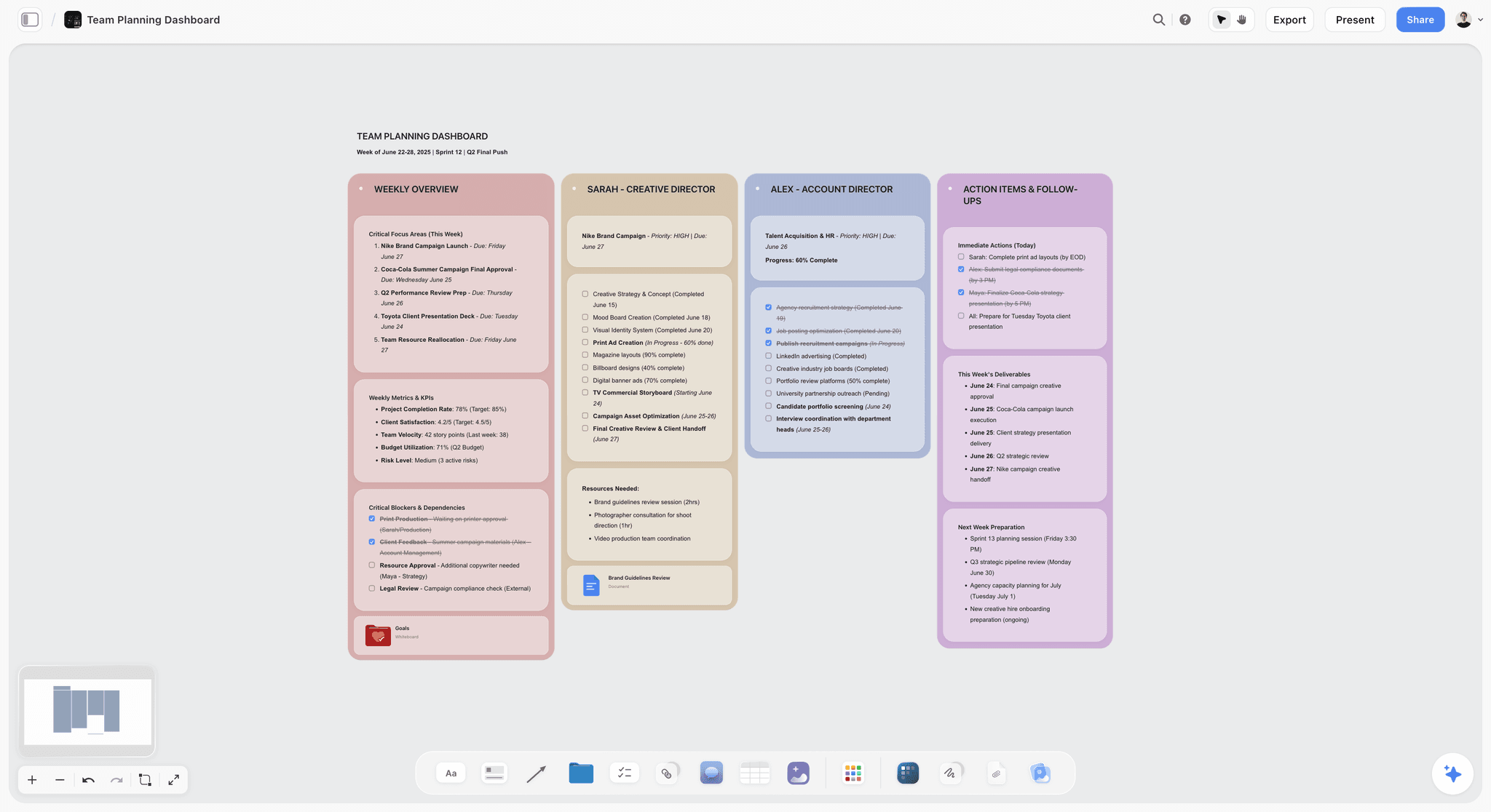
The fastest way to feel the shape difference is to start from a board that is already project-shaped: the Second Brain template for personal knowledge that outgrew Notion pages, or the Team Planning Dashboard template for the project-tracking side.
Pricing
Storyflow is in paid-only early access: the Free plan (unlimited boards, unlimited cards, unlimited collaboration, basic AI usage, 20 file uploads) launches before the end of 2026, and until then anyone a paid member invites to a board signs up free. Plus: $7.99/mo annual or $9.99 monthly (full 200+ Blueprint library, unlimited file uploads). Pro: $14/mo annual or $19/mo monthly (adds AI image generation and 20x more AI than Plus). Max: $39/mo annual or $49/mo monthly (adds 40x more AI plus Team Workspace with Permissions and Roles).
Pros
- Canvas-first AI matches the shape of creative project work better than Notion's doc primitive.
- Blueprint Tactics give the AI methodology to ground responses, not just user prompts.
- Pricing is per-account at the solo tier, not per-seat, so it scales differently than Notion.
Cons
- Wrong tool for finished long-form documentation, team wikis, or formal doc collaboration. Use Notion or Google Docs for that.
- Cloud-only; no local-first option for users with strict privacy requirements.
- Onboarding takes about an hour to feel the canvas-AI workflow click.
For the head-to-head, see Storyflow vs Notion: Full Comparison and Storyflow vs Notion as a Second Brain.
2. Obsidian
Obsidian is a local-first plain-text knowledge tool with a graph view and thousands of community plugins. The pick for users who want full control of their data and a tool that will outlive any company.
Best for: Long-term personal knowledge systems, privacy-sensitive users, plugin tinkerers, plain-text purists.
Verdict: The strongest local-first alternative to Notion. Different philosophy, not just different features.
Key features
- Local plain-markdown files. A vault is literally a folder of .md files on your device, so you can search it with any tool, back it up with git, and open it in another editor tomorrow.
- Graph view, bidirectional links, backlinks.
- Thousands of community plugins for almost any need. Dataview alone turns a folder of notes into queryable lists and tables, which is the closest the plain-text world gets to Notion databases.
- A built-in Canvas core plugin for spatial arrangement of notes and cards (lighter than a dedicated canvas tool, but useful for mapping an argument).
- Optional paid Sync ($4/mo Standard) for multi-device.
Pricing
Local app: free forever. Sync: $4/mo annual (Standard) up to $20/mo (Plus). Publish: $8/mo annual.
Pros
- Your data is yours. Plain markdown means zero vendor lock-in.
- The plugin ecosystem is unmatched for power users.
- Free forever for the core local app.
Cons
- The plugin maintenance overhead is real. What is "free forever" for the app is not free in time.
- Native AI features are minimal; you bolt on community plugins for AI.
- Collaboration is weak. This is a personal knowledge tool, not a team tool.
For the deeper comparison, see The 12 Best Obsidian Alternatives in 2026.
3. Coda
Coda is what Notion would be if it had taken databases more seriously. The pick for power users who actually want their docs to behave like apps with formulas, automations, and packs.
Best for: Operations teams, power users who use Notion's databases more than its docs, anyone who needs spreadsheet-grade calculations inside a doc.
Verdict: The strongest doc-database alternative. More powerful than Notion at its own database game.
Key features
- Docs that combine narrative, tables, formulas, and apps in one surface. The signature Coda pattern is one table as the source of truth with filtered views of it embedded across the doc, so sales and ops read the same rows sliced differently.
- A real formula language that works across tables, not just inside a column, which is where Notion's formula system stops.
- Packs (integrations with hundreds of services, including Jira, Slack, and Google Calendar) that pull live data into tables.
- Automations and buttons for action-driven workflows: a button in a row can update statuses, send a Slack message, or create calendar events.
- Coda AI for assistance inside docs.
Pricing
Free for makers. Pro: $10/maker/mo. Team: $30/maker/mo. Doc-makers pay; viewers and editors do not.
Pros
- The "doc as app" model is genuinely different and more powerful than Notion's database.
- Pricing model (pay per maker, not per editor) is friendly for shared org use.
- Formulas approach Excel power inside the doc.
Cons
- Steeper learning curve than Notion. Power comes with friction.
- Visual structure is still doc-shaped; if you want a canvas, this is not the tool.
- Smaller community and template marketplace than Notion.
4. Capacities
Capacities is an object-typed personal knowledge tool. The pick if your knowledge naturally splits into people, books, projects, and ideas rather than free-form pages.
Best for: Personal knowledge management users who want structure without the chaos of full-blown databases.
Verdict: The most thoughtful structural alternative to Notion for personal use.
Key features
- Object types (people, books, projects, etc.) as first-class, each with its own properties and default template. Create a Book object once and every book note you ever take collects under it automatically, with backlinks showing where you referenced it.
- Daily notes and timeline views. The daily note works as an inbox: you write the day, tag the objects you mention, and the structure files itself instead of you filing pages into a hierarchy.
- AI assistance inside notes.
- Local-first with optional cloud sync.
Pricing
Capacities Pro: $9.99/mo annual. Free tier with limits.
Pros
- Object types impose useful structure without database setup overhead.
- Genuinely thoughtful about personal knowledge.
- Local-first option matters for some users.
Cons
- Personal-use focused. Not built for team workflows.
- Smaller than Notion and Obsidian; smaller plugin and template ecosystem.
- AI features are improving but not central.
For the head-to-head, see Storyflow vs Capacities as a Second Brain.
5. ClickUp
ClickUp is the all-in-one project management tool that ships with docs and databases bundled. The pick for teams whose primary friction is "Notion is great for docs but bad for tracking work."
Best for: Operations and project teams who want kanban, lists, Gantt, and docs in one tool.
Verdict: Strong if you need project management primarily and docs secondarily. Wrong shape for doc-first teams.
Key features
- Tasks, lists, kanban, Gantt, calendar in one tool.
- Docs as a secondary surface.
- Automations, time tracking, dashboards.
- ClickUp AI for drafting and summarization.
Pricing
Free Forever for unlimited members. Unlimited: $7/user/mo annual. Business: $12/user/mo annual.
Pros
- The most comprehensive PM tool in the space.
- Free Forever tier is genuinely usable.
- Strong for ops teams and agencies tracking many simultaneous projects.
Cons
- The breadth is also the friction. ClickUp can feel bloated for simple use.
- Docs are decent but not best-in-class. Notion still wins on pure doc work.
- Configuration overhead is real for new teams.
6. Heptabase
Heptabase is the canvas-first knowledge tool with rich card-detail pages. The pick for academic researchers and book-note-takers who want a canvas with depth per card.
Best for: Academic research, study work, structured research synthesis, journal-into-card workflows.
Verdict: Strong if your knowledge unit is "a deep card" rather than "a project canvas." Different shape than Notion entirely.
Key features
- Whiteboard with rich card-detail pages.
- Local-first storage with optional cloud sync.
- AI assistance on selected cards.
- Journal-into-card workflow.
Pricing
Around $8.99/mo annual. Trial only; no perpetual free tier.
Pros
- Strongest canvas-first tool for research-shaped work.
- Local-first matters for users with privacy requirements.
- Card-detail pages give individual notes real depth.
Cons
- Cross-canvas synthesis is harder than in canvas-AI tools where the AI reads the full board.
- No methodology layer (Tactics) for scaffolding AI responses.
- Shorter free trial than competitors.
7. Tana
Tana is an outliner with supertags. The pick for power users whose mental model is "everything is a node, and nodes have types."
Best for: Networked-thinking power users, founders, knowledge workers who think in outlines.
Verdict: The most ambitious of the outliner alternatives. Steep learning curve, big payoff for the right user.
Key features
- Outline-first structure with supertags as the typing system.
- Bidirectional links and queries.
- AI inside the workspace.
- Custom views per supertag.
Pricing
Free during early access in some markets. Pro: $14/mo. Tana has adjusted tiers during its rollout, so treat the number as a snapshot.
Pros
- Supertags are a genuinely novel structural primitive.
- Power users describe a real "click" moment after learning curve.
- AI integration is improving rapidly.
Cons
- The learning curve is the steepest on this list.
- Onboarding takes weeks, not days.
- Smaller community than Roam, Obsidian, or Notion.
For the head-to-head, see Storyflow vs Tana as a Second Brain.
8. AppFlowy
AppFlowy is the open-source, self-hostable Notion alternative. The pick when open-source matters or your org cannot use cloud SaaS for compliance reasons.
Best for: Open-source advocates, privacy-sensitive teams, organizations with self-hosting requirements.
Verdict: Strongest open-source Notion-shaped alternative. Less polished than Notion, real for the right audience.
Key features
- Notion-shaped doc-and-database structure.
- Self-hostable; can run on your infrastructure.
- AI features improving with each release.
- Active open-source community.
Pricing
Free open-source. Paid AppFlowy Cloud tiers add hosted sync and storage.
Pros
- Open-source means no vendor risk.
- Self-hosting addresses compliance and privacy concerns Notion cannot.
- Genuine Notion-shape without the per-seat pricing.
Cons
- Polish lags behind Notion noticeably.
- Self-hosting is real work; cloud tier is the practical option for most.
- AI features are catching up but not leading.
9. Anytype
Anytype is a local-first object database with end-to-end encryption and P2P sync. The pick for users who want Notion's flexibility with full data ownership.
Best for: Privacy-first users, Web3 / decentralization advocates, knowledge workers who want their data fully theirs.
Verdict: Architecturally interesting; usability is improving. Real for the right user.
Key features
- Object types (Notion-style) but local-first by default.
- End-to-end encryption.
- P2P sync between devices.
- Free with no cloud bill.
Pricing
Free. Optional paid tiers for vaults and storage.
Pros
- Local-first plus encryption is a uniquely strong privacy posture.
- Free tier is generous.
- The architecture is genuinely different from cloud-only competitors.
Cons
- UX is less polished than Notion.
- Smaller community and ecosystem.
- AI features lag the cloud-native competition.
10. Microsoft Loop
Microsoft Loop is Microsoft's Notion-shaped workspace: pages, workspaces, and live-syncing Loop components that stay updated wherever you paste them. The pick when your organization already lives in Microsoft 365 and a separate workspace tool would never get adopted.
Best for: Teams standardized on Microsoft 365 who want Notion-style pages without adding a new vendor.
Verdict: The lowest-friction Notion alternative for Microsoft organizations. The wrong pick everywhere else.
Key features
- Loop components: tables, lists, and paragraphs that sync live across Teams chats, Outlook emails, and Word documents, so the same table is current in every surface it is pasted into.
- Notion-style pages and workspaces with templates.
- Copilot integration on Microsoft 365 Copilot plans for drafting and summarizing inside pages.
- Enterprise-grade admin, compliance, and permissions inherited from Microsoft 365.
Pricing
Included with most Microsoft 365 work and school subscriptions. A free tier works with a personal Microsoft account.
Pros
- Zero procurement friction: if your company has Microsoft 365, you likely already have Loop.
- Live-syncing components across Teams and Outlook are genuinely useful for meeting-heavy teams.
- Admin and compliance story is stronger than any startup on this list.
Cons
- Outside Microsoft 365 it has no reason to exist; the ecosystem is the product.
- Template and community ecosystem is far smaller than Notion's.
- No canvas or visual surface; doc-shaped through and through.
11. Logseq
Logseq is an open-source outliner with daily notes and bidirectional links. The pick for users who want Roam Research's structure as an open-source local-first tool.
Best for: Daily-notes journaling, networked-thinking users, anyone who wanted Roam but for free and local.
Verdict: Strong for outliner-shaped knowledge work. Different shape than Notion.
Key features
- Daily-notes outline format.
- Bidirectional links and graph view.
- Local plain-text or markdown files.
- Open-source, plugin-extensible.
Pricing
Free open-source. Optional Sync subscription planned.
Pros
- Free open-source plus local-first is a strong value proposition.
- The outline-with-links model is excellent for some thinkers.
- Active community and plugin ecosystem.
Cons
- Less polished than Notion or Obsidian.
- AI integration lags.
- Outliner shape does not fit every job.
12. AFFiNE
AFFiNE is an open-source workspace that combines Notion-style docs with an edgeless whiteboard canvas in one tool. The pick if you want the doc-plus-canvas hybrid and open-source ownership at the same time.
Best for: Open-source advocates who want both pages and a whiteboard surface, self-hosters, local-first users.
Verdict: The most ambitious open-source alternative. Younger and rougher than the incumbents, but the docs-plus-canvas shape is real.
Key features
- Every document can flip between page mode and an edgeless canvas mode, so notes and whiteboard live in the same file.
- Local-first storage with optional AFFiNE Cloud sync.
- Self-hostable and open-source, with an active community.
- AI copilot features arriving release by release.
Pricing
Free and open-source to self-host. Paid cloud tiers add sync and storage; an AI add-on is priced separately.
Pros
- The doc-plus-canvas hybrid is a shape neither Notion nor most alternatives offer.
- Open-source plus local-first covers both ownership concerns at once.
- Development pace is fast.
Cons
- Young product; rough edges and occasional breaking changes are part of the deal.
- Collaboration and mobile lag the mature tools.
- The canvas is a drawing surface, not an AI-readable project context like Storyflow's board.
13. Mem
Mem is AI-native notes that surface relevant past notes contextually. The pick for personal users who want their notes to be searchable by an AI that understands what they wrote.
Best for: Personal note-takers who want AI to do the surfacing work.
Verdict: Niche but genuine. AI-meets-notes architecture is elegant for personal use.
Key features
- AI that connects related notes automatically.
- Mem Chat for asking questions across your note library.
- Daily notes and ambient capture.
Pricing
Around $14.99/mo. Mem has changed its pricing several times, so treat the number as a snapshot.
Pros
- The AI-meets-notes architecture is elegant for personal use.
- Surfacing related past notes is genuinely useful.
- Lower friction than building your own AI-over-Obsidian setup.
Cons
- Pricing has changed multiple times; uncertain trajectory.
- Less mature than Heptabase for canvas work or Notion for doc work.
- Not built for team workflows.
For the head-to-head, see Storyflow vs Mem as a Second Brain.
14. Reflect
Reflect is daily-notes journaling with AI assistance. The pick for personal users who want a beautiful journal that uses AI to expand thinking.
Best for: Daily journaling, personal knowledge management, lone-wolf creative thinkers.
Verdict: Beautiful tool, narrower audience than Notion.
Key features
- Daily-notes structure.
- AI integration for drafting, summarization, and journaling prompts.
- Bidirectional links.
- End-to-end encryption.
Pricing
$10/mo annual. Free trial.
Pros
- Aesthetic and ergonomic; pleasant to use daily.
- AI integration is mature for the journaling use case.
- Privacy posture is strong.
Cons
- Personal use only; no team features.
- Smaller than Obsidian or Logseq for power users.
- Less suited to project work than journaling.
For the head-to-head, see Storyflow vs Reflect as a Second Brain.
9) Persona-Based Recommendations
1. Solo Creator / Blogger
Top picks: Storyflow or Obsidian
Storyflow if your work is project-shaped (videos, campaigns, series). Obsidian if your work is text-shaped and long-term, and you want plain-text plus plugin tinkering. Avoid ClickUp unless you need real project tracking. Writers weighing the same trade-off should see Best Notion Alternatives for Writers in 2026.
2. Marketer / Brand Strategist
Top picks: Storyflow or Coda
Storyflow's Blueprint Tactics (AIDA, StoryBrand, Retention Hooks) and canvas-AI fit campaign work. Coda if your team needs power-user databases with formulas and packs. For the writer-level version of this decision, see Best Notion Alternatives for Writers in 2026.
3. Documentary Filmmaker / Video Creator
Top picks: Storyflow + Heptabase
Storyflow for the project canvas (research clusters, treatments, beat sheets, mood boards); the Documentary Research template opens with that structure ready. Heptabase if your research benefits from card-detail depth. The full breakdown for this persona is in Best Notion Alternatives for Filmmakers in 2026.
4. Academic Researcher / PhD Student
Top picks: Obsidian or Heptabase
Obsidian for the long-term card library with full data ownership. Heptabase for canvas-based research with rich card-detail pages.
5. Small Operations / Agency Team
Top picks: ClickUp or Coda
ClickUp if project tracking dominates. Coda if you want doc-as-app workflows with formulas and packs.
6. Open-Source / Self-Hosted Required
Top picks: AppFlowy or Logseq
AppFlowy for Notion-shape with self-hosting. Logseq for outliner shape. Both are real for users who cannot use cloud SaaS for compliance.
7. Privacy / Local-First User
Top picks: Obsidian or Anytype
Obsidian for plain markdown with optional sync. Anytype for object-database with end-to-end encryption and P2P sync.
8. Daily Journaling / PKM
Top picks: Reflect or Logseq
Reflect for AI-native journaling. Logseq for outliner-style daily notes with bidirectional links.
9. Power User With Many Projects
Top picks: Tana or Coda
Tana if outline-with-supertags clicks for you. Coda if you want doc-database power workflows.
10. Founder / Operator
Top picks: Storyflow + Notion
Storyflow as the canvas where strategy and creative project work live. Keep Notion for finished company docs and team wikis. Many operators run both.
11. Team Inside Microsoft 365
Top picks: Microsoft Loop or ClickUp
Loop if the goal is Notion-style pages that your IT department will actually approve and your colleagues will actually open, because they sync into Teams and Outlook. ClickUp if the real job is project tracking and Microsoft 365 only handles the documents.
10) Free vs Paid: When to Upgrade
Most tools on this list have a free tier. Only some of them are usable as a real workspace rather than a trial with the clock hidden.
Free tiers that are genuinely usable indefinitely:
- Obsidian. The local app is free forever for personal use. Sync ($4/month) and Publish ($8/month) are the only paid pieces.
- Logseq and AppFlowy. Open-source and free, with paid cloud sync optional.
- Anytype. Free with peer-to-peer sync.
- ClickUp Free Forever. Unlimited members, capped on some advanced features.
- Storyflow. Paid-only early access today; the Free plan (unlimited boards, notes, images, links, and collaborators, basic AI usage, 3 starter blueprints, 20 file uploads) launches before the end of 2026. Until then, anyone a paid member invites to a board signs up free.
Free tiers that are effectively trials: Heptabase (trial only), Tana (trial or waitlist), Reflect (free trial), Mem and Capacities (limited enough that sustained use pushes you to pay).
The four upgrade triggers
Across the tools we tested, the same four things end the free ride. Watch for these rather than upgrading on a hunch:
- File uploads. The most common wall. Storyflow's upcoming free plan allows 20 uploads; a single mood-board-heavy project can hit that in an afternoon, and Plus removes the cap.
- Template or framework libraries. Free plans usually withhold them. Storyflow's Free plan, arriving before the end of 2026, will include 3 starter blueprints; the full 200+ Story Blueprints library is on Plus and above.
- AI volume. Basic AI usage covers occasional prompting. Once the assistant is part of your daily loop, you hit the ceiling. Pro adds AI image generation and 20 times more AI usage than Plus.
- Seats and roles. The moment you need permissions rather than just sharing, per-seat tools start multiplying. Storyflow's Max tier adds a team workspace with permissions and roles.
The pricing-model math nobody runs first
This matters more than the sticker price, and it is where per-seat tools quietly get expensive.
Notion Plus is $10 per user per month billed annually. Coda charges roughly $10 per Doc Maker. ClickUp Unlimited is $7 per user per month. Storyflow is flat per account and paid-only during early access: Plus at $7.99/month annual ($9.99 monthly), Pro at $14/month annual ($19 monthly), Max at $39/month annual ($49 monthly); a Free plan arrives before the end of 2026.
For one person, the difference is a rounding error. For a five-person creative team that also pulls in three freelancers per project, a per-seat tool bills eight people while a flat per-account tool bills once. Run the number for your actual headcount, including the collaborators you invite for two weeks at a time, before you decide any of these tools is the cheap one.
The counter-argument, stated fairly: per-seat pricing usually buys real administrative machinery (SSO, audit logs, granular permissions, provisioning). If you need that, per-seat is not a tax, it is the product. If you do not, you are paying for an org chart you do not have.
11) Honorable Mentions
These did not go through the same multi-week hands-on testing as the fourteen above, so they are not ranked. They are here because each one is genuinely the right answer for a narrower job, and three of them come up often enough in "best Notion alternative" conversations that leaving them out would be misleading.
- Slite: A documentation-first team wiki with AI search over the whole workspace. The reason it keeps appearing in these lists is that it solves one specific Notion failure mode very directly: a company knowledge base nobody can find anything in. Slite deliberately does not try to be a database or a project tracker, which is why it is not in the ranked list here and also why teams that only want a searchable handbook often prefer it to Notion.
- Craft: A document editor with the most polished writing and reading experience of anything in this category, especially on Apple hardware. Pick it when the artifact you produce is a beautiful document you send to someone, not a workspace you live in. Its team and database features are much lighter than Notion's, so it replaces the "write and share" half of Notion and not the "organize everything" half.
- Nuclino: A lightweight team wiki built around speed. It is the answer when the complaint about Notion is purely that it feels slow and heavy for what the team actually does with it, which is write short internal pages and link them together.
- RemNote: Outliner with spaced repetition built in; strong for students who want their notes to become revision material. Niche audience.
- Roam Research: The original networked-outline pioneer, and still the clearest expression of that idea. Pricing and interface have aged relative to Obsidian and Tana.
- Walling: Visual canvas with cards. Closer in shape to Storyflow than to Notion, with much lighter AI.
- Bear: Beautiful Mac and iOS markdown notes. Personal use only, no team layer.
- Nimbus: Another team wiki alternative in the Nuclino mould, narrower than Notion.
These are not bad tools. Their audience or use case is narrower than the main list.
12) When Notion Itself Is Still the Right Pick
It is worth being honest: for some uses, Notion remains the best choice and switching is unnecessary friction.
Notion wins when:
- You need a polished team wiki with strong permissions and database views.
- Your team is already trained on Notion and switching cost outweighs the gain.
- You need a tool that ships with a massive template marketplace.
- Your work is doc-shaped and runbook-shaped, not canvas-shaped.
- You value the broadest integration ecosystem for doc tools.
- You want a single tool that handles wiki, docs, lite-PM, and lite-database in one surface.
If three or more of these match, the cost of switching outweighs the gain. The honest answer is: stay on Notion and use it well. The right alternative depends on which Notion failure mode is actually costing you time.
12b) Choosing an Alternative by What Notion Actually Failed At
Fourteen alternatives is a long list, and the useful way through it is not by category but by which specific Notion failure sent you looking. Each failure points at a different subset, and picking from the wrong subset is why people switch twice.
The switch that most often gets reversed is Notion to Obsidian, and the reason is predictable: Obsidian solves speed, offline and lock-in, and it does not solve structure. Anyone who liked Notion's databases and disliked its performance ends up rebuilding databases in Obsidian with plugins, which is slower and more fragile than what they left.
The switch that most often sticks is Notion to something narrower. People who move to Craft, Bear or Apple Notes for writing, and keep a separate tool for the structured work, report far higher satisfaction than people who look for one product that does everything Notion did but better. That product does not exist, because Notion's breadth is the thing it is genuinely best at.
Before switching at all, name the failure in one sentence. If you cannot, the problem is usually that Notion was set up badly rather than that Notion is wrong, and section 12 covers when to stay.
14) The Bottom Line
The best Notion alternative in 2026 depends on which Notion failure mode is actually costing you time. If the failure is that the doc primitive does not fit your creative project work, Storyflow is the strongest canvas-first alternative with AI that reads your full board by default. If the failure is privacy and data ownership, Obsidian is the strongest local-first plain-text alternative. If the failure is database power, Coda is the strongest doc-database alternative. If the failure is project tracking, ClickUp is the strongest PM-with-docs alternative.
For the deeper architectural argument, see The End of the App-Per-Task Era. For the deep dive on Notion alternatives specifically for visual thinkers, see Best Notion Alternatives for Visual Thinkers in 2025.
The decisive recommendation: if your work is creative-project-shaped with mixed visual material, start a Storyflow workspace and run one project on it for two weeks. If your work is doc-and-wiki-shaped, stay on Notion. If your work is privacy-first or plain-text, switch to Obsidian. The right tool follows the shape of the work.
13) FAQ: Notion Alternatives in 2026
What are the best Notion alternatives?
The best Notion alternatives are Storyflow for visual, canvas-first work, Obsidian for local-first plain text, Coda for doc-and-database power, Capacities for object-typed personal knowledge, and ClickUp when project tracking dominates. The right pick depends on which Notion failure mode is costing you time: pricing, performance at scale, or a doc primitive that does not fit the work. Storyflow is the strongest pick when the friction is the doc primitive itself, because its AI reads your entire canvas board at once rather than one page at a time. Plus is $7.99/month billed annually ($9.99 monthly); a Free plan launches before the end of 2026.
What is a good visual alternative to Notion?
Storyflow is the best visual alternative to Notion for people who think in space. Instead of stacking pages in a sidebar, you arrange mood boards, mind maps, kanbans, and project cards on one infinite canvas, and the AI reads the whole board as context. Heptabase is the strongest visual research canvas, and FigJam suits design-team whiteboarding. If your Notion frustration is that everything collapses into linear documents, a canvas tool fixes the shape, not just the features. See Best Notion Alternatives for Visual Thinkers in 2025.
Is there an AI alternative to Notion?
Yes. Storyflow is an AI-native alternative where the AI reads your full active canvas board by default, plus up to 5 documents and 3 boards you attach. That project-level grounding is the difference from Notion AI, which works on the current page or database. Coda AI is strong for doc-and-database automations, and Mem is elegant for AI-surfaced personal notes. The question is less which AI is smartest and more whether it can see your whole project at once.
How do visual workspaces compare to Notion for project management?
AI-driven visual workspaces and traditional project management software solve different halves of the job. Notion and ClickUp excel at structured tracking: databases, tasks, timelines, and team wikis. Visual workspaces like Storyflow excel at the thinking that happens before the tracking, where research, mood boards, and strategy live on one canvas an AI can read end to end. Most teams in 2026 run both: a canvas for the messy creative front end, a structured tool for execution.
What is the best free Notion alternative?
Obsidian (free forever for the local app), AppFlowy, and Logseq (both free open-source) are the strongest free alternatives, and ClickUp's Free Forever tier supports unlimited members. Storyflow's Free plan (launching before the end of 2026) will be the strongest free tier for visual, canvas-AI work: unlimited boards, cards, and collaboration plus basic AI. Today Storyflow is paid-only early access, though anyone a paid member invites to a board joins free. Pick by shape: plain text points to Obsidian, canvas work points to Storyflow.
What is the closest alternative to Notion?
Coda is the closest overall: docs, databases, and automations in one surface, with a formula system that goes further than Notion's. ClickUp is the closest if you mainly used Notion to track projects, and AppFlowy or AFFiNE are the closest open-source options if you want the Notion shape with self-hosting. Microsoft Loop is the closest inside a Microsoft 365 organization. If none of those excite you, the honest question is whether you want a better Notion at all or a different shape entirely, like a canvas or plain-text vault.
Is Coda better than Notion?
For database-heavy power workflows with formulas, automations, and packs, Coda is more capable than Notion at its own game. For pure documentation and polished team wikis, Notion is still smoother and has the larger template marketplace. They serve overlapping but distinct jobs, so pick by which side of the doc-database split your work leans toward. If you actually want a canvas rather than a better doc, neither is the answer; look at Storyflow.
Which Notion alternative is best for personal use?
Obsidian is best for long-term plain-text knowledge with full data ownership, Capacities for object-typed personal knowledge that splits into people, books, and projects, and Reflect for daily-notes journaling with AI. Storyflow fits personal use when your work is creative-project-shaped with mixed visual material, like planning videos, campaigns, or a book. Choose by whether your knowledge is mostly text you revisit or projects you build out visually.
Which Notion alternative is best for teams?
ClickUp suits project-management-first teams, Coda suits doc-database power users, and Storyflow Max ($39/mo annual) suits creative teams who want a shared canvas plus a Team Workspace with permissions and roles. Notion itself is still excellent for team wikis and structured documentation. The right answer depends on whether your team's core work is task-shaped, doc-shaped, or canvas-shaped, and plenty of teams pair a canvas tool with a structured one.
Which Notion alternative has the best pricing?
For free, Obsidian, AppFlowy, Logseq, and ClickUp Free Forever are hard to beat. For paid solo use, Storyflow Plus ($7.99/mo billed annually, or $9.99 monthly) is the cheapest of the strong canvas alternatives and is charged per account rather than per seat. For team pricing, ClickUp Unlimited ($7/user/mo) is the cheapest mainstream project-management-with-docs option. Per-account pricing scales very differently from Notion's per-seat model once your team grows.
Is Notion AI worth it?
For Notion users whose work is genuinely doc-shaped, yes: the cross-source Q&A across your pages and databases is mature and useful. For users whose real friction is that the doc primitive is wrong for their work, no AI feature inside Notion fixes an architectural mismatch. If your material is visual and project-shaped, an AI that reads a full canvas, like Storyflow's, will feel more useful than a smarter AI trapped on a single page.
What does one Storyflow subscription replace?
More than Notion alone. Because the canvas combines AI chat, visual boards, documents, mind maps, and kanbans on one surface, one Storyflow plan can replace ChatGPT for brainstorming, Milanote for mood boards, and Notion for project documents. Plus is $7.99/mo billed annually and Pro is $14/mo billed annually, and the Free plan arriving before the end of 2026 will cover unlimited boards, cards, and collaboration.
Should I use Notion or an alternative?
Use Notion if your work is doc-and-wiki-shaped, your team is small to medium, and per-seat pricing is acceptable. Use an alternative if your work is visual and canvas-shaped (Storyflow, Heptabase), local-first matters (Obsidian, Anytype), database power matters (Coda), or project tracking dominates (ClickUp). A two-tool stack, a canvas for thinking plus a structured tool for execution, is the common shape in 2026, not a single replacement.
What is the best Notion alternative overall?
There is no single answer, because Notion's breadth is the thing it does best and every alternative is narrower somewhere. Obsidian leads for local-first notes and open formats, Craft for writing that looks finished, Coda and Airtable for genuinely relational work, and Milanote or Storyflow when you need a canvas rather than a page. Start from the specific Notion failure that sent you looking, using the table above.
What are the best Notion alternatives without AI?
Obsidian, Bear, Apple Notes and AppFlowy either have no AI or leave it entirely off by default. Obsidian is the strongest of the four for anyone who wants Notion's flexibility without a model touching their notes, since AI arrives only through plugins you choose to install. This is a growing reason for switching and is covered in the Frequently Asked section above.
Why do people switch back to Notion after leaving?
Most often because they replaced it with Obsidian to fix speed, offline access or lock-in, and then discovered they needed the databases. Rebuilding Notion's structured views in Obsidian through plugins is slower and more fragile than what they left. The switches that stick are usually to something deliberately narrower, with a second tool kept for the structured work.
Table of Contents
- Quick Answer: The Best Notion Alternatives in 2026
- Key Takeaways
- Comparison Table: 14 Notion Alternatives Compared
- Frequently Asked: Notion Alternatives Without AI, Without a Subscription, and Without Lock-In
- How the Alternatives Compare on AI Depth
- Why People Switch From Notion (And When They Should Not)
- How We Evaluated the Best Notion Alternatives
- Quick Picks by Use Case
- Detailed Reviews: 14 Notion Alternatives in 2026
- Persona-Based Recommendations
- Free vs Paid: When to Upgrade
- Honorable Mentions
- When Notion Itself Is Still the Right Pick
- Choosing an Alternative by What Notion Actually Failed At
- FAQ: Notion Alternatives in 2026
- The Bottom Line
- Author
- Related Reading
Templates to check out for this topic


Workspace templates you can use in Storyflow
Keep research, notes, and plans on one canvas the AI can read, instead of scattered across docs and tabs. Open a template and make it your second brain.


See Storyflow in Action
A visual AI workspace where every feature lives inside one canvas. No tab-switching, no context lost.
Build your entire board from a single message
Type what you need in the AI chat at the bottom of your canvas. The AI adds cards, headings, and structure directly onto your board.
Use expert frameworks as AI context
Type @ in the AI chat and choose any Tactic. The AI tailors every response to that framework instead of giving generic advice.
Turn your board into a mind map in seconds
Ask the AI to restructure your canvas as a mindmap. It connects your ideas into a visual hierarchy so you can see how everything relates.
Why Storyflow Exists
Storyflow actually began as a personal tool while working on creative and research projects.
We kept running into the same problem: ideas were scattered everywhere: notes, documents, and whiteboards.
Nothing helped us see how everything connected.
So we started building a workspace designed around how ideas actually grow.
→ Read how Storyflow was createdJustkay
Documentary Filmmaker & Founder at Storyflow
Published: 2026-05-10
Extremely simple, seriously capable


See how easy it is to get started
Watch a real project come together, from a blank board to a finished plan, clicked through step by step.
Start creating with AI and become more productive
Transform your creative workflow with AI-powered tools. Generate ideas, create content, and boost your productivity in minutes instead of hours.