
Category
Filmmaking
Author

Justkay
Documentary Filmmaker & Founder at Storyflow
Topics
2026-05-12
•
Updated July 2, 2026
•
15 min read
•
Filmmaking- best Notion alternatives for filmmakers 2026
- Notion for filmmakers
- Notion alternative for video creators
- film pre-production tools
- filmmaker workflow
- StudioBinder vs Notion
What are the best Notion alternatives for filmmakers in 2026?
The best Notion alternatives for filmmakers in 2026 are Storyflow (best pre-production canvas with AI context), StudioBinder (best production scheduling and call sheets), Milanote (best visual mood boards), and Final Draft (best screenplay writing). Filmmaking is six specialized jobs; the strongest stacks pick a specialist per stage.

Full disclosure: Storyflow is our own product, and we rank it #1 for one job: the pre-production canvas, holding the story bible, beat sheet, and mood board with an AI that reads the whole board. Filmmaking is not one job though, and the specialists win their stages. StudioBinder is stronger for production scheduling and call sheets, Final Draft is the industry standard for screenplay formatting, and Milanote is the nicer pure visual moodboard. Storyflow does not format a screenplay to industry spec or print a crew-ready call sheet, so most film stacks pair it with a scheduling tool and a script tool. We link to every tool so you can judge the fit.
Quick Comparison: Best Notion Alternatives for Filmmakers
These four cover the specialized stages of a film: the pre-production canvas, scheduling and call sheets, visual moodboards, and screenplay writing.
| Tool | Best For | AI Features | Price |
|---|---|---|---|
| Storyflow | Pre-production canvas with AI context | Reads the full canvas | $7.99 mo annual (free plan late 2026) |
| StudioBinder | Scheduling, call sheets, and crew ops | Light AI | Free / $29 mo |
| Milanote | Visual mood boards and research | None | Free / $9.99 mo |
| Final Draft | Industry-standard screenplay writing | Light AI | $249.99 one-time |
A filmmaker workspace that is visual first, not a database
Notion is built around docs and tables; Storyflow keeps your script, shots, and schedule on a canvas where the AI reads the whole production, not one page at a time.

1) Quick Answer: The Best Notion Alternatives for Filmmakers in 2026
The best Notion alternatives for filmmakers in 2026 are Storyflow (best for pre-production canvas with story bible, beat sheet, mood board, and AI context), StudioBinder (best for production scheduling and call sheets), Milanote (best for visual mood boards and research collection), and Final Draft (best for screenplay writing). The split that matters: filmmaking is not one job, it is six. Pre-production, scripting, scheduling, production, post-production, and distribution each have specialized tools. Notion tries to be a hub but ends up being half a tool for each stage.
Notion's "all-in-one" promise breaks at the moment the project moves from pre-production into production. The call sheet that needs to print correctly. The shot list that needs to sync with the camera department. The script that needs revision tracking. The mood board that needs to live next to the storyboards. Notion can hold notes about all of these, but it cannot do the work itself.
All 12 Notion Alternatives for Filmmakers, Ranked
- Storyflow: best overall, canvas pre-production with AI that reads the full board
- StudioBinder: best for production scheduling and call sheets
- Milanote: best for visual mood boards and research collection
- Final Draft: industry standard for screenplay writing
- WriterDuet: best cloud collaborative screenwriting
- Frame.io: best post-production review and approval
- Trello: best lightweight production task tracking
- Scenechronize: best studio-level production management
- Boords: best paid storyboarding with AI image generation
- Storyboarder: best free open-source storyboarding
- Scrivener: best long-form treatment writing
- Yamdu: best European all-in-one production management
I have run multiple documentary projects through tool stacks across the past few years. The pattern that has held: filmmakers do not need one tool; they need two or three that work together. Notion's strength as a generalist is its weakness as a film tool, because film work is intensely specialized at each stage.
For the broader Notion alternatives landscape, see The 12 Best Notion Alternatives in 2026. For the writer variant, see Best Notion Alternatives for Writers and Storytellers.
2) Comparison Table: 12 Tools Compared for Filmmakers
Rating criteria: pre-production canvas support, AI context for filmmakers, production-to-post handoff, scheduling and budgeting, and pricing fit for indie/documentary teams. Tools optimized for generic project management rather than filmmaking were rated lower.
3) Why Notion Fails Filmmakers
Notion is brilliant software for office work. Knowledge teams, operators, and small businesses love it because it lets them build their own systems. The flexibility is real. The databases are powerful.
But filmmaking is not office work.
A film project starts with a beat sheet, a treatment, character profiles, and mood boards. None of those fit Notion's database-with-document-UI architecture cleanly. The beat sheet wants spatial layout. The mood board wants images and texture, not titles and tags. The character profiles want to live next to the script and the storyboards, not in a separate database.
A film project moves into a script. Scripts have their own conventions: scene numbering, dialogue formatting, parentheticals, scene headings. Notion's pages cannot do scene formatting; you end up writing the script in Final Draft or WriterDuet anyway. Notion becomes a tab you do not open.
A film project moves into a shot list and storyboards. Shot lists want columns: shot number, scene, description, camera, lens, frame size, notes. Storyboards want visual cells next to their descriptions. Notion can build a shot list database, but it cannot render the storyboard cell, and the shot list is disconnected from the script and the beat sheet that produced it.
A film project moves into production. Call sheets need to print on a specific format. Production schedules need to sync with crew availability. Notion cannot generate a call sheet that the crew can use; you end up using StudioBinder, Scenechronize, or a spreadsheet anyway.
Notion's flexibility is the problem. The flexibility means you have to build the film tool yourself, and the tool you build is always worse than the one a film-specific platform built. Worse, every film project requires the same setup work, because no Notion template captures the actual flow from beat sheet to script to shot list to call sheet.
The filmmakers I know who use Notion the most also use the most other tools. They use Notion as a wiki for the team and Final Draft for the script and StudioBinder for scheduling and Milanote for moodboards and Frame.io for review. Notion becomes the table of contents to the actual tools.
4) How We Evaluated These Tools
Five criteria, weighted in this order.
- Pre-production canvas support. Native or strong support for story bible, beat sheet, treatment, mood board, character profiles, and research, ideally on a shared canvas. Tools that require manual database setup were rated lower.
- AI for filmmaking context. AI that reads the project context (beat sheet, treatment, character profiles, research) and answers narrative or production questions. Most tools have AI; few have AI that understands film work.
- Production-to-post handoff. Whether the tool's outputs (script, shot list, storyboard, schedule) export or sync cleanly to the next stage's tools.
- Specialization vs generalization. Tools that do one filmmaking job well were rated higher than tools that do many jobs adequately. Generalist tools were penalized.
- Pricing fit for indie and documentary teams. Free tiers and indie pricing usable for sustained projects. Enterprise-only tools were rated lower for the indie reader.
Tested workflows included a documentary pre-production from treatment through shot list, a short narrative film from script through call sheet, and a YouTube long-form serialized format with beat sheets and channel bible. Tools were tested on real projects over weeks.
5) Quick Picks by Project Type
If you want the short list, organize by project type.
Best for Documentary Pre-Production: Storyflow (treatment + bible + research) plus StudioBinder (scheduling and call sheets when production starts). Documentary pre-production is research-heavy and bible-heavy; Storyflow's canvas handles both.
Best for Narrative Short and Feature: Storyflow (beat sheet + character bible + mood board) plus Final Draft or WriterDuet (script) plus StudioBinder (production). Narrative work has a clean pipeline; specialized tools at each stage win.
Best for Commercial and Branded Video: Milanote (moodboard + research) plus a script tool plus a scheduling tool. Commercial work is mood-heavy and timeline-driven; visual research collection is the highest-leverage step.
Best for YouTube Long-Form Creators: Storyflow (channel bible + episode beat sheets) plus Google Docs or Notion (scripts and ops). YouTube serialization needs a bible more than a production pipeline.
Best for Indie Film with Small Crew: Storyflow plus Final Draft plus a simple scheduling spreadsheet. Indie production does not need StudioBinder's full feature set; the script and bible work matters more.
Best for Studio-Level Production: Scenechronize or Yamdu for production management plus Final Draft for script plus Storyflow or Milanote for the pre-production creative work. Studio production has scale needs that indie tools do not handle.
Best for Storyboard-Heavy Work (Animation, VFX): Boords or Storyboarder for the storyboards plus Storyflow for the surrounding beat sheet and bible. Storyboards need their own canvas.
Put your pre-production on one canvas
Filmmaking is six jobs, and Notion does half of each. Build the beat sheet, bible, mood board, and shot list on one board with AI that reads the whole project before it answers.
6) Detailed Reviews: 12 Notion Alternatives for Filmmakers
1. Storyflow
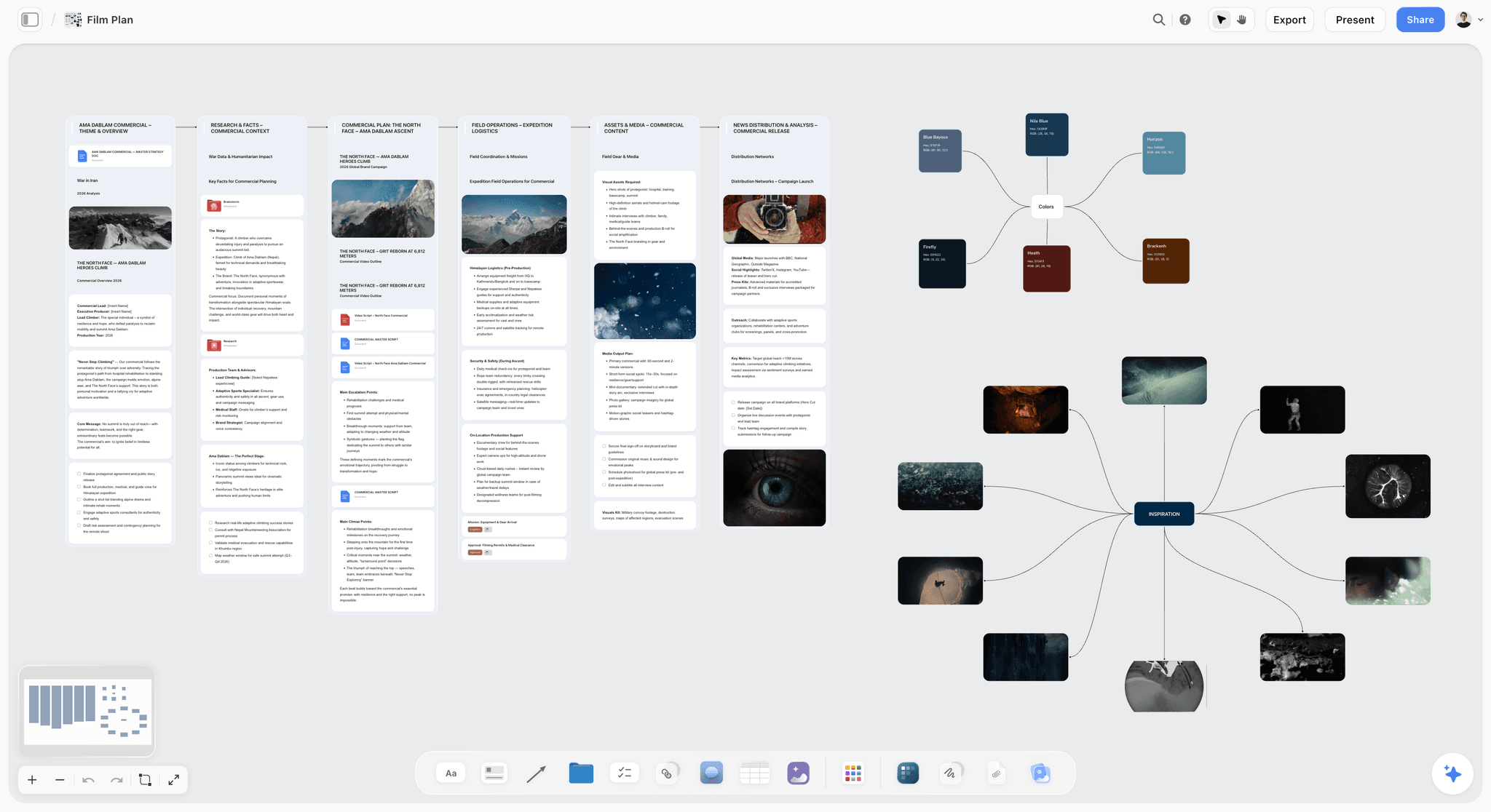
Storyflow is a canvas-based workspace where every artifact of pre-production lives as a card: the beat sheet, the treatment, character profiles, mood board references, research notes, and shot list drafts. The AI reads the full canvas and answers questions about the project ("which characters appear in act two?"). The Story Blueprints library includes templates for beat sheets, character profiles, treatment outlines, and shot lists. The fastest way to test it is to skip the blank canvas: open the Pre-Production Board template or the Film Plan template and the board opens with the structure a real project needs already laid out.
Best for: Documentary filmmakers, narrative pre-production, YouTube long-form creators, commercial directors.
Verdict: The strongest Notion alternative for filmmakers' pre-production work, where most film projects spend their planning time.
Key features
- Canvas where beat sheets, treatments, mood boards, character profiles, and shot lists live as movable cards.
- AI reads the full active canvas plus up to 1 Tactic and 3 Documents you @-mention.
- Story Blueprints library (200+ templates including beat sheets, treatments, character profiles, mood board structures).
- Unlimited collaboration with no seat fee, on every plan.
- Multi-format support: images, links, notes, embedded video.
Pricing
Free: launches before the end of 2026. Storyflow is paid-only during early access; once live, Free covers unlimited boards, unlimited cards, unlimited collaboration, basic AI usage, 20 file uploads, and 3 starter Story Blueprints. Plus: $7.99/mo annual. Full 200+ Story Blueprints, unlimited file uploads. Pro: $14/mo annual. AI image generation (mood board), 20x AI usage. Max: $39/mo annual. 40x more AI, team workspace with roles for production teams.
Pros
- Canvas-based pre-production is dramatically faster than database-based.
- AI reads full project context.
- Unlimited collaboration with no seat fee is unmatched for indie film teams.
Cons
- Not a script tool; pair with Final Draft or WriterDuet for screenplay work.
- Drafts a call sheet PDF and a strip board, but is not a scheduling engine and does not send call sheets; pair with StudioBinder for distribution and crew scheduling.
- Cloud-only; no local-first option.
2. StudioBinder
StudioBinder is the go-to for production scheduling, call sheets, shot lists, and contact management. The strongest tool for the production stage of a film project, where the work shifts from creative to operational.
Best for: Production managers, line producers, indie producers running calendar-heavy projects.
Verdict: Strongest for production-stage work; pair with a pre-production canvas tool.
Key features
- Call sheet generation with industry-standard formatting.
- Shot list with image attachments.
- Production calendar with crew sync.
- Contact management for cast and crew.
- Script breakdown with auto-categorization.
Pricing
Free with caps. Indie $29/mo. Production $49/mo. Studio $99/mo.
Pros
- Industry-standard call sheets that print correctly.
- Strong production calendar.
- Active development with regular feature releases.
Cons
- Pre-production weaker than Storyflow or Milanote.
- Pricing climbs fast for serious production use.
- AI is light compared to canvas-AI tools.
3. Milanote
Milanote is the visual moodboard tool of choice for commercial directors, music video directors, and filmmakers in the research phase. Clean boards with image, note, and link cards. Strong for collecting visual references.
Best for: Visual research, mood boards, commercial pre-production.
Verdict: Strong for moodboard work; weak as a primary pre-production hub.
Key features
- Visual boards with image, note, video, and link cards.
- Storyboard templates.
- Web, desktop, and iOS.
- Simple sharing with clients.
Pricing
Free with 100-card cap. Pro $9.99/mo.
Pros
- Best-in-class for visual research and moodboarding.
- Clean simple UI.
- Strong client-sharing for commercial work.
Cons
- 100-card free cap hits fast for serious projects.
- No AI.
- Not a structured pre-production tool; pair with Storyflow for beat sheet and bible work.
4. Final Draft
Final Draft has been the industry-standard screenwriting tool since the 1990s. Auto-formatting, scene numbering, revision tracking, and the file format every studio expects. Strongest for the screenplay-writing stage.
Best for: Screenwriters writing for production.
Verdict: Industry standard for screenplay; pair with a pre-production canvas and a production scheduler.
Key features
- Auto-format for industry screenplay standards.
- Scene numbering and revision tracking.
- Beat board and index card features (limited compared to canvas tools).
- Final Draft file format accepted by every studio.
- Mac and Windows.
Pricing
$249.99 one-time purchase. Upgrade discounts for existing users.
Pros
- Industry standard; if your script is going to a studio, this is what they expect.
- One-time purchase, no subscription.
- Strong revision and production-draft features.
Cons
- Expensive for indie writers.
- Pre-production features (beat board) lag canvas tools.
- No real AI.
5. WriterDuet
WriterDuet is the cloud-based collaborative screenwriting tool. Real-time co-editing for scripts, version control, and a generous free tier.
Best for: Screenwriting teams, indie writers who want cloud sync, students.
Verdict: Strong collaborative alternative to Final Draft, especially for teams.
Key features
- Real-time collaborative screenwriting.
- Industry-standard formatting.
- Version history and revision marks.
- Web, desktop, and mobile.
- Free tier with limited scripts.
Pricing
Free with 3-script cap. Pro $11.99/mo or $99/year. Pro Lifetime $299 one-time.
Pros
- Real-time collab is best-in-class for screenwriting.
- Generous free tier.
- Cloud sync without subscription requirement (Pro Lifetime).
Cons
- Industry adoption lags Final Draft.
- Pre-production features minimal.
- AI light.
6. Frame.io
Frame.io is the standard for post-production review and approval. Time-coded comments on video files. Pair with a pre-production tool; Frame.io handles the last 30% of the project.
Best for: Post-production review, client approval workflows.
Verdict: Best-in-class for post review; not relevant for pre-production but essential for the post handoff.
Key features
- Time-coded comments on video.
- Version comparison.
- Client review with approval workflows.
- Adobe Premiere and Final Cut integration.
Pricing
Free with caps. Pro $15/mo. Team $25/user/mo.
Pros
- Industry standard for client review.
- Strong Premiere/FCP integration.
- Generous free tier for small projects.
Cons
- Post-only; not a pre-production or production tool.
- Adobe acquisition has slowed independent feature development.
7. Trello
Trello is the lightweight kanban tool used by many small film teams for production task tracking. Cards on lists, simple drag-and-drop, low overhead.
Best for: Indie production task tracking, small crew assignments.
Verdict: Useful for production task tracking; weak for pre-production or scripting.
Key features
- Kanban boards with cards.
- Power-ups for calendar, automation, and integrations.
- Simple sharing and team views.
- Free tier generous.
Pricing
Free. Standard $5/user/mo. Premium $10/user/mo.
Pros
- Easy adoption; everyone understands kanban.
- Free tier covers most indie production tracking.
- Cross-platform.
Cons
- Generic; not built for filmmaking.
- Pre-production work feels awkward in kanban.
- No AI for film context.
8. Scenechronize
Scenechronize is the studio-grade production management platform. Script breakdown, scheduling, daily production reports, and the workflow features studios require.
Best for: Studio-level features, episodic television, large crews.
Verdict: Built for studio scale; overkill for indie or documentary work.
Key features
- Studio-grade script breakdown.
- Production scheduling with crew sync.
- Daily production reports.
- Multi-show franchise management.
Pricing
Enterprise quote only.
Pros
- Built for studio scale.
- Industry adoption among large productions.
- Strong reporting features.
Cons
- Enterprise pricing.
- Overkill for indie or documentary.
- Pre-production creative work weak compared to canvas tools.
9. Boords
Boords is the dedicated storyboarding tool. Frame-by-frame storyboards with AI-assisted image generation, animatics, and team review.
Best for: Director-driven projects with heavy storyboarding (commercials, animation, music videos).
Verdict: Strong for storyboarding; pair with a pre-production canvas for the surrounding work.
Key features
- Storyboard panels with notes.
- AI image generation for storyboards.
- Animatic export.
- Team review and approval.
Pricing
Free with caps. Starter $15/mo. Pro $25/mo.
Pros
- Best dedicated storyboarding tool in 2026.
- AI image generation reduces storyboard creation time.
- Strong client review.
Cons
- Storyboard-only; pair with Storyflow or Milanote for the surrounding work.
- Free tier limited.
- Subscription only.
10. Storyboarder
Storyboarder is the free open-source storyboarding tool from Wonder Unit. Desktop application with basic drawing tools and frame structure. Strongest for indie filmmakers needing free storyboarding.
Best for: Indie filmmakers, students, anyone needing free storyboarding.
Verdict: The strongest free storyboarding option in 2026.
Key features
- Free desktop app for storyboarding.
- Basic drawing tools and pose library.
- Export to Premiere and Final Cut.
- Open-source.
Pricing
Free.
Pros
- Genuinely free, no caps.
- Open-source community.
- Cross-platform desktop.
Cons
- Desktop only.
- Drawing tools light compared to Boords.
- No collaboration.
11. Scrivener
Scrivener is the long-form writing tool from the writing world, sometimes used by filmmakers for treatment writing and documentary research. Strong binder and corkboard structure for long-form material.
Best for: Long-form treatment writing, documentary research compilation.
Verdict: Strong for the writing layer of pre-production; weak for visual or production work.
Key features
- Binder for hierarchical document organization.
- Corkboard view for visual scene-card arrangement.
- Strong long-form prose editor.
- One-time purchase.
Pricing
$59.99 one-time (Mac or Windows).
Pros
- Strong long-form writing environment.
- One-time purchase.
- No AI but no subscription either.
Cons
- Not built for film; pre-production feels awkward.
- No visual mood board.
- No production tooling.
12. Yamdu
Yamdu is the all-in-one production management platform from Germany. Script breakdown, scheduling, budget tracking, and call sheets in one tool. Designed for European indie and broadcast production.
Best for: European indie filmmakers, broadcast television production.
Verdict: Solid all-in-one for production; pre-production creative work weaker.
Key features
- Script breakdown and tagging.
- Schedule and budget tracking.
- Call sheet generation.
- Multi-language support strong in Europe.
Pricing
$35/mo per project.
Pros
- All-in-one production coverage.
- Strong European market adoption.
- Reasonable per-project pricing.
Cons
- Per-project pricing adds up.
- Pre-production weaker than canvas tools.
- Smaller community than StudioBinder.
7) Recommended Filmmaker Stacks
The strongest filmmaker setups are usually three or four tools, not one. Four stacks that work.
Stack 1: Documentary Filmmaker. Storyflow (treatment + bible + research + beat sheet) + StudioBinder (when production starts) + Frame.io (post review). Documentary's planning is bible-heavy; Storyflow handles it, and the Documentary Research template gives the research layer a working structure on day one.
Stack 2: Narrative Short or Feature. Storyflow (beat sheet + character bible + mood board) + Final Draft (script) + StudioBinder (production) + Frame.io (post). Narrative work has a clean stage pipeline.
Stack 3: Commercial / Music Video Director. Milanote (moodboard + research) + Storyflow (treatment + shot list) + Boords (storyboards) + Frame.io (review). Commercial work is mood and visual reference heavy.
Stack 4: YouTube Long-Form Creator. Storyflow (channel bible + episode beat sheets + research) + Google Docs (scripts) + Frame.io (review if working with editor). YouTube serialization needs a bible more than a production pipeline.
The stack pattern matters because filmmaking is multiple specialized jobs. Pick the right tool for each layer.
8) Honorable Mentions
Tools that did not make the main 12 but are worth knowing.
- CelTx. Older all-in-one with script and budget features; lost ground to specialized tools.
- Movie Magic Scheduling. Studio-grade scheduling; legacy industry standard, now competing with StudioBinder.
- DragonFrame. Animation-specific stop-motion software for animators.
- PreviSociety. AI-powered previsualization and storyboarding for VFX-heavy projects.
- Setkeeper. Production management for indie crews.
- Pomello (Pomera). Continuity tracking for narrative production.
Honorable mentions usually do one job very well but do not cover the full filmmaker workflow.
9) Tools to Avoid as a Filmmaker
A few tools that get recommended for film teams but underperform in practice.
- Notion as a primary tool. Fine for the team wiki; weak for any actual film work.
- Google Sheets for scheduling production. Acceptable for the smallest crews; breaks down past 3-4 shoot days.
- Microsoft Word for scripts. Will work but the formatting fights you. Final Draft or WriterDuet for any serious script.
- Generic kanban tools for pre-production. Trello and Asana feel like office work; film pre-production wants a canvas.
- Pure AI chat tools for pre-production. ChatGPT and Claude help generate ideas but cannot hold the project across sessions. Pair with a workspace tool.
The pattern: tools built for office or general productivity rarely fit film work. The specialization at each stage is what makes film stacks effective.
11) The Bottom Line
The best Notion alternatives for filmmakers in 2026 are specialized tools that do one stage of filmmaking very well, not generalists that try to do everything. Storyflow is the strongest for pre-production canvas work. StudioBinder is the strongest for production scheduling. Milanote is the strongest for moodboard work. Final Draft is the industry standard for screenplays. Frame.io is the standard for post review. Most working film teams use three to five of these, not one.
The pattern that matters is that filmmaking is six jobs, not one. Pre-production, scripting, scheduling, production, post-production, and distribution each have specialized tools. The strongest stacks pick the right tool for each layer.
The strongest 2026 workflow for new film projects starts with Storyflow for the pre-production canvas (the Shotlist template is a good first board), adds Final Draft or WriterDuet when the script is written, adds StudioBinder when production starts, and adds Frame.io for post. Try Storyflow's Story Blueprints to start.
10) FAQ: Notion Alternatives for Filmmakers
Why is Notion not great for filmmakers?
Notion is built around databases and pages, neither of which fits film work cleanly. Pre-production wants spatial canvases (beat sheets, mood boards, character cards). Scripts want their own formatting. Production wants call sheets and crew sync. Notion can hold notes about all of these, but it cannot do the actual work itself. Filmmakers end up using Notion as a wiki alongside the specialized tools they actually work in.
What is the best tool for film pre-production?
Storyflow is the strongest pre-production canvas tool in 2026 because it holds the beat sheet, treatment, character bible, mood board, and research on one board with AI that reads the full canvas. Milanote is the strongest for moodboard-only work. Final Draft has beat board features for screenplay-only pre-production.
Do I need StudioBinder if I have Storyflow?
If your project includes production (cast, crew, shooting days, call sheets), yes. Storyflow handles pre-production creative work; StudioBinder handles production scheduling and operations. The two complement rather than overlap. For pure pre-production work (treatment writing, documentary research, YouTube long-form planning), Storyflow alone is enough.
What is the best free filmmaker tool stack?
Storyboarder (free desktop storyboarding) plus WriterDuet Free (3 scripts) plus Frame.io Free (post-review) cover most of the film pipeline without paying. Storyflow's pre-production canvas is paid-only during early access (Plus at $7.99/month billed annually), with a Free plan launching before the end of 2026 to complete the stack.
Can I write a screenplay in Notion?
Yes, but you should not. Notion's pages cannot apply screenplay formatting (auto-capitalized scene headings, dialogue centering, parenthetical formatting). Final Draft or WriterDuet are dramatically faster and produce industry-standard output.
What do documentary filmmakers use instead of Notion?
Storyflow for the treatment, bible, research, and beat sheet. Final Draft or a generic editor for narration scripts. A simple spreadsheet or StudioBinder for production scheduling. Frame.io for post review. The documentary pipeline is heavier on pre-production and lighter on production than narrative; Storyflow does most of the work.
Is Final Draft worth the price?
If your script is going to a studio, network, or competition: yes. The industry expects Final Draft files. If you are writing for indie production, YouTube, or self-funded work: WriterDuet, Highland, or Fade In all work fine and cost less.
What is the best tool for storyboarding in 2026?
Boords for paid AI-assisted storyboarding. Storyboarder for free open-source storyboarding. For storyboards integrated with the surrounding beat sheet and pre-production work, Storyflow's canvas can hold storyboard images as cards next to the beat sheet, which keeps the visual context next to the structural context.
How does Storyflow compare to Milanote for filmmakers?
Different strengths. Milanote is strongest for pure moodboard and visual research collection. Storyflow is broader: moodboards plus beat sheets plus treatments plus character bibles plus AI that reads all of it. Many filmmakers use both, with Milanote for visual reference and Storyflow for the structural work.
What is the best AI tool for filmmakers in 2026?
For pre-production work where AI reads project context, Storyflow's canvas-AI is the strongest. For generic AI chat (brainstorming, prose drafting), Claude or ChatGPT. For AI image generation (mood board references, storyboards), Midjourney, Boords AI, or Storyflow Pro's AI image generation.
Do I need separate tools for documentary vs narrative?
The pre-production tool can be the same (Storyflow). The script tool may differ: narrative work uses Final Draft or WriterDuet; documentary often uses a generic editor for narration scripts. Production tools are similar across types (StudioBinder, Frame.io). The split is in the script stage, not pre-production.
Can I run a film production entirely on free tools?
For small projects, mostly. Storyboarder + WriterDuet Free (3 scripts) + Frame.io Free + a spreadsheet for production scheduling cover most indie work without paying. Storyflow's pre-production canvas is paid-only during early access (Plus at $7.99/month billed annually) until its Free plan launches before the end of 2026. Larger projects (multi-day shoots, full crews) tend to need at least StudioBinder Indie ($29/mo) for the production stage.
Table of Contents
- Quick Answer: The Best Notion Alternatives for Filmmakers in 2026
- Comparison Table: 12 Tools Compared for Filmmakers
- Why Notion Fails Filmmakers
- How We Evaluated These Tools
- Quick Picks by Project Type
- Detailed Reviews: 12 Notion Alternatives for Filmmakers
- Recommended Filmmaker Stacks
- Honorable Mentions
- Tools to Avoid as a Filmmaker
- FAQ: Notion Alternatives for Filmmakers
- The Bottom Line
- Author
- Related Reading
Templates to check out for this topic


Filmmaking templates you can use in Storyflow
Skip the blank canvas. Open one of these filmmaking boards in Storyflow and the AI builds on the structure that is already there, from research through the shot list.


See Storyflow in Action
A visual AI workspace where every feature lives inside one canvas. No tab-switching, no context lost.
Build your entire board from a single message
Type what you need in the AI chat at the bottom of your canvas. The AI adds cards, headings, and structure directly onto your board.
Use expert frameworks as AI context
Type @ in the AI chat and choose any Tactic. The AI tailors every response to that framework instead of giving generic advice.
Turn your board into a mind map in seconds
Ask the AI to restructure your canvas as a mindmap. It connects your ideas into a visual hierarchy so you can see how everything relates.
Why Storyflow Exists
Storyflow actually began as a personal tool while working on creative and research projects.
We kept running into the same problem: ideas were scattered everywhere: notes, documents, and whiteboards.
Nothing helped us see how everything connected.
So we started building a workspace designed around how ideas actually grow.
→ Read how Storyflow was createdJustkay
Documentary Filmmaker & Founder at Storyflow
Published: 2026-05-12
Extremely simple, seriously capable


See how easy it is to get started
Watch a real project come together, from a blank board to a finished plan, clicked through step by step.
Start creating with AI and become more productive
Transform your creative workflow with AI-powered tools. Generate ideas, create content, and boost your productivity in minutes instead of hours.