XMind vs MindNode for Mind Mapping: The Toolbox and the Instrument
One is a toolbox: heavy, complete, everywhere. The other is an instrument: light, opinionated, Apple-only. Look at whether your last five maps were different shapes or one shape drawn fast.

Category
Productivity
Author

Justkay
Documentary Filmmaker & Founder at Storyflow
Topics
2026-08-10
•
14 min read
•
Productivity- XMind vs MindNode
- best mind mapping app
- best mind mapping software
- XMind pricing 2026
- MindNode pricing 2026
- mind mapping app for Mac
XMind vs MindNode: which mind mapping app should you use?
Pick XMind when you need structural power everywhere (multiple layout engines, matrices, timelines, a Pitch mode, on every platform you own) and MindNode when you live on Apple devices and want the fastest, most beautiful native mapping experience money can modestly buy. XMind sells one subscription for the full app across desktop and mobile at roughly $60 per year, with a limited free tier. MindNode is Apple-only, free to view and try, with MindNode Plus at around $2 to $3 per month. These are the two best pure mind mappers in their respective philosophies, and the philosophies are almost opposite. One is a toolbox: heavy, complete, indifferent to elegance. The other is an instrument: light, opinionated, tuned for one platform. Which one belongs in your hands depends on what your maps are for.

Full disclosure: Storyflow is our own product, so weigh its placement accordingly. As pure mapping instruments, both competitors beat us: XMind's layout engines and Pitch mode and MindNode's native capture flow are specialist strengths Storyflow does not match, and Storyflow is paid-only during early access while both have cheap or trial entry points. Storyflow's claim is only the step after the map: drafting the outline, brief, or plan from the branches, which neither mapper attempts.
Quick Comparison
XMind gives you every structure you might need. MindNode makes the one you use constantly feel effortless.
| Tool | Best For | AI Features | Price |
|---|---|---|---|
| XMind | Logic charts, timelines, fishbones, and matrices everywhere | None meaningful as of August 2026 | About $60 per year, all platforms |
| MindNode | Instant, offline, beautiful maps on Mac, iPad, iPhone | None meaningful as of August 2026 | Plus around $2 to $3 per month, Apple-only |
| Storyflow | Turning the map into the project it was drawn for | AI reads the full canvas plus @-mentioned Tactics and Documents | $7.99 mo annual (free plan late 2026) |
Key Takeaways
- XMind is the structure specialist: logic charts, org charts, timelines, fishbone diagrams, matrices, and a ZEN focus mode, identical on Windows, Mac, Linux, Android, iOS, and web.
- MindNode is the Apple specialist: a native Mac, iPad, and iPhone app with iCloud sync, offline everything, and a Tab-and-Enter keyboard flow that makes capture feel instant.
- Price is close enough to ignore: roughly $60 per year for XMind against roughly $30 per year for MindNode Plus. The platform question decides this, not the price question.
- XMind's free tier is a limited trial-like offering; MindNode's free mode is a viewer with basic editing. Neither is a long-term free home.
- Cowan's working-memory research (Behavioral and Brain Sciences, 2001) explains why mapping works at all: about four chunks at once. Both tools respect the cognitive science; they differ on everything around it.
- Neither has meaningful AI as of August 2026, and neither connects a finished map to the project it was drawn for. The map ends where the work begins.
- Cross-platform teams cannot use MindNode at all. Apple-only individuals rarely need XMind's full toolbox. Most buyers are choosing for a future they should name first.
For the ranked field, see The 12 Best Mind Mapping Tools.
The Toolbox and the Instrument
Open both apps side by side and the philosophical difference is visible before you type a node.
XMind greets you with a template chooser: logic chart right, logic chart left, org chart, tree, timeline, fishbone, matrix. The premise is that a mind map is one member of a family of structures, and the tool's job is to give you the whole family plus an engine (automatic layouts, relationships, boundaries, summaries) for reorganizing at will. It looks the same on a ThinkPad, a MacBook, a Pixel, and a browser, because being everywhere is part of the product.
MindNode greets you with a canvas and a cursor. The premise is that mapping is thinking at typing speed: Tab for a child, Enter for a sibling, and the layout takes care of itself beautifully. It is a real Mac and iOS app, not a browser tab, and the difference is physical: instant launch, full offline, iCloud sync you never think about, and a visual polish that makes maps you are not embarrassed to show.
XMind gives you every structure you might need. MindNode makes the one structure you use constantly feel effortless.
The test: look at your last five maps. If they were genuinely different shapes (a timeline, an org chart, a decision fishbone), you are using maps as an analysis toolbox, and XMind is that toolbox. If they were all the same shape (ideas radiating from a center, captured fast), you are using maps as a thinking instrument, and the instrument should be the one that disappears in your hands.
Head-to-Head Comparison Table
| XMind | MindNode | |
|---|---|---|
Platforms | Windows, Mac, Linux, iOS, Android, web | Mac, iPad, iPhone only |
Price | About $60 per year, one subscription for everything | MindNode Plus around $2 to $3 per month |
Free tier | Limited free use, trial-like | Free viewer with basic editing |
Layout variety | Logic charts, org charts, timelines, fishbone, matrix, tree | Classic mind map layouts, auto-arranged |
Capture speed | Good | Exceptional (Tab and Enter flow) |
Visual polish | Functional, themes | Beautiful by default |
Presentation | Pitch mode turns maps into slides | Export-based |
Focus features | ZEN mode | Focus mode, quieter by design |
Offline | Full desktop apps | Full, native |
AI | None meaningful as of August 2026 | None meaningful as of August 2026 |
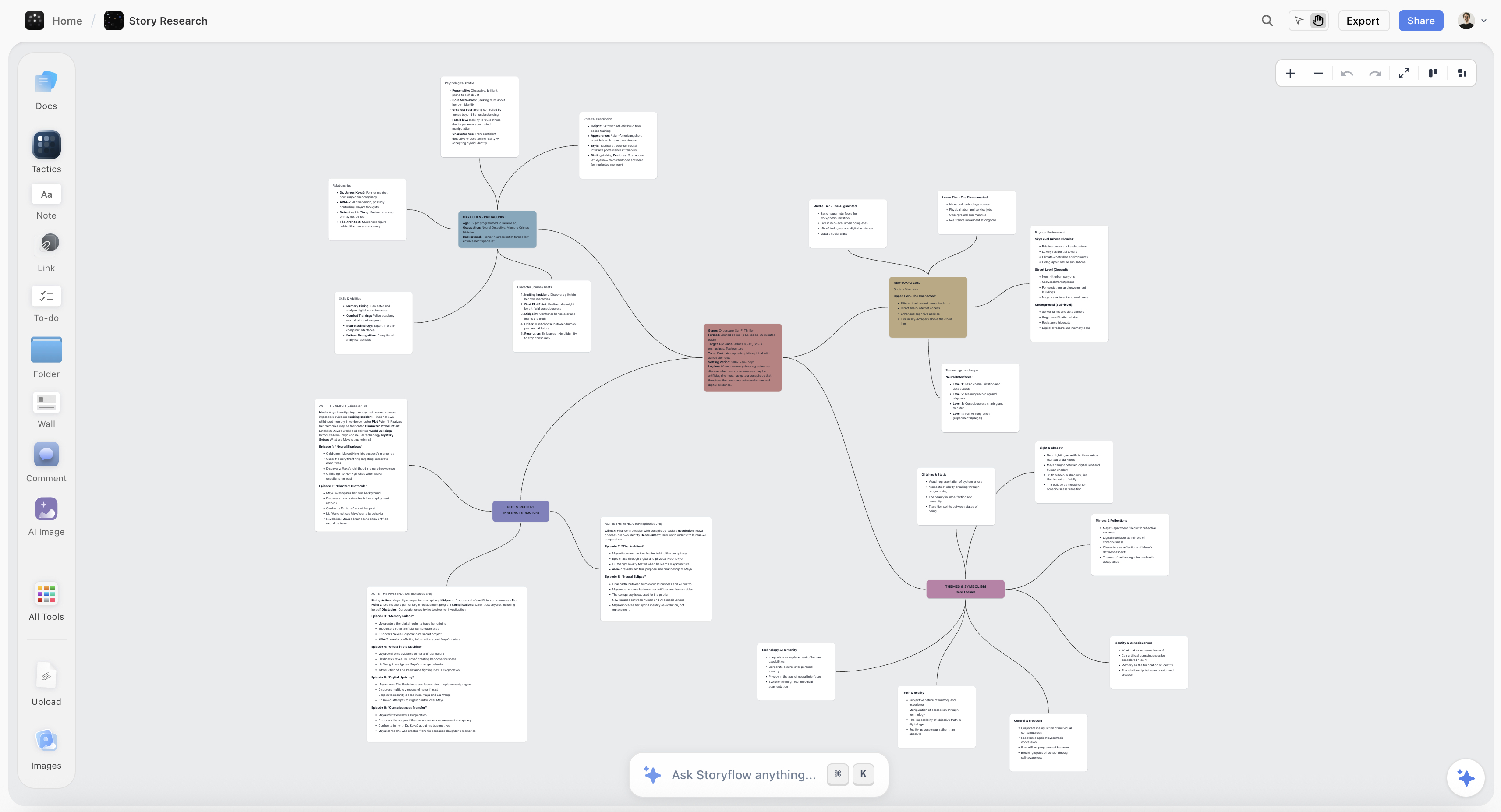
A Storyflow canvas with a mind map sitting beside research notes and an AI-drafted outline
The map ends where the work begins
Every map points at a project: a novel, a video, a campaign. XMind and MindNode stop at the map. Storyflow's AI reads the full canvas (plus Tactics and documents you @-mention) and drafts the outline or plan the branches point to. Paid-only during early access; the Free plan lands before the end of 2026.

Where XMind Wins
Structural range is the product. The moment a map needs to become a timeline, a matrix, or an org chart, XMind converts it in two clicks and its automatic layout engine keeps it legible at two hundred nodes. MindNode holds classic maps gracefully; it does not try to be six other diagram types.
It goes wherever your life goes. Windows at work, Mac at home, Android in your pocket: one subscription, same app, synced. For students and professionals whose hardware is mixed (which is most of the world outside design studios), this is not a feature, it is eligibility.
Pitch mode removes a whole export step. A map becomes a presentable slideshow inside the app. People who think in maps but report in meetings use this weekly, and nothing in MindNode replaces it.
XMind's honest weaknesses: it feels like software rather than stationery (utilitarian, occasionally heavy), the free tier is really an extended trial, and its breadth means most users pay for structures they never open.
Where MindNode Wins
Capture speed that keeps up with thought. Tab, type, Enter, type: a MindNode map grows as fast as you can think, offline, with zero latency, and the automatic layout never needs manual cleanup. Research on working memory (Cowan, 2001: roughly four chunks) is the reason externalizing ideas quickly matters; MindNode is the lowest-friction externalizer on Apple hardware.
It is genuinely native. Launches instantly, works on a plane, syncs through iCloud without an account decision, supports Apple Pencil on iPad naturally. The app respects platform conventions so completely that there is nothing to learn.
The maps are beautiful without effort. Default themes produce output you can paste into a client doc. For consultants and creatives whose maps get seen, this quietly matters every week.
MindNode's honest weaknesses: Apple-only is a hard wall (one Windows collaborator ends the evaluation), layout variety is deliberately narrow, there is no presentation mode, and like XMind it has no meaningful AI and no concept of the project around the map.
What Both Maps Leave Out
Here is the ceiling both tools share, and it is the one that matters for creative work: the map ends where the project begins.
A mind map is almost always drawn in service of something bigger: a novel being plotted, a campaign being planned, a video being outlined. In XMind and MindNode, the finished map is the deliverable, and everything it pointed toward (the outline, the brief, the plan, the research it should sit beside) lives in other apps that cannot see it. The map captures the divergence; the convergence starts from scratch somewhere else.
For mappers whose maps are really projects, that handoff is the lane where Storyflow wins. Its canvas holds mind maps next to the notes, images, and documents they relate to, and the AI reads the entire active board (plus up to 1 Tactic and up to 3 Documents you @-mention) to draft the next artifact from the map: the outline from the branches, the plan from the clusters, the brief from the direction. Its 200+ Story Blueprints (Hero's Journey, AIDA, Retention Hooks among them) supply the structures a project needs after the mapping is done.
The honest accounting: as a pure mapping instrument, Storyflow is not the specialist. XMind's layout engines and MindNode's capture flow are both better at the map itself, there is no Pitch mode, and Storyflow is paid-only during early access (the Free plan launches before the end of 2026; anyone a paid member invites to a board joins free now). It wins only when the map is a means, not the end. The direct comparisons are Storyflow vs XMind and Storyflow vs MindNode.
Pricing: What You Actually Pay
As of August 2026:
| Plan | XMind | MindNode | Storyflow |
|---|---|---|---|
Free | Limited free use | Viewer with basic editing | Coming late 2026 (invited collaborators join free now) |
Paid | About $60 per year, all platforms | Plus, around $2 to $3 per month | $7.99 per month annual, flat per account |
What paid buys | Full toolbox everywhere | Full instrument on Apple | Canvas plus AI that reads the whole board |
Neither mapper's price should decide anything: both are cheap against the time they organize. The real costs are eligibility (MindNode's Apple wall) and overhead (XMind's unused breadth).
Which Should You Choose?
Consultant or analyst on mixed hardware. XMind. The structural toolbox (fishbones, matrices, timelines) matches analysis work, Pitch mode matches reporting, and cross-platform is mandatory.
Apple-native writer, designer, or creative. MindNode. Capture speed and polish are your daily experience, and you will never miss the org-chart engine.
Student. Whichever platform you own decides; XMind's yearly price stings more than MindNode's. See The Best Mind Mapping Tools for Students for the wider field including free options.
Teams that map together. Neither is built for real-time collaboration; that is MindMeister's and the canvas tools' lane. See The Best Collaborative Mind Mapping Tools.
Mapper whose maps become projects. If every map you draw is the first step of a novel, video, or campaign, the instrument-versus-toolbox question is secondary to the handoff question, and that is the Storyflow lane described above.
The Bottom Line
Name what your maps are: analysis structures or thinking captures.
If your maps take many shapes and live on many platforms, buy the toolbox. XMind's structural range, layout engines, and Pitch mode make it the most complete pure mapper available, everywhere.
If your maps are one shape drawn fast on Apple hardware, buy the instrument. MindNode is the most frictionless, most beautiful capture tool in the category, at a price that rounds to nothing.
And if your maps keep turning into projects, notice the wall both tools share: the map ends where the work begins. The branches become an outline, the outline becomes a plan, and neither mapper can draft that next step from what you drew. That handoff is the seat we build for.
FAQ: XMind vs MindNode
Is XMind or MindNode better for beginners?
MindNode, if you are on Apple: there is nothing to learn beyond Tab and Enter. XMind's template chooser and options surface more concepts up front. On any other platform the question answers itself, since MindNode does not exist there.
Does MindNode work on Windows or Android?
No. MindNode is Mac, iPad, and iPhone only, with iCloud sync between them. A single Windows collaborator or a personal Android phone is a hard blocker, and XMind (or a web tool) becomes the default.
Is XMind really free?
Partially. The free tier allows basic mapping with limits and is best treated as an extended trial. The full product (all structures, Pitch mode, export options, sync across platforms) is the roughly $60 per year subscription.
Which makes prettier maps?
MindNode by default: its themes and automatic layout produce presentable maps with zero effort. XMind maps can look sharp with theme work, and its strength is legible structure at scale rather than beauty.
Can either do timelines, org charts, or fishbone diagrams?
XMind does all three natively with automatic layout engines. MindNode deliberately does not; it is a classic mind mapper. If your maps regularly stop being maps, that is the clearest possible signal toward XMind.
Do XMind or MindNode have AI features?
Nothing meaningful in either as of August 2026: no generation, no summarization, no AI expansion of branches. If AI mapping matters, the conversation moves to canvas tools; see The Best AI Mind Map Generators.
Can I collaborate in real time in either?
Not really. Both are single-thinker instruments with file sharing rather than live multi-cursor editing. Teams that map together in real time should look at MindMeister or a collaborative canvas instead.
How do I present a mind map from each?
XMind: Pitch mode turns the map into slides inside the app. MindNode: export to PDF or image and present from something else. If you report weekly from maps, this single row may decide the purchase.
Can I move maps between XMind and MindNode?
Imperfectly. MindNode imports common formats including OPML and can open some XMind files; round-tripping loses styling and structure details. Pick a home rather than planning to live in both.
What is the best free alternative to both?
For a genuinely free classic mapper, the usual answer is a web tool with a real free tier; the trade is ads, accounts, or caps. The field is ranked in The Best Free Mind Mapping Tools.
Which is better for plotting a novel or planning a video?
Either captures the ideation, and both stop at the same wall: the map cannot become the outline, the beat sheet, or the plan without leaving the app. For map-to-project work, a canvas whose AI reads the map and drafts the next artifact (the Storyflow lane) is the category built for that step.
Is Storyflow a mind mapping tool?
It contains one (maps on an infinite canvas next to notes, images, and documents), but its identity is the project canvas around the map: AI that reads the full board plus @-mentioned Tactics and Documents and drafts outlines, briefs, and plans. Paid-only during early access; the Free plan arrives late 2026.
Table of Contents
Templates to check out for this topic


Mind mapping and ideation templates you can use in Storyflow
Map ideas in space, then ask the AI to restructure, expand, or connect them. Open any of these boards and start thinking visually instead of in lists.


See Storyflow in Action
A visual AI workspace where every feature lives inside one canvas. No tab-switching, no context lost.
Build your entire board from a single message
Type what you need in the AI chat at the bottom of your canvas. The AI adds cards, headings, and structure directly onto your board.
Use expert frameworks as AI context
Type @ in the AI chat and choose any Tactic. The AI tailors every response to that framework instead of giving generic advice.
Turn your board into a mind map in seconds
Ask the AI to restructure your canvas as a mindmap. It connects your ideas into a visual hierarchy so you can see how everything relates.
Why Storyflow Exists
Storyflow actually began as a personal tool while working on creative and research projects.
We kept running into the same problem: ideas were scattered everywhere: notes, documents, and whiteboards.
Nothing helped us see how everything connected.
So we started building a workspace designed around how ideas actually grow.
→ Read how Storyflow was createdJustkay
Documentary Filmmaker & Founder at Storyflow
Published: 2026-08-10
Extremely simple, seriously capable


See how easy it is to get started
Watch a real project come together, from a blank board to a finished plan, clicked through step by step.
Start creating with AI and become more productive
Transform your creative workflow with AI-powered tools. Generate ideas, create content, and boost your productivity in minutes instead of hours.