The 10 Best Mind Mapping Tools for Students in 2026 (Tested for Real Studying)
Most mind mapping software was built for managers, not students. We tested 10 tools to find which actually help with thesis work, lecture revision, and exam prep in 2026: AI that reads your sources, free plans students can live on, and pricing that makes sense for a course-loaded semester.

Category
Visual Thinking
Author

Justkay
Documentary Filmmaker & Founder at Storyflow
Topics
2026-05-09
•
14 min read
•
Visual Thinking- best mind mapping tools for students 2026
- mind mapping software students
- AI mind mapping for thesis
What is the best mind mapping tool for students in 2026?
Storyflow is the best mind mapping tool for students in 2026 (best for thesis-level work: its AI reads your full board plus @-mentioned sources before answering). MindMeister is best for traditional radial maps, Coggle for free browser-based maps, and XMind for presentation-ready output.

I tested mind mapping tools while writing a thesis on documentary storytelling as a film student. Most of them are built for managers running team retros, not students wrestling with a 60-page lit review. The ones I actually kept open during revision week behaved differently. They held source PDFs near the branch they supported, pulled context from notes I had already taken, and survived the moment a deadline collapsed and I had to restructure two chapters in one night. The rest produced a tidy diagram and not much else. The full breakdown of which tool earned which slot, and why three of them surprised me, is below. Read on before you commit to a subscription with a free tier you will outgrow by week three.
All 10 Mind Mapping Tools for Students, Ranked
- Storyflow: best overall for thesis-level work, AI reads the full canvas plus @-mentioned sources
- MindMeister: best traditional radial mind mapping for students
- XMind: best polished maps for thesis defenses and presentations
- Coggle: best free browser-based maps for shared computers
- Mindomo: best education-specific assignment workflows
- SimpleMind: best mobile-first capture between classes
- MindMup: best free zero-friction maps for exam prep
- Whimsical: best for CS and design students mixing maps, flowcharts, and wireframes
- FreeMind: best free open-source option for power users
- Lucidchart: best for engineering diagrams plus occasional mind maps
Full disclosure: Storyflow is our own product, and we rank it #1 for one job: thesis-level mind mapping where the AI reads your full canvas plus the sources you @-mention before it answers. For fast, keyboard-first radial maps MindMeister is stronger, and on a shared or locked-down school computer Coggle's free browser maps are the easier pick. Storyflow's free plan caps basic AI usage rather than giving it away without limit, so if you just need a quick offline map for exam prep, a lighter tool like FreeMind does that job. We link to every tool so you can judge the fit.
Quick Comparison: Best Mind Mapping Tools for Students
These four cover what students actually pick a mind mapper for: thesis-level work with AI context, fast traditional radial maps, free browser maps on shared computers, and presentation-ready output.
| Tool | Best For | AI Features | Price |
|---|---|---|---|
| Storyflow | Thesis-level mind mapping with AI context | Reads full board + @-docs and Tactics | $7.99 mo annual (free plan late 2026) |
| MindMeister | Traditional radial mind mapping | Limited AI | Free / $5.99 mo |
| Coggle | Free browser maps on shared computers | None, collaboration-focused | Free / $5 mo |
| XMind | Polished maps for presentations | None, structure-focused | Free / $59.99 yr |
Quick Picks: Best Mind Mapping Tools for Students 2026 by Use Case
Best for thesis-level project work: Storyflow Storyflow is the only mind mapping workspace I tested where the AI reads the full canvas before it answers. Drop your thesis abstract, lit review notes, and chapter mind map onto one board, @-mention a source Document and a research Tactic from the Story blueprints library, and ask it to find the gap in your argument. The responses land differently when the AI has actually read your work, not just the node you clicked. Plus is $7.99/month billed annually. The friction worth naming first: the free tier includes unlimited projects, basic AI usage, 20 file uploads, which is fine for a thesis but tight if you are running mind maps for every course in a semester because of the AI cap.
Best traditional student mind mapping: MindMeister MindMeister is the most "what mind mapping looks like in a textbook" tool on this list. Branches radiate from a central topic, formatting is clean, and the export options are student-friendly. Free plan covers 3 maps. Paid plans start around $5.99/month with a student discount available in some regions. Limitation: branch-only structure means it does not handle freeform research where ideas live in clusters, not hierarchies.
Best polished maps for presentations: XMind XMind produces the cleanest visual output of any mind mapping tool I tested. If you are presenting your thesis defense or a class project, XMind exports look like they belong on a slide. Free plan exists with limited templates. Pro is around $59.99/year. Limitation: minimal real-time collaboration, no AI that understands your project context.
Best free browser-based for students: Coggle Coggle runs in the browser, is free for unlimited public maps, and lets you work without installing anything. For students on shared computers in a library or lab, that matters. Free plan includes unlimited public diagrams and 3 private. Limitation: feels dated, AI is functionally absent, and the export options are basic.
Best education-specific mind mapping: Mindomo Mindomo is the most explicit about being a learning tool. It has assignment workflows, teacher-student review features, and templates designed around academic structures. Free plan with 3 maps. Education plans available for institutions. Limitation: the interface is heavier than tools designed for individual creative work.
Best mobile-first for note-taking students: SimpleMind SimpleMind is genuinely good on a phone. For students who think during a commute and want to capture branches between classes, the mobile-first design holds up. Free desktop version with limits. Mobile and full versions are paid one-time purchases. Limitation: no real AI and limited collaboration features.
Best free quick-map tool: MindMup MindMup is the fastest "click to start a map" experience on this list. No account needed for the free version. Useful for cramming sessions when you need to dump a chapter into a diagram before an exam. Free plan with 100KB per map limit, paid Gold around $2.99/month. Limitation: aggressive map size limits and no document integration.
Storyflow's AI reads everything currently on your canvas. @-mention a source document and a research Tactic in the same AI chat, and it has full project context before it responds. For thesis-level project work, that context gap is the whole game. The free plan is enough to test this on one project, so put your current thesis chapter on a Storyflow board for a week and ask the AI to find the gap in your argument.
Comparison Table: Best Mind Mapping Tools for Students 2026
| Tool | Best For | Starting Price | Free Plan | Student Workflow Fit (★/5) | Rating (/10) |
|---|---|---|---|---|---|
Storyflow | Thesis-level project mind mapping with AI context | $7.99/month annual | Coming late 2026 (invited collaborators join free now) | ★★★★★ | 9.2/10 |
MindMeister | Traditional branch-based student mind mapping | $5.99/month | Yes (3 maps) | ★★★★☆ | 8.4/10 |
XMind | Polished maps for thesis defenses and presentations | $59.99/year | Yes (limited templates) | ★★★★☆ | 8.2/10 |
Coggle | Free browser-based maps for shared computers | Free / $5/month | Yes (unlimited public) | ★★★☆☆ | 7.8/10 |
Mindomo | Education-specific assignment workflows | $5.50/month | Yes (3 maps) | ★★★★☆ | 7.7/10 |
SimpleMind | Mobile-first capture between classes | $39.99 one-time | Yes (limited desktop) | ★★★☆☆ | 7.5/10 |
MindMup | Free quick-map exam prep | $2.99/month | Yes (100KB maps) | ★★★☆☆ | 7.2/10 |
Whimsical | Lightweight visual thinking for CS and design | $10/editor/month | Yes (4 boards) | ★★★☆☆ | 7.1/10 |
FreeMind | Free open-source for power students | Free | Yes (fully free) | ★★★☆☆ | 6.8/10 |
Lucidchart | Process and engineering diagrams plus mind maps | $7.95/user/month | Yes (3 documents) | ★★★☆☆ | 6.7/10 |
Rating criteria: Student workflow fit was weighted most heavily (30%) because most mind mapping tools are designed for office use cases that map poorly onto a thesis. AI depth and context awareness (20%), pricing and free plan honesty (20%), ease of use on day one (15%), collaboration (10%), and export and integration with study tools (5%).
Storyflow leads on AI because its student workflow fit ties to narrative and research context awareness no other tool on this list offers. MindMeister leads on traditional mind mapping execution. The gap between them is what you value: AI-aware research and thesis development, or clean radial diagrams that look like the textbook image.

Storyflow holds thesis branches, source documents, and Story blueprints on a single connected canvas
How Mind Mapping Helps Students in 2026
The mind map is older than your laptop. Tony Buzan formalised the technique in the 1970s, and the underlying idea is older still. The point of a mind map is not the diagram. The point is what the diagram does to working memory. Cowan's 2001 review of working memory put the typical capacity at around four chunks of information held at once. A mind map externalises chunks onto a canvas so working memory can reason across more of them than it could hold alone. This is why a mind map feels different from a linear outline. It is not a different format. It is a different cognitive load.
Most mind mapping software was built for an office worker brainstorming a product launch, not a student trying to hold a 60-page lit review in their head while writing chapter three. The student workflow has different demands. Sources need to live near the branches they support. The same map gets opened, expanded, and restructured over weeks or months as the argument evolves. Course work overlaps with research projects, which overlap with exam revision. A free plan that caps you at three maps stops being free the moment you take five courses.
It is not a productivity tool. It is a thinking tool. The difference matters when you are evaluating which one to spend a semester on.
How We Evaluated the Best Mind Mapping Tools for Students 2026
I started a real thesis project from scratch in each tool: 12 weeks of documentary storytelling research with around 40 source PDFs, three chapter outlines, and a defense presentation at the end. Five criteria determined every rating. Here is what each test specifically involved.
Student workflow fit: I tested whether the tool held up across three modes that students actually use mind maps in: lecture revision (fast capture during a class), thesis development (slow growth over months), and exam preparation (cramming a syllabus into one map the night before). Tools that handled one mode well but collapsed in another scored lower.
AI depth and context awareness: I tested whether the AI in each tool could reason across the project, not just the node I had selected. The test prompt: "Find the gap in my argument across the three chapters on this canvas." Tools that needed the full prompt copy-pasted into them scored lower than tools that read the canvas directly.
Pricing and free plan honesty: I checked what each free plan actually allows for a student running multiple courses, and what the paid plan unlocks. Free plans that look generous on the marketing page but cap you at three maps in week two were called out.
Ease of use on day one: I measured time to first usable map, toolbar friction, and whether the basic gestures for adding, restructuring, and reorganising branches felt natural or required tutorials.
Collaboration and export: I tested real-time editing for group projects, comment threads for advisor feedback, and export options for handing a map to a professor as a PDF or image. Storyflow includes unlimited shared boards and unlimited collaboration even on the free plan. The Max tier adds a team workspace with roles and permissions, which is the honest framing rather than implying every tier is built for institutional group work.
Every tool on this list was tested with real thesis work, not feature checklists pulled from marketing pages.
Put your thesis on a board the AI can actually read
Generate a first mind map from your research question, then drop your chapter notes and sources onto the same board and ask the AI to find the gap in your argument.

Detailed Reviews: Best Mind Mapping Tools for Students 2026
1. Storyflow
Storyflow is a visual AI workspace built for creators, students, and strategists who need their ideas, structure, and execution inside one project. It is not purpose-built for radial mind mapping the way MindMeister is. It is built for the thinking that mind mapping is one part of: the brief, the research framework, the source documents, the chapter outline, and the working draft all living on the same connected canvas.
That distinction matters most during thesis-level project work. In MindMeister, your mind map is a sequence of branches with no awareness of the source PDFs or chapter notes that produced them. In Storyflow, your branches sit on the same canvas as a research Tactic from the Story blueprints library, your literature notes Document, and your visual references. The AI reads all of it when you ask a question about the structure or gaps in your argument.
Best for: Students working on theses, capstones, dissertations, or year-long research projects where the mind map is part of a larger development process, not a deliverable on its own.
Key features:
Infinite canvas with spatial mind mapping. Storyflow's whiteboard lets you arrange branches, source notes, reference images, and frameworks spatially on an unlimited canvas. There is no fixed radial structure. You can cluster ideas by chapter, separate research threads into distinct areas, or expand the map into a full thesis outline on the same board. The unlimited scale means you are never restructuring files to make room for chapter four.
Story blueprints for academic structure. Add a research Tactic from the Story blueprints library and it creates a guided structure: research question, hypothesis, literature gap, methodology, findings. Each card has AI assistance grounded in the framework. For a student building a thesis alongside the source map, this changes the quality of structural decisions. You are placing branches inside an academic architecture you can see and edit, not guessing at chapter order from a blank canvas. The fastest way to see this is to skip the blank board: open the Mindmap template for the chapter map, or the Documentary Research template if your project is source-heavy, and the board opens with structure the AI can already read.
AI chat reads the full canvas and @-mentioned context. Open AI chat on a Storyflow canvas and the AI reads everything on the current board. @-mention up to three source Documents and one Tactic to give it complete project context. Ask it to identify the weak link in chapter two, suggest counterarguments your lit review missed, or summarise the through-line across three chapters. The responses land differently when the AI has read the abstract and the sources, not just the current node.
Documents connected to the board. Write your draft, lit review, or research notes as Documents inside the same project. They live alongside the whiteboard, not in a separate app. During AI chat, you can @-mention up to three Documents alongside one Tactic, which means your draft and source notes are both available to the AI simultaneously.
Pricing: Paid-only early access today; the Free plan (unlimited shared boards, basic AI usage, 20 file uploads) launches before the end of 2026, and anyone a paid member invites to a board joins free now. Plus: $7.99/month billed annually or $9.99/month billed monthly (full 200+ Story blueprints, unlimited file uploads). Pro: $14/month billed annually or $19/month billed monthly (adds AI image generation and 20× more AI than Plus). Max: $39/month billed annually.
Pros:
- The only student mind mapping environment where AI has context from your sources, draft, and research framework before it responds
- Research Tactics from the Story blueprints library teach academic structure while you build the actual project map
- Unlimited canvas removes space constraints as research expands across multiple chapters
- Pro is reasonable for a thesis year and the student-relevant features (AI image generation, 20× more AI than Plus, full 200+ Story blueprints library) sit on the individual Pro tier, not a higher institutional plan
Cons:
- The free tier includes unlimited projects, basic AI usage, 20 file uploads. Fine for evaluating Storyflow on one thesis, tight on AI usage if you want heavy AI generation across every course in a five-course semester. A student doing AI-heavy course work across many subjects might want to upgrade.
- No native flashcard or spaced-repetition view. Students preparing for exams with active recall workflows will need a tool like Anki alongside Storyflow.
- Shared boards and collaboration work on every tier, but the team workspace with roles and permissions is a Max feature. Solo students do not need it. Larger group projects that want managed access do.
Verdict: Storyflow is the right choice for a student running a thesis, dissertation, or capstone project where the mind map is one part of an evolving research process. If your work has a brief, a draft, sources, and a structural framework that all need to stay connected, Storyflow's AI canvas context is the feature no other tool on this list matches. For a one-off mind map of a chapter the night before an exam, MindMup or Coggle is faster.
2. MindMeister
MindMeister is the most "this is what a mind map should look like" tool on this list. Open a new map and a central node sits in the middle of the screen, ready for branches. Press Tab to add a child, Enter to add a sibling. The keyboard shortcuts feel built for momentum.
For students who learned mind mapping from a Tony Buzan book or a study skills course, MindMeister behaves the way the diagram in the textbook behaves. Radial structure, clean colour-coded branches, image attachments per node. The export options include PDF, image formats, and outline view.
Best for: Students who want a traditional radial mind mapping experience with a strong free tier and a low-friction paid upgrade.
Key features:
Pure radial mind mapping with strong keyboard shortcuts. MindMeister is a keyboard-first tool. Once the shortcuts click, you can build a 50-branch map without taking your hand off the keys. For exam revision sessions where speed matters more than visual polish, this is the workflow MindMeister wins.
Outline view for switching to linear writing. Toggle from map view to outline view and the same content shows as a hierarchical document. For students who think in maps but write in outlines, the toggle is genuinely useful. The same data drives both views.
MeisterTask integration for turning maps into task lists. A branch can become a task in MeisterTask. For a group project where the mind map is the planning phase and execution moves into a task system, the integration is the cleanest of any tool on this list.
Pricing: Free plan with 3 maps. Personal at around $5.99/month. Pro at around $8.25/month. Student discounts available in some regions.
Pros:
- The cleanest radial mind mapping experience with keyboard-first speed
- Pricing is among the most student-friendly on this list
- Outline view solves the "I think in maps, I write in outlines" problem natively
- Strong export options including PDF and image formats for assignment submission
Cons:
- AI features exist but are limited to text generation per node, with no awareness of the rest of the canvas
- Three-map free tier is restrictive for students taking multiple courses
- Branch-only structure does not handle freeform research where ideas cluster instead of branch
- No native source document storage. PDFs and source notes live in another app
Verdict: Use MindMeister when the mind map is the deliverable and a clean radial diagram is what you need. Skip it when the map is a layer inside a larger thesis project that includes source documents, an evolving draft, and structural frameworks. The cleanest tool for the textbook version of mind mapping.
3. XMind
XMind produces the most polished visual output of any tool I tested. If your mind map is going on a slide for a thesis defense, a presentation in front of a class, or a chapter introduction, XMind exports look intentional. The themes, fonts, and visual hierarchy feel designed by someone who cares about how diagrams look.
Beyond the visual polish, XMind supports multiple structural formats: classic mind map, logic chart, tree, fishbone, matrix, timeline, and org chart. For students moving between subjects where one chapter calls for a fishbone and the next calls for a hierarchy, XMind handles both inside one tool.
Best for: Students who present their work visually: thesis defenses, design and architecture students, anyone whose mind map ends up on a slide.
Key features:
Multiple structural formats inside one map. Switch a map from radial to fishbone to matrix without rebuilding. For a student running a methodology comparison, this format flexibility is rare on this list.
Strong export options for presentations. PDF, PNG, SVG, and direct PowerPoint export. The output looks like a designed slide, not a screenshot of a diagram.
Pitch mode for live presentation. Present your mind map node by node in fullscreen mode. For a thesis defense where you walk a committee through your argument, this is a presentation feature most mind mapping tools do not have.
Pricing: Free with limited templates. Pro at around $59.99/year (around $5/month annualised).
Pros:
- The best visual output of any tool on this list, ready for slides without manual reformatting
- Multiple structural formats handle a wider range of academic diagrams than radial-only tools
- Pitch mode is genuinely useful for thesis defenses and class presentations
- Annual pricing is reasonable for students who use it across a degree
Cons:
- Real-time collaboration is limited compared to web-first tools
- AI assistance is minimal and does not read project-wide context
- The desktop-first feel can be heavy for quick capture during a lecture
Verdict: XMind is the right tool when your mind map needs to look professional in a presentation or thesis defense. For working drafts that change weekly, lighter tools like MindMeister or Storyflow keep up better with how research actually moves.
4. Coggle
Coggle is a browser-based mind mapping tool that has stayed deliberately simple since it launched. The free plan allows unlimited public diagrams and three private maps. For students on shared library computers, on a Chromebook, or on any device where installing software is not an option, Coggle is one of the few tools that just works.
The map interface is clean and the gesture for branching feels natural. You drag from a node to create a child, and the line curves automatically. The visual style is friendly without being cluttered.
Best for: Students who need a free, browser-based tool for one-off study maps and small group collaboration.
Key features:
Browser-only, no install. Works on any computer with Chrome, Safari, Firefox, or Edge. For students on locked-down lab machines, this matters.
Unlimited free public maps. If you do not mind your map being publicly accessible, the free tier covers unlimited diagrams. For class notes and topic summaries, the public option is fine.
Real-time collaboration on the free tier. Invite classmates to a map and edit together. Few free tools include real-time multi-user editing.
Pricing: Free for unlimited public maps and 3 private maps. Awesome plan at around $5/month for unlimited private maps and image uploads.
Pros:
- One of the few free tools with real-time collaboration on the free tier
- Browser-only access works on any student device
- The interface is friendly to first-time mind mappers
- Clean export to PDF and image formats
Cons:
- The interface feels dated compared to newer tools
- AI is functionally absent
- Limited structural options. Radial only.
- No document storage or source-PDF integration
Verdict: Coggle is the right tool for free, fast, browser-based study maps and small group collaboration. For thesis-level work where AI context and document integration matter, the limitations show quickly.
5. Mindomo
Mindomo is the most education-specific tool on this list. The marketing speaks directly to teachers and students. Features include assignment workflows where teachers can create a starter map, students fill it in, and the teacher reviews submissions inside the platform.
For students at institutions that have a Mindomo subscription, the integration with learning management systems and the assignment-specific features make it a natural choice. For students choosing a tool independently, the education focus can feel heavier than a creative-thinking tool.
Best for: Students at institutions that already use Mindomo, and students who want education-specific templates and workflows.
Key features:
Assignment workflows for teacher-student review. Teachers can create assignment maps, students complete them, and review happens inside the platform. The workflow is rare on this list.
Education-specific templates. Templates for essay planning, research projects, lab reports, and exam revision. For students who want a starting structure, the templates are useful.
LMS integrations. Mindomo integrates with Google Classroom, Microsoft Teams for Education, Schoology, and Moodle. For institutions running a single LMS, the integration removes a workflow step.
Pricing: Free plan with 3 maps. Personal at around $5.50/month. Education plans for institutions.
Pros:
- The most explicit student and education focus on this list
- Strong LMS integrations for institutional use
- Assignment workflow is a rare and useful feature
- Decent variety of structural formats including radial, tree, and organisational
Cons:
- The interface feels more functional than inspiring for individual creative work
- AI features are limited compared to AI-first tools
- Free plan caps at 3 maps, which is restrictive for course load
Verdict: Mindomo is the right tool for institutional use and education-specific workflows. For independent thesis work where the student is the project owner, lighter or more AI-aware tools fit better.
6. SimpleMind
SimpleMind is the most mobile-friendly tool on this list. The phone and tablet experience is genuinely good. For students who think during a commute, between classes, or during the walk home from a lecture, capturing a branch on a phone is fast and reliable.
The desktop version syncs with mobile, so a thought captured on a phone shows up on the laptop later. The cross-platform sync is the feature that distinguishes SimpleMind from desktop-first or mobile-first competitors.
Best for: Students who do their best thinking outside their desk: on the train, walking, or in cafes between classes.
Key features:
Mobile-first design. The phone and tablet apps are designed for thumb-driven mind mapping, not adapted from a desktop interface.
Cross-platform sync. Maps move between phone, tablet, and desktop without conversion friction.
One-time purchase model. Pay once for the app, no subscription on most platforms. For students avoiding monthly bills, this matters.
Pricing: Free desktop version with limits. Mobile and full versions are paid one-time purchases at around $39.99 for the full edition.
Pros:
- The best mobile mind mapping experience on this list
- One-time purchase pricing avoids subscription fatigue
- Cross-platform sync is reliable and unfussy
- Capture-on-the-go workflow suits students who think in motion
Cons:
- AI features are minimal
- Real-time collaboration is limited
- The desktop interface, while functional, is not as polished as web-first tools
- No deep document integration
Verdict: SimpleMind is the right tool for mobile-heavy students who want capture-anywhere reliability without a subscription. For thesis-level project work that lives mostly on a laptop with AI assistance, other tools fit better.
7. MindMup
MindMup is the fastest "click to start a map" experience on this list. No account required for the free version. Open the site, click the centre node, type, and you are mind mapping. For exam prep or cramming a chapter the night before, the zero-friction start matters.
The free tier has a 100KB per-map size limit, which is fine for a single-topic study map but constrains larger projects. The Gold tier removes the limit and adds Google Drive integration.
Best for: Students who need a quick free map for a single study session without account setup.
Key features:
No-account free tier. Start a map without signing up. For one-off use, this is rare.
Google Drive integration on paid tier. Save maps to Google Drive at the Gold tier. For students living in Google Workspace, the integration is convenient.
Outline view. Switch from map to outline for linear note-taking.
Pricing: Free with 100KB map size limit. Gold at around $2.99/month. Personal at around $20/year.
Pros:
- The fastest start of any tool on this list
- No-account free tier is rare and useful for one-off use
- Pricing is among the lowest on this list
- Clean and simple interface with no learning curve
Cons:
- The 100KB free map size limit is reached faster than expected on dense topics
- No real AI capabilities
- Limited collaboration features
- Visual polish is below newer tools
Verdict: MindMup is the right tool for free, fast, zero-friction maps for exam prep and quick study sessions. For sustained thesis work, the size limits and missing AI become real constraints.
8. Whimsical
Whimsical was built for product designers and UX teams, not students. But its lightweight, fast interface has been adopted by computer science and design students who want a tool that makes mind maps, flowcharts, and wireframes inside one workspace.
The mind mapping module is one of several. For a CS student mapping an algorithm and then sketching a UI flow in the same project, Whimsical handles both without context switching.
Best for: Computer science, design, and engineering students who need flowcharts and wireframes alongside mind maps.
Key features:
Multiple visual thinking formats in one workspace. Mind maps, flowcharts, wireframes, sticky notes, and sequence diagrams in the same canvas.
Fast and minimal interface. The tool is designed for speed. Frame creation, branch addition, and arrow drawing are smooth.
Strong export and embed options. Embed Whimsical boards into Notion, Figma, and other tools cleanly.
Pricing: Free plan with 4 boards. Pro at around $10/editor/month.
Pros:
- The best multi-format visual thinking tool for students whose work crosses mind maps, flowcharts, and wireframes
- Fast and pleasant to use
- Strong integrations with the tools designers and CS students already use
- Solid free tier for individual project work
Cons:
- Mind mapping is one of several modules, not the primary focus
- AI features are limited compared to AI-first tools
- Pricing is per editor, which is high for solo students
Verdict: Whimsical is the right tool for CS and design students whose visual thinking spans multiple formats. For pure mind mapping in humanities or research-heavy disciplines, the broader feature set is more than you need.
9. FreeMind
FreeMind is the open-source veteran. Originally released in 2000, it predates most tools on this list by a decade or more. The interface looks its age, but for power students who want full control, scriptable customisation, and zero subscription cost, FreeMind still works.
It is a desktop application, written in Java, that runs on Windows, Mac, and Linux. The map files are XML, which means a FreeMind map can be parsed and processed by other tools or exported into custom formats.
Best for: Computer science students, technically inclined power users, and anyone who wants a scriptable mind mapping tool with no subscription.
Key features:
Fully open source. No subscription, no account, no telemetry. Source code is available.
XML file format. Map files are human-readable XML, scriptable, and version-controllable in Git.
Cross-platform desktop. Runs on every major desktop OS through Java.
Pricing: Free.
Pros:
- Genuinely free with no upsell
- Scriptable and version-controllable file format
- Works offline indefinitely
- No telemetry or account requirement
Cons:
- The interface is dated
- No AI, no cloud sync, no collaboration
- Java dependency makes installation friction higher than browser tools
- No active commercial development
Verdict: FreeMind is the right tool for power students who want full control, scriptability, and no subscription. For everyone else, modern tools have moved the bar far enough that FreeMind feels like a museum piece with the lights still on.
10. Lucidchart
Lucidchart is a diagramming platform built for engineering and process documentation. Mind mapping is one of many diagram types it supports. For engineering students producing flowcharts, system diagrams, and process maps for class projects, Lucidchart handles all of them in one tool with a usable mind mapping module on top.
The free tier allows three documents and limited shapes. For students who only occasionally need a mind map but regularly need other diagrams, the breadth makes Lucidchart worth the slot.
Best for: Engineering, IT, and process-focused students who need diagrams beyond just mind maps.
Key features:
Multiple diagram types in one tool. Flowcharts, ERDs, UML, network diagrams, and mind maps in one workspace.
Strong integration with Google Workspace and Microsoft 365. Embed Lucidcharts into Docs, Slides, and Office files.
Templates for technical diagrams. Pre-built templates for engineering and CS course work.
Pricing: Free plan with 3 documents. Individual at around $7.95/user/month. Team plans available.
Pros:
- The breadth of diagram types is unmatched on this list for engineering students
- Office and Google Workspace integration is strong
- Templates accelerate technical course work
Cons:
- Mind mapping is not the focus of the tool
- The interface can feel heavy for pure mind mapping use cases
- Pricing is higher than dedicated mind mapping tools
- AI features are limited
Verdict: Lucidchart is the right tool for engineering and process students whose diagram needs go beyond mind maps. For students focused on mind mapping alone, dedicated tools deliver a cleaner experience.

AI Planner converts a mind map into a phased study plan or thesis chapter outline

Kanban view tracks chapter drafts and study tasks without leaving the mind map project
How to Choose by Subject
The right mind mapping tool depends on what you study, how your work moves, and where you do your thinking. A few patterns held up across testing.
Humanities, social sciences, and research-heavy disciplines. Storyflow if the project is thesis or dissertation scale and you need AI that reads your sources. A semester of readings, quotes, and lecture notes fits naturally in the Second Brain template, which keeps every source one canvas away from the map it supports. MindMeister if you want a clean radial map for a single chapter or topic. Coggle if you need a free browser-based tool for class notes.
STEM, engineering, and computer science. Whimsical if your work crosses mind maps, flowcharts, and wireframes. Lucidchart if you produce a wider range of technical diagrams. FreeMind if you want a scriptable file format you can process in code.
Design, architecture, and visual disciplines. XMind if your map ends up on a presentation slide. Storyflow if you need visual references and image branches alongside text. Whimsical if you switch between mind maps and wireframes inside the same project.
Mobile-heavy students. SimpleMind if most of your capture happens on a phone. Storyflow if your phone is for capture but your laptop is where the project lives.
Group projects. Storyflow Max plan for real-time collaborative co-editing on a connected canvas. Coggle for free real-time editing on simpler maps. MindMeister with MeisterTask for converting a planning map into team tasks.
It is not about finding the best tool. It is about finding the tool that matches how your studying actually works.

Storyflow Pro unlocks 200+ Story blueprints for thesis-level project work across subjects
The Bottom Line
The right mind mapping tool for a student in 2026 depends on the shape of the work. If your map is part of a thesis, dissertation, or capstone where sources, drafts, and structure all need to stay connected, Storyflow's AI canvas context is the feature no other tool on this list matches. The basic AI usage free cap is the friction worth knowing about up front. For thesis-level project work, that AI cap is enough. For a semester of AI-driven mapping across every course, Coggle or FreeMind covers more breadth on the free tier.
If you want a clean radial map for a chapter, a class topic, or an exam-prep session, MindMeister and XMind handle the textbook version of mind mapping better than anything else. If you want a free browser-based tool that just works on a library computer, Coggle is hard to beat. If your work crosses mind maps, flowcharts, and wireframes, Whimsical or Lucidchart cover the wider visual thinking surface.
It is not about finding the best mind mapping tool. It is about finding the one that matches how your studying actually moves. Start with the friction points in your current workflow, not with the feature lists on a marketing page. If your work is thesis-shaped, take your most active research project, generate a first mind map of it with AI, then rebuild it on a Storyflow board for one week on the free plan, and ask the AI to find the gap in your argument. The decision will be obvious by the end.
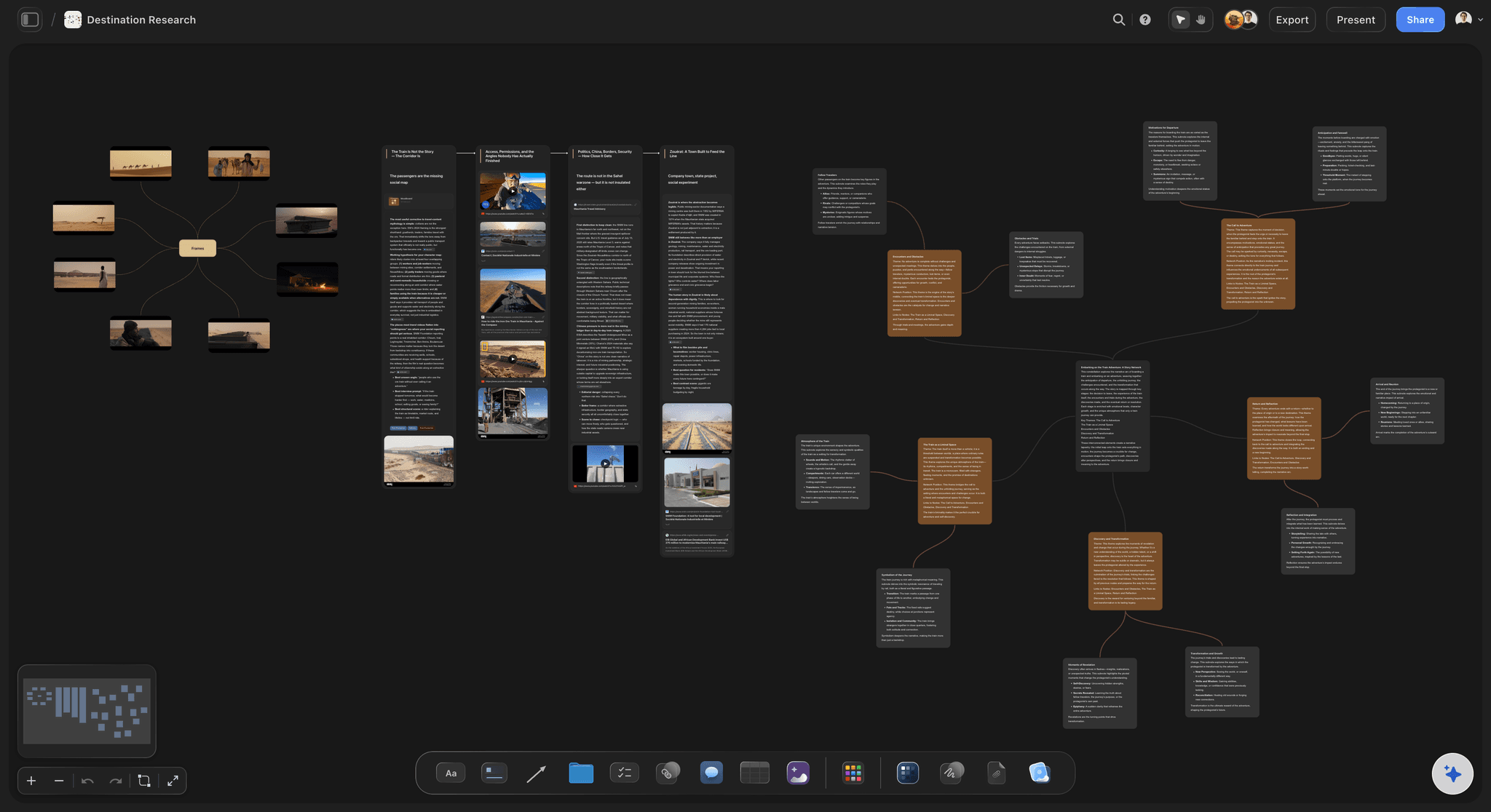
A research board in Storyflow: questions, source notes, and findings on one canvas the AI reads before it answers
FAQ: Best Mind Mapping Tools for Students 2026
What is the best mind mapping tool for students in 2026?
Storyflow is the best mind mapping tool for students working on thesis-level project work in 2026. Its AI reads the full canvas and @-mentioned source documents before responding, which is the feature most useful for sustained research. For traditional radial mind mapping with a strong free plan, MindMeister is the cleanest option. The right answer depends on whether the map is part of a larger evolving project or a one-off study diagram.
Is there a free mind mapping tool that is actually good for students?
Yes. Coggle is genuinely free for unlimited public maps and three private maps, with real-time collaboration included. MindMup offers a no-account free tier for quick study maps. Storyflow's Free plan, which launches before the end of 2026, will be unusually generous: unlimited boards, unlimited cards (notes, images, links), unlimited collaboration with as many study partners as you want, basic AI usage, and 20 file uploads. Enough for a thesis or major project, though students running AI-heavy mind mapping across five courses simultaneously will hit the basic AI cap. FreeMind is fully free as an open-source desktop app. None of the free tiers fully replace a paid plan for a year-long thesis, but several get a student through a semester.
Does Storyflow work for thesis writing and dissertation projects?
Yes, this is where Storyflow performs best for students. The AI reads the full active canvas, you can @-mention up to three source Documents and one Tactic in a single AI chat, and Documents live alongside the whiteboard inside the same project. For a thesis or dissertation that runs for months and grows through multiple chapters, the connected workspace removes the file-and-tab juggling that fragments most student research workflows.
What is the difference between mind mapping and brainstorming?
Mind mapping is a structured visual representation of relationships between ideas, usually radiating from a central topic. Brainstorming is the process of generating ideas, often without structure or filtering. A mind map can be the output of a brainstorm, but the two are not the same. Mind mapping helps with retention, recall, and seeing relationships. Brainstorming helps with quantity and divergent thinking. Most students benefit from doing brainstorming first, then organising the output into a mind map.
Can AI mind mapping tools replace traditional studying?
No. AI mind mapping tools accelerate certain parts of studying, but the cognitive benefit of mind mapping comes from the act of building the map yourself. Cowan's 2001 work on working memory shows that externalising chunks onto a canvas extends what you can reason across. The retention benefit comes from the construction, not the consumption. AI is most useful for finding gaps in your map after you have built it, not for building it for you.
What is the best mind mapping tool for exam preparation?
For fast exam-prep maps, MindMup or Coggle. Both let you start a map quickly and produce a usable diagram within minutes. For longer exam preparation across a term, MindMeister's outline view helps you switch between visual mapping and linear study notes. For students who want AI to generate practice questions from their own map, Storyflow's AI chat works well when you @-mention your source notes alongside the map.
How does mind mapping help with note-taking in lectures?
Mind mapping during a lecture forces you to identify relationships between ideas in real time, which is harder than transcribing what the professor said. The result is a smaller, more usable artefact that aids retention better than a verbatim transcript. Tools with strong keyboard shortcuts (MindMeister, Storyflow) keep up with lecture pace. Mobile-friendly tools (SimpleMind, Storyflow) let you take a quick photo of a slide and drop it onto the relevant branch.
Is mind mapping actually proven to help studying?
Mind mapping draws on cognitive science research on working memory and external representation. Cowan's 2001 review put working memory capacity at around four chunks of information. Mind maps externalise chunks onto a canvas so reasoning can happen across more of them than working memory holds alone. Tony Buzan, who formalised the modern mind mapping technique, made empirical claims that have been debated, but the underlying cognitive principle of external representation is well supported in the broader literature.
Can I use Storyflow's free plan for a full semester?
For evaluating Storyflow on one major project, yes. For running AI-heavy mind maps and projects across five simultaneous courses, the basic AI usage cap on the free plan is the friction point worth naming. A student doing AI-heavy course-level work across many subjects might prefer a tool with no AI cap on the free plan, like Coggle for browser-based maps or FreeMind for desktop. Storyflow shines for thesis-level project work where the AI canvas context, Story blueprints, and connected Documents matter more than running a separate map per course.
What mind mapping tool should I pick if I have never used one before?
Start with MindMeister or Coggle. Both have low learning curves, free tiers that cover a first project, and clean interfaces that match the textbook idea of what a mind map is. Once you have built three or four maps and know how you actually work, evaluate whether you need AI canvas context (Storyflow), polished presentation output (XMind), or multi-format visual thinking (Whimsical). Picking the most powerful tool first is the most common student mistake. Picking the simplest tool first and outgrowing it is faster.
Table of Contents
- Quick Picks: Best Mind Mapping Tools for Students 2026 by Use Case
- Comparison Table: Best Mind Mapping Tools for Students 2026
- How Mind Mapping Helps Students in 2026
- How We Evaluated the Best Mind Mapping Tools for Students 2026
- Detailed Reviews: Best Mind Mapping Tools for Students 2026
- How to Choose by Subject
- The Bottom Line
- Author
- 1. Storyflow
- 2. MindMeister
- 3. XMind
- 4. Coggle
- 5. Mindomo
- 6. SimpleMind
- 7. MindMup
- 8. Whimsical
- 9. FreeMind
- 10. Lucidchart
- FAQ: Best Mind Mapping Tools for Students 2026
- Related Reading
Templates to check out for this topic


Mind mapping and ideation templates you can use in Storyflow
Map ideas in space, then ask the AI to restructure, expand, or connect them. Open any of these boards and start thinking visually instead of in lists.


See Storyflow in Action
A visual AI workspace where every feature lives inside one canvas. No tab-switching, no context lost.
Build your entire board from a single message
Type what you need in the AI chat at the bottom of your canvas. The AI adds cards, headings, and structure directly onto your board.
Use expert frameworks as AI context
Type @ in the AI chat and choose any Tactic. The AI tailors every response to that framework instead of giving generic advice.
Turn your board into a mind map in seconds
Ask the AI to restructure your canvas as a mindmap. It connects your ideas into a visual hierarchy so you can see how everything relates.
Why Storyflow Exists
Storyflow actually began as a personal tool while working on creative and research projects.
We kept running into the same problem: ideas were scattered everywhere: notes, documents, and whiteboards.
Nothing helped us see how everything connected.
So we started building a workspace designed around how ideas actually grow.
→ Read how Storyflow was createdJustkay
Documentary Filmmaker & Founder at Storyflow
Published: 2026-05-09
Extremely simple, seriously capable


See how easy it is to get started
Watch a real project come together, from a blank board to a finished plan, clicked through step by step.
Start creating with AI and become more productive
Transform your creative workflow with AI-powered tools. Generate ideas, create content, and boost your productivity in minutes instead of hours.