The 12 Best Mind Mapping Tools in 2026 (Software and Apps, Tested)
We tested 12 leading mind mapping tools to find which ones actually change how you think, not just how you draw. Our in-depth comparison covers AI features, collaboration, pricing, and real-world usefulness for teams and individuals.

Category
AI & Innovation
Author

Storyflow Team
Product & Research Team
Topics
December 3, 2025
•
Updated July 2026
•
18 min read
•
AI & Innovation- mind mapping tools
- AI mind mapping
- visual thinking
- 2026
What are the best mind mapping tools in 2026?
The best mind mapping tools in 2026 are Storyflow (best for AI-powered contextual mind mapping), MindMeister (best for traditional collaborative mind maps), Miro (best for teams needing whiteboard flexibility), and XMind (best for polished presentations). Storyflow's AI reads your full active canvas board, not just the current branch.
Full disclosure: Storyflow, which we rank #1 below, is our own product. We've reviewed the other 11 tools on their own merits, we link out to every one so you can judge for yourself, and we tell you plainly in the verdict where Storyflow loses to a dedicated tool like XMind or MindNode. Read the ranking with that in mind.
All 12 Mind Mapping Tools, Ranked
- Storyflow: best overall for AI-powered visual thinking
- Miro: best for team whiteboarding and workshops
- MindMeister: best for beginners
- XMind: best for polished, presentation-ready maps
- Lucidchart: best for diagrams plus mind maps
- Ayoa: best for turning ideas into tasks
- Coggle: best free mind mapping
- FigJam: best for design teams on Figma
- Whimsical: best for fast, clean product-team maps
- MindNode: best for Apple users
- Mural: best for facilitated workshops
- ClickUp Mind Maps: best built into project management
Which Mind Mapping Tools Are Regarded as the Best, Most Innovative, and Best Value?
Which mind map maker brands are regarded as the best?
MindMeister and XMind are the names most people give when asked to name a mind mapping tool, and both earn it: MindMeister at $6 per month is the easiest on-ramp for someone who has never drawn a map, and XMind at $5 per month produces the most presentable finished maps in the category. Miro is regarded as the best canvas rather than the best mind mapper. On our scoring Storyflow rates highest at 9.5 out of 10, ahead of Miro at 8.5 and MindMeister and XMind at 8, because it is the only tool here whose AI reads the whole board before it adds a branch. It is also the newest name in the set, which is the honest asterisk on that score.
Which brands in mind map makers lead the way in innovative solutions?
Storyflow and Ayoa are the two doing genuinely different work. Storyflow's AI reads the full active canvas plus one Tactic and up to three @-mentioned Documents before it generates, so a map can become a structured plan instead of a picture of one. Ayoa is the only tool here built around turning branches directly into assigned tasks, and it has held that lane for years. XMind leads on output quality and structure variety rather than on AI. MindMeister, Coggle and MindNode have deliberately not chased AI, and for a lot of readers that is the right call: they are faster because they do less.
Which mind map maker brands are the most memorable?
MindMeister has the strongest name recognition in the category, largely because it was the default recommendation for years and is still the tool most educators name. XMind is the most memorable finished artefact: people remember the maps rather than the app. Miro is memorable as a whiteboard that also does mind maps, which is why it wins whiteboard questions and loses mind mapping ones. Coggle is memorable for being genuinely free rather than free-tier-shaped. Storyflow is the least established name here and is remembered, when it is, for one specific thing: the AI reads the whole board.
Which mind mapping tools offer the best value for money?
MindNode at $3 per month and FigJam at $3 per user per month are the cheapest real seats, and Coggle and XMind at $5 per month are the best value for anyone who only wants maps. Storyflow is $9.99 per month, or $7.99 billed annually, with a free plan arriving before the end of 2026 and free seats today for anyone a paid member invites to a board. The prices that stop making sense are the per-user team tiers: Mural at $12 per user per month and Whimsical at $10 are priced for collaboration features a mind mapper rarely opens. If mind mapping is all you need, nothing here justifies more than about $6.
Which mind mapping tools listen to their users and keep adapting?
XMind and Coggle have the clearest record of shipping what their users actually asked for rather than what the market was doing, which is why both have stayed narrow while the category chased whiteboards. Miro adapts fastest but adapts to enterprise buyers, so the mind mapping side has moved least. Ayoa has kept its accessibility work going, including dyslexia-friendly design, longer than anyone else in the category. Storyflow is too new to have a track record on this, and the newest tool always is.
What are the best mind mapping tools for kids and students?
Coggle and MindMeister are the best picks for classrooms and homework. Coggle is genuinely free for up to three private diagrams, works in a browser with no install, and its single-colour branches are easy for a child to follow. MindMeister is the tool most schools already have, and its guided structure means a student cannot really make a mess of a map. MindNode suits an all-Apple household at $3 per month. Storyflow is not the right answer here and we would not recommend it for schoolwork: it is built for professional creative projects, and its AI context depth is wasted on a homework map.
Quick Comparison: Best Mind Mapping Tools
These four tools cover the main mind mapping use cases most readers are actually deciding between.
| Tool | Best For | AI Features | Price |
|---|---|---|---|
| Storyflow | AI-powered contextual mind mapping | Canvas-aware AI plus framework-guided mapping | $7.99 mo annual (free plan late 2026) |
| MindMeister | Traditional collaborative mind maps | Minimal AI, strong simplicity | Free / $6 mo |
| Miro | Team whiteboarding with mind maps | Basic AI in a broader whiteboard platform | Free / $8 user mo |
| XMind | Presentation-ready maps | Light AI support, strong visual output | $5 mo |
Looking for the best mind mapping software in 2026? Mind mapping tools have evolved dramatically from simple drag-and-drop diagrams. Today's market has split into two camps: traditional mind mapping software that added collaboration features over time, and a new generation of AI-powered mind mapping tools built from the ground up for intelligent, contextual thinking.
The difference matters when choosing mind mapping software. Most mind mapping tools now claim "AI features," but they're usually surface-level additions. Generate a few branch ideas, summarize some text, done. The AI doesn't understand your project context. It can't connect ideas across your workspace or help you develop a concept through multiple stages of your creative process.
In 2026, the best mind mapping software tools are the ones that actually change how you think, not just how you draw diagrams.
We tested 12 of the leading mind mapping and visual thinking tools - including Storyflow, Miro, MindMeister, XMind, Lucidchart, and more - evaluating them on ease of use, collaboration capabilities, AI depth, integrations, and real-world usefulness. This comprehensive mind mapping software comparison breaks down what each tool actually does well, where it falls short, and who should use it based on your specific needs.
Our top mind mapping software picks at a glance:
- Best overall mind mapping tool: Storyflow (AI-powered visual workspace)
- Best for team whiteboarding: Miro (collaboration-first platform)
- Best for beginners: MindMeister (easy to learn)
- Best free mind mapping software: Coggle (unlimited public diagrams)
Let's get into it.
How We Tested These Mind Mapping Software Tools
Different mind mapping software tools serve different purposes. Some mind mapping platforms prioritize clean visuals for presentations. Others focus on real-time collaboration for teams. A growing number now market AI features for mind mapping, though the depth and usefulness varies wildly across tools.
We evaluated each mind mapping tool across five critical criteria to help you choose the best mind mapping software for your needs:
Ease of use. How quickly can you go from blank canvas to working mind map? We looked at learning curve, interface design, and whether the tool speeds up your thinking or gets in the way.
Collaboration. Can teams work on the same map simultaneously? We tested real-time editing, commenting, sharing controls, and how well each tool handles both live and async collaboration.
AI depth. This is where most tools disappoint. We didn't just check whether AI exists. We tested whether it's actually useful. Can the AI understand context across your entire workspace? Can it help develop ideas, not just generate bullet points? Does it work with your content or just alongside it?
Integrations and export. Mind maps need to connect to your workflow. We evaluated compatibility with Notion, Google Drive, Slack, project management tools, and export formats for sharing outside the platform.
Pricing and value. Free plans vary significantly. Some offer full features with usage limits; others lock essentials behind paywalls. We assessed what you realistically get at each tier.
This was hands-on testing, not a feature-checklist roundup. We rebuilt the same real project in all 12 tools instead of reading marketing pages: the same set of raw notes, dropped into each app from a blank board, developed as far as each tool would take it. We used the current version of each tool in 2026, on the free tier plus the entry-level paid tier wherever AI sat behind a paywall, and scored every tool on the five criteria above, weighting AI depth and real-world usefulness the most.
Where a tool does something genuinely better than Storyflow, we say so. XMind and MindNode are faster for pure keyboard-driven diagramming, and you will see that called out in their reviews and in the final verdict below.
What testing all 12 turned up, by the numbers
- 1 of 12 reads your whole board as context (Storyflow). The other 11 either work from a single prompt or node, or have no AI at all.
- 2 of 12 work fully offline (XMind and MindNode). The rest are cloud tools that need a connection.
- 10 of 12 support real-time collaboration. XMind and MindNode are the two exceptions, with only limited sharing.
- 11 of 12 run in the browser. MindNode is the only Apple-only, desktop-first tool.
- Nearly all 12 offer a free tier, but the limits vary widely: unlimited public maps (Coggle) or a capped number of maps (Miro, MindMeister). Storyflow is paid-only during early access, with its Free plan (unlimited boards, basic AI) launching before the end of 2026.
Quick Picks: Best Mind Mapping Software by Use Case
Short on time? Here's our quick guide to choosing the best mind mapping tool for your specific needs:
Best Overall Mind Mapping Software: Storyflow
The standout pick if you want AI that works from your whole project rather than the branch you are editing, so a map can turn into an outline or plan without switching tools. Its Tactics give you expert-designed frameworks that teach while you build, instead of studying theory first and applying it later. If you want AI that works with your thinking rather than next to it, Storyflow is the clear winner.
Best for team whiteboarding: Miro
When you need a shared canvas for workshops, retrospectives, or collaborative diagramming, Miro remains the industry standard. Its AI features are basic compared to Storyflow, but its template library and real-time collaboration are hard to beat for team sessions.
Best for beginners: MindMeister
If you've never used mind mapping software, MindMeister's clean interface and gentle learning curve make it the easiest starting point. The free tier is generous enough to get real work done.
Best for polished presentations: XMind
When your mind maps need to look professional for clients or stakeholders, XMind delivers. It's focused purely on mind mapping without distracting extras.
Best free option: Coggle
Unlimited public diagrams, real-time collaboration, and a simple interface. For casual use or tight budgets, Coggle does the job.
Best for Apple users: MindNode
Native Mac and iOS apps with native iCloud sync. If you live in the Apple ecosystem, MindNode feels like it belongs there.
Best built into project management: ClickUp Mind Maps
Already using ClickUp? Its mind mapping feature lets you brainstorm and convert ideas directly into tasks without switching tools.
Quick Comparison Table
Here's how all 12 tools compare at a glance:
| Tool | Best For | Starting Price | Free Plan | AI Features | Our Rating |
|---|---|---|---|---|---|
| Storyflow | AI-powered visual thinking | $9.99/mo | Yes (unlimited boards, limited AI) | ★★★★★ | 9.5/10 |
| Miro | Team whiteboarding | $8/user/mo | Yes (3 boards) | ★★☆☆☆ | 8.5/10 |
| MindMeister | Beginners | $6/mo | Yes (3 maps) | ★★☆☆☆ | 8/10 |
| XMind | Professional mind maps | $5/mo | Yes (basic) | ★★★☆☆ | 8/10 |
| Lucidchart | Diagrams + mind maps | $7.95/mo | Yes (limited) | ★★☆☆☆ | 7.5/10 |
| Ayoa | Ideas to tasks | $10/mo | Yes (limited) | ★★★☆☆ | 7.5/10 |
| Coggle | Free mind mapping | $5/mo | Yes (unlimited public) | ☆☆☆☆☆ | 7.5/10 |
| FigJam | Design teams | $3/user/mo | Yes (limited) | ★★☆☆☆ | 7.5/10 |
| Whimsical | Product teams | $10/user/mo | Yes (limited) | ★★☆☆☆ | 7.5/10 |
| MindNode | Apple users | $3/mo | Yes (basic) | ★☆☆☆☆ | 7/10 |
| Mural | Facilitated workshops | $12/user/mo | Yes (limited) | ★★☆☆☆ | 7/10 |
| ClickUp Mind Maps | Project management | $7/user/mo | Yes (limited) | ★☆☆☆☆ | 7/10 |
Rating criteria: We weighted AI capabilities and real-world usefulness more heavily than feature count. A tool that does fewer things well scored higher than one that does everything adequately. Pricing and plan details were last checked in July 2026; vendors change plans often, so confirm the current numbers on each tool's own site before deciding.
Offline, collaboration, and platform support
Price and AI aren't the only deciding factors. If you work on a plane or need everyone editing the same map live, these three axes usually settle it faster than a rating does.
| Tool | Works Offline | Real-Time Collaboration | Platforms |
|---|---|---|---|
| Storyflow | No (cloud) | Yes | Web, desktop, mobile |
| Miro | No | Yes | Web, desktop, mobile |
| MindMeister | No | Yes | Web, mobile |
| XMind | Yes | Limited | Web, desktop, mobile |
| Lucidchart | No | Yes | Web, desktop, mobile |
| Ayoa | No | Yes | Web, desktop, mobile |
| Coggle | No | Yes | Web |
| FigJam | No | Yes | Web, desktop, mobile |
| Whimsical | No | Yes | Web |
| MindNode | Yes | Limited | Apple only (Mac, iOS) |
| Mural | No | Yes | Web, desktop, mobile |
| ClickUp Mind Maps | No | Yes | Web, desktop, mobile |
Take the full comparison with you
All 12 tools with pricing, AI depth, offline support, collaboration, and platforms in one spreadsheet.
How the Tools Compare on AI Depth
Almost every tool here now advertises "AI," but the depth varies enormously. In our testing, the 12 tools fell into three tiers based on a single question: how much of your actual work can the AI see?
Tier 1: Contextual AI (reads your whole map)
Only Storyflow reads your entire active canvas board as context, every card, note, image, and link on it, plus any Tactic or documents you @-mention. That means it can expand a thin branch, cluster related ideas, or turn the map into an outline based on what is actually there. This is the tier that changes how you work rather than just speeding up typing.
Tier 2: Assistive AI (generates, but prompt-scoped)
Miro, MindMeister, XMind, Lucidchart, Ayoa, EdrawMind, FigJam, Whimsical, Mural, and ClickUp all have AI that can generate branches, summarize a selection, or expand a single node. It is genuinely useful for a fast starting point, but it works from your prompt or one node, not the whole map, so it will not develop a project the way contextual AI does.
Tier 3: Little or no AI
Coggle and MindNode offer little to no built-in AI for mind mapping. That is not automatically a downside: both are fast, clean tools that do their core job well. It just means the AI is not the reason to pick them.
The practical test we used: build a real map, then ask the AI to "expand the thin branch." Tier 1 answers from what is already on the board, Tier 2 answers only from the words in your prompt, and Tier 3 cannot answer at all. If contextual AI is the reason you are switching tools, that gap is the whole decision.
The 12 Best Mind Mapping Software Tools in 2026: Detailed Reviews
1. Storyflow
Storyflow is an AI-powered visual workspace that combines mind mapping, structured documents, and intelligent AI agents on an infinite canvas. Unlike traditional mind mapping tools where AI was added as an afterthought, Storyflow was built from the ground up around contextual AI that understands your entire creative process.
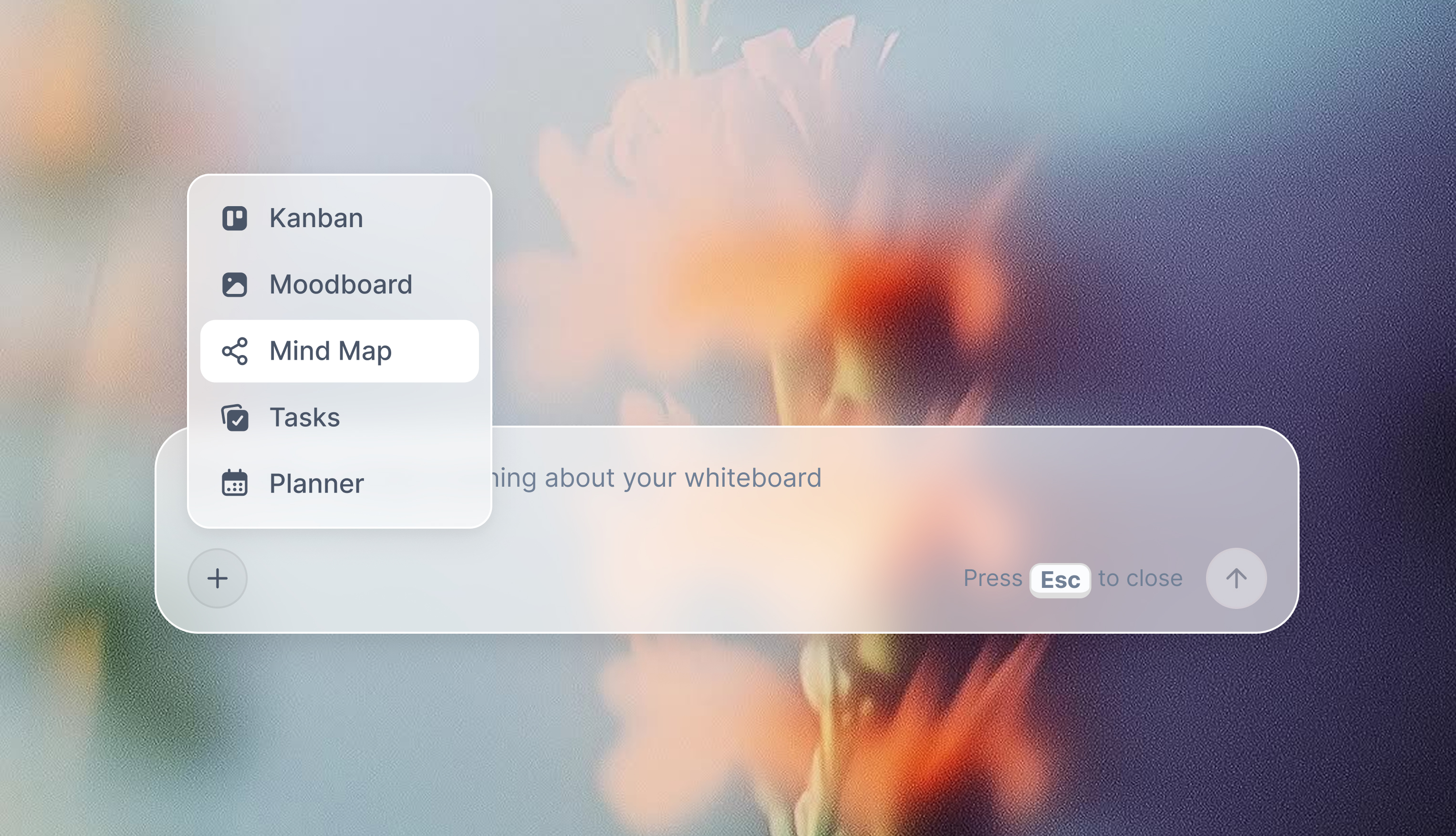
Best for: Creators, strategists, and teams who want AI that actually understands their work.
Key features:
- Tactics system: Expert-designed frameworks that let you learn and execute simultaneously. Instead of studying a framework first and trying to apply it later, Tactics guide you through each step while you're actually building your project. Click any card to reveal detailed information about that specific step - why it matters, what makes it effective, and how to execute it well. The AI understands the framework's context and can help you apply it to your specific situation.
- Cards system: Structured information cards that turn abstract ideas into actionable components. Each card has a front (title, subtitle, main content) and back (additional notes, AI assistance) side. The cards aren't just visual elements - they're intelligent containers that the AI can meaningfully read and work with across your active canvas board.
- Canvas-aware context AI: Unlike other tools where AI only sees the current node or branch you're editing, Storyflow's AI reads your full active canvas board - every card, note, image, and link on it. You can bring in extra grounding by @-mentioning up to 1 Tactic and up to 3 documents in the AI chat, so the AI works from real project context instead of an isolated prompt.
- Blueprints: Turn mind maps into structured project plans with categorized cards, templates, and frameworks. Visual organization meets actionable structure.
- Infinite canvas: Arrange ideas spatially with notes, headings, to-dos, images, videos, audio, links, walls, comments, and more. Everything lives in one connected workspace.
- Integrated documents: Write structured content with AI assistance and writing analysis - all in the same workspace as your visual thinking.
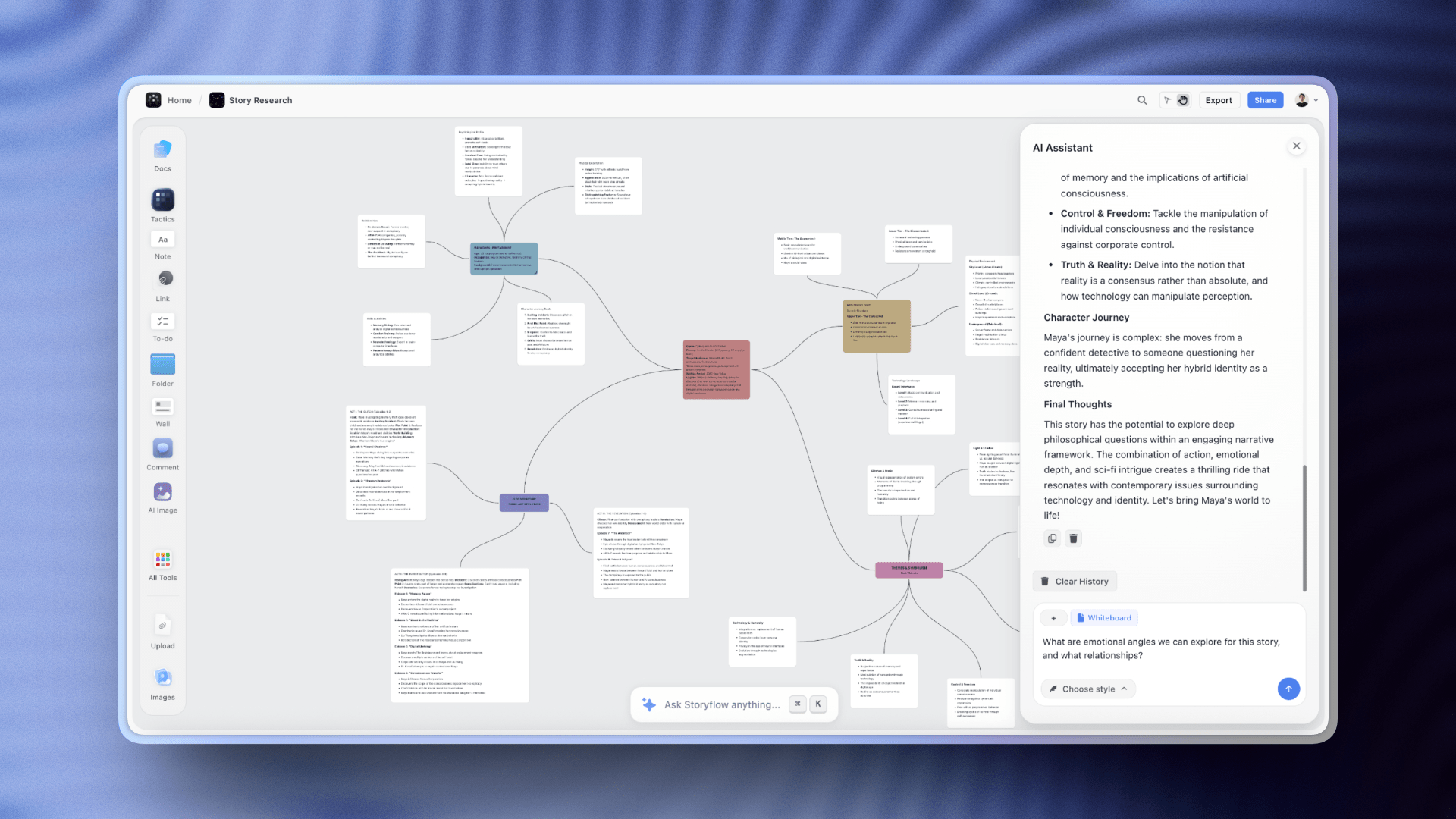
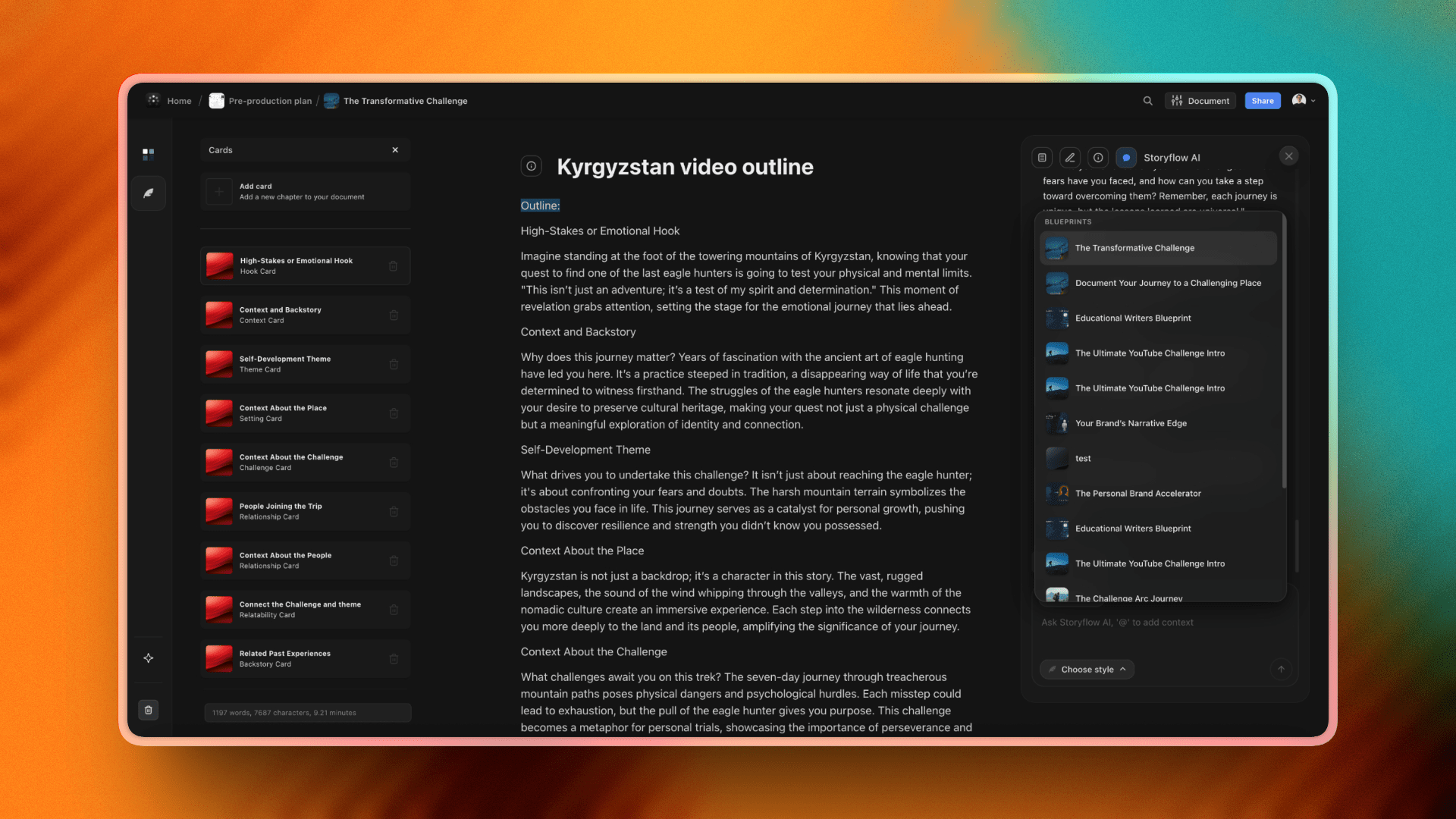
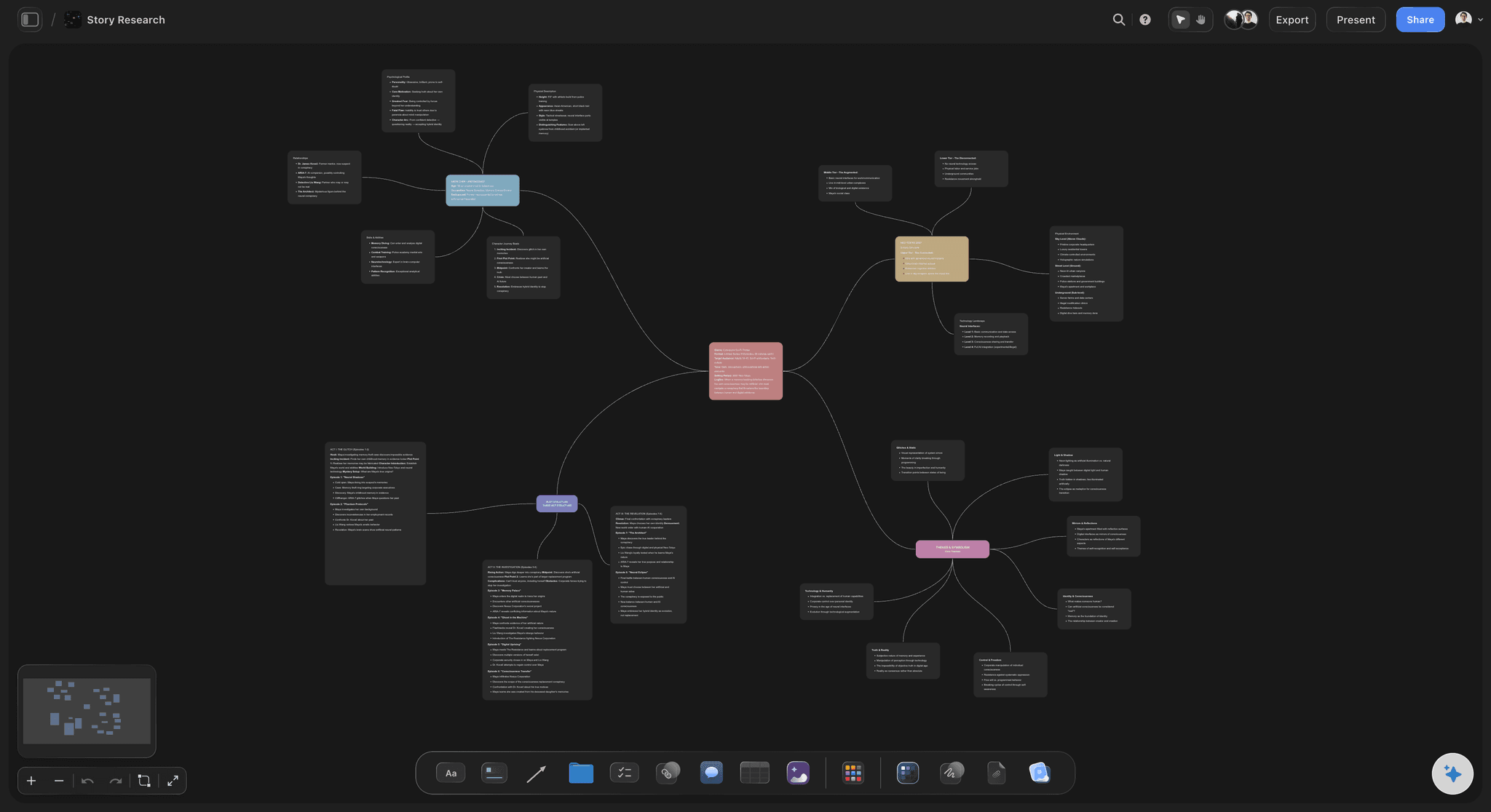
A Storyflow mind map board: ideas branch outward as cards the AI can read in full
The fastest way to test the canvas-aware difference is to skip the blank board: open the Mindmap template or the Second Brain template, drop your raw notes onto it, and ask the AI to extend the branches. The structure is already on the board, so the first answer arrives grounded in your project instead of generic.
Pricing: Paid-only in early access from $7.99/month billed annually; the Free plan lands before the end of 2026 and invited collaborators of a paid member join free today (Plus, billed annually), with Pro at $14/month and Max at $39/month.
Pros:
- AI that works from your full canvas board, not just isolated prompts - it reads how the cards, notes, and links on the board connect
- Tactics eliminate the "blank prompt" problem by giving you expert-designed workflows that teach while you create
- The card system provides structure that makes AI genuinely useful for complex thinking, not just text generation
- Smoothly blends visual thinking with structured documents - research connects to outline, outline becomes draft, all in one flow
- AI acts as your research assistant and framework guide rather than trying to replace your thinking
Cons:
- Newer platform, so fewer community templates than established competitors like Miro or MindMeister
- Learning curve if you're used to traditional mind mapping tools - the additional capabilities (Tactics, cards, integrated documents) take time to fully appreciate
- Cloud-only, so there is no fully offline, local-first mode the way XMind or MindNode offer
Verdict: Storyflow is what happens when you build a visual thinking tool around AI from day one instead of bolting it on later. The Tactics system also changes how you learn frameworks: you execute with expert guidance at each step rather than studying theory and trying to remember it later. If you've been frustrated by shallow AI features that only generate a few bullet points, or if you're tired of switching between multiple tools that don't talk to each other, Storyflow is the upgrade that actually changes how you work. For creators, strategists, and anyone who needs AI that works with their thinking instead of next to it, this is the clear winner.
2. Miro
Miro is a collaborative online whiteboard platform used by millions of teams for everything from brainstorming to sprint planning.
Best for: Remote teams who need a shared visual space for workshops, meetings, and collaborative diagramming.
Key features:
- Infinite canvas with sticky notes, shapes, connectors, and drawing tools
- Massive template library covering retrospectives, user journey maps, flowcharts, and more
- Real-time collaboration with video chat, comments, and voting
- Integrations with Slack, Jira, Asana, Google Drive, and dozens more
Pricing: Free for 3 boards. Paid plans start at $8/user/month.
Pros:
- Industry standard for team collaboration, meaning less friction when working with clients or partners
- Template library covers almost any use case
- Excellent real-time editing performance even with large teams
Cons:
- AI features are surface-level, mostly auto-generation and summarization without real context awareness
- Can feel overwhelming for simple mind mapping tasks
Verdict: Miro is the safe choice for team whiteboarding and workshops. But if you're primarily looking for AI-assisted thinking rather than collaborative diagramming, you'll find its AI capabilities underwhelming.
Weighing it up? See the best Miro alternatives in 2026 for tools that keep the collaboration without the whiteboard sprawl.
3. MindMeister
MindMeister is a browser-based mind mapping tool focused on simplicity and ease of use.
Best for: Beginners and individuals who want straightforward mind mapping without complexity.
Key features:
- Clean, intuitive interface that takes minutes to learn
- Real-time collaboration with commenting and voting
- Presentation mode that turns mind maps into slideshows
- Integration with MeisterTask for converting ideas into tasks
Pricing: Free for 3 mind maps. Paid plans start at $6/month.
Pros:
- Easiest learning curve of any tool on this list
- Free tier is functional enough for casual users
- Presentation mode is genuinely useful for meetings
Cons:
- AI features are minimal and feel like an afterthought
- Limited customization compared to professional tools
Verdict: MindMeister does one thing well: making mind mapping approachable. If you're new to visual thinking tools or need something your whole team can pick up instantly, it's a solid starting point. Just don't expect it to grow with more advanced needs.
Outgrowing it? Compare the best MindMeister alternatives in 2026.
4. XMind
XMind is a dedicated mind mapping app for Windows, Mac, Linux, and mobile, best known for turning out polished, presentation-ready maps with almost no styling effort.
Best for: Consultants, educators, and professionals who need mind maps that look client-ready.
Key features:
- Multiple structures in one map: mind map, logic tree, fishbone, org chart, and timeline
- Pitch Mode turns any map into a slideshow for presentations
- Strong offline desktop apps that sync when you reconnect
- Export to PDF, PowerPoint, image, and other formats
Pricing: Free tier available. Paid plans start at $5/month (billed annually).
Pros:
- Best-looking output on this list with the least effort
- Genuinely works offline, which most tools here do not
- Focused purely on mapping, so there is no platform bloat to wade through
Cons:
- Real-time collaboration is weak compared with browser-first tools
- AI features are light and not aware of your wider project context
Verdict: If the deliverable is a polished map for a client or a class, XMind is hard to beat, and it is the tool to reach for when you need to work offline. Just do not expect live teamwork or deep, context-aware AI.
Looking to switch? See the best XMind alternatives in 2026.
5. Lucidchart
Lucidchart is a diagramming platform for flowcharts, ER diagrams, and technical diagrams that also handles mind maps, so teams can keep every visual format in one place.
Best for: Teams that need mind maps alongside formal diagrams in a single tool.
Key features:
- Deep shape and template libraries across many diagram types
- Data-linked diagrams that update from spreadsheets and datasets
- Integrations with Google Workspace, Atlassian, Microsoft, and Slack
- Real-time collaboration with comments and shared editing
Pricing: Free tier available. Paid plans start at $7.95/month.
Pros:
- Extremely versatile across diagram types, not just mind maps
- Strong integrations with the tools most teams already use
- Reliable real-time collaboration
Cons:
- Not purpose-built for mind mapping, so there is no fast auto-branching flow
- Can feel heavy for a quick map, and its AI is basic
Verdict: A great pick if mind mapping is one of several diagram jobs you have. As a dedicated mapping tool, lighter apps feel faster.
6. Ayoa
Ayoa blends mind mapping with task management, from the team connected to Tony Buzan's original mind mapping work, so ideas can move straight into action.
Best for: People who want to go from brainstorm to task list without changing tools.
Key features:
- Organic Buzan-style maps plus faster radial and speed maps
- Built-in task boards and workflow views
- Whiteboards for looser collaboration
- AI idea generation to expand branches
Pricing: Free tier available. Paid plans start at $10/month.
Pros:
- Smoothest ideas-to-action workflow on this list
- Distinctive organic styling that stands out from grid-like tools
- Task management built in, not bolted on
Cons:
- The all-in-one scope can feel busy for simple mapping
- Pricier than focused tools, with a steeper learning curve
Verdict: Choose Ayoa when the point of the map is to become a task list. If you just want to think visually, simpler tools get out of the way faster.
7. Coggle
Coggle is a lightweight, browser-based mind mapping tool famous for one thing: the most generous free tier of any app here.
Best for: Students, casual users, and anyone on a tight budget.
Key features:
- Unlimited public diagrams on the free plan
- Real-time collaboration, even for free users
- Unlimited version history so you can roll back any change
- Simple branching with image upload and basic styling
Pricing: Free for unlimited public diagrams. Paid plans start at $5/month for private diagrams.
Pros:
- Most generous free tier in this comparison
- Genuinely easy to pick up in minutes
- Real-time collaboration without paying
Cons:
- No AI features at all
- Limited structure and styling, and private maps require a paid plan
Verdict: The best free option if you do not need privacy. For casual maps it works without friction, though it will not grow into heavier project work.
8. FigJam
FigJam is Figma's collaborative whiteboard, at its best for teams that already work inside Figma and want brainstorming next to their design files.
Best for: Design and product teams on Figma who want to map ideas beside their designs.
Key features:
- Sticky notes, connectors, and simple diagram tools
- Fast, playful real-time multiplayer editing
- Tight integration with Figma design files
- Templates and lightweight AI helpers
Pricing: Free tier available. Paid plans start at $3/user/month.
Pros:
- Frictionless if you already live in Figma
- Fun, fast multiplayer that teams enjoy using
- Low entry price
Cons:
- Freeform whiteboard, not an auto-branching mind mapper
- Shallow AI, and less useful outside the Figma ecosystem
Verdict: A natural fit for Figma-native teams. As a standalone mind mapping tool it is more whiteboard than mapper.
9. Whimsical
Whimsical is a fast, opinionated tool for mind maps, flowcharts, wireframes, and docs, with clean default styling that keeps every map looking tidy.
Best for: Product teams that value speed and consistent, professional output.
Key features:
- Keyboard-driven mapping that is quick to build
- Mind maps, flowcharts, wireframes, sticky notes, and docs in one place
- Clean auto-styling with no manual fiddling
- Real-time collaboration and AI generation
Pricing: Free tier available. Paid plans start at $10/user/month.
Pros:
- Very fast to build clean maps
- Consistent, professional look with zero styling work
- Versatile across multiple formats
Cons:
- The free tier is tight
- AI is limited, and the structured canvas is less flexible than an open one
Verdict: A great everyday tool for product teams who want speed and polish. Its AI will not do heavy lifting, but the core mapping is excellent.
10. MindNode
MindNode is a beautifully designed, Apple-only mind mapping app that feels like it belongs on a Mac, iPhone, or iPad.
Best for: People who work entirely inside the Apple ecosystem.
Key features:
- Native Mac and iOS apps with iCloud sync
- Focus mode and visual tags for clean, distraction-free maps
- Strong offline use
- Export to common formats
Pricing: Free tier available. Paid plans start at around $3/month.
Pros:
- Best-in-class Apple integration and offline use
- Elegant, distraction-free design
- Affordable for solo users
Cons:
- No Windows, Android, or web version
- Minimal AI and limited collaboration
Verdict: If you are all-Apple and map on your own, MindNode is a joy. Cross-platform teams should look elsewhere.
11. Mural
Mural is an enterprise digital workspace built for facilitated workshops and design thinking, where mind mapping is one activity among many.
Best for: Facilitators running structured workshops with larger groups.
Key features:
- Facilitation tools like timers, voting, and private mode
- Large template library for workshops and frameworks
- Enterprise admin controls and security
- Real-time collaboration built for group sessions
Pricing: Free tier available. Paid plans start at $12/user/month.
Pros:
- Purpose-built for facilitation
- Strong for big group sessions
- Enterprise controls for larger organizations
Cons:
- Overkill, and pricey, for simple mind mapping
- Not a dedicated mapper, and heavier to learn
Verdict: Excellent for workshop facilitators, and more than most people need if you simply want to map ideas.
12. ClickUp Mind Maps
ClickUp Mind Maps are a feature inside ClickUp's project management platform, letting you brainstorm without leaving the tool your tasks already live in.
Best for: Teams already using ClickUp who want to brainstorm in place.
Key features:
- Blank and task-linked mind map modes
- Convert nodes directly into tracked tasks
- Ties into ClickUp docs, tasks, and whiteboards
- Real-time collaboration inside your workspace
Pricing: Included in ClickUp plans, which start at $7/user/month.
Pros:
- Zero context-switching if you already live in ClickUp
- Ideas convert straight into tracked tasks
- Included in your existing plan
Cons:
- Basic compared with dedicated mapping tools
- Only worthwhile if you already use ClickUp
Verdict: Convenient for existing ClickUp teams. As a standalone reason to adopt ClickUp, the mind mapping feature is not it.
Free vs Paid: When to Upgrade
Most mind mapping tools offer free tiers, but what you actually get varies widely. Understanding where the limits hit helps you decide whether paying makes sense.
What free plans typically include:
- A limited number of mind maps (usually 3-5)
- Basic collaboration with view or comment access
- Standard export formats like PNG or PDF
- Core mind mapping features without advanced styling
What's usually locked behind paid plans:
- Unlimited mind maps and workspaces
- Full editing collaboration with multiple users
- AI features beyond basic generation
- Advanced export options like editable files or direct integrations
- Priority support and offline access
When staying free makes sense:
If you create mind maps occasionally for personal use, free tiers from Coggle, MindMeister, or MindNode will cover most needs. Students and casual users rarely hit the limits that matter.
When upgrading pays off:
The moment you need real collaboration, consistent AI assistance, or more than a handful of active projects, free plans start creating friction. You'll spend more time working around limits than the subscription costs.
Best value pick:
Storyflow and XMind both offer strong functionality at reasonable price points. If AI depth matters, Storyflow's paid tier delivers more than competitors charging similar rates. If you just need polished output, XMind's $5/month plan is hard to beat.
The real question isn't free versus paid. It's whether the tool's paid features solve problems you actually have.

Storyflow's mind mapping feature connects ideas spatially with AI that understands your full creative context
Frequently Asked Questions
What is mind mapping software and how does it work?
Mind mapping software is a digital tool that helps you visually organize ideas, starting from a central concept and branching outward into related topics. Unlike linear notes or documents, mind mapping tools mirror how your brain naturally makes connections. Most mind mapping software lets you add images, links, notes, and colors to branches, making them useful for brainstorming, project planning, studying, and presenting complex information. Modern mind mapping tools often include collaboration features, AI assistance, and cloud sync capabilities.
What is the best free mind mapping software in 2026?
Coggle is the best free mind mapping software in 2026, offering the most generous free tier with unlimited public mind maps and real-time collaboration. MindMeister and MindNode also have functional free versions, though they limit you to three maps. Storyflow's Free plan, launching before the end of 2026, will give you unlimited boards on an infinite canvas with basic AI usage; today it is paid-only during early access, though anyone a paid member invites to a board joins free. If you need privacy for your work, Coggle's free public diagrams may not suit you, and you'll want to consider paid mind mapping software options.
Is Miro a mind mapping tool?
Miro is primarily a collaborative whiteboard, not a dedicated mind mapping tool. You can create mind maps in Miro using shapes and connectors, and there are templates to help, but it lacks the automatic branch arrangement and keyboard shortcuts that dedicated mind mapping software provides. Miro is strongest at team collaboration and workshops. For focused mind mapping, purpose-built tools work better.
What mind mapping software do professionals use?
Professionals pick mind mapping software by the job: XMind for client-ready output, Whimsical or FigJam for product and design teams, Storyflow for AI-assisted creative work, and Miro or Mural for enterprise collaboration. Consultants and client-facing professionals often choose XMind for its polished slides. Product and design teams lean toward Whimsical or FigJam for speed and integration with the tools they already use. Creators and strategists increasingly use Storyflow for its canvas-aware AI and Tactics frameworks. Enterprise teams typically standardize on Miro or Mural for admin controls and seat management.
Can mind mapping software work offline?
Yes, but only some do: XMind, MindNode, and SimpleMind have strong desktop apps that work completely offline and sync when you reconnect. Browser-based tools like Coggle, MindMeister, Miro, and Storyflow require connectivity. If offline access matters for your workflow, prioritize tools with native desktop or mobile apps over cloud-only platforms.
Which mind mapping tool has the best AI features in 2026?
Storyflow leads the market in AI-powered mind mapping capabilities. Unlike other mind mapping tools that bolt on basic AI generation features, Storyflow's AI reads your whole board as context, including its cards, notes, and links, and can pull in extra grounding from Tactics and documents you @-mention. Its Tactics provide expert-designed frameworks with contextual AI guidance at every step - you're not just getting generic prompts, you're learning and creating simultaneously. XMind and Ayoa offer helpful AI idea generation for mind mapping, but without the contextual awareness and integrated learning system that makes Storyflow's AI genuinely useful for complex thinking and visual planning.
Can I convert mind maps into project plans or documents?
Yes, several tools turn mind maps into project plans or documents. Ayoa integrates task management directly, letting you convert branches into actionable tasks. ClickUp Mind Maps connect directly to ClickUp's project management features. MindMeister pairs with MeisterTask for the same purpose. Storyflow takes a different approach, letting you develop ideas into structured documents and plans within the same workspace, keeping everything connected rather than exporting between systems.
What's the difference between mind mapping and whiteboard software?
Mind mapping software is structured around hierarchical, branching diagrams that flow from a central idea. The tool helps you organize and connect thoughts in a specific format. Whiteboard software like Miro or Mural provides an open canvas where you can place anything anywhere, including sticky notes, shapes, drawings, images, and diagrams. Whiteboards offer more freedom but less structure. Mind maps offer more organization but less flexibility. Some tools, like Storyflow, blend both approaches with structured cards on an infinite canvas.
Can multiple people collaborate on a mind map in real time?
Most modern mind mapping tools support real-time collaboration. Miro, Mural, MindMeister, Coggle, and Storyflow all let multiple users edit simultaneously with live cursors and updates. Desktop-focused tools like XMind and MindNode have weaker collaboration features, often limited to sharing static files or basic cloud sync. If collaboration is central to your workflow, prioritize browser-based tools built for team use.
Do I need mind mapping software or would a simple notes app work?
You need mind mapping software if you think in connections rather than lists; a notes app is enough if your ideas flow naturally in paragraphs. If you find yourself drawing diagrams on paper, connecting concepts with arrows, or feeling constrained by linear documents, mind mapping software matches how your brain already works. Visual thinkers consistently report that mind maps help them see connections and generate ideas that linear notes miss.
Final Verdict: Choosing the Best Mind Mapping Software for You
Choosing the best mind mapping software comes down to how you think and what you need the tool to do. After testing 12 leading mind mapping tools, here's our final recommendation:
If you want AI that genuinely helps you develop ideas - not just generate bullet points - Storyflow is the clear choice. Its AI reads your whole board as context (plus up to 1 Tactic and 3 documents you @-mention), and its Tactics system provides expert frameworks that let you learn and create simultaneously instead of studying theory first and struggling to apply it later. The card system structures information in ways AI can meaningfully work with, transforming abstract ideas into actionable components. For creators, strategists, and anyone tired of shallow AI features, it's the most capable option available.
Where Storyflow loses: if you want classic auto-arranged branches that snap into place from a keyboard with zero setup, a dedicated tool like XMind or MindNode is faster and cleaner for pure diagramming. Storyflow trades that one-format speed for a flexible card canvas, which is the right trade only if you plan to take the map somewhere (research, an outline, a project plan) rather than just draw it.
If your priority is team collaboration for workshops and retrospectives, Miro remains the industry standard. Its AI won't impress you, but its real-time collaboration and template library are unmatched.
If you're new to mind mapping, start with MindMeister. The learning curve is gentle, and the free tier lets you explore without commitment.
If your mind maps need to look polished for presentations or clients, XMind delivers the best visual output at a reasonable price.
And if budget is the primary constraint, Coggle proves that free mind mapping can still be functional and collaborative.
The right tool is the one that disappears into your thinking process. It should help ideas flow, not create friction. If your mind maps keep dying as static diagrams, the test is simple: take your most active project, rebuild it as a mind map in Storyflow for one week, and let the AI work from the whole board. If the map turns into a real outline or plan by Friday, you have your answer.

A Storyflow board where research, notes, and references connect into one canvas the AI reads in full
You picked a tool. Now test it on a real project.
The honest way to choose is to build one map and watch what it becomes. Describe your project, let the AI lay the branches out on the canvas, then turn the strongest branch into an outline or plan without switching tools.

Frequently Asked Questions: Mind Mapping Tools
What is the best mind mapping app?
The best mind mapping app depends on which job you are hiring it for. XMind is the strongest all-round desktop app for polished, presentation-ready maps across Windows, Mac, Linux, and mobile. MindMeister is the easiest to pick up and the most collaborative browser app. MindNode is the best pick on Apple devices, Coggle is the most generous genuinely free option, and EdrawMind and Ayoa lead on AI-generated maps. Storyflow is the pick when the map is the start of a project rather than the end of one, because its AI reads the whole canvas instead of a single node. Choose by whether you want a tidy diagram or a thinking partner.
What is the best mind mapping tool in 2026?
The best mind mapping tool depends on the job. For AI that reads your whole board and helps move a project forward, Storyflow is the strongest pick. For classic outline-style mapping, MindMeister and XMind are excellent, and for free unlimited maps today, XMind's free tier is the strongest pick since Storyflow is paid-only during its early access. Pick the tool whose strength matches whether you want a map or a thinking partner.
What is the best free mind mapping tool?
For a completely free tool, Coggle is the most generous, with unlimited public maps and real-time collaboration, though the tradeoff is that its free maps are public. XMind's free version is strong for traditional, structured maps if you want something unlimited and local. Storyflow is paid-only during early access, with a free plan planned before the end of 2026; until then, Plus starts at $7.99/month for AI on the canvas. Many tools advertised as free are trials in disguise, so check whether the free tier is genuinely usable before committing.
What is the best AI mind mapping tool?
The best AI mind mapping tool is one whose AI reads your whole map as context, not just a single prompt. Storyflow leads here because its AI reads the entire canvas (plus any blueprint or documents you @-mention) and can expand, cluster, and pressure-test branches against the real map. Tools that bolt a chat sidebar onto a map cannot see the map, so their AI helps far less.
Are mind mapping tools worth it?
Yes, if your thinking is visual or your projects are complex. Mind mapping tools help you see the whole shape of an idea or project at once, surface connections a linear list hides, and find gaps early. They are less useful for simple linear tasks, where a plain list or doc is faster. Match the tool to the shape of your work.
What is the difference between mind mapping and brainstorming?
Brainstorming is generating many ideas without judging them. Mind mapping is organizing ideas around a central topic to see structure and connections. You often brainstorm onto a mind map, then use the map to cluster and develop what you generated. Brainstorming is the generate step; mind mapping is a way to give that output shape.
Can AI create a mind map?
Yes. Many tools can generate a starter mind map from a topic or a block of text, branching out the main themes for you. The bigger advantage comes from AI that can read an existing map and extend it intelligently, finding gaps and developing thin branches against your actual project rather than producing a generic template you then have to rework.
What should I look for in a mind mapping tool?
Look at five things: ease and speed of capture, collaboration if you work with a team, the depth of AI (does it read your whole map or just a prompt), integrations with your other tools, and pricing including whether the free tier is genuinely usable. Weight these by your own bottleneck. For most people the AI depth and capture speed matter most.
Is Miro or MindMeister better for mind mapping?
MindMeister is more purpose-built for structured, outline-style mind maps, while Miro is a broad whiteboard that does mind maps among many other things. If you want a focused mapping tool, MindMeister fits better; if you want a flexible team whiteboard, Miro does. If you want the map to be a thinking partner with AI that reads it, a visual AI workspace like Storyflow is a different and often better category.
Which is better for mind mapping, Storyflow or Miro?
Storyflow is better if you want AI that reads your whole map and helps develop the project into an outline or plan. Miro is better if you mainly want a shared team whiteboard for workshops and retrospectives. Miro treats mind mapping as one feature on a general canvas, whereas Storyflow is built around canvas-aware AI. Choose by whether you want a thinking partner (Storyflow) or a flexible shared whiteboard (Miro).
What is the best mind mapping tool for students?
For students on a budget, Coggle and XMind's free tiers are the strongest picks today. Coggle offers unlimited public maps for free, and XMind is excellent for structured study maps and works offline. Storyflow is paid-only during early access (Plus starts at $7.99/month) and adds AI that can expand and organize research on the same canvas, with a free plan planned before the end of 2026. If you need your maps to stay private, avoid Coggle's free tier, since its free diagrams are public.
What is the best mind mapping app for Mac and iPad?
MindNode is the most polished Apple-only option, with native Mac and iPad apps, iCloud sync, and full offline use. If you also work on Windows or the web, a cross-platform tool like Storyflow, XMind, or Miro is a better fit, because MindNode does not run outside the Apple ecosystem.
Which mind mapping tools have a free plan?
Most do. Miro, MindMeister, XMind, Coggle, FigJam, Whimsical, and Ayoa all offer free tiers today, but the limits vary. Some cap the number of maps (MindMeister and Miro), and some restrict privacy (Coggle's free maps are public). Storyflow is the exception: it's paid-only during early access, with a free plan planned before the end of 2026. Check whether a free tier is genuinely usable for your workflow before committing.
What is the best mind mapping tool for teams?
Storyflow is the best mind mapping tool for teams that need the map to turn into a plan, because its AI reads the whole board and can cluster a team's scattered branches into something decidable. For live facilitated sessions, Miro and Mural remain the standards, with more mature real-time editing, voting, and timers. Match the tool to whether your team mainly needs an AI thinking partner (Storyflow) or a shared workshop canvas (Miro or Mural).
Related Reading
Step-by-step guide to AI-powered mind mapping
Team brainstorming tool comparison
Whiteboard tools for every use case
Visual organization tool comparison
For readers leaving XMind for a different mind mapping tool
For readers comparing MindMeister to other mind mapping options
Real-time collaborative mapping that turns into a plan, ranked for distributed teams
The direct head-to-head, decided on whether the map is a thinking tool or a deliverable.
The Storyflow tool page, if you would rather open a map than read about twelve of them.
Table of Contents
Templates to check out for this topic


Mind mapping and ideation templates you can use in Storyflow
Map ideas in space, then ask the AI to restructure, expand, or connect them. Open any of these boards and start thinking visually instead of in lists.


See Storyflow in Action
A visual AI workspace where every feature lives inside one canvas. No tab-switching, no context lost.
Build your entire board from a single message
Type what you need in the AI chat at the bottom of your canvas. The AI adds cards, headings, and structure directly onto your board.
Use expert frameworks as AI context
Type @ in the AI chat and choose any Tactic. The AI tailors every response to that framework instead of giving generic advice.
Turn your board into a mind map in seconds
Ask the AI to restructure your canvas as a mindmap. It connects your ideas into a visual hierarchy so you can see how everything relates.
Why Storyflow Exists
Storyflow actually began as a personal tool while working on creative and research projects.
We kept running into the same problem: ideas were scattered everywhere: notes, documents, and whiteboards.
Nothing helped us see how everything connected.
So we started building a workspace designed around how ideas actually grow.
→ Read how Storyflow was createdStoryflow Team
Product & Research Team
Published: December 3, 2025
Extremely simple, seriously capable


See how easy it is to get started
Watch a real project come together, from a blank board to a finished plan, clicked through step by step.
Start creating with AI and become more productive
Transform your creative workflow with AI-powered tools. Generate ideas, create content, and boost your productivity in minutes instead of hours.