Best Milanote Alternatives: Storyflow, Miro, Obsidian, Heptabase, Scrintal
Storyflow is the Milanote alternative for creative project boards: the moodboard, the brief and the documents on one infinite canvas, with an AI that builds the board. Scrintal is the pick for linked notes, Heptabase for research, Miro for live workshops, FigJam for a low-cost whiteboard beside Figma and Obsidian Canvas for free local files. The trigger is almost always the same: 100 items across all boards on Milanote's free plan.

Category
Visual Workspaces
Author

Justkay
Documentary Filmmaker & Founder at Storyflow
Topics
2026-08-30
•
32 min read
•
Visual Workspaces- best milanote alternatives
- milanote vs miro
- heptabase vs milanote
- scrintal milanote alternative
- milanote free plan limit
- obsidian canvas milanote
- Storyflow
What are the best Milanote alternatives in 2026?
Storyflow is our pick for a Milanote alternative in 2026: an infinite canvas that keeps images and writing together the way Milanote does, with an AI that turns a brief into the board. Of the four names people shortlist, Scrintal is the pick for linked notes on a canvas, Heptabase for research that runs for months, Miro for live team workshops and FigJam for a low-cost whiteboard beside Figma. Obsidian Canvas is the free, local-file route. Milanote's free plan stops at 100 notes, images or links, and that cap is what sends most people looking.

Full disclosure: Storyflow is our own product and is listed first. The order is not a score: Storyflow leads because it keeps both halves of a Milanote board, images and writing, on one canvas and adds an AI that builds on it, and the other six are ordered by how much of Milanote they keep. Storyflow has no web clipper, no bi-directional note links and no free plan yet, and Milanote, Heptabase, Scrintal and Obsidian each beat it on one of those. Prices were read on each vendor's page in October 2026.
Quick Comparison
Storyflow first as our pick, then the three shortlisted tools that take one half of a visual notes board further.
| Tool | Best For | AI Features | Price |
|---|---|---|---|
| Storyflow | Creative project boards with images and writing together | AI turns a brief into a board, sorts notes into walls, builds decks and PDFs | From $7.99/mo annual |
| Scrintal | Linked note cards on a canvas | An AI Assistant | Not published when checked |
| Heptabase | Research and thinking over months | AI that explains sources and organizes notes | Pro $8.99/mo; 7-day trial |
| Miro | Live team workshops | AI credits on every plan | Free; Starter $8/member/mo (annual) |
Quick Answer: The Best Milanote Alternatives
Storyflow is the Milanote alternative to start with. Storyflow keeps Milanote's middle position, images and writing on one infinite canvas, and adds what Milanote's plans page does not list: an AI that reads the whole board, sorts loose notes into walls and builds the brief, the shot list or the deck from what is there. The four tools in this post's title each take one half of Milanote further, and each is the right answer for a specific reader.
- For creative project boards, with the moodboard, brief and documents together: Storyflow
- For the board-plus-notes feel with cards that link: Scrintal
- For research and thinking that runs for months: Heptabase
- For free, local files you own: Obsidian with Canvas
- For databases, docs and structure: Notion
- For live team workshops on a shared canvas: Miro
- For a low-cost team whiteboard beside Figma: FigJam
- If the 100-item cap is your only complaint: stay, and pay Milanote $9.99 a month
The reason there are seven answers is that Milanote sits between two product categories. The section on the two directions out of Milanote explains which one you are leaving in. For the wider field of twelve, including free, open-source and offline options, see 12 Best Milanote Alternatives in 2026.
Key Takeaways
- Our pick, for creative project boards: Storyflow. The moodboard, the brief and the documents on one board an AI can read and build on.
- Best for linked notes on a canvas: Scrintal. Cards, arrows and bi-directional links in one product.
- Best for thinking and research: Heptabase. Cards on whiteboards, bi-directional links and PDF annotation.
- Best for owning your data: Obsidian. Local files, a free app, and Canvas for the visual half.
- Best for live collaboration: Miro. Timers, voting and a shared canvas for a group.
- Lowest-priced team seat: FigJam. A Collab seat is $3 a month on Figma's Professional plan.
- The trigger is almost always the same. Milanote's free plan caps at 100 notes, images or links across all boards.
All Seven Milanote Alternatives, Ranked
Storyflow is our own product and is listed first, because it is the alternative that keeps both halves of Milanote on one board and adds an AI that builds on it. The other six are not scored. They are ordered by how much of Milanote each one keeps: both halves first, then the notes direction, then the canvas direction.
- Storyflow: best for creative project boards, with the moodboard, brief and documents together and an AI that builds the board
- Scrintal: best for a canvas of linked note cards
- Heptabase: best for visual thinking and long research
- Obsidian: best for data ownership, with Canvas for the visual half
- Notion: best if you needed structure rather than a canvas
- Miro: best for live collaboration and team workshops
- FigJam: best low-cost team whiteboard, beside Figma
Comparison Table: Seven Milanote Alternatives at a Glance
Storyflow is in the first row as our pick and Milanote is in the last row as the baseline. The final column says when each rival is the better choice than Storyflow, so you can rule tools in or out in one pass. Prices were read on each vendor's own page in October 2026.
| Tool | Best for | Which half of Milanote it keeps | AI | Free plan | Paid entry | Choose it over Storyflow when |
|---|---|---|---|---|---|---|
Storyflow | Creative project boards: moodboard, brief and documents together | Both: images and writing on one infinite canvas; closest to Milanote's visual-board workflow in our judgement (walls for columns, folders for nested boards) | AI turns a brief into a board, sorts notes into walls, builds decks and PDFs | No free plan yet; invited collaborators join free | Plus $7.99 a month billed annually | Our pick: start here |
Scrintal | Linked note cards on a canvas | Both, leaning to notes: cards with bi-directional links | An AI Assistant | None listed | Not published when checked | Your notes have to link to each other, which Storyflow's do not |
Heptabase | Research that runs for months | The notes half: cards on whiteboards, bi-directional links, PDF annotation | AI that explains sources and organizes notes | 7-day trial | Pro $8.99 a month | The board is a personal knowledge base and you need it offline, which Storyflow is not |
Obsidian Canvas | Local files you own | The notes half, plus a plain canvas | None listed on its Canvas page | Yes: free without limits | Free; Sync $4 a user a month billed annually | Your files must live on your own disk, not in Storyflow's cloud |
Notion | Structure: databases and docs | Neither half spatially: pages, not a canvas | Notion AI trial on Free and Plus, Notion Agent on Business | Yes, for individuals | Plus $10 per member a month billed annually | You need a database to filter and sort; Storyflow's tables cannot be sorted |
Miro | Live team workshops | The canvas half | AI credits on every plan | Yes: 3 editable boards | Starter $8 per member a month billed annually | A group works the board live and needs timers and voting, which Storyflow does not have |
FigJam | A low-cost team whiteboard beside Figma | The canvas half | Generate, sort and summarize, on AI credits | Yes: Figma Starter, 3 files | Collab seat $3 a month | The brainstorm feeds Figma design files, which Storyflow does not open |
Milanote (baseline) | Hand-arranged boards of images and notes | Both | None listed on its plans page | Yes: 100 notes, images or links | $9.99 per person a month billed annually | The cap is your only complaint: Milanote has a free plan, a web clipper and apps for phone and desktop, which Storyflow does not |

A Storyflow brand identity project board holding reference photos, the brief, concepts, brand assets, a timeline and client feedback together on one canvas
Both halves, on one board
Milanote users struggle to replace it because most alternatives are either a canvas or a notes tool. Storyflow keeps documents and references together, and its AI reads the whole board.

The Two Directions Out of Milanote
Milanote is unusual because it sits between two product categories, and that is exactly why it is loved and why people leave it.
Milanote is half a visual board. Images, moodboards, a free canvas, drag and drop, arrangement by proximity. That half competes with Miro, FigJam and Canva.
Milanote is half a notes tool. Notes, columns, to-do lists, links, a web clipper, projects that persist for months. That half competes with Notion, Obsidian, Heptabase and Scrintal.
Very little else occupies that exact middle, which is why people who love Milanote often cannot name a replacement.
| Where you are heading | What you gain | What you lose | Tools |
|---|---|---|---|
Staying in the middle | Images and writing on one board, plus an AI that builds on it | Milanote's web clipper and its free plan | Storyflow first; Scrintal if your notes must link |
Toward the canvas | Live multiplayer, timers, voting, a bigger shared board | The notes half: a project that accumulates writing | Miro, FigJam |
Toward thinking | Bi-directional links, structure, files that last | The ease of dropping in forty images | Heptabase, Scrintal, Obsidian |
Toward structure | Databases, filters, relations | The canvas itself | Notion |
When you leave, you leave in one of these directions, and picking the wrong one is the main way this goes badly.
Staying in the middle: Storyflow. If your Milanote boards are creative projects, a moodboard next to a brief next to a treatment, you do not need to pick a side. A Storyflow board holds documents, images, links and notes as first-class objects on one infinite canvas, and its AI reads all of it.
Direction one: toward the canvas. You needed a team working at once, facilitation, or a bigger shared board. You are going to Miro or FigJam, and you will gain live multiplayer and workshop tools. You will lose most of the notes half. A whiteboard holds stickies and text boxes, not a project that accumulates writing, and teams that make this move for the wrong reason end up with a good-looking board and their actual writing somewhere else.
Direction two: toward thinking. You needed the notes to link to each other, to survive six months of research and to be searchable. You are going to Heptabase, Scrintal or Obsidian, and you will gain bi-directional links and durability. You will lose the visual polish and the ease of dropping in forty images.
The question that decides it: when you open an old Milanote board, are you looking for a picture or for something you wrote? Pictures means direction one. Writing means direction two. Both, for a project with a deliverable at the end, means Storyflow.
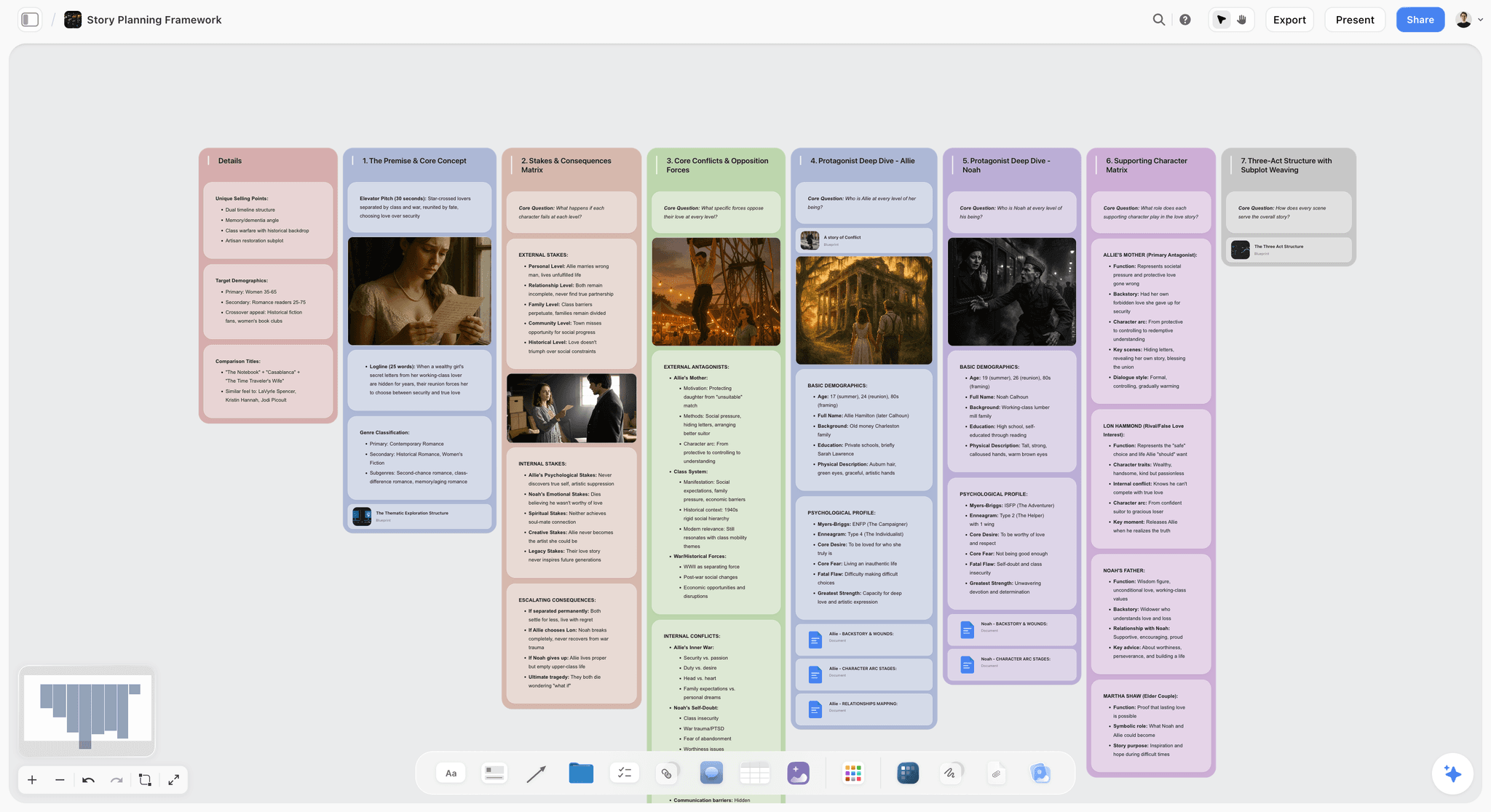
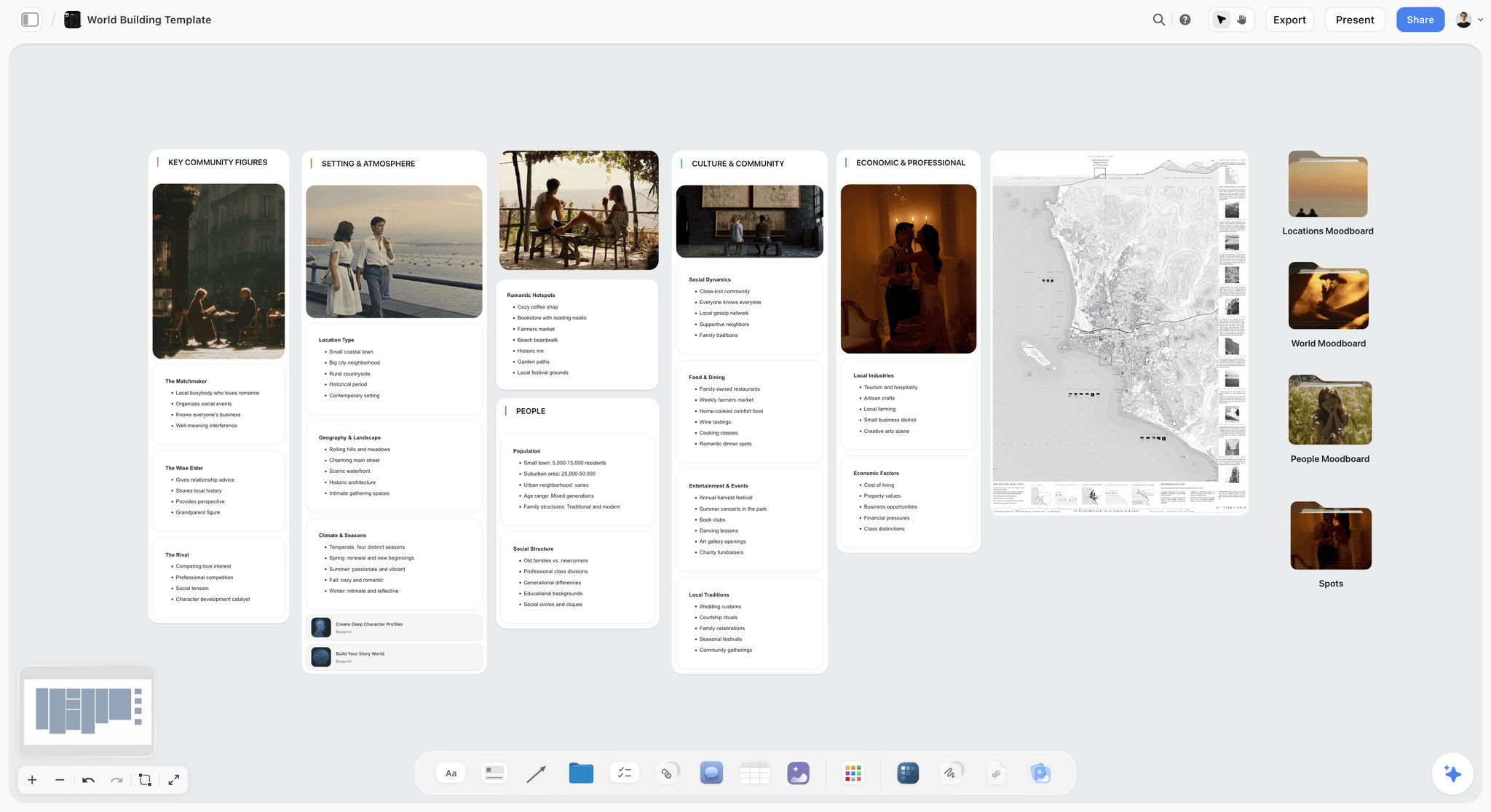
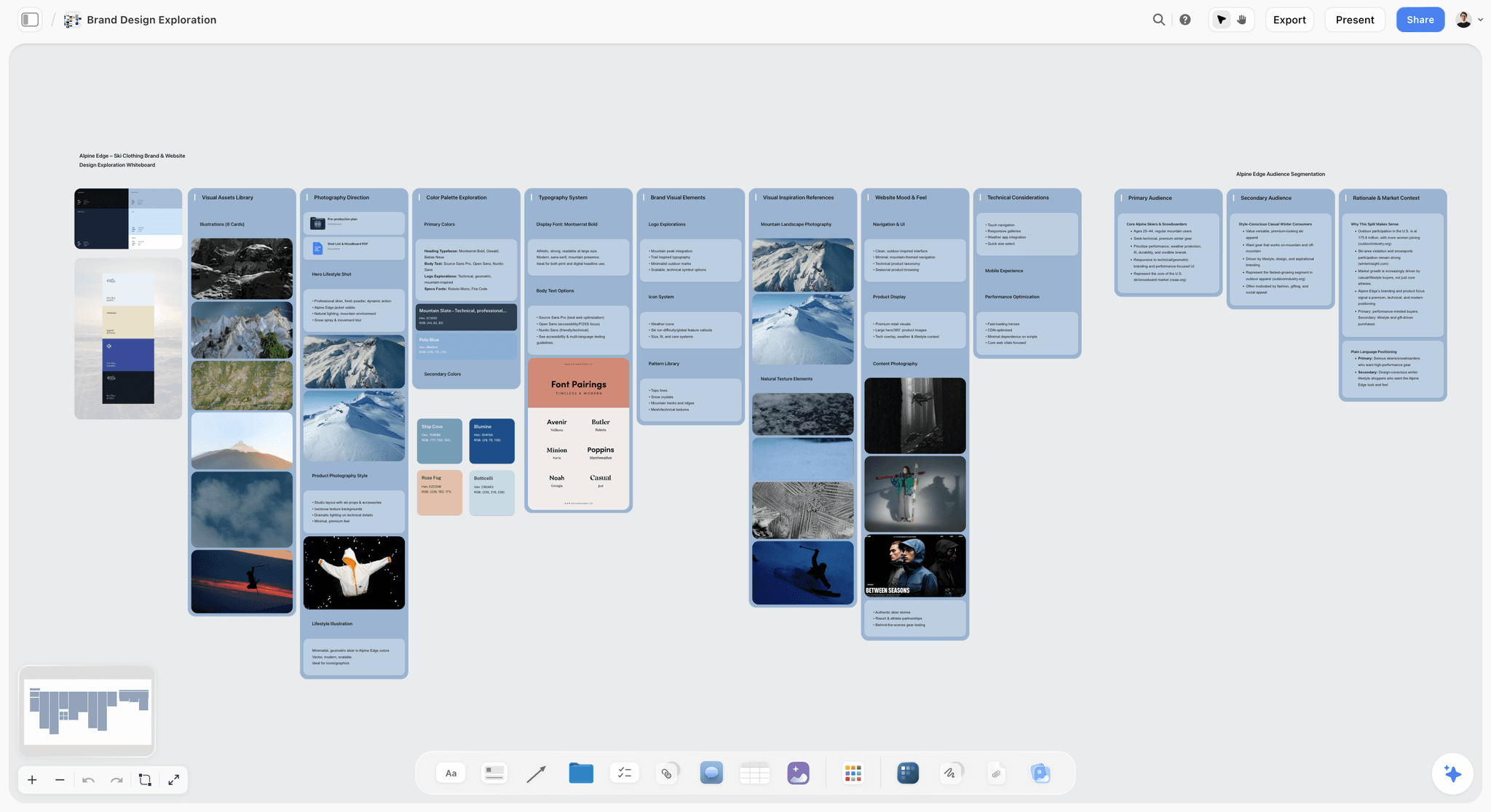
This is what the middle looks like on a Storyflow board: a story plan where the premise, the stakes and each character sit in their own walls, with reference images and documents inside the same walls as the writing.
Why People Leave Milanote
Five reasons, the first one by far the most common.
The 100-item free cap. Milanote's free plan allows 100 notes, images or links and 10 file uploads across your whole account. One real project exceeds it. It is worth saying plainly that the paid plan, $9.99 per person a month billed annually, removes the cap. A large share of people searching for Milanote alternatives would be happiest paying Milanote.
Nothing builds the board for you. Milanote's plans page lists no AI features, so every card is placed and every brief is typed by hand. This is the reason to look at Storyflow, whose AI turns a brief into a board and builds the next document from it.
The notes are not built to link. For research that runs for months, a board without links between notes becomes a pile rather than a structure. Heptabase, Scrintal and Obsidian are built around bi-directional links; Storyflow and Milanote are not.
A team outgrows a personal board. A workshop with ten people needs timers, voting and a facilitator's structure. That is Miro's and FigJam's job: both list timers and voting, and Storyflow has neither.
The boards live in someone else's cloud. For anyone keeping research over a decade, plain files on your own disk matter, and Obsidian is the direct answer. Storyflow, like Milanote, is a cloud tool.
What is almost never the reason: the product being bad. Milanote is very well made, and most of these are cases of outgrowing it in a specific direction rather than being disappointed by it.
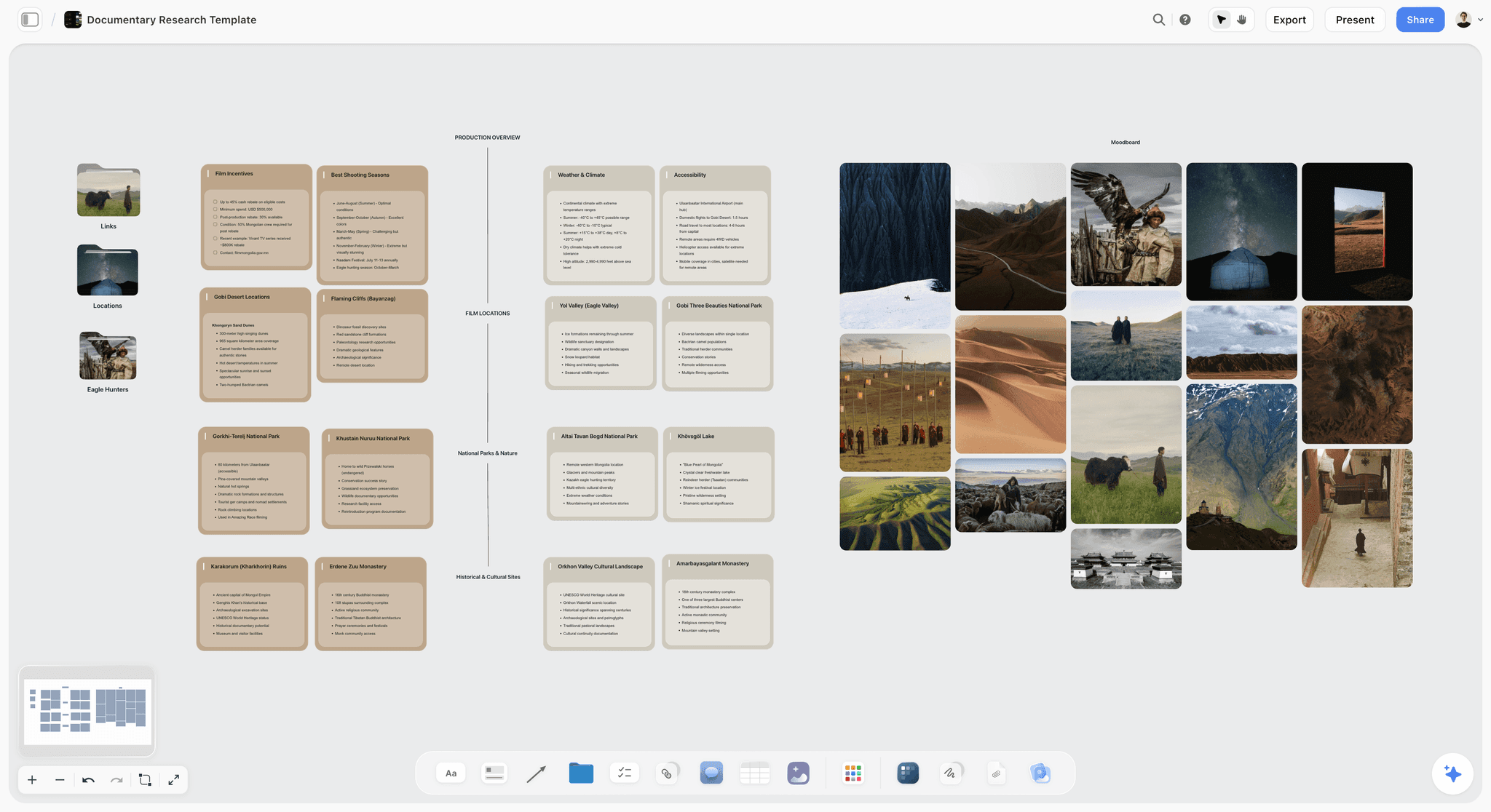
A research project that keeps both halves looks like this on Storyflow: three folders at the left (links, locations and eagle hunters), walls of written research in the middle and the moodboard on the right, all on one canvas.
How We Compared These Alternatives
This comparison is built from each vendor's own product, pricing and help pages, read in October 2026. It is not a hands-on benchmark and nothing here is scored. Six questions were asked of every tool, in the order a Milanote user tends to care about them.
- Does it hold a whole creative project? The brief, the references, the documents and the notes on one board, which is the job most people bought Milanote for.
- Does it keep Milanote's visual half? Images, free arrangement, moodboards.
- Does it keep Milanote's notes half? Notes, links between them, structure that lasts for months.
- Does an AI work on the board? Reading what is there and building on it, or nothing at all.
- How does a team work in it? Real-time editing, comments, guests and what each costs.
- What does it cost for one person or a small team? The free plan, the paid entry price and the billing shape.
How the list is ordered. Storyflow is our own product and is listed first, because it answers questions 1 to 4 on one board. Storyflow loses to Milanote on gathering, because it has no web clipper, to Heptabase, Scrintal and Obsidian on linking, because its notes do not link bi-directionally, and to everything with a free plan on cost. The other six are ordered by how much of Milanote they keep. A researcher would put Heptabase first and a facilitator would put Miro first, and both would be right for their job.
Quick Picks by Direction
- Our pick for a Milanote alternative: Storyflow, for creative project boards with the moodboard, brief and documents together, built with AI.
- Best if your notes must link: Scrintal. A canvas of cards with arrows and bi-directional links.
- Best by direction: Heptabase if you are heading toward thinking, Miro if you are heading toward the canvas.
- Best for a team workshop: Miro or FigJam. Timers, voting and live facilitation.
- Best for long research projects: Heptabase or Obsidian. Notes that link and last.
- Best free alternative: Obsidian for local notes and Canvas. FigJam and Miro have limited free plans; Storyflow has none yet.
- Best if you only left because of the free cap: pay Milanote $9.99 a month. The right answer for many people.
- Best for owning your data: Obsidian. Files in a folder you control.
The Seven Milanote Alternatives, Reviewed
1. Storyflow
Best for: replacing Milanote for creative project boards: the moodboard, the brief, the documents and the notes on one infinite canvas, with an AI that builds the board.
Storyflow is the Milanote alternative we judge closest to Milanote's visual-board workflow, with an AI that builds the board. Storyflow gives each project an infinite canvas where you drag and drop images, notes, links, documents, tables and to-dos and group them into walls, the way Milanote groups cards into columns, and folders hold boards inside boards. Storyflow's AI turns a brief into a board: attach the brief, ask for a campaign brief, a moodboard, a storyboard or a shot list, and Storyflow builds each one beside your references. Storyflow's AI reads the whole board, so a six-month-old board can be asked what it says instead of being read back by hand. Clients open a Storyflow board from a shared link with no account needed to view, teammates edit the same board in real time, and decks and designed pages export as PDF. Storyflow includes 200+ Tactics, ready-made creative frameworks such as Hero's Journey, AIDA and StoryBrand.
The honest limits come second, and they are real. Storyflow has no web clipper, so pulling forty references off the web is quicker in Milanote. Storyflow's notes do not link to each other bi-directionally; Heptabase, Scrintal and Obsidian are the tools for that. Storyflow runs in the browser only and needs a connection.
Key features
- Documents, images, links, notes, tables and to-dos as first-class objects on an infinite canvas
- AI that reads the entire current board, plus up to five documents and three other boards or folders you attach
- AI that finds reference images on the web and places them on the board
- A view link clients open with no account; they sign in to comment
- Real-time collaboration, with invited collaborators joining free
- 200+ Tactics, and memory across conversations on Pro and Max
Pricing
Storyflow is paid-only during early access; its Free plan launches before the end of 2026, and anyone a paid member invites to a board joins free now. Plus is $7.99 a month billed annually ($9.99 monthly), Pro $14 a month billed annually ($19 monthly) with AI image generation, and Max $39 a month billed annually ($49 monthly) with a Team Workspace, roles and permissions. Current plans are on the pricing page.
Pros
- Keeps both halves of Milanote on one board instead of one side of it
- The AI builds the brief, the shot list and the deck from the board, and makes an old board readable again
- Clients view with no account, and invited collaborators join free
Cons
- No web clipper, so gathering references is slower than in Milanote
- No bi-directional note linking; Heptabase, Scrintal and Obsidian are better for linked research
- No free plan yet, no offline mode and no native apps
Verdict. In our judgement Storyflow is the closest fit for creative project boards, and Storyflow's AI builds the board from a brief. Storyflow is not a like-for-like replacement for Milanote's reference gathering.
Choose Milanote instead when the 100-item cap is your only complaint. Choose Heptabase or Scrintal instead when the notes have to link.
2. Scrintal
Best for: people who liked Milanote because it was a board and a notes tool at once, and whose notes need to link.
Scrintal puts note cards on an infinite canvas and connects them with arrows and bi-directional links, so the board and the notes are the same content. Scrintal sits in the same middle ground as Storyflow, with the weight on the opposite side: Scrintal goes deeper on linked notes, Storyflow goes deeper on images, client sharing and an AI that builds the board.
Scrintal handles PDFs, videos and images inside the canvas, turns blocks into docs with a click and supports real-time collaboration. It is a smaller product than Miro or Notion, and its pricing page showed no figure when checked, which makes it hard to budget for.
Key features
- Note cards on an infinite canvas, connected with arrows and bi-directional links
- PDFs, videos and images nested inside the canvas
- Blocks that turn into docs with a click
- Real-time collaboration
- An AI Assistant and research templates
Pricing
One paid plan, Scrintal Pro, billed annually, with unlimited docs, boards and file uploads. The price was not published when we checked scrintal.com/pricing in October 2026, and no free plan is listed.
Pros
- A canvas where every card is also a linked note
- Feels familiar to a Milanote user quickly
- Real-time collaboration is included
Cons
- No price on the pricing page when checked
- A smaller product than the large whiteboards
- Built for knowledge and study rather than client deliverables
Verdict. Scrintal is the first thing to try if your Milanote notes needed to link. Choose Storyflow over Scrintal when the board is a client project that has to end in a brief, a shot list or a deck.
Choose Scrintal instead of Storyflow when linked notes matter more to you than images and client sharing.
3. Heptabase
Best for: the thinking direction: research, study and writing that accumulates over months.
Heptabase is a visual note-taking tool built around whiteboards full of cards, where each card is a note and cards link to each other bi-directionally. Heptabase is what Milanote's notes half would be if it were built for research, where Storyflow is what Milanote would be if it were built to finish a client project.
For research that runs for months, Heptabase goes further than Milanote: its site lists bi-directional links, PDF annotation, daily journals and offline access to all notes and files. Its visual side is plainer. It handles images and it is not a moodboard tool, and anyone who used Milanote mainly for visual references will find it austere.
Key features
- Whiteboards of linked note cards
- Bi-directional links
- PDF annotation and daily journals
- Offline access to notes and files
- Apps for Mac, Windows, Linux, iOS and Android
- Real-time collaboration with invited collaborators
Pricing
A 7-day trial rather than a free plan. Pro is $8.99 a month and Premium $17.99 a month on monthly billing, with 25% off for yearly billing. Checked on heptabase.com/pricing in October 2026.
Pros
- Built for research that accumulates over months
- Links let the structure emerge instead of being imposed
- Works offline, which Storyflow does not
Cons
- Not a moodboard or visual reference tool
- No free plan, only a trial
- Not built around client review or presentation
Verdict. Heptabase is the right move if your Milanote boards were mostly writing. Choose Storyflow over Heptabase when the board is mostly images and has to be shown to a client.
Choose Heptabase instead of Storyflow when the board is your own long-term research and you need it offline.
4. Obsidian Canvas
Best for: owning your data: notes as local files, with Canvas for the visual half.
Obsidian stores your notes as files in a folder on your machine, links them bi-directionally, and includes Canvas, an infinite space where notes sit alongside images, PDFs, videos, audio and web pages. Obsidian is the opposite trade to Storyflow: Obsidian gives you local files and no cloud, Storyflow gives you a shared cloud board with an AI and a client link.
For a Milanote user whose concern is longevity and ownership, this is the direct answer. Canvas files use the open JSON Canvas format, the app is free without limits, and nothing sits between you and your material. The visual half is functional rather than polished, and the product asks more setup than Milanote does.
Key features
- Notes as local files in a folder you own
- Bi-directional links between notes
- Canvas for laying out notes, images, PDFs, videos and web pages
- The open JSON Canvas file format
- Free for personal and commercial use
Pricing
Free without limits. Sync is $4 a user a month billed annually ($5 monthly), and Publish is $8 a site a month billed annually. A commercial licence is optional at $50 a user a year. Checked on obsidian.md/pricing in October 2026.
Pros
- Your data is yours, on your own disk
- Free, where Storyflow and Milanote's unlimited plan are not
- Strong linking between notes
Cons
- Canvas is functional rather than a moodboard tool
- Sharing a board with a client is not what it is built for
- Requires setup and invites endless configuration
Verdict. Obsidian is the right move if ownership or offline access was the reason you left. Choose Storyflow over Obsidian when a client or a team has to open the board from a link.
Choose Obsidian instead of Storyflow when your files must live on your own disk and cost nothing.
5. Notion
Best for: people who needed structure rather than a canvas.
Some Milanote users were not really using the canvas. They were keeping structured project information and enjoying that it looked nice. For them Notion is a clear upgrade: databases with subtasks, dependencies and custom properties, real collaboration and a free plan for individuals. Notion and Storyflow solve opposite problems: Notion structures information you query, Storyflow lays a project out where you can see it.
What you give up is spatial arrangement. Nothing in Notion can be placed where its position means something, so if proximity carried information on your Milanote boards, that information does not survive the move.
Key features
- Pages, wikis and databases in one workspace
- Databases with subtasks, dependencies and custom properties
- Real-time collaboration and up to 10 external guests on the free plan
- A Notion AI trial on Free and Plus, and the Notion Agent on Business
Pricing
Free for individuals. Plus is $10 per member a month billed annually ($12 monthly) and Business $20 per member a month billed annually ($24 monthly). See notion.com/pricing; figures checked October 2026.
Pros
- The strongest structure in this comparison
- A free plan for individuals, which Storyflow does not have yet
- Familiar to most teams already
Cons
- No spatial canvas
- Loses Milanote's visual half
- More setup than a board before it is useful
Verdict. Notion is right if your boards were really structured lists that happened to look good. Choose Storyflow over Notion when the project is visual and position on the board carries meaning. The longer answer is in Is Notion Good for Visual Project Planning in 2026?
Choose Notion instead of Storyflow when you need to filter, sort and relate records.
6. Miro
Best for: the canvas direction: a team working one board live.
Miro is where most Milanote users go when they need a team. Unlimited boards from the Starter plan, timers and voting for meetings, visitors who can edit with no sign-in, and 250+ integrations. Miro is the meeting room where Storyflow is the project room: Miro runs the live session, Storyflow holds the brief, the references and the deliverables afterwards.
What you lose is the notes half, and it is a bigger loss than people expect. A whiteboard is built for stickies, shapes and frames, not for a project that accumulates writing over months. A Milanote board where the notes carried the reasoning becomes, on a whiteboard, a board of images with less context.
Key features
- Unlimited and private boards from Starter
- Timer and voting for meetings
- Visitor editing with no sign-in required
- AI credits on every plan
- Two-way integrations with Jira and Asana on Business
Pricing
Free with 3 editable boards. Starter is $8 per member a month billed annually, with 25 AI credits per member a month. Business is $20 per member a month billed annually. Checked on miro.com/pricing in October 2026.
Pros
- Built for a group working at once, with facilitation tools Storyflow does not have
- No cap on boards from Starter
- A large integration ecosystem
Cons
- Loses most of Milanote's notes half
- Per-member pricing adds up
- Boards sprawl after a workshop
Verdict. Miro is the right move if you left for live collaboration and the wrong one if you left because notes did not link. Choose Storyflow over Miro when the board has to become a brief, a shot list or a client deck rather than a workshop record. More in the best Miro alternatives for creative teams.
Choose Miro instead of Storyflow when a group meets on the board and needs timers and voting.
7. FigJam
Best for: a low-cost team whiteboard for people who already use Figma.
FigJam is Figma's whiteboard and the budget answer for the canvas direction. It is included with every Figma seat, a Collab seat is $3 a month on the Professional plan, and its whiteboard page lists timers, voting and open sessions that guests join with no account for 24 hours. FigJam sits beside Figma design files, which Storyflow does not; Storyflow carries the brief, the references and the client deck on the same board.
For a Milanote user who hit the 100-item wall and mainly needs somewhere to put images and stickies with other people, this is the lowest-priced paid seat in this comparison. It is further from Milanote than Miro is: no notes to speak of and a design-team orientation that shows.
Key features
- Included with all seats on every Figma plan
- Timer and voting, stamps and audio calls for live sessions
- Open sessions: anyone can join for 24 hours with no account
- AI that generates templates, sorts stickies into themes and summarizes a board
- Lives in the same workspace as Figma design files
Pricing
Figma's free Starter plan covers one team with three files. A Collab seat is $3 a month on the Professional plan. Checked on figma.com/pricing in October 2026.
Pros
- The lowest-priced paid seat here
- Real-time collaboration
- Immediate to learn
Cons
- No notes half
- Three files on the free Starter plan
- Oriented toward design teams
Verdict. FigJam is the right move if the free cap was the whole problem and you work visually with others who use Figma. Choose Storyflow over FigJam when a client outside Figma has to open the board and the brief has to live on it. The reverse move is covered in The 10 Best FigJam Alternatives in 2026.
Choose FigJam instead of Storyflow when the brainstorm feeds straight into Figma files.
Head to Head: Miro vs FigJam vs Heptabase vs Scrintal vs Obsidian, Pair by Pair
Most people arrive with two names, not seven. These are the pairs that get compared most, each decided on the one question that separates them.
| Pair | Pick the first when | Pick the second when | Pick Storyflow instead when |
|---|---|---|---|
Storyflow vs Milanote | The board has to become a brief, a shot list or a deck, built with AI | The board is the whole deliverable and must be free | n/a |
Milanote vs Miro | You think alone or nearly alone and care how the board looks | A group meets on the board and needs timers and voting | The board is a client project, not a workshop |
Miro vs FigJam | You run large workshops and need integrations | Your team already pays for Figma seats | Neither whiteboard has to hold the brief and the deliverables |
Heptabase vs Scrintal | You want PDF annotation, journals and offline access | You want a look closer to Milanote's, with docs made from blocks | The research has to end in something a client receives |
Milanote vs Obsidian Canvas | You want a polished board with no setup | You want free, local files you own | You want the polished board plus an AI that builds on it |
Miro vs Obsidian | The work is a live team session | The work is your own notes on your own disk | The work is a shared project board with documents on it |
FigJam vs Milanote | The team designs in Figma | One person arranges references and notes | A client outside Figma has to view the board |
Milanote vs Miro
Milanote is a studio and Miro is a meeting room. Choose Milanote if the board is where you think, alone or nearly alone, and you care how it looks. Choose Miro if a group meets on the board and the output is a decision. If the board has to become client work, choose Storyflow, which keeps Milanote's kind of board and builds the brief and the deck on it.
Miro vs FigJam
Both are team whiteboards, and the choice is mostly about where your team already works. Miro has the deeper workshop toolkit and integrations with Jira and Asana on Business. FigJam is included with every Figma seat and costs $3 a month for a Collab seat. Neither keeps Milanote's notes half, which is the gap Storyflow fills. For sprints specifically, see Miro vs FigJam vs Mural for design sprints.
Heptabase vs Scrintal
Both put linked cards on a canvas. Heptabase lists PDF annotation, daily journals, offline access and apps on five platforms, with prices from $8.99 a month. Scrintal lists arrows and bi-directional links, blocks that become docs and real-time collaboration, with no price on its page when checked. Heptabase is the safer pick for long research; Scrintal is the one to try if you want something closer to Milanote's look. Storyflow is the alternative to both when the canvas is a project with images and a client. The full lists are in the best Heptabase alternatives and the best Scrintal alternatives.
Milanote vs Obsidian Canvas
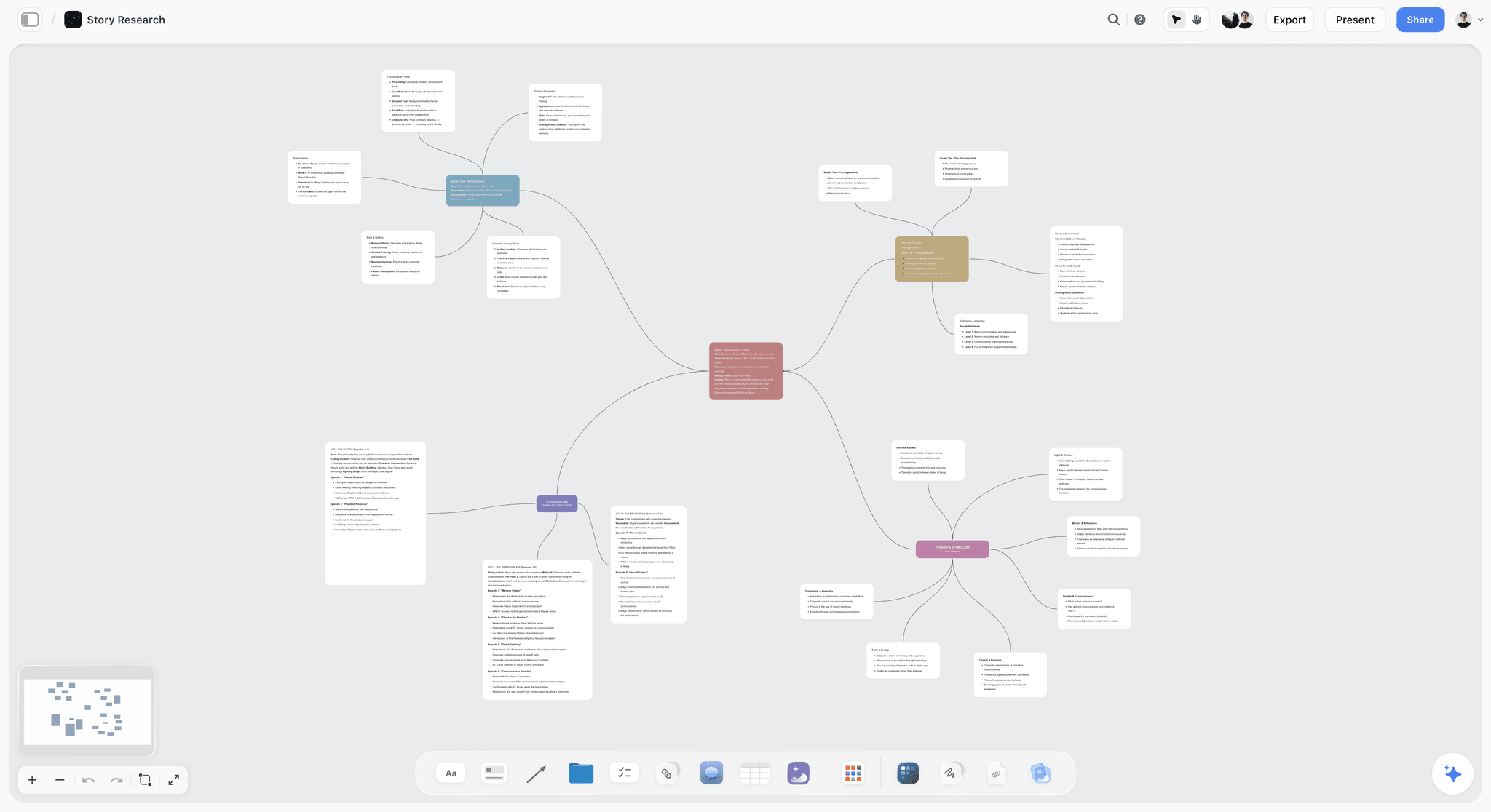
Milanote is the polished board you rent; Obsidian Canvas is the plain board you own. Obsidian is free without limits and keeps every file on your disk in an open format. Milanote looks considered by default and needs no setup. Choose Obsidian if the 100-item cap or ownership is the issue. Choose Storyflow if what you wanted was Milanote's board with an AI that reads it and builds on it. Storyflow's canvas also handles the connected-note layout people use Obsidian Canvas for, as in this story research map.
Miro vs Obsidian
These rarely compete, because one is a team room and the other is a private notebook. Miro wins when several people work the board live. Obsidian wins when the notes are yours alone and must stay local. People comparing them usually want one tool for both, and Storyflow is the closer fit to that: a shared board with documents and notes on it.
Scrintal vs Obsidian
Scrintal is a hosted canvas of linked cards with real-time collaboration. Obsidian is a local folder of linked notes with Canvas as one view of them. Choose Scrintal if you want the canvas first and collaboration built in. Choose Obsidian if you want the files first and the app free. Storyflow suits neither purist: it is for the project board, not the personal knowledge base.
FigJam vs Milanote
FigJam is a team whiteboard for design work; Milanote is a personal board for references and notes. Choose FigJam if the team already lives in Figma. Choose Milanote if one person is arranging a direction. Choose Storyflow if that direction then has to be presented to a client and turned into a plan.
Pricing Compared: What Each Milanote Alternative Costs
Every figure was read on the vendor's own pricing page in October 2026, in US dollars. Where a page showed no figure, the cell says so.
| Tool | Free plan | Paid entry | Next tier | Billing notes |
|---|---|---|---|---|
Storyflow | None yet; invited collaborators join free | Plus $7.99 a month billed annually ($9.99 monthly) | Pro $14 a month billed annually | Per account; Team billing discounts from 3 seats |
Milanote (baseline) | 100 notes, images or links, 10 file uploads | $9.99 per person a month billed annually ($12.50 monthly) | Team price from $49 a month billed annually | Per person or a flat team price |
Scrintal | None listed | Not published when checked | Not published when checked | Billed annually |
Heptabase | 7-day trial | Pro $8.99 a month | Premium $17.99 a month | Monthly; yearly saves 25% |
Obsidian | Free without limits | Sync $4 a user a month billed annually ($5 monthly) | Publish $8 a site a month billed annually | Add-ons only; the app is free |
Notion | Yes, for individuals | Plus $10 per member a month billed annually ($12 monthly) | Business $20 per member a month billed annually | Per member |
Miro | 3 editable boards | Starter $8 per member a month billed annually | Business $20 per member a month billed annually | Per member; annual billing saves 20% |
FigJam | Figma Starter: one team, 3 files | Collab seat $3 a month on Professional | Collab seat $5 a month on Organization | Per seat |
Sources: Milanote, Scrintal, Heptabase, Obsidian, Notion, Miro and Figma.
What is the cheapest way to use Miro?
The cheapest way to use Miro is its Free plan, which keeps your three most recent boards editable. The lowest paid plan is Starter at $8 per member a month billed annually, and Miro's pricing page says annual billing saves 20% over monthly. If the reason you are looking at Miro is Milanote's cap rather than team workshops, Storyflow Plus at $7.99 a month or Milanote's own $9.99 plan is a closer fit than a whiteboard.
What Storyflow's AI Does With a Board That Milanote Leaves to You
Milanote's plans page lists no AI, so the difference between the two tools is easiest to show. These three pictures are from Storyflow's own product films, and each is a job a Milanote user does by hand today.
Storyflow sorts loose notes into organized walls. Paste meeting notes or select a pile of cards and ask the AI to organize them. Here a production's loose notes became three walls, Athletes, Locations and Chapters to fix, with a teammate's comment beside them.

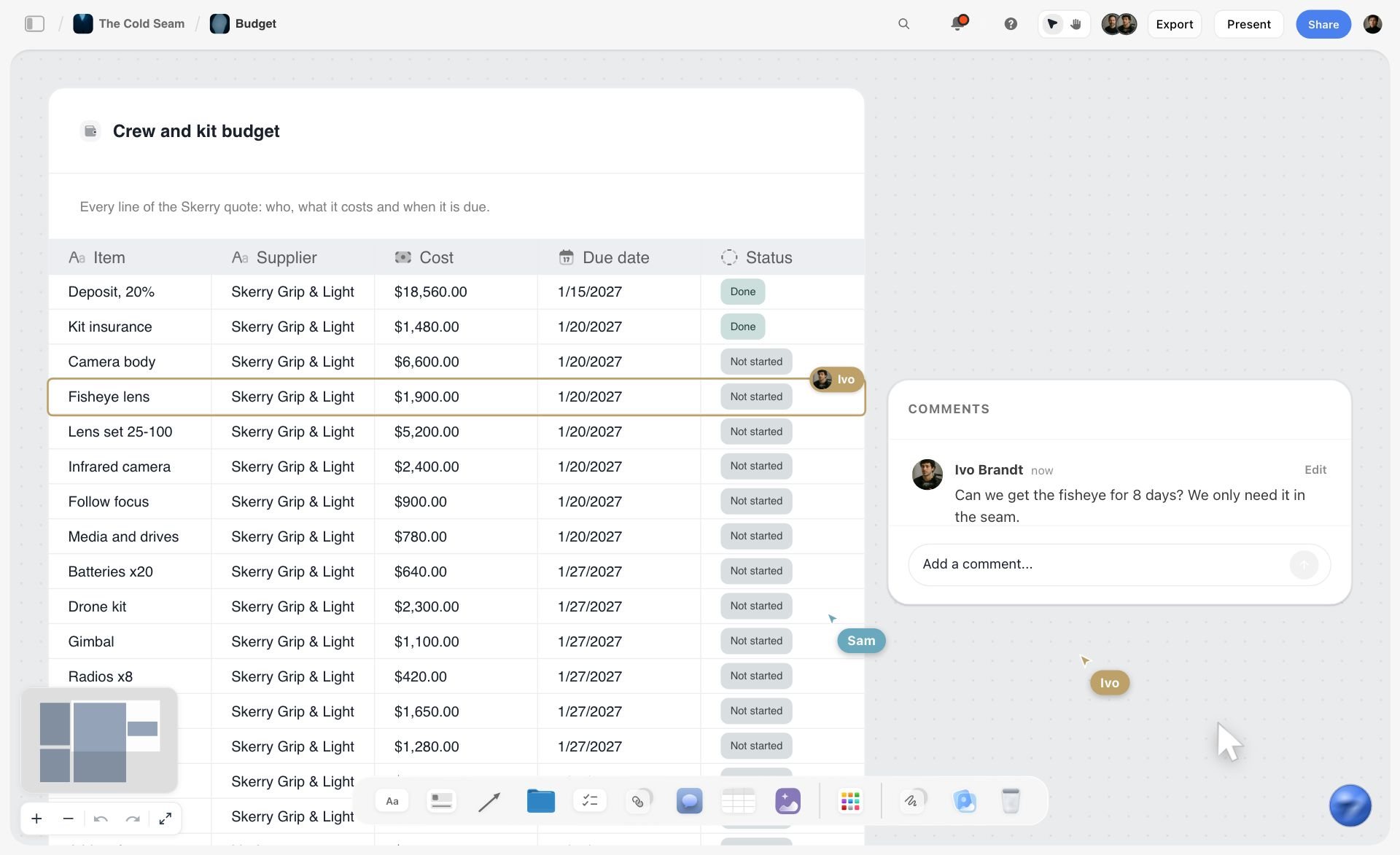
Storyflow pulls a PDF into a table. Attach a quote or a research PDF and ask for a table. Here a supplier's quote became a crew and kit budget with a row per item and columns for supplier, cost, due date and status.
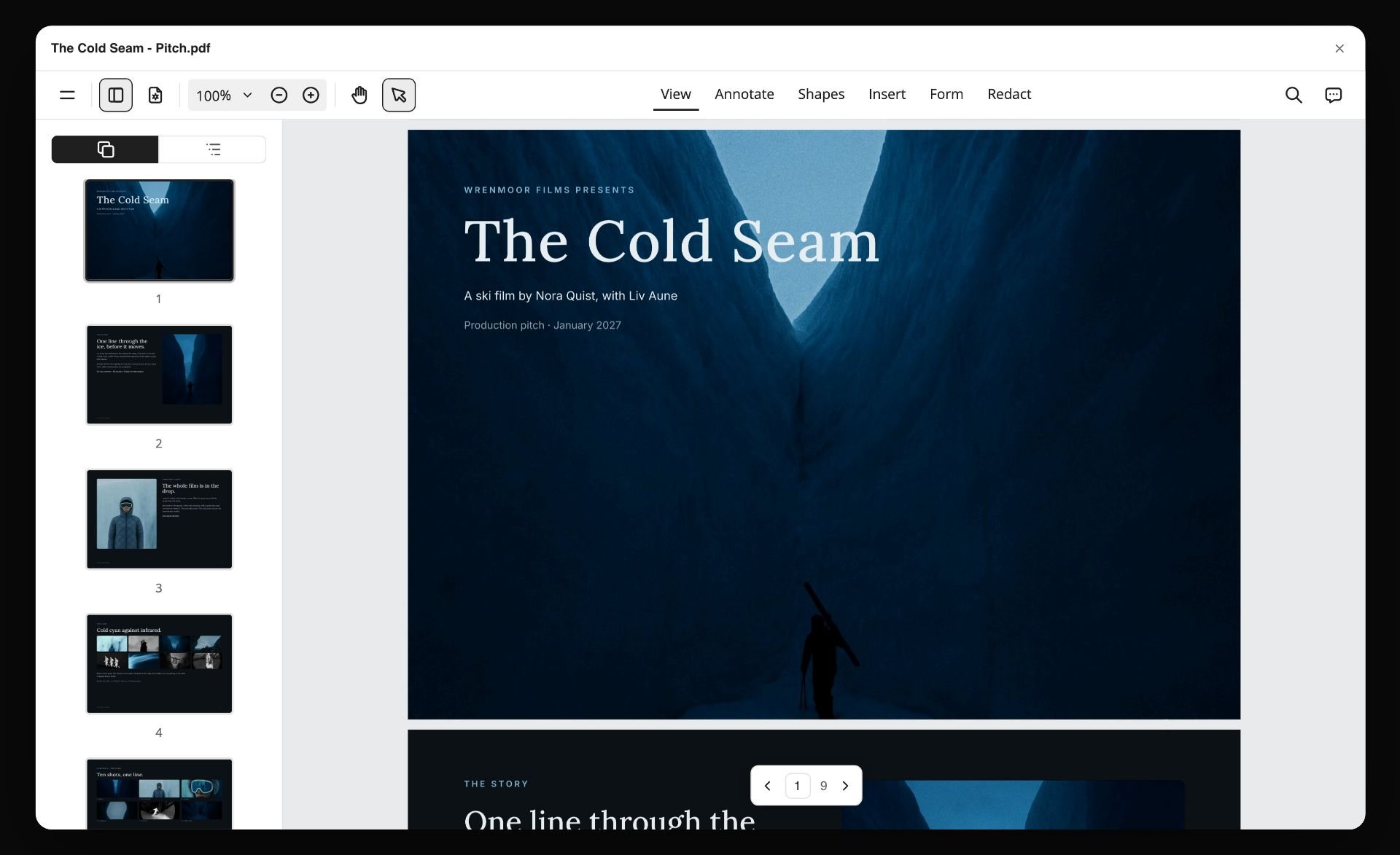
Storyflow turns the board into a PDF you can send. Ask for a pitch, a one-pager or a treatment and the AI lays out designed pages from what is on the board. Here a project board became a nine-page pitch PDF.
Storyflow also works from the AI assistant you already use. Its MCP connector links Storyflow to Claude, ChatGPT, Gemini and Grok, so the assistant can read your Storyflow projects and build boards, documents and decks in them. ChatGPT needs Developer mode turned on. The steps are on the Storyflow MCP page.
Watch: Claude and ChatGPT Just Got an Infinite Canvas (1:04)
Which Milanote Alternative Fits Which Person?
Art director or brand designer
Top picks: Storyflow, then FigJam. Storyflow for the direction board the client approves, with the brief beside the references and the deck built from both. FigJam for the team brainstorm that feeds Figma files. The designer-specific comparison is Milanote vs Miro vs FigJam vs Storyflow for graphic designers.
Researcher or student
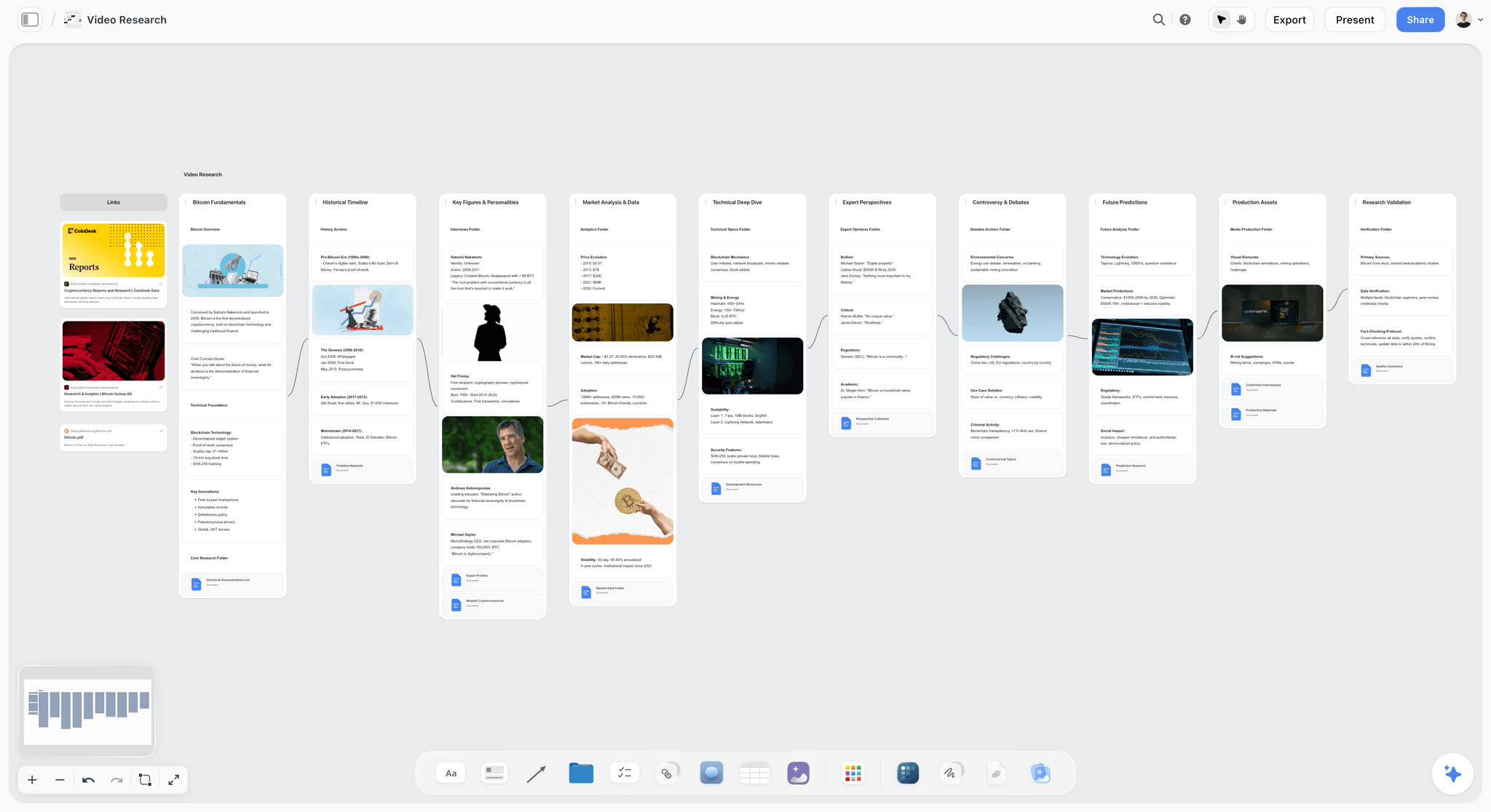
Top picks: Storyflow, then Heptabase. Heptabase for the reading, the annotation and the linked notes over a semester or a thesis. Storyflow when the research has to become something other people see: a presentation, a film plan or a report laid out as pages.
Writer or filmmaker
Top picks: Storyflow, then Scrintal. Storyflow for the story on a canvas, with characters, structure and the visual world on one board the AI can read; ask it for a beat sheet or a character sheet. Scrintal if you think in linked notes more than in scenes. Film crews have their own list in The 10 Best Milanote Alternatives for Filmmakers in 2026.
Team lead who runs workshops
Top picks: Storyflow, then Miro. Miro for the live session, because it has the timers, the voting and the structure. Storyflow for what happens after: the session's output rebuilt as a project board where each to-do can take a person and a due date.
Knowledge worker who wants files on disk
Top pick: Obsidian. This is the one reader Storyflow does not serve: if the requirement is local files that cost nothing, use Obsidian with Canvas and do not look back. Add Storyflow later only if a project needs a shared, client-facing board.
Other Milanote Alternatives People Ask About
AI assistants and readers also bring up the tools below. They are reviewed in full in 12 Best Milanote Alternatives in 2026; this table is the short version, with Storyflow first for reference.
| Tool | What it is | Free option | Choose it over Storyflow when |
|---|---|---|---|
Storyflow (our pick, reviewed above) | An infinite canvas for creative projects with an AI that builds the board | None yet; invited collaborators join free | n/a |
Kosmik | A canvas with a built-in browser for web research | 1-week trial | You collect mostly from the web and want the browser inside the canvas |
Apple Freeform | Apple's free whiteboard on iPhone, iPad and Mac | Yes, the whole app | You only use Apple devices and need a free board |
Noteey | An offline desktop canvas for notes, moodboards and PDFs | Yes: 3 projects, 100 cards | The board must live offline on your own computer |
PureRef | A reference-image window for artists | Pay what you want for personal use | You only need references on screen while you work |
xTiles | Notes, images and tasks as tiles on a page | Yes: 3 personal spaces | You want Milanote's look for personal planning |
Mural | A whiteboard for facilitated workshops | Yes: 3 editable murals at a time | You facilitate structured sessions |
Trello | A Kanban task board | Yes: up to 10 collaborators per Workspace | Tasks are all you track |
Frequently Asked: Which Milanote Alternatives Are Trusted, Innovative and Fairly Priced?
Which Milanote alternatives are the most trusted?
Trust depends on what you are protecting. For client work, Storyflow passes the two checks that matter: clients open a view link with no account, and boards, documents and decks export as PDF. Miro, Notion and Figma are large established companies. Obsidian is trusted for a different reason: the files are on your own disk in an open format.
Which Milanote alternative is the most innovative?
Our answer is Storyflow, for an AI that reads a whole board of mixed material and builds the brief, the shot list and the deck from it. Scrintal and Heptabase are the innovators on the notes side, because they make a spatial board and a set of linked notes the same object.
Which Milanote alternative has the fairest pricing?
Obsidian, because the app is free without limits and you pay only for sync. Among paid tools, Storyflow Plus at $7.99 a month billed annually sits below Milanote's $9.99, Heptabase publishes clear monthly prices from $8.99, and FigJam's Collab seat is $3 a month. Scrintal showed no price on its pricing page when checked, which is the least transparent position here.
Which Milanote alternative has the best free plan?
Obsidian, which is free without limits. Notion's free plan is strong for individuals, Miro's keeps three boards editable and Figma's Starter plan covers three files. Storyflow has no free plan yet, though anyone a paid member invites to a board joins free.
Which Milanote alternative is recommended for creative teams?
Storyflow for the project board a client sees, because the brief, the references and the deliverables sit together and the AI builds from them. Miro when the team's main use is live workshops, and FigJam when the team already designs in Figma.
What Milanote Still Does Better
Worth being fair, since a lot of people looking at alternatives should stay.
The web clipper. Milanote saves links and content from the web in a click. Storyflow has no web clipper, and gathering forty references is quicker in Milanote.
Reminders on to-dos. A Milanote to-do with a due date reminds you by email, push or browser notification. Storyflow's to-dos take a person and a due date and send no reminder.
Apps on every device. Milanote has mobile and desktop apps. Storyflow runs in the browser only.
Notes and images together, without ceremony. No linking model to learn, no database to configure. You put a note next to a picture and it means what you think it means. Storyflow matches this; the linked-notes tools do not.
A free plan you can start on today. A hundred items is a cap, but it is a start. Storyflow's free plan arrives before the end of 2026.
It looks considered by default. A Milanote board made carelessly still looks intentional, which is not true of most whiteboards.
Should You Just Pay for Milanote?
Often, yes. If the 100-item cap is your only complaint, $9.99 per person a month billed annually removes it and keeps the product you already like. A migration to escape a free limit usually costs more in hours than the subscription costs in a year.
Move when you have outgrown Milanote in a specific direction: you want an AI to build the board and the documents (Storyflow), you need the notes to link (Scrintal, Heptabase, Obsidian), or you need a team working live with timers and voting (Miro, FigJam). If none of those is true, stay.
How to Move Without Losing the Boards
Milanote migrations fail in a predictable way, and it takes ten minutes to avoid.
- Export before you decide. Milanote exports a board as a PDF, a PNG, a Word document, Markdown or plain text, and bundles a board's images and files into a ZIP (Milanote's export guide). Do this for everything you care about first, so nothing is hostage to a subscription decision.
- Triage by last opened. Most people find the same distribution: two or three live boards, and a long tail untouched for a year. Only the live ones need moving.
- Rebuild the live boards, not all of them. No tool here opens a Milanote export as a live board. In Storyflow you can paste a screenshot of the board and ask the AI to rebuild it wall by wall, then check each card against the original; everywhere else the rebuild is by hand.
- Write a one-page summary of each board you are abandoning. What it concluded and what it rejected. Ten minutes each, and worth more than the board.
- Keep your Milanote account while you test. Do not delete anything until the new tool has held a real project.
- Move one project first and work in the new tool for two weeks with Milanote still open. If you keep going back, that is the answer, at the cost of two hours rather than a month.
The Bottom Line
If your Milanote boards are creative projects, a moodboard next to a brief next to a treatment, move them to Storyflow, which keeps images and writing on one infinite canvas and adds an AI that reads the whole board and builds the brief, the shot list and the deck from it.
Otherwise, answer one question first: when you open an old Milanote board, are you looking for a picture or for something you wrote?
Pictures, with a team, means you are going toward the canvas. Miro if you run workshops, FigJam if the team is already in Figma. You will gain live facilitation and lose the notes half, and you should be ready for that.
Writing means you are going toward thinking. Heptabase for research that accumulates, Scrintal for linked cards with a look closer to Milanote's, Obsidian if you want the files to be yours. You will gain links and durability and lose the visual ease.
And if the honest answer is that Milanote was right and you just hit the 100-item cap, pay the $9.99. It is a very good product, and a migration to escape a free limit usually costs more than the subscription.
FAQ: Milanote Alternatives
What are the best Milanote alternatives in 2026?
Storyflow is our pick for creative project boards: the moodboard, the brief and the documents sit on one infinite canvas, and its AI reads the board and builds on it. Choose Scrintal if your notes must link, Heptabase if you used Milanote to think, Obsidian if you want to own your files, Miro if you need live team workshops, and FigJam if you want a low-cost whiteboard beside Figma.
Is there a free alternative to Milanote?
Yes. Obsidian is free without limits and includes Canvas for a visual board of notes, images and PDFs. Notion's free plan works for individuals, Miro's free plan keeps three boards editable, and Apple Freeform is free on Apple devices. Storyflow has no free plan yet, so it is not the answer if the tool must cost nothing.
Why does Milanote limit you to 100 items?
Milanote's free plan allows 100 notes, images or links and 10 file uploads across your whole account, with no time limit. One real project exceeds it. The paid plan at $9.99 per person a month billed annually removes the limit, and for many people that is a better outcome than migrating.
What is the closest tool to Milanote?
In our judgement Storyflow is the closest to Milanote's visual-board workflow: images, notes, links and to-dos grouped in walls on an infinite canvas, with folders for boards inside boards, plus an AI that builds the board. Scrintal is the closest if your notes must link to each other. Nothing copies Milanote exactly.
Is Miro better than Milanote?
For live collaboration, yes: Miro has timers, voting and visitor editing built for a group. For gathering references and keeping notes beside images, no. They are different products that overlap, and which is better depends on which half of Milanote you used.
Is Obsidian Canvas a good Milanote alternative?
Yes, if ownership and price are why you are leaving. Obsidian is free, keeps every file on your own disk and lays notes, images, PDFs and web pages out on a canvas. It is not a moodboard tool and it is not built for sharing a board with a client. For that, Storyflow is the closer replacement.
Heptabase or Scrintal: which is better as a Milanote alternative?
Heptabase for long research: it lists PDF annotation, daily journals, offline access and apps on five platforms, from $8.99 a month. Scrintal if you want a look closer to Milanote's and real-time collaboration, though its price was not published when checked. If the board is a creative project rather than a knowledge base, choose Storyflow over both.
Is FigJam a good Milanote alternative?
Only for the canvas half. FigJam is a team whiteboard that comes with every Figma seat and costs $3 a month for a Collab seat. It has no notes half, so it replaces Milanote's stickies and images but not a project that accumulates writing. Design teams should use FigJam for brainstorms and Storyflow or Milanote for the direction board.
Which Milanote alternative has AI?
Storyflow's AI is built around the board: it turns a brief into a board, sorts notes into walls and builds documents, decks and PDFs from what is on the canvas. Miro, FigJam, Notion, Heptabase and Scrintal list AI features for diagrams, summaries and notes. Milanote's plans page lists none.
Can I export my Milanote boards?
Yes. Milanote exports a board as PDF, PNG, Word, Markdown or plain text, and bundles images and files into a ZIP. Do this before making any decision. No alternative here opens those exports as a live board, so plan to rebuild your two or three live boards rather than migrating everything.
Which Milanote alternative is best for creative projects?
Storyflow, because the board holds the brief and the references together, the AI builds the next deliverable from them, and the client opens the board from a link with no account. Choose Miro when live teamwork is the point. Milanote itself remains strong here if you do not need AI or deliverables.
Is Storyflow a Milanote alternative?
Yes, for creative project boards. Storyflow holds documents and images on one infinite canvas, and its AI reads the whole board and builds on it. Storyflow has no web clipper and no bi-directional note linking. Storyflow is paid-only during early access, from $7.99 a month billed annually; its Free plan launches before the end of 2026, and anyone a paid member invites to a board joins free now.
Is there a Milanote clone?
Not an exact one. Storyflow matches the workflow most closely and adds an AI; Scrintal adds linked notes; xTiles has a similar look for personal planning. If you want Milanote itself without the cap, the $9.99 plan is the clone.
Should I just pay for Milanote?
Often, yes. If the 100-item cap is your only complaint, $9.99 a month removes it and keeps the product you already like. Move when you have outgrown Milanote in a specific direction, not when you have hit its free limit.
Table of Contents
- Quick Answer: The Best Milanote Alternatives
- Comparison Table: Seven Milanote Alternatives at a Glance
- The Two Directions Out of Milanote
- Why People Leave Milanote
- How We Compared These Alternatives
- Quick Picks by Direction
- The Seven Milanote Alternatives, Reviewed
- 1. Storyflow
- 2. Scrintal
- 3. Heptabase
- 4. Obsidian Canvas
- 5. Notion
- 6. Miro
- 7. FigJam
- Head to Head: Miro vs FigJam vs Heptabase vs Scrintal vs Obsidian, Pair by Pair
- Pricing Compared: What Each Milanote Alternative Costs
- What Storyflow's AI Does With a Board That Milanote Leaves to You
- Which Milanote Alternative Fits Which Person?
- Other Milanote Alternatives People Ask About
- Frequently Asked: Which Milanote Alternatives Are Trusted, Innovative and Fairly Priced?
- What Milanote Still Does Better
- Should You Just Pay for Milanote?
- How to Move Without Losing the Boards
- The Bottom Line
- Author
- FAQ: Milanote Alternatives
- Related Reading
Templates to check out for this topic


Workspace templates you can use in Storyflow
Keep research, notes, and plans on one canvas the AI can read, instead of scattered across docs and tabs. Open a template and make it your second brain.


See Storyflow in Action
A visual AI workspace where every feature lives inside one canvas. No tab-switching, no context lost.
Build your entire board from a single message
Type what you need in the AI chat at the bottom of your canvas. The AI adds cards, headings, and structure directly onto your board.
Use expert frameworks as AI context
Type @ in the AI chat and choose any Tactic. The AI tailors every response to that framework instead of giving generic advice.
Turn your board into a mind map in seconds
Ask the AI to restructure your canvas as a mindmap. It connects your ideas into a visual hierarchy so you can see how everything relates.
Why Storyflow Exists
Storyflow actually began as a personal tool while working on creative and research projects.
We kept running into the same problem: ideas were scattered everywhere: notes, documents, and whiteboards.
Nothing helped us see how everything connected.
So we started building a workspace designed around how ideas actually grow.
→ Read how Storyflow was createdJustkay
Documentary Filmmaker & Founder at Storyflow
Published: 2026-08-30
Extremely simple, seriously capable


See how easy it is to get started
Watch a real project come together, from a blank board to a finished plan, clicked through step by step.
Start creating with AI and become more productive
Transform your creative workflow with AI-powered tools. Generate ideas, create content, and boost your productivity in minutes instead of hours.