The 12 Best Heptabase Alternatives in 2026 (We Tested Them All)
The 12 best Heptabase alternatives in 2026, tested on real visual thinking projects. Whiteboard PKM tools compared on card-based research, AI, and pricing.

Category
Knowledge Management
Author

Justkay
Documentary Filmmaker & Founder at Storyflow
Topics
2026-05-14
•
15 min read
•
Knowledge Management- best Heptabase alternatives 2026
- Heptabase alternative
- visual PKM tools
- card-on-canvas PKM
What are the best Heptabase alternatives in 2026?
The best Heptabase alternative in 2026 is Storyflow for creative work you want to build on a visual AI canvas, Scrintal for academic citation, Obsidian Canvas for markdown ownership, and Logseq Whiteboards for open-source. Heptabase did something the rest of the PKM category missed in 2022. It put cards on a whiteboard, made the whiteboard the unit of thought, and let visual thinkers stop pretending their notes were a list. By 2026 the friction is real. The pricing increased, the AI features arrived later than competitors, the mobile app is still secondary, and the journaling tool feels grafted on. The mistake most leavers make is switching on paradigm alone, another card-on-canvas tool, without asking the harder question: what were you actually doing on that canvas? A research canvas is for understanding what already exists. A creative canvas is for building what does not. Those are two different tools wearing the same visual shape. I tested twelve Heptabase alternatives across three real projects this spring: a documentary research corpus, a brand strategy build for a Series A SaaS, and a literature review of 60 academic papers. The rankings below sort the tools by which of those two jobs they do best, and they concede the cases where a card-based research tool beats a creative one.

Full disclosure: Storyflow is our own product, and this guide ranks it first for the creative-canvas half of the Canvas Fork, where its AI reads the full active board and expands cards using Story blueprints. That ranking is honest about scope, not a claim to win every job. Storyflow is not a deep card-based research PKM: it has no PDF annotation or citation manager, so for a literature-review corpus Scrintal and Obsidian Canvas beat it, and it is cloud-only, so local-first users are better served by Logseq or Anytype. If your board was for understanding sources rather than building projects, one of those is the honest pick. We link to every tool so you can judge the fit.
Quick Comparison
These four cover both sides of the Canvas Fork: a creative-canvas builder, a markdown-owned canvas, an academic citation canvas, and an open-source local-first option.
| Tool | Best For | AI Features | Price |
|---|---|---|---|
| Storyflow | Creative project work on a canvas | AI reads the full active board | $7.99 mo annual (free plan late 2026) |
| Obsidian Canvas | Markdown ownership with canvas | AI via plugins | Free (personal) |
| Scrintal | Academic citation on canvas | Lighter AI than Storyflow | $9.99/month |
| Logseq Whiteboards | Open-source card whiteboard | Plugin-based AI | Free |
All 12 Heptabase Alternatives, Ranked
- Storyflow: best for creative project work on a canvas
- Obsidian Canvas: best for markdown ownership
- Scrintal: best for academic research on canvas
- Logseq Whiteboards: best open-source card whiteboard
- Reflect: best AI-native notes, a different paradigm
- Muse: best iPad-first spatial notes
- Miro Cards: best team whiteboarding with cards
- Capacities: best object-typed PKM with canvas
- Mem: best personal AI notebook
- Tana: best outliner with supertags
- Roam Research: best block-based PKM with backlinks
- Anytype: best open-source local-first PKM
Quick Picks: Best Heptabase Alternatives 2026 by Use Case
Best for Creative Project Work on a Canvas: Storyflow. Cards on an infinite canvas, AI that reads your full active board (plus up to 1 Tactic and 3 @-mentioned Documents), and a Free plan (unlimited shared boards) landing before the end of 2026. Paid-only during early access, with Plus from $7.99/month annual. Honest scope: it is a creative-visual workspace, not a deep research PKM, so for literature review it loses to Scrintal.
Best for Academic Research on Canvas: Scrintal. PDF annotation, citation management, and cards on canvas in one tool. From $9.99/month. If your board was a literature corpus, this is the honest winner, not Storyflow.
Best for Markdown Ownership: Obsidian Canvas. Heptabase's visual paradigm with local file ownership and a deep plugin ecosystem. Free for personal use.
Best for Open-Source: Logseq Whiteboards. Card-on-whiteboard on an open-source, local-first codebase. Free for self-hosting.
Best for AI-Native Notes (Different Paradigm): Reflect. Conversation-aware GPT-4 class AI, but it drops the canvas entirely. From $10/month.
Best for Spatial Note-Taking on iPad: Muse. iPad-first with the best stylus support on this list. From $9.99/month. iPad and Mac only.
Best for Team Whiteboarding with Cards: Miro Cards. Structured cards on Miro's whiteboard for teams already there. From $8/user/month. Whiteboard-shaped, not PKM-shaped.
Best Free Heptabase-Like Experience Today: Obsidian Canvas. Free for personal use, with local file ownership. Storyflow's Free plan (unlimited shared boards with basic AI) is coming before the end of 2026, but it is paid-only during early access now.
The right alternative depends on whether your canvas was for understanding what exists (Scrintal, Obsidian, or staying on Heptabase) or for building what does not (Storyflow). If your frustration is that the canvas knows where your cards are but the AI does not, rebuild your most-active Heptabase whiteboard in Storyflow for one week. For a direct head-to-head, read Storyflow vs Heptabase as a Second Brain.
Comparison Table: Best Heptabase Alternatives 2026
| Tool | Best For | Starting Price | Free Plan | Canvas Depth (★/5) | Rating (/10) |
|---|---|---|---|---|---|
Storyflow | Canvas plus board-aware AI plus Story blueprints | $7.99/month annual | Coming late 2026 (invited collaborators join free now) | ★★★★★ | 9.1/10 |
Obsidian Canvas | Markdown plus whiteboard | Free (personal) | Yes | ★★★★☆ | 8.6/10 |
Scrintal | Academic citation on whiteboard | $9.99/month | Yes (limited) | ★★★★☆ | 8.4/10 |
Logseq Whiteboards | Open-source card whiteboard | Free | Yes | ★★★★☆ | 8.2/10 |
Reflect | AI-native notes (different paradigm) | $10/month | 7-day trial | ★★★☆☆ | 8.0/10 |
Muse | iPad-first spatial notes | $9.99/month | 30-day trial | ★★★★☆ | 7.9/10 |
Miro Cards | Whiteboard with structured cards | $8/user/month | Yes (limited) | ★★★★☆ | 7.7/10 |
Capacities | Object-typed PKM with canvas | $10/month | Yes | ★★★★☆ | 7.6/10 |
Mem | Personal AI notebook | $10/month | Yes (limited) | ★★☆☆☆ | 7.4/10 |
Tana | Outliner with supertags | $14/month | Limited beta | ★★★☆☆ | 7.3/10 |
Roam Research | Block-based PKM with backlinks | $15/month | 31-day trial | ★★☆☆☆ | 7.1/10 |
Anytype | Open-source local-first PKM | Free | Yes | ★★★☆☆ | 7.0/10 |
Rating criteria: Canvas depth (30%), AI depth (25%), pricing and value (20%), workflow fit (15%), portability (10%). Canvas depth is weighted highest because it is the reason most readers leave Heptabase. The #1 rank fits the largest group of leavers (creative-canvas users), not a universal winner; for a pure literature-review corpus, Scrintal is the correct pick.

Storyflow second brain board: research cards on an infinite canvas with AI that reads the whole board
A visual second brain the AI actually reads
Heptabase gives you cards on a whiteboard; Storyflow adds an AI that reads the whole board at once and surfaces the connections instead of leaving you to find them.

The Canvas Fork: Why People Actually Leave Heptabase
Every Heptabase alternative decision comes down to a fork the marketing pages hide. Heptabase is built as a research canvas: you read, highlight, and drop cards on a whiteboard, and the spatial layout helps you see how sources connect. For deep reading it is hard to beat. The problem is that a large share of Heptabase users are not doing research at all. They are using the canvas to develop a project, and the tool was never shaped for the second half of that job.
That is the fork. On one side is the research canvas: gather sources, annotate PDFs, connect ideas, understand a body of knowledge. On the other side is the creative canvas: take what you understand and build the campaign, the film, the launch, the deck. A research canvas is for understanding what exists. A creative canvas is for building what does not. Heptabase does the first job well and the second job barely.
Once you know which side of the fork you are on, the twelve tools sort themselves. Research-canvas tools keep Heptabase's reading and connecting strengths: Scrintal (citation-grade), Obsidian Canvas (markdown-owned), Logseq Whiteboards (open-source), and Anytype (local-first). Creative-canvas tools optimise for building forward: Storyflow leads because its AI reads the full active board and can be pointed at a framework to expand cards into real project work, with Miro Cards (team-shaped) and Muse (iPad-shaped) close behind. Paradigm-shifted tools drop the canvas but win on other axes: Reflect and Mem (AI-native notes), Tana and Roam (outliner and block-based), Capacities (object-typed).
A 2024 Forte Labs survey of PKM users found that 68% of canvas-based PKM users reported higher engagement with their notes than block-based users. The mechanism appears to be visual context: spatial arrangement makes connections inspectable in a way text-based links do not. That is why the canvas keeps pulling people back, and why the fork, not the paradigm, is the decision that matters.
How We Evaluated the Best Heptabase Alternatives 2026
Five criteria determined the rankings.
Canvas depth. Card creation speed, infinite canvas performance with 100+ cards, grouping and spatial organisation, card linking and backlinks, embed support.
AI depth. Context awareness across the canvas, framework-aware AI, conversation memory, source grounding accuracy.
Pricing and value. Annual cost across plans, free tier reality, the value at each tier compared to the work I could do.
Workflow fit. Three real projects: documentary research, brand strategy, literature review. Tools that fit one but not the others got split scores, which is how the Canvas Fork shows up in the data.
Portability. Export formats, data ownership, the ease of leaving the tool with my work intact.
Every tool was tested on real visual thinking work over three weeks.
Detailed Reviews: Best Heptabase Alternatives 2026
1. Storyflow (Best for Creative Project Work)
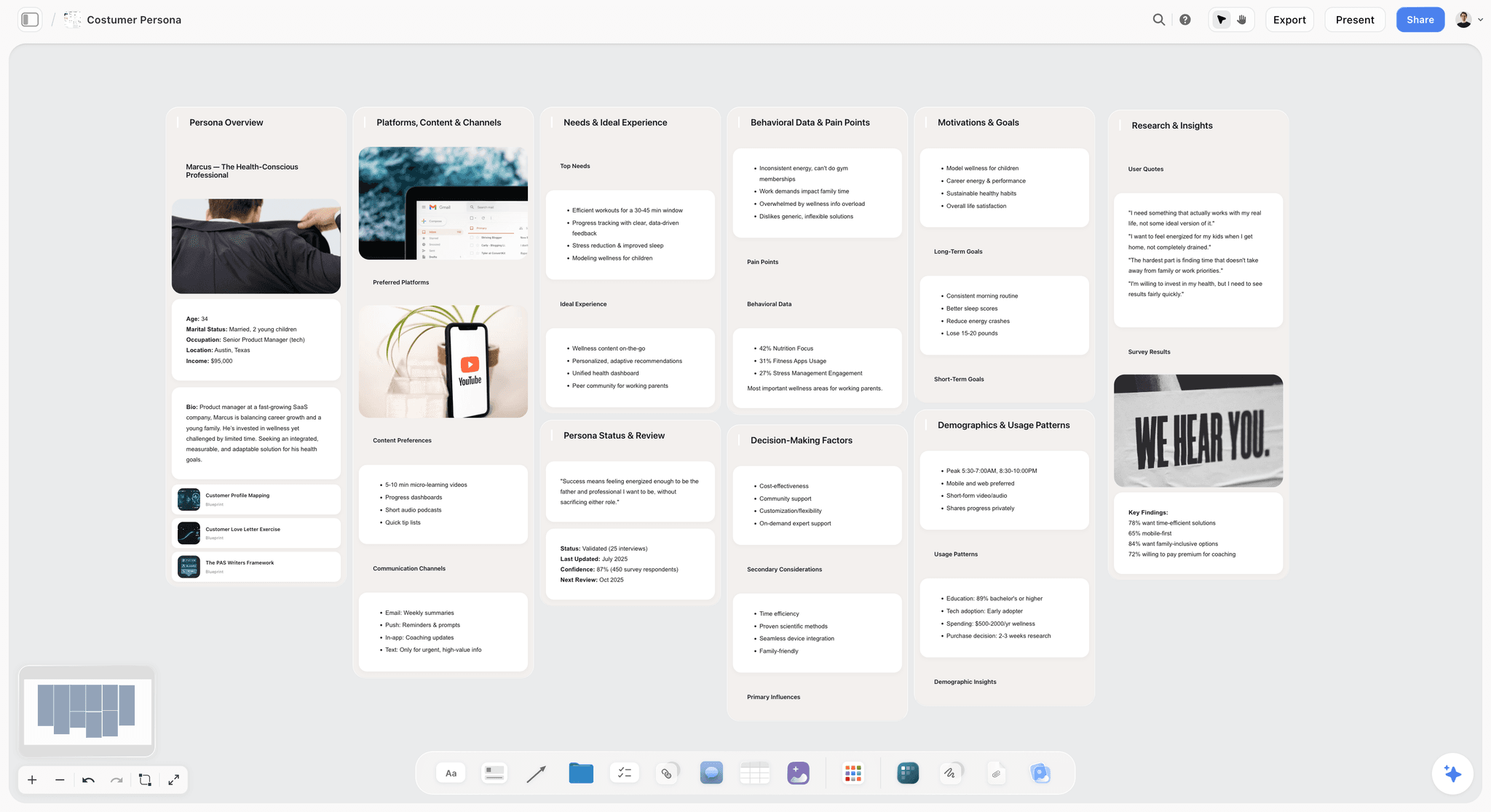
The friction that pushes people off Heptabase is not the canvas. It is that the canvas knows where every card sits while the AI sees only the card in front of it. Storyflow closes that gap for the creative-canvas half of the fork: cards live on an infinite canvas, and the AI reads your full active board by default, plus up to 1 Tactic and up to 3 Documents you @-mention in the chat. The result is AI that works with your thinking instead of next to it. The Story blueprints library (200+ expert frameworks like Hero's Journey, AIDA, and Retention Hooks) is the differentiator: @-mention AIDA on a brand board and the AI knows the framework when it expands cards, rather than guessing from a single note. In my Series A brand build, that turned a wall of research cards into a structured campaign in an afternoon.
Best for: Heptabase users whose canvas was really a workspace for making things, who want board-aware AI and structural scaffolding through Story blueprints.
Pricing: Paid-only early access today; the Free plan (unlimited shared boards, basic AI, 20 file uploads) launches before the end of 2026, and anyone a paid member invites to a board joins free now. Plus: $7.99/month annual or $9.99/month monthly. Pro: $14/month annual or $19/month monthly (AI image generation, 20× more AI than Plus). Max: $39/month annual or $49/month monthly.
Pros: Canvas paradigm matches Heptabase, AI reads the full active board plus @-mentioned context, 200+ Story blueprints provide scaffolding Heptabase does not match, upcoming Free plan is built to be functional for real work.
Cons: Storyflow is honestly not a deep card-based research PKM. It has no PDF annotation or citation manager, so literature review loses to Scrintal and Obsidian. It is cloud-only, so local-first users should look at Logseq or Anytype. And it is a newer platform, so the community and the daily journaling feature are thinner than Heptabase's.
Verdict: Storyflow is the right pick for Heptabase users who want to build projects on a canvas with board-aware AI, not just archive research. For broader canvas comparisons, see The 12 Best Creative Workspace Tools in 2026 and The 12 Best Mind Mapping Tools in 2026.
2. Scrintal (Best for Academic Research on Canvas)
Scrintal is the Heptabase-shaped alternative built for the research side of the fork. PDF annotation, citation management, and the card-on-canvas paradigm sit in one tool, so a literature review never leaves the whiteboard. In my 60-paper review it was the only tool that let me annotate a source, pull the citation, and connect the argument to three related cards without switching apps. That first-class citation workflow is why it ranks above the free markdown tools.
Best for: Academic researchers who want canvas PKM with academic citation.
Pricing: Free with limits. Pro from $9.99/month. Annual discount available.
Pros: Citation management is academic-grade, PDF annotation directly on canvas cards, the research shape is fully realised, export preserves references.
Cons: Smaller community than Heptabase, AI features are lighter than Storyflow or Reflect, and the academic shape feels heavy for non-academic creative work.
3. Obsidian Canvas (Best for Markdown Ownership)
Obsidian's canvas combines plain-text markdown notes with a card-on-whiteboard surface, and the whole thing runs on local files you own. The community-driven plugin ecosystem is the real leverage: plugins for AI, spaced repetition, and citation let you shape the tool around your workflow. The trade-off is that the canvas is one feature inside a larger markdown app, so it never feels as polished or fast as a canvas-first tool, and mobile canvas support lags.
Best for: Users who want markdown ownership with the canvas paradigm.
Pricing: Free for personal use. Commercial use from $50/user/year. Sync from $4/month if needed.
Pros: Markdown-based portability, the plugin ecosystem extends the tool meaningfully, free for personal use, local-first data ownership.
Cons: Canvas is one feature within a broader tool, polish is lower than dedicated canvas tools, mobile canvas support is limited, and AI depends on which plugin you configure.
Verdict: Obsidian Canvas is the right pick for markdown-first users who want canvas as a feature. See The 12 Best Obsidian Alternatives in 2026.
4. Logseq Whiteboards (Best Open-Source)
Logseq Whiteboards offers card-on-whiteboard functionality on an open-source, local-first codebase, and it is the leading open-source pick for users with data sovereignty needs. The standout is the block-and-canvas link: a bullet you wrote last week can be dragged onto a canvas as a card, so your outline and spatial layout stay in sync. The cost of open-source is polish and pace: the interface lags commercial tools, AI is plugin-based rather than native, and mobile is still secondary.
Best for: Open-source-committed users who want canvas PKM with local data.
Pricing: Free for self-hosting. Logseq Sync from $5/month if needed.
Pros: Free, open-source, active development, block-and-canvas integration, full data sovereignty.
Cons: Polish lags behind commercial tools, AI features are plugin-based, mobile support is secondary, setup takes more patience than a hosted tool.
5. Reflect (Best AI-Native Notes)
Reflect is the AI-native note-taking tool with GPT-4 class quality and a notes-first paradigm. It is not card-on-canvas, but it is AI-deep enough that Heptabase users frustrated with slow AI development should look hard at it. The AI drafts, summarises, and answers across your notes with genuinely strong quality, and the mobile app is fast for capture. What you give up is the spatial layer entirely, so if seeing cards in space is why Heptabase worked for you, Reflect will feel like a step backward no matter how good the AI is.
Best for: Users who want AI-native PKM and can accept a non-canvas paradigm.
Pricing: From $10/month or $100/year. 7-day trial.
Pros: AI is among the best in this list, the notes-first paradigm is clean, fast capture, mature mobile app, end-to-end encryption.
Cons: No canvas paradigm, structural and spatial features are light, smaller community than the incumbents.
6. Muse (Best iPad-First Spatial Notes)
Muse is the iPad-first spatial note-taking tool with stylus support, the most native option here for people who think with a pencil. The spatial paradigm is close to Heptabase but rebuilt for touch, so dragging, zooming, and sketching feel tactile rather than mouse-driven. In practice it is the tool I reached for to sketch a rough film sequence by hand before formalising it. The catch is platform lock-in and lighter AI: on Windows or Android, Muse is simply not available.
Best for: iPad-first visual thinkers who use a stylus.
Pricing: Free with limits. Pro from $9.99/month. 30-day trial.
Pros: Best stylus support on this list, the iPad-first design is well realised, spatial paradigm matches Heptabase's core strength, smooth touch performance.
Cons: iPad and Mac only, no Windows or Android, AI features are light, less useful for text-heavy corpora.
7. Miro Cards (Best Whiteboard with Cards)
Miro added structured cards to its whiteboard in 2024, so teams already on Miro can get Heptabase-like card thinking without adopting another platform. The collaboration features are stronger than Heptabase's: real-time cursors, comments, and a large template library turn a card wall into a working session, which makes Miro Cards the natural pick when the canvas is shared rather than personal. The honest limitation is shape. Miro is built for workshops and diagrams, not durable personal knowledge, so a card graph you want to revisit for months can get lost in the busier Miro environment.
Best for: Teams already on Miro who want card-based thinking.
Pricing: Free with limits (3 boards). Starter from $8/user/month. Business from $16/user/month.
Pros: Best team collaboration on this list, integrates with existing Miro workflow, large template library, strong real-time features.
Cons: Whiteboard-shaped rather than PKM-shaped, the broader Miro environment can feel noisy for focused thinking, per-user pricing adds up for teams.
8. Capacities (Best Object-Typed PKM)
Capacities is object-typed PKM with a canvas layer. The paradigm centres on typed objects (people, books, ideas, projects) with structured properties, so instead of free-form cards you build a small database that also has a whiteboard view. For users who felt Heptabase's cards were too loose and wanted queries to know that this card is a book and that one is a person, it is the structured alternative. The cost is exactly that structure: deciding object types up front is a learning curve, and free-form thinkers will find it rigid.
Best for: PKM users who want typed objects with structured properties.
Pricing: Free with limits. Pro from $10/month or $80/year.
Pros: Object-typed paradigm is genuinely unique, structured properties enable powerful filtering and queries, canvas view is present, tidy mobile app.
Cons: Object-typed paradigm has a real learning curve, the structure can feel rigid, the canvas is lighter than dedicated tools.
9. Mem (Best Personal AI Notebook)
Mem is the personal AI notebook that pairs fast note-taking with AI retrieval that improves as you write. There is no real spatial layer, but it is stronger than Heptabase on daily capture and on surfacing an old note exactly when you need it. In testing it was excellent for throwing quick research fragments in and getting them back later, and weak for anything that needed to be seen in spatial relationship to other cards.
Best for: Daily-use AI notebook users who value capture and retrieval.
Pricing: Free with limits. Plus from $10/month.
Pros: Fast capture, mature mobile app, AI retrieval improves with use, low friction to start.
Cons: Not a canvas paradigm, structural and spatial depth is light, less suited to project building.
10. Tana (Best Outliner with Supertags)
Tana is an outliner with supertags (typed nodes) that adds structural depth to traditional outlining. It is not card-on-canvas, but it is powerful for users who think in nested outlines and want typed structure the way a database has it. Supertags let a single node behave like a typed record, so you can query "every meeting tagged with this project" across a workspace. The reasons it ranks lower here are simple: it abandons the canvas Heptabase users came for, the community is smaller, and public AI integration remained thin as of 2026.
Best for: Outliner-first thinkers with structural and query needs.
Pricing: Limited beta access. From $14/month when generally available.
Pros: Supertags are powerful, the outliner paradigm scales, typed structure enables advanced queries.
Cons: Outliner paradigm is far from canvas, smaller community, limited public AI as of 2026, beta access friction.
Verdict: Tana is the right pick for outliner-first thinkers. See The 12 Best Tana Alternatives in 2026.
11. Roam Research (Best Block-Based PKM with Backlinks)
Roam Research pioneered backlink-based PKM with the block as the unit of organisation, and it remains historically influential even though the canvas era passed it by. For users who want maximum backlink depth (every block linkable, every mention bidirectional) Roam is still one of the strongest tools in the category, unmatched for building a dense web of connected thoughts. The honest reasons it ranks near the bottom of a Heptabase list: it is not canvas-paradigm at all, its AI is limited, and the pricing is high relative to newer AI-native tools.
Best for: Backlink-heavy PKM users who want block-level granularity.
Pricing: $15/month or $165/year. 31-day trial.
Pros: Mature backlink paradigm, block-based granularity, active and knowledgeable power-user community.
Cons: Not canvas-paradigm, AI features are limited, pricing is high, the learning curve is steep.
Verdict: Roam Research is the right pick for backlink maximalists. See The 12 Best Roam Research Alternatives in 2026.
12. Anytype (Best Open-Source Local-First PKM)
Anytype is open-source, local-first PKM with object types and a small canvas component. Its combination of local-first, encrypted, open-source, and typed is rare, and encrypted sync means you keep ownership without giving up cross-device access, which is why privacy-focused users choose it over hosted alternatives. The trade-off for a Heptabase leaver is that the canvas features are the lightest on this list: Anytype is a strong object database with a bit of canvas, not a canvas tool with a database attached, so spatial thinkers will feel the gap.
Best for: Local-first, open-source PKM users who want typed objects.
Pricing: Free. Paid sync tiers available.
Pros: Free, open-source, local-first, encrypted sync, active development.
Cons: Canvas features are light, smaller community, AI features are limited, object model has a learning curve.
How to Choose the Right Heptabase Alternative for Your Thinking
Start by naming which side of the Canvas Fork you are on, then the tool follows: building projects points to Storyflow, a research corpus to Scrintal, markdown ownership to Obsidian Canvas, open-source and local-first to Logseq Whiteboards, and iPad stylus work to Muse. The wrong move is to switch on paradigm alone and expect the same working pattern. A research canvas is for understanding what exists. A creative canvas is for building what does not. Pick the one your actual work needs. For broader knowledge management comparisons, see The 12 Best AI Second Brain Apps in 2026 and The 12 Best Note-Taking Apps for Visual Thinkers in 2026.
The Bottom Line
The best Heptabase alternative depends on which side of the Canvas Fork you are on. A research canvas is for understanding what exists. A creative canvas is for building what does not. For building projects on a canvas with AI, Storyflow is the most direct match. For a research corpus with citations, Scrintal. For markdown ownership, Obsidian Canvas. For open-source and local-first, Logseq Whiteboards. For iPad stylus work, Muse.
If you are not sure which fits, open your most-used Heptabase whiteboard and ask what made the canvas paradigm work for you: AI that read across cards points to Storyflow, annotating and citing sources points to Scrintal, markdown notes that happened to live on a board point to Obsidian Canvas. The wrong move is to switch to a tool on the wrong side of the fork and expect your working pattern to survive.
If your answer was board-aware AI for creative work, the test is cheap: rebuild that one Heptabase whiteboard in Storyflow for a week and ask the AI a question that needs the whole board, not one card. If it reads the context Heptabase made you stitch together by hand, the decision is made for you.
FAQ: Best Heptabase Alternatives 2026
What is the best Heptabase alternative in 2026?
The best Heptabase alternative depends on which side of the Canvas Fork you are on. If your board was for building projects, Storyflow, because its AI reads the full active board and expands cards using Story blueprints. If your board was a research corpus, Scrintal, because citation and PDF annotation live on the canvas. For markdown ownership choose Obsidian Canvas, for open-source Logseq Whiteboards, and for iPad stylus work Muse.
Why do people leave Heptabase?
People leave Heptabase mostly because of pricing increases, slower AI development relative to AI-native alternatives, and the pull toward a tool that helps them build the project their research was for. The mobile app also remains secondary. The deeper reason is the Canvas Fork: many leavers were doing creative work on a research tool.
Is Heptabase worth it in 2026?
Heptabase is still worth it if your main job is deep reading and connecting sources, because the card-on-canvas research workflow is genuinely strong and hard to match. It is less worth it if you use the canvas to build campaigns, films, or launches, where the AI is shallow and the tool stops helping after capture. Before renewing, ask whether your board is mostly research you are understanding or a project you are trying to make.
Is there a free Heptabase alternative?
Yes. Obsidian Canvas is free for personal use with local file ownership. Logseq Whiteboards is free open-source, and Anytype is free and local-first. Storyflow is paid-only during early access, but its Free plan (unlimited shared boards, basic AI) launches before the end of 2026. The right free option today depends on whether you want markdown ownership (Obsidian), open-source canvas (Logseq), or local-first typed objects (Anytype); AI-native building (Storyflow) joins that list once its Free plan ships.
Is Storyflow better than Heptabase?
For users who want AI built in from the start and structural scaffolding through Story blueprints, Storyflow is meaningfully better at building projects on a canvas. For users who value Heptabase's daily journal or its PDF-and-source research workflow, Heptabase still wins on those jobs. Storyflow is honestly not a deep card-based research PKM, so the deciding factor is whether board-aware AI and blueprints matter more than annotation and journaling.
What is the best open-source Heptabase alternative?
Logseq Whiteboards is the leading open-source canvas PKM in 2026, with active development, a card-on-whiteboard paradigm similar to Heptabase, and local-first data. Anytype is the alternative for users who prioritise encryption and object-typed structure over deep canvas features. Both are free and keep your data on your own machine.
What is the best Heptabase alternative for academic research?
Scrintal is the canvas-paradigm Heptabase alternative built around academic citation. PDF annotation on cards, citation management, and the canvas paradigm sit in one tool, so a literature review never leaves the whiteboard. For academic researchers who valued Heptabase's canvas approach to reading, Scrintal is the focused pick and the honest winner over Storyflow for this specific job.
What is the best Heptabase alternative on iPad?
Muse is the iPad-first canvas PKM with stylus support, and its spatial paradigm is close to Heptabase but rebuilt for touch and Apple Pencil. It is the most native option for anyone who thinks by sketching. Storyflow also runs on iPad and is stronger on AI, but it is more desktop-first. If pencil input is central to how you work, Muse is the better iPad choice.
Does any alternative match Heptabase's AI features?
Storyflow and Reflect exceed Heptabase's AI as of 2026. Storyflow's AI reads your full active board plus up to 1 @-mentioned Tactic and 3 @-mentioned Documents, so it is canvas-aware and blueprint-aware. Reflect's AI is conversation-aware with strong general quality but no canvas. Heptabase's AI improved through 2025 but remains behind both on depth, one of the main reasons AI-focused users leave.
Which Heptabase alternative has the best free plan?
Among the free options available today, Obsidian Canvas (free for personal use with full local ownership), Logseq Whiteboards (free open-source), and Anytype (free and local-first) cover real work at no cost, so the pick depends on whether you want markdown ownership or open-source data control. Storyflow's upcoming Free plan, launching before the end of 2026, will be the most generous of the group, with unlimited shared boards, basic AI, and 20 file uploads; it is paid-only during early access now.
Can I import my Heptabase whiteboard into another tool?
Most canvas alternatives accept basic export formats like Markdown, JSON, and PNG, but direct import that preserves card positions, links, and metadata is rare. Plan for a manual migration if your project has a complex spatial layout, and start with your single most-active board. Rebuilding one board by hand is often faster than fighting a lossy import.
How much does Storyflow cost compared to Heptabase?
Storyflow is paid-only during early access, with tiers at Plus ($7.99/month annual, $9.99 monthly), Pro ($14/month annual, $19 monthly), and Max ($39/month annual, $49 monthly). Pricing is flat per account, not per user. The Free plan, launching before the end of 2026, will cover unlimited shared boards and basic AI, which most Heptabase migrators do not get for free elsewhere. Heptabase is subscription-only with no free tier, so verify its current price before comparing.
Table of Contents
- All 12 Heptabase Alternatives, Ranked
- Quick Picks: Best Heptabase Alternatives 2026 by Use Case
- Comparison Table: Best Heptabase Alternatives 2026
- The Canvas Fork: Why People Actually Leave Heptabase
- How We Evaluated the Best Heptabase Alternatives 2026
- Detailed Reviews: Best Heptabase Alternatives 2026
- How to Choose the Right Heptabase Alternative for Your Thinking
- The Bottom Line
- Author
- FAQ: Best Heptabase Alternatives 2026
- Related Reading
Templates to check out for this topic


Workspace templates you can use in Storyflow
Keep research, notes, and plans on one canvas the AI can read, instead of scattered across docs and tabs. Open a template and make it your second brain.


See Storyflow in Action
A visual AI workspace where every feature lives inside one canvas. No tab-switching, no context lost.
Build your entire board from a single message
Type what you need in the AI chat at the bottom of your canvas. The AI adds cards, headings, and structure directly onto your board.
Use expert frameworks as AI context
Type @ in the AI chat and choose any Tactic. The AI tailors every response to that framework instead of giving generic advice.
Turn your board into a mind map in seconds
Ask the AI to restructure your canvas as a mindmap. It connects your ideas into a visual hierarchy so you can see how everything relates.
Why Storyflow Exists
Storyflow actually began as a personal tool while working on creative and research projects.
We kept running into the same problem: ideas were scattered everywhere: notes, documents, and whiteboards.
Nothing helped us see how everything connected.
So we started building a workspace designed around how ideas actually grow.
→ Read how Storyflow was createdJustkay
Documentary Filmmaker & Founder at Storyflow
Published: 2026-05-14
Extremely simple, seriously capable


See how easy it is to get started
Watch a real project come together, from a blank board to a finished plan, clicked through step by step.
Start creating with AI and become more productive
Transform your creative workflow with AI-powered tools. Generate ideas, create content, and boost your productivity in minutes instead of hours.