The 10 Best Milanote Alternatives for Filmmakers in 2026
Milanote alternatives for filmmakers: our pick, Storyflow, builds the storyboard, shot list and call sheet PDF from your script, beside the mood board. 10 compared.

Category
Filmmaking
Author

Justkay
Documentary Filmmaker & Founder at Storyflow
Topics
2026-06-18
•
Updated October 11, 2026
•
32 min read
•
Filmmaking- Milanote alternatives for filmmakers
- best Milanote alternative for film
- Milanote alternative storyboard
- film pre-production tools
- documentary planning tools
- AI film planning canvas
What is the best Milanote alternative for filmmakers?
Our pick for a Milanote alternative for filmmakers in 2026 is Storyflow: attach your script and its AI builds the storyboard, one wall per scene, then the shot list, a strip board grouped into shoot days and a call sheet PDF on the same board as your moodboard, where Milanote leaves every card to you. The same boards work from ChatGPT and Claude. Choose Boords for a timed animatic and StudioBinder to send call sheets and track confirmations. Storyflow has no free plan today; Milanote does.

Full disclosure: Storyflow is our own product and it is listed first. The basis is one job: carrying a film past the mood board on a single board. Attach a script and Storyflow's AI builds the storyboard, the shot list, a strip board grouped into shoot days and a call sheet PDF beside the references. The nine tools after it follow the order a production meets them. What Storyflow does not do: it has no free plan today, no animatic or frame-level approval (Boords does), no schedule that recalculates and no way to send a call sheet or track confirmations (StudioBinder does), and it is not a screenwriting app. Milanote itself is still the more beautiful place to decide a look, with a free plan and native apps. Competitor prices were read on each vendor's page on October 11, 2026.
Quick Comparison: Best Milanote Alternatives for Filmmakers
Storyflow first, as our pick for carrying a film past the mood board, then the specialist for each job it does not do: the animatic, the schedule and the production database.
| Tool | Best For | AI Features | Price |
|---|---|---|---|
| Storyflow | Closest to Milanote's visual-board workflow, with AI that builds the board from a script | Builds the storyboard, shot list, strip board and call sheet PDF from the script | $7.99 mo billed annually (no free plan today) |
| Boords | Timed animatics; choose it over Storyflow for frame-level client approval | Script to frames, with a character library | Free plan / Solo $26 mo billed annually |
| StudioBinder | Scheduling; choose it over Storyflow to send call sheets and track confirmations | Limited AI | Free account / Indie $49 mo for 2 users |
| Notion | Production bibles; choose it over Storyflow for a database you can filter | Notion AI (trial on Free and Plus) | Free / $10 seat mo billed annually |
A filmmaker board that moves the project, not just pins references
Storyflow gives you the free-form canvas you liked in Milanote for moodboards and notes, then adds an AI that reads your script and builds the storyboard, the shot list and a call sheet PDF on the same board.

1) Quick Answer: The Best Milanote Alternative for Filmmakers
The best Milanote alternative for filmmakers in 2026 is Storyflow: attach your script and its AI builds the storyboard, one wall per scene, then the shot list, a strip board grouped into shoot days and a call sheet PDF, on the same board as the moodboard. Plus is $7.99 a month billed annually. Choose Boords when the deliverable is a timed animatic, StudioBinder when call sheets must be sent and confirmations tracked, and Notion for a production database.
Last updated October 11, 2026. Competitor prices come from each vendor's own pricing page, read that day; where a page showed no price we could read, this article says so instead of quoting an old one.
The short version: Milanote is a beautiful place to decide what a film looks like. The references sit in a calm, curated grid, the palette is set, the tone is clear, and then the project stalls exactly there. Milanote is where the look of a film gets decided. It is not where the film gets made. A filmmaker does not abandon Milanote because the mood board failed. The mood board worked. The problem is everything after it: the treatment, the storyboard, the shot list, the shoot day. Storyflow is listed first because it is the alternative that builds those from the script, on the board the look already lives on.
What Storyflow is. Storyflow is a visual AI workspace: an infinite canvas where a film's notes, to-dos, tables, documents, images, moodboards and storyboards sit together on boards, and an AI agent that reads the board and builds on it. Storyflow runs in the browser.
For the wider category, see The 12 Best Milanote Alternatives in 2026 and The Best Pre-Production Tools in 2026.
All 10 Milanote Alternatives for Filmmakers, Ranked
Storyflow is first as our pick: the closest to Milanote's visual-board workflow, with AI that builds the board from a script. The other nine follow in the order a film meets them, from storyboard to post, and each line says what the tool does that Storyflow does not.
- Storyflow: best overall, builds the storyboard, shot list, strip board and call sheet PDF from your script on one board
- Boords: best for a timed animatic with frame-level client approval, which Storyflow does not have
- StudioBinder: best for a schedule that recalculates and call sheets sent to the crew, where Storyflow drafts the PDF and stops
- Notion: best document-and-database production bible, where Storyflow is a canvas
- Miro: best for a live writers' room with a timer and voting, which Storyflow lacks
- Trello: best simple production task board, for crews who need less than a Storyflow board
- Frame.io: best for footage review in post, a stage Storyflow does not cover
- Celtx: best script-to-schedule pipeline when the screenplay is written there; Storyflow is not a screenwriting app
- Shot Deck: best library of film frames to research, as an input to a Storyflow board
- PureRef: best always-on-top desktop reference window, which Storyflow does not offer
Which Milanote Alternative Should a Filmmaker Use?
Use Storyflow if you have a script or a treatment and need the mood board to turn into a shoot: its AI builds the storyboard, shot list and call sheet PDF on the same board. Then add a specialist only for the job Storyflow does not do.
2) Comparison Table: 10 Milanote Alternatives for Film
Storyflow is the first row because it is our pick for the job this page is about: carrying a film from the mood board to a shootable plan. Each rival row says when to choose it over Storyflow. Prices were read on each vendor's page on October 11, 2026.
This table used to carry a rating out of ten for every tool. The ratings were removed: they did not follow the order of the list, and a single number hides the real question, which is the stage of the film each tool covers. Storyflow's plans are Plus at $7.99, Pro at $14 and Max at $39 a month, billed annually.
3) Why Filmmakers Look Past Milanote
Filmmakers look past Milanote because the film stops at the mood board. Milanote arranges and presents the look; it lists no AI and has no storyboard, shot list or call sheet features, so the treatment and the plan move to other tools. Storyflow keeps the look and builds the plan on the same board.
Milanote earned its following among filmmakers honestly. It is one of the most pleasant tools on the internet for a mood board, and for the look-and-feel stage of a film it is hard to beat. Directors pin reference frames, color palettes, and location photos into a calm grid, and the result genuinely communicates a vision. People do not leave Milanote because it is ugly or hard. They leave because the film stops at the mood board.
The mood board is the part of a film that is easiest to make look finished. That is exactly the trap. A few weeks into a project, the Milanote board is gorgeous and the film is no closer to being shot. The references are arranged, the columns are neat, the palette is locked, and not one shot has been planned. This is not a Milanote bug. It is what Milanote is for. It arranges and presents the look; it does not build the production.
This is the pattern I call the Mood Board Cliff, and it is the single most common place a film project stalls. The cliff has three drops.
- The treatment drop. A mood board shows what the film feels like. It cannot hold the argument of the film: the through-line, the structure, the reason a stranger should fund or watch it. That work moves to a doc somewhere else, disconnected from the references that inspired it.
- The storyboard and shot-list drop. The look is decided, but nobody has planned a frame. Storyboards, shot lists, and coverage plans all live in tools Milanote was never built to be, so the look and the plan drift apart from day one.
- The schedule drop. A real shoot needs a stripboard, a call sheet, and a budget. Milanote does not pretend to do any of it, which means the production reality lives in a fourth and fifth app, far from the vision that started it.
The fix is not a prettier board. It is a surface where the look, the treatment, the storyboard, and the shot list sit together so the film can actually cross the cliff. The tool that wins for filmmakers is the one where the mood board is the start of the work, not the end of it.
On a Storyflow board the three drops close: the treatment, the storyboard and the shot list are built from the script beside the references, and a strip board and a call sheet PDF are drafted from the same board. The schedule that recalculates still belongs to a production tool.
4) How We Evaluated These Tools for Film Work
Storyflow is our product and it is listed first, on one stated basis: how far past the mood board a tool carries a real film on a single board. The nine tools after it follow the order a production meets them. Judgements come from each tool's own product, help and pricing pages and from Storyflow as it ships; they are not timed tests.
I have run documentary projects from first research through pre-production, planned narrative shorts, and worked alongside commercial directors prepping ad shoots on real timelines. Six criteria, weighted toward the pre-production work that happens after the mood board:
- Mood board to pre-production handoff. Does the look connect to the treatment, the storyboard, and the shot list, or does it dead-end as a pretty wall of references?
- AI context scope. Does the AI see the whole film, or only the note it sits in? An AI that reads the script, the references and the board together is doing development. An AI that only sees the current card is doing autocomplete.
- Storyboard and shot-list support. Filmmaking is shot-by-shot. Can you plan frames and coverage, or are you forced back into a separate drawing tool?
- Production logistics. Scheduling, stripboards, call sheets, and budgets are where a shoot lives or dies. We note exactly where each tool plays and where it does not, Storyflow included.
- Collaboration and review. Film is a team sport. Director, DP, producer, and client all need to see the same plan and leave notes on it.
- Price for an indie budget. Most filmmakers are not on a studio card. Prices were re-read on each vendor's page; the sources are listed near the end.
5) Quick Picks by Filmmaking Job
Storyflow is the pick for the job most Milanote users have next, turning the look into a shootable plan. The other picks are specialists for one stage each.
- Carry the whole film from look to shot list and call sheet PDF on one board: Storyflow ($7.99 a month billed annually).
- Storyboard a script without drawing: Storyflow. Its AI builds one wall per scene with a frame, a beat note and a checklist.
- Build a client-reviewable animatic: Boords (Solo $26 a month billed annually), because Storyflow has no animatic.
- Schedule the shoot and send call sheets: StudioBinder (Indie $49 a month for 2 users, per its support article), because Storyflow drafts the call sheet PDF and does not send it.
- Hold a full production database and wiki: Notion (Plus $10 a seat a month billed annually).
- Review footage and run post notes: Frame.io (Pro $15 per member a month).
- Keep a lightweight reference wall while you work: PureRef (pay what you want for personal use).
Carry your film past the mood board
Storyflow puts the mood board, the storyboard, the shot list and the shoot days on one canvas its AI builds from your script, so the look stops dead-ending as a pretty wall of references.
6) Detailed Reviews: 10 Milanote Alternatives for Filmmakers
1. Storyflow
Storyflow is the closest alternative to Milanote's visual-board workflow, with AI that builds the board from a script. Storyflow is a visual AI workspace: an infinite canvas where the mood board, the treatment, the storyboard, the shot list and the shoot plan sit together on boards, and an AI agent that reads the board and builds on it. See Storyflow as a Milanote alternative for the side-by-side, and the AI storyboard generator for the storyboard workflow.
Best for: documentary, narrative and commercial filmmakers who have a script or a treatment and need the mood board to become a storyboard, a shot list and a shoot day without retyping it.
What Storyflow does for a film
- A storyboard from a script. Attach the screenplay as a PDF, a Final Draft .fdx or a Fountain file and pick Storyboard my script. Storyflow's AI builds one wall per scene, beat or shot in script order, with the script's own scene numbers, and each wall gets a frame, a beat note with two to four labels and a three to five item checklist.
- Frames three ways, with no drawing. Storyflow fills frames with AI-generated images (Pro and Max), real web photographs captioned "Reference", or empty placeholders for your own stills.
- Shot list, breakdown, strip board and call sheet from the same board. Storyflow has menu workflows for Make a shot list for my shoot and A shot list from my storyboard. Ask the AI for a script breakdown, a strip board grouped into shoot days with page counts, or a call sheet PDF that lists the nearest hospital and leaves anything you did not give it visibly blank.
- The mood board on the same canvas. Ask Storyflow for a moodboard and the AI collects and lays out references; drag and drop your own stills beside them, and pull a colour palette onto the board.
- Story structure. Plan my story lays out premise, stakes, characters and structure, Build a character sheet profiles a character, and Storyflow's 200+ Tactics include Hero's Journey, Pixar Story Spine and Five-Act Structure. Ask for a timed beat sheet and the AI builds one wall per beat with its timecode range.
- Designed deliverables. Storyflow's AI designs a film treatment, a pitch deck or a lookbook from the board, exported as one PDF.
- AI that reads the film. Storyflow's AI reads the current board plus up to five documents and three other boards you attach, and looks at the images you select, up to 24.
- Real-time collaboration and a client link. Storyflow has real-time co-editing on every paid plan, and anyone a paid member invites to a board joins free. A view-only link opens with no account needed to view; the client or DP signs in to comment or draw.
- Works from ChatGPT and Claude. Storyflow's MCP connector lets ChatGPT, Claude, Gemini and Grok read your film project and build boards and documents in it. Setup is on the MCP page.
Pricing
Storyflow is paid-only during early access: Plus is $7.99 a month billed annually ($9.99 monthly) with unlimited projects, images, files and links and the full Tactics library; Pro is $14 billed annually ($19 monthly) and adds AI image generation for storyboard frames, memory across conversations and more AI usage; Max is $39 billed annually ($49 monthly) with the most AI usage and a Team Workspace. The Free plan launches before the end of 2026, and anyone a paid member invites to a board joins free. Team discounts start from 3 seats (pricing).
Strengths
- Storyflow's AI builds the storyboard from the script instead of handing you an empty grid.
- The mood board, storyboard, shot list, strip board and call sheet PDF share one Storyflow board, so the look never dead-ends.
- Storyflow needs no drawing: AI frames, web references or your own photos.
- A paid Storyflow member invites the DP and the producer to the board free.
Limitations
- No free plan today. Milanote's free plan, Boords' free plan and PureRef cost nothing.
- No animatic, frame timing or MP4 export. For a board cut to a voiceover, use Boords.
- The strip board is a board layout, not a schedule that recalculates, and there are no Day Out of Days reports. Storyflow drafts the call sheet PDF and does not send it or track confirmations; StudioBinder does.
- Not a screenwriting app: no screenplay formatting and no .fdx export. Write in Final Draft or Celtx and attach the script.
- No saved character cast for consistent AI characters, no always-on-top reference window, and browser only, best built on a laptop.
Try it: attach your script to a Storyflow board that already holds your mood board and pick Storyboard my script. The wall-per-scene board it proposes is usually the plan the mood board was missing.
2. Boords
Boords is the cleanest dedicated storyboarding tool for filmmakers, and the strongest pick when your bottleneck is the storyboard-to-animatic-to-client-approval loop. You build frames in a numbered grid, add camera and action notes per panel, then turn the boards into a timed animatic, which is what a director or agency needs to sign off before the shoot. Storyflow has no animatic and no per-frame approval, so this is the stage where Boords beats it.
Where Boords is narrower is the rest of the film. Boords owns the storyboard and the animatic; it is not where you hold the mood board, write the treatment or plan the shoot days, which is the part Storyflow keeps on one board.
Best for: directors and agencies whose deliverable is a storyboard and a client-reviewable animatic. Choose Boords over Storyflow when the client signs off frame by frame.
Pricing: free plan with 5 active storyboards; Solo $26 a month billed annually ($39 monthly).
Strengths: purpose-built storyboarding, timed animatics, per-frame client comments, AI that turns a script into frames with a character library.
Limitations: scoped to storyboards; the mood board, treatment and shoot plan live elsewhere, where Storyflow holds them together.
Verdict: many productions use both: Storyflow to build the board and the plan from the script, Boords to time and approve the animatic.
3. StudioBinder
StudioBinder is the production-management standard for filmmakers, and it is where Storyflow stops. If your bottleneck is the shoot itself (a schedule that recalculates, stripboards, call sheets sent to the crew with confirmations, crew contacts), StudioBinder is built for exactly that, in formats your AD and producer already expect. Storyflow drafts a strip board layout and a call sheet PDF; it does not distribute them.
Where StudioBinder is weaker is the early creative stage. It holds shot lists and storyboards, but it is a logistics tool, so the open-ended look-and-structure work (the mood board, the treatment, the messy development) is not where it shines. That is the half Storyflow covers.
Best for: producers and ADs who need scheduling, stripboards and call sheets done right. Choose StudioBinder over Storyflow once the call sheet has to reach a crew and confirmations have to be tracked.
Pricing: a free account; StudioBinder's pricing page showed no plans when we loaded it, and its own Indie plan article lists Indie at $49 a month for 2 users.
Strengths: industry-standard scheduling, call sheets, stripboards, shot lists.
Limitations: logistics-first; the creative development stage lives elsewhere; light AI.
Verdict: plan the film in Storyflow, run the shoot from StudioBinder.
4. Notion
Notion is the best fit when your film is document-and-database shaped. A production wiki, an interview database for a documentary, treatments as pages and a shot list as a table can all live in one Notion workspace, and Notion AI can draft and summarize across them. Notion can filter and query records in a way a Storyflow table cannot.
The trade-off is that Notion is text-and-table first. It is not a spatial canvas, so the visual front of a film (the mood board, the storyboard) has no natural home there, and that is the part Storyflow keeps visual.
Best for: teams that already live in Notion and think in docs and databases. Choose Notion over Storyflow when the project is a large archive of sources and transcripts.
Pricing: free plan; Plus $10 a seat a month billed annually ($12 monthly); the full Notion AI is on Business at $20 ($24 monthly).
Strengths: flexible, strong databases, good AI writing, large template ecosystem.
Limitations: not a visual canvas; no storyboard support; per-seat pricing adds up.
Verdict: archive the research in Notion and develop the film on a Storyflow board.
5. Miro
Miro is the team whiteboard filmmakers reach for when a writers' room or a concept session has to happen together. For a live development workshop (sticky-note structure, character maps, sequence beats on a wall), it is excellent, with a timer, voting and private mode that Storyflow does not have.
The catch is that Miro is a whiteboard, not a film system. The board from the session is a good artifact, but the storyboard, the shot list and the call sheet still get built somewhere else. Storyflow builds them from the script on the board itself.
Best for: teams running collaborative development and concept workshops. Choose Miro over Storyflow when the session needs facilitation tools.
Pricing: free plan with 3 editable boards; Starter $8 per member a month billed annually ($10 monthly).
Strengths: strong whiteboard, real-time collaboration, 7,000+ templates.
Limitations: workshop output still has to move into a real plan elsewhere.
Verdict: run the room in Miro, then move the outcome to Storyflow for the storyboard and the shot list.
6. Trello
Trello is the simplest way to run a production as a kanban board, and for a small crew that just needs "to do, shooting, done" across scenes or deliverables, it is quick and cheap. Its simplicity is the feature: there is almost nothing to learn, which matters when half your crew is freelance.
That simplicity is also the ceiling. Trello tracks a production but does not help you develop one: no mood board, no storyboard, no shot list from a script. Storyflow builds a kanban board on the same canvas as the references, and any Storyflow to-do takes an assignee and a due date.
Best for: small crews that want a plain production kanban. Choose Trello over Storyflow when task tracking is the whole job and it should be free for up to 10 collaborators.
Pricing: free for up to 10 collaborators per Workspace; Standard $5 per user a month billed annually ($6 monthly).
Strengths: simple, cheap, quick to set up; Calendar and Timeline views on Premium, which Storyflow does not have.
Limitations: no film features, shallow planning, outgrown quickly.
Verdict: a task board. The film itself belongs on a Storyflow board.
7. Frame.io
Frame.io is the standard for footage review and post collaboration, and it belongs on a filmmaker's list because it owns a stage the planning tools ignore: getting cuts reviewed and approved. Editors upload versions, the director and client leave frame-accurate comments, and approvals are tracked. Storyflow does none of that.
Frame.io is deliberately downstream. It assumes the film is shot, so it pairs with a planning board such as Storyflow instead of replacing one.
Best for: teams that need frame-accurate review and approval on footage and cuts. Choose Frame.io over Storyflow the moment there is footage.
Pricing: free for up to 2 members, 2 projects and 2 GB; Pro $15 per member a month, with a saving on annual billing.
Strengths: frame-accurate comments, version tracking, review built for post.
Limitations: post-stage only; not a development or pre-production planner.
Verdict: Storyflow before the shoot, Frame.io after it.
8. Celtx
Celtx is the long-running script-to-schedule tool, and a strong pick when your film is script-led and you want screenwriting, breakdowns and a schedule in one pipeline. You write the script, tag elements, and generate breakdowns and schedules from it. Storyflow is not a screenwriting app, so the pages have to be written somewhere like Celtx or Final Draft.
The trade-off is that Celtx is built around the script as the source of truth, so the visual, pre-script development (the mood board, the loose concept, the documentary research with no script yet) is not its strength. That is where a Storyflow board starts.
Best for: script-led narrative filmmakers who want writing, breakdowns and scheduling in one pipeline. Choose Celtx over Storyflow when the schedule must follow script changes automatically.
Pricing: a free plan without storyboards; Celtx's pricing page showed no dollar figures we could read, so see Celtx's pricing page.
Strengths: script-to-schedule pipeline, breakdowns, budgeting.
Limitations: script-first, so pre-script visual development is weak; light AI.
Verdict: write and schedule in Celtx; develop the look and the storyboard in Storyflow, which reads the script as a PDF or Fountain file.
9. Shot Deck
Shot Deck is a reference and shot-research library filmmakers use to study how scenes are actually shot, with a deep, searchable archive of frames tagged by lens, lighting, color and composition. For building a visual language or proving a look to a DP, it is a far richer source than scrolling Pinterest. Storyflow's AI can search the web for references when asked, but it has no curated library of film stills.
Shot Deck is a reference library, not a planning surface. It helps you find and collect frames; it does not hold your treatment, plan your shots or draft a call sheet. It is an input to a Storyflow board, not a replacement for one.
Best for: directors and DPs doing serious visual reference and shot research. Choose Shot Deck over Storyflow for the research itself.
Pricing: ShotDeck's pricing page blocked our read on October 11, 2026, so see ShotDeck's pricing page.
Strengths: deep tagged frame library, strong search, real shot research.
Limitations: reference only; no treatment, planning or scheduling.
Verdict: find the frames in Shot Deck, then build the film around them in Storyflow.
10. PureRef
PureRef is a lightweight desktop reference board that filmmakers and other visual artists keep open while they work, pinning frames and stills onto a free-floating canvas that stays on top of everything else. It is cheap and offline, and for a director who just wants a wall of reference next to the work, it does that one job cleanly. Storyflow has no always-on-top window and does not work offline.
PureRef is intentionally minimal. There is no AI, no treatment, no storyboard, no collaboration and no scheduling. It is an input to pre-production, not a place to do it, which is where Storyflow takes over.
Best for: filmmakers who want an offline reference wall while they work. Choose PureRef over Storyflow for a window that floats over your edit or grade.
Pricing: pay what you want for personal use, with $0 accepted; a small business licence is a one-time $49 for up to 3 seats. Windows, macOS and Linux.
Strengths: lightweight, offline, always-on-top reference board.
Limitations: reference only; no AI, planning, collaboration or scheduling.
Verdict: keep PureRef open beside the edit, and keep the film on a Storyflow board.
Storyflow vs Milanote for Film: Feature by Feature
Storyflow and Milanote are both visual boards; the difference for a filmmaker is what happens to the board. Milanote holds the look, arranged by hand, with a free plan and native apps. Storyflow holds the look and builds the storyboard, shot list and call sheet PDF from the script with AI.
Where Milanote wins this table: the free plan, the native apps and the hand-arranged mood board itself. Where Storyflow wins it: every row after the mood board. The full two-tool comparison is in Storyflow vs Milanote.
From Mood Board to Shoot Day: The Film, Stage by Stage
A film passes through nine stages between the mood board and the edit. Storyflow covers eight of them on one board, from the look to the call sheet PDF and the pitch deck. A timed animatic, a recalculating schedule and footage review belong to Boords, StudioBinder and Frame.io.
The pattern to notice: every specialist in the right-hand column takes an input the Storyflow board already holds. Boords needs the frames, StudioBinder needs the breakdown, Frame.io needs the cut. None of them holds the mood board, which is why the look and the plan drift apart when the mood board lives in Milanote and the plan lives in three other tools.
How to Cross the Mood Board Cliff on One Storyflow Board
Keep five things on one Storyflow board: the look, the script, the storyboard, the shot list and the shoot days. Build them in that order, and let the AI build each from the one before it. This is the method for a short film or a commercial; a feature repeats steps three to five per sequence.
- Put the look on a Storyflow board. Pick Build a moodboard for my project and say whether tiles should come from a web search or be AI generated. The AI lays out 9 to 16 reference tiles in one aspect ratio. Drag in the stills you already have from Milanote's ZIP export.
- Attach the script to the same Storyflow board. PDF, Final Draft .fdx or Fountain. If there is no script yet, pick Plan my story for premise, stakes, characters and structure, or ask for a timed beat sheet with one wall per beat.
- Storyboard the script in Storyflow. Pick Storyboard my script. The AI asks at most two things: how many scenes, if the script does not settle it, and where frames come from. You get one wall per scene in the script's own numbering, each with a frame, a beat note with two to four labels and a three to five item checklist.
- Build the shot list on the Storyflow board. Pick A shot list from my storyboard, or Make a shot list for my shoot. If your location photos are on the board, select them and the AI builds one wall per picture around them. Duplicate the board first, because that workflow moves the pictures into its walls.
- Group the scenes into days in Storyflow. Ask for a script breakdown, then a strip board grouped into shoot days with page counts. Treat it as a layout: move a scene and you update the counts yourself.
- Draft the day and share the Storyflow link. Ask for a call sheet PDF for each shoot day and fill the blanks it leaves. Turn on the view-only link for the client or the DP, and present the board fullscreen, one wall at a time.
Where to stop and switch tools. If the client needs a timed animatic, export the frames to Boords after step 3. If the call sheet has to be texted to a crew with confirmations, hand the plan to StudioBinder after step 5. For the workflow in more depth, see the indie film production workflow and the AI shot list generator.
What It Takes by Hand vs in Storyflow
Milanote lists no AI, so a film board there is built card by card, and the storyboard, shot list and call sheet are built again in other tools. In Storyflow you attach the script, answer one or two questions and accept the proposal. The first table counts steps; the second gives the homepage figures for Storyflow's agent, with the standing of each figure stated.
The Storyflow column is the agent time shown on the Storyflow homepage: four figures are a single recorded run each and the poster is the median of 25 runs, so read them as what happened in a recorded run, not an average. For a board turned into slides there is no recorded run; we estimate about 3 minutes, against about 5 hours by hand. The by-hand column is our own estimate at 1.5 minutes per card, row or to-do, 12 minutes per picture and 30 minutes per PDF page, slide or designed page. We have no recorded time for a full script-to-storyboard run, so that job is shown as steps only.
The consolidation argument. On Storyflow Plus at $7.99 a month billed annually, the mood board, the script, the storyboard, the shot list and the client link are on one board the AI reads. The stack it replaces for development is a mood board tool, a document tool and a storyboard tool; you still add StudioBinder or Boords for the jobs named above.
Milanote Alternatives for Filmmakers Inside ChatGPT and Claude
Storyflow is the film planning board you can reach from ChatGPT and Claude. Storyflow's MCP connector lets ChatGPT, Claude, Gemini and Grok read your Storyflow projects and build boards and documents in them, so "storyboard this script on my film board" works from the chat. Setup is on the MCP page.
Three ways a filmmaker uses it:
- From a script conversation to a board. You have been breaking a story with Claude or ChatGPT. Ask it to build the storyboard on your Storyflow film project, and the walls are on the board when you open it.
- Questions about the film from the chat. With the connector on, the assistant can read the project, so "which scenes still have no location" is a question it can answer from your board.
- Documents from the board. Ask the assistant to draft the treatment as a document in the same Storyflow project the mood board lives in.
Milanote's plans and product pages list no AI feature and no assistant connector, checked October 11, 2026. Other vendors publish their own connectors; check their integration pages before you rely on one.
Milanote vs PureRef for Filmmakers
Milanote vs PureRef is a choice between a shared board and a private window. Milanote is a cloud board you curate and send to a client; PureRef is a desktop window of references that floats over your edit. Storyflow is the third option when the references have to become a storyboard and a shot list.
Pick PureRef when the references are for you alone, at the desk, over Premiere, Resolve or Photoshop. PureRef floats on top of other windows and works offline; Storyflow does neither.
Pick Milanote when the mood board is a presentation: something a client or a DP opens from a link and reads.
Pick Storyflow when the references are the start of a plan. A Storyflow board keeps the stills next to the storyboard and the shot list the AI builds from the script, which neither Milanote nor PureRef does.
Is Shot Deck a Milanote alternative?
Not really. Shot Deck is where you find film frames; Milanote, PureRef and Storyflow are where you put them. People searching for Shot Deck alternatives usually want a source of stills, and the alternatives there are other libraries and your own screenshots. Use Shot Deck to research, then lay the frames out on a Storyflow board with the script beside them.
What Each Tool Costs a Small Crew
Storyflow Plus is $7.99 a month billed annually for the person who owns the board, and the DP, producer and client that person invites join free. That makes it the lowest-cost way on this page to put a small crew on one film board, apart from the free plans.
How to read it. The cheapest working stack for a short film is Storyflow Plus for the board, PureRef beside the edit and Frame.io's free plan for a two-person review. A production that sends call sheets adds StudioBinder. AI-generated storyboard frames need Storyflow Pro at $14 a month billed annually, not Plus.
7) Which Alternative Fits Which Filmmaker?
Storyflow is the first pick for every filmmaker below except the line producer, whose job starts where Storyflow stops. The second pick is the specialist for the stage that filmmaker cares about most.
Documentary Filmmaker
Top picks: Storyflow and Notion
Documentary is research-heavy before it is visual. Storyflow ($7.99 a month billed annually) holds the interview notes, the mood board, the treatment and the emerging structure on one board where the AI can read across them, which is the hardest part of a doc. Start from the Documentary Research template so the sources, characters and questions already have a structure the AI can read. Notion is the better home for a large interview-and-source database if your project is records-heavy. Plan and structure in Storyflow; archive the database in Notion.
Narrative Short / Feature Director
Top picks: Storyflow and Boords
A narrative film lives or dies on structure and coverage. Storyflow builds the storyboard and the shot list from the script on one board (the Beat Sheet Filmmaking template gives the structure a head start), then Boords turns the frames into a timed animatic you can sign off before the shoot. For a short film this pair is usually the whole pre-production stack.
Commercial / Ad Director
Top picks: Storyflow and StudioBinder
Commercials are client-driven and logistics-heavy. Build and present the concept, the treatment and the storyboard in Storyflow, where the AI drafts them across many briefs and designs the pitch deck from the board, then run the schedule and send the call sheets from StudioBinder. Add Boords if the agency needs a polished animatic for approval.
Student / Film-School Filmmaker
Top picks: Storyflow and PureRef
You need to learn the whole pipeline without paying for five tools. Storyflow Plus holds the mood board, the storyboard and the shot list on one board, which teaches the connection between look and plan. Storyflow is not free, so on a zero budget use Milanote's free plan for the look, Boords' free plan for five storyboards and PureRef beside the edit, or ask a classmate on a paid Storyflow plan to invite you to the board.
Producer / Line Producer
Top picks: StudioBinder and Storyflow
Your job is the shoot working on the day. StudioBinder owns the schedule and the call sheets that go to the crew, which is the one place on this page where Storyflow is the second pick. Use Storyflow upstream so the creative plan the schedule is built on (the storyboard, the shot list, a first strip board by day) is clear before you break it down.
Music-Video Director
Top picks: Storyflow and Boords
Music videos are concept-and-image first, with a tight shoot. Storyflow holds the concept, the song breakdown, the mood board and the shot list on one canvas, and a timed beat sheet gives each section of the track its own wall. Boords turns the strongest sequences into an animatic timed to the music for the artist and label to approve.
8) Honorable Mentions
These four came up in research and are not ranked, because none of them replaces the board a Milanote user is leaving. Each one feeds a Storyflow board or sits after it.
- Pinterest. Where most film mood boards still start. Left off the main list because it is pure inspiration collecting with no path into pre-production, which is the exact gap this article is about.
- Final Draft. The screenwriting standard. Not here because it is a script tool, not a board, and it does not hold the visual or research stages a Milanote user is leaving Milanote to keep.
- Yarn / Frame Set. Useful for pulling reference frames and clips from existing films. Genuinely handy for shot research, but a source, not a planning surface.
- Adobe Workfront / Air. Strong asset-management and review for larger production teams. Left off because they are heavier and pricier than the indie-and-small-team focus of this list.
9) Where Milanote Still Wins for Filmmakers
Milanote still beats every tool here, Storyflow included, on three things: the pure hand-arranged mood board, a free plan that never expires, and native mobile and desktop apps. If the mood board is the whole deliverable, stay on Milanote.
Honesty is the point of a ranking like this, so here is where Milanote genuinely beats every tool above, Storyflow included.
For the pure mood board, the curated look-and-feel wall a director shows a DP or a client, Milanote's design and feel are exceptional. The drag-and-drop is fluid, the templates are tasteful, and the finished board simply looks better than what most tools produce. If your only job is to make a beautiful, considered mood board and present it, Milanote is still a top choice.
It is also calm in a way that matters creatively. Milanote does not nag you with tasks, AI suggestions, or production fields. For the early, intuitive, no-pressure stage of finding a film's visual language, that quiet is a feature, not a gap.
Milanote is free to start and Storyflow is not. Milanote's free plan holds 100 notes, images or links and 10 uploads with no time limit, which covers the look for one film. Storyflow has no free plan today.
Milanote has apps. Its product page lists a mobile app, an iPad app and a desktop app, which matters on a scout. Storyflow runs in the browser and is best built on a laptop.
The point of this article is not that Milanote is bad. It is that Milanote is the wrong tool for everything after the mood board. Milanote is where the look of a film gets decided. It is not where the film gets made. The right move for a filmmaker is often not to abandon Milanote but to stop asking it to do the pre-production it was never built for, and to put that work on a Storyflow board, where the look, the storyboard, the shot list and the shoot days live together. If the mood board is the part you love, the Filmmaking Moodboard template keeps that stage visual while the rest of the film grows around it on the same canvas.
Prices and Sources Checked October 11, 2026
Every competitor price on this page comes from the vendor's own page. Where a page showed no figure we could read, the page says so instead of quoting an old one.
Storyflow Templates to Get You Started
You do not have to start from a blank Storyflow board. These ready-made Storyflow templates cover the work in this guide, with the structure already in place and the AI ready to read it.
Film Plan Template
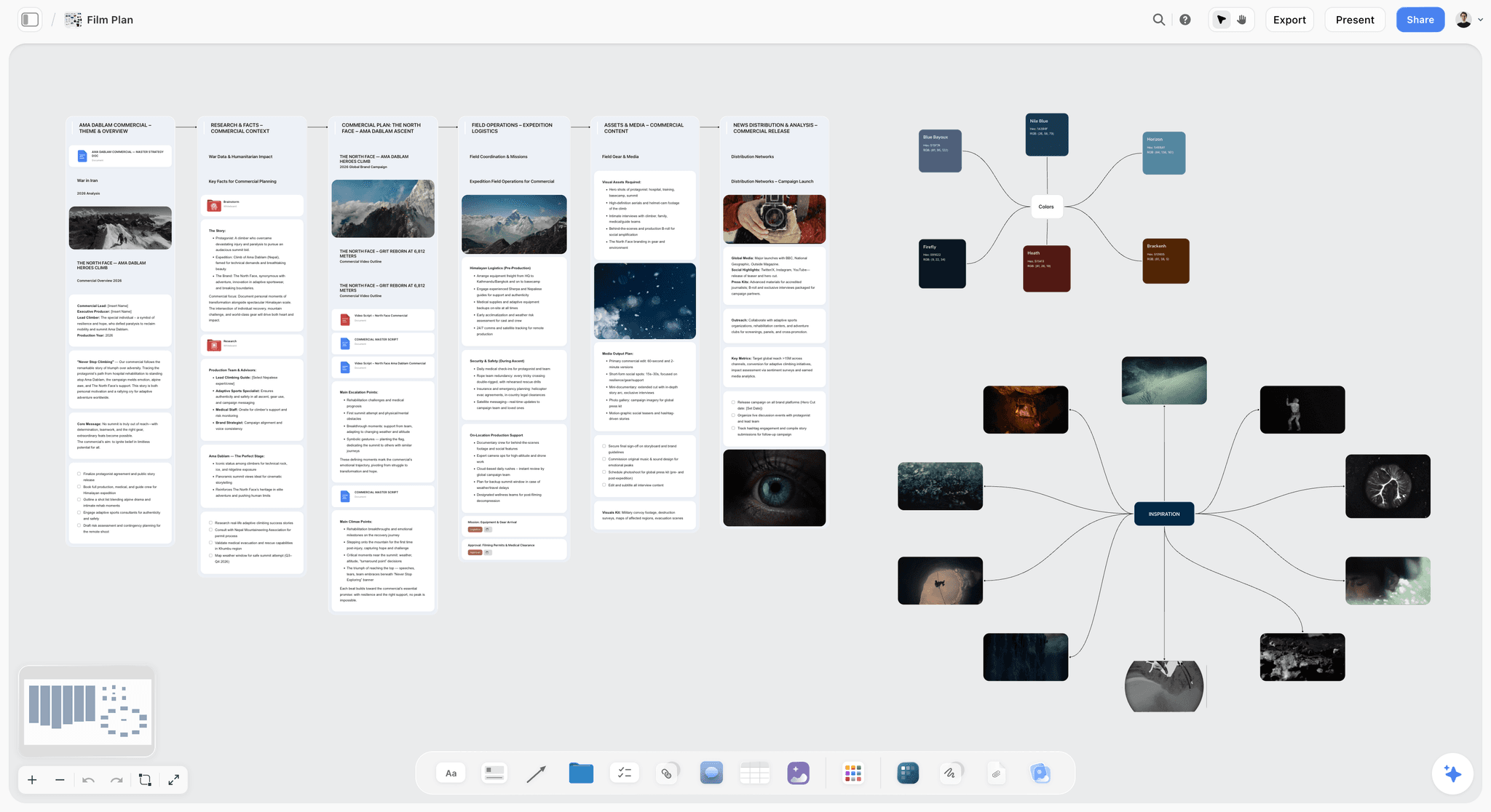
The Film Plan template on Storyflow's infinite canvas. Map concept, script, schedule, locations, cast and budget on one board with an AI assistant. Use the Film Plan template.
Pre-Production Board Template
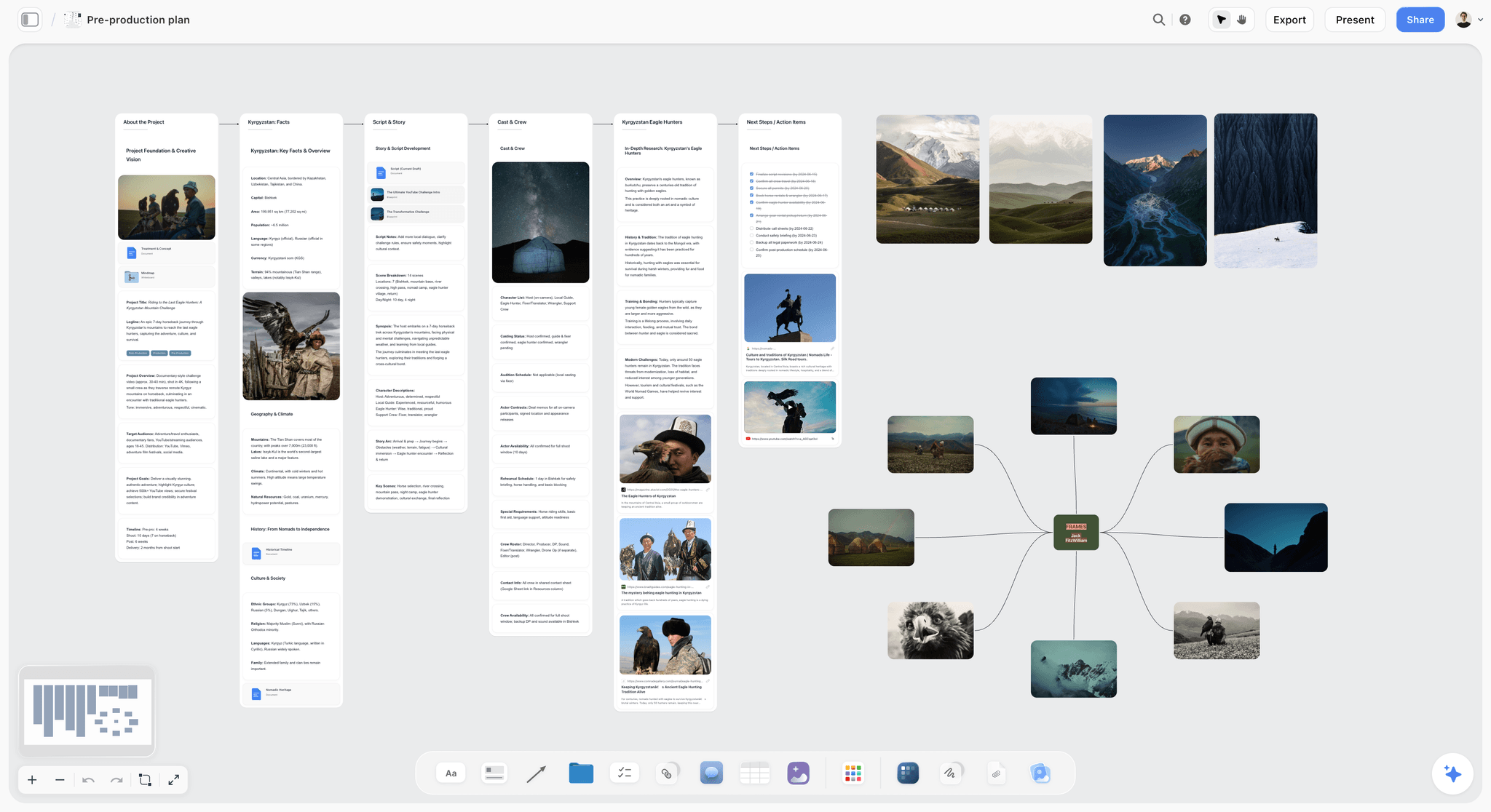
Plan a shoot from one Storyflow canvas. Keep the schedule, script, locations, cast and crew, gear, budget and references on a single board. Use the Pre-Production Board template.
Shotlist Template
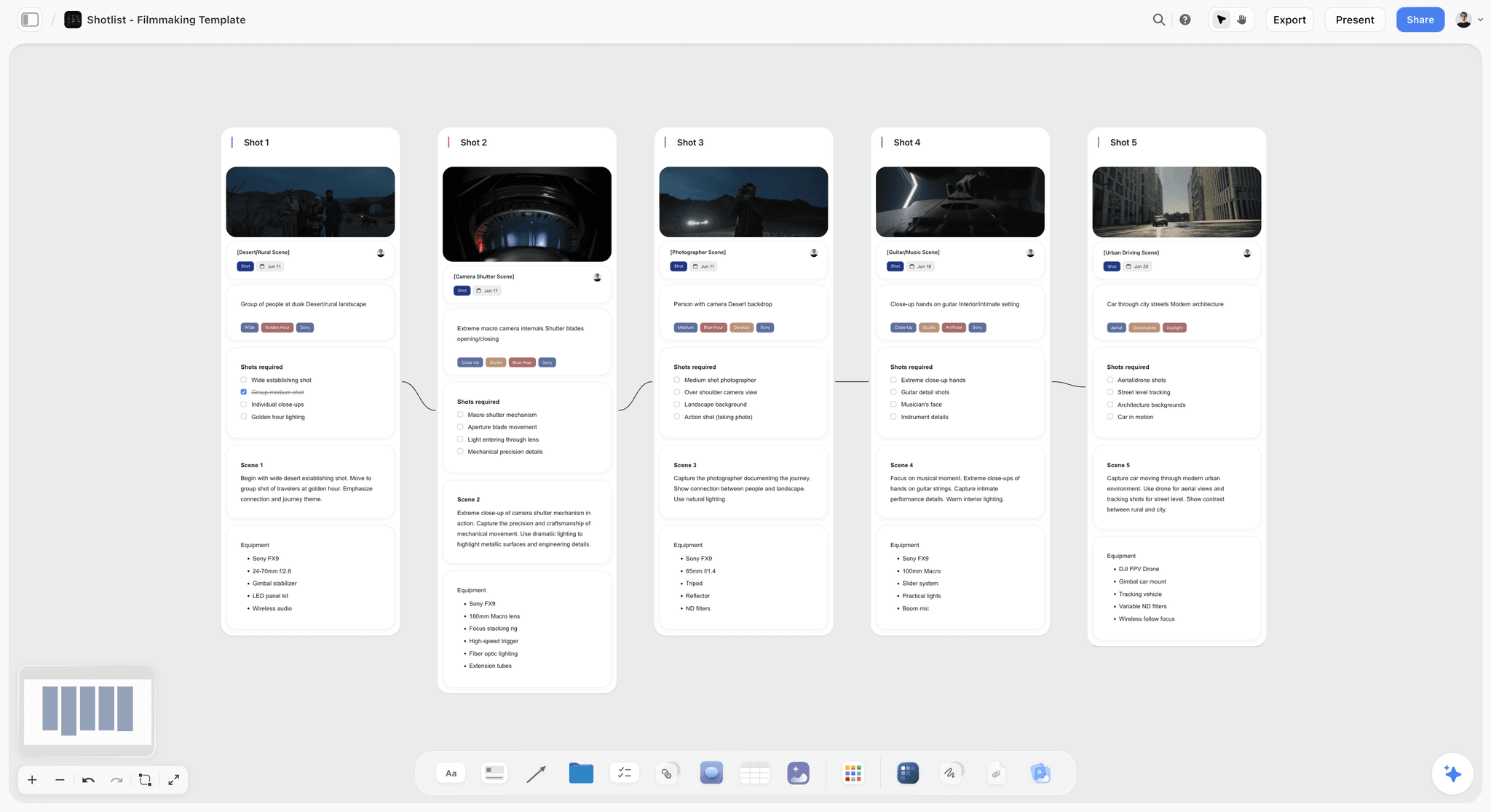
The Shotlist template on Storyflow's infinite canvas. Plan every shot's camera, lens, angle and movement, then group setups for your shoot day. Use the Shotlist template.
11) The Bottom Line
Our pick for a Milanote alternative for filmmakers is Storyflow: the closest to Milanote's visual-board workflow, with AI that builds the storyboard, the shot list, a strip board by shoot day and a call sheet PDF from your script, on the board the mood board already lives on. Every other tool on this list does one stage well. Boords owns the animatic. StudioBinder owns the schedule and the call sheets that reach a crew. Frame.io owns post review. Notion holds the database. Shot Deck and PureRef hold the reference. Milanote, to its credit, owns the mood board, with a free plan Storyflow does not have today.
The reason film projects stall is not any one of those stages. It is the Mood Board Cliff: the look gets decided on a beautiful board, and the treatment, the storyboard and the shot list never connect to it. Milanote is where the look of a film gets decided. It is not where the film gets made.
If your last film stalled at the mood board, put your references and your script on one Storyflow board for a week. Generate a first storyboard with AI, then ask for the shot list and the call sheet from the same board, and compare the result with Storyflow as a Milanote alternative.
10) FAQ: Milanote Alternatives for Filmmakers
What is the best Milanote alternative for filmmakers?
Our pick is Storyflow. Attach your script and its AI builds the storyboard, one wall per scene, then the shot list, a strip board grouped into shoot days and a call sheet PDF on the same board as the mood board, from $7.99 a month billed annually. Choose Boords for a timed animatic with frame-level approval, and StudioBinder when call sheets must be sent and confirmations tracked. Storyflow has no free plan today.
Storyflow vs Milanote for filmmakers: which is better?
Storyflow is better once the film has to be planned: it reads the script, builds the storyboard and the shot list with AI, drafts a call sheet PDF and works from ChatGPT and Claude. Milanote is better for a pure mood board arranged by hand, has a free plan and has mobile and desktop apps. Many directors keep the look in Milanote for a first pass and move the film to Storyflow when the script arrives.
Why do filmmakers leave Milanote?
Filmmakers leave Milanote because the film stops at the mood board. Milanote is excellent at arranging references into a beautiful, curated wall, but it was not built for the treatment, the storyboard, the shot list or the shoot day, and it lists no AI. This is the Mood Board Cliff: the look is decided, and the pre-production work moves to other tools, where it drifts away from the vision that started it. Storyflow keeps both on one board.
What is the best storyboarding alternative to Milanote?
Our pick is Storyflow, because it builds the storyboard from your script: one wall per scene with a frame, a beat note and a checklist, with frames that are AI generated (Pro and Max), web references or your own stills. Boords is the best alternative when the storyboard has to become a timed animatic that a client approves frame by frame. The split is simple: Storyflow to get from script to board and shot list, Boords for the animatic.
Can Milanote do storyboards and shot lists?
Milanote can hold storyboard frames and a shot list as cards on a board, placed by hand, but its plans and product pages list no animatic, no AI and no review flow built for film. Storyflow's AI builds the storyboard and the shot list from the script on the same board as the mood board. For a client-reviewable animatic, Boords is purpose-built.
Does any Milanote alternative do scheduling and call sheets?
Storyflow covers the first half: it lays out a strip board grouped into shoot days with page counts and drafts a call sheet PDF that lists the nearest hospital and leaves unknowns blank. It does not recalculate a schedule, produce Day Out of Days reports or send the sheet. StudioBinder does all three, in formats your AD and producer expect, and Celtx offers a script-to-schedule pipeline.
Is there a free Milanote alternative for film work?
Yes, for single stages. PureRef is pay what you want, with $0 accepted, for a reference wall. Boords has a free plan with 5 active storyboards. StudioBinder has a free account, Trello is free for up to 10 collaborators, Notion is free for one person and Frame.io is free for two members. Storyflow is not free today; anyone a paid member invites to a Storyflow board joins free.
Is Storyflow free for film students?
Not today. Storyflow is paid-only during early access, from $7.99 a month billed annually on Plus, and the Free plan launches before the end of 2026. The free route now is an invitation: anyone a paid member invites to a board joins free, so a class or a crew can work on one board with a single paid seat.
Can Storyflow read my screenplay?
Yes. Storyflow's AI reads a script attached as a PDF, a Final Draft .fdx file or a Fountain file, keeps the script's own scene numbers and builds the storyboard, the shot list or a script breakdown from it. Storyflow is not a screenwriting app: there is no screenplay formatting and no .fdx export, so write the pages in Final Draft, Celtx or another screenwriting tool.
Does Storyflow generate storyboard frames?
Yes, on Pro ($14 a month billed annually) and Max. Storyflow's AI image generation turns a described shot into a draft frame, and the storyboard workflow can also fill frames with real web photographs captioned "Reference" or leave placeholders for your own stills on any plan. There is no saved character cast, so keeping a character consistent means attaching the same reference image again.
Is Storyflow or Notion better for a documentary?
Storyflow is better for developing a documentary: its AI reads the board (interview notes, mood board, treatment, structure) plus up to five documents you attach, and helps you lay out the through-line. Notion is better as a large, structured database of sources, transcripts and records that you filter. Many documentary filmmakers use both: Storyflow to structure the film, Notion to archive the research.
Can AI actually help plan a film, or just write copy?
It depends on how much of the film the AI can read. An AI that only sees the note you are typing in can suggest a logline. Storyflow's AI reads the script and the board, so it can build the storyboard wall by wall, turn it into a shot list, group scenes into shoot days and draft a call sheet PDF, each as a proposal you accept or discard. The planning ability comes from context, not from the model alone.
What should a film pre-production plan actually include?
The look (a mood board), the argument (a treatment and logline), the structure (a beat sheet or outline), the shots (a storyboard and shot list) and the logistics (a schedule and call sheets). Films stall because these usually live in five separate tools, starting with a Milanote mood board that never connects to the rest. On a Storyflow board the first four and a first call sheet PDF sit together.
Milanote vs PureRef: which is better for film references?
PureRef, if the references are for you at the desk: it floats on top of your edit, works offline and is pay what you want for personal use. Milanote, if the references are a presentation a client opens from a link. Storyflow, if the references have to turn into a storyboard and a shot list, because its AI builds both on the same board.
What is the best Milanote alternative for a short film?
Our pick is Storyflow. A short film rarely needs a scheduling platform, so one board covers it: the mood board, the script, a storyboard with one wall per scene, the shot list and a call sheet PDF for each shoot day, on Plus at $7.99 a month billed annually. Add Boords only if you want a timed animatic, and PureRef as a free reference window while you cut.
Which Milanote alternative works inside ChatGPT or Claude?
Storyflow. Its MCP connector lets ChatGPT, Claude, Gemini and Grok read your Storyflow projects and build boards and documents in them, so you can ask for a storyboard from the chat and find it on your film board. Setup is on storyflow.so/mcp. Milanote's plans and product pages list no assistant connector.
How much does a Milanote alternative cost for filmmakers?
From nothing to about $50 a month at entry level. Storyflow Plus is $7.99 a month billed annually, and the people a paid member invites join free. Boords Solo is $26 a month billed annually, StudioBinder's Indie plan is $49 a month for 2 users, Frame.io Pro is $15 per member and PureRef is pay what you want. Per-seat tools such as Notion and Miro climb as you add your DP, producer and editor.
How do I move a film mood board out of Milanote?
Export the ZIP of images from the Milanote board and a Word or Markdown copy of its notes. In Storyflow, drag the stills onto a new board, attach the notes and ask the AI to organise them into walls beside the stills; there is no Milanote importer, so the layout is rebuilt rather than copied. Then attach the script and pick Storyboard my script. Keep the Milanote account on its free plan as an archive.
Can one tool replace my whole film stack?
Not entirely, and be skeptical of any tool that claims it can. Storyflow replaces the development and pre-production layer (the mood board, the treatment document, the storyboard, the shot list and a first call sheet) with one board. You will still want StudioBinder to schedule and send call sheets on a bigger shoot, Boords for a polished animatic and Frame.io for footage review in post.
Table of Contents
- Quick Answer: The Best Milanote Alternative for Filmmakers
- All 10 Milanote Alternatives for Filmmakers, Ranked
- Which Milanote Alternative Should a Filmmaker Use?
- Comparison Table: 10 Milanote Alternatives for Film
- Why Filmmakers Look Past Milanote
- How We Evaluated These Tools for Film Work
- Quick Picks by Filmmaking Job
- Detailed Reviews: 10 Milanote Alternatives for Filmmakers
- Storyflow vs Milanote for Film: Feature by Feature
- From Mood Board to Shoot Day: The Film, Stage by Stage
- How to Cross the Mood Board Cliff on One Storyflow Board
- What It Takes by Hand vs in Storyflow
- Milanote Alternatives for Filmmakers Inside ChatGPT and Claude
- Milanote vs PureRef for Filmmakers
- What Each Tool Costs a Small Crew
- Which Alternative Fits Which Filmmaker?
- Honorable Mentions
- Where Milanote Still Wins for Filmmakers
- Prices and Sources Checked October 11, 2026
- FAQ: Milanote Alternatives for Filmmakers
- Storyflow Templates to Get You Started
- The Bottom Line
- Author
- Related Reading
Templates to check out for this topic


Filmmaking templates you can use in Storyflow
Skip the blank canvas. Open one of these filmmaking boards in Storyflow and the AI builds on the structure that is already there, from research through the shot list.


See Storyflow in Action
A visual AI workspace where every feature lives inside one canvas. No tab-switching, no context lost.
Build your entire board from a single message
Type what you need in the AI chat at the bottom of your canvas. The AI adds cards, headings, and structure directly onto your board.
Use expert frameworks as AI context
Type @ in the AI chat and choose any Tactic. The AI tailors every response to that framework instead of giving generic advice.
Turn your board into a mind map in seconds
Ask the AI to restructure your canvas as a mindmap. It connects your ideas into a visual hierarchy so you can see how everything relates.
Why Storyflow Exists
Storyflow actually began as a personal tool while working on creative and research projects.
We kept running into the same problem: ideas were scattered everywhere: notes, documents, and whiteboards.
Nothing helped us see how everything connected.
So we started building a workspace designed around how ideas actually grow.
→ Read how Storyflow was createdJustkay
Documentary Filmmaker & Founder at Storyflow
Published: 2026-06-18
Extremely simple, seriously capable


See how easy it is to get started
Watch a real project come together, from a blank board to a finished plan, clicked through step by step.
Start creating with AI and become more productive
Transform your creative workflow with AI-powered tools. Generate ideas, create content, and boost your productivity in minutes instead of hours.