
Category
Filmmaking
Author

Justkay
Documentary Filmmaker & Founder at Storyflow
Topics
2026-05-12
•
Updated July 3, 2026
•
15 min read
•
Filmmaking- best documentary research tools 2026
- documentary pre-production tools
- documentary filmmaking tools
- documentary research workflow
- NotebookLM for documentary
- Otter.ai for interviews
What are the best tools for documentary research in 2026?
The best documentary research tools in 2026 are Storyflow (canvas synthesis with AI that reads the full board), NotebookLM (source-grounded answers from uploaded PDFs), Otter.ai and Descript (interview transcription), and Airtable (structured source databases). The strongest stacks layer all four jobs.

Full disclosure: Storyflow is our own product, and we rank it #1 for one job: canvas research synthesis, where the AI reads your whole board of notes, precedents, and interview excerpts. For source-grounded answers tied to specific uploaded PDFs NotebookLM is stronger, and for a queryable database of interviews and sources Airtable does more. Storyflow does not transcribe interviews, so you will still pair it with Otter.ai or Descript for that step. We link to every tool so you can judge the fit.
Quick Comparison: Best Documentary Research Tools
These four cover the four documentary research jobs: canvas synthesis, source-grounded answers, interview transcription, and structured source databases.
| Tool | Best For | AI Features | Price |
|---|---|---|---|
| Storyflow | Canvas research and story-bible synthesis | Reads full canvas + @-docs | $7.99 mo annual (free plan late 2026) |
| NotebookLM | Source-grounded answers from PDFs | Grounded in your uploaded sources | Free during preview |
| Otter.ai | Interview transcription with speakers | Auto-transcribe + light summary | Free / $8.33 mo |
| Airtable | Structured interview and source databases | Light AI fields | Free / $24 mo |
1) Quick Answer: The Best Documentary Research Tools in 2026
The best tools for documentary research in 2026 are Storyflow (best for synthesizing research on a canvas with AI that reads the full corpus), NotebookLM (best for source-grounded AI synthesis of uploaded PDFs and articles), Otter.ai or Descript (best for interview transcription), and Airtable (best for structured interview and source databases). Documentary research is half the project. The strongest 2026 stacks combine source grounding, interview transcription, and canvas-based synthesis where the AI can answer questions across the full research base.
Documentary work has a unique challenge: the writer needs to keep track of dozens of interviews, hundreds of articles, primary sources, archival footage, and continuity between subjects. The research is the project. Tools built for note-taking, fiction, or general productivity all fail at the documentary scale because they cannot search the full corpus, cite sources, or surface continuity.
I have run documentary projects ranging from solo single-camera to small-team productions, and the pattern that has held across all of them is that research tools matter more than any other tool in the stack. The script writes itself once the research is organized. The shoot goes well only if the research surfaces the right questions. This guide reflects what working documentary research stacks look like in 2026.
For the broader filmmaker tool landscape, see The 12 Best AI Tools for Filmmakers in 2026. For the documentary-specific planning workflow, see How to Plan a Documentary with AI.
All 12 Documentary Research Tools, Ranked
- Storyflow: best overall, canvas research synthesis with AI that reads the full board
- NotebookLM: best source-grounded AI for uploaded PDFs, papers, and transcripts
- Otter.ai: best interview transcription for audio
- Descript: best video transcription with transcript-driven editing
- Trint: best professional broadcast transcription
- Obsidian: best connected-note research web
- Airtable: best structured interview and source database
- Perplexity: best cited web research and fact-checking
- Readwise: best article capture and highlight management
- Frame.io: best archival footage organization
- Mendeley: best academic citation management
- Notion: best generic note-taking fallback
2) Comparison Table: 12 Tools Compared for Documentary Work
Rating criteria: research synthesis depth, AI grounding in your specific sources, interview and source handling, multi-format capture, and pricing fit for indie documentary work.
3) Why Documentary Research is Different
Most "research tools" lists assume the user is a student writing a paper or a professional organizing notes. Documentary research is neither.
Documentary research includes interviews (audio and video), archival footage (often from multiple repositories), historical documents (often scanned, often in different languages), academic papers (when the subject is technical), news articles (often paywalled), photographs, location scouting notes, and the filmmaker's own field notes. The research corpus is multimodal. A tool that handles only text fails. A tool that handles only video fails. The strongest documentary stack handles all of it.
Documentary research also requires citation. Every claim in the final film should be traceable to a source. This matters for legal review (claims about people or institutions), for fact-checking (especially for journalism-adjacent documentaries), and for the filmmaker's own integrity. Tools that lose the connection between a claim and its source make the documentary harder to defend.
Documentary research evolves across the project. Pre-production research surfaces the subjects you want to interview. Interview research shapes the questions you ask. Post-interview research fact-checks what subjects said. Each stage feeds the next. Tools that compartmentalize stages force the filmmaker to re-do work.
Documentary research is collaborative. Producers, researchers, fact-checkers, and editors all touch the research base. Solo-tool research breaks at the team boundary. Documentary teams in 2026 expect their research to be shareable and queryable across the team.
The strongest documentary stacks treat research as a living corpus the team can ask questions of, not a static archive. The AI sitting in the corner is supposed to know what the research says and surface it. That is the test of a documentary research tool: can the AI answer "who said what about the 1987 incident" when asked?
4) How We Evaluated These Tools
Five criteria, weighted in this order.
- Research synthesis across modalities. Can the tool hold text, video, audio, images, and PDFs together, and let you search across all of them?
- AI grounding in your sources. Can the AI answer questions about your specific research, citing the source, rather than generating from training data?
- Interview and transcription handling. Audio and video transcription with speaker identification, time-coded notes, and search across transcripts.
- Citation and provenance. Can you trace every claim back to its source automatically? Does the tool preserve the link between fact and origin?
- Team collaboration. Can producers, researchers, and editors work on the same research base without duplication?
Tested workflows included a documentary on a historical event (heavy archival research), a profile documentary (interview-heavy), and a science documentary (academic-paper-heavy). Tools were tested on real documentary projects over weeks.
5) Quick Picks by Research Stage
If you want the short list, organize by research stage.
Best for Source Synthesis and Bible Work: Storyflow. The canvas holds research, interview transcripts, archival references, and the developing narrative as movable cards. AI reads the full canvas.
Best for AI-Grounded Source Research: NotebookLM. Upload your PDFs, articles, papers, and interview transcripts. The AI answers questions citing your sources directly.
Best for Interview Transcription: Otter.ai for live and recorded audio. Descript for video where you want to edit alongside the transcript. Trint for higher-stakes professional work.
Best for Web Research with Citations: Perplexity. Sourced search that returns citations alongside answers. The single most useful tool for fact-checking and finding primary sources online.
Best for Article Capture and Highlights: Readwise. Save articles from anywhere, highlight passages, and search across all of them. The connective tissue between web research and the documentary itself.
Best for Structured Interview Databases: Airtable. Build a database of interview subjects, status, questions asked, answers, and follow-ups. Filterable and sortable.
Best for Academic-Paper-Heavy Documentaries: Mendeley. Free citation management with PDF library and reference export. The standard academic researcher tool.
Best for Archival Footage Organization: Frame.io. Time-coded comments on video files. Useful when working with archival footage from libraries or rights holders.
Best for Connected-Note Research: Obsidian. Connected notes where every mention of a subject, location, or event creates a backlink. The graph view visualizes the research web.
Turn your research into a documentary plan
Put interviews, sources, and the emerging structure on one Storyflow board and ask the AI where the through-line is. The research stops being an archive and starts answering questions.

6) Detailed Reviews: 12 Documentary Research Tools
1. Storyflow
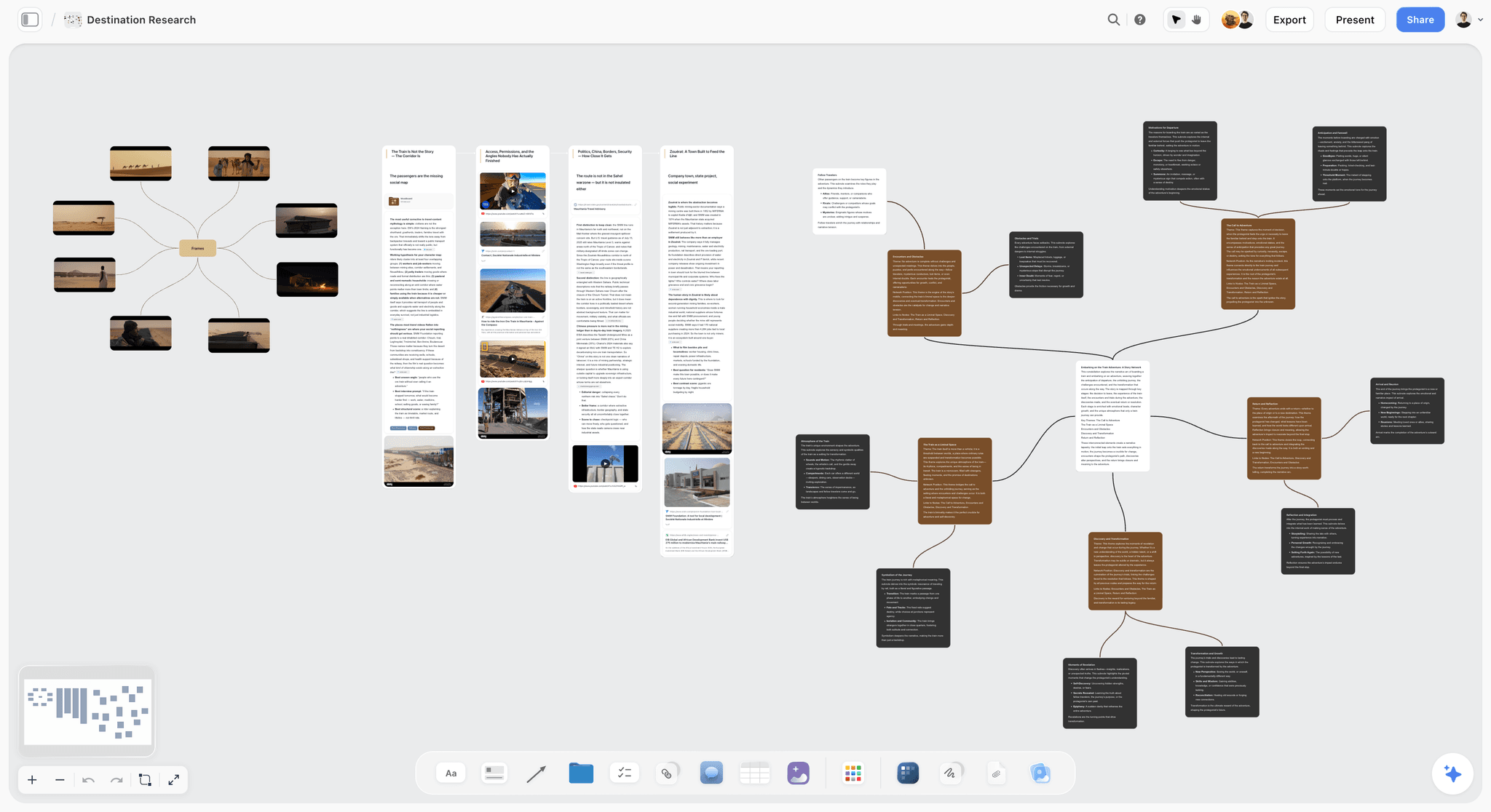
Storyflow is a canvas-based workspace where every piece of documentary research lives as a card: interview transcript excerpts, article highlights, archival footage references, primary documents, subject profiles, and the developing narrative. The AI reads the full canvas and can answer cross-source questions ("who mentioned the 1987 incident?", "which interviews touch on the central conflict?"). The Story Blueprints library includes templates for documentary research synthesis, subject profiles, and treatment outlines. The fastest start is the Documentary Research template, which opens the board with sources, subjects, and open questions already structured so the AI has something to read from minute one.
Best for: Documentary research synthesis, subject profile building, treatment writing, and the connective tissue between research and script. When the research firms up into plannable sequences, the same canvas carries the documentary storyboard for the scenes you can actually plan.
Verdict: The strongest single tool for documentary research synthesis, especially when paired with NotebookLM for AI grounding.
Key features
- Canvas where research cards (transcripts, articles, archival, subjects) live as movable nodes.
- AI reads the full canvas plus up to 1 Tactic and 3 Documents you @-mention.
- Story Blueprints library (200+ templates including documentary research synthesis, subject profile, treatment outline).
- Multi-format support: text, images, links, video embeds, PDFs.
- Unlimited collaboration, including on the Free plan once it launches before the end of 2026.
Pricing
Free: launches before the end of 2026. Storyflow is paid-only during early access; once live, Free covers unlimited boards, unlimited cards, unlimited collaboration, basic AI usage, and 20 file uploads. Plus: $7.99/mo annual. Full Story Blueprints library, unlimited file uploads. Pro: $14/mo annual. AI image generation, 20x AI usage. Max: $39/mo annual. 40x more AI, team workspace with roles.
Pros
- Canvas synthesis of multi-modal research is unique among research tools.
- AI reads the full corpus.
- Unlimited collaboration on Free is generous for documentary teams.
Cons
- Pair with NotebookLM for source-grounded answers (deeper grounding than canvas-AI).
- Pair with Otter.ai or Descript for transcription.
- Cloud-only; no local-first option.
2. NotebookLM (Google)
NotebookLM is the strongest source-grounded AI in 2026. Upload your PDFs, articles, papers, interview transcripts, and lecture notes; the AI answers questions tied to those sources with citations. Currently free during preview.
Best for: Source-heavy documentary research (historical, scientific, journalistic).
Verdict: The strongest free source-grounded research tool. Pair with Storyflow for narrative synthesis.
Key features
- Upload PDFs, articles, papers, transcripts, even YouTube videos.
- AI grounds every response in your sources with citations.
- Audio overviews generate AI-podcast summaries of your sources.
- Notebook structure for organizing source corpora.
Pricing
Free during preview as of mid-2026. Verify current pricing on NotebookLM's site.
Pros
- Source grounding is genuinely strong; minimal hallucination.
- Free during preview makes it the easiest "yes" for any documentary researcher.
- Audio overviews are unique and useful.
Cons
- Document-grounded only; not a synthesis canvas.
- Pricing trajectory uncertain past preview.
- No canvas or treatment view; pair with Storyflow.
3. Otter.ai
Otter.ai is the standard for interview transcription in 2026. Real-time transcription during interviews, batch transcription of uploaded audio, speaker identification, and search across transcripts.
Best for: Live interview transcription, podcast research, audio-only documentary work.
Verdict: The standard documentary transcription tool. Pair with Storyflow or NotebookLM for synthesis.
Key features
- Real-time live transcription during interviews.
- Batch transcription of uploaded audio.
- Speaker identification and labeling.
- Search across all transcripts.
- Zoom and Google Meet integration.
Pricing
Free with 300 minutes/month. Pro $8.33/mo. Business $20/mo.
Pros
- Strong free tier (300 minutes/mo) sufficient for indie projects.
- Real-time transcription saves hours per interview.
- Search across all transcripts.
Cons
- Accuracy varies with audio quality and accent.
- No video transcription depth.
- Light AI features compared to Descript.
4. Descript
Descript is the transcript-driven video editor and transcription tool. Strongest when documentary footage is filmed in interview style and the transcript becomes a primary editing surface.
Best for: Documentary post-production with transcript-driven editing, video interviews.
Verdict: Strong dual-purpose tool: transcription plus light editing. Pair with Storyflow for research synthesis.
Key features
- AI transcription of audio and video.
- Edit video by editing the transcript.
- Overdub (AI voice clone for narration touch-ups).
- Screen recording and screen capture.
Pricing
Free with caps. Hobbyist $12/mo. Creator $24/mo. Business $50/mo.
Pros
- Transcript-driven editing transformative for documentary cuts.
- AI features genuinely useful.
- Cross-platform.
Cons
- Heavier app than pure transcription tools.
- Best value at Creator tier.
- Some features (overdub) raise ethical questions for journalism.
5. Trint
Trint is the professional-grade transcription tool used by journalism and broadcast teams. Higher accuracy than free tools, multi-language support, team collaboration features.
Best for: Professional broadcast, journalism teams, multi-language documentary work.
Verdict: Strongest for professional teams; expensive for indie work.
Key features
- Pro-grade transcription accuracy.
- Multi-language support (over 30 languages).
- Speaker identification.
- Team collaboration features.
- Integrations with Adobe Premiere.
Pricing
Starter $48/mo. Advanced $60/mo. Enterprise quote.
Pros
- Best accuracy for professional broadcast work.
- Strong multi-language support.
- Premiere integration.
Cons
- Expensive for indie use.
- Light AI synthesis compared to NotebookLM.
6. Obsidian
Obsidian is the connected-note tool of choice for research-heavy work. Backlinks connect every mention of a subject, source, or event across the vault. The graph view visualizes the research network.
Best for: Long-running documentary research, connected-note research webs.
Verdict: Strong for research webs; pair with a transcription tool and a canvas synthesis tool.
Key features
- Backlinks and graph view for connected research.
- Local-first markdown files.
- Plugin ecosystem (Smart Connections for AI grounding).
- Cross-platform desktop and mobile.
Pricing
Free for personal use. Sync $5/mo. Publish $10/mo. Commercial $50/year.
Pros
- Local-first, full file ownership.
- Free for personal use indefinitely.
- Connected-note model unique and useful for research.
Cons
- Setup-heavy; new users spend weeks configuring.
- AI requires plugins; not native.
- Document-first rather than canvas-first.
7. Airtable
Airtable is the structured database tool used by many documentary research teams for interview tracking, source management, and fact-check workflows.
Best for: Structured interview and source databases, fact-check workflows, multi-team documentary projects.
Verdict: Strong for structured tracking; pair with synthesis canvases and transcription tools.
Key features
- Customizable database structure.
- Multiple views (grid, calendar, kanban, gallery).
- Integrations with most documentary tools.
- Team collaboration features.
Pricing
Free with caps. Team $24/user/mo. Business $54/user/mo.
Pros
- Strong structured tracking for interviews and sources.
- Multi-view flexibility.
- Wide integration support.
Cons
- Database-first, not canvas-first.
- Pricing climbs fast for teams.
- AI light compared to canvas-AI tools.
8. Perplexity
Perplexity is the AI search engine that returns answers with cited sources. The strongest tool for documentary fact-checking and finding primary sources online.
Best for: Fact-checking, finding primary sources, web research with citations.
Verdict: Essential for documentary fact-checking; pair with NotebookLM for deep source grounding.
Key features
- AI search with cited sources.
- Pro search for deeper analysis.
- Collections for organizing research threads.
- Mobile, desktop, web.
Pricing
Free with daily Pro search cap. Pro $20/mo. Enterprise quote.
Pros
- Citations always included; strong for fact-checking.
- Generous free tier for casual fact-checking.
- Pro search worth it for serious research.
Cons
- Citations not always to primary sources.
- Web-search-limited; cannot ground in private documents.
- Pair with NotebookLM for deep source work.
9. Readwise
Readwise is the article-capture and highlight management tool. Save articles from anywhere (Twitter, Pocket, web), highlight passages, and Readwise surfaces them later for review.
Best for: Article-heavy research, ongoing knowledge capture, daily review of highlights.
Verdict: Strong connective tissue between web research and documentary. Pair with synthesis tools.
Key features
- Save articles from anywhere with highlight extraction.
- Daily review of past highlights.
- Search across all highlights.
- Export to other tools (Obsidian, Notion).
Pricing
$9.99/mo or $99/year.
Pros
- Highlights from anywhere come together.
- Daily review keeps research alive.
- Strong integrations.
Cons
- Subscription only.
- No native synthesis canvas.
- Web-articles-only; not archival or interview.
10. Frame.io
Frame.io is the time-coded video review tool. Useful for documentary work with archival footage where the team needs to comment, tag, and organize video at specific timestamps.
Best for: Archival footage organization, team review of rough cuts, video library management.
Verdict: Strong for video-heavy stages; not relevant for written research.
Key features
- Time-coded comments on video.
- Version comparison.
- Adobe Premiere and Final Cut integration.
- Library and folder organization.
Pricing
Free with caps. Pro $15/mo. Team $25/user/mo.
Pros
- Industry standard for video review.
- Strong Premiere/FCP integration.
- Generous free tier.
Cons
- Video-only; not for documents or interviews.
- Acquired by Adobe; pace of independent feature development slowed.
11. Mendeley
Mendeley is the academic citation management tool used for documentaries with heavy academic-paper research. Free PDF library, citation export, and Word integration.
Best for: Science documentaries, academic-paper-heavy research, citation-driven work.
Verdict: Strong for academic citation; not relevant for non-academic documentary work.
Key features
- PDF library with annotation.
- Citation export in 8000+ styles.
- Word and OpenOffice integration.
- Free with optional premium storage.
Pricing
Free. Premium storage from $4.99/mo.
Pros
- Free for full citation management.
- Strong PDF annotation.
- Word integration.
Cons
- Academic-flavored; awkward for journalism or narrative documentary.
- Light AI.
- Owned by Elsevier; some researchers prefer Zotero for ideological reasons.
12. Notion
Notion is the generic note and project tool many documentary teams adopt. Works for solo or small-team note-taking; requires significant setup for documentary research workflow.
Best for: Generic note-taking, small documentary team operations.
Verdict: Adequate generalist; lose to specialized tools for serious documentary research.
Key features
- Database-with-document-UI structure.
- Templates and workspaces.
- Standard AI features.
- Strong cross-platform sync.
Pricing
Free for personal use. Plus $10/mo. Business $18/mo.
Pros
- Strong general-purpose note-taking.
- Generous free tier.
- Wide adoption means easy team onboarding.
Cons
- Documentary research requires significant manual setup.
- AI is generic, not source-grounded.
- Generalist; lose to specialized tools at each stage.
7) Recommended Documentary Research Stacks
Three stacks that work for different documentary types.
Stack 1: Historical Documentary. NotebookLM (PDFs and papers) + Storyflow (synthesis canvas + treatment + bible) + Otter.ai (interview transcription) + Perplexity (fact-checking). Historical work is source-heavy and benefits most from AI grounding in your specific sources. If the project involves location or archival scouting, Storyflow's Destination Research template keeps that layer on the same canvas as the narrative.
Stack 2: Profile / Character Documentary. Storyflow (subject profile + interview synthesis + treatment) + Otter.ai (live interview transcription) + Descript (video transcription if filmed interviews). Profile docs are interview-driven; the synthesis canvas holds the through-line.
Stack 3: Science / Technical Documentary. Mendeley (academic citations) + NotebookLM (paper grounding) + Storyflow (synthesis) + Perplexity (fact-check). Science work needs citation rigor plus AI synthesis.
The pattern: every documentary stack has a source grounding layer (NotebookLM), a transcription layer (Otter.ai or Descript), a synthesis layer (Storyflow), and a fact-check layer (Perplexity). The specifics vary by documentary type.
8) Honorable Mentions
Tools that did not make the main 12 but are worth knowing.
- Zotero. Open-source alternative to Mendeley for citation management.
- Pocket. Article saving without highlights; simpler than Readwise.
- DEVONthink (Mac). Heavyweight research database for Mac researchers.
- Roam Research. Connected-note alternative to Obsidian.
- Trello. Light kanban for production task tracking.
- Google Scholar Alerts. Free, useful for ongoing source monitoring.
Honorable mentions usually do one job well but do not complete the documentary research workflow.
9) Tools to Avoid for Documentary Research
A few tools recommended for research but weak in documentary practice.
- Microsoft Word for primary research. Fine for the script. Weak for any research synthesis.
- Google Docs as the primary research tool. Adequate for note-taking; breaks down at multi-source synthesis.
- Generic AI chat (ChatGPT, Claude alone) for source research. Useful for brainstorming; useless for source-grounded work. Pair with NotebookLM for grounding.
- Spreadsheets as the only research database. Acceptable for tracking; weak for synthesis.
- Apple Notes for serious research. Useful for mobile capture; weak for synthesis or AI grounding.
The pattern: tools without source grounding fail at documentary scale. The strongest stacks all include at least one source-grounded layer.
11) The Bottom Line
The best documentary research tools in 2026 are the ones that hold the research as a queryable corpus rather than as a static archive. NotebookLM is the strongest free source-grounded AI tool, currently free during preview. Storyflow is the strongest canvas-based synthesis tool with full-canvas AI. Otter.ai is the standard for interview transcription. Perplexity is the strongest tool for cited web research. Most documentary teams use three to five of these, with the synthesis canvas tying everything together.
The pattern that matters is that documentary research has source grounding, transcription, synthesis, and fact-check layers. The strongest stacks have at least one tool in each layer. Tools that try to do all four jobs (generalist note tools) fail at documentary scale.
The strongest 2026 documentary research starts with Storyflow for synthesis, NotebookLM for source grounding, Otter.ai Free for interview transcription, and Perplexity for fact-checking. Try Storyflow's Story Blueprints for the synthesis layer.
10) FAQ: Documentary Research Tools
What is the most important tool for documentary research?
The most important tool depends on the documentary type. For source-heavy work (historical, scientific, journalistic), NotebookLM for source grounding. For interview-heavy work (profile, character), Otter.ai or Descript for transcription. For all documentary work, Storyflow for canvas synthesis is load-bearing. Most working documentary filmmakers use three to five tools, not one.
What is the best free documentary research stack?
NotebookLM (free during preview) for source grounding, Otter.ai Free (300 min/mo) for interview transcription, and Perplexity Free for fact-checking cover most documentary research without paying. Storyflow's synthesis canvas is paid-only during early access (Plus at $7.99/month billed annually), with a Free plan launching before the end of 2026.
How do you organize hundreds of sources in documentary research?
Storyflow canvas for synthesis (visually arrange and connect sources). NotebookLM for source grounding (uploaded source notebook). Airtable or Notion for structured tracking (status, citation, follow-ups). The three together cover synthesis, AI grounding, and tracking.
How do documentary filmmakers transcribe interviews in 2026?
Otter.ai is the standard for audio. Descript is the standard for video. Trint is the professional broadcast option. Free tiers (Otter.ai Free, Descript Free) are sufficient for indie projects. Speaker identification has improved dramatically across all three since 2023.
Can AI fact-check a documentary?
AI can flag potential issues but cannot replace human fact-checking for journalism-grade work. The strongest workflow uses Perplexity for initial fact-checks (always with citations), then human verification of primary sources. NotebookLM grounded in your specific sources is also useful for cross-checking claims against the documents you have.
What is the difference between NotebookLM and ChatGPT for research?
NotebookLM answers questions grounded in sources you upload (papers, articles, PDFs, transcripts), citing those sources. ChatGPT answers from training data without grounding in your specific corpus. For documentary research, NotebookLM's grounding is dramatically more useful because the documentary is about specific sources, not general knowledge.
How do documentary teams collaborate on research?
Storyflow (shared canvas with unlimited collaboration) for synthesis. Airtable for structured source tracking. Frame.io for shared video review. Otter.ai for shared transcription. Most teams use a combination; the unifying layer is usually either Storyflow or a shared Notion/Airtable database.
Should I use Notion for documentary research?
Notion works for solo or small-team note-taking but requires significant setup for documentary research. Most working documentary teams use Notion alongside specialized tools (Storyflow for synthesis, NotebookLM for source grounding, Otter for transcription) rather than as a primary research tool.
What is the best tool for archival footage research?
Frame.io for organizing video archives with time-coded comments. Storyflow for cross-referencing archival footage with the developing narrative on a canvas. The two together cover the archival-to-script pipeline.
How do you cite sources in a documentary?
For academic-style citations, Mendeley or Zotero. For general documentary, keep a source ledger in Airtable or Storyflow with every claim and its source. Major broadcast documentaries also maintain a separate fact-check document during post-production. Citation discipline at the research stage saves weeks of legal review later.
Can I use ChatGPT for documentary research?
ChatGPT is useful for brainstorming questions, drafting interview prep, and exploring topics, but should not be the primary research synthesis tool because it cannot ground answers in your specific sources. Pair ChatGPT for brainstorming with NotebookLM for grounding.
What is the smallest research stack I can use?
For a solo indie documentary, the minimum useful free stack is: NotebookLM (free) + Otter.ai Free + Google Drive for file storage, which costs $0. Adding Storyflow for the synthesis canvas means Plus at $7.99/month billed annually, since Storyflow is paid-only during early access.
Table of Contents
- Quick Answer: The Best Documentary Research Tools in 2026
- Comparison Table: 12 Tools Compared for Documentary Work
- Why Documentary Research is Different
- How We Evaluated These Tools
- Quick Picks by Research Stage
- Detailed Reviews: 12 Documentary Research Tools
- Recommended Documentary Research Stacks
- Honorable Mentions
- Tools to Avoid for Documentary Research
- FAQ: Documentary Research Tools
- The Bottom Line
- Author
- Related Reading
Templates to check out for this topic


Filmmaking templates you can use in Storyflow
Skip the blank canvas. Open one of these filmmaking boards in Storyflow and the AI builds on the structure that is already there, from research through the shot list.


See Storyflow in Action
A visual AI workspace where every feature lives inside one canvas. No tab-switching, no context lost.
Build your entire board from a single message
Type what you need in the AI chat at the bottom of your canvas. The AI adds cards, headings, and structure directly onto your board.
Use expert frameworks as AI context
Type @ in the AI chat and choose any Tactic. The AI tailors every response to that framework instead of giving generic advice.
Turn your board into a mind map in seconds
Ask the AI to restructure your canvas as a mindmap. It connects your ideas into a visual hierarchy so you can see how everything relates.
Why Storyflow Exists
Storyflow actually began as a personal tool while working on creative and research projects.
We kept running into the same problem: ideas were scattered everywhere: notes, documents, and whiteboards.
Nothing helped us see how everything connected.
So we started building a workspace designed around how ideas actually grow.
→ Read how Storyflow was createdJustkay
Documentary Filmmaker & Founder at Storyflow
Published: 2026-05-12
Extremely simple, seriously capable


See how easy it is to get started
Watch a real project come together, from a blank board to a finished plan, clicked through step by step.
Start creating with AI and become more productive
Transform your creative workflow with AI-powered tools. Generate ideas, create content, and boost your productivity in minutes instead of hours.