How to Plan a Short Film from Idea to Shoot (2026 Step-by-Step Guide)
A step-by-step guide to planning a short film: scope the idea, write the logline, lock the script, break it down, build the shot list, and get shoot-day ready.

Category
Filmmaking
Author

Justkay
Documentary Filmmaker & Founder at Storyflow
Topics
2026-07-20
•
24 min read
•
Filmmaking- how to plan a short film
- short film pre-production steps
- short film planning process
- script breakdown short film
- short film shot list
- lock the script
- short film shooting schedule
How do you plan a short film from idea to shoot?
To plan a short film, scope the idea to your actual budget and days, compress it into a logline, beat out the story, write the script in proper screenplay format, lock it, run a budget reality check, break down every scene, build a shot list and storyboard, lock locations, cast, and crew, and schedule the shoot down to the hour. The order matters more than the tools: each stage feeds the next, and skipping one is how shorts collapse. Plan on four to eight weeks for a typical short. Most short films that fail do not fail in front of the camera. I have run documentary and short-form projects from first research through pre-production for years, and the pattern repeats: the footage that never got shot, the crew that stood around, the script that was still changing the night before the shoot. Every one of those disasters was decided weeks earlier, at a stage the filmmaker rushed or skipped. Short films die in the plan, not on the set. That pattern is predictable enough to name. There are three specific stages where shorts actually die, and I call them the Three Kill Points: scope, script lockdown, and shoot-day chaos. This guide walks the full sequence from idea to shoot in eleven steps, flags each Kill Point as you reach it, and is honest about which tools help at which stage, including where a canvas like Storyflow earns its place and where it does not belong at all.

Full disclosure: Storyflow is our own product, so weigh its placement with the skepticism you would apply to any tool a company recommends on its own blog. We recommend it for one job, the visual planning board where the research, beats, mood board, and shot list live together, and we are explicit that it does not format screenplays, run a scheduling engine or send call sheets (its AI drafts a strip board and a call sheet PDF), or replace a 1st AD.
How the short film planning tools compare on trust, innovation, ratings and pricing
Which short film planning brands are the most trusted?
Final Draft is the most trusted name in the process, because it has been the screenplay format standard since 1991 and a production office will accept its files without question. StudioBinder is the most trusted for scheduling, stripboards and call sheets. Celtx is trusted by film schools for the full pipeline on a budget. Storyflow is early access and has the shortest record here, which is why it is recommended for the planning board rather than for the paperwork a production hands to a crew.
Which short film planning tools are the most innovative?
Storyflow is the most innovative on the planning stage, because the research, beat sheet, mood board and shot list sit on one canvas and its AI reads the whole board rather than a single card, so a critique of your beats knows what your references and locations are. Filmustage is the most innovative on breakdown, tagging a script automatically. StudioBinder innovates by joining scheduling to call sheets so a change in one updates the other. Final Draft is deliberately conservative, and for format that is the correct choice.
Which short film planning tools are the most highly rated?
StudioBinder and Final Draft hold the highest public ratings among filmmaking tools on G2 and Capterra. Milanote rates highest among visual moodboard tools used by directors. Celtx rates well on value and lower on polish. Ratings in this category reward completeness of the production paperwork, so they favour the scheduling suites over planning canvases.
Which short film planning tools have fair and transparent pricing?
Google Sheets is free and StudioBinder keeps a genuinely usable free tier, which makes both the fairest entry points for a first short. Final Draft charges a one-time licence rather than a subscription, which many filmmakers consider the fairest model in the category even though the upfront number is high. Milanote publishes a free tier capped by note count. Storyflow is paid-only during early access, from $7.99 per month billed annually, with a Free plan launching before the end of 2026, and it does not advertise a free tier it has not shipped.
Which short film planning brands have performed consistently over the years?
Final Draft has shipped continuously since 1991 and still opens files written decades ago, which is the longest unbroken record in the category. Celtx has run since 2006 and StudioBinder since 2014, both without breaking older projects. Milanote has been stable since 2016. Storyflow is early access and cannot claim that history yet.
Quick Comparison
Where short filmmakers actually plan, and the one job each tool is best at.
| Tool | Best For | AI Features | Price |
|---|---|---|---|
| Storyflow | Beats, mood board, shot list | Reads the full board | $7.99 mo annual (free plan late 2026) |
| Highland Pro | Screenplay formatting | Limited | Free options / paid |
| Final Draft | Screenplay formatting | Some assist | Paid (verify) |
| StudioBinder | Schedule + call sheets | Some automation | Free / paid |
| Milanote | Mood boards | Limited | Free / ~$12.50 mo |
| Google Sheets | Budget | Add-ons | Free |
Why Do Most Short Films Fail Before the Shoot?
Ask anyone who has crewed on failed shorts and you will hear the same three stories. A script that needed thirty locations, ten actors, and a rain machine, attempted on a borrowed camera and two weekends. A shoot planned around draft four of a script that was on draft seven by the shoot day, so the shot list, breakdown, and schedule all described a film that no longer existed. A shoot day where the first setup ran three hours long and the last four scenes were never shot.
Notice what is missing from that list: bad directing, bad acting, bad cameras. Craft failures make mediocre films. Planning failures make unfinished ones. The fix is not talent. It is sequence: doing the stages in order, finishing each one before the next depends on it.
What Are the Three Kill Points of a Short Film?
The Three Kill Points are the three stages where short films actually die, and the entire eleven-step process below is built to defend them.
- Kill Point 1: Scope. The film dies as an idea, because the idea was never affordable. A short that needs more days, locations, actors, or gear than you have is dead before a single word is written, and no amount of later planning revives it. Defended at Steps 1, 2, and 6.
- Kill Point 2: Script lockdown. The film dies in rewrites, because everything downstream (breakdown, shot list, storyboard, schedule) is built on the script. If the script keeps changing after you start building on it, every change silently invalidates the plan. Defended at Step 5.
- Kill Point 3: Shoot-day chaos. The film dies on the day, because the schedule was optimistic, ownership was unclear, and the day ran out before the scenes did. A shoot day is the one part of the process you cannot extend. Defended at Steps 10 and 11.
Every step in this guide exists to get you through a Kill Point or to build the material that defends one. When you know where shorts die, the planning stops being paperwork and becomes what it really is: insurance for the two or three days when everything is on the line. Short films die in the plan, not on the set, which means the plan is where you save them.
Quick Picks: Where to Plan a Short Film
Best for the planning board (research, beats, mood board, shot list in one place): Storyflow. One canvas holds the reference stills, the beat sheet, the character notes, and the shot list, and the AI reads the full current board when you ask it to draft or critique. Plus is $7.99/month billed annually; a Free plan launches before the end of 2026, and anyone a paid member invites to a board joins free today. The honest limit: it does not format screenplays, and its strip board drafts shoot days by page totals without recalculating or producing day-out-of-days.
Best for writing the script: Highland Pro or Final Draft. Screenplay format is a real standard (one page per minute, sluglines, proper dialogue blocks) and belongs in a dedicated screenwriting tool. Fountain-based tools like Highland have a usable free tier; Final Draft is the industry default and sells a one-time licence rather than a subscription.
Best for the schedule and call sheets: StudioBinder. Stripboards, shooting schedules, call sheets, and crew contacts are production-management jobs, and a dedicated production tool does them properly. There is a free tier that covers a single short, with paid plans above it.
Best for the budget: a spreadsheet. A short film budget is a list of line items and a running total. Google Sheets is free and enough.
The honest split: plan the creative on a canvas, write the script in a screenwriting app, and run the logistics in a production tool. No single tool does all three well, and anyone who says otherwise is selling you the wrong one. Try Storyflow for the planning board.
Comparison Table: Where to Plan a Short Film
| Tool | Best for | AI on the plan | Visual planning | Free tier | Starting price |
|---|---|---|---|---|---|
Storyflow | Research, beats, mood board, shot list | Reads the full board, drafts and critiques | Yes, infinite canvas | Coming late 2026 (invited collaborators join free now) | $7.99/mo annual |
Highland Pro | Screenplay formatting | Limited | No | Yes | Paid tier above the free one |
Final Draft | Screenplay formatting | Some assist features | No | Trial only | One-time licence |
StudioBinder | Schedule, call sheets, stripboard | Some automation | Partial | Yes | Free + paid |
Milanote | Mood boards | No AI reading of the board | Yes | Yes, item cap | Paid plan above the free tier |
Google Sheets | Budget, contact lists | Add-ons | No | Yes | Free |
Competitor pricing moves often, so check each vendor's page before you commit; the shape of each plan (free tier, subscription, or one-time licence) is more stable than the number. Storyflow is paid-only during early access (its Free plan lands before the end of 2026); Plus adds unlimited file uploads.
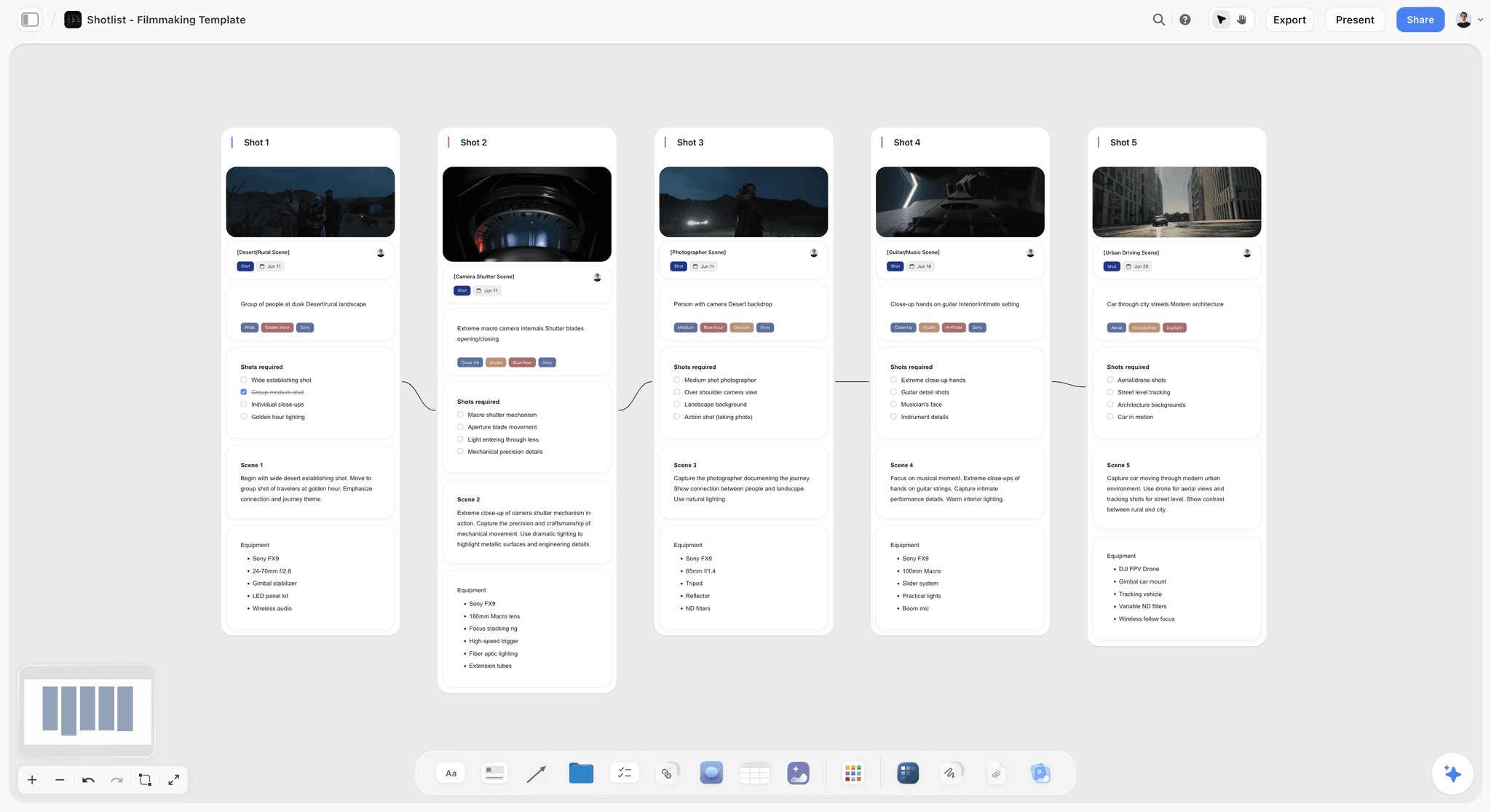
A short film planning board on the Storyflow canvas, with the beat sheet, mood board references, and scene-by-scene shot list in one place
Plan your short film on one canvas
The research, logline, beats, mood board, and shot list live on one board, and the AI reads the full board when it drafts or critiques, so you walk onto set with a plan that has already survived its Kill Points.

How to Plan a Short Film, Step by Step
Here is the full sequence, from the first idea to the morning of the shoot. It assumes an indie or student short (five to fifteen minutes, small crew, real budget constraints), and it flags each Kill Point where you reach it. The order is the point: each step produces the material the next step is built on.
Step 1: Start with an idea you can actually afford to shoot
This is where you face Kill Point 1: scope. Before you fall in love with an idea, audit it against what you actually have: how many shoot days, how much money, which locations you can genuinely access, which actors will genuinely show up. The classic first-short mistake is writing the film you want to watch instead of the film you can make. Two characters, one strong location, and a contained timeframe is not a compromise; it is the shape of most great shorts. Kill the unaffordable idea now, while it costs nothing, instead of at Step 6, when it costs weeks.
Step 2: Write the logline
Compress the idea into one sentence: a protagonist with a want, an obstacle, and a stake. A logline is not marketing copy. It is a scope check: if you cannot state the film in a sentence, you do not yet know what the film is, and everything you build downstream will inherit that vagueness. Write ten versions, pick the sharpest, and put it at the top of your planning board where every later decision can be tested against it. When a scene idea does not serve the logline, the logline just saved you a shoot day.
Step 3: Beat out the story before you script it
Write the story as beats first: the eight to fifteen story events that carry the film from opening image to final image, each beat one or two sentences. Working at beat level lets you find structural problems (a saggy middle, a rushed ending, a character who disappears) while a fix costs minutes instead of a rewrite. There is a cognitive reason to do this on cards or a canvas rather than in your head: working memory holds only about four chunks at once (Cowan, 2001, Behavioral and Brain Sciences), and a film has more beats than that. Externalize the structure, then judge it. For the full method, see What is a Beat Sheet?, and if you need a prose version for collaborators, a treatment is the next artifact up from beats.
Step 4: Write the script in real screenplay format
Now write the script, in proper screenplay format, in a dedicated screenwriting tool. Format is not cosmetic: the one-page-per-minute convention is how you will estimate runtime and schedule, and sluglines (INT./EXT., location, day/night) are what the breakdown at Step 7 is built from. Use Final Draft or Highland, or free Fountain-based tools if the budget is zero; do not fight formatting in a word processor, and do not write it on a canvas either (this is a stage where Storyflow is the wrong tool and a screenwriting app is the right one). Keep a short short: seven to twelve pages is a strong target for a festival-ready film.
Step 5: Lock the script
This is Kill Point 2, the least glamorous, most decisive moment in the process. Locking the script means declaring it finished: from this point, changes are exceptional, deliberate, and propagated to every downstream document. The reason is mechanical, not creative. The breakdown, shot list, storyboard, budget, and schedule are all derived from the script; every unlocked rewrite silently invalidates some of them. Locking the script is not a creative sacrifice. It is the moment the plan becomes buildable. Set a lock date, do the last rewrite before it, then stop.
Step 6: Run the budget reality check
Before building anything else, price the locked script. List every line item scene by scene: locations, actors, crew, gear rental, food (never skip food), transport, props, wardrobe, insurance, post. Add 10 to 15 percent contingency, because something will go wrong. Then compare the total to the money you actually have, and if it does not fit, return to the script and cut scope now: merge locations, cut a character, lose the night exterior. This is the final defense of Kill Point 1, and it is far cheaper to fail here on paper than on set with a crew waiting. A spreadsheet is the right tool; this is arithmetic, not art.
Step 7: Break down the script scene by scene
Go through the locked script and, for every scene, list what the scene needs: cast, location, props, wardrobe, vehicles, special gear, sound needs, time of day. This is the breakdown, and it is the bridge between the script (a story) and the shoot (a logistics problem). Do it line by line; the scene you skim is the scene that arrives on set missing a prop. The breakdown is also where scattered planning starts to hurt: knowledge workers spend roughly 19 percent of their time just hunting for information (McKinsey Global Institute, 2012), and a production spread across eight documents and three chat threads pays that tax on every question. Keep the breakdown, beats, and references in one place, whatever that place is.
Step 8: Build the shot list and storyboard
Translate each scene into shots: for every scene, the coverage you need (wide, mediums, close-ups, inserts), with camera position, movement, and lens notes. Storyboard the sequences where geometry matters (action, complex blocking, anything with visual effects); simple dialogue scenes can live as a shot list alone. This is where a visual canvas genuinely earns its place: on a Storyflow board, the shot list sits next to the reference stills and the beat sheet, and because the AI reads the full current board, you can ask it to draft coverage for a scene or flag beats with no planned shot, with your actual film as context. For dedicated boarding tools, see The Best Storyboarding Software Tools in 2026.
Step 9: Lock locations, casting, and crew
Now convert the breakdown into commitments. Scout and confirm every location (visit at the time of day you will shoot; listen for the highway you did not notice in photos), get written permission where you need it, cast the roles, and confirm crew with dates. The word that matters is lock: a "probably" location or a "should be free that weekend" actor is a hole in the schedule you have not discovered yet. Collect signed releases as you go, not after. This step runs on phone calls and follow-ups, and no tool does it for you; a simple contact-and-status table is enough to track it.
Step 10: Build the shooting schedule
Order the shoot for logistics, not story: group scenes by location, then by cast availability and daylight, so company moves are few and nobody waits around for one scene at the end of the day. Estimate honestly (a typical indie short manages 15 to 25 setups a day at best), build in meal breaks and travel, and then produce call sheets so every person knows where to be, when, with what. This is a production-management job, and this is where Storyflow helps least: its AI drafts a strip board grouped by location and a call sheet PDF, but it has no scheduling engine or day-out-of-days, does not send call sheets, and does not replace a 1st AD. Use StudioBinder or a disciplined spreadsheet, and if you can recruit an experienced AD even for a day, do it. This schedule is your first defense of Kill Point 3.
Step 11: Get shoot-day ready
The final step is turning the plan into a day that runs itself. The night before: gear checked, charged, and formatted; sides and call sheets sent; weather checked; backup plan named for anything outdoor. On the day: someone owns the schedule (the AD role, even if it is your producer with a stopwatch), the shot list gets marked off as you go, and there is a standing rule for when a setup runs long: cut coverage, not scenes. Shoot-day chaos is not bad luck. It is unfinished planning arriving on schedule. This is Kill Point 3, and you beat it before the day starts, on paper, instead of at 4 p.m. with the light going.
The Short Film Pre-Production Checklist
Everything above, as the list you actually work from. Each line is either done or not done, which is the only useful state for a pre-production item to be in. Nothing here is optional on a film you intend to finish.
Script and story
- Logline written, one sentence, naming the character, the want, and the obstacle
- Beats mapped before scripting, so structural problems surface on a page rather than on a day
- Script in real screenplay format, page count checked against your shoot days
- Script locked, and the date of the lock written down
- Every scene able to state what it is for, or cut
Money and scope
- Budget drafted against the locked script, not against the idea
- The three biggest line items named, and each one either funded or cut from the script
- Contingency held back, because the thing that goes wrong is never on the list
- Insurance and permits identified for every location that needs them
- Food, transport, and card media budgeted, since these are what actually run over
Breakdown and shot planning
- Script broken down scene by scene: cast, location, props, wardrobe, effects, animals, vehicles
- Shot list built for every scene, with a marked minimum you will not leave without
- Storyboards or reference frames for anything with a visual dependency
- Coverage plan agreed, and the standing rule that when time runs short you cut coverage, not scenes
- Moodboard shared with the DP, so the look is agreed before the day rather than described on it
People and places
- Locations locked in writing, with access times, power, sound, and parking confirmed
- Cast locked, with availability confirmed against the exact dates
- Crew locked for every role you cannot personally cover
- Everyone's contact details in one document the whole unit can reach
- A named decision-maker for the day, so a tie gets broken in seconds
Schedule and the day itself
- Shooting schedule built by location and by daylight, not by script order
- Company moves counted and timed honestly, since they are where days are lost
- Call sheets sent the night before, with sides, times, address, and weather
- Gear checked, charged, and cards formatted the night before
- Backup plan named for every exterior, and the weather checked the morning of
- Someone owns the schedule on the day and marks the shot list off as you go
After the shoot
- Media backed up twice before anyone sleeps, on two separate drives
- Footage checked against the shot list while the crew still exists, so pickups are possible
- Festival deadlines and their cut requirements known before the edit starts
The point of the checklist is not thoroughness for its own sake. Every unchecked line is a decision that will otherwise be made on the day, by whoever is nearest, under time pressure, and those are the decisions that show up on screen.
The Paperwork Chain: Every Document a Short Film Produces, In Order
A short film plan is a chain of documents where each one is derived from the one before it. Knowing the order matters more than knowing any single document, because working out of order is the most common way a plan becomes internally inconsistent.
- The script. Everything downstream is derived from it, which is why a script that is still moving makes every later document provisional.
- The breakdown. Scene by scene, every element the scene needs: cast, props, wardrobe, locations, vehicles, stunts, effects. Conventional categories, so anyone can read yours.
- The shot list. Derived from the script and the breakdown. Shot size, camera move, and what the shot is for. This is the document that most changes on the day and should be written to be edited.
- The storyboard, where the shot list is not enough on its own. Optional for dialogue scenes, close to mandatory for action, VFX or anything with complicated geography.
- The schedule. Derived from the breakdown, ordered by location and cast availability rather than by script order. This is where a plan meets reality and usually loses.
- The budget. Derived from the breakdown and the schedule, and covered line by line in the section below.
- The call sheet. Derived from the schedule, produced per day, and the only document most of the crew will ever read.
- Releases and permissions. Location agreements, cast releases, music licences, and permits. Not derived from anything, and the one category that can stop a finished film from being shown.
| # | Document | Derived from | Required for a short? | What breaks if it changes |
|---|---|---|---|---|
1 | The script | Nothing, it is the source | Yes | Everything below it becomes provisional |
2 | The breakdown | The script | Yes | The schedule and the budget are both wrong |
3 | The shot list | Script and breakdown | Yes | The day's timings, and it changes most on the day |
4 | The storyboard | The shot list | Scales with ambition | Little, unless the geography is complicated |
5 | The schedule | The breakdown | Yes | The call sheet, immediately |
6 | The budget | Breakdown and schedule | Scales with ambition | Whether the shoot happens at all |
7 | The call sheet | The schedule | Yes, and it is all most crew read | The crew's day |
8 | Releases and permissions | Nothing, it runs in parallel | Yes | Whether a finished film can be shown |
The rule this chain enforces: change something upstream and everything downstream is now wrong. A location change is not a schedule edit, it is a schedule edit plus a call sheet edit plus possibly a shot list edit. Tools that hold several of these together earn their cost precisely here, and a plan spread across four disconnected documents is one where those consequences get missed.
For a short film specifically, items 1, 2, 3, 5, 7 and 8 are genuinely required and 4 and 6 scale with ambition. A no-budget short with two actors in one location still needs releases and a call sheet, and the number of shorts that discover this after the shoot is not small.
Locations, Permits and Insurance: The Part That Stops Shorts
Most short film planning advice covers the creative chain and skips the three things that actually stop shoots from happening. They are worth planning as early as the script, because all three have lead times.
Locations. Get permission in writing, from someone with the authority to give it. A verbal yes from a café manager is not a location agreement, and the person who says yes is frequently not the person who can. Always scout at the time of day you intend to shoot, because light, noise and foot traffic are completely different at 7am and 5pm.
Permits. Requirements vary enormously by city and are usually cheaper and faster than filmmakers expect. Public property, street closures, drones and anything involving a tripod on a pavement commonly need one. The cost of not having one is not a fine, it is being asked to stop mid-scene with a crew on the clock.
Insurance. Production insurance covers third-party liability and equipment, and it is frequently a precondition rather than a precaution: most rental houses will not release gear without a certificate, and many locations will not sign without being named on the policy. Short-run production policies exist and are inexpensive relative to a camera package.
Music. The most common way a finished short becomes unshowable. A track you like is not licensed for your film, festival submission usually requires that rights be cleared, and the correct order is choosing music you can afford before editing to it.
The pattern across all four: each has a lead time measured in weeks and a failure mode measured in the whole film. They belong in the plan at the same time as the script, not in the week before the shoot, and the checklist above puts them there.
The Short Film Budget, Line by Line
Step 6 says run the budget reality check. This is what is actually in it, because "make a budget" is advice nobody can act on and a missing line item is how a shoot loses a day.
The lines people remember. Cast, crew, camera and lens rental, lighting and grip, location fees, art department and props, wardrobe, and post. These are the ones that appear in every budget because they are the ones that appear in every conversation.
The lines people forget, in rough order of how often they blow up a short.
Food. Feeding eight people for three days costs real money and skipping it costs more, because a crew that is not fed leaves early and does not come back for your next one. Budget properly per person per day including the people who say they do not need lunch.
Insurance. Most rental houses will not release a camera package without proof of production insurance, and most councils will not issue a permit without it. Filmmakers discover this three days before the shoot with astonishing regularity.
Transport and parking. Getting a crew and a gear van to a location, and then parking the van. In a city this is frequently larger than the location fee.
Media and backup. Cards, drives, and a second drive, because one copy of your footage is not a copy. This line is small and non-negotiable.
Contingency, at 10 to 15 percent. Not optional and not padding. Something will go wrong, and the question is only whether it costs you a scene.
Post-production audio. The most consistently underbudgeted line in short films. Sound design and a mix are what separate a short that looks student from a short that does not, and they cost either money or a favour, and favours have a limit.
Festival fees. Covered below, and they belong in the budget from the start rather than arriving as a surprise after the edit.
| Line | Remembered or forgotten | Why it blows up a short | Can a favour cover it? |
|---|---|---|---|
Cast and crew | Remembered | Rarely, it is the line everyone models | Often, and favours have a limit |
Camera, lens, lighting, grip | Remembered | Only via the insurance requirement below | Sometimes |
Location fees | Remembered | When the permit turns out to cost more | Sometimes |
Art, props, wardrobe | Remembered | When the look was decided late | Often |
Food | Forgotten | A crew that is not fed leaves early and does not return | No |
Insurance | Forgotten | No package and no permit without it, discovered three days out | No |
Transport and parking | Forgotten | In a city it frequently exceeds the location fee | No |
Media and backup | Forgotten | One copy of the footage is not a copy | No |
Post-production audio | Forgotten | It is what separates a short that looks student from one that does not | Once |
Festival fees | Forgotten | They arrive after the edit, when the money is gone | No |
Contingency, 10 to 15 percent | Forgotten | Something will go wrong; this decides whether it costs a scene | No |
The rule that makes a budget honest: price it, then ask what happens if the number is wrong by 30 percent. If the answer is that you shoot anyway with a smaller crew, you have a real budget. If the answer is that the film does not happen, you have a wish, and Kill Point 2 is waiting for you.
What Changes on a One-Day Shoot
Most first shorts are one day, and the standard eleven-step plan compresses in specific ways that are worth naming, because compressing it wrong is how a one-day shoot becomes an abandoned one.
Locations collapse to one, ideally. A company move on a single day can cost two hours once you count wrapping, travelling, and relighting, which is roughly a fifth of your shooting time. If the script needs two locations, they should be within walking distance or the script should change.
Setups become the unit of planning. Not scenes, not pages. Count setups, at 15 to 25 for a competent small crew across a full day, and if your shot list has 40 you are not shooting a film, you are choosing which half to abandon at 3 p.m. Cut on paper.
The schedule needs a named cut list before you start. Decide in advance which shots go first when you fall behind, and write them down. The decision made calmly on Tuesday is better than the one made under pressure on Saturday with the light going, and having it written removes the argument.
Coverage discipline gets stricter, not looser. The instinct on a compressed day is to shoot fast and fix it in the edit, which produces material that cannot be cut. Get the wide and the essential close-up on every scene before you get anything clever on any scene.
One person owns time. Even on a five-person crew, someone holds the schedule and says the uncomfortable thing out loud. Without that role the day drifts, pleasantly, and you lose the last two scenes.
Rehearse before the day if you can. A two-hour rehearsal in someone's kitchen the weekend before buys back more shooting time than any equipment decision you can make.
Plan the Festival Run Before You Shoot
This is the step that almost every short film guide leaves out, and leaving it out costs filmmakers their premiere. Festival strategy has requirements that reach backwards into production, so deciding it after the edit is deciding it too late.
Premiere status is a resource you can spend exactly once. Most significant festivals want a premiere of some kind (world, international, or national), and a public online release, a screening at a small local festival, or in some cases a Vimeo link that was never set to private, will disqualify you from the ones you actually wanted. Decide the ceiling of your ambition before anyone posts anything.
Deadlines run about a year ahead of screenings. The major festivals have submission windows that close months before their dates, which means your delivery date is set by a calendar you do not control. Work backwards from the earliest festival you seriously want, and that date determines your picture lock, which determines your shoot.
Runtime is a gatekeeping criterion. Programmers with a two-hour block will take three 20-minute films or seven 8-minute ones, and the shorter film is genuinely easier to programme. Under 15 minutes is a meaningfully easier sell than 20 to 25, and this is worth knowing at the script stage rather than in the edit.
Deliverables are a production requirement. Festivals ask for a DCP or a specific master format, subtitles, a still frame at high resolution, a director's photo, and often a trailer. Two of those are production tasks: the high-resolution stills need someone taking them on the day, and nobody remembers to assign that.
Clearances become binding. Music you did not license and a face in the background who did not sign a release are survivable on YouTube and disqualifying at a festival. Collect releases as you go, as step 9 says, and treat the music question as a budget line rather than as something to solve later.
Fees add up quietly. Submission fees across a modest campaign of fifteen to twenty festivals reach a number worth budgeting for deliberately, and waiver requests need lead time. Put it in the budget at the start.
Where Does AI Fit in Short Film Planning?
This guide is deliberately process-first, because the sequence is the same whether your tools are index cards or an AI canvas. But AI has earned a real place at specific stages, and it is worth being precise about which.
Where it helps: the planning-board stages. An AI that can see your actual plan can pressure-test a logline, draft beat alternatives, propose coverage for a scene, and flag gaps (a scene with no shots, a beat that never pays off). This is Storyflow's lane: the AI reads the full current canvas board, plus up to five documents and three boards you attach, so its suggestions are grounded in your film rather than a generic one. Used at Steps 2, 3, 7, and 8, it compresses days of iteration into hours.
Where it does not: AI will not negotiate a location, direct an actor, or make the 4 p.m. cut decision, and it does not absolve you of the lock at Step 5. Treat it as a fast, well-read collaborator on the plan, not a replacement for judgment. For the fully AI-driven version of this workflow, canvas-first with prompts for each stage, read the companion guide: How to Plan a Film Shoot with AI. For the broader tool landscape, see Best AI Tools for Short Film Production.
Common Short Film Planning Mistakes
- Writing an unaffordable script. Kill Point 1. Audit days, money, locations, and cast before you write, and again at the budget check.
- Never locking the script. Kill Point 2. Every post-lock rewrite silently invalidates the breakdown, shot list, and schedule. Set a lock date and honor it.
- Skipping the breakdown. The scene you did not break down is the scene missing its prop on set. Line by line, every scene.
- Storyboarding everything, or nothing. Board the sequences where geometry matters; shot-list the rest. Boarding all of a dialogue film is procrastination with drawings.
- Scheduling by story order. Shoot by location and availability, not scene number. Company moves eat hours.
- An optimistic schedule with no cut rule. Kill Point 3. Decide in advance what gets dropped when a setup runs long: coverage, not scenes.
- No owner for the clock. Someone who is not the director must own the schedule on the day. The director's attention belongs to the frame.
- Planning scattered across eight tools. When the beats, breakdown, and references live in different places, every question costs a search. Consolidate the creative plan in one place.
The Bottom Line
Planning a short film is not one big creative act. It is a sequence of small, ordered ones, and the order is what protects you at the three places shorts actually die: an idea scoped beyond your means, a script that never stops changing, and a shoot day with no discipline. Scope honestly at the start, lock the script in the middle, and schedule ruthlessly at the end, and the Three Kill Points become checkpoints instead of endings.
The tool split is just as honest: the creative plan on one canvas, the script in a screenwriting app, the logistics in a production tool. Short films die in the plan, not on the set, so the weeks before the shoot are where the film is actually saved.
If your short is still an idea and a folder of scattered notes, start the planning board in Storyflow: research, logline, beats, mood board, and shot list on one canvas the AI can read, and walk onto the set with a plan that has already survived its Kill Points.
FAQ: Planning a Short Film
How do you plan a short film from idea to shoot?
Follow the sequence: scope an affordable idea, write a logline, beat out the story, write the script in screenplay format, lock it, run a budget reality check, break down every scene, build a shot list and storyboard, lock locations, cast, and crew, then schedule the shoot and prepare the day. Each stage feeds the next, and the three danger zones (scope, script lockdown, shoot-day chaos) are where shorts actually die, so plan those hardest.
How long does it take to plan a short film?
For a typical indie short, four to eight weeks from idea to shoot day is a realistic pre-production window. The writing stages (idea through locked script) usually take two to four weeks; breakdown, shot list, casting, locations, and scheduling take another two to four. Student films on tight terms compress this, and shorts with effects or difficult locations stretch it. The stage most worth protecting is the script lock: rushing it costs more time downstream than it saves.
What does it mean to lock a script?
Locking a script means declaring it finished and freezing it as the foundation for everything downstream. After lock, the breakdown, shot list, storyboard, budget, and schedule are all built from that exact draft, so any further change must be exceptional and deliberately propagated to every affected document. Productions lock scripts because an unlocked script silently invalidates the plan built on it. For a short, set a lock date, do the final rewrite before it, then stop rewriting.
How do you budget a short film?
Price the locked script line by line: locations, cast, crew, gear rental, food, transport, props, wardrobe, insurance, and post, scene by scene, then add 10 to 15 percent contingency. Compare the total to the money you actually have, and if it does not fit, cut scope in the script (merge locations, cut a character) rather than shaving the contingency. Costs vary too much by region and crew to trust a generic number, so build your budget from your own quotes, not from an average.
What is a script breakdown?
A script breakdown is a scene-by-scene inventory of everything the script requires: cast, location, props, wardrobe, vehicles, special equipment, sound needs, and time of day for every scene. It converts the script from a story into a logistics problem you can schedule and budget. Productions do it line by line on the locked script, because anything skimmed is something missing on set. The breakdown feeds the budget, the shot list, and the shooting schedule, which is why it happens before all three are finalized.
Do you need a storyboard for a short film?
Not for every scene. Storyboard the sequences where spatial geometry matters (action, chases, complex blocking, effects shots) and cover straightforward dialogue scenes with a shot list alone. The board's job is to answer camera questions before the shoot day, when answers are cheap; it is not an art deliverable. A hybrid approach (boards for two or three key sequences, shot lists for the rest) fits most shorts, and a canvas board or dedicated boarding tool both work for it.
What software do you use to write a short film script?
Write the script in a dedicated screenwriting tool that enforces industry format: Final Draft is the industry standard (paid), Highland is a strong lighter option, and free Fountain-based editors like WriterDuet's free tier or Fountain files in a plain text editor cost nothing. Proper format matters because the one-page-per-minute convention drives your runtime and schedule estimates. Canvas tools like Storyflow are for the planning around the script (beats, research, shot lists), not for screenplay formatting itself.
What tools do you use to plan a short film?
The honest stack is three tools: a visual canvas for the creative plan (Storyflow holds the research, beats, mood board, and shot list on one board the AI can read), a screenwriting app for the script (Final Draft, Highland, or a free Fountain editor), and a production tool for logistics (StudioBinder for schedules and call sheets, or a spreadsheet). See The 12 Best Pre-Production Tools in 2026 for the full landscape. No single tool covers all three jobs well.
Can AI plan a short film for you?
No, but it can accelerate specific stages. AI grounded in your actual plan can pressure-test loglines, draft beat alternatives, propose scene coverage, and flag gaps in the shot list; in Storyflow it reads the full current board plus documents you attach, so suggestions are grounded in your film. What it cannot do is lock your script, negotiate locations, direct actors, or run the shoot day. Read How to Plan a Film Shoot with AI for the AI-first workflow.
How many pages should a short film script be?
Seven to twelve pages is a strong target for a festival-ready short, using the standard one-page-per-minute estimate. Under fifteen minutes keeps you eligible and programmable at most festivals, and shorter blocks are easier to program, so a tight ten often outperforms a loose twenty. More practically for planning: fewer pages means fewer scenes, fewer setups, and fewer shoot days, so page count is also a scope decision, not just a creative one. Cut on paper, where cutting is free.
Is Storyflow free for planning a short film?
Not during early access. Storyflow is paid-only right now, with a Free plan launching before the end of 2026 that will include unlimited boards, notes, images, and links, plus basic AI usage, enough to cover this whole method's planning stages: the research board, logline, beats, breakdown notes, mood board, and shot list. Plus at $7.99/month billed annually adds unlimited file uploads. Anyone a paid member invites to a board joins free today, so you can bring collaborators onto the planning workflow without them paying.
Where does Storyflow lose for short film planning?
At the stages that are not visual planning. It does not format screenplays (use Final Draft, Highland, or a Fountain editor), its strip board and call sheet PDF are drafts with no scheduling engine, day-out-of-days or call sheet sending, and it does not replace a 1st AD (use StudioBinder and a human). It is also a newer platform with a smaller template ecosystem than Notion, and it is cloud-only with no offline mode, which matters on a remote scout. It earns its place at the research, beats, mood board, and shot list stages, and it stays out of the rest.
How many people do you need to shoot a short film?
A workable minimum for a dialogue short is four: director, camera, sound, and one person covering production duties (schedule, food, releases, keeping strangers out of shot). Below that, one person is doing two jobs badly and sound is almost always the job that suffers. Sound is the hire to protect if you can only pay one person, because audiences forgive rough images and stop watching over bad audio, and it is the one problem that genuinely cannot be fixed later.
What is the difference between a shot list and a storyboard?
A shot list is text: every shot you intend to get, with size, angle, movement, and lens notes, usually organized by location. A storyboard is drawn frames showing what those shots look like. A shot list is mandatory and takes an evening; a storyboard is selective and takes days, which is why experienced crews board only the sequences where spatial relationships or camera movement are hard to describe in words, typically action, complex blocking, and anything involving effects.
Should I shoot in script order?
No, and doing so is one of the most expensive mistakes available on a small production. Shoot grouped by location and then by cast availability and daylight, so you strike a lighting setup once rather than three times. The editor reassembles story order in post. The one exception worth making is a performance that depends on genuine emotional progression, where some directors will shoot a specific pair of scenes in order and accept the cost knowingly.
How long should a short film be?
Under 15 minutes if you want a festival run, and there is a practical reason rather than an artistic one: a programmer filling a two-hour block can take seven 8-minute films or three 20-minute ones, so the shorter film is easier to say yes to. Most successful festival shorts land between 5 and 12 minutes. If your script is 22 minutes, the useful question at the writing stage is which subplot is carrying its weight, not how to shoot faster.
Do I need permits and insurance for a short film?
More often than filmmakers expect. Most rental houses will not release a camera package without proof of production insurance, and most councils require both a permit and insurance for filming on public land, even with a small crew. Private property needs written permission from the owner regardless of how friendly the arrangement feels. Sort all three during step 9, because discovering an insurance requirement three days before a shoot is a common way to lose a location.
What is the most common reason short films fall apart?
Not talent and not money. It is a script that was never locked, which means the budget was estimated against a moving target, the breakdown covered scenes that later changed, and the schedule was built for a film nobody was shooting. Every downstream document depends on the script being fixed, so the lock in step 5 is the single highest-leverage moment in the whole process, and it is the one most often skipped because locking feels like giving up on improvements.
What documents does a short film actually need?
A script, a breakdown, a shot list, a schedule, call sheets, and releases and permissions, at minimum. A storyboard and a formal budget scale with the ambition of the film. The order matters more than any single document, because each is derived from the one before it: change something upstream and everything downstream is now wrong.
Do I need permits and insurance for a short film?
Usually yes for both, and earlier than most filmmakers expect. Public property, street closures and drone work commonly need permits, and the cost of not having one is being told to stop mid-scene with a crew on the clock. Insurance is often a precondition rather than a precaution, since most rental houses will not release gear without a certificate and many locations will not sign without being named on the policy.
What most often stops a short film from being finished or shown?
Music rights, location permission that was never written down, and missing releases. All three are cheap to handle in advance and expensive or impossible to fix afterwards. A track chosen during the edit is the single most common reason a completed short cannot be submitted to festivals.
How far in advance should short film planning start?
Locations, permits, insurance and music all have lead times measured in weeks, so they belong in the plan at the same time as the script rather than in the week before the shoot. The creative chain can compress; those four cannot, and they are what turns an achievable shoot date into a missed one.
Table of Contents
- Why Do Most Short Films Fail Before the Shoot?
- What Are the Three Kill Points of a Short Film?
- Quick Picks: Where to Plan a Short Film
- Comparison Table: Where to Plan a Short Film
- How to Plan a Short Film, Step by Step
- The Short Film Pre-Production Checklist
- The Paperwork Chain: Every Document a Short Film Produces, In Order
- Locations, Permits and Insurance: The Part That Stops Shorts
- The Short Film Budget, Line by Line
- What Changes on a One-Day Shoot
- Plan the Festival Run Before You Shoot
- Where Does AI Fit in Short Film Planning?
- Common Short Film Planning Mistakes
- The Bottom Line
- Author
- FAQ: Planning a Short Film
- Related Reading
Templates to check out for this topic


Filmmaking templates you can use in Storyflow
Skip the blank canvas. Open one of these filmmaking boards in Storyflow and the AI builds on the structure that is already there, from research through the shot list.


See Storyflow in Action
A visual AI workspace where every feature lives inside one canvas. No tab-switching, no context lost.
Build your entire board from a single message
Type what you need in the AI chat at the bottom of your canvas. The AI adds cards, headings, and structure directly onto your board.
Use expert frameworks as AI context
Type @ in the AI chat and choose any Tactic. The AI tailors every response to that framework instead of giving generic advice.
Turn your board into a mind map in seconds
Ask the AI to restructure your canvas as a mindmap. It connects your ideas into a visual hierarchy so you can see how everything relates.
Why Storyflow Exists
Storyflow actually began as a personal tool while working on creative and research projects.
We kept running into the same problem: ideas were scattered everywhere: notes, documents, and whiteboards.
Nothing helped us see how everything connected.
So we started building a workspace designed around how ideas actually grow.
→ Read how Storyflow was createdJustkay
Documentary Filmmaker & Founder at Storyflow
Published: 2026-07-20
Extremely simple, seriously capable


See how easy it is to get started
Watch a real project come together, from a blank board to a finished plan, clicked through step by step.
Start creating with AI and become more productive
Transform your creative workflow with AI-powered tools. Generate ideas, create content, and boost your productivity in minutes instead of hours.