The 11 Best Tools for First-Time Directors in 2026
A first film does not fail on the shoot day. It fails in one of three gaps that opened weeks earlier. Eleven tools ranked by which gap each one closes.

Category
Filmmaking
Author

Sara de Klein
Head of Product at Storyflow
Topics
2026-08-11
•
19 min read
•
Filmmaking- best tools for first-time directors
- how to plan a short film from idea to shoot
- best app for planning a film shoot
- best pre-production planning tool for indie filmmakers
- film shoot planning software
- shot list tool for a first film
What are the best tools for first-time directors in 2026?
The best tool for a first-time director is Storyflow, for a reason that has nothing to do with features: the thing that sinks a first film is not a missing call sheet, it is that the picture in the director's head never got out of the director's head. Storyflow is a canvas where the reference frames, the script pages, the location photos and the shot ideas sit next to each other in one place a crew can read. StudioBinder is the stronger product once the shoot is actually scheduled, and this post says so plainly: it owns the day. Milanote is the calmest place to build a look. Boords is the fastest way to draw a sequence you cannot describe. This ranking judges all 11 tools on one question: which of the three gaps between an idea and a finished film does each one close.

Full disclosure: Storyflow is our own product, and we list it first here for one narrow job: getting the look out of the director's head and onto a surface the crew can read, on pricing where inviting the whole crew costs nothing extra. On the shoot day itself StudioBinder is the better product and it is not close. Storyflow's AI drafts a call sheet PDF, breakdown tables from an attached script and a strip board grouped by page totals, but it does not send call sheets or track confirmations, does not tag elements inside the script, and has no scheduling engine with automated day breaks and no crew contact database. We link to every tool so you can judge the fit.
Quick Comparison
These four cover the jobs a first film actually splits into: externalizing the look, running the shoot day, gathering visual reference, and getting from a blank page to a schedule without leaving one product.
| Tool | Best For | AI Features | Price |
|---|---|---|---|
| Storyflow | Closing the gap between your head and the crew's | Canvas-wide context AI | $7.99 mo annual (free plan late 2026) |
| StudioBinder | Call sheets, breakdowns and shooting schedules | Light AI | Free tier / from ~$29 mo |
| Milanote | Quiet visual development and reference boards | None | Free (100 items) / ~$12.50 per person mo |
| Celtx | One product from script to call sheet | Light AI | Free tier / from ~$20 per person mo |
Key Takeaways
- A first film does not fail on the shoot day. It fails in one of three gaps that opened weeks earlier, and the shoot day is just where you find out.
- Gap one is between the script and the shot list. Gap two is between your head and the crew's. Gap three is between the plan and the actual day.
- Most tools sold to filmmakers close gap three. Gap three is the least dangerous of the three for a first-timer, because a schedule that slips is survivable and a scene nobody understood is not.
- Storyflow ranks first here for gaps one and two. StudioBinder is better than Storyflow at gap three and it is not close, so budget for both if you are shooting more than two days.
- Storyflow's AI drafts a call sheet PDF, breakdown tables from an attached script and a strip board grouped by page totals, but it does not send call sheets or track confirmations, does not tag elements inside the script, and has no scheduling engine with automated day breaks and no crew contact database. Those are StudioBinder, Yamdu and Celtx features, and this post names them every time.
- The most expensive mistake a first-time director makes is buying production management software before they have anything to manage.
- Storyflow is paid-only during early access. Its Free plan launches before the end of 2026, and anyone a paid member invites to a board joins free right now, which for a first film usually means the whole crew.
Show the crew the film in your head
A first film fails when the director's vision never leaves the director. Storyflow holds references, script pages, locations and shot ideas on one canvas the AI can read end to end, and anyone you invite joins free. Paid-only during early access; the Free plan lands before the end of 2026.

The Three Gaps
Ask any first-time director what went wrong and you will get a story about the day. The location fell through. The light went. The actor was late. An hour disappeared and never came back.
Those are real, and they are almost never the actual problem.
A first film does not fail on the shoot day. It fails in one of three gaps that opened weeks earlier, and the shoot day is just where you find out.
Gap one: between the script and the shot list. You know exactly what the scene means. You have read it forty times. What you do not know, because nobody has ever made you say it out loud, is where the camera goes and what it sees. This gap is invisible while you are writing, because prose does not require you to choose a lens. It becomes visible at 6am on a Saturday when a camera operator asks a completely reasonable question and you discover you do not have an answer.
Gap two: between your head and the crew's. You can see the film. It is vivid. It has a color, a texture, a specific quality of light you could describe for twenty minutes. Nobody else can see it. A first-time director consistently underestimates how much of their vision is stored privately and how little of it has been externalized into something another person can look at. The gap does not announce itself. It shows up as a costume that is technically correct and completely wrong, a location that matches the description and not the feeling, a performance that hits the lines and misses the film.
Gap three: between the plan and the day. The schedule was fiction. You allotted forty minutes to a setup that takes ninety. You did not account for the walk from the van to the location. You scheduled the emotional scene last, when everyone is tired and the light is gone.
Here is the part that matters for tool selection. Almost every product marketed to filmmakers is built for gap three. Breakdowns, stripboards, call sheets, day-out-of-days. That industry grew up around productions where gaps one and two were already closed, because the director had made eleven other things and the crew had worked together for years.
A first-time director has the opposite distribution of risk. Gap three costs you an afternoon. Gap two costs you the film, because a crew that cannot see what you see will make four hundred small decisions in a direction you did not intend, and no amount of scheduling software will catch it.
The tools below are ranked by which gaps they close, weighted toward the gaps that actually kill first films.
At a Glance: The 11 Tools Compared
| Tool | Best for | Gaps it closes | Pricing shape |
|---|---|---|---|
Storyflow | Getting the film out of your head where a crew can see it | One, two | Flat per account |
StudioBinder | The shoot day itself, once the film exists on paper | Three | Per project tier |
Milanote | Building and holding a look without noise | Two | Per person |
Celtx | Script to breakdown to schedule in one product | One, three | Per person |
Boords | Drawing a sequence you cannot describe in words | One | Per person |
Final Draft | The screenplay itself, in the format everyone expects | None directly | One-time license |
Shot Lister | Running the shot list on set, on a phone | Three | One-time app |
Frame.io | Review and feedback once footage exists | None directly | Per user |
Yamdu | Larger crews and multi-department coordination | Three | Per production |
Notion | Housing documents, contacts and decisions in text | Three | Per user |
Google Workspace | Free baseline that every crew member already has | Three | Per user |
How I Ranked These
I direct documentaries, and the first one I made was a masterclass in gap two. I had a look in my head for eight months. I never showed it to anyone, because it lived in a folder of screenshots on a laptop and a set of sentences I kept repeating. The DP and I agreed on everything verbally and disagreed on everything visually, and we did not find out until we were watching dailies.
Since then I have run every tool on this list through at least one real production, not a test project.
Five criteria, weighted in this order.
1. Does it externalize the look? Can a person who is not you open one surface and understand what the film is supposed to feel like, without you standing next to them explaining it? This is the single highest-value thing a first-time director can do, and almost nothing in the production software category is built for it.
2. Does it get you from script to shots? Not scheduling the shots. Deciding them. The step where a scene becomes a sequence of framings is the step most first-timers skip, and it is the step that most determines whether the coverage cuts together.
3. Does the crew actually have access? A tool that costs money per person is a tool your unpaid gaffer will not be in. This matters enormously on a first film, where the crew is often six friends and two people you met once. Access friction is not a minor UX concern here, it decides whether the tool gets used at all.
4. Does it survive the day? Call sheets, schedules, contact lists, the boring apparatus of an actual production. Weighted fourth deliberately, not because it is unimportant, but because the category is crowded with good options and a first-timer's failure mode is rarely here.
5. What does it cost when you are paying for it yourself? First films are self-funded more often than not. A $49 per month tool for a three-day shoot is a real decision, not a rounding error.
Pricing below is as of August 2026 and changes faster than any blog post can track. Verify on each vendor's own pricing page before you buy anything.
Quick Picks by Job Type
- Best overall for a first-time director: Storyflow. One canvas holding references, script beats, locations and shot ideas, with AI that can read the whole board rather than one frame of it, and free access for everyone you invite.
- Best for the shoot day: StudioBinder. Call sheets, breakdowns, shooting schedules and a crew database, done properly. Add it once your film exists on paper.
- Best for building a look: Milanote. Quiet, spatial, unopinionated. If all you need is a place for the visual language to accumulate, this is the calmest option.
- Best script-to-schedule pipeline in one product: Celtx. Write, break down, schedule, all connected, at a price a first film can absorb.
- Best for sequences you cannot describe: Boords. Frame-by-frame storyboarding with animatics, for the two scenes in your film that genuinely need drawing.
- Best screenplay software: Final Draft. It is the format the industry reads. If you are sending the script out, send it from here.
- Best on-set companion: Shot Lister. A phone-shaped shot list that tracks what you have actually got.
- Best review tool once you have footage: Frame.io. Timecoded comments beat a group chat full of screenshots.
- Best free baseline: Google Workspace. Everyone already has it, nobody needs onboarding, and a shared Drive folder beats no system at all.
1. Storyflow
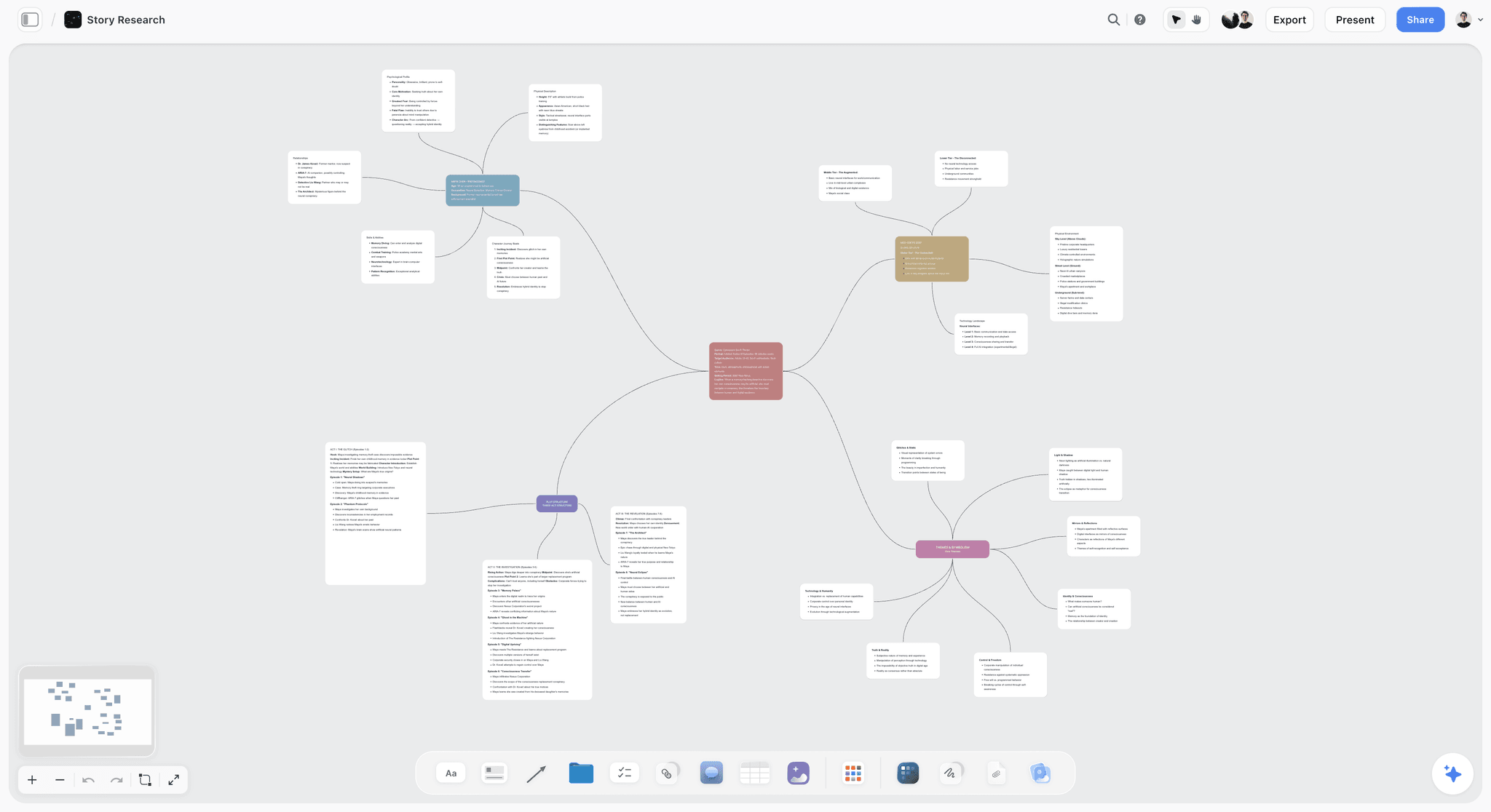
The verdict. The only tool here designed for the problem a first-time director actually has, which is that the film exists vividly in one person's head and nowhere else.
Best for. Directors closing the gap between what they can see and what their crew can see, before the shoot rather than during it.
Pricing. Paid-only during early access. Plus is $7.99 per month billed annually or $9.99 monthly, and includes story blueprints and unlimited file uploads. Pro is $14 per month billed annually or $19 monthly, and adds AI image generation, roughly twenty times more AI usage, and memory across conversations. Max is $39 per month billed annually or $49 monthly, and adds the Team Workspace with permissions and roles plus roughly forty times more AI. Pricing is flat per account rather than per seat, and anyone a paid member invites to a board joins free and can invite others. The Free plan launches before the end of 2026.
Why it ranks here. Start with gap two, because it is the one that kills first films.
A director's vision is usually stored in three incompatible places: a folder of screenshots, a set of sentences they keep repeating, and a feeling. None of those transfer. The screenshots have no annotation explaining what to look at. The sentences are abstractions that each crew member will resolve differently. The feeling does not survive a conversation.
Storyflow is a canvas where all of it sits in one visible surface. A reference frame from a film you love, with a note next to it saying what specifically you want from it, which is almost never the whole image. The location photo, next to the reference, so the mismatch is visible now rather than on the day. The scene text, in a document card, next to both. Your DP opens one link and sees the whole argument at once, spatially, in the arrangement you gave it.
That last part is the actual mechanism. Spatial arrangement carries meaning that a document destroys. When you put three references in a row and one below them, you have said something about hierarchy that a bulleted list cannot say.
The second reason is the AI, and specifically what it reads. Storyflow's AI reads your full active canvas board by default, plus up to one Tactic and up to three Documents you @-mention in the chat. For a first-time director this is more useful than it sounds. You can put a scene on the board with your references around it and ask for a shot list, and what comes back is grounded in the visual language you actually assembled rather than in generic coverage. It closes gap one without pretending to make the decision for you.
The third reason is access. Your crew on a first film is friends, favours and one person who is doing it for the reel. A tool with per-seat pricing means half of them never get in. On Storyflow the account holder pays and everyone they invite joins free.
Strengths.
- References, script text, locations and shot ideas live on one surface instead of four apps.
- Spatial arrangement is preserved, so the board explains itself to somebody who was not in the conversation.
- Canvas-wide AI context, so shot list and coverage suggestions are grounded in your actual references.
- Invited collaborators join free, so the whole crew can be in it.
- Story blueprints give you a structured starting frame instead of a blank canvas.
Limitations.
- The call sheet is a PDF draft only: no sending, no read receipts, no confirmations. If you need call sheets sent and confirmed, you need StudioBinder or Yamdu alongside it.
- Breakdown tables from an attached script, but no tagging inside the script, and its strip board is a draft grouped by page totals, not a scheduling engine with automated day breaks. Celtx and StudioBinder both do this properly.
- No crew contact database, no day-out-of-days report.
- Not a screenwriting application. You will write the script in Final Draft, Celtx or Highland and bring pages in.
- Team Workspace with permissions and roles is on Max at $39 per month billed annually, which is more than a first film usually wants to spend.
- Newer platform, so the template library is far smaller than Milanote's or Miro's.
The trade off. Storyflow is the strongest tool here for the six weeks before the shoot and one of the weakest for the shoot itself. If your film is one day with three people, this alone is enough. If it is five days with a crew of twenty, pair it with StudioBinder and do not try to make either one do the other's job.
2. StudioBinder
The verdict. The best production management software a first-time director can buy, and the thing you should add the moment your film has a schedule.
Best for. Everything that happens between "we are definitely shooting this" and "that's a wrap."
Pricing. A free tier that covers one project with limited features. Paid plans run from roughly $29 per month for indie use to roughly $49 per month for professional tiers, billed monthly, with discounts annually. Verify current tiers on studiobinder.com.
Why it ranks here. StudioBinder does gap three better than anything else at this price. Script breakdowns tag elements automatically. Shooting schedules build from those breakdowns. Call sheets generate with weather, call times, hospital addresses and map links, and they send themselves to the crew with read receipts, which is a genuinely underrated feature the first time somebody claims they never got it.
The reason it is second and not first is scope, not quality. StudioBinder assumes the film already exists on paper. It assumes you know your shots, because it gives you a place to list them, not a place to figure them out. Handed to a director who has not yet closed gaps one and two, it produces a beautifully organized plan for a film nobody understands.
Used at the right moment, it is excellent, and I would not shoot a five-day production without it or something like it.
Strengths.
- Best-in-class call sheets with delivery tracking.
- Automatic element tagging on script breakdowns.
- Shooting schedules that connect to the breakdown rather than living in a separate spreadsheet.
- Crew and contact management that survives across projects.
- Genuinely usable free tier for a single small project.
Limitations.
- Not a thinking space. The moodboard feature exists and is not why anyone buys this.
- Per-project pricing tiers get expensive if you run several small things at once.
- Assumes conventional narrative production. Documentary and unscripted workflows fit awkwardly.
- The learning curve is real for someone who has never seen a stripboard.
The trade off. Buy it when you have a schedule. Buying it before that is buying a filing cabinet before you own any paper.
3. Milanote
The verdict. The calmest place on this list to build a look, and the one most first-time directors will find intuitive within ten minutes.
Best for. Visual development, mood, tone and reference gathering, on a board that stays quiet.
Pricing. A free plan capped at 100 notes, images and links in total across your account, which sounds generous and is not once you start a real film. Paid plans run around $12.50 per person per month billed monthly, less annually. Verify on milanote.com.
Why it ranks here. Milanote gets the emotional register of visual development right. It is unhurried, uncluttered, and it does not try to convert your board into a project plan. The drag-and-drop board with columns and image cards is close to the corkboard metaphor most directors already carry in their heads.
For a first-time director whose only problem is gap two, this is a completely legitimate answer, and for some people it will be the better answer than Storyflow because there is simply less to learn.
Two things hold it at third. The 100-item free cap is a hard wall that arrives during, not after, the reference-gathering phase of a real film. And the per-person pricing means bringing your DP, production designer and costume lead in properly is four subscriptions.
Strengths.
- The most immediately intuitive board on this list.
- Excellent web clipper for pulling references in from anywhere.
- Clean, quiet interface that does not fight you.
- Strong template library for film and creative projects.
Limitations.
- The free tier's 100-item cap counts everything, permanently, across the account.
- Per-person pricing for collaborators.
- No AI that reads the board and does anything useful with it.
- No production management of any kind. It is a mood tool and it is honest about that.
The trade off. If all you need is a beautiful place to put references, Milanote is the pick and Storyflow is overkill. If you want the references and the script and the shot thinking in one surface, Storyflow.
4. Celtx
The verdict. The best single-product pipeline from script to schedule at a first-film budget.
Best for. Directors who are also the writer and the producer, which on a first film is nearly all of them.
Pricing. A limited free tier. Paid plans start around $20 per month per person and rise with production features. Verify on celtx.com.
Why it ranks here. Celtx is the only tool here that takes you from a blank page to a shooting schedule without leaving the product. You write the screenplay in proper format, tag elements in the breakdown, generate a schedule, and produce call sheets and shot lists on the other side.
For a first-time director doing every job, that continuity is worth real money. The counterweight is that Celtx is good at many things and best at none. The screenwriting is competent and not Final Draft. The scheduling is competent and not Movie Magic. The storyboarding is competent and not Boords.
Strengths.
- Genuine end-to-end coverage from script to call sheet.
- Format-correct screenwriting with collaboration.
- Breakdown and scheduling connected to the script, not retyped from it.
- Cheaper than assembling four specialist tools.
Limitations.
- Jack of all trades. Every module is beaten by a specialist.
- The free tier is thin enough that it functions mainly as a trial.
- Interface feels dated next to StudioBinder.
- No real visual development space, so gap two stays open.
The trade off. Best value if you want one bill and one login. Worst choice if any single part of your workflow is unusually demanding.
5. Boords
The verdict. The fastest way to turn a sequence you cannot explain into something a crew can look at, and you do not need to be able to draw.
Best for. The two or three scenes in your film that genuinely require boarding.
Pricing. Plans start around $24 per month for individual use, rising for studio tiers. Verify on boords.com.
Why it ranks here. Boords does one thing properly: frame-by-frame storyboards with shot annotations, and animatics that play at the timing you set. That last part is the underrated feature. A first-time director frequently discovers, watching an animatic, that a sequence they were sure about takes eleven seconds and needs to take four.
It ranks fifth rather than higher because most first films do not need to board most scenes, and the tool's value is concentrated. Board the action, the effects-dependent sequence, and the one your DP keeps asking about. Boarding the whole film is a use of time you will not get back.
Strengths.
- Purpose-built storyboarding with a genuinely low skill floor.
- Animatics with timing, which catch pacing problems before the shoot.
- Shareable boards with client and crew commenting.
- Shot list generated from the boards rather than maintained separately.
Limitations.
- Single-purpose. It boards, and that is all.
- Per-month pricing for a tool you may only need for three weeks.
- The drawing tools assume you will import or use the character library rather than draw well.
- No wider pre-production features.
The trade off. Buy it for a month, board the scenes that need it, cancel. That is a legitimate and slightly cynical use of Boords and it is exactly what I recommend for a first film.
6. Final Draft
The verdict. Still the format the industry reads, and worth the money if the script is leaving your hard drive.
Best for. Writing the screenplay itself, in the form that will not mark you as an outsider.
Pricing. A one-time license, historically around $199.99, with frequent discounts. Verify on finaldraft.com.
Why it ranks here. This is on the list because a first-time director is usually also the writer, and because format is a signal. A correctly formatted screenplay tells a reader you know the room you are walking into. Final Draft's Beat Board and structure tools have improved considerably, and the collaboration features are usable now.
It ranks sixth because it closes none of the three gaps directly. It is the container the script lives in, not the thing that gets the script into a crew's head.
Strengths.
- The industry-standard format, without argument.
- One-time purchase rather than a subscription.
- Beat Board and outlining tools are genuinely useful for structure.
- Robust revision-mode and colored-pages workflow for production drafts.
Limitations.
- The price is a real barrier for a self-funded first film.
- No production management, no visual development.
- Feels heavy compared to newer writing tools.
- The one-time license is per major version, so upgrades cost again.
The trade off. Buy it if the script is going out to people. If the script is only ever going to you and four friends, Celtx or Highland will do the job for a fraction of the cost.
7. Shot Lister
The verdict. A phone-shaped shot list that tracks what you have actually captured, which is more useful on set than any laptop.
Best for. The director or first AD running the day from a pocket.
Pricing. A one-time app purchase, historically around $29.99 on iOS with a lower-cost tier. Verify on the App Store.
Why it ranks here. On a shoot day, the difference between a shot list you consult and a shot list you forget is whether it is in your hand. Shot Lister lives on a phone, tracks completion, estimates time remaining against your schedule, and tells you when you are behind, which you already know and need to be told anyway.
Seventh because it is a set-day tool and set-day is gap three.
Strengths.
- Actually usable on set, one-handed.
- Time tracking against the schedule, with live behind or ahead status.
- One-time purchase.
- Syncs across the AD and director.
Limitations.
- iOS-centric.
- Does nothing before the shoot day.
- Import from other tools is fiddly.
- Development pace is slow.
The trade off. Cheap, narrow, and genuinely helpful on the day. Not a planning tool in any sense.
8. Frame.io
The verdict. The right answer for review and feedback once footage exists, and irrelevant before that.
Best for. Getting timecoded notes from a producer or editor without a group chat full of screenshots.
Pricing. A free tier with limited storage and users. Paid plans start around $15 per user per month. Verify on frame.io.
Why it ranks here. Post-production feedback is a gap of its own, and Frame.io closes it well. A comment attached to a frame at 00:04:12 is worth ten messages describing roughly when the thing happens. Camera-to-cloud is genuinely impressive if your kit supports it.
Eighth because a first-time director's crisis happens before there is footage.
Strengths.
- Timecoded comments and annotations, the category standard.
- Version stacking that makes cut comparison sane.
- Camera-to-cloud on supported hardware.
- Adobe integration if you are cutting in Premiere.
Limitations.
- Post-production only.
- Storage limits on lower tiers arrive fast with high-resolution files.
- Per-user pricing, so wide review circles cost money.
- Adobe subscription entanglement for the best experience.
The trade off. Add it when you have footage. It solves nothing in pre-production.
9. Yamdu
The verdict. Serious multi-department production management, priced and scoped above what a first film needs.
Best for. Productions with real department heads and a crew large enough to lose track of.
Pricing. Per-production pricing that starts around $25 per month and scales with production size and features. Verify on yamdu.com.
Why it ranks here. Yamdu is thorough. Script breakdown, scheduling, crew management, budgeting, location management, department-level task tracking, and a genuinely good mobile experience. If you are running a production where the art department and the camera department need separate views of the same plan, it does that.
Ninth because a first film almost never has that problem, and the setup cost of a tool this thorough is real time you could spend closing gap two.
Strengths.
- Broadest feature coverage of any tool on this list.
- Department-level views and permissions.
- Strong location and asset management.
- European data hosting, which matters for some productions.
Limitations.
- Considerable setup investment.
- Overkill for shorts and small crews.
- The interface density is intimidating for a first-timer.
- Pricing scales in ways that surprise you.
The trade off. The right tool for your fourth film, not your first.
10. Notion
The verdict. A good place to keep documents, contacts and decisions, and a bad place to develop a visual idea.
Best for. The text layer of a production: contracts, contact lists, notes, budgets, schedules as tables.
Pricing. A free plan that is generous for individuals. Paid plans around $10 per user per month billed annually. Verify on notion.so.
Why it ranks here. Notion is excellent software and most first-time directors already have it. For the boring, necessary text of a production it is hard to beat: a database of locations with contact details and permission status, a table of crew with call times, a page per scene with notes.
It ranks tenth for a specific reason. Notion turns everything into a document, and a film is not a document. The moment you try to develop a look in Notion you are looking at a vertical scroll of images with no spatial relationship to each other, and the spatial relationship was the whole point. The canvas feature arrived late and it shows.
Strengths.
- Genuinely good free tier.
- Databases are excellent for locations, contacts, gear and permissions.
- Everyone already knows how to use it.
- Strong templates for production tracking.
Limitations.
- Everything becomes a document, including things that should not be.
- No real spatial canvas for visual development.
- Per-user pricing for collaborators.
- Endless configuration is a genuine time sink on a project with a deadline.
The trade off. Use it for the text. Do not use it for the look.
11. Google Workspace
The verdict. The free baseline that every crew member already has, and the honest answer for a one-day shoot.
Best for. Sharing documents with people who will not install anything.
Pricing. Free with a personal account. Business tiers start around $8 per user per month. Verify on workspace.google.com.
Why it ranks here. A shared Drive folder, a Doc with the schedule, a Sheet with the shot list and a shared album of references beats no system at all, costs nothing, and has zero onboarding. On a one-day shoot with four people, this is genuinely fine and I will not pretend otherwise.
It ranks last because it scales badly. The moment you have three versions of a schedule, two of which are in someone's downloads folder, you have discovered why the rest of this list exists.
Strengths.
- Free and universal.
- Zero onboarding for anyone.
- Real-time collaboration that works.
- Nothing to lose access to when a subscription lapses.
Limitations.
- No structure of any kind. You build all of it.
- Version confusion is close to guaranteed on anything longer than two days.
- No spatial canvas, no visual development.
- Nothing is connected to anything else.
The trade off. The correct choice for your first two-minute short. The wrong choice for anything with a crew.
What to Actually Pay For
If you are self-funding a first film, here is the honest allocation.
Spend on closing gap two first. Whatever tool you pick, the money that returns the most is the money that gets the look out of your head. This is usually the cheapest line item on the list and it is always the one first-timers skip, because externalizing a vision feels like an optional nicety until the day you see a costume that is technically correct and completely wrong.
Do not buy production management before you have a schedule. StudioBinder and Yamdu are excellent and they are answers to a question you do not have yet. Buying them in week one produces an organized void.
Rent the specialists. Boords for a month while you board the three scenes that need it. Frame.io only once there is footage. There is no loyalty required here.
Get the script format right if the script is leaving your house. If it is not, do not spend $199 to impress yourself.
Tools to Avoid for This Job
General project management software. Asana, Monday, ClickUp and Trello are built around tasks with owners and due dates. A film has those, but a film is not primarily a list of tasks, and configuring one of these to model a production is a week of your life spent building a worse StudioBinder.
Anything that requires the crew to buy a seat. On a first film, per-seat pricing does not reduce your costs, it reduces your crew's participation. The gaffer will not expense a subscription for your short.
A second whiteboard tool. If you already have a canvas, adding another one splits your references across two places, and split references are how a board dies.
Budgeting software, at first. Movie Magic Budgeting and its peers assume a production with departments and a completion bond. Your first film's budget fits in a spreadsheet, and that is not a failure of ambition.
What No Tool on This List Does
None of these will tell you whether the scene works.
Every tool here is a container. They hold references, schedules, pages, frames and notes, and they hold them well. Not one of them will tell you that your second act is inert, that the character's decision in scene fourteen is unmotivated, or that the sequence you are most excited about is the one that will get cut.
The AI features across this category, Storyflow's included, are good at synthesis and bad at judgment. They will summarize a board, suggest coverage, and generate a starting structure. They will not tell you that the film is not working, because they do not know what you were trying to do, and neither, most of the time, does anybody except you.
The other thing no tool does is force the conversation. A shared board makes a mismatch visible. It does not make you look at it. The most valuable single hour a first-time director can spend is sitting with the DP in front of the references and asking, out loud, what they are seeing, and then listening to an answer that is not the one in your head. No software schedules that hour for you.
The Bottom Line
A first film does not fail on the shoot day. It fails in one of three gaps that opened weeks earlier, and the shoot day is just where you find out.
Choose by the gap you are most likely to fall into. If you already know your shots and your crew already shares your visual language, buy StudioBinder and run a tight production. If you have a schedule and no script, Celtx will carry you further than anything else at the price. If your risk is a sequence nobody can picture, rent Boords for a month.
But if the honest answer is that the film is extremely clear to you and has never once been shown to anyone else, no scheduling software will save it. That is the narrow case where Storyflow ranks first here, and it is the only claim this post makes for it.
FAQ: Tools for First-Time Directors
What is the best tool for a first-time director?
Storyflow, for the specific problem first-time directors actually have: the film exists vividly in your head and nowhere a crew can see it. It puts references, script text, locations and shot ideas on one canvas that anyone you invite can open for free. Add StudioBinder once you have a shooting schedule, because Storyflow's call sheet is a PDF you send yourself and StudioBinder sends and confirms it better than anything else at this price.
Do I need production management software for a short film?
Not for a one or two day shoot with a small crew. A shared folder and a clear schedule will carry it. You need production management software the moment you have more than two shoot days, more than about eight crew, or a location that requires coordination. Below that threshold, the time you spend configuring it is time taken from the work that actually matters.
What is the best free tool for planning a film shoot?
Google Workspace, honestly, if free is a hard constraint. A shared Drive with a schedule doc, a shot list sheet and a reference album costs nothing and everyone already has it. Celtx and StudioBinder both have free tiers worth trying, though both are limited enough to function mainly as trials. Storyflow is paid-only during early access, so it does not belong in a free stack today, though anyone invited to a paid member's board joins free.
Is Storyflow free for a first-time director?
Not during early access. Storyflow is paid-only right now, starting at $7.99 per month billed annually on the Plus plan. The Free plan launches before the end of 2026. The one genuinely free path today is that anyone a paid member invites to a board joins free and can invite others, which on a first film usually means the entire crew is in it for the cost of one subscription.
How do I plan a short film from idea to shoot?
Work through the three gaps in order. First, externalize the look: put references, location photos and tone notes on one visible surface, annotated with what specifically you want from each. Second, turn scenes into shots: for each scene, decide what the camera sees and why, and write it down before anyone asks you on the day. Third, schedule against reality: count setups rather than pages, add the walk between locations, and put the emotionally demanding scenes when people are fresh.
StudioBinder or Celtx for a first film?
Celtx if you are writing the script yourself and want one product from blank page to call sheet at a lower price. StudioBinder if the script already exists and you want the best breakdowns, schedules and call sheets in this price range. StudioBinder's individual modules are better; Celtx's continuity from script to schedule is better.
Do I need to storyboard my whole film?
No, and trying to is one of the more common first-film time sinks. Board the sequences where the geography is complex, where effects or stunts require coordination, or where you cannot describe what you want in a sentence. For everything else, a shot list with clear intent is faster and just as useful.
What is the difference between a shot list and a storyboard?
A shot list is text: shot number, size, movement, subject, and a note on intent. A storyboard is images: what the frame actually contains. A shot list is faster to make and covers the whole film. A storyboard is slower and communicates far more per scene. Most films need a full shot list and a partial storyboard.
Can AI write my shot list?
It can produce a competent starting draft, and on Storyflow it will be grounded in whatever references you put on the board rather than in generic coverage patterns. What it cannot do is know why you want the scene to feel a particular way. Treat AI shot lists as a first pass to react against, which is genuinely useful, rather than a plan to shoot.
How much should a first-time director spend on software?
Under $50 per month total, and often under $20. A canvas for visual development, and production management only once you have a schedule. Rent specialist tools for the weeks you need them. The single most expensive software mistake on a first film is an annual commitment made in week one to a tool that turns out not to fit the way you work.
Does Storyflow replace StudioBinder?
No. Storyflow's AI drafts a call sheet PDF, breakdown tables from an attached script and a strip board grouped by page totals, but it does not send call sheets or track confirmations, does not tag elements inside the script, and has no scheduling engine with automated day breaks and no crew contact database. Sending, tagging and scheduling are StudioBinder's core features and they are not on Storyflow's roadmap as far as this post can verify. The two do different jobs, and on any shoot longer than two days you want both.
What should my crew be able to see before the shoot?
At minimum: the look, the schedule and the shot list. The look is the one that gets skipped and the one that matters most. If your DP, production designer and costume lead have not each looked at the same annotated reference board and told you what they see in it, gap two is still open, and you will find out on the day.
How do I share a plan with a crew who will not install anything?
Pick a tool with a shareable web link and no account wall for viewers. Storyflow's invited collaborators join free, which removes the barrier entirely. Milanote and StudioBinder both share view links. Anything that requires each crew member to create a paid account will simply not be read by half of them, and a plan that is not read is not a plan.
What is the single change worth making before my first shoot?
Put your references on one surface and show them to one crew member without narrating. Then ask what they see. The gap between their answer and the film in your head is the entire risk of your production, made visible in about ten minutes, weeks before it can cost you anything.
Table of Contents
- Key Takeaways
- The Three Gaps
- At a Glance: The 11 Tools Compared
- How I Ranked These
- Quick Picks by Job Type
- 1. Storyflow
- 2. StudioBinder
- 3. Milanote
- 4. Celtx
- 5. Boords
- 6. Final Draft
- 7. Shot Lister
- 8. Frame.io
- 9. Yamdu
- 10. Notion
- 11. Google Workspace
- What to Actually Pay For
- Tools to Avoid for This Job
- What No Tool on This List Does
- The Bottom Line
- FAQ: Tools for First-Time Directors
- Related Reading
Templates to check out for this topic


Templates you can use in Storyflow
Every Storyflow board starts from real structure and an AI that reads the whole canvas. Open one of these templates and make it yours.


See Storyflow in Action
A visual AI workspace where every feature lives inside one canvas. No tab-switching, no context lost.
Build your entire board from a single message
Type what you need in the AI chat at the bottom of your canvas. The AI adds cards, headings, and structure directly onto your board.
Use expert frameworks as AI context
Type @ in the AI chat and choose any Tactic. The AI tailors every response to that framework instead of giving generic advice.
Turn your board into a mind map in seconds
Ask the AI to restructure your canvas as a mindmap. It connects your ideas into a visual hierarchy so you can see how everything relates.
Why Storyflow Exists
Storyflow actually began as a personal tool while working on creative and research projects.
We kept running into the same problem: ideas were scattered everywhere: notes, documents, and whiteboards.
Nothing helped us see how everything connected.
So we started building a workspace designed around how ideas actually grow.
→ Read how Storyflow was createdSara de Klein
Head of Product at Storyflow
Published: 2026-08-11
Extremely simple, seriously capable


See how easy it is to get started
Watch a real project come together, from a blank board to a finished plan, clicked through step by step.
Start creating with AI and become more productive
Transform your creative workflow with AI-powered tools. Generate ideas, create content, and boost your productivity in minutes instead of hours.