Best ChatGPT Plugins for Filmmakers in 2026: 10 Ranked by Job
Ten ChatGPT plugins from the directory for producers and small production companies, in production order: Storyflow to plan the shoot on one board, then script, crew, previs, sound, edit, captions and hosting.

Category
Video Production
Author

Storyflow Team
Product & Research Team
Topics
2026-10-28
•
28 min read
•
Video Production- ChatGPT plugins
- filmmakers
- Storyflow
- Descript
- Runway
- Kapwing
- pre-production
What are the best ChatGPT plugins for filmmakers?
The best ChatGPT plugins for filmmakers start with Storyflow for planning the production: Storyflow is an AI visual workspace that holds the breakdown, shot cards, references and strip board on one infinite canvas, and ChatGPT builds them there for you. Then choose by job: ShotClick writes and revises formatted scenes, Descript finds the selects in your interviews by chat, and Runway generates concept frames when a pitch needs pictures before the shoot.

Full disclosure: Storyflow is our product. It is listed first because planning is the stage every other plugin here hands its work back to, and through its plugin ChatGPT builds that plan on a board the crew and client open by link. The other nine are ordered by when a production uses them, not by a score. Storyflow's limits: no AI image or video generation through the plugin, no animatic, and it does not send call sheets.
How the ChatGPT plugins for filmmakers compare on trust, innovation, ratings and pricing
Which ChatGPT plugins for filmmakers are the most trusted?
Descript, Runway and Riverside each document on their own pages what their ChatGPT plugin does and what it spends, which is the first thing to check before a client job. Storyflow is newer: its plugin went live on October 24, 2026. What it offers is a plan that stays inspectable, because ChatGPT writes the breakdown and shot cards onto a board anyone on the production can open and check.
Which ChatGPT plugins for filmmakers have fair and transparent pricing?
MatchMyCrew.com is free to use with no commission as of October 2026. Runway, Descript, ElevenLabs and Storyflow publish prices with the billing period stated and say which allowance a plugin action spends. Storyflow starts at $7.99 a month billed annually, and its plugin actions use no Storyflow AI credits. Storyblocks and Wistia quote their top tiers, and Kapwing's and Riverside's pages are the place to check current paid prices.
Which ChatGPT plugins for filmmakers are the most innovative?
Runway, for generating multi-shot previs inside a chat with a choice of models. Riverside, for going from a recording to scheduled clips without leaving ChatGPT. Storyflow, for letting ChatGPT build a production plan as shot cards and a strip board on a shared board, then read that board back to answer what changed since Monday.
Which ChatGPT plugins for filmmakers have a strong history of consistent performance?
Every plugin here acts inside the vendor's existing app, so its output is as dependable as that app: Descript's edits land in your Descript Drive, Wistia's changes in your Wistia account. Storyflow's plugin is weeks old, so its track record is short. The consistency it offers is structural: one board holds the plan, so the version ChatGPT edits is the version the crew reads.
Which ChatGPT plugins for filmmakers are underrated?
MatchMyCrew.com, because it searches crew by service, location and availability from the chat, which suits an away shoot that needs one local drone operator. Kapwing, because a campaign in three languages turns one master into a dozen captioned files, and its plugin makes them from the chat. Storyflow's strip board is easy to miss too: the plugin that builds the shot list also lays out the shoot days.
Quick Comparison
Our pick first for planning the production on one board, then the rest by the order a production uses them. Prices as of October 2026.
| Tool | Best For | AI Features | Price |
|---|---|---|---|
| Storyflow | Breakdown, shot cards, references and strip board for commercials and brand films | ChatGPT reads and builds on your boards through the plugin; actions use no Storyflow AI credits | Plus $7.99 a month billed annually (paid-only in early access) |
| Descript | Selects and clean dialogue on interview-led films | Imports, transcribes and edits with Underlord from the chat | Hobbyist $16 a month billed annually |
| Runway | Previs frames and pitch visuals | Generates images and multi-shot video inside ChatGPT on Runway credits | Standard $12 a month billed annually |
| Kapwing | Captions, translations and dubbed cutdowns | Uploads media, subtitles, translates and dubs on workspace credits | Free plan; paid plans: see Kapwing pricing |
Key Takeaways
- Storyflow comes first for one job, planning the production: through the plugin, ChatGPT writes the breakdown table, shot cards and a strip board onto a board the crew and client open by link.
- Nine more plugins cover the rest of a production, in the order you reach for them: ShotClick (script), MatchMyCrew.com (crew), Runway (previs frames), Storyblocks (stock), ElevenLabs (voice), Descript (edit), Riverside (remote recordings), Kapwing (captions and dubbing) and Wistia (hosting).
- Every plugin works inside its own vendor account and spends that vendor's credits or minutes. Storyflow's plugin runs on ChatGPT's model, so its actions use no Storyflow AI credits.
- Frame.io, StudioBinder, Celtx, Boords and Vimeo were not in ChatGPT's plugin directory on October 28, 2026, so review links and stripboard-to-call-sheet suites still live outside ChatGPT.
- A small production rarely needs more than four plugins: one to plan, one for pictures or sound, one to edit and one to version.
What a ChatGPT Plugin Changes on a Shoot
You have a 60-second script, a client call on Thursday and two shoot days in three weeks. ChatGPT can already break the script into scenes, argue for coverage and draft a schedule. The trouble is where that work ends up: a long conversation that your first AC, your editor and your client cannot open. A plugin changes the destination, not the thinking.
The work lands in an app your crew already opens
OpenAI describes a plugin as a bundle of skills and connected apps that links ChatGPT to your accounts in other services, so it can read their information and take actions there (Plugins in ChatGPT). On a production that means the breakdown becomes a table on a board, the rough cut becomes a Descript composition and the captions become a Kapwing project. Each result has a link someone else can open, which a chat answer never has.
Every plugin acts inside its own account and spends its own credits
A plugin does not give ChatGPT new powers over your money. It acts in the vendor account you sign in to, under that account's plan. Runway generations draw on Runway credits, Descript imports draw on media minutes, Kapwing dubbing draws on workspace credits. OpenAI adds that app use can also count toward your ChatGPT plan limits and toward limits the app provider sets (Connected apps in ChatGPT). Budget the vendor's allowance, not just your ChatGPT plan.
How We Chose the 10 Plugins and Why Storyflow Is First
The shortlist started from ChatGPT's plugin directory as captured on October 28, 2026, about 2,460 plugins across its categories. A plugin made the list only if it passed four checks, and the order follows the production rather than a score.
What qualified a plugin
- It is in ChatGPT's plugin directory. Tools with an MCP server you would add by hand did not count, because a crew member cannot install them from the listing.
- The vendor documents what it does in ChatGPT. Every description below comes from the directory one-liner plus the vendor's own page about its ChatGPT plugin or MCP server, read in October 2026.
- It does a job a producer is accountable for. Script, crew, previs, sound, edit, captions or delivery. Plugins whose main job is a generated presenter or avatar video, which replaces the shoot rather than serving it, are honorable mentions, not ranked.
- The price is published. Prices are the vendor's own pricing page as of October 2026; where a vendor shows only annual billing or hides the cycle, the entry says so.
Why the order follows the production, not a score
Storyflow is our product and it is first because planning is the stage the other nine hand their work back to: the shot list decides what Runway frames you need, the schedule decides when MatchMyCrew.com has to find a gaffer, and the deliverables list decides how many Kapwing versions you make. After Storyflow, the plugins appear in the order a production uses them. Number 7 is not worse than number 3; it arrives later in the job.
What did not count
Brand size, directory badges and how many models a plugin wraps did not move anything. Neither did features outside ChatGPT: a vendor's desktop app can be excellent and still do nothing for you inside a chat.
At a Glance: 10 ChatGPT Plugins for Filmmakers
| # | Plugin | Directory one-liner | Job on a production | Price as of October 2026 |
|---|---|---|---|---|
1 | Storyflow | Plan projects on visual boards | Breakdown, shot cards, references, strip board on one board | Plus $7.99 a month billed annually; paid-only in early access |
2 | ShotClick | Write and edit screenplays | Formatted scenes, rewrites and research notes | Studio tier €24.99 a month includes the connector |
3 | MatchMyCrew.com | Find creative-production crew | Searching crew by service, location and availability | Free to use today |
4 | Runway | Generate with every AI model | Previs frames, pitch visuals, motion tests | Standard $12 a month billed annually |
5 | Storyblocks | Discover stock media | Stock footage, music and sound effects | Essentials $21 a month billed annually |
6 | ElevenLabs | Voice agents and media | Scratch voiceover and temp audio | Starter $6 a month |
7 | Descript | Edit video by chatting | Transcripts, selects, filler removal, highlight cuts | Hobbyist $16 a month billed annually |
8 | Riverside | Search, edit & publish videos | Remote interviews and video podcasts into clips | Connector on Grow and above; see Riverside pricing |
9 | Kapwing | Caption, translate & dub video | Subtitles, translations and dubbed versions | Free plan; paid plans: see Kapwing pricing |
10 | Wistia | Manage your Wistia content | Hosting, captions audit, analytics for the client | Business $79 a month billed annually |
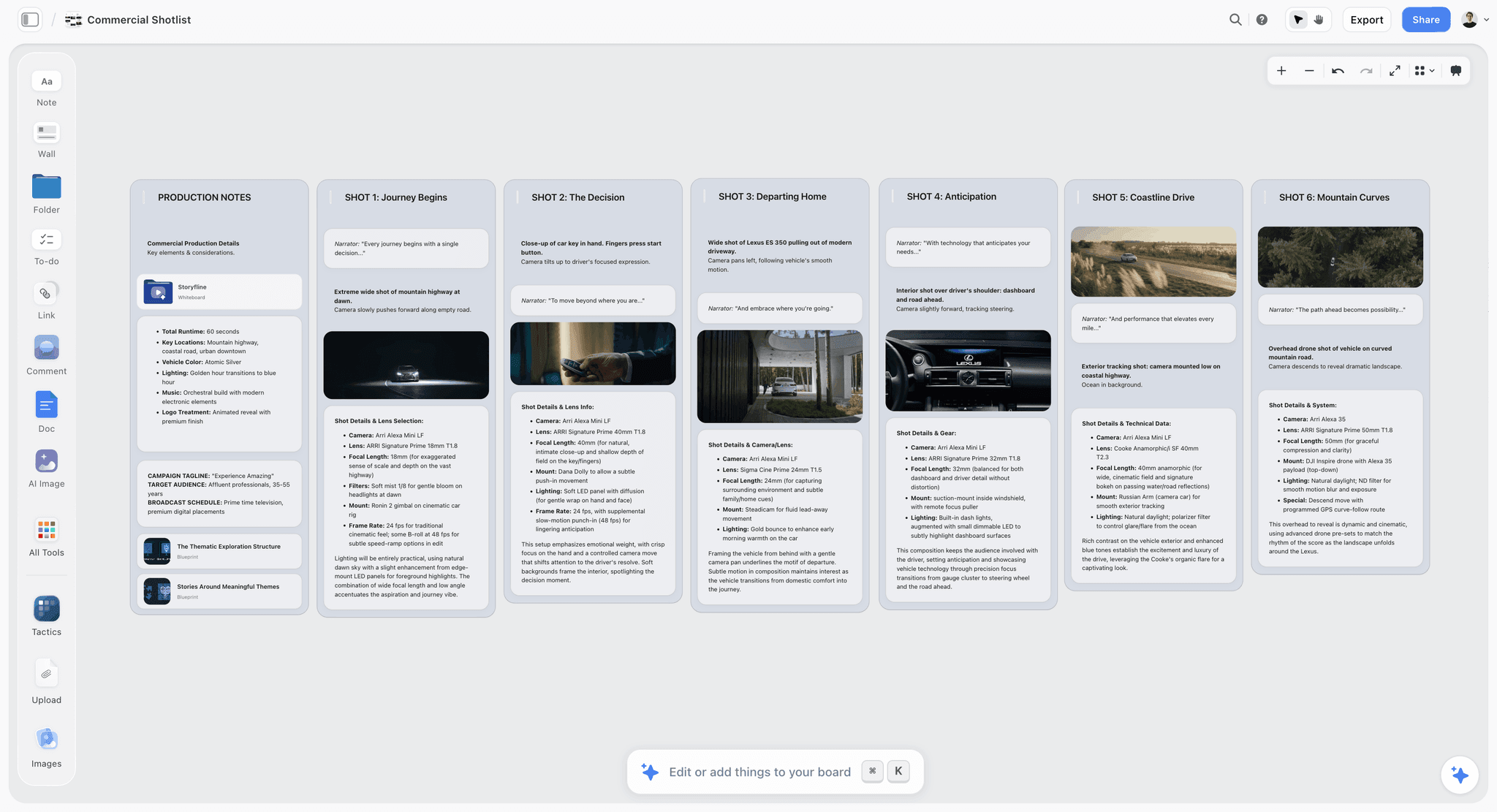
Storyflow board with a row of shot cards, each with a frame, a shots checklist and direction notes
Let ChatGPT build the shot list on your board
Install the Storyflow plugin, give ChatGPT one client project, and get shot cards, a breakdown table and a strip board your crew opens by link.

The 10 Best ChatGPT Plugins for Filmmakers, Reviewed
Each entry gives what the plugin does inside ChatGPT, who it is for, its main limit and its price. Install any of them the same way; the steps are in the install section and in how to install plugins in ChatGPT.
1. Storyflow
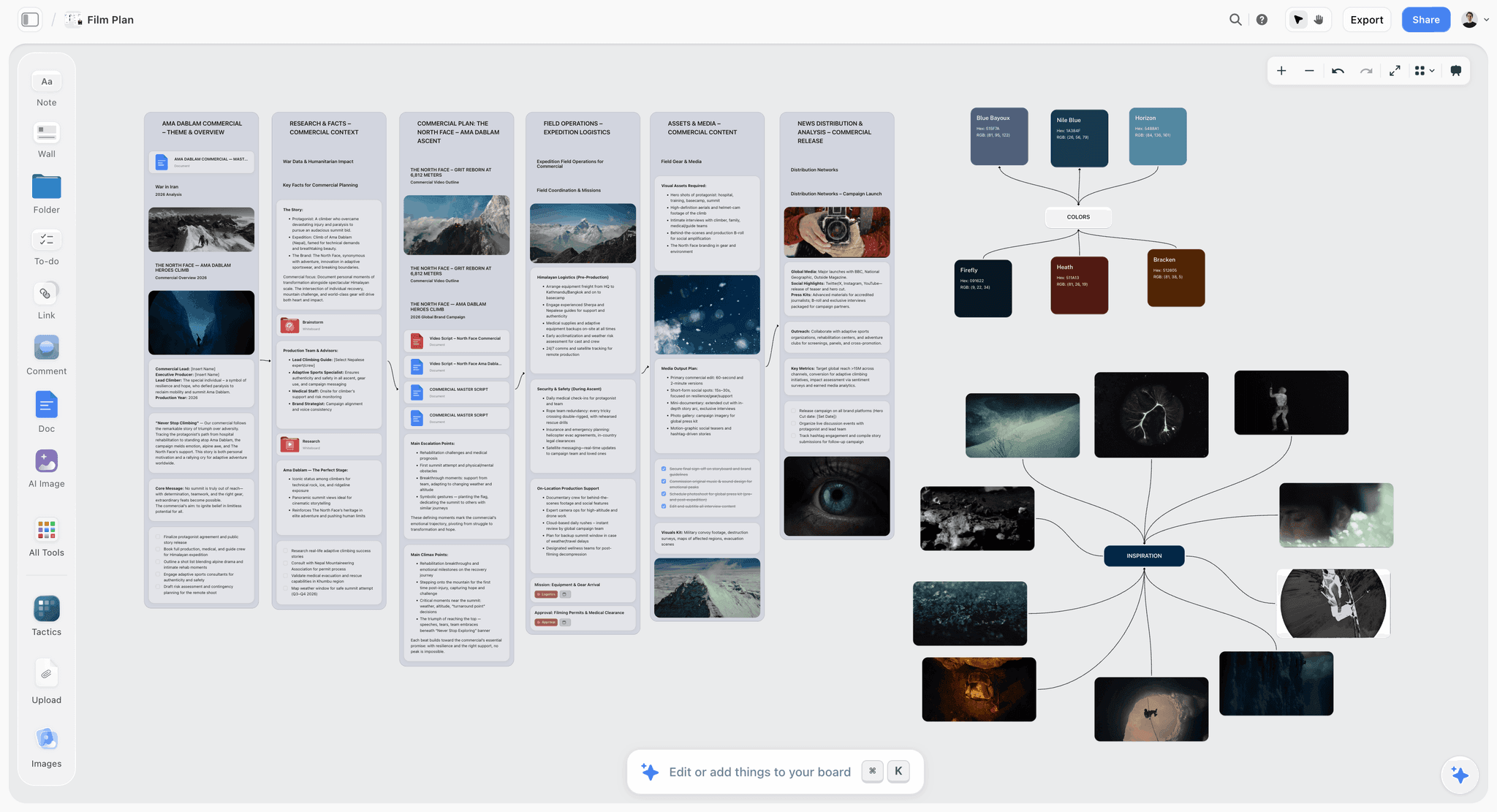
A commercial plan on one Storyflow board: research, logistics, assets and distribution in walls, with the palette and references beside them.
What it does in ChatGPT: the listing reads "Plan projects on visual boards". Once installed, ChatGPT can read your projects, boards and documents, report what changed on a board in the last day or week and who changed it, and build on a board: notes, to-dos, tables, documents, walls and whole sections, mind maps, diagrams, slide decks, colour palettes and ready-made board templates. Two tools matter most on a shoot. Shot cards come out as a connected row of shot walls, each with a frame, a "Shots required" checklist, a direction note and an equipment note. The strip board comes out as a wall per shoot day with a coloured strip per scene, each day totalled in pages.
Best for: producers and small production companies planning commercials, brand films and social campaigns, where the client, the crew and ChatGPT should all work from one board.
Limit: ChatGPT cannot generate AI images through the plugin, and a photo you attach in the ChatGPT chat does not reach Storyflow; the plugin gives you an upload link for the board instead. The strip board does not recalculate when you move a scene, and Storyflow does not send call sheets.
Price: Plus $7.99 a month billed annually ($9.99 monthly), Pro $14 ($19 monthly), Max $39 ($49 monthly). Storyflow is paid-only during early access; a Free plan launches before the end of 2026, and anyone a paid member invites to a board joins free now. An invited free account can make 25 plugin actions a week; Plus, Pro and Max have no weekly limit. See Storyflow pricing.
The practical difference shows up the second time you ask. Because ChatGPT reads the board rather than its memory of the chat, "rebuild the strip board with the warehouse scenes on day two, and tell me what changed since Monday" works on the real plan. The client opens a view-only link with no account and signs in only to comment. For the shot list itself, the ChatGPT shot list page walks through the card and table formats.
2. ShotClick
What it does in ChatGPT: "Write and edit screenplays". ShotClick is a screenwriting editor with standard formatting, colored revisions, breakdown and shooting schedule tools. Its connector lets ChatGPT read your projects, add and rewrite scenes and save research notes, within the roles and permissions each project already has (ShotClick).
Best for: writer-producers on branded series, shorts and long-form commercials who want ChatGPT's rewrites to land as formatted pages instead of loose prose.
Limit: the connector comes only with the Studio and Production tiers, and ShotClick's page does not say whether its breakdown and schedule tools are reachable through ChatGPT, so treat it as a script tool.
Price: Free with pay-as-you-go AI credits, Pro €9.99 a month, Studio €24.99 a month (includes the connector), Production €399 a month, as of October 2026.
A 30-second spot rarely needs screenplay format. A six-episode branded series does, and that is where ShotClick earns its place: ask for "a version of scene 4 that lands in 20 seconds" and the rewrite arrives in the script, not in the chat.
3. MatchMyCrew.com
What it does in ChatGPT: "Find creative-production crew". MatchMyCrew.com lists photographers, cinematographers, sound, lighting, drone and production professionals, searchable by service, skill, location, availability, language and rating, with portfolios, price displays and reviews (MatchMyCrew.com). Its agent guide describes read-only access: searching and viewing published profiles.
Best for: producers filling one or two specialist roles away from home: a drone operator for a single location day, a sound recordist in a city you are flying into.
Limit: it is read-only. You start an inquiry privately on the platform, not from the chat, and results only cover people who have listed themselves.
Price: free to use as of October 2026, with no subscription, listing fee or booking commission.
The useful prompt is specific: service, city, dates and the one skill that rules people out ("drone operator near Lisbon, free on 14 and 15 November, with a portfolio of moving-vehicle work"). Keep the shortlist on the production board so the final choice and the reason for it survive the chat.
4. Runway
What it does in ChatGPT: "Generate with every AI model". Runway's plugin generates images and videos inside ChatGPT, including multi-shot sequences, with a choice of models such as Gen-4.5, Veo 3.1 and GPT Image 2; you install it from the plugins page, sign in and mention @Runway (Runway for ChatGPT).
Best for: previs and pitch visuals: a frame for each hero shot of a commercial, a motion test of a tricky camera move, a mood sequence for a treatment.
Limit: generations spend Runway credits, and the cost of each one varies with the model, the resolution and other settings. The result returns in the chat, so getting frames onto your plan means saving them and adding them to the board through Storyflow's upload link.
Price: a free account with 125 one-time credits; Standard $12 a month billed annually ($15 monthly, 625 credits), Pro $28 ($35, 2,250 credits), Max $76 ($95, 9,500 credits), as of October 2026 (Runway pricing).
Runway is the strongest picture-maker on this list, and the honest framing matters: it shows a client what a shot could look like. It does not plan the shoot. Storyflow will never add AI video generation, so the two do not overlap; Runway makes the frame, the board holds the plan the frame belongs to.
5. Storyblocks
What it does in ChatGPT: "Discover stock media". Storyblocks says its connector lets you search, browse and download assets from its human-made stock library inside ChatGPT or Claude (Storyblocks MCP).
Best for: pickup shots you cannot afford to fly for (a skyline, weather, an aerial), and temp music and sound effects for a rough cut.
Limit: check the license before client work. Storyblocks' Small Business plan excludes agencies, production and broadcast companies, and the Business license with organisation-wide coverage is quote-only.
Price: Essentials $21 a month billed annually (footage and images), Unlimited All Access $30 (adds music and sound effects), Small Business $40, Business by quote, as of October 2026 (Storyblocks pricing).
Ask for the shot by its job in the cut ("a 6-second aerial of a harbour at dawn, no boats in frame, for a cutaway before scene 3"), not by a keyword. The more the request reads like your shot list, the fewer results you scroll.
6. ElevenLabs
What it does in ChatGPT: "Voice agents and media". ElevenLabs runs a hosted MCP server that connects your workspace to AI assistants; its page says the connector manages voice and chat agents and can generate voice, music, images and video, with access to more than 50 models (ElevenLabs MCP).
Best for: a scratch voiceover under an animatic or rough cut so the client hears the pacing before you book the real voice, and quick temp narration for a pitch reel.
Limit: the vendor page is written mainly about agents and describes the media side in general terms, and its FAQ lists Claude and Claude Code as the assistants available today, with more coming. Open the listing and confirm the voice tools you need before you plan around it.
Price: a free plan with 10,000 credits a month; Starter $6 a month, Creator $22, Pro $99, with annual billing at ten times the monthly price, as of October 2026 (ElevenLabs pricing).
Scratch voice is a planning tool, not a finished asset. Label it on the board as temp, and keep the casting note for the real voice beside it, so nobody mistakes the guide track for the deliverable.
7. Descript
What it does in ChatGPT: "Edit video by chatting". Descript's plugin runs a Descript workflow from the chat: importing media, transcribing it, editing with its AI editor Underlord (Studio Sound, filler-word removal), finding a project and cutting a highlight reel, and publishing (Connect Descript to ChatGPT).
Best for: interview-led brand films and testimonials, where the first pass is finding the good answers and cleaning the dialogue.
Limit: imports and Underlord edits spend your media minutes and AI credits, and the connection uses whichever Descript Drive you are signed in to. A shoot with five hour-long interviews spends half of a Hobbyist month's 10 hours on import alone.
Price: a free plan with 60 media minutes a month; Hobbyist $16 a month billed annually ($24 monthly), Creator $24 ($35), Business $50 ($65), as of October 2026 (Descript pricing).
The productive split: ChatGPT and Descript find the selects and build a paper edit, the editor shapes it. "Find every answer where the founder mentions the first factory and make a 90-second highlight in interview order" is a request Descript can act on directly.
8. Riverside
What it does in ChatGPT: "Search, edit & publish videos". Riverside's connector searches your transcripts to find past moments, makes edits you describe (cleaning audio, removing filler words, adding captions), cuts strong moments into short clips, drafts titles, show notes and social posts, and posts or schedules to YouTube, TikTok, Instagram, Facebook and X (Riverside MCP).
Best for: brand video podcasts, remote interview series and talking-head campaigns recorded in Riverside.
Limit: recording still happens in Riverside, and social accounts must be connected on Riverside's web platform before ChatGPT can post.
Price: the connector comes with the Grow plan and above at no added cost; for each plan's price, see Riverside pricing (as of October 2026).
If a campaign is ten episodes of one guest each, Riverside covers record-to-clip. Keep the episode plan and the clip schedule on the board so the client sees one calendar instead of ten chat threads.
9. Kapwing
What it does in ChatGPT: "Caption, translate & dub video". Kapwing's connector uploads media from a file, link or folder into your workspace, generates subtitles, translates them and AI-dubs videos into other languages; ChatGPT sees only the projects you can already view or edit (Kapwing MCP).
Best for: versioning: burned-in captions for every social cutdown and translated or dubbed versions of a campaign for other markets.
Limit: actions spend workspace credits, and Kapwing warns that heavy dubbing and translation use them up faster than you might expect. Its MCP page lists uploads, subtitles, translation and dubbing, not trims or transitions, so the cut itself stays in the Kapwing editor.
Price: a free plan with 10 credits; for paid plans, see Kapwing pricing (as of October 2026).
Plan the versions before you caption. A 60-second spot with three 15-second cutdowns in three languages is twelve files; write that matrix on the board first, then ask Kapwing for one row at a time.
10. Wistia
What it does in ChatGPT: "Manage your Wistia content". Wistia's connector covers account summaries and plan usage, searching and managing media, folders, tags, Channels and webinars, captions and localizations, Remix editing and analytics (Wistia MCP server).
Best for: production companies that host finished films for brand clients and report on them: which videos lack captions, which cutdown held viewers longest.
Limit: account owners and managers enable it, and it is a hosting tool. It is not a frame-accurate review tool like Frame.io, which was not in the directory.
Price: a free plan; Business $79 a month billed annually; Business + Signals $329 a month, both billed annually, as of October 2026 (Wistia pricing). Wistia says the connector itself is free for now.
The report you send a client after launch is where this pays back. "Which of the three cutdowns held viewers longest last week" is one question in ChatGPT instead of an afternoon in a dashboard.
Which Plugin for Which Production Job
Start from the deliverable you owe this week, not the tool. The table maps each production job to the plugin that does it in ChatGPT and the shape of what comes back.
| Production job | Plugin | What to ask | What you get back | Where it lives |
|---|---|---|---|---|
Script breakdown | Storyflow | "Break this script into scenes and put a breakdown table on my board" | A table: scene, location, INT/EXT, day or night, cast, props, pages | Storyflow board |
Shot list | Storyflow | "Turn the breakdown into shot cards, one per setup" | A row of shot walls with frame, checklist, direction, equipment | Storyflow board |
Shooting schedule | Storyflow | "Build a two-day strip board from the scene table" | A wall per day, a strip per scene, pages per day | Storyflow board |
Script rewrite | ShotClick | "Rewrite scene 4 to run 20 seconds" | A formatted scene | ShotClick project |
Crew search | MatchMyCrew.com | "Gaffers near Rotterdam free on 3 and 4 December" | A list of published profiles | MatchMyCrew.com |
Previs frames | Runway | "Six frames for shots 1A to 3C in this style" | Images in the chat and your Runway workspace | Runway, then the board via upload link |
Stock pickups | Storyblocks | "A dawn harbour aerial, six seconds, no boats" | Results to preview and download | Storyblocks account |
Temp voiceover | ElevenLabs | "A neutral read of this 60-second script" | An audio file | ElevenLabs workspace |
Selects and paper edit | Descript | "Find every answer about the first factory" | A composition with the matching moments | Descript Drive |
Clips from a recording | Riverside | "Cut three 30-second clips from episode 4" | Clips and draft posts | Riverside project |
Captions and dubs | Kapwing | "Dutch subtitles for all three cutdowns" | Subtitled and dubbed versions | Kapwing workspace |
Delivery and reporting | Wistia | "Which videos are missing captions?" | A list from your account | Wistia account |
The breakdown, shot list and schedule rows have their own deeper guides: the ChatGPT script breakdown page and the ChatGPT shooting schedule page.
Three Plugin Stacks That Work Together
Ten plugins is a catalogue, not a workflow. These three stacks cover the production types most small companies run, and each one routes its work back to a single board so the plan stays in one place.
A commercial or brand film with a crew under ten
Storyflow, Runway, Descript and Kapwing. The board holds the breakdown, shot cards and strip board; Runway supplies frames for the pitch; Descript builds selects from the interviews or takes; Kapwing makes the captioned cutdowns. If you hire locally, add MatchMyCrew.com for the one role you are missing.
A brand video podcast or interview series
Storyflow, Riverside and Kapwing. The board holds the episode plan, guest research and the clip calendar; Riverside records, edits and posts; Kapwing makes the translated subtitles and dubbed versions. Wistia joins when the client wants the full episodes hosted on their own site with analytics.
A script-led branded series
ShotClick, Storyflow, MatchMyCrew.com and Storyblocks. ShotClick holds the formatted script and the rewrites; Storyflow holds the breakdown, references and schedule built from it; MatchMyCrew.com fills specialist roles; Storyblocks covers establishing shots you cannot get on the day.
| Stack | Plugins | Entry prices as of October 2026 | The one rule that keeps it working |
|---|---|---|---|
Commercial or brand film | Storyflow, Runway, Descript, Kapwing | Storyflow Plus $7.99, Runway Standard $12 and Descript Hobbyist $16 (all billed annually); Kapwing: see pricing | Frames and selects go back on the board before the client sees them |
Podcast or interview series | Storyflow, Riverside, Kapwing | Storyflow Plus $7.99 (annual); Riverside Grow and Kapwing: see pricing | The clip calendar lives on the board, not in Riverside drafts |
Script-led branded series | ShotClick, Storyflow, MatchMyCrew.com, Storyblocks | ShotClick Studio €24.99, Storyflow Plus $7.99, MatchMyCrew.com free, Storyblocks Essentials $21 | The script is the source; the breakdown is rebuilt from it after each revision |
Prices are single-seat entry points; check each vendor's page for the seat count and billing cycle your team needs.
Worked Example: A Cargo-Bike Spot Planned Through Five Plugins
This is an illustrative project, not a recorded run. Vos & Lind is a fictional two-producer studio hired to make a 60-second spot and three 15-second cutdowns for a cargo-bike brand, shot over two days in Rotterdam, with Dutch and German versions.
The brief and the script
The client sends a one-page brief and a draft script. The producer pastes both into ChatGPT, then asks ShotClick to hold the script in the project already set up there: "@ShotClick add this script's scenes to my Cargo Spot project." After the client's first note, the rewrite goes to the same place: "Shorten scene 3, the school run, so it lands in 12 seconds and keep the line about the rain cover."
The breakdown and shot cards on the board
Next, the plan goes on the board: "@Storyflow on my Cargo Spot project, put a breakdown table on the main board with scene, location, INT or EXT, day or night, cast, props and estimated seconds, then build shot cards for every camera setup." The table comes back with seven scenes; the shot cards come back as a row of 22 setup walls, each with an empty frame, a checklist of the coverage needed, a direction note and the kit. The producer asks for one change in the same chat: "Fold 2C's coverage into 2B's checklist, they are the same lens." ChatGPT rewrites 2B, and the producer deletes the 2C wall on the board, because the plugin does not delete anything.
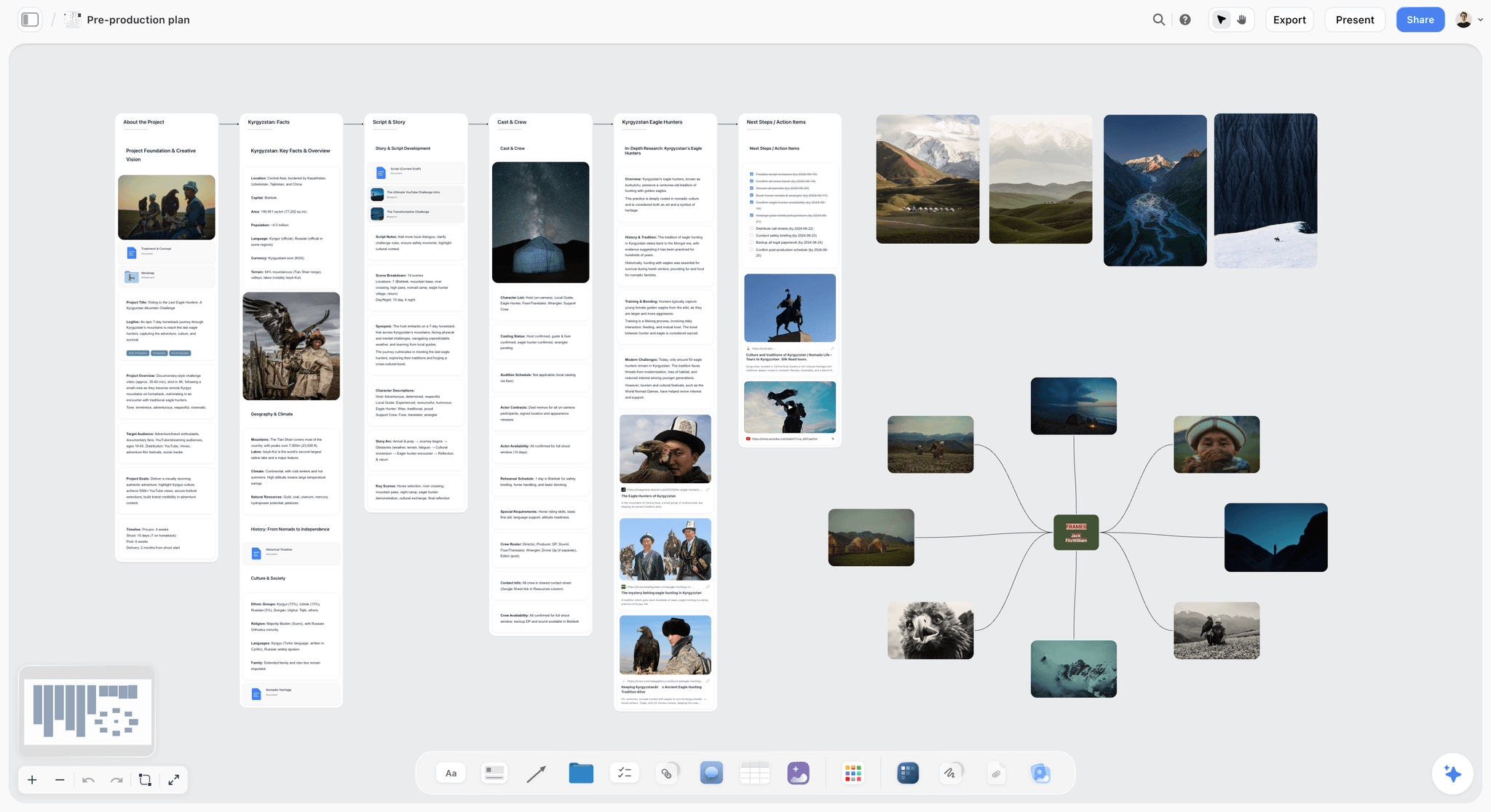
A pre-production board in the same shape: project, research, script, cast and crew, and a next-steps checklist, with reference frames to the right.
Frames from Runway, crew from MatchMyCrew.com
The client wants to see the three hero shots before signing off. "@Runway make three frames: a cargo bike crossing a canal bridge at dawn, low angle, wet cobbles, muted teal grade." The producer saves the frames and asks Storyflow for an upload link aimed at the three hero shot cards, which fills their empty frames in the order the files go up. The same afternoon: "@MatchMyCrew.com drone operators near Rotterdam available 3 and 4 December, with moving-vehicle work in their portfolio." The shortlist of four goes into a note on the board with a line on why each made it.
The strip board
"@Storyflow build a two-day strip board from the scene table: exteriors on day one while the light is good, the warehouse interiors on day two." Day one gets the four exterior scenes, day two the three interiors, each day totalled in pages. When the client moves the school-run scene, the producer asks ChatGPT to rebuild the strip board, because the strips do not recalculate on their own, then deletes the old one by hand.
Post: Descript and Kapwing
After the shoot, the founder interview goes into Descript: "@Descript import the interview from my Cargo Spot folder, remove filler words and find every answer about the first factory." The editor builds the spot from the selects. Kapwing does the versions: "@Kapwing Dutch and German subtitles for the 60-second master and the three cutdowns."
What each plugin produced
| Stage | Plugin | Output shape | Who opens it |
|---|---|---|---|
Script and rewrites | ShotClick | A formatted script with revised scene 3 | Producers, client |
Breakdown | Storyflow | A 7-row scene table | Producers, first AD |
Shot list | Storyflow | 22 shot walls, 21 after the 2B and 2C merge | Director, DP, client |
Hero frames | Runway | 3 images, added to shot cards by upload link | Client |
Crew shortlist | MatchMyCrew.com | 4 profiles noted on the board | Producers |
Schedule | Storyflow | A 2-day strip board | Crew |
Selects | Descript | A highlight composition | Editor |
Versions | Kapwing | 8 subtitled files (4 cuts in 2 languages) | Client, social team |
The point of the example is the routing. Five plugins did work, and the client only ever needed one link: the board.
How to Install a Plugin in ChatGPT, Using Storyflow as the Example
Every plugin on this list installs the same way. OpenAI's version: go to Plugins in the ChatGPT sidebar, select the plugin, select Install plugin, and if prompted select Connect and sign in to the provider account (Plugins in ChatGPT). The full walkthrough, including what to do when a plugin does not appear, is in how to install plugins in ChatGPT.
Install from the listing
Open the Storyflow listing in ChatGPT (on Storyflow's pages, the "Open in ChatGPT" button goes there), select Install plugin and sign in to Storyflow. Availability depends on your ChatGPT plan, workspace and region; in a Business or Enterprise workspace an admin manages plugins and can turn them on or off.
Choose what ChatGPT may touch
Storyflow asks which projects ChatGPT may use: all of them, or the ones you pick. Read access is always on; you decide whether ChatGPT may also make changes, and you can allow documents outside projects. For a production company, pick the client project you are planning rather than everything, and allow changes only once you want ChatGPT building on the board.
Call the plugin in a chat
Type @ and pick Storyflow, or choose it from the + menu. OpenAI notes that ChatGPT also uses installed plugins automatically when they are relevant, but naming the plugin removes the guesswork when you have several installed.
Set how often ChatGPT asks first
| Permission option | What ChatGPT does | When it suits a production |
|---|---|---|
Always ask | Asks before reading information or making changes | The first week with a new plugin, or a client's account |
Allow read actions | Reads without asking, asks before changes | Most planning work: free reads, confirmed edits |
Allow low-risk actions | Approves low-risk actions automatically; higher-risk ones may need confirmation | Repetitive building on your own board |
Allow all actions | Runs supported actions without further prompts; OpenAI labels it elevated risk | Rarely; not offered in the account-wide selector |
These options and their wording come from OpenAI's permissions article, which does not say which option a new plugin starts on, so open Settings, then Plugins, and check Permissions after you install. Changing a permission does not disconnect a plugin; to stop access, open Settings, then Plugins, select the plugin and choose Disconnect. Storyflow's connection also ends after 30 days by design, and ChatGPT asks you to sign in again.
Film Tools That Are Not in ChatGPT's Plugin Directory
Several tools producers rely on did not appear in ChatGPT's plugin directory on October 28, 2026. That does not make them worse tools; it means ChatGPT cannot act inside them from a chat without extra setup.
- Frame.io: frame-accurate review and approval. Keep it for client review of cuts; nothing on this list replaces it.
- StudioBinder: stripboards, call sheets with tracked confirmations and crew management for larger crews.
- Celtx: script writing and production scheduling in one suite.
- Boords: an approved storyboard turned into a timed animatic with your voiceover.
- Vimeo: video hosting. Wistia is the hosting option that is in the directory.
- Milanote: moodboards and visual notes; Storyflow covers the moodboard and storyboard part of that job on the production board.
The working pattern is to keep these where they already serve you and let ChatGPT prepare what goes into them: the breakdown you paste into StudioBinder, the shot order you rebuild in Boords. For storyboards specifically, the storyboarding plugin roundup compares what is in the directory.
Honorable Mentions
These plugins are in the directory and do real work, but either duplicate a ranked plugin's job or replace the shoot rather than plan it.
- Higgsfield ("Every image and video model"): another multi-model generator; pick it or Runway, not both.
- HeyGen ("Create AI videos and avatars") and Synthesia ("Make AI videos in the chat"): generated video and avatars, which replace a shoot rather than plan one.
- Artlist ("AI image, video, and voiceover"): images, video and voiceover from one plugin, where this list uses Storyblocks and ElevenLabs for those jobs.
- Dropbox ("Find, create, and take action") and Google Drive ("Drive, Docs, Sheets or Slides"): where rushes, releases and contracts already live; useful when ChatGPT needs to find a file, not to plan.
- Gamma ("Create presentations and docs"): a fast pitch deck from text, when the deck is separate from the production plan.
When Storyflow Is Not the Plugin You Need
Storyflow is first for planning on a shared board. It is the wrong choice for several jobs, and a production is better served knowing which.
You need a finished, timed animatic
Storyflow has no animatic, frame timing or MP4 export. Boords does this outside ChatGPT, and Runway can generate motion inside it.
You need tracked call sheets for a large crew
Storyflow does not send call sheets or track confirmations, and the strip board does not recalculate. A crew of thirty with daily call sheets belongs in StudioBinder.
You need screenplay formatting and revision colours
Storyflow is not a screenwriting app. Use ShotClick inside ChatGPT, or your usual screenwriting software, and plan from the script on the board.
You need a free tool today
Storyflow is paid-only during early access. If budget is zero this month, a shared spreadsheet holds a breakdown, and you can move it onto a board when the project pays.
The Bottom Line
ChatGPT already thinks like a decent production coordinator. Plugins decide where that thinking goes. Put the plan on a Storyflow board first, because every other plugin feeds it: the frames from Runway, the crew shortlist, the selects, the version matrix. Then add plugins only for jobs you do this month: Descript or Riverside for the edit, Kapwing for versions, ShotClick when the script is the product. Keep Frame.io and StudioBinder where they already work. If you plan shoots for clients, install Storyflow, give ChatGPT one project, and ask it to build the shot list on the board.
FAQ: ChatGPT Plugins for Filmmakers
What are the best ChatGPT plugins for filmmakers?
Storyflow comes first for planning the production on one board, where ChatGPT builds the breakdown, shot cards and strip board. Then pick by job: ShotClick for formatted scripts, MatchMyCrew.com for crew, Runway for previs frames, Storyblocks for stock, ElevenLabs for scratch voice, Descript for edits by chat, Riverside for remote recordings, Kapwing for captions and dubs, and Wistia for hosting. Most productions need four or fewer.
What is the best ChatGPT plugin for film pre-production?
Storyflow is the best ChatGPT plugin for film pre-production because ChatGPT writes the plan onto a board: a breakdown table, a row of shot cards with frames and checklists, a strip board grouped into shoot days, and reference images. The crew and client open it by link. Use ShotClick alongside it when the script itself needs formatted rewrites.
Which ChatGPT plugin builds the shot list and the shooting schedule together?
Storyflow. Through its plugin, ChatGPT builds shot cards, one wall per setup with a frame, a coverage checklist, direction and equipment, and a strip board with a wall per shoot day and a strip per scene, on the same board as the breakdown they come from. The strip board does not recalculate when you move a scene, so ask ChatGPT to rebuild it after changes.
Can ChatGPT edit video with a plugin?
Yes, through plugins that do the editing in their own apps. Descript imports, transcribes and edits with its Underlord editor, Riverside cleans audio and cuts clips from recordings, and Kapwing adds subtitles and dubs. The editing happens in the vendor's app, not in ChatGPT itself. Each edit spends the vendor's media minutes or credits, and fine trimming still happens in the vendor's editor.
Do ChatGPT plugins cost extra?
Most cost whatever the vendor's own plan costs, because the plugin acts inside your account there. Runway spends Runway credits, Descript spends media minutes and AI credits, and Kapwing spends workspace credits. OpenAI adds that app use may count toward ChatGPT plan limits. Storyflow's plugin uses no Storyflow AI credits, since it runs on ChatGPT's model.
Which ChatGPT plan do I need to use plugins?
OpenAI says the plugin directory is available across ChatGPT plans, and that installing or using an individual plugin depends on your plan, workspace, role, region and the plugin's capabilities. In a Business or Enterprise workspace, an admin manages which plugins members can install. Check the listing for the plugin you want; each vendor may also require its own paid tier.
Are Frame.io and StudioBinder available as ChatGPT plugins?
No. Neither Frame.io nor StudioBinder was in ChatGPT's plugin directory on October 28, 2026, and neither were Celtx, Boords or Vimeo. Keep using them for review links and tracked call sheets, and let ChatGPT prepare what goes into them, such as a breakdown on a Storyflow board you copy across.
Can a ChatGPT plugin find crew for a shoot?
Yes. MatchMyCrew.com's plugin searches published profiles of photographers, cinematographers, sound, lighting, drone and production crew by service, location and availability. It is read-only, so you start the inquiry privately on MatchMyCrew.com itself. It is free to use as of October 2026, and coverage depends on who has listed.
How do I get Runway frames onto my Storyflow board?
Save them from the chat, then ask the Storyflow plugin for an upload link aimed at the shot cards they belong to; the link fills those cards' empty frames in the order you upload and works for 15 minutes. Attaching the frames in the ChatGPT chat does not work, because a picture attached there never reaches Storyflow. ChatGPT can also place pictures from web addresses.
Is it safe to let a plugin make changes in my accounts?
It is as safe as the permissions you set. ChatGPT can ask before every read or change, read freely and confirm changes, or approve low-risk actions automatically. OpenAI labels Allow all actions elevated risk. Storyflow also lets you limit ChatGPT to the projects you pick, and you can disconnect any plugin from Settings, then Plugins.
Does Storyflow generate AI video or images through ChatGPT?
No. Storyflow will never add AI video generation, and ChatGPT cannot generate AI images through the Storyflow plugin. The creative work stays yours. For generated frames, use Runway or Higgsfield in ChatGPT and add the results to the board through the upload link. AI image generation inside Storyflow's own app is on the Pro and Max plans.
Can my client see the production plan without a ChatGPT account?
Yes. A Storyflow board opens from a view-only link with no account and no ChatGPT access. To comment or draw, the client signs in. That is the main reason to route plugin output back to one board: the client and crew read the same plan ChatGPT keeps updating.
Table of Contents
- Key Takeaways
- What a ChatGPT Plugin Changes on a Shoot
- How We Chose the 10 Plugins and Why Storyflow Is First
- At a Glance: 10 ChatGPT Plugins for Filmmakers
- The 10 Best ChatGPT Plugins for Filmmakers, Reviewed
- 1. Storyflow
- 2. ShotClick
- 3. MatchMyCrew.com
- 4. Runway
- 5. Storyblocks
- 6. ElevenLabs
- 7. Descript
- 8. Riverside
- 9. Kapwing
- 10. Wistia
- Which Plugin for Which Production Job
- Three Plugin Stacks That Work Together
- Worked Example: A Cargo-Bike Spot Planned Through Five Plugins
- How to Install a Plugin in ChatGPT, Using Storyflow as the Example
- Film Tools That Are Not in ChatGPT's Plugin Directory
- Honorable Mentions
- When Storyflow Is Not the Plugin You Need
- The Bottom Line
- FAQ: ChatGPT Plugins for Filmmakers
- Related Reading
Templates to check out for this topic


Filmmaking templates you can use in Storyflow
Skip the blank canvas. Open one of these filmmaking boards in Storyflow and the AI builds on the structure that is already there, from research through the shot list.


See Storyflow in Action
A visual AI workspace where every feature lives inside one canvas. No tab-switching, no context lost.
Build your entire board from a single message
Type what you need in the AI chat at the bottom of your canvas. The AI adds cards, headings, and structure directly onto your board.
Use expert frameworks as AI context
Type @ in the AI chat and choose any Tactic. The AI tailors every response to that framework instead of giving generic advice.
Turn your board into a mind map in seconds
Ask the AI to restructure your canvas as a mindmap. It connects your ideas into a visual hierarchy so you can see how everything relates.
Why Storyflow Exists
Storyflow actually began as a personal tool while working on creative and research projects.
We kept running into the same problem: ideas were scattered everywhere: notes, documents, and whiteboards.
Nothing helped us see how everything connected.
So we started building a workspace designed around how ideas actually grow.
→ Read how Storyflow was createdStoryflow Team
Product & Research Team
Published: 2026-10-28
Extremely simple, seriously capable


See how easy it is to get started
Watch a real project come together, from a blank board to a finished plan, clicked through step by step.
Start creating with AI and become more productive
Transform your creative workflow with AI-powered tools. Generate ideas, create content, and boost your productivity in minutes instead of hours.