Best ChatGPT Plugins for Photographers (2026): 10 Picks by Job
Ten ChatGPT plugins for photographers, ordered by the job: Storyflow plans the shoot on one board, then HoneyBook, Calendly, Docusign, Adobe, Picsart, Canva, Dropbox, Wix and Metricool, with prices and limits.

Category
Photography
Author

Storyflow Team
Product & Research Team
Topics
2026-10-28
•
32 min read
•
Photography- ChatGPT plugins
- photographers
- Storyflow
- HoneyBook
- Adobe
- photoshoot planning
What are the best ChatGPT plugins for photographers?
The best ChatGPT plugin for photographers in 2026 is Storyflow, for planning a client shoot: ChatGPT builds the brief, moodboard, shot list and client deck on one Storyflow board the client opens by link. Storyflow is an AI visual workspace that keeps a shoot's brief, references and shot list on one infinite canvas. Add HoneyBook for inquiries, contracts and invoices, Adobe for quick edits without leaving the chat, and Dropbox for delivery links and file requests.

Full disclosure: Storyflow is our product. It is listed first because the job is planning a client shoot with ChatGPT, and it is the plugin here that keeps the brief, references, shot list and deck on one board the client opens by link. Its limits: photos attached in the chat reach the board only through an upload link, the plugin cannot generate images, and Storyflow does not do galleries, contracts or invoices.
How the ChatGPT plugins for photographers compare on trust, innovation, ratings and pricing
Which ChatGPT plugins for photographers are the most trusted?
Trust comes down to what a plugin does without asking you. HoneyBook says nothing sends, changes or goes out until you approve it; Docusign requires your approval before a contract goes for signature and keeps your existing permissions; Dropbox asks before it adds files or creates share links. Storyflow's plugin is newer, live since 24 October 2026: you pick which projects ChatGPT may use and whether it may make changes.
Which ChatGPT plugins for photographers have fair and transparent pricing?
Calendly, Dropbox and Metricool say their ChatGPT plugins work on their free plans, Wix has a Free plan, Adobe lets guests start with no account, and HoneyBook, Docusign, Picsart and Storyflow publish their paid prices. Storyflow starts at $7.99 a month billed annually, paid-only during early access, and its plugin actions use no Storyflow AI credits. Picsart is the one to watch: its operations spend credits, so ask for the estimate first.
Which ChatGPT plugins for photographers are the most innovative in 2026?
Storyflow, because ChatGPT builds the whole shoot plan on a shared board and reads it back, including what changed this week and who changed it. Adobe's single plugin, which draws on more than 70 tools from Photoshop, Lightroom, Firefly and Express, is the most ambitious editing plugin, and HoneyBook's approve-before-send drafts are a sensible model for client-facing actions.
Which ChatGPT plugins for photographers have a strong history of consistent performance?
None has a long record as a ChatGPT plugin: Adobe announced its single plugin in August 2026 and Storyflow's went live on 24 October 2026. What carries over is the account underneath. Docusign says your existing permissions carry over, and Dropbox reaches only files your account can already open. Storyflow keeps one live plan on one board, rather than copies of a shot list spread across chats and emails.
Which ChatGPT plugins for photographers are underrated?
Dropbox's file requests are underrated: one prompt creates a folder link where a client's team drops logos, packshots and retouch notes. Calendly's one-time links stop a public booking page filling up. Storyflow's upload link is easy to miss too: it moves your own test shots from a phone onto the shoot board without signing in on the phone.
Quick Comparison
Ten ChatGPT plugins for photographers, Storyflow first for planning the shoot on one board, then the rest in the order a commission runs. Five shown here; prices as of October 2026.
| Tool | Best For | AI Features | Price |
|---|---|---|---|
| Storyflow | Planning a client shoot the client signs off | ChatGPT builds walls, shot cards, palettes, tables and decks on a board and reads it back; photos arrive through an upload link | Plus $7.99 mo annual (paid-only early access; invited collaborators join free) |
| HoneyBook | Booking and billing | Looks up clients and invoices; drafts proposals, contracts and payment requests from your templates | Starter $29 mo billed yearly |
| Docusign | Agreements with brand clients | Summarises obligations, flags deadlines, routes contracts for signature with your approval | Personal $11 mo, annual |
| Adobe | Quick edits and teasers | Photoshop-style adjustments, batch looks, Express templates and PDFs in the chat | Guest use with no account; see Adobe pricing |
| Dropbox | Delivery and file collection | Shared links, file requests, Dropbox Sign; asks before changes | All plans; Basic free (2 GB); see Dropbox pricing |
Key Takeaways
- Storyflow is our pick first because it holds the whole shoot plan where the client reviews it: brief, references, palette, shot cards, the day's timings and a lookbook deck on one board, viewable by link with no account.
- No single plugin covers a commission. Map them to the job: plan (Storyflow), book and bill (HoneyBook, Calendly), sign (Docusign), edit (Adobe, Picsart), design (Canva), deliver (Dropbox), get found (Wix, Metricool).
- A photo you attach in a ChatGPT chat does not reach your Storyflow board. ChatGPT hands you an upload link for the board instead, good for 15 minutes and up to 200 photos.
- Set permissions per plugin. "Allow read actions" suits planning tools; keep "Always ask" on anything that sends a proposal, an invoice or a contract.
- Gallery platforms such as Pixieset, ShootProof, Pic-Time and SmugMug have no plugin in ChatGPT's directory as captured on 28 October 2026, and neither does Aftershoot. Keep proofing, culling and delivery galleries in their own apps.
- Storyflow is paid-only during early access, from $7.99 a month billed annually, and plugin actions run on your ChatGPT plan, so they use no Storyflow AI credits.
What a ChatGPT Plugin Actually Does on a Paid Shoot
You have the brief in an email thread, references in a Pinterest board, the contract in HoneyBook, the shot list in your notes app and the delivery folder in Dropbox. ChatGPT can reason across all of it, but on its own it can only answer inside the chat, and the answer scrolls away. A plugin changes where the answer lands. Five facts decide whether that helps or hurts a client job.
It works on your real accounts, not on a copy
OpenAI describes a plugin as a package that can include skills and connected apps, and installing one "may start an app-connection or setup flow" in which you sign in to the provider (Plugins in ChatGPT). The consequence for a photographer: when HoneyBook drafts an invoice through ChatGPT, that is a real draft in your HoneyBook account, and when Storyflow adds a shot card, it is on the board your client can open. It is not a chat answer you copy out. It is the work itself, in the tool that already holds the job.
It asks before it changes anything, if you leave it that way
ChatGPT's permission settings decide when it asks: Always ask, Allow read actions, Allow low-risk actions and, for some apps, Allow all actions, which OpenAI labels as carrying elevated risk (Managing app permissions in ChatGPT). Changing a permission never grants new access; it only changes when ChatGPT stops to ask. The table in the install section below gives a setting per plugin.
It can see more of the conversation than the line you typed
OpenAI's own example: ask the Canva app to turn ideas into a presentation and it "may access and use relevant context from your ChatGPT conversations", and with Memory on, from your memories too (Connected apps in ChatGPT). If a client's product is under embargo, keep that job in its own chat and check what Memory holds before you invite a plugin in.
Photos reach some plugins and not others
Editing plugins take the picture you add to the request: Adobe's own Photoshop example is "Make the people pop in my vacation photo", and Picsart asks for a source image when the job needs one. A planning board is different. A photo you attach in the chat does not reach your Storyflow board; ask for an upload link instead, tap it on your phone or laptop, pick the photos, and each one lands on the board as it uploads. Dropbox's examples of what ChatGPT can analyse there are documents: PDFs, Word files, spreadsheets and presentations (Dropbox's guide). Check which kind of plugin you are talking to before you attach a client's unreleased product shot.
What none of these plugins do
Culling, catalog work and client proofing stay in your editing and gallery apps: Pixieset, ShootProof, Pic-Time, SmugMug and Aftershoot have no plugin in the directory, and none of the ten plugins here documents those jobs; our roundup of client gallery and delivery tools covers them. What plugins do well is the work around the pictures: the inquiry, the plan, the paperwork, the handoff and the follow-up.
How We Chose and Ordered the 10 Plugins
Every plugin here passed four checks, and the order follows one rule.
The four checks
- It is in ChatGPT's plugin directory. Each name below appears in the directory as captured on 28 October 2026. Tools that only offer a custom connection are left out.
- The vendor documents its ChatGPT plugin. We describe each plugin from its directory one-liner plus the vendor's own page about it, read on 28 October 2026. Where a vendor page could not be read, the plugin moved to the "not ranked" table further down. Canva is the one exception: we could not read its help page, so it is described only by its one-liner and OpenAI's own example.
- It does a job a client pays for. Booking, planning, contracts, editing, delivery or getting the next commission. Novelty filters and gift-print plugins are out.
- The output is something you or the client can open later. A draft in HoneyBook, a board in Storyflow, a link in Dropbox. A clever answer that lives only in the chat did not count.
Why Storyflow is first and the rest follow the job
Storyflow is our product and our pick first, on one basis: it is the plugin that holds the plan for the shoot on one board, which is the piece every other plugin feeds or draws from. The other nine are listed in the order a commission runs (book, sign, edit, design, deliver, get found), not by a score. A wedding photographer and a product studio need different subsets, so the stacks section names which to install first.
The 10 Plugins at a Glance
| # | Plugin | Directory one-liner | Job in the commission | Price (as of October 2026) |
|---|---|---|---|---|
1 | Storyflow | Plan projects on visual boards | Brief, moodboard, shot list, timings and lookbook deck on one board the client opens | Plus $7.99 a month billed annually; paid-only in early access, invited collaborators join free |
2 | HoneyBook | Book clients, get paid | Inquiries, proposals, contracts, invoices and payment requests | Starter $29, Essentials $49, Premium $109 a month billed yearly |
3 | Calendly | Manage bookings & availability | Consult calls and one-time scheduling links | Listed on the Free, Standard, Teams and Enterprise plans; see Calendly pricing |
4 | Docusign | Manage contracts from ChatGPT | Agreements a client's legal team wants on Docusign | Personal $11 a month, Standard $30 per user a month, annual |
5 | Adobe | Design, combine, and edit | Quick photo adjustments, consistent batch looks, PDFs | Guest use with no Adobe account; see Adobe pricing for plans |
6 | Picsart | Create images, video and audio | Background removal or replacement, enhancement, variants | Pro $10.50 a month billed yearly, plus Picsart credits |
7 | Canva | Create, review, edit designs | Designed price guides, flyers and social graphics | See Canva pricing |
8 | Dropbox | Find, create, and take action | Delivery links, file requests, signatures | All Dropbox plans; Basic is free (2 GB); see Dropbox pricing for paid plans |
9 | Wix | Create your own website | A portfolio site built from a chat | Free plan; Light $17.77 a month billed yearly |
10 | Metricool | Analyze and schedule posts | Scheduling portfolio posts and reading what worked | Any plan, including Free (20 scheduled posts a month); see Metricool pricing |
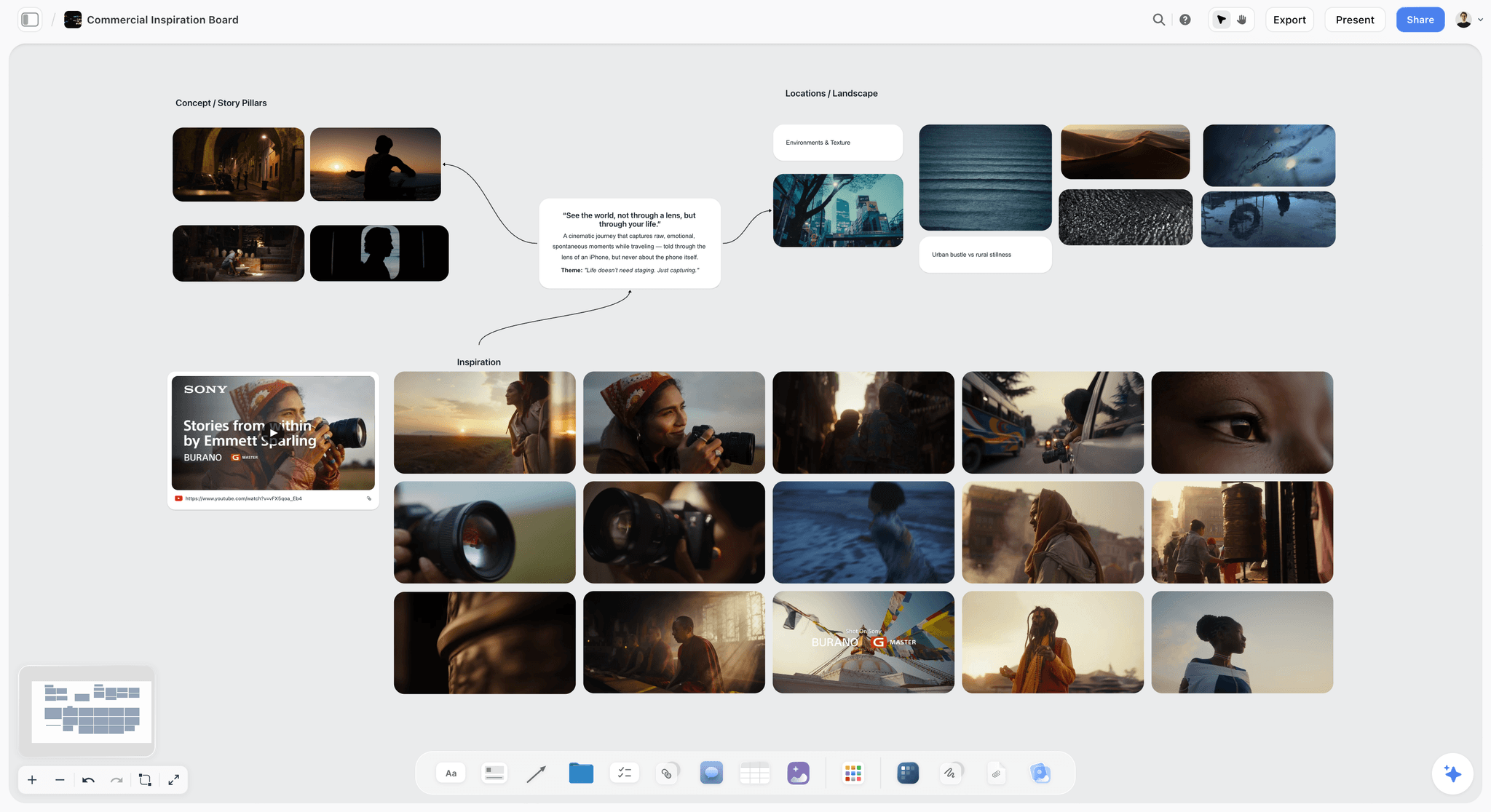
Storyflow commercial moodboard board with reference images, palette and notes for a client shoot
Plan your next client shoot on one board
Install the Storyflow plugin in ChatGPT, paste the client's brief, and get the references, palette, shot cards and timings on a board your client opens by link.

The 10 Best ChatGPT Plugins for Photographers, Reviewed
1. Storyflow
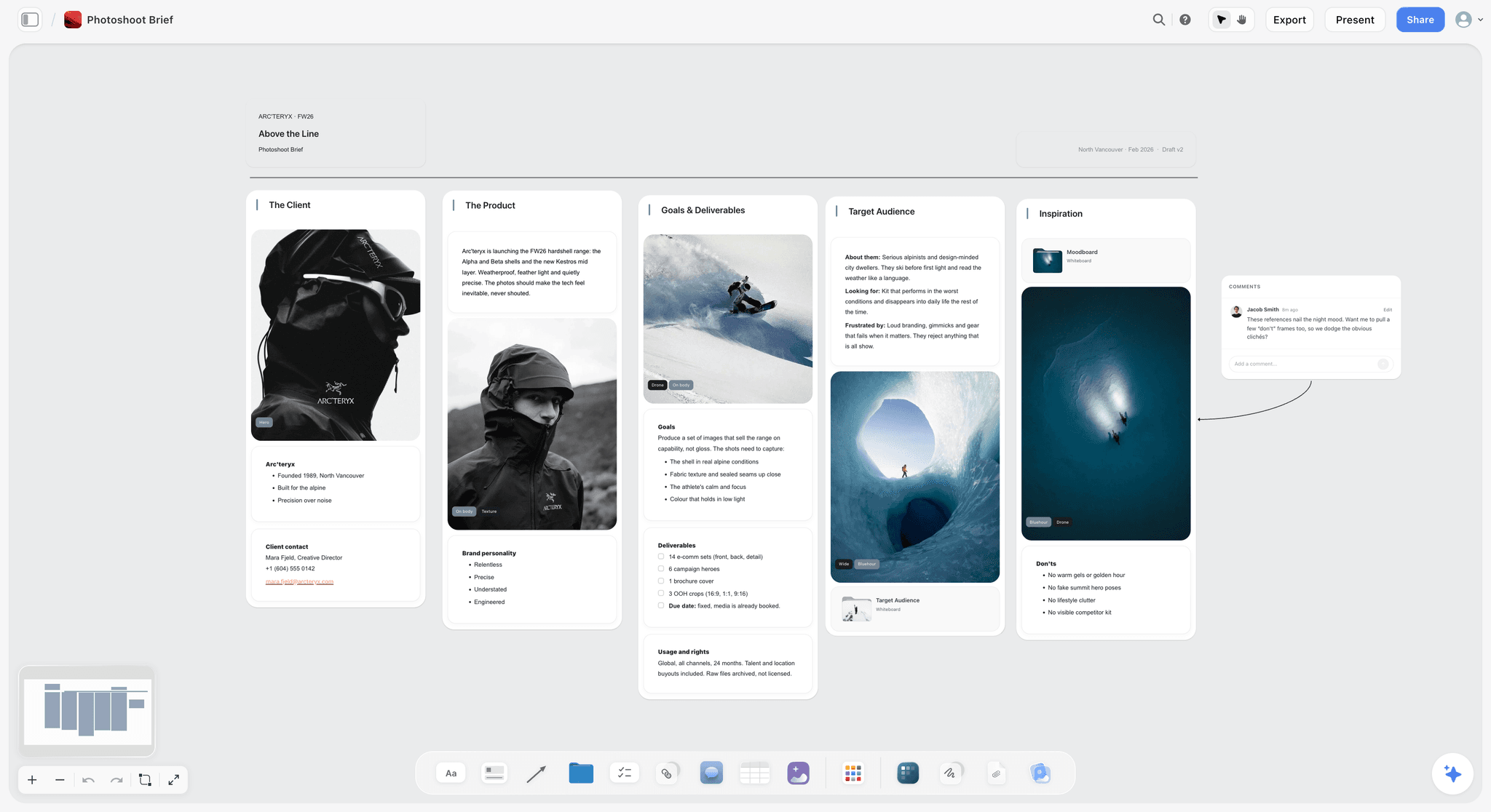
A photoshoot brief laid out as columns on one board: client, product, deliverables with usage rights, audience, and references with a short list of don'ts.
Verdict: the plugin that turns a planning conversation into the board the client and crew work from.
What it does in ChatGPT. Storyflow's listing reads "Plan projects on visual boards" (developer Storyflow LTD, category Productivity). Through it, ChatGPT lists your projects and boards, reads a board's elements and layout, and builds on it: notes, to-dos, headings, tables, documents, walls (grouped sections), shot cards with a frame each, colour palettes, slide decks, charts, mind maps and ready-made board templates. It adds images to a board from links it found in its own web search or that you paste, and Storyflow keeps its own copy so the picture survives the link dying. It also answers "what changed on this board this week, and who changed it?"
Best for. The plan the client signs off: the brief, 12 to 20 references, the palette, a shot card per deliverable, the call times and a lookbook deck, in one place. The client opens a view-only link with no account; to comment, they sign in. The crew opens the same link on a phone browser on the day. Our ChatGPT photoshoot plan page walks through that board, and the ChatGPT moodboard and ChatGPT lookbook pages cover the two pieces clients ask for most.
Limits. Photos attached in the chat do not reach the board; ask for an upload link. The plugin cannot generate AI images or read board comments, so paste a client's comment into the chat when you want ChatGPT to act on it. Storyflow runs in a browser (no native desktop or mobile app), does not send call sheets, and exports boards as PNG, JPEG or PDF.
Price (as of October 2026). Paid-only during early access: Plus $7.99 a month billed annually ($9.99 monthly), Pro $14 ($19), Max $39 ($49), per the pricing page. A Free plan launches before the end of 2026; anyone a paid member invites to a board joins free today. An invited free account gets 25 plugin actions a week (reset Monday, UTC); Plus, Pro and Max have no weekly limit. The plugin runs on ChatGPT's own model and your ChatGPT plan, so its actions use no Storyflow AI credits.
Try this prompt. "@Storyflow On the main board of my Fernwell project, add a Brief wall from the email I pasted, a References wall, a palette from the brand's three colours, and one shot card per deliverable: 18 e-commerce stills and 6 campaign heroes."
2. HoneyBook
Verdict: the business side of the job, done from the chat without opening HoneyBook.
What it does in ChatGPT. HoneyBook's ChatGPT page says it looks up clients, projects, invoices and contracts, flags overdue payments, your upcoming schedule and leads that need a follow-up, creates and updates contacts and projects, and generates proposals, invoices or contracts from your own templates, including payment requests. Its promise on the risky part is the one you want: nothing sends, changes or goes out until you approve it.
Best for. Wedding, family and portrait photographers who already run inquiries and bookings through HoneyBook and lose evenings to "did they pay the retainer?" lookups.
Limit. HoneyBook serves business owners in only a few countries, and its own page gives two different lists, so check that it covers yours. Proposals and contracts come from your existing templates, so the plugin is only as good as the templates you built.
Price (as of October 2026). Starter $29, Essentials $49 and Premium $109 a month billed yearly (HoneyBook pricing).
Try this prompt. "@HoneyBook Which clients owe a balance on shoots in the next 30 days? Draft a polite reminder for each, but do not send anything."
3. Calendly
Verdict: the fastest way to get a prospect from "sounds great" to a booked consult call.
What it does in ChatGPT. Per Calendly's plugin page, you can create and update event types, generate scheduling links (including one-time links), adjust availability, and book or cancel meetings.
Best for. Consult calls, location walk-throughs and mini-session slots. A one-time link for a specific client stops a public booking page filling with strangers.
Limit. It books time, not paid shoots: deposits, contracts and questionnaires belong in HoneyBook or your studio CRM.
Price (as of October 2026). Calendly's plugin page lists it as available with the Free, Standard, Teams and Enterprise plans; for paid prices, see Calendly pricing.
Try this prompt. "@Calendly Make a one-time 30-minute link for a call with Fernwell's brand manager on Thursday or Friday afternoon."
4. Docusign
Verdict: for commercial clients whose legal team will only sign on Docusign.
What it does in ChatGPT. Docusign's small-business post says you can create, analyse and manage agreements in plain language: summarise obligations, flag deadlines, create an agreement (its example is an NDA for a new supplier) and list client contracts up for renewal in the next 90 days. Sending a contract for signature requires your approval, and your existing Docusign permissions carry over.
Best for. Agency and brand work with usage-rights agreements, NDAs and renewals of annual content retainers.
Limit. Keep the wording your lawyer approved for model and property releases and usage terms; use the plugin to summarise, track and route them for signature, not to draft legal language from scratch.
Price (as of October 2026). eSignature Personal $11 a month and Standard $30 per user a month, both on annual plans (Docusign plans).
Try this prompt. "@Docusign Which of my agreements with brand clients expire before March, and what notice period does each require?"
5. Adobe
Verdict: quick adjustments and consistent looks without opening an editor; Photoshop itself for anything finer.
What it does in ChatGPT. Adobe's August 2026 announcement describes one plugin drawing on more than 70 tools from Express, Photoshop, Firefly, Premiere, Acrobat, Lightroom, Illustrator, InDesign and Stock, including batch editing a set of photos in a consistent style. Adobe's earlier Photoshop in ChatGPT post lists the kind of edit to expect: make the people stand out, add an effect to the background or one object, apply a retro look to a selected area such as the sky, add grain, then fine-tune each change with sliders. Adobe Express also has its own directory listing ("Design posts, flyers, and more") for template-based social graphics.
Best for. Social teasers from a shoot, a quick sky or background fix for a client preview, and combining a treatment, estimate and references into one PDF.
Limit. Adobe itself sends layers, masks and pixel-level precision to Photoshop and its other apps. Your client grade still lives in your presets and your editor. Guests get a broad set of tools; generative features, your Creative Cloud files and saved work need you to sign in.
Price (as of October 2026). You can start as a guest with no Adobe account; see Adobe's pricing for Creative Cloud plans.
Try this prompt. "@Adobe Apply the same warm, low-contrast look to these six behind-the-scenes photos and add light grain."
6. Picsart
Verdict: background swaps and fast variants for product photographers, paid in Picsart credits.
What it does in ChatGPT. Picsart's ChatGPT page lists image, video and audio generation, background removal or replacement, image enhancement, vector conversion and editing tools, across a catalog of AI models. It tells you to ask for model options and a credit estimate before you run anything.
Best for. Marketplace-ready product cutouts, seasonal background swaps on an existing hero, and quick vertical variants for a client's social team.
Limit. Your Picsart account and credits are separate from your ChatGPT plan, and creative operations spend credits that vary by model. Generated backgrounds change what a photo claims to show: agree with the client in writing when a deliverable may be composited.
Price (as of October 2026). Pro $10.50 a month and Ultra $60 a month per seat, both billed yearly (Picsart pricing). Browsing the model catalog and getting quotes in ChatGPT is free.
Try this prompt. "@Picsart Remove the background from this bottle shot, place it on warm off-white, and tell me the credit cost before you run it."
7. Canva
Verdict: designed, on-brand pieces from a conversation, finished in Canva.
What it does in ChatGPT. The directory one-liner is "Create, review, edit designs". OpenAI uses Canva as its own example of an app that takes context from your conversation, such as turning brainstormed ideas into a presentation (Connected apps in ChatGPT). For what the Canva app can do today, see Canva's help.
Best for. A designed price guide, a mini-session flyer or a carousel that has to match the brand kit your client already keeps in Canva.
Limit. Canva is the finished design, not the plan behind it. Keep the brief and approvals where the client reviews them, and bring final copy into Canva.
Price (as of October 2026). See Canva pricing.
Try this prompt. "@Canva Make a one-page price guide for spring mini sessions from these three packages, in my brand colours."
8. Dropbox
Verdict: the handoff: delivery links out, client files in, signatures on the side.
What it does in ChatGPT. Dropbox's help article lists browsing and searching files, @-mentioning a file, summarising and comparing documents, moving, copying, deleting and restoring files, saving chat output to Dropbox, creating shared links, creating and managing file requests, and Dropbox Sign requests. ChatGPT asks before it makes changes such as adding files or creating share links.
Best for. "Create a shared link for the Fernwell Finals folder" at delivery, and a file request so the client's team can drop logos, product packshots and retouch notes into one folder.
Limit. Dropbox's analysis examples are all documents, and you only reach files your Dropbox account can already open. Team admins can block the app.
Price (as of October 2026). Dropbox says the app is available on all Dropbox plans. Basic is free with 2 GB; for paid plans, see Dropbox plans.
Try this prompt. "@Dropbox Create a file request called Fernwell retouch notes that saves into Clients/Fernwell/Inbox, and give me the link."
9. Wix
Verdict: a portfolio site from a chat, edited afterwards like any Wix site.
What it does in ChatGPT. Wix's guide uses a photographer's portfolio as its example: brainstorm in the chat, tag @Wix, review the planned structure (home, gallery, about, contact form), then select Create Site. The site stays in your Wix account and you refine it in the editor by hand or with Wix's AI agent.
Best for. A photographer launching a niche (food, interiors, brand portraits) who needs a clean site with a contact form this week.
Limit. You must be logged in to Wix before the chat that builds the site, and a portfolio site is not a client proofing gallery.
Price (as of October 2026). A Free plan, then Light $17.77, Core $29.77 and Business $39.77 a month billed yearly; prices vary by location (Wix plans).
Try this prompt. "@Wix Build a portfolio site for a food and drink photographer in Bristol with a gallery, a services page and an inquiry form."
10. Metricool
Verdict: scheduling and reading your own social posts, so the next commission finds you.
What it does in ChatGPT. Metricool's help article lists viewing brand configuration, querying analytics, checking the best time to post, and viewing, creating and editing scheduled posts or sending them for review.
Best for. Scheduling a shoot's behind-the-scenes set across your connected social accounts after the client has approved what you may share.
Limit. Metricool says the native ChatGPT app uses an earlier version of its integration, so it does not yet return clickable links back to a scheduled post. Inbox messages, post comments and Canva or Drive files are not reachable. Storyflow can plan carousel pages on a board, but it does not schedule or publish posts, which is the gap Metricool fills.
Price (as of October 2026). Metricool says its integration works with any Metricool plan, including Free, which covers one brand, 20 scheduled posts a month and 30 days of analytics. For paid plans, see Metricool pricing.
Try this prompt. "@Metricool Which of my last 20 Instagram posts did best, and when should I post the Fernwell behind-the-scenes set next week?"
Which Plugin for Which Job
Most photographers install three or four of these, not ten. Start from the job that eats your week.
| The job | Plugin | What to ask | What the client ends up with |
|---|---|---|---|
Plan the shoot and get sign-off | Storyflow | "Build the brief, references, palette and one shot card per deliverable on my project board" | A view-only board link, no account needed |
Present directions or a lookbook | Storyflow | "Build a six-slide lookbook deck with a labelled picture space per look" | A deck that presents fullscreen and exports as PDF, once you drag the photos onto its slides |
Answer an inquiry and quote | HoneyBook | "Draft a proposal from my Half-Day template with two options" | A proposal in HoneyBook, sent when you approve |
Book the consult call | Calendly | "Make a one-time 30-minute link for this client" | A single-use booking link |
Agree usage and sign | Docusign or HoneyBook | "Which agreements are waiting on a signature?" | A signing request, sent when you approve |
Quick edits and teasers | Adobe | "Apply one consistent look to these six images" | Edited files to download or open in Adobe |
Backgrounds and variants | Picsart | "Swap the background and quote the credits first" | New image versions |
A designed one-pager | Canva | "Make a price guide in my brand colours" | A Canva design |
Deliver and collect files | Dropbox | "Create a shared link for the Finals folder" | A Dropbox link or file request |
Get the next job | Wix, Metricool | "Build a portfolio site" or "Schedule the BTS set" | A site, or scheduled posts |
Worked Example: A Skincare Campaign Shoot Through Five Plugins
Juniper Row is a fictional two-photographer studio. Fernwell, a skincare brand, wants a spring campaign: 9 products, 18 e-commerce stills (front and back), 6 campaign heroes and 4 vertical crops for paid social, shot over one studio day and a morning in a greenhouse. Here is how the week runs with plugins, and the shape of what each one produces. The shapes are illustrative; your outputs will differ in the details.
Monday: the inquiry and the call
The brief lands as an inquiry. In one chat: "@HoneyBook Find the Fernwell inquiry and summarise what they asked for, then draft a proposal from my Commercial Half-Day template with a one-day and a one-and-a-half-day option." ChatGPT replies with a five-line summary (products, deliverables, dates, budget signal, missing information) and a draft proposal waiting in HoneyBook. Then "@Calendly Make a one-time 30-minute link for Thursday or Friday afternoon." You send both yourself.
Tuesday: brief, references and shot list on one board
After the call, the plan goes on a Storyflow board: "@Storyflow On the Fernwell board, add a Brief wall from my call notes, a References wall with 12 images from your web search of greenhouse product photography with soft daylight, and a palette from these three hex codes." Then: "Add one shot card per deliverable: 18 e-commerce, 6 heroes, 4 verticals. Put the product name and surface in each card." And: "Add a Day Plan table with time, setup, products, surface and who is needed." The board now holds a Brief wall, a References wall, the palette, a row of 28 shot cards (each with a frame and a checklist of shots required) and the Day Plan table. Your own test shots from last week's lighting check go up through the upload link ChatGPT gives you.
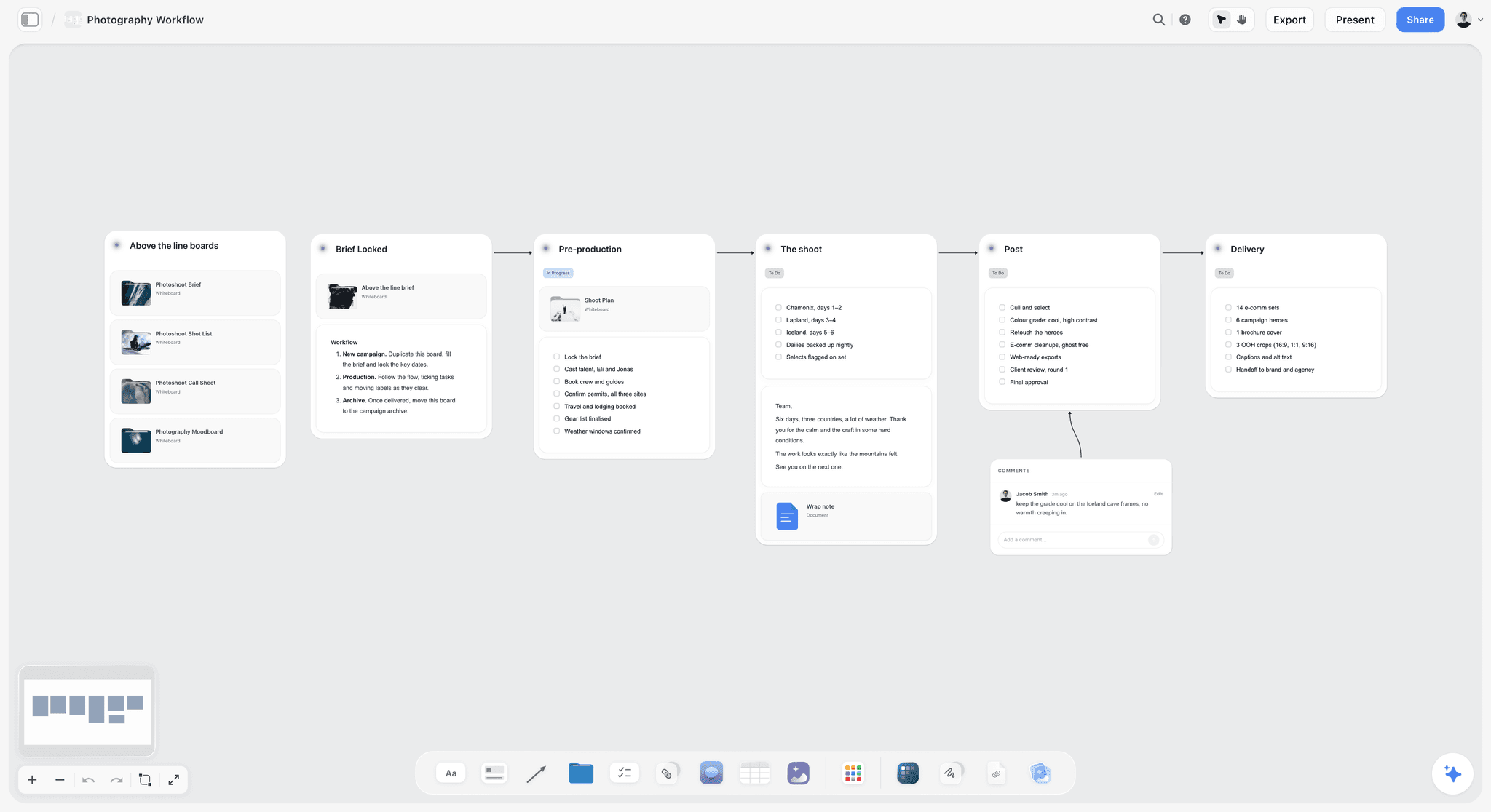
One board laid out by stage of the job: brief locked, pre-production, the shoot, post and delivery, each with its own checklist.
Wednesday: client review and the agreement
You send Fernwell's brand manager the view-only link. She signs in to leave two comments: drop the amber bottle from the heroes, and add a hand-holding shot. ChatGPT cannot read board comments through the plugin, so you paste them into the chat: "Apply these two changes to the shot cards and tell me what moved." Fernwell's legal team sends its usage agreement through Docusign: "@Docusign Summarise the obligations and deadlines in the Fernwell usage agreement, and flag any usage beyond 24 months." You read the flags, query one clause by email, and sign in Docusign.
Shoot days: the board is the run sheet
The crew opens the same view-only link on their phones. Your assistant, invited to the board (invited members join free and can edit), ticks each shot card's checklist as it is shot. At lunch on day one: "@Storyflow What changed on the Fernwell board this week, and who changed it?" gives you the client's edits and your assistant's ticks in one answer, which beats scrolling a group chat.
Delivery and the follow-up
"@Dropbox Create a shared link for Clients/Fernwell/Finals and a file request called Fernwell retouch notes." Two weeks later, with Fernwell's written OK on what you may share: "@Metricool Create three posts for review from the behind-the-scenes set for next Tuesday to Thursday at my best times."
How to Install a Plugin and Call It in a Chat
Each install is a few steps. The full walkthrough, with what to do when a listing will not install, is in our guide to installing plugins in ChatGPT. The short version follows OpenAI's own steps.
Find and install a plugin
OpenAI's steps (Plugins in ChatGPT): go to Plugins in the ChatGPT sidebar (web, desktop or mobile), select the plugin and review its included apps, select Install plugin, select Connect if an app needs account authorization, and sign in to the provider account that holds the work. Connect the studio's Dropbox or HoneyBook, not a personal one: OpenAI notes that a personal account does not reach files only your work account can open (Connecting and managing app accounts).
Install Storyflow
Open the Storyflow plugin listing (on Storyflow's pages, the Open in ChatGPT button goes there), select Install plugin, sign in to Storyflow, and choose which projects ChatGPT may use: all of them, or only the ones you pick, such as your client projects. Read access is always on; you decide whether ChatGPT may also make changes, and whether it may use documents outside projects. Availability depends on your ChatGPT plan, workspace and region. Our ChatGPT connector page covers the same flow.
Call a plugin in a chat
ChatGPT uses installed plugins on its own when they fit the request. To pick one yourself, type @ and choose it, or select + and enter its name. OpenAI's help does not describe how ChatGPT splits one request between two plugins, so give each plugin its own step: "@HoneyBook find the Fernwell deposit date", then "@Storyflow add that date to the Day Plan table." App use may count toward your ChatGPT plan limits and the provider's own limits (Connected apps in ChatGPT).
Set a permission per plugin
Open your profile menu, select Settings, then Plugins, then Permissions for the default, or open one plugin for its own setting (Managing app permissions in ChatGPT). A sensible split for a studio:
| Plugin | Suggested permission | Why |
|---|---|---|
Storyflow | Allow read actions | Reading boards is constant; additions to a client board deserve a glance |
HoneyBook | Always ask | Proposals, invoices and payment requests reach clients |
Docusign | Always ask | Contracts and signature requests are hard to undo |
Calendly | Allow read actions | Reading availability is harmless; booking or cancelling is not |
Dropbox | Always ask | Shared links, moves and deletes reach real client folders |
Adobe, Canva | Allow low-risk actions | Nothing reaches a client from these on its own |
Picsart | Always ask | Operations spend Picsart credits |
Metricool | Always ask | A scheduled post goes out under your name |
Workspace and connection notes
In a ChatGPT Business or Enterprise workspace, an admin manages plugins and can turn them on or off; a "Disabled by admin" message means asking that person, not reinstalling (Troubleshooting plugins and apps). Storyflow's connection ends after 30 days by design, and ChatGPT then asks you to sign in again.
Three Stacks That Work Together
Two to four plugins that hand work to each other beat ten installed out of curiosity. Each stack below starts with the plugin that holds the plan.
Wedding and portrait photographer
Storyflow for the timeline, shot list and family-formals list the couple can open; HoneyBook for the inquiry, contract and payment plan; Calendly for the planning call; Dropbox for the gallery handoff link alongside your gallery app. The board is where "who is in the 3:40 family photo?" gets answered before the day.
Commercial and product studio
Storyflow for the brief, references, shot cards and the client deck; Docusign for usage agreements and NDAs; Adobe or Picsart for preview edits and background variants; Dropbox for finals and the client's asset drop. Our shoot pitch guide covers winning the job before this stack starts.
Brand content photographer for social
Storyflow for the content plan and carousel pages on a board; Canva for the designed versions in the client's brand kit; Metricool to schedule and read what performed. Storyflow plans and Metricool publishes; neither replaces the other.
Directory Plugins We Did Not Rank, and Why
Each of these is in ChatGPT's plugin directory as captured on 28 October 2026, and its one-liner points at a photography job. None is ranked for one reason: we could not read a vendor page that documents its ChatGPT plugin, and we describe a plugin only from that page. The one-liner is all we can vouch for, so open the listing and read what it asks to access before you install one.
| Plugin | Directory one-liner |
|---|---|
Photoroom | AI product photo editing |
Gigapixel AI | Upscale photos and images |
Rawnd | Open RAW photos in chat |
Shutterstock | Spark ideas with Shutterstock |
Typeform | Build forms, analyze responses |
WeTransfer | Send files with WeTransfer |
Partoska | Manage event photo galleries |
Photography Website Builder | Build and host photo sites |
Tailwind | Create & plan Pinterest Pins |
Also absent from the directory capture of 28 October 2026, so not plugins: Pixieset, ShootProof, Pic-Time, SmugMug, a standalone Lightroom or Capture One plugin, Aftershoot, Pinterest, Milanote and StudioBinder. If one of these is central to your work, keep it and use ChatGPT for the planning around it.
Where Storyflow Is Not the Answer
Storyflow plans the shoot. It is the wrong tool for six jobs photographers also do.
- Galleries, proofing and print sales. Use your gallery platform. Storyflow can hold selects for a review, but it has no proofing, favourites workflow or store.
- Editing and culling. Your editor and presets do this; Adobe's plugin handles quick looks in the chat.
- Contracts, invoices and payments. Storyflow has none; HoneyBook and Docusign do.
- AI images through the plugin. The ChatGPT plugin cannot generate images. Storyflow's in-app AI does image generation on Pro and Max, as a separate feature inside Storyflow that uses Storyflow AI credits.
- Sending the call sheet. Storyflow can hold call times in a table and its in-app AI can draft a call sheet, but it does not send call sheets or track confirmations.
- Working offline on set. Storyflow runs in a browser, with no native app; plan on a laptop and read the board from a phone browser on the day.
If your commissions are small portrait sessions with no brief, no references and no client approval step, you may not need a planning plugin at all: HoneyBook plus your gallery app covers it.
Four Mistakes Photographers Make With ChatGPT Plugins
Leaving "Allow all actions" on a plugin that reaches clients
A permission that skips approval is a convenience on your own board and a risk on a plugin that sends invoices, contracts or posts. Keep those on Always ask.
Connecting the wrong account
When ChatGPT "cannot find" a client folder, check the account before anything else: a personal Dropbox or a second HoneyBook login sees different files. OpenAI's troubleshooting lists the same check, under Settings, then Plugins (Troubleshooting plugins and apps).
Running every client through one long chat
Plugins can draw on conversation context and, with Memory on, on memories. One chat per client keeps an embargoed launch out of a different client's deck.
Treating the chat as the record
The decision the client approved belongs on the board or in the contract, not six screens up in a conversation. Ask ChatGPT to write it where it lives: "Add today's approved changes to the Brief wall with today's date."
The Bottom Line
ChatGPT plugins earn their place in a photography business when each one does the job its tool was built for and the plan has one home. Install Storyflow first if your work involves a brief, references and a client sign-off, because that board is what the other plugins feed. Add HoneyBook or Docusign for the paperwork, Dropbox for the handoff, and an editing plugin only if quick looks in the chat save you real time. Leave galleries, culling and grading in the apps you already trust. If you want the prompts that drive this workflow stage by stage, read our ChatGPT prompts for photographers.
This article was published in October 2026; plugin features and prices change, so each one is marked with the date it was read.
FAQ: Best ChatGPT Plugins for Photographers
What are the best ChatGPT plugins for photographers in 2026?
Storyflow is the best ChatGPT plugin for photographers who plan client shoots, because ChatGPT builds the brief, moodboard, shot list and lookbook on one board the client opens by link. Round it out by job: HoneyBook and Calendly for booking, Docusign for agreements, Adobe and Picsart for quick edits, Canva for designed pieces, Dropbox for delivery, and Wix and Metricool for getting the next commission.
What is the best ChatGPT plugin for photographers?
Storyflow, for photographers whose work runs on a brief, references and a client sign-off. ChatGPT builds the plan on one Storyflow board the client opens by link, then reads it back to report what changed and who changed it. If your week goes on inquiries and unpaid retainers rather than planning, install HoneyBook first and add Storyflow when a commission needs a shared plan.
Can a ChatGPT plugin edit my photos?
Yes, for quick adjustments. Adobe's plugin applies looks, background effects, grain and consistent batch styles, with sliders to fine-tune, and Picsart removes or replaces backgrounds and enhances images for Picsart credits. Neither replaces your editor for client grading: Adobe itself sends layers, masks and pixel-level work to Photoshop and its other apps.
Is there a ChatGPT plugin for client galleries or proofing?
Not from the big gallery platforms. ChatGPT's plugin directory captured on 28 October 2026 has no Pixieset, ShootProof, Pic-Time or SmugMug plugin. Partoska is listed with the one-liner "Manage event photo galleries"; read its listing before you rely on it for client delivery. Otherwise deliver finals through your gallery app, or through a Dropbox shared link when a client prefers plain folders.
Do photos I attach in ChatGPT reach my Storyflow board?
No. A photo attached in the chat stays in the chat. Ask ChatGPT for a Storyflow upload link instead: tap it, choose the pictures from your phone or computer, and each one lands on the board as it uploads. The link is good for 15 minutes and up to 200 photos, and it can fill empty frames ChatGPT placed for you.
How do I install a plugin in ChatGPT?
Go to Plugins in the ChatGPT sidebar, select the plugin, review its included apps and select Install plugin. If prompted, select Connect and sign in to the provider account that holds your work. For Storyflow, you then choose which projects ChatGPT may use and whether it may make changes. Use it in a chat by typing @ or choosing it from the + menu.
Which ChatGPT plan do I need to use plugins?
OpenAI says the plugin directory is available across ChatGPT plans, and that installing or using an individual plugin depends on your plan, workspace, role, region and the plugin's capabilities. In a Business or Enterprise workspace, an admin manages plugins and can turn them on or off. Check the plugin's listing for the requirement that applies to you.
Can my client see the shoot plan without a Storyflow account?
Yes. A Storyflow view-only link opens with no account, so the client, art director and crew can see the brief, references, shot cards and deck. To leave a comment or draw on the board, a visitor signs in. Anyone a paid member invites to a board joins free and can edit.
Does the Storyflow plugin use my Storyflow AI credits?
No. The plugin runs on ChatGPT's own model and your ChatGPT plan, so building and reading boards through it uses no Storyflow AI credits. Plus, Pro and Max have no weekly limit on plugin actions. An invited free account gets 25 plugin actions a week, reset every Monday (UTC).
Is Storyflow free for photographers?
Not during early access. Storyflow plans start at Plus, $7.99 a month billed annually or $9.99 monthly, then Pro at $14 and Max at $39 billed annually. A Free plan launches before the end of 2026. Anyone a paid member invites to a board joins free today, so a second shooter or assistant can work on your board.
Can ChatGPT send invoices or contracts through a plugin?
Yes, through HoneyBook and Docusign, and only with your approval. HoneyBook drafts proposals, invoices, contracts and payment requests from your templates and sends nothing until you approve. Docusign requires your approval before sending a contract for signature. Keep both plugins on the Always ask permission so every send passes your eyes.
Is it safe to connect client work to ChatGPT plugins?
It is as safe as the access you grant. A plugin reaches only what the connected account can open, and ChatGPT asks before actions unless you change the permission. Apps can use relevant conversation context and, with Memory on, memories. Keep embargoed clients in their own chat, grant Storyflow only the projects it needs, and disconnect plugins you stop using.
Table of Contents
- Key Takeaways
- What a ChatGPT Plugin Actually Does on a Paid Shoot
- How We Chose and Ordered the 10 Plugins
- The 10 Plugins at a Glance
- The 10 Best ChatGPT Plugins for Photographers, Reviewed
- 1. Storyflow
- 2. HoneyBook
- 3. Calendly
- 4. Docusign
- 5. Adobe
- 6. Picsart
- 7. Canva
- 8. Dropbox
- 9. Wix
- 10. Metricool
- Which Plugin for Which Job
- Worked Example: A Skincare Campaign Shoot Through Five Plugins
- How to Install a Plugin and Call It in a Chat
- Three Stacks That Work Together
- Directory Plugins We Did Not Rank, and Why
- Where Storyflow Is Not the Answer
- Four Mistakes Photographers Make With ChatGPT Plugins
- The Bottom Line
- FAQ: Best ChatGPT Plugins for Photographers
- Related Reading
Templates to check out for this topic


Templates you can use in Storyflow
Every Storyflow board starts from real structure and an AI that reads the whole canvas. Open one of these templates and make it yours.


See Storyflow in Action
A visual AI workspace where every feature lives inside one canvas. No tab-switching, no context lost.
Build your entire board from a single message
Type what you need in the AI chat at the bottom of your canvas. The AI adds cards, headings, and structure directly onto your board.
Use expert frameworks as AI context
Type @ in the AI chat and choose any Tactic. The AI tailors every response to that framework instead of giving generic advice.
Turn your board into a mind map in seconds
Ask the AI to restructure your canvas as a mindmap. It connects your ideas into a visual hierarchy so you can see how everything relates.
Why Storyflow Exists
Storyflow actually began as a personal tool while working on creative and research projects.
We kept running into the same problem: ideas were scattered everywhere: notes, documents, and whiteboards.
Nothing helped us see how everything connected.
So we started building a workspace designed around how ideas actually grow.
→ Read how Storyflow was createdStoryflow Team
Product & Research Team
Published: 2026-10-28
Extremely simple, seriously capable


See how easy it is to get started
Watch a real project come together, from a blank board to a finished plan, clicked through step by step.
Start creating with AI and become more productive
Transform your creative workflow with AI-powered tools. Generate ideas, create content, and boost your productivity in minutes instead of hours.