The 11 Best AI Tools for Instructional Designers in 2026
Courses fail in analysis and design, then get authored beautifully anyway. Eleven tools ranked by whether they help before the authoring starts.

Category
Education
Author

Sara de Klein
Head of Product at Storyflow
Topics
2026-08-10
•
17 min read
•
Education- best AI tools for instructional designers
- what are the best AI-native productivity tools
- instructional design software
- objectives assessment alignment
- Articulate Storyline vs Rise
- AI course design tools
What are the best AI tools for instructional designers in 2026?
The best AI tools for instructional designers are the ones that help before the authoring starts, because authoring was never where courses fail. Storyflow ranks first here for the analysis and design phases, where the objectives, the audience constraints and the assessment sit on one canvas an AI can check for alignment. Articulate Storyline remains the authoring standard and nothing here displaces it. Synthesia has genuinely changed the economics of video in learning. Claude is the strongest partner for turning subject matter expert transcripts into structured content. This ranking judges all 11 tools on one question: does it help you notice that the assessment does not test the objective.

Full disclosure: Storyflow is our own product, and we rank it #1 here for one job: making objectives, content and assessment visible together so misalignment shows up while it is still cheap to fix. Storyflow authors nothing a learner ever sees. It produces no SCORM, xAPI or cmi5 package, has no LMS integration, no assessment engine, no accessibility checking and no learner analytics. Articulate is ranked second because that gap is not small. We link to every tool so you can judge the fit.
Quick Comparison
These four map to the phases that decide a course: the alignment check in design, the authoring build, the SME processing that feeds it, and the video layer.
| Tool | Best For | AI Features | Price |
|---|---|---|---|
| Storyflow | Design-phase alignment checking | Canvas-wide context AI | $7.99 mo annual (free plan late 2026) |
| Articulate Storyline | Branching interactive authoring | AI Assistant | From ~$1,400 per user yr |
| Claude | SME transcript to learner sequence | Long-context LLM | Free / ~$20 mo |
| Synthesia | Updatable presenter video | AI avatars and voice | From ~$29 mo |
Key Takeaways
- Courses fail in analysis and design, then get authored beautifully anyway. Almost all instructional design tooling serves authoring, which is the phase that was already fine.
- The single most common structural defect in corporate learning is misalignment: the objective says one thing, the content teaches another, and the assessment tests a third.
- Storyflow ranks first for the alignment check specifically, because whole canvas AI can read the objectives, the content outline and the assessment together and report where they diverge.
- Storyflow does not author courses, produces no SCORM or xAPI package, and does not talk to an LMS. Articulate, Rise and your LMS own that, and this post says so.
- Synthesia has changed the arithmetic on video: updating a module no longer means rebooking a studio, which makes video viable for content that changes.
- AI is genuinely good at generating assessment items and genuinely bad at judging whether they test the right cognitive level.
- The subject matter expert interview is still the bottleneck, and transcription plus a good LLM has compressed it more than any authoring feature in a decade.
See the misalignment before you build it
The objective says apply, the content teaches concepts, and the quiz tests recall. Each looks fine reviewed alone. Storyflow puts all three on one canvas the AI reads together, so the drift shows up in the design phase instead of in the evaluation. Paid-only during early access; the Free plan lands before the end of 2026.

Where Courses Actually Fail
Ask an instructional designer what tools they use and you will hear about authoring. Storyline, Rise, Captivate, maybe Camtasia.
Authoring is the visible part of the job and the part that was already solved. Courses do not fail because a slide was badly built.
They fail earlier, in analysis and design, and they fail in a specific and depressingly consistent way.
The objective says one thing, the content teaches another, and the assessment tests a third.
A module opens with an objective like "learners will be able to de-escalate an angry customer". The content is then twelve screens explaining the five stages of conflict. The assessment is a multiple choice quiz asking learners to name the five stages.
Every piece is competently produced. The objective describes a performance, the content delivers knowledge, and the assessment measures recall. Nothing in that chain tests whether anyone can de-escalate anything, and the misalignment is invisible when you review the pieces separately, which is how they are always reviewed.
This is a cognitive level problem as much as a content problem. Bloom's revised taxonomy gives you the vocabulary: an objective at the "apply" level cannot be assessed at the "remember" level, but a quiz question is much faster to write than a scenario, so the assessment quietly drifts down the taxonomy while the objective stays where the stakeholder wanted it.
The second failure is subtler. Corporate learning is usually built from what a subject matter expert knows, and subject matter experts explain their field in the order they learned it, which is almost never the order a novice needs. Turning expert knowledge into learner sequence is the actual craft, and it is largely invisible in the finished artifact.
The 11 tools below are ranked by which phase they serve, with weight given to the phases where the failures happen.
At a Glance: The 11 Tools Compared
| Tool | Best for | Phase it serves | Shape |
|---|---|---|---|
Storyflow | Checking objectives, content and assessment align | Analysis, design | AI canvas |
Articulate Storyline | Building interactive, branching modules | Development | Authoring |
Articulate Rise | Fast responsive courses from structured content | Development | Authoring |
Claude | Turning SME transcripts into learner sequence | Design | LLM |
Synthesia | Video without a studio, and updatable | Development | AI video |
Otter.ai | Capturing the SME interview | Analysis | Transcription |
Camtasia | Software simulation and screen recording | Development | Screen capture |
Canva | Course graphics and job aids | Development | Design |
Notion | The design document and the project record | Design | Docs |
Airtable | Content inventory and review tracking at scale | Development | Database |
Vyond | Animated scenario video | Development | Animation |
How I Ranked These
I build documentary narrative for a living, which is the same problem as instructional sequencing with different stakes: taking what an expert knows and ordering it so a stranger can follow. Over the last two years I have run real course builds and real SME interviews through every tool here.
Five criteria, in order.
1. Does it help before authoring starts? Analysis and design are where courses fail, and they are where almost no tooling exists.
2. Can it check alignment across objective, content and assessment? The test: give the tool a module where the objective is at the apply level and the quiz is at the remember level, and see whether anything flags it. Almost nothing does.
3. Does it survive revision? Corporate content changes, and the real cost of a course is its second and third versions. Tools that make updates expensive push teams toward leaving content stale.
4. Does it handle the SME bottleneck? Getting knowledge out of an expert's head is the slowest step in the process.
5. What does it cost for a team of one? Many instructional designers are the entire learning function.
Pricing is as of August 2026 and changes frequently. Verify with each vendor.
Quick Picks by Job Type
- Best for design phase alignment: Storyflow. Objectives, content and assessment on one canvas the AI reads together.
- Best authoring: Articulate Storyline. Still the standard for branching and interaction, and rightly so.
- Best fast authoring: Articulate Rise. When the content is structured and the deadline is real.
- Best SME processing: Claude. Transcript to learner ordered outline, with the reordering made explicit.
- Best video: Synthesia. Updatable video changes what content can be video at all.
- Best software training: Camtasia. Screen recording and simulation remain its own category.
- Best at content scale: Airtable. Once there are 200 modules, the inventory is the problem.
1. Storyflow
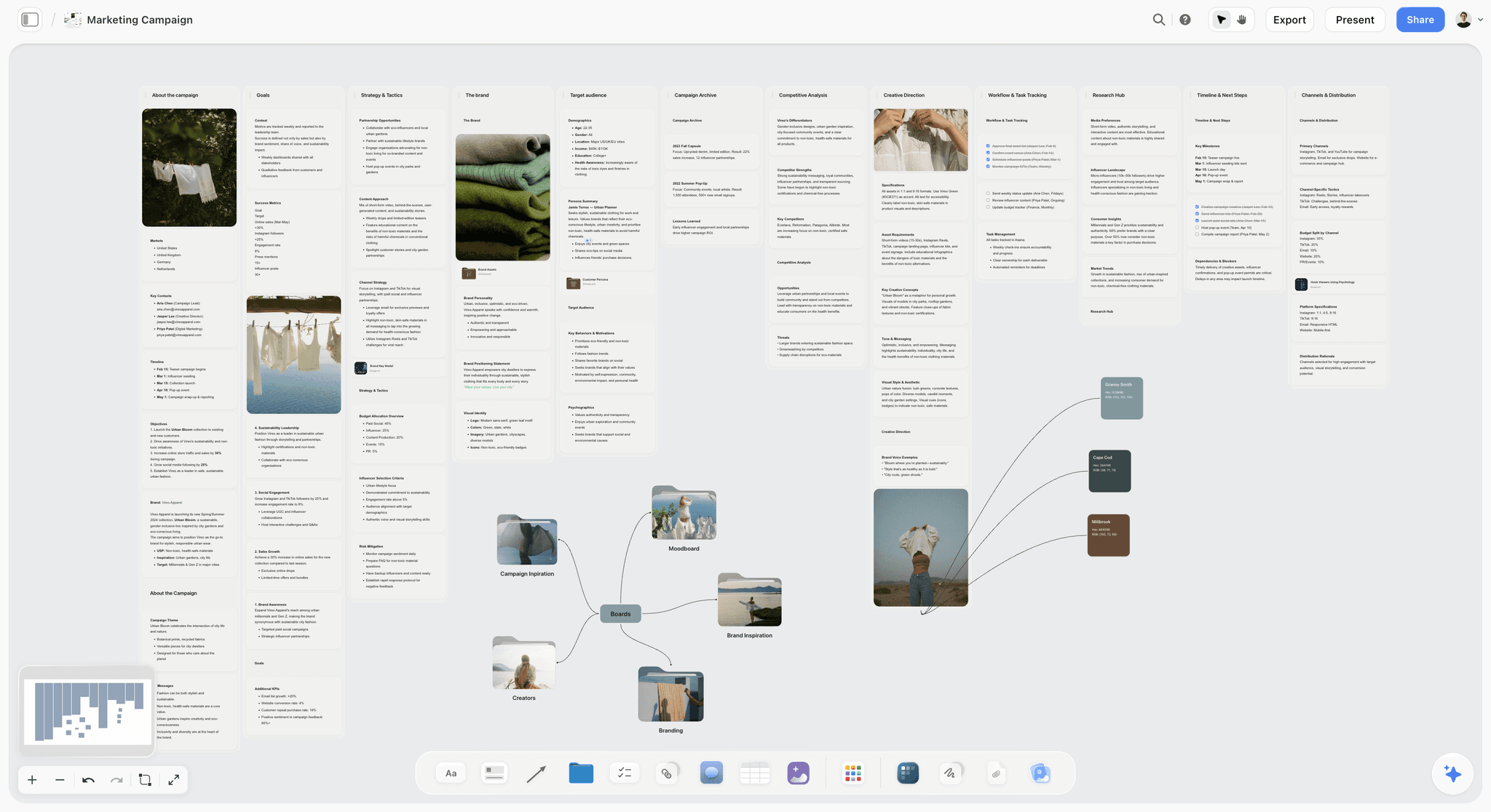
The verdict. The only tool here that operates where courses actually fail, which is before anything is built.
Best for. Instructional designers who want alignment checked while it is still cheap to change.
Pricing. Paid only early access today. Plus is $7.99 per month billed annually or $9.99 monthly, with 200 plus Blueprint Tactics and unlimited file uploads. Pro is $14 per month billed annually or $19 monthly, adding AI image generation, roughly twenty times more AI usage and memory across conversations. Max is $39 per month billed annually or $49 monthly, adding Team Workspace with permissions and roles. Pricing is flat per account rather than per seat, and anyone a paid member invites joins free. The Free plan launches before the end of 2026.
Why it ranks here. The alignment problem is a comparison problem, and comparison requires seeing several things at once. In a normal workflow the objectives live in a design document, the content lives in an outline, and the assessment lives in a spreadsheet or directly in the authoring tool, so they are never in the same field of view and the drift is structurally invisible.
Put all three on one canvas, in columns, with each objective's content and assessment beside it, and the misalignment becomes visible to the naked eye. That alone is worth the exercise and it needs no AI at all.
The AI then makes it a routine check rather than an occasional one. Storyflow's AI reads your full active canvas board by default, plus up to one Tactic and up to three Documents you @-mention. The useful queries are specific: which objectives have no assessment item, which assessment items test a lower cognitive level than their objective, which content sections do not map to any stated objective. That third one reliably finds the material a subject matter expert insisted on that serves no learning purpose, which is a conversation worth having with evidence.
The second job it serves is the sequencing one. A canvas is the right shape for reordering, because moving a concept before its prerequisite is a spatial operation and rewriting an outline is not. Laying out the concepts and drawing the dependencies is how you discover that step four requires something you teach in step nine.
Strengths.
- Objectives, content and assessment visible together, which makes drift obvious.
- Whole board AI can check alignment and cognitive level as a routine query.
- Spatial reordering suits prerequisite mapping.
- Invited collaborators join free, so SMEs and stakeholders can review without licences.
- Blueprint Tactics give structure to recurring design work.
Limitations.
- Does not author courses. There is no interaction, no branching, no publishing.
- Produces no SCORM, xAPI or cmi5 package and has no LMS integration whatsoever.
- No assessment engine, no question banks, no scoring.
- No accessibility checking against WCAG, which authoring tools increasingly provide.
- No learner analytics of any kind.
- Newer platform, so no instructional design specific templates yet.
The trade off. Storyflow is a design phase tool. Everything that gets shipped to a learner is built somewhere else, and Articulate is ranked next because that is not a small caveat.
2. Articulate Storyline
The verdict. Still the authoring standard, and nothing on this list threatens it.
Best for. Interactive, branching modules with real logic.
Pricing. Articulate 360 subscriptions run roughly $1,400 to $1,900 per user per year as of August 2026, with cheaper personal and academic options.
Why it ranks here. When a course needs genuine branching, variables, custom interactions and precise control, Storyline is where it gets built. Two decades of accumulated capability, an enormous community, and output that works reliably across LMS platforms.
Its AI Assistant now generates draft slide content, quiz items and alt text, which removes a real amount of mechanical work. Treat generated quiz items as first drafts specifically because of the cognitive level problem: the model will happily produce recall questions for an application objective.
It ranks second only because it is a development tool and the failures this article describes happen before it opens.
Strengths.
- Unmatched control over interaction and branching.
- Reliable SCORM and xAPI output across LMS platforms.
- Huge community, templates and hiring pool.
- AI assistant removes mechanical drafting work.
Limitations.
- Expensive, and priced per user per year.
- Windows first, with a weaker Mac story.
- Steep learning curve.
- Slide based mental model makes structural rework painful, which discourages fixing design problems late.
The trade off. Necessary if your courses need interaction. Budget for it as infrastructure rather than as a tool choice.
3. Articulate Rise
The verdict. The pragmatic answer for most corporate content, and a quiet trap if used to avoid design work.
Best for. Responsive, scrollable courses built fast from structured content.
Pricing. Included with Articulate 360, roughly $1,400 to $1,900 per user per year as of August 2026.
Why it ranks here. Most corporate learning does not need branching logic. It needs clear content, some knowledge checks and mobile responsiveness, and Rise produces that in a fraction of Storyline's time with output that looks modern by default.
The caution is real though. Rise's block based structure is so quick that it encourages building before designing, and a beautifully produced Rise course with misaligned objectives is the most common artifact in corporate learning.
Strengths.
- Very fast from structured content to finished course.
- Responsive and modern looking without design effort.
- Same ecosystem and publishing reliability as Storyline.
Limitations.
- Limited interaction and no real branching.
- Template driven, so courses look alike.
- Speed encourages skipping design.
- Same high subscription cost.
The trade off. Use it when the content is genuinely settled. Do not let its speed substitute for the design phase.
4. Claude
The verdict. The best tool for the slowest step, which is turning what an expert said into what a learner needs.
Best for. Processing SME transcripts into a learner ordered structure.
Pricing. Free tier available. Pro is roughly $20 per month as of August 2026.
Why it ranks here. A ninety minute SME interview produces perhaps twelve thousand words in expert order. Restructuring that into novice order is the core craft of the job and it is slow.
Claude handles long transcripts well and is genuinely useful at a specific prompt: identify every concept mentioned, list the prerequisites each one assumes, and flag any concept used before it is explained. That last output is a prerequisite map, and it is the thing that turns expert order into learner order.
It is also good at drafting scenario based assessment items, which are more work than multiple choice and therefore usually skipped. Lowering that cost is a direct improvement in alignment.
Strengths.
- Handles long SME transcripts in one pass.
- Prerequisite mapping is a genuine time saver.
- Good at drafting scenarios, which raises assessment quality.
- Free tier is usable.
Limitations.
- Will invent plausible domain detail if not constrained to the transcript.
- No understanding of your learners beyond what you describe.
- Cognitive level judgments need checking; it agrees too readily.
- Context must be re supplied each session.
The trade off. Constrain it to the transcript and it is excellent. Let it draw on general knowledge about the domain and you will ship something the SME will reject.
5. Synthesia
The verdict. It changed which content can be video at all, which matters more than the production quality.
Best for. Presenter led video that will need updating.
Pricing. Plans start around $29 to $89 per month as of August 2026, with enterprise tiers above.
Why it ranks here. The old reason to avoid video in corporate learning was not cost of production, it was cost of revision. A policy changes, and updating a filmed module means rebooking a person, a studio and an edit.
Synthesia removes that: change the script, regenerate. That single property makes video viable for content that changes, which is most corporate content, and it also solves localization since the same script renders in many languages.
The honest caveat is that avatars sit in an uncanny middle register, and learners notice. For compliance and procedural content that is acceptable. For anything requiring emotional credibility, such as leadership or wellbeing topics, a real human still outperforms it.
Strengths.
- Updating a module is a script edit, not a reshoot.
- Multilingual output from one script.
- No studio, camera or presenter scheduling.
- Fast enough to make video a default rather than an event.
Limitations.
- Avatars are noticeably synthetic and reduce warmth.
- Weak for emotionally loaded topics.
- Per minute and per seat limits on lower tiers.
- Some organizations have policies against synthetic presenters.
The trade off. Use it where accuracy matters more than warmth, which is most compliance and process content.
6. Otter.ai
The verdict. Removes the friction from the slowest input in the whole process.
Best for. Capturing SME interviews so they can be worked on rather than remembered.
Pricing. Free tier with monthly minute limits. Paid plans start around $17 per user per month as of August 2026.
Why it ranks here. SME time is the scarcest resource in instructional design, and the traditional pattern wastes it: the designer takes notes while trying to listen, misses things, and books a second session to fill gaps.
Recording and transcribing changes the interview itself. You can concentrate on asking better questions, and the full text becomes the source material for the design phase rather than a partial memory of it.
Strengths.
- Frees the designer to listen and probe rather than transcribe.
- Searchable text becomes the design input.
- Cheap with a usable free tier.
- Good speaker separation for multi SME sessions.
Limitations.
- Requires consent and a recording policy.
- Struggles with heavy jargon and acronyms, which is exactly what SME interviews contain.
- Cloud processing may conflict with confidentiality on sensitive content.
The trade off. Always record, always check the jargon, and never rely on the auto summary.
7. Camtasia
The verdict. Its own category. If you train people on software, nothing replaces it.
Best for. Screen recording, software simulation and demonstration video.
Pricing. One time purchase around $180 to $300, with optional maintenance, as of August 2026.
Why it ranks here. Software training has requirements no general video tool meets: clean screen capture, cursor emphasis, zoom and pan to make small UI readable, and callouts synchronized to actions.
Camtasia does all of it, is a one time purchase rather than a subscription, and produces output that drops into any authoring tool.
It ranks seventh because it serves one content type. Within that type it is close to unbeatable.
Strengths.
- Purpose built for screen based instruction.
- One time purchase.
- Cursor effects and zoom make small interfaces legible.
- Straightforward learning curve.
Limitations.
- Narrow use case.
- Weak for anything other than screen content.
- Re recording after a UI change is a full redo, unlike Synthesia's script edit.
The trade off. Essential for software training, irrelevant otherwise.
8. Canva
The verdict. Job aids and course graphics, produced fast enough to actually exist.
Best for. Visual assets, infographics and downloadable job aids.
Pricing. Free tier available. Pro roughly $15 per month for one person as of August 2026.
Why it ranks here. The most used artifact from many courses is not the course. It is the one page job aid the learner prints and keeps, and it is frequently skipped because producing it feels like extra work.
Canva makes it a twenty minute task, and brand kits keep a library of them consistent.
Strengths.
- Fast enough that job aids actually get made.
- Brand kits maintain consistency across a library.
- Accessible to non designers.
- Free tier is workable.
Limitations.
- Template aesthetics are recognizable.
- Not built for accessibility compliance, so contrast and structure need checking.
- No connection to the course itself.
The trade off. Make the job aid. It is often the part that gets used.
9. Notion
The verdict. The design document, which is necessary and is not where design happens.
Best for. Project records, stakeholder sign off and the written design document.
Pricing. Free personal tier. Paid from roughly $10 per user per month as of August 2026.
Why it ranks here. Instructional design runs on documentation: the needs analysis, the design document, the review log, the sign off record. Notion holds those well and is what most stakeholders will happily open.
It ranks ninth because a linear document cannot show alignment. Objectives on page one and the assessment plan on page six are exactly the separation that causes the problem this article describes.
Strengths.
- Good home for the written record and sign offs.
- Databases handle review cycles and status.
- Stakeholders will actually open it.
- Free tier is sufficient.
Limitations.
- Linear, so alignment stays invisible.
- No AI grounding across the workspace.
- Documents go stale after sign off.
The trade off. Keep the record here. Do the alignment work somewhere you can see everything at once.
10. Airtable
The verdict. The content inventory, which becomes the whole job at scale.
Best for. Tracking hundreds of modules, their review dates and their owners.
Pricing. Free tier available. Paid plans start around $20 per seat per month billed annually as of August 2026.
Why it ranks here. A mature learning function has a library, and libraries decay. Modules reference obsolete policies, name departed staff and teach superseded procedures, and nobody notices because nobody owns the inventory.
One row per module with an owner, a last reviewed date, the linked objectives and a next review date turns silent decay into a filtered view. That view is the difference between a curated library and an archive of things nobody trusts.
Strengths.
- Makes content decay visible and actionable.
- Linked records connect modules to objectives and owners.
- Filtered views surface what is overdue.
Limitations.
- Overhead below roughly fifty modules.
- Per seat pricing.
- Requires an owner, or it decays like everything else.
The trade off. Adopt it when the library is large enough that you cannot list it from memory.
11. Vyond
The verdict. Animated scenarios, which are the right format for a narrow but important slice of content.
Best for. Character driven scenario video, especially interpersonal skills.
Pricing. Plans start around $49 to $99 per month as of August 2026.
Why it ranks here. Some content is best taught by watching a situation go wrong. Difficult conversations, harassment scenarios, customer conflict and ethics dilemmas all benefit from a dramatized example, and hiring actors is out of reach for most learning budgets.
Vyond makes animated scenarios producible in a day, and animation carries an advantage over synthetic presenters for this content: nobody expects an animated character to be real, so it avoids the uncanny register that hurts Synthesia on emotional topics.
It ranks last because its use case is narrow and the house style is recognizable.
Strengths.
- Makes scenario video affordable.
- Animation sidesteps the uncanny valley for emotional content.
- Character library covers most workplace situations.
Limitations.
- Distinctive style that becomes tiring across a library.
- Time consuming to produce well.
- Subscription cost for occasional use.
The trade off. Worth it if interpersonal skills are a real part of your curriculum.
What to Actually Pay For
Pay for authoring, because you have no choice. Articulate 360 is expensive and it is infrastructure. Budget it as a fixed cost rather than agonizing over it, and spend the decision energy on the phases where you have options.
Pay for transcription immediately. At roughly $17 per month it removes friction from the scarcest resource in the process, which is SME time. This is the clearest small return on the page.
Do not pay for two video tools. Synthesia and Vyond serve different content types, but most learning functions only genuinely need one. Pick based on whether your content is procedural, which favours Synthesia, or interpersonal, which favours Vyond.
Tools to Avoid for This Job
An authoring tool as the design tool. Building in Rise or Storyline before the objectives, content and assessment are aligned means every structural fix is a rebuild, which is why structural problems ship.
AI generated quiz items accepted as written. Models default to recall questions regardless of the objective's cognitive level, which is precisely the misalignment this article is about.
A design document nobody reads after sign off. If the design document is the only record of the objectives and it is never reopened during development, the content will drift and nothing will catch it.
PowerPoint converted to e-learning. A deck built for a presenter to talk over is missing the half of the communication that was going to be spoken, and converting it produces a course made of headings.
What No Tool on This List Does
None of them will tell you whether training was the right intervention. A great deal of corporate learning addresses problems that are actually about process, incentives or management, and a well built course cannot fix those.
None of them will get you SME time. That is an organizational negotiation, and it is usually the real constraint on quality.
None of them, including Storyflow, will write objectives that describe a performance rather than a topic. The alignment check compares your objective against your assessment, and if the objective says "understand the policy", nothing downstream can be checked, because "understand" is not observable. Writing a testable objective is the craft, and it is still yours.
The Bottom Line
Instructional design has excellent tools for the phase that was never the problem and almost none for the phase that is.
Buy the Articulate subscription and stop thinking about it, because authoring is infrastructure. Add transcription immediately, since SME time is the scarcest input and recording changes what the interview can be. Use Synthesia where content changes often enough that filming was never viable.
But the defect that survives every production improvement is the one where the objective, the content and the assessment quietly describe three different things, and it survives because they are never in the same field of view. Putting them there, and being able to ask whether they agree, is the narrow ground on which Storyflow ranks first here.
FAQ: AI Tools for Instructional Designers
What are the best AI tools for instructional designers in 2026?
Claude is the strongest AI tool for the design phase, particularly for turning long subject matter expert transcripts into a learner ordered sequence with prerequisites mapped. Synthesia has changed the economics of video by making updates a script edit rather than a reshoot. Storyflow ranks first for the alignment check, because it can read the objectives, content outline and assessment together and report where they diverge, which is where courses actually fail.
Can AI create a whole e-learning course?
It can produce a plausible draft of one, and that is the problem, because the draft will be internally consistent and misaligned with the actual performance need. AI is genuinely useful for generating first draft content from a transcript, drafting assessment items and producing alt text. It cannot conduct a needs analysis, and a course generated without one solves whatever problem the model assumed you had.
How do you check that objectives, content and assessment align?
Put all three in the same field of view, which is the step almost nobody takes, since they normally live in a design document, an outline and the authoring tool respectively. Then check each objective's cognitive level against its assessment item: an objective at the apply level cannot be measured by a recall question. Whole canvas AI makes this a routine query rather than an occasional manual audit.
What is the best free tool for instructional designers?
Claude's free tier handles SME transcript processing, which is the highest value AI application in the workflow. Otter's free tier covers a reasonable number of interviews per month. Canva's free tier produces job aids. Notion's free tier holds the design documentation. Authoring is the one place with no good free option, since Articulate has no free tier and open source alternatives lag significantly.
Is Articulate Storyline still worth the price?
Yes, if your courses need genuine branching, variables and custom interaction, because nothing else matches its control and its LMS output reliability. If your content is mostly linear with knowledge checks, Rise, included in the same subscription, will produce it far faster. The subscription is expensive enough that it should be treated as infrastructure rather than reconsidered each year.
Are AI avatars good enough for corporate training?
For procedural and compliance content, yes, and the ability to update a module by editing a script rather than rebooking a shoot is a genuine change in what content can be video. For emotionally loaded topics such as leadership, wellbeing or difficult conversations, learners notice the synthetic register and it undermines credibility. Animated scenarios often work better there, since nobody expects an animated character to be real.
How do you get information out of a subject matter expert efficiently?
Record the session and transcribe it, so you can concentrate on asking better questions instead of taking notes. Then process the transcript for concepts and prerequisites rather than reading it linearly, because the expert explained things in the order they learned them and your job is to find the order a novice needs. Asking a model to flag every concept used before it is explained produces the reordering map quickly.
Does Storyflow replace Articulate?
No, and there is no overlap. Storyflow is a design phase surface for objectives, sequencing and alignment, and it produces nothing a learner ever sees. It generates no SCORM or xAPI package and has no LMS integration. Articulate builds and publishes the course, and this post ranks it second precisely because that gap is not a small one.
What is the most common mistake in instructional design?
Assessing at a lower cognitive level than the objective states. Writing a scenario that measures whether someone can apply a skill takes far longer than writing a multiple choice question about the same topic, so under deadline the assessment quietly drifts down while the objective stays where the stakeholder wanted it. The course then certifies knowledge and claims to have taught performance.
How do you keep a large course library from going stale?
Give every module an owner and a next review date in a tracked inventory, so decay becomes a filtered view rather than a discovery. Libraries rot silently, referencing superseded policies and departed staff, and the failure is that nobody is responsible for noticing. Above roughly fifty modules this inventory matters more than any authoring capability.
Should instructional designers use AI to write assessment questions?
Yes for the first draft and no for the final one. Models produce recall questions quickly and will produce them for objectives at any cognitive level, so every generated item needs checking against what the objective actually claims. Where AI genuinely helps is in drafting scenario based items, which are more work and are therefore usually skipped in favour of weaker questions.
What is the difference between instructional design and content development?
Design is the analysis, objectives, sequencing and assessment strategy, and it is where the outcome is determined. Development is building the artifact, and it is where most of the visible effort and nearly all the tooling budget goes. The gap between the two is why so many well produced courses do not change behaviour.
Do I need SCORM or can I just publish video?
If your organization tracks completion or compliance, you need a package format your LMS accepts, which usually means SCORM or increasingly xAPI. If the content is genuinely informational with no tracking requirement, hosted video with a job aid is often more useful to learners than a wrapped module, and considerably cheaper to maintain.
What is the single change worth making on the next project?
Before opening an authoring tool, put the objectives, the content outline and the assessment items side by side and check each objective against its assessment for cognitive level. It takes an hour and it catches the defect that no amount of production quality can compensate for.
Table of Contents
- Key Takeaways
- Where Courses Actually Fail
- At a Glance: The 11 Tools Compared
- How I Ranked These
- Quick Picks by Job Type
- 1. Storyflow
- 2. Articulate Storyline
- 3. Articulate Rise
- 4. Claude
- 5. Synthesia
- 6. Otter.ai
- 7. Camtasia
- 8. Canva
- 9. Notion
- 10. Airtable
- 11. Vyond
- What to Actually Pay For
- Tools to Avoid for This Job
- What No Tool on This List Does
- The Bottom Line
- FAQ: AI Tools for Instructional Designers
- Related Reading
Templates to check out for this topic


Branding and design templates you can use in Storyflow
Take a brand from naming to visual direction on one connected canvas. Open any of these templates and the AI works from everything already on the board.


See Storyflow in Action
A visual AI workspace where every feature lives inside one canvas. No tab-switching, no context lost.
Build your entire board from a single message
Type what you need in the AI chat at the bottom of your canvas. The AI adds cards, headings, and structure directly onto your board.
Use expert frameworks as AI context
Type @ in the AI chat and choose any Tactic. The AI tailors every response to that framework instead of giving generic advice.
Turn your board into a mind map in seconds
Ask the AI to restructure your canvas as a mindmap. It connects your ideas into a visual hierarchy so you can see how everything relates.
Why Storyflow Exists
Storyflow actually began as a personal tool while working on creative and research projects.
We kept running into the same problem: ideas were scattered everywhere: notes, documents, and whiteboards.
Nothing helped us see how everything connected.
So we started building a workspace designed around how ideas actually grow.
→ Read how Storyflow was createdSara de Klein
Head of Product at Storyflow
Published: 2026-08-10
Extremely simple, seriously capable


See how easy it is to get started
Watch a real project come together, from a blank board to a finished plan, clicked through step by step.
Start creating with AI and become more productive
Transform your creative workflow with AI-powered tools. Generate ideas, create content, and boost your productivity in minutes instead of hours.