Best AI Workspace for Content Creators in 2026
Content creators need more than AI text generation. Discover why visual workspaces with expert Tactics outperform generic AI tools for YouTube, writing, and content strategy.

Category
Content Creation & AI
Author

Sara de Klein
Head of Product at Storyflow
Topics
January 22, 2026
•
18 min read
•
Content Creation & AI- AI workspace
- content creation tools
- YouTube planning
- content strategy
- Storyflow
What is the best AI workspace for content creators?
Storyflow is the best AI workspace for content creators in 2026: your whole content strategy sits on one visual canvas, expert Tactics (Maximize YouTube Retention, Hook Viewers Using Psychology) guide the structure, and the AI reads the full active board before answering. Text tools draft; a workspace plans.

All 6 AI Workspaces for Creators, Ranked
- Storyflow: best overall: visual planning, expert Tactics, AI that reads the full active board
- ChatGPT: best for quick text generation, research, and brainstorms
- Notion AI: best for text documentation and content databases
- Miro: best for team whiteboard collaboration on a blank canvas
- Jasper / Copy.ai: best for template-based marketing copy at volume
- Trello / Asana: best for list-based task and calendar management
Full disclosure: Storyflow, which we rank #1, is our own product. We rank it #1 as a content workspace, the whole strategy on one canvas the AI reads in full, and we say plainly where the others win: ChatGPT is the faster pick for quick drafting and research, Notion is the stronger text-and- database home, and Jasper wins high-volume marketing copy. We link out to every tool so you can judge for yourself.
Quick Comparison: Best AI Workspaces for Creators
These four cover the choice most creators are making: a visual workspace that plans the whole strategy versus text and copy tools that draft the parts.
| Tool | Best For | AI Features | Price |
|---|---|---|---|
| Storyflow | The whole content strategy on one canvas | Canvas-aware AI (reads the whole board) | $7.99 mo annual (free plan late 2026) |
| ChatGPT | Quick drafting, research, brainstorms | General-purpose chat AI | Free / $20 mo |
| Notion AI | Text documentation and databases | Notion AI (page and database) | Free / $12 user mo |
| Miro | Team whiteboard collaboration | Selection-scoped assistive AI | Free / $8 user mo |
Content calendar in Notion. Video scripts in Google Docs. YouTube ideas in a notes app. Brand guidelines in another doc. Research scattered across browser tabs. ChatGPT open in a window, but you keep losing context every time you switch back to planning.
You spend Monday morning trying to remember where you saved that video hook from last week. Tuesday reorganizing your content pipeline. Wednesday copying text from ChatGPT into three different apps. None of this is creation. All of it is administrative overhead.
This isn't a personal organization problem. This is what happens when you try to plan spatial work - content that interconnects, builds on itself, and requires seeing patterns - using tools designed for linear text.
Content creators need AI workspaces built for their actual workflow: visual planning, expert Tactics, and context that persists across projects.
The Content Creator's AI Problem
Most content creators use AI daily. ChatGPT for ideation. Claude for script refinement. AI writing assistants for blog posts. But these tools solve the wrong problem.
The bottleneck in content creation isn't text generation. It's organization, consistency, and structure. The real challenges:
Challenge 1: Context Fragmentation
Your content universe exists across 8 different apps. When you plan new content, you can't see what you've already created, what performed well, or how pieces connect. Every project starts from scattered fragments instead of accumulated knowledge.
Challenge 2: Tactic Amnesia
You know YouTube retention needs hooks, tension points, and payoffs. You understand Hook Viewers Using Psychology. You've read about Customer Journey Mapping. But when you're staring at a blank doc, that knowledge evaporates. You reinvent structure every time instead of applying proven tactics that already work.
Challenge 3: Brand Inconsistency
ChatGPT generates content, but it doesn't remember your brand voice from Monday to Wednesday. Every conversation starts fresh. You explain your audience, tone, and style repeatedly. The AI has infinite knowledge - except about your specific brand.
Challenge 4: Linear Planning, Spatial Work
Content isn't linear. Your YouTube video connects to your blog post. Your email sequence builds on your social content. But you're planning in docs and spreadsheets that force everything into lists and paragraphs. The interconnections stay invisible.
The problem isn't lack of AI assistance. It's that AI tools generate text without organizing your content universe, maintaining brand context, or providing expert Tactics that work the way content creators actually think.
What Content Creators Actually Need
After working with YouTube creators, writers, and content marketers, three needs emerge consistently:
1. Visual Organization That Shows Everything
Content creators need to see their entire content universe spatially. Not a list in Notion or a spreadsheet in Sheets - a visual workspace where content pieces, research, ideas, and strategies connect visibly. Where you can see that your YouTube video about topic X connects to your blog series about theme Y. Where gaps in your content calendar become obvious because you literally see empty space. Where moving from ideation to execution means dragging cards, not rewriting lists.
2. Expert Tactics Built Into Workflow
Professional creators use proven structures. Maximize YouTube Retention for platform content. Hook Viewers Using Psychology for opening seconds. Customer Journey Mapping for marketing campaigns. Write Problem-Solution Content for educational posts. But these tactics live in courses and books - not in your workspace where you actually create. You need tactics embedded as guides: side panels that teach while you build, structure that reveals gaps, and methodology that becomes permanent skill.
3. Context That Lives on the Canvas
Your AI should read what you have already built, not start from a blank slate every session. In Storyflow, the AI reads your full active canvas board by default, plus up to 1 Tactic and 3 Documents you @-mention in the chat. So when your brand voice notes, audience profile, and past hooks all sit on the same board you are planning from, the AI works with that context instead of asking you to re-explain it. The honest limit: this is board-scoped, not workspace-wide. The AI does not silently read all 30 of your other boards at once, so creators who want one giant cross-project memory should keep their active content for a project on a single board rather than scattering it. The Second Brain template is built for exactly this: one board that holds your brand notes, references, and past content where the AI can read them.
"I was using ChatGPT for every video script. Spending an hour each time explaining my channel's style, my audience (tech professionals who want practical tutorials), my typical video structure. Every. Single. Time."
"Switched to Storyflow. Created one workspace for my channel. Added my brand voice, audience notes, and past successful videos. Now when I plan new content, the AI already knows my channel. Suggests hooks that match my style. Recommends structures similar to what's worked before."
"Planning time dropped from 90 minutes to 30 minutes per video - not because the AI writes faster, but because it remembers my context and I can see all my content at once."
Why Visual Workspaces Beat Text-Based AI
The shift from text-based AI tools to visual AI workspaces isn't about features. It's about matching tool architecture to how content creation actually works:
| Content Need | Text-Based AI | Visual AI Workspace |
|---|---|---|
| Content strategy view | Lists in separate docs | Entire strategy visible on canvas |
| Tactic application | You explain tactics each time | Tactics guide while you build |
| Brand consistency | Re-explain every session | Context persists across projects |
| Content connections | Hidden in different documents | Visually connected on board |
| Content gaps | Discovered by reading through lists | Obvious as visual empty space |
| Project evolution | Rewrite docs as strategy changes | Drag and rearrange spatially |
Visual AI workspaces transform content planning from document management into spatial thinking - letting creators see entire strategies, apply expert Tactics visually, and maintain context that generic AI tools can't preserve.
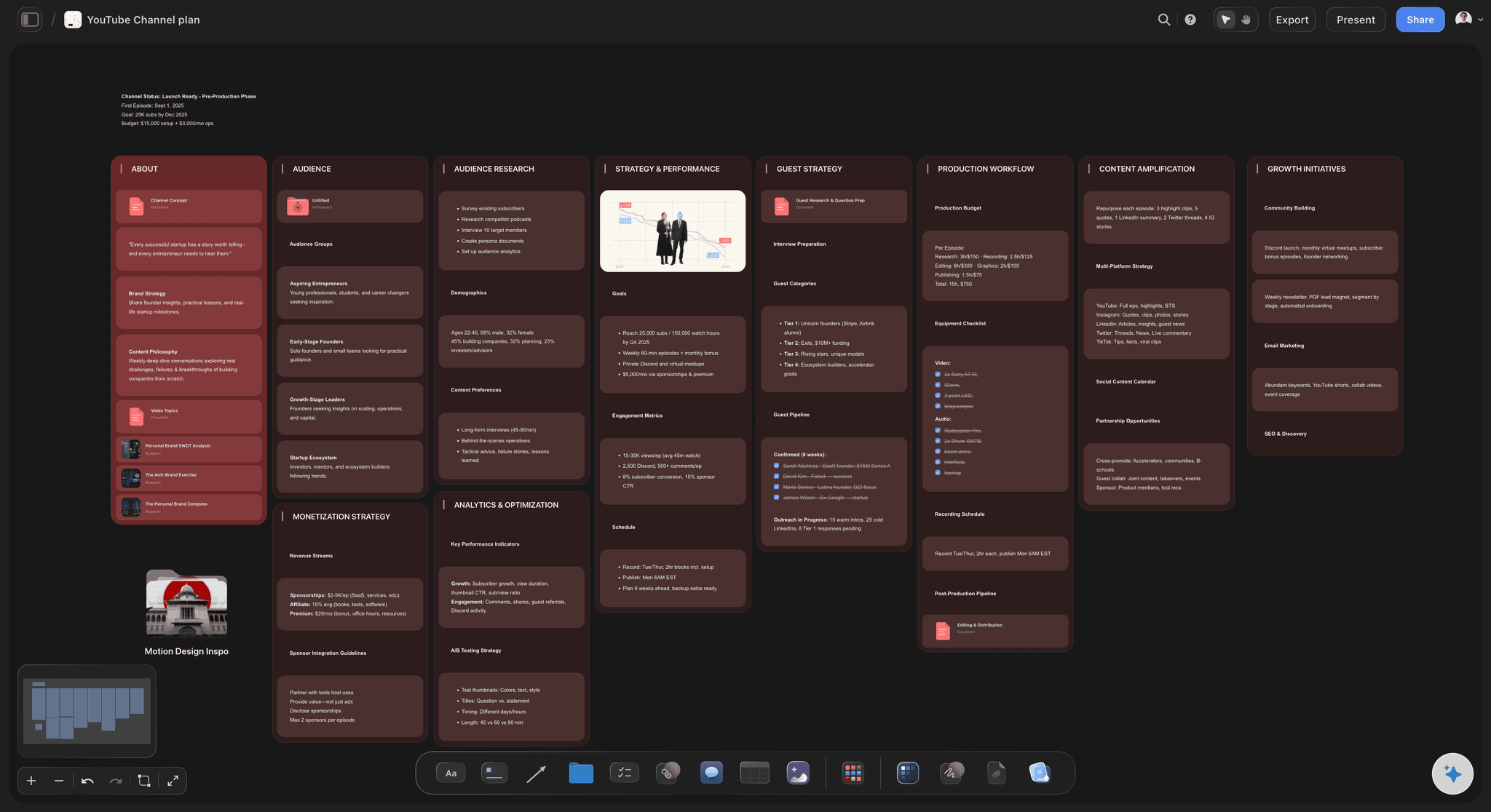
Move one project onto a canvas the AI can read
Take the content you are planning this week, put the idea, the hooks, and the calendar on one infinite canvas, and ask the AI what is missing. The gaps show up before you publish, not after.

For YouTube Creators: Retention Architecture You Can See
YouTube success depends on retention. The algorithm rewards videos that keep viewers watching. But retention isn't about individual hooks - it's about architecture you need to see spatially.
Before: ChatGPT + Google Docs
Ask ChatGPT for video script → copy to Google Doc → write intro hook → write body content → add conclusion → upload to YouTube → watch the retention graph fall off a cliff at minute 4 → no clear sense why viewers left → try again with a different hook → same cliff, same spot
After: Visual Workspace with Maximize YouTube Retention + Hook Viewers Using Psychology
Open Storyflow → select "Maximize YouTube Retention" Tactic → cards appear showing retention architecture: pattern interrupts every 90 seconds, curiosity loops, payoff positioning → add "Hook Viewers Using Psychology" → see psychological triggers: novelty, authority, relatability → map your video spatially → visual gaps reveal your hook promises "the secret" but payoff appears at minute 8 (viewers already left) → restructure: psychological hook using pattern interrupt → immediate mini-payoff at 30 seconds → build new curiosity → deliver major payoff at minute 3 → final revelation → upload → the mid-video cliff flattens because the promise is paid off before viewers give up
The difference: spatial planning with expert Tactics reveals retention architecture that's invisible in linear scripts. You see where psychological hooks connect to payoffs, where dangerous curiosity gaps exist, whether tension builds consistently. The YouTube Video Plan template opens with this architecture already laid out: hook, outline, thumbnail concepts, and publish checklist on one board.
"My retention was flat across 30 videos. I was writing good scripts - they read well, made sense, delivered value. But people kept leaving at predictable points."
"Used Storyflow's Maximize YouTube Retention tactic. Positioned my entire video on the canvas - hook at top, payoff below, all content in between. The tactic showed me retention checkpoints: pattern interrupt at 0:05, first payoff by 0:30, re-hook every 90 seconds. The problem became obvious: I was creating curiosity gaps that never resolved. Opening hook: 'I'll show you the fastest method.' But the actual method didn't appear until minute 9."
"Added Hook Viewers Using Psychology tactic. Restructured spatially using psychological triggers: pattern interrupt opening (novelty), immediate mini-method at 0:30 (satisfies initial curiosity), deeper optimization at 2:00 (new curiosity loop), advanced techniques at 5:00. Same content, different architecture guided by proven tactics. The predictable drop-off points disappeared, because every curiosity gap now resolves before viewers give up on it."
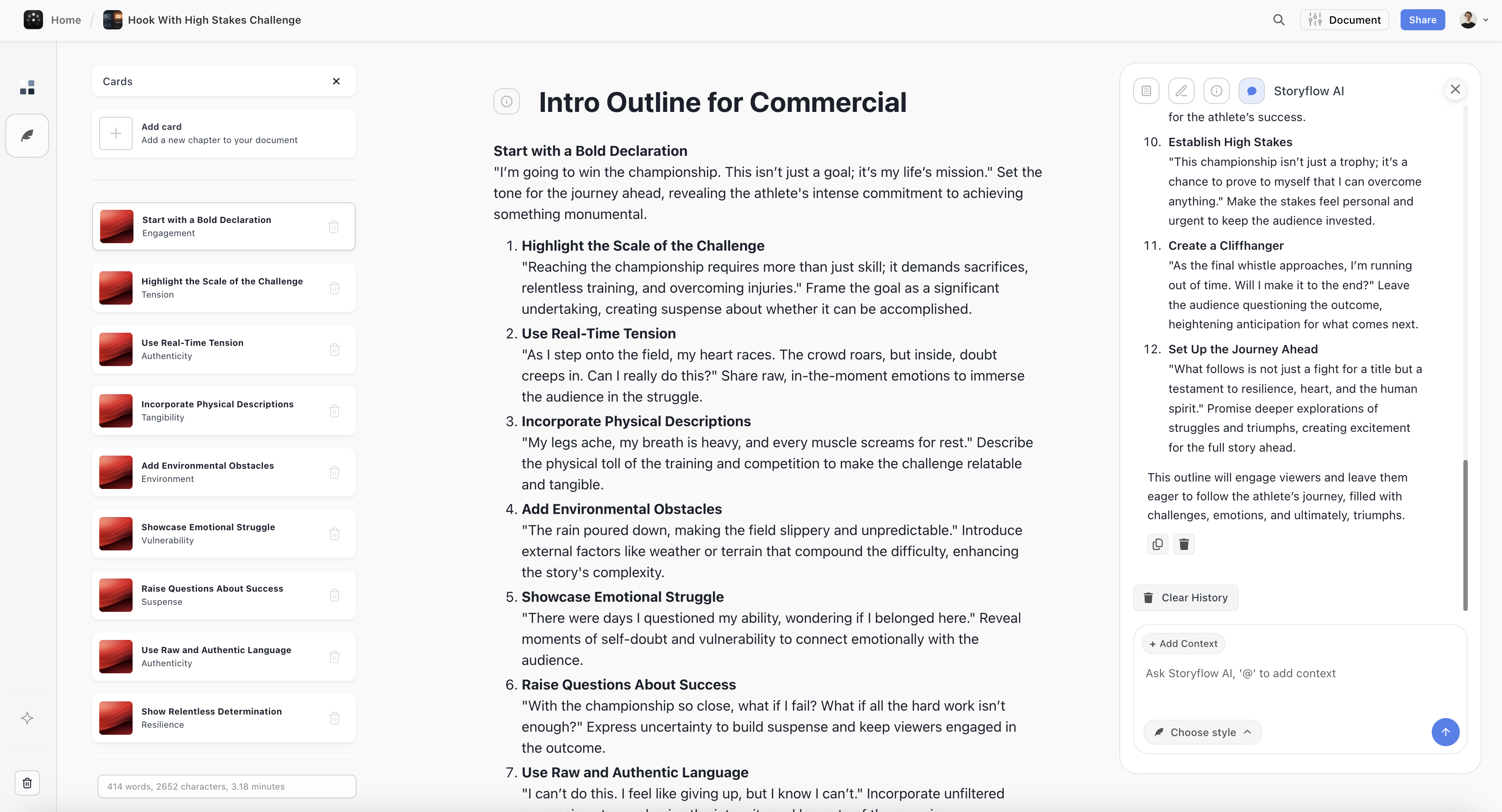
For Writers and Bloggers: Structure That Teaches While You Build
Writers understand that structure matters. Film Transformation Journeys for narrative content. Write Problem-Solution Content for educational posts. Structure Stories in Three Acts for emotional impact. But knowing about tactics and applying them are different things.
A Real Writing Session
I'm writing a long-form blog post about productivity systems. I know educational content needs clear structure - readers need to understand the problem before they care about solutions. But I'm staring at a blank Google Doc, unsure where to start.
I open Storyflow and select "Write Problem-Solution Content" tactic. Cards appear in a side panel: Identify the Pain Point, Show Why Common Solutions Fail, Introduce Your Approach, Demonstrate with Examples, Address Objections, Provide Clear Next Steps. Each card explains what belongs there and why it matters psychologically.
I start mapping my article spatially. "Identify the Pain Point" - readers drowning in productivity apps but still feeling overwhelmed. "Why Common Solutions Fail" - I hadn't planned this section, but the tactic reveals I need it. I add analysis of why to-do lists alone don't work. "Address Objections" appears as a card - I realize I never explicitly handled the "this sounds complicated" concern.
Two hours later, I have a complete structure that flows logically from problem to solution. The tactic taught me educational content architecture while I built my actual article. The visual workspace showed me gaps I would have missed in a linear doc.
The point of a Tactic-guided workspace is not that it writes for you. It is that the structure of a piece stops being something you rebuild from memory each session, and the content resonates more because that structure serves reader psychology, not just information delivery.
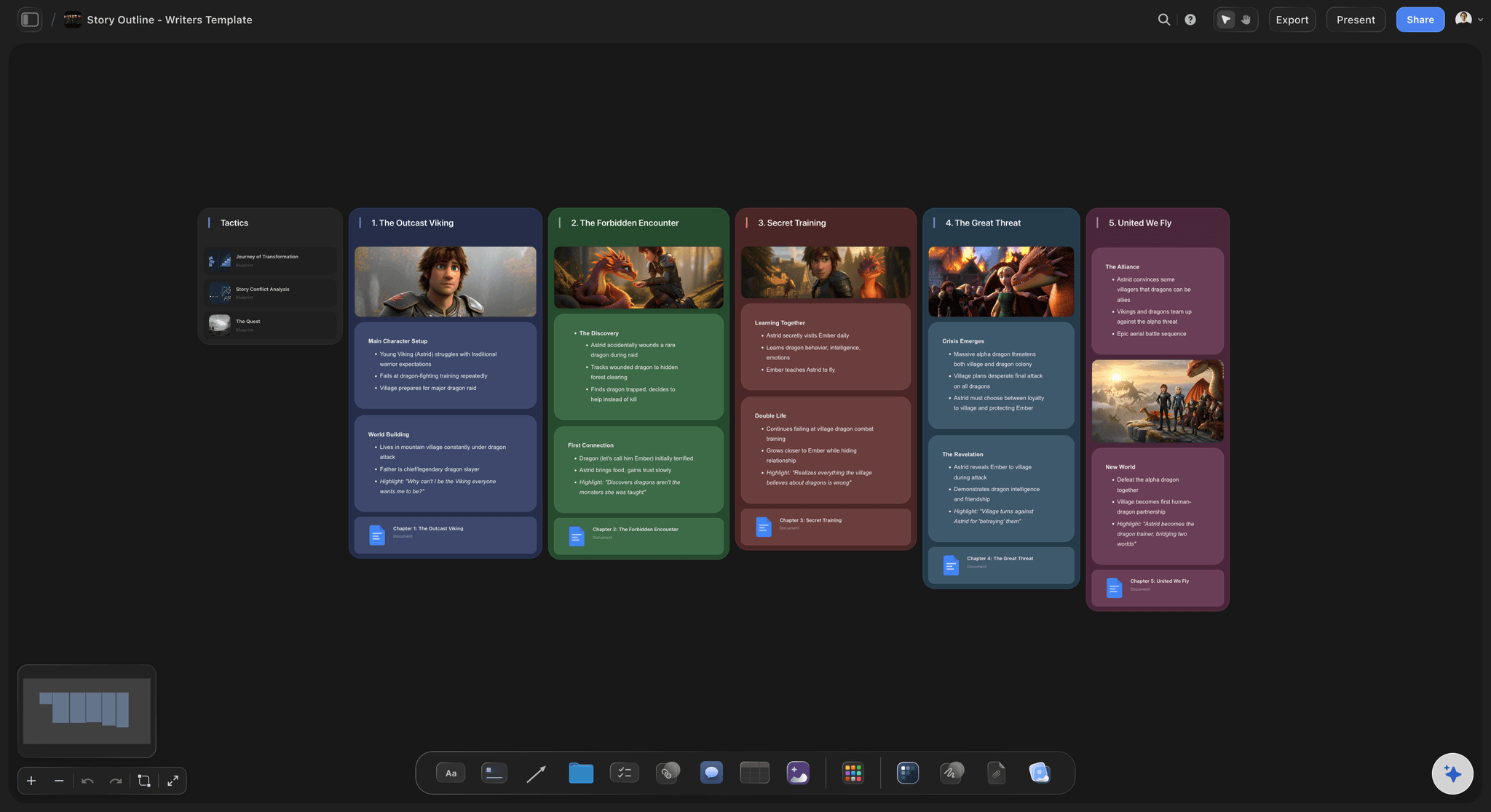
For Content Marketers: Campaigns That Connect Visually
Content marketers don't create individual pieces - they orchestrate campaigns. Blog post connects to email sequence. Social content builds toward webinar. But when each piece lives in a different document, the connections stay abstract.
"I was managing a product launch campaign: announcement blog post, 5-email nurture sequence, social content, case study, landing page. All planned in separate docs. I knew they should connect thematically, but I couldn't see how."
"Opened Storyflow and selected 'Customer Journey Mapping' tactic. Cards appeared showing stages: Awareness, Consideration, Decision, Retention. Each stage showed what content type works and what psychological triggers matter. Mapped all my campaign pieces spatially onto this journey."
"The gaps became obvious: I had three pieces for Awareness (blog, social, webinar invite) but nothing for Consideration stage - where prospects compare solutions. The tactic showed I needed comparison content and objection handling. I also had three pieces making the same point (ease of use) but nothing about scalability for Decision stage."
"Added 'Turn Features Into Benefits' tactic to strengthen Decision stage content. The visual arrangement plus expert tactics let me see the campaign as a customer journey system instead of isolated pieces. It converted noticeably better than previous launches - not because individual pieces were better written, but because the campaign architecture matched how customers actually buy."
For content marketers the payoff is coherence: when every campaign piece is mapped onto the same journey on the same board, audiences experience unified messaging that matches their buying journey instead of disconnected content. Start from the Marketing Campaign template and the journey stages are already laid out for your pieces.

A Storyflow second brain keeps your research, brand voice, and past content in one canvas the AI can read across projects
AI Workspace Comparison for Content Creators
How do different AI workspaces compare for content creation?
| Tool | Best For | Limitations |
|---|---|---|
| Storyflow | Complete content workflow: planning, strategy, expert Tactics, visual organization | Not a publishing tool or long-form text editor. AI context is board-scoped, not workspace-wide. Cloud-only |
| ChatGPT | Quick text generation, research, brainstorming | No project organization, context doesn't persist, no expert Tactics |
| Notion AI | Text-based documentation with AI assistance | Linear/database view, no spatial planning, no expert Tactics |
| Jasper/Copy.ai | Marketing copy generation | Template-based, no strategy planning, no visual organization |
| Miro | Visual collaboration, blank canvas | No expert Tactics, basic AI, requires building structure from scratch |
| Trello/Asana | Task management, content calendar lists | List-based, no expert Tactics, no AI assistance |
Most successful content creators use multiple tools: Storyflow for planning and strategy, ChatGPT for quick text tasks, their CMS for publishing. The key is recognizing what each tool does well.
The best AI workspace for content creators combines three elements: visual organization that shows entire strategies spatially, expert Tactics that teach while you create (Maximize YouTube Retention, Hook Viewers Using Psychology, Customer Journey Mapping, Write Problem-Solution Content), and canvas-aware AI that reads the board you are working in plus the Tactics and documents you @-mention.

Storyflow's mind map turns scattered content ideas into a visible strategy with clear themes and connections
FAQ
Frequently Asked Questions
What is the best AI workspace for content creators?
Storyflow is the best AI workspace for content creators because it combines visual organization (see entire content strategies spatially), expert Tactics (proven structures like Maximize YouTube Retention, Hook Viewers Using Psychology, Customer Journey Mapping), and board-scoped AI context (the AI reads your full active board before answering). Unlike text-based AI tools, it's built for the complete content workflow from ideation through execution.
What makes an AI workspace better than ChatGPT for content creation?
AI workspaces provide spatial organization where you see entire content calendars and strategies visually, board-level context (keep your brand voice and audience notes on the board and the AI reads them with the plan), and expert Tactics like Maximize YouTube Retention, Hook Viewers Using Psychology, or Film Transformation Journeys. ChatGPT generates text but doesn't organize projects or maintain context across sessions.
Do content creators need specialized AI tools?
Yes. Generic AI tools generate text without structure. Content creators need tools with expert Tactics (Maximize YouTube Retention, Hook Viewers Using Psychology, Customer Journey Mapping, Write Problem-Solution Content), brand consistency across projects, and spatial organization. The gain is not writing speed: it is planning time you stop spending on re-explaining context and reinventing structure.
What features should content creators look for in AI workspaces?
Look for: visual organization (see entire content strategy on one canvas), expert Tactics (proven structures like Maximize YouTube Retention, Hook Viewers Using Psychology, Customer Journey Mapping), board-level context (brand voice and audience notes on the board are read with every prompt), and spatial planning. The workspace should handle ideation, planning, and organization - not just text generation.
Can I use ChatGPT alongside a visual AI workspace?
Yes. Most successful creators use both: ChatGPT for quick text editing and research, and a visual AI workspace like Storyflow for content planning, strategy, and organization. They serve different needs in the content creation workflow, so the practical setup is to plan and structure in Storyflow, then draft individual pieces wherever you write.
Does Storyflow's AI remember my brand across all my projects?
Storyflow's AI reads your full active canvas board by default, plus up to 1 Tactic and 3 Documents you @-mention in the chat. It is board-scoped, not a workspace-wide memory that silently reads every board you own. The practical move for content creators is to keep a project's brand voice notes, audience profile, and past hooks on the same board you plan from, so the AI works with that context instead of starting fresh each session.
From Text Generation to Content Systems
The first wave of AI tools for content creators focused on text generation. ChatGPT writes. Jasper writes. Copy.ai writes. These tools changed what's possible, but they solved only part of the problem.
The bottleneck in content creation isn't writing speed - it's organization, strategy, and consistency. Successful creators don't produce more content; they produce more coherent content systems where pieces connect, campaigns build momentum, and brand voice stays consistent.
Visual AI workspaces designed for content creation provide what text-based AI can't: spatial organization that reveals connections, expert Tactics that teach proven methodology (Maximize YouTube Retention, Hook Viewers Using Psychology, Customer Journey Mapping, Write Problem-Solution Content), and canvas-aware AI that reads the board you are planning on plus the Tactics and documents you @-mention.
The result is not faster typing. It is a content system: more consistent brand voice, fewer abandoned plans, and individual pieces that serve larger strategies instead of existing as isolated posts.
Here is a concrete test. Take the next piece of content you have to plan (your next video, your next launch sequence, your next long-form post) and build it on one Storyflow board with the matching Tactic open: Maximize YouTube Retention for video, Customer Journey Mapping for a campaign, Write Problem-Solution Content for an article. Plan that single piece visually with the Tactic guiding the structure. If the gaps in your plan become obvious in a way they never did in a doc, you have your answer. Try it on storyflow.so.
Related Reading
The process the workspace is for: audit the hours, protect the angle and the voice, and delegate one stage at a time.
ChatGPT generates text. Creators need structure. Discover why filmmakers, YouTubers, and marketers are switching to visual AI workspaces.
Compare AI tools for YouTube planning and discover why Tactic-guided tools outperform raw text generation for retention optimization.
Table of Contents
Templates to check out for this topic


Content and video templates you can use in Storyflow
Plan a channel, a script, and a content pipeline on the same board. Open one of these templates and let the AI build on the structure instead of starting from a blank doc.


See Storyflow in Action
A visual AI workspace where every feature lives inside one canvas. No tab-switching, no context lost.
Build your entire board from a single message
Type what you need in the AI chat at the bottom of your canvas. The AI adds cards, headings, and structure directly onto your board.
Use expert frameworks as AI context
Type @ in the AI chat and choose any Tactic. The AI tailors every response to that framework instead of giving generic advice.
Turn your board into a mind map in seconds
Ask the AI to restructure your canvas as a mindmap. It connects your ideas into a visual hierarchy so you can see how everything relates.
Why Storyflow Exists
Storyflow actually began as a personal tool while working on creative and research projects.
We kept running into the same problem: ideas were scattered everywhere: notes, documents, and whiteboards.
Nothing helped us see how everything connected.
So we started building a workspace designed around how ideas actually grow.
→ Read how Storyflow was createdSara de Klein
Head of Product at Storyflow
Published: January 22, 2026
Extremely simple, seriously capable


See how easy it is to get started
Watch a real project come together, from a blank board to a finished plan, clicked through step by step.
Start creating with AI and become more productive
Transform your creative workflow with AI-powered tools. Generate ideas, create content, and boost your productivity in minutes instead of hours.