
Category
Content Creation
Author

Justkay
Documentary Filmmaker & Founder at Storyflow
Topics
2026-05-18
•
Updated May 18, 2026
•
15 min read
•
Content Creation- best AI tools for bloggers 2026
- AI tools for bloggers
- AI for blogging
- AI blog writing tools
- AI content calendar tool
- AI SEO tools for bloggers
What are the best AI tools for bloggers in 2026?
The best AI tools for bloggers in 2026 are Storyflow (best for the content calendar, pillar planning, and outline canvas), Claude (best for long-form drafting), Surfer SEO (best for on-page SEO scoring), and Perplexity (best for sourced research). Storyflow stands out because the AI reads your full active canvas, so the calendar, pillar map, and outlines sit in one place the AI can see. Most working bloggers in 2026 run three or four tools together, one per phase of the blogging workflow.

All 12 AI Tools for Bloggers, Ranked
- Storyflow: best for the content calendar, pillar planning, and outline canvas
- Claude: best for long-form drafting that sounds human
- ChatGPT: best for ideation, quick drafts, and ecosystem breadth
- Surfer SEO: best for on-page SEO scoring and SERP-graded briefs
- Perplexity: best for sourced research and fact-checking
- Frase: best for brief building plus SEO optimization
- NeuronWriter: best for affordable semantic SEO optimization
- Koala AI: best for one-click SEO article drafts
- Originality.ai: best for AI and plagiarism detection for publishers
- Grammarly: best for grammar, tone, and final polish
- Jasper: best for templated blog and marketing copy
- Notion AI: best for doc-and-wiki AI inside a blog team's workspace
Full disclosure: Storyflow is our own product, and we rank it #1 for one phase of blogging: planning, where the calendar, pillar map, and outlines sit on one canvas the AI reads. For long-form drafts that sound human Claude is stronger, and for an on-page SEO score before you publish Surfer SEO is the trusted tool. Storyflow is not an SEO scoring tool and not a CMS, so you still pair it with Surfer and WordPress rather than replacing them. If your bottleneck is drafting or ranking rather than planning, one of those tools is the better first buy. We link to every tool so you can judge the fit.
Quick Comparison: Best AI Tools for Bloggers
These four cover the phases bloggers switch tools for: planning the calendar, long-form drafting, on-page SEO scoring, and sourced research.
| Tool | Best For | AI Features | Price |
|---|---|---|---|
| Storyflow | Content calendar, pillars, and outlines on one canvas | Reads full board + @-docs and Tactics | $7.99 mo annual (free plan late 2026) |
| Claude | Long-form drafting that sounds human | Long-context human-sounding drafts | Free / $20 mo |
| Surfer SEO | On-page SEO scoring before publish | SERP-graded on-page optimization score | $79 mo |
| Perplexity | Sourced research and fact-checking | Cited answers from live web search | Free / $20 mo |
1) Quick Answer: The Best AI Tools for Bloggers in 2026
The best AI tools for bloggers in 2026 are Storyflow (best for the content calendar, pillar planning, and outline canvas), Claude (best for long-form drafting that reads like a person wrote it), Surfer SEO (best for on-page SEO scoring), and Perplexity (best for sourced research). Storyflow stands out because the AI reads your full active canvas board, so your content calendar, pillar and cluster map, audience notes, and post outlines all sit in one place the AI can actually see, which is the part of blogging where a chat tab keeps losing the thread.
The short version: if you want a draft fast, Claude or ChatGPT. If you want an SEO score before you publish, Surfer SEO or Frase. If you want the calendar, the pillar map, and the outlines on one surface the AI reads, Storyflow. If you want research with citations, Perplexity. Most working bloggers in 2026 run three or four of these together, not one.
For the wider case, see How to Write a Content Strategy With AI and The 10 Best Content Planning Tools in 2026.
2) Comparison Table: 12 AI Tools for Bloggers Compared
Rating criteria: Tested on real blog posts, content calendars, and SEO programs. Tools were rated on whether they shipped a publishable post or moved a metric, not on demo impressions. Pricing verified at each tool's official page as of May 2026.
3) Why Bloggers Need a Different AI Stack
A blogger and a copywriter both produce words, but the AI stack they need is not the same. Three structural differences shape what a blogger should actually pay for.
Blogging is a pipeline, not a single output. A copywriter ships one landing page. A blogger runs a repeating cycle: research a topic, place it on a calendar, draft the post, optimize it for search, publish it, then repurpose it into a newsletter or a thread. A chat tool optimized for a single generation handles one step of that cycle and ignores the other five. A blog is a system, not a stack of posts. The AI tools that help a blogger are the ones that fit a phase of that system, not the ones that promise to replace it.
Blogging has a discoverability layer. A copywriter's page gets traffic from ads. A blog post gets traffic from Google and, increasingly, from AI answer engines. That means the blogger's stack needs a tool that scores a draft against what already ranks. A general AI model has no idea what the current top ten results for your query contain. SEO tools (Surfer, Frase, NeuronWriter) close that gap; chat models do not.
Blogging is a long game with a memory problem. A blog is built over months. The pillar topics, the cluster structure, the posts already published, the posts still planned: all of it has to stay coherent. A chat tab forgets the project the moment you close it. The tools that help here are the ones that hold the structure on a surface you return to, not the ones that start fresh every session.
The familiar approach is to open ChatGPT, paste a topic, and ask for a blog post. It works for one post, then breaks the moment you need a calendar of forty posts that do not overlap, a pillar that real cluster posts link back to, and outlines that fit the strategy. The blogger approach is to keep the calendar, the pillar map, the audience notes, and the outlines on one canvas the AI reads, then draft each post against that context. The drafts come back fitting your blog, not the prompt fragment you had time to type.
For the architectural argument behind that, see The Single-Prompt Fallacy.
4) How We Evaluated These Tools (On Real Blogs)
Every tool on this list was tested on actual blog work between 2024 and 2026: a niche affiliate site, a SaaS company blog, a solo personal blog, and a small content team's editorial program. No synthetic prompts. Five criteria, weighted in this order.
- Workflow fit. Which phase of the blogging pipeline (research, plan, draft, optimize, publish, repurpose) does the tool actually serve, and does it serve it well or just adequately?
- Output quality vs rework. Did the AI output ship after a light edit, or did rewriting it take longer than writing from scratch?
- Context retention. Does the tool hold the blog's structure (calendar, pillars, prior posts) across sessions, or does it start cold every time?
- SEO honesty. For tools that claim SEO help, does the scoring reflect real ranking factors, or is it a word-count gauge dressed up as strategy?
- Pricing transparency. What does the tool cost at the tier a working blogger actually needs, not the headline number?
Tested workflows included: a 40-post content calendar for a niche site, a pillar-and-cluster build for a SaaS blog, a weekly publishing cadence for a solo blogger, and an editorial review loop for a three-person team. The rankings reflect what each tool felt like across a real blogging cycle, not feature parity on paper.
5) Quick Picks by Blogging Phase
If you want the short list, organize it by the phase of the blog you are working on.
Best for Research: Perplexity for sourced web research with citations you can quote. ChatGPT or Claude for synthesizing notes into angles.
Best for Planning (Calendar, Pillars, Clusters): Storyflow. The content calendar, the pillar and cluster map, and the audience notes live on one canvas the AI reads when it helps you plan.
Best for Outlines and Briefs: Storyflow for the outline canvas grounded in your strategy. Frase for SEO-graded briefs built from SERP data.
Best for Drafting: Claude for long-form posts that read like a person wrote them. ChatGPT for faster, more exploratory drafts. Koala AI for one-click first drafts you will edit heavily.
Best for SEO Optimization: Surfer SEO for the strongest on-page scoring. Frase as a brief-plus-optimization combination. NeuronWriter for the same job at a lower price.
Best for Polish and Publishing Checks: Grammarly for grammar, tone, and clarity. Originality.ai for an AI-content and plagiarism scan before you hit publish.
Best for Repurposing: ChatGPT or Claude for turning a post into a newsletter, a thread, or a LinkedIn version. Storyflow for keeping the repurposed pieces tied to the original on the calendar.
6) Detailed Reviews: 12 AI Tools for Bloggers in 2026
1. Storyflow
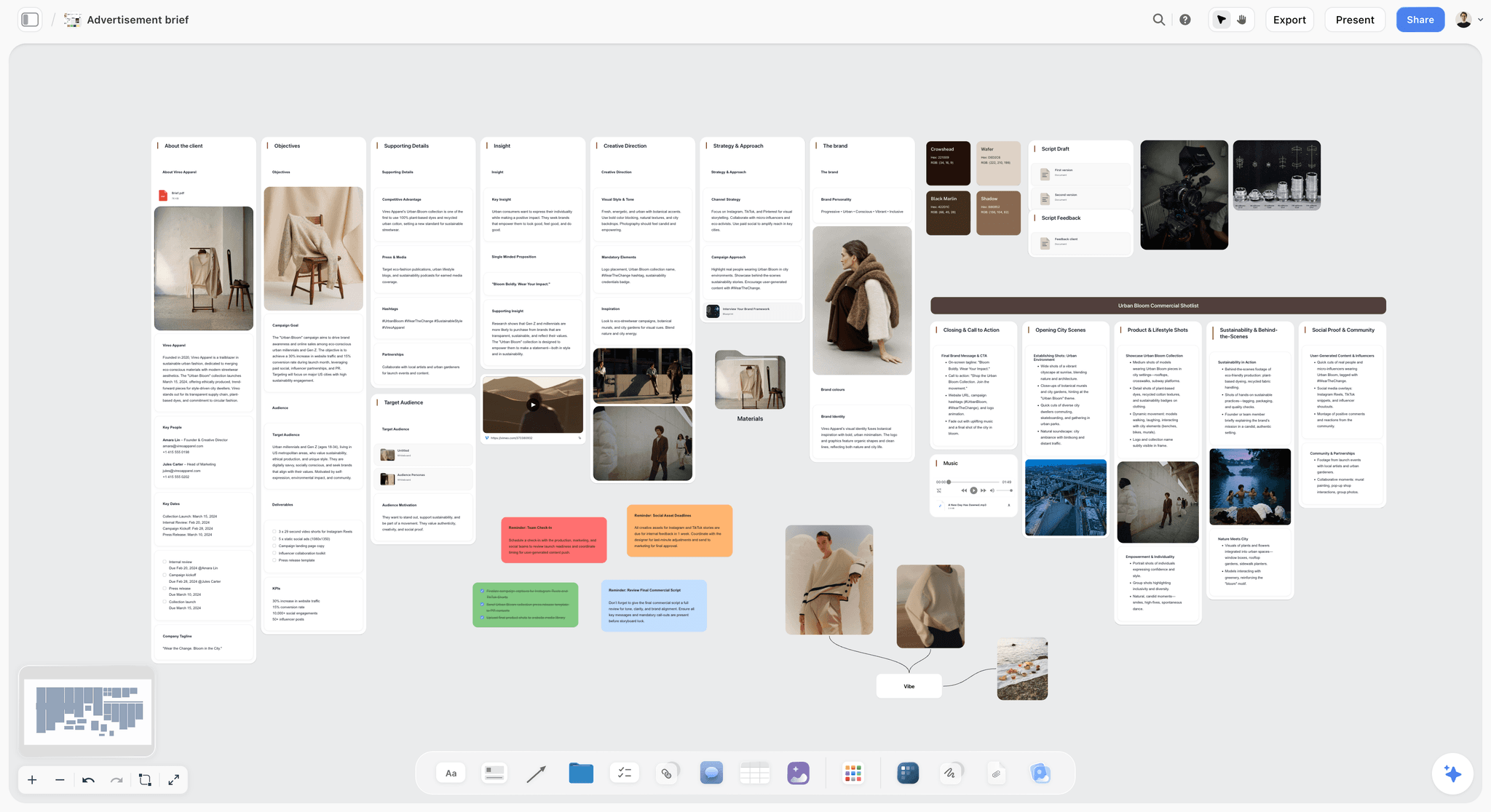
Storyflow is a visual workspace where the AI reads your full active canvas board, so the content calendar, pillar and cluster map, audience research, and post outlines all sit on one surface the AI can see. It is the tool to pick when chat-only AI keeps losing the structure of your blog between sessions.
Best for: Solo bloggers, niche-site owners, and content teams who run a real editorial calendar and want planning, outlines, and briefs in one place.
Verdict: The strongest AI tool for the planning and outline half of blogging. It is honestly not an SEO scoring tool or a publishing platform, so it pairs with Surfer and WordPress rather than replacing them.
Key features
- Project-aware AI by default. The AI reads the full active canvas board (content calendar, pillar map, audience notes, outlines). You can add up to 1 Tactic and up to 3 Documents via @-mention for extra grounding.
- 200+ Story Blueprints on Plus and above. Expert framework templates including Hero's Journey, AIDA, and Retention Hooks. The free plan does not include the 200+ library.
- Multi-format canvas. Mind maps, calendar cards, outline cards, research clusters, and mood boards all live on one board.
- Unlimited shared boards and unlimited collaboration on every plan. The Max plan adds a team workspace with permissions and roles for editorial teams.
Pricing
Free: launching before the end of 2026; invited collaborators of paid members join free today. Unlimited notes, images, and links, unlimited shared boards, unlimited collaboration, basic AI usage, and 20 file uploads. Plus: $7.99/mo annual or $9.99/mo monthly (200+ Story Blueprints, unlimited uploads). Pro: $14/mo annual or $19/mo monthly (adds AI image generation and 20x more AI than Plus). Max: $39/mo annual or $49/mo monthly (adds 40x more AI plus a team workspace with permissions and roles).
Pros
- The AI reads the full calendar and outline canvas, so planning help stays tied to your actual blog.
- Story Blueprints ground outline and structure work in real frameworks instead of generic prose.
- The free tier is genuinely usable for planning, and the entry paid tier at $7.99/mo annual undercuts most SEO tools.
Cons
- Storyflow is not an SEO scoring or SERP tool. Use Surfer, Frase, or NeuronWriter for on-page grades.
- Storyflow is not a CMS or publishing tool. You still draft into WordPress, Ghost, or your platform of choice.
- No built-in AI-content detector, and it is cloud-only with no offline mode. It is also a newer platform than Notion.
2. Claude
Claude is the strongest pure-chat AI for long-form blog drafting in 2026. It is the pick when the post is 1,500 words or more and you want a draft that does not read like a content mill produced it.
Best for: Long-form guides, thought-leadership posts, and any blogger who edits hard and wants a strong first draft to edit from.
Verdict: The best drafting model for bloggers. It is a chat tool, so the project memory problem still applies across a long editorial calendar.
Key features
- Long context window that holds a full outline plus reference notes in a single prompt.
- Projects feature for persistent instructions and reference material across sessions.
- Strong tone-matching when you give it two or three samples of your own writing.
Pricing
Claude Pro: $20/mo. Claude Max: $100/mo and up. Free tier with daily message limits.
Pros
- Frequently rated the best AI at long-form writing quality in real blogging tests.
- Holds tone and logical flow across a long post better than most models.
- The Projects feature reduces how much context you re-paste each session.
Cons
- It is still a chat tab, so it does not hold your content calendar or pillar structure.
- No image generation in the consumer product.
- A smaller plugin and integration ecosystem than ChatGPT.
3. ChatGPT
ChatGPT is still the broadest AI tool a blogger can reach for in 2026. It is the pick for ideation, fast drafts, and the widest ecosystem of custom workflows.
Best for: Topic brainstorming, quick drafts, repurposing posts into other formats, and bloggers who want one tool that does most jobs adequately.
Verdict: The default most bloggers already use. Genuinely strong, just the wrong shape for holding a months-long editorial plan.
Key features
- Image generation alongside text in the same product.
- Custom GPTs and the GPT Store for repeatable blog workflows.
- Voice mode, web browsing, and the largest integration ecosystem of any model.
Pricing
ChatGPT Plus: $20/mo. ChatGPT Pro tiers above that. Free tier with daily limits.
Pros
- The broadest AI ecosystem, so most blogging jobs have a workaround.
- Image generation in the same tab is convenient for post thumbnails.
- Custom GPTs let you save an outline or brief workflow once and reuse it.
Cons
- Loses context across multi-post editorial work, the failure mode covered in Why ChatGPT Loses the Plot.
- No knowledge of what currently ranks for your target query.
- Brand and tone consistency take careful prompt engineering on every post.
4. Surfer SEO
Surfer SEO is the strongest on-page SEO tool for bloggers in 2026. It is the pick when an SEO score before you publish is the part of the workflow you cannot skip.
Best for: SEO bloggers, affiliate-site owners, and content teams whose KPI is organic traffic.
Verdict: The strongest SEO scoring tool on this list. Worth the cost if search is your main traffic channel; skippable if it is not.
Key features
- Content Editor with a live optimization score graded against the current SERP.
- SERP-analyzed briefs covering terms, headings, and word-count targets.
- AI Tracker add-on for monitoring brand mentions in AI search results.
- Integrations with Google Docs and WordPress.
Pricing
Essential: $99/mo monthly, $79/mo billed annually. Scale: $219/mo monthly, $175/mo billed annually. Enterprise: custom. The AI Tracker add-on is an extra $95/mo. 7-day money-back guarantee.
Pros
- The on-page optimization score is the most trusted of any tool here.
- SERP-grounded briefs save real research time on every post.
- The WordPress and Google Docs integrations fit how bloggers already work.
Cons
- Expensive for a solo blogger; the entry tier is $79/mo annual.
- The score is a guide, not a guarantee; chasing 100 produces stuffed prose.
- It is an optimization tool, not a planning tool. It does not hold your calendar.
5. Perplexity
Perplexity is the answer engine that ships every response with sources. For bloggers, it is the pick when research and fact-checking are the bottleneck.
Best for: Research-heavy posts, fact-checking, competitive analysis, and any blogger who needs to cite verifiable sources.
Verdict: The strongest research tool for bloggers. Citations are the reason it earns a slot.
Key features
- Every answer ships with linked citations you can verify and quote.
- Pro Search runs deeper multi-source synthesis for complex topics.
- Spaces for grouping research threads by blog topic or pillar.
- A multi-model backend so you can route queries to different models.
Pricing
Perplexity Pro: $20/mo. Education Pro: $10/mo for verified students and educators. Free tier with limited Pro searches.
Pros
- Citations matter when a post makes claims readers and editors will check.
- Strong on current-events and "latest on X" queries where chat models go stale.
- Pro Search is excellent for a first-pass research sweep on a new topic.
Cons
- Not built for drafting. Use Claude or ChatGPT for the actual writing.
- Spaces are lighter than a real planning canvas for sustained editorial work.
- The free tier limits Pro Search heavily, which is where the value sits.
6. Frase
Frase is the brief-building and SEO-optimization tool that sits between research and draft. It is the pick for bloggers who want one tool covering the brief and the on-page score.
Best for: Bloggers and small teams who want SERP-based briefs and optimization without paying Surfer prices at the top.
Verdict: A solid Surfer alternative for the brief-plus-optimization job. Less specialized than Surfer on pure scoring depth.
Key features
- SERP-analyzed content briefs built from the current top results.
- An optimization score for drafts as you write.
- An AI agent covering research, optimization, and a site audit.
- AI search visibility tracking on higher tiers.
Pricing
Solo: $45/mo monthly, $38/mo billed annually. Basic tiers above that, with the Scale plan at $299/mo. Volume add-ons are sold separately. 7-day free trial.
Pros
- The brief builder is genuinely fast and grounded in SERP data.
- One tool covers research, brief, and optimization for many bloggers.
- Cheaper at entry than Surfer for a comparable on-page job.
Cons
- The optimization score is less trusted than Surfer's among SEO specialists.
- Lower tiers gate the AI search tracking behind an add-on.
- The AI draft quality is weaker than Claude or ChatGPT; use it for briefs, draft elsewhere.
7. NeuronWriter
NeuronWriter is the affordable semantic-SEO optimization tool. It is the pick for budget-conscious bloggers who still want a real content score.
Best for: Solo bloggers and niche-site owners who want SEO optimization without a Surfer-sized bill.
Verdict: The best value SEO scoring tool on this list. The interface is less polished than Surfer, but the core job is solid.
Key features
- Content Editor with a semantic optimization score.
- SERP analysis for terms, questions, and competitor structure.
- Plagiarism checker and AI templates on the Gold tier and above.
- Lifetime deal options for bloggers who prefer a one-time payment.
Pricing
Bronze: $23/mo monthly, $19/mo billed annually. Silver: $45/mo monthly, $37/mo annually. Gold: $69/mo monthly, $57/mo annually. Platinum and Diamond tiers above that. Lifetime deals available.
Pros
- The cheapest entry point of any real SEO scoring tool here, at $19/mo annual.
- Semantic scoring covers the same core job as Surfer.
- The lifetime deal is a genuine option for bloggers who hate subscriptions.
Cons
- The interface is less polished and slower than Surfer or Frase.
- Lower tiers cap projects and analyses tightly.
- Advanced features (plagiarism, templates) start only at the Gold tier.
8. Koala AI
Koala AI is the one-click SEO article generator. It is the pick for bloggers who want a complete first draft fast, with the editing burden understood up front.
Best for: Affiliate bloggers and niche-site owners producing volume who will heavily edit every draft.
Verdict: Fast and cheap for first drafts. The output needs real editing, and unedited Koala posts are exactly what Google's scaled-content rules target.
Key features
- KoalaWriter generates a full SEO-structured article from a keyword.
- KoalaChat, KoalaImages, and automatic internal linking on higher tiers.
- Real-time data and SERP-aware structure.
- Bulk generation for high-volume sites.
Pricing
Essentials: $9/mo and up depending on word volume, with annual billing roughly 20% cheaper. Higher tiers scale by words and chat messages. Free trial with 5,000 words.
Pros
- The fastest path to a structured first draft of any tool here.
- Cheap entry point for bloggers testing topics at volume.
- Built-in internal linking saves a manual step on larger sites.
Cons
- The draft quality trails Claude; treat every output as a rough first pass.
- Unedited bulk output is the exact pattern Google's scaled-content abuse policy penalizes.
- It is a draft generator, not a planning or research tool.
9. Originality.ai
Originality.ai is the AI-content and plagiarism detector built for publishers. For bloggers, it is the pick for a pre-publish check, especially when editors or clients are involved.
Best for: Editors, content teams, and bloggers who hire writers and need an AI and plagiarism scan before publishing.
Verdict: The most-trusted detection tool here. Useful as a check, but treat its scores as a signal, not a verdict.
Key features
- AI-content detection across major models including GPT, Claude, and Gemini.
- Plagiarism checking in the same scan.
- Readability scoring and fact-checking tools.
- A credit system where one credit covers 100 words.
Pricing
Base: $14.95/mo for 2,000 credits. Pay-as-you-go: $30 for 3,000 credits. Pro: $179/mo for agencies. Free trial with 50 credits.
Pros
- The most accurate AI detector among publisher-facing tools in 2026.
- Plagiarism and AI detection in one scan saves a step.
- Useful for content teams checking work from freelance writers.
Cons
- AI detectors produce false positives; never treat a score as proof.
- The credit system gets expensive for high-volume sites.
- It checks content; it does not help you plan, research, or write it.
10. Grammarly
Grammarly is the grammar, tone, and clarity layer for the polish phase. It is the pick for the final pass before a post goes live.
Best for: Every blogger, as a polish layer on top of whatever tool drafted the post.
Verdict: The standard for the final-edit pass. It polishes prose; it does not plan, research, or rank.
Key features
- Real-time grammar, spelling, and clarity checks across browsers and apps.
- Tone detection and rewrite suggestions.
- Plagiarism detection and AI writing tools on Pro.
- Works directly inside WordPress, Google Docs, and most editors.
Pricing
Free: $0 with basic checks and 100 AI prompts per month. Pro: $12/mo billed annually, $30/mo monthly. Enterprise: custom.
Pros
- The free tier alone covers most of a blogger's polish needs.
- It works inside the editor you already draft in.
- Tone detection catches drift between sections of a long post.
Cons
- It is a polish tool, not a drafting or planning tool.
- The AI writing features are weaker than dedicated models.
- Suggestions need judgment; accepting every one flattens your voice.
11. Jasper
Jasper is the templated marketing-and-blog copy platform. It is the pick for bloggers who want a tool that looks like a content tool rather than a chat box.
Best for: Bloggers and small teams who want templates and brand-voice modeling out of the box.
Verdict: Solid for templated blog copy. Less compelling now that general models match it on quality at a lower price.
Key features
- Templates for blog posts, intros, outlines, and meta descriptions.
- Brand Voice modeling for tone consistency.
- Workflows and Campaigns for multi-step content.
- A built-in chat mode.
Pricing
Creator: $39/mo annual, $49/mo monthly. Pro: $59/mo annual, $69/mo monthly. Business: custom. 7-day free trial.
Pros
- The content-shaped interface lowers friction for bloggers new to AI.
- Brand Voice modeling is mature and useful for consistency.
- Templates speed up repeatable pieces like meta descriptions.
Cons
- Pricing is high relative to the underlying model quality you are renting.
- General models (Claude, ChatGPT) have caught up on core drafting.
- It is a copy tool, not a planning, research, or SEO-scoring tool.
For the head-to-head, see Jasper Alternative.
12. Notion AI
Notion AI is the AI inside Notion docs and databases. It is the pick for bloggers whose editorial calendar and drafts already live in Notion.
Best for: Blog teams deep in Notion who want AI inside their existing knowledge base.
Verdict: Solid if your blog already runs on Notion. Limited as a reason to adopt Notion.
Key features
- AI inside Notion pages, databases, and the editorial calendar.
- Ask Notion queries your workspace plus connected sources like Drive and Slack.
- AI Agents for multi-step tasks across the workspace.
- Templates for editorial calendars and content runbooks.
Pricing
Notion Free: $0. Plus: $10/user/mo annual. Business: $20/user/mo annual, which is the tier that includes full AI. Enterprise: custom.
Pros
- The best AI experience for teams whose blog already runs in Notion.
- Ask Notion across connected sources is genuinely useful for retrieval.
- The database primitive fits a content calendar well.
Cons
- Full AI now requires the Business tier at $20/user/mo, which scales fast.
- It is doc-and-database shaped, so visual pillar mapping is awkward.
- The AI works on the page, not on a project-level planning canvas.
7) Blogger-Type Recommendations
1. Solo Blogger
Top picks: Storyflow + Claude
Storyflow for the content calendar, pillar map, and post outlines on one canvas. Claude for drafting posts that read well. Add Grammarly Free for the polish pass. This is the minimum viable AI blogging stack for one person, and it costs under $30 a month.
2. SEO / Affiliate Blogger
Top picks: Surfer SEO + Storyflow + Perplexity
Surfer SEO for the on-page score that decides whether a post ranks. Storyflow for the pillar-and-cluster plan and the outline work behind each post. Perplexity for sourced research. Surfer alone is not a content strategy; the plan still has to live somewhere.
3. Niche-Site Owner (Volume)
Top picks: Koala AI + NeuronWriter + Originality.ai
Koala AI for fast first drafts at volume. NeuronWriter for affordable SEO scoring on each one. Originality.ai for a pre-publish check. Edit every draft hard. Unedited bulk output is what Google's scaled-content rules target.
4. Content Team / Company Blog
Top picks: Storyflow Max + Claude + Surfer SEO
Storyflow Max for the team workspace with permissions and roles where the editorial calendar lives. Claude for drafting. Surfer SEO for the optimization gate before publish. Add Originality.ai if freelance writers are in the loop.
5. Personal / Thought-Leadership Blogger
Top picks: Claude + Storyflow
Claude for long-form drafting that holds your voice across a 2,000-word essay. Storyflow for the idea backlog and the loose editorial calendar. SEO tools matter less here because the traffic comes from your audience, not the SERP.
6. Newsletter-First Blogger
Top picks: Storyflow + Claude + ChatGPT
Storyflow for the content calendar that keeps the blog and the newsletter in sync. Claude for the long-form pieces. ChatGPT for fast repurposing of a post into the newsletter version. The repurposing phase is where a calendar tool earns its place.
8) Honorable Mentions
A few tools that came close but did not make the main twelve.
- Writesonic: Marketing-and-blog AI copy; a Jasper alternative with similar strengths and the same model-rental issue.
- Rytr: Cheap AI writing; fine for short pieces, thin for long-form blogging.
- Clearscope: Premium SEO content optimization; excellent, but priced for agencies, not solo bloggers.
- NotebookLM: Strong for synthesizing uploaded research into notes; narrower than a full blogging tool.
- Copy.ai: Workflow-driven copy; more marketing-ops shaped than blog shaped.
- QuillBot: Paraphrasing and grammar; overlaps with Grammarly for the polish phase.
- AnswerThePublic: Question and topic discovery; a useful research add-on, not a full tool.
These are not bad tools. Their audience or use case is narrower than the main list.
9) Where AI Does Not Help Bloggers Yet
Honest accounting matters. There are blogging jobs where AI is still weak, and pretending otherwise wastes your time and your money.
- Original first-hand experience. AI cannot run the test, take the trip, interview the source, or use the product. The first-hand detail that makes a post worth reading still comes from you.
- A genuine point of view. AI produces the consensus take by default. The contrarian angle, the opinion that makes a post get shared, is human work.
- Real expertise and accuracy. AI confidently states things that are wrong. On any post where being wrong has a cost, you fact-check every claim. Google's quality systems reward demonstrated expertise, and AI cannot fake it for you.
- Your actual voice. AI can imitate a voice from samples, but it cannot originate one. The voice readers subscribe for comes from years of you writing, not from a prompt.
- Community and audience relationships. Replying to comments, building an email list, showing up consistently: the relationship work that turns a blog into an audience is not an AI job.
- Strategic taste. Knowing which topic is worth a post and which is a dead end is judgment built from watching your own analytics. AI can suggest; it cannot decide.
If your AI use is concentrated in these areas, you are using AI for the wrong jobs. The right use is upstream (research, planning, outlining) and in the middle (first drafts, SEO scoring, polish). The judgment about what to say and whether it is true stays human. AI drafts the post. It does not have the experience that makes the post worth reading.
11) The Bottom Line
The best AI tool for bloggers in 2026 depends on which phase of the blogging workflow is your bottleneck. A blog is a system, not a stack of posts, and the right stack puts one tool on each phase. Storyflow is the strongest pick for planning: the content calendar, the pillar-and-cluster map, and the outlines on one canvas the AI reads. Claude is the strongest for long-form drafting. Surfer SEO is the strongest for the on-page score. Perplexity is the strongest for sourced research. Grammarly is the standard for the final polish.
Most working bloggers in 2026 run three or four tools: one for planning (Storyflow), one for drafting (Claude or ChatGPT), one for SEO (Surfer, Frase, or NeuronWriter), and one for polish (Grammarly). Storyflow is honestly not an SEO scoring tool or a publishing platform, so it pairs with Surfer and WordPress rather than replacing them. The judgment about what to write, whether it is true, and what your readers actually need stays human. AI drafts the post. It does not have the experience that makes the post worth reading.
For bloggers who want to test the planning half, the move is to put your next month of topics on a Storyflow canvas and outline against that context for two weeks. Start a Storyflow workspace to run that test.
10) FAQ: AI Tools for Bloggers in 2026
What is the best AI tool for bloggers in 2026?
It depends on the job. For the content calendar, pillar planning, and outlines, Storyflow. For long-form drafting, Claude. For SEO scoring before you publish, Surfer SEO. For sourced research, Perplexity. Most working bloggers in 2026 run three or four together, one per phase of the blogging workflow, rather than expecting a single tool to do everything.
Does Google penalize AI-generated content?
No. Google does not penalize content for being AI-generated. It penalizes thin, unoriginal, low-value content regardless of how it was made. Google's position has been consistent since the March 2024 helpful-content guidance and remained unchanged through 2026. An Ahrefs study of 600,000 top-ranking pages found 86.5% contain some AI-generated content, with a statistically negligible correlation to ranking position. What gets penalized is scaled content abuse: large volumes of unedited low-quality pages built to game search. AI-assisted content with editor oversight, real expertise, and genuine value ranks fine.
What is the best free AI tool for bloggers?
Storyflow's Free plan, which launches before the end of 2026, will be the strongest free tier for blog planning: unlimited boards, unlimited notes and images, unlimited collaboration, basic AI usage, and 20 file uploads. Note the free plan does not include the 200+ Story Blueprints library. Claude and ChatGPT have free tiers with daily limits that work for occasional drafting. Grammarly's free tier covers most polish needs. Perplexity's free tier handles light research.
Which AI tool is best for SEO blogging?
Surfer SEO for the strongest on-page optimization score, Frase for a brief-plus-optimization combination, or NeuronWriter for the same job at a lower price. Pair whichever you choose with Storyflow for the pillar-and-cluster plan and Perplexity for sourced research. Storyflow is honestly not an SEO scoring tool, so it sits beside an SEO tool, not in place of one.
Can AI write a whole blog post for me?
It can produce a full draft, but a publishable post still needs you. AI handles structure, first-pass prose, and SEO scaffolding well. It cannot supply first-hand experience, a genuine point of view, or guaranteed accuracy. The workflow that works in 2026 is AI for the draft and you for the experience, the opinion, and the fact-check. Hitting publish on an unedited AI draft is the exact pattern Google's scaled-content rules target.
Is ChatGPT or Claude better for blogging?
For long-form posts where writing quality matters, Claude is the stronger pick; it holds tone and logical flow across a long article better. For ideation, faster drafts, image generation, and ecosystem breadth, ChatGPT wins. Many bloggers use both: ChatGPT to brainstorm and outline, Claude to draft. Neither holds your editorial calendar, which is why a planning tool sits alongside them.
How much should a blogger spend on AI tools per month?
A solo blogger can run a complete stack for under $30 a month: Storyflow Plus at $7.99/mo annual, Claude Pro at $20/mo, and Grammarly Free. An SEO or affiliate blogger adds Surfer at $79/mo annual or NeuronWriter at $19/mo annual. A content team adds Storyflow Max at $39/mo annual for the team workspace. Start with the free tiers, then pay only for the phase that is actually your bottleneck.
Do I need an AI content detector for my blog?
If you write your own posts, no. If you hire freelance writers or run a content team, a detector like Originality.ai is a useful pre-publish check. Treat the score as a signal, not a verdict; AI detectors produce false positives, and Google does not penalize AI content anyway. The real reason to scan is quality control on outsourced work, not fear of a penalty.
What is the best AI tool for planning a content calendar?
Storyflow. The content calendar, the pillar and cluster map, the audience notes, and the post outlines all live on one canvas, and the AI reads that full board when it helps you plan. A chat tool forgets the calendar the moment you close the tab. Notion AI is an alternative if your blog already runs in Notion, though its database view is less visual than a canvas.
Will AI replace bloggers?
No, but it is replacing specific blogging tasks. First-draft generation, SEO scaffolding, research synthesis, and repurposing are increasingly AI work. First-hand experience, point of view, accuracy, voice, and audience relationships remain human. Bloggers who thrive in 2026 use AI for the slow mechanical phases and spend the time saved on the parts of a blog that AI cannot fake.
What is the smallest test I can run?
Take your next five blog topics. Put them on a Storyflow canvas as calendar cards, add a pillar card and the cluster posts that link to it, and write one outline against that context. Then draft the post in Claude. Compare it to your usual paste-a-topic-into-ChatGPT approach. Most bloggers see the difference in coherence within one post. Try a Storyflow workspace to run that test.
Table of Contents
- Quick Answer: The Best AI Tools for Bloggers in 2026
- Comparison Table: 12 AI Tools for Bloggers Compared
- Why Bloggers Need a Different AI Stack
- How We Evaluated These Tools (On Real Blogs)
- Quick Picks by Blogging Phase
- Detailed Reviews: 12 AI Tools for Bloggers in 2026
- Blogger-Type Recommendations
- Honorable Mentions
- Where AI Does Not Help Bloggers Yet
- FAQ: AI Tools for Bloggers in 2026
- The Bottom Line
- Author
- Related Reading
Templates to check out for this topic


Content and video templates you can use in Storyflow
Plan a channel, a script, and a content pipeline on the same board. Open one of these templates and let the AI build on the structure instead of starting from a blank doc.


See Storyflow in Action
A visual AI workspace where every feature lives inside one canvas. No tab-switching, no context lost.
Build your entire board from a single message
Type what you need in the AI chat at the bottom of your canvas. The AI adds cards, headings, and structure directly onto your board.
Use expert frameworks as AI context
Type @ in the AI chat and choose any Tactic. The AI tailors every response to that framework instead of giving generic advice.
Turn your board into a mind map in seconds
Ask the AI to restructure your canvas as a mindmap. It connects your ideas into a visual hierarchy so you can see how everything relates.
Why Storyflow Exists
Storyflow actually began as a personal tool while working on creative and research projects.
We kept running into the same problem: ideas were scattered everywhere: notes, documents, and whiteboards.
Nothing helped us see how everything connected.
So we started building a workspace designed around how ideas actually grow.
→ Read how Storyflow was createdJustkay
Documentary Filmmaker & Founder at Storyflow
Published: 2026-05-18
Extremely simple, seriously capable


See how easy it is to get started
Watch a real project come together, from a blank board to a finished plan, clicked through step by step.
Start creating with AI and become more productive
Transform your creative workflow with AI-powered tools. Generate ideas, create content, and boost your productivity in minutes instead of hours.