Best Tools for Content Creators in 2026: The Complete Toolkit
Your browser has 23 tabs open. Notion for notes. Google Docs for scripts. Trello for your content calendar. Every creator knows this chaos. The best content creator tools in 2026 don't add to the chaos - they reduce it.

Category
Tools & Resources
Author

Sara de Klein
Head of Product at Storyflow
Topics
January 6, 2026
•
22 min read
•
Tools & Resources- content creator tools
- YouTube tools 2026
- video editing software
- creator toolkit
What are the essential tools for content creators in 2026?
The essential content creator toolkit in 2026 includes Storyflow for planning and ideation, Premiere Pro or DaVinci Resolve for editing, Descript for audio/video with AI, Canva or Photoshop for design, Frame.io for feedback, and vidIQ or TubeBuddy for YouTube growth. Total cost ranges from $0 (free tools) to $150-200/month for professional setups.

The 2026 Content Creator Stack, Ranked
- Storyflow: best planning and ideation workspace, AI that reads your full active board
- DaVinci Resolve: best free professional video editor
- Premiere Pro: best paid editor for long-form YouTube
- CapCut: best short-form editor for Reels, Shorts, and TikTok
- Canva: best fast thumbnail and graphics tool
- Descript: best AI-first audio and podcast editor
- Claude / ChatGPT: best general AI writing partners
- vidIQ: best YouTube SEO and analytics layer
- Frame.io: best video review and feedback workflow
- Buffer: best simple cross-platform scheduler
Full disclosure: Storyflow, listed first, is our own product. This is a stack, not a claim that one tool wins everything: Storyflow leads the planning and ideation slot because its AI reads your whole board, and we say plainly that the specialists own the rest, DaVinci Resolve and Premiere for editing, Canva for design, Descript for audio, and vidIQ for YouTube growth. We link out to every tool so you can judge for yourself.
Which Content Creator Tools Are Free, and Which Are Worth Paying For?
Which of these content creator tools are free, and how free?
More of this stack is genuinely free than most roundups admit. DaVinci Resolve is the standout: a professional colour and edit suite that is free forever, not a trial, and the paid Studio version is a one-time purchase rather than a subscription. CapCut is free for mobile editing, Canva's free tier covers thumbnails comfortably, Buffer still schedules to a few channels at no cost, and Claude and ChatGPT both have capable free tiers. Free but capped where it matters: Descript limits transcription minutes, vidIQ limits the useful analytics, and Frame.io limits storage. Not free: Premiere Pro is subscription-only, and Storyflow is paid-only during early access at $7.99 a month billed annually, with a free plan arriving before the end of 2026 and invited collaborators of a paid member free today. A creator can build a complete professional stack for nothing except a domain name.
Which content creator tools are actually worth paying for?
Pay for the one that removes your specific bottleneck, and expect that to be one or two tools rather than eight. If editing time is the bottleneck, Descript is the highest-value subscription here for talking-head and podcast work, because transcript-based editing changes how long a cut takes rather than shaving minutes off it. If your channel lives or dies on discovery, vidIQ earns its price. If clients are involved, Frame.io removes an entire category of email. Premiere Pro is worth it only if you need the Adobe ecosystem, since DaVinci Resolve is free and professional. The subscriptions creators most often regret are the ones bought before the bottleneck was identified.
What is the best AI for creating storytelling content for creators and filmmakers?
Claude is the stronger of the two general models for long-form work in a consistent voice, and ChatGPT is better at range and at getting unstuck. Neither holds a project, which is the real limitation for storytelling: the fifth conversation about your film knows nothing about the first four. That gap is what a planning canvas fills, and it is where Storyflow sits, with the script, the references and the notes on one surface its AI reads across before answering. Descript handles the storytelling that happens in the edit, which for interview-led work is where most of it actually happens. There is no single AI for storytelling; there is a model for language, a canvas for the project, and an editor for the cut.
What are the best tools for making a mini documentary?
Four, in the order you need them. Research first, and use something that cites its sources, because a documentary that cannot cite is not one. Then a planning surface for the interviews, the archive and the structure, which for a short documentary keeps moving until very late. Then DaVinci Resolve or Descript for the edit: Descript if the film is interview-led, because finding the line you half-remember is the whole job and transcript search does it in seconds, and Resolve if the film is visual and you need real colour work. Frame.io for the review round if anyone else has to approve it. Skip generative video entirely for documentary work, since the form's credibility rests on the footage being real.
What is the best content pipeline for review, feedback, and editing?
Descript or DaVinci Resolve for the edit, Frame.io for the review round, and nothing clever in between. Frame.io is the piece most creators skip and the one that removes the most friction once anyone else is involved: comments timestamped to the frame, version stacking so a client sees v3 against v2, and reviewers who need no account. The part of this pipeline that resists automation is the approval itself, because it is a person deciding, and tools that promise to remove it mostly remove the record of who decided what. Keep the record.
What are the best tools for content creation beyond writing drafts?
Drafting is the most crowded and least valuable part of the stack, so the leverage is everywhere else. Planning: a visual surface where a series or launch can be seen whole rather than as a list. Production: DaVinci Resolve or Premiere Pro for video, Descript for audio-led work, CapCut for mobile. Design: Canva for on-brand thumbnails at speed. Distribution: Buffer for scheduling, vidIQ for understanding what actually worked. Repurposing is the stage most creators skip and the one with the best return, because the work is already made. A creator with only an AI writing tool has automated the fastest part of the job and none of the slow parts.
Quick Comparison: The Core Content Creator Tools
These four anchor the stack across the jobs most creators are deciding on: planning, editing, design, and audio.
| Tool | Best For | AI Features | Price |
|---|---|---|---|
| Storyflow | Planning and ideation | Canvas-aware AI (reads the whole board) | $7.99 mo annual (free plan late 2026) |
| DaVinci Resolve | Professional video editing | AI Magic Mask and audio tools | Free / $295 once |
| Canva | Thumbnails and graphics | Magic Studio design AI | Free / $15 mo |
| Descript | AI audio and podcast editing | AI transcript editing and overdub | Free / $12 mo |
Your browser has 23 tabs open.
Notion for notes. Google Docs for scripts. Trello for your content calendar. Canva for thumbnails. Frame.io for feedback. Premiere for editing. TubeBuddy for SEO. Three different apps for scheduling posts.
Every creator knows this chaos. You spend more time switching between tools than actually creating.
The best content creator tools in 2026 don't add to the chaos. They reduce it. They handle multiple parts of your workflow. They talk to each other. They save you time instead of eating it.
This guide covers every tool you need to create content professionally - planning, scripting, filming, editing, designing, publishing, and growing. No fluff. Just what actually works.
Quick answer: The essential content creator toolkit in 2026 includes Storyflow (planning and ideation), Premiere Pro or DaVinci Resolve (editing), Descript (audio/video with AI), Canva or Photoshop (design), Frame.io (feedback), and vidIQ or TubeBuddy (YouTube growth). Total cost: $50-150/month depending on your choices.
The Content Creator Tool Stack: Overview
Before we get into specific tools, here's how they fit together:
| Stage | What You Need | Best Tools |
|---|---|---|
| Ideation & Planning | Brainstorming, research, organizing ideas | Storyflow, Notion, Milanote |
| Scripting & Writing | Writing scripts, outlines, show notes | Storyflow, Google Docs, Descript |
| Recording | Camera, mic, lighting, capture | Your camera + Riverside, OBS, Loom |
| Editing | Video editing, color, effects | Premiere Pro, DaVinci Resolve, CapCut |
| Audio | Podcast editing, cleanup, transcription | Descript, Audacity, Adobe Podcast |
| Design | Thumbnails, graphics, social assets | Canva, Photoshop, Figma |
| Feedback | Review and collaboration | Frame.io, Dropbox Replay |
| Publishing | Scheduling, cross-posting | Buffer, Later, Metricool |
| Analytics & Growth | SEO, performance, optimization | vidIQ, TubeBuddy, Social Blade |
| AI Assistance | Writing, editing, ideation help | Claude, ChatGPT, Storyflow AI |
You don't need everything. Start with the stages where you spend the most time or struggle the most.
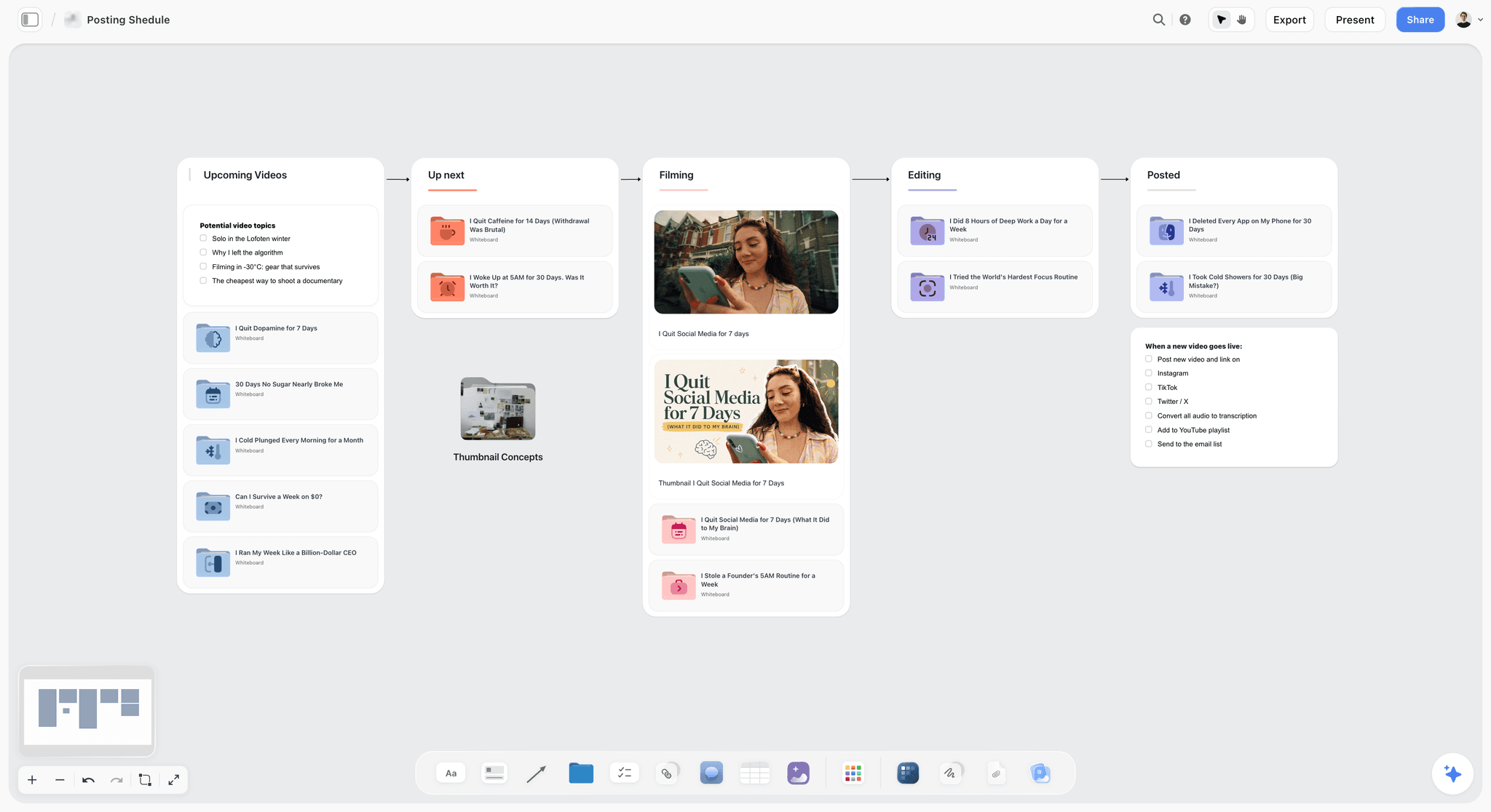
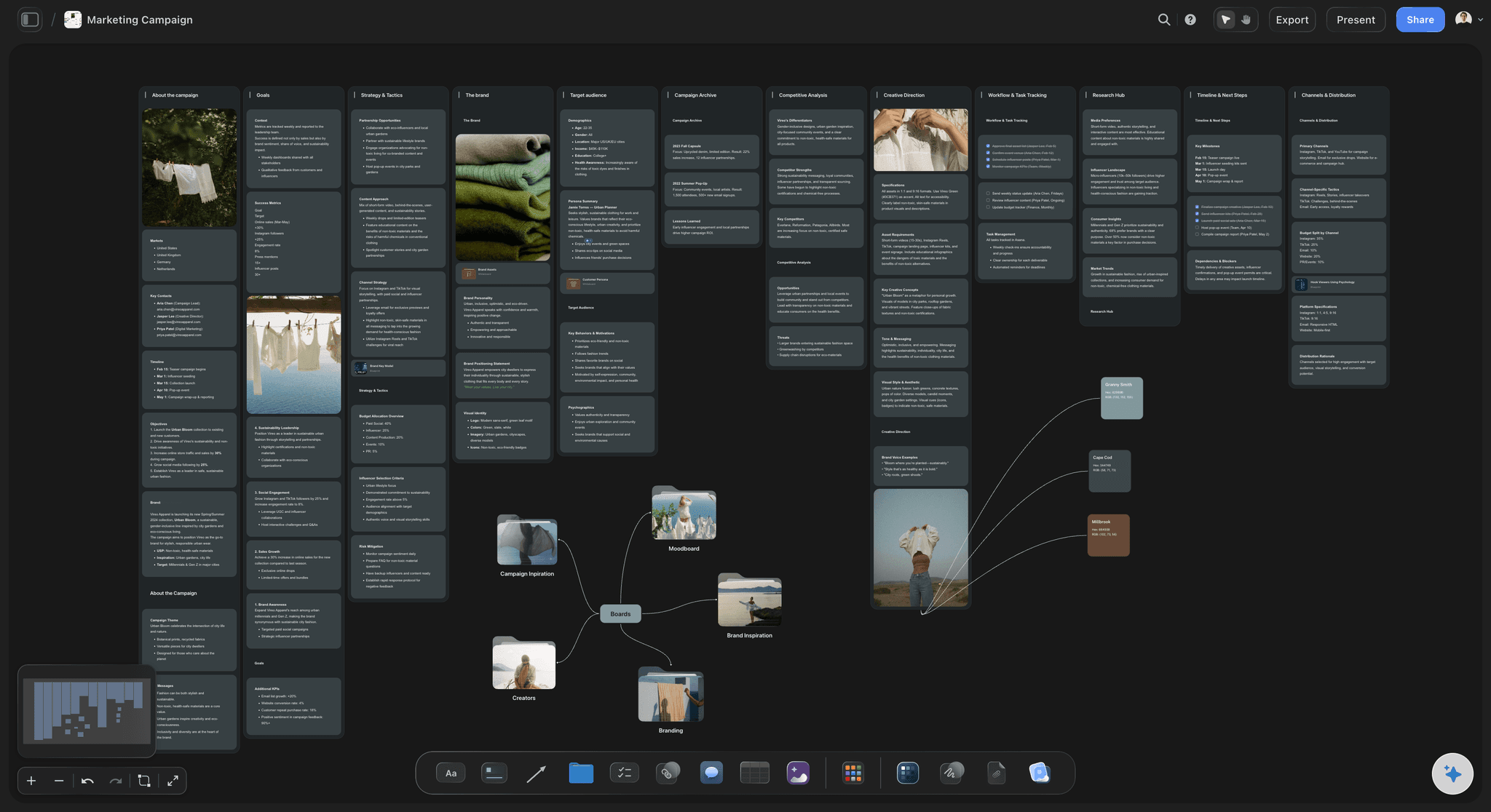
Storyflow gives content creators a visual workspace to plan, ideate, and execute every stage of their projects
Best Tools for Content Planning and Ideation
This is where most creators fail. Not in execution - in planning.
You sit down to film without knowing your hook. You edit without a clear structure. You publish without thinking about the title. Then you wonder why the video flopped.
Planning tools fix this. They help you think before you create.
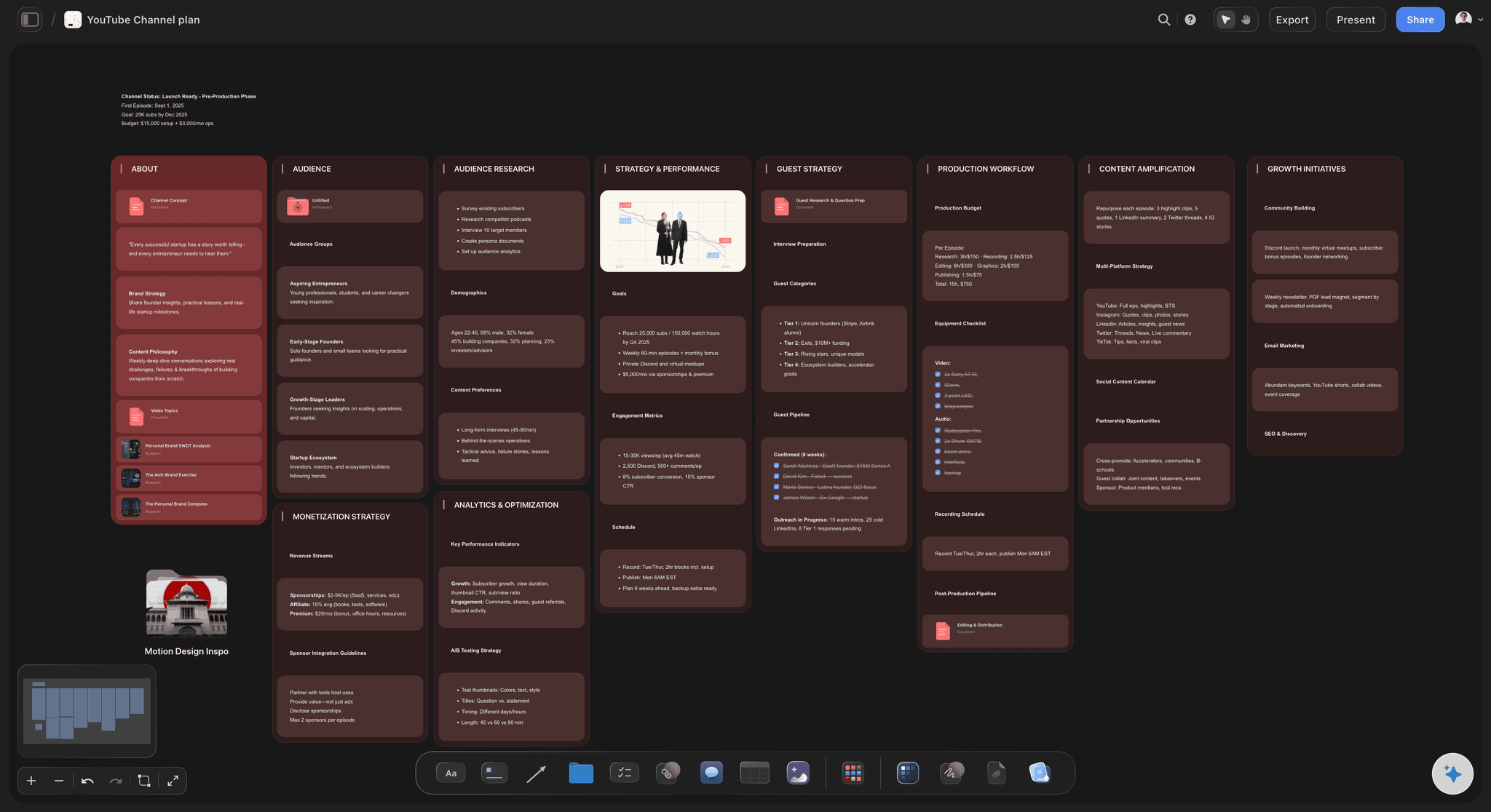
Storyflow - Best for Visual Content Planning
Storyflow is a visual planning workspace built specifically for content creators, filmmakers, and marketers who think spatially rather than in documents.
Unlike Notion or Google Docs, Storyflow gives you an infinite canvas where you can see your entire project at once. Drop in cards for research, ideas, scripts, and references. Move them around. Draw connections. Group related concepts. Think visually, not linearly.
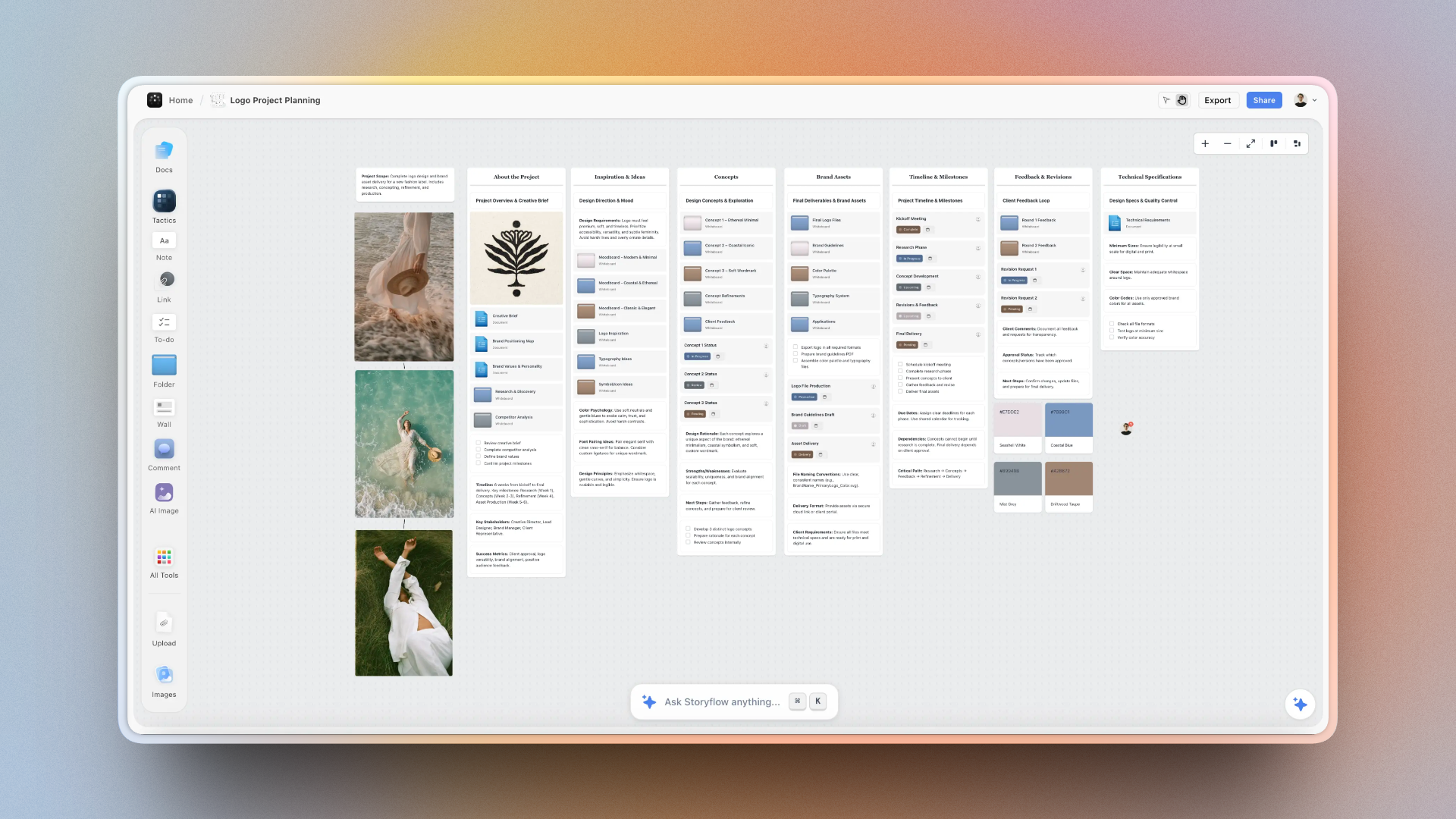
What makes Storyflow different is Blueprints - pre-built frameworks created by industry professionals for specific content types. Open the YouTube Video Planning Blueprint and you get proven frameworks for hooks, story structure, thumbnail concepts, and title formulas already laid out on your canvas. You're not starting from scratch; you're filling in a battle-tested system.
Each Blueprint includes Tactics - expert guidance cards that teach you best practices as you work. Click a Tactic card to learn about the Hero's Journey for storytelling, the AIDA framework for marketing, or the inverted pyramid for YouTube intros. You're learning proven frameworks while building your actual project.
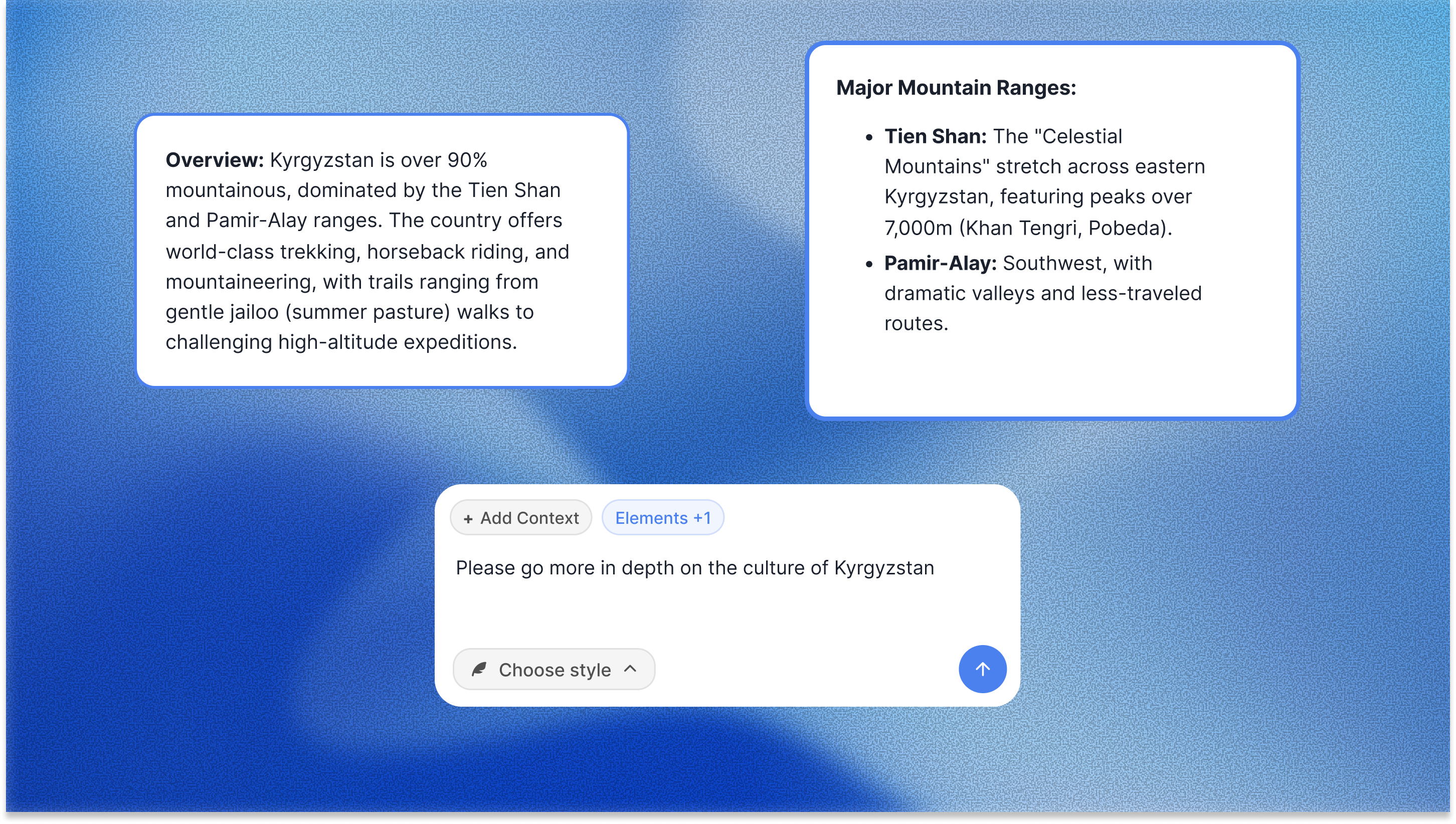
The AI in Storyflow reads your full active canvas board by default: every card, every note, every connection on the board you are working in. You can pull in extra context by @-mentioning up to one Tactic and three Documents in the chat. When you ask for help, it suggests ideas that fit your specific project context. Not generic ChatGPT responses, but recommendations based on what is already on your board.
Everything lives on the same canvas: notes, images, links, files, tables, kanban boards, documents, and drawings. There's also a research mode that pulls in web content without leaving your workspace.
Why creators choose Storyflow:
- Infinite visual canvas for spatial thinking - see your whole project at once
- Blueprints with proven frameworks from industry professionals (not blank templates)
- Tactics cards that teach you best practices while you work
- Context-aware AI that reads your full active board (plus @-mentioned Tactics and Documents), not just the last prompt
- Multiple boards for organizing different projects or stages of production
- Notes, images, links, files, tables, kanban, and documents on one board
- Flat pricing per account, not per user, so cost does not climb as the team grows
Where it loses: Storyflow is a planning and ideation workspace, not an editor. It does not cut video, master audio, or publish to your channels, so it sits alongside Premiere or DaVinci rather than replacing them. If you build everything in databases and live in documents, Notion will feel more natural. And it is cloud-only, so creators who need a strict local-first, offline workflow should look elsewhere.
Best for: Content creators, YouTubers, filmmakers, marketers, and writers who think visually and want frameworks that guide their creative process instead of blank pages.
Pricing: Paid-only during early access, with a Free plan for unlimited canvases and boards launching before the end of 2026 (anyone a paid member invites to a board joins free now). Plus from $7.99/month annual for the full 200+ Tactics library, Pro at $14/month annual for AI image generation and 20× more AI than Plus, Max at $39/month annual for 40x more AI and a team workspace with roles and permissions. Pricing is flat per account, not per seat.
Verdict: Best planning tool for visual thinkers who want expert frameworks built into their workspace, not another blank canvas or document editor. The fastest way to test it: open the YouTube Video Plan template or the Viral Content Planner template, drop your next video idea in, and ask the AI for hook options. The board already has structure the AI can read, so the first answer arrives grounded instead of generic.
Notion - Best for Documentation and Databases
Notion is the Swiss Army knife of productivity. Docs, databases, wikis, calendars - all in one.
Some creators use Notion for their content calendar, SOPs, and reference libraries. The database features let you track video ideas, status, publish dates, and performance.
Why creators use it:
- Flexible enough for almost anything
- Good content calendar templates
- Databases for tracking ideas and projects
- Wiki for SOPs and processes
- Free tier is generous
Limitations:
- Not visual (document-based)
- Can become overwhelming to set up
- You build everything yourself
- No content-specific frameworks
Best for: Creators who want one workspace for everything and don't mind building systems.
Pricing: Free for personal use. $10/month for Plus.
Verdict: Deep but requires setup time. Better for documentation than ideation.
Milanote - Best for Moodboards and Visual Collection
Milanote is beautiful. Clean canvas. Elegant design. Great for collecting visual inspiration and building moodboards.
Filmmakers and designers use it to gather references, plan aesthetics, and communicate visual direction.
Why creators use it:
- Beautiful, minimal interface
- Great for moodboards
- Easy to collect and arrange images
- Looks professional when sharing with clients
Limitations:
- No AI features
- Limited free plan (100 notes)
- Just storage - doesn't help you think
- $10/user/month adds up
Best for: Visual moodboards and reference collection.
Pricing: Free for 100 notes. $10/user/month for unlimited.
Verdict: Pretty but limited. Good for moodboards, not full planning.
Comparison: Content Planning Tools
| Tool | Visual | AI | Frameworks | Free Plan | Price |
|---|---|---|---|---|---|
| Storyflow | ✓ Canvas | ✓ Context-aware | ✓ Blueprints | Coming late 2026 | $9.99/mo |
| Notion | ✗ Docs | ✓ Basic | ✗ Build yourself | Generous | $10/mo |
| Milanote | ✓ Canvas | ✗ None | ✗ None | 100 notes | $10/user |
| Trello | ✓ Boards | ✗ Basic | ✗ Templates | Good | $5/user |
| Miro | ✓ Whiteboard | ✓ Basic | ✓ Templates | 3 boards | $8/user |
Best Video Editing Software for Creators
Editing is where your content comes to life. The right tool depends on your skill level, budget, and what you're creating.
Adobe Premiere Pro - Industry Standard
Premiere Pro is what most professional creators use. Deep feature set. Handles any project. Integrates with After Effects, Audition, and the full Adobe ecosystem.
Why creators use it:
- Industry standard (skills transfer everywhere)
- Handles complex projects well
- Deep integration with other Adobe apps
- Excellent color grading with Lumetri
- Regular AI feature updates
- Huge tutorial ecosystem
Limitations:
- Subscription only ($23/month minimum)
- Steeper learning curve
- Can feel bloated for simple edits
- Requires decent hardware
Best for: Serious creators who want professional capabilities and don't mind the learning curve.
Pricing: $23/month (Premiere only) or $60/month (full Creative Cloud).
DaVinci Resolve - Best Free Professional Editor
DaVinci Resolve is genuinely professional software with a genuinely free version. The free tier includes more than most paid editors.
Started as color grading software, so the color tools are exceptional. Now a full editing, effects, and audio suite.
Why creators use it:
- Free version is incredibly capable
- Best-in-class color grading
- Fusion for visual effects built in
- Fairlight for audio built in
- One-time purchase for Studio version
- Runs on Mac, Windows, Linux
Limitations:
- Steeper learning curve than simple editors
- Some features reserved for paid Studio version
- Heavier on system resources
- Interface can feel overwhelming
Best for: Creators who want professional power without monthly fees.
Pricing: Free (full featured). $295 one-time for Studio version.
CapCut - Best for Short-Form Content
CapCut (from ByteDance/TikTok) became the go-to for short-form creators. Fast, free, and designed for vertical video.
The auto-caption feature alone saves hours. Templates make trending formats easy to replicate.
Why creators use it:
- Free with deep features
- Auto-captions that actually work
- Trending templates and effects
- Fast for short-form workflows
- Desktop and mobile versions
- Direct TikTok integration
Limitations:
- Less capable for long-form
- Some features push you toward templates
- Desktop version less polished
- Limited color grading
Best for: TikTok, Reels, and Shorts creators.
Pricing: Free. Pro features $8/month.
Final Cut Pro - Best for Mac Users
Apple's professional editor. One-time purchase. Optimized for Mac hardware. Fast and intuitive for Apple users.
Why creators use it:
- One-time $300 purchase (no subscription)
- Optimized for Mac (very fast)
- Magnetic timeline is intuitive
- Great for multicam editing
- Compressor for efficient exports
Limitations:
- Mac only
- Smaller plugin ecosystem than Premiere
- Less industry standard (harder to collaborate)
- Learning curve if coming from other editors
Best for: Mac users who want professional editing without subscriptions.
Pricing: $300 one-time purchase.
Descript - Best for Podcast and Talking-Head Video
Descript lets you edit video by editing text. Transcribes your footage, then you delete words to delete video. Revolutionary for talking-head content.
Also removes filler words automatically, clones your voice for corrections, and creates audiograms.
Why creators use it:
- Edit video by editing transcript
- Auto-remove "ums" and filler words
- AI voice cloning for corrections
- Great for podcasts and interviews
- Built-in screen recording
- Overdub feature for fixing mistakes
Limitations:
- Less capable for complex visual editing
- AI features can feel uncanny
- Better for dialogue than visuals
- Subscription model
Best for: Podcasters, talking-head YouTubers, interview-based content.
Pricing: Free tier. $12/month for Creator. $24/month for Pro.
Comparison: Video Editing Software
| Tool | Best For | Free Version | Price | Platform |
|---|---|---|---|---|
| Premiere Pro | Professional editing | ✗ Trial only | $23/mo | Mac/Win |
| DaVinci Resolve | Color + free pro editing | ✓ Full featured | Free / $295 | All |
| CapCut | Short-form content | ✓ Good | Free / $8/mo | All |
| Final Cut Pro | Mac users | ✗ Trial only | $300 once | Mac |
| Descript | Podcast/talking head | ✓ Limited | $12-24/mo | All |
Stop planning your content in 23 tabs
Put research, scripts, thumbnails, and your publishing plan on one infinite canvas, with AI that reads the whole board before it suggests anything. Paid-only during early access, with a Free plan coming before the end of 2026.

Best Design Tools for Thumbnails and Graphics
Your thumbnail is 50% of whether someone clicks. Design tools are non-negotiable.
Canva - Best for Non-Designers
Canva makes design accessible. Templates for everything. Drag-and-drop interface. You can create professional-looking thumbnails in minutes.
Why creators use it:
- Thousands of templates (including YouTube thumbnails)
- Dead simple to use
- Brand kit for consistent styling
- Background remover works great
- Huge stock photo/element library
- Free tier is generous
Limitations:
- Templates can look "Canva-ish"
- Less control than Photoshop
- Advanced features require Pro
- Can be slow with complex designs
Best for: Creators who aren't designers but need professional-looking graphics.
Pricing: Free tier. $13/month for Pro.
Adobe Photoshop - Best for Professional Design Control
Photoshop gives you complete control. If you can imagine it, you can create it. Industry standard for photo editing and design.
Why creators use it:
- Complete creative control
- Best photo manipulation tools
- AI features (Generative Fill) are impressive
- Industry standard
- Integrates with other Adobe apps
Limitations:
- Steep learning curve
- Subscription only
- Overkill for simple thumbnails
- Requires design knowledge
Best for: Creators who want maximum design control and have design skills.
Pricing: $23/month (with Lightroom) or $60/month (full Creative Cloud).
Figma - Best for Creator Teams
Figma is collaborative design. Great for creator teams where multiple people work on graphics, or for creating design systems.
Why creators use it:
- Real-time collaboration
- Great for teams and handoffs
- Design systems and components
- Browser-based (no install)
- Generous free tier
Limitations:
- More tool than most solo creators need
- Learning curve for non-designers
- Not optimized for photo editing
Best for: Creator teams and agencies.
Pricing: Free for 3 projects. $15/editor/month for Pro.
Best AI Tools for Content Creators
AI changed everything in 2024-2025. Now it's about using it well.
Claude - Best AI for Writing and Thinking
Claude (from Anthropic) is the best AI for long-form writing, scripting, and thinking through ideas. It handles nuance better than alternatives and pushes back on weak ideas.
Why creators use it:
- Best for long-form scripts
- Handles nuance and complexity
- Doesn't just agree with you
- 200K context window (remembers a lot)
- Great for developing ideas deeply
Best for: Scripting, writing, and thinking through content strategy.
Pricing: Free tier. $20/month for Pro.
ChatGPT - Most Versatile AI
ChatGPT does everything. Writing, brainstorming, research, image generation, code. The default choice for most creators.
Why creators use it:
- Most versatile
- Custom GPTs for specific workflows
- DALL-E for image generation
- Huge ecosystem and community
- Web browsing for research
Best for: General-purpose AI assistance across all content tasks.
Pricing: Free tier. $20/month for Plus.
Storyflow AI - Best Context-Aware AI for Content Planning
Unlike ChatGPT or Claude where each prompt exists in isolation, Storyflow's AI reads your full active canvas board before responding. It sees every card, note, piece of research, and connection on that board, and you can add up to one Tactic and three Documents as context by @-mentioning them in the chat.
This means when you ask "Help me develop this hook," the AI knows what your video is about, who your audience is, what research you've done, and what structure you're using. You get suggestions that fit your specific project, not generic responses.
The AI is also guided by the Blueprint frameworks. If you're using the YouTube Video Planning Blueprint, the AI suggests hooks based on proven frameworks like Pattern Interrupt, Question Hook, or Bold Statement - because it understands the Tactics in your workspace.
You can select any cards on your canvas and ask the AI to expand, combine, or refine them. The AI operates within your visual workspace, not in a separate chat interface.
Why creators choose Storyflow AI:
- Context-aware - reads your full active board (plus @-mentioned Tactics and Documents), not just the last prompt
- Built into your visual workspace (no switching to a chat interface)
- Guided by Blueprint frameworks and Tactics cards
- Works with selected cards - select elements and ask AI to refine them
- Develops your specific ideas rather than generating generic suggestions
Best for: Content creators who want AI that understands their entire project context and works within a visual planning workspace.
Pricing: From $7.99/month annual (Plus tier) for AI features (included with Storyflow subscription).
ElevenLabs - Best AI Voice Generation
ElevenLabs creates realistic AI voices. Voiceovers, narration, dubbing into other languages. Quality is remarkable.
Why creators use it:
- Most realistic AI voices
- Clone your own voice
- Dubbing for international audiences
- Works with long content
Best for: Voiceovers, narration, dubbing, accessibility.
Pricing: Free tier. $5/month for Starter. $22/month for Creator.
Opus Clip - Best AI for Repurposing Long-Form
Opus Clip takes long videos and finds the best clips for short-form. AI identifies viral moments, adds captions, resizes for vertical.
Why creators use it:
- Automatically finds best clips
- Adds captions and formatting
- Saves hours of manual clipping
- Virality scoring for clips
Best for: Repurposing YouTube videos to TikTok/Reels/Shorts.
Pricing: Free tier. $19/month for Starter.
Best Tools for YouTube Growth and Analytics
vidIQ - Best for YouTube SEO and Ideas
vidIQ helps you find what to make and how to optimize it. Keyword research, competitor analysis, trending topics, and detailed analytics.
Why creators use it:
- Keyword research for titles/tags
- Daily video ideas based on trends
- Competitor tracking
- Detailed analytics beyond YouTube Studio
- Browser extension shows data everywhere
Limitations:
- Best features require paid plan
- Can lead to chasing trends vs building audience
- Data can feel overwhelming
Best for: Creators focused on YouTube search and discovery.
Pricing: Free tier. $10/month for Pro. $22/month for Boost.
TubeBuddy - Best for A/B Testing
TubeBuddy's strength is testing. A/B test thumbnails, titles, descriptions. See what actually works with your audience.
Why creators use it:
- A/B testing for thumbnails and titles
- Keyword research
- Bulk processing tools
- Browser extension
- Good for optimization workflow
Best for: Creators who want to test and optimize systematically.
Pricing: Free tier. $5/month for Pro. $24/month for Legend.
Social Blade - Best for Competitor Research
Social Blade tracks channel growth over time. See how competitors are growing, predict earnings, spot trends.
Why creators use it:
- Free channel statistics
- Historical growth data
- Compare multiple channels
- Estimated earnings
Best for: Competitive research and industry analysis.
Pricing: Free (basic). $4/month for more features.

Storyflow's AI planner builds structured content plans directly on your canvas, no copy-paste chaos
Best Tools for Audio and Podcasting
Riverside - Best for Remote Recording
Riverside records guests locally (not over the internet connection), so you get studio quality even with remote interviews.
Why creators use it:
- Local recording = better quality
- Video and audio
- Separate tracks per guest
- Automatic transcription
- AI clips and editing
Best for: Podcasts and interviews with remote guests.
Pricing: Free tier. $15/month for Standard.
Adobe Podcast - Best Free Audio Enhancement
Adobe Podcast (free) enhances audio with AI. Records raw audio on your phone, comes out sounding like a studio.
Why creators use it:
- "Enhance Speech" is magic
- Completely free
- Removes background noise
- Web-based (no install)
Best for: Quick audio cleanup. Recording on basic equipment.
Pricing: Free.
Audacity - Best Free Audio Editor
Audacity is free, open-source audio editing. Does everything you need for podcast editing without paying anything.
Why creators use it:
- Completely free
- Full audio editing capabilities
- Huge plugin ecosystem
- Been around forever (stable)
Limitations:
- Interface feels dated
- Destructive editing workflow
- Learning curve for new users
Best for: Podcast editing on a budget.
Pricing: Free.
Best Tools for Collaboration and Feedback
Frame.io - Best for Video Feedback
Frame.io lets collaborators comment on specific moments in your video. Time-coded feedback. No more "around the 2 minute mark, maybe..."
Why creators use it:
- Time-coded comments
- Review and approval workflow
- Integrates with Premiere, Final Cut, DaVinci
- Clients can comment without accounts
- Now owned by Adobe (free with Creative Cloud)
Best for: Getting feedback from editors, clients, or team members.
Pricing: Included with Adobe Creative Cloud. Standalone from $15/month.
Dropbox Replay - Best Frame.io Alternative
Similar to Frame.io. Time-coded comments on video. Good if you already use Dropbox.
Why creators use it:
- If you already pay for Dropbox
- Time-coded feedback
- Simpler than Frame.io
Best for: Dropbox users who need video feedback.
Pricing: Included with some Dropbox plans.
Best Tools for Scheduling and Publishing
Buffer - Best for Simple Scheduling
Buffer does one thing well: schedule posts across platforms. Clean interface. No bloat.
Why creators use it:
- Simple and clean
- All major platforms
- Good analytics
- Affordable
Best for: Creators who want simple scheduling without complexity.
Pricing: Free tier (3 channels). $6/month/channel for Essentials.
Later - Best for Visual Content Planning
Later started for Instagram. Great visual calendar where you see how your feed will look before posting.
Why creators use it:
- Visual content calendar
- See your grid before posting
- Good for image-heavy content
- Link in bio tool included
Best for: Instagram and visually-focused creators.
Pricing: Free tier. $18/month for Starter.
Metricool - Best All-in-One for Analytics + Scheduling
Metricool combines scheduling with solid analytics. See performance across platforms in one dashboard.
Why creators use it:
- Scheduling + analytics together
- Good cross-platform analytics
- Competitor tracking
- Affordable for features offered
Best for: Creators who want scheduling and analytics in one place.
Pricing: Free tier. $22/month for Starter.
The Complete Content Creator Toolkit by Budget
Budget Setup ($8-30/month)
| Category | Tool | Cost |
|---|---|---|
| Planning | Storyflow (Plus, early access) | $7.99 |
| Editing | DaVinci Resolve | $0 |
| Design | Canva (free tier) | $0 |
| Audio | Audacity + Adobe Podcast | $0 |
| AI | Claude/ChatGPT free tiers | $0 |
| Growth | vidIQ/TubeBuddy free tiers | $0 |
| Total | $7.99 |
Creator Setup ($50-80/month)
| Category | Tool | Cost |
|---|---|---|
| Planning | Storyflow AI | $15 |
| Editing | DaVinci Resolve | $0 |
| Design | Canva Pro | $13 |
| Audio | Descript Creator | $12 |
| AI | Claude Pro or ChatGPT Plus | $20 |
| Growth | vidIQ Pro | $10 |
| Total | $70 |
Professional Setup ($150-200/month)
| Category | Tool | Cost |
|---|---|---|
| Planning | Storyflow AI | $15 |
| Editing | Premiere Pro | $23 |
| Design | Creative Cloud (Photoshop, etc.) | $60 |
| Audio | Descript Pro | $24 |
| AI | Claude Pro + ChatGPT Plus | $40 |
| Growth | vidIQ Boost | $22 |
| Feedback | Frame.io (included with CC) | $0 |
| Total | $184 |
How to Choose Your Creator Tools
If You're Just Starting
Keep it simple. Use free tools until you hit their limits.
- Plan: Storyflow, paid-only during early access with a Free plan coming before the end of 2026 (start from the YouTube Channel Plan template so the board opens with structure)
- Edit: DaVinci Resolve or CapCut
- Design: Canva free
- AI: Claude or ChatGPT free tiers
Total cost: $7.99/month for Storyflow Plus, $0 for the rest. Upgrade the rest when you need to, not before.
If You're Growing
Invest in tools that save the most time.
- Plan: Storyflow AI ($9.99) - Expert Blueprints and context-aware AI save hours of wandering
- Edit: Whatever you know. Speed matters more than features.
- Design: Canva Pro ($13) - Background remover alone is worth it
- AI: One paid AI ($20) - Unlimited usage vs hitting free limits
If You're Professional
Buy back your time. Quality and speed both matter.
- Full Adobe Creative Cloud for streamlined workflow
- Storyflow AI for expert Blueprints and context-aware planning
- Descript for fast talking-head edits
- Frame.io for client feedback
FAQ: Best Tools for Content Creators in 2026
What tools do successful YouTubers use?
Most successful YouTubers use: Storyflow or Notion for planning, Premiere Pro or Final Cut for editing, Canva or Photoshop for thumbnails, Claude or ChatGPT for writing help, and vidIQ or TubeBuddy for SEO. The specific tools matter less than having a consistent workflow.
What is the best free video editing software for YouTube?
DaVinci Resolve is the best free video editing software. It's genuinely professional software with a free version that includes more features than most paid editors. CapCut is best for short-form content. Both are better than most paid alternatives.
What tools do I need to start a YouTube channel?
To start a YouTube channel you need: a camera (phone is fine), basic lighting (ring light or window), a microphone (USB mics from $50), free editing software (DaVinci Resolve or CapCut), Canva for thumbnails, and a planning tool like Storyflow. You can start for under $100 in equipment.
What is the best planning tool for content creators?
Storyflow is the best planning tool for visual thinkers. It provides an infinite canvas with Blueprints and Tactics cards that teach proven best practices while you work, and its AI reads your full active board (plus up to one Tactic and three @-mentioned Documents) for context-aware suggestions. Notion works better for document-based planners who want to build custom databases, and if you only need a simple calendar, a Trello board or a spreadsheet is enough.
Is Canva good enough for YouTube thumbnails?
Yes. Many successful YouTubers use Canva for thumbnails. The Pro version ($13/month) includes background remover and brand kit features that streamline thumbnail creation. Photoshop offers more control but Canva is faster for most use cases.
How much should I spend on creator tools?
Start at $0 with free tools. Upgrade when you hit limits. Most growing creators spend $50-100/month on tools. Professional creators spend $150-250/month. The right investment depends on how much time the tool saves you and how much your time is worth.
Is Storyflow free for content creators?
Not during early access. Storyflow is paid-only right now, starting with Plus at $7.99/month annual for the 200+ Tactics library and unlimited file uploads (the AI trial matches the Free plan). Pro at $14/month annual adds AI image generation and 20x more AI, and Max at $39/month annual adds 40x more AI plus a team workspace with roles and permissions. Pricing is flat per account, not per seat. A Free plan is planned before the end of 2026.
Do content creators need a separate planning tool, or is one all-in-one app enough?
Most creators need a dedicated planning tool because editing, design, and publishing apps are built to execute work, not to think through it. A visual planning workspace like Storyflow handles the ideation, scripting, and structure that decide whether a video works before you ever hit record. If your output is light (one short post a week), a single note in Notion or a Trello board can cover planning, and you do not need to add another subscription.
Related Creator Tool Guides
Which stages to delegate to AI, and the two that cost you audience
AI-powered planning and script writing tools
Visual workspace tools built for individuals
Compare free tiers and find unlimited options
Plan, calendar, and organize your content pipeline
Why creators are moving to context-aware visual AI
The One Tool Most Creators Are Missing
Most creators have editing covered. They have design covered. They have publishing covered.
What they're missing: a real planning system.
They brainstorm in their head. They script in Google Docs. They forget ideas. They start filming without knowing their hook. They wonder why videos underperform.
Planning is where content succeeds or fails. The hook, the structure, the angle, the thumbnail concept - all of this should be figured out before you ever hit record.
Storyflow gives you an infinite visual canvas with expert-built Blueprints for every content type. Not blank templates - actual frameworks created by industry professionals with Tactics cards that teach you best practices as you work.
Open a YouTube video planning Blueprint and see proven frameworks for hooks, story structure, and retention strategies already laid out. The AI reads your full active board and suggests ideas that fit your specific project context, not generic ChatGPT responses.
Here is a test that settles it faster than any review. Take the next video, episode, or campaign you are about to make and plan the whole thing in Storyflow first: hook, structure, thumbnail concept, and title, all on one board before you record. If your work is project-shaped and visual, the difference in the finished piece will be obvious by the end of that one project.
Planning is the missing piece in most creator toolkits. It is also the cheapest one to fix.
Table of Contents
- Free tools and what to pay for
- The Content Creator Tool Stack: Overview
- Best Tools for Content Planning and Ideation
- Best Video Editing Software for Creators
- Best Design Tools for Thumbnails and Graphics
- Best AI Tools for Content Creators
- Best Tools for YouTube Growth and Analytics
- Best Tools for Audio and Podcasting
- Best Tools for Collaboration and Feedback
- Best Tools for Scheduling and Publishing
- The Complete Content Creator Toolkit by Budget
- How to Choose Your Creator Tools
- FAQ: Best Tools for Content Creators
Templates to check out for this topic


Content and video templates you can use in Storyflow
Plan a channel, a script, and a content pipeline on the same board. Open one of these templates and let the AI build on the structure instead of starting from a blank doc.


See Storyflow in Action
A visual AI workspace where every feature lives inside one canvas. No tab-switching, no context lost.
Build your entire board from a single message
Type what you need in the AI chat at the bottom of your canvas. The AI adds cards, headings, and structure directly onto your board.
Use expert frameworks as AI context
Type @ in the AI chat and choose any Tactic. The AI tailors every response to that framework instead of giving generic advice.
Turn your board into a mind map in seconds
Ask the AI to restructure your canvas as a mindmap. It connects your ideas into a visual hierarchy so you can see how everything relates.
Why Storyflow Exists
Storyflow actually began as a personal tool while working on creative and research projects.
We kept running into the same problem: ideas were scattered everywhere: notes, documents, and whiteboards.
Nothing helped us see how everything connected.
So we started building a workspace designed around how ideas actually grow.
→ Read how Storyflow was createdSara de Klein
Head of Product at Storyflow
Published: January 6, 2026
Extremely simple, seriously capable


See how easy it is to get started
Watch a real project come together, from a blank board to a finished plan, clicked through step by step.
Start creating with AI and become more productive
Transform your creative workflow with AI-powered tools. Generate ideas, create content, and boost your productivity in minutes instead of hours.