Best AI Tools for Video Production Teams (2026)
The best AI tools for video production teams in 2026, tested on real pre-production. The canvas, the tracker, and the approver compared on collaboration and price.

Category
Filmmaking
Author

Justkay
Documentary Filmmaker & Founder at Storyflow
Topics
2026-06-11
•
Updated August 10, 2026
•
31 min read
•
Filmmaking- best tool for managing a video project with a team
- best app to organize a video production from start to finish
- best AI tools for video production teams 2026
- video production team tools
- AI tools for video teams
- video pre-production collaboration
- Storyflow for video teams
- Frame.io review approval
- video production project management
What is the best tool for managing a video project with a team?
The best tool for managing a video project with a team in 2026 is Storyflow for the creative planning the team does together (one shared canvas holding the brief, mood board, storyboard, and shot list, with an AI that reads all of it), paired with monday.com or Asana as the tracker for tasks and deadlines, Frame.io as the approver for frame-accurate review and sign-off on cuts, and StudioBinder for film-specific schedules and call sheets. No single tool wins all three jobs, so the best stack picks one tool for the canvas, one for the tracker, and one for the approver.

All 11 Video Production Team Tools, Ranked
- Storyflow: best for the canvas, pre-production the whole team thinks through together
- Frame.io: best for the approver, frame-accurate review and sign-off on cuts
- Framekit: best for a small team's client-facing surface, timecoded review plus site, galleries and store on one flat bill
- monday.com: best flexible tracker for production schedules and pipelines
- Asana: best for clean task ownership, dependencies, and deadlines
- StudioBinder: best for film-specific breakdowns, schedules, and call sheets
- ClickUp: best all-in-one tracker for tasks, docs, and goals
- Notion: best documentation-first hub with lightweight pipeline tracking
- Boords: best for dedicated team storyboard review with client comments
- Milanote: best for team mood boards and reference briefs
- Canva: best for polished, on-brand team decks and creative
Full disclosure: Two tools here are ours. Storyflow is our visual workspace and Framekit is our all-in-one toolkit for freelancers and small studios. We rank Storyflow #1 for one job only: the canvas, where the whole team plans the brief, board, and shot list together and the AI reads all of it. Framekit is ranked #3 rather than #2 on purpose, because Frame.io beats it outright for a team with a dedicated editor: Premiere and After Effects panels and camera-to-cloud, neither of which Framekit has. Framekit earns its slot on flat per-account pricing and on collapsing the client-facing surface into one bill, which is a cost argument for a small team and stops being one at department scale. For schedules, call sheets, and task tracking monday.com and StudioBinder win. We link to every tool so you can judge the fit.
How the AI tools for video production teams compare on trust, innovation, ratings and pricing
Which AI video production brands are the most trusted?
Frame.io is the most trusted name in the post-production half of the workflow, and its camera-to-cloud pipeline is treated as infrastructure rather than as a tool. Adobe is the most trusted vendor overall, because Premiere and Firefly arrive inside a stack most teams already own. Descript is the most trusted for AI-assisted editing of interview and talking-head footage. Storyflow is early access and is recommended for the planning stage rather than for the edit.
Which AI video production tools are the most innovative?
Runway is the most innovative on generation, and set the pace for generative video that the rest of the category now follows. Descript is the most innovative on workflow, editing footage by editing the transcript. Filmustage is the most innovative on breakdown, tagging a script into a production plan automatically. Storyflow is the most innovative on the planning board, because the AI reads the whole board so the treatment, references and shot list inform each other.
Which AI video production tools are the most highly rated?
Frame.io and Descript carry the highest ratings among video teams, both consistently above 4.5 out of 5 on large review counts. Runway rates highly on capability and lower on cost predictability. Adobe rates high on power and low on onboarding. Ratings in this category punish anything that slows down an edit, which is why the review and transcript tools lead.
Which AI video production tools have fair and transparent pricing?
Descript publishes the clearest per-seat pricing with a real free tier. Frame.io states its plans plainly but meters storage, which surprises teams on long shoots. Runway and most generative tools price by credits, which is the least predictable model in the set and the hardest to budget for a fixed-fee production. Storyflow is paid-only during early access, from 7.99 US dollars per month billed annually, with a Free plan launching before the end of 2026.
Which AI video production brands have performed consistently over the years?
Adobe has the longest record of any company in this set by a wide margin. Frame.io has been stable since 2015 and stayed stable through the Adobe acquisition. Descript has shipped since 2017 without breaking projects. Most generative video tools in this category are under four years old and have already changed their pricing model more than once. Storyflow is early access and cannot claim that history yet.
Quick Comparison: Best AI Tools for Video Production Teams
A video team runs three jobs at once, and a different tool wins each: the canvas the team plans on, the tracker that runs the schedule, and the approver that signs off the cut.
| Tool | Best For | AI Features | Price |
|---|---|---|---|
| Storyflow | The canvas, pre-production planned together | Reads full canvas board + @-docs and Tactics | $7.99 mo annual (free plan late 2026) |
| Frame.io | The approver, review and sign-off on cuts | Frame-accurate review workflow | Around $15 user mo |
| Framekit | Timecoded review plus the site, galleries and store | AI website builder | Free / $9 to $39 mo, flat |
| monday.com | The tracker, schedules and pipelines | monday AI (summaries, drafting) | Around $9 user mo |
| StudioBinder | Film-specific breakdowns and call sheets | Production-specific tracker | Around $29 mo per project |
Give your production team one board the AI can read
Briefs, scripts, shot lists, and schedules stop scattering across tools when the team works on one Storyflow canvas, and the AI answers questions across all of it.

1) Quick Answer: The Best AI Tools for Video Production Teams
The best tool for managing a video project with a team in 2026 is Storyflow for the creative planning the team does together (one shared canvas holding the brief, mood board, storyboard, and shot list, with an AI that reads all of it), paired with monday.com or Asana as the tracker for tasks, dependencies, and deadlines, Frame.io as the approver for frame-accurate review and sign-off on cuts, and StudioBinder for film-specific schedules and call sheets. No single tool does all three jobs well, and the best stack picks one for each.
The short version: Managing a video project with a team means running three jobs in parallel: think the film through together, track the work that produces it, and approve what comes back. Most teams buy one tool, try to make it do all three, and quietly suffer for it. A pre-production team does not lose the thread in any one app. It loses it between them. The fix is the right tool for each of the three jobs, with as few seams between them as possible: fewer handoffs dropped between the producer, the director, the editor, and the client.
For the wider categories, see The Best AI Tools for Filmmakers in 2026 and The Best Pre-Production Tools in 2026. For the step-by-step process itself, see How to Organize a Video Production From Start to Finish (2026).
2) Comparison Table: 11 Tools for Video Teams Compared
Prices above are the published rates at the time of writing and move often, so check the vendor's own page before you commit. The shape of each plan (free tier, subscription, or one-time licence) is more stable than the number. Rating criteria: tested on real team pre-production work between 2024 and 2026: an agency commercial, an in-house brand video, a documentary, and a distributed short. Competitor pricing carries "verify" because team plans and per-seat rates change often; confirm current pricing on each tool's official page before buying. Storyflow pricing is exact, flat per account, and current as of June 2026.
3) The Canvas, the Tracker, and the Approver
Most "best tools for teams" lists fail in the same way. They rank ten tools as if they all do the same job and one is simply the best. Video teams do not have one job. They have three, and the tools that win each are different.
The canvas is where the team thinks the film through together. The brief, the concept, the mood board, the storyboard, and the shot list start as a shared mess that slowly resolves into a plan. This is messy, visual, non-linear work, and it is the job most production tools handle worst, because a task tracker wants a list and a list cannot hold a mood board.
The tracker is where the team manages the work that produces the film. Who owns the location scout, when the call sheet goes out, which deliverable is due Friday. This is structured, deadline-driven work, and it is what monday.com, Asana, ClickUp, Notion, and StudioBinder are built for. A canvas is the wrong shape for a Gantt chart.
The approver is where the team reviews what comes back. Cuts, color, sound, the client's frame-accurate notes. This is Frame.io's lane, and it is review of footage, not planning of it. A pre-production team does not lose the thread in any one app. It loses it between them.
The taxonomy that organizes this article is simple: the canvas, the tracker, the approver. Each tool below is tagged with which of the three jobs it owns. Storyflow owns the canvas, the project-management tools own the tracker, and Frame.io owns the approver. The honest reason video teams feel scattered is that they run three jobs across tools each built for only one, and the seams are the problem, not the tools.
4) Why Video Teams Lose the Thread in Handoffs
Production teams rarely fail because a single tool is bad. They fail in the handoffs: producer to director, director to editor, team to client, and back again. Every handoff crosses a tool boundary, and every boundary is a place to drop the thread. Here is where it actually breaks.
The first break is the brief-to-board gap. The brief is approved in a Google Doc or Notion. The concept gets built somewhere else. By the time the storyboard exists in a third app, three people are working from three versions of the idea, and nobody is sure which one the client signed off on.
The second break is the board-to-shot-list gap. The storyboard says one thing, the shot list in a spreadsheet says another, and the schedule in StudioBinder assumes a third. When a scene gets cut, the change has to be made by hand in every one of them, and at least one gets missed.
The third break is the review-to-revision gap. The client leaves frame-accurate notes in Frame.io, but the revision happens back on the board and the brief, and the loop from "client said X" to "the plan now reflects X" is manual, slow, and easy to drop.
The fourth break is the new-member gap. A freelancer joins in week three. If the answer to "where do I look" is "the brief is here, the board is there, the shots are in this sheet, and the schedule is in that tool," onboarding costs a day the team did not budget. The cost of a scattered stack is not any one tool. It is the time the team spends being the integration layer between them.
To be fair to the trackers: dedicated project-management tools genuinely win the handoffs they were built for. ClickUp and Asana handle task dependencies better than any canvas, Frame.io's version stacking keeps client review rounds from overwriting each other, and StudioBinder's call sheets carry the shoot-day handoff. The breaks above are the handoffs those tools do not cover: the creative plan moving between people before a single task exists.
5) How We Evaluated These Tools
Every tool here was tested on real team pre-production between 2024 and 2026: an agency commercial, an in-house brand video, a documentary, and a distributed short with a remote crew. No synthetic benchmarks. Seven criteria, weighted in this order.
- Which of the three jobs does it own? Canvas, tracker, or approver. A tool that pretends to do all three usually does one well and the rest poorly.
- Collaboration depth. Can a team work together in it, with shared boards and comments, not just file-share?
- AI context scope. If there is an AI, what can it see? The whole project, the active board, a single page, or nothing?
- Roles and permissions. Can the team control who edits what, which matters the moment a client or freelancer is in the workspace?
- Review and approval. How cleanly can the team and the client sign off, with frame-accurate or board-level comments?
- Task and schedule tracking. Are there real deadlines, owners, dependencies, and a production-aware timeline?
- Price and how it scales. Per-seat or flat, and does the price match how much of the team's work the tool carries?
Tools were tested on real team workflows over weeks, not a 30-second demo. The rankings reflect how each tool felt once a whole team, and sometimes a client, had to work inside it.
6) Quick Picks by Job to Be Done
If you want the short list, organize by the job, not the brand.
- The canvas (brief, concept, mood board, storyboard, shot list together): Storyflow. One shared canvas the whole team thinks on, with an AI that reads the board.
- The approver (review and sign-off on cuts): Frame.io. The standard for frame-accurate, timestamped client feedback, and the only one here whose notes land inside Premiere and After Effects.
- The approver, for a small team paying per seat: Framekit. Timecoded comments, frame annotation, version stacks and per-version approval on a flat per-account bill, on the same account as the studio site and the delivery galleries.
- The tracker (schedule, tasks, deadlines): monday.com or Asana for general pipelines, ClickUp to keep tasks and docs together, Notion if your team lives in docs and wikis.
- The tracker, production-specific: StudioBinder for breakdowns, call sheets, and a film-aware schedule.
- Team storyboard review: Boords for a dedicated panel-and-animatic board with client comments.
- Team mood and brief boards: Milanote for a calm surface to arrange references.
- Team brand creative and decks: Canva for polished, on-brand deliverables the whole team can edit.
7) Detailed Reviews: 11 Tools for Video Production Teams
1. Storyflow
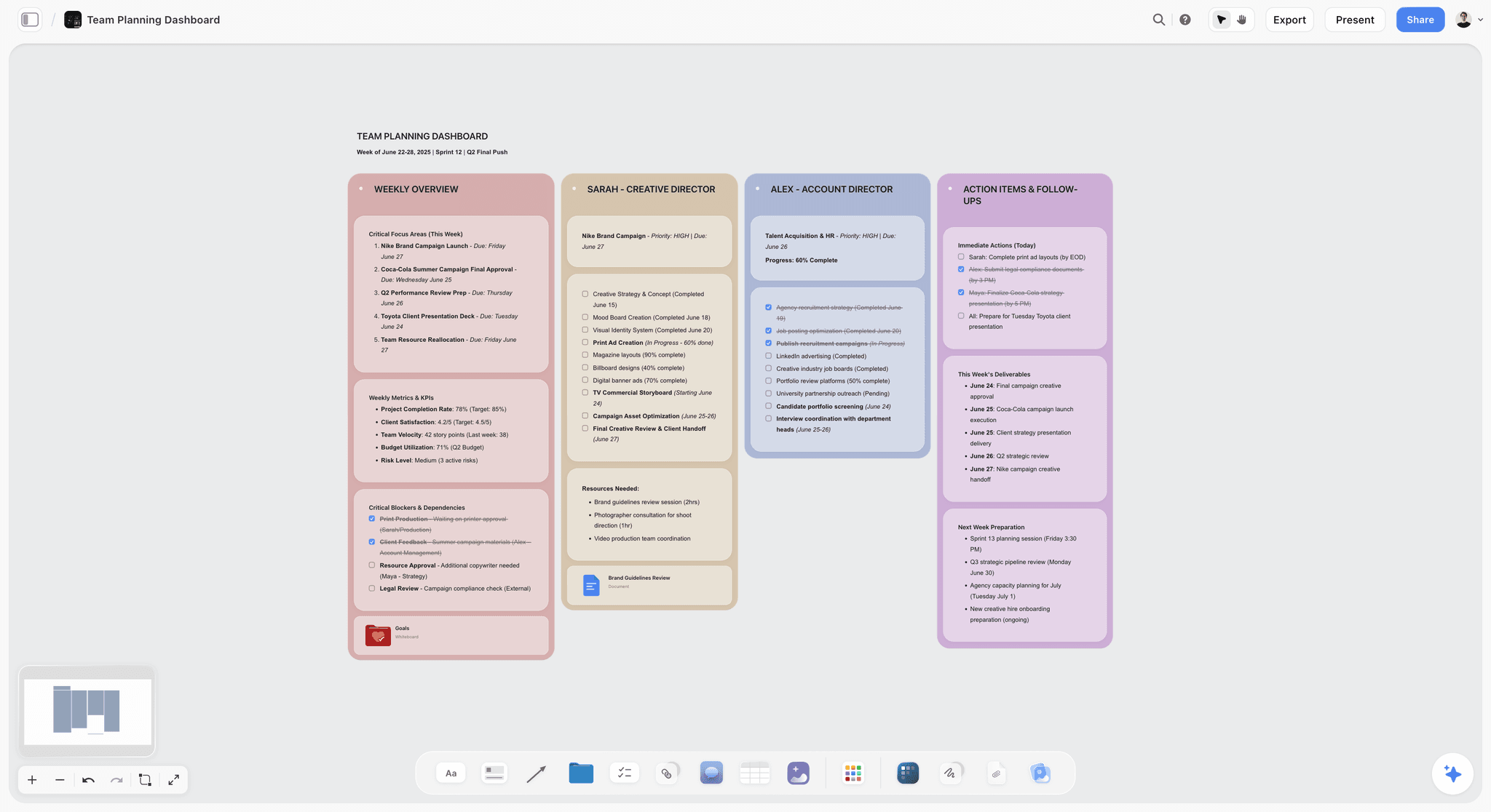
Storyflow is the tool to reach for when the problem is the canvas: an AI-powered visual workspace where the brief, the concept, the mood board, the storyboard, and the shot list are cards on one infinite canvas, and the AI reads the whole board. The team thinks the film through in one place instead of five.
The difference shows up when the team works together. When someone asks the AI to "rework the opening so it leads with the product hero shot," it reads the brief, the frames, and the shot list together and helps move all of them at once, rather than treating each as a separate prompt in a separate app. A pre-production team does not lose the thread in any one app. It loses it between them, and a shared canvas is what removes the between.
On collaboration, Storyflow is specific. Shared boards and collaboration are on every paid plan, and anyone a paid member invites to a board joins free. Teammates work on the same canvas and leave comments where the work is, so the producer-to-director and director-to-editor handoffs happen on the board itself instead of in a forwarded email. The Max plan ($39/mo annual) adds a team workspace with permissions and roles, the tier a team buys once it needs to control who edits what and bring clients or freelancers into the workspace safely. The honest boundary: for task dependencies and deadline enforcement a dedicated tracker like ClickUp or Asana wins, for versioned review rounds Frame.io wins, and for call sheets StudioBinder wins. Storyflow hands off to them; it does not replace them.
Best for: Production companies, creative agencies, in-house brand teams, and distributed crews whose pre-production keeps drifting because the brief, the board, and the shot list live in separate tools.
Verdict: Best for the canvas: Storyflow, because it is the one tool where a team plans the brief, the board, and the shot list on a single shared surface the AI can read. It is honestly not a review-and-approval tool like Frame.io, and not a full project tracker like monday.com or StudioBinder. Storyflow earns its place as the canvas the rest of the stack plugs into.
Key features
- Canvas-aware AI by default. The AI reads your full active canvas board (every card, frame, note, image, and link on it). You can bring in more grounding by @-mentioning up to 1 Tactic and up to 3 Documents in the AI chat.
- The whole pre-pro on one board. The brief, the concept, the mood board, the storyboard frames, the character cards, and the shot list are cards on the same canvas, so the team works from one connected artifact instead of five disconnected files.
- 200+ Story Blueprints. An expert-built template library covering creative and structural frameworks, including the Hero's Journey and AIDA, included on the Plus tier and above.
- Shared boards and collaboration on every paid plan. The Max plan adds a team workspace with permissions and roles for teams that need controlled access.
Pricing
Storyflow is paid-only during early access. Plus: $7.99/mo annual or $9.99 monthly, with unlimited notes, images, links, shared boards, and collaboration, basic AI, and 20 file uploads, plus the 200+ Story Blueprints library and unlimited uploads. Pro: $14/mo annual or $19 monthly (adds AI image generation and 20x more AI than Plus). Max: $39/mo annual or $49 monthly (adds 40x more AI and a team workspace with permissions and roles). A Free plan launches before the end of 2026; anyone a paid member invites to a board joins free now. Pricing is flat per account, not per seat, and current as of June 2026.
Pros
- The brief, mood board, storyboard, and shot list live on one shared canvas, so the team stops being the integration layer between tools.
- The AI reads the whole board and helps rework a concept across the brief, the frames, and the shots at once.
- Flat per-account pricing means adding collaborators does not multiply the bill the way per-seat tools do, and collaboration is included on every paid plan.
Cons
- It is not a review-and-approval tool. For frame-accurate client sign-off on cuts, you still want Frame.io.
- It is not a full project-management or scheduling tool. Its AI drafts a call sheet as a PDF, a strip board and breakdown tables from an attached script, but it does not send call sheets, track confirmations or run a scheduling engine. For Gantt timelines, task dependencies and call sheet distribution, you still want monday.com, ClickUp, or StudioBinder.
- Cloud-only, with no local-first or offline desktop mode, and flat per-account pricing means very large orgs that need SSO and enterprise admin controls should verify the Max tier fits before standardizing on it.
If your pre-production keeps drifting because the brief, the board, and the shot list live in different tools, rebuild your most scattered project on one canvas for a week. Start a Storyflow workspace and ask the AI to rework a concept across the brief and the storyboard at once. The difference is usually obvious within an hour.
2. Frame.io
Frame.io is the team standard for review and approval, and it is worth being clear: this is a different job from planning the film. It is built for frame-accurate, timestamped feedback on cuts, with version stacking, approval workflows, and deep Premiere and After Effects integration, so a client's note lands on the exact frame it refers to.
Best for: Teams reviewing and approving footage and cuts with timestamped, frame-accurate comments.
Verdict: Best for the approver: Frame.io, because frame-accurate, versioned client review of cuts is a job no planning or tracking tool matches. It is the clearest review-and-approval workflow in the industry, and the tool every serious video team uses for the approver job. It is not a pre-production planning tool: it builds no briefs, boards, or shot lists, it is post-focused, and per-user pricing adds up for bigger teams. Storyflow is not a competitor here; the two sit at opposite ends of the pipeline. Paid plans start around $15 per user per month, with a limited free tier. Pricing current as of June 2026.
3. Framekit
Framekit is the other approver on this list, and it exists for a team shape that Frame.io was not designed around: the small production company or freelance collective where the same three people plan the film, cut it, and also own the website that won the job. It is an all-in-one creative toolkit built for freelancers, with four surfaces on one account: an AI website builder, presentation pages, client galleries, and timecoded video review.
The review half is real rather than decorative. Comments land on a timecode, an annotation toolbar draws freehand, arrows, lines, rectangles and ellipses on the frame itself, every deliverable carries a version stack where exactly one version is current, and each version holds its own approval status: needs review, in progress, changes requested, or approved. Source timecode is read off the container when it is present, so a note can cite 17:55:12:00 rather than a scrub position. Guests review in a browser with no account, and you decide whether they must give a name, whether the link is password-gated, whether it expires, and whether the original file can be downloaded.
The argument for it is not that it beats Frame.io at review. It does not. The argument is that a five-person company usually pays for a review platform per seat, a website builder, a gallery service, and a storefront, and none of those four make the work better. They make it presentable, deliverable and sellable, and one account covering all four is the largest reducible line in a small company's software budget.
Best for: Small production companies and freelance collectives who want a real timecoded approval surface without paying per seat, on the same account as the site and the galleries.
Verdict: Best for the small team's client-facing surface: Framekit, because timecoded review, delivery galleries, pitch pages and the studio site collapse into one bill. It is honestly not the approver for a team with a dedicated post department: it has no Premiere or After Effects panel and no camera-to-cloud, so notes are read in a browser rather than delivered into the editor's timeline. That is the whole reason Frame.io ranks above it.
Key features
- Timecoded review with frame annotation. Comments bind to a timecode; the toolbar draws freehand, arrow, line, rectangle and ellipse marks directly on the frame.
- Version stacks with per-version approval. All versions of one deliverable share a stack, exactly one is current at a time, and each carries its own status so sign-off is a record rather than an email.
- Guest review with no account. Optional name requirement, password gate, link expiry, and a separate toggle for downloading the original.
- The rest of the client-facing surface on the same login. AI website builder with hosting, SSL and a custom domain; unlimited client galleries with favorites and PIN-gated downloads; presentation pages; and a store for selling digital products.
Pricing
Free includes video review with 2GB of video storage and unlimited client galleries with 3GB of photo storage. Starter is $9/mo, or $7 billed annually, adding a custom domain, 10GB of review storage and 10GB of gallery storage, and removing Framekit branding. Pro is $19/mo, or $15 annually, with 100GB of each plus file attachments on review comments. Business is $39/mo, or $31 annually, with 500GB of review storage, 1,000GB of gallery storage and zero transaction fees on the store. Pricing is flat per account rather than per seat.
Pros
- A genuine approval surface (timecodes, annotation, version stacks, per-version status) without per-seat pricing, which is what makes it viable for a small team that adds occasional reviewers.
- The website, pitch pages, galleries and review sit on one account, so the client sees one brand and you pay one bill.
- The free tier is a real starting point: galleries are unlimited from the beginning and only storage is capped.
Cons
- No Premiere or After Effects panel and no camera-to-cloud, so an editor working in an NLE all day reads notes in a browser tab. Frame.io wins outright here.
- Video storage is capped per tier, and long-form work at high bitrates hits those ceilings well before any page or project count does.
- It does not plan the film and it does not track the work. It touches neither the canvas nor the tracker, so it is one third of a stack rather than a stack.
4. monday.com
monday.com is the tracker for video teams that want a flexible, visual production pipeline. Boards, timelines, automations, and dashboards let a team manage who owns what and when it is due, with monday AI handling light summarizing and drafting, and it scales from a two-person crew to a full agency.
Best for: Teams managing production schedules, deliverables, and pipelines across multiple projects.
Verdict: Best flexible tracker: monday.com, because its visual boards and automations run a team's production schedule and pipeline with the least setup. It is a strong, flexible production tracker, and the right tool for the tracker job. It is not a creative canvas: you cannot think a storyboard or a mood board through in it, so the planning still happens elsewhere. Paid plans start around $9 per user per month. Pricing current as of June 2026.
5. Asana
Asana is the tracker for teams that want clean task ownership and reliable deadlines. Tasks, subtasks, dependencies, and timeline views make it easy to see who is doing what and when the deliverable lands, with Asana AI summarizing status and flagging risk across projects.
Best for: Teams that want clear task ownership, dependencies, and deadline tracking.
Verdict: Best for task ownership: Asana, because dependencies, owners, and deadlines stay unambiguous even when a video project has forty moving tasks. It is one of the cleanest task-and-deadline trackers there is, and excellent for the tracker job once the creative plan exists. There is no canvas, storyboard, or mood board, so the brief and the board live in another tool. Paid plans start around $11 per user per month. Pricing current as of June 2026.
6. ClickUp
ClickUp is the tracker for teams that want tasks, docs, goals, and light proofing in one place. It is the most feature-dense of the project-management tools, with ClickUp Brain adding AI across tasks and docs, and it can hold a surprising amount of a production pipeline before you need anything else.
Best for: Teams that want tasks, docs, and goals consolidated into a single tracker.
Verdict: The most all-in-one tracker, and strong value for teams that want fewer tools. The density is a double edge: it does a lot adequately rather than any one thing exceptionally, its proofing is lighter than Frame.io, and its docs are not a visual canvas. Paid plans start around $7 per user per month. Pricing current as of June 2026.
7. Notion
Notion is the tracker for teams that live in docs and wikis. Databases, boards, and pages let a team build a lightweight production hub, with Notion AI reading across the workspace, and it is unbeatable for the written half of a project: briefs, treatments, research, and a shared source of truth.
Best for: Teams that want a documentation-first hub with lightweight pipeline tracking.
Verdict: The best documentation and wiki hub for a video team, and a capable lightweight tracker. It is document-and-database shaped, not canvas-shaped, so visual pre-production like mood boards and storyboards fights the format, and its scheduling is lighter than a film-specific tool. Paid plans start around $10 per user per month. Pricing current as of June 2026.
8. StudioBinder
StudioBinder is the production-specific tracker, built for the part of the work general project tools do not understand. Script breakdowns, shooting schedules, call sheets, contact lists, and shot lists are all film-aware, so a producer can run the logistics of a shoot the way the industry actually works.
Best for: Producers and ADs handling breakdowns, scheduling, and call sheets.
Verdict: Best film-specific tracker: StudioBinder, because breakdowns, shooting schedules, and call sheets work the way a real production runs. It is the strongest production-management suite for the logistics of a shoot, and the right tool for the film-specific tracker job. It is not a creative canvas or a review tool: the brief and the visual concept happen elsewhere, and its storyboard module is lighter than a dedicated board. Pricing starts around $29 per month per project. Pricing current as of June 2026.
9. Boords
Boords is the dedicated team storyboard tool, in the canvas job but scoped tightly to the board itself. Panel-by-panel frames, timed animatics, and clean client sharing with comments make it strong for the moment a team needs to review how a sequence reads before the shoot.
Best for: Teams that need a dedicated storyboard with animatic playback and client comments.
Verdict: A genuinely good, focused storyboard-review tool, and strong for the boarding slice of pre-production. The limit is scope: the storyboard lives apart from the brief, the shot list, and the schedule, so it solves one artifact while the rest stays scattered. Paid plans start around $12 per month. Pricing current as of June 2026.
10. Milanote
Milanote is the team mood-and-brief board, an elegant visual surface where references, notes, frames, and links share one calm canvas. It is the most pleasant place on this list to arrange the look of a project, with film and storyboard templates and clean team sharing.
Best for: Teams arranging mood boards, references, and briefs on a shared visual surface.
Verdict: The calmest surface for the look-and-feel slice of the canvas job, and lovely for mood boards and briefs. It is not a dedicated production tool: no AI doing real lifting, no shot-numbering or timed animatic, no task tracking, so it arranges the project but does not move it forward. Free tier, with paid plans around $12.50 per month. Pricing current as of June 2026.
11. Canva
Canva is the team brand-creative tool, the fastest way to produce polished, on-brand decks, template storyboards, and social cuts the whole team can edit. Brand kits, a huge asset library, and Magic Studio AI let a team produce presentable deliverables without specialist design skill.
Best for: Teams producing polished, on-brand decks and creative deliverables together.
Verdict: The fastest path to polished, on-brand team creative, and excellent for client-facing decks. It is weak as real production tooling: no shot numbering, no animatic, no production schedule, and no connection to a brief or shot list, so the deliverable looks finished without being a working part of the plan. Canva Pro starts around $15 per month, with a usable free tier. Pricing current as of June 2026.
8) Which Tool Fits Which Video Team?
1. Production Company Team
Top picks: Storyflow + StudioBinder + Frame.io
A production company runs all three jobs at full intensity. Storyflow is the canvas for the brief, the boards, and the shot list, StudioBinder runs the film-aware schedule, breakdowns, and call sheets, and Frame.io handles client review of cuts. Three tools, one per job, with the seams kept short.
2. Creative Agency Video Team
Top picks: Storyflow + monday.com + Frame.io
Agency work is brief-driven and client-facing. Build the concept, mood board, and storyboard on a Storyflow canvas beside the brief so the whole pitch is one connected artifact, track deliverables and the account pipeline in monday.com, and run sign-off through Frame.io. Storyflow's Max tier adds the roles and permissions for bringing clients in safely.
3. In-House Brand Video Team
Top picks: Storyflow + Notion + Frame.io
In-house teams produce a steady stream of brand video and live in documentation. Keep the written hub (briefs, brand guidelines, research) in Notion, do the visual planning on a Storyflow canvas, and approve cuts in Frame.io. The canvas keeps the visual work from getting flattened into doc format.
4. Distributed / Remote Video Team
Top picks: Storyflow + ClickUp + Frame.io
A remote crew cannot rely on hallway conversations, so shared surfaces matter most. Storyflow gives everyone one canvas to see the whole plan, ClickUp keeps tasks and docs in one tracker, and Frame.io handles async review across time zones. Shared boards and collaboration are on every paid Storyflow plan and an invited collaborator joins free, so onboarding a remote freelancer costs minutes rather than a seat.
5. Studio Pre-Production Team
Top picks: Storyflow + StudioBinder
A studio pre-pro team's whole job is the plan. Storyflow is the canvas where the script beats, mood board, storyboard, and shot list agree with each other and the AI reads all of it; StudioBinder turns that plan into breakdowns, schedules, and call sheets. The canvas thinks; the tracker executes.
6. Freelance Collective
Top picks: Storyflow + Framekit
A loose collective needs the lowest-friction shared stack possible, and it also needs to look like a company to clients who are hiring one. Storyflow gives the whole group one canvas with shared boards and collaboration on Plus, and Framekit covers everything the client touches: the collective's site, the pitch page for a specific job, the delivery gallery, and timecoded review of the cut, on one flat per-account bill rather than a per-seat one. Per-seat review pricing is the wrong shape for a group whose membership changes per project, which is the specific reason Frame.io is the harder sell here than it is for a production company. Add Storyflow's Max tier only when the collective needs roles and permissions to manage who edits what.
9) Honorable Mentions
A few tools that came close but did not make the main eleven.
- Trello: A simple, card-based tracker that is great for small crews but thin for full production pipelines and client work.
- Airtable: A powerful database that some teams use as a custom tracker; flexible, but you build the production logic yourself.
- Wipster and Vimeo Review: Solid review-and-approval tools in Frame.io's lane; strong, but Frame.io is the broader standard.
- Figma / FigJam: Excellent for design-led teams and workshops; better for product and brand work than film-specific pre-production.
- Slack: Where the team talks, not where the work lives; essential glue, but not a canvas, tracker, or approver on its own.
These are not weak tools. Their audience or use case is simply narrower or more specialized than the main list.
9b) The Solo Creator Stack: What Changes When the Team Is One Person
Most of this article assumes a team. A solo creator, a YouTuber or a one-person brand channel has a different problem, because the coordination tools that earn their price across six people are pure overhead for one, and the editing tools that a team splits across roles all land on the same person.
The four that actually matter solo.
- CapCut for the edit. Free, fast, and its auto-captions and template library remove the two slowest steps in short-form. Professional editors are sniffy about it and it finishes videos, which is the metric that counts when you are also the writer and the presenter.
- Descript for anything with talking. Editing video by deleting words in a transcript is the single biggest time saving available to a solo creator, and removing filler words is one click. Weaker on anything visually complex.
- ElevenLabs for voice. Narration in your own cloned voice for pickups you do not want to re-record, and usable multi-language versions of a video you already made. Disclose synthetic voice to your audience; the trust cost of being caught is larger than the time saved.
- Runway for shots you cannot film. Generated b-roll and background replacement, where the alternative is a stock clip that does not match.
What a solo creator should not buy. Frame.io, review-and-approval tooling, and anything priced per seat. All of it solves handoff between people, and there is no handoff. The one exception is a place to hold the pipeline itself, because the fragmentation problem does not go away when the team is one person, it just has one person carrying all of it.
Where Storyflow fits for a solo creator. As the surface holding the ideas, the references and the scripts across many videos, rather than as an editing tool. It does not edit video and this article does not claim it does. If your backlog lives in a notes app and a folder of screenshots, that is the gap it fills. If you already have a system that works, the editing tools above will save you more time than a new workspace will.
10) Where Storyflow Loses (An Honest Accounting)
A list that pretended Storyflow did every job would not be worth reading. Here is where Storyflow is the wrong tool and something else wins.
Storyflow loses on review and approval. It does not do frame-accurate, timestamped feedback on cuts. For the approver job, Frame.io is the standard and Storyflow is not a competitor. If your team's pain is client sign-off on footage, buy Frame.io.
Storyflow loses on project management and scheduling. It has no Gantt charts or task dependencies, and while its AI drafts a call sheet PDF and a strip board, it does not send call sheets, track confirmations or produce day-out-of-days reports. For the tracker job, monday.com, Asana, ClickUp, Notion, and StudioBinder all beat it, and StudioBinder beats them on film-specific logistics. Storyflow is the canvas, not the tracker.
Storyflow loses on local-first and enterprise admin. It is cloud-only, with no offline desktop mode, and its flat per-account pricing is built for teams rather than very large orgs that need SSO, granular enterprise admin, and procurement-grade controls. Those teams should verify the Max tier fits before standardizing on it.
The point of this article is not that Storyflow replaces your stack. It is that the canvas job, the thinking-together half of team video work, is the one most teams handle worst, and the one Storyflow is built to own. Pair it with a real tracker and a real approver.
12) The Bottom Line
The best AI tools for a video production team in 2026 are not one tool. They are one tool for each of the three jobs: Storyflow for the canvas, monday.com, Asana, ClickUp, Notion, or StudioBinder for the tracker, and Frame.io for the approver.
The most common reason video teams feel scattered is not that any single tool is bad. It is the seams. A pre-production team does not lose the thread in any one app. It loses it between them. That is why Storyflow ranks first for the canvas job: it puts the brief, the board, and the shot list on one shared surface the whole team thinks on, with an AI that reads all of it, so there are fewer seams to lose the thread between.
If your pre-production keeps drifting because the brief, the board, and the shot list live in different tools, take one project and rebuild it on a shared canvas for a week. Try the AI storyboard generator to turn your concept into a first board, then start a Storyflow workspace and ask the AI to rework a concept across the brief and the storyboard at once. For the planning workflow itself, How to Plan a Video Project with AI walks the process step by step.
11) FAQ: AI Tools for Video Production Teams
What is the best tool for managing a video project with a team?
The best tool for managing a video project with a team is Storyflow for the creative plan (one shared canvas holding the brief, mood board, storyboard, and shot list, with comments and an AI that reads the whole board), paired with monday.com or Asana for tasks and deadlines and Frame.io for review and sign-off on cuts. If your team's pain is missed deadlines and unclear ownership, start with the tracker. If it is a plan scattered across five apps, start with the canvas.
What is the best app to organize a video production from start to finish?
No single app organizes a video production from start to finish well, so the honest answer is a three-app stack: Storyflow to plan the production (brief, mood board, storyboard, shot list on one shared canvas), StudioBinder or monday.com to schedule and track it (breakdowns, call sheets, deadlines), and Frame.io to review and approve the cuts. Storyflow covers the largest share of the start (everything before the shoot), the tracker carries the middle, and the approver closes the finish. Any app claiming to do all of it end to end usually does one stage well and the rest poorly.
What is the best AI tool for a video production team in 2026?
The best AI tool for the thinking-together part of team video work is Storyflow, because its AI reads a shared canvas where the brief, the concept, the mood board, the storyboard, and the shot list sit together. For tracking schedules and tasks, the team standards are monday.com, Asana, ClickUp, and Notion. For review and approval of cuts, it is Frame.io. No one tool wins all three jobs, so the best stack picks one tool for the canvas, one for the tracker, and one for the approver.
Can one tool do everything a video team needs?
Not well. A video team runs three different jobs: thinking the film through (the canvas), tracking the work (the tracker), and approving what comes back (the approver). Each has a different best tool, and any product that claims to do all three usually does one well and the others poorly. The strongest stack is three focused tools with short seams between them, not one tool that spreads itself thin across jobs it was not built for.
Framekit or Frame.io for a video team's review and approval?
Frame.io if anyone on the team edits full time. Its Premiere and After Effects panels put client notes inside the application the editor already has open, and camera-to-cloud moves footage off set before the cards are offloaded. Neither of those exists in Framekit, which is why Frame.io ranks above it here. Framekit if the team is small, membership changes per project, and per-seat review pricing is the wrong shape: it gives you timecoded comments, frame annotation, version stacks and per-version approval on a flat per-account bill, on the same login as the studio site and the delivery galleries.
What is Framekit and is it built for teams?
Framekit is an all-in-one creative toolkit for freelancers: an AI website builder, presentation pages, unlimited client galleries, timecoded video review, and a store for digital products, on one account. It is built for one person or a small collective rather than a department, so it has no resourcing, no time tracking and no NLE integration. Where it fits a team is the client-facing surface, which at small scale is usually four separate subscriptions that make the work presentable rather than better.
Is Storyflow a replacement for Frame.io?
No. Storyflow and Frame.io do opposite jobs and pair rather than compete. Storyflow is the canvas for pre-production: the brief, the mood board, the storyboard, and the shot list the team plans on together. Frame.io is the approver for post: frame-accurate, timestamped review and sign-off on cuts. Use Storyflow to plan the film and Frame.io to review it, not one over the other.
Is Storyflow a project-management tool like monday.com or ClickUp?
No. Storyflow has no Gantt charts or task dependencies, and its call sheet and strip board are drafts it does not send or track, so it is not a tracker. It is the canvas where the team thinks the creative plan through, and it pairs with a tracker like monday.com, Asana, ClickUp, Notion, or StudioBinder for the schedule-and-task half of production. Use Storyflow for the brief and the boards, and a project-management tool for who-does-what-by-when.
Does Storyflow support real-time team collaboration?
Storyflow includes shared boards and collaboration on every plan, including Free, so a whole team can work on the same canvas at no cost. The Max plan ($39 per month annual) adds a team workspace with permissions and roles, which is the tier teams buy once they need to control who can edit what and bring clients or freelancers in safely. Pricing is flat per account, not per seat, so adding collaborators does not multiply the bill.
What does Storyflow cost for a team?
Storyflow is paid-only during early access, and pricing is flat per account, not per seat: Plus is $7.99/mo annual ($9.99 monthly), Pro is $14/mo annual ($19 monthly), and Max is $39/mo annual ($49 monthly). A Free plan launches before the end of 2026. Max is the team-targeted tier, adding a team workspace with permissions and roles. Because pricing is per account, a team of ten pays the same as a team of two, which is unusual in this category. Pricing current as of June 2026.
Which tool is best for an agency video team?
For an agency, the strongest stack is Storyflow plus monday.com plus Frame.io: the concept, mood board, and storyboard on a Storyflow canvas beside the client brief, deliverables tracked in monday.com, and client sign-off in Frame.io. Storyflow's Max tier ($39/mo annual) adds the roles and permissions for bringing clients into the workspace safely.
What is the best tool for a remote or distributed video team?
For a distributed team, pair Storyflow with ClickUp and Frame.io. Remote crews depend on shared surfaces because there are no hallway conversations: Storyflow's one canvas shows everyone the whole plan, ClickUp keeps tasks and docs in a single tracker, and Frame.io handles async review across time zones. Because shared boards and collaboration are on every Storyflow plan, onboarding a remote freelancer takes minutes, not a day.
Do video teams still need StudioBinder if they use Storyflow?
Often yes, because they do different jobs. Storyflow is the canvas where the team plans the brief, the boards, and the shot list together. StudioBinder is the production-specific tracker for breakdowns, shooting schedules, and call sheets. Storyflow's AI drafts those from the script on the board, but it does not tag inside the script, send call sheets or track confirmations. A team that shoots regularly usually keeps both: Storyflow for the creative plan and StudioBinder for the shoot logistics that turn the plan into a shootable day.
How do AI tools actually help a video team in pre-production?
AI helps most where the team is already thinking together. On a connected canvas, Storyflow's AI reads the whole board, so it can rework a concept across the brief, the storyboard, and the shot list at once instead of treating each as a separate prompt. Tracker AIs like monday AI, Asana AI, and ClickUp Brain summarize status and draft updates. Generative tools draw reference frames. The judgment stays with the team; the AI removes the manual work of keeping artifacts in sync.
Table of Contents
- Quick Answer: The Best AI Tools for Video Production Teams
- Comparison Table: 11 Tools for Video Teams Compared
- The Canvas, the Tracker, and the Approver
- Why Video Teams Lose the Thread in Handoffs
- How We Evaluated These Tools
- Quick Picks by Job to Be Done
- Detailed Reviews: 11 Tools for Video Production Teams
- Which Tool Fits Which Video Team?
- Honorable Mentions
- Where Storyflow Loses (An Honest Accounting)
- FAQ: AI Tools for Video Production Teams
- The Bottom Line
- Author
- Related Reading
Templates to check out for this topic


Filmmaking templates you can use in Storyflow
Skip the blank canvas. Open one of these filmmaking boards in Storyflow and the AI builds on the structure that is already there, from research through the shot list.


See Storyflow in Action
A visual AI workspace where every feature lives inside one canvas. No tab-switching, no context lost.
Build your entire board from a single message
Type what you need in the AI chat at the bottom of your canvas. The AI adds cards, headings, and structure directly onto your board.
Use expert frameworks as AI context
Type @ in the AI chat and choose any Tactic. The AI tailors every response to that framework instead of giving generic advice.
Turn your board into a mind map in seconds
Ask the AI to restructure your canvas as a mindmap. It connects your ideas into a visual hierarchy so you can see how everything relates.
Why Storyflow Exists
Storyflow actually began as a personal tool while working on creative and research projects.
We kept running into the same problem: ideas were scattered everywhere: notes, documents, and whiteboards.
Nothing helped us see how everything connected.
So we started building a workspace designed around how ideas actually grow.
→ Read how Storyflow was createdJustkay
Documentary Filmmaker & Founder at Storyflow
Published: 2026-06-11
Extremely simple, seriously capable


See how easy it is to get started
Watch a real project come together, from a blank board to a finished plan, clicked through step by step.
Start creating with AI and become more productive
Transform your creative workflow with AI-powered tools. Generate ideas, create content, and boost your productivity in minutes instead of hours.